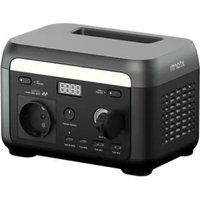
USER MANUAL XP2W600 Xtorm
Battery capacity 512Wh 25,6V=20Ah
| AC socket x2 | Pure sine-wave, total 600W (peak 1000W), 220-240V~, 50Hz/60Hz, 3A | AC input power(Charge) AC input power(Bypass) | 600W Max., 3A 1200W Max., 6A |
| AC input voltage | 220-240V~, 50Hz/60Hz |
| USB-A1/A2 | 5V=2.4A, 12W Max. | | |
| USB-C1/C2 | 5/9/12/15=3A, 20V=5A, 100W Max. | PV Solar input | 200W Max., 12~20V=10A |
| Car charging input | 12V battery supported, 8A by default |
| Car charger | 12.6V=10A, 126W Max. | | |
| DC5521 output x2 | 12.6V=3A | AC charging power | 600W Max. |
| PV / Car charging power | 200W Max. |
| AC+PV charging power | 600W Max. |
- Car charge and DC5521 share power, 126W Max.
BATTERY
Cell Type Lithium iron phosphate battery (LiFePO_4)
Life Cycle 3000 cycles
Protection Type Over-temperature protection, low-temperature protection, over-discharge protection, overcharge protection, overload protection, short circuit protection, over-current protection
Charge temperature range 0^ 45^
Storage ambient temperature -20°C~45°C (20°C~30°C preferred)
2 SAFETY GUIDELINES
- Do not expose the power station heat sources such as fire or heaters.
- Avoid exposure to water or high humidity.
- Do not use power station in a strong electrostatic or strong magnetic field environment.
- Do not disassemble the power station in any way, nor pierce it with a sharp object.
- Do not short-circuit the power station by wire or other metal objects.
- Do not step on, sit or climb on the power station.
- When using the power station, please strictly adhere to the operating temperature defined in this user manual. If the temperature is too high, the battery may catch fire or even explode. If the temperature is too low, power station performance and capacity might permanently be severely limited.
- Do not stack heavy objects on the power station.
- Do not stop the fan by force.
- When in use, do not expose the power station to an unventilated or dusty environment.
- Please avoid collisions, dropping the power station, or violently shaking the power station. If a severe impact occurs, immediately shut down the power supply. Please secure the power station firmly during transportation to avoid shaking and impacts.
- If the power station accidentally gets wet, place it in a safe and open area and keep distance until it is dry. Once dried, do not attempt to use the power station again. Dispose / recycle the power station properly.
- If the power station is on fire, please use a suitable fire extinguisher.
- If there is dirt on the power station, use a dry cloth to clean it.
- Keep the power station out of the reach of children and pets.
- Keep the power station in a dry and ventilated place.
- In humid environments, it is recommended to store the power station in a moisture-proof bag. If water is found inside product, do not use/start it again.
- It is not recommended to use the power station with safety-related emergency medical equipment, including but not limited to medical grade breathing machines (hospital version CPAP: Continuous Positive Airway Pressure) and artificial lungs (ECMO, Extracorporeal Membrane Oxygenation). The power station can be used to supply power to home version CPAPs that do not require continuous professional monitoring. Always follow your doctor's advice and consult the manufacturer for any restrictions on the use of the device. For general medical equipment, please pay attention to the power condition to ensure that power does not run out.
- When the power station is connected to a refrigerator, the power fluctuations of the refrigerator may cause the power supply to shut down automatically. It is recommended that for refrigerators storing medicine, vaccines or other high-value items, when connecting to the power supply productto use the "Always On" mode to ensure continuous power supply (see chapter 3, AC output).
Conditions permitting, be sure to discharge the battery completely and bring the workstation to a designated battery and collection point. Please check online to find one near you.
Please note:
Do not dispose of the power station in regular waste or garbage bins! The high power batteries form a serious risk if not disposed of correctly.
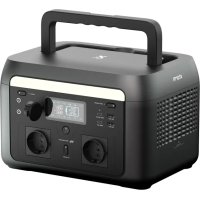
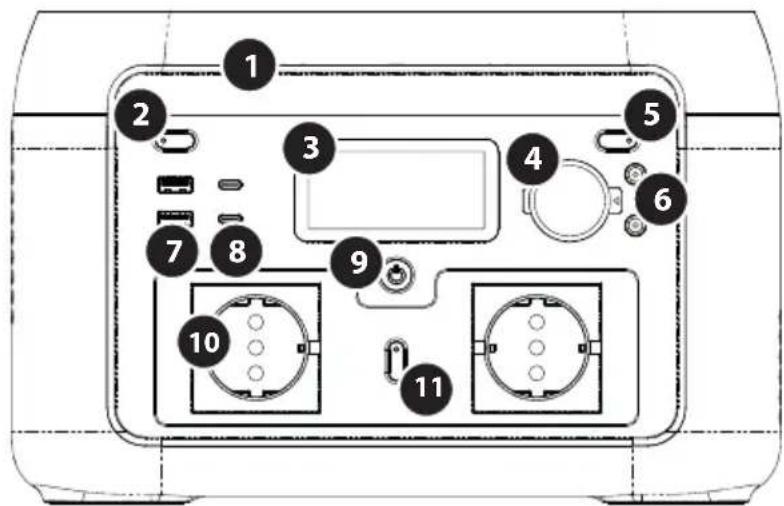
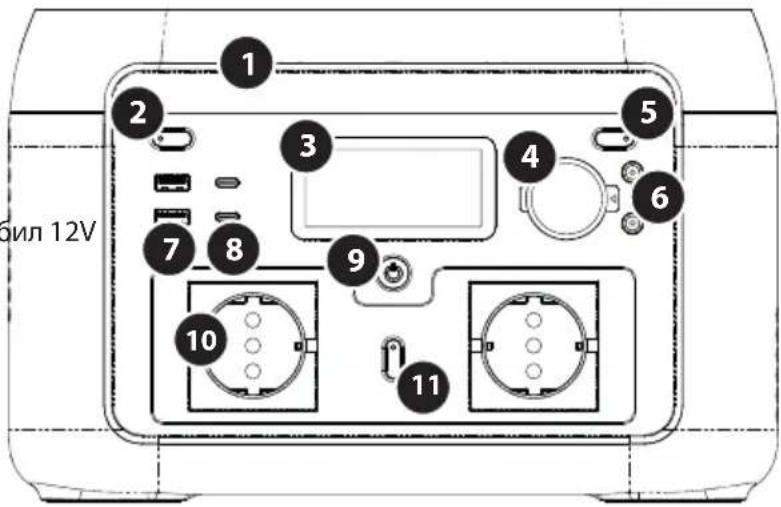
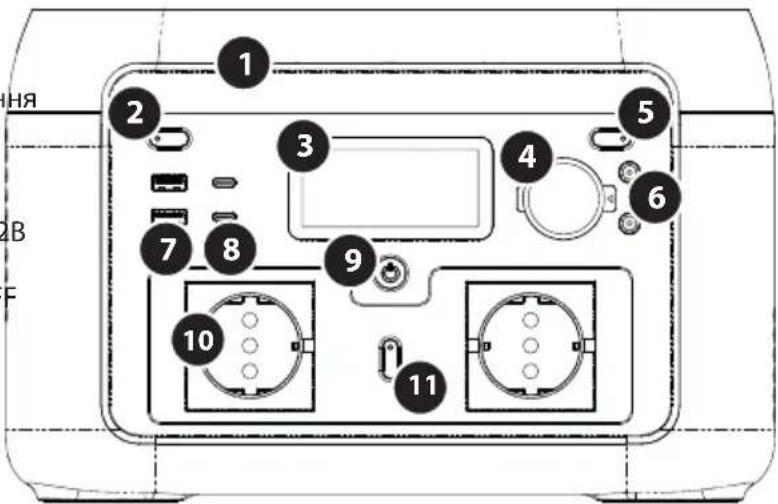
PRODUCT OVERVIEW
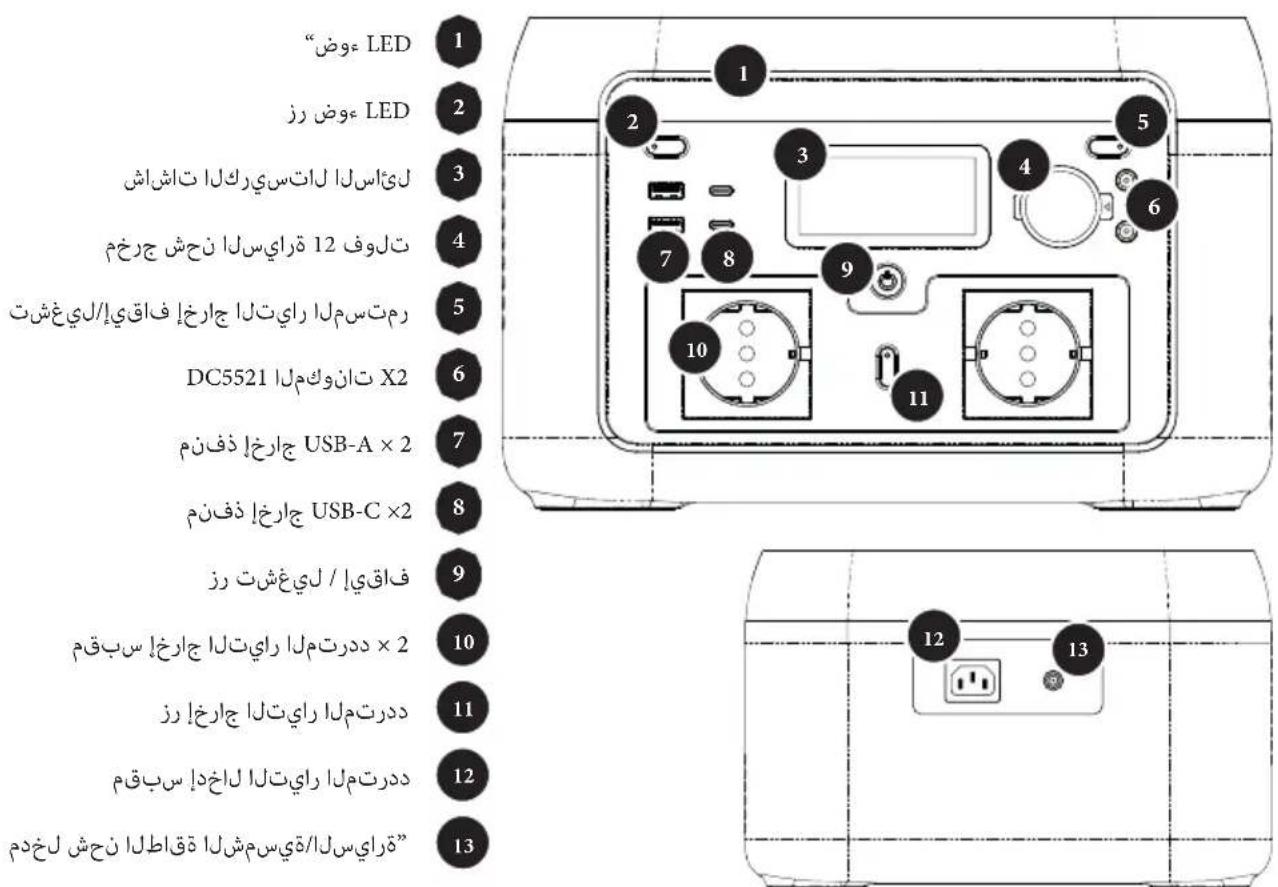
1 LED light
2 LED light button
3 LCD
4 Car charge output 12V
5 DC output ON/OFF
DC5521 plug x2
7 USB-A output port x2
USB-C output port x2
9 ON/OFF button
10 AC output socket x2
11 AC output button
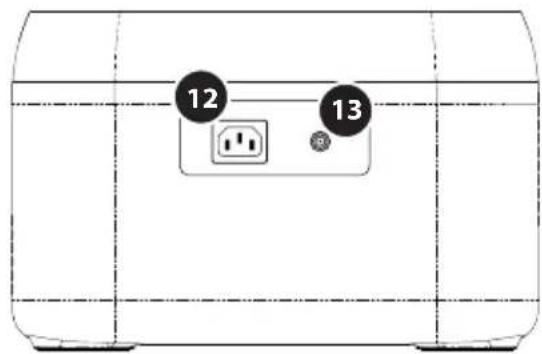
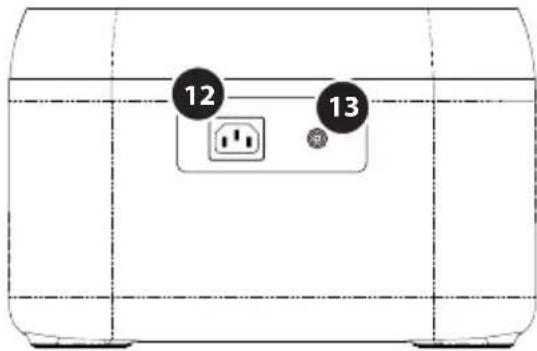
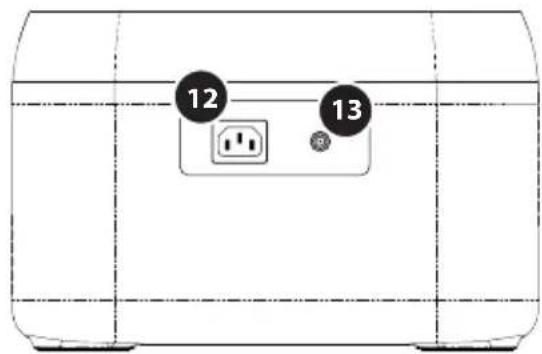
12 AC input socket
13 Solar / car charge input
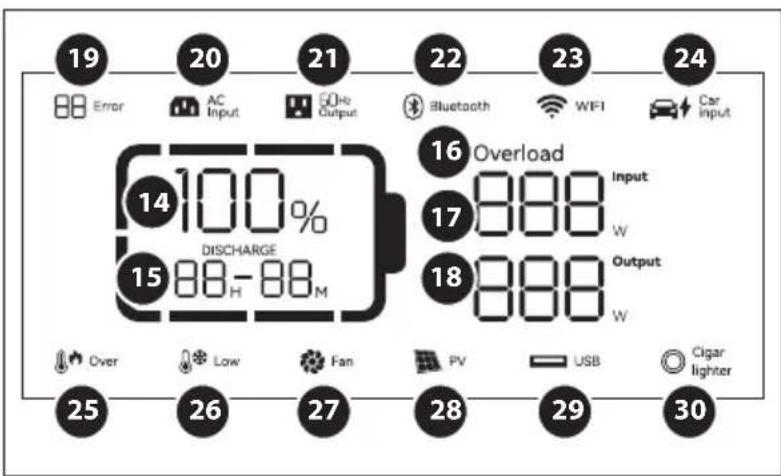
LCD SCREEN
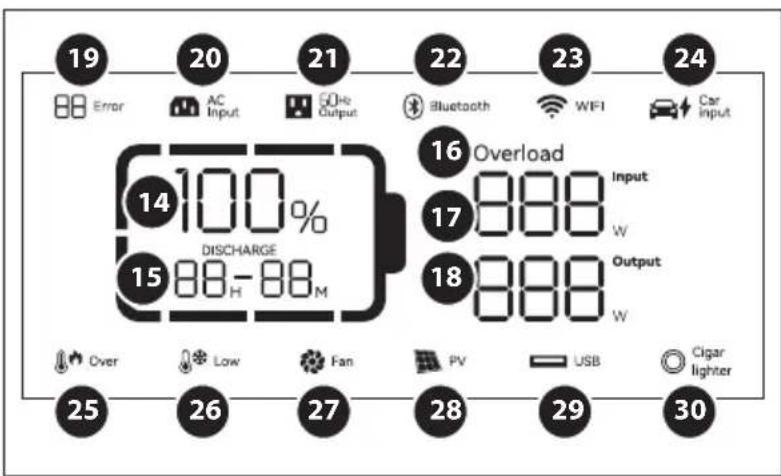
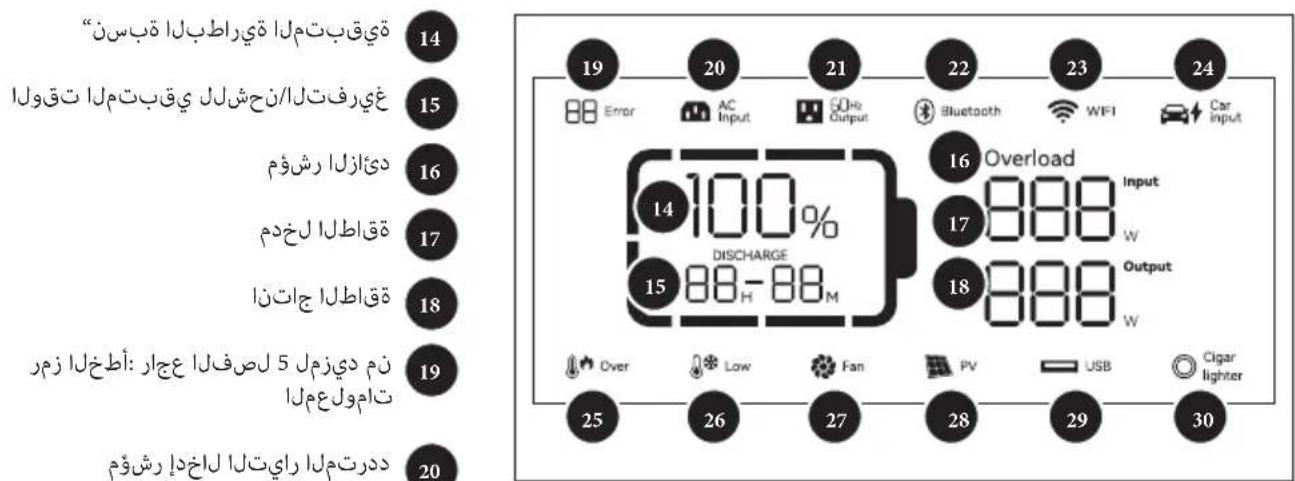
14 Remaining battery percentage
15 Remaining charge/discharge time
Overload indicator
17 Input power
18 Output power
19 Error code: see chapter 5 for more info
20 AC input indicator
21 AC output indicator
22 Bluetooth connection indicator
23 Wi-Fi connection status
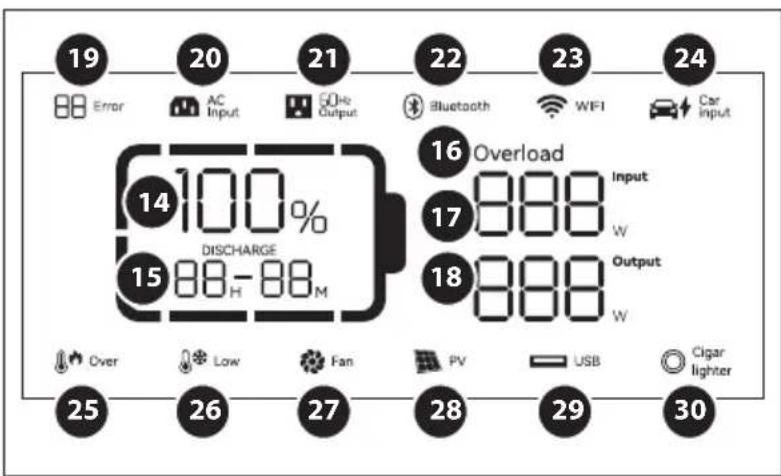
24 Car charging
25 High temperature warning
26 Low temperature warning
27 Fan status
28 PV charging
29 USB output indicator
30 Cigarette lighter indicator
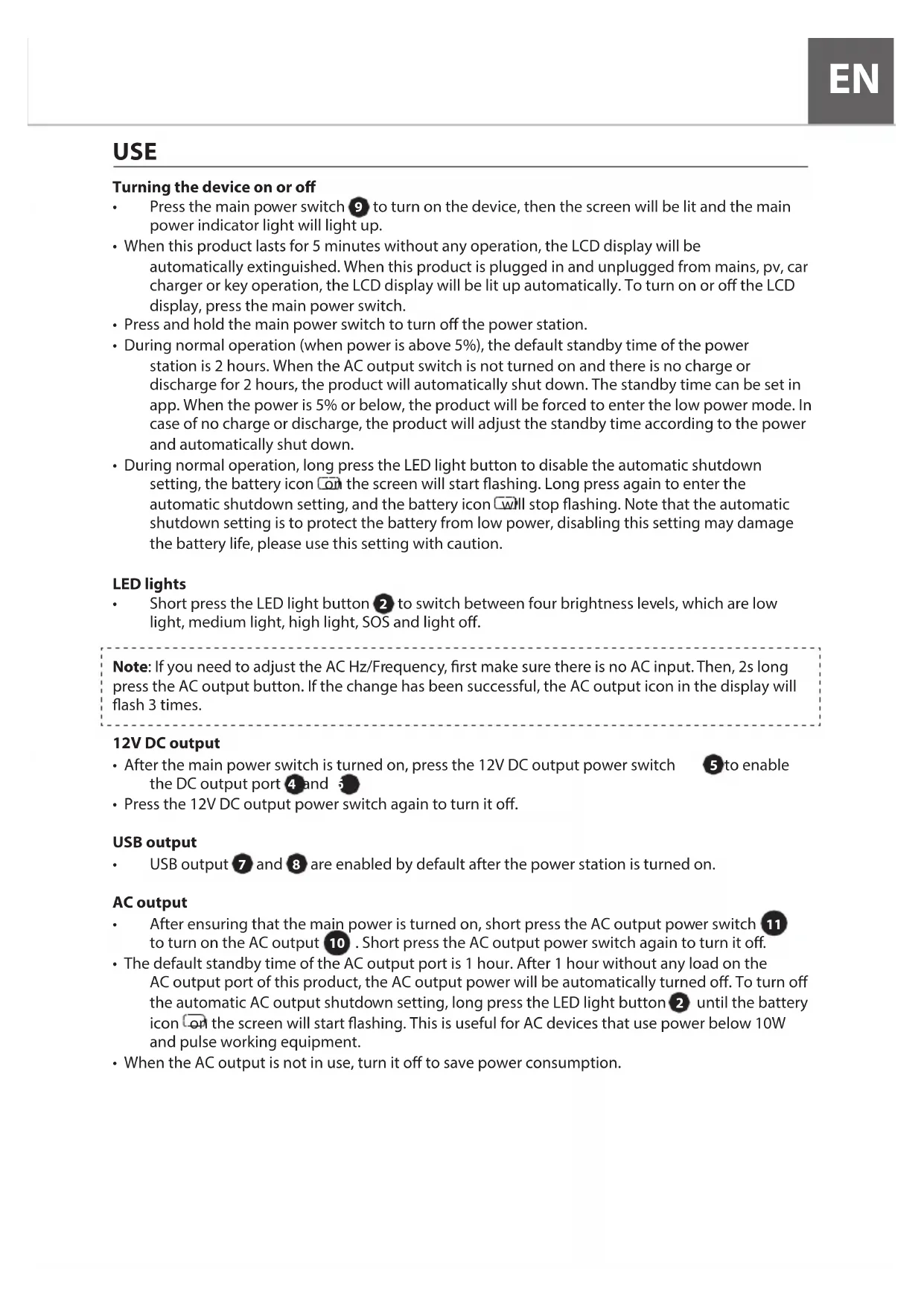
USE
Turning the device on or off
- Press the main power switch 9 to turn on the device, then the screen will be lit and the main power indicator light will light up.
- When this product lasts for 5 minutes without any operation, the LCD display will be automatically extinguished. When this product is plugged in and unplugged from mains, pv, car charger or key operation, the LCD display will be lit up automatically. To turn on or off the LCD display, press the main power switch.
- Press and hold the main power switch to turn off the power station.
- During normal operation (when power is above 5% ), the default standby time of the power station is 2 hours. When the AC output switch is not turned on and there is no charge or discharge for 2 hours, the product will automatically shut down. The standby time can be set in app. When the power is 5% or below, the product will be forced to enter the low power mode. In case of no charge or discharge, the product will adjust the standby time according to the power and automatically shut down.
- During normal operation, long press the LED light button to disable the automatic shutdown setting, the battery icon on the screen will start flashing. Long press again to enter the automatic shutdown setting, and the battery icon will stop flashing. Note that the automatic shutdown setting is to protect the battery from low power, disabling this setting may damage the battery life, please use this setting with caution.
LED lights
- Short press the LED light button 2 to switch between four brightness levels, which are low light, medium light, high light, SOS and light off.
Note: If you need to adjust the AC Hz/Frequency, first make sure there is no AC input. Then, 2s long press the AC output button. If the change has been successful, the AC output icon in the display will flash 3 times.
12V DC output
After the main power switch is turned on, press the 12V DC output power switch to enable the DC output port and
- Press the 12V DC output power switch again to turn it off.
USB output
USB output 7 and 8 are enabled by default after the power station is turned on.
ACoutput
After ensuring that the main power is turned on, short press the AC output power switch 11 to turn on the AC output 10. Short press the AC output power switch again to turn it off.
- The default standby time of the AC output port is 1 hour. After 1 hour without any load on the AC output port of this product, the AC output power will be automatically turned off. To turn off the automatic AC output shutdown setting, long press the LED light button until the battery icon on the screen will start flashing. This is useful for AC devices that use power below 10W and pulse working equipment.
- When the AC output is not in use, turn it off to save power consumption.
When turning on the power station for the first time, the default charging mode is active. You can control the recharge rate through use of the app (see more in chapter 4).
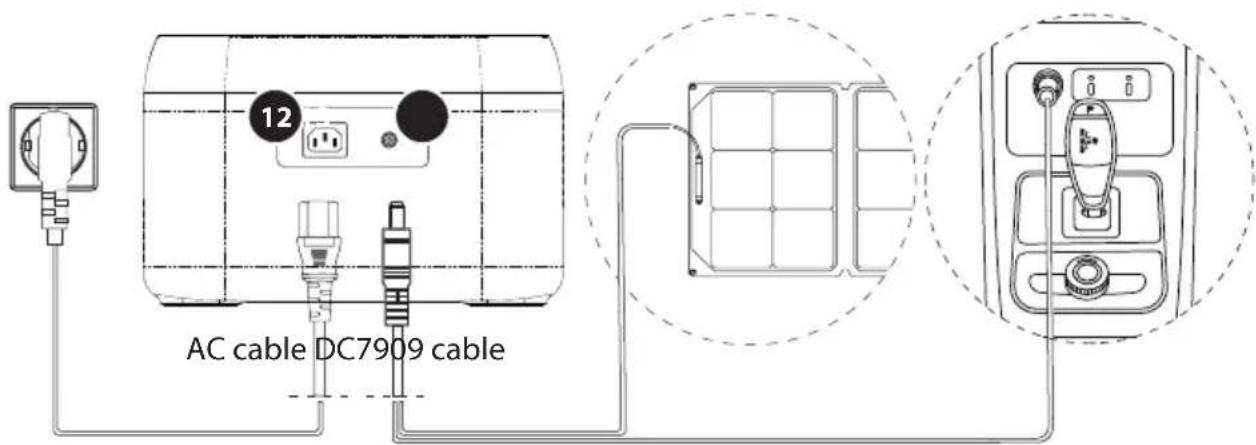
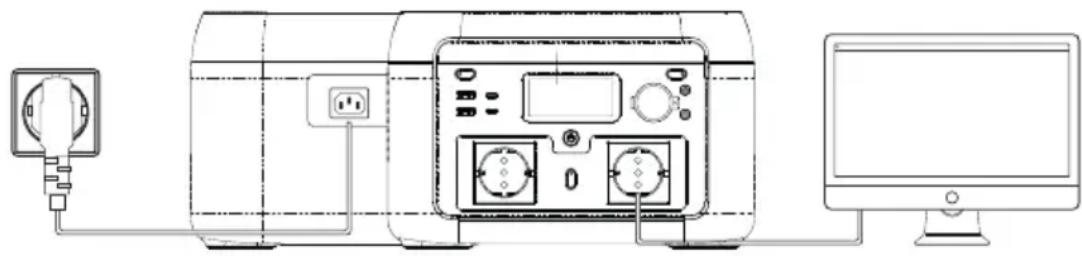
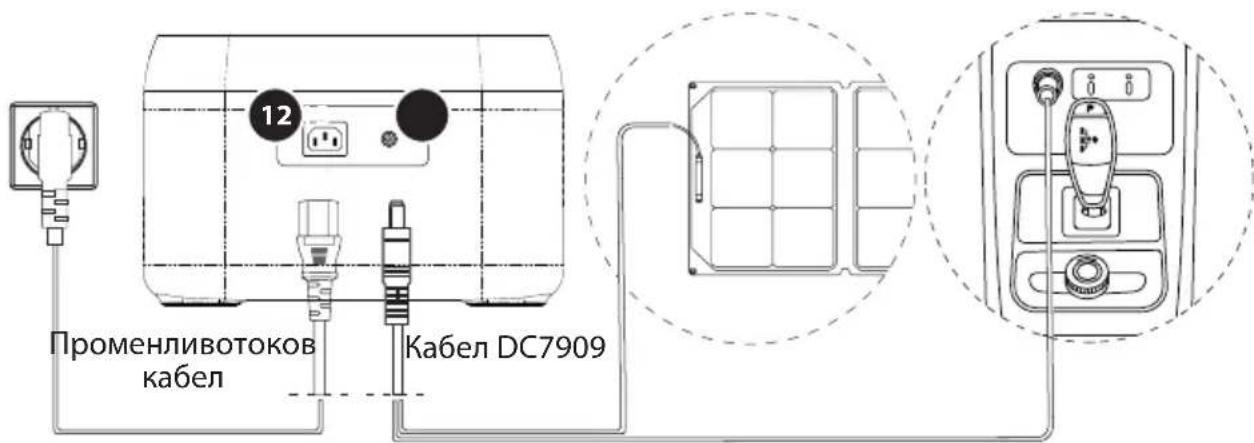
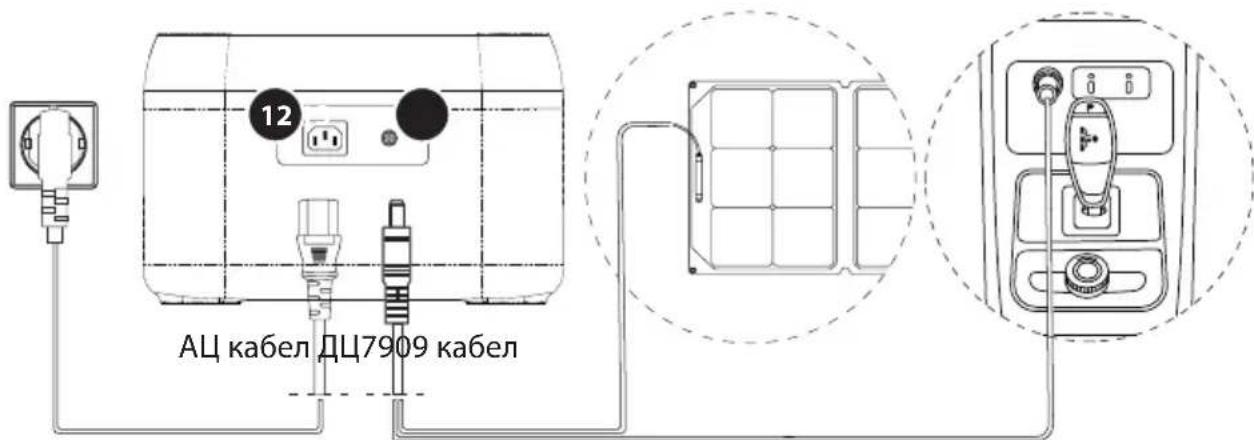
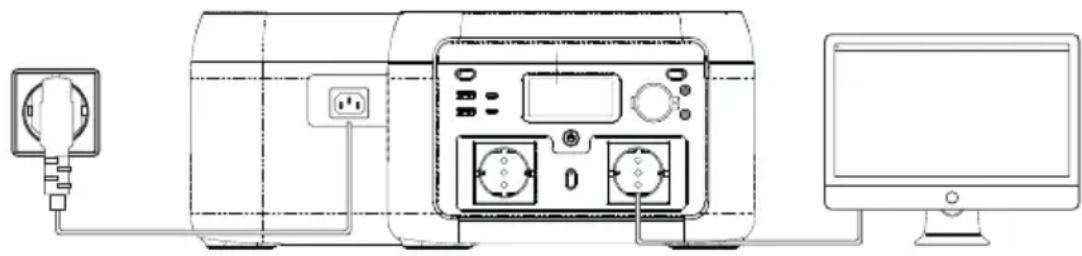
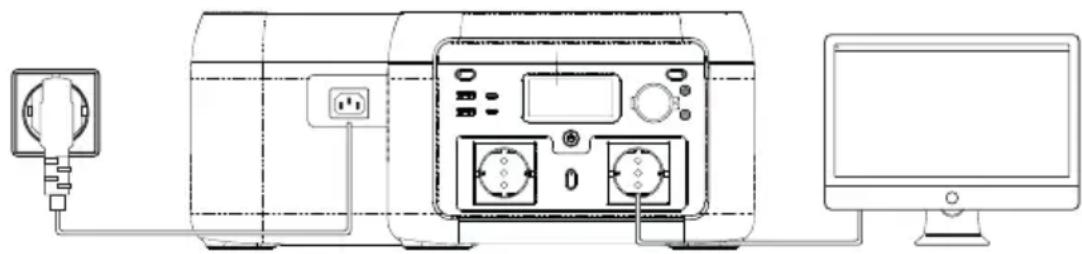
- Use the provided AC cable with the AC input socket

- In fast charging mode, it takes about 1,5 hours to fully charge the power station.
Note: Please only use the provided AC cable for charging. AC charging cable should directly plug into a wall-mounted socket. Using other AC charging cables is not covered by our warranty.
PV charging

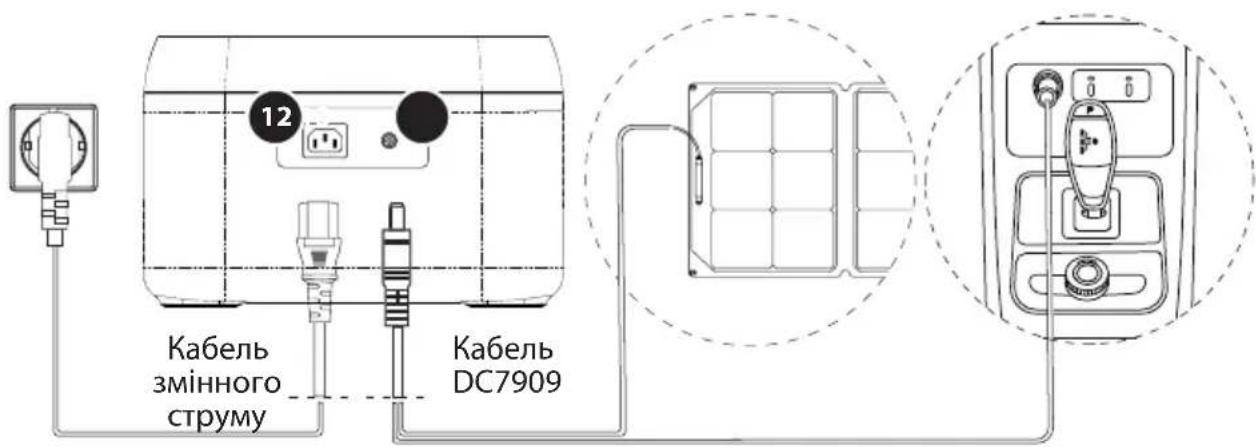
- PV charging uses the solar/car charge input
- Please follow the solar panel user manual to connect the solar panel.
- If using a Solar Panel from a different brand – before connecting the solar panel, check whether its output voltage is within power station specifications (max 24V), to avoid damage.
- The input connector is DC7909. If you need an adapter cable from MC4 to DC7909, please purchase it yourself.
Carcharging
- The power station can be charged through the solar/car charge input 13 with the charging cable DC7909 and the 12V outlet inside your car. It should be charged after the car starts, to avoid the possibility of the car battery draining too much.
EPS FUNCTION
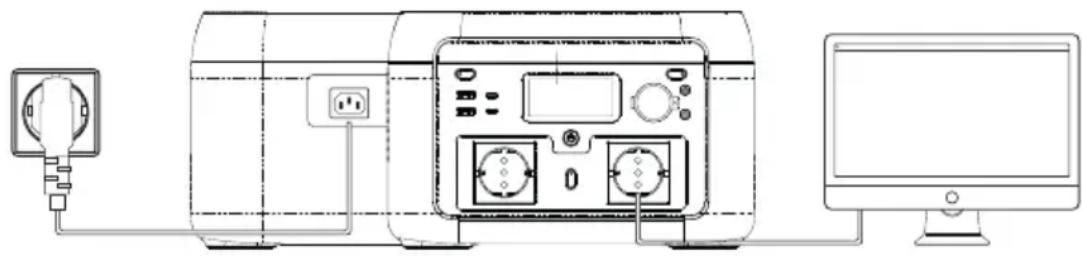
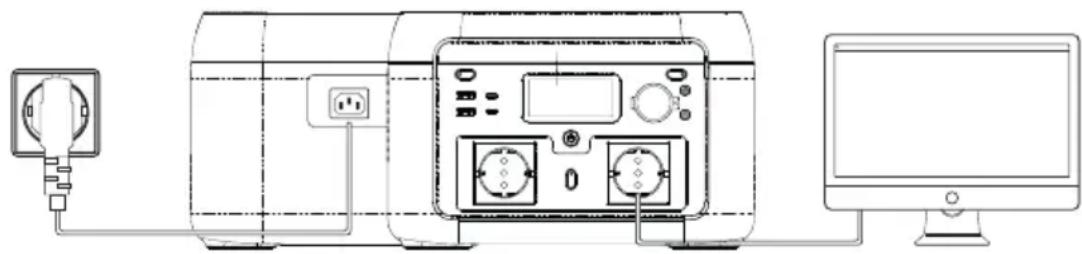
This product supports EPS (emergency power supply) function. When using the product in Pass-Through mode (so the power station is being recharged, as well as delivering output at the same time), if the grid suddenly loses power, the power station will automatically switch to battery power supply mode within 10 milli-seconds.
Note:
This function does not support 0ms switching. Please do not connect it to devices that require a true UPS (uninterrupted power supply), such as data servers and workstations. If unsure, please run multiple tests to confirm whether it is compatible with your set-up.
POWERBOOST TECHNOLOGY
PowerBoost features dynamic voltage control that intelligently reduces voltage while still providing the required current. Effectively this means most of your appliances are still able to operate, while staying within the safe output limitations of the workstation.
Example:
You want to connect a 700W water boiling kettle to the 600W Power Station.
When plugging in your appliance PowerBoost automatically activates, and marginally lowers the output voltage until the kettle effectively operates at 600W. The resulting effect is that it might boil water slower than normal, but still fast enough to otherwise function as normal.
- PowerBoost allows you to safely connect a wide variety of appliances you otherwise wouldn't be able to connect at all.
- PowerBoost is most effective for products with heaters and motors. It is not suitable for some electrical appliances that feature voltage protection (such as precision instruments).
DOWNLOAD THE APP
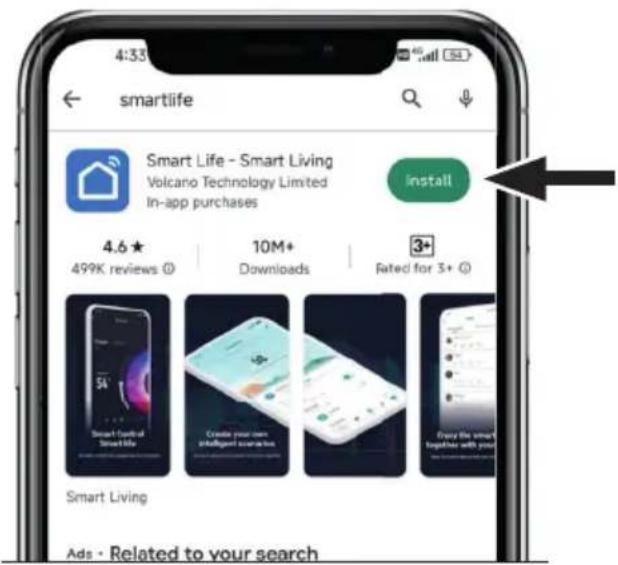
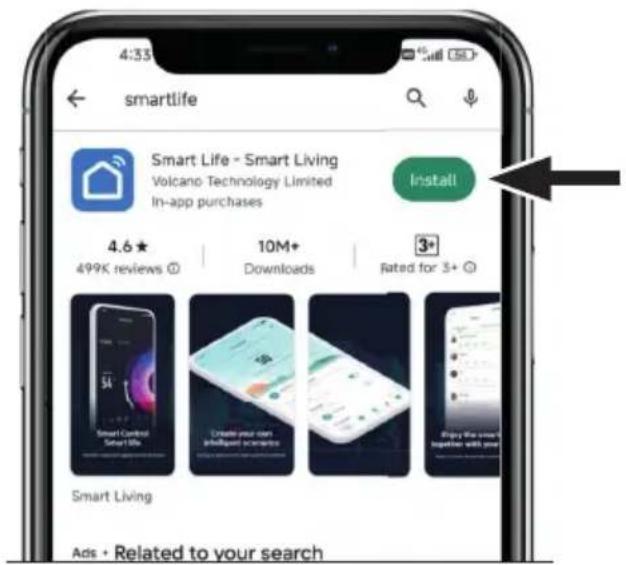
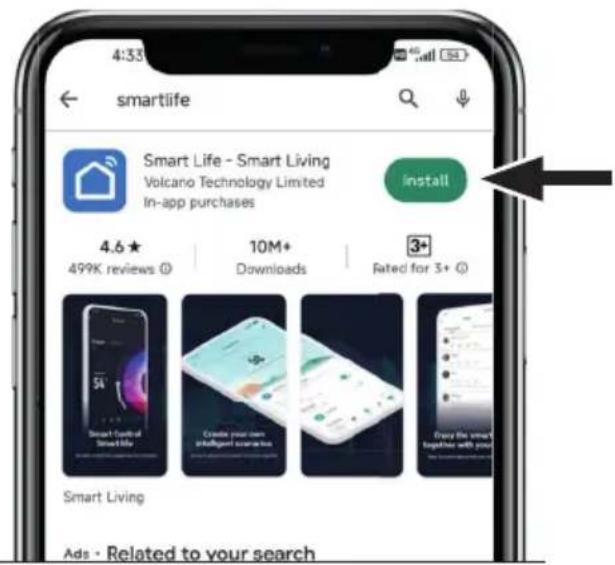
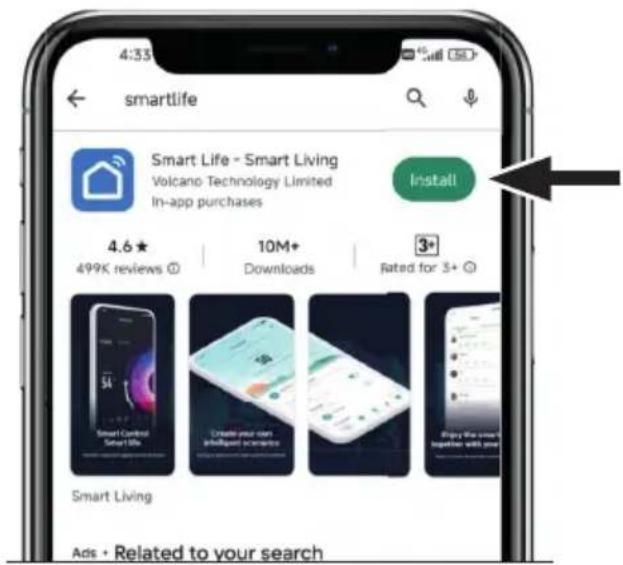
Search for "Smart Life" in the app store to download and install, or scan the QR code to download and install.
Create an account or continue as guest.

Note: for first time setup an internet connection is required, either through Wi-Fi or a mobile hotspot.
- Turn on the power station. It automatically sends out a pairing signal.
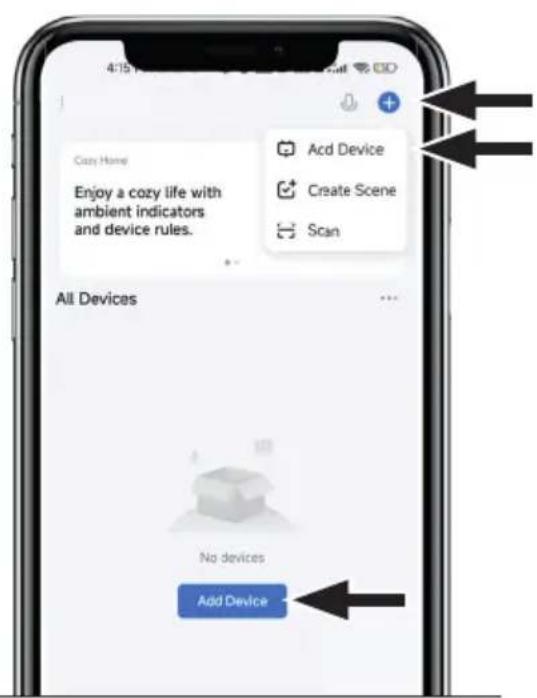
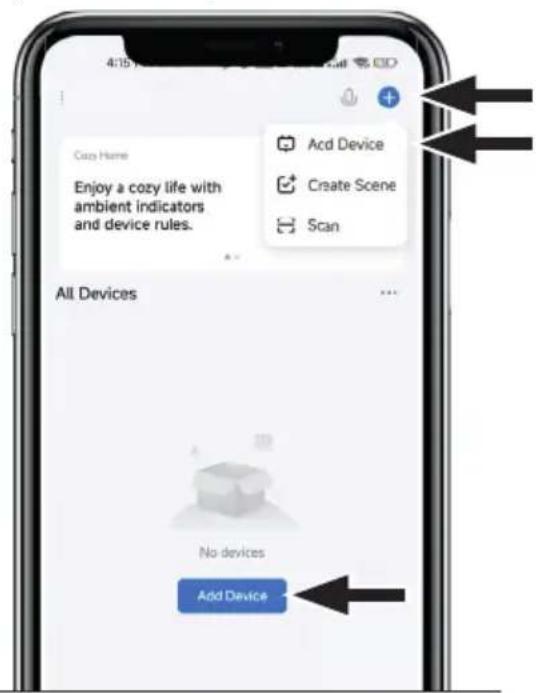
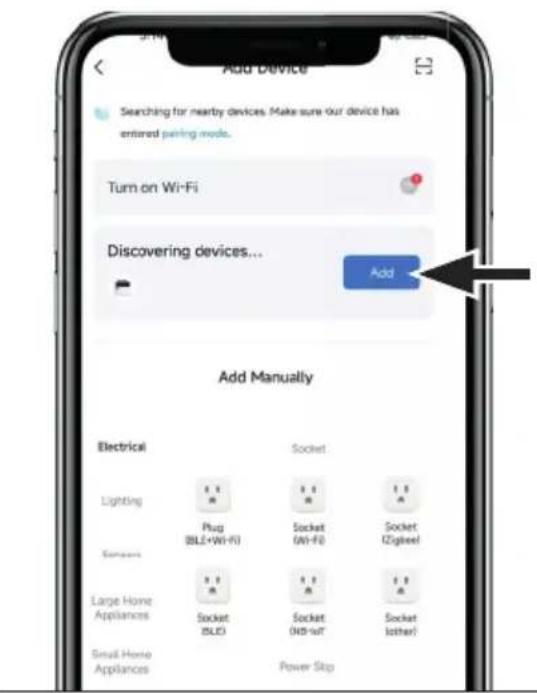
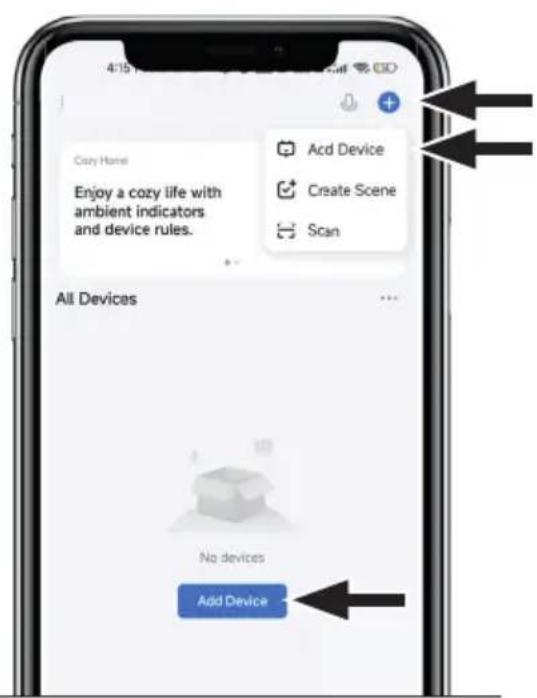
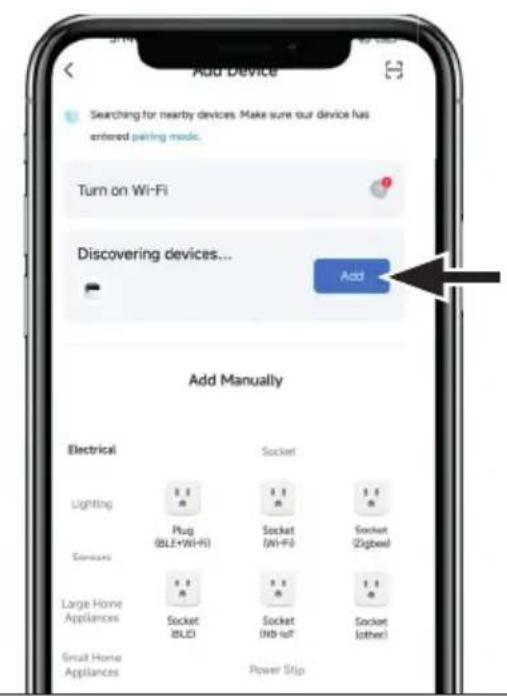
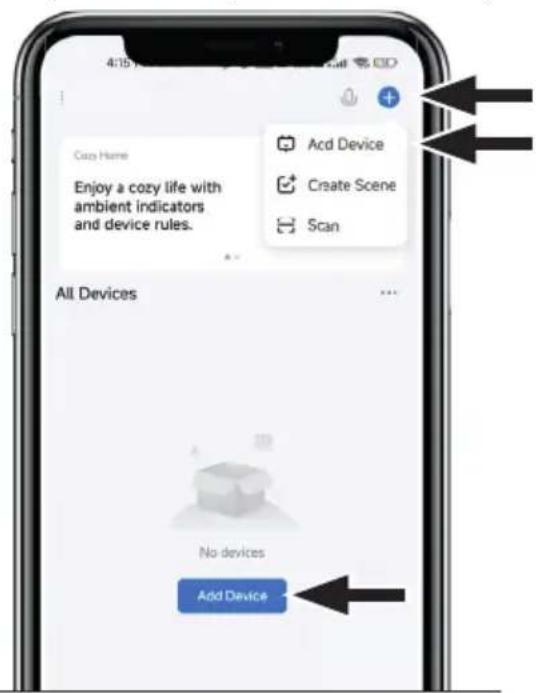
- Select Add Device in the app's main interface.
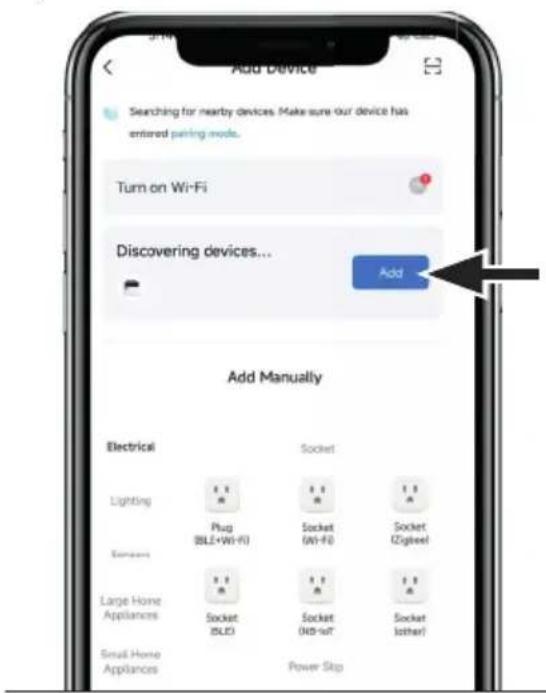
- Allow Bluetooth access permission and location access permission and turn on Bluetooth as instructed in the app.
- Select the XP2W600 as it appears in the list.
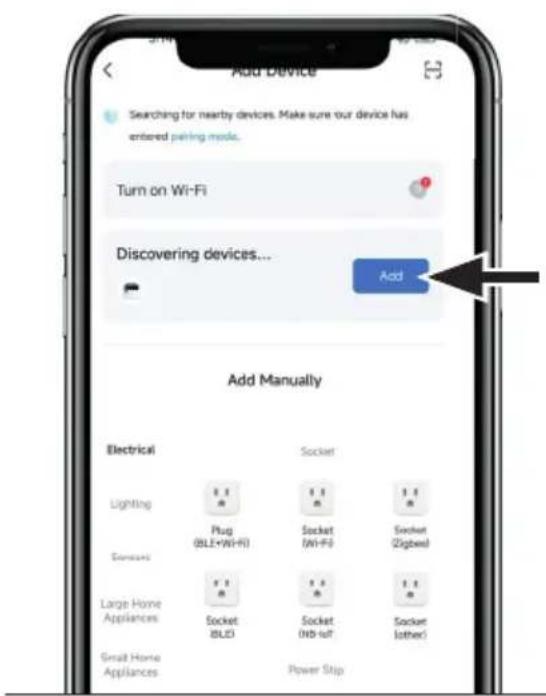
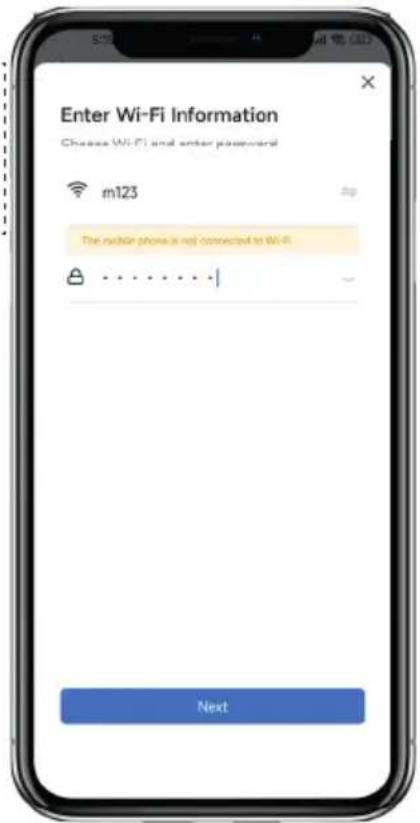
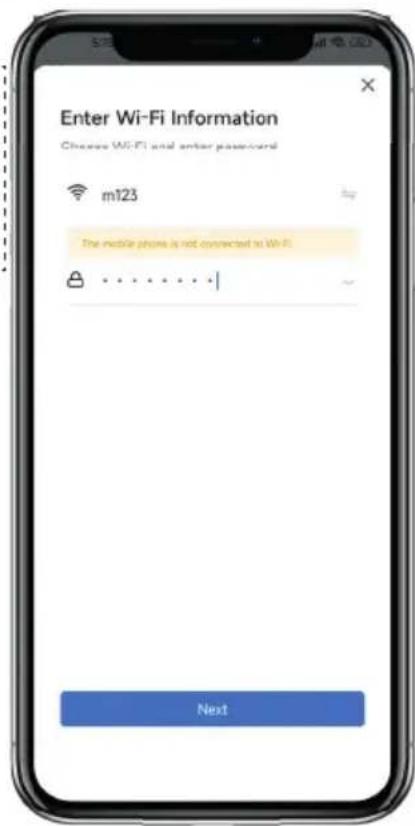
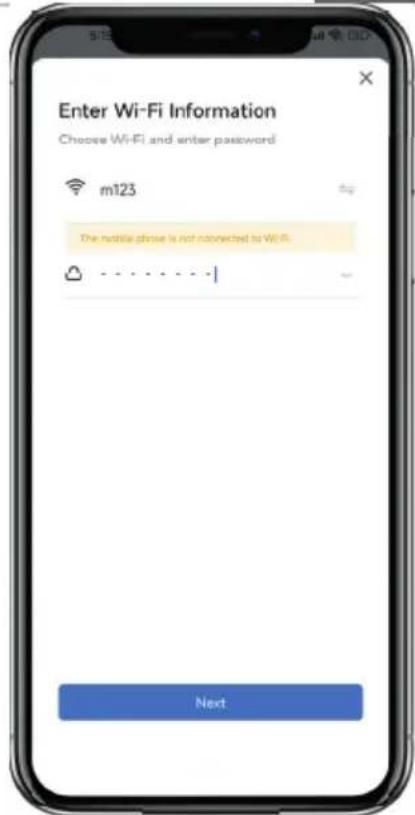
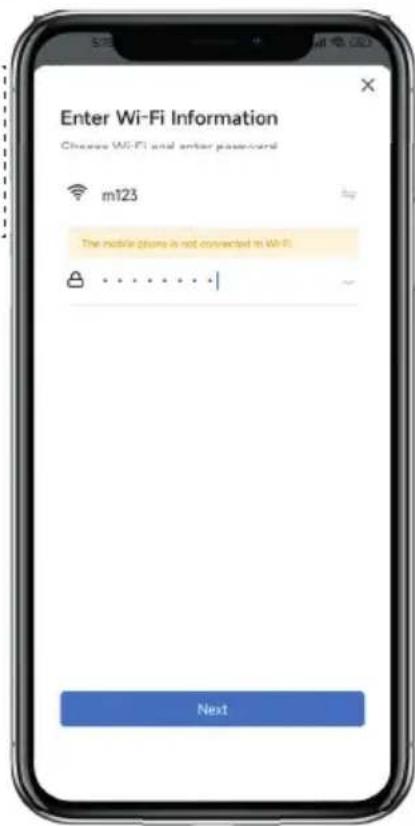
- Enter the Wi-Fi password of your current Wi-Fi connection.
If no Wi-Fi network is available in your area, you can create a mobile hotspot in the settings of your smartphone. A mobile internet connection is required for this. After setting up the mobile hotspot, enter the name and password of the hotspot manually.
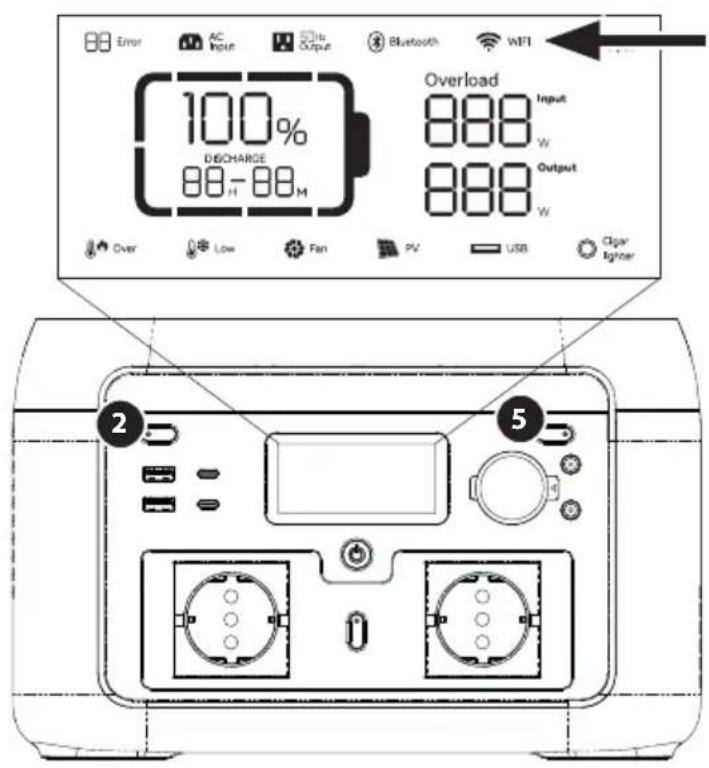
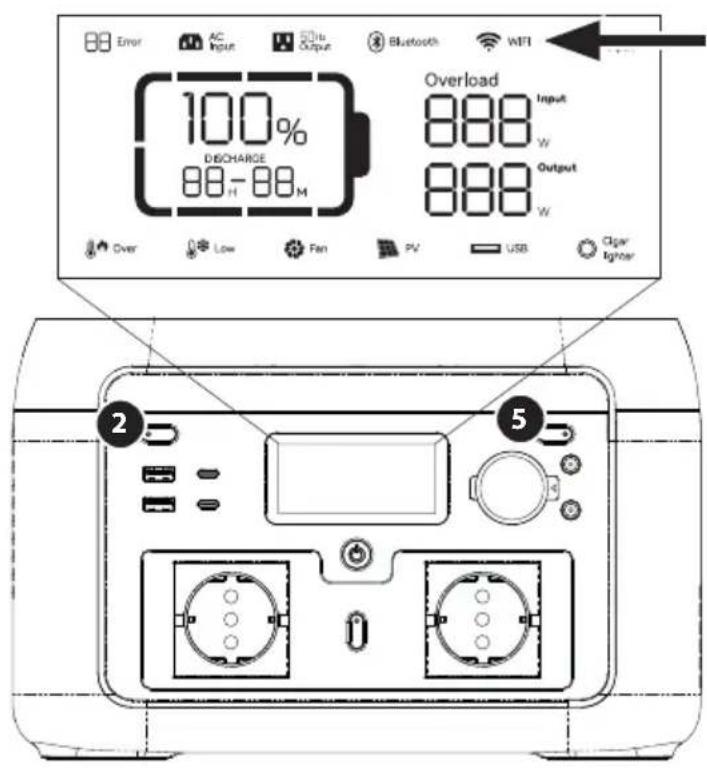
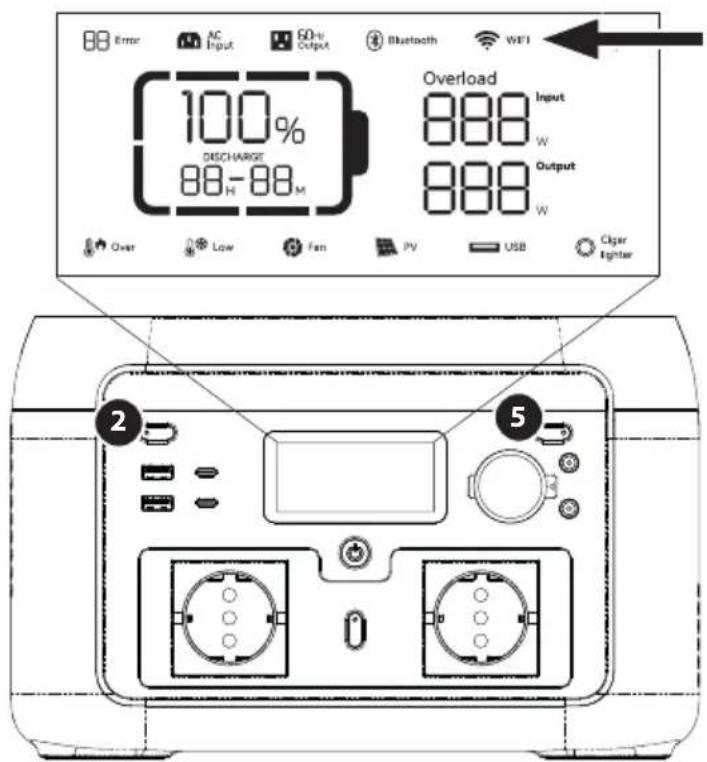
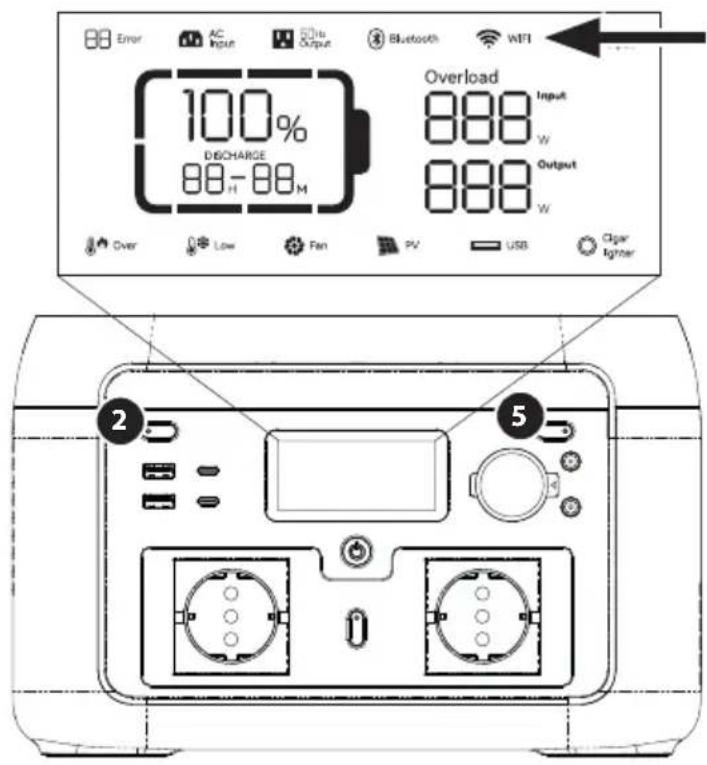
If the power station display shows a Wi-Fi icon, the connection is successful.
After the initial Wi-Fi pairing, the app can be used by just using a Bluetooth connection without needing to connect to a Wi-Fi network.
It is possible to reset the power station's app connection by pressing both the LED light button 2 and the DC output button 5 . The Wi-Fi icon will start flashing to indicate a successful reset.
VIEW AND CONTROL THE POWER STATION VIA THE APP
For a detailed guide on all the features in the app, please check our website xtorm.eu/manuals/xp2w600
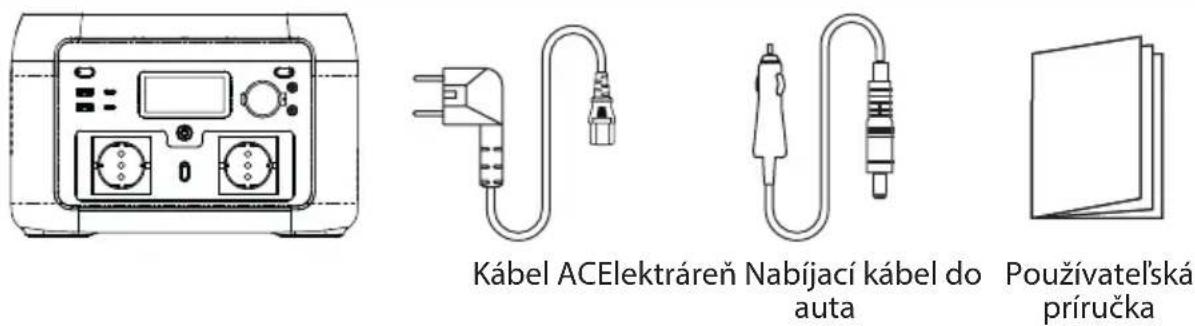
IN THE BOX

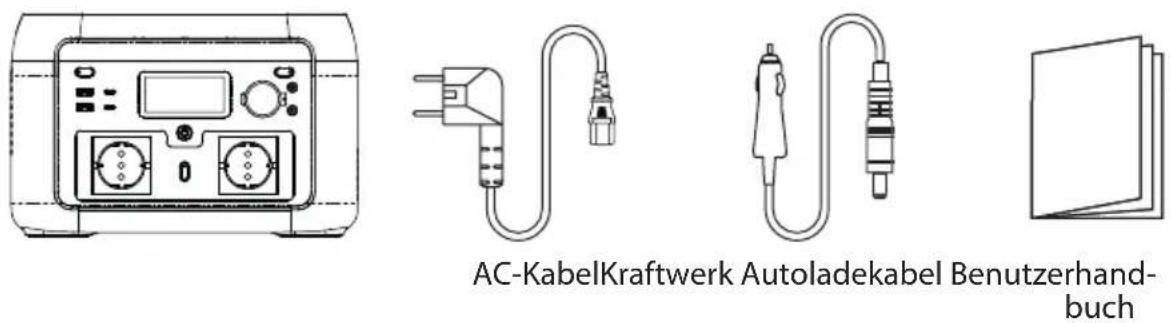
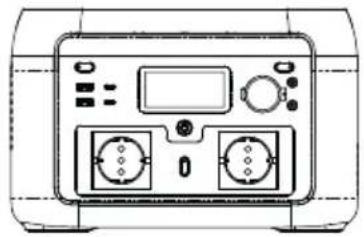
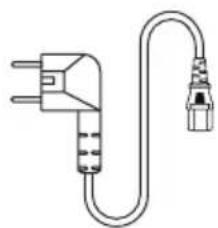
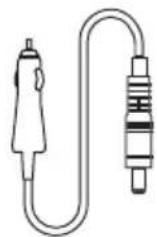
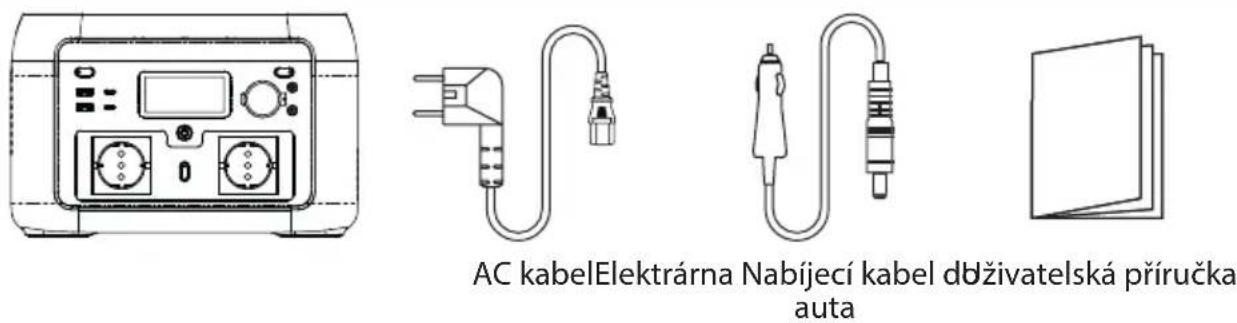
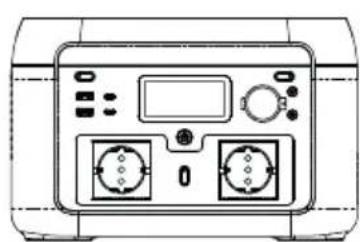
AC cablePower station Car charge cable User manual
FREQUently ASKED QUESTIONS
What type of battery is used?
Lithium iron phosphate battery (LiFePO4).
What equipment can be connected to the AC output ports?
The AC output can supply power to small power household equipment. We suggest confirming the power of the equipment before use, to ensure that the sum of the power requirement is within the rated specification of the power station.
How long can the power station supply power to my appliance?
The LCD shows time remaining until the battery is empty, which is based on the visible actual power output (assuming stable output levels)
How long does it take to fully charge the workstation?
The LCD shows remaining charging time, and shows the current actual power input.
How do I clean the power station?
Clean the unit with a dry, soft and clean cloth or tissue.
How do I safely store the power station?
Turn the power station off, and keep it in a dry and ventilated place. Do not expose to water or high humidity. For long-term storage, we suggest using the product every 3 months. Drain the battery to 0% , and then fully recharge it to 100% before storage.
Can the power station be taken on board airplanes?
No, the battery exceeds the 100Wh capacity limit.
MAINTENANCE
- It is recommended to use or store power station under 20 30^ ambient temperature. Keep the power station away from water, heat and metal parts.
- For long-term storage, we suggest using the product every 3 months. Drain the battery to 0% , and then fully recharge the power station to 100% before storage.
- For safety, do not store power station with temperature above 45^ or below -10^ .
- If the charge level is lower than 1% , please charge to 60% . Long-term storage at very low power can cause irreversible damage to the battery cells and shorten the service life of the product.
- If the battery level is too low before storing the powerstation for a very long time, the product will enter deep sleep mode, and the product can only be used after being (trickle) charged.
DISCLAIMER
The product has a built-in battery management system (BMS), which features protection such as overcharge, over discharge, overcurrent, short circuit, high and low temperature, and abnormal communication. During the use of this product, protection may occur and cause output interruption. Damage caused to special equipment, such as medical equipment, servers, due to the indirect power loss caused by accidental power failure are not liable to Xtorm or Telco Accessories B.V.
Xtorm or Telco Accessories B.V are not legally liable for any or all accidents caused by illegal use, self-dismantling, or man-made damage.
Before using the power station power station, please read this user manual to ensure a thorough understanding and proper use. After reading the user manual, please keep it stored for future reference. Improper operation may cause serious injury to yourself or others, or result in product damage and property loss. Once using power station, you are deemed to have understood and accepted all terms and contents thereof. Users promise to be responsible for their actions and all consequences arising there from. We shall not be liable for any loss arising from users not following this user manual.
FCC Statement
This device complies with Part 15 of the FCC Rules. Operation is subject to the following two conditions:
(1)This device may not cause harmful interference.
(2)This device must accept any interference received, including interference that may cause undesired operation.
2. Changes or modifications not expressly approved by the party responsible for compliance could void the user's authority to operate the equipment.
Note: This equipment has been tested and found to comply with the limits for class B digital device, pursuant to Part 15 of the FCC
Rules. These limits are designed to provide reasonable protection against harmful interference in a residential installation.
This equipment generates uses and can radiate radio frequency energy and, if not installed and used in accordance with the instructions, may cause harmful interference to radio communications. However, there is no guarantee that interference will not occur in a particular installation. If this equipment does cause harmful interference to radio or television reception, which can be determined by turning the equipment off and on, the user is encouraged to try to correct the interference by one or more of the following measures:
Reorient or relocate the receiving antenna.
- Increase the separation between the equipment and receiver.
- Connect the equipment into an outlet on a circuit different from that to which the receiver is connected.
- Consult the dealer or an experienced radio/TV technician for help.
The device has been evaluated to meet general RF exposure requirement, This equipment should be installed and operated with a minimum distance of 20~cm between the radiator and your body.
ISEO Statement
This device contains licence-exempt transmitter(s)/receiver(s) that comply with Innovation, Science and Economy Development Canada's licence-exempt RSS(s). Operation is subject to the following two conditions:
This device may not cause interference.
This device must accept any interference, including interference that may cause undesired operation of the device.
This equipment should be installed and operated with a minimum distance of 20~cm between the radiator and your body.
| Icon | Error description Solution | |
| 02 Error | Error code remains on | Pressure difference is too great | The power station will automatically recover. If the error is triggered 3 times within 1 minute, the power station will be locked, and the recovery time will be extended. The power station can ten be recovered by powering on and off again. |
| Over Error | Error code remains on, high temperature icon is flashing | Battery OTP (over temperature protection) error | Shut down power station. After temperature has reached normal levels, resume charging. |
| Low Error | Error code remains on, low temperature icon is flashing | Battery UTP (under temperature protection) error |
| 06 Error | Error code remains on | OCP (over current protection) error | Remove the device causing over-current. The power station will automatically recover. If the error is triggered 3 times within 1 minute, the power station will be locked, and the recovery time will be extended. The power station can then be recovered by powering on and off again. |
| 08 Error | Error code remains on | Abnormal precharge Power on and off again to clear the error. | |
| 09 Error | Error code remains on | Battery under voltage error | Charging process, repeated charging failures or failure to charge, please contact customer service. |
| 11 Error | Error code remains on | Abnormal INV battery voltage | The power station will automatically recover. If the error is triggered 3 times within 1 minute, the power station will be locked, and the recovery time will be extended. The power station can then be recovered by powering on and off again. |
| 12 Error | Error code remains on | Grid voltage or frequency error The error is cleared when the grid returns to normal. | |
| 13 Error | Error code remains on | Abnormal INV BUS voltage | The power station will automatically recover. If the error is triggered 3 times within 1 minute, the power station will be locked, and the recovery time will be extended. The power station can be recovered by powering on and off again. |
| 14 Error | Error code remains on | Abnormal INV output |
| Overload Error | Error code and Overload icon remain on | INV discharge overload | Remove the device causing discharge overload. The power station will automatically recover. If the error is triggered 3 times within 1 minute, the power station will be locked, and the recovery time will be extended. The power station can then be recovered by powering on and off again. |
| Overload Error | Error code and Overload icon remain on | Charge overload | The power station will automatically recover. If the error is triggered 3 times within 1 minute, the power station will be locked, and the recovery time will be extended. The power station can ten be recovered by powering on and off again. |
| 17 Error | Error code remains on | INV Tz | The power station will automatically recover after the error is cleared. |
| 19 Error | Error code remains on | INV output short | Error will be cleared after turning the power station off and on. |
| Over Error | Error code remains on, high temperature icon is flashing | MOSFET OTP (over temperature protection) error | After removing the device and restarting, the error is cleared. |
| Error | Error code remains on | Fan stop | Check fan for obstructions, turn on and off, contact customer service if still not fixed. |
| Error | Error code remains on | Discharge soft start error | The power station will automatically recover after the error is cleared. |
| Error | Error code remains on | Charge soft start error | The power station will automatically recover. If the error is triggered 3 times within 1 minute, the power station will be locked, and the recovery time will be extended. The power station can then be recovered by powering on and off again. |
| Error | Error code remains on | MOSFET UTP (under temperature protection) error | Automatic recovery after the power station heats up. |
| Error | Error code remains on | DC input hardware over charge protection error | Remove DC charge, auto recover after connecting DC and turning on. |
| Error | Error code remains on | DC input software over charge protection error | Stop DC charging, auto recover after connecting DC and turning on. |
| Error | Error code remains on | Car charge output OCP (over charge protection) error | Turn off output, manual recover after error is cleared. |
| Error | Error code remains on | PV (solar) output OVP (over voltage protection) error | Removing the PV charging interface will automatically restore it after a certain period of time. |
| Error | Error code remains on | DC input voltage over-voltage protection | Remove the DC charging interface for a certain period of time to automatically recover or check whether the DC output fuse is disconnected. |
| Over Error | Error code remains on, high temperature icon is flashing | DC input over temperature protection error | Stop DC. Auto recover after error is cleared. |
| Error | Error code remains on | Abnormal communication | Turn on and off, or change operation environment. Contact after sales if still not fixed. |
| Error | Error code remains on | The battery voltage is too low. The battery is broken. | Contact customer service. |
If none of the above information can solve problem you encounter, please contact the customer service for consultation.
If there is a warning occurs during the use of this product, and the warning icon still does not disappear after restarting the device, please stop using it immediately (do not try to charge or discharge).
ALGEMEEN
Gewicht 7kg
Afmetingen 301× 227× 193mm
IN DER KISTE
QUESTIONS FREQUEMMENT POSÉES
OFTE STILTE SPØRSMÄL
ILADAN

TILSLUTNING AF DIT KRAFTVÆRK
IKASSEN

OFTE STILLDE SPØRGSMÄL
VKRABICI
CASTO KLADENE OTÁZKY
VKRABICI
CASTO KLADENÉ OTÁZKY
ZRIKNUTIE SA ZODPOVEDNOSTI
This product supports EPS (emergency power supply) function. When using the product in Pass-Through mode (so the power station is being recharged, as well as delivering output at the same time), if the grid suddenly loses power, the power station will automatically switch to battery power supply mode within 10 milli-seconds.
Biljeska:
Ova funkcjna ne podržava prebacivanje od 0 ms. Nemojte ga spajati na uredaje koji zahtijevaju pravi UPS (neprekidno napajanje), kao sto su poslužitelji podataka i radne stanice. Ako niste sigurni,Pokrenite više testova kako biste potvrdili je li kompatibilan s vašim postavkama.
POWERBOOST TEHNOLOGIJA
AC cablePower station Car charge cable User manual
CESTO POSTAVLJANA PITANJA
LED
Piéote ouvtota to koupi φwiou LED va aλaετε μεtaεu τεoapwv επiδωv ψwteivotntac, ta onia εival xaunlo ψwc, μεσaio ψwc, uψnlo ψwc, SOS ka φwc, εKToc λεitoupyiac.
ByToH 3a LED CBeTnHa

LCD

I3xOa 3a 3apeXdaHe Ha aBTOMoBn12V

DC n3xoON/OFF

Uencen DC5521x2

I3xoJen nopT USB-A x2

I3xoJen npT USB-C x2

ByToH ON/OFF

I3xoJHO rHe3do 3a npomeHnVB TOK x2

ByToH 3a AC n3XoA

BxoJHO rHe3do 3a npomeHnIB TOK

Bxod 3a 3apekdahe Ha cIbHueBa eHepn/ abTOMO6nI
LCD EKPAH

OcTaTbueH npoceHT Ha 6aTepyTa

OctaTbUHO BpeMe 3a 3apeXdaHe/pa3peXdaHe

HnDnKaTOp 3a npTeOBapBaHe

BxOJaMaMoUHOC

M3XoHaMoUHOCT

KoJ 3a rpeuKa:BnXTe rnaBa5 3a noBee HhOpMaun

HnKaTOp 3a BXoD HnPOMeHnB TOK

HnKaTOp 3a AC n3xoD

MнДиКaTOp 3a BpБЗKaIBluetooth

CbctoHne Ha Wi-Fi Bpb3KaTa

3apekdaheHa aBTOMO6nI

IpeynpekdeHne 3a BnCoka TempepaTypa

IpeynpejdeHne 3a Hncka TemnepaTypa

CbctOHaHeBaHTnAToP

3apeKdaHe Ha oTOBOJTaUN

INHdkaTop 3a USB n3x0d

HnKaTOp Ha 3aJaKKaTa 3aZnrapn
N3ПОЛ3BAITE
BkIOUbaHe nIIN n3KIOUbaHe Ha yCTpoIcTBOTO
HaTnCHete TnaBnI npEbkIIOuBaTeH Na 3axpaHbAHeTO 9,3a Da BkIIOUHTe yCTpOietBOTO,CneI KoETO ekpaHbT uE CBETHe N uE CBETHE OCHOBHnT HnIKaTOP 3a 3axpaHbAHe.
Korato npoduktbT he pa60n 5 MNHyTu, LCD nncnneT abTomatuHOn u3racBa. Korato to3n npodukTe BkIoueh n n3KnIOueH OT eNEKtpuueckata MpeXa, pv, 3apAHO 3a Kona nnn pa6Ota c kIOU, LCD nncnneT ue CBeTHE aBtOMaTHUHO. 3a da BkIOUHTe nnn n3KIOUHTe LCD nncnner, HATNCHEte rnaBHnnpEbkIOUBAteJ Ha 3axpaHbHeTo.
HaTnCHeTe 3aApbXTe rnaBnI npeBkIIOuBaTeI Ha 3axpaHbaHeTo, 3a da n3KlIOUte eIeKtpnueckaTa CTaHcua.
- ПО Време на Нормална pa6otа (korato мошноctta e hab 5%) Врето на ГOTOBHOCT ha eilektpoeHTpaIata no nOpa3bupahe e 2 yaca. Korato npebkIIOUbaTeIaT Ha npomeHINBOTOKOBn I3XOD He e BKNIOUeH N HMa 3apeJdaHe NN pa3peJdaHe B pOdbLKeHne Ha 2 yaca, npodyKTbT ue ce I3KJIIOuN abTomatNoHo. Врето в ржим Ha rotOBHOCT moKe da ce 3aJaDe B npinIOxHNeTo. Korato MOsHocCTTa e 5% NN no-MaMKo, npodyKbT ue 6bde npinHydEn da BnEze B pejMn Ha HnCKa MoHOCt. B clyuaaYe hMa 3apeJdaHe NN pa3peJdaHe, npodyKbT ue perylnpa Врето на ГOTOBHOC T 3abNCIMOCT OT MOsHocCTTa n ABTomatNoHo ue CE n3KJIIOUv.
- По Врeme Ha HopmaJIHa pa6Ota HaTnCHepe npObIxKITeHNO 6yToHa 3a LED cBETnHa, 3a da DeaKTbNpuTe HAcTpoiKaTa 3a aBTOMaTNUHO n3KIIIOUBaHe, IKOHaTa Ha 6aTePnra TaHa ekpaHa ige 3aIOuHe Da Mira. HaTnCHeTe OTHOBO dblro, 3a Da BNe3eTe B NaCTPOiKaTa 3a ABTOMaTNUHO n3KIIIOUBaHe, IIKoHaTa Ha 6aTePnra Ta Oe cnpe Da Mira. ImaIte npedBnD, Ye HAcTPOiKaTa 3a ABTOMaTNUHO n3KIIIOUBaHe e 3a 3aunTa Ha 6aTePnra Ta OT HnCKO HnBO Ha 3axPaHBAHe, DeaKTbNpuHaTe OHa Ta3n HAcTPOiKa MoKe Da yBpeDi XnBOTa Ha 6aTePnra Ta, MOJ, N3NoI3BaIte Ta3n HAcTPOiKa C NOBNISeHO BHIMAHne.
LED cBeTmHn
HaTncheTe KpaTko 6yToHa 3a LED cbETnHa 2, 3a da npBkIIOuHTe MeJdy YeTnpHn HnBa Ha npKoCT, KOInTO ca cna6a cbETnHa, cpeHa cbETnHa, cnHa cbETnHa, SOS n n3KnUoyeha cbETnHa.
3a6eexka: Ako Tp86ba Da HacptponTe YecToTa Ha npomeHnBnTOK, NbpBO Ce yBepTe, Ye Hma BxOd 3a npomeHnB Tok. Cnei TOBa HaTncHe TpoDbNkntEnHO 3a 2 cekyn6yToHa 3a n3XoD Ha npomeHnB Tok. Ako npomHaTa e 6nla ycneuHa, IKoHaTa 3a npomeHnBOTOKOB n3XoD Ha dncnpe Ie Mira 3 nbTN.
12VDCn3xoA
CneI KaTO OCHOBHNrT KIOU 3a 3axpaHbAe e BKIOueH, HATNCHe TpeBkIOuBaTeIra 3a 3axpaHbAe Ha n3XoJa 3a NOCTOJHEH TOK 12 V5, 3a Da aKTINBpATE NOpTa 3a NOCTOJHEH TOK 4 n6.
HaTnCHete OTHOBO npeBKnIOuBaTeIa 3aXpaHbAHe Ha I3xoJa 12V DC, 3a da ro I3KIOUHTe.
USB u3x04
USB n3xOoIte 7 n 8 ca aKTHBnpuHn no noDpa36npaHe cneB BKJIIOUbaHe Ha 3axpaHbuaTa cTahnra.
ACn3x0a
Cne KaTo ce yBepnte, ye OCHOBHOTo 3axpaHbHe e BkIIOueHO, HaTnCHTe KpaTKO npEbkIOUbaTeJra 3a 3axpaHbHe Ha IpOMEHINIBOTOKOBn I3XoD 11, 3a Da BkIOuHTe IpOMEHINIBOTOKOBn I3XoD 10. HaTnCHTe OTHOBO KpATKOTpaHnO npEbkIOUbaTeJra 3a 3axpaHbHe Ha IpOMEHINIBOTOKOBn I3XoD, 3a Da rO n3KIOUHTe.
BpemeTo nO npda36bpaHe B pexHM Ha rTOOBHOCT Ha n3XODHnI NOpT 3a npOMEHnIB TOK e 1 yac. Cne1 1 yac 6e3 HnKaKBO HaTOBapBaHe Ha n3XODHnI NOpT 3a npOMEHnIB TOK Ha TO3N IPOdyKT, n3XoDnTO 3axpaHBAhe 3a npOMEHnIB TOK ue Ce n3KNIOUAn ABTOMaTHuHO. 3a da n3KNIOUHTe HAcTPOJkata 3a ABTOMaTHuHO n3KNIOUBAHe Ha npOMEHnIBOTOKOBn I3XoD, HATNCHE TPOdJIIXeJIHO 6yTOHa 3a OCBETraBaHe Ha CBtOJNOJa 2, DOKATO NKOHATA Ha 6aTePnIgTA □ Ha ekpaHa 3aNoUHe Da mHa. ToBa e nOJe3HO 3a yCTpoiCTBa C npOMEHnIB TOK, KOUTO n3NOJ3BaT MOUHOCT NOI 10 W, INMnyJCHO pa6OTHO o6OpYDaBe.
Korato npomeHnIBOTOKOBnT n3XoJ He ce n3NoJ3Ba, ro n3KnUoyTe, 3a da cneCTnTe KOHCymaun Ha eHeprn.
3APEXDAHE HA EJEKTPOUEHTPAJATA
3apeKdaHe c npomeHnVB TOK
Pn PbBTO BkIIOUBaHe Ha eJekTPOueHTpaJaTa e aKTHBeH pexIMbT Ha 3apeXdaHe no PnOpa36upaHe. MoKeTe Da KOHTpOInpate CkOpocTTa Ha 3apeXdaHe ue3 n3NoI3BaHe Ha npINOxKeHneTo (BVXte NOBce B rIabe 4).
- 3nol3BaIte npedocTaBeHna Ka6eJ 3a npOMEHJIb TOK C BXOJHNA KOHTAKT 3a npOMEHJIb TOK

BpeKmHa 6bp3o 3apeJdahe nblHOTo 3apeJdahe Ha eJeKTPoueHTpaJaTa OTHema OKono 1,5
yaca.
3a6eIeKka: Monla, n3noJI3BaIte cAmO npedocTaBeHna Ka6eI 3a npomeHnIB TOK 3a 3apeXdaHe.
PpomeHnBOTOKOBnT Ka6e 3a 3apeXdaHe Tp86Ba Da Ce BKIOUcBA DnpeKTHO B KOHTaKT Ha CTeHaTa.
I3noJI3BaHeTo Ha npyI Ka6eJIa 3a 3apeXdahe CnpoMeHnIB TOK He Ce NOKpNBa OT HaJata rapaHnIa.
3apeKdaHe Ha foTOBOtanu
- 3apekdaheTo OT fOToBOnTaunu N3No13Ba BXoJa 3a 3apeKdaHe Ha cIbHueBa eHepnra/


Mol, cneBaiTe pkoBDCTBOTO 3a notpe6nteHa cnBHeBnaHEn, 3a da CBpXeTe
CtBHyEBynHaHeJ.
- Ako n3no3BaTe coIapeH naHEn ot pyra Mapka - npeDn da CbpxKeTe coIapHnnaHeJ,
IPOBepTe DaJIH 3XODHOTo MY HaNPExeHne E BaMKInTe Ha CpeUΦHKaUNTe Ha
eJektpoceHtpaIaTa (makcymm 24 V), 3a da n36erHeTe nobpeJa.
BxoHnT KOHeKTope DC7909. ako Bne Heo6xOuM aadantep oT MC4 KbM DC7909, MoJra,
3aKynTe Ro CaMn.
3apeKdaHe Ha aBTOMo6n
- EneKtpnueckaTa CTaHcun MoKeJa 6bJe 3apeXdaHa Upe3 BxOJa 3a CJIbHcEBO 3apeXdaHe/ 3apeXdaHe Ha aBTOMo6n1 13 c Ka6ena 3a 3apeXdaHe DC7909 n 12V KOHTaKaTb A aBTOMo6nla BN. Ta Tp8Ba Da ce 3apeXda CneI CTapTnpaHe Ha aBTOMo6nla, 3a Da Ce n36eRHe Bb3MOxKHOCTTa 3a IpeKaJEno N3ToUaBaHe Ha aKymyLaTopa Ha aBTOMo6nla.
ФУнкця EPS
To3n npoDKyKT noDbPka fynKcunraTa EPS (aBapuHNO 3axpaHbaHe). KoraTO n3no3BaTe npoDKTa B pexkIM Pass-Through (taka ye eJekTpoeHTpanata ce 3apejda n eHOBpeMeHHO c TOBA noDaBA MOHOC), aKO mpejata Bhe3aHNO 3ary6n MOHOC, eJekTpoeHTpanata ABTomTuHIO ue npemHe B pexkIM Ha 3axpaHbaHe ot 6atepyB pamKITE ha 10MNlnckyHdi.
3a6eIeKka:
Ta3nФункиЯ He noДьржа npeBknIouBaHe Ha 0ms. MoJ, He ro Cbbp3BaIte KbM yCTpoIcTba, KOINTO n3NCKBat nCTHnCk UPS (He npEkeBcBaem 3axpaHbAhe), KaTO HApPIMep CbPbPru 3a daHHn I pa6OTn CTaHcII. Ako He cTe cnrypHn, MoJ, nPoBeJeTe HAKoJIKO TecTa, 3a Da NOTBbpDITe dAIIn e CbBMecTm C BaShaTa KOHfNpyaun.
TEXHOLOGIPOWEROOST
PowerBoost pa3noIara c dHnAmuHc KOHTpOHa HAnpeXeHHeTo, KOITo INHTeINrEHTHO HaMaJIbA HAnpeXeHHeTo, KaTO cbUeBpeMeHHO OcNryPRABa Heo6xOdIMMra TOK. ToBA O3NaJABa, Ye NOBeYeTo OT BaIte Upei Moar Da pa6oTt, KaTO cbUeBpeMeHHO OCTaBaT B pAMKInTe Ha 6e3OnaChnTe ORpaHueHnHa MOUHOCTTa Ha 3axPaHbAaTa CTAHcNIA.
Пример:
IcKaTe Da CbPKeTe 700W yauHnK 3a BapeHe Ha BOa KbM 600W eJeKTpoeHTpaJa.
Korato BkIouHte ypeDa, PowerBoost ce aKTbnpa abTOMaTHUHO n noHxKaBa Jeko u3XODHOT O HApEKeHne,doKATO qAHnKbT 3aNoUHe da pa6Otn eΦeKTBHO c 600 W. B pe3yNTaT ha TOBa BOdaTa MOnke Da 3aBpN NO-6abHO OT o6uKHObeHO, HO Bce NaK DOCTaTbUHO 6bp3O, 3a Da yHKUHOHPa HOpMaIIHO.
- PowerBoost Bn no3BOLIbRa da CbpxKeTe 6e3oNaCHO uHPOK cneKTbp OT ypeN, KOnTO uHaue He 6xTe MoJIn Da CbpxKeTe n3O6U.
- PowerBoost e ha-efekTuben 3a npodukTn c harpeBaTeu n DnuraTeu. He e noxoadz 3a HkON eNEKtpnueckn ypeu, KOnTO mAt 3aunTa OT HappeKeHne (HaNPmep npeu3HN INCTpyMeHTn).
I3TEFJIHE HA IPIJIOXEHNETO
NotbpcTe"Smart Life"BMara3nHa 3a npinojKeHn,3a da n3TeJInTe u HCTanIpate, nn cKaHnpaIte QR Koda,3a da n3TeJInTe u HCTanIpate.
Cb3daIte aKayHT nII npOdbJIkeTe KaTo roCT.

CbP3BAHE HA BAJATA EJEKTPOUEHTPAJA
3a6eexka: 3a IIpBaTa HacTpoiKa e Heo6xoIma INHTepHET Bpb3Ka Upe3 Wi-Fi IIN Mo6uHa ToKa 3a DOCTbI.
- BkIouhe eeneKtpoueHTpanata.Ta ABtOMaTHNO ue n3npaTN cHnHa 3a CDBOBAHe.
- 136epete Oo6aBHe Ha yctpoCTBO B OCHOBHn INHTepeic Hn npJIOKeHneTo.
- Pa3peweTe pa3peweHneTo 3a DocTbI Do Bluetooth n pa3peweHneTo 3a DocTbI Do MeCTOnOJIOKeHneTo IN BKNIOUeTe Bluetooth, KaKTo e yKa3aHO B pNIOJOKeHneTO.
4.ИЗберетe XP2W600,kaKTo ce NOBBAВ B CnncbKa.
- BbBeTe npoJaTa 3a Wi-Fi Ha TeKyuata Ta cn Wi-Fi Bpb3ka.
AkoBpaHbN HnHaWi-FiMpexKa,MOxTe Da Cb3daTe Mo6uHa ropea ToUkBa HacTpoKInTe Ha cMapToHa cn.3a Ta3n ue Heo6xoDnMa MO6uHa INHTepHET Bpb3Ka.Cne KaTO HAcTpOnTe MO6uHaTa Ropea ToUkKa,BbBeTe PbHu NMeTo n NapOJaTa Ha ropeaTa ToUka.
AkoHaIncnpe Ha 3axpaHbauaTa CTaHcna Ce nOBu IKOHa Wi-Fi, Bpb3kata e ycneuHa.
Cnei npbboHaayHTo cDBoaHe c Wi-Fi npnloxehneTo moKe da ce n3non3Ba camo ue3 Bluetooth Bpb3ka, 6e3 da e Heo6xOdmo da ce Cbbp3BaTe c Wi-Fi mpeka.
Bb3MOxH0 e da Hynipate Bp3KaTc npnIOxHeNoTo Ha eNEKtpoueHTpaNata, KaTO HaTHCHete edHOBpeMeHHO 6yToHa 3a CBeTOIoNHaTa CBETInHa 2 n 6yToHa 3a NocToHHOTOKOB u3XoI 5. IkoHATA ha Wi-Fi ue 3anoHne da Mira, 3a da NOKaxe YcneuHOTO HynipaHe.
ПЕгели Унларьене HA ELEKТpoцHTРАЛATAЧЕЗ ПИJOKEHNETO
3a noippo6HOp bkoBOCTBO 3a BCnKuHa npnoKeHneTo, MoJ, pa3rpeaTe Haunye6caT xtorm.eu/manuals/xp2w600
IouncTe Te yctpoNCTBOTO cbc cyxa, MeKa n UcNtA KbPna NII TbKaH.
Kakda cxbxpaHbAm 6e3onacHO eNeKTpoueHTpanata?
I3Klnouhe eNeKtpoeHTpanaTnЯ cBxpaHbAitHe Na cyxo n npOBetpmbO macto. He n3laarTe Ha Boda nnn BncoKa BnaXnOCT. 3a IblroCPOUHO cbxpaHene npenopbYBaMe da n3noJ3BaTe npOyKta Ha BCEkn 3 Meceua. Ppei Da 3aNoHete Da cbxpaHbAte, n3ToSeTe 6aTePnraTa do 0% n cIed ToBa r 3apeDeTe HnblHo do 100%
Mоже Ли eн ektpoцentpaJaTа Ja ce B3eMe Ha 6opJa Ha caMonet?
He, 6aTePnraTApneBnBaOrganHueHnTo3aKanaIeTOT100Wh.
IODPbXKA
- npenopbuyntelno e enektpocehtpanaTa da ce n3no3Ba nn cbxpaHb npn TeMnepaTpaHa OKonHata cpea 20 30^ . Pa3eTe enektpocehtpanaTata OT BODa, TOnnHa m MetaHn qactn.
3aIbIroCPOHcBxaHHeNpeOpBvAmeJaI3NoJ3BaTe npOyKTAHaBCEKn3Meceua.IpeiNb cxpaHHe N3Toe6bATEpnaTdo 0 % n cneT TOBa 3apeTe HnblHO eJeKtpoEHTpanata do 100%
3a 6e30anachocHe cxbxpaHbAte eJeKtpoceHTpanaT npn Tempepatya Ha4 45^ Cnn no- 10^
Ako HnBOTO Ha 3apeKdaHe e no-HnCKo OT 1%, MoIa, 3apeTe do 60%. IbIroCpoHTo cBxpaHHe npMHO RO HnCKa MOuHcT MoKe Da IOBeJe DO Heo6paTMo YBpeKDaHe Ha KneTKte Ha 6atepna Ta n Da CbKpatN EKCIIIOaTaUHOHHJ XNBOT Ha pOdykTa.
aKo HNBOTo Ha 3apRJaHa 6aTePnraTa e TBbpDe HnCKO, Ppei Da CbXpaHbATE CTaHcIyTa 3a MHOrO Dblro Bpeme, npOdykTbT ue npemHe B pexmHa nb60KO 3acnBaHe n MOxe Da ce n3noJ3Ba cAmo Cnei 3apexdahe (Ha ctpyika).
OTKA3 OT OTROBOPHOCT
Пюдуктима Вгадена систema 3a упавление на 6atepenяta (BMS), каяр разноага CBc 3aunt KaTo npe3apexkahe, CBpbxpa3pejdahe, CBpbxTOK, KBco cbeINHeHne, BUCOKa HNCKa TemnepaType na anopmaHa KOMyHkauzna. ПО Врeme Ha n3noJ3BaHTo Ha To3n PpOdyKT MoKe da Bb3HnKHaT 3aunTu, KOINT Da npuHrt npekbcBaHe Ha n3xoJa. 3a UetN, npuHEnHa cneuaJHo ObopydBaHe, KaTO NaPIMeR MeDInCnHcO obOpudBaHe, CbpBbpN, BCJeCTBne Ha Heppra Ka 3ary6a Ha MOUHocT, npuHHeHa OT cnUaHNo npekbcBaHe Ha 3axpaHbaHeto, Xtorm nIi Telco Accessories B.V. He HOCr OTROBOPOHcT.
Xtorm nIIu Telco Accessories B.V He hocr TOpnuecka OTROBOPHOCT 3a INUeHTN, npuHHeN OTHe3aKoHHa ynoTpe6a, camopazIIO6BaHe nIu IeTN, npuHHeN OTOVBeKa.
Ipei Da n3non3BaTe eJekTpoeHTpaJaTa, MoJy, npOyeTe TOBa pBkoBOdCTBO 3a noTpe6nte, 3a da ce yBepnte, ye cTe ro pa36paIIu I n3non3BaTe npabunHNo. CJe kato npOyeTe pBkoBOdCTBOTo 3a noTpe6nte, MOJI, 3ana3eTe ro 3a 6bdeu cnpaBkn. HenpaBnHaTa ekCnloatauM MoKe da npuHnIcepno3Hn HapAHBaHn Ha BAC Nn Ha dpyrN LNuca Nn Da DOBeE Do NOBpeDa Ha npOdyKta n 3ary6a Ha co6CTBeHocT. CJe kato n3non3BaTe eJekTpoeHTpaJaTa, ce cUHTa, ye cTe pa36paIIu I npueIN BCNUKN YcNOBn I cbDbpxKaHne B He. IpOte6nteTIte oBeuaBat Da HOcAOTROBOPHOCT 3a CBOITe DeIcTBn I BCNUKN npoN3Tuau OTOX NocLeDCTBn. Hne He HOCIM OTROBOPHOCT 3a 3ary6n, npoN3Tuau OTOB, Ye npOte6nteTIte He ca cNa3nn ToBa pBkoBOdCTBO 3a yNoTpe6a.
U3BnHeHme Ha FCC
ToBa yctpoiCTBO OTROBAPa Ha 3nCKBaHnra Ta Ha auct 15 ot npabnilata Ha FCC. Ecknloatauetae npedmet Ha cnEHNte Dbe ycNoBna:
(1)ToBa yCTpoiCTBO He MoKeJa npuHnRa BpeHn CmUeHnA.
(2)ToBa yctpoiCtBO Tp86Ba Da npHema BCnUKN NOnyuEHN CmUeHn, BKnIOHTENHO CmUeHn, KOnTO MoT Da npuHnT HeKeHa pa6ota.
2. PpomeHnTE mN moNΦnKaunTE, KOtO He ca n3pruHO oO6peHN OT cTpaHATA, OTROBOPHa 3a CbOTBeTcTBHeTO, MOra T da DObedat do npekpTaBaHae Ha npabOMOnyraHa Na notpe6nteIa pa6oTc o6OpdyBaHeto.
3a6eJekka:ToBa o6OpUdBaH e TcTeBaHO n eYCTaHOBeHO, ye OTOBapHa OraPauHueHnTa 3a UΦpOBO yCTpoIcTBo OT KlaC B
CbIacno 15 ot npabnata ha FCC. Te3n orpaHueHna ca npedHa3NaeHn da ocurnpyat pa3ymha 3aunta cpeuy BpeHn cmuene H npjxNluiuHa uHctanauaia.
ToBa o6OpyDbaHe rHeepnpa n MoKe Da n3IbUba paInnoecToHa eHepnra n, aKe He e HnCTaIIpaHO n 3nON3BaHO B CBoTBeCTBne C nHCTpyKcNITe, MoKe Da npuHHn BpeHN CmUeHnna Ha paINOKOMyHnKaCnHTe. Bbnpke ToBa hMa rapaHnna, ye npi KOHKpeTHa IHCTaJIaCnHrMa Da Bb3HnKnat CmUeHnA. AKe ToBa o6OpyDbaHe npuHHBa BpeHN CmUeHnBa PpaIO-nI IN TeBeN3IOHOTo npEmaHe, KoEtO MoKe Da ce yCTaHOBn Upe3 N3KnIOuBaHe n BkIoUbaHe Ha o6OpyDbaHeTO, Ha nOpTeJIa Ce npenopbYBa da ce OINTa Da KopuHnpa CmUeHnTa Ype3 eJHa nII IIOBEue OT cIeHNITE MepKn:
- PpeopneHTnpaIe ININ ppeMeCTe npEmHaTa aHTeHa.
- YBeJIuHcTe pa3CToRHaHeTo MExJy 6OpUyDbaHeTo n IpiMeMHnka.
Cbbpxte 606pydBaHTo KbM KOHTaKT Ha BepnHa, pa3IuHa OT Ta3N, KbM KOaTO e Cbbp3AH npneMHNKbT.
KohcyntpaTe ce c dIbpa nIc oOnTeH paDIO/TeNEBu3NOHeH TexHk 3a NOMOu.
YcTpoiCTBOTO e oueHeHO KaTo OTROBaPraH a O6IOTo N3NcKBaHe 3a N3IarHe Ha paDIOueCTOTn, TOba o6OpyDbAte Tp8Ba da ce HnCTaJInpa n da ce N3NoJ3Ba Ha MNHIMaJIHo pa3OToHne ot 20 cm MEXd y paDnTopa n TAnoTo BN.
I3BHeHne Ha ISEO
ToBa yctpoictBO cBbPka oCbo6oJeHn ot IuueH3 npedaBteI(II)/npneMHNK(II), KOnTO OTRObaprHa n3NcKBaHnraHa RSS 3a ocbo6oxdabaHe ot IuueH3 Ha Inovation, Science and Economy Development Canada. EKcnloatauaTae npeDMeHa cnEHNTe DBe ycNOBn:
ToBa yctpoCTBO He MoKe Da npuHnHa CBmUeHn.
ToBa yCTpoIcTBo Tp6Ba Da npHema BcKaKbN CMyeHn, BKIOHTeHNO CMyeHn, KOIT MoT Da npuHnT HeKeHa pa6Ota Ha yCTpoIcTBOTo.
Toba o6opyDbaHe Tp86Ba Da ce MoHTnpa u H3NoJ3Ba Ha MmHmAlnHO pa3ToHne ot 20 cm MeKdy paJaTaPoa n TAnTo Bn.
YKbByuBaBe nn nckbyuBaHe ypehajaf
- PnTnCHnTe rnaBn npeknau 3a yKbUyBaHbe ypehaja 9, TaHa he ekpan 6ntu ocBeTbeH nCBETIO rnaBHOr INnKaTopa HanajaHa he OCBeTnTu.
KaJa OBaj npOn3BOJ TpaJe 5 MNHyTa 6e3 NkaKBnX paIbH, IuI, ekpaH he ce ayTomatckn yracHTn. KaJa ce OBaj npOn3BOJ yKbUyn NcKbUyn n3 MpeKe, PB, ayTo nyBaaynn KbUy, IuI, ekpaH he ce ayTomatckn ypaJIHTN. 3a yKbUynBaBe nn NcKbUynBaBe IuI, ekpaHa npITncHTe rIabHn npEKnDaay.
- PnTnCHnTe n dpxknte rnaBn npkeKndaq KaKo 6nCe nckbuyuInn eNeKtpnHy cTaHnUy.
ToKOM HOpMaJIHOr paJa (kaJa je cHaRa n3HaD 5%), 3aJaHO BpeMe YeKaHa eJeKtpaHe je 2 cata. KaJa npEknJaau 3a n3MeHbUHNn HJJe yKbUeyen Hema NyBeHa nn npaxHbeHa 2 cata, npOn3BOD he ce ayTomatcKn NCKbUyHTN. BpeMe YeKaHa ce MoKe NOCTABNTu y anIIkaunjy. KaJa je cHaRa 5% nnn HxKa, npOn3BOd he 6HTn npncJBeh yHn y Haunpada MaIe chare. Y cnUajy da HeMa npYBeHa nn npaxHbeHa, npOn3BOd he npnilarOJTn BpeMe YeKaHa npema Cha3n i ayTomatcKn ce NCKbUyHTN.
TOKOM HOPMaHOr paJa, dyro npITcHInTe TnKky IeI cBeTna da OHemOryhnte NOCTaBky ayTomatCKor nckbUyHBa, IKoHa 6atepJe Ha ekpaHy he noeTu Tpeepu. IHOBO dyro npITcHInTe 3a yla3ak Y NOCTaBky ayTOMATCKOR NCKbUyHBa HIKoHa 6atepJe pecTaT he Tpeepu. ImajTe Ha yMy Da je NOCTaBka ayTOMATCKOR NCKbUyHBa HAMEHeHa 3aHTtN 6atepJa OD HnCKe Chare, NckbUyHBaBe OBe NOCTaBKe MoKe OWTeTtN TpaJaHe 6atepJe, KOpNCtTE OBy NOCTaBky ca ONpezOM.
JIΕД CBetna
Kpatko npitncnTe Tnky JIEcBtna 3a npe6aunBahe n3MeHy yeTnpu HnBOa CBeTnHe, a To cy cna6a CBeTIOCT, cpeNbba CBeTIOCT, jaka CBeTIOCT, COC n NCKbUyeHo CBeTIO..
Bnbeka:Ako Tpe6a da noDecnte AUCX3/ΦpeKBeHcunjy, npBO npOBepuTe da Hema ALU yna3a. 3aTm2 cekynde nyro npTncnTe Tnky ALU n3na3.Ako je npomeHa 6nla ycneuHa, IKOHa ALU n3na3n Ha ekpan he 3atpepeptn 3 nyTa
12B Dl u3na3
HaKoH uTo je rnaBn npeknDaay KkbyueH, npuTncnTe npeknDaay 12B DlU n3na3Hor hanaJb a KaKo 6nCTe omOryhnn DlU n3na3Hn npNKbuyak 4 n 6.
- IOHOBO npNTnCHnte npekndauchna3Ha3Hor HanajaHa oD 12 B Dc da 6ncTe ra nckbuyuHn.
YCb u3na3
UCBn3na3 7 n8 omoryheh cy npema 3aHaHm NOCTaBkAma HAKOH yKbYuNbBaHa eJeKtpaHa.
ALn3na3
HaKoH uTo cTe yBepuN da je rnaBHO HanajaHe yKbByeHo, KpaTKO npTnCHnte npeknau AL 11 n3Ja3Hor HanajaHa KaKO 6nCTe yKbByuN AL n3Ja3 10. IIOHO BO KpaTKO npTnCHnte npeknau AL n3Ja3Hor HanajaHa da 6nCTe ra nckbByuN.
3aHaHO BpeMe ueKaHa ALI n3la3HOr npNKbUyka je 1 cat. HakoH 1 cata 6e3 onTepeheHa Ha ALI n3la3HOM npNKbUyky OBOr npOn3B0da, ALI n3la3Ha cHar a he ce ayTomatcKn NCKbUyHTn. 3a NCKbUyHBAHe NOdeWabHa ayToMaTcKor NCKbUyHbHa ALI n3la3a2, dyro npNTCHNe TINKy JED CBETNa DOK INKoHa 6aTepeJe Ha ekpaHy He nouHre Tpepeptn. OBO je KopncHo 3a ALI ypeJae KOJn KOpNCte Chary nCNoD 10 B n Onpemy 3a npLCn pad.
KaandaALU n3la3 Hnje y ynoTpe6n, nckbuynte ra kaKo 6ncte yuTeJen noTpoHbyeheprnJe.
IyHeE EJEKTPAHE
AL nybebe
"Прилелkom npвог укьучивае селкован ќадан начин поюгьа. Ромо hy anлкаци ќ можete д КОНТРОЛше CTONY nyбөн (norlejaTe Bwse y 4. norgabby).
Kopnstte ncnopyuene AU ka6n ca AU yna3HOM ytnuHnucm 12.
Y haunhy 6p30r nybeHa notpe6Ho je oko 1,5 cat da ce eneKtpaHa notnyHO hanyHn.
Bnbeka: 3a nybebe Kopncntte cmo ncnopyuhen ALK Ka6n. ALK Ka6n 3a nybebe 6n Tpe6ano da ce dIpuekTHO yKbuyu y 3ndHy yTuHnuy. KopuTeBe npyux ALK Ka6noBa 3a nybebe Hije NOKpNBHeHO HaUM jamCTBOM.
Pbnybehe
"ПВ nybeheКОрUCnToCoJAPHn/ayTomObUncKn yna3 aPybeHe 13
3a cnajahe coIapnix nnoa cIeJnte yNyTCTBO 3a coIapHy nlouy.
Ako KopinCTte coIapHn paHen dpyre Mapke - npije cnajaBa coIapHor paHena, npOBjepTe je nn HberOB n3na3Hn HanoH yHyTap cneuNphiKaunja eNeKtpaHa (mAc. 24 B), kako 6ncte n36jernn oWtHeBe.
- Yna3Hn KOHeKToP je Iu7909. Ako Tpe6aTe aanTepckn Ka6n ca ML4 Ha Iu7909, Kynnte ra camn.
NyhebeayTomo6nna
EneKtpaHa ce MoKe nyHHTn nyTem coIapHor/ayTomo6nckor yna3a 3a nyBeHe ca Ka6lOM 3a nyHBe He DC7909 n yTuHnOom od 12 B yHyTap BaWer ayTomo6nla 13. Tpe6aNo 6n ra HanyHHTn HAKOH NOKpeTaHa aYtomO6nla, Kako 6n ce n36jerNa MoryhHOCT da ce akymyntop ayTomo6nla npeBnue NCpna3H
ENCΦYHKUNJA
Obaj npoI3BOD nOdpKabA cyHKunjy ENC (HaJajaBe y HxkDn). KaJa KopnCTNe npoI3BOD y Tacc-TxpoYrX MoNy (Tako da ce eJektpaHa nyHn, Kao n IcnpuKa y nCTO BpeMe), aKO mpeKa n3HeHaDa n3ry6n HanajaBe, eJektpaHa he ce ayTomatckn ppeaunTu Ha NaUnn HanajaBa 6aTepnjom yHytap 10 MInnn cekyn..
BnbeWka:
ObaФункиJa He noDpxKaBa npe6aunBaHe oD 0mc. HEmoJTe cnajaTn ypehaje KoJn 3axTebaj npabN YPc (HepkeiNo HanajaBe), KAO StO cy cepBepn NpaTaKa n paIne cTaHnCe. Ako HnCTe CnpyHn, POKpeHnTE BnSe TecToBA KaKo 6nCTe NOTBpDnI Na je KOMNaTn6nlaH ca BaUnM NOCTaBkAm..
IOBEPBOOCTTEXHOJOTNJA
Повербоocnt Иma ДИнамичky KOHTPOny HANOHa Koja INTeIInreHTHO CMaHByje HAnOH DOK jOw yBek OcNrypaba Notpe6Hy cTpyjy. To 3anpaBO 3nau n da BehHa Baunx ypehaja jow yBek MoKe da paDi, DOK OCTajy uHyTap cnrypHnx n3na3Hnx orpaHnueBa nobepctaTnoH-a.
Ppumjep:
XeJInte cnojNTu KxJaIO 3a BOny OJ 700BHa NOBep CtaTnOH OJ 600B.
KaDa y CBOM ypehajy, NOBepBooCt ce ayTomatcKn aKTHBnpa n 6Jano CHNJaBa n3Ja3Hn HAnOH CBe DOK KyBaNo 3a BODy He yKbByuJe eKnacan pad Ha 600 B. PezIantHn yUnHaKe J da 6n BODa MoRa Da KyBa cnpiJe Hero wTo je yObuJeHo, anJ oJU yBek DoBOJbHO 6p3O da INaHe FyHKUOnHne Kao ITO je HopMaJIHo.
.
- IobepBoocT Bam omoryhaba cnrypno nobe3nBahe wnpokor cneKtpa ypehaja kojn nHaue yonwte He 6ncte moJn da ce cnojnte.
IobepBooct je hajeKacnju 3a npon3Boe ca rpujaumma n MOTOpMa. Hnje npNKnaan 3a Heke eJektpnue ypehaje kojn majy 3aunTy od HanoHa (kao wTO cy npceu3Hn INHCTpyMeHTN).
PPEY3MNTE ANJIUKAUJU
TpaxnTe "CmapT Jnphi"y TprobHn anJnkaunjy 3a npey3nmaHe n nHctanaunj y nn cKeHnpajTe KP kOd 3a npey3nmaHe n nHctanaunjy.
Ötboŋte paúŋn nɪn noctaBnte kao roct.

IOBE3NBAHbE BAUNX EJEKTPAHA
Hannomeha: 3a npBO noCTabbahe noTpe6Ha je nHTepHeTcKa Be3a, 6nlo nyTeM Bn-Φn nn Mo6nHe npNCTynHe TaUKe.
-1. --"yKbYHHTe eNeKTPaHy. AyTomatCKn Waebe cHrHa-3a-ynpNbAHe.
2. Ⅲa6epnte Iodaj ypehaj y rnaBHom cyueby annkaunje.
3. Npynte dozBOy 3a npncTyn bnyeTOoTx-y n DOnyuTeHe 3a npncTyn Iokaunjn u KJbuynte bnyeTooTx npema ynyTCTBIma y anlkaunj.
4. ɪəbepnte KCl2B600 kaO ce npka3yje Ha nonucy.
- yHeCnTe Bn-Фn lo3nHky Baue tpeHythe Bn-Фn Be3e.
IAko y BaIoJ 6nactHnJe DoCTynHa Bu-ΦmpeKa, MoKeTe da KpeIpaTe Mo6nHy npIcTynHy TaUKy y nOdeuBaHbMa CBOr NaMeTHor TeNefoHa.3a OBO je noTppe6Ha Mo6nHa nHTepHET Be3a. Hako NOpEwaBaBaMo6nHe npIcTynHe TaUKe, pyuHo yHeCnTe nme INo3nHKy npIcTynHe TaUKe.
Ako dincnpej eelenktpane npka3yje nKoHy Bn-Φn, Be3a je ycneewha.
HaKoH noeTHor Bu-Φn ynapuBaHa, aannkaunja ce moKe KopncTn camo KopnshHeBem BnyeTOOTx Be3e 6e3 notpe6e 3a nobEzNBaHbEm Ha Bu-Φn mpeKy.
Moryhe je peceTobTu Be3y ca annkaunjom eeneKtpaHe npntncOM Ha nyrme 3a JED cBeTno 2 n 3na3 3a nybHe ayTomo6nla 12B 5. IkoHa Bn-FeH neoTeN da Tpeepn da 6n O3NaUna ycneuho peceTobAbe.
ПЕгледAJTEИ KOHTPOЛшETEЕLEKTPAHY ПPEKO ANIUKAUJIJE
3a deTaBaan BOnu O CBIM fYHKunjama y anlkaunj, norJeJaTe HaSy Be6 cTpaHnuy xtorm.eu/ manuals/xp2w600
5 INHΦOPMAÇUJE O ΠPON3BOODY
KYTUJN
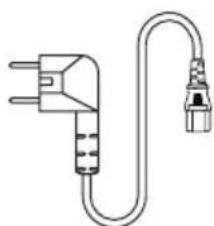
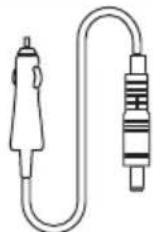
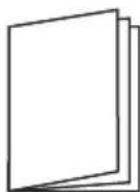
AC cablePower station Car charge cable User manual
YECTO NOCCTABJbAHA NITAHbA
Kojn Tn6aTepnje ce Kopncn?
JTNjym-rBoxke-phiatha6aTepuja (JnΦeIO4).
Koja onpema ce moKe NOBe3aTu Ha n3Ja3He nopToBe Hau3MeHnUHe cTpye?
I3na3 Han3MeHnue He Ctpyje MoKe Da Hanaja eneKtpnHy onpemy 3a DomahnHCTBO Mahe.
IpejnaKeMo Da notBpDnte Chary onpe Me npe ynoTpe6, KaKo 6nCTe 6nIn cnrypn da je 3bnp 3axTeBa 3a CHaROM yHyTap Ha3HaueHnx CneuNkauJa eNeKtpaHe.
KoNiKO dyro eNeKtpaHa MoKe da Hanaja moj ypehaj?
JIUД npiKa3yje npeocTano BpeMe DoK ce 6aTepuJa He Ncnpa3Hn, WTo je 3aCHOBaHO Ha BnJbNBOj CTBapHoJ n3Na3HOJ cHa3N (NoI npETnOCTaBkOM Cta6NJHnx n3Ja3HNx HnBOa)
Kolnko Bpemha je nOtpe6Ho 3a noTnyHO nyHebe eNeKTPaHe?
IuI npka3yje npeoctaIO Bpeme nyheBa I npka3yje TpeHyTHy CTbapHy yna3Hy CHary.
Kako da ouncTm eJeKTpaHy?
OuHNTe jeiHnCy CBOM, MeKOM u NCTOM KpNOM UIN MapaMnO.
Kako da 6e36eHNO cKJaIuNTM eJeKTpahy?
Nckbyuhte ekeptnuy CTanu y npxnte je ha cybom npobetpeHom mecty. He n3naxtte BODn nn Bucokoj Blaxnoctn. 3a dyrotpajHo cknadniTehe, npenopyjemy noTpe6y npon3Boda cbaKa 3 meceua. Ncnpa3HNTe 6atepjuy do 0% , a 3atm je y notnyoctn hanyhnte do 100% npe cknadniTeha.
Möxe li ce eeneKtpaHa yHeTu y abNoHe?
He, 6atepija npemaayje orpaHnuehe kanaunTea od 100 Bx.
OДРЖABA№
Ipenopyuye ce Kopnshene i cnkaaunTehe eektpaHe Ha TemnepaTyPi o2 30^ .Ipxnte eektpaHy daBe oBode, TOnlote n MetaJHnx deJIOba.
3a dnyrotpajno cknaiuntehe, npenopyyjemo ynotpe6y npon3bOda cBaKa 3 meceua. Ncnpa3HnTe 6atepnjy do 0% a 3aTm y notnyHOCTn HanyHnTe eJektpaHy do 100% npecknaHnTeHa.
PaH636eHocTn, He cKlaHHTne eJenKtpaHy Ha Tempepatyn n3Ha 45u nnncno -10L.
Ako je HnBO HanyheOCTMaHbN O1%, HanyHnte Do 60%. DyrotpajHo cKnaIiTeHe npi Beoma MaJoo CHa3N MoKe N3a3BaTu HENOBpArHO OwTeHebe hennja 6aTepeJIe n CkpaTITn padHn BEK pOn3Boda.
Ako je HnBO 6aTepnje npen3ak npe cknadniTeBa eeneKtpnue He TaHnue Ha Beoma dyro Bpeme, npo3BOD he yhny pexm ny6okor cnabaHa, a npo3BOD ce moxe Kopncntn camo hakoH To ce HanyH.
OДРицанБЕОДОДROBOPHOCTN
Ipon3BOD mma yrpaheHn cncTeM 3a ynpabbahe 6atepnjom (BMC), koJn kappaTepnue 3aHTnTa Kao 70 cy npenanybeHe, npekomepno npaxbHe, npekomepna cTpyja, kpatkn cnoj, BnCoka n Hncka Te mnpaTpya n a6hopmaHa KOMyHKauJa. Tokom ynotpe6 obor npon3Boda moze do 3aHTte n do npeknda n3na3a. KCTOPM nIIu TELIO Auceccopnec b.B. Hncy odroBOpHn 3a wTeTy HaHety cneunjanHoJ onpemn, kao 70 je meiunHcKa onpema, cepBepn, ycJe iHdInpeKTHor r6ntka cTpyje n3a3BaHOr cnuyajHm HectAHKOM cTpyje.
KCTOPM nnn TeuO Auueccopnec b.B HnCy 3aKOHsKn OndroBOpHn 3a 6nlo KoJy nnn CBe Hecpehye y3pOKOBaHe He3aKOHITOM yNOTpe6om, cAmODEMONTaxOM nnn 7TeTOM KoJy je HanpaBnO QOBek.
Ipe ynoTpe6e eJekTpaHe, MOIMMO BAC da npoHTate OBO ynyTCTBO 3a ynoTpe6y kaKo 6nCTe OCnrgpAIn TeMeJIbHO pa3ymEbaHe i npabUNHy ynoTpe6y. Hako ITO npoHTate ynyTCTBO 3a ynoTpe6y, cayBaJte ra 3a 6dyHcy noTpe6y. HenpabUanH pad moKe y3pOKOBaTN 036nBHe nOBpeDe ce6n nn dpyrMa, nn doBeCTn do oWTeHbA npOn3BODa n rY6NTka ImOBnHe. KaJa jeNHom KOpNCtnte eJekTpaHy, CmATpa Ce da cTe pa3ymeIn n pnxBaTnIN CBE yCNoB e n caDpxkaj. KopncnCiu 06ehabajy da he 6ntn odroBOPHN 3a CBOje noctynke n CBe noCneDuCe KoJe n3 Tora npOn3nla3e.
Hehmo 6ntu OndroBOpHn 3a 6nlo kakab r6ntak Koju Hactahe 36or Tora wTO KopncnU He npate OBO ynyTCTBO 3a ynotpe6y.
ΦUuH3jaba
Obaj ypehaj je y cknay ca deJom 15 OLn npabuna. Onpauja je noDnoxHa cnedeha yca ycnaBa:
(1)Obajypehaj moKda Hehe n3aBn utThe cmTHe.
(2)Obaj ypehaj mopa npxbaTn CBe npimbeHe cMeTbe, ykbyuyjhyc MeTbe Koje Mory y3pOKoBaTn HxeJIbeHn pad.
2.Поме He mIoMnФнkaIue KoJe HNe I3PnHTO ODo6pNla CToHa ODoROBOPHa 3a ycknaheHOCT Mory IOHnHTTN KOpNCnKOBO OBlaaHeBe da KopncTOnOpemy.
Haonomeha: Oba onpema je teTnpaHa n yTbpheHo je da je y cKaIaNy ca orpaHnuehima 3a dunrtanHn ypehaj KNaCe b, y cKnaNy ca denom 15 PUNPAHA. Oba orpaHnueBa cy dN3ajHnpaHa da o6e36epe pa3mHy 3aHTNY od wTeTHNX CMeTHbN y CTAMBeHOJ HCTanaJIN.
Oba onpema kopnctn m oMoje emntobatn eheprjny paadno fpekBeHcuiJe n, ako ce He nHctaInpa n He Kopncty cKlaNy ca yNytCTBIMa, Moje n3a3BaTn 7TeTHe CMeTbe pao KOMynkaunja. MeHyTM, He noctoJr rapanuJa da ce cmteHe heNojabTu y odpeHoJ nHCTaIauzijn. Ako OBA onpema n3a3INbA 7TeTHe CMeTbe paadno IIn TeNeBn3NJckom npjuemy, ITO ce moKe yTBPNTn NCKbYnuBaHem n YkByuBaHem onpeme, KopncnK ce NDCTnue da NOKUHa da NCnPABn CMeTbe jeqHom IIn Bnne o cnledehnx Mepa:
IpeycmepnTe nI npemecTne npjemHy aHTeH.
Pobehajte pa3mak n3Mehy onpeme n npjemHnka.
NobexnTe onpemy y tynHcy Ha ctpyjHom kony pa3nnHtOM oD OHOR ha koju je npukbyyen npjuemHK.
3a nomoh ce o6paTne npoDabuy nnnnckychom paNo/TBXHnUAPy.
Ypehaj je npoueHen da nCnybaba Onthe 3axte 3a n3naHbe paNooPekBeHTHM TaIacnMa. Oby onpemy Tpe6a HCTanipatn KOpNCHTn Ha MINHMaJIHOJ ydaheOcTOn o2 0m n3MeHy padNJatopa N Bawer TeNa.
VCEO u3jaba
Obaj ypehaj cndpnjdpnajnke/npnjemnke 6e3 nueheue kojn cy uy ckna dy ca PCC-obma n3y3etnx od nueheue 3a nHOBAunje, hayky n ekOHOMCKn pa3BoJ KaHaJe. Paad noDneKe cnedeha Dya ycnoBa:
ObaypehajMoXJaHeHn3a3BaTNcMeTHe.
Obaj ypehaj mopa da npnxbatn cbe cmtehe, ykbbyyjyn cmtehe koje mory n3a3batn HexebeHN paJypehaja.
Oby onpemy tpe6a uHCTaInpatu N KOpIcTmTu Ha MmHmAmHoJ ydaJIbeHOCTn o2 2M m3MeHy paJaTaTopa n Bawer ta.
Ie npceent annapen enct cOnhopme ayk LHP d'Inndcptne Laana aannnua6nc aykannnpaennc paia no ekemntc de nueheune.
J'eknnonTaHON eCT ayTopncce ayk deyK yCNoBc cyBaHTec:
(Anpapnne He nont npoynpe De 6poynnare, et (2) n'tynncateyp de n'annapeun dont auenr Toy6poynnare paOnoeuTpyKe cy6n, MeMe cn Ne 6poynnare ect cyccntnbE d'eh cOpnpometTpe neohcTuOHemH. yHe nctaHc MEHHMaIe de 20 um entpe Ne panaTeyp er Botpe oopnc.
3MIHHORO Ctpymy (Charge)
BxIDHe KInBleHnA
3MiHHoro Ctpymy (6ainnac)
600BTMaKc,3A
1200 Bt MaKc., 6 A
220-240B\~,50T/60T
USB-A1/A2
5V=2.4A, 12W maKc.
USB-C1/C2
5/9/12/15=3A,
20B = 5A ,100BTmaKc.
3MiHHORO ctpymy
PV CoHryHn Bxid
Cohnyn Bxid
200BTMaKc.,12\~20B 10A
niItpmMyetybca6atape812B,
3a 3aMOBcYBaHHm8A
ABTOMO6iIbHn
12.6B=10A, 126B
MaKC.
npucpii
12.6V=3A
DC5521 Bnxi
x2
BxiДЯ abTomO6IbHoi600 BT MaKcunMym.
3apdKn
NotyKhiCTb 3apAkn
3MHHORO Ctpymy
NotyXhIcTb
200BTMaKcunMym.
fOToeJIekTpnuHoi
CTaHcii / aBTOMo6inbHoI
3apdKn
IotyKhiCtB 3apAkn
600BTMaKcunMym.
AC+PV
- ABTomO6IbHn 3apAHy npncTpi i DC5521 MaIOtb cnIbHy noTyXhCtB, 126 Bt MaKc.
BATAPER
Tun Komipku
JIitI-3aIi3o-ΦocΦaTHa 6atapea (LiFePO4)
KHTTEBM uKn
3000 uKJIb
Tm3axncty
3axnCT BiD neperpiBy, 3axnCT BiD HN3bKnx TeMnepaTyp, 3axnCT BiD nepepo3pA dy, 3axnCT BiD nepe3apA dy, 3axnCT BiD nepeBaHTaKeHHy, 3axnCT BiD KOpOTKO 0 3AMKaHHy, 3axnCT BiD nepeBaHTaKeHHy nO CTpyMy
POBOYA TEMNEPATYPA
OntmalbHa po6oHa tempepatypa
20^ 30^
Diana3OH TemnepaTyp Ha Buxodi
-20°C~45°C
Diana3OH TemnepaTyp 3ap4y
0^ 45^
Temnepaotypa HABKOJIINHboro
-20°C~45°C (6axaHo 20°C~30°C)
2 ПРавида БEЗКИ
- He niDaaBaiTe eNeKtpocTaHciIO BnIbBy IkepeN TeNa, TaKx JaBOrOhb a6o o6irpiBaui.
- YHnKaIte BnJIbY Boa n a6o BucOkoBolorocTi.
3.He BnKOpNCToBnyTe eJekTpoCTaHciu B yMObax CnIbHOro eJekTpoCTaTuHoro a6o CunbHoromarHiTHoro nOJIy.
- Hi B ykomy pa3i He po36npaTte eJekTpoCTaHciO i He npokOnHte II roctpM npedmetom.
5.He 3amkaTe eNeKtpocTaHciIO npOTom a6o iHnIMMeTaNEBMn npedMeTaMn.
-
He hactynaiTe, He ciainTe i He 3aia3bTe Ha eIeKtpocHaio.
7.Пдчсвикористаннг eilektproctanii,6ydb nacka,cybopo doTpmyntecb po6ooyi tempeatypn, Bn3haeHOI B cboMy noci6Hnky KopncTyBaay.3aHaTO BnCoka TemnepaTpya Moke npn3BecTu Do 3aropHHa6o Habt b Bu6yxy akymylTopa.Якso TemnepaTpya 6yde 3aHaTO Hn3bKOIO, npodykTNBHicTh i notyHKHcTb eilektproctanii moKytb 6yTu cyTTeBO o6mxeHi.
-
He cTaBte Ha eNeKtpoCtHaunu BaxkI npEpmTn.
- He 3yynnHae Te BeHTnJrTOp CunIO.
10.ПдчсВИКОРИСТАнг He 3aIIuAaTe eNeKTPoCTaHciIO B HENpOBIrPIOBAHOMy a6O 3aIJIeHOMy cepeOBIuIi.
- Byb Iacka, yHnKaIte 3itKHeHb, naiHna eKeTpoCTaHii a6o CnBHO TpncHna eKeTPOCTaHii. Y pa3i cnilbHorO ydApy heraHOBuMKHiB eKeTPOXKNBHeHn. Pid qac TpaHCnOpTyBaHHa MiHo 3akpinIt b eKeTPOCTaHciU, 06 yHnKHyTu TpciHn Ta ydapIB.
- RaKuo eNeKTPOCTAHcIa BnnaAdKOBO Hamokla, noKnaIb II B 6e3neUHe i BiKpnte Micue i TpMaHTecr Ha BiDcTaH, nOKu BOHa He BucOxHe. IicJI BucXaHH He HamaTae TECB NKOpNCTOByBaTu eNeKTPOCTAHcIIO 3HOBy. YtunizyTe / nepepo6JnTe eNeKTPOCTAHcIIO HaleKHM YINOM.
- RaKo eJekTpoCTaHcIa 3arOpilac, 6yNb IaCKa, BnKOpNCTOByTe BiNObiDHi BorHeracHKn.
- RaKsHa eNeKtpocTaHcii E 6pyD, BnKOpncToByIe cyxu raHupKy, o6 ouNCTtIi.
- 36epiraTe eNeKtpocTaHciu B HeNoctynHomy dIte Ta Domaunix TBapnH Micu.
- 36epiraTe eJekTpoctauB cyxomy i npoBITpObaHomy micui.
- Y BONORmy cepeobnui pekomeHdyetbca 36epiraTne ENEKtpocTaHciO y BONor0axnciH cymci. RaKo BOda notpapanla BCEpeuHy Bnpo6y, He BNKOpNCTOByTe/BMKAaTe Ioro 3HOby.
- He pekomeHdyETbcBVKOpncToByBaTn eektpocTaHcIO 3 NOB'3aHIM 3 6e3neKoIO o6naHaHHm DnHeBikKaIHOi MeuHoi DonOMOrn, BKNIOUaOuN, aJe He O6MeKyIOuNCb, dXxaJIbHi anapatn MeunHoro KNaCy (niKapHa Bepci CPAP: 6e3pepeBHN N03NTNBHN TnCK y DnxAaHx WJaxx) Ta anapatn TuYHOI BeHTnlaqii IereHIB (ECMO, ektpakopnpabHa Mem6paHn Ha OKCureHia). EektpocTaHcIO MoKHa BHKOpncToByBaTn DnR JxNBneHHa DomauHix anapatrib CPAP, kKi He Notpe6bytB noCTiHORo npofoeciHoro MOHITOPINHy. 3ABKnD nOtpmMyTEcb peKomeHaui NiKapra Ta npokohcyIbTyIeCra 3 Bnpo6hIKOM 5Odo 6yDb-RAKNX O6MeKeHb y BHKOpncTaNHI pInCTpIo. Dnra 3aralbHoro MeuHoro 6bIaNahHH, 6ydN NaCA, 3BepHiTb Ybary Ha CTan XnuBHeHH, 0o6 nepekoHaTnC, 9O XnuBHeHH He 3aKiHcyTbcR.
- KonyeKtpocHaHia NIKHueHa Do XOJIOINbHnka, KOINBaHHN NOyXHOCTi XOJIOINbHnka MoKyTb np3BecTu DO ABTomaTHUHO BIMKHeHHA DxepeHa XINBHeHHa. PeKOMeHNyETbcra dna XOIOINbHnkiB, B AKNX 36epiraTObCra NiK, BaKUnHn a6o IHwi ciHHi peu, npn iNkIooHHi do DxKepeHa XINBHeHHBAKOpNCToByBaTu pexm "3aBXdYbIMKHeHO", 06 3a6e3neHTn 6e3nepePBHe XINBHeHHa (DInB. po3dIn 3, Bxixd 3MiHHOrO ctpymy).
BIDMOBA BID EJEKTPOCTAHI
JaKIO DO3BOJIAOTb yMOBn, O6OB'RA3KOBO NOBHICTO PO3PraITb aKymyIaTOp i BiHeciTB eJIeKTPOCTAHciIO do CneuaJIbHorO pYHKTy 360py 6aTapeNOK. Byd naCKa, nepeBiPe T B lHTepHeTi, 3NaHTu HAI6NIJKHn Do BaC.
3BepHb yBary:
He BnKndaIte eIekTpoctaHIO y 3BnuaHi BiXoAn a6o cmITcBi 6aKn! NotyKHi akymyIaTOPn cTaHOBnTb cepNo3Hy He6e3neKy, ksoix HnnpabunbHo yTuNi3yBaTu.
Ог��д порукту
1 CbitnoioDHe cBtIO
2 Khonka cbitnoiOHO OCBtneHn
3 PK-ДИСПЛЕн
4 Buxi aBtOMo6ilbHoro 3apAry 12B
5 BuxiD noCTiHoro cTpyMOn/OFF
6 DC5521 wTekep x2
7 BuxiHn npT USB-A x2
8 BuxiHn npT USB-C x2
9 KhoNka yBIMKHeHHa/BUMKHeHHa
10 BuxiHa po3etka 3miHHoro cTpyMy x2
11 KhoNka BuxOdy 3MiHHoro ctpymy
12 Bxinda po3etka 3miHHoro ctpymy
13 BxidIycoHryHO/abTOMo6IbHOI 3apn
PK-EEKPAH
14 3aIIuok 3apny 6atapei y BIDcOTkax
15 3aIIuKOBn Yac 3apAry/ po3pIy
16 INdkaTOp nepeBaHTaKeHHA
17 Bxida notyXHictb
18 BuxiHa notyXHiCTb
19KoI NOMJIKN:INB. PO3dIN 5 IJRA OTPIMaHHA DOaTKOBOI IHΦopMaui
20 IHHKATOP BXOy 3MiHHORO CTpyMy
21 INdikatop BnXOy 3MiHHoro CTpyMy
22 INdkaTOp 3'eHaHHaBluetooth
23 CtaH 3'eHaHHaWi-Fi
24 ABTomO6iNbHa 3aprJaKa
25Поперджени по Високу TemпepaТуру
26Поперджени по
нзьку TempepaTypY
27 CtaH BeHTnIaTopa
28ΦOToeNeKTpnuHa 3apJaKa
29 INdikatop BnxOy USB
30 INdikatop npKypobaa
BVKOPNUCTAHH
YbIMKHeHH Ta BUMKHeHH npuctpo
HaTnCHiB rONOBHm BmMkauch XNBHeHH 9, uO6 yBIMKHyTN npncptpi, nCJRA YORo 3acBITntbce ekpaH i 3arOpNTbcra rONOBHm iNDnKaTOP XNBHeHH.
JaKuo ue Bnpi6 He BnKOpNCTOByETbC npOTaROM 5 XBUNH, PK-dncnne aBtOMaTuHO rache. Pn iDkNIOUeHHI Ta BiDkNIOUeHHI cboRo npucTpoIO BiD MepeKi, akymyJrTopa, aBtOMo6iNbHorO 3apAHorO npcTpoIO a60 KNoHa, PK-dncnne aBtOMaTuHO 3acBiuyETbcra. Ioo6 yBIMKHyTN a60 BmKHyTN PK-dncnne, HATNCHTb roOBHN BmNKaay XNBHeHHa.
HaTnCHiB iYtpmMyTe rOIOBHN BUMKau XNBLeHHA, 0o6 BUMKHyTN eNeKTPOCTaHIO.
IiJ qac HopmaJIbHOi pO60Tu (KOnn notyXHcTb Bnue 5%), qac ouikyBaHHe nekTpoCTaHci 3a 3AMOBuyBaHHm CTahOBHTb 2 roDHH. Jkso BuxiHn nepemka 3miHoro ctpmy He yBIMKHeHO i npotrrom 2 rOHN He Bi6yBaCTCBs 3apJxKaHHa 6o po3pJxKaHH, npncptpi ABTomATuHO BIMKHeTBc. Yac ouikyBaHH MoXHa BCTaHOBTu BdoAtKy. KOnn 3apJd akymlaTopa 3Hn3ntbcra do 5% a6o HxJue, npncptpi ABtomATuHO nepeJe b pexim Hn3bKOro eheproCnoXkBaHH. y pa3i BiDCyTHocTI iN3apJDKn a6o po3pJKn npncptpi BiDperyIIOe qac ouikyBaHH BIDNOIBHO do pIBH 3apJdy i ABTomATuHO BIMKHeTBc.
Iiudac3BnuaHoi pO6OTn, uo6 BmKHyTu fYHKUIO ABOMATuHOROBUMKHeHHaHTNCITb i yTpmyTe KhoNky CbiTNOJIOHOrO IHdNKAtOpA, npu cboMy Ha ekpaHIOue He 6nMaTu NIKTORpama akymyTAopa .NoBTOPHe TpuBaJe HAtNcKaHHaYBMKHepeXMMABOTMaTuHOROBUMKHeHHa nIKTORpama akymyTAopa nepeCTaHe 6nMaTu. 3BepHiTy bYbary, 0o aBTOMaTuHHe BUMKHeHH npn3HaueHe dna 3axNCTy akymyTAopa BiD Hn3bKO rO 3apAry, BUMKHeHH zuoro napaMeTaMoKe npn3BeCTn do ckopoueHHaTeMHy cnjx6n akymyTAopa, 6yNbJaCKa, BUKOPNCObyute cei npametp 3 o6epeXhictu.
CbitnoioaHn lixtapi
KopoTko HaTnCHiB KHONKY CbITIOIOJHO rIcBiCyBaHHra 2,io6 nepeMkATncr mix qoTnpMa pIBHmN RCKpABOCTi: H3bKnPiBeHb, cpeHiPiBeHb, BnCOKn PiBeHb, SOS i BmKHeHHa.
PpMmItKa: RaKuo Bam notpi6HOBiDperyIIOBaTu qactOTy/actOTy 3MiHHoro cTpyMy, CNoaATky nepekoHaTeCra, 0o BXiD 3MinHoro cTpyMy BicTyHi. Notim HATnCHiB i YTPmUyTe KONkY BHXOy 3MinHoro cTpyMy npotrrom 2 cekyHd. RaKuo 3MiHa 6yna ycniuHO, nIKTORpama BHXOy 3MinHoro cTpyMy Ha dncnnei 6nIMHe 3 paN.
BuxiA noctiHoro ctpmy 12 B
Iicna yBIMKHeHHra rONOBHORo BUMNkaa JxNBHeHH HaTnCHiB nepemNKau XnBHeHH 12 B noCTiINHOrO CTpyMy 5,IO6 yBIMKHyTN BxIXHn NOPt NOCTiINHOrO CTpyMy 4 Ta 6.
- 506 BUMKHyTn Ioro, 3HOBy HATNCiThb nepemikaBuxiDHorO KINBHeHHa 12 B noCTiHoro cTpymy.
Buxia USB
USB-BHXOIN 7 Ta 8 BMUKaHTbcra 3a 3aMOBcYBaHHm nICJyYBMKHeHH eNEKtpoCTaHci.
Buxid 3minHoro ctpymy
- IpekeHOaBuncB, 0O OCHOBHe JINBJIeHHy YBIIMKHeHO, KOpOTKO HaTNCiTB NepEMNKaU XINJIeHHA 3MiHHoro CTPMy 11, 0o6 yBIMKHHTu BxIg 3MiHHoro CTPMy, 3HOBy KOpOTKO HATNCiTB NepEMNKaU XINJIeHHA, 0o6 BUMKHyTN IOrO.
3a 3amOByBaHHaC ac OikyBaHH BnIXiDHoro npTy 3mIHoro ctpMy cTaHOBntb 1 roHy. UroHny 6e3 HabaHTaxeHH Ha BnIXiDnI npT 3mIHoro ctpMy cboRo BnpOby BnIXiHa NotyKHiCTb 3mIHoro ctpMy 6yde ABTomTuHOBnMKHeHa. 06 BnMKHyTN ABTomTuHHE BnMKHeHHBnXOdy 3mIHoro ctpMy, DOBro yTpmyte CbitIOJHO KNOKy 2, DOKn Ha ekpaHI He noUhe 6nMaTn nIKTorpama akymlyaTopa .Lc KOpncHO IJI npNCtpoIB 3mIHoro ctpMy, Aki BnKOpNCTOBYOTb notyKHiCTb MeHwe 10 Bt, a TakokdIg o6naDHaHH, 10 npauoe B imNybcHOMy peKmi.
KoJIi BIXiD 3MiHHOrO CTpyM He BnKOpNCTOByETbCra, BmMkaIe NIO dJI eKOHOMII eNEKTpoeHepri.
3APЯДKA ELEKTKPOCTAHцii
3apraKa 3minHoro ctpymy
Припапому BBIMKHeHHi eJIeKTPoCTaHciI aKTHBnI pexm 3apJxHaHHa 3a 3amOByBaHHaM.Ви можete KoHTpoJIbOBatu WbUdkicTb 3apJxHaHHa 3a dONOMTOIOdoTaKy (dVB. DetalbHiwe b po3diJI 4).
BnKopncToBynte Ka6enb 3mHHO CTpyMy, 0o BXOHTb Do KOMnIeKTy, 3 BxIHHO PO3eTKIO 3mHHoro CTPmy 12
- y pexnmi wbnkoi 3aprakn nobha 3apraka eJeKtpoCTaHui 3aIma€ 6n3bko 1,5 roDHH.
Ppumitka: Byd nacka, BnKOpNCTOByIe dny 3apJxHaHNe Inne Ka6enb 3MiHHoro cTpyM y 3 KOMnIeKty noctabKn. 3apAnHn Ka6enb 3miHHoro cTpyM cn iPiKnIOuATn 6e3nocepeHbO do NaCTIHoi po3eTK. BnKOpNCTaHH n Hux 3apJxHnx Ka6enib 3MiHHoro cTpyM He NOKpNBaETbcra HaIoO rapaHTieIO.
ΦOToeNeKTpnuHa 3aprKa
ДяPV-3aprKn BnKOpntOByeTbcBxid CoHryHOro/abTomO6ijbHOro 3aprNy13
Byb Iaca, DoTpmyItecb IHCTpyKu3 iNkUoyenHcOhyHOi naHeI.
JaKIO Bn BVNKOpNCTOByTe COHJHy naHeIb IHwOro 6peHny - nepei NIKIOUeHHaM COHauHOI naHJI nepeBipTe, H BiNobIaIe II BxIDHa HAnpyra CneuΦikaIaM eJeKTpOCTaHcII (MaKc. 24 B), Uo6 yHnKHTn NOkOJKeHHa.
Bxidn po3'em - DC7909. Kaio Bam noTpi6eH nepexiHk 3 MC4 Ha DC7909, 6yNb nacka, npud6aIte Ioro camoctiHo.
AbTomo6iNbHa 3apAka
EeKtpocTaHcIO MoXHa 3apJxKATn Upe3 COHuaHn/ABTOMO6IbHn 3apJHn Bxid 13 3a DonomoroIO 3apJHOrO Ka6JIIO DC7909 Ta po3eTkn 12B y BaWOMy ABTOMO6Ii. 3apJxKaTI CTAHcIO CnID NICr TORo, k ABTOMO6Inb 3abeTeBCra, uO6 yHNKHHTn HAdMIPHO rpo3pJxKeHHA kMyJrTopa.
Функця EPS
Cen Bnpi6 niTpmye fynKciu EPS (abapiHoro XNBHeHH).Pn BNkopncTaHHi Bnpo6y B pexmip Pass-Through (To6To eIeKtpocTAnCi OndHouacHO 3apJxkaetbca i Bndae NotyXhictb), kuoB mepeki paNTOBO 3HnKHe XNBLeHH, eIeKtpocTAnCi ABTomatNtuHO nepeKnIOHTbcra B pexm XNBHeHHa Bid akymylrTopa npotarom 10 minicekynd.
3ayBaXTe:
UyHKJHn He nItpmUe nepemKanHn 0 Mc. Byb naCa, He nIKnOuaTe no npucTpoB, kni notpe6yIOb cnpaBXbOro DbX (JkepeNa 6e3nepe6iHoro XNBHeHH), HapnKlaad, cepBepi DaHnx i po6oHx cTaHcui. RaIO Bn He BnEBHeHi, npoeiB KInbKa TectIB, o6 nepekoHaTncs, oio Bn Cymichn 3 BaAMm O6naHaHHam.
TEXHOLOTIJIIBNUEHHNOTYXHOCTI
PowerBoost Maé ΦyHKZIO DnHAMiHOro peryIIOBaHHaHApYr, Jka iHTeKeKTyaIbHO 3NHXyE HAnpyry, 3a6e3neUoyu npu cboMy Heo6xIDHm CTpym. QaKTNUHO ue O3Naue, 10 6iNbSiCTb BaIuXn npuIadIM MoKyTb PpaOIBaTn, 3aIIuSAOUCb y MeKax 6e3neUHO BVIXHOI NOTyXHOCtI eNEKTPoCTaHcii.
PnKnaI:
Bx ouyete niknouhtn Kn'atunbHKn notyxhicto 700 Bt do ekeTpoctaHcii noTyxhicto 600 Bt.
Pi yac ybmKHeHH npuady B mepeky aBTomTuHNo AKTNByc8c fynkciia PowerBoost, kA tpoxn
3HnxjE BVxidHy Happy,doKu qaiHnK He 6yde eefKTUBHO npauioBatn Ha pIBHi 600 Bt. B pezylbTaTi
caHnk MoKe Kn'ATHTN Bodny NobInbHiwe, hIX 3a3Bnua, ane BCE ue IOCTaTHbo WbnIdko, 0o6
BVKOHyBaTn Bci iHwi fynkui jk 3a3Bnua.
PowerBoostdo3B0JAE6e3neuHO nID'EDHaTN uHPOKNI cNEKTP npnlaIB,aki iHaKHe Bn He 3MOrIi 6 niD'EDHaTN B3arani.
PowerBoost haiefekeTbHni nI yBnpo6IB 3 Harpibayamu Ta DBNrhyAmn. BiH ne iJxOaNTb dIy DeAKNX eNEKtpoPnpunadIB, kI MaIOb 3axncT BiD nepenadIB HanpyrN (HaNPKnaD, npeuz3iHi npunadN).
4 IHCTPYKciI IO PPOrPAMN
3ABAHTAXTE OODATOK
3HaNdIb "Smart Life" B MaRa3HHi DOnaTkIB, 0o6 3aBaHTaXnTu Ta BCTaHOBnTu, aOo BiDcKaHynte QR-KoI, 0o6 3aBaHTaXnTu Ta BCTaHOBnTu.
CTbopiTb 06nikoBni 3aInc a6o npOIOBkyIte Rk rictb.

ПIDКЛIOЧЕHЯ BAJOI ELEKTKPOCTAHцI
Ppumitka: npepwo Ho hanaTuBaHHn oTpi6He niKluueHHn do IHTepHeTy uepe3 Wi-Fi a60 MO6ilbHy TOnkY Doctyny.
- YbIMKHiB eJektpocTaHciio. BOHa aBTOMaTHUHO HaCnlae CnHrAn cNoIyHeHH.
- Bn6epitb Doatnpucptpi y roOBHomy iHTepeeyi nporpamn.
- YbIMKhitbdo3BnHa doctyn Do Bluetooth i do3Bin Ha doctyn Do Micue3haxoJxehn Ta ybIMKhitb Bluetooth BiINOBiIDHO do IHCTpykuiydoataKy.
- Bn6epiTb XP2W600, KOJI NBIH 3'BAuTBcR y CnCKy.
- BBeiNb npoB baworo notouHoro Wi-Fi 3'eHaHHa.
KuO y Baowomy perioHi BiccyTHa Mepexa Wi-Fi, BN MoKeTe CTBOpNTn MO6InbHy TOUY DOCTyNy B HanaWTyBaHHx BAwOrO cMapTfoHa. IJra UboRo notpi6He MO6InbHe iHTepHET-3'cDHaHH. Iicna HanaWTyBaHHr MO6InbHOI TOUKN DOCTyNy BVeDiMbIM'a napoNb TOUKN DOCTyNy BpyHy.
Kaio Ha dncnnei eektpoctau 3'BBtbc3HaOKWi-Fi, 3'eHaHH6yde ycniHMM.
Picna noaTKOBORO cnoIyehn3 Wi-Fi dOaTOK moXHa BnKOpNCTOBvBaTu Nnue 3a DOnOMoroIO Bluetooth-3'edHnn6e3 Heo6xIDHOCTi nIKNIOUeHHn Do MEPexi Wi-Fi.
Bn Moxete cKHyTu 3'eHaHHa 3doaTkom eJeKTpoCTaHci,HaTNCyBUn KKHONky CbitnoiOHOI INkKaTopa 2, TaK BuxiAbTOMo6InbHoro 3apAny 12B5.3HaQOK Wi-Fi noUHe 6JImMaTn, IIO CBiDHTb npo ycniuHe cKnDaHHa.
IPEPJIATNA KEPYBATN EJEKTPOCTAHICIO YEPE3 DOATOK
Длг OTриманнадетаьноинфорmaцii npo Bci Функцдодау,бydь пасka,BiДыдайт haш Be6-caIT xtorm.eu/manuals/xp2w600
Ha PK-tnnei BiO6paKaTbCyaac, 0o 3aIINUBc I OPO3pAkn aKymyIaTopa, kN 6a3yETbcra Ha BnIMi KaTnHi BxHIn NoTyXHOCTi (3a yMOBn Cta6inbHoro pIBH BAxIHoi NOTyXHOCTi)
Ckijbkyacynoptpi6HOnnobHOJnapAekneEneKtpocHaui?
Ha PK-dncnnei Biio6paXaetbcaac 3apxHnH, 03aunmbc, i nOTouHa aKTnua H cnoXnBaHa notyKHiTb.
YK nouchntn eNeKtpocctaio?
OuHuaTe npncptpi cyxoo, M'koio i uhcTO raHupKOIO a60 TkaHHoK.
A63neuho 36epiraTu eKeTpoctaHcio?
BmKHTeEneKTpoCTaHcIIO I 36epiraTe II B cyxomy I npoBITpOBAHOMy Micci. He iDaaBte BnInBy BoOn a60 BucOKoi BOlorocti. Ira TpuBaNoRo 36epirAHnM peKomeHdyEmo BNkOpNCTOByBatN BuPi6 KoxHi 3 MicaJI.
Ipeed 36epirahnma p03piaTb akymyIaTOp do 0% , a notim nobHicTIO 3apraIITb Ioro do 100%
Yn moXHa 6paTne enekTpocTaHcIO Ha 6Op TJIraka?
Hi, 6atape nepeBnue limt emhoCTi B 100 B-rod.
OБСЛУROTOВАНHA
pekomehnyetbcn BkopncTOBbATn a6o 36epiratn eektpoctaHIO npu TemnpaTypi HABKONHbOcpeboNca 20 30^ .TpmaTe eektpoctaHIO ndaI BiD BOIN, Tena Ta metaeBx uactNH.
IJa TpBbAIOrO 36epiraHHMa peKomeHdyEMo BnKOpNCTOByBaTn Bnpi6 KoJHi 3 MICAuI. IpePe 36epiraHHaP03paIb akMyIaTOp do 0% a NotIM NOBHcTIO 3apraITb cTaHciIO do 100%
3 MeToIO 6e3neKn He 36epiraIte eIekTpoCTaHcIIO npi TeMpepaTypi Bnue 45^0 HnXkue-10°C.
JaKIO pIBeHb 3apAHy HnXyue 1%, 6yDb IaCKa, 3apAITb Do 60%. TpNBane 36epiraHHa Ha Dyke Hn3bKiI NOTyXHOCTi MoKe npN3BecTn Do He3BOPoTHOro NOnkOJKeHHa eJeMeENTIB aKymyIaTopa i CkOpOTHTI TepMIn CnyK6n Bnpo6y.
KIO pIBeHb 3apAkyakymyIaTopa 3aHaTTo Hn3bKn nepeD TUM, k36epiratN eJektpocTaHIO npOTROM TpNBALOrO yacy, Bnpi6 npeEneB peXIM rIn60kOrO cHy, i Noro moKHa 6yde BIKOPNCTOBYBaTN NIIe nicra 3apAxdKaHHa (KpaPnnHHoro).
BIDMOBA BID BIDIOBIDAJIbHOCTI
Bnpi6 Mae B6ydoBaHy cnCTemy KepyBaHHa akymylTopom (BMS), kka Mae taKi yHKci 3axNcty, knepezapaid, nepepOzprad, naMipHn CTpym, KopOTke 3amKHaHH, BUCOKa Ta Hn3bKa TempepaTpa, a TAKoJ HeHOpMaIbHn 3B'30K. Pid qac BnKOpncTaHHa CbOrO BnpOby MoKe CnpaQOBaTI 3axNCT, 10 npu3BeDe do nepePbAHn BxixIDHO rCnHany. 3a shKOdy, 3anODiary CyceiaIbHOMy 0bIaNHaHHU, HApriKnaI, MeDnuHOMy 0bIaNHaHHU, cepBepam, Upe3 He nprMy BtpaTy notyXHoCTi, cnpuHHeNy BnIaNkOBIM BiIckIIOueHHa XNBLeHHa, Xtorm a6o Telco Accessories B.V. He Hecytb BiIIOBdaJIbHocTi.
Xtorm a6o Telco Accessories B.V. He HeCyTb IOpuDnUHOi BiINOBiIaNbHocTi 3a 6ydb-aki HeuaChi BnpaIKn, cnpuHHeHi He3aKoHHm BnKOpNCTaHHM, camOCTiHm demOHTaxem a6o NowkoJKeHHM, cnpuHHeHM IIOdHIO.
Ipeed BnKOpNCTAHHm eJekTpoCTaHcii, 6ydNb IacKa, npOuHTaTe cei noCi6HnK KopnCTyBaHa, 3ab6e3neuHTn NobHe po3ymHH i npabInbHe BnKOpNCTAHH. IicI npOuHTaHH noci6HnKa KopnCTyBaHa, 6ydNb IacKa, 36epexitb Ioro dIy IoanbIooBnKOpNCTAHH. HnPaBnBHa ekCnlyataiMa oKe np3BeCTn Do cepno3Hx TpaBM dIy Bac a6o IHnx IIOde, a TaKoJdo N0WKoJXeHH BnPo6y Ta BtpaTn MaHa. POnHauOn KOpNCTyBaTnc EJeKTPoCTaHciEIO, BV BBaxaTe, 3pO3ymiIN i npinHraNN Bci yMOBn Ta 3Mict cboR O noci6HnKa. KopnCTyBaCi 306OB'ayIObCe HecTN BiDnOBdaIbHicTb 3a CBOI dII Ta Bci HaCNIIDKN, 30 BuNHkaOTb y 3B'3KY 3 HIMN. Mn He HecEMo BiDnOBdaIbHoCTi 3a 6yd-b-Aki 36NTKN, 30 BuNHKnB Pe3yIbTaTi HeDoTpImaHH KOpNCTyBaAMn cBoRo noci6HnKa KopnCTyBaHa.
3aBA FCC
Ley npicptpi BIDNOBIAe BIMoram qactHn 15 npabn FCC. Eckpnyataia MoKInBa 3a DOpTmuHaHa HAcTyHnx DBox yMOB:
(1) Léu npicpii He NOBHeN CTBOPoBaTn WkIDINBxpeeWkoD.
(2) Lepnptpi nOBHHBnBtpmByaTb-aki nepekoD, BkIOuOoN pekoD, kMOxTyb cnpunHmTu he6axaHy po60ty.
2.3mHn a6o MoNphiKaui, He CxBaIeHi B AHI fOpMi cTOPOHO, BiIOBiaJbHOIO 3a dOTpMaHHB BMOR, MOKyTb npu3BeCTn Do BtpaTN KopNCtByaue Hnpaba Ha EKcIIyatauio 6naHaHH.
PpIMtKa:Le 6nlaHaHnHb 6yI npoteoBaHO I Bn3HaHO TaKIM,IO BiNobiJa e 6mExeHHaM IaI npCpOxBn pncTpoB kNaCy B BiNobiIDNo do qacTHnH 15 PpaBn FCC. Li 6mExeHH np3HaueHi dna 3a6e3neHHe HaneKHO 3axuCTy BiD uKidnBnx nepeWkoJ y KHTLOBnX npMIiSeHHx.
Ye oBnHaHn BnKOpNCTOBy e MoKe BnPOMInHOBAt npiaoyactoTHy ehepi 1, AaIO BOHO BCTaHOBneHe i BnKOpNCTOByeTc3 nopyuHn m HcTpykui, MoKe CTbOPIOBaTn WkIDnBi nepeWKoDi nIra paio38'3ky. OndaH HeMaE JODnHex rapaHTi, IIO nepeWKoHn He BnHKHyb y KONKPeTHi yctAHoCi. Ako 0e oBnHaHn CnpunHRe WkIDnBi nepeWKoDi nIra pao- a6o TeneB3iHorO npinyomy, 10 MOxHa Bn3HaUnTI, BmKHyBw Ta yBIMKHyBwn OblaHaHn, KopncTyBauebi peKOMeHdyETbcr Cpno6yBaTu ycHyTu nepeWKoDn ONDM a6o KINbKOMa 3 HabedeHN HIXue cnoc6ib:
- IpeepoieHTyTe a6o npemicTiB npuMaIbHy aHTeHy.
36inbIte BiDCTaHb MIX O6naHnHaHHm i npMauem.
Piiknouitb 6bnHaHHo pO3eKn bNaHc03i, BiMHHOMy BiD TORO,do koroPiKlnueHo npmMa.
3BepHtbcra 3a donomoroio do dunepa a6o dcBdyeHo ro paio/Teemaictpa.
Pnncpi 6yno ouiHeno Ha BiIDNobIDHicTB 3aIaNbHM BIMoRAM 5OIO BINNBY paIOUacTtHO BINpOMIHOBAHN, 0e OJIaHaHHcII BCTaHOBNIbATn Ta EKcNpyaTyBaTn, DOTPMUYOCnb MINaIbHOI BiCTaHI 20 CM MIX BNpOMIHOBaHem Ta BaHm TlOM.
3a8baISEO
Lepnptpi niptnbpeabau(n)/pniMau(n), 0ne He notpe6ytoB liueh3i, kki BiinobiaToB BmOram RSS MinictepcBa iHHoAci, Haykn Ta eKOHOMUHO po3BNTky KaHdi, 0ne He notpe6ytoB liueh3ii.) EkCnnyaatai npncpto moxlnba 3a doTpmnaHn HacTyNHnx DBOX yMOB:
Cen npncpti He noBunEn CTBOPOBaTn nepekoD.
Cen npctpi noBnHeH BntpmyBaTn 6yI nepekoDn, BKIOaOuN nepekoDn, kI MOKytb cnpunHHTn He6axaHy po60ty npctpoio.
Lc06nHaHnCnD BCTaHOBnBaTu Ta ekCnIyAtyBaTu 3 DoTPMaHHM MiImaJIbHOi BiCTaHI 20 CM mix paiaTopoMaT a TINOM.
Kak 6e3oNaCHO xpaHnTb 3NeKTKpoCTaHcIIO?
BbIKIOHTe 3JIeKTPoCTaHcIIO HxpaHITe ee B cyXOM I npOBetpmbaEMOM MecTe. He noDBepraTe BO3dEICTBIO BOdbI INN BbICOKO BnAIXHOCTN. Ppi dINTEbHOM xpaHeHH peKOMHdyETc NcNOb3OBaTb yCTPOICTBO KaKDbIe 3 MeCAu. Ipeed XpaHeHem pa3PAnTe aKKymyIaTOp Do 0% , a 3aTeM NOHOCbIO 3apJNTe erO do 100%
Moxho nn 6paTb 3neKtpocTaHcNIO Ha 6oT camOJeTob?
Het, 6aTape npebbwaetnpedemKocnB 100 Bt.
TEXHnueCKOE OBCJyXnBAHne
pekomeHdyetca nCNoB3OBaTb IIN XpaHnTB 3JektpoCTaHcIIO npi Tempepatye OKpykaiouei cpebl 20~30°C. JepKnte 3JektpoCTaHcIIO BdaJI N OT BObl, TENla IMetaJIInuecknx DeTaJIeJ.
PnI dInTeJbHOM xpaHeHn peKomeHdyetcN cNoJIb3OBaTb yCTPOCTBO KaJkbIe 3 Meca. Ipeed XpaHeHem pa3pndte aKKyMylrTop do 0% , a 3aTe mONHOCTbIO 3apdnte 3JeKTPOCTaHIO do 100%
B ceJx 6e3oNaChOCTn He xpaHnTe 3neKtpocTaHcIIO npi TeMpepaType Bblwe 45^ nHnxE -10^
Ecn npobeh 3apra Hnke 1%, 3aprnte akkymyIaTOp do 60%. DInTeHoe xpaHHe npi Oueh Hn3KoMooHocTN MoKeT npVBecTN K Heo6paTMOMy NOBpeXeHIO 3JeMeHTOB 6aTapeN IN COKpATNb cPOK cnjX6bl n3denn.
ecnn nepei dIInTeBnBIM xpaHeHnem 3JIeKtpocTaHcN ypoBeHb 3apra aKKymyJrTopa CNIuKOM Hn3Kn, yCTpoiCTBO nepeiDeT B pexim rny6okoro cHa, n erO moXHO 6yJeT NcNoB3OBaTb TOnbKO nocne (ctpyHo) 3apAkn.
OTKA3 OT OTBETCTBEHHOCTN
I3dennie nmeet BCTpoehnyo cnctemy ynpableny aKKymyTAPOm (BMS), KOtopa o6ecneuBAeT 3aunTy OT nepe3apra, nepepa3pda, neperpy3KN IIO TOKU, KOPOTKORO 3aMbikAHN, BbICOKO IN Hn3KOI TEMNEPAtpb, a TAKKe aHOMaJIbHOI CB3N. Bo BpEm NaONJb3OBaHIn DaHHoro IN3dEINMOKET cpa60TaTb 3aunTa, YTO npBeDeT K npepbBaHIn BO bIXODHOro CnIHana. 3a yueP6, npuHNHeHbI CNeuaJIbHOMy o6OpyIDoBaHInO, TaKOMy KaK MeiUnHcKoe o6OpyIDoBaHne, cepBepbl, B pe3yIbTaTe KocBeHHoI NOteRn 3Heprn, Bbl3BaHHoI cnUaHbIM OTKIQUeHHeM NITaHIn, KomnaHIn Xtorm nnn Telco Accessories B.V. OTBETCTBeHHOCTH Ne He Hecyt.
KomnaHn Xtorm nIu Telco Accessories B.V He Hecyt IOpuIuueckoN OTBETCTBEHHOCHTa IIO6bIe HeCuaCTHbIe ClyuA, Bbl3BaHHbIe He3aKOHbIM NcPOnb3OBaHnEM, CaMOCTOReTbHbIM DeMOHTaXem IJI INTEXHOReHHbIM NOBpeJdeHnAMy.
Ipepe nCnoJb3OBaHnem 3JeKTPoCTaHcHnn npOHTte daHHoe pyKOBOCTBO nOJIb3OBaTeJIy, yTO6bl oBecneuHTb nOIIHOe noHmHaHne i npABInbHOe nCNoJb3OBaHne. IocNe npOHTeHn pyKOBOCTBa nOJIb3OBaTeJIa coXpAHnte erO dJaIbHeHWeRo nCNoJb3OBaHn. HenpaBInbHa JkCNlyaTaUaTn moKe TcTaTb npUHNoI cepBe3HbIX TpaBM dJaIbNdpYrNX IIODei, a TaKxE npINBeCTN K NOBpeJdeHIO u3dEJIINu I NOTepe IMyUeCTBa.CuNTaeTcA, YTO nOCNe nCNoJb3OBaHn 3JeKTPoCTaHcHn Bbl NOnJINu I pRnJIIN BCE ee ycNOBnI cOePxAHne. POnJb3OBaTeJIu O63yIOTc HcTt OTBeTCTBeHHOCTb 3a CBOI DeIcTBnI INCe BBITEkaIOUme I3 Hnx NocLeIDCTBn. Mbl He Hecem OTBeTCTBeHHOCTn 3a IIO6bIe y6bITKN, BO3NHKUnE B pe3yNbTaTe HecO6LIODeHn NOpJb3OBaTeJIaMn DaHHORo pyKOBOCTBa NO 3KcNlyaTaUIN.
3aBHeHne FCC
3To yctpoiCTBO COOTBeTCTByET 15 npabn FCC. 3Kcnnyataaun ocuetae Tc np co6nloehn cneyduixn Dbyx ycnoBn:
(1) 3To yCTpoNCTBO He DoJHKHO Co3JaBaTb BpeHbIX NOMEX.
(2)Данhoe yctpoicntBOdoJOLKHO BOCpHIMaTb JIO6bIe NOMEXN, BKIOUaYam NOMEXN, KOtOpBie MOry T bI3BaTb HeKeJaTeNbHyO pa60Ty.
2.Измehнглmoифнuaи, He oobpeHHbIe CTopoHoi, OTBeTCTBHeHoi 3a co6knOJHne Tpe6oBaHn, Moryt IINuNTb NOlb3OBaTeNpabaHa EKcnnyatauio O6opydoBaHn.
PpmeHHe: DnHoe o6opDobAHne 6bIIO npoteCtupoBaHO n np3HaHO COOTBeTCTBYUOMM OPAHueHnM dNzHPOBbIX yCTpoiCTB KlaCa B CooTBeTcBn C acTbIO 15 npaBn FCC. 3TN orpaHueHn PpeHa3HaueHb I nO bcneHn pa3ymHO 3aunbTo OT BpeHbIX NOMex npu YcTaHOBKe B KJIbIX NOMEeHnX.
DaHHe O6OpDyOBaHne rHeepuyet m MoKET n3nyaTb paNoocactOTHyO 3HeprnIO u,ecn OHO yCTaHOBNeH N cNoIb3yeTc H Be COOTBeTcBm C INCTpykUmaM, MoKET co3daBaTb NOMEx nIra paNOCB3N. OHaKO Het NkaKoI rapaHTM, YTO NOMEXn He BO3HNKHY B KOHKpeTHOH yCTaHOBKe. Ecn DaHHe O6OpDyOBaHne co3dae TBeNble NOMEx nIra paNO- IIN TEeBN3IOHOro pInema, YTO MOXHO ONPeDeJIbTb, BbIKIOuHb IN BKIOUHb OBopDyOBaHne, NOb3ObaTeLIO peKOMeHdyeTc NOnbTaTbCry yCTpaHtB NOMEXn ODNIM INHECKOJIbKIMN IN CNEduOuNX CNOC6OB:
- Ipeopnentpynte nn npemecntte npemhnyo aHTHhy.
YBeIuIyTe paCtOarHne MeJxuO6OpDObaHnEM nPmEmHKOM.
IopknouHTe obopyoBaHne K po3eK B ceni,OTnHNO TToi, KOtopoN pOKnIOueH pecNBep.
O6paTntecb 3a nmoouk K dunepy nn onbithomy cneuaancty no paiao/TB.
UcTpoCTBO 6bIIO OueHEno Ha COOTBeTCTBnE 06uIM Tpe6OBaHnM K Bo3eJCTBnIO paIOnOaCToTHOro n3nyHn. DaHHe o6OpydoBaHne CNeNyET UcTaHaBnBaTb N kCkNpyAtnpoBaTb Ha pacCTOAHn He Mehee 20 CM MmKdy N3nyaTeenm N BaWm Teom.
3aBHeI SEO
3To yctpoiCTBO coepknt nepaatunK(n)/npemHnK(n),OCbO6oxdeHHbIe OT nUcEHN, KOTOpBie COOTBeTCTBYOT NlueH3NIOHHbIM RSS(aM) MmHnCTepCTBa HHOBAuN, HayKn EkoHomueckoro paBHTNa KaHaDbI. 3KcPnyataua yctpoiCTBa Bo3MoXHa npn Co6JIODeHN CNeDyUoXx DByx ycNoBn:
To yctpoCTBO He doJIKHO CO3daBaTb NOMex.
3To yCTPOIcTBO DoJNHO npINHMaTb IIObIe NOMexu, B TOM uCnIe NOMexu, KOtOpBIE MOrY TbB1BaTb HeKeJIaTeHbHyo pa60Tu yCTpoIcTBA.
PpU yCTaHOBke N EKcPiyaTaun 3TOO o6OpyDobAHn paCCToHHe MEXdy paDnAToPOM n BaAMm TeON DoJNHO coCTabnTb He MeHee 20 CM.
DaHHoe yctpoCTBO COOTBETCTBYET Tpe6oBaHnM CNR KaHaDbI, npIMeHMbIM K paDIOyCTPOJCTBaM, OCBO6OxKeHHbIM OT NInCeH3NpOBaHn. 3Kcnnyaataqna pa3peeHa npi co6IoJeHNn DByx ycNoBn:
5/9/12/153A.20V5A.100W USB-C1/C2
12.6 10 126 12
126 12
DC5521x2
12.6 3
600 g1b 3 1200 g1b 6 220-240 gJ\~50 oJ/60
200g1b 12\~20 gU C 10
12gU 8p8.8u
6001b
200 g 1b 2c d g
600 1b aU.
100 100 100 100 100 100 100 100 100 100 100 100 100 100 100 100 100 100 100 100 100 100 100 100
200150 1U UU U U U
p0cJU UblgO Uwos O Uoog
0oJUwUwU
gddU UJU
UJbIgOJJ0goggs/ j
gdd UUgUgss + Udooggs
“ 10 wJg DH5521 nJ uJ g.126.
UUBJ
EooUoOe o.ofofofofofofofofofofofofofofofofofofofofofofofofofofofofofofofofofofofofofofofofofofofofofofofofofofofofofofo
- 11111111111111111111111111111111111
151 20j 1u1 u1 u1 u1 u1 u1 u1 u1 u1 u1 u1 u1 u1 u1 u1 u1 u1 u1 u1 u1 u1 u1 u1 u1 u1 u1 u1 u1 u1 u1 u1 u1 u1 u1 u1 u1 u1 u1 u1 u1 u1 u1 u1 u1 u1 u1 u1
111000UuUgUgoljGgUgUulfo. gSsIepePbfoCg
151 100d jgolj golj uJg oJb.1w cOp aBcO pJooBgol.
12cB c01gJgUb3o gEg E pUcbU gUgSglUgS
12c0jUJUbuOgOgDulUgOgOg
. 1Uyusu UJbua. yuus u c juyu Jc uu JUbuoo uu uuuu uuuu uuuu
JU 100000000000000000000000000000000000000000000000000000000000000000000000000000000
- 100000000000000000000000000000000000000000000000000000000000
Uü-UVU pU pZb0 Ublg
131 wepcUdbg. Cds p u cgs Uu bglg uulpug gusgcbbUblso Uuaboo epege yblgoe yuuey
S_ OBC = 12 · CO · BC = 12 × CD × 5
JU 10000000000000000000000000000000000000000000000000000
pJgB1UJU
LCD
pfofofofofofofofo
p
g
1JUUuUuUgUg
20
21
22
23
wJUWJZ
c0s0g 1
心
CUBUUPJGG
U.
24
25
26
27
28
USB
P
29
30
s
U!JU19 JU!JU
Uge, Uusu s Jucu s b Uc0j. c u CooJus b Uo jg e Uus Uo ja o Ujis wos g C u E u Uus
eupu 5 uu 1g uu LCD uuuu uu uu uu uu uu uu uu uu uu uu uu uu uu uu uu uu
ooie oipgssso eooeys eooss
01 p 150s (Upl UJp J5%), u 12. e 11 yu J 11y j 11y j 11y j 11y j 11y j 11y j 11y j 11y j 11y j 11y j 11y j 11y j 11y j 11y j 11y j 11y j 11y j 11y j 11y j 11y j 11y
031og UwUbSgog gE gpo pUuLcLED u2uJyglgOg npUubrso JIeys UJQ.ooj 0000000000000000000000000000000000000000000000000000000
ωg=Uw
. 15g 150 LED UUu u u u u u u u u u u u u u u u u u u u u u u u u u u u u u u u u u uu
Ll lJU. USB gllllo 1wU Ug Ug Ug Ug Ug Ug Ug Ug Ug Ug Ug
E
J131 CgCgUgUgUgUgUgUgUgUgUgUgUgUgUgUgUgUgUgUgUgUgUgUgUgUgUgUgUgUgUgUgUgUgUgUgUgUgUgUgUgUgUgUgUgUgUgUgUgUgUgUg
A H 1 s p 1 s p 1 s p 1 s p 1 s p 1 s p 1 s p 1 s p 1 s p 1 s p 1 s p 1 s p 1 s p 1 s p 1 s p 1 s p 1 s p 1 s p 1 s p 1 s p 1 s p 1 s p 1 s p 1 s p 1 s p 1 s
EJUgBAAACsUusu,ooJELeJIsb
J
- EJU WFi UJUWU WFi UJU
SiUoWFiOgUoBcUoOgUoBooUoBooUoBooUoBooUoBoo UoBooUoBooUoBooUoBooUoBooUoBooUoBooUoBooUoBooUoBooUoBooUoBooUoBooUoBooUoBooUoBooUoBooUoBooUoBooUoBooUoBooUoBooUoBooUoBooUoBooUoBoo
131b0ylofofofofofofofofoWi-Fi.0ofofofofofofofofofofofofofofofofofofofofofofofofofofofofofofofofofofofofofofofofofofofofofofofofofo
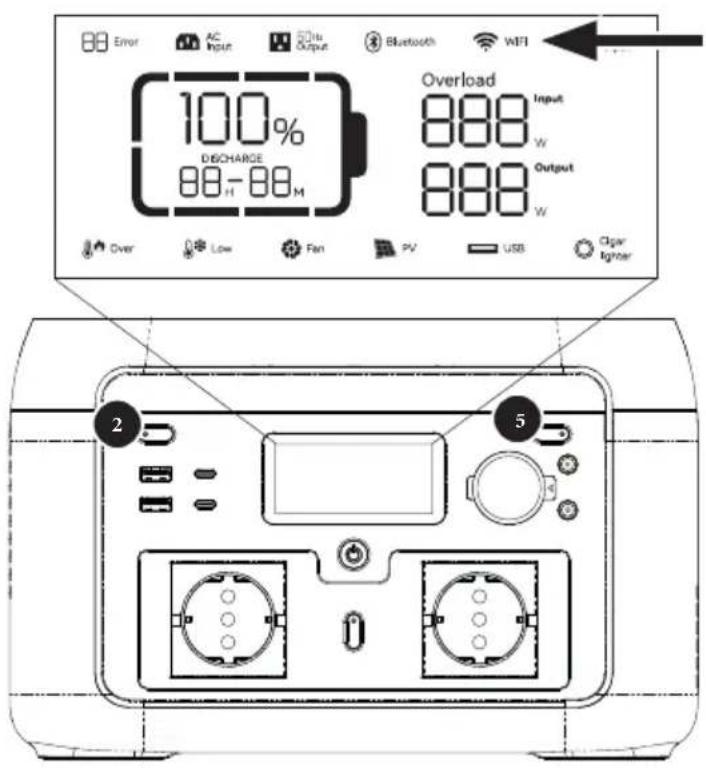
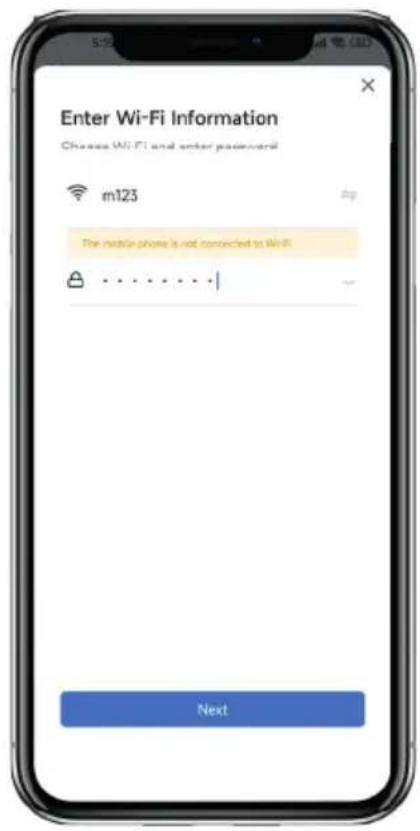
Wi-Fi UjUjS, uJUjS, uUjS, uUjS, uUjS, uUjS, uUjS, uUjS, uUjS, uUjS, uUjS, uUjS, uUjS, uUjS, uUjS, uUjS, uUjS, uUjS, uUjS, uUjS, uUjS, uUjS,
pUppeu Ieoo ooho uobgog ebo Ublgo ufo bgs LED grrs Uus Uwos
Jg3jWi-Fi UJgUJUJUJUJUJUJU
gboUblgglUcfo golgUcbu
UcogUeUsUgUcUgUcUgUcUgUcUgUcUgUcUgUcUgUcUgUcUgUcUgUcUgUcUgUcUgUcUgUcUgUcUgUcUgUcUgUcUgUcUgUcUgUcUgUcUgUcUgUcUgU
IN THE BOX
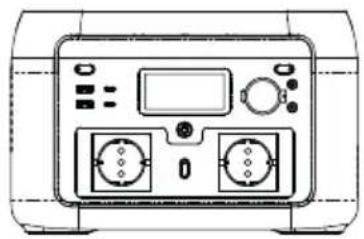
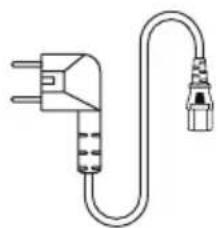
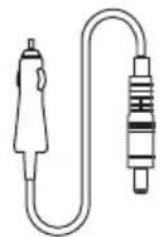

AC cablePower station Car charge cable User manual
1wSJoo
pUeUuBuaUpuo
JbIgSgSgUgUgSgP(LiFePO4).
pUpeo Uo geo uo ooo
pUgUgUgUgUgUgUgUgUgUgUgUgUgUgUgUgUgUgUgUgUgUgUgUgUgUgUgUgUgUgUgUgUgUgUgUgUgUgUgUgUgUgUgUgUgUgUgUgUgUgU
pUgC uOc20cbuB100uUplps
yduo yduo yduo yduo yduo
Ugcooofoefofofofofofofofofofofofofofofofofofofofofofofofofofofofofofofofofofofofofofofofofofofofofofofofofofofofofofofofofofofofofofofofo
100% 100%
oJ spdu Ioo bclpeb0uIbufoEuspuuUbu5i
J. C 100 J. C
ω
·pJUJUWpa.1UeJpupeboUblgOgOgOgOgOgOgOgOgOgOgOgOgOgOgOgOgOgOgOgOgOgOgOgOgOgOgOgOgOgOgOgOgOgOgOgOgOgOgOgOgOgOgOgOgOgOgOgOgOgOg0u 45 O28 pssso I JU 10 o28 pssso.
·IJI UU WpUeUeUeUeUeUeUeUeUeUeUeUeUeUeUeUeUeUeUeUeUeUeUeUeUeUeUeUeUeUeUeUeUeUeUeUeUeUeUeUeUeUeUeUeUeUe
gUpOe EUs uble lJy yblso pse (BMS).glus gupy f Ucpgo pUjzU. gluys Ujls. gUcs Ujls. gUjts. gUoU. UdoRgU. Ujso Ujso gUcfo. gUcfo Uj. Uj. Uj. Uj. Uj. Uj. Uj. Uj. Uj. Uj. Uj. Uj. Uj. Uj. Uj. Uj. Uj. Uj. Uj. Uj. Uj. Uj. Uj. Uj. Uj. Uj. Uj. Uj. Uj. Uj. Uj. Uj. Uj. Uj.
jglo wfofofofofofofofofofofofofofofofofofofofofofofofofofofofofofofofofofofofofofofofofofofofofofofofofofofofofofo
Ugolj pJds jgs pCJoo UoG Goo Jol golj u
100000000000000000000000000000000000000000
Ug 102
gSIOE ggs 10e jg e j (e) 1000000000000000000000000000000000000000000000000000000000000000000000000
SEVPJ.
| 02Error | العربية الحرفية | العربية الحرفية |
| 04Error | العربية الحرفية.puisالعربية الحرفية.Ugolges (OTP) | العربية الحرفية.puisالعربية الحرفية.Ugolges (OTP) |
| 05Error | العربية الحرفية.puisالعربية الحرفية.Ugolges (UTP) |
| 06Error | العربية الح costa Ugl.العربية(OCP) | العربية الح costa Ugl.العربية(Ugl.العربية).العربية.puisالعربية.Ugl.العربية.puisالعربية.Ugl.العربية.puisالعربية.Ugl.العربية.puisالعربية.Ugl.العربية.puisالعربية.Ugl.العربية.puisالعربية.Ugl.العربية.puisالعربية.Ugl.العربية.puisالعربية.Ugl.العربية.puisالعربية.Ugl. |
| 08Error | العربية الح costa Ugl.العertas.puisالعertas.Ugl.العertas.puisالعertas.Ugl.العertas.puisالعertas.Ugl.العertas.puisالعertas.Ugl. | العertas.Ugl.العertas.puisالعertas.Ugl. |
| 09Error | العertas.puisالعertas.Ugl. | العertas.puisالعertas.Ugl. |
| 11Error | العertas.puisالعertas.Ugl. | العertas.puisالعertas.Ugl. |
| 12Error | العertas.puisالعertas.Ugl. | العertas.puisالعertas.Ugl. |
| 13Error | العertas.puisالعertas.Ugl. | العertas.puisالعertas.Ugl. |
| 14Error | العertas.puisالعertas.Ugl. | العertas.puisالعertas.Ugl. |
| 15Error | العertas.puisالعertas.Ugl. | العertas.puisالعertas.Ugl. |
| 16Error | العertas.puisالعertas.Ugl. | العertas.puisالعertas.Ugl. |
| 17Error | Tz INV.Sعboat.spxp.bla.lal.lal.lal.lal.lal.lal.lal.lal.lal.lal.lal.lal.lal.lal.lal.lal.lal.lal.lal.lal.lal.lal.lal.lal.lal.lal.lal.lal.lal.lal.lal.lal.lal.lal.lal.lal.lal.lal.lal.lal.lal.lal.lal.lal.lal.lal.lal.lal.lal.lal.lAL | العertas.puisLal.lal.lal.lal.lal.lal.lal.lal.lal.lal.lal.lal.lal.lal.lal.lal.lal.lal.lal.lal.lal.lal.lal.lal.lal.lal.lal.lal.lal.lal.lal.lal.lal.lal.lal.lal.lal.lal.lal.lal.lal.lal.lal.lal.lal.lal.lal.lal.lal.lall |
| 19Error | العertas.puisالعertas.puisLal.lal.lal.lal.lal.lal.lal.lal.lal.lal.lal.lal.lal.lal.lal.lal.lal.lal.lal.lal.lal.lal.lal.lal.lal.lal.lal.lal.lal.lal.lal.lal.lal.lal.lal.lal.lal.lal.lal.lal.lal.lal.lal.lal.lal.lal.lall | العertas.puisLal.lal.lal.lal.lal.lal.lal.lal.lal.lal.lal.lal.lal.lal.lal.lal.lal.lal.lal.lal.lal.lal.lal.lal.lal.lal.lal.lal.lal.lal.lal.lal.lal.lal.lal.lal.lal.lal.lal.lal.lal.lal.lal.lal.lal.lal.lAL |
| 20Error | العertas.puisالعertas.puisLal.lal.lal.lal.lal.lal.lal.lal.lal.lal.lal.lal.lal.lal.lal.lal.lal.lal.lal.lal.lal.lal.lal.lal.lal.lal.lal.lal.lal.lal.lal.lal.lal.lal.lal.lal.lal.lal.lal.lal.lal.lal.lal.lAL | العertas.puisLal.lal.lal lal.lal lal.lal lal lal lal lal lal lal lal lal lal lal lal lal lal lal lal lal lal lal lal lal lal lal lal lal lal lal lal lal lal lal lal lal lal lal lal lal lal lal lal lal lal lal lal lal lal lal lal lal lal lall |
| 21Error | العertas.puisLal.lal.lal.lal.lal.lal.lal.lal.lal.lal.lal.lal.lal.lal.lal.lal.lal.lal.lal.lal.lal.lal.lal.lal.lal.lal.lal.lal.lal.lal.lal.lal.lal.lal.lal.lal.lal.lal.lal.lal.lal.lal.lal.lal.lal.lal.lall | العertas.puisLal.lal.lal lal lal lal lal lal lal lal lal lal lal lal lal lal lal lal lal lal lal lal lal lal lal lal lal lal lal lal lal lal lal lal lal lal lal lal lal lal lal lal lal lal lal lal lal lal lal lal lal |
| 22Error | العertas.puisLal.lal.lal.lal.lal.lal.lal.lal.lal.lal.lal.lal.lal.lal.lal.lal.lal.lal.lal.lal.lal.lal.lal.lal.lal.lal.lal.lal.lal.lal.lal.lal.lal.lal.lal.lal.lal.lal.lal.lal.lal.lal.lal.lal.lal.lall | العertas.puisLALlALlALlALlALlALlALlALlALlALlALlALlALlALlALlALlALlALlALlALlALlALlALlALlALlALlALlALlALlALlALlALlALlALlALlALlALlALlALlALlALlALlALlALlALlALlALlALlALlALlAL |
| 133 | 134 | 135 |
| 23 Error | 136 | 137 |
| 24 Error | 138 | 139 |
| 25 Error | 131 | 132 |
| 26 Error | 133 | 134 |
| 27 Error | 135 | 136 |
| 28 Error | 137 | 138 |
| 30 Error | 139 | 140 |
| 31 Error | 141 | 142 |
| 32 Error | 143 | 144 |
| 33 Error | 145 | 146 |
| 34 Error | 147 | 148 |
| 35 Error | 149 | 150 |
| 36 Error | 150 | 151 |
| 37 Error | 152 | 153 |
| 38 Error | 154 | 155 |
| 39 Error | 156 | 157 |
| 40 Error | 158 | 159 |
| 41 Error | 160 | 161 |
| 42 Error | 162 | 163 |
| 43 Error | 164 | 165 |
| 44 Error | 166 | 167 |
| 45 Error | 168 | 169 |
| 46 Error | 170 | 171 |
| 47 Error | 172 | 173 |
| 48 Error | 174 | 175 |
| 49 Error | 176 | 177 |
| 50 Error | 178 | 179 |
| 51 Error | 180 | 181 |
| 52 Error | 182 | 183 |
| 53 Error | 184 | 185 |
| 54 Error | 186 | 187 |
| 55 Error | 188 | 189 |
| 56 Error | 190 | 191 |
| 57 Error | 192 | 193 |
| 58 Error | 194 | 195 |
| 59 Error | 196 | 197 |
| 60 Error | 198 | 199 |
| 61 Error | 200 | 201 |
| 62 Error | 202 | 203 |
| 63 Error | 204 | 205 |
| 64 Error | 206 | 207 |
| 65 Error | 208 | 209 |
| 66 Error | 210 | 211 |
| 67 Error | 212 | 213 |
| 68 Error | 214 | 215 |
| 69 Error | 216 | 217 |
| 70 Error | 218 | 219 |
| 71 Error | 220 | 221 |
| 72 Error | 222 | 223 |
| 73 Error | 224 | 225 |
| 74 Error | 226 | 227 |
| 75 Error | 228 | 229 |
| 76 Error | 230 | 231 |
| 77 Error | 232 | 233 |
| 78 Error | 234 | 235 |
| 79 Error | 236 | 237 |
| 80 Error | 238 | 239 |
| 81 Error | 240 | 241 |
| 82 Error | 242 | 243 |
| 83 Error | 244 | 245 |
| 84 Error | 246 | 247 |
| 85 Error | 248 | 249 |
| 86 Error | 250 | 251 |
| 87 Error | 252 | 253 |
| 88 Error | 254 | 255 |
| 89 Error | 256 | 257 |
| 90 Error | 258 | 259 |
| 91 Error | 260 | 261 |
| 92 Error | 262 | 263 |
| 93 Error | 264 | 265 |
| 94 Error | 266 | 267 |
| 95 Error | 268 | 269 |
| 96 Error | 270 | 271 |
| 97 Error | 272 | 273 |
| 98 Error | 274 | 275 |
| 99 Error | 276 | 277 |
| 100 Error | 278 | 279 |
1JUePdUgpuUeEgeIupeoJUeJojuUeOooJUeOooJUeOooJUeOoo
131 Bo, Cg, 1201 Lw c0101 Upuu 96 p 1Ucog y e 100 Cg S Ueolj. g sS Uo g e JUg (U CgJg u o
(In accordance with EN ISO/IEC 17050-1)
| Declaration number: | DOCIP 2293549 |
| Name and address of manufacturer / EU-AR: | Telco Accessories BV Hoofdveste 19 3992 DH Houten Netherlands |
| THIS DECLARATION OF CONFORMITY IS ISSUED UNDER THE SOLE RESPONSIBILITY OF: |
| Name and address of manufacturer: | Telco Accessories BV Hoofdveste 19 3992 DH Houten Netherlands |
| Product identification: | XP2W300 XP2W600 |
| THE PRODUCTS MENTIONED IN THIS DECLARATION ARE IN CONFORMITY WITH: |
| EU Community Legislation | Restriction of Hazardous Substances (RoHS) Directive 2011/65/EU Electromagnetic Compatibility (EMC) Directive 2014/30/EU Low Voltage Directive (LVD) 2014/35/EU Battery Regulation (EU) 2023/1542 |
| Harmonised standards | Safety of electrical equipment EN 62368-1:2014 + AC:2015-02 + AC:2015-05 + AC:2015-11 + AC:2017-03 + A11:2017 + EN IEC 62368-1:2020 + A11:2020 + AC:2020-05 Electromagnetic Compatibility (EMC) EN 61000-3-2:2014 + EN IEC 61000-3-2:2019 + A1:2021 EN 61000-3-3:2013 + A1:2019 + A2:2021 + A2:2021/AC:2022-01 EN IEC 61000-6-2:2019 + EN 61000-6-2:2005 + AC:2005 EN 61000-6-3:2007 + A1:2011 + A1:2011/AC:2012 + EN IEC 61000-6-3:2021 |
| SIGNED FOR AND ON BEHALF OF: |
| Place and date of issue: | Houten, 10 June 2024 |
| Signature: | R.B. |
| Ralph Both |
| Name, function: | CEO |
| Company name: | Telco Accessories BV |

HIGHER QUALITY
= LOWER IMPACT