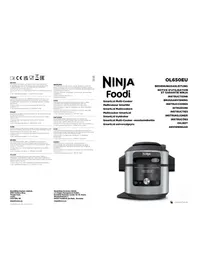
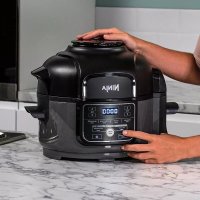
Foodi MAX OL650EU - Multi-cooker NINJA - Free user manual and instructions
Find the device manual for free Foodi MAX OL650EU NINJA in PDF.



| Product Type | Multi-Cooker |
| Brand | Ninja |
| Model | Foodi MAX OL650EU |
| Power Supply | 230 V~, 50 Hz |
| Power | 1760 W |
| Pot Capacity | 7.5 L |
| Liquid Group | 2 |
| Maximum Pressure | 40 kPa |
| Cooking Functions | Pressure Cook, Steam Meal, Air Fry, Steam Cook, Oil-Free Frying, Grill, Bake, Dehydrate, Sear/Sauté, Steam, Slow Cook, Yogurt |
| Cooking Modes | Pressure, Combi-Steam, Air Fry/Cooker |
| Included Accessories | Reversible 2-Tier Rack, Crisper Basket, Removable Diffuser, Removable 7.5L Cooking Pot, Multi-Purpose Tray, Condensation Collector |
| Pot Material | Non-Stick Coating |
| Display | Digital Control Panel with Display |
| Keep Warm Function | Yes, automatic Keep Warm after certain cycles |
| Safety | Lid Lock, Pressure Release Valve, Anti-Clog Cap, Auto Shut-Off |
| Care & Cleaning | Pot, rack, basket, diffuser are dishwasher safe; body and control panel hand wash |
| Silicone Gasket | Removable, dishwasher safe, replaceable |
| Warranty | 2 years (Ninja commercial warranty + statutory rights) |
| Intended Use | Household only, on countertop |
Frequently Asked Questions - Foodi MAX OL650EU NINJA
User questions about Foodi MAX OL650EU NINJA
0 question about this device. Answer the ones you know or ask your own.
Ask a new question about this device
Download the instructions for your Multi-cooker in PDF format for free! Find your manual Foodi MAX OL650EU - NINJA and take your electronic device back in hand. On this page are published all the documents necessary for the use of your device. Foodi MAX OL650EU by NINJA.
USER MANUAL Foodi MAX OL650EU NINJA
© 2021 StarkNinja Operating LLC GEDRUCKT IN CHINA
FRANCAIS
© 2021 SharzNinja Operating LLC IMPRIHE EN CHINE
ENGLISH
Illustrations may differ from actual product. We are constantly striving
to improve our products.
There are the special indicators contained herein are subject to change without notice.
FOOD and NIM14 are translated into the use of Shokin's
- Ocular dNMSA are registered subunits as SHAK and Operating LLC.
© 2021 StarkNiric Operating LLC PRINTED IN CHINA
DANSK
© 2021 SparkNings Operating LLC, MARK KINA
ESPAÑOL
modifiene serva (previously
© 2021 SparkNinja Operating LLC STAMPATO IN CNA
SharkNinja Europe Limited,
3150 Century Way.
Thorpe Park
Lords
Leeds, LSEF OTR UK
LS15 82B, UK
niniakitchen.eu
CL650LU B MP 210910 MV1
NEDERLANDS
© 2021 SharxNina Operating LLC
GEDRUKT IN CHINA
NORSK
© 2021 SharkNina Operating LLC TRYKKET | XINA
PORTUGUESE
© 2021 Shanghai Operating LLC IMPRESSO NAO CHINA
SUOMI
© 2021 Shanghai Operating LLC PAIN=LIUKINASSA
SVENSKA
Illustradora ena kan aviva han den verkiga produkten. Vi
© 2021 SharkNinja Operating LLC TRYOKT | KINA
SharkNinja Germany GmbH,
c/o Regus Management GmbH.
Excellent Business Center 10. +1
Westhafenplatz 1
Westdunichplatz 1,
60327 Frankfurt am Main, Germany
ninjakitchen.eu
NINJA Foodi
SmartLid Multi-Cooker
Multicuiseur Smartlid
SmartLid Multicookere
Multicooker SmartLid
SmartLid trykkoker
natural_image
Ninja air fryer with digital display and control buttons (no visible text or symbols on main body)
ninjakitchen.eu
VIELEN DANK
natural_image
Two hand-drawn diagrams showing a cylindrical object being folded into a bow-like structure, with no text or symbols present.natural_image
Line drawing of a beige industrial machine with control panel and side ports (no text or symbols)natural_image
Technical line drawings of a mechanical device with multiple views (top, front, side), no text or symbols present.natural_image
Line drawing of a hand using a tool to clean or adjust a woven basket inside a waffle (no text or symbols)natural_image
Line drawing of a kitchen appliance with open lid and side compartments (no text or symbols)natural_image
Line drawing of a hand placing a cooking pot into a rice cooker (no text or symbols)natural_image
Line drawing of a NIWA camera module with no visible text or symbolsnatural_image
Line drawing of hands operating a mechanical device with a lid (no text or symbols)natural_image
Two hand-drawn diagrams showing a cylindrical object being folded into a bow-shaped component, with no text or symbols present.KEEP WARM (MAINTENIR AU CHAUD):
natural_image
Line drawing of a vintage NIMA airship with control panel and buttons (no text or symbols)natural_image
Technical line drawing of a mechanical device with internal components and external assembly (no text or symbols)natural_image
Line drawing of a hand using a tool to clean or adjust a circular grid-patterned object (no text or symbols)natural_image
Line drawing of a kitchen appliance with open lid and side compartments (no text or symbols)natural_image
Line drawing of a hand opening a rice cooker with a lid open (no text or symbols)for purchasing the Ninja® Foodi® SmartLid Multi-Cooker

REGISTER YOUR PURCHASE

ninjakitchen.eu

Scan QR code using mobile device
RECORD THIS INFORMATION
Model Number:
Serial Number:
Date of Purchase:
(Keep receipt)
Store of Purchase:
TECHNICAL SPECIFICATIONS
Voltage: 230V\~, 50Hz
Watts: 1760W
Volume: 7.5L
Fluid group: 2
PS: 40 kPa
TIP: You can find the model and serial numbers on the QR code label on the back of the unit by the power cord.

This marking indicates this product should not be disposed of with other household waste. To prevent possible harm to the
environment or human health from uncontrolled waste disposal, recycle it responsibly to promote the sustainable reuse of material sources. To return your used device, please use the return and collection systems or contact the retailer where this product was purchased. They can take this product for environmentally safe recycling.
CONTENTS
Important Safeguards....59
Parts & Accessories 63
Accessory Assembly Instructions 65
Using the SmartLid Slider 65
Using the Control Panel....66
Cooking Functions 66
Operating Buttons 66
Before First Use....67
Installing the Condensation Collector 67
Removing & Reinstalling the Anti-Clog Cap....67
Using the Multi-Cooker 68
Using the Pressure Cooking Functions....68
Water Test: Getting Started Pressure Cooking 68
Natural Pressure Release vs. Quick Pressure Release ..... 69
Pressurising 69
Using the Pressure Function 69
Using the Combi-Steam Mode Functions....71
Steam Meals....71
Steam Air Fry....71
Steam Bake 72
Using the Air Fry/Cooker Functions ....73
Air Fry 73
Grill 74
Bake 75
Dehydrate 75
Sear/Sauté 76
Steam 77
Slow Cook 77
Yogurt 78
Cleaning & Maintenance....79
Cleaning: Dishwasher & Hand-Washing 79
Removing & Reinstalling the Silicone Ring....79
Cleaning the Lid 80
Troubleshooting Guide 81
Helpful Tips 82
Product Registration 83
IMPORTANT SAFEGUARDS
HOUSEHOLD USE ONLY • READ ALL INSTRUCTIONS BEFORE USE
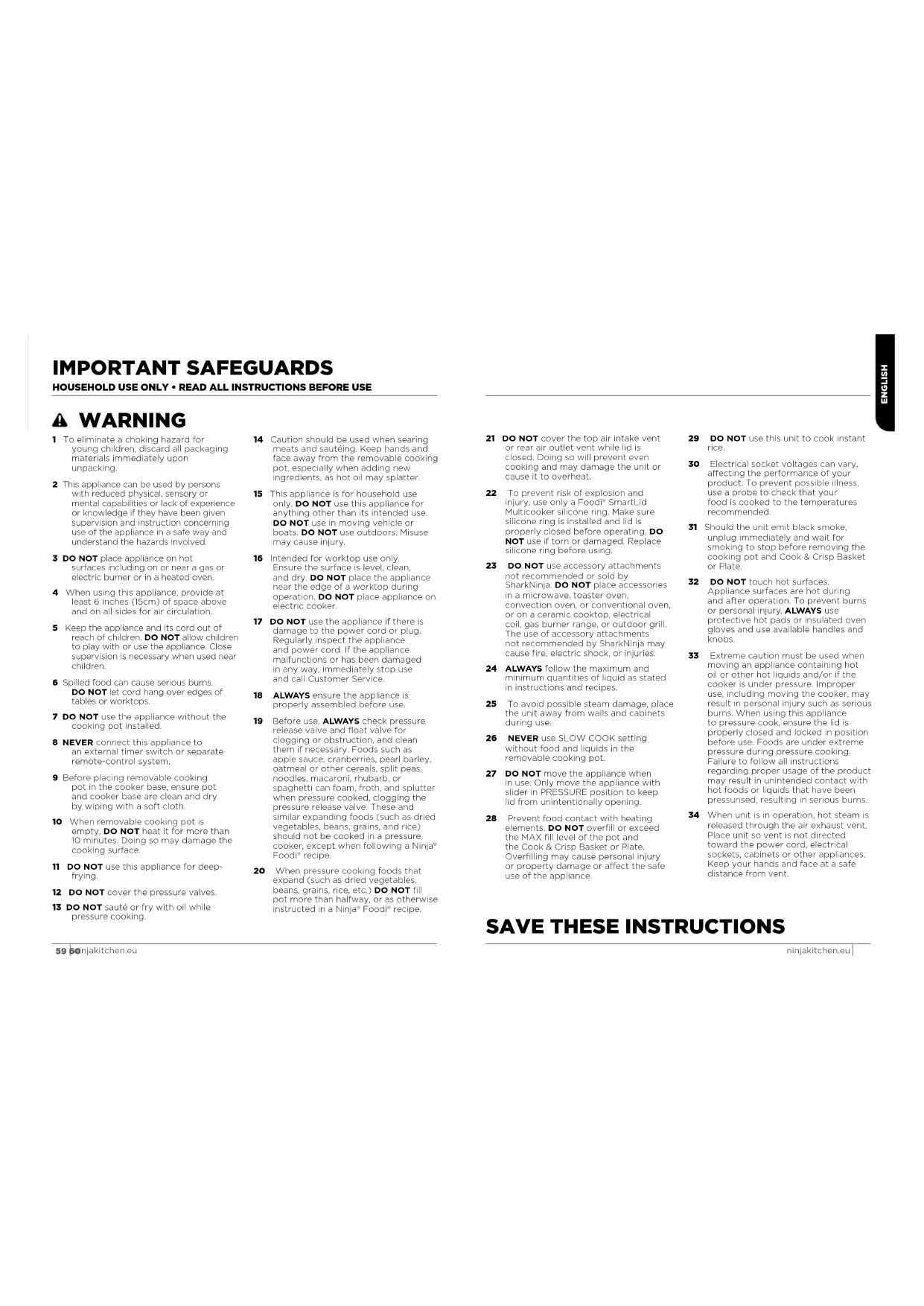
WARNING
1 To eliminate a choking hazard for young children, discard all packaging materials immediately upon unpacking.
2 This appliance can be used by persons with reduced physical, sensory or mental capabilities or lack of experience or knowledge if they have been given supervision and instruction concerning use of the appliance in a safe way and understand the hazards involved.
3 DO NOT place appliance on hot surfaces including on or near a gas or electric burner or in a heated oven.
4 When using this appliance, provide at least 6 inches (15cm) of space above and on all sides for air circulation.
5 Keep the appliance and its cord out of reach of children. DO NOT allow children to play with or use the appliance. Close supervision is necessary when used near children.
6 Spilled food can cause serious burns.
DO NOT let cord hang over edges of
tables or worktops.
7 DO NOT use the appliance without the cooking pot installed.
8 NEVER connect this appliance to an external timer switch or separate remote-control system.
9 Before placing removable cooking pot in the cooker base, ensure pot and cooker base are clean and dry by wiping with a soft cloth.
10 When removable cooking pot is empty. DO NOT heat it for more than 10 minutes. Doing so may damage the cooking surface.
11 DO NOT use this appliance for deep-frying.
12 DO NOT cover the pressure valves.
13 DO NOT sauté or fry with oil while pressure cooking.
14 Caution should be used when searing meats and sautéing. Keep hands and face away from the removable cooking pot, especially when adding new ingredients, as hot oil may splatter.
15 This appliance is for household use only. DO NOT use this appliance for anything other than its intended use. DO NOT use in moving vehicle or boats. DO NOT use outdoors. Misuse may cause injury.
16 Intended for worktop use only. Ensure the surface is level, clean, and dry. DO NOT place the appliance near the edge of a worktop during operation. DO NOT place appliance on electric cooker.
17 DO NOT use the appliance if there is damage to the power cord or plug. Regularly inspect the appliance and power cord. If the appliance malfunctions or has been damaged in any way, immediately stop use and call Customer Service.
18 ALWAYS ensure the appliance is properly assembled before use.
19 Before use, ALWAYS check pressure release valve and float valve for clogging or obstruction, and clean them if necessary. Foods such as apple sauce, cranberries, pearl barley, oatmeal or other cereals, split peas, noodles, macaroni, rhubarb, or spaghetti can foam, froth, and splutter when pressure cooked, clogging the pressure release valve. These and similar expanding foods (such as dried vegetables, beans, grains, and rice) should not be cooked in a pressure cooker, except when following a Ninja® Food® recipe.
20 When pressure cooking foods that expand (such as dried vegetables, beans, grains, rice, etc.) DO NOT fill pot more than halfway, or as otherwise instructed in a Ninja® Foodl® recipe.
21 DO NOT cover the top air intake vent or roar air outlet vent while lid is closed. Doing so will prevent even cooking and may damage the unit or cause it to overheat.
22 To prevent risk of explosion and injury, use only a Food® Smartl id Multicooker silicone ring. Make sure silicone ring is installed and lid is properly closed before operating. DO NOT use if torn or damaged. Replace silicone ring before using.
23 DO NOT use accessory attachments not recommended or sold by SharkNinja. DO NOT place accessories in a microwave, toaster oven, convection oven, or conventional oven, or on a ceramic cooktop, electrical coil, gas burner range, or outdoor grill. The use of accessory attachments not recommended by SharkNinja may cause fire, electric shock, or injuries.
24 ALWAYS follow the maximum and minimum quantities of liquid as stated in instructions and recipes.
25 To avoid possible steam damage, place the unit away from walls and cabinets during use.
26 NEVER use SLOW COOK setting without food and liquids in the removable cooking pot.
27 DO NOT move the appliance when in use. Only move the appliance with slider in PRESSURE position to keep lid from unintentionally opening.
28 Prevent food contact with heating elements. DO NOT overfill or exceed the MAX fill level of the pot and the Cook & Crisp Basket or Plate. Overfilling may cause personal injury or property damage or affect the safe use of the appliance.
29 DO NOT use this unit to cook instant rice.
30 Electrical socket voltages can vary, affecting the performance of your product. To prevent possible illness, use a probe to check that your food is cooked to the temperatures recommended.
31 Should the unit emit black smoke, unplug immediately and wait for smoking to stop before removing the cooking pot and Cook & Crisp Basket or Plate.
32 DO NOT touch hot surfaces. Appliance surfaces are hot during and after operation. To prevent burns or personal injury, ALWAYS use protective hot pads or insulated oven gloves and use available handles and knobs.
33 Extreme caution must be used when moving an appliance containing hot oil or other hot liquids and/or if the cooker is under pressure. Improper use, including moving the cooker, may result in personal injury such as serious burns. When using this appliance to pressure cook, ensure the lid is properly closed and locked in position before use. Foods are under extreme pressure during pressure cooking. Failure to follow all instructions regarding proper usage of the product may result in unintended contact with hot foods or liquids that have been pressurised, resulting in serious burns.
34 When unit is in operation, hot steam is released through the air exhaust vent. Place unit so vent is not directed toward the power cord, electrical sockets, cabinets or other appliances. Keep your hands and face at a safe distance from vent.
SAVE THESE INSTRUCTIONS
IMPORTANT SAFEGUARDS
HOUSEHOLD USE ONLY • READ ALL INSTRUCTIONS BEFORE USE
35 DO NOT tamper with, disassemble, or otherwise remove the float valve or pressure release assembly.
36 DO NOT attempt to open the lid during or after pressure cooking until all internal pressure has been released through the pressure release valve and the unit has cooled slightly. Open lid promptly to avoid re-pressurisation of the inner pot.
37 When using SLOW COOK setting, ALWAYS keep the lid closed.
38 If the lid will not unlock to open, this indicates the appliance is still under pressure. Any pressure remaining can be hazardous. Let unit naturally release pressure or press the Steam Release button to release steam. Take care to avoid contact with the releasing steam to avoid burns or injury. When steam is released the control panel will show OPN LID indicating the lid can be opened. If steam does not release when the pressure release valve is moved to vent, unplug the unit from the wall and let the unit naturally release pressure.
39 Serious burns can result from the steam and hot foods inside the inner pot. ALWAYS keep hands, face, and other body parts away from the pressure release valve prior to or during pressure release and when opening the lid after cooking.
40 The cooking pot, Cook & Crisp Basket or Plate, and reversible rack become extremely hot during the cooking process. Avoid hot steam and air while removing the cooking pot and Cook & Crisp Basket or Plate from the appliance, and ALWAYS place them on a heat-resistant surface after removing. DO NOT touch accessories during or immediately after cooking.
41 ONLY lift the lid from the handle on the front of the unit. DO NOT lift lid from side area as scalding steam will release.
42 Removable cooking pot can be extremely heavy when full of ingredients. Care should be taken when lifting pot from cooker base.
43 DO NOT touch accessories, including the probe (if included with the model), during or immediately after cooking, as they become extremely hot during the cooking process. To prevent burns or personal injury, ALWAYS use care when interfacing with product. Use long-handed utensils and protective hot pads or insulated oven gloves.
44 Cleaning and user maintenance should not be done by children.
45 Allow unit to cool before cleaning, disassembly, putting in or taking off parts and storage.
46 To disconnect, turn unit off, then unplug from socket when not in use and before cleaning.
47 DO NOT clean with metal scouring pads. Pieces can break off the pad and touch electrical parts, creating a risk of electric shock.
48 Please refer to the Cleaning & Maintenance section for regular maintenance of the appliance.
49 NEVER put the cooker base, digital cooking probe or probe cap in the dishwasher or immerse it in water or any other liquid.

Indicates to read and review instructions to understand operation and use of product.

Indicates the presence of a hazard that can cause personal injury, death or substantial property damage if the warning included with this symbol is ignored.

Take care to avoid contact with hot surface. Always use hand protection to avoid burns.

For indoor and household use only.
SAVE THESE INSTRUCTIONS
PARTS & ACCESSORIES
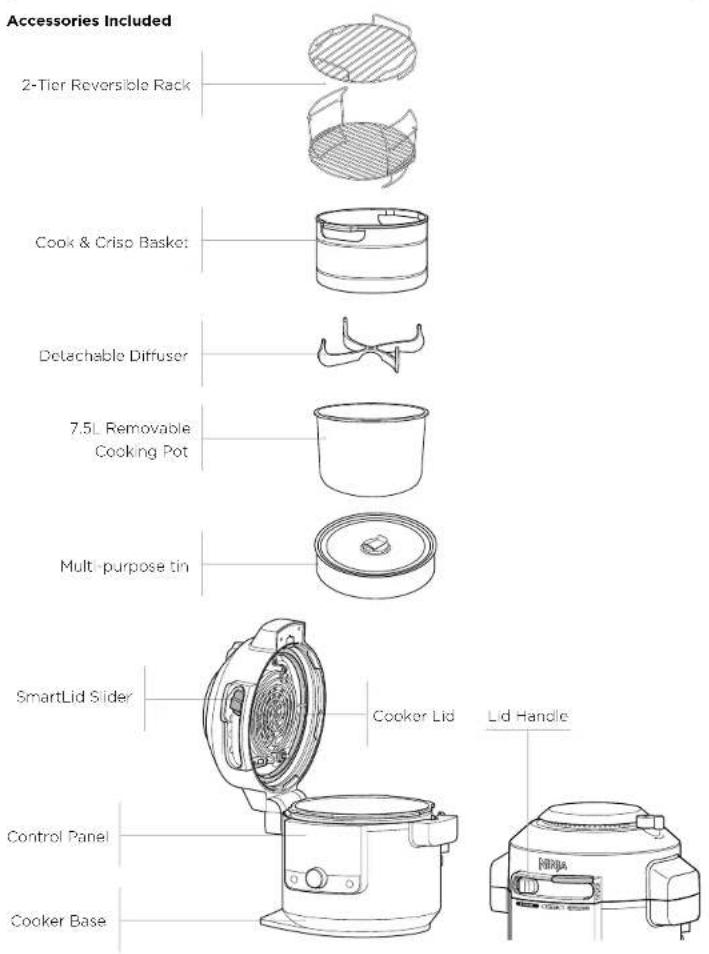
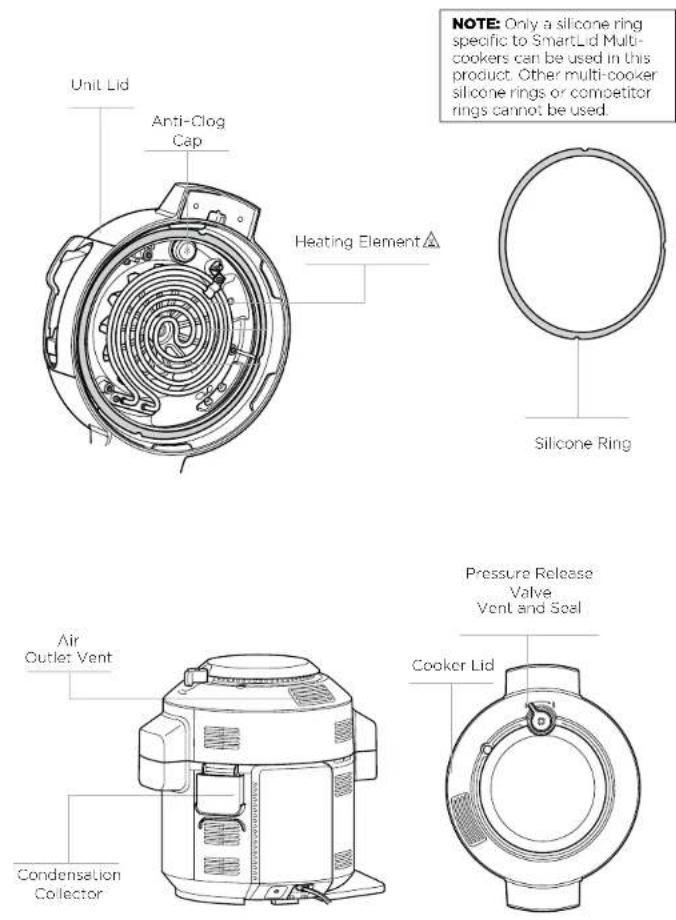
To order additional parts and accessories, visit ninjakitchen.eu
ACCESSORY ASSEMBLY INSTRUCTIONS
COOK & CRISP BASKET
natural_image
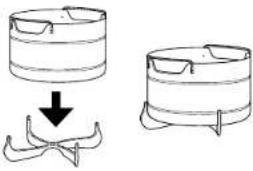
Two identical line drawings of cylindrical containers with a downward arrow indicating a change or transformation (no text or symbols)1 To remove diffuser for cleaning, pull 2 diffuser fins off the groove on the basket, then pull diffuser down firmly
NOTE: Diffuser helps with airflow and should always be installed on the basket before use.
2 To assemble the Cook & Crisp Basket, place basket on top of diffuser and press down firmly.
2-TIER REVERSIBLE RACK
Higher Position
Grill chicken, steak, fish and more.
Lower Position
Steam vegetables.
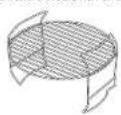
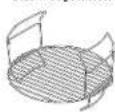
2-Tier Assembly
Increase cooking capacity
by cooking on both levels.
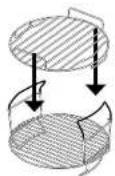
1 With the reversible rack in the lower position, (shown above) place it in the cooking pot. Then place ingredients on the bottom layer.
2 If needing an extra layer, add the top rack by sliding it over the handles of the bottom rack as shown above. Place remaining ingredients on the top layer.
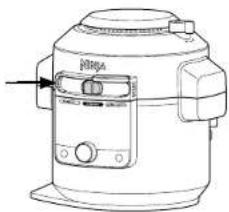
USING THE SMARTLID SLIDER
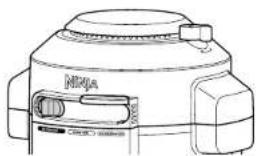
The slider allows you to switch between cook modes and notifies the lid which function you are using.
- Pressure
• Combi-Steam mode
• Air Fry/Cooker
natural_image
Line drawing of a rice cooker with control panel and side-mounted buttons (no text or symbols)HOW TO OPEN AND CLOSE THE LID
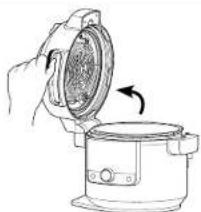
Use the handle that is located above the slider to open and close the lid at all times.
You can open and close the lid when the slider is in the COMBI-STEAM mode and AIR FRY/COOKER position. When the slider is in the PRESSURE position, the lid cannot be opened. If there is no pressure in the unit, move the slider to the COMBI-STEAM mode or AIR FRY/COOKER position to open the lid
NOTE: The lid will not unlock until the unit is completely depressurised. The smart slider will not slide to the right until the unit is completely depressurised. The unit will display "OPN LID" when unit is depressurised.
natural_image
Illustration of a hand pouring liquid into a cooking pot (no text or symbols)USING THE CONTROL PANEL
COOKING FUNCTIONS
PRESSURE: Cook food quickly while maintaining tenderness.
STEAM MEALS: Create complete meals with the push of a button.
STEAM AIR FRY: Crisp vegetables and proteins with little to no oil.
STEAM BAKE: Bake fluffy cakes and sweet treats.
AIR FRY: Give food crispness and crunch with little to no oil.
GRILL: Use high temperature to caramelise and brown your food.
BAKE: Use the unit like an oven for baked treats and more.
DEHYDRATE: Dehydrate meats, fruits and vegetables for healthy snacks.
SEAR/SAUTÉ: Use the unit as a cooker for browning meats, sautéing vegetables, simmering sauces and more.
STEAM: Gently cook delicate foods at a high temperature.
SLOW COOK: Cook your food at a lower temperature for a longer period of time.
YOGURT: Pasteurise and ferment milk for creamy homemade yogurt.
KEEP WARM: When using steam, slow cook and pressure the unit will switch to KEEP WARM at the end of the cycle. Press the KEEP WARM button after the function has started to disable this automatic transition.
NOTE: If running for 1 hour or less, the clock will count down by minutes and seconds. If running for more than 1 hour, the clock will count down by minutes only. This function will time out after 12 hours.
OPERATING BUTTONS
SMARTLID SLIDER: As you move the slider, the available functions for each mode will illuminate.
DIAL: Once you've chosen a mode, use the dial to scroll through the available functions until your desired function is highlighted.
LEFT ARROWS: Press these to choose a cook temperature. Use the left arrows as well to set the internal outcome when using PRESET, and MANUAL buttons.
RIGHT ARROWS: Press these to choose a cook time. Use these arrows to set the food
START/STOP button: Press to start cooking. Pressing the button while the unit is cooking will stop the current cooking function.
(POWER): The Power button shuts the unit off and stops all cooking modes.
BEFORE FIRST USE
1 Remove and discard any packaging material, stickers and tape from the unit.
2 Pay particular attention to operational instructions, warnings and important safeguards to avoid any injury or property damage.
3 Wash the silicone ring, removable cooking pot, multi-purpose tin, Cook & Crisp Basket, reversible rack and condensation collector in warm, soapy water, then rinse and dry thoroughly. NEVER clean the cooker base in the dishwasher.
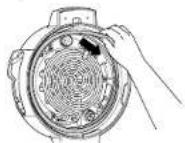
4 The silicone ring is reversible and can be inserted in either direction. Insert the silicone ring around the outer edge of the silicone ring rack on the underside of the lid. Ensure it is fully inserted and lies flat under the silicone ring rack.
5 Use long-handed utensils and protective hot pads or insulated oven gloves when removing foods.
INSTALLING THE CONDENSATION COLLECTOR
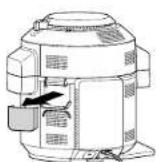
To install the condensation collector, slide it into the slot on the cooker base. Slide it out to remove it for hand-washing after each use.
NOTE: Make sure to empty out excess water collected in the condensation collector after cooking.
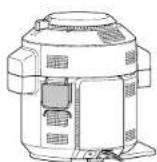
REMOVING & REINSTALLING THE ANTI-CLOG CAP
The anti-clog cao protects the inner valve of the pressure lid from clogging and protects users from potential food splatters. It should be cleaned after every use with a cleaning brush.
To remove it, hold the anti-clog cap between your thumb and bent index finger, then rotate your wrist clockwise. To reinstall, position it in place and press down. Make sure the anti-clog cap is in the correct position before using the unit.
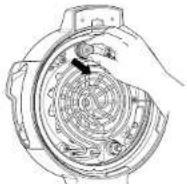
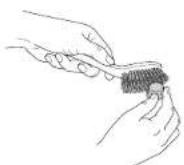
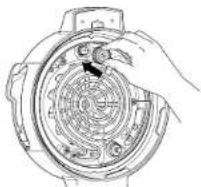
NOTE: Prior to each use, make sure the silicone ring is well-seated in the silicone ring rack and the anti-clog cap is mounted properly on the pressure release valve.
USING THE PRESSURE COOKING FUNCTIONS
WATER TEST: GETTING STARTED PRESSURE COOKING
It is recommended that first-time users do the water test to familiarise themselves with pressure cooking.
1 Place the pot in the cooker base and add 750ml of room-temperature water to the pot.
2 Close the lid and move slider to the PRESSURE position.
natural_image
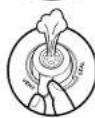
Line drawing of a NIJA device with control panel and buttons (no text or symbols)3 Make sure the pressure release valve is in the SEAL position.

SEAL
for Pressure functions
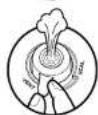
VENT
for all other functions and all other slider positions
NOTE: Valve will be loose when fully installed. Do not force valve over the ridge.
4 The unit will default to high (Hi) pressure. Use the right down arrow to adjust the time to 2 minutes. Press START/STOP to begin.
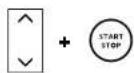
5 This display will show "PrE" and a progress bar indicating the unit is building pressure. When the unit is fully pressurised, the timer will start counting down.
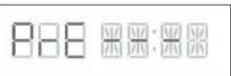
NOTE: Time to pressure will vary based on quantity and temperature of ingredients, along with selected pressure level.
6 When cook time reaches zero, the unit will beep and display "End" before automatically quick releasing the pressurised steam. A warning chime will sound, indicating the pressure release valve is about to open. When the pressure release valve opens, steam will escape from it. As soon as the unit reads "OPN Lid", move the slider to the right to unlock the lid. Then open the lid.
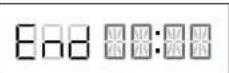
NOTE: The unit will switch to KEEP WARM mode and the heating element will remain on.
USING THE
PRESSURE COOKING FUNCTIONS - CONT
NATURAL PRESSURE RELEASE VS. QUICK PRESSURE RELEASE
NATURAL: When pressure cooking is complete, steam will naturally release from the unit as it cools down. This can take up to 20 minutes or more, depending on the amount of liquid and food in the pot. During this time, the unit will switch to Keep Warm mode. Press the KEEP WARM button if you would like to turn Keep Warm mode off. When natural pressure release is complete, the unit will display "OPN Ltd".
DELAYED: Use ONLY if your recipe calls for it. When pressure cooking is complete and the KFTP WARM light is on, turn the pressure release valve to the VENT position to instantly release pressure through the valve.
Even after releasing pressure naturally or using the pressure release valve, some steam will remain in the unit and will escape when the lid is opened.
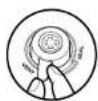
NOTE: For larger food loads that require more depressur sation, you can release pressure by moving the valve to the VENT position.
PRESSURISING
As pressure builds in the unit, the control panel display will show "PrE" and progress bars. Time to pressure varies based on the amount and temperature of ingredients as well as liquid in the pot. For safety, the lid will lock as the unit pressures and it will not unlock until pressure is released. Once the unit has reached full pressure, cooking will begin and the timer will start counting down.
USING THE PRESSURE FUNCTION
To turn on the unit, plug the power cord into a wall socket, then press the button.
Pressure
1 Place ingredients and at least 250ml of liquid in the pot, as well as any necessary accessory. DO NOT fill the pot past the PRESSURE MAX line.
NOTE: Unit will not pressurise if there is not enough liquid.
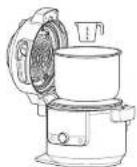
NOTE: When cooking rice, beans or other ingredients that expand, DO NOT fill the pot more than halfway.
2 Close the lid, then turn the pressure release valve to the SEAL position.
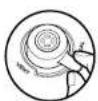
3 Move the slider to PRESSURE. Use the up and down arrows to the left of the display to select Hi or Lo.
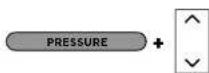
4 Use the up and down arrows to the right of the display to adjust the cook time in minute increments up to 1 hour and then 5-minute increments from 1 hour to 4 hours.
NOTE: If running for 1 hour or less, the clock will count down by minutes and seconds. If running for more than 1 hour, the clock will count down by minutes only.
5 Press START/STOP to begin cooking. The unit will begin building pressure. The display will show "PrE" and a progress bar. The timer will begin counting down when the unit is fully pressurised.

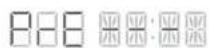
NOTE: Time to pressure varies depending on the selected pressure, current temperatures of the cooking pot and temperature/quantity of the ingredients.
6 When cook time reaches zero, turn the pressure release valve to VENT position.

NOTE: After cooking is complete, you may press KEEP WARM to turn the KEEP WARM mode off. Or press the START/STOP button.
7 When the unit displays "OPN Lid," it has depressursed and you can move the slider to the right to open the lid.
USING THE COMBI-STEAM MODE FUNCTIONS
To turn on the unit, plug the power cord into a wall socket, then press the ⏻ button.
NOTE: The position of the pressure release valve does not matter. It can be in the SEAL or VENT position.
Steam Meals
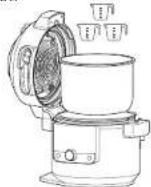
1 Using the Ninja® Multi-purpose tin, add ingredients according to the recipe. Place tin on the reversible rack (as shown in the lower position). Ensure there is liquid in the pot to create steam, then place rack and tin into the pot. Close the lid.
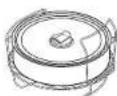
2 Move slider to COMBI-STEAM mode. The function selection will default to STEAM MEALS. The default temperature and time settings will display. Use the up and down arrows to the left of the display to choose a temperature between in 5°C increments between 150°C and 240°C.
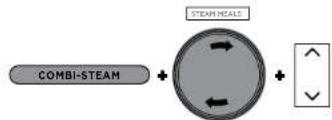
3 Use the up and down arrows to the right of the display to adjust the cock time in minute increments up to 1 hour.
4 Press START/STOP to begin cooking.
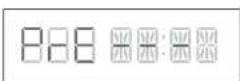
5 The display will show "PrE" and a progress bar indicating the unit is building steam. The time to steam depends on the amount of ingredients in the pot.
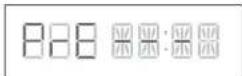
6 When the unit reaches the appropriate steam level, the display will show the set temperature and the timer will begin counting down.
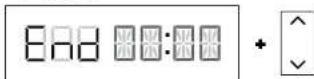
7 When cook time reaches zero, the unit will beep and display "End" for 5 minutes.
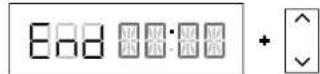
NOTE: If your food requires more time use the up arrows to the right of the display to add additional time. The unit will skip preheating.
Steam Air Fry
1 Place ingredients in the pot with Cook & Crisp Basket or the reversible rack. Ensure there is liquid in the pot to create steam. Close the lid.
2 Move slider to COMBI-STEAM mode, then use the dial to select STEAM AIR FRY. The default temperature and time settings will display. Use the up and down arrows to the left of the display to choose a temperature in 5°C increments between 150°C and 240°C.
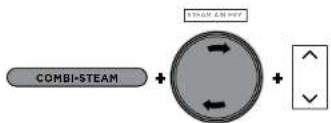
flowchart
graph LR
    A["COMBI-STEAM"] --> B((Circular Component))
    B --> C["Arrow to Left"]
    B --> D["Arrow to Right"]
    B --> E["Arrow to Down"]
    B --> F["Arrow to Up"]
    B --> G["Arrow to Down"]
3 Use the up and down arrows to the right of the display to adjust the cook time in minute increments up to 1 hour.
4 Press START/STOP to begin cooking.
5 The display will show "PrE" and progress bars indicating the unit is building steam. The time to steam depends on the amount of ingredients in the pot.
6 When the unit reaches the appropriate steam level, the display will show the set temperature and the timer will begin counting down.
7 When cook time reaches zero, the unit will beep and display "End" for 5 minutes.
NOTE: If your food requires more time use the up arrows to the right of the display to add additional time. The unit will skip preheating.
Steam Bake
1 Using the Ninja® Multi-purpose tin, add ingredients according to the recipe. Place tin on the reversible rack (as shown in the lower position). Ensure there is liquid in the pot to create steam, then place rack and tin into the pot. Close the lid.
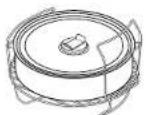
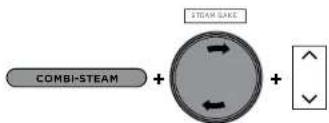
2 Move slider to COMBI-STEAM mode, then use the dial to select STEAM BAKE. The default temperature setting will display. Use the up and down arrows to the left of the display to choose a temperature in 5°C increments between 105°C and 210°C.
3 Use the up and down arrows to the right of the display to adjust the cook time in minute increments up to 1 hour 15 minutes.
4 Press START/STOP to begin cooking.
5 The display will show "PrE" and a progress bar indicating the unit is building steam. The time to steam is 20 minutes.
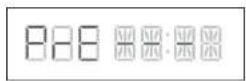
6 When preheating has completed, the display will show the set temperature and the timer will begin counting down
7 When cook time reaches zero, the unit will beep and display "End" for 5 minutes.
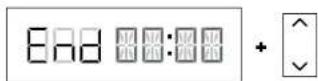
NOTE: If your food requires more time, use the up arrow to the right of the display to add additional time. The unit will skip preheating.
USING THE AIR FRY/COOKER FUNCTIONS
To turn on the unit, plug the power cord into a wall socket, then press the button.
NOTE: Opening the lid when using Air Fry, Bake, Grill or Prove will pause cook time. Close lid to resume.
Air Fry
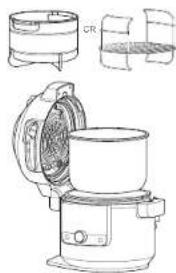
1 Place either the Cook & Criso Basket or reversible rack in the pot. Basket should have diffuser attached.
natural_image
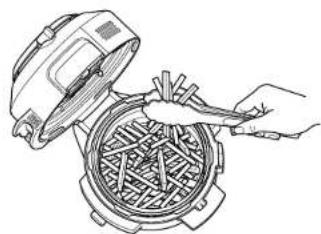
Technical line drawings of a kitchen appliance with cylindrical and rectangular components (no text or symbols)2 Add ingredients to the Cook & Crisp Basket or reversible rack. Close the lid.
natural_image
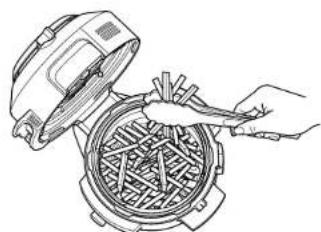
Line drawing of a hand using a fan to clean or adjust a woven basket inside a microwave oven (no text or symbols)3 Move slider to AIR FRY/COOKER then use the dial to select AIR FRY. The default temperature setting will display. Use the up and down arrows to the left of the display to choose a temperature in 5°C increments between 150°C and 210°C.

4 Use the up and down arrows to the right of the display to adjust the cook time in minute increments up to 1 hour.
5 Press START/STOP to begin cooking.
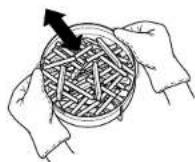
6 During cooking, you can open the lid and lift out the basket to shake or toss ingredients for even browning, if needed. When done, lower basket back into pot and close lid. Cooking will automatically resume after lid is closed.
NOTE: For best results, it is recommended to periodically shake ingredients during air frying. You can open the lid and lift out the basket to shake or toss ingredients for even browning. When done, lower the basket back into the pot and firmly close the lid. Cooking will automatically resume after the lid is closed.
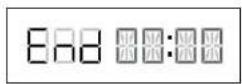
7 When cook time reaches zero, the unit will beep and "End" will flash 3 times on the display.
Grill
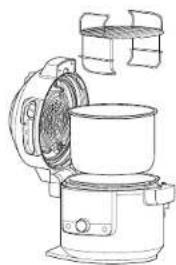
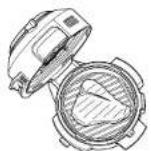
1 Place the reversible rack in the pot in the higher grill position or follow the directions in your recipe.
natural_image
Line drawing of a kitchen oven with lid open, showing internal components (no text or symbols)2 Place ingredients on the rack, then close the lid.
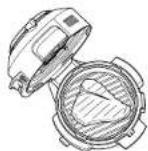
3 Move slider to AIR FRY/COOKER, then use the dial to select GRILL.
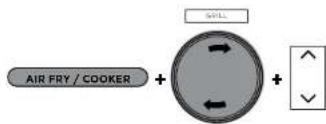
NOTE: There is no temperature adjustment available or necessary when using the Grill function.
4 Use the up and down arrows to the right of the display to adjust the cook time in minute increments up to 30 minutes.
5 Press START/STOP to begin cooking.
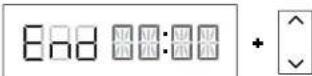
6 When cook time reaches zero, the unit will flash "End" will flash 3 times on the display.
USING THE AIR FRY/COOKER FUNCTIONS - CONT
Bake
1 Place any accessories and ingredients in the pot. Close the lid.
2 Move slider to AIR FRY/COOKER, then use the dial to select BAKE. The default temperature setting will display: Use the up and down arrows to the left of the display to choose a temperature in 5°C increments between 120°C and 210°C.
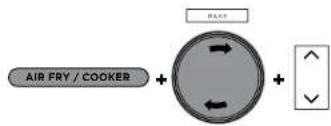
3 Use the up and down arrows to the right of the display to adjust the cook time in minute increments up to 1 hour and then 5-minute increments from 1 hour to 4 hours.
4 Press START/STOP to begin cooking.
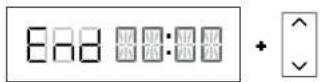
5 When cook time reaches zero, the unit will beep and "End" will flash 3 times on the display.
Dehydrate
1 Place the reversible rack in the pot in the lower position, then place a layer of ingredients on the rack.
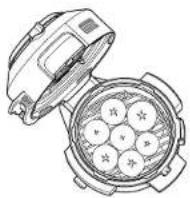
2 Holding the top layer by its handles, place it down over the reversible rack in the position shown below. Then place a layer of ingredients on the top layer and close the lid.
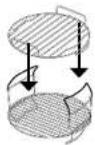
NOTE: For 5 levels of capacity, use the Dehydrator Stand (sold separately) directly in the cooking pot.
3 Move slider to AIR FRY/COOKER, then use the dial to select DEHYDRATE. The default temperature setting will display. Use the up and down arrows to the left of the display to choose a temperature in 5°C increments between 40°C and 90°C.
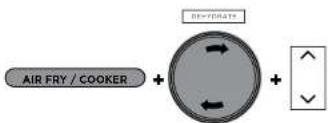
4 Use the up and down arrows to the right of the display to adjust the cook time in 15-minute increments from 1 hour to 12 hours.
5 Press START/STOP to begin cooking.
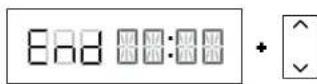
6 When cook time reaches zero, the unit will beep and "End" will flash 3 times on the display.
Sear/Sauté
1 Add ingredients to the pot.
2 Move slider to AIR FRY/COOKER or open the lid, then use the dial to select SEAR/SAUTE. The default temperature setting will display. Use the up and down arrows to the left of the display to select "LO 1," "2," "3," "4," OR "Hi 5."
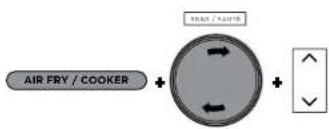
NOTE: There is no time adjustment available when using the Soar/Sauté function.
3 Press START/STOP to begin cooking.
4 Press START/STOP to turn off the SCAR/SAUTE function. To switch to a different cooking function, press START/STOP to end the cooking function then use the slider and dial to select your desired function.
NOTE: You can use this function with the lid open or with the lid closed.
NOTE: ALWAYS use non-stick utensils in the cooking pot. DO NOT use metal utensils, as they will scratch the non-stick coating on the pot.
NOTE: SFAR/SAUTF will automatically turn off after 1 hour for "4" and "Hi 5" and 4 hours for "Lo 1," "2" and "3."
USING THE AIR FRY/COOKER FUNCTIONS - CONT
Steam
- Add 250ml of liquid (or recipe-specified amount) to the pot, then place the reversible rack or Cook & Crisp Basket with ingredients in the pot.
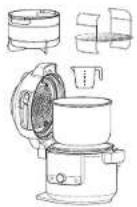
2 Move slider to AIR FRY/COOKER, then use the dial to select STEAM.
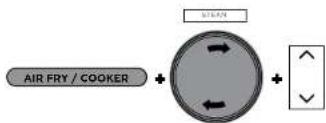
3 Use the up and down arrows to the right of the display to adjust the cook time in 5 minute increments up to 30 minutes.
4 Press START/STOP to begin cooking.
NOTE: There is no temperature adjustment when using the STEAM function.
5 The unit will begin preheating to bring the liquid to a boil. The display will show "P/E". The preheating animation will show until the unit reaches temperature and then the display will show the timer counting down.
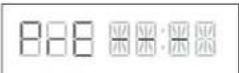
6 When the cook time reaches zero, the unit will beep and "End" will flash 3 times on the display.
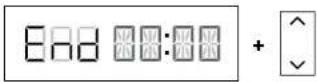
Slow Cook
1 Add ingredients to the pot. DO NOT fill the pot past the MAX line.
2 Move slider to AIR FRY/COOKER, then use the dial to select SLOW COOK. The default temperature setting will display. Use the up and down arrows to the left of the display to select "Hi", "Lo" or "oFFF."
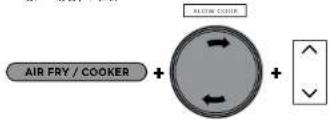
3 Use the up and down arrows to the right of the display to adjust the cook time in 15-minute increments up to 12 hours.
4 Press START/STOP to begin cooking.
NOTE: The Slow Cook BUFFET time setting may be adjusted between 2 and 12 hours; the SLOW COOK HI time setting may be adjusted between 4 and 12 hours.
5 When cook time reaches zero, the unit will beep, automatically switch to KEEP WARM and begin counting up.
NOTE: After cooking is complete, you may press KEEP WARM to turn the KEEP WARM mode off.
Yogurt
1 Add desired amount of milk to the pot.
NOTE: If you prefer to pasteurise, cool and add cultures not using the unit, skip steps 1-9. Instead, press TEMP, select "FFr," press TIME, select desired incubation time, then press START/STOP to begin.
2 Close the lid.
3 Move slider to AIR FRY/COOKER, then use the dial to select YOGURT. The default temperature setting will display. Use the up and down arrows to the left of the display to select "YGt" or "FEr."
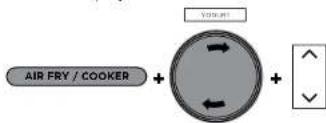
4 Use the up and down arrows to the right of the display to adjust the incubation time in 30-minute increments between 6 and 12 hours.
NOTE: Selecting a longer time will lead to tangier yogurt with a thicker consistency. Use 12 hours to achieve Greek-style yogurt.
5 Press START/STOP to begin pasteurisation.
6 Unit will display "boil" while pasteurising. When pasteurisation temperature is reached, the unit will beep and display "COOL".
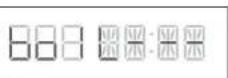
7 Once the milk has cooled, the unit will display ADD and STIR in succession and the incubation time.
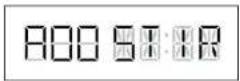
8 Open the lid and skim the top off the milk.
9 Add yogurt cultures to milk and stir to combine. Close the lid and press START/STOP to begin incubation process.
10 The display will show "FEr" and will begin counting down. When incubation time is complete, the unit will beep and END will flash 3 times on the display. The unit will beep each minute for up to 4 hours or until powered off.
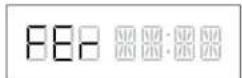
11 Chill yogurt for up to 12 hours before serving.
CLEANING & MAINTENANCE
Cleaning: Dishwasher & Hand-Washing
natural_image
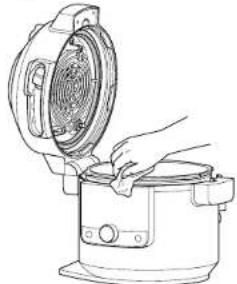
Line drawing of a hand placing a cooking pot into a rice cooker (no text or symbols)The unit should be cleaned thoroughly after every use.
1 Unplug the unit from the wall socket before cleaning.
2 To clean the cooker base and the control panel, wipe them clean with a damp cloth.
3 The cooking pot, multi-purpose tin, silicone ring, reversible rack, Cook & Crisp Basket and detachable diffuser can be washed in the dishwasher.
NOTE: NEVER put the cooker base in the dishwasher or immerse it in water or any other liquid.
4 The pressure release valve and anti-clog cap, can be washed with water and dish soap.
5 If food residue is stuck on the cooking pot, reversible rack or Cook & Crisp Basket, fill the pot with water and allow to soak before cleaning. DO NOT use scouring pads. If scrubbing is necessary, use a non-abrasive cleanser or liquid dish soap with a nylon pad or brush.
6 Air-dry all parts after each use.
Removing & Reinstalling the Silicone Ring
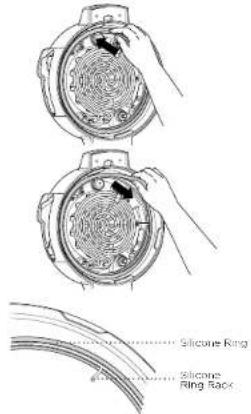
To remove the silicone ring, gently pull it outward, section by section, from the silicone ring rack. The ring can be installed with either side facing up. To reinstall, press it down into the rack section by section, (see image above).
After use, remove any food debris from the silicone ring and anti-clog cap.
Keep the silicone ring clean to avoid odour
Washing it in warm, soapy water or in the dishwasher can remove odour. However, it is normal for it to absorb the smell of certain acidic foods. It is recommended to have more than one silicone ring on hand. You can purchase additional silicone rings at minjakitchen.eu.
NEVER pull out the silicone ring with excessive force, as that may deform it and the rack and affect the pressure-sealing function. A silicone ring with cracks, cuts or other damage should be replaced immediately.
NOTE: The silicone ring must be replaced by one that is specific to a Food ^® SmartLid Multi-cooker.
CLEANING THE LID
We recommend inspecting the interior of the lid and heating elements prior to cooking with "wet cooking functions," which include Slow Cook, Steam, Sear/Sauté, Pressure and all COMBI-STEAM modes. If you see any food residue or oil buildup, we recommend steam cleaning the unit (see instructions below), then wiping down the interior of the lid.
STEAM CLEANING INSTRUCTIONS:
1 Fill pot with 750ml of water.
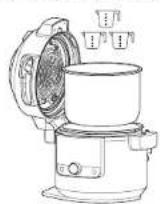
2 Move SmartLid Slider to Air Fry/Cooker,
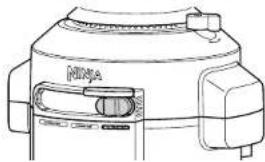
natural_image
Line drawing of a NIYA camera module with no visible text or symbols3 Select STEAM, and set time to 30 minutes. Press START/STOP.
4 When time reaches zero and the unit has cooled down, use a wet cloth or sponge to wipe down the interior of the lid and heating elements. CAUTION: When cleaning the interior of the lid, do not touch the fan.
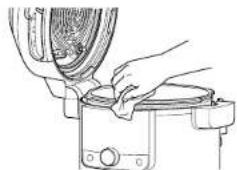
natural_image
Line drawing of hands operating a mechanical device with a fan or knob (no text or symbols)5 Repeat steps 3 and 4 as needed and spot clean as necessary.
NOTE: If the unit is not open after the cycle is over, the unit will default to KEEP WARM and the heating element will continue running.
TROUBLESHOOTING GUIDE
Why is my unit taking so long to come to pressure? How long does it take to come to pressure?
- Cooking times may vary based on the selected temperature, current temperature of the cooking pot and temperature or quantity of the ingredients.
- Check to make sure the silicone ring is fully seated and flush against the lid. If installed correctly, you should be able to tug lightly on the ring to rotate it.
- Check that the pressure lid is fully locked and the pressure release valve is in the SEAL position when pressure cooking.
- Unit will not pressurise if there is not enough liquid.
Why is the time counting down so slowly?
- You may have set hours rather than minutes. When setting time, the display will show HH:MM and the time will increase/decrease in minute increments.
How can I tell when the unit is pressurising?
- The display will show progress bar loading the building animation to indicate the unit is building pressure.
"PrE" and moving lights are shown on the display screen when using the Pressure or Steam function or any Combi-Steam mode Function.
- This indicates the unit is building pressure or preheating when using STEAM or PRESSURE. When the unit has finished building pressure, your set cook time will begin counting down.
There is a lot of steam coming from my unit when using the Steam function.
- It's normal for steam to release through the pressure release valve during cooking.
Why can't I open the lid after pressurising?
- As a safety feature, the lid will not unlock until the unit is completely depressurised. Turn the pressure release valve to the VENT position to quick release the pressurised steam. A quick burst of steam will spurt out of the pressure release valve. When the steam is completely released, the unit will be ready to open.
Is the pressure release valve supposed to be loose?
- Yes. The pressure release valve's loose fit is intentional; it enables a quick and easy transition between SEAL and VENT and helps regulate pressure by releasing small amounts of steam during cooking to ensure great results. Please make sure it is turned as far as possible toward the SEAL position when pressure cooking and as far as possible toward the VENT position when quick releasing.
The unit is hissing and not reaching pressure.
- Make sure the pressure release valve is turned to the SEAL position. If you've done this and still hear a loud hissing noise, it may indicate the silicone ring is not fully in place. Press START/STOP to stop cocking, VENT as necessary and open the lid. Press down on the silicone ring, ensuring it is fully inserted and lies flat under the ring rack. Once fully installed, you should be able to tug lightly on the ring to rotate it.
The unit is counting up rather than down.
• The cooking cycle is complete and the unit is in KEEP WARM mode.
How long does the unit take to depressurise?
- The time it takes to release pressure depends on the quantity of food in the unit and can vary from recipe to recipe. Always ensure the float valve has dropped before trying to remove the lid. If the unit is taking longer than normal to depressurise, unplug the unit and wait until the float valve drops before opening the lid.
TROUBLESHOOTING GUIDE - CONT.
"ADD POT" error message appears on display screen.
- Cooking pot is not inside the cooker base. Cooking pot is required for all functions.
"SHUT LID" error message appears on display screen.
- The lid is open and needs to be closed for the selected function to start.
• The water level is too low. Add more water to the unit for the function to continue.
"ADD WATER" error message appears on display screen when using the Steam and Pressure function.
"NO PRESSURE" error message appears on display screen when using the Pressure function.
- Add more liquid to the cooking pot before restarting the pressure cook cycle.
• Make sure the pressure release valve is in the SEAL position.
• Make sure the silicone ring is installed correctly.
"ERR" message appears.
- The unit is not functioning properly. Please contact Customer Service at 0800 000 9063.
"SLIDE" error message appears on display screen.
- Move the slider to the position desired before selecting a cooking function.
"LOCK LID" error message appears on display screen.
- Move the slider to the PRESSURE position in order to lock the lid.
HELPFUL TIPS
1 For consistent browning, make sure ingredients are arranged in an even layer on the bottom of the cooking pot with no overlapping. If ingredients are overlapping, make sure to shake halfway through the set cook time.
2 For smaller ingredients that could fall through the reversible rack, we recommend first wrapping them in a parchment paper or foil pouch.
3 Use the KEEP WARM mode to keep food at a warm, food-safe temperature after cooking. To prevent food from drying out, we recommend keeping the lid closed and using this function just before serving.
4 To reheat food, use the AIR FRY function.
TWO (2) YEAR LIMITED GUARANTEE
When you buy a product in Europe as a consumer, you got the benefit of legal rights relating to the quality of the product (your "statutory rights"). You can enforce these statutory rights against your retailer. However, at: Ninja we are so confident about the quality of our products (the "Products") that we give you a manufacturer's guarantee of two years. This guarantee only applies to the Product if it is bought in new and unused condition. These terms and conditions relate to our guarantees only - your statutory rights as a buyer are unaffected. Please note that the 2 year guarantee is available in all EU countries.
The conditions below describe the prerequisites and scope of our guarantees which are issued by SharkNinja Germany GmbH, c/o Regus Management GmbH, Excellent Business Center 10. +1// Stock, Westhafenplatz 1, 60327 Frankfurt am Main (Germany) ("us", "our" or "we"). They do not affect your statutory rights or the obligations of your retailer and your contract with them. The same applies if you have purchased the product directly from Ninja.
Ninja® Guarantees
A household kitchen appliance constitutes a sizeable investment. Your new machine needs to work properly for as long as possible. The guarantee it comes with is an important consideration - and reflects how much confidence the manufacturer has in its product and manufacturing quality.
You'll find online support at www.ninjakitchen.eu.
How do I register my guarantee?
You can register your guarantee online within 28 days of purchase. To save time, you'll need the following information about your machine:
- Model no.
- Serial Number (only if available)
• Date of purchase of the Product (receipt or delivery note)
To register online, please visit www.ninjakitchen.eu
IMPORTANT
• The guarantee covers your Product for 2 years starting on the date of purchase.
- Please keep the receipt at all times. Should you need to use your guarantee we will need the receipt to verify the information supplied to us is correct. The inability to produce a valid receipt will invalidate your guarantee.
What are the benefits of registering my guarantee?
When you register your guarantee, you can choose to receive our newsletter containing tips, advice and competitions. Hear the latest news about new Ninja technology and launches. If you register your guarantee online, you'll get instant confirmation that we've received your details.
For details of our privacy policy please visit www.ninjakitchen.eu
How long are our Products guaranteed for?
Our confidence in our design and quality control means that your Product is guaranteed for two years.
PRODUCT REGISTRATIONPRODUCT REGISTRATIO
What is covered by the guarantee?
Repair or replacement (at Ninja's discretion) of your Product, including all parts and labour in case of any defect in design, materials and workmanship (including transport and shipping costs). Our guarantee is in addition to your legal rights as a consumer.
What is not covered by the guarantee?
• Normal wear and tear.
- Accidental damage, faults caused by negligent use or care, misuse, neglect, careless operation or handling of the kitchen appliance which is not in accordance with the Ninja® Instruction Manual supplied with your machine.
- Use of the kitchen appliance for anything other than normal domestic household purposes.
- Use of parts not assembled or installed in accordance with the operating instructions.
- Use of parts and accessories which are not Ninja® Genuine Components.
- Faulty installation (except where installed by Ninja*).
- Repairs or alterations carried out by parties other than Ninja or its agents, unless you can show that the repairs or alterations carried out by others are not related to the defect for which you exercise the guarantee.
What happens when my guarantee runs out?
Ninja does not design products to last for a limited time. We do appreciate that there may be a desire for our customers to want to repair their kitchen appliance after the guarantee has elapsed. You'll find more support at ninjakitchen.eu.
Where can I buy genuine Ninja spares and accessories?
Ninja spares and accessories are developed by the same engineers who developed your Ninja kitchen appliance. You'll find a full range of Ninja spares, replacement parts and accessories for all Ninja machines at www.ninjakitchen.eu
Please remember that using non-Ninja spares may invalidate your manufacturer's guarantee. However, your statutory rights are unaffected.
MANGE TAK
Bake (bagning)....103
Dehydrering 103
Svitse/sautere 104
Damp 105
Slow Cook (Langsom tilberedning)....105
Yoghurt....106
natural_image
Two identical line drawings of cylindrical objects with a downward arrow indicating a transformation or assembly (no text or symbols)natural_image
Hand pouring liquid into a cooking pot (no text or symbols visible)Tibered in kengere lid.
natural_image
Line drawing of a NIJA device with no visible text or symbols3 Sørg for, et tryxudligningsventilen er i positionen SEAL (FORSEGLET).

SEAL (FORSEGLET) for tryklunktener
natural_image
Technical line drawing of a kitchen appliance with internal components and housing (no text or symbols)natural_image
Line drawing of a hand inserting a fan into a waffle device (no text or symbols)natural_image
Line drawing of a kitchen oven with lid open, showing internal components (no text or symbols)natural_image
Line drawing of a hand placing a cooking pan into a rice cooker (no text or symbols)natural_image
Line drawing of a NI-3A camera with no visible text or symbolsnatural_image
Line drawing of hands operating a kitchen appliance with a lid (no text or symbols)When you buy a product in Europe as a consumer, you got the benefit of legal rights relating to the quality of the product (your "statutory rights"). You can enforce these statutory rights against your retailer. However, at: Ninja we are so confident about the quality of our products (the "Products") that we give you a manufacturer's guarantee of two years. This guarantee only applies to the Product if it is bought in new and unused condition. These terms and conditions relate to our guarantees only - your statutory rights as a buyer are unaffected. Please note that the 2 year guarantee is available in all EU countries.
The conditions below describe the prerequisites and scope of our guarantees which are issued by SharkNinja Germany GmbH, c/o Regus Management GmbH, Excellent Business Center 10. +1// Stock, Westhafenplatz 1. 60327 Frankfurt am Main (Germany) ("us", "our" or "we"). They do not affect your statutory rights or the obligations of your retailer and your contract with them. The same applies if you have purchased the product directly from Ninja.
Ninja® Guarantees
A household kitchen appliance constitutes a sizeable investment. Your new machine needs to work properly for as long as possible. The guarantee it comes with is an important consideration - and reflects how much confidence the manufacturer has in its product and manufacturing quality.
You'll find online support at www.ninjakitchen.eu.
How do I register my guarantee?
You can register your guarantee online within 28 days of purchase. To save time, you'll need the following information about your machine:
- Model no.
- Serial Number (only if available)
• Date of purchase of the Product (receipt or delivery note)
To register online, please visit www.ninjakitchen.eu
IMPORTANT
• The guarantee covers your Product for 2 years starting on the date of purchase.
- Please keep the receipt at all times. Should you need to use your guarantee we will need the receipt to verify the information supplied to us is correct. The inability to produce a valid receipt will invalidate your guarantee.
What are the benefits of registering my guarantee?
When you register your guarantee, you can choose to receive our newsletter containing tips, advice and competitions. Hear the latest news about new Ninja technology and launches. If you register your guarantee online, you'll get instant confirmation that we've received your details.
For details of our privacy policy please visit www.ninjakitchen.eu
How long are our Products guaranteed for?
Our confidence in our design and quality control means that your Product is guaranteed for two years.
PRODUKTREGISTRERINGPRODUKTREGISTRERING
What is covered by the guarantee?
Repair or replacement (at Ninja's discretion) of your Product, including all parts and labour in case of any defect in design, materials and workmanship (including transport and shipping costs). Our guarantee is in addition to your legal rights as a consumer.
What is not covered by the guarantee?
• Normal wear and tear.
- Accidental damage, faults caused by negligent use or care, misuse, neglect, careless operation or handling of the kitchen appliance which is not in accordance with the Ninja® Instruction Manual supplied with your machine.
- Use of the kitchen appliance for anything other than normal domestic household purposes.
- Use of parts not assembled or installed in accordance with the operating instructions.
- Use of parts and accessories which are not Ninja® Genuine Components.
- Faulty installation (except where installed by Ninja*).
- Repairs or alterations carried out by parties other than Ninja or its agents, Repairs or alterations carried out by parties other than Ninja or its agents, unless you can show that the repairs or alterations carried out by others are not related to the defect for which you exercise the guarantee.
What happens when my guarantee runs out?
Ninja does not design products to last for a limited time. We do appreciate that there may be a desire for our customers to want to repair their kitchen appliance after the guarantee has elapsed. You'll find more support at ninjakitchen.eu.
Where can I buy genuine Ninja spares and accessories?
Ninja spares and accessories are developed by the same engineers who developed your Ninja kitchen appliance. You'll find a full range of Ninja spares, replacement parts and accessories for all Ninja machines at www.ninjakitchen.eu
Please remember that using non-Ninja spares may invalidate your manufacturer's guarantee. However, your statutory rights are unaffected.
GRACIAS
natural_image
Three-step line drawings of a mechanical device with a tool interacting with it, showing progressive assembly (no text or symbols)natural_image
Line drawing of a vintage MRI scanner device (no text or symbols visible)natural_image
Technical line drawing of a portable kitchen appliance with internal components and a separate view of its lid (no text or symbols)natural_image
Line drawing of a hand using a waffle to clean a grid-patterned fan (no text or symbols)natural_image
Line drawing of a kitchen mixer with open lid and side arm (no text or symbols)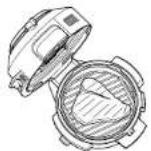
Sear/Sauté (sofreir/saltear)
natural_image
Line drawing of a hand placing a cooking pot into a rice cooker (no text or symbols)natural_image
Line drawing of a NIJA electric shaver with control panel (no text or symbols)natural_image
Line drawing of hands using a kitchen mixer to adjust or clean food (no text or symbols visible)natural_image
Line drawing of a NIJA device with control panel and buttons (no text or symbols)natural_image
Technical line drawings of three different types of industrial machines or enclosures (no text or symbols present)natural_image
Line drawing of a hand using a portable electric stove to clean the air in a circular pan (no text or symbols)natural_image
Line drawing of a kitchen appliance with a lid open, showing internal components and a side shelf (no text or symbols)natural_image
Line drawing of a hand pouring liquid into a cooking pot (no text or symbols)natural_image
Line drawing of a NIWA device with control panel and buttons (no text or symbols)natural_image
Line drawing of hands operating a kitchen appliance (no text or symbols)5 Rioctero le fasi 3 e 4 se necessario e puire in punti precisi se necessario.
natural_image
Two cylindrical containers with curved handles, one showing a downward arrow indicating a change or transformation (no text or symbols present)natural_image
Line drawing of a rice cooker with control panel and side-mounted lid (no text or symbols)HOE HET DEKSEL TE OPENEN EN SLUITEN
natural_image
Line drawing of a mechanical device with no visible text or symbolsnatural_image
Technical line drawing of a kitchen appliance with three views: top view, side view, and front view (no text or symbols)natural_image
Line drawing of a hand using a waffle to clean the basket (no text or symbols)natural_image
Line drawing of a kitchen appliance with open lid and side compartments (no text or symbols)natural_image
Line drawing of a hand pouring liquid into a cooking pot (no text or symbols)natural_image
Line drawing of a NIJA camera with no visible text or symbolsnatural_image
Line drawing of hands operating a mechanical device with a fan or blade (no text or symbols)natural_image
Two identical line drawings of cylindrical containers with a downward arrow indicating a process or transformation (no text or symbols)natural_image
Line drawing of a NIJA device with no visible text or symbols on the bodynatural_image
Technical line drawing of a kitchen appliance with internal components and exploded view (no text or labels)2 Legg ingredienser i Cook & Crisp-kurven eller den vendbare risten. Lukk lokket.
natural_image
Line drawing of a hand using a waffle to clean a grid-patterned dish (no text or symbols)natural_image
Line drawing of a kitchen appliance with lid open and side view showing internal components (no text or symbols)Dehydrate (dehydrere)
natural_image
Line drawing of a hand pouring liquid into a rice cooker (no text or symbols)natural_image
Line drawing of a NIYA device with control panel and buttons (no text or symbols)natural_image
Line drawing of hands using a tool to clean or inspect a mechanical component (no text or symbols visible)natural_image
Line drawing of a white industrial machine with control panel and side ports (no text or symbols)natural_image
Technical line drawings of a mechanical device with three views: top shows cylindrical components, middle shows a cross-section, and bottom shows a cylindrical housing (no text or symbols present)natural_image
Line drawing of a hand using a tool to clean or adjust a woven basket inside a waffle (no text or symbols)natural_image
Line drawing of a kitchen oven with lid open, showing internal components (no text or symbols)2 Coloque os ingredientes no suporte e feche a tampa.
natural_image
Line drawing of a hand pouring liquid into a rice cooker (no text or symbols)natural_image
Line drawing of a NI4 camera with control panel and buttons (no text or symbols)natural_image
Line drawing of hands operating a kitchen appliance with a lid (no text or symbols)natural_image
Line drawing of a rice cooker with control panel and lid (no text or symbols)KANNEN AVAAMINEN JA SULKEMINEN
natural_image
Line drawing of a NIJA device with control panel and buttons (no text or symbols)natural_image
Technical line drawing of a kitchen appliance with internal components and a side view (no text or symbols)natural_image
Line drawing of a hand using a waffle to clean a grid-patterned surface (no text or symbols)natural_image
Line drawing of a kitchen appliance with lid open and side view showing internal components (no text or symbols)natural_image
Line drawing of a hand inserting a fan into a rice cooker (no text or symbols)natural_image
Line drawing of a Mini Camer device with handle and control panel (no text or symbols)natural_image
Line drawing of hands operating a kitchen appliance (no text or symbols)natural_image
Two hand-drawn diagrams showing a cylindrical object being folded into a bow-like structure, with no text or symbols present.natural_image
Line drawing of a vintage camera with no visible text or symbolsnatural_image
Technical line drawing of a kitchen appliance with two views: top shows a cylindrical device, bottom shows a side view of a microwave oven (no text or labels)natural_image
Line drawing of a hand using a tool to clean or adjust a waffle (no text or symbols present)natural_image
Line drawing of a kitchen oven with open lid and side compartments (no text or symbols)natural_image
Line drawing of a hand pouring liquid into a cooking pot (no text or symbols)natural_image
Line drawing of a NIVA milkshake organizer with control panel (no text or symbols)natural_image
Illustration of hands operating a kitchen grater with a cloth (no text or symbols visible)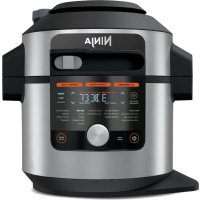
- FRANCAIS
- ENGLISH
- DANSK
- ESPAÑOL
- NEDERLANDS
- NORSK
- PORTUGUESE
- SUOMI
- SVENSKA
- NINJA Foodi
- VIELEN DANK
- KEEP WARM (MAINTENIR AU CHAUD):
- REGISTER YOUR PURCHASE
- RECORD THIS INFORMATION
- TECHNICAL SPECIFICATIONS
- CONTENTS
- IMPORTANT SAFEGUARDS
- HOUSEHOLD USE ONLY • READ ALL INSTRUCTIONS BEFORE USE
- WARNING
- SAVE THESE INSTRUCTIONS
- ACCESSORY ASSEMBLY INSTRUCTIONS
- USING THE SMARTLID SLIDER
- HOW TO OPEN AND CLOSE THE LID
- USING THE CONTROL PANEL
- COOKING FUNCTIONS
- OPERATING BUTTONS
- BEFORE FIRST USE
- INSTALLING THE CONDENSATION COLLECTOR
- REMOVING & REINSTALLING THE ANTI-CLOG CAP
- USING THE PRESSURE COOKING FUNCTIONS
- WATER TEST: GETTING STARTED PRESSURE COOKING
- USING THE
- PRESSURE COOKING FUNCTIONS - CONT
- NATURAL PRESSURE RELEASE VS. QUICK PRESSURE RELEASE
- PRESSURISING
- USING THE PRESSURE FUNCTION
- Pressure
- USING THE COMBI-STEAM MODE FUNCTIONS
- Steam Meals
- Steam Air Fry
- Steam Bake
- USING THE AIR FRY/COOKER FUNCTIONS
- Air Fry
- Grill
- USING THE AIR FRY/COOKER FUNCTIONS - CONT
- Bake
- Dehydrate
- Sear/Sauté
- Steam
- Slow Cook
- Yogurt
- CLEANING & MAINTENANCE
- Keep the silicone ring clean to avoid odour
- CLEANING THE LID
- STEAM CLEANING INSTRUCTIONS:
- TROUBLESHOOTING GUIDE
- Why is my unit taking so long to come to pressure? How long does it take to come to pressure?
- Why is the time counting down so slowly?
- How can I tell when the unit is pressurising?
- "PrE" and moving lights are shown on the display screen when using the Pressure or Steam function or any Combi-Steam mode Function.
- There is a lot of steam coming from my unit when using the Steam function.
- Why can't I open the lid after pressurising?
- Is the pressure release valve supposed to be loose?
- The unit is hissing and not reaching pressure.
- The unit is counting up rather than down.
- How long does the unit take to depressurise?
- TROUBLESHOOTING GUIDE - CONT.
- "ADD POT" error message appears on display screen.
- "SHUT LID" error message appears on display screen.
- "ADD WATER" error message appears on display screen when using the Steam and Pressure function.
- "NO PRESSURE" error message appears on display screen when using the Pressure function.
- "ERR" message appears.
- "SLIDE" error message appears on display screen.
- "LOCK LID" error message appears on display screen.
- HELPFUL TIPS
- TWO (2) YEAR LIMITED GUARANTEE
- Ninja® Guarantees
- How do I register my guarantee?
- IMPORTANT
- What are the benefits of registering my guarantee?
- How long are our Products guaranteed for?
- PRODUCT REGISTRATIONPRODUCT REGISTRATIO
- What is covered by the guarantee?
- What is not covered by the guarantee?
- What happens when my guarantee runs out?
- Where can I buy genuine Ninja spares and accessories?
- MANGE TAK
- PRODUKTREGISTRERINGPRODUKTREGISTRERING
- GRACIAS
- Sear/Sauté (sofreir/saltear)
- HOE HET DEKSEL TE OPENEN EN SLUITEN
- Dehydrate (dehydrere)
- KANNEN AVAAMINEN JA SULKEMINEN
Brand : NINJA
Model : Foodi MAX OL650EU
Category : Multi-cooker