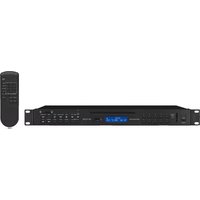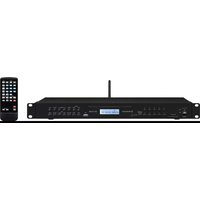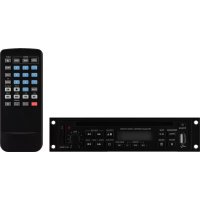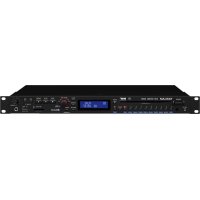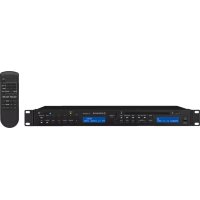
CD112RDSBT - Cd player/recorder Monacor - Free user manual and instructions
Find the device manual for free CD112RDSBT Monacor in PDF.



| Brand | Monacor |
| Model | CD112RDSBT |
| Product type | CD player/recorder with FM RDS tuner and Bluetooth receiver |
| Dimensions (W × H × D) | 482 × 44 × 265 mm (1U) |
| Weight | 4 kg |
| Power supply | 230 V / 50 Hz via mains cord |
| Bandwidth | 20 - 20000 Hz |
| Distortion factor | < 0.1 % |
| Channel separation | > 60 dB |
| Dynamic range | > 96 dB |
| Signal-to-noise ratio | > 70 dB |
| Audio output | 1.2 V |
| Available audio outputs | Priority (XLR balanced), CD (XLR balanced), Bluetooth (RCA), Tuner (RCA) |
| Connectivity | CD/MP3, USB, SD/SDHC card (32 GB max.), FM RDS, Bluetooth (A2DP), RS-232 |
| Main functions | CD/MP3 playback, programming, repeat (track/folder/all), random, intro, alphabetical search, sleep timer |
| CD compatibility | Audio CD, CD-R, MP3 on CD; CD-RW possible with limitations |
| Operating temperature | 0 - 40 °C |
| Installation | 19" rack (1U) or tabletop |
| Remote control | Yes, with 2× 1.5 V type R03 batteries |
| Maintenance and cleaning | Soft, dry cloth; no chemicals |
| Safety | Indoor use, avoid water splashes and high humidity, unplug if damaged |
| Spare parts and repairability | Repair by qualified technician; professional laser cleaning required |
| General information | Warranty void if misused; disposal according to environmental regulations |
Frequently Asked Questions - CD112RDSBT Monacor
User questions about CD112RDSBT Monacor
0 question about this device. Answer the ones you know or ask your own.
Ask a new question about this device
Download the instructions for your Cd player/recorder in PDF format for free! Find your manual CD112RDSBT - Monacor and take your electronic device back in hand. On this page are published all the documents necessary for the use of your device. CD112RDSBT by Monacor.
USER MANUAL CD112RDSBT Monacor
These instructions are intended for users without any specific technical knowledge. Please read these instructions carefully prior to operation and keep them for later reference.
1 Applications
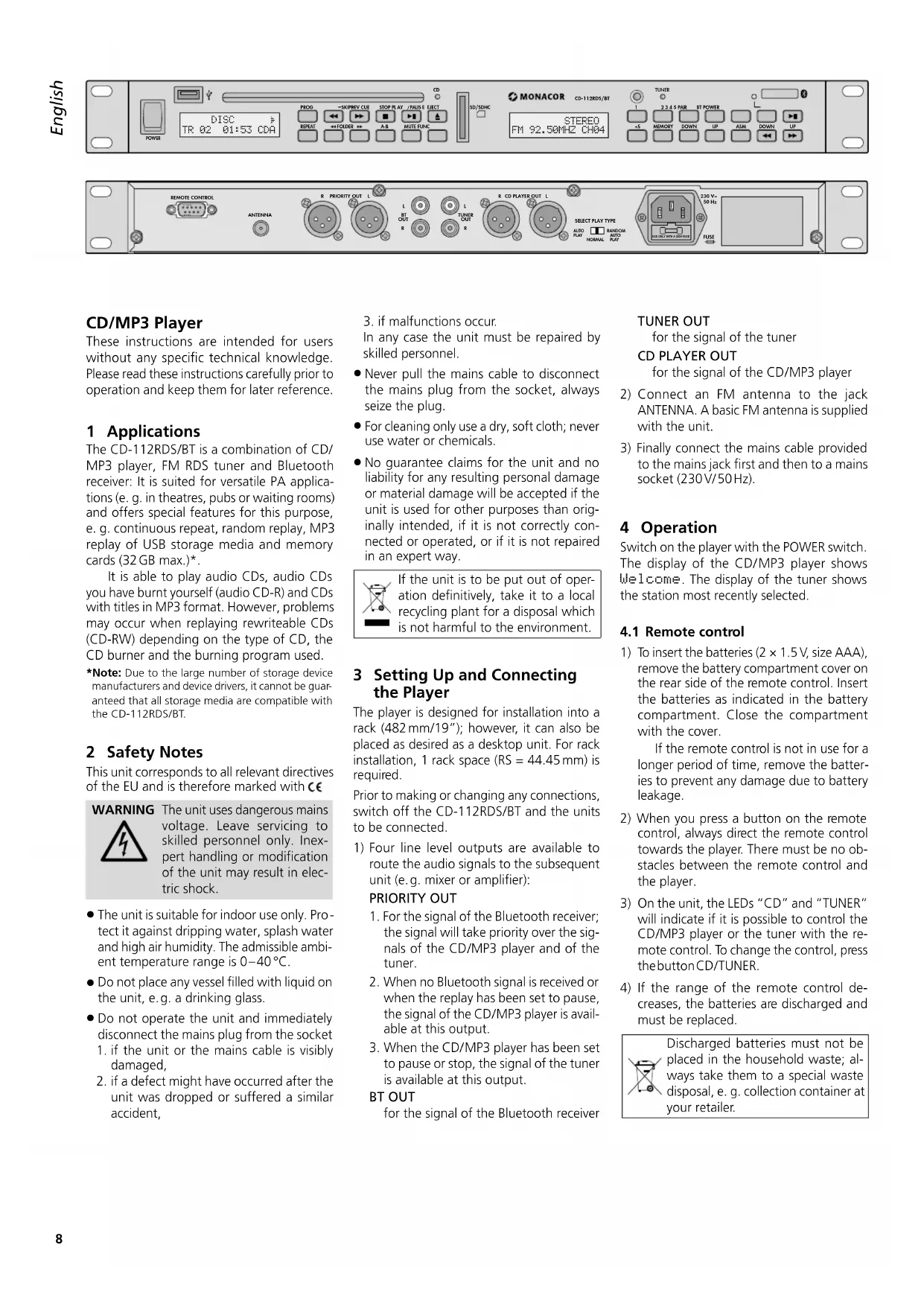
The CD-112RDS/BT is a combination of CD/ MP3 player, FM RDS tuner and Bluetooth receiver: It is suited for versatile PA applications (e.g. in theatres, pubs or waiting rooms) and offers special features for this purpose, e.g. continuous repeat, random replay, MP3 replay of USB storage media and memory cards (32 GB max.)*.
It is able to play audio CDs, audio CDs you have burnt yourself (audio CD-R) and CDs with titles in MP3 format. However, problems may occur when replaying rewriteable CDs (CD-RW) depending on the type of CD, the CD burner and the burning program used.
*Note: Due to the large number of storage device manufacturers and device drivers, it cannot be guaranteed that all storage media are compatible with the CD-112RDS/BT.
2 Safety Notes
This unit corresponds to all relevant directives of the EU and is therefore marked with C€
WARNING

The unit uses dangerous mains voltage. Leave servicing to skilled personnel only. Inexpert handling or modification of the unit may result in electric shock.
The unit is suitable for indoor use only. Protect it against dripping water, splash water and high air humidity. The admissible ambient temperature range is 0 - 40^
- Do not place any vessel filled with liquid on the unit, e.g. a drinking glass.
- Do not operate the unit and immediately disconnect the mains plug from the socket
- if the unit or the mains cable is visibly damaged,
-
if a defect might have occurred after the unit was dropped or suffered a similar accident,
-
if malfunctions occur.
In any case the unit must be repaired by skilled personnel.
- Never pull the mains cable to disconnect the mains plug from the socket, always seize the plug.
For cleaning only use a dry, soft cloth; never use water or chemicals. - No guarantee claims for the unit and no liability for any resulting personal damage or material damage will be accepted if the unit is used for other purposes than originally intended, if it is not correctly connected or operated, or if it is not repaired in an expert way.
If the unit is to be put out of operation definitively, take it to a local recycling plant for a disposal which is not harmful to the environment.
3 Setting Up and Connecting the Player
The player is designed for installation into a rack (482mm / 19^ ) however, it can also be placed as desired as a desktop unit. For rack installation, 1 rack space (RS = 44.45mm) is required.
Prior to making or changing any connections, switch off the CD-112RDS/BT and the units to be connected.
1) Four line level outputs are available to route the audio signals to the subsequent unit (e.g. mixer or amplifier):
PRIORITY OUT
- For the signal of the Bluetooth receiver; the signal will take priority over the signals of the CD/MP3 player and of the tuner.
- When no Bluetooth signal is received or when the replay has been set to pause, the signal of the CD/MP3 player is available at this output.
- When the CD/MP3 player has been set to pause or stop, the signal of the tuner is available at this output.
BT OUT
for the signal of the Bluetooth receiver
TUNER OUT
for the signal of the tuner
CD PLAYER OUT
for the signal of the CD/MP3 player
2) Connect an FM antenna to the jack ANTENNA. A basic FM antenna is supplied with the unit.
3) Finally connect the mains cable provided to the mains jack first and then to a mains socket (230V/50Hz).
4 Operation
Switch on the player with the POWER switch. The display of the CD/MP3 player shows Welcome. The display of the tuner shows the station most recently selected.
4.1 Remote control
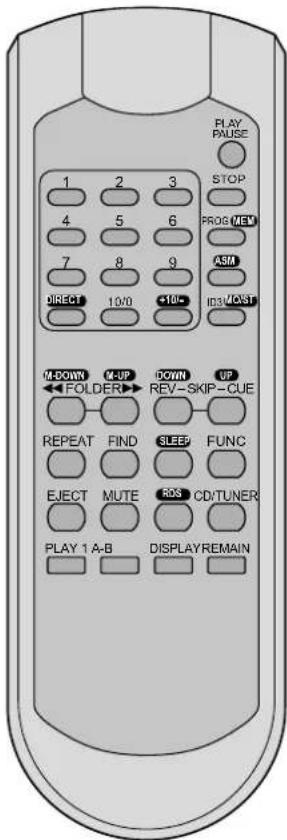
1) To insert the batteries (2× 1.5V, size AAA), remove the battery compartment cover on the rear side of the remote control. Insert the batteries as indicated in the battery compartment. Close the compartment with the cover.
If the remote control is not in use for a longer period of time, remove the batteries to prevent any damage due to battery leakage.
2) When you press a button on the remote control, always direct the remote control towards the player. There must be no obstacles between the remote control and the player.
3) On the unit, the LEDs "CD" and "TUNER" will indicate if it is possible to control the CD/MP3 player or the tuner with the remote control. To change the control, press the button CD/TUNER.
4) If the range of the remote control decreases, the batteries are discharged and must be replaced.

Discharged batteries must not be placed in the household waste; always take them to a special waste disposal, e. g. collection container at your retailer.
4.2 Tuner
1) On the remote control, the buttons for the tuner functions are marked by a white field with black letters (with the exception of the number buttons 1 ... 9, 10/0). The tuner can only be operated with the remote control when the LED "TUNER" lights up. If the LED "CD" lights up, press the button CD/TUNER on the remote control.
2) All operating options are listed in the following table.
3) During initial operation, first store the stations that can be received at where you are located. A maximum of 30 stations can be stored.
| FM Tuner | ||
| Button | Function | |
| on the remote control | ||
| on the unit↓ | ||
| Storing stations | ||
| ASM x x | to scan all stations and to store them one after the other:Keep button pressed for 2 s until the figures start to appear on the frequency indication. When the station number CHB1 appears on the display, all stations have been stored. | |
| DIRECT x | to enter the received frequency:1. Press the button DIRECT.2. Enter the frequency in MHz, using the buttons 1...9 and 10/0. | |
| DOWN UP | x x | station scanning:Keep button pressed until the figures start to appear on the frequency indication. Fine tuning:Briefly press button (repeatedly). |
| MEMORY MEM | x x | to store stations:1. Set the station (see buttons DIRECT or DOWN / UP).Press each of the following buttons within 5 seconds; otherwise, steps 2 - 4 must be repeated.2. Press the button MEM(ORY).3. Select the station number (see "Calling up stored stations").4. Press the button MEM(ORY). |
| Calling up stored stations | ||
| 1...5,+5 | x | no. buttons4 410 5, +5, +518 3, +5, +5, +5, +522 2, +5, +5, +5, +5, +5 |
| 1...9,10/0,+10/- | x | no. buttons4 41010/0188, +10/-222, +10/-, +10/-or keep the button +10/- pressed for 2 seconds until CH--- appears on the display, and then enter the number (two digits). |
| M-DOWN / M-UP x | previous/nextstation number | |
| MO/ST | x | to switch between stereo reception and mono reception |
| MUTE | x | to mute and unmute the sound |
| Additional information for RDS reception | ||
| RDS | 1stpress of the button:indication of the programme type or PTY NONE*2ndpress of the button:information with regard to title / broadcast programme or RT NONE*3ndpress of the button:indication of the time (after calling up the station, it may take a few minutes until the time is available) or CT NONE*4thpress of the button:brief indication of the frequency and the station number, then indication of the station name (basic setting)*if the information is not provided | |
| Automatic switch-off of the tuner | ||
| SLEEP | 1. Press button repeatedly until the display indicates the desired length of time after which the tuner switches off. The tuner will switch off when the set length of time has elapsed.2. To switch the tuner on again:Press button: SLEEP--98 MIN will appear on the display. Press button once again; otherwise, the switchoff function will be activated again.3. To deactivate the function before the set length of time has elapsed:Press button so that the indication SLEEP... MIN disappears. | |
4.3 CD/MP3 player
1) Insert a CD with the lettering facing up into the slot until it is pulled in automatically and/or connect a USB flash drive to the USB port or connect a hard disk (with individual power supply, if required) to the USB port and/or insert a memory card into the slot SD/SDHC CARD, the notched corner of the card facing up. To remove the card, slightly push it in to eject the card from the slot.
2) The audio player can only be operated with the remote control when the LED "CD" lights up. If the LED "TUNER" lights up, press the button CD/TUNER on the remote control.
3) All other operating options are listed in the table. After operation, switch off the unit with the POWER switch.
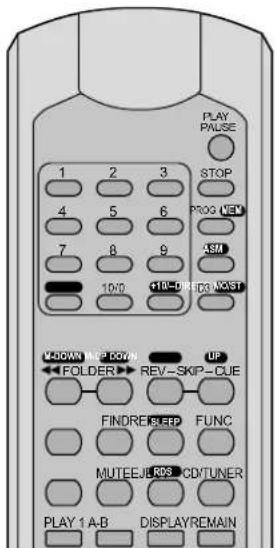
| CD/MP3player | ||
| Button | Function | |
| on the remote control↓ | ||
| on the unit↓ | ||
| Basic functions | ||
| SELECT PLAY TYPE | × | sliding switch on the rear: AUTO PLAY = The replay will start automatically after the unit has been switched on NORMAL = The unit will be set to pause after the unit has been switched on RANDOM /AUTO PLAY = Replay in random order will start automatically after the unit has been switched on |
| FUNC × × to switch between CD, USB port and memory card | ||
| PLAY/PAUSE | × | to start the replay and to switch between replay and pause |
| 1...9, 10/0 | × × | direct title selection, examples: title 8 = buttons 8 and II title 30 = buttons 3, 10 / 0 and II title 125 = buttons 1, 2, 5 and II |
| REV-SKIP-CUE | × | beginning of title, previous / next title: Press button briefly. fast forward / reverse: Keep button pressed |
| FOLDER | × × | to go to the first title of the previous / next folder |
| MUTE | × × to mute and unmute the sound | |
| PLAY 1 | × | single title replay (indication 1*): At the end of a title, the player is set to pause. To start the next title, press the button II. |
| Changing the information shown on the display | ||
| REMAIN | × | only when a CD-DA (Compact Disc Audio Digital) is being replayed: to change the information shown on the display - time already played of the title - remaining time of the title - remaining time of the CD |
| ID3 | × | only when MP3 files are being replayed: to change the information shown in the upper line of the display - name of the file, the title, the artist and the album will scroll through the upper line - the type of the selected storage medium will be indicated: DISC, USB or CARD |
| DISPLAY | × | only when MP3 files are being replayed: to change the information shown in the lower line of the display - number and playing time of the title - name of the folder - name of the title - number of folders and titles |
| CD/MP3player | ||
| Button | Function | |
| on the remote control↓ | ||
| on the unit↓ | ||
| Repeat functions | ||
| A-B | ×× | repeat of title section (continuous loop):Press button at the beginning and at the end of the section (minimum length of the section: 2 seconds).Press button once again to exit the loop. |
| REPEAT | ×× | repeat functions, random replay and intro function basic setting PLAY FILL: all titles will be replayed oncefirst actuation of button REPEAT TRACKthe title selected will be repeated continuously next actuation of button REPEAT FOLDERall titles in the folder selected will be repeated continuouslynext actuation of button REPEAT ALLall titles will be repeated continuously next actuation of button RANDOM REPEATall titles will be replayed continuously in random ordernext actuation of button RANDOM PLAYall titles will be replayed once in random ordernext actuation of button INT PLAYintro function: the first 10 seconds of each title will be replayednext actuation of button PLAY FILL: basic setting |
| Alphabetic search for MP3 titles | ||
| FIND | × | alphabetic search for titles and foldersTitle search1. Press FIND once → Indication "F".2. Select the 1stletter of the title with REV-SKIP-CUE.3. Press the button PLAY to start the replay.If there are multiple titles beginning with the same letter, keep the button REV or CUE pressed until the letter starts flashing; select the title with REV-SKIP-CUE and then press the button PLAY to start the replay of the title.Folder search1. Press FIND twice → Indication "Dir".2. Select the folder with REV-SKIP-CUE.3. Press the button PLAY to start the replay of the first title in the folder. |
| To program an individual title sequence | ||
| PROG | ×× | 1. Press the button STOP .2. Press the button PROG.3. for MP3 files only: Enter the folder number and press the button PROG.4. Enter the title number and press the button PROG.5. Repeat these steps to program all further titles (64 max.).6. Press the button PROG to start the replay.To delete or cancel the sequence,press the button STOP . |
| To stop the replay | ||
| STOP | ×× to | stop the replay |
| EJECT | ×× to | eject the CD |
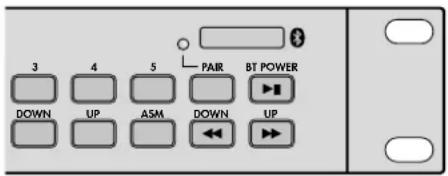
4.4 Operation of the Bluetooth receiver
The Bluetooth receiver is used for radio communication with a Bluetooth signal source (e.g. notebook, smartphone, tablet PC). Thus, the CD-112RDS / BT will be able to replay the audio files that have been stored on this source.
Note: The Bluetooth signal source must be compatible with the A2DP protocol (Advanced Audio Distribution Profile); otherwise radio communication will not be possible.
1) Enable the Bluetooth function on the notebook, smartphone or tablet PC (see manual of the unit, if necessary).
2) To switch on the Bluetooth receiver of the CD-112RDS / BT, keep the button BT POWER [▶II] pressed briefly until the LED PAIR starts flashing.
3) To link the CD-112RDS / BT to the Bluetooth signal source, keep the button PAIR pressed briefly until the LED PAIR keeps flashing more slowly. As soon as the radio communication has been established, the LED PAIR will light permanently.
Note: On the display of the Bluetooth signal source, the CD-112RDS / BT is indicated as "Audio Bluetooth".
4) Start a title at the Bluetooth signal source.
5) To pause or continue the title, press the button BT POWER [▶II].
Note: As long as the replay is interrupted, the signal of the CD / MP3 player or of the tuner will be available at the output PRIORITY.
6) Use the buttons DOWN [▶] and UP [▶] to go to the previous or next title (press the button briefly) or for fast forward / reverse (keep the button pressed).
7) To switch off the Bluetooth receiver, keep the button BT POWER [▶II] pressed until the LED PAIR is extinguished.
5 PC Control of the Unit via RS-232 Interface
It is possible to control the CD-112RDS / BT from a PC via a suitable terminal program. Connect the jack REMOTE CONTROL to the RS-232 interface of the computer. Set the following parameters in the terminal program:
Symbol rate 9600 bauds
Number of data bits:8
Number of stop bits: .1
Parity: .none
Flow control: . . . . . . . . . . . . . . . . . . . . . . . . . . . . . . . . . . . . . . . . . . . . . . . . . . . . . . . . . . . . . .
The control commands for all functions of the CD-112RDS / BT are listed in the table below. The terminal program will send them in ASCII code. Finally, the commands "Carriage Return" (OD hexadecimal) and "Line Feed" (0A hexadecimal) must be sent to the CD-112RDS / BT as bytes 4 and 5. Some terminal
programs will execute them automatically or can be adjusted accordingly.
After a command has been executed, the CD-112RDS / BT will send the following message in ASCII code to the PC:
+OK"Carriage Return"“Line Feed"
In case of an input error, it will send the message:
+ER"Carriage Return" "Line Feed"
Note: Between two commands, there must be an interval of at least 300 ms. After a command for station scanning, an interval of at least 800 ms is required.
| Functions of the CD/MP3 player | |||
| Function | Control command | ||
| Byte 1 | Byte 2 | Byte 3 | |
| FOLDER← | E | A | A |
| FOLDER→ | E | A | B |
| SKIP REV← | E | A | C |
| SKIP CUE→ | E | A | D |
| STOP | E | A | E |
| PLAY PAUSE→II | E | A | F |
| EJECT | E | A | G |
| PROG | E | A | H |
| ID3 | E | A | I |
| FIND | E | A | J |
| MUTE | E | A | K |
| REPEAT | E | A | L |
| FUNC | E | A | M |
| DISPLAY | E | A | N |
| A-B | E | A | O |
| disable EJECT | E | A | P |
| enable EJECT | E | A | Q |
| CARD | E | A | R |
| CD | E | A | S |
| USB | E | A | T |
| PLAY 1 | E | A | U |
| REMAIN | E | A | V |
| 0 | E | A | 0 |
| 1 | E | A | 1 |
| 2 | E | A | 2 |
| 3 | E | A | 3 |
| 4 | E | A | 4 |
| 5 | E | A | 5 |
| 6 | E | A | 6 |
| 7 | E | A | 7 |
| 8 | E | A | 8 |
| 9 | E | A | 9 |
| Functions of the tuner | |||
| 1 | E | C | A |
| 2 | E | C | B |
| 3 | E | C | C |
| 4 | E | C | D |
| 5 | E | C | E |
| 6 | E | C | F |
| 7 | E | C | G |
| 8 | E | C | H |
| 9 | E | C | I |
| 10/0 | E | C | J |
| +10 | E | C | K |
| DIRECT | E | C | L |
| (Tuning) DOWN | E | C | M |
| (Tuning) UP | E | C | N |
| MUTE | E | C | O |
| RDS | E | C | P |
| (Station) M-UP | E | C | 0 |
| (Station) M-DOWN | E | C | 1 |
| MEM(ORY) | E | C | 2 |
| ASM | E | C | 3 |
| Mono/Stereo | E | C | 4 |
| SLEEP | E | C | 5 |
| Station scanning← | E | C | 7 |
| Station scanning→ | E | C | 8 |
6 Maintenance
Protect the player from dust, vibrations, humidity and heat (admissible ambient temperature range 0 - 40^ ). For cleaning only use a dry, soft cloth; never use water or chemicals.
Note concerning sound interruptions and reading errors
Cigarette smoke and dust will easily penetrate through all openings of the unit and will also settle on the optics of the laser sampling systems. If this deposit should cause reading errors and sound interruptions, the unit must be cleaned by skilled personnel. Please note that there will be a charge on cleaning, even during the warranty period!
7 Specifications
Frequency range: .20-20000Hz
THD: <0.1%
Channel separation: ..>60 dB
Dynamic range: .96dB
S/N ratio: .70 dB
Audio output: 1.2V
Power supply: 230V/50Hz
Power consumption: .50VA max.
Ambient temperature: 0 - 40^
Dimensions
(W× H× D) ..482x44x265mm
1 rack space
Weight: 4kg
Connections
Priority: XLR, balanced
CD: XLR, balanced
Bluetooth: .RCA
Tuner: RCA
Remote Control: . . .D-sub jack, 9 poles
Subject to technical modification.
All rights reserved by MONACOR 假 INTERNATIONAL GmbH & Co. KG.No part of this instruction manual may be reproduced in any form or by any means for any commercial use.


Lecteur CD/MP3
Alimentation: .230V/50Hz
Consommation: . . . . . .50VA max.
Priority: XLR, symmetrico
CD: XLR, symmetrico
Bluetooth: .RCA
Tuner: .RCA
Remote Control: . . . .presa D-sub, 9 poli
Symbol rate: .9600 baud
Liczbabitowdanych:8