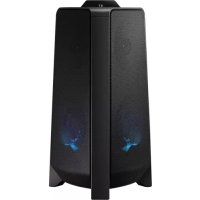
MXT40 - Pregnant SAMSUNG - Free user manual and instructions
Find the device manual for free MXT40 SAMSUNG in PDF.



| Product Type | Active speaker (Sound Tower) |
| Brand | Samsung |
| Model | MXT40 |
| Dimensions (W x H x D) | 291.5 x 530.5 x 268.0 mm |
| Weight | 6.8 kg |
| Power Supply | 220-240 V AC, 50/60 Hz (power cord included) |
| Standby Power Consumption | 2.0 W |
| Rated Output Power | Tweeter 2 x 50 W (8 ohms), Woofer 2 x 100 W (4 ohms) |
| Connectivity | Bluetooth, USB, AUX1 (3.5 mm jack), AUX2 (RCA input) |
| Wireless Functions | Group Play (up to 10 speakers), Stereo Group (2 speakers), Bluetooth Multi (2 devices) |
| Sound Modes | PARTY, STANDARD, HIPHOP, EDM, ROCK, LATIN, HOUSE, REGGAE |
| DJ Effects | NOISE, FILTER, CRUSH, CHORUS, WAHWAH, OFF (adjustable from -15 to +15) |
| Lighting | Modes AMBIENT, PARTY, DANCE, THUNDERBOLT, STAR, OFF |
| Supported USB Audio Formats | MP3, WMA, AAC, WAV, FLAC (FAT/FAT32) |
| USB Port | 5V/0.5A |
| Care and Cleaning | Clean with a soft, dry cloth. Avoid moisture and heat sources. |
| Safety | Risk of electric shock – do not open. Plug into a grounded outlet. Avoid water. |
| Spare Parts and Repairability | No user-serviceable parts. Contact a qualified after-sales service. |
| Operating Temperature | +5°C to +35°C |
| Operating Humidity | 10 % ~ 75 % |
Frequently Asked Questions - MXT40 SAMSUNG
User questions about MXT40 SAMSUNG
0 question about this device. Answer the ones you know or ask your own.
Ask a new question about this device
Download the instructions for your Pregnant in PDF format for free! Find your manual MXT40 - SAMSUNG and take your electronic device back in hand. On this page are published all the documents necessary for the use of your device. MXT40 by SAMSUNG.
USER MANUAL MXT40 SAMSUNG
Thank you for purchasing this Samsung product.
To receive more complete service, please register
your product at www.samsung.com/register
SAFETY INFORMATION
SAFETYWARNINGS
TO REDUCE THE RISK OF ELECTRIC SHOCK, DO NOT REMOVE THE COVER (OR BACK). NO USER- SERVICEABLE PARTS ARE INSIDE. REFER SERVICING TO QUALIFIED SERVICE PERSONNEL.
Refer to the table below for an explanation of symbols which may be on your Samsung product.
| CAUTION RISK OF ELECTRIC SHOCK. DO NOT OPEN. | |
| This symbol indicates that high voltage is present inside. It is dangerous to make any kind of contact with any internal part of this product. | |
| This symbol indicates that this product has included important literature concerning operation and maintenance. | |
| Class II product: This symbol indicates that it does not require a safety connection to electrical earth (ground). If this symbol is not present on a product with a power cord, the product MUST have a reliable connection to protective earth (ground). | |
| AC voltage: This symbol indicates that the rated voltage marked with the symbol is AC voltage. | |
| DC voltage: This symbol indicates that the rated voltage marked with the symbol is DC voltage. | |
| Caution, Consult instructions for use: This symbol instructs the user to consult the user manual for further safety related information. | |
WARNING
- To reduce the risk of fire or electric shock, do not expose this appliance to rain or moisture.
CAUTION
- TO PREVENT ELECTRIC SHOCK, MATCH WIDE BLADE OF PLUG TO WIDE SLOT, FULLY INSERT.
- This apparatus shall always be connected to a AC outlet with a protective grounding connection.
- To disconnect the apparatus from the mains, the plug must be pulled out from the mains socket, therefore the mains plug shall be readily operable.
- Do not expose this apparatus to dripping or splashing. Do not put objects filled with liquids, such as vases on the apparatus.
- To turn this apparatus off completely, you must pull the power plug out of the wall socket. Consequently, the power plug must be easily and readily accessible at all times.
PRECAUTIONS
- Ensure that the AC power supply in your house complies with the power requirements listed on the identification sticker located on the rear of your product. Install your product horizontally, on a suitable base (furniture), with enough space around it for ventilation (7 10~cm) .Make sure the ventilation slots are not covered. Do not place the unit on amplifiers or other equipment which may become hot. This unit is designed for continuous use. To fully turn off the unit, disconnect the AC plug from the wall outlet. Unplug the unit if you intend to leave it unused for a long period of time.
- During thunderstorms, disconnect the AC plug from the wall outlet. Voltage peaks due to lightning could damage the unit.
- Do not expose the unit to direct sunlight or other heat sources. This could lead to overheating and cause the unit to malfunction.
-
Protect the product from moisture (i.e. vases), and excess heat (e.g. a fireplace) or equipment creating strong magnetic or electric fields. Unplug the power cable from the AC wall socket if the unit malfunctions. Your product is not intended for industrial use. It is for personal use only. Condensation may occur if your product has been stored in cold temperatures. If transporting the unit during the winter, wait approximately 2 hours until the unit has reached room temperature before using.
-
The battery used with this product contains chemicals that are harmful to the environment. Do not dispose of the battery in the general household trash. Do not expose the battery to excess heat, direct sunlight, or fire. Do not short circuit, disassemble, or overheat the battery.
CAUTION: Danger of explosion if the battery is replaced incorrectly. Replace only with the same or equivalent type.
ABOUT THIS MANUAL
The user manual has two parts: this simple paper USER MANUAL and a detailed FULL MANUAL you can download.

USER MANUAL
See this manual for safety instructions, product installation, components, connections, and product specifications.

FULL MANUAL
You can access the FULL MANUAL on Samsung's on-line customer support centre by scanning the QR code. To see the manual on your PC or mobile device, download the manual in document format from Samsung's website. (http://www.samsung.com/support)
Design and specifications are subject to change without prior notice.
Sound Tower is a new name for Giga Party Audio.
CONTENTS
01 Checking the Components 2
Inserting Batteries before using the Remote Control (AAA batteries X 2)
02 Product Overview 3
Top Panel of the Sound Tower 3
Rear Panel of the Sound Tower 4
03 Connecting the Sound Tower 6
Connecting Electrical Power 6
How to use Audio Group 7
04 Connecting an External Device 13
Connecting using an Analogue Audio (AUX) Cable 13
Connecting a mobile device via Bluetooth 14
Connecting the Samsung TV via Bluetooth 17
05 Connecting a USB Storage Device 18
Software Update 19
06 Using the Remote Control 20
How to Use the Remote Control 20
How to use Sound Mode 22
How to use the DJ Effect 22
07 Using the Samsung Sound Tower (Giga Party Audio) app 23
Install Samsung Sound Tower (Giga Party Audio) App 23
Launching the Samsung Sound Tower (Giga Party Audio) App 23
08 Troubleshooting 24
09 Licence 25
10 Open Source Licence Notice 26
11 Important Notes About Service 26
12 Specifications and Guide 27
Specifications 27
01 CHECKING THE COMPONENTS
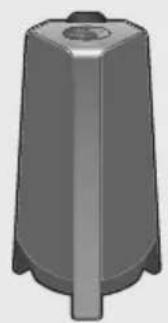
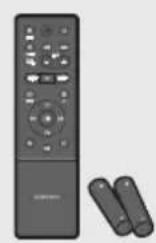
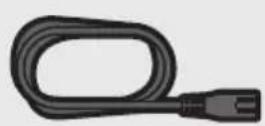
Sound Tower Main Unit Remote Control / Batteries Power Cord
- For more information about the power supply and power consumption, refer to the label attached to the product. (Label: Rear of the Sound Tower Main Unit)
- To purchase additional components or optional cables, contact a Samsung Service Centre or Samsung Customer Care.
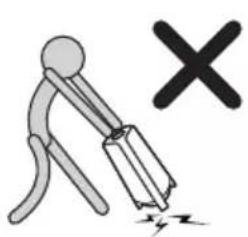
- When moving the product, do not drag or pull the product from the ground. Lift the product when moving the product.

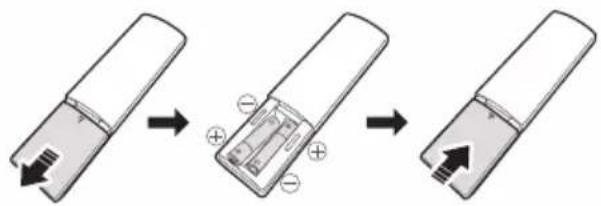
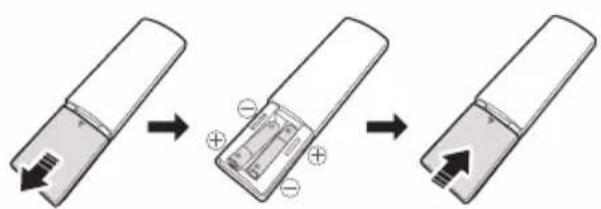
Inserting Batteries before using the Remote Control (AAA batteries X 2)
Slide the battery cover in the direction of the arrow until it is completely removed. Insert 2 AAA batteries (1.5V) oriented so that their polarity is correct. Slide the battery cover back into position.
02 PRODUCT OVERVIEW
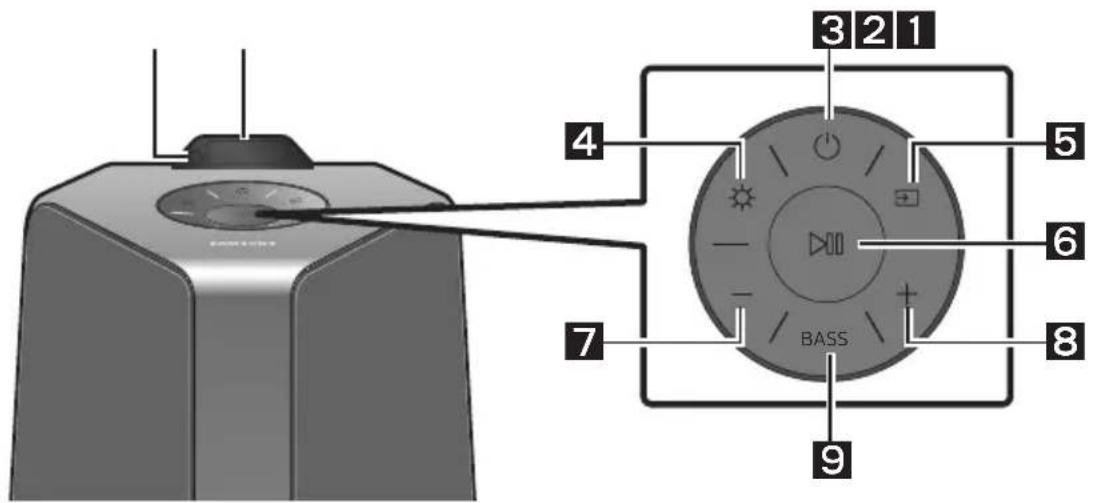
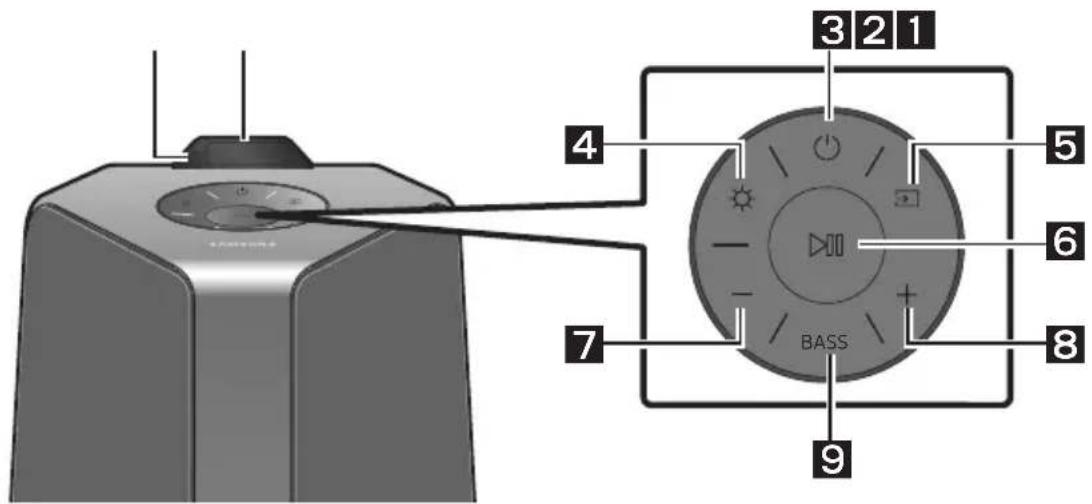
Top Panel of the Sound Tower
| 1 | Remote Sensor | When operating the Sound Tower system, please aim the front of the remote control at the remote sensor. |
| 2 | Display Window | Displays operating messages or current status of the Sound Tower system. |
| 3 | Power Turns the Sound Tower on and off. | |
| 4 | Light | Press the (Light) button to turn the Lighting Mode on. Press the button repeatedly to cycle through the available lighting modes: AMBIENT, PARTY, DANCE, THUNDERBOLT, STAR or OFF. |
| 5 | Source | Press to select a source connected to the Sound Tower. Press and hold the (Source) button for more than 5 seconds to enter the “SEARCHING TV” mode. |
| 6 | Play/Pause | Play/Pause Press the button to pause a music file temporarily. When you press the button again, the music file plays. Next/Previous Press the button 2 times to select the next music file, press the button 3 times to select the previous music file. |
| • Demo play Press and hold the button for more than 5 seconds to start the Demo play while the system is turned on. “DEMO” appears on the display and it plays demo music for 60 seconds. To cancel Demo Play, press and hold the button for more than 5 seconds during Demo Play. - If you input any commands while in demo play, 60 seconds timer is refreshed. - All the buttons on the remote control and rear panel are disabled while in demo play. If you want to use the remote control, cancel the demo play. - Demo play is cancelled when you change the source or power off the system. - Please be careful as it may play louder than the set volume. | ||
| 7 | Volume down | Press the (Volume down) button to lower the volume. Press and hold the - (Volume down) button to quickly lower the volume. |
| 8 | Volume up | Press the + (Volume up) button to raise the volume. Press and hold the + (Volume up) button to quickly raise the volume. |
| 9 | BASS | Press the BASS button to use the powerful bass sound. Press it again to return to the normal sound. Press and hold the BASS button for more than 5 seconds to turn on or off the BLUETOOTH POWER function. |
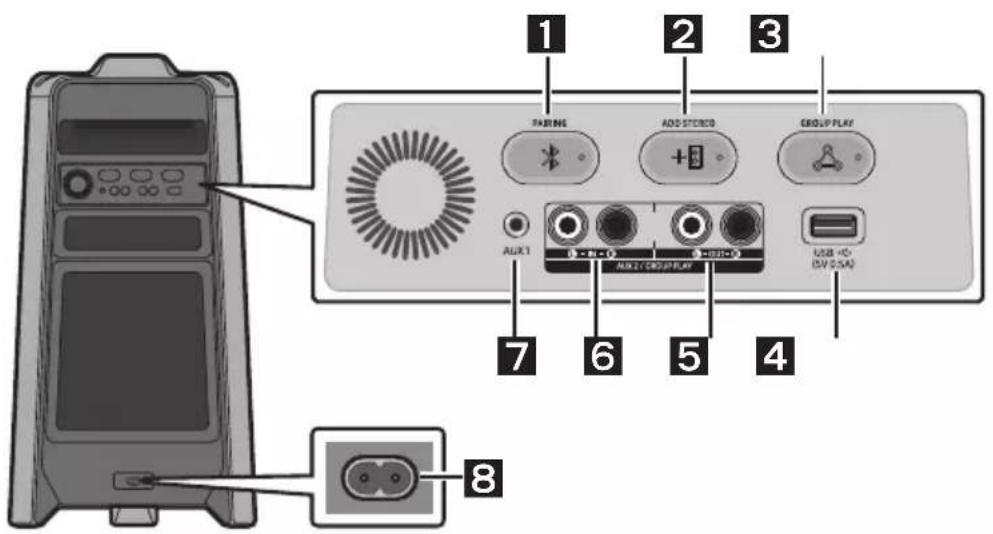
Rear Panel of the Sound Tower
| 1 | Bluetooth PAIRING | Press the PAIRING button to enter the "BT PAIRING" mode. You can connect the Sound Tower to a new Bluetooth device in this mode by selecting the Sound Tower from the Bluetooth device's search list. |
| 2 | ADD STEREO | Press the ADD STEREO button to connect to another Sound Tower wirelessly. Press the ADD STEREO button again before connecting another Sound Tower to exit Stereo Group mode. When the connection is made, you can enjoy stereo sound. Press and hold the ADD STEREO button for more than 5 seconds to disconnect the Stereo Group mode. |
| 3 | GROUP PLAY | Press the GROUP PLAY button to connect up to ten Sound Tower systems wirelessly. Press the GROUP PLAY button again before connecting other Sound Tower to exit wireless Group Play. When the connection is made, you can use multiple Sound Tower systems at the same time using Group Play mode. Press and hold the GROUP PLAY button for more than 5 seconds to disconnect the wireless Group Play mode. |
| 4 | USB | Connect a USB device to the USB portson the main unit. • Press the ➔ (Source) button to select USB. |
| 5 | GROUP PLAY OUT Terminals | Use an Audio Cable (not supplied) to connect GROUP PLAY (OUT) terminals on the main unit to Audio In on an external analogue output device. • Be sure to match connector colours. • If the external analogue output device has only one Audio In jack, connect either left or right. |
| 6 | AUX2/ GROUP PLAY IN Terminals | Use an Audio Cable (not supplied) to connect AUX2 (IN) terminals on the main unit to Audio Out on an external analogue output device. • Be sure to match connector colours. • If the external analogue output device has only one Audio Out jack, connect either left or right. • Press the ➔ (Source) button to select AUX2. • If the product is in AUX2 mode with no playback and no command input for more than 20 minutes, the system will turn off. • If the product is in AUX2 mode with playback for more than 8 hours and no command input, the system will turn off. |
| 7 | AUX1 | Use an Audio (AUX) Cable (not supplied) to connect AUX1 jack on the main unit to Audio Out on an external device. • If the product is in AUX1 mode with no playback and no command input for more than 20 minutes, the system will turn off. • If the product is in AUX1 mode with playback for more than 8 hours and no command input, the system will turn off. |
| 8 | Power | Connect the power cord to the Power jack and connect the other end of the power cord to a wall socket to supply electrical power to the Sound Tower. |
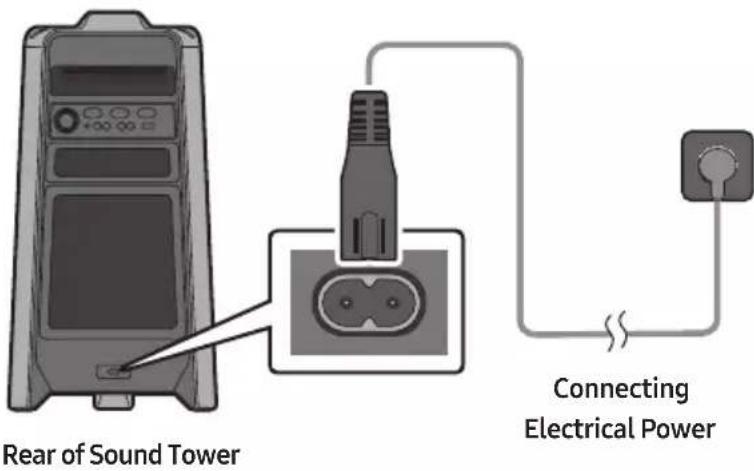
Connecting Electrical Power
Use the power cord to connect the Sound Tower to an electrical outlet in the following order:
Connect the power cord to the Sound Tower and then to a wall socket.
See the illustrations below.
- For more information about the required electrical power and power consumption, refer to the label attached to the product. (Label: Rear of the Sound Tower)
How to use Audio Group
You can connect multiple audio systems in a group to create a party environment and produce higher sound output. Set one Sound Tower as the HOST and any music played on it will be shared among any other Sound Tower systems in the Audio group.
Connecting the wired Group Play mode
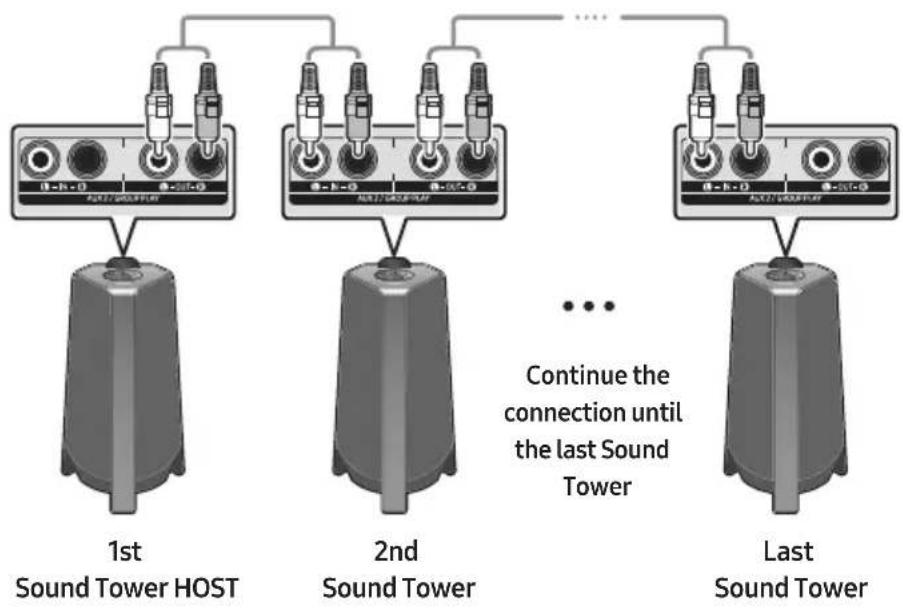
Set up Group Play by connecting all the systems using audio cables (not supplied). Use the AUX or (Source) button to change the source to AUX2 for every Sound Tower system except the 1st (or HOST) Sound Tower system.
NOTES
- The 1st Sound Tower HOST can play music from any source.
- Depending on the length or characteristics of the cable, there may be a difference in operating distance.
Connecting the wireless Group Play mode
You can connect up to ten Sound Tower systems with the wireless Group Play function.
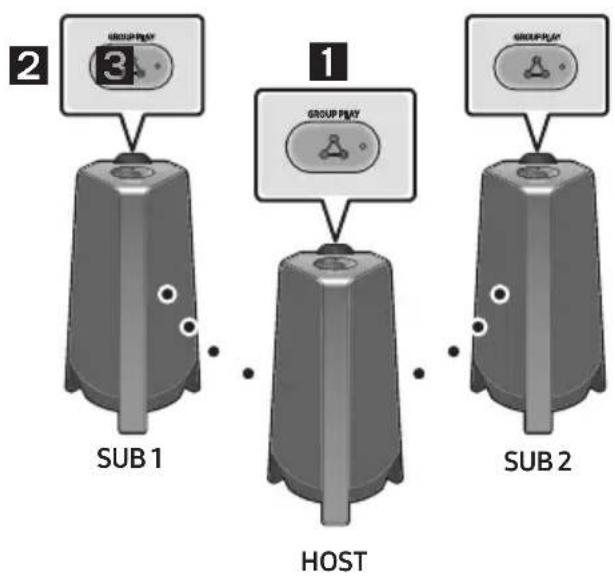
- Press the GROUP PLAY button on the HOST Sound Tower system. The "HOST" message appears on the display of the HOST Sound Tower and the LED blinks on the GROUP PLAY button.
- Press the GROUP PLAY button on the 2nd Sound Tower system (SUB 1). The "GROUP PLAY CONNECTED" message appears on the display and the GROUP PLAY button on both systems stops blinking.
- Press the GROUP PLAY button on the 3rd Sound Tower system (SUB 2). The "GROUP PLAY CONNECTED" message appears on the display and the GROUP PLAY button on the system stops blinking.
- If you want to add more Sound Tower systems, repeat step 3.
- Play music on the HOST Sound Tower. Sound outputs from all the connected systems.
NOTES
- If Sound Tower is connected with Samsung TV, Wireless Group Play is not available.
- The wireless Group Play connection is available for any Sound Tower system.
- Environmental conditions or other factors with connected devices may have effect on playback quality.
- If the red LED is on the GROUP PLAY button, an error has occurred in the wireless Group Play connection. Try step 1 to step 5 again.
- The ADD STEREO button and PAIRING button on the SUB Sound Tower systems are not available while in wireless Group Play mode.
- The ADD STEREO button on the HOST Sound Tower system is not available while in wireless Group Play mode.
-
When adding a SUB unit, if you press and hold GROUP PLAY on the SUB, before the "GROUP PLAY CONNECTED" message appears, it will become the HOST unit instead.
-
All SUB units must be connected one by one. For example, after HOST is connected, press GROUP PLAY button on SUB 1 to connect, and after SUB 1 is connected, you should connect SUB 2 and SUB 3 one by one sequentially.
- While using Group Play, currently connected Bluetooth devices are disconnected and Bluetooth connection is disabled.
- Bluetooth devices can search and connect with the HOST Sound Tower only.
- When in Group Play mode, the SUB cannot connect to a Bluetooth device.
- If you power off and then power on the Sound Tower or select any source other than BT on a SUB unit, in Group Play mode, the Group Play mode is disconnected.
- This product does not support aptX audio stream with Wireless Group Play mode.
Disconnecting the wireless Group Play mode
-
Press and hold the GROUP PLAY button over 5 seconds (HOST or SUB) after Group Play is connected or press the GROUP PLAY button (HOST or SUB) before Group Play is connected.
-
"OFF-GROUP PLAY" appears on the display and the LED above the GROUP PLAY button is off.
-
If you select any source other than BT on the SUB units or turn off the HOST Sound Tower, the Group Play mode is disconnected.
-
If the disconnection is made from the HOST Sound Tower, Group Play is disconnected.
LED Indications
| LED STATE Description | ||
| Green | Blink Waiting for a wireless Group Play connection. | |
| Solid The | wireless Group Play connection was successful. | |
| Red | Solid | There is an error with the wireless Group Play connection. |
NOTE
- In wireless connection, playback quality can be unstable depending on Bluetooth environment. For better play, please keep the device in wired Group Play mode.
Using a Smartphone and Stereo Group mode
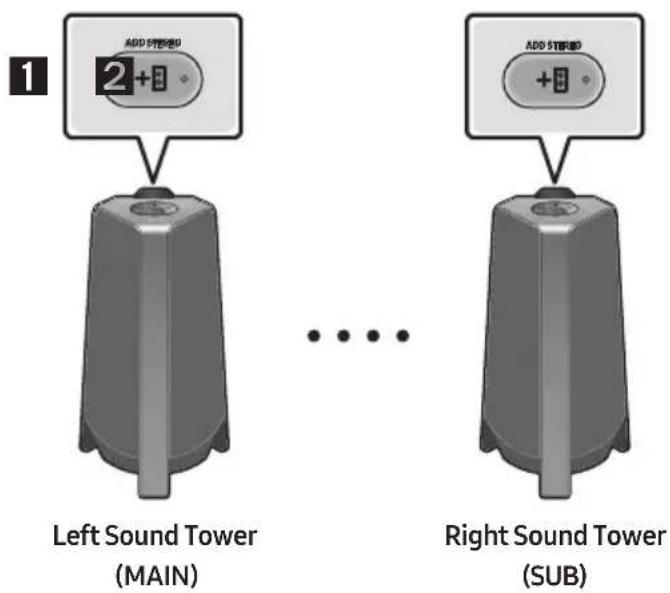
Connect two Sound Tower and use them with your smartphone to enjoy stereo sound.
-
Press the ADD STEREO button on the left Sound Tower system. The "SEARCHING STEREO" message appears on the display and the LED blinks on the ADD STEREO button.
-
Press the ADD STEREO button on the right Sound Tower system. The "SEARCHING STEREO" message appears on the display and the LED blinks on the ADD STEREO button.
-
When the connection is made, The "LEFT" message appears on the MAIN Sound Tower system and "RIGHT" appears on the SUB Sound Tower system.
-
The MAIN Sound Tower system outputs left channel sound and the SUB Sound Tower system outputs right channel sound. Press the ADD STEREO button on the MAIN or SUB Sound Tower to change the sound channel of the Sound Tower.
-
Play music by connecting your smartphone to the MAIN Sound Tower and Bluetooth. Sound is output from both Sound Tower.
NOTES
- To use the Stereo Group mode, both Sound Tower systems must be the same model.
- Environmental conditions or other factors with connected devices may have effect on playback quality.
- If the red LED is on the ADD STEREO, an error has occurred in the Stereo Group connection. Try step 1 and step 3 again.
- Remote Controller, BTPAIRING, GROUP PLAY and (Source) buttons on the SUB Sound Tower systems are disabled while in Stereo Group mode.
-
The GROUP PLAY button on the MAIN Sound Tower system is not available while in Stereo Group mode.
-
In mode other than "BT" (ex. USB, AUX mode), music is played only in MAIN Sound Tower and music is not played in SUB Sound Tower.
- The lighting colours between MAIN Sound Tower and SUB Sound Tower may vary.
- The Bluetooth device has the same name as MAIN Sound Tower and SUB Sound Tower when connected to the Bluetooth device, and only the MAIN Sound Tower can be connected.
- This product does not support aptX audio stream with Stereo Group mode.
- If you try to connect a Bluetooth device while Stereo Group is connecting, the Stereo Group mode may fail.
Terminate the Stereo Group mode
Press the ADD STEREO button (MAIN or SUB) for at least 5 seconds after the Stereo Group is connected.
- "OFF-STEREO MODE" appears on the display and the LED above the ADD STEREO button is off.
LED Indications
| LED STATE Description | ||
| Green | Blink Waiting for a Stereo Group connection. | |
| Solid The | Stereo Group connection is successful. | |
| Red Solid | There is an error with the Stereo Group connection. | |
Using Samsung TV and Stereo Group mode
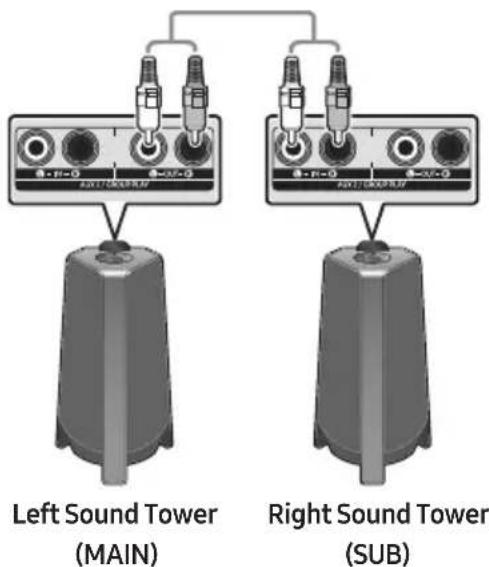
Connect two Sound Tower by wire and use them with Samsung TV to enjoy stereo sound.
-
Refer to "Using a Smartphone and Stereo Group mode" to connect the two Sound Tower in a Stereo Group.
-
Connect the RCA cable to the AUX2 OUT on the MAIN and AUX2 IN on the SUB as shown by using the RCA cable (not supplied).
- In "BT" mode, press the "AUX" button on the MAIN Sound Tower remote control for at least 5 seconds. "SEARCHING TV STEREO" appears on the display.
- When the connection is complete, "TV STEREO MODE" appears in the display and then the current output CHANNEL is displayed.
- When the connection is complete, a "SEARCHING TV" message appears in the MAIN Sound Tower display and a "SUB" appears in the SUB Sound Tower display.
- The MAIN Sound Tower outputs the left channel sound and the SUB Sound Tower outputs the right channel sound. Press the ADD STEREO button on the MAIN or SUB Sound Tower to change the sound channel of the Sound Tower.
- Connect a TV and MAIN Sound Tower via Bluetooth to play music. Sound is output from both Sound Tower.
NOTES
- To use Stereo Group mode, both Sound Tower must be the same model.
- A red light on the LED on the ADD STEREO button indicates an error in the Stereo Group connection. Try Step 1 to 5 again.
- In Stereo Group mode, the remote control, BT PAIRING, GROUP PLAY, and (Source) buttons on the SUB Sound Tower are disabled.
- The GROUP PLAY button on the MAIN Sound Tower is not available in Stereo Group mode.
- If Samsung TV supports a simple connection, the connection pop-up is automatically displayed on the TV, and if you select "Yes", it connects to the TV. If there is a previous connection history between Samsung TV and Sound Tower, it will be connected to Samsung TV without pop-up. For a simple connection to Samsung TV, refer to page 17.
- The lighting colours may vary between the MAIN Sound Tower and the SUB Sound Tower.
- When connecting to a TV, the names of the MAIN and SUB Sound Tower are the same in the Bluetooth list on the TV, and only the MAIN Sound Tower can be connected.
Terminating the Stereo Group mode connection
Press the ADD STEREO button (MAIN or SUB) for at least 5 seconds after the Stereo Group is connected.
- "OFF-STEREO MODE" appears in the display and the LED on the ADD STEREO button turns off.
04 CONNECTING AN EXTERNAL DEVICE
Connect to an external device via a wired or wireless network to play the external device's sound through the Sound Tower.
Connecting using an Analogue Audio (AUX) Cable
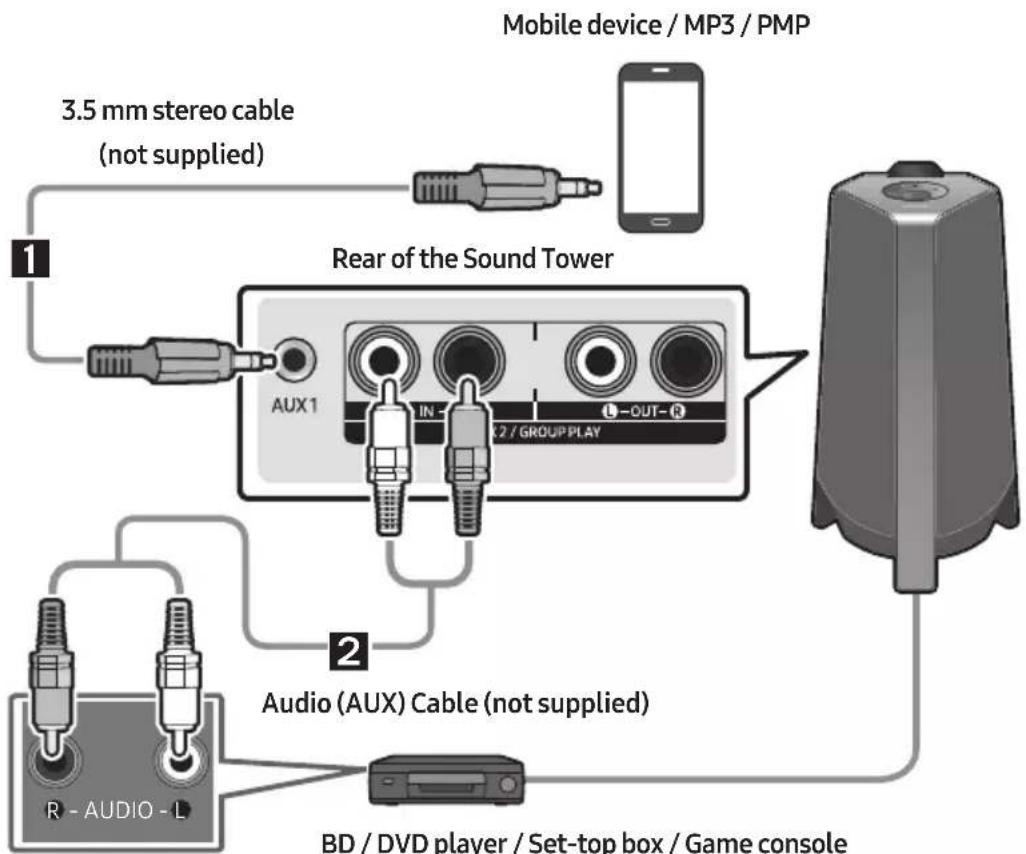
1 3.5 mm stereo Cable (AUX1)
-
Connect AUX1 jack on the main unit to the AUDIO OUT jack of the Source Device using an 3.5 mm stereo cable.
-
Select "AUX1" mode by pressing the (Source) button on the top panel or on the remote control.
-
You can also select a source using AUX button on the remote control.
2 Audio Cable (AUX2)
-
Connect AUX2 (IN) terminals on the main unit to the AUDIO OUT terminals of the Source Device using an audio cable.
-
Select "AUX2" mode by pressing the (Source) button on the top panel or on the remote control.
-
You can also select a source using AUX button on the remote control.
Connecting a mobile device via Bluetooth
When a mobile device is connected using Bluetooth, you can hear stereo sound without the hassle of cabling.
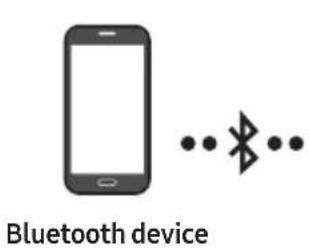
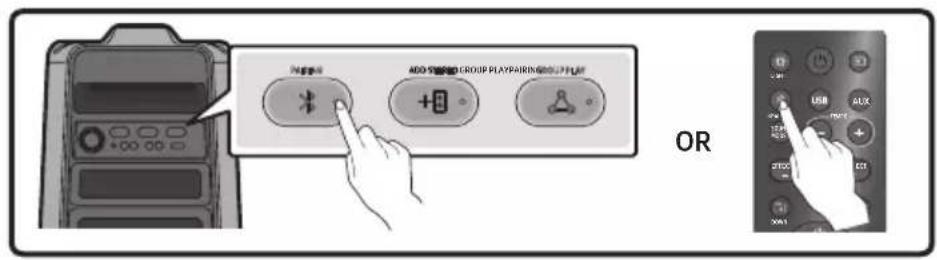
The initial connection
- Press and hold the PAIRING button on the remote control for more than 5 seconds to enter the "BT PAIRING" mode.
(OR) Press the PAIRING button on the rear panel.
-
On your device, select "[AV]MX-T40" from the list that appears.
-
When the Sound Tower is connected to the Bluetooth device, [Bluetooth Device Name] "BT" appears in the front display.
-
Play music files from the device connected via Bluetooth through the Sound Tower.
If the device fails to connect
-
If a previously connected Sound Tower listing (e.g. "[AV] MX-T40") appears in the list, delete it
-
Then repeat steps 1 and 2.
What is the difference between BT READY and BT PAIRING?
- BT READY: In this mode, you can search for previously connected TVs or connect a previously connected mobile device to the Sound Tower.
- BT PAIRING: In this mode, you can connect a new device to the Sound Tower. (Press and hold the PAIRING button on the remote control for more than 5 seconds or press the
PAIRING button on the rear of the Sound Tower to enter the "BT PAIRING" mode.)
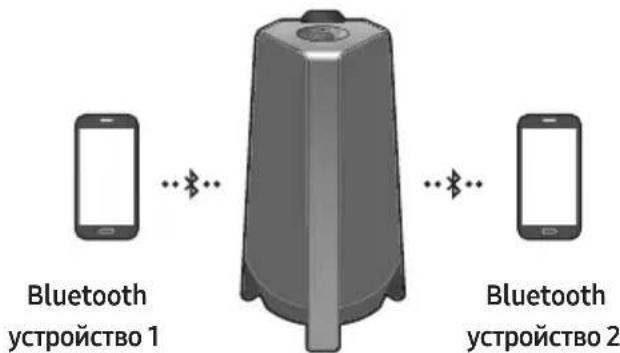
Bluetooth Multi connection
Sound Tower supports up-to two simultaneous Bluetooth device connections. Sound Tower can play music through one of the connected Bluetooth devices without disconnecting the second device.
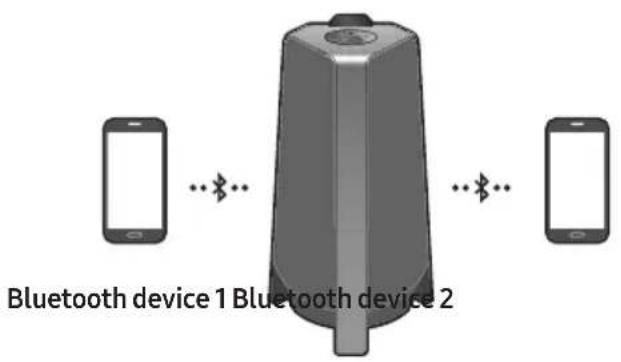
- Connect Sound Tower to the first device and the second device respectively for the first time. (See page 14)
- Music can be played on only one of the two connected devices, and when the music is played on the other device, the music on the playing device is paused.
NOTES
- If you want to connect Sound Tower to a third device, you can disconnect Sound Tower from one of the two currently connected devices and then connect Sound Tower to the third device.
- With the Sound Tower and two devices currently connected, when pairing to a new Bluetooth device, the devices currently connected may be disconnected.
- You can connect to two Bluetooth devices at the same time.
- If asked for a PIN code when connecting a Bluetooth device, enter <0000>.
- Environmental conditions or other factors with connected devices may have effect on playback quality.
- The Sound Tower automatically turns off after 20 minutes with no command input in the ready state.
-
The Sound Tower may not perform Bluetooth search or connection correctly under the following circumstances:
-
If there is a strong electrical field around the Sound Tower.
- If several Bluetooth devices are simultaneously paired with the Sound Tower.
-
If the Bluetooth device is turned off, not in place, or malfunctions.
-
Electronic devices may cause radio interference. Devices that generate electromagnetic waves must be kept away from the Sound Tower main unit - e.g., microwaves, wireless LAN devices, etc.
-
When the Sound Tower is connected to your TV by Bluetooth connection, the video on the TV and audio from the Sound Tower may not be synchronised because the distance between the Sound Tower and the TV is too far. It is recommended to move the Sound Tower closer to your TV within 1 meter.
-
When the speaker is in the Bluetooth Multi connection mode, you will need to connect the other Bluetooth device and speaker within a few minutes (Approx. 1 minute). Otherwise Bluetooth Multi connection mode will be cancelled.
- Bluetooth Multi connection may not be supported depending on the connected device's specifications.
- Removable/detachable Bluetooth devices (Ex:Dongle etc..), windows phone, laptops, TV, etc. do not support Bluetooth Multi connection.
- After Bluetooth Multi connection pairing, there may be a slight delay before music starts playing depending on the Bluetooth devices.
- If you move too far out of range from the Sound Tower without first disconnecting your Bluetooth device, it may take a few minutes to connect other Bluetooth devices. If you turn the Sound Tower off and back on, you can connect other Bluetooth devices without waiting.
LED Indications
| LED STATE Description | ||
| Blue | Fast Blink BT PAIRING mode | |
| Blink BT READY mode | ||
| Solid A Bluetooth device is connected. | ||
Using Bluetooth Power On
When the Sound Tower is turned off, you can connect your smart device via a Bluetooth connection to turn it on.
- Press and hold the BASS button on the remote control or on the top panel to set the Bluetooth Power On function on. "ON-BLUETOOTH POWER" appears on the display.
- When the Sound Tower is off, connect your smart device via Bluetooth. (For information on Bluetooth connections, refer to your smart device's manual.)
-
When the connection is complete, the Sound Tower turns itself on automatically in Bluetooth mode.
-
Select the desired music to play from your smart device.
NOTE
- Press and hold the BASS button for more than 5 seconds on the remote control or on the top panel to turn the Bluetooth Power On function on or off.
Each time you press the BASS button, the Sound Tower displays :
ON-BLUETOOTH POWER OFF-BLUETOOTH POWER
Connecting the Samsung TV via Bluetooth
If Sound Tower connected with Samsung TV via Bluetooth, Sound Tower can be controlled by TV UI.
Volume + / - Mute On/Off and Power On/Off
Easy connect with Samsung TV (SEARCHING TV mode)
Sound Tower has "SEARCHING TV" mode for easy connect with Samsung TV.
- Press and hold (Source) button on remote control or top panel then Sound Tower will start to search Samsung TV. The "SEARCHING TV" message appears on the display.
(Or, when the wired Stereo Group mode connection is complete, the "SEARCHING TV" mode is automatically activated.)
- If Samsung TV support easy connection, connection popup will be displayed on TV.
If Samsung TV has connected with Sound Tower before, Samsung TV will be connected without lookup.
- If Sound Tower can not find any Samsung TV within 5 minutes, Sound Tower will terminate "SEARCHING TV" mode and turn to "BT PAIRING" mode. If find any Samsung TV, Sound Tower will request connection to those TV.
NOTES
- While in wireless Group Play mode, searching TV is not available.
- To stop searching Samsung TV, turn off the Sound Tower or press the (Source) or PAIRING button.
Sound Tower does not support multi connection if Samsung TV is connected. - While Samsung TV is connected, Sound mode is PARTY and SOUND MODE button is not available.
- While Samsung TV is connected, Sound Tower APP can not connect with Sound Tower.
- Connection popup may not be displayed according to TV spec.
- You can select and connect directly from the Bluetooth speaker list on your TV when the connection pop-up does not appear on your TV.
05 CONNECTING A USB STORAGE DEVICE
You can play music files located on USB storage device through the Sound Tower.
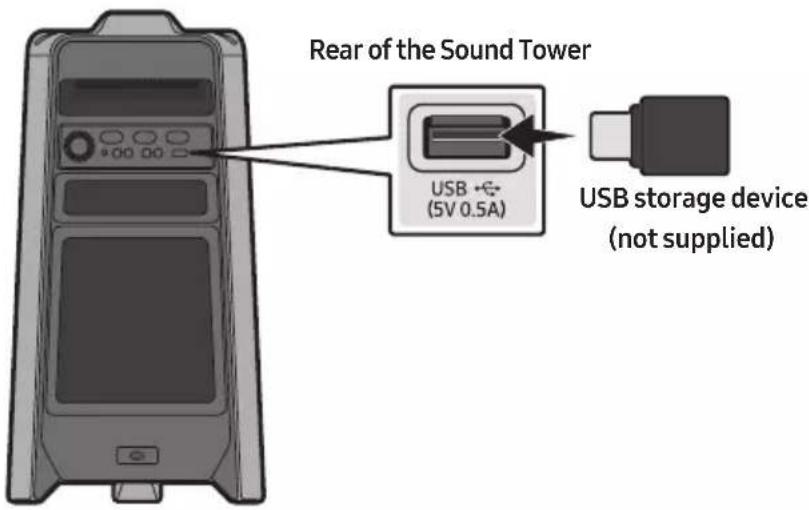
- Connect a USB storage device to the USB jack on your Sound Tower.
-
Press the (Source) button on the top panel or on the remote control, and then select "USB".
-
You can also select a source using USB button on the remote control.
-
"USB" appears in the display screen.
-
Play music files from the USB storage device through the Sound Tower.
-
The Sound Tower automatically turns off (Auto Power Down) if USB device is not connected, playback stopped, or there is no input for more than 20 minutes.
NOTES
- This product only supports USB storage devices that are formatted in the FAT and FAT32 file system.
-
This product does not support HDD storage or storage on mobile devices.
-
A maximum of 999 files can be played per USB storage device.
- A maximum of 256 folders can be read per USB storage device.
Supported Audio Formats
| File Extension | Audio Codec | Sampling Rate | Bit Rate |
| *.mp3 | MPEG 1 Layer3 32 kHz | Hz ~ 48 kHz 32 kbps ~ 320 kbps | |
| MPEG 2 Layer3 16 kHz | Hz ~ 24 kHz 8 kbps ~ 160 kbps | ||
| MPEG 2.5 Layer3 8 kHz | Hz ~ 12 kHz 8 kbps ~ 160 kbps | ||
| *.wma WMA7/8 | 9.8 kHz ~ 48 kHz 32 kbps | ~ 320 kbps | |
| *.aac | AAC 8 kHz ~ 96 | kHz < 1728 kbps | |
| AAC-LC | 8 kHz ~ 96 kHz | < 1728 kbps | |
| HE-AAC | 8 kHz ~ 96 kHz < 1728 kbps | ||
| *.wav | PCM/LPCM/IMA_ADPCM | 8 kHz ~ 192 kHz | < 5 Mbps |
| *flac | - | 8 kHz ~ 192 kHz | < 5 Mbps |
NOTES
- This product does not support WMA Professional codec.
- The above table shows supported sampling rates and bit rates. Files in formats that are not supported will not play.
- AAC files only support the ADTS native format.
Software Update
Samsung may offer updates for the Sound Tower's system firmware in the future.
If an update is offered, you can update the firmware by connecting a USB device with the firmware update stored on it to the USB port on your Sound Tower. For more information about how to download update files, go to the Samsung website at www.samsung.com Support.
Then, enter or select the model number of your Sound Tower, select the Software & Apps option, and then Downloads. Note that the option names can vary.
06 USING THE REMOTE CONTROL
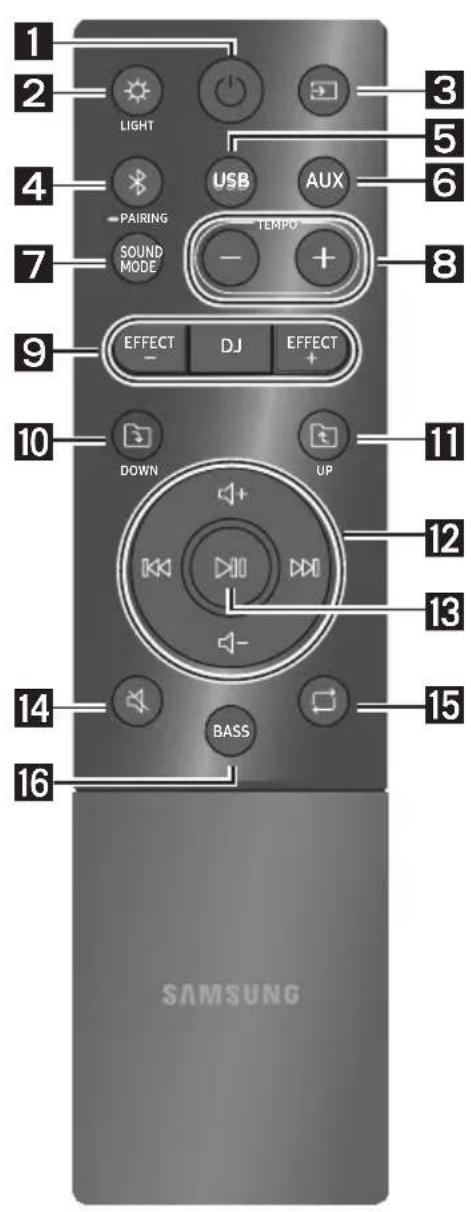
How to Use the Remote Control
| 1 | Power | Turn the Sound Tower on and off. |
| 2 | LIGHT | Press the (LIGHT) button to turn the Lighting Mode on. Press the button repeatedly to cycle through the available light modes: AMBIENT, PARTY, DANCE, THUNDERBOLT, STAR or OFF. |
| 3 | Source | Press to select a source connected to the Sound Tower. Press the button repeatedly to cycle through the available sources: BT, USB, AUX1 or AUX2. |
| 4 | PAIRINGBluetoothPAIRING | Press to select a source connected directly to "BT" mode. Press and hold the button for more than 5 seconds to enter the "BT PAIRING" mode. You can connect the Sound Tower to a new Bluetooth device in this mode by selecting the Sound Tower from the Bluetooth device's search list. |
| 5 | USBUSB | Press to select the USB sources connected to the Sound Tower. |
| 6 | AUXAUX | Press to select the AUX1 or AUX2 sources connected to the Sound Tower. |
| 7 | SOUND MODE | Press the button repeatedly to cycle through the available sound effects: PARTY, STANDARD, HIPHOP, EDM, ROCK, LATIN, HOUSE or REGGAE. |
| 8 | TEMPO - + TEMPO+, - | Press the TEMPO + or TEMPO - buttons to change the tempo of the music up or down. · This function only works in the USB mode. |
| 9 | DJ DJ | This function lets you turn on the DJ effect function. Press the button repeatedly to cycle through the available DJ sound effects: NOISE, FILTER, CRUSH, CHORUS, WAHWAH or OFF. |
| EFFECT EFFECT EFFECT+,- | Press the EFFECT + or EFFECT - buttons to change the level of the each DJ sound effect up or down. | |
| 10 | DOWN Folder DOWN | Press the (DOWN) button to move to the next folder in the USB device. |
| 11 | UP Folder UP | Press the (UP) button to move to the previous folder in the USB device. |
| 12 | Volume up, Volume down / Skip | • Volume up, Volume down Press the (+ Volume up) or (Volume down) to adjust the volume level up or down. • Music Skip Press the button to select the next music file. Press the (K) button to select the previous music file. Press and hold the button or the button for more than 3 seconds in USB play mode to search forward or search backward. Press and hold the button or the (K) button for more than 3 seconds again to get back to normal play. |
| 13 | Play / Pause | Press the button to pause a music file temporarily. When you press the button again, the music file plays. • Auto Power Down Function To turn off Auto Power Down function while the unit is in AUX1, AUX2 mode, press and hold the (K) button for more than 5 seconds. ON-AUTO POWER DOWN / OFF-AUTO POWER DOWN appears on the display. |
| 14 | Mute | Press the (Mute) button to mute the sound. Press it again to unmute the sound. |
| 15 | Repeat | Press the (Repeat) button to use the Repeat function in "USB" mode. Press the button repeatedly to cycle through the available repeat functions: ONE, FOLDER, ALL, RANDOM or OFF. |
| 16 | BASS | Press the BASS button to use the powerful bass sound. Press it again to return to the normal sound. Press and hold the BASS button for more than 5 seconds to turn on or off the BLUETOOTH POWER function. |
| BASS |
How to use Sound Mode
Your Sound Tower provides predefined equaliser settings that are optimised for particular music genres.
- Press the SOUND MODE button on the Remote control.
- Each time you press the SOUND MODE button, the Sound Tower cycles through the available sound effects: PARTY, STANDARD, HIPHOP, EDM, ROCK, LATIN, HOUSE or REGGAE.
NOTES
- Default sound mode is PARTY.
- When turned off, press and hold the button on product or remote control for more than 5 seconds to turn on in the default Sound Mode setting.
How to use the DJ Effect
The DJ Effect function lets you add DJ sound effects to your music. The level of each effect is adjustable.
- Press the DJ button on the Remote control.
-
Each time you press the DJ button, the Sound Tower cycles through the available DJ Effects:
-
NOISE: Create white noise and mixed with the original sound through the filter and output.
- FILTER : Creates an effect similar to the sound of only treble or bass.
CRUSH: Creates an effect that makes the original sound sharper. - CHORUS: Creates an effect similar to a singing chorus.
WAHWAH:Creates a Wah\~ Wah\~'effect. -
DJEFFECT OFF: Turns off the DJ Effect.
-
Press the EFFECT + or EFFECT - buttons to raise or lower the level of each of the DJ sound effects from -15 to +15.
NOTE
- When turned off, press and hold the button on product or remote control for more than 5 seconds to turn on in the default DJ Effect setting.
07 USING THE SAMSUNG SOUND TOWER (GIGA PARTY AUDIO) APP
Install Samsung Sound Tower (Giga Party Audio) App
To control this product with your Smart Device and the Samsung Sound Tower (Giga Party Audio) app, download the Samsung Sound Tower (Giga Party Audio) App from the Google Play Store or Apple App Store, and install it on your Smart Device.
NOTES
- The Samsung Sound Tower (Giga Party Audio) app is compatible with Android mobile phone devices running Android OS 6.0 or later.
- The Samsung Sound Tower (Giga Party Audio) app is compatible with Apple mobile devices running iOS 10.0 or later.
Market search : Samsung Sound Tower or Samsung Giga Party Audio

GET IT ON Google Play

Download on the App Store
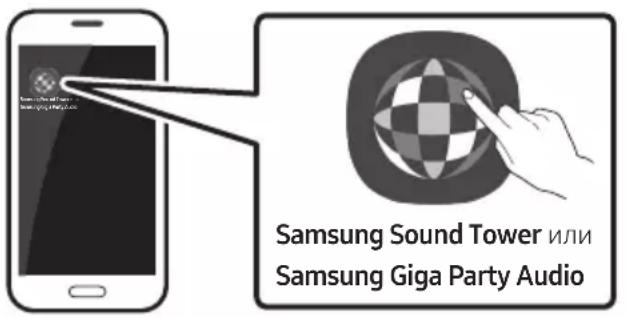
Launching the Samsung Sound Tower (Giga Party Audio) App
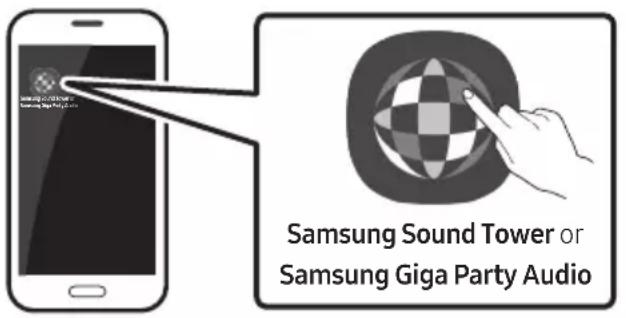
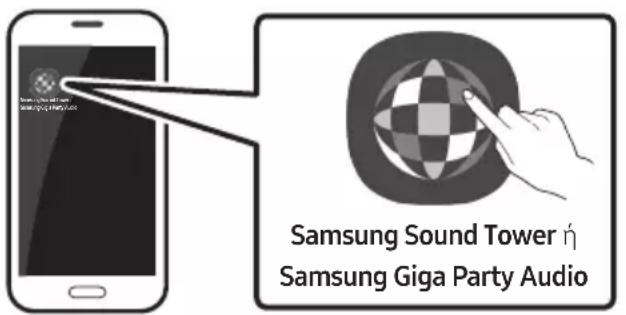
To launch and use the Samsung Sound Tower (Giga Party Audio) app, touch the Samsung Sound Tower (Giga Party Audio) icon on your smart device, and then follow the directions on the screen.
08 TROUBLESHOOTING
Before seeking assistance, check the following.
The unit will not turn on.
Is the power cord plugged into the outlet?
Connect the power plug to the outlet.
A function does not work when the button is pressed.
Is there static electricity in the air?
Disconnect the power plug and connect it again.
Sound dropouts occur in BT mode.
See the Bluetooth connection sections on page 14.
Sound is not produced.
Is the Mute function on?
Press the (Mute) button to cancel the mute function.
Is the volume set to minimum?
Adjust the Volume.
The remote control does not work.
Are the batteries drained?
Replace them with new batteries.
Is the distance between the remote control and Sound Tower main unit too far?
Move the remote control closer to the Sound Tower main unit.
Stereo Group connection is not working.
Is the system in wireless Group Play mode?
Disconnect the wireless Group Play mode and try Stereo Group connection again.
It cannot make a Bluetooth connection.
Is the system connected to another system in wireless Group Play mode or Stereo Group mode?
Try Bluetooth connection again after disconnecting the wireless Group Play or Stereo Group connection.
Are the two Bluetooth devices already connected?
Try Bluetooth connection again after disconnecting other Bluetooth connections.
The PAIRING button is not working.
Is the system in wireless Group Play mode or Stereo Group mode?
Try again after disconnecting the wireless Group Play or Stereo Group connection.
I want to switch the HOST (MAIN) system to the other in wireless Group Play or Stereo Group connection.
Disconnect Group Play mode, press the Speaker which you want make to HOST first, and after it displays "HOST" message, connect the others one by one.
With Stereo Group mode, MAIN is fixed. You can not change others as MAIN.
I want to play AUX1 or AUX2 more than 8 hours without control input.
Press and hold the button for more than 5 seconds in AUX1 or AUX2 mode to disable Auto Power Down Function. Change from ON-AUTO POWER DOWN to OFF-AUTO POWER DOWN.
I can't connect a SUB to Group play.
→After 1 hour, the HOST will block any additional SUB from being added. Press the GROUP PLAY button on HOST, after it display "HOST" message, the SUB can be reconnected.
It cannot make a "Wireless/Wired Group/Add Stereo/Bluetooth" connection.
Is the distance between systems too far?
It is recommended to make a "Wireless/Wired Group/Add Stereo/Bluetooth" pairing within 1 meter from the system.
The recommended operating distance between Sound Tower systems is closer than 10 meters.
09 LICENCE

Bluetooth
The Bluetooth® word mark and logos are registered trademarks owned by the Bluetooth SIG, Inc. and any use of such marks by Samsung Electronics Co., Ltd. is under license. Other trademarks and trade names are those of their respective owners.

Qualcomm aptX
Qualcomm aptX is a product of Qualcomm Technologies, Inc. and/or its subsidiaries. Qualcomm is a trademark of Qualcomm Incorporated, registered in the United States and other countries. aptX is a trademark of Qualcomm Technologies International, Ltd., registered in the United States and other countries.

[ENERGY STAR]
ENERGY STAR qualified model only
- Your Samsung product is ENERGY STAR qualified in its factory default setting. Change to certain features, settings and functionality in this product can change the power consumption, possibly beyond the limits required for ENERGY STAR qualification.
- Environmental Protection Agency and Department of Energy. ENERGY STAR is a joint program of the Government agencies, designed to promote energy efficient products and practices.
Refer to www.energystar.gov for more information of the ENERGY STAR Program.
ENERGY STAR qualified model only (Applicable to Thin Client models only)
As an ENERGY STAR® Partner, SAMSUNG has determined that this product meets the ENERGY STAR® guidelines for energy efficiency.
- The ENERGY STAR Program has been to reduced greenhouse gas emissions and save energy through voluntary labeling.
- Power management setting of this product have been enabled by default, and have various timing settings from 1 minutes to 5 hours.
- The product can wake with a button press on the chassis from sleep mode.
ENERGY STAR qualified model only (The other models)
- As an ENERGY STAR Partner, Samsung has determined that this product or product models meets the ENERGY STAR guideline for energy efficiency.
10 OPEN SOURCE LICENCE NOTICE
To send inquiries and requests for questions regarding open sources, contact Samsung Open Source (http://opensource.samsung.com)
11 IMPORTANT NOTES ABOUT SERVICE
- Figures and illustrations in this User Manual are provided for reference only and may differ from actual product appearance.
- An administration fee may be charged if either
(a) an engineer is called out at your request and there is no defect with the product (i.e. where the user manual has not been read).
(b) you bring the unit to a repair centre and there is no defect with the product (i.e. where the user manual has not been read).
- You will be informed of the administration fee amount before a technician visits.
12 SPECIFICATIONS AND GUIDE
Specifications
| Model Name MX-T40 | ||
| USB 5V/0.5A | ||
| Weight 6.8 kg | ||
| Dimensions (W x H x D) 291.5 x 530.5 x 268.0 mm | ||
| Operating Temperature Range +5°C to +35°C | ||
| Operating Humidity Range 10 % ~ 75 % | ||
| AMPLIFIER | Tweeter 50W x 2, 8 ohm | |
| Rated Output power | Woofer 100W x 2, 4 ohm | |
| WIRELESS DEVICE OUTPUT POWER BT max transmitter power | 100mW at 2.4GHz – 2.4835GHz | |
| Overall Standby Power Consumption (W) 2.0W | |
| Bluetooth Port deactivation method | Press and hold the BASS button for more than 5 seconds to turn off Bluetooth Power function. |
NOTES
Samsung Electronics Co., Ltd reserves the right to change the specifications without notice.
Weight and dimensions are approximate.
Hereby, Samsung declares that this radio equipment is in compliance with Directive 2014/53/EU and the relevant UK statutory requirements.
The full text of the declaration of conformity is available at the following internet address:
http://www.samsung.com go to Support and enter the model name.
This equipment may be operated in all EU countries and in the UK.
[Correct disposal of batteries in this product]
(Applicable in countries with separate collection systems)
This marking on the battery, manual or packaging indicates that the batteries in this product should not be disposed of with other household waste at the end of their working life. Where marked, the chemical symbols Hg, Cd or Pb indicate that the battery contains mercury, cadmium or lead above the reference levels in EC Directive 2006/66.
If batteries are not properly disposed of, these substances can cause harm to human health or the environment.
To protect natural resources and to promote material reuse, please separate batteries from other types of waste and recycle them through your local, free battery return system.
Correct Disposal of This Product
(Waste Electrical & Electronic Equipment)
(Applicable in countries with separate collection systems)
This marking on the product, accessories or literature indicates that the product and its electronic accessories (e.g. charger, headset, USB cable) should not be disposed of with other household waste at the end of their working life. To prevent possible harm to the environment or human health from uncontrolled waste disposal, please separate these items from other types of waste and recycle them responsibly to promote the sustainable reuse of material resources.
Household users should contact either the retailer where they purchased this product, or their local government office, for details of where and how they can take these items for environmentally safe recycling.
Business users should contact their supplier and check the terms and conditions of the purchase contract. This product and its electronic accessories should not be mixed with other commercial wastes for disposal.
For information on Samsung's environmental commitments and product specific regulatory obligations e.g. REACH, WEEE, Batteries, visit:
www.samsung.com/uk/aboutsamsung/sustainability/environment/our-commitment/data/
BkapBaHe Ha 6aTePnIte npeIN n3NoI3BaHe Ha dNCTaHcIOHHOTynpaBLeHne (AAA 6aTePnX2)
Topen napeHaSoundTower 3
3aien panen haSound Tower 4
03 Cbbp3BaHe Ha Sound Tower 6
Cbbp3BaHeHa eIeKtpnuecko 3axpaHbaHe 6
Kak da n3no3BaTe Audio rpyna 7
04 Cbbp3BaHe Ha BbHsHo yCTpoiCTBO 13
Cbbp3BaHe ype3 aHaIorOB aydno (AUX) ka6eJ 13
Cbbp3BaHe Ha Mo6uHNo yctpoNCTBO upe3 Bluetooth 14
Cbbp3BaHe Ha TeleBn3Op Samsung ype3 Bliotyc 17
05 Cbbp3BaHe Ha USB yctpoiCTBO 3a cbxpaHHe 18
CoΦTyepHa aKtuaIaIaIaIaIaIaIaIaIaIaIaIaIaIaIaIaIaIaIaIaIaIaIaIaIaIaIaIaIaIaIaIaIaIaIaIaIaIaIaIaIaIaIaIaIaIaIaIaIaIaI
06 I3noI3BaHe Ha dIcTaHcNIOHHoTo ynpaBJIeHne 20
Kak da ce n3noJ3Ba dNCTaHcIOHHOTO ynpabIeHne 20
Kak da n3no13BaTe PeXIM Ha 3Byk 22
Kak da n3noI3BaTe DJ eΦeKT 22
BkapBaHe Ha 6aTePnIte IpeHn H3IOJ3BaHe Ha INCTaHcIOHHOTO yIpaBJIeHne (AAA 6aTePnX 2)
Пльзhte Кала Ha OTделенeto 3a 6atepinВ посokata, указаHa CBС CTpeлka,doKaTO He ce OTстраин HaNBЛHo. Вkapайte 2 6atepin AAA (1,5V) opneHTnpaHn npabINHO cnpЯmo Поляртета с. Пльзhte Кала Ha 6atepnite Ha МЯCTOTO MY DoKaTO UцpaKHe.
02 ПЕГLEДHA ПОДУКТА
Горен панел на Sound Tower
CBeToIDNoDNH NHNKaUH
OFF-STEREOMODE"ce noBBA Ha DCnpe N CBeToIODbT Ha 6yTOH ADD STEREO eN3KJIIOUeyH.
CBeToIONoHN HnDnKaaun
| Сbvетонод | БСТОУНЕ Oп.Исанne | |
| Зелен | Мига Изчa | Квае за грутова Stereo врьзka. |
| Вкlioунов Брьзкatinga Stereo рруна усpenha. | ||
| Червен Вкл. | Юунен Има Гецka Вьв Врьзкatinga на Stereo рруна. |
Ako yctpoiCTBOTo He MoXe Da 6bIe CBbp3aHO
- Ako npéi n TOBa CBbP3aHn CnCTeMn Sound Tower (HaNP. " [AV] MX-T40") ce noBbT B cnncbKa, n3TpniTe rN.
CneiToBa nobTopeTe cTbIkn 1 n2.
KakBa e pa3nkaTamaexy BT READY nBT PAIRING?
-
BT READY: B To3n peKIM, Bne moXeTe Da Tbpcnte 3a npEi TOBa Cbbp3aHn TeIeBn3Opn nn MO6uHNu yCTpOInCTBa KbM cnCTemata Sound Tower.
-
BT PAIRING: BTO3n peXHm, Bne moXeTe Da CBbpxKeTe HOBO yCTpoiCTBO KbM CnCTemata Sound Tower. (HaTnCHHeTe n 3aDpBxKeTe PAIRING 6yToH Ha NcIcTaHcNHOHOTo ynpaBLeHne 3a noBeue ot 5 cekyn nn HATnCHTe PAIRING 6yToH OT 3aDnHata CTpaHa Ha Sound Tower 3a da BnE3eTe B "BT PAIRING" peXHm.)
Bluetooth Муltи Врька
Sound Tower noДьрka edHOBpeMeHHO CBbp3BaHe Ha ha-МнOrO DBe Bluetooth yctpoiCTBa. Sound Tower може да ВьзпрОиЗБЕЖдa My3ИKa пeЗ НяКоe OT CBbp3aHInTe Bluetooth yctpoiCTBa, 6e3 da ИЗКлIOчВа BTOPOTO yCTpoICTBO.
- Пьрваанно CBьрзвае Ha Sound Tower cпьрво И CBOTBEТHO BTOPOTO yCTPONCTBO. (Вж.ст. 14)
- My3nka MoKe Da Ce Bb3npOn3BExKa CaMo Ha eHOTo OT DBeTe CBbp3aHN yCTPOINCTBa N KOraTO Bb3npOn3BExKaHeTo e Ha dpyrOTo yCTPOINCTBO, My3nKaTa OT Bb3npOn3BExKaIIO To yCTPOINCTBO Ce NoCTabra Ha nay3a.
BENEXKNI
- Ako xeIaTe da cBbpxKeTe Sound Tower c TpeTo yctpoNCTBO, MoKTe Da npeKbcHete Bpb3kata Ha Sound Tower c eIHO OT IBeTe CbBp3aHN B MOMHTa yctpoNCTBa N CneI TOBa Da cBbpxKeTe Sound Tower c TpeTOTO yctpoNCTBO.
- Пи вкlioуета систema Sound Tower И дve CBbp3aHn B MOMeHTa yCTpoiCTBa, пи сдвогаHe с HOBO Bluetooth устwo ВьзькATAс ДВete CBbp3aHn B MOMeHTa yCTpoiCTBa можда 6ьде п配电ьснata.
- MojkeTe Da CBbPjKeTe eHOBpeMeHHo He noBue OTo DBe Bluetooth yctpoiCTBa.
- Ako npn cBbP3BaHeTo Ha Bluetooth ycTpoIcTBo 6bJeTe noniTahn 3a PIN kO, BBeJeTe <0000>.
- YcnoBnTa Ha OKoHaTa Cpea NIn DpyrN fakTopn OKONo CBbp3aHnTe yCTpOInCTBa MoKe da IOBnraT Ha KaueCTBOTo HA Bb3npOn3BeJkaHe.
- CnCTemata Sound Tower ce n3KlIOUba aBTOMaTNUHO cIeI 20 MInHyTu 6e3 BbBeDeHa KOMaHda BpeKIM Ha rOTOBHOCT.
- CnCTemata Sound Tower Moke Da He ocBueCTBn TbpceHe Ha Bluetooth nIa He n3IbIHH npabINHO Bpb3kata npi CneHIne o6ctOarTeJCTBa:
-Ako mMa MoUHo eJleKtpnuecko noJIe OKOJIo cnCTemata Sound Tower.
-Ako HraKoJIko Bluetooth yctpOuCTBa ca cBbP3aHn eHOBpeMeHHo cbc cnCTeMaTa Sound Tower.
-Ako Bluetooth yctpoiCTBOTo e n3KJIIOUeHO, He e Ha MrcTOTo INI He e n3PpaBHO.
- EneKtpoHn yctpoNCTBa MoarT da npuHraBat padno cmUeHna. YcTPOIcTBaTa, KOITo reHepnPaTeleKTPOMaHHTn BbHN Tp8Ba da 6bDat IbpxaHn Ha pa3CTOHne OT rIabHn moyHa cnCTemata Sound Tower - Hap., MInKpOBbHOBn fypHn, 6e3KunHn LAN yctpoNCTBa n np.
Korato cnctemata Sound Tower e cBbp3aHa KbMa BaaHra TeJeBn3Op ue3 Bluetooth Bpb3ka, Bndeo Bb3npOn3BExkDaHeTo Ha TeJeBn3Opa n ayDnO Bb3npOn3BExkDaHeTo ot Sound Tower moKe da He ca cnHXpoHN3InpAnn nopAin DnCTaHcNraTa MeKdy Sound Tower n TeJeBn3Opa. IpenOpbUHTeHno e da npemecTe Sound Tower no-6n30 do TeJeBn3Opa do 1 MeTbp.
Korato BncoKorOBopnteHa BpeXnMa Bluetooth MyIaBp3ka, Bne Tpr6Ba da CbpxKeTe DpyrOTo Bluetooth ycTpoiCTBO N BncoKOROBopnteBA paMKite Ha HAKoNko MInHyTu (npn61. 1MnhyTa).B npotINBeH cnUyai Bluetooth MyIaBp3kata Ze 6bJe OTMeHeHa.
- Bluetooth MyIITN Bp3KaTa MoKe Ia He 6bIe NODIbPkaHa B 3aBNCIMOCT OT CneuΦnKaunTe Ha CBbp3aHHTe yCTPOINCTBa.
- OTCTpaHIMN/cmHeMaEMn Bluetooth yctpoiCtBa (Pp:doHrbln np..), windows telephiOH, IantOnn, TeLeBn3Op n np. He noDlbpxkat Bluetooth myItnb3ka.
- Cnéi cDBoBaHe Na Bluetooth MyJTN BpB3Ka e Heo6xOДmO n3BeCTHO BpeMe 3a Bb3POn3BExKdAHe Na My3nKaTa B 3aBnCmOcT ot Bluetooth ycTpoIcTBata.
- Ako npemeCTte npekaleho daJeO t obXbata O T cncTeMaTa Sound Tower 6e3 nbpBO da npekbche Te CBOeTo Bluetooth ycTpoiCTBO, MoKe Da ca Heo6xOdIMn HApKOLKO MInHyTu 3a CBbp3BaHe Ha dpYrN Bluetooth ycTpoiCTBa. Ako n3KnIOHTe CnCTemTa Sound Tower I Ra BkIoUHTe OTHOBO, MoKeTe Da CbPjKeTe DpyrN Bluetooth ycTpoiCTBO 6e3 n3uKaBaHe.
CBeToIIOHn HndNkaun
| Сbvетонод | БbvSTОЯнUE Oписаиме |
| Син | Мига 6bvрз0 Ржим BT PAIRING |
| Мига Ржим BT READY | |
| Вклочen Blue tooth устристvo e CBbvрзано. |
Download on the App Store
Стартупаны пиюжениTo Samsung Sound Tower (Giga Party Audio)
3a da cnapate n 3noIbATE npinloxeHneTo Samsung Sound Tower (Giga Party Audio),doKocheTe NkoHata Samsung Sound Tower (Giga Party Audio) Ha cboeTo cmapr yctpoiCTBO n cIeDbaiTe INCTpyKcuiTe Ha ekpaHa.
08 OTCTPAHЯBAHE HA HEN3ПРABHOCTN
Ipei da nonckate cepBn3no o6cnykBaHe, npOBepTe cJeHTo.
YpeBt He Ce BkIIOUyBa.
BkIIOueH Ie 3axpaHbauT Ka6eI B eIeKtpnueckn N3B0d?
→CbpbkTe Ueencena B KOHTaKT.
Функця He pa6OTn npn HATnCKaHe Ha 6yToH.
Ima IIN CTaTnH0 eJeKTpNueCTBO BbB Bb3dya?
→OTkaueTe ⅢeNceHa Ha 3axpaHbaHeTo n rO CBbpxKeTe OTHOBO.
B BT pekIM ce noIyabat cnaObe Ha 3Byka.
→Вижтpe pa3делпe 3a Bluetooth Вььзka Na CTpaMuca 14.
He ce 4yBa 3ByK.
BkIoueHa Ine e yHKueta 3aIyuaBaHe?
→HattincheTe 6yToH (3arLyuwaBaHe),3a da OTMeHNte FyHKUraTa 3a 3aLyuwaBaHe.
CnilataHa3BykaNoctaBeHaJIeHa MNHmym?
He Mora Da CBbpxa NOpuHHeHa CnCTema SUB B Group play.
→CneI 1 yac HOST 6noknpa nobabraheTo Ha BcKaKBN DOnbHInTeHN HSub CnCTeMn. Hatnche 6yToHa GROUP PLAY Ha HOST I CneI POKa3BaHe Ha CbO6uEHNeTo "HOST" SUB cnctemata MoKe da 6bJe CBbp3aHa OTHOBO.
He moxe da ce ocbueCTBn Bpb3ka "Be3KHHo/ Ka6eHa rpyna/Do6aBn Ctepeo/Bluetooth".
IpekaJIeHO rOJaMo IIn e pa3cToHHeTo Mexy cnCTeMHTe?
→ПpenOpbUHTeHNo eДа HanpaBNTe cDBoRABaHeTo "Бe3KnUHo/Ka6ElnHa rpyna/ JIo6aBN CTepeo /Bluetooth"В pamKInTe Ha 1 MeTbp OT cnCTemata.
→Прелорьчтелно eда pa60nteHa pa3ctoHne mexkdy cnCTemnteSound Tower no-manko ot 10 metpa.
09 リングEH3

Bluetooth
The Bluetooth® word mark and logos are registered trademarks owned by the Bluetooth SIG, Inc. and any use of such marks by Samsung Electronics Co., Ltd. is under license. Other trademarks and trade names are those of their respective owners.

Qualcomm aptX
Qualcomm aptX is a product of Qualcomm Technologies, Inc. and/or its subsidiaries. Qualcomm is a trademark of Qualcomm Incorporated, registered in the United States and other countries. aptX is a trademark of Qualcomm Technologies International, Ltd., registered in the United States and other countries.

[ENERGY STAR]
ENERGY STAR qualified model only
- Your Samsung product is ENERGY STAR qualified in its factory default setting. Change to certain features, settings and functionality in this product can change the power consumption, possibly beyond the limits required for ENERGY STAR qualification.
Environmental Protection Agency and Department of Energy. ENERGY STAR is a joint program of the Government agencies, designed to promote energy efficient products and practices.
Refer to www.energystar.gov for more information of the ENERGY STAR Program.
ENERGY STAR qualified model only (Applicable to Thin Client models only)
As an ENERGY STAR® Partner, SAMSUNG has determined that this product meets the ENERGY STAR® guidelines for energy efficiency.
- The ENERGY STAR Program has been to reduced greenhouse gas emissions and save energy through voluntary labeling.
- Power management setting of this product have been enabled by default, and have various timing settings from 1 minutes to 5 hours.
- The product can wake with a button press on the chassis from sleep mode.
ENERGY STAR qualified model only (The other models)
- As an ENERGY STAR Partner, Samsung has determined that this product or product models meets the ENERGY STAR guideline for energy efficiency.
10 БЕLEЖKA 3A ЛИЦЕНЗА 3A OTBOPEH KOD
3aДаизпразITEЗАNTВанЯиЗЯВКИ NO Bbnpocn,Cbbp3aHNCOTBOpeHNTeKOIOBE, CBpbKTe ce cbc Samsung Open Source (http://opensource.samsung.com)
11BAJKHN BELEXKIN3A OBCJIyXBAHETO
- LcHpIe H NIOCTpaCnITe B TOBa pBkoBOdCTBO 3a nOTpe6nteJ ca IpeIOCTaBeHn cAmO 3a CnpabKa i MoT aI ce pa3JIuHaBt OT dEiCTBNTeHNr N3rJeH a I3dJIeNTo.
- Je da ce Naucn TaKca 3a aDMNHCTpnpaHe, aKO:
(a) e n3BnKaH TexnK NO BaSe HaCToBaHe N HЯMa IeΦeKT B npOdykTa (T.e. He cTe npOyuIN pbKOBOdCTBOTO 3a NOTpe6ntela)
(b) 3aHecTe ypeDa B cepBn3eH ueHTbp nHaMa DeΦeKT B npOdyKta (T.e. He cTe npOyei pbKOBoDCTBOTo 3a notpe6ntela).
Cymata 3a Ta3n TaKca 3a aMmHnctpnpaHe
Ie BN 6bIe Cbo6uHa, npEi Da ce
I3BbPun KaKBato I da e 6nlo pa60ta nn
NoceUe HBe.
12 CNEUΦNKAU IN PbKOBOCTBO
TexHnueckxapaKTepeNCTnKN
SIGURNOSNE INFORMACije
SIGURNOSNA UPOZORENJA
DA BISTE SMANJILI OPASNOST OD ELEKTRICNOG UDARA, NE ODSTRANJUJTE POKLOPAC (ILI POLEDINU).
U UNUTRAŠNJOSTI NEMA DIJELOVA KOJE MOZE SERVISIRATI KORISNIK. PREPUSTITE SERVISIRANJE KVALIFICIRANOM SERVISNOM OSOBLJU.
Objašjenje symbola koji se mogu nalaziti na vašem proizvodu Samsung potražite u donjoj tablici.
| 4 | OPREZ OPASNOST OD ELEKTRICNOG UDARA NE OTVARAJTE | |
| 4 | Ovaj simbol znači da je struja u unutrašnjosti visokog napona. Opasno je dolaziti u bilo kakav doticaj s unutarnjim sklopopova proizvoda. | |
| 4 | Ovaj simbol naznačuje da je uz urežaj priložena važna dokumentacija o njejgovom radu i odžavanju. | |
| 4 | Proizvod II. razreda: Ovaj simbol označava da.nije potrebna sigurnosna veza s uzemljenjem. Ako se taj simbol ne nalazi na proizvodu s kabelom za napajanje, proizvod MORA imati pouzdan spoj na zašitno uzemljenje. | |
| ~ | AC napon: Ovaj simbol označava da nazivni napon označen navenimen simbolom predstavlja AC napon. | |
| == | DC napon: Ovaj simbol označava da nazivni napon označen navenimen simbolom predstavlja DC napon. | |
| i | Oprez, poglejte upute za upotrebu: Ovaj simbol upićuje korisnika da potraži dodatne informacije u pogledu sigurnosti u korisničkom prisćniku. | |
UPOZORENJE
- Da biste smanjili opasnost od požara ili elektricnog udara, ne izlažite uredaj kisi ili vlazi.
OPREZ
DA BISTE SPRIJEČILI ELEKTRICNI UDAR, NAMJESTITE ŠIROKE KONTAKTE UTIKAÇA U SIOK UTOR, UMETNUT DO KRAJA.
- Ovaj uredaj treba uvijek biti spojen na uticnicu izmjenične struje sa zašitnim uzemljenjem.
- Da biste isključili urežaj iz struje, morate izvuci utikač iz strujne utičnice. Stoga strujni utikač treba biti spreman za rad.
- Ne izlažite ovaj uredaj kapanju ili prskanjutekućina. Ne stavljajte predmete punetekućine, poput vaza, na uredaj.
- Da bist potpuno isključili ovaj uredaj, morate izvuci utikač za napajanje iz zidne uticnice.
Stoga utikač mora uvijek biti lako dostupan.
MJERE OPREZA
The Bluetooth® word mark and logos are registered trademarks owned by the Bluetooth SIG, Inc. and any use of such marks by Samsung Electronics Co., Ltd. is under license. Other trademarks and trade names are those of their respective owners.

Qualcomm aptX
Qualcomm aptX is a product of Qualcomm Technologies, Inc. and/or its subsidiaries. Qualcomm is a trademark of Qualcomm Incorporated, registered in the United States and other countries. aptX is a trademark of Qualcomm Technologies International, Ltd., registered in the United States and other countries.

[ENERGY STAR]
ENERGY STAR qualified model only
- Your Samsung product is ENERGY STAR qualified in its factory default setting. Change to certain features, settings and functionality in this product can change the power consumption, possibly beyond the limits required for ENERGY STAR qualification.
- Environmental Protection Agency and Department of Energy. ENERGY STAR is a joint program of the Government agencies, designed to promote energy efficient products and practices.
Refer to www.energystar.gov for more information of the ENERGY STAR Program.
ENERGY STAR qualified model only (Applicable to Thin Client models only)
As an ENERGY STAR® Partner, SAMSUNG has determined that this product meets the ENERGY STAR® guidelines for energy efficiency.
- The ENERGY STAR Program has been to reduced greenhouse gas emissions and save energy through voluntary labeling.
- Power management setting of this product have been enabled by default, and have various timing settings from 1 minutes to 5 hours.
- The product can wake with a button press on the chassis from sleep mode.
ENERGY STAR qualified model only (The other models)
- As an ENERGY STAR Partner, Samsung has determined that this product or product models meets the ENERGY STAR guideline for energy efficiency.
10 OBAVIJESTO LICENCIZA UPORABU SOFTVERA OTVORENOC KODA
Želite li poslati upite i zahtjeve u vezi sa softverom otvorenog koda, obratite se grupi Samsung Open Source (http://opensource.samsung.com)
11 VAŽNA NAPOMENA VEZANA UZ SERVIS
- Slike u ovom korisničkom priručniku služe kao samo kao referencec i mogu se razlikovati od stvarnog izgleda proizvoda.
- Moguca je naplata administrativne pristojbe u slučaju
www.samsung.com/uk/aboutsamsung/sustainability/environment/our-commitment/data/
BEZPEČNOSTNI INFORMACE
BEZPECNOSTNI VAROVÁNÍ
ABYSTE PřeDEŠLI RIZIKU URAZU ELEKTRICKÍM
PROUDEM, NEODNÍMEJTE ZADNI KRYT
PRISTROJE.
UVNITR PRISTROJE NEJSOU ZADNA SERVISNI MISTA. OPRAVU SVERTE KVALIFIKOVANEMU SERVISINI TECHNIKOVI.
The Bluetooth® word mark and logos are registered trademarks owned by the Bluetooth SIG, Inc. and any use of such marks by Samsung Electronics Co., Ltd. is under license. Other trademarks and trade names are those of their respective owners.

Qualcomm aptX
Qualcomm aptX is a product of Qualcomm Technologies, Inc. and/or its subsidiaries.
Qualcomm is a trademark of Qualcomm Incorporated, registered in the United States and other countries. aptX is a trademark of Qualcomm Technologies International, Ltd., registered in the United States and other countries.

[ENERGY STAR]
ENERGY STAR qualified model only
- Your Samsung product is ENERGY STAR qualified in its factory default setting. Change to certain features, settings and functionality in this product can change the power consumption, possibly beyond the limits required for ENERGY STAR qualification.
- Environmental Protection Agency and Department of Energy. ENERGY STAR is a joint program of the Government agencies, designed to promote energy efficient products and practices.
Refer to www.energystar.gov for more information of the ENERGY STAR Program.
ENERGY STAR qualified model only (Applicable to Thin Client models only)
As an ENERGY STAR® Partner, SAMSUNG has determined that this product meets the ENERGY STAR® guidelines for energy efficiency.
- The ENERGY STAR Program has been to reduced greenhouse gas emissions and save energy through voluntary labeling.
- Power management setting of this product have been enabled by default, and have various timing settings from 1 minutes to 5 hours.
- The product can wake with a button press on the chassis from sleep mode.
ENERGY STAR qualified model only (The other models)
- As an ENERGY STAR Partner, Samsung has determined that this product or product models meets the ENERGY STAR guideline for energy efficiency.
10 POZNÁMKA K LICENCI OTEVRENEHO SOFTWARE
The Bluetooth® word mark and logos are registered trademarks owned by the Bluetooth SIG, Inc. and any use of such marks by Samsung Electronics Co., Ltd. is under license. Other trademarks and trade names are those of their respective owners.

Qualcomm aptX
Qualcomm aptX is a product of Qualcomm Technologies, Inc. and/or its subsidiaries. Qualcomm is a trademark of Qualcomm Incorporated, registered in the United States and other countries. aptX is a trademark of Qualcomm Technologies International, Ltd., registered in the United States and other countries.

[ENERGY STAR]
ENERGY STAR qualified model only
- Your Samsung product is ENERGY STAR qualified in its factory default setting. Change to certain features, settings and functionality in this product can change the power consumption, possibly beyond the limits required for ENERGY STAR qualification.
- Environmental Protection Agency and Department of Energy. ENERGY STAR is a joint program of the Government agencies, designed to promote energy efficient products and practices.
Refer to www.energystar.gov for more information of the ENERGY STAR Program.
ENERGY STAR qualified model only (Applicable to Thin Client models only)
As an ENERGY STAR® Partner, SAMSUNG has determined that this product meets the ENERGY STAR® guidelines for energy efficiency.
- The ENERGY STAR Program has been to reduced greenhouse gas emissions and save energy through voluntary labeling.
- Power management setting of this product have been enabled by default, and have various timing settings from 1 minutes to 5 hours.
- The product can wake with a button press on the chassis from sleep mode.
ENERGY STAR qualified model only (The other models)
- As an ENERGY STAR Partner, Samsung has determined that this product or product models meets the ENERGY STAR guideline for energy efficiency.
10 BEKANNTMACHUNG ZU OPEN SOURCE LIZENZEN
www.samsung.com/uk/aboutsamsung/sustainability/environment/our-commitment/data/
OHUTUSTEAVE
HOIATUSED
ELEKTRILÖGIOHU VÄHENDAMISEKS ARGE EEMALDAGE KAANT (EGA TAGAPANEELI). SEADMES POLE KASUTAJA HOOLDATVAID OSI. HOOLDAMISEKS POÖRDUGE KVALIFITSEERITUD TEENINDUSTÖTAJATE POOLE. Sümboleid, mis vöivad teie Samsungi tootel olla, on selgitatud alltoodudABELis.
Download on the App Store
Samsung Sound Tower (Giga Party Audio) App käivitamine
The Bluetooth® word mark and logos are registered trademarks owned by the Bluetooth SIG, Inc. and any use of such marks by Samsung Electronics Co., Ltd. is under license. Other trademarks and trade names are those of their respective owners.

Qualcomm aptX
Qualcomm aptX is a product of Qualcomm Technologies, Inc. and/or its subsidiaries. Qualcomm is a trademark of Qualcomm Incorporated, registered in the United States and other countries. aptX is a trademark of Qualcomm Technologies International, Ltd., registered in the United States and other countries.

[ENERGY STAR]
ENERGY STAR qualified model only
- Your Samsung product is ENERGY STAR qualified in its factory default setting. Change to certain features, settings and functionality in this product can change the power consumption, possibly beyond the limits required for ENERGY STAR qualification.
- Environmental Protection Agency and Department of Energy. ENERGY STAR is a joint program of the Government agencies, designed to promote energy efficient products and practices.
Refer to www.energystar.gov for more information of the ENERGY STAR Program.
ENERGY STAR qualified model only (Applicable to Thin Client models only)
As an ENERGY STAR® Partner, SAMSUNG has determined that this product meets the ENERGY STAR® guidelines for energy efficiency.
- The ENERGY STAR Program has been to reduced greenhouse gas emissions and save energy through voluntary labeling.
- Power management setting of this product have been enabled by default, and have various timing settings from 1 minutes to 5 hours.
- The product can wake with a button press on the chassis from sleep mode.
ENERGY STAR qualified model only (The other models)
- As an ENERGY STAR Partner, Samsung has determined that this product or product models meets the ENERGY STAR guideline for energy efficiency.
10 AVATUD LÄHTEKOODI LITSENTSI TEATIS
www.samsung.com/ee/aboutsamsung/sustainability/environment/our-commitment/data/
INFORMATIONS RELATIVES À LA SECURITÉ
AVERTISSEMENTS
The Bluetooth® word mark and logos are registered trademarks owned by the Bluetooth SIG, Inc. and any use of such marks by Samsung Electronics Co., Ltd. is under license. Other trademarks and trade names are those of their respective owners.

Qualcomm aptX
Qualcomm aptX is a product of Qualcomm Technologies, Inc. and/or its subsidiaries. Qualcomm is a trademark of Qualcomm Incorporated, registered in the United States and other countries. aptX is a trademark of Qualcomm Technologies International, Ltd., registered in the United States and other countries.

[ENERGY STAR]
ENERGY STAR qualified model only
- Your Samsung product is ENERGY STAR qualified in its factory default setting. Change to certain features, settings and functionality in this product can change the power consumption, possibly beyond the limits required for ENERGY STAR qualification.
- Environmental Protection Agency and Department of Energy. ENERGY STAR is a joint program of the Government agencies, designed to promote energy efficient products and practices.
Refer to www.energystar.gov for more information of the ENERGY STAR Program.
ENERGY STAR qualified model only (Applicable to Thin Client models only)
As an ENERGY STAR® Partner, SAMSUNG has determined that this product meets the ENERGY STAR® guidelines for energy efficiency.
- The ENERGY STAR Program has been to reduced greenhouse gas emissions and save energy through voluntary labeling.
- Power management setting of this product have been enabled by default, and have various timing settings from 1 minutes to 5 hours.
- The product can wake with a button press on the chassis from sleep mode.
ENERGY STAR qualified model only (The other models)
- As an ENERGY STAR Partner, Samsung has determined that this product or product models meets the ENERGY STAR guideline for energy efficiency.
10 AVIS DE LICENCE LIBRE
Ekkivnon TnC Eapouync Samsung Sound Tower (Giga Party Audio)
Tia va ekkivnoe te kal va xpnouoioe te tnv eoapoyn Samsung Sound Tower (Giga Party Audio), ayiEto eikoviolo Samsung Sound Tower (Giga Party Audio) otnv Eunnuoakeu n oac kai, otn ouvexla, akoalouhote tic oyniec otnyovn.
08ANTIMETΩΠΕH ΠPOBΑΗΜΑΝ
Ppota'ntnoe T Bo'ehia, EeVyEe Ta npakatw.
H movadδa δev evepyonoleital.
Eiva to kawduo trophiodoiac ouvdeemuvo otnv npici;
The Bluetooth® word mark and logos are registered trademarks owned by the Bluetooth SIG, Inc. and any use of such marks by Samsung Electronics Co., Ltd. is under license. Other trademarks and trade names are those of their respective owners.

Qualcomm aptX
Qualcomm aptX is a product of Qualcomm Technologies, Inc. and/or its subsidiaries. Qualcomm is a trademark of Qualcomm Incorporated, registered in the United States and other countries. aptX is a trademark of Qualcomm Technologies International, Ltd., registered in the United States and other countries.

[ENERGY STAR]
ENERGY STAR qualified model only
- Your Samsung product is ENERGY STAR qualified in its factory default setting. Change to certain features, settings and functionality in this product can change the power consumption, possibly beyond the limits required for ENERGY STAR qualification.
- Environmental Protection Agency and Department of Energy. ENERGY STAR is a joint program of the Government agencies, designed to promote energy efficient products and practices.
Refer to www.energystar.gov for more information of the ENERGY STAR Program.
ENERGY STAR qualified model only (Applicable to Thin Client models only)
As an ENERGY STAR® Partner, SAMSUNG has determined that this product meets the ENERGY STAR® guidelines for energy efficiency.
- The ENERGY STAR Program has been to reduced greenhouse gas emissions and save energy through voluntary labeling.
- Power management setting of this product have been enabled by default, and have various timing settings from 1 minutes to 5 hours.
- The product can wake with a button press on the chassis from sleep mode.
ENERGY STAR qualified model only (The other models)
- As an ENERGY STAR Partner, Samsung has determined that this product or product models meets the ENERGY STAR guideline for energy efficiency.
The Bluetooth® word mark and logos are registered trademarks owned by the Bluetooth SIG, Inc. and any use of such marks by Samsung Electronics Co., Ltd. is under license. Other trademarks and trade names are those of their respective owners.

Qualcomm aptX
Qualcomm aptX is a product of Qualcomm Technologies, Inc. and/or its subsidiaries. Qualcomm is a trademark of Qualcomm Incorporated, registered in the United States and other countries. aptX is a trademark of Qualcomm Technologies International, Ltd., registered in the United States and other countries.

[ENERGY STAR]
ENERGY STAR qualified model only
- Your Samsung product is ENERGY STAR qualified in its factory default setting. Change to certain features, settings and functionality in this product can change the power consumption, possibly beyond the limits required for ENERGY STAR qualification.
- Environmental Protection Agency and Department of Energy. ENERGY STAR is a joint program of the Government agencies, designed to promote energy efficient products and practices.
Refer to www.energystar.gov for more information of the ENERGY STAR Program.
ENERGY STAR qualified model only (Applicable to Thin Client models only)
As an ENERGY STAR® Partner, SAMSUNG has determined that this product meets the ENERGY STAR® guidelines for energy efficiency.
- The ENERGY STAR Program has been to reduced greenhouse gas emissions and save energy through voluntary labeling.
- Power management setting of this product have been enabled by default, and have various timing settings from 1 minutes to 5 hours.
- The product can wake with a button press on the chassis from sleep mode.
ENERGY STAR qualified model only (The other models)
- As an ENERGY STAR Partner, Samsung has determined that this product or product models meets the ENERGY STAR guideline for energy efficiency.
10 NYICT FORRASKODU LICENC MEGJEGYZES
The Bluetooth® word mark and logos are registered trademarks owned by the Bluetooth SIG, Inc. and any use of such marks by Samsung Electronics Co., Ltd. is under license. Other trademarks and trade names are those of their respective owners.

Qualcomm aptX
Qualcomm aptX is a product of Qualcomm Technologies, Inc. and/or its subsidiaries. Qualcomm is a trademark of Qualcomm Incorporated, registered in the United States and other countries. aptX is a trademark of Qualcomm Technologies International, Ltd., registered in the United States and other countries.

[ENERGY STAR]
ENERGY STAR qualified model only
- Your Samsung product is ENERGY STAR qualified in its factory default setting. Change to certain features, settings and functionality in this product can change the power consumption, possibly beyond the limits required for ENERGY STAR qualification.
- Environmental Protection Agency and Department of Energy. ENERGY STAR is a joint program of the Government agencies, designed to promote energy efficient products and practices.
Refer to www.energystar.gov for more information of the ENERGY STAR Program.
ENERGY STAR qualified model only (Applicable to Thin Client models only)
As an ENERGY STAR® Partner, SAMSUNG has determined that this product meets the ENERGY STAR® guidelines for energy efficiency.
- The ENERGY STAR Program has been to reduced greenhouse gas emissions and save energy through voluntary labeling.
- Power management setting of this product have been enabled by default, and have various timing settings from 1 minutes to 5 hours.
- The product can wake with a button press on the chassis from sleep mode.
ENERGY STAR qualified model only (The other models)
- As an ENERGY STAR Partner, Samsung has determined that this product or product models meets the ENERGY STAR guideline for energy efficiency.
10 AVVISO DI LICENZA OPEN SOURCE
http://www.samsung.com/it/aboutsamsung/sustainability/environment/our-commitment/data/
DROŠIBAS INFORMÁCIJA
DROŠIBAS BRIDINAJUMI
LAI SAMAZINATU ELEKTRISKAS STRAVAS
TRIECIENA RISKU, NENONEMIET PARSEGU (VAI KORPUSA AIZMUGURI).
08 PROBLEMU NOVER'SANA
The Bluetooth® word mark and logos are registered trademarks owned by the Bluetooth SIG, Inc. and any use of such marks by Samsung Electronics Co., Ltd. is under license. Other trademarks and trade names are those of their respective owners.

Qualcomm aptX
Qualcomm aptX is a product of Qualcomm Technologies, Inc. and/or its subsidiaries. Qualcomm is a trademark of Qualcomm Incorporated, registered in the United States and other countries. aptX is a trademark of Qualcomm Technologies International, Ltd., registered in the United States and other countries.

[ENERGY STAR]
ENERGY STAR qualified model only
- Your Samsung product is ENERGY STAR qualified in its factory default setting. Change to certain features, settings and functionality in this product can change the power consumption, possibly beyond the limits required for ENERGY STAR qualification.
- Environmental Protection Agency and Department of Energy. ENERGY STAR is a joint program of the Government agencies, designed to promote energy efficient products and practices.
Refer to www.energystar.gov for more information of the ENERGY STAR Program.
ENERGY STAR qualified model only (Applicable to Thin Client models only)
As an ENERGY STAR® Partner, SAMSUNG has determined that this product meets the ENERGY STAR® guidelines for energy efficiency.
- The ENERGY STAR Program has been to reduced greenhouse gas emissions and save energy through voluntary labeling.
- Power management setting of this product have been enabled by default, and have various timing settings from 1 minutes to 5 hours.
- The product can wake with a button press on the chassis from sleep mode.
ENERGY STAR qualified model only (The other models)
- As an ENERGY STAR Partner, Samsung has determined that this product or product models meets the ENERGY STAR guideline for energy efficiency.
10 PAZINOJUMS PAR ATVERTA PIRMKODA LICENCI
The Bluetooth® word mark and logos are registered trademarks owned by the Bluetooth SIG, Inc. and any use of such marks by Samsung Electronics Co., Ltd. is under license. Other trademarks and trade names are those of their respective owners.

Qualcomm aptX
Qualcomm aptX is a product of Qualcomm Technologies, Inc. and/or its subsidiaries. Qualcomm is a trademark of Qualcomm Incorporated, registered in the United States and other countries. aptX is a trademark of Qualcomm Technologies International, Ltd., registered in the United States and other countries.

[ENERGY STAR]
ENERGY STAR qualified model only
- Your Samsung product is ENERGY STAR qualified in its factory default setting. Change to certain features, settings and functionality in this product can change the power consumption, possibly beyond the limits required for ENERGY STAR qualification.
- Environmental Protection Agency and Department of Energy. ENERGY STAR is a joint program of the Government agencies, designed to promote energy efficient products and practices.
Refer to www.energystar.gov for more information of the ENERGY STAR Program.
ENERGY STAR qualified model only (Applicable to Thin Client models only)
As an ENERGY STAR® Partner, SAMSUNG has determined that this product meets the ENERGY STAR® guidelines for energy efficiency.
- The ENERGY STAR Program has been to reduced greenhouse gas emissions and save energy through voluntary labeling.
- Power management setting of this product have been enabled by default, and have various timing settings from 1 minutes to 5 hours.
- The product can wake with a button press on the chassis from sleep mode.
ENERGY STAR qualified model only (The other models)
- As an ENERGY STAR Partner, Samsung has determined that this product or product models meets the ENERGY STAR guideline for energy efficiency.
10 ATVIROSIOS PROGRAMINES JRANGOS LICENCIJOS PRANEŠIMAS
Noredami siusti uzkaugas ir prasymus del atvirosios programines jrangos, susisiekite su "Samsung" atvirosios programines jrangos palaikymo tarryba (http://opensource.samsung.com)
11 SVARBI PASTABA APIE TECHNINE PRIEŽIURA
www.samsung.com/uk/aboutsamsung/sustainability/environment/our-commitment/data/
INFORMACJE DOTYCZACE BEZPIECZENSTWA
Gorny panel Sound Tower 3
Panel tylny Sound Tower 4
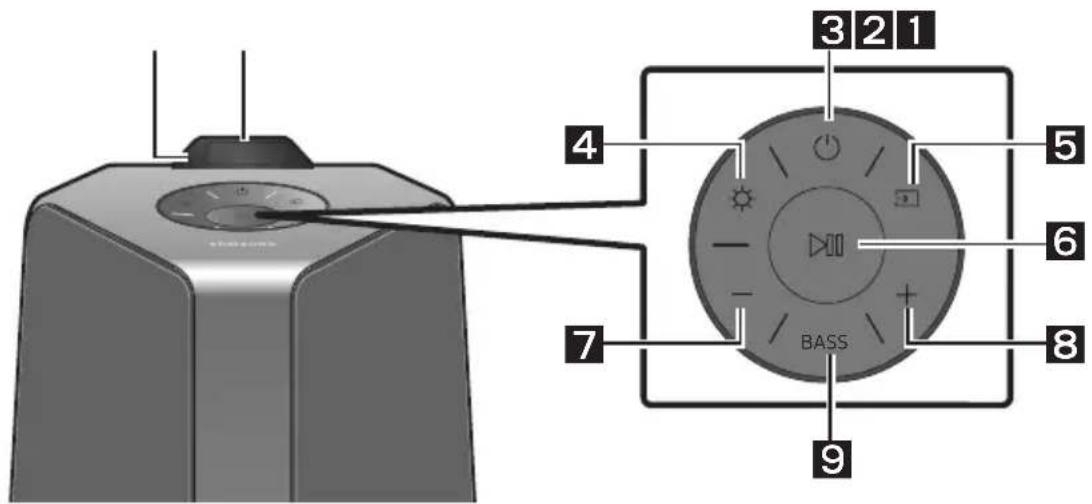
Gorny panel Sound Tower
Download on the App Store
The Bluetooth® word mark and logos are registered trademarks owned by the Bluetooth SIG, Inc. and any use of such marks by Samsung Electronics Co., Ltd. is under license. Other trademarks and trade names are those of their respective owners.

Qualcomm aptX
Qualcomm aptX is a product of Qualcomm Technologies, Inc. and/or its subsidiaries. Qualcomm is a trademark of Qualcomm Incorporated, registered in the United States and other countries. aptX is a trademark of Qualcomm Technologies International, Ltd., registered in the United States and other countries.

[ENERGY STAR]
ENERGY STAR qualified model only
- Your Samsung product is ENERGY STAR qualified in its factory default setting. Change to certain features, settings and functionality in this product can change the power consumption, possibly beyond the limits required for ENERGY STAR qualification.
- Environmental Protection Agency and Department of Energy. ENERGY STAR is a joint program of the Government agencies, designed to promote energy efficient products and practices.
Refer to www.energystar.gov for more information of the ENERGY STAR Program.
ENERGY STAR qualified model only (Applicable to Thin Client models only)
As an ENERGY STAR® Partner, SAMSUNG has determined that this product meets the ENERGY STAR® guidelines for energy efficiency.
- The ENERGY STAR Program has been to reduced greenhouse gas emissions and save energy through voluntary labeling.
- Power management setting of this product have been enabled by default, and have various timing settings from 1 minutes to 5 hours.
- The product can wake with a button press on the chassis from sleep mode.
ENERGY STAR qualified model only (The other models)
- As an ENERGY STAR Partner, Samsung has determined that this product or product models meets the ENERGY STAR guideline for energy efficiency.
10 INFORMACJA O LICENCJI OPEN SOURCE
The Bluetooth® word mark and logos are registered trademarks owned by the Bluetooth SIG, Inc. and any use of such marks by Samsung Electronics Co., Ltd. is under license. Other trademarks and trade names are those of their respective owners.

Qualcomm aptX
Qualcomm aptX is a product of Qualcomm Technologies, Inc. and/or its subsidiaries. Qualcomm is a trademark of Qualcomm Incorporated, registered in the United States and other countries. aptX is a trademark of Qualcomm Technologies International, Ltd., registered in the United States and other countries.

[ENERGY STAR]
ENERGY STAR qualified model only
- Your Samsung product is ENERGY STAR qualified in its factory default setting. Change to certain features, settings and functionality in this product can change the power consumption, possibly beyond the limits required for ENERGY STAR qualification.
- Environmental Protection Agency and Department of Energy. ENERGY STAR is a joint program of the Government agencies, designed to promote energy efficient products and practices.
Refer to www.energystar.gov for more information of the ENERGY STAR Program.
ENERGY STAR qualified model only (Applicable to Thin Client models only)
As an ENERGY STAR® Partner, SAMSUNG has determined that this product meets the ENERGY STAR® guidelines for energy efficiency.
- The ENERGY STAR Program has been to reduced greenhouse gas emissions and save energy through voluntary labeling.
- Power management setting of this product have been enabled by default, and have various timing settings from 1 minutes to 5 hours.
- The product can wake with a button press on the chassis from sleep mode.
ENERGY STAR qualified model only (The other models)
- As an ENERGY STAR Partner, Samsung has determined that this product or product models meets the ENERGY STAR guideline for energy efficiency.
10 NOTIFICARE DE LICENTÀ OPEN SOURCE
Pentru a adresa intrebari si solicitari privind sursele beschise, contactaichi echipa Samsung Open Source (http://opensource.samsung.com).
11 NOTÄ IMPORTANT DESPRE SERVICE
www.samsung.com/uk/aboutsamsung/sustainability/environment/our-commitment/data/
SIGURNOSNE INFORMACIJE
SIGURNOSNA UPOZORENJA
DA BISTE SMANJILI OPASNOST OD
ELEKTRICNOG UDARA, NE SKIDAJTE POKLOPAC (ILI ZADNJU PLOCU).
UNUTRA SE NE NALAZE DELOVI KOJI SE MOGU SERVISIRATI. SERVISIRANJE POVERITE KVALIFIKOVANOM OSOBLJU SERVISA.
Gornji panel systemd Sound Tower 3
Zadnji panel formula Sound Tower 4
03 Povezivanje systemd Sound Tower 6
Gornji panel systemd Sound Tower
| Senzor za daljinski upravljač | Kada upravljate systemom Sound Tower, usmerite prednju stranu daljinskog upravljača ka senzoru za daljinski upravljač. | |
| Prozor sa prikazom | Prikazuje operativne poruke ili trenutni status systemd Sound Tower. | |
| Napajanje Uk | jučuje i isključuje system Sound Tower. | |
| Osvetljenje | Pritisnite dugme (Osvetljenje) da biste uključili režim osvetljenja. Pritiskajte ovo dugme uzastopno kako biste kružili kroz dostupne režime osvetljenja: AMBIENT, PARTY, DANCE, THUNDERBOLT, STAR ili OFF. | |
| Izvor | Pritisnite da biste izabrali izvor povezan na systemd Sound Tower. Pritisnite i zadržite pritsinutim dugme (Izvor) duže od 5 sekundi kako biste ušli u režim „SEARCH TV". | |
| Reprodukcija/Pauza | • Reprodukcija/Pauza Pritisnite dugme da biste privremeno pauzirali muzičku datoteku. Kada ponovo pritsinete dugme, požće reprodukcija muzičke datoteke. • Sledeće/Prethodno Pritisnite tipku buta za odabir sledeće muzičke datoteke, a zatim pritsinite tipku buta za odabir prethodne muzičke datoteke. | |
| • Reprodukcija demonstracije Pritisnite i zadržite pritsnutim dugme od 5 sekundi kako bistecPokrenuli Reprodukcija demonstracije dok je system uključen. Na ekranu ce se prikazati "DEMO", a muzika demonstracije ce se reprodukovati tokom 60 sekundi. Da bistec prekinuli Reprodukcija demonstracije, pritsnite i zadržite pritsnutim dugme od 5 sekundi dok radi Reprodukcija demonstracije. - Ako unesete bilo koju komandu dok je reprodukcija demonstracije u toku, osvežićse se tajmer koji odrojava 60 sekundi. - Dok je reprodukcija demonstracije u toku, nijedno dugme na daljinskom upravljaču nilu fungcjiji kao ni zadnja ploča s priključcima. Ako Želite da koristite daljinski upravljač, otkažite Reprodukcija demonstracije. - Reprodukcija demonstracije otkazuje se kada promenite izvor ili isključite napajanjeSYSTEMA. - Molimo budite oprezni jer moze da šuje glasnjë od postavljene jačine. | ||
| 7 | Smanjivanje jačine zvuka | Pritisnite dugme-(Smanjenje jačine zvuka) da bistec podesili niži nivo jačine zvuka. Pritisnite i zadržite dugme-(Smanjenje jačine zvuka) da bistec brzo smanjili nivo jačine zvuka. |
| 8 | Povećavanje jačine zvuka | Pritiskanjem dugmeta+(Povećanje jačine zvuka) povećava se jačina zvuka. Pritisnite i zadržite dugme+(Povećanje jačine zvuka) da bistec brzo povećali nivo jačine zvuka. |
| 9 | BASS | Pritisnite dugme BASS da bistec koristili snažni zvuk basa. Ponovo ga pritsnite da bistec vratili normalan zvuk. Pritisnite i zadržite pritsnutim dugme BASS duže od 5 sekundi kako bistec uključili ili isključili funkcjù BLUETOOTH POWER. |
Zadnji panel systemd Sound Tower
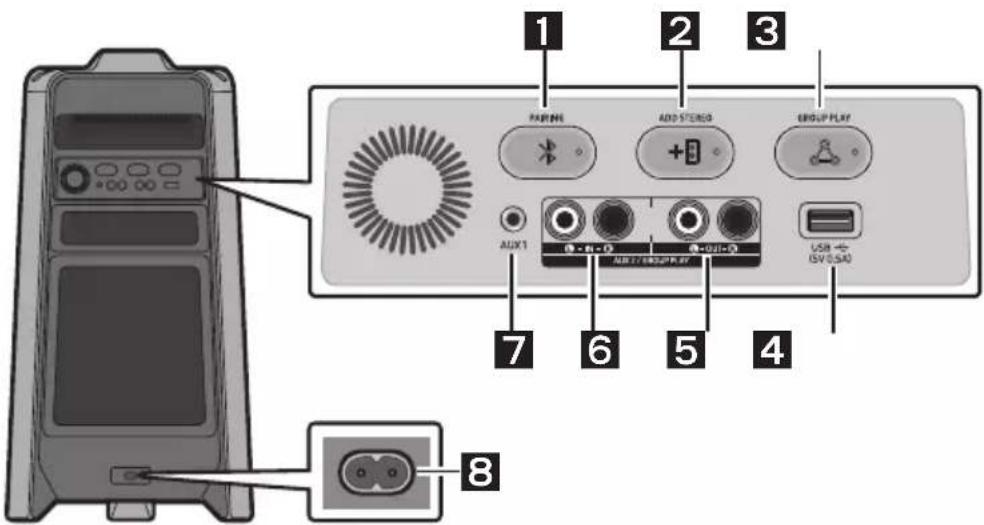
| 1 | Bluetooth PAIRING | Pritisnite dugme PAIRING da biste aktivirali režim „BT PAIRING". Sistem Sound Tower doit da povežete sa novim Bluetooth urežajem u ovom režimu takoto štoće iz liste za pretragu na Bluetooth urežaju izabrati Sound Tower. |
| 2 | ADD STEREO | Pritisnite dugme ADD STEREO da biste se bežić no povezali sa drugim systemom Sound Tower. Ponovo pritisnite dugme ADD STEREO pre povezivanja drugogSYSTEMa Sound Tower da biste izašli iz režima Stereo Group. Kada se konekcija ostvari, možete uzivati u stero zvuku. Pritisnite i zadržite pritsinutim dugme ADD STEREO duje od 5 sekundi;kako biste prekinuli režim Stereo grupe. |
| 3 | GROUP PLAY | Pritisnite dugme GROUP PLAY da biste bežić no povezali do deset systemdam Sound Tower. Ponovo pritisnite dugme GROUP PLAY pre povezivanja drugogSYSTEMa Sound Tower da biste izašli iz režima Group Play. Kada se veza uspostavi, možete da koristite više systemdam Sound Tower u isto vreme pomoću režima Group Play. Pritisnite i zadržite pritsinutim dugme GROUP PLAY duje od 5 sekundi;kako biste prekinuli bežići režim Group Play. |
| 4 | USB | Povežite USB urežaj na USB priključak na glavnoj jedinici. • Pritisnite dugme→(Izvor)da biste izabrali USB. |
| 5 | Priključci GROUP PLAY OUT | Pomocu audio kabla (ne isporučuje se) povežite priljucke GROUP PLAY (OUT) na glavnoj jedinici sa audio izlazom na speljnom analognom izlaznom urežaju. • Pazite da se boje priljucakaPoklapaju. • Ako spoljni analogni izlazni urežaj ima samo jegan ulazni audio priljucak,povežite samo levi ili desni. |
| 6 | Priključci AUX2/ GROUP PLAY IN | Pomocu audio kabla (ne isporučuje se) povežite priljucke AUX2 (IN) na glavnoj jedinici sa audio izlazom na speljnom analognom izlaznom urežaju. • Pazite da se boje priljucakaPoklapaju. • Ako spoljni analogni izlazni urežaj ima samo jegan izlazni audio priljucak,povežite samo levi ili desni. • Pritisnite dugme→(Izvor)da biste izabrali AUX2. • Ako je proizvod u režimu AUX2 bez reproduccije i njedna komanda se ne unese duže od 20 minuta,sistem ce se isključiti. • Ako je proizvod u režimu AUX2 uz reproducciju duže od 8 sati i njedna komanda se ne unese,sistem ce se isključiti. |
| 7 | AUX1 | Pomocu audio (AUX) kabla (ne isporučuje se) povežite priljucak AUX1 na glavnoj jedinici sa audio izlazom na speljnom urežaju. • Ako je proizvod u režimu AUX1 bez reproduccije i njedna komanda se ne unese duže od 20 minuta,sistem ce se isključiti. • Ako je proizvod u režimu AUX1 uz reproducciju duže od 8 sati i njedna komanda se ne unese,sistem ce se isključiti. |
| 8 | Napajanje | Povežite kabla za napajanje u priljucak Napajanje, a zatim povežite drugi kraj kabla za napajanje u vidnu uticnicu da biste dostavili elektricnu energiju systemdam Sound Tower. |
03 POVEZIVANJE SISTEMA SOUND TOWER
The Bluetooth® word mark and logos are registered trademarks owned by the Bluetooth SIG, Inc. and any use of such marks by Samsung Electronics Co., Ltd. is under license. Other trademarks and trade names are those of their respective owners.

Qualcomm aptX
Qualcomm aptX is a product of Qualcomm Technologies, Inc. and/or its subsidiaries. Qualcomm is a trademark of Qualcomm Incorporated, registered in the United States and other countries. aptX is a trademark of Qualcomm Technologies International, Ltd., registered in the United States and other countries.

[ENERGY STAR]
ENERGY STAR qualified model only
- Your Samsung product is ENERGY STAR qualified in its factory default setting. Change to certain features, settings and functionality in this product can change the power consumption, possibly beyond the limits required for ENERGY STAR qualification.
- Environmental Protection Agency and Department of Energy. ENERGY STAR is a joint program of the Government agencies, designed to promote energy efficient products and practices.
Refer to www.energystar.gov for more information of the ENERGY STAR Program.
ENERGY STAR qualified model only (Applicable to Thin Client models only)
As an ENERGY STAR® Partner, SAMSUNG has determined that this product meets the ENERGY STAR® guidelines for energy efficiency.
- The ENERGY STAR Program has been to reduced greenhouse gas emissions and save energy through voluntary labeling.
- Power management setting of this product have been enabled by default, and have various timing settings from 1 minutes to 5 hours.
- The product can wake with a button press on the chassis from sleep mode.
ENERGY STAR qualified model only (The other models)
- As an ENERGY STAR Partner, Samsung has determined that this product or product models meets the ENERGY STAR guideline for energy efficiency.
10 OBAVESTENJE O LICENCI OTVORENOG IZVORNOG KODA
Da bisteposlali pitanja i zahteve u vezi sa
softverom otvorenog koda obratite se grupi
Samsung Open Source
(http://opensource.samsung.com).
11 VAŽNA
NAPOMENA O SERVISIRANJU
- Slike i ilustracije koje su upotrebljene u ovom korisničkom uputstvu date su samo kao reference i mogu se razlikovati od vašeg proizvoda.
- Administrativni troškovi mogu biti naplaceni u sledećim slučajevima:
(a) tehnicar je pozvan u vaš dom na vaš zahtev i ako proizvod不同程度 (tj. ako niste pročitali ovo korisničko uputstvo),
(b) vi donesete uredj u servisni centar, a proizvod nije u kvaru (tj. ako niste pročitali ovo korisničko uputstvo).
www.samsung.com/uk/aboutsamsung/sustainability/environment/our-commitment/data/
BEZPEČNOSTNÉ INFORMÁCIE
BEZPECNOSTNÉ VAROVANIA
ABY STE PREDIŠLI RIZIKU VZNIKU POŽIARU A RIZIKU URAZU ELEKTRICKYM PRUDOM, NEODSTRANJTE PREDNÍ (ANI ZADNY) KRYT. ZARIADENIE SA NEPOKUŠAJTE SVOJPOMOCNE OPRAVOVAT. OPRAVY PRENECHAJTE KVALIFIKOVANÉMU SERVISNÉMU PRACOVNIKOVI.
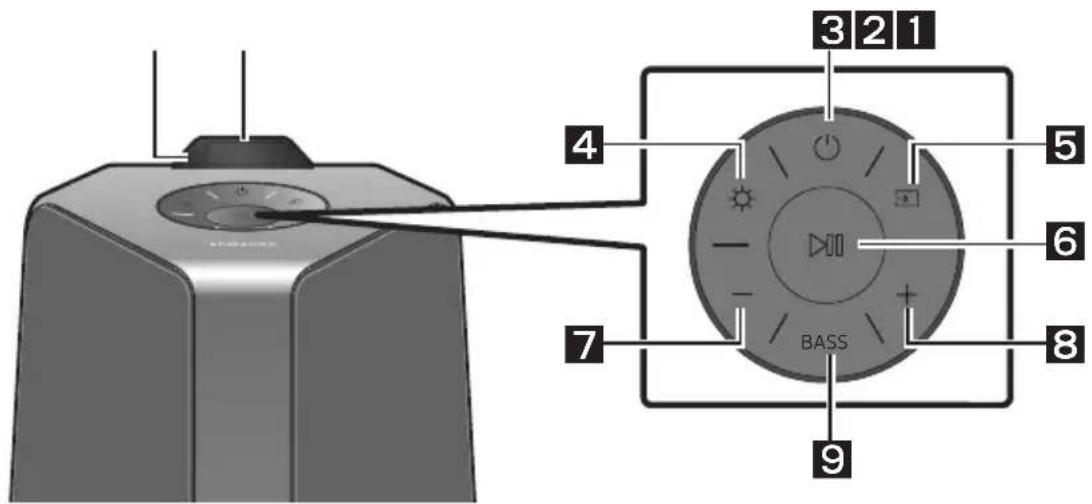
Vrchny panel zariadenia Sound Tower
08 RIESENIE PROBLEMOV
The Bluetooth® word mark and logos are registered trademarks owned by the Bluetooth SIG, Inc. and any use of such marks by Samsung Electronics Co., Ltd. is under license. Other trademarks and trade names are those of their respective owners.

Qualcomm aptX
Qualcomm aptX is a product of Qualcomm Technologies, Inc. and/or its subsidiaries. Qualcomm is a trademark of Qualcomm Incorporated, registered in the United States and other countries. aptX is a trademark of Qualcomm Technologies International, Ltd., registered in the United States and other countries.

[ENERGY STAR]
ENERGY STAR qualified model only
- Your Samsung product is ENERGY STAR qualified in its factory default setting. Change to certain features, settings and functionality in this product can change the power consumption, possibly beyond the limits required for ENERGY STAR qualification.
- Environmental Protection Agency and Department of Energy. ENERGY STAR is a joint program of the Government agencies, designed to promote energy efficient products and practices.
Refer to www.energystar.gov for more information of the ENERGY STAR Program.
ENERGY STAR qualified model only (Applicable to Thin Client models only)
As an ENERGY STAR® Partner, SAMSUNG has determined that this product meets the ENERGY STAR® guidelines for energy efficiency.
- The ENERGY STAR Program has been to reduced greenhouse gas emissions and save energy through voluntary labeling.
- Power management setting of this product have been enabled by default, and have various timing settings from 1 minutes to 5 hours.
- The product can wake with a button press on the chassis from sleep mode.
ENERGY STAR qualified model only (The other models)
- As an ENERGY STAR Partner, Samsung has determined that this product or product models meets the ENERGY STAR guideline for energy efficiency.
10 POZNÁMKA K LICENCII S OTVORENÍM ZDROJOVÍM KÖDOM
Ak chcetezaslat otazky ci poziadavky na otazky o otvorenych zdrojoch, obratte sa na diviziu Samsung Open Source (http://opensource.samsung.com).
11 DÖLEZITÁ POZNÁMKA OHL'ADOM SERVISU
The Bluetooth® word mark and logos are registered trademarks owned by the Bluetooth SIG, Inc. and any use of such marks by Samsung Electronics Co., Ltd. is under license. Other trademarks and trade names are those of their respective owners.

Qualcomm aptX
Qualcomm aptX is a product of Qualcomm Technologies, Inc. and/or its subsidiaries. Qualcomm is a trademark of Qualcomm Incorporated, registered in the United States and other countries. aptX is a trademark of Qualcomm Technologies International, Ltd., registered in the United States and other countries.

[ENERGY STAR]
ENERGY STAR qualified model only
- Your Samsung product is ENERGY STAR qualified in its factory default setting. Change to certain features, settings and functionality in this product can change the power consumption, possibly beyond the limits required for ENERGY STAR qualification.
- Environmental Protection Agency and Department of Energy. ENERGY STAR is a joint program of the Government agencies, designed to promote energy efficient products and practices.
Refer to www.energystar.gov for more information of the ENERGY STAR Program.
ENERGY STAR qualified model only (Applicable to Thin Client models only)
As an ENERGY STAR® Partner, SAMSUNG has determined that this product meets the ENERGY STAR® guidelines for energy efficiency.
- The ENERGY STAR Program has been to reduced greenhouse gas emissions and save energy through voluntary labeling.
- Power management setting of this product have been enabled by default, and have various timing settings from 1 minutes to 5 hours.
- The product can wake with a button press on the chassis from sleep mode.
ENERGY STAR qualified model only (The other models)
- As an ENERGY STAR Partner, Samsung has determined that this product or product models meets the ENERGY STAR guideline for energy efficiency.
10 OBVESTILO O ODPRTOKODNIH LICENCAH
www.samsung.com/uk/aboutsamsung/sustainability/environment/our-commitment/data/
© 2020 Samsung Electronics Co., Ltd. All rights reserved.
Contact SAMSUNG WORLD WIDE
If you have any questions or comments relating to Samsung products, please contact the SAMSUNG customer care Centre.
| Country | Samsung Service Centre | Web Site |
| ■Europe | ||
| UK 0333 000 0333 | www.samsung.com/uk/support | |
| IRELAND (EIRE) 0818 717100 | www.samsung.com/ie/support | |
| GERMANY 061967755577 | www.samsung.com/de/support | |
| FRANCE 0148630000 | www.samsung.com/fr/support | |
| ITALIA 800-SAMSUNG (800.7267864) | www.samsung.com/it/support | |
| SPAIN 911750015 | www.samsung.com/es/support | |
| PORTUGAL 808207267 | www.samsung.com/pt/support | |
| LUXEMBURG 26103710 | www.samsung.com/be_fr/support | |
| NETHERLANDS 0889090100 | www.samsung.com/nl/support | |
| BELGIUM 02-20124-18 | www.samsung.com/be/support (Dutch)www.samsung.com/be_fr/support (French) | |
| NORWAY 21629099 | www.samsung.com/no/support | |
| DENMARK 7070970 | www.samsung.com.dk/support | |
| FINLAND 030-6227515 | www.samsung.com/fei/support | |
| SWEDEN 0771726786 | www.samsung.com/se/support | |
| POLAND 801-172-678+lub+4822607-93-33*Specialistyczna infolinia do obstugi zapytani dotycznych Telefonówkomórkowych: 801-672-678* (opłata wedlug taryfy operadora) | http://www.samsung.com/pl/support/ | |
| HUNGARY 0680SAMSUNG (0680-726-7864) | www.samsung.com/hu/support | |
| AUSTRIA 08007267864 (0800-SAMSUNG) | www.samsung.com/at/support | |
| SWITZERLAND 0800726786 | www.samsung.com/ch/support (German)www.samsung.com/ch_fr/support (French) | |
| Country | Samsung Service Centre | Web Site |
| CZECH | 800-SAMSUNG (800-726786) | www.samsung.com/cz/support |
| SLOVAKIA | 0800-SAMSUNG (0800-726786) | www.samsung.com/sk/support |
| CROATIA | 072726786 | www.samsung.com/hr/support |
| BOSNIA | 055 233 999 | www.samsung.com/support |
| NORTHMACEDONIA | 023 207 777 | www.samsung.com/mk/support |
| MONTENEGRO | 020 405 888 | www.samsung.com/support |
| SLOVENIA | 080 697 267 (brezplačna številka) | www.samsung.com/si/support |
| SERBIA | 011 321 6899 | www.samsung.com/rs/support |
| KOSOVO | 0800 10 101 | www.samsung.com/support |
| ALBANIA 045 620 | 202 | www.samsung.com/al/support |
| BULGARIA | 0800 111 31 - Баллатен за BCNHи операту* *3000 - Сени наedoин радск разоворни сюpeцтariхдота наюшнолт оретату 09:00 до 18:00 - Понededелник до Рétьк | www.samsung.com/bg/support |
| ROMANIA | 0800872678 - Apel Gratisit *8000 - Apel tarifat in rejea | www.samsung.com/ro/support |
| CYPRUS | 8009 4000 only from landline, toll free | www.samsung.com/gr/support |
| GREECE | 80111-SAMSUNG (80111 726 7864) only from land line (+30) 210 6897691 from mobile and land line | |
| LITHUANIA 8-800 | 0-77777 | www.samsung.com/lt/support |
| LATvia | 8000-7267 | www.samsung.com/lv/support |
| ESTONIA | 800-7267 | www.samsung.com/ee/support |

- SAFETY INFORMATION
- SAFETYWARNINGS
- WARNING
- CAUTION
- PRECAUTIONS
- ABOUT THIS MANUAL
- USER MANUAL
- FULL MANUAL
- CONTENTS
- Checking the Components 2
- Product Overview 3
- Connecting the Sound Tower 6
- Connecting an External Device 13
- Connecting a USB Storage Device 18
- Using the Remote Control 20
- Using the Samsung Sound Tower (Giga Party Audio) app 23
- Troubleshooting 24
- CHECKING THE COMPONENTS
- Sound Tower Main Unit Remote Control / Batteries Power Cord
- Inserting Batteries before using the Remote Control (AAA batteries X 2)
- PRODUCT OVERVIEW
- Connecting Electrical Power
- How to use Audio Group
- Connecting the wired Group Play mode
- NOTES
- Connecting the wireless Group Play mode
- Disconnecting the wireless Group Play mode
- LED Indications
- NOTE
- Using a Smartphone and Stereo Group mode
- Terminate the Stereo Group mode
- Using Samsung TV and Stereo Group mode
- Terminating the Stereo Group mode connection
- CONNECTING AN EXTERNAL DEVICE
- Connecting using an Analogue Audio (AUX) Cable
- 3.5 mm stereo Cable (AUX1)
- Audio Cable (AUX2)
- Connecting a mobile device via Bluetooth
- The initial connection
- If the device fails to connect
- What is the difference between BT READY and BT PAIRING?
- Bluetooth Multi connection
- Using Bluetooth Power On
- Connecting the Samsung TV via Bluetooth
- Easy connect with Samsung TV (SEARCHING TV mode)
- CONNECTING A USB STORAGE DEVICE
- Supported Audio Formats
- Software Update
- Samsung may offer updates for the Sound Tower's system firmware in the future.
- USING THE REMOTE CONTROL
- How to use Sound Mode
- How to use the DJ Effect
- USING THE SAMSUNG SOUND TOWER (GIGA PARTY AUDIO) APP
- Install Samsung Sound Tower (Giga Party Audio) App
- Launching the Samsung Sound Tower (Giga Party Audio) App
- TROUBLESHOOTING
- The unit will not turn on.
- It cannot make a Bluetooth connection.
- The PAIRING button is not working.
- I can't connect a SUB to Group play.
- It cannot make a "Wireless/Wired Group/Add Stereo/Bluetooth" connection.
- Is the distance between systems too far?
- LICENCE
- Bluetooth
- Qualcomm aptX
- [ENERGY STAR]
- ENERGY STAR qualified model only
- ENERGY STAR qualified model only (Applicable to Thin Client models only)
- ENERGY STAR qualified model only (The other models)
- OPEN SOURCE LICENCE NOTICE
- IMPORTANT NOTES ABOUT SERVICE
- SPECIFICATIONS AND GUIDE
- [Correct disposal of batteries in this product]
- (Applicable in countries with separate collection systems)
- Correct Disposal of This Product
- (Waste Electrical & Electronic Equipment)
- Cbbp3BaHe Ha Sound Tower 6
- Cbbp3BaHe Ha BbHsHo yCTpoiCTBO 13
- Cbbp3BaHe Ha USB yctpoiCTBO 3a cbxpaHHe 18
- I3noI3BaHe Ha dIcTaHcNIOHHoTo ynpaBJIeHne 20
- BkapBaHe Ha 6aTePnIte IpeHn H3IOJ3BaHe Ha INCTaHcIOHHOTO yIpaBJIeHne (AAA 6aTePnX 2)
- ПЕГLEДHA ПОДУКТА
- CBeToIDNoDNH NHNKaUH
- CBeToIONoHN HnDnKaaun
- Ako yctpoiCTBOTo He MoXe Da 6bIe CBbp3aHO
- KakBa e pa3nkaTamaexy BT READY nBT PAIRING?
- Bluetooth Муltи Врька
- BENEXKNI
- CBeToIIOHn HndNkaun
- Стартупаны пиюжениTo Samsung Sound Tower (Giga Party Audio)
- OTCTPAHЯBAHE HA HEN3ПРABHOCTN
- YpeBt He Ce BkIIOUyBa.
- He ce 4yBa 3ByK.
- He Mora Da CBbpxa NOpuHHeHa CnCTema SUB B Group play.
- He moxe da ce ocbueCTBn Bpb3ka "Be3KHHo/ Ka6eHa rpyna/Do6aBn Ctepeo/Bluetooth".
- IpekaJIeHO rOJaMo IIn e pa3cToHHeTo Mexy cnCTeMHTe?
- リングEH3
- БЕLEЖKA 3A ЛИЦЕНЗА 3A OTBOPEH KOD
- 11BAJKHN BELEXKIN3A OBCJIyXBAHETO
- CNEUΦNKAU IN PbKOBOCTBO
- SIGURNOSNE INFORMACije
- SIGURNOSNA UPOZORENJA
- UPOZORENJE
- OPREZ
- MJERE OPREZA
- OBAVIJESTO LICENCIZA UPORABU SOFTVERA OTVORENOC KODA
- VAŽNA NAPOMENA VEZANA UZ SERVIS
- BEZPEČNOSTNI INFORMACE
- BEZPECNOSTNI VAROVÁNÍ
- POZNÁMKA K LICENCI OTEVRENEHO SOFTWARE
- BEKANNTMACHUNG ZU OPEN SOURCE LIZENZEN
- OHUTUSTEAVE
- HOIATUSED
- Samsung Sound Tower (Giga Party Audio) App käivitamine
- AVATUD LÄHTEKOODI LITSENTSI TEATIS
- INFORMATIONS RELATIVES À LA SECURITÉ
- AVERTISSEMENTS
- AVIS DE LICENCE LIBRE
- Ekkivnon TnC Eapouync Samsung Sound Tower (Giga Party Audio)
- 08ANTIMETΩΠΕH ΠPOBΑΗΜΑΝ
- H movadδa δev evepyonoleital.
- NYICT FORRASKODU LICENC MEGJEGYZES
- AVVISO DI LICENZA OPEN SOURCE
- DROŠIBAS INFORMÁCIJA
- DROŠIBAS BRIDINAJUMI
- PROBLEMU NOVER'SANA
- PAZINOJUMS PAR ATVERTA PIRMKODA LICENCI
- ATVIROSIOS PROGRAMINES JRANGOS LICENCIJOS PRANEŠIMAS
- SVARBI PASTABA APIE TECHNINE PRIEŽIURA
- INFORMACJE DOTYCZACE BEZPIECZENSTWA
- INFORMACJA O LICENCJI OPEN SOURCE
- NOTIFICARE DE LICENTÀ OPEN SOURCE
- NOTÄ IMPORTANT DESPRE SERVICE
- Povezivanje systemd Sound Tower 6
- Gornji panel systemd Sound Tower
- Zadnji panel systemd Sound Tower
- POVEZIVANJE SISTEMA SOUND TOWER
- OBAVESTENJE O LICENCI OTVORENOG IZVORNOG KODA
- VAŽNA
- NAPOMENA O SERVISIRANJU
- BEZPEČNOSTNÉ INFORMÁCIE
- BEZPECNOSTNÉ VAROVANIA
- RIESENIE PROBLEMOV
- POZNÁMKA K LICENCII S OTVORENÍM ZDROJOVÍM KÖDOM
- DÖLEZITÁ POZNÁMKA OHL'ADOM SERVISU
- OBVESTILO O ODPRTOKODNIH LICENCAH
- Contact SAMSUNG WORLD WIDE
Brand : SAMSUNG
Model : MXT40
Category : Pregnant