
SRS556DLS - Pregnant SAMSUNG - Free user manual and instructions
Find the device manual for free SRS556DLS SAMSUNG in PDF.


| Product Type | Portable Bluetooth Speaker |
| Brand | Samsung |
| Model | SRS556DLS |
| Dimensions (W x H x D) | 200 mm x 100 mm x 100 mm |
| Weight | 1.2 kg |
| Power Supply | Built-in rechargeable lithium-ion battery, 7.4V, 5000mAh |
| Charging Time | Approximately 4 hours via USB-C |
| Playback Time | Up to 12 hours at moderate volume |
| Bluetooth Version | 5.0 |
| Audio Inputs | Bluetooth, 3.5mm AUX, USB-A for MP3 playback |
| Output Power | 20W RMS (2 x 10W stereo) |
| Frequency Response | 60 Hz - 20 kHz |
| Driver | 2 x 52mm full-range drivers |
| Connectivity | Bluetooth, NFC pairing, AUX, USB |
| Microphone | Built-in microphone for hands-free calls |
| Water Resistance | IPX5 |
| Controls | Power, Volume +/-, Play/Pause, Next/Previous, Bluetooth pairing button |
| LED Indicators | Battery level, Bluetooth status, charging |
| Compatible Devices | Smartphones, tablets, laptops, and any Bluetooth-enabled device |
| In the Box | Speaker, USB-C charging cable, 3.5mm AUX cable, user manual |
| Maintenance | Clean with a soft, dry cloth. Do not use abrasive cleaners or solvents. Avoid exposure to extreme temperatures. |
| Safety | Do not disassemble the device. Avoid contact with liquids. Do not expose to high humidity or direct sunlight. Keep away from children. |
| Spare Parts and Repairability | Battery is replaceable by an authorized service center. Other components are not user-serviceable. Contact Samsung support for repairs. |
| General Information | This device complies with part 15 of the FCC Rules. Operation is subject to the condition that this device does not cause harmful interference. |
Frequently Asked Questions - SRS556DLS SAMSUNG
User questions about SRS556DLS SAMSUNG
0 question about this device. Answer the ones you know or ask your own.
Ask a new question about this device
Download the instructions for your Pregnant in PDF format for free! Find your manual SRS556DLS - SAMSUNG and take your electronic device back in hand. On this page are published all the documents necessary for the use of your device. SRS556DLS by SAMSUNG.
USER MANUAL SRS556DLS SAMSUNG
Free Standing Appliance
Contents
Safety information 3
Important safety symbols and precautions: 5
Severe warning signs for transportation and site 6
Critical installation warnings 6
Installation cautions 10
Critical usage warnings 11
Usage cautions 16
Cleaning cautions 19
Critical disposal warnings 21
Additional tips for proper usage 22
Saving Energy Tips 23
Instructions about the WEEE 24
Installation 26
Getting ready to install the refrigerator 26
Clearance 27
Removing the refrigerator doors 28
Reattaching the refrigerator doors 31
Making minor adjustments to the doors 35
Checking the water dispenser line (optional) 36
Installing the water dispenser line(optional) 37
Setting up the refrigerator 41
Using the control panel(optional) 43
Controlling the temperature 45
Using the ice and cold water dispenser (freezer) 46
Using the cold water dispenser (fridge) 48
Shelves and bins 49
Storing food 51
Using the coolselect duo (optional) 53
Removing the freezer accessories 54
Cleaning the refrigerator 56
Changing the interior lights 57
Using the doors 57
Troubleshooting 58
- Before using your new Samsung Refrigerator, please read this manual thoroughly to ensure that you know how to operate the features and functions that your new appliance offers safely and efficiently.
- This appliance is not intended for use by persons (including children) with reduced physical, sensory, or mental capabilities, or those who lack experience and knowledge, unless they have been given supervision or instruction concerning the use of the appliance by a person responsible for their safety.
- This appliance can be used by children aged from 8 years and above and persons with reduced physical, sensory or mental capabilities or lack of experience and knowledge if they have been given supervision or instruction concerning use of the appliance in a safe way and understand the hazards involved. Children shall not play with the appliance. Cleaning and user maintenance shall not be made by children without supervision.
- Warnings and Important Safety Instructions in this manual do not cover all possible conditions and situations that may occur. It is your responsibility to use common sense, caution, and care when installing, maintaining, and operating your appliance.
- Because these following operating instructions cover various models, the characteristics of your refrigerator may differ slightly from those described in this manual and not all warning signs may be applicable. If you have any questions or concerns, contact your nearest service center or find help and information online at www.samsung.com.
- R-600a or R-134a is used as a refrigerant. Check the compressor label on the rear of the appliance or the rating label inside the fridge to see which refrigerant is used for your refrigerator. When this product contains flammable gas (Refrigerant R-600a), contact your local authority in regard to
safe disposal of this product.
- In order to avoid the creation of a flammable gas-air mixture if a leak in the refrigerating circuit occurs, the size of the room in which the appliance may be sited depends on the amount of refrigerant used.
- Never start up an appliance showing any signs of damage. If in doubt, consult your dealer. The room must be 1 m ^3 in size for every 8 g of R-600a refrigerant inside the appliance. The amount of refrigerant in your particular appliance is shown on the identification plate inside the appliance.
- Refrigerant squirting out of the pipes could ignite or cause an eye injury. When refrigerant leaks from the pipe, avoid any naked flames and move anything flammable away from the product and ventilate the room immediately.
- Failing to do so may result in fire or explosion.
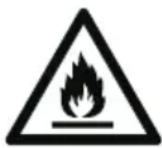
Warning; Risk of fire / flammable materials
Important safety symbols and precautions:
Please follow all safety instructions in this manual. This manual uses the following safety symbols.

WARNING
Hazards or unsafe practices that may result in severe personal injury, property damage, and/or death.

CAUTION
Hazards or unsafe practices that may result in severe personal injury and/or property damage.

NOTE
Useful information that helps users understand or benefit from the refrigerator.
These warning signs are here to prevent injury to you and others. Please follow them carefully.
After reading this section, keep it in a safe place for future reference.
Severe warning signs for transportation and site

WARNING
- When transporting and installing the appliance, care should be taken to ensure that no parts of the refrigerating circuit are damaged.
- Refrigerant leaking from the pipe work could ignite or cause an eye injury. If a leak is detected, avoid any naked flames or potential sources of ignition and air the room in which the appliance is standing for several minutes.
- This appliance contains a small amount of isobutane refrigerant (R-600a), a natural gas with high environmental compatibility that is, however, also combustible. When transporting and installing the appliance, care should be taken to ensure that no parts of the refrigerating circuit are damaged.
- When transporting and installing the refrigerator, do not touch the water hose on the back side of the refrigerator.
- This may damage the refrigerator and as a result the water dispenser can not be used.
Critical installation warnings

WARNING
- Do not install the refrigerator in a damp location or place where it may come in contact with water.
- Deteriorated insulation on electrical parts may cause an electric shock or fire.
- Do not place this refrigerator in direct sunlight or expose it to the heat from stoves, room heaters, or other appliances.
- Do not plug several appliances into the same multiple power
strip. The refrigerator should always be plugged into its own individual electrical outlet which has a voltage rating that matches the voltage listed on the refrigerator's rating plate.
- This provides the best performance and also prevents overloading of house wiring circuits, which could cause a fire hazard from overheated wires.
- If the wall socket is loose, do not insert the power plug.
- There is a risk of electric shock of fire.
- Do not use a power cord that has cracks or abrasion damage along its length or at either end.
- Do not bend the power cord excessively or place heavy objects on it.
- Do not pull or excessively bend the power cord.
- Do not twist or tie the power cord.
- Do not hook the power cord over a metal object, place a heavy object on the power cord, insert the power cord between objects, or push the power cord into the space behind the appliance.
- When moving the refrigerator, be careful not to roll over or damage the power cord.
- This may result in an electric shock or fire.
- Never unplug your refrigerator by pulling on the power cord. Always grip the plug firmly and pull straight out from the outlet.
- Damage to the cord may cause a short-circuit, fire, and/or electric shock.
- Do not use aerosols near the refrigerator.
- Using aerosols near the refrigerator may cause an explosion or fire.
- Do not install this appliance near a heater or inflammable material.
- Do not install this appliance in a location where gas may leak.
- This may result in an electric shock or fire.
- This refrigerator must be properly located and installed in accordance with the instructions in this manual before you use it.
- Connect the power plug in the proper position with the cord hanging down.
- If you connect the power plug upside down, the wire can get cut off and cause a fire or electric shock.
- Make sure that the power plug is not crushed or damaged by the back of the refrigerator.
- Keep the packing materials out of reach of children.
- There is a risk of death from suffocation if a child puts the packing materials on his or her head.
- The appliance must be positioned so that the plug is accessible after installation.
- Failing to do so may result in an electric shock or fire due to electric leakage.
- Do not install this appliance in a humid, oily or dusty location, in a location exposed to direct sunlight and water (rain drops).
- Deteriorated insulation of electrical parts may cause an electric shock or fire.
- If any dust or water is in the refrigerator, pull out power plug and contact your Samsung Electronics service center.
- Otherwise there is a risk of fire.
- Do not stand on top of the appliance or place objects (such as laundry, lighted candles, lighted cigarettes, dishes, chemicals, metal objects, etc.) on the appliance.
- This may result in an electric shock, fire, problems with the product, or injury.
- You need to remove all the protective plastic film before you initially plug the product in.
- Children should be supervised to ensure that they do not play with the snap rings used for door adjustment or the water tube
clips.
- There is risk of death by suffocation if a child swallows a snap ring or water tube clip. Keep the snap rings and water tube clips out of children's reach.
- The refrigerator must be safely grounded.
- Always make sure that you have grounded the refrigerator before attempting to investigate or repair any part of the appliance. Power leakages can cause severe electric shock.
- Never use gas pipes, telephone lines, or other potential lightning attractors as an electrical ground.
- You must ground the refrigerator to prevent any power leakages or electric shocks caused by current leakage from the refrigerator.
- This may result in an electric shock, fire, explosion, or problems with the product.
- Plug the power plug into the wall socket firmly. Do not use a damaged power plug, damaged power cord, or loose wall socket.
- This may result in an electric shock or fire.
- If the power cord is damaged, have it replaced immediately by the manufacturer or one of its service agents.
- The fuse on the refrigerator must be changed by a qualified technician or service company.
- Failing to do so may result in an electric shock or personal injury.
- When positioning the appliance, ensure the supply cord is not trapped or damaged.
- Do not locate multiple portable socket-outlets or portable power supplies at the rear of the appliance.
Installation cautions

CAUTION
- Allow sufficient space around the refrigerator and install it on a flat surface.
- If your refrigerator is not level, cooling efficiency and durability can be declined.
- Keep the ventilation space in the appliance enclosure or mounting structure clear of obstructions.
- Allow the appliance to stand for 2 hours before loading foods after installation and turning on.
• We strongly recommend you have a qualified technician or service company install the refrigerator. - Failing to do so may result in an electric shock, fire, explosion, problems with the product, or injury.
Critical usage warnings

WARNING
- Do not insert the power plug into a wall socket with wet hands.
- This may result in an electric shock.
- Do not store articles on the top of the appliance.
- When you open or close the door, the articles may fall and cause personal injury and/or material damage.
- Do not insert hands, feet or metal objects (such as chopsticks, etc.) into the bottom or the back of the refrigerator.
- This may result in an electric shock or injury.
- Any sharp edges may cause a personal injury.
- Do not touch the inside walls of the freezer or products stored in the freezer with wet hands.
- This may cause frostbite.
- Do not put a container filled with water on the refrigerator.
• If spilled, there is a risk of fire or electric shock.
- Do not keep volatile or flammable objects or substances (benzene, thinner, propane gas, alcohol, ether, LP gas, and other such products) in the refrigerator.
- This refrigerator is for storing food only.
- This may result in fire or explosion.
- Children should be supervised to ensure that they do not play with the appliance.
- Keep fingers out of "pinch point" areas. Clearances between the doors and cabinet are necessarily small. Be careful when you open the doors if children are in the area.
- Do not let children hang on the door or door bins. A serious injury may occur.
- Do not let children go inside the refrigerator. They could become trapped.
- Do not insert your hands into the bottom area under the appliance.
- Any sharp edges may cause personal injury.
- Do not store pharmaceutical products, scientific materials, or temperature sensitive products in the refrigerator.
- Products that require strict temperature controls must not be stored in the refrigerator.
- Do not place or use electrical appliance inside the refrigerator/freezer, unless they are of a type recommended by the manufacturer.
- If you smell pharmaceutical or smoke, pull out power plug immediately and contact your Samsung Electronics service center.
- If any dust or water is in Refrigerator, pull out power plug and contact your Samsung Electronics service center.
- Otherwise there is a risk of fire.
- Do not let children step on a drawer.
- The drawer may break and cause them to slip.
- Do not leave the doors of the refrigerator open while the refrigerator is unattended and do not let children enter inside the refrigerator.
- Do not allow babies or children go inside the drawer.
- It can cause death from suffocation by entrapment or personal injury.
- Do not overfill the refrigerator with food.
- When you open the door, an item may fall out and cause personal injury or material damage.
- Do not spray volatile material such as insecticide onto the surface of the appliance.
-
As well as being harmful to humans, it may also result in an electric shock, fire, or problems with the product.
-
Never put fingers or other objects into the water dispenser hole, ice chute and ice maker bucket.
- It may cause a personal injury or material damage.
- Do not use or place any substances sensitive to temperature such as flammable sprays, flammable objects, dry ice, medicine, or chemicals near or inside of the refrigerator.
- Do not use a hair dryer to dry the inside of the refrigerator. Do not place a lighted candle in the refrigerator for removing bad odours.
- This may result in an electric shock or fire
- Fill the water tank, ice tray and water cubes only with potable water (mineral water or purified water).
- Do not fill the tank with tea, juice or sports drink, this may damage the refrigerator.
- Do not stand on top of the appliance or place objects (such as laundry, lighted candles, lighted cigarettes, dishes, chemicals, metal objects, etc.) on the appliance. This may result in an electric shock, fire, problems with the product, or injury. Do not put a container filled with water on the appliance.
- If spilled, there is a risk of fire or electric shock.
- Do not use mechanical devices or any other means to accelerate the defrosting process, other than those recommended by the manufacturer.
- Do not damage the refrigerant circuit.
- Never stare directly at the UV LED lamp for long periods of time.
- This may result in eye strain due to the ultraviolet rays.
- Do not put fridge shelf in upside down. Shelf stopper could not work.
- It may cause a personal injury because of glass shelf drop.
- Keep fingers out of “pinch point” areas. Clearances between the doors and cabinet are necessarily small. Be careful when
you open the doors if children are in the area.
- If a gas leak is detected, avoid any naked flames or potential sources of ignition, and air the room in which the appliance is standing for several minutes.
- Do not touch the appliance or power cord.
- Do not use a ventilating fan.
- A spark may result in explosion or fire.
- Use only the LED Lamps provided by the manufacturer or its service agents.
- Bottles should be stored tightly together so that they do not fall out.
- This product is intended only for the storage of food in a domestic environment.
- Never put fingers or other objects into the water dispenser hole, ice chute and ice maker bucket.
- It may cause a personal injury or material damage.
- Do not attempt to repair, disassemble, or modify the refrigerator yourself.
- Do not use any fuse (such as cooper, steel wire, etc.) other than a standard fuse.
- If your refrigerator needs to be repaired or reinstalled, contact your nearest service center.
- Failing to do so may result in an electric shock, fire, problems with the product, or injury.
- If the interior or exterior LED lamp has gone out, contact your nearest service center.
- If the refrigerator emits a burning smell or smoke, unplug the refrigerator immediately and contact your Samsung Electronics service center.
- Failing to do so may result in an electric or fire hazards.
- Pull the power plug out of the socket before changing the interior lamps of the refrigerator.
- Otherwise, there is a risk of electric shock.
- If you experience difficulty changing a non-LED light, contact a Samsung service center.
- If the product is equipped with LED lamps, do not disassemble the Lamp Covers and LED lamps yourself.
- Contact a Samsung service center.
- Plug the power plug into the wall socket firmly.
- Do not use a damaged power plug, damaged power cord or loose wall socket.
- This may result in an electric shock or fire.
- Do not store explosive substances such as aerosol cans with a flammable propellant in this appliance.
Usage cautions

CAUTION
- Do not re-freeze frozen foods that have thawed completely. Do not place carbonated or fizzy drinks in the freezer compartment. Do not put bottles or glass containers in the freezer.
- When the contents freeze, the glass may break and cause personal injury.
- Use only the ice maker provided with the refrigerator.
- Have the refrigerator's water supply connected only to a potable water supply. To operate the ice maker properly, water pressure of 20 \~ 125 psi (138 \~ 862 kPa) is required. If you will be away from home for a long period of time (on vacation, for example) and won't be using the water or ice dispensers, close the water valve.
- Otherwise, water leakage may occur.
- If you won't be using the refrigerator for a very long period of time, (3 weeks or more) empty the refrigerator including the ice bucket, unplug it, close the water valve, wipe excess moisture from the inside walls, and leave the doors open to prevent odors and mold.
• To get the best performance from the product: - Do not place food too close to the vents at the rear of the refrigerator as this can obstruct free air circulation in the refrigerator compartment.
- Wrap food up properly or place it in airtight containers before putting it into the refrigerator.
-
Do not place glass bottles or carbonated beverages into the freezer. They can freeze and break. Broken beverage containers can cause injury.
-
Please observe maximum storage times and expiration dates of frozen goods.
- There is no need to disconnect the refrigerator from the power supply if you will be away for less than three weeks. However, if you will be away for more than three weeks, remove all the food and ice in the ice bucket, unplug the refrigerator, close the water valve, wipe excess moisture from the inside walls, and leave the doors open to prevent odors and mold.
- Do not place glass or bottles or carbonated beverages into the freezer.
- The container may freeze and break, and this may result in injury.
- Do not place carbonated or fizzy drinks in the freezer compartment. Do not put bottles or glass containers in the freezer.
- When the contents freeze, the glass may break and cause personal injury and property damage.
• Service Warranty and Modification.
- Any changes or modifications performed by a 3rd party on this finished appliance are not covered under Samsung warranty service, nor is Samsung responsible for safety issues that result from 3rd party modifications.
- Do not block the air vents inside the refrigerator.
- If the air vents are blocked, especially with a plastic bag, the refrigerator can be over cooled. If a cooling period lasts too long, the water filter may break and cause water leakage.
- Use only the ice-maker provided with the refrigerator.
- Wipe excess moisture from the inside and leave the doors open.
- Otherwise, odor and mold may develop.
- If the refrigerator is disconnected from the power supply, you should wait for at least five minutes before plugging it back in. If
- you have a long vacation planned or do not intend to use the refrigerator for a long period of time, (3 weeks or more) empty the refrigerator including the ice bucket, pull out the power plug, close the water valve, wipe excess moisture from the inside walls, and leave the doors open to prevent odors and mold.
- When the refrigerator got wet by water, pull out the power plug and contact your Samsung Electronics service center.
- Do not strike or apply excessive force to any glass surface.
- Broken glass may result in a personal injury and/or property damage.
- Fill the water tank and ice cube trays with potable water only (tap water, mineral water, or purified water).
- Do not fill the tank with tea or a sports drink. This may damage the refrigerator.
- Be careful that your fingers are not caught in.
- If the refrigerator is flooded, make sure to contact your nearest service center.
- There is a risk of electric shock or fire.
- Do not keep vegetable oil in your refrigerator's door bins. The oil can solidify, making it foul-tasting and difficult to use. In addition, the open container can leak and the leaked oil can cause the door bin to crack. After opening an oil container, it is best to keep the container in a cool and shaded place such as a cupboard or pantry.
- Examples of vegetable oil: olive oil, corn oil, grape-seed oil, etc.
Cleaning cautions

CAUTION
- Do not spray water directly on the inside or outside the refrigerator.
- There is a risk of fire or electric shock.
- Do not use a hair dryer to dry the inside of the refrigerator.
- Do not place a lighted candle in the refrigerator to remove bad odors.
- This may result in an electric shock or fire.
- Do not spray cleaning products directly on the display.
- Printed letters on the display may come off.
- If any foreign substance such as water has entered the appliance, unplug the power plug and contact your nearest service center.
- Failing to do so may result in an electric shock or fire.
- Use a clean, dry cloth to remove any foreign matter or dust from the power plug blades. Do not use a wet or damp cloth when cleaning the plug.
- Otherwise, there is a risk of fire or electric shock.
- Do not clean the appliance by spraying water directly onto it.
- Do not use benzene, thinner, or Clorox, Chloride for cleaning.
- They may damage the surface of the appliance and may cause a fire.
- Never put fingers or other objects into the dispenser hole.
- It may cause a personal injury or material damage.
- Before cleaning or performing maintenance, unplug the appliance from the wall socket.
- Failing to do so may result in an electric shock or fire.
- Use a clean sponge or soft cloth and a mild detergent in warm water to clean the refrigerator.
- Do not use abrasive or harsh cleansers such as window sprays, scouring cleansers, flammable fluids, muriatic acid, cleaning waxes, concentrated detergents, bleaches, or cleansers containing petroleum products on exterior surfaces (doors and cabinet), plastic parts, door and interior liners, and gaskets.
- These can scratch or damage the material.
- Do not clean glass shelves or covers with warm water when they are cold. Glass shelves and covers may break if exposed to sudden temperature changes or impacts such as bumping or dropping.
Critical disposal warnings

CAUTION
- Please dispose of the packaging material from this product in an environmentally friendly manner.
- Ensure that none of the pipes on the back of the refrigerator are damaged prior to disposal.
- R-600a or R-134a is used as a refrigerant. Check the compressor label on the rear of the appliance or the rating label inside the fridge to see which refrigerant is used for your refrigerator. If this refrigerator contains flammable gas (Refrigerant R-600a), contact your local authority in regard to safe disposal of this product.
- When disposing of this refrigerator, remove the door/door seals and door latch so that small children or animals cannot become trapped inside. Children should be supervised to ensure that they do not play with the appliance. If trapped inside, a child may get hurt or suffocate to death.
- If trapped inside, the child may become injury and suffocate to death.
- Cyclopentane is used in the insulation. The gases in the insulation material require a special disposal procedure. Please contact your local authorities in regard to the environmentally safe disposal of this product.
- Keep all packaging materials well out of the reach of children, as packaging materials can be dangerous to children.
- If a child places a bag over his or her head, the child could suffocate.
Additional tips for proper usage
- In the event of a power failure, call the local office of your electric company and ask how long the failure is going to last.
- Most power failures that are corrected in an hour or two will not affect your refrigerator temperatures. However, you should minimize the number of door openings while the power is off.
- Should the power failure last more than 24 hours, remove and discard all frozen food.
- The refrigerator might not operate consistently (frozen contents can thaw or temperatures can become too warm in the frozen food compartment) if sited for an extended period of time in a location where ambient air temperatures are constantly below the temperatures for which the appliance is designed.
- In case of particular foods, keeping it under refrigeration can have a bad effect on preservation due to its properties.
- Your appliance is frost free, which means there is no need to manually defrost your appliance. This will be carried out automatically.
- Temperature rise during defrosting complies with ISO requirements. If you want to prevent an undue rise in the temperature of frozen food while the appliance defrosts, wrap the frozen food in several layers of newspaper.
- Do not re-freeze frozen foods that have thawed completely.
- The temperature of two star section (sections) or compartment (compartments) which have two star symbol (*) is slightly higher than other freezer compartment (compartments). The two star section (sections) or compartment (compartments) is (are) based on the instruction and/or the condition as delivered.
Saving Energy Tips
- Install the appliance in a cool, dry room with adequate ventilation. Ensure that it is not exposed to direct sunlight and never put it near a direct source of heat (a radiator, for example).
- Not to block any vents and grilles is recommended for energy efficiency.
- Allow warm food to cool down before placing it in the appliance.
- Put frozen food in the refrigerator to thaw. You can then use the low temperatures of the frozen products to cool food in the refrigerator.
- Do not keep the door of the refrigerator open for too long when putting food in or taking food out. The shorter the time the door is open, the less frost build-up you'll have in the freezer.
- It is recommended to install the refrigerator with clearance to the back and sides. This will help reduce power consumption and keep your energy bills lower.
- For the most efficient use of energy, please keep the all inner fittings such as baskets, drawers, shelves on the position supplied by manufacturer.
This appliance is intended to be used in household and similar applications such as
- staff kitchen areas in shops, offices and other working environments;
- farm houses and by clients in hotels, motels and other residential type environments;
• bed and breakfast type environments;
• catering and similar non-retail applications
Instructions about the WEEE

natural_image
Symbol of a trash bin crossed with no text or numbers, representing environmental restriction (no text present)Correct Disposal of This Product
(Waste Electrical & Electronic Equipment)
(Applicable in countries with separate collection systems)
This marking on the product, accessories or literature indicates that the product and its electronic accessories (e.g. charger, headset, USB cable) should not be disposed of with other household waste at the end of their working life. To prevent possible harm to the environment or human health from uncontrolled waste disposal, please separate these items from other types of waste and recycle them responsibly to promote the sustainable reuse of material resources.
Household users should contact either the retailer where they purchased this product, or their local government office, for details of where and how they can take these items for environmentally safe recycling.
Business users should contact their supplier and check the terms and conditions of the purchase contract. This product and its electronic accessories should not be mixed with other commercial wastes for disposal.
Safety information
Getting ready to install the refrigerator
Congratulations on the purchase of your Samsung Side-By-Side Refrigerator. We hope you will enjoy the many state-of-the-art features and efficiencies that this new appliance has to offer.
Selecting the best location for the refrigerator
- Solid, level surface without carpeting or flooring that may obstruct ventilation
• Away from direct sunlight - Adequate room for opening and closing the door
• Away from a heat source
• Room for maintenance and servicing
• Temperature range: between 5 °C and 43 °C
Clearance
Allow sufficient space to install the refrigerator on a flat surface.
Overall space required in use. Refer to drawing and dimension as below.


NOTE
- Allow clearance to the right, left, back and top when installing. This will help reduce power consumption and keep your energy bills lower.
- Do not install the refrigerator where the temperature will go below 50^ (10°C).
• Make sure you disconnect the water supply line BEFORE removing the freezer door.
Removing the refrigerator doors
If your entrance won't allow the refrigerator to pass easily through it, you can remove the doors.
The actual image of your refrigerator may differ, depending on the model and the country.
- Removing the Front Leg Cover
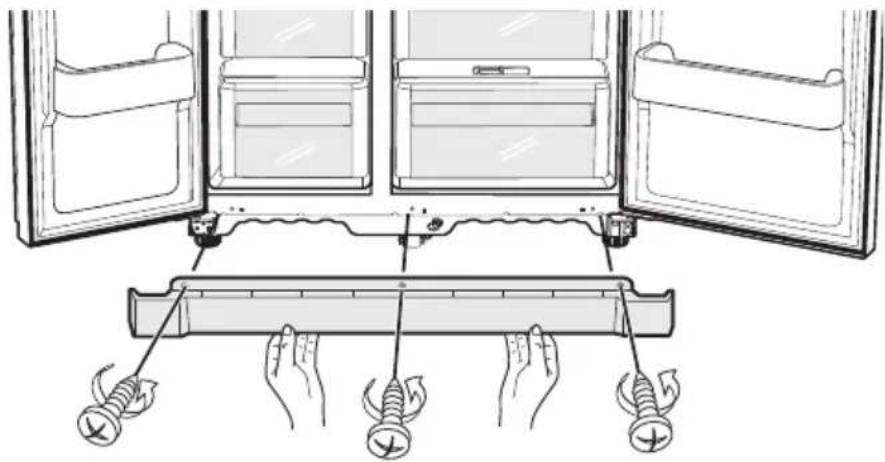
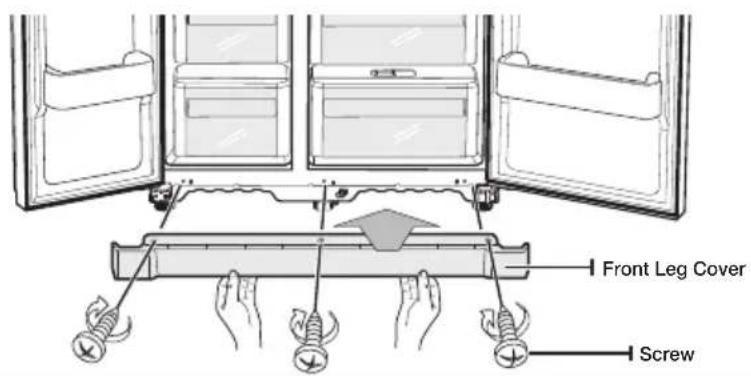
First, open both the freezer and refrigerator doors, and then take off the front leg cover by turning the three screws counter-clockwise.
natural_image
Diagram of a refrigerator interior with open doors and hands holding screwdrivers, showing internal components and wiring (no text or labels)Separating the Water Supply Line from the Refrigerator
- Remove the water line by pressing the coupler ① and pulling the water line ② away.


NOTE
- Do not cut the water line. Gently separate it from the coupler.
2. Removing the freezer door
A few things to mention first.
• Make sure that you lift the door straight up so the hinges are not bent or broken.
- Be careful not to pinch the water tubing and wire harness on the door.
- Place doors on a protected surface to prevent scratching or damage.
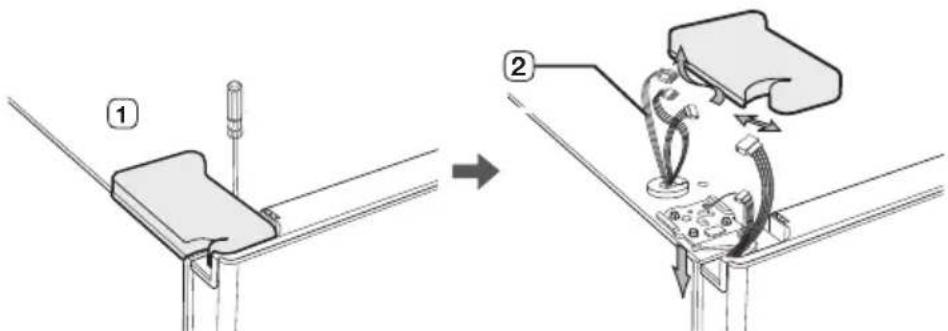
- With the Freezer door closed, remove the upper hinge cover ① using a screwdriver, and then disconnect the wires by gently pulling them apart ②.
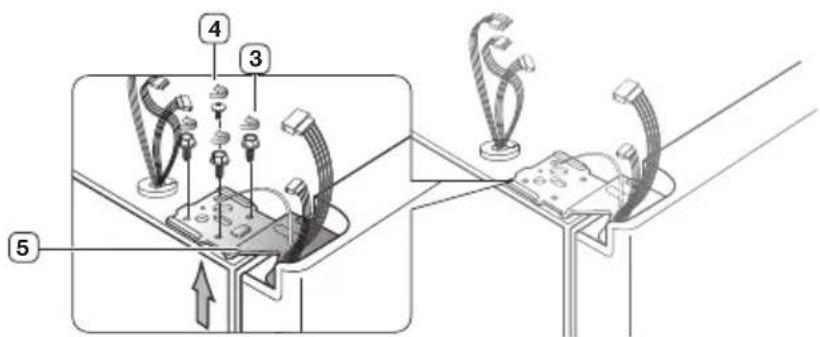
- Remove hinge screws ③ and the ground screw ④ by turning counterclockwise, and take off the upper hinge ⑤. Be careful that the door may fall on you as you are removing it
- Next, remove the door from the lower hinge ⑥ by carefully lifting the door straight up ⑦.


CAUTION
- Be careful not to pinch the water tubing and wire harness on the door.
Removing the Fridge Door
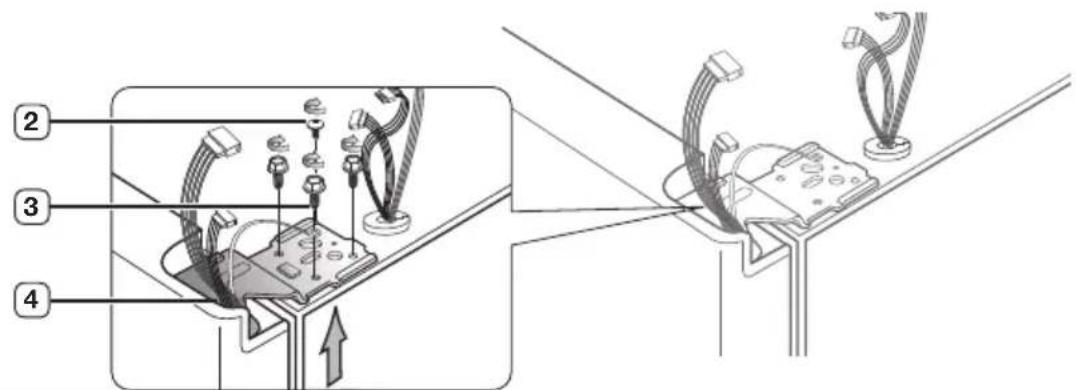
- With the door closed, remove the upper hinge cover ① using a screwdriver.

- Remove hinge screws ② and the ground screw ③ by turning counterclockwise, and take off the upper hinge ④. Be careful that the door may fall on you as you are removing it.
- Remove the door from the lower hinge ⑤ by lifting the door straight up ⑥.
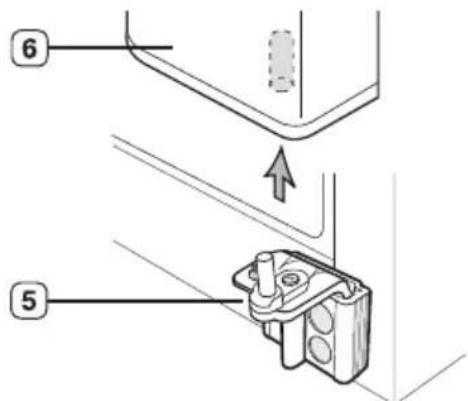
Reattaching the refrigerator doors
Once you have safely placed your refrigerator where you plan for it to stay, it is time to put the doors back on.
Reattaching the Freezer Door
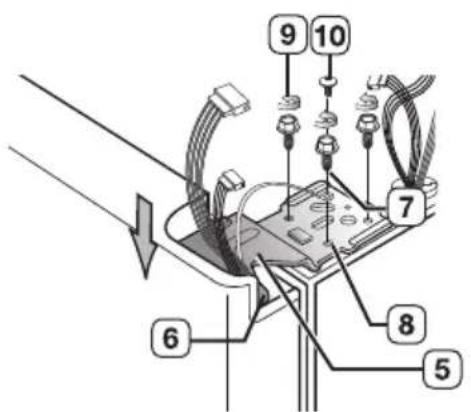
- Insert the upper hinge shaft ③ into the hole on the corner of the freezer door ④. Make sure the hinge is level between the upper hinge hole ⑤ and the hole of the cabinet ⑥ and reattach the hinge screws ⑦ and ground screw ⑧ by turning in a clockwise direction.
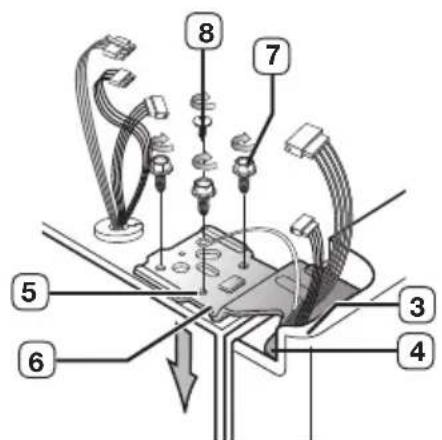
- Reconnect the wires.
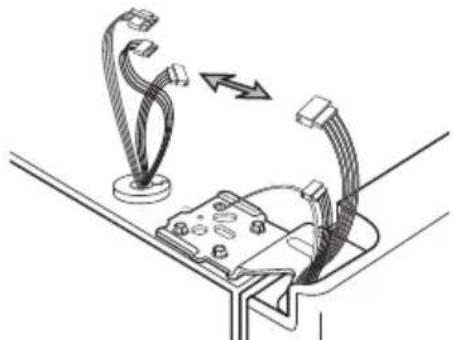
natural_image
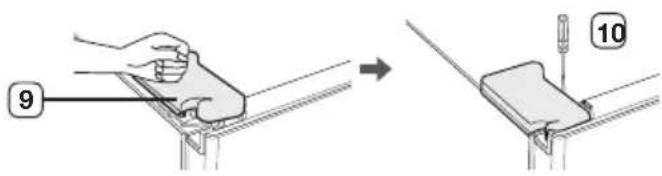
Diagram showing cable routing between a device and connectors (no text or symbols)3 Place the front part of the upper hinge cover 9 on the front of the upper hinge 10 and reattach with the screw.
Reattaching the Fridge Door
- Fit the hole in the corner of the fridge door ③ over the lower ④ hinge.
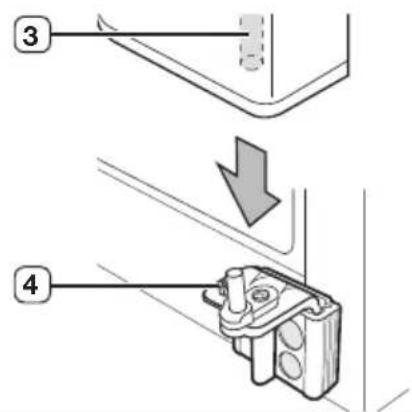
- Insert the upper hinge shaft ⑤ into the hole on the hinge ⑥ Make sure the hinge is level between the upper hinge hole ⑦ and the hole on the top of the cabinet ⑨. Then, reattach hinge screws ⑨ and the ground screw ⑩ by turning it in a clock wise direction.
- Place the front part of the upper hinge cover 11 on the front of the upper hinge 12 and reattach it with the screw.

Reattaching the Water Supply Line
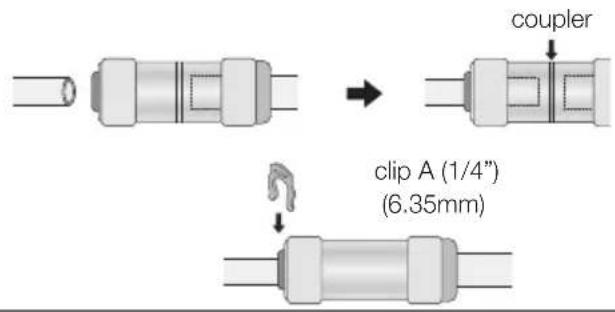
- Insert the water line ① into the coupler ②.
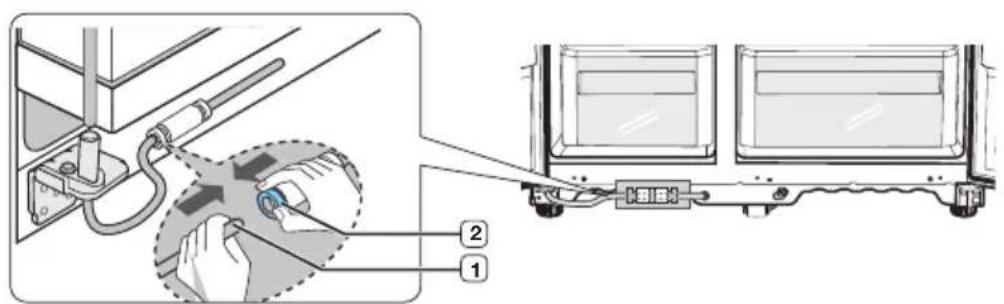
- The Water Line must be fully inserted to the center of transparent coupler to prevent water leakage from the dispenser.
- Insert the clip in the install pack and check that it holds the line firmly.
Reattaching the Front Leg Cover

NOTE
- Before attaching the cover, check water connector for leakage.
- Replace the front leg cover by turning the three screws clockwise, as shown in the figure.
Leveling the refrigerator
Now that the doors are back on the refrigerator, you will want to make sure the refrigerator is level so you can then make final adjustments. If the refrigerator is not level, it will not be possible to get the doors perfectly even.

NOTE
• The front of the refrigerator is also adjustable.
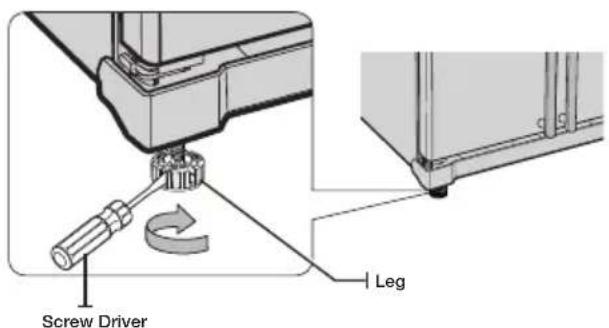
When the Freezer door is lower than the fridge
Insert a flat-blade screwdriver into a notch on the Leg, turn it clockwise or counter clockwise to level the freezer.
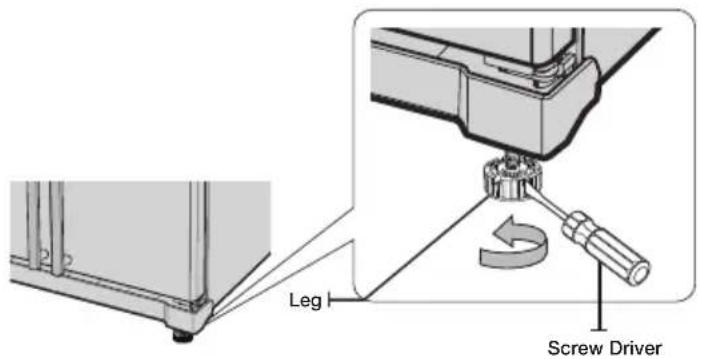
When the Freezer door is higher than the fridge
Insert a flat-blade screwdriver into a notch on the Leg, turn it clockwise or counter clockwise to level the fridge.

NOTE
• Refer to the next section for the best way to make very minor adjustments to the doors.
- The legs of product are unconnected when it is out of factory. Make sure to adjust the legs to touch the floor, and make the product level before using.
- For safety reasons, adjust the front side a little higher than the rear side.
Making minor adjustments to the doors
Remember, a leveling refrigerator is necessary for getting the doors perfectly even. If you need help, review the previous section on leveling the refrigerator.

In the case of the process to correct the imbalance is the same. Open the doors and adjust them, one at a time, as follows:
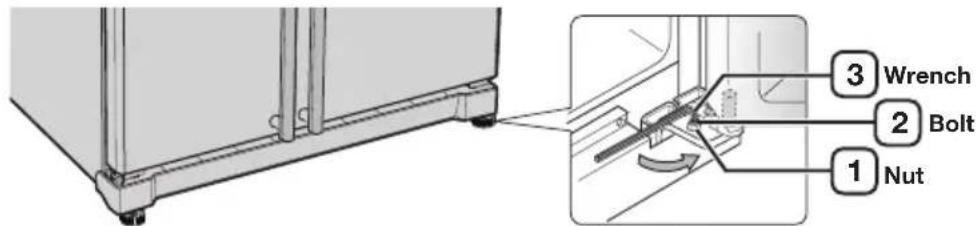
- Unscrew the nut ① from the lower hinge until it reaches the upper end of the bolt ②.

NOTE
- When you release the nut ①, make sure that you use the Allen wrench (4mm) ③ to loosen the bolt ② in a counter-clockwise direction. You should then be able to unscrew the nut ① with your fingers.
- Adjust the height difference between the doors by turning the bolt ② clockwise or counter clockwise


NOTE
When you turn clockwise, the door will move up.
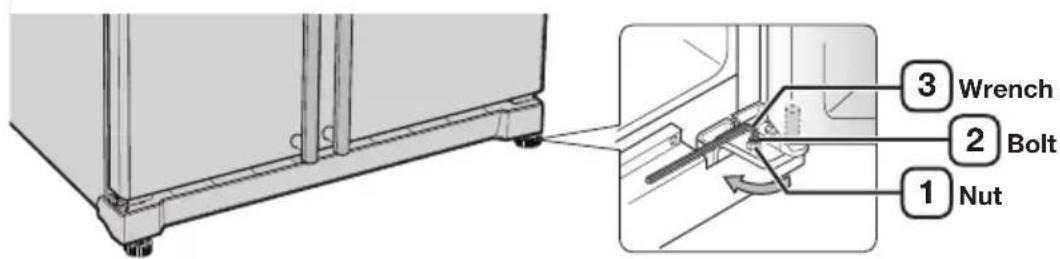
- After adjusting the doors, turn the nut ① clockwise until it reaches the lower end of the bolt, then tighten the bolt again with the wrench ③ to fix the nut in place ① .

NOTE
If you do not secure the nut firmly, the bolt may release.
Checking the water dispenser line (optional)
A water dispenser is just one of the helpful features on your new Samsung refrigerator. To help promote better health, the Samsung water filter removes unwanted particles from your water. However, it does not sterilize or destroy microorganisms. You will need to purchase a water purifying system to do that.
In order for the icemaker to operate properly, water pressure of 138\~862 Kpa is required. Under normal conditions, a 170 cc paper cup can be filled in 10 seconds.
If the refrigerator is installed in an area with low water pressure (below 138 Kpa), you can install a booster pump to compensate for the low pressure.
Make sure the water storage tank inside the refrigerator is properly filled. To do this, press the water dispenser lever until the water runs from the water outlet.

NOTE
Water Line installation Kits are included with unit. You can find it in freezer drawer.
Installing the water dispenser line (optional)
Parts for water line Installation
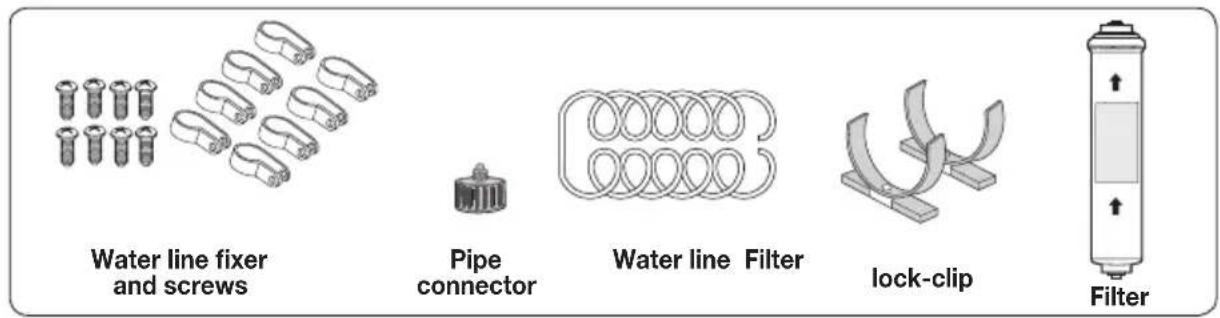
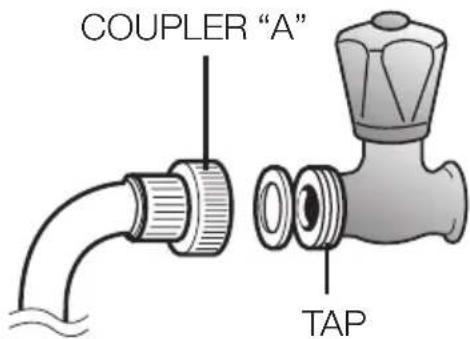
Connecting to the water supply line Connect the water pipe with coupler and tap.
- Close the main water tap.
- Connect coupler "A" to the tap.

CAUTION
The water line must be connected to the cold water pipe. If it is connected to the hot water pipe, it may cause the filter to malfunction.
WARRANTY INFORMATION
This water line installation is not covered by the refrigerator or ice maker manufacturer's warranty.
Follow these instructions carefully to minimise the risk of expensive water damage.

NOTE
If the coupler does not fit on the current tap, go the nearest authorised service dealer and purchase the right couplers fittings.
Select the location where the filter is to install.
- If you wish to reassemble the water inlet and outlet sides of the filter during filter installation, see the reference illustration.
- Cut the water line attached to the filter to the appropriate place after measuring the distance between the filter and the cold water tap.
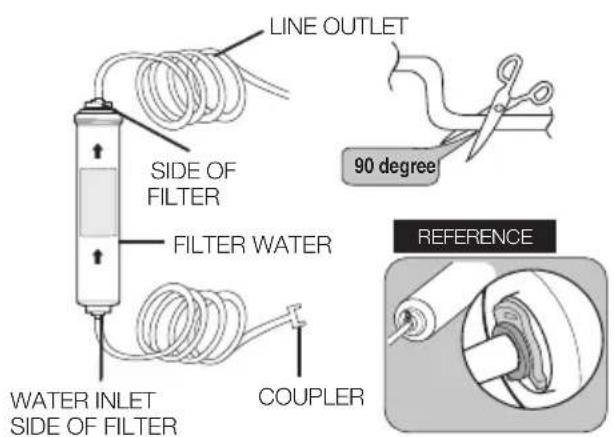
Remove any residual matter inside the filter.
- Open the main water tap to check whether water is running through the water tube on the water inlet side of the filter.
- If water does not come out through the line, check whether the tap is open.
- Leave the tap open until clean water is running out and any residual matter that built up during manufacturing has been removed.

Attach the filter lock stations.
- Hold the filter lock stations in the appropriate position (under the sink for example) and fix it tightly into place where to screw.
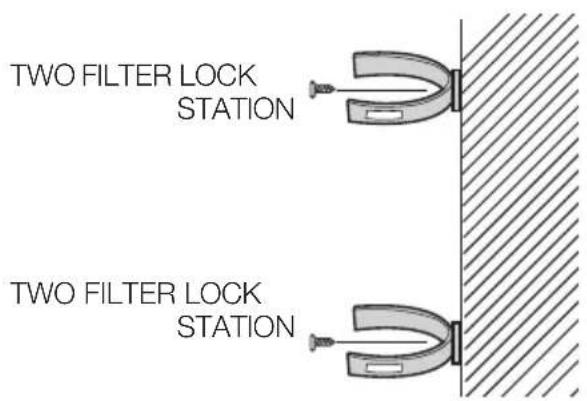
Secure the filter in position.
• Fix the filter in position, as shown in the figure on the right.
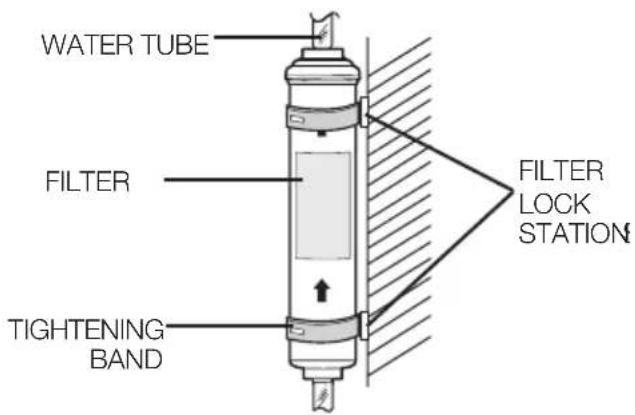
Connect the water line to the refrigerator.
- Remove the compressor cover of the refrigerator.
- Connect the water line to the valve, as shown in the figure.
- When connected, check if there is any leakage. If any, repeat the connection.
- Reattach the compressor cover of the refrigerator.
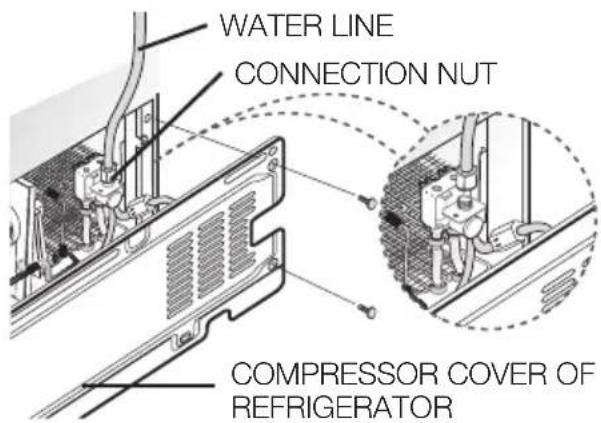
Secure the water line.
- Using clip "A", fix the water line to the wall (the back of refrigerator).
- When the water line is secure, make sure whether the water line is not excessively bent, pinched or squashed.
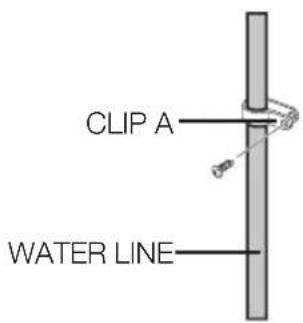
Removing any residual matter inside the water supply line after installing filter.(Optional)
- Turn ON the main water supply & turn OFF the valve to the water supply line.
- Run water through the dispenser until the water runs clear (approx. 1L). This will clean the water supply system and remove air from the lines.
- Additional flushing may be required in some households.
4.Open the refrigerator door and make sure there are no water leaks coming from the water filter.

NOTE
- A newly installed water filter cartridge may cause water to briefly spurt from the water dispenser. This is due to air getting into the line. It should pose no problem to operation.
Check the amount of water supplied to the ice tray. (Optional)
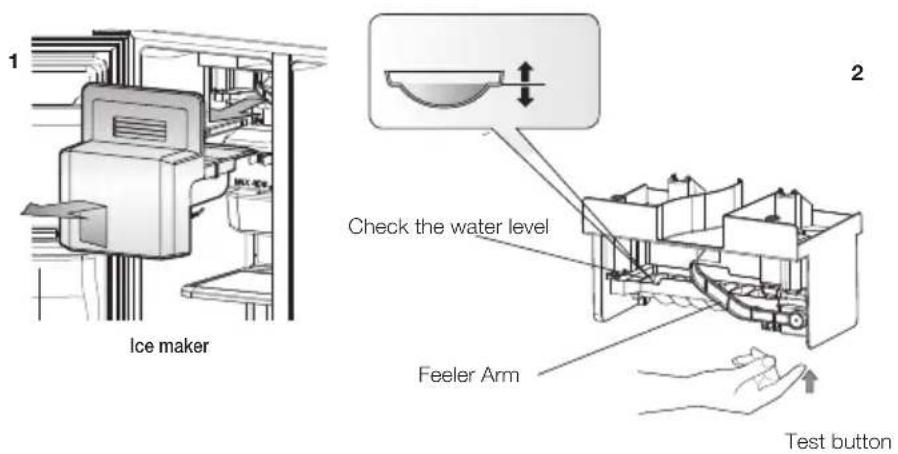
- Lift up the icemaker bucket and gently pull out of the freezer.
- When you press the Test button for 1.5 seconds, the ice cube container is filled with water from the water supply tap after ice tray is twisted. Check to make sure the amount of water is correct(see the illustration below).
If the water level is too low, the ice cubes will be small. This is a water pressure problem from with in the main water pipes, not the refrigerator
Setting up the refrigerator
Now that you have your new refrigerator installed and in place, you are ready to set up and enjoy the full features and functions of the appliance.
By completing the following steps, your refrigerator should be fully operational. If not, first check the power supply and electricity source or try the troubleshooting section at the back of this user guide. If you have any further questions, contact your Samsung Electronics service center.
- Place the refrigerator in an appropriate location with reasonable clearance between the wall and the refrigerator. Refer to installation instructions in this manual.
- Once the refrigerator is plugged in, make sure the interior light comes on when you open the doors.
- Set the temperature control to the coldest temperature and wait for an hour. The freezer should get slightly chilled and the motor should run smoothly.
- After powering the refrigerator, it will take a few hours to reach the appropriate temperature. Once the refrigerator temperature is sufficiently cool, you can store food and drink in the refrigerator.
USE ICE TRAY(OPTIONAL)
When the freeze temperature get zero degree below, you can use Ice Box to make ice.
| 1.Pull out the ice tray. | 3.Place it inside ice tray. |  | |
| 2.Pour cool water into the tray until it reaches the water level indicator on the tray. | 4.Turn ice tray button and the ice automatically fall into the below ice compartment after release. Pull out ice storage compartment for ice. | 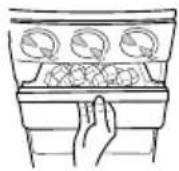 |
Operations
| 1.Pull out the ice tray. |  | 3.Place it under the freezer shelf or on the freezer shelf. | 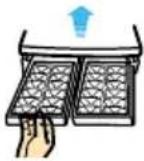 |
| 2.Pour water into the tray until it reaches the water level indicator on the tray. | 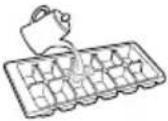 | 4.To separate individual ice cubes, pull out the ice tray and hold the ice tray by its ends, then twist it gently. | 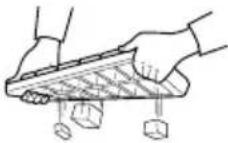 |
Using the control panel (optional)
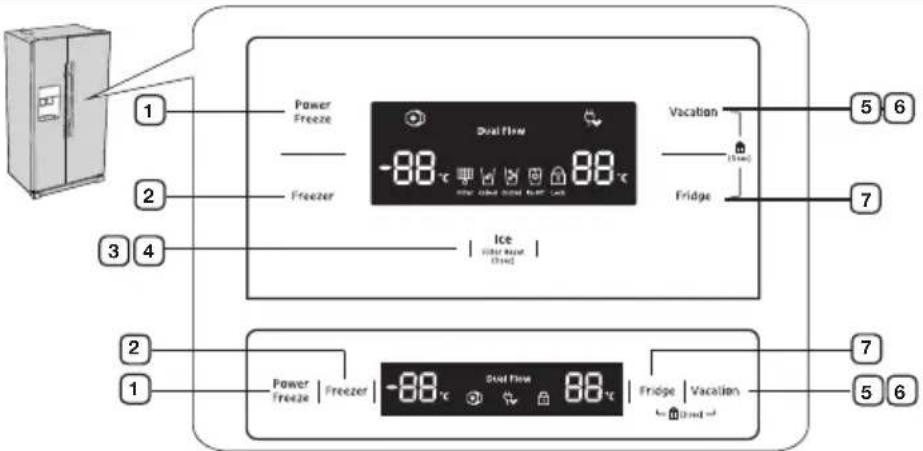

CAUTION
- When not in use the temperature key, Dual Flow and Filter (green) display will turn off, and press the key or door open will turn on again, this is normal.
| 1.POWER FREEZE BUTTON | Speeds up the time needed to freeze products in the freezer. This can be helpful if you need to quickly freeze items that spoil easily or if the temperature in the freezer has warmed dramatically (For example, if the door was left open). |
| 2.FREEZER BUTTON | Press the Freezer button to set the freezer to your desired temperature,You can set the temperature between -14°C (8°F) and -25°C (-14°F). |
| 3.ICE TYPE BUTTON | Use this button to choose Cubed, Crushed or to turn the Ice feature off. |
| 4.FILTER CHANGE BUTTON | When you change the filter, press this button for 3 seconds to reset the filter schedule. |
| 5.VACATION BUTTON | If you are going on vacation or business trip or you do not need to use the refrigerator, press the Vacation button. When you select vacation button for fridge compartment off, display LED of Vacation will be on.CAUTIONIt is strongly requested to remove foods in the fresh-food compartment and do not leave the door open when you select Vacation function. |
| 6.CHILD LOCK FUNCTION | By pressing the Vacation button and the Fridge button simultaneously for 3 seconds, all buttons will be locked. The Water dispenser lever and the Ice lever will not work either. To cancel this function, Press these two buttons for 3 seconds again. |
| 7.FRIDGE BUTTON | Press the Fridge button to set the fridge to your desired temperature. You can set temperature between 1°C and 7°C (34°F and 45°F). |
Using the control panel (optional)
“88” segment on Freezer part indicates the current Freezer temperature. “88” segment on Fridge part indicates the current Fridge temperature.

Power Freeze
This icon will light up when you activate the "Power Freeze" feature. When you don't need requirement, just press the button again to cancel the "Power Freeze" mode.

CAUTION
- When you use this function the energy consumption of the refrigerator will increase. This function must be activated before putting large amount of food stuff in the freezer compartment at least 24 hours before.
Child Lock
This icon will light up when you activate the Child Lock function by pressing the Vacation button or the Power Cool button and the Fridge button simultaneously for 3 seconds. Press these two buttons for 3 seconds again to reactivate.
Filter Indicator (Optional)
When the filter indicator light is on, it is time to change the filter. Typically this happens about every 6 months. After removing the old water filter and installing a new one, reset the indicator status light by pressing the Ice Type button for about 3 seconds. The indicator will light again in about 6 months to let you know it is time to change your water filter. When you do not use the water filter, press the Ice Type button for more than 5 seconds, the Filter indicator lamp and the Filter Change letters will be off.
Cubed Ice, Crushed Ice and turning the Ice maker off (Optional)
Enjoy cubed or crushed ice by selecting your preference from the digital control panel. If you don't need ice, turn the feature off to save on water and energy consumption. The ice type light indicates the type of ice (or no ice) that is currently chosen.
Controlling the temperature
Controlling the Freezer temperature
The freezer temperature can be set between -14^ (8°F) and -25^ (-14°F) to suit your particular needs. Press the Freezer button repeatedly until the desired temperature is shown in the temperature display. Keep in mind that foods like ice cream may melt at -16^ (4°F).
The temperature display will move sequentially from -14^ (8°F) and -25^ (-14°F). When the display reaches -14^ (8°F), it will begin again at -25^ (-14°F).
Five seconds after the new temperature is set the display will again show the actual current freezer temperature. However, this number will change as the Freezer adjusts to the new temperature.
The temperature in two star sections are slightly higher than other freezer compartment.
Controlling the Fridge temperature
The refrigerator temperature can be set between 7^ C ( 45^ F) and 1^ C ( 34^ F) to suit your particular needs. Press the Fridge button repeatedly until the desired temperature is shown in the temperature display.
The temperature control process for the Fridge works just like the Freezer process. Press the Fridge button to set your desired temperature. After a few seconds, the Fridge will begin tracking towards the newly set temperature. This will be reflected in the digital display.

CAUTION
- The temperature of the freezer or the refrigerator may rise from opening the doors too frequently, or if a large amount of warm or hot food is placed in either side.
- This may cause the digital display to blink. Once the freezer and refrigerator return to their normal set temperatures the blinking will stop.
- If the blinking continues, you may need to "reset" the refrigerator. Try unplugging the appliance, wait about 10 minutes and then plug back in.
Using the ice and cold water dispenser (freezer)
Press the Ice Type button to select the type of ice you want

flowchart
graph LR
    A["Power Freeze"] --> B["Freezer"]
    B --> C["Real Flow -88°C"]
    C --> D["Vacation"]
    D --> E["Ice Eliber Bowl (100c)"]
    E --> F["Fridge"]
    F --> G["Cubed"]
    G --> H["No Ice Select this if you want to turn off the icemaker"]
    H --> I["Crushed"]
    I --> J["Ice Off"]
    J --> K["ICE OFF"]

NOTE
- Ice is made in cubes. When you select "Crushed", the icemaker grinds the ice cubes into crushed ice.
Dispensing ice
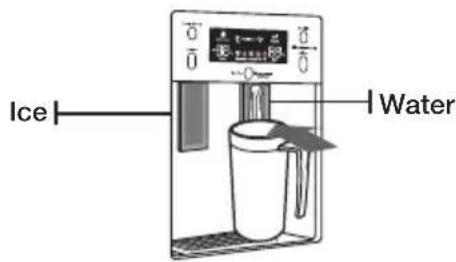
Place your glass underneath the ice outlet and push gently against the ice dispenser lever with your glass. Make sure the glass is in line with the dispenser to prevent the ice from bouncing out.
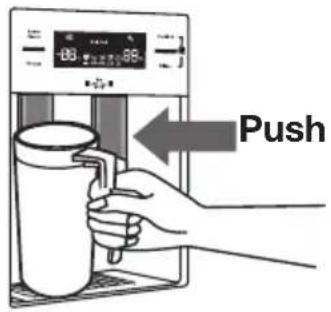
Using the Water Dispenser
Place a glass underneath the water outlet and push gently against the water dispenser lever with your glass. Make sure the glass is in line with the dispenser to prevent the water from splashing out.
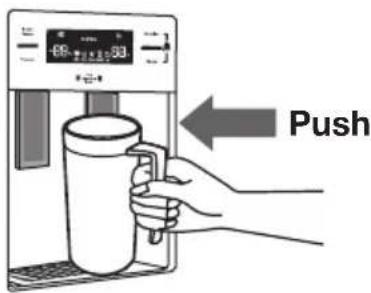

WARNING
- Do not put your fingers, hands or any other unsuitable objects in the chute or ice-maker bucket.
- It may result in personal injury or material damage.
- Never put finger or any other objects in the dispenser opening.
- It may cause injury.
- Use only the ice maker provided with the refrigerator.
- The water supply to this refrigerator must only be installed/connected by a suitably qualified person and connect to a potable water supply only.
- In order to operate the ice maker properly, water pressure of 138 \~ 862 Kpa is required.

CAUTION
- If you have a long vacation or business trip and won't use water or ice dispensers, close the water valve.
- Otherwise, water leakage may occur.
- Wipe excess moisture from the inside and leave the doors open.
- Otherwise, odor and mold may develop.
Using the cold water dispenser (fridge)
Place a glass underneath the water outlet and push gently against the water dispenser lever with your glass. Make sure the glass is in line with the dispenser to prevent the water from splashing out.
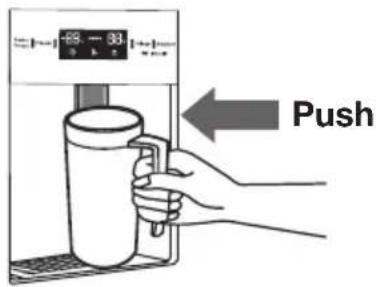
Shelves and bins (freezer)
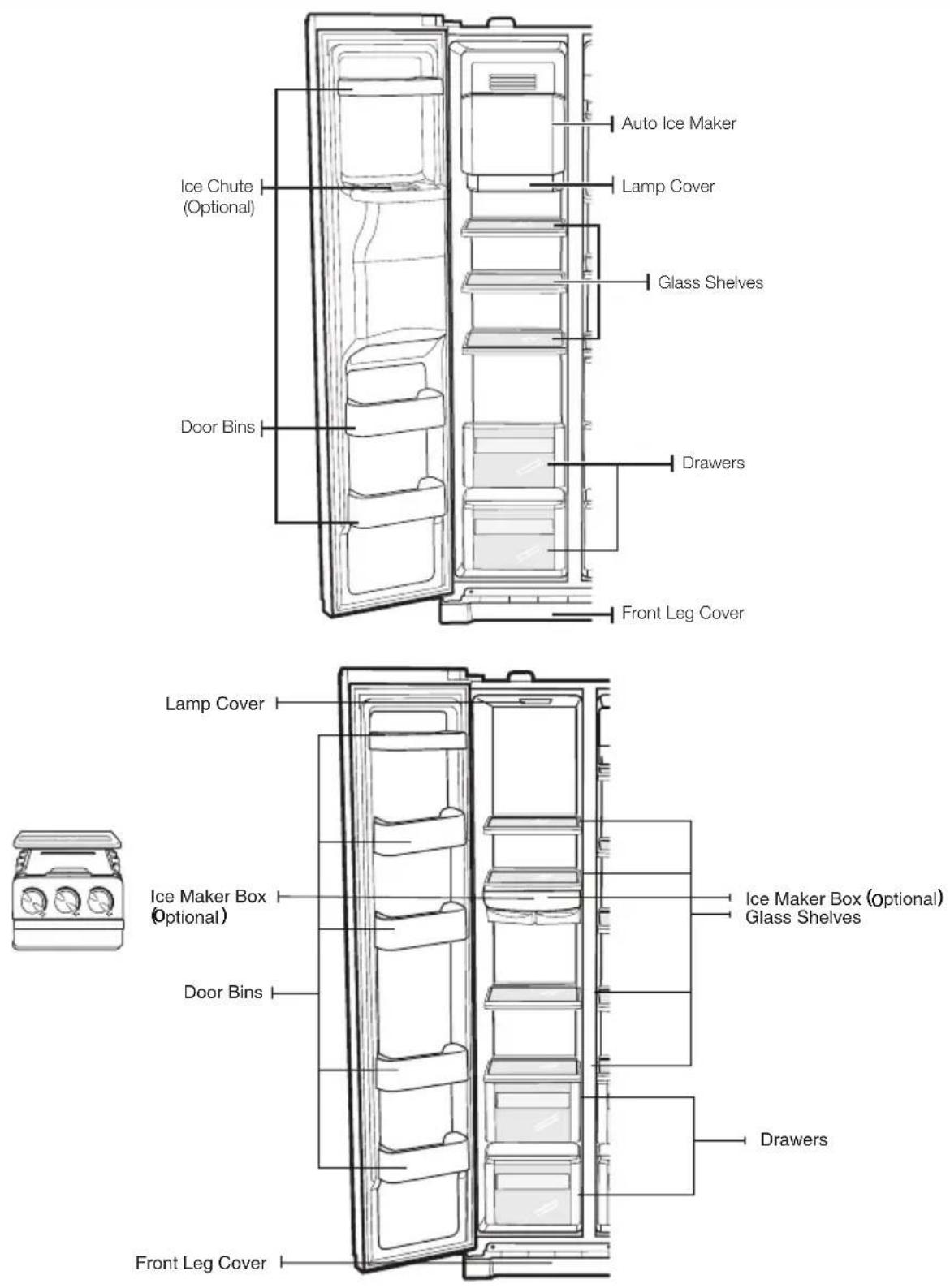
Shelves and bins (fridge)
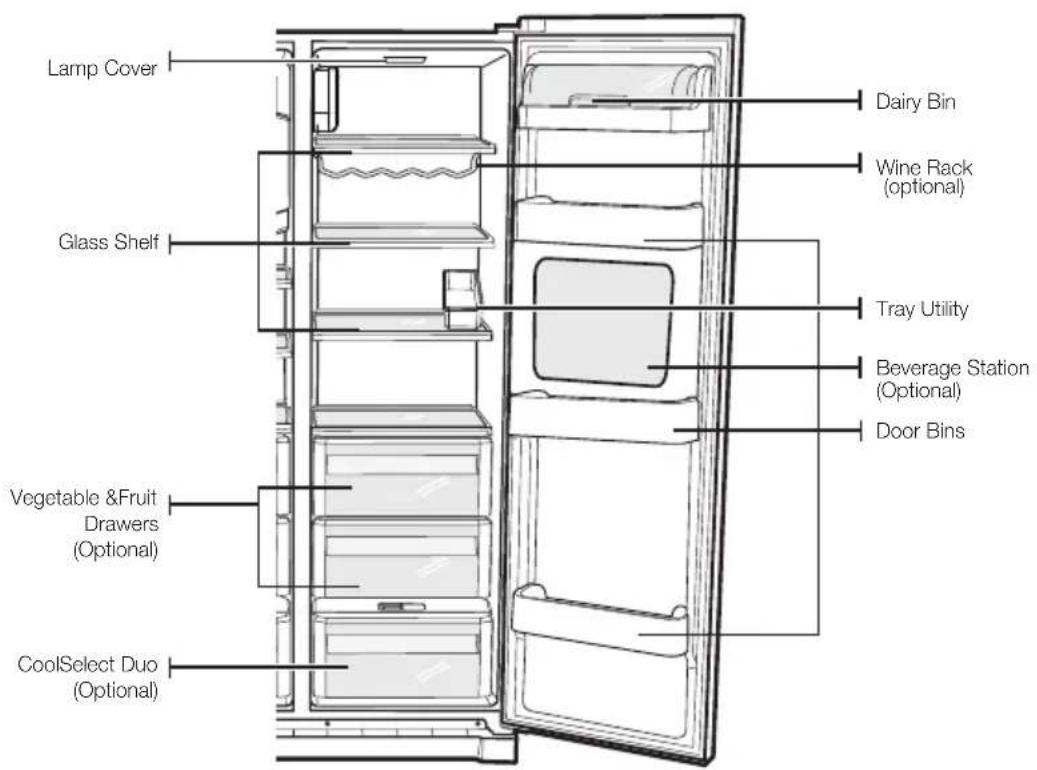

Storing food
Storing Food in the Freezer
The Samsung Side-By-Side Refrigerator has been designed to provide you with maximum spacesaving features and functions. Here are some of the customized compartments we have created to keep your food fresher, longer. Remember, in order to prevent odor penetration to the ice, stored food should be wrapped securely and as airtight as possible.

NOTE
- To get more space, you can remove freezer drawer(s) except bottom freezer drawer and ice trays, since it does not affect thermal and mechanical characteristics. A declared storage volume of frozen food storage compartment is calculated with these components removed.
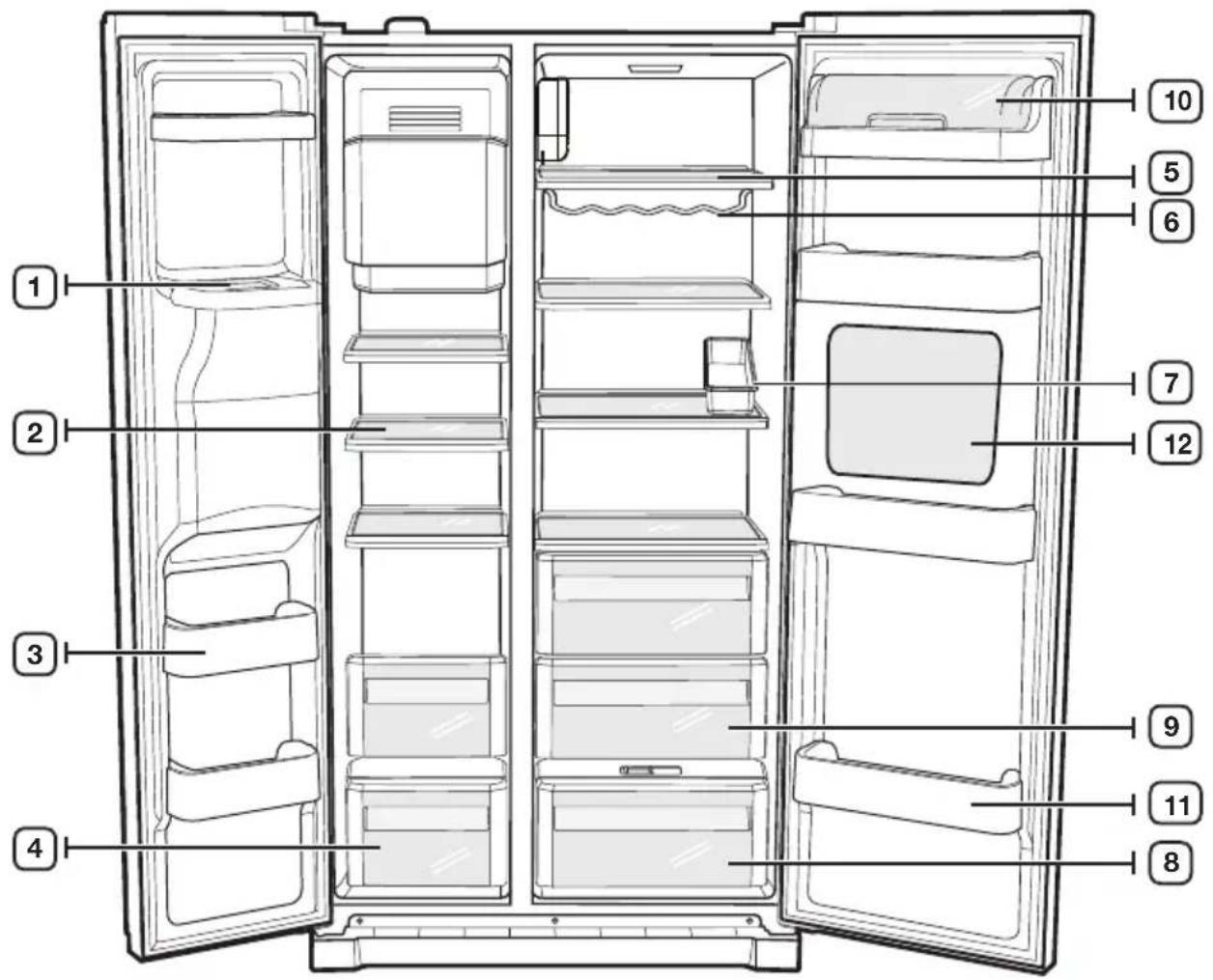
Storing Food in the Freezer
| 1.ICE CHUTE | Do not put your fingers, hands or any other objects in the ice chute or the ice maker bucket. This may result in personal injury or material damage. |
| 2.SHELVES Can be used to store all types of frozen food. | |
| 3.DOOR BINS Can be used for small packages of frozen food. | |
| 4.DRAWERS | Best used to store meats or dry foods. Stored food should be wrapped securely using foil or other suitable wrapping materials or containers. |
Storing Food in the Fridge
| 5.SHELVES | Designed to be crack-resistant.They can be used to store all types of food and drinks.Circlear marks on the glass surface are a normal phenomenon and can usually be wiped clean with a damp cloth. |
| 6 WINE RACK (OPTIONAI) | A place in which the wine is placed. |
| 7.TRAY UTIIITY | Best place to keep eggs.Place the TRAY UTILITY on the shelf for easy access. |
| 8.COOSELECT DUO(OPTIONAI) | Helps to preserve the taste, and prolong the freshness of your food. Use it to store meat,vegetable, poultry, fish or any other foods that are consumed on a regular basis. |
| 9.FRUIT & VEGETABLE DRAWER | Used to preserve the freshness of your stored vegetables and fruits. It has been specifically designed to control the level of humidity within the drawer. |
| 10.DAIRY BIN | Can be used to store smaller dairy items like butter or margarine, yogurt or cream-cheese bricks. |
| 11.DOOR BINS | Designed to handle large, bulky items such as gallons of milk or other large bottles and containers. |
| 12.BEVERAGE STATION (OPTIONAI) | Canbe used to store the frequently used items,such as canned beverages and snacks and allows access to these items without opening the refrigerator door. |

NOTE
Bottles should be stored tightly together so that they do not tip and fall out when the refrigerator door is opened.

WARNING
- If you plan to go away for a significant time, empty the refrigerator and turn it off. Wipe the excess moisture from the inside of the appliance and leave the doors open. This helps keep odor and mold from developing.
- If the refrigerator is not to be used for a long period of time, pull out the power plug.
- Deterioration in the insulation may cause fire.
Using the coolselect duo (optional)
The CoolSelect Duo is designed to make your busy life just a little bit easier.
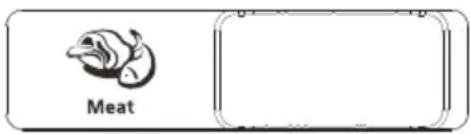
Meat
When MEAT is selected, the temperature of the CoolSelect Duo is suitable for storing meat or ham by entering chill of freezer to it. This feature also helps keep meat or ham fresh for longer.
Vegetable
When VEGETABLE is selected, the temperature of CoolSelect Duo is suitable for storing vegetable or fruit by closing chill of freezer to it. This feature also helps keep vegetable or fruit.


NOTE
- When “Meat or Vergetable” is in operation, any items that you do NOT want affected should be moved out of the drawer.
Removing the freezer accessories
Cleaning and rearranging the interior of the freezer is a snap.
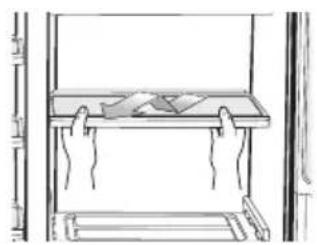
- Remove the Glass Shelf by pulling the shelf out as far as it will go. Then, gently lift it up and remove it.

CAUTION
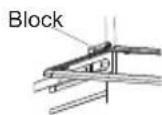
- In case it does not have hooks itself in the back side for not being tilted, a shelf should be placed deeply in a proper position where there are blocks for shelves as shown. if not, the shelf can fall out of a refrigerator.
-
Remove the Door Bin by holding the door bin with both hands and then gently lift it up.
-
Remove the Plastic Drawer by pulling it out and slightly lifting it up.
-
Remove the Icemaker Bucket by lifting up and pulling it out.
-
Remove the Front Leg Cover by opening both the freezer and refrigerator doors, and removing the three screws. Once the screws are free, detach the cover. To reattach the front leg cover, place it back in its original position and tighten the three screws.


natural_image
Illustration of hands holding a smartphone with an upward arrow (no text or symbols)
natural_image
Illustration of a hand placing a paper into a window frame (no text or symbols visible)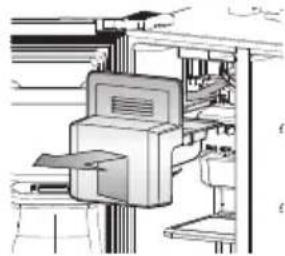
natural_image
Technical line drawing of a mechanical device with no visible text or symbols
natural_image
Technical line drawing of a mechanical assembly with mounting brackets and a central support beam (no text or symbols)
NOTE
- Do not use excessive force when removing the cover.
- Otherwise, the cover may break and cause injury.
Removing the freezer accessories
- Remove the Glass Shelf by pulling the shelf out as far as it will go. Then, gently lift it up and gently remove it.

CAUTION
- In case it does not have hooks itself in the back side for not being tilted, a shelf should be placed deeply in a proper position where there are blocks for shelves as shown. if not, the shelf can fall out of a refrigerator.
natural_image
Line drawing of hands installing or adjusting a component on a cabinet (no text or symbols)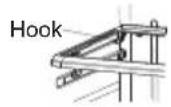
-
Remove the Vegetable & Fruit Drawer by pressing on the indentations found on the inside left and right sides of the Veggie Box/Dry Box cover and remove by pulling forward. Holding the drawer with one hand, lift it up a little bit while pulling it forward and take it out of the refrigerator.
-
Remove the Gallon Door Bin by holding the bin with both hands and gently lifting it up.

natural_image
Line drawing of a hand placing a drawer into a cabinet (no text or symbols)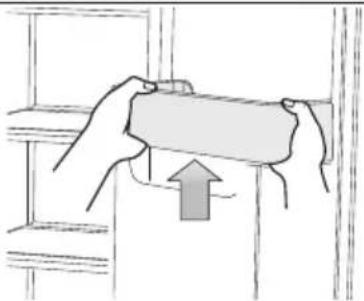
natural_image
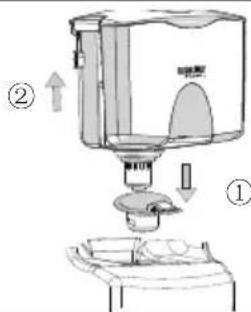
Illustration of hands holding a rectangular object with an upward arrow, placed on a shelf (no text or symbols)- Push the Case Fixer handle, and lift the Water Tank up, then take it out.

NOTE
- Before removing any accessories, make sure that no food is in the way. When possible, remove the food altogether to reduce the risk of accidents.
Cleaning the refrigerator
Caring for your Samsung Side-By-Side Refrigerator prolongs the life of your appliance and helps keep it odor and germ-free.
Cleaning the Interior
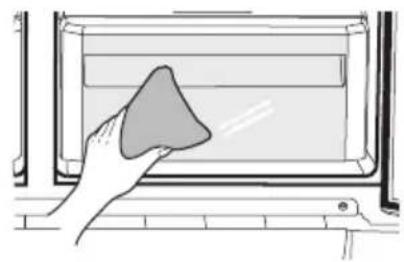
Clean the inside walls and accessories with a mild detergent and then wipe dry with a soft cloth. You can remove the drawers and shelves for a more thorough cleaning. Just make sure to dry them before putting them back into place.
natural_image
Hand cleaning a window with a cloth (no text or symbols visible)Cleaning the Exterior
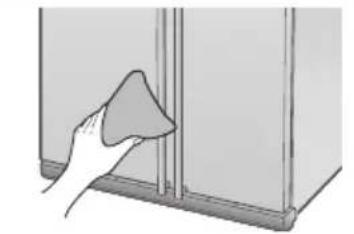
Wipe the digital panel and display panel with a clean, soft cloth. Spray water onto the cleaning cloth instead of spraying directly on the surface of the refrigerator. This helps ensure an even distribution of moisture to the surface. The doors, handles and cabinet surfaces should be cleaned with a mild detergent and then wiped dry with a soft cloth. To keep your appliance looking its best, the exterior should be polished once or twice a year.
natural_image
Hand cleaning a wall corner with a cloth (no text or symbols visible)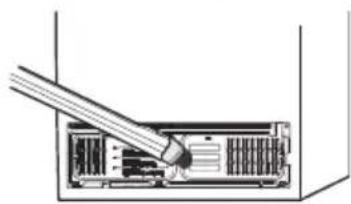
natural_image
Diagram of a device's internal structure showing a cable inserted into a rack (no text or symbols visible)
WARNING
- Do not use Benzene, Thinner or Clorox™ for cleaning.
• They may damage the surface of the appliance and can create a risk of fire.
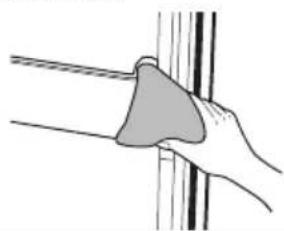
If the rubber door seals are dirty the doors may not close properly, and the refrigerator will not operate efficiently. Keep the door seals free of grit or grime by cleaning the doors with a mild detergent and damp cloth. Wipe dry with a clean, soft cloth.
natural_image
Illustration of a hand holding a cloth or sponge against a vertical line (no text or symbols)
CAUTION
- Do not spray the refrigerator with water while it is plugged in, as it may cause an electric shock. Do not clean the refrigerator with benzene, thinner or car detergent for risk of fire.
Cleaning the Home Bar
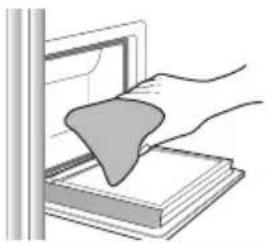
Use a damp cloth to clean the ice and water dispenser. Then wipe dry with a clean, soft cloth.
natural_image
Illustration of a hand pressing down on a stack of books with a triangular object on top (no text or symbols)Changing the interior lights

WARNING
- Do not replace LED lamp privately and please contact the specialized repair staff if necessary.
- And make it sure that the new LED lamp is the same as the old one. Do not break the lamp cover.
Using the doors
The refrigerator doors are equipped with a door opening and closing feature that ensures that the doors close all the way and are securely sealed.
After opening beyond a certain point, the door will "catch" and remain open. When the door is ajar ahead of the catch that allows it to stay open, it will close automatically.
| Symptom Action | |
| The refrigerator does not work at all or it does not chill sufficiently. | Check that the power plug is properly connected.Is the temperature control on the display panel set to the correct temperature? Try setting it to a lower temperature.Is the refrigerator in direct sunlight or located too near a heat source?Is the back of the refrigerator too close to the wall and therefore keeping air from circulating? |
| The food in the fridge is frozen. | Is the temperature control on the display panel set to the correct temperature? Try setting it to a warmer temperature.Is the temperature in the room very low?Did you store the food with a high water content in the coldest part of the fridge? Try moving those items into the body of the fridge instead of keeping them in the CoolSelect DuoTM drawer. |
| You hear unusual noises or sounds. | Check that the refrigerator is level and stable.Is the back of the refrigerator too close to the wall and therefore keeping air from circulating?Was anything dropped behind or under the refrigerator?A “ticking” sound is heard from inside the refrigerator. This is normal and occurs because various accessories are contracting or expanding in relation to the temperature of the refrigerator interior. |
| The front corners and sides of the appliance are hot and condensation is occurring. | Some heat is normal as anti-condensators are installed in the frontcorners of the refrigerator to prevent condensationIs the refrigerator door ajar? Condensation can occur when you leave the door open for a long time. |
| Ice is not dispensing. | Did you wait for 12 hours after installation of the water supply line before making ice?Is the water line connected and the shut-off valve open?Did you manually stop the ice making function? Make sure Ice Type is set to Cubed or Crushed.Is there any ice blocked within the ice storage unit?Is the freezer temperature too warm? Try setting the freezer temperature lower. |
| You can hear water bubbling in the refrigerator | This is normal. The bubbling comes from the refrigerant coolant liquid circulating through the refrigerator. |
| There is a bad smell in the refrigerator. | Has a food item spoiled?Make sure that strong smelling food (for example, fish) is wrapped so that it is airtight.Clean out your freezer periodically and throw away any spoiled or suspect food. |
| Frost forms on the walls of the freezer. | Is the air vent blocked? Remove any obstructions so air can circulate freely.Allow sufficient space between the foods stored for efficient air circulation.Is the freezer door closed properly? |
| Water dispenser is not functioning. | Is the water line connected and the shut-off valve open?Has the water supply line tubing been crushed or kinked?Make sure the tubing is free and clear of any obstruction.Is the water tank frozen because the refrigerator temperature is too low? Try selecting a warmer setting on the main display panel. |
| The alarm does not sound even though the door is open? | The door alarm only sounds when the refrigerator door is ajar at an angle of more than 15 for more than 2 minutes. Initially,the alarm sounds with 10 consecutive rings,then rings 10 consecutive times every minute. |
Contact SAMSUNG WORLD WIDE
If you have any questions or comments relating to Samsung products, please contact the SAMSUNG customer care center.
| Country Contact Center Web Site | |
| AUSTRALIA 1300 362 603 www.samsung.com/au/support | |
| NEW ZEALAND 0800 726 786 www.samsung.com/nz/support |
- Contents
- Safety information 3
- Installation 26
- Troubleshooting 58
- Warning; Risk of fire / flammable materials
- Important safety symbols and precautions:
- WARNING
- CAUTION
- NOTE
- Severe warning signs for transportation and site
- Critical installation warnings
- Installation cautions
- Critical usage warnings
- Usage cautions
- Cleaning cautions
- Critical disposal warnings
- Additional tips for proper usage
- Saving Energy Tips
- This appliance is intended to be used in household and similar applications such as
- Instructions about the WEEE
- Safety information
- Getting ready to install the refrigerator
- Selecting the best location for the refrigerator
- Clearance
- Removing the refrigerator doors
- Removing the freezer door
- Removing the Fridge Door
- Reattaching the refrigerator doors
- Reattaching the Freezer Door
- Reattaching the Fridge Door
- Reattaching the Water Supply Line
- Reattaching the Front Leg Cover
- Leveling the refrigerator
- Making minor adjustments to the doors
- Checking the water dispenser line (optional)
- Installing the water dispenser line (optional)
- WARRANTY INFORMATION
- Secure the filter in position.
- Connect the water line to the refrigerator.
- Secure the water line.
- Setting up the refrigerator
- USE ICE TRAY(OPTIONAL)
- Operations
- Using the control panel (optional)
- Power Freeze
- Child Lock
- Filter Indicator (Optional)
- Cubed Ice, Crushed Ice and turning the Ice maker off (Optional)
- Controlling the temperature
- Controlling the Fridge temperature
- Using the ice and cold water dispenser (freezer)
- Dispensing ice
- Using the Water Dispenser
- Using the cold water dispenser (fridge)
- Shelves and bins (fridge)
- Storing food
- Using the coolselect duo (optional)
- Meat
- Vegetable
- Removing the freezer accessories
- Cleaning the refrigerator
- Cleaning the Interior
- Cleaning the Exterior
- Changing the interior lights
- Using the doors
- Contact SAMSUNG WORLD WIDE
Brand : SAMSUNG
Model : SRS556DLS
Category : Pregnant