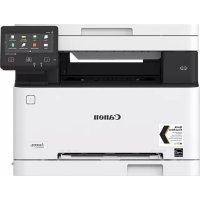
iSENSYS MF631Cn - Printer CANON - Free user manual and instructions
Find the device manual for free iSENSYS MF631Cn CANON in PDF.



| Product Type | Color laser multifunction printer |
| Brand | Canon |
| Model | iSENSYS MF631Cn |
| Main functions | Print, copy, scan, fax |
| Print technology | Color laser |
| Toner cartridges | Canon Cartridge 045 (black, cyan, magenta, yellow) and high-capacity versions (H) |
| Network connectivity | Wi-Fi (2.4 GHz, 2412-2472 MHz), Ethernet 10/100/1000, USB 2.0 |
| Power supply | Mains 220-240 V, 50/60 Hz |
| Laser safety | Class 1 (IEC 60825-1:2014, EN 60825-1:2014) |
| Compliance | Directive 2014/53/EU, CE marking |
| Maintenance | Clean with a soft cloth dampened with water only. Do not use alcohol, benzene, or solvent. |
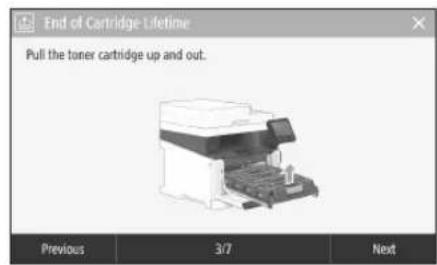
| Cartridge replacement | Follow the instructions displayed on the control panel screen. |
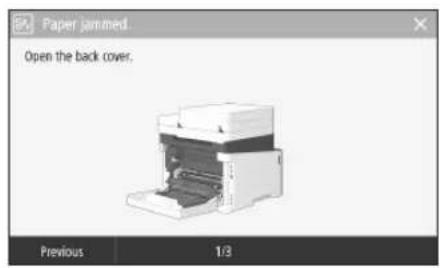
| Paper jam clearance | The screen displays the procedure to follow to clear the jam. |
| Copy functions | N-up, duplex, enlarge/reduce, ID card copy |
| Scan functions | Send by email, store on USB memory, send to file server |
| Fax functions | Sequential broadcast, memory reception, PC fax |
| Print functions | Duplex, N-up, booklet printing |
| Paper feed | Cassette and manual feed slot |
| Parts availability period | At least 7 years after end of model sales |
| Cartridge storage temperature | 0 to 35°C |
| Cartridge storage humidity | 35 to 85% RH (no condensation) |
Frequently Asked Questions - iSENSYS MF631Cn CANON
User questions about iSENSYS MF631Cn CANON
0 question about this device. Answer the ones you know or ask your own.
Ask a new question about this device
Download the instructions for your Printer in PDF format for free! Find your manual iSENSYS MF631Cn - CANON and take your electronic device back in hand. On this page are published all the documents necessary for the use of your device. iSENSYS MF631Cn by CANON.
USER MANUAL iSENSYS MF631Cn CANON
Please read "Important Safety Instructions" before operating this product. After you finish reading this guide, store it in a safe place for future reference.
The information in this document is subject to change without notice.


You can access canon.com/oip-manual
to read the User's Guide that describes all functions of this machine.
Quick Setup
Getting Started
Please read "Important Safety Instructions" before operating this product. P.78
After you Unish reading this guide, store it in a safe place for future reference.
The information in this document is subject to change without notice.
Mise en route
canon.com/oip-manual to read the User's Guide that describes all functions of this machine.
Installation of the Machine
Items Included with the Machine
stalling the Machine
Before starting the installation
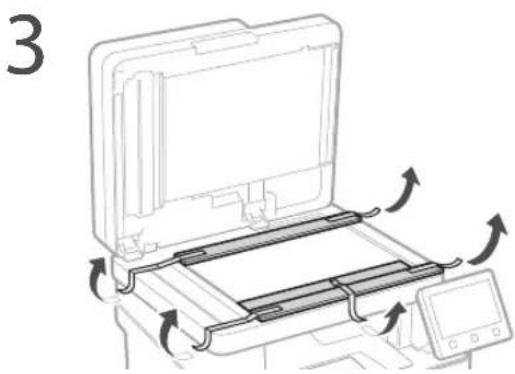
- Remove all of the tape.
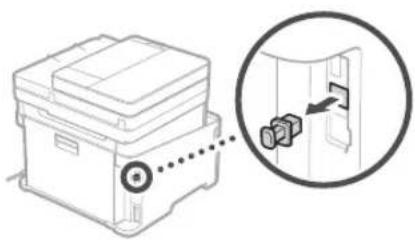
- Do not remove the cap that covers the USB port.

- This item may not be included depending on the model of the machine.
Cap
Installation Requirements
Provide a space of 100mm or more around the machine.
MF635Cx/MF633Cdw
377 mm 460 mm 216 mm
Handset
(optional)
451 mm 79 mm
400 mm 276 mm
MF631Cn
377 mm 460 mm 216 mm
×4
Starter toner cartridges are included.
321 mm347 mm 451 mm
8
9
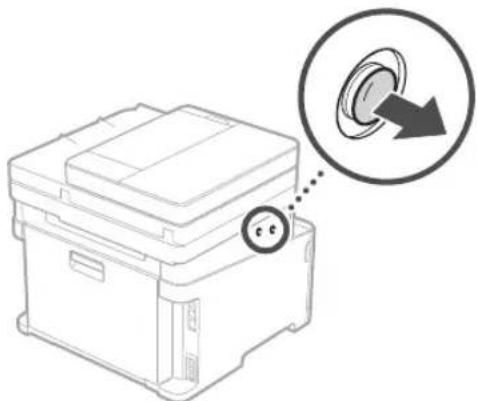
11 Attach the handset (optional).
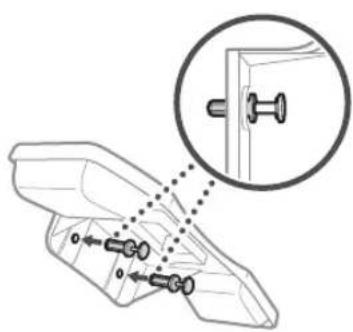
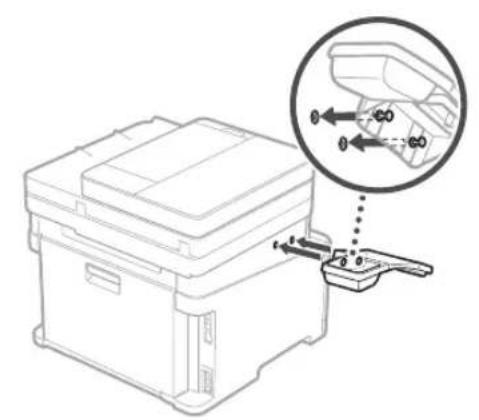
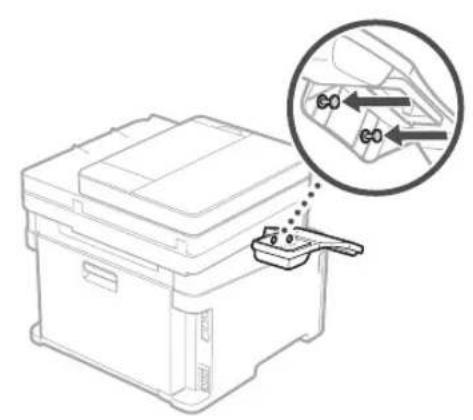
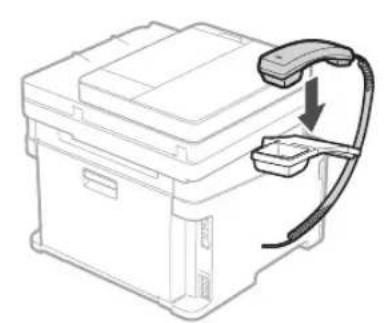
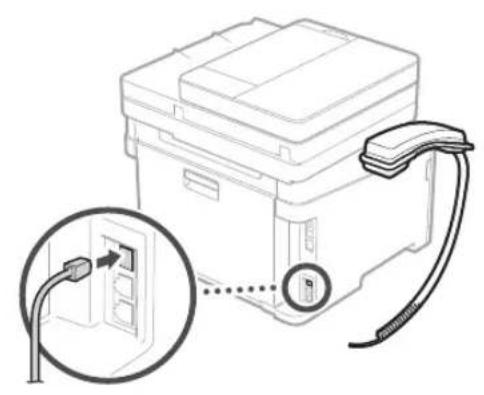
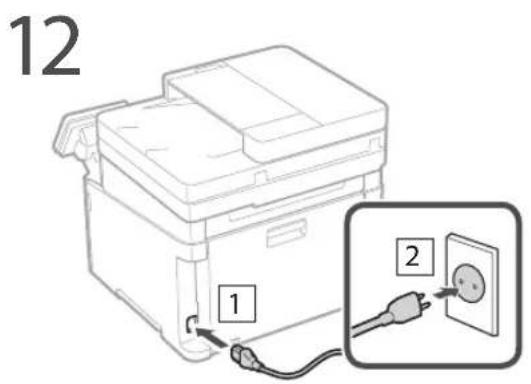
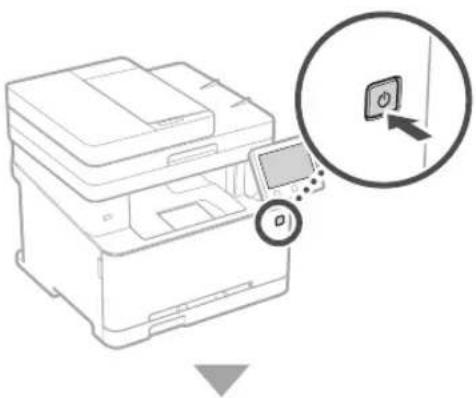
Next, proceed to configure the machine.
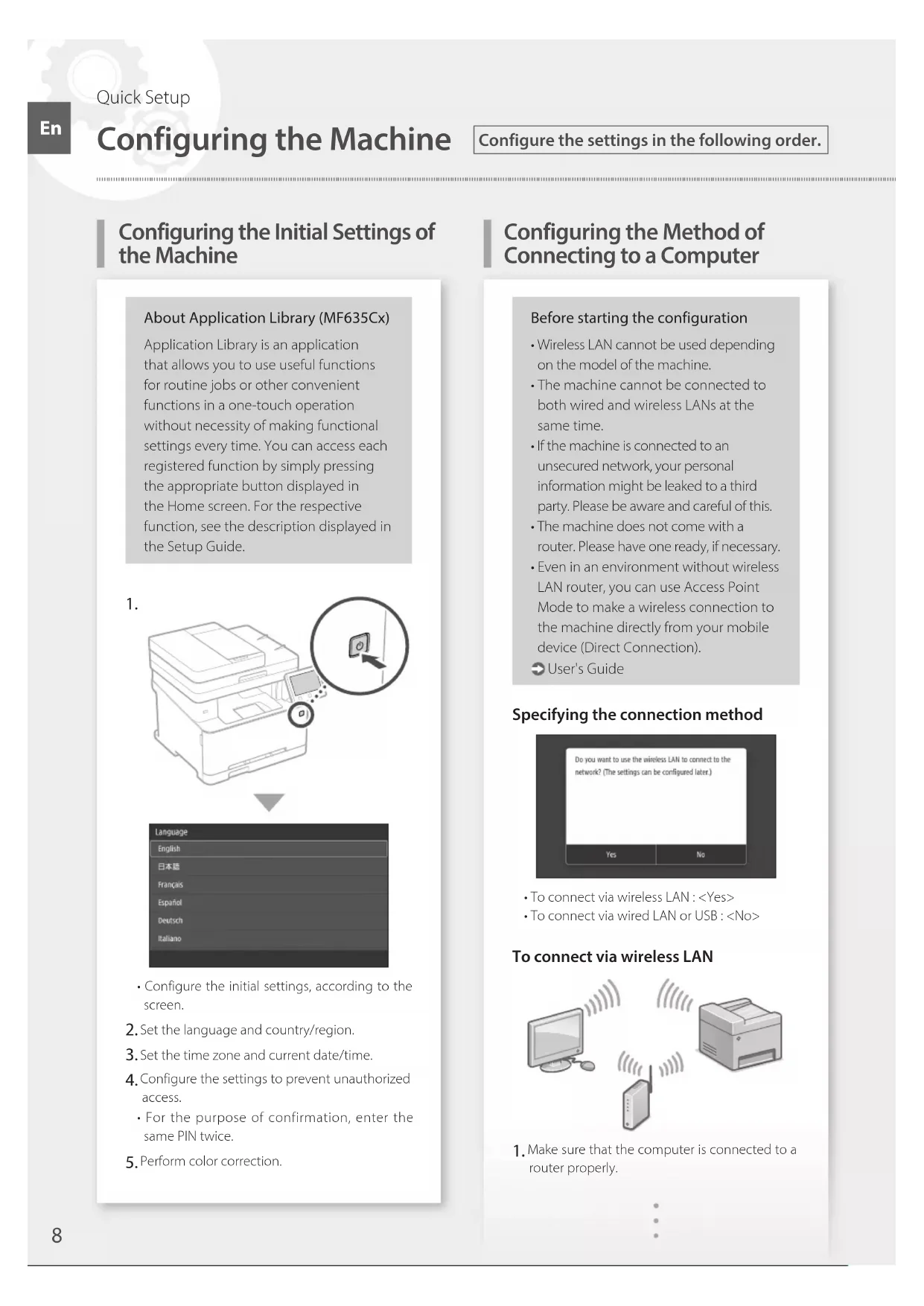
Configuring the Initial Settings of the Machine
About Application Library (MF635Cx)
Application Library is an application that allows you to use useful functions for routine jobs or other convenient functions in a one-touch operation without necessity of making functional settings every time. You can access each registered function by simply pressing the appropriate button displayed in the Home screen. For the respective function, see the description displayed in the Setup Guide.
1.
-
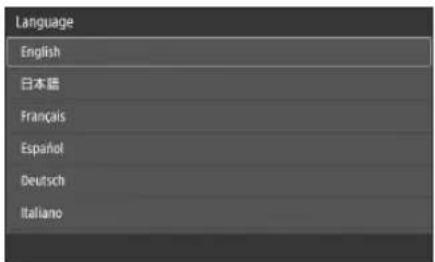
Configure the initial settings, according to the screen.
-
Set the language and country/region.
- Set the time zone and current date/time.
- Configure the settings to prevent unauthorized access.
- For the purpose of confirmation, enter the same PIN twice.
- Perform color correction.
Configuring the Method of Connecting to a Computer
Before starting the configuration
- Wireless LAN cannot be used depending on the model of the machine.
The machine cannot be connected to both wired and wireless LANs at the same time.
If the machine is connected to an unsecured network, your personal information might be leaked to a third party. Please be aware and careful of this.
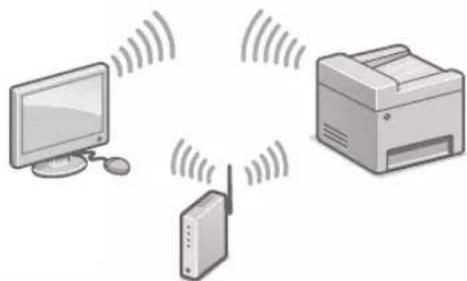
The machine does not come with a router. Please have one ready, if necessary. - Even in an environment without wireless LAN router, you can use Access Point Mode to make a wireless connection to the machine directly from your mobile device (Direct Connection).
User's Guide
Specifying the connection method
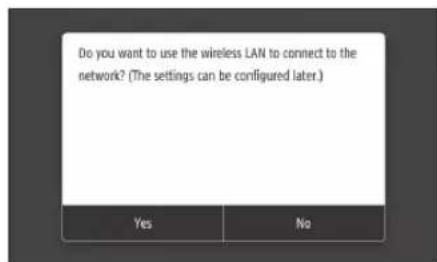
To connect via wireless LAN:
- To connect via wired LAN or USB :
To connect via wireless LAN
-
Make sure that the computer is connected to a router properly.
-
Check the network settings on the computer.
-
Take note of the SSID and network key.
-
Check the label on the router. User's Guide
-
The setting operation is easier if the router is provided with a WPS mark. © User's Guide
-
Set the access point and network key according to the screen below.
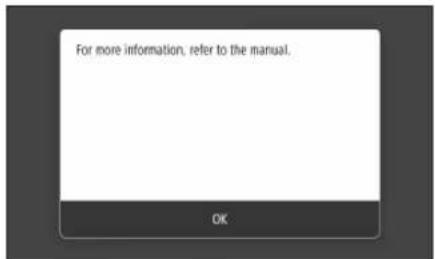
- Press OK>
- Press
. - Press
- Select the access point (SSID), and press
. - Enter a WEP key (network key), and press
. - Press
.
The IP address will be automatically configured in a few minutes.
"Connected," is displayed.
- Install the driver and software.
"Installing the software" on P.10
Now you are finished with the configuration of the initial settings. If your machine is provided with the fax function, proceed to configuring the fax settings. P.11
To connect via wired LAN
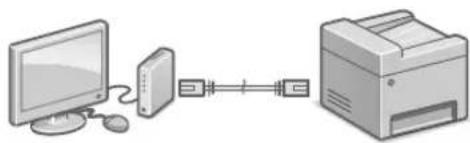
The machine does not come with a LAN cable. Please have one ready, if necessary.
- Make sure that the computer is connected to a router properly.
- Check the network settings on the computer.
- Connect the LAN cable.
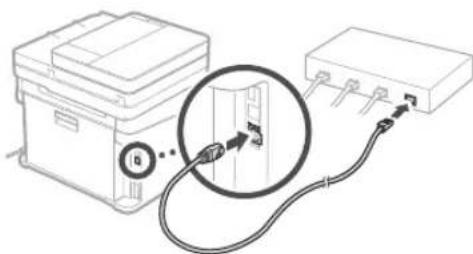
After connecting the cable, wait a few minutes (until the IP address is set automatically).
If a static IP address has been set on the computer, set the machine's IP address manually.
4.Install the driver and software.
"Installing the software" on P.10
Now you are finished with the configuration of the initial settings.
If your machine is provided with the fax function, proceed to configuring the fax settings. P.11
To connect via USB
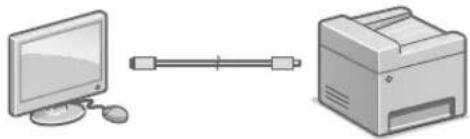
The machine does not come with a USB cable. Please have one ready, if necessary.
Make sure that the USB cable you use has the following mark.
- Do not connect the USB cable before installing the driver. If you did, disconnect the USB cable from the computer, close the dialog box, and then perform the following procedure from step 1.
- Install the driver and software.
"Installing the software" on P.10
- When the screen to connect the USB cable to the machine is displayed, remove the cap that covers the USB port.
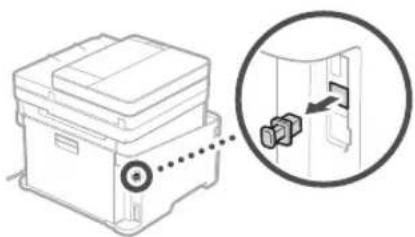
Now you are finished with the configuration of the initial settings.
If your machine is provided with the fax function, proceed to configuring the fax settings. P.11
Installing the software
The procedure described here is only applicable when your computer runs on the Windows OS. For more details on the software installation procedure, see the driver's manual.
- For the installation when your computer runs on the Mac OS, see the driver's manual.
- Your machine may not come with the driver for the Mac OS, depending on the time of purchase. New drivers are uploaded to the Canon website, and you can download and use the latest one.
1.

2.
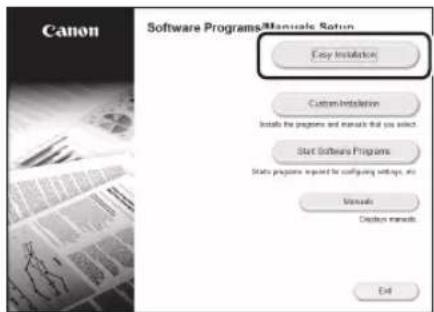
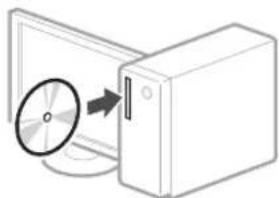
If the screen is not displayed properly, re-insert the DVD-ROM or search for "D:\MInst.exe" on the Windows platform (This description assumes that "D:" is the DVD-ROM drive name).
Using the scanner conveniently
Configuring the network settings with "Send Function Setting Tool" allows you to directly send scanned originals with e-mail or I-Fax or store them in a shared folder or on the FTP server.
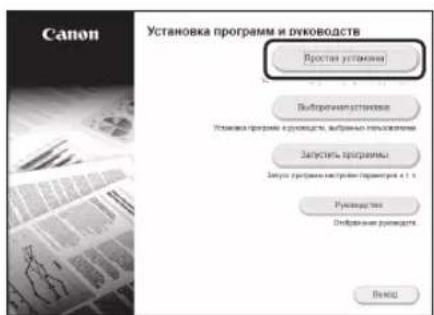
In the screen displayed in step 2, select [Start Software Programs] [Send Function Setting Tool] to start the Send Function Setting Tool.
Configuring Fax Settings
Before starting the configuration:
If your machine does not come with a telephone cable, have one ready, as necessary.
Configure the fax settings, according to the screen below.
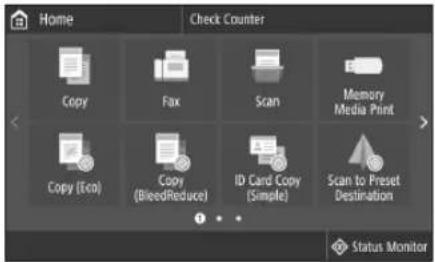
- Press <Fax> .
- Press
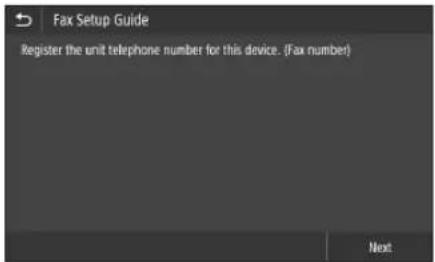
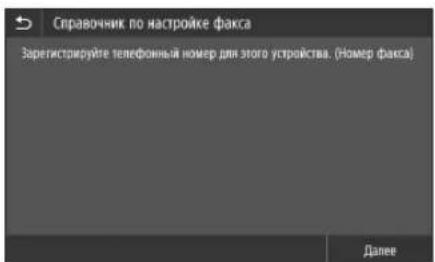
. - Register the machine's telephone number (fax number) and abbreviated user name.
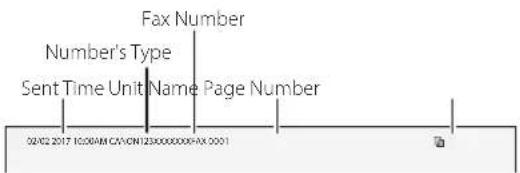
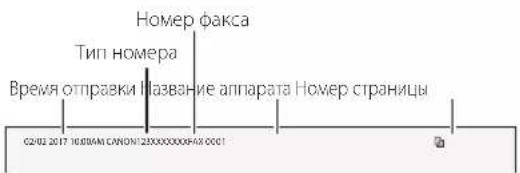
The information below will be printed at the top part of the paper output from the destination machine as sender information.
- Set the reception mode.
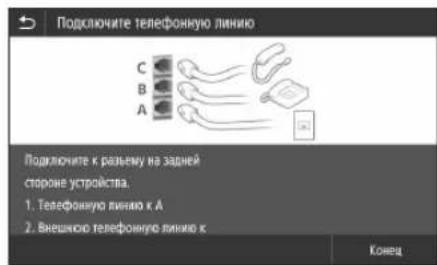
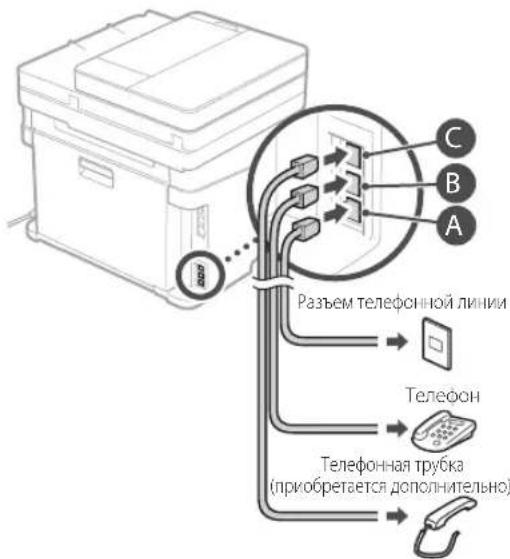
Make the setting by answering the questions on your purposes of using the fax function. - Connect to a telephone line.
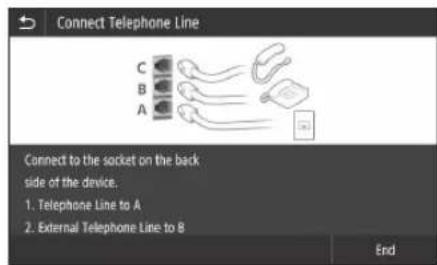
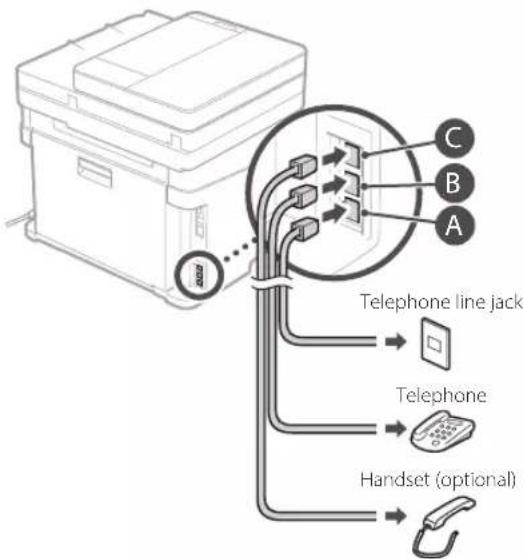
- Press
. - Press
.
Now you are finished with the configuration.
CAUTION!
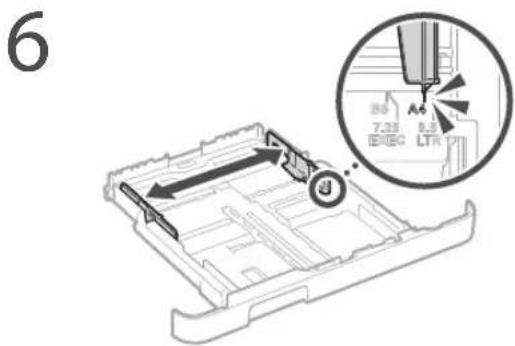
When you load paper of a size other than A4, change the paper settings. Steps 5 and 6 in "Loading in the Paper Printer" on P.76
U's adequat de I'escanner
Installation of softwares
- Verbinding makes via draadloos LAN:
- Verbinding makes via bedraad LAN of USB:
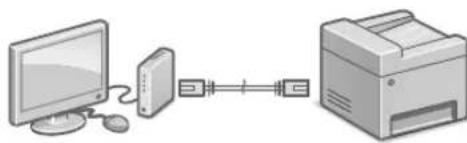
Verbinding makes via draadloos LAN
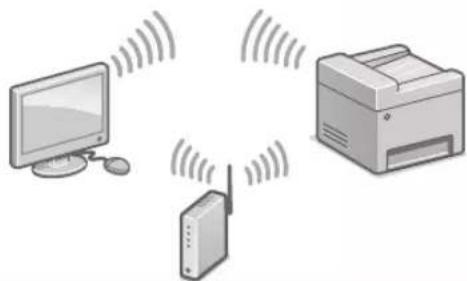
Verbinding makes via bedraad LAN
PykoBODCTBO noIb3OBaTeJIa
Pa6ota no HacptpoKe ynpouaetc,eCnHa Mapwpytn3atope mMeetc 3Haoyk WPS.
PykoBOCTBO NOIb3OBaTeJIa
4.3aaiTeTOUkyIOCTyNA KIOUc CEINB COOTBECTBUN C 3KpaHOM, pNIBeEHbIM HIXe.
- Haxmte OK>
- Haxmte
- Haxmte
- Bb6epnte Toky DocTyna (SSID) n HaxmTe
.
5.BBeHNTe KIOU WEP (KIOU cETn) n HAKMITE. - Haxmte
-IP-aDPEC HAcTpaBaeTcABTOMaTnueckn B TeueHHe HECKOJIbKIN MNHY.T
-0To6paKaTaC coo6eHHe NIOdknHO.HeO.
5.YctaHOBtTe npaIBep nnporpaMMHoe o6ecneueHne.
《YCTAHOBKa nporpaMMHoro 06ecneueHnHa CTp.66
Tenepb 3aDAnHe nCXoDhBix HAcTpoek 3aBepseHo.
EcnnB aannapate npedymotpeha akcmmnbna yHKnna, nepexoute K 3aHaHIO Hactpoek aKa ca.
CTp.67
PoiKJIoueHne no npoBOHOcTn
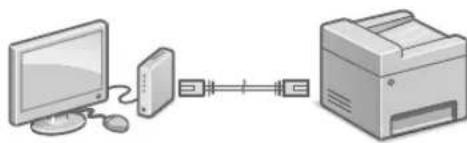
Kabenb nokaibhoi cetn He BXoNT B KOMnneKT annapata.
PnHHeOxOaMIOCTN NOIgROTOBbTe Ka6eNb.
1.Y6eNTecbBTOM,HTO KOMNbIOTep npabINbHO NOKJIIOHcK MapuPyTu3aTOpY.
2.Поверпге Настpoик сети На КOMьTepe.
3. Npoknouhte ka6ebnb nokaibHOI cTe.
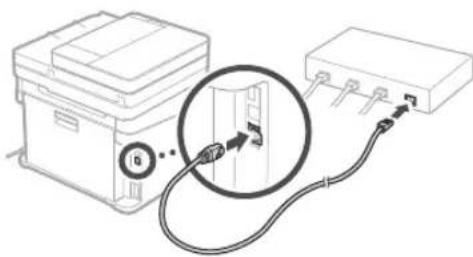
-Подклочь Кабь,поюждte HeckольковуТ (нoka IP-aДPEC He 6удET 3адан abTomatNuecekn).
- Ecnn Ha KOMnbIope 3aHa n CTaTnueckn IP-aDpec, 3aJaIe IP-aDpec annapata BpyHyIO.
- yctaHOBNTe npaBep n nporpaMMHoe oecneueHne.
«YctaHOBKa nporpaMMHOrO 06ecneueHnra Ha cTp.66
Tenepb 3aHaHne mCXoHNbIX HAcTpoek 3aBepseHo.
EcnnBannapate npedymotpeha aKcmmnIbHa yHKun, nepexoJnte K 3aDaHnIO HAcTpoE kakca.
Ctp.67
PoiKJIoueHne no USB
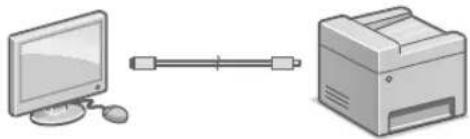
Ka6eNB USB He BXoNT B KOMnNeKT annapata. Pn Heo6xOmoCTN NOrTOOBTe Ka6eNb.
- Y6eNTecbBTOM,TO nCnoIb3yEmbKabEB USB Nmee TcNeDyUOuO MapKnipOBky.

He nooknouaKe Ka6eNB USD do yctaHOBKn npaBepa. EcnB bTo cenann, oTcoeHNHTe Ka6eNB USB OT KOMNIOTEpa, 3akpoTne dAnorOBoE OKHO N BbINONHITe npuBeHHyIO Hnke npoueDpy C wara 1.
1.YcTaHOBnTeIpaNBePnnporpaMMHoe 06ecneueHne.
«YctaHOBKa nporpaMMHOro oecneueHnra Ha ctp.66
- Ecnn oTo6paKaetcA kpaH c npednoXeHneM noKlIOuHTb Ka6enb USB K annapaty, cHmnte konnaqok, 3akpbBaIoU nopt USB.
Tenepb 3aandaHne mCxOaNbIX HacTpoek 3aBepweHo.
EcnB annapate npedymotpeha aKcmmnbHa yHKnna, nepexoJte K 3aHaHIO HAcTpoe KaKa.
Ctp.67
yctahOBka nporpamMHoro 06ecneueHn
-Пивденинaria 3дecь поцуда ппимеима
Тольк Дя КOMьтЕрOB,Ha KOTOPbie
уctановлеса OC Windows. Ппpoбkee
o npocdupe yctahOBkn nporpaMMHoro
обссченя CM.В рykobODCTBE KдраИБер.
-Порадok yctahOBKN Ha KOMNbIOTepblc OC Mac OS CM.В руковдгбКДраиБур.
B3abncmocnOT BpeMeHH npno6peHn annapata, OH MOXET NOCTABNtBC 6e3 dpaBepa IIN OC Mac OS.HOBbIe paaBepb pa3meauotc H a Be6-caTe Canon, noTOMy MoXHO 3aRpy3ntb INNCONb3OBA Tb HOBeWIM dpaBep.
1.
2.
Ecnn Ekapan He OTo6paKaetc HauNexkaum
O6pa3OM, 3aHOBo yctahOBHTe Nsck DVD
ROM nIN BbInOHInTe nonck faina
«D:MInst.exe» Ha nlatphiOpme Windows
(B ATOM onncAHIN npednoJaraetc, YTO
«D»- 3TO mMa NsCKOBOda DVD-ROM).
Ydo6Hoe nCnoJb3ObaHne cKaHepa
3aHaHHe HAcTpoek CeTc NOMOsbIO
CpeCTBa «INHCTpyMeHT HaCTpOiKn
fYHKUIn OTPaBKNI NOZBOJAE THaPmMyo
OTpApBnAByt OCTKaHnPOBaHHBe OprHnAHbl
No 3JeKTPoHHo Noute IIN-ΦakCy IIN60
COxpaHbIX COBMeCTHO INCNOB3yEmOn NaKe
IIIN HA cepBepe FTP.
Ha 3kpaHe, OTO6paXaEMom Ha WARE 2,
BbIbepTe [3aNcyCTNb npOrpAmMb]
[INCTpyMeHT HAcTPOiKn fYHKUIn OTpApBKn],
yTO6bI 3aNcyCTNb INCTpyMeHT HaCTpOiKn
fYHKUIn OTpApBtB.
3aahanne hactpoek kaKca
IpeedHaayalomHacTpoiKn:
Ecn TelefoHHb Ka6eHb He BXoNT B KOMJIeK TnOCTaBKn aannapata, npn HEO6XoDMOCn IOnrTOOBt eero.
3aainTe HactpoKn 0akca B COOTBETCTBUN C ekpaHOM, npNBedeHHbIM HIXe.
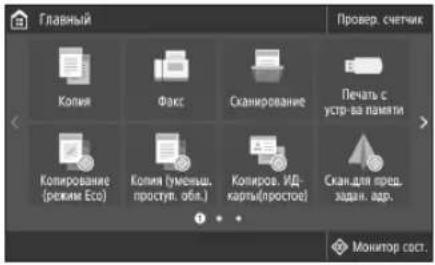
1.HaMMTe<0aKc>
2.HaKMnTe
3. 3apeTepnyte Homep TenefoHa (Homep akca) annapata n cokpaueHHoe mna NOIb30BaTeJIa.
JaHbIe, npBcEHHbc HNKe, 6yDyT neaTaBcA BBePxy NcTa 6ymaru, BbBOIMORo Ha annapate nonyuataTe, B KaueCTBe CBeHn 06 otnpabntene.
4.3aJaTepeXKIMnpEma.
JaHAcTpoKnOTBtTeHaBONpOcblOeJIAXNCN0b3OBaHHaKcMmNBHOyHKUIN.
- NpoknIOHTec k TeneoHHHINH
- HaxMMTe
- HaxmTe
JrKIO 3aBaHTaKeHo nanip iHwOrO po3Mipy, HIX A4, 3MiHiTb npaMeTpnu nanepy.
Див. крoks 5 i 6 y po3di n «3aBaHTaKeHHy loTOK dIЯ naNepy» Ha cTOp. 226
Memo
Quick
Operation

Quick Operation
En
Utilisation rapide
Fr
Kurzanleitung
De
KpaTkoe pykoBODCTBO no 3KcnIyatauIN
Ru
Ubnka ekcnnyataia
UK
Place the Original Properly
Remember before You Start Operation
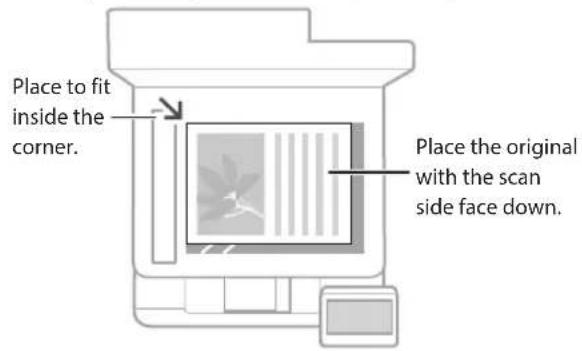
Place your original on the platen glass


Suitable for scanning book pages, magazine pages and newspaper clips.
- This function may not be included depending on the model of the machine.
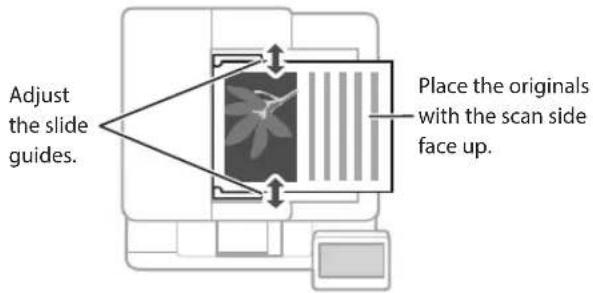
Place your originals into the feeder*

Suitable for continuously scanning many pages of literature, quotation, etc.
Start the Operation from the Operation Panel
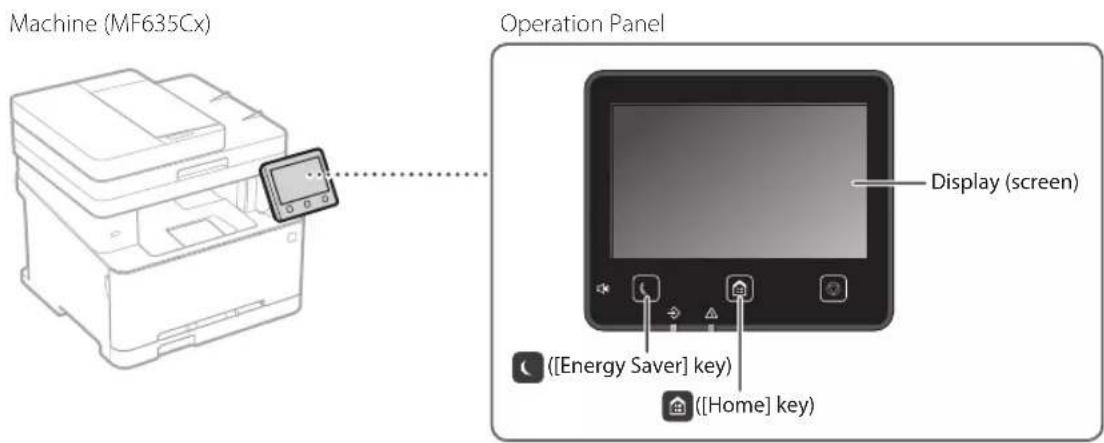

Scanning
- Place the original.
- Press, and select
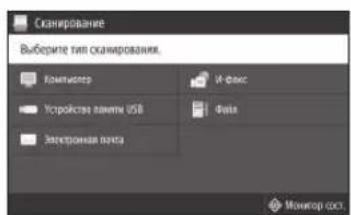
. - Select the type of scan, and enter the necessary information.
- Select
, .
Types of scan
Store in USB memory device
Send e-mail
Send to file server
To scan from a computer
MF Scan Utility
For details
"Scanning" in the User's Guide

Copying
- Place the original.
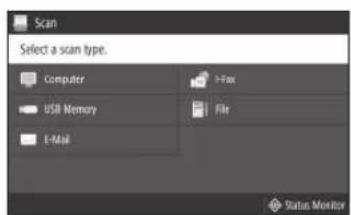
- Press and then select <Copy> .
- Specify the copy settings, as necessary.
- Enter the desired number of copies.
- Select
.
Useful copy settings
Non 1
2-Sided or 1-Sided*
Enlarging or reducing
- Copying ID cards
- This function may not be available, depending on the model of the machine.

For details
"Copying" in the User's Guide

Faxing*
-
This function may not be available, depending on the model of the machine.
-
Place the original.
- Press and select
. - Enter the destination information.
- Specify the fax settings, as necessary.
- Select
.
Useful fax functions
Sequential Broadcast
Memory Reception
PC Fax
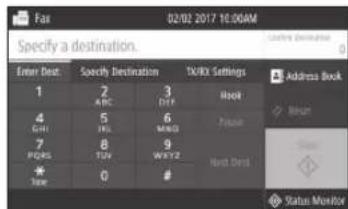
For details
^ "Faxing" in the User's Guide

Printing
- Open the document to print, and select the print function of the application.
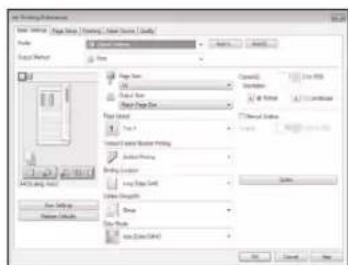
- Select the printer driver for the machine, and select [Preferences] or [Properties].
- Specify the paper size.
- Specify the paper source and paper type.
- Specify the print settings, as necessary.
- Select [OK].
- Select [Print] or [OK].
Useful print settings
2-sided
Non 1
Booklet Printing
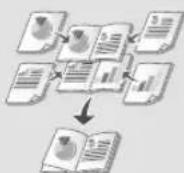
- This function may not be available, depending on the model of the machine.
For details
"Printing" in the User's Guide
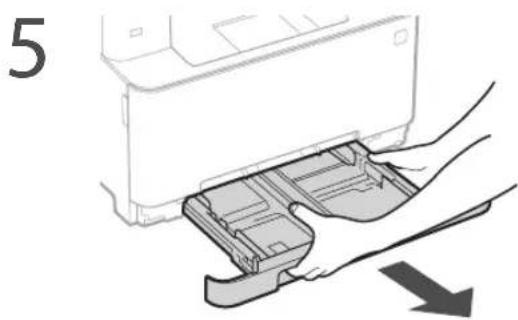
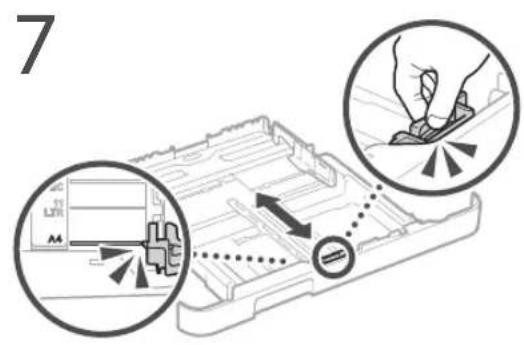
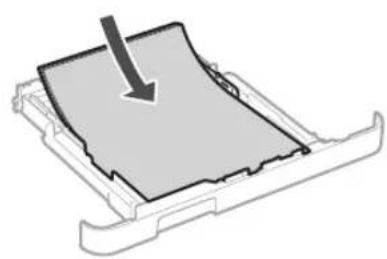
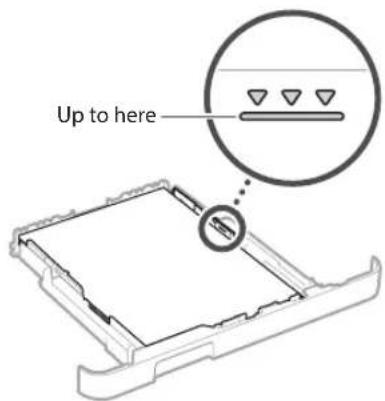
Pull out the paper drawer.
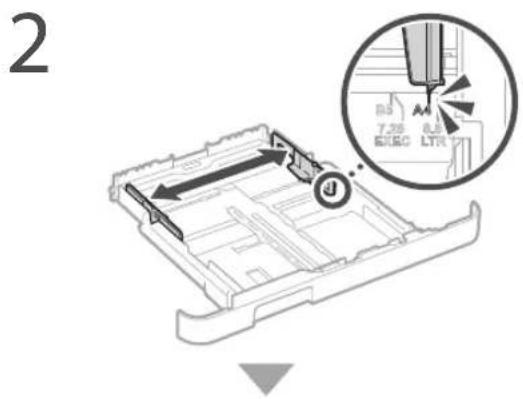
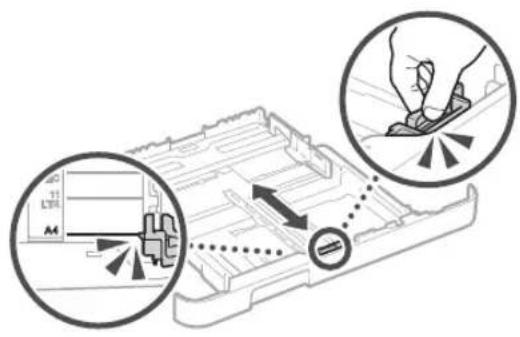
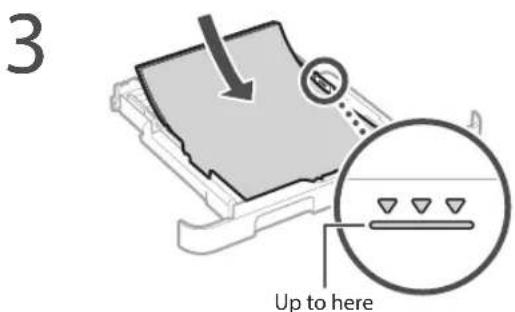
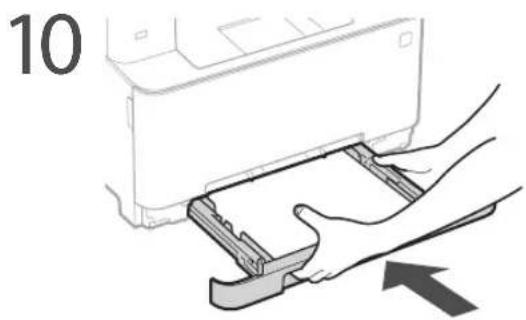
4 Insert the paper drawer into the machine.
If you load a different size or type of paper from the one before, make sure to change the settings.
Press nd select
6 Specify the size and type of paper, according to the screen.
Loading in the Manual Feed SlotLoading
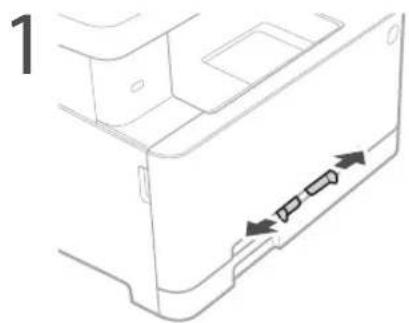

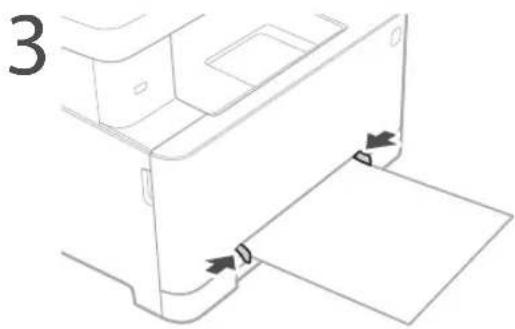
4 Specify the size and type of paper, according to the screen.
The Machine Does Not Seem to Work
Check the following.
Is the power turned ON?
Is the machine out of sleep mode?
If both the display and are not lit, press the power switch.
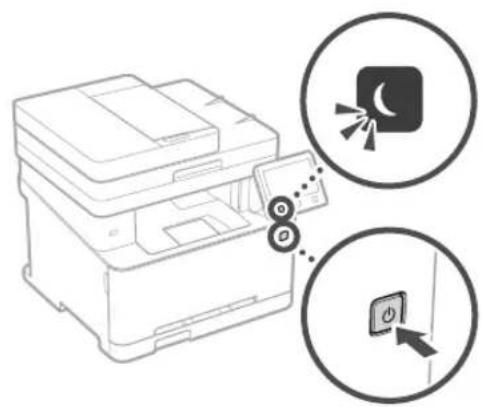
- Is the power cord connected correctly?
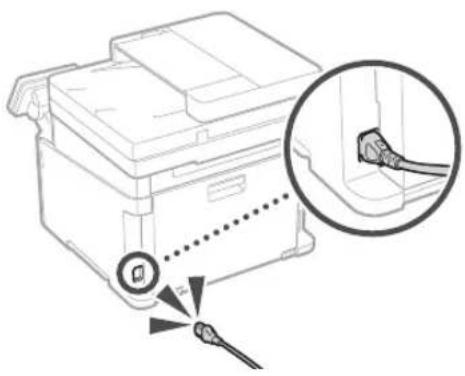
If the problem persists, see the User's Guide.
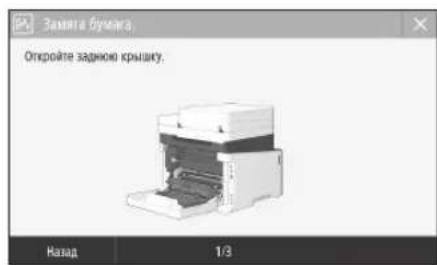
Paper Jams Have Occurred
When paper is jammed, a screen, as shown below appears.
Clear the paper jams, according to the on-screen instructions.
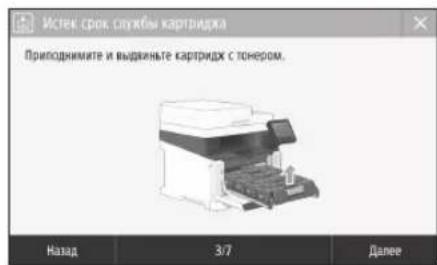
Replacing the Toner Cartridge
Replace the toner cartridge, according to the onscreen instructions.
Model number of replacement toner cartridge
- Canon Cartridge 045 Black
- Canon Cartridge 045 Cyan
- Canon Cartridge 045 Magenta
-
Canon Cartridge 045 Yellow
-
Canon Cartridge 045 H Black
- Canon Cartridge 045 H Cyan
- Canon Cartridge 045 H Magenta
- Canon Cartridge 045 H Yellow
Appendix
Important Safety Instructions
This chapter describes important safety instructions for the prevention of injury to users of this machine and others, and damage to property. Read this chapter before using the machine, and follow the instructions to use the machine properly. Do not perform any operations not described in this manual. Canon will not be responsible for any damages resulting from operations not described in this manual, improper use, or repair or changes not performed by Canon or a third party authorized by Canon. Improper operation or use of this machine could result in personal injury and/or damage requiring extensive repair that may not be covered under your Limited Warranty.
WARNING
Indicates a warning concerning operations that may lead to death or injury to persons if not performed correctly. To use the machine safely, always pay attention to these warnings.
CAUTION
Indicates a caution concerning operations that may lead to injury to persons if not performed correctly. To use the machine safely, always pay attention to these cautions.
0IMPORTANT
Indicates operational requirements and restrictions. Be sure to read these items carefully to operate the machine correctly and avoid damage to the machine or property.
Installation
To use this machine safely and in a trouble-free way, carefully read the following precautions and install the machine in an appropriate location.
WARNING
Do not install in a location that may result in a fire or electrical shock
- A location where the ventilation slots are blocked (too close to walls, beds, sofas, rugs, or similar objects)
A damp or dusty location - A location exposed to direct sunlight or outdoors
A location subject to high temperatures
A location exposed to open flames
Near alcohol, paint thinners or other flammable substances
Other warnings
- Do not connect unapproved cables to this machine. Doing so may result in a fire or electrical shock.
- Do not place necklaces and other metal objects or containers filled with liquid on the machine. If foreign substances come in contact with electrical parts inside the machine, it may result in a fire or electrical shock.
- When installing and removing the optional accessories, be sure to turn OFF the power, unplug the power plug, and then disconnect all the interface cables and power cord from the machine. Otherwise, the power cord or interface cables may be damaged, resulting in a fire or electrical shock.
If any foreign substance falls into this machine, unplug the power plug from the AC power outlet and contact your local authorized Canon dealer.
Do not install in the following locations
The machine may drop or fall, resulting in injury.
An unstable location
A location exposed to vibrations
CAUTION
Do not install in the following locations Doing so may result in damage to the machine.
- A location subject to temperature and humidity extremes, whether low or high
- A location subject to dramatic changes in temperature or humidity
- A location near equipment that generates magnetic or electromagnetic waves
A laboratory or location where chemical reactions occur
A location exposed to corrosive or toxic gases - A location that may warp from the weight of the machine or where the machine is liable to sink (a carpet, etc.)
Avoid poorly ventilated locations
This machine generates a slight amount of ozone and other emissions during normal use. These emissions are not harmful to health. However, they may be noticeable during extended use or long production runs in poorly ventilated rooms. To maintain a comfortable working environment, it is recommended that the room where the machine operates be appropriately ventilated. Also avoid locations where people would be exposed to emissions from the machine.
Do not install in a location where condensation occurs
Water droplets (condensation) may form inside the machine when the room where the machine is installed is heated rapidly, and when the machine is moved from a cool or dry location to a hot or humid location. Using the machine under these conditions may result in paper jams, poor print quality, or damage to the machine. Let the machine adjust to the ambient temperature and humidity for at least 2 hours before use.
In altitudes of above sea level 3,000m or higher
Machines with a hard disk may not operate properly when used at high altitudes of about 3,000 meters above sea level, or higher.
Leveling feet (only for products with leveling feet)
Do not remove the machine's leveling feet after the machine has been installed, as this may cause the machine to fall or tip over, resulting in personal injury.
Connecting the Telephone Line (Only for Products with a Fax Function)
This machine conforms to a analog telephone line standard. The machine can be connected to the public switched telephone network (PSTN) only. If you connect the machine to a digital telephone line or a dedicated telephone line, it might impede proper operation of the machine and could be the cause of damage. Make sure to confirm a type of telephone line before connecting the machine. Contact your optical fiber line or IP telephone line service providers if you want to connect the machine to those telephone lines.
When using wireless LAN (only for products with a wireless LAN function)
Install the machine at a distance of 50 meters or less from the wireless LAN router.
As far as possible, install in a location where communication is not blocked by intervening objects. The signal may be degraded when passing through walls or floors.
- Keep the machine as far as possible from digital cordless phones, microwave ovens, or other equipment that emits radio waves.
- Do not use near medical equipment. Radio waves emitted from this machine may interfere with medical equipment, which may result in malfunctions and accidents.
Power Supply
WARNING
- Use only a power supply that meets the specified voltage requirements. Failure to do so may result in a fire or electrical shock.
- Do not use power cords other than the one provided, as this may result in a fire or electrical shock.
The provided power cord is intended for use with this machine. Do not connect the power cord to other devices. - Do not modify, pull, forcibly bend, or perform any other act that may damage the power cord. Do not place heavy objects on the power cord. Damaging the power cord may result in a fire or electrical shock.
- Do not plug in or unplug the power plug with wet hands, as this may result in an electrical shock.
- Do not use extension cords or multi-plug power strips with the machine. Doing so may result in a fire or electrical shock.
- Do not wrap the power cord or tie it in a knot, as this may result in a fire or electrical shock.
- Insert the power plug completely into the AC power outlet. Failure to do so may result in a fire or electrical shock.
- Remove the power plug completely from the AC power outlet during a thunder storm. Failure to do so may result in a fire, electrical shock, or damage to the machine.
Make sure that the power supply for the machine is safe, and has a steady voltage - Keep the power cord away from a heat source; failure to do this may cause the power cord coating to melt, resulting in a fire or electrical shock.
-
If excessive stress is applied to the connection part of the power cord, it may damage the power cord or the wires inside the machine may disconnect. This could result in a fire. Avoid the following situations:
-
Connecting and disconnecting the power cord frequently.
-
Tripping over the power cord.
The power cord is bent near the connection part, and continuous stress is being applied to the power outlet or the connection part.
Applying excessive force on the power plug.
CAUTION
Install this machine near the power outlet and leave sufficient space around the power plug so that it can be unplugged easily in an emergency.
0IMPORTANT
When connecting power
- Do not connect the power cord to an uninterrupted power source. Doing so may result in malfunction of or damage to the machine at power failure.
- If you plug this machine into an AC power outlet with multiple sockets, do not use the remaining sockets to connect other devices.
- Do not connect the power cord to the auxiliary AC power outlet on a computer.
Other precautions
Electrical noise may cause this machine to malfunction or lose data.
Handling
WARNING
- Immediately unplug the power plug from the AC power outlet and contact an authorized Canon dealer if the machine makes an unusual noise, emits an unusual smell, or emits smoke or excessive heat. Continued use may result in a fire or electrical shock.
- Do not disassemble or modify this machine. There are high-voltage and high-temperature components inside the machine. Disassembly or modification may result in a fire or electrical shock.
- Place the machine where children will not come in contact with the power cord and other cables or gears and electrical parts inside the machine. Failure to do so may result in unexpected accidents.
- Do not use flammable sprays near this machine. If flammable substances come into contact with electrical parts inside this machine, it may result in a fire or electrical shock.
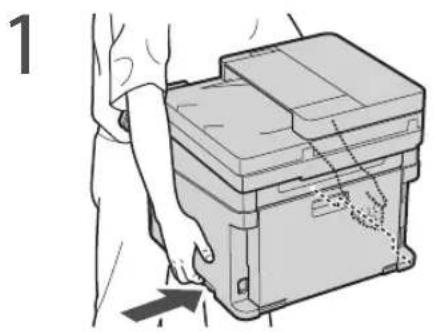
- When moving this machine, be sure to turn OFF the power of this machine, and then unplug the power plug and interface cables. Failure to do so may damage the power cord or interface cables, resulting in a fire or electrical shock.
- When plugging or unplugging a USB cable when the power plug is plugged into an AC power outlet, do not touch the metal part of the connector, as this may result in an electrical shock.
- Use a modular cable that is shorter than 3 meters.
- Use a USB cable that is shorter than 3 meters.
If the operating noise concerns you
Depending on the use environment and operating mode, if the operating noise is of concern, it is recommended that the machine be Installed in a place other than the office.
If you are using a cardiac pacemaker
This machine generates a low level magnetic flux. If you use a cardiac pacemaker and feel abnormalities, please move away from this machine and consult your physician immediately.
CAUTION
- Do not place heavy objects on this machine as they may fall, resulting in injury.
- For safety, unplug the power plug if the machine will not be used for a long period of time.
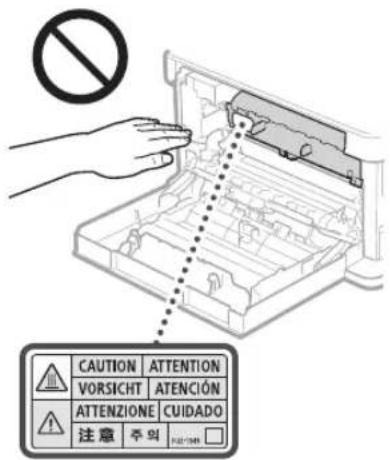
Use caution when opening and closing covers to avoid injury to your hands. - Keep hands and clothing away from the rollers in the output area. If the rollers catch your hands or clothing, this may result in personal injury.
- The inside of the machine and the output slot are very hot during and immediately after use. Avoid contact with these areas to prevent burns. Also, printed paper may be hot immediately after being output, so use caution when handling it. Failure to do so may result in burns.
- Be careful not to drop a heavy object, such as a dictionary, on the platen glass. Doing so may damage the platen glass and result in injury.
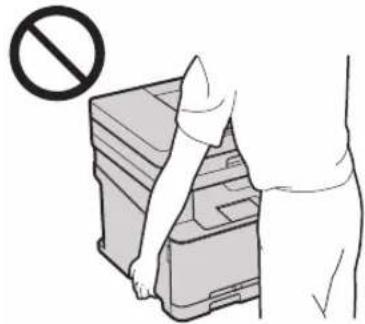
- Do not carry the machine with the paper drawers installed. Otherwise, the paper drawer may fall and result in injury.
Feeder (only for products with a feeder)
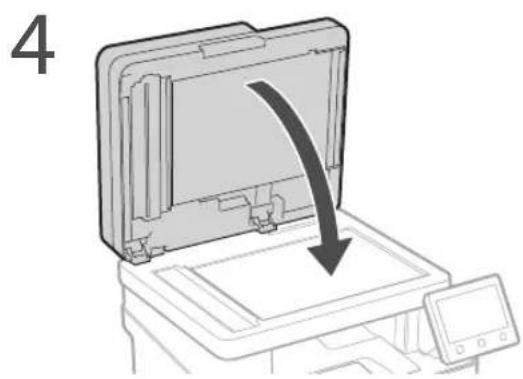
- Do not press down hard on the feeder when using the platen glass to make copies of thick books. Doing so may damage the platen glass and result in personal injury.
- Close the feeder gently to avoid catching your hands, as this may result in personal injury.
- Close the feeder gently to avoid catching your hands in the back of the feeder, as this may result in personal injury.
Finisher (only for products with a finisher)
- Do not place your hands in the part of the tray where stapling is performed (near the rollers), especially pay careful attention to the sharp staples, as this may result in personal injury.
Paper drawer (only for products with a paper drawer)
- Do not insert your hand into the machine while the paper drawer is removed, as this may result in personal injury.
Energy Saver key (only for products with an Energy Saver key)
- Press (Energy Saver) for safety when the machine will not be used for a long period of time, such as overnight. Also, turn OFF the main power switch, and disconnect the power cord for safety when the machine will not be used for an extended period of time, such as during consecutive holidays.
Laser Safety
This product is confirmed as a Class 1 laser product in IEC60825-1:2014 and EN60825-1:2014.
CLASS 1 LASER PRODUCT
LASER KLASSE 1
APPAREL LASER DE CLASSE 1
APPARECCHIO LASER DI CLASSE T
PRODUCTO LASER DE CLASE 1
APARELHO ALASER DE CLASSE 1
LUOKAN 1 LASER-TUOTE
LASERPRODUKTCLASS1
The laser beam can be harmful to human bodies. Since radiation emitted inside the product is completely confined within protective housings and external covers, the laser beam cannot escape from the machine during any phase of user operation. Read the following remarks and instructions for safety.
- Never open covers other than those instructed in the manuals for this machine.
If the laser beam should escape and enter your eyes, exposure may cause damage to your eyes.
CAUTION
Use of controls, adjustments, or performance of procedures other than those specified in this manual may result in hazardous radiation exposure.
Other precautions
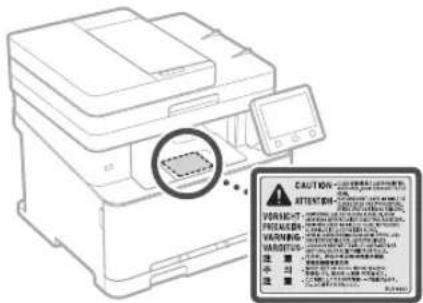
- Follow the instructions on the caution label attached to this machine.
- Do not subject the machine to strong shocks or vibration.
- Do not forcibly open and close doors, covers, and other parts. Doing so may result in damage to the machine.
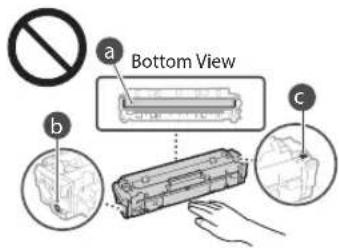
- Do not touch the toner cartridge contacts (a). Doing so may result in damage to the machine.
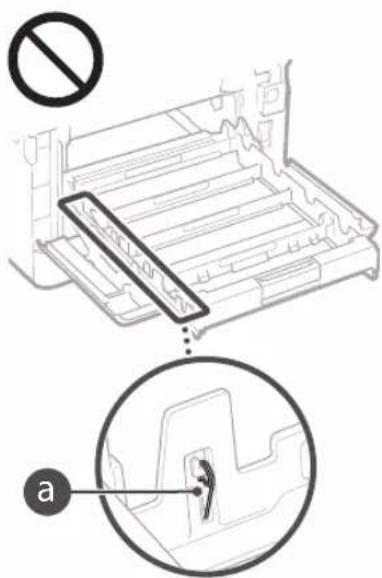
- Do not turn the main power switch OFF or open the covers while the machine is in operation. This may result in paper jams.
When transporting the machine
To prevent damage to the machine during transport, perform the following.
- Remove the toner cartridges.
- Securely pack the machine in the original box with packing materials.
Appendix
Maintenance and Inspections
Clean this machine periodically. If dust accumulates, the machine may not operate properly. When cleaning, be sure to observe the following. If a problem occurs during operation, see Troubleshooting. If the problem cannot be resolved or you feel the machine requires an inspection, see When a Problem Cannot Be Solved.
WARNING
Before cleaning, turn OFF the power and unplug the power plug from the AC power outlet. Failure to do so may result in a fire or electrical shock.
- Unplug the power plug periodically and clean with a dry cloth to remove dust and grime. Accumulated dust may absorb humidity in the air and may result in a fire if it comes into contact with electricity.
- Use a damp, well wrung-out cloth to clean the machine. Dampen cleaning cloths with water only. Do not use alcohol, benzenes, paint thinkers, or other flammable substances. Do not use tissue paper or paper towels. If these substances come into contact with electrical parts inside the machine, they may generate static electricity or result in a fire or electrical shock.
- Check the power cord and plug periodically for rust, bent prongs, fraying, cracks, or excessive heat generation. Use of poorly-maintained power cord or plug may result in a fire or electrical shock.
CAUTION
The inside of the machine has high temperature and high-voltage components. Touching these components may result in injury or burns. Do not touch any part of the machine that is not indicated in the manual.
- When loading paper or removing jammed paper, be careful not to cut your hands with the edges of the paper.
Legal Limitations on the Usage of Your Product and the Use of Images
Using your product to scan, print or otherwise reproduce certain documents, and the use of such images as scanned, printed or otherwise reproduced by your product, may be prohibited by law and may result in criminal and/or civil liability. A non-exhaustive list of these documents is set forth below. This list is intended to be a guide only. If you are uncertain about the legality of using your product to scan, print or otherwise reproduce any particular document, and/or of the use of the images scanned, printed or otherwise reproduced, you should consult in advance with your legal advisor for guidance.
Paper Money
Travelers Checks
Money Orders
Food Stamps
Certificates of Deposit
Passports
Postage Stamps (canceled or uncanceled)
Immigration Papers
Identifying Badges or Insignias
- Internal Revenue Stamps (canceled or uncanceled)
- Selective Service or Draft Papers
Bonds or Other Certificates of Indebtedness
- Checks or Drafts Issued by Governmental Agencies
Stock Certificates
Motor Vehicle Licenses and Certificates of Title
Copyrighted Works/Works of Art without Permission of Copyright Owner
Safety-Related Symbols
Power switch: "ON" position
Power switch:"OFF" position
Power switch:"STAND-BY" position
① Push-push switch “N” “OFF”
Protective earthing terminal
Dangerous voltage inside. Do not open covers other than instructed.
CAUTION: Hot surface. Do not touch.
Class II equipment
Moving parts:Keep body parts away from moving parts
[NOTE]
Some of symbols shown above may not be affixed depending on the product.
v1602_00_en-GB
Laser Safety Label
Consumables
WARNING
- Do not dispose of used toner cartridges in open flames. This may cause an ignition, and result in burns or fire.
- If you accidentally spill or scatter toner, carefully wipe up the loose toner with a damp, soft cloth and avoid inhaling any toner dust. Never use a vacuum cleaner to clean up loose toner. Doing so may cause a malfunction in the vacuum cleaner or result in a dust explosion due to static discharge.
CAUTION
- Keep the toner cartridges and other consumables out of the reach of small children. If toner is ingested, consult a physician or poison control center immediately.
- Do not attempt to disassemble the toner cartridge. The toner may scatter and get into your eyes or mouth. If toner gets into your eyes or mouth, wash them immediately with cold water and consult a physician.
If toner spills from the toner cartridge, avoid inhaling it or allowing it to come into contact with your skin. If the toner comes into contact with your skin, wash immediately with soap. If you inhale the toner or your skin becomes irritated due to contact with the toner, consult a physician or poison control center immediately.
0IMPORTANT
Handling the toner cartridge
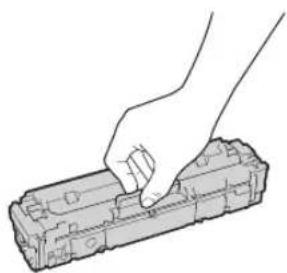
- Be sure to hold the toner cartridge using the handle.
- Do not scratch the drum surface (a) or expose it to light. Do not touch the electrical contacts (b) or the toner cartridge memory (c).
- Do not remove the toner cartridge from this machine or from the protective bag unnecessarily.
- The toner cartridge is a magnetic product. Do not move it close to products susceptible to magnetism including floppy disks and disk drives. Doing so may result in data corruption.
Storing the toner cartridge
- Store in the following environment to ensure safe and satisfactory use. Storage temperature range: 0 to 35^ Storage humidity range: 35 to 85% RH (relative humidity/no condensation)*
- Store without opening until the toner cartridge is to be used.
- When removing the toner cartridge from this machine for storage, attach the protective cover for the drum, and then place the removed toner cartridge into the original protective bag or wrap it with a thick cloth.
- When storing the toner cartridge, do not store it upright or upside down. The toner will solidify and may not return to its original condition even if it is shaken.
- Even within the storable humidity range, water droplets (condensation) may develop inside the toner cartridge if there is a difference of temperature inside and outside the toner cartridge. Condensation will adversely affect the print quality of toner cartridges.
Do not store the toner cartridge in the following locations
- Locations exposed to open flames
- Locations exposed to direct sunlight or bright light for five minutes or more
- Locations exposed to excessive salty air
- Locations where there are corrosive gases (i.e. aerosol sprays and ammonia)
-
Locations subject to high temperature and high humidity
-
Locations subject to dramatic changes in temperature and humidity where condensation may easily occur
- Locations with a large amount of dust
- Locations within the reach of children
Be careful of counterfeit toner cartridges
- Please be aware that there are counterfeit Canon toner cartridges in the marketplace. Use of counterfeit toner cartridge may result in poor print quality or machine performance. Canon is not responsible for any malfunction, accident or damage caused by the use of counterfeit toner cartridge. For more information, see http://canon.com/counterfeit.
Availability period of repairing parts and toner cartridges
The repairing parts and toner cartridges for the machine will be available for at least seven (7) years after production of this machine model has been discontinued.
Toner cartridge packing materials
- Save the protective bag for the toner cartridge and protective cover for the drum. They are required when transporting this machine.
- The packing materials may be changed in form or placement, or may be added or removed without notice.
- Dispose of the removed sealing tape according to local regulations.
When disposing of a used toner cartridge
- Attach the protective cover for the drum, place the toner container into its protective bag to prevent the toner from scattering, and then dispose of the toner cartridge according to local regulations.
Notice
Product Name
Safety regulations require the product's name to be registered.
In some regions where this product is sold, the following name(s) in parentheses () may be registered instead.
MF635Cx(F170102)
MF633Cdw/MF631Cn(F170100)
EMC requirements of EC Directive
This equipment conforms with the essential EMC requirements of EC Directive. We declare that this product conforms with the EMC requirements of EC Directive at nominal mains input 230V 50Hz although the rated input of the product is 220 to 240V 50 / 60Hz . Use of shielded cable is necessary to comply with the technical EMC requirements of EC Directive.
WEEE and Battery Directives
You can see the WEEE and Battery Directives information in the latest User's Guide (HTML manual) from the Canon website (http://canon.com/oip-manual).
Regulatory information for users in Jordan
MF635Cx / MF633Cdw includes approved
Wireless LAN Module (Model name: AW-NM383).
Contains Wireless LAN Module approved by TRC/SS/2014/38
Regulatory information for users in UAE MF635Cx/MF633Cdw includes approved Wireless LAN Module (Model name: AW-NM383).
TRA
REGISTERED No: ER0126617/14
DEALER No: DA0060877/11
Regulatory information for users in Russian
PocBekpIeHne COOTBETCTBnM MHKOMCBAHn
PocCn: DieKnapaun COOTBETCTBnN N D-MPD-4784
ot 02.05.2017 roDa, deNCTBnTeBnHa do 02.05.2023
roDa, aapeirntnpoBaHa B OedepeAblHom areHTCTBe
cBn 17.05.2017 roDa
RE Directive
(For Europe Only)
RE Declaration of Conformity
English (EN) Hereby, Canon Inc. declares that this equipment is in compliance with Directive 2014/53/EU. The full text of the EU declaration of conformity is available at the following internet address: http://www.canon-europe.com/ce-documentation/Wireless LAN Specifications Frequency band(s):2412-2472MHz Maximum radio-frequency power:15.98dBm
Czech (CS) Timto spelecnost Canon Inc. prohlasej, ze toto zafenji je v souladu se smemici 2014/53/EU. Uplne zneni EU prohlaseni o shode je k dispozici na tefo internetové adrese: http://www.canon-europe.com/ce-documentation Technicke udaje bezdratove LAN Pasma(a) frekvence: 2412-2472 MHz Maximaliy kon radiove frekvence: 15.98 dBm
The information in this document is subject to change without notice.
CANON INC. MAKES NO WARRANTY OF ANY KIND WITH REGARD TO THIS MATERIAL, Either EXPRESS OR IMPLIED, EXCEPT AS PROVIDED HEREIN, INCLUDING WITHOUT LIMITATION, THEREOF, WARRANTY AS TO MARKETABILITY, MERCHANTABILITY, FITNESS FOR A
PARTICULAR PURPOSE OF USE, OR NONINFRINGEMENT. CANON INC. SHALL NOT BE LIABLE FOR ANY DIRECT, INCIDENTAL, OR CONSEQUENTIAL DAMAGES OF ANY NATURE, OR LOSSES OR EXPENSES RESULTING FROM THE USE OF THIS MATERIAL.
About This Manual
Keys and Buttons Used in This Manual
The following symbols and key names are a few examples of how keys to be pressed are expressed in this manual.
Operation panel keys: [Key icon]
Example:
- Display:
- Buttons and items on the computer display: [Preferences]
Illustrations and Displays Used in This Manual Illustrations and displays used in this manual are which of MF635Cx unless specified.
Trademarks
Mac is a trademark of Apple Inc.
Microsoft, Windows, Windows Vista, Windows Server, Internet Explorer, Excel, and PowerPoint are either registered trademarks or trademarks of Microsoft Corporation in the United States and/or other countries.
Other product and company names herein may be the trademarks of their respective owners.
Third Party Software
This Canon product (the "PRODUCT") includes third-party software modules. Use and distribution of these software modules, including any updates of such software modules (collectively, the "SOFTWARE") are subject to license conditions (1) through (9) below.
(1) You agree that you will comply with any applicable export control laws, restrictions or regulations of the countries involved in the event that this PRODUCT including the SOFTWARE is shipped, transferred or exported into any country.
(2) Rights holders of the SOFTWARE retain in all respects the title, ownership and intellectual property rights in and to the SOFTWARE. Except as expressly provided herein, no license or right, expressed or implied, is hereby conveyed or granted by rights holders of the SOFTWARE to you for any intellectual property of rights holders of the SOFTWARE.
(3) You may use the SOFTWARE solely for use with the PRODUCT.
(4) You may not assign, sub license, market, distribute, or transfer the SOFTWARE to any third party without prior written consent of rights holders of the SOFTWARE.
(5) Notwithstanding the foregoing, you may transfer the SOFTWARE only when (a) you assign all of your rights to the PRODUCT and all rights and obligations under the license conditions to transferee and (b) such transferee agrees to be bound by all these conditions.
(6) You may not decompile, reverse engineer, disassemble or otherwise reduce the code of the SOFTWARE to human readable form.
(7) You may not modify, adapt, translate, rent, lease or loan the SOFTWARE or create derivative works based on the SOFTWARE.
(8) You are not entitled to remove or make separate copies of the SOFTWARE from the PRODUCT.
(9) The human-readable portion (the source code) of the SOFTWARE is not licensed to you.
Notwithstanding (1) through (9) above, the PRODUCT includes third-party software modules accompanying the other license conditions, and these software modules are subject to the other license conditions.
Please refer to the other license conditions of third-party software modules described in Appendix of Manual for the corresponding the PRODUCT. This Manual is available at http://canon.com/oip-manual.
By using the PRODUCT, you shall be deemed to have agreed to all applicable license conditions. If you do not agree to these license conditions, please contact your service representative.
Memo
CLASS 1 LASER PRODUCT
LASER KLASSE 1
APPAREL A LASER DE CLASSE 1
APPARECCHIO LASER DI CLASSE 1
PRODUCTO LASER DE CLASE
APARELHO A LASER DE CLASSE 1
LUOKAN1LASER-TUOTE
LASERPRODUKT KCLASS 1
Regulatory information for users in Jordan
MF635Cx/MF633Cdw includes approved Wireless LAN Module (Model name: AW-NM383).
Contains Wireless LAN Module approved by TRC/SS/2014/38
Regulatory information for users in UAE MF635Cx/MF633Cdw includes approved Wireless LAN Module (Model name: AW-NM383).
TRA
REGISTERED No: ER0126617/14
DEALER No: DA0060877/11
Regulatory information for users in Russian Pocn: Deknapaia COOTBCTBNA N#-M#PD-4784 02.05.2017 rga, neCTBntbHa no 02.05.2023 rga, apercTprpoaa B DepeabHOM areHTCTBe CBs 17.05.2017 rga
RE Directive
(For Europe Only)
RE Declaration of Conformity
English (EN) Hereby, Canon Inc. declares that this equipment is in compliance with Directive 2014/53/EU. The full text of the EU declaration of conformity is available at the following internet address: http://www.canon-europe.com/ce-documentation/Wireless LAN Specifications Frequency band(s):2412-2472MHz Maximum radio-frequency power:15.98dBm
Czech (CS) Timto spelecnost Canon Inc. prohlasej, ze toto zafrzeni je v souladu se smemici 2014/53/FU. Uplne zneni FU prohlasei o shode je k dispozici na teo internetové adrese: http://www.canon-europe.com/ce-documentation Technické udaje bezdratovi LAN Pasm(a) frekce: 2412-2472 MHz Maximaliy vykon radiosfrekvence: 15.98 dBm
CLASS 1 LASER PRODUCT
LASER KLASSE 1
APPAREL A LASER DE CLASSE 1
APPARECCHIO LASER DI CLASSE 1
PRODUCTO LASER DE CLASE 1
APARELHO A LASER DE CLASSE 1
LUOKAN 1 LASER-TUOTE
LASERPRODUKT KCLASS 1
MF633Cdw/MF631Cn(F170100)
Regulatory information for users in Jordan
MF635Cx / MF633Cdw includes approved
Wireless LAN Module (Model name: AW-NM383).
Contains Wireless LAN Module approved by TRC/SS/2014/38
Regulatory information for users in UAE
MF635Cx/MF633Cdw includes approved Wireless LAN Module (Model name: AW-NM383).
TRA
REGISTERED No: ER0126617/14
DEALER No: DA0060877/11
Regulatory information for users in Russian PocBn: DieKapauin cooTBeCTBnN NoI-MDPI-4784 02.05.2017 roa, deHCTBnTeBnHa do 02.05.2023 roa, aperHCTpnpObaBa B OedepeBbHom areHCTBe CBAH 17.05.2017 roa
RE Directive
(For Europe Only)
RE Declaration of Conformity
English (EN) Hereby, Canon Inc. declares that this equipment is in compliance with Directive 2014/53/EU.
The full text of the EU declaration of conformity is available at the following internet address: http://www.canon-europe.com/ce-documentation Wireless LAN Specifications Frequency band(s):2412-2472MHz Maximum radio-frequency power:15.98dBm
CLASS 1 LASER PRODUCT
LASER KLASSE 1
APPARELÀLASER DE CLASSE1 APPARECCIIIO LASER DI CLASSE 1
PRODUCTO LASER DE CLASE 1
APARELHO ALASER DE CLASSE 1
LUOKAN 1 LASER-TUOTE
LASERPRODUKT KCLASS 1
Regulatory information for users in Jordan
MF635Cx / MF633Cdw includes approved Wireless LAN Module (Model name: AW-NM383). Contains Wireless LAN Module approved by TRC/ SS/2014/38
Regulatory information for users in UAE
MF635Cx / MF633Cdw includes approved Wireless LAN Module (Model name: AW-NM383).
TRA
REGISTERED No:ER0126617/14
DEALER No: DA0060877/11
Regulatory information for users in Russian
IIOBEPKJHHe COOTBCTBNA MNKOMCBBn PoCm: JeJIaPauIN COOTBCTBNA N D MJP4784 02.05.2017 rO, dNCTBnEbnHa 02.05.2023 rOa, 3apeTNTnpoBaBA B DeepalbHom aERHTBe CBBn 17.05.2017 rOa
RE Directive
(For Europe Only)
RE Declaration of Conformity
English (EN) Hereby, Canon Inc. declares that this equipment is in compliance with Directive 2014/53/EU. The full text of the EU declaration of conformity is available at the following internet address: http://www.canon-europe.com/ce-documentation/Wireless LAN Specifications Frequency band(s):2412-2472MHz Maximum radio frequency power:15.98dBm
CLASS 1 LASER PRODUCT
LASER KLASSE 1
APPAREL A LASER DE CLASSE 1
APPARECCHIO LASER DI CLASSE 1
PRODUCTO LASER DE CLASE 1
APARELHO ALASER DE CLASSE 1
LUOKAN 1 LASER-TUOTE
LASERPRODUKT Klass 1
Regulatory information for users in Jordan
MF635Cx / MF633Cdw includes approved
Wireless LAN Module (Model name: AW-NM383).
Contains Wireless LAN Module approved by TRC/SS/2014/38
Regulatory information for users in UAE MF635Cx/MF633Cdw includes approved Wireless LAN Module (Model name: AW-NM383).
TRA
REGISTERED No: ER0126617/14
DEALER No: DA0060877/11
Regulatory information for users in Russian PocBn: DknapaCn COBtCTBnN No-IMP4784 02.05.2017 roA, neCTBnEnbHa 02.05.2023 roA, aperiTcPrpObaH B OpepaHbHom AHTCTBE CBAH 1705.2017 roA
RE Directive
(For Europe Only)
RE Declaration of Conformity
English (EN) Hereby, Canon Inc. declares that this equipment is in compliance with Directive 2014/53/EU. The full text of the EU declaration of conformity is available at the following internet address: http://www.canon-europe.com/ce-documentation Wireless LAN Specifications Frequency band(s):2412-2472MHz Maximum radio-frequency power:15.98dBm
Czech (CS) Timto spelecnost Canon Inc. prohlasej, ze toto zaifenje v souladus smemic 2014/53/EU. Uplne zneni FU prohlasei o shode je k dispozici na teo internetové adrese: http://www.canon-europe.com/ce-documentation Technicke udaje bezdratovi LAN Pasma(a) frekcvce:2412-2472 MHz Maximaliy vxkon radiosfrekvence:15.98 dBm
Danish (DA) Hermed erklærer Canon Inc., at dette udsty er i overensstemmelse med direktiv 2014/53/EU. EU-overensstemmelseserklaeringens fulde tekst kan vindes pafelgende internetadresse: http://www.canon-europe.com/ce-documentation Tradlros LAN specifikationer Frekvensband: 2412-2472 MHz Maks. radio-frekvenseffekt: 15.98 dBm
CLASS 1 LASER PRODUCT
LASER KLASSE 1
APPAREL A LASER DE CLASSE 1
APPARECCHIO LASER DI CLASSE 1
PRODUCTO LASER DE CLASE 1
APARELHO A LASER DE CLASSE 1
LUOKAN 1 LASER-TUOTE
LASERPRODUKT KCLASS 1
MF633Cdw/MF631Cn(F170100)
Regulatory information for users in Jordan
MF635Cx / MF633Cdw includes approved
Wireless LAN Module (Model name: AW-NM383).
Contains Wireless LAN Module approved by TRC/SS/2014/38
Regulatory information for users in UAE MF635Cx/MF633Cdw includes approved Wireless LAN Module (Model name: AW-NM383).
TRA
REGISTERED No:ER0126617/14
DEALER No: DA0060877/11
Regulatory information for users in Russian IpoTBePckJeHHe COOTBETCTBnMNIHKOMCBAN PoCm: JeKApaUcN COOTBETCTBn Np D-MJPD-4784 ot 02.05.2017 roa, deCTBnteNo ha do 02.05.2023 roa, apeTtCTPnpoBaHa B DeepaHbHom areHTCTbe CBs17.05.2017 roa
RE Directive
(For Europe Only)
RE Declaration of Conformity
English (EN) Hereby, Canon Inc. declares that this equipment is in compliance with Directive 2014/53/EU.
The full text of the EU declaration of conformity is available at the following internet address: http://www.canon-europe.com/ce-documentation Wireless LAN Specifications Frequency band(s):2412-2472MHz Maximum radio-frequency power:15.98dBm
CLASS 1 LASER PRODUCT
LASER KLASSE 1
APPEARL A LASER DE CLASSE 1
APPEARCCHIO LASER DI CLASSE 1
PRODUCTO LASER DE CLASE 1
APARELHO LASER DE CLASSE 1 LUOKAN 1 LASER TUQTE LASERPRODUKT KCLASS 1
Regulatory information for users in Jordan
MF635Cx / MF633Cdw includes approved
Wireless LAN Module (Model name: AW-NM383)
Contains Wireless LAN Module approved by TRC/SS/2014/38
Regulatory information for users in UAE MF635Cx/MF633Cdw includes approved Wireless LAN Module (Model name: AW-NM383).
TRA
REGISTERED No:ER0126617/14 DEALER No:DA0060877/11
Regulatory information for users in Russian
POTBepKdHmcooTBeCTBnMHKOMCBaNPOccn:KeIapauuCOoTBeCTBnNpD-MJPD-4784ot 02.05.2017 roa,deHCTBntenbHa do 02.05.2023roda,3apeHCTPNopBaNA BΦeepaHbHom aEHTCTBcBcBn17.05.2017 roa
RE Directive
(For Europe Only)
RE Declaration of Conformity
English (EN) Hereby, Canon Inc. declares that this equipment is in compliance with Directive 2014/53/EU. The full text of the EU declaration of conformity is available at the following internet address: http://www.canon-europe.com/cedocumentation Wireless LAN Specifications Frequency band(s):2412-2472MHz Maximum radio-frequency power:15.98dBm
CLASS 1 LASER PRODUCT LASER KLASSE 1
APPAREL A LASER DE CLASSE 1
APPARECCHIO LASER DI CLASSE 1
PRODUCTO LASER DE CLASE 1
APARELHO A LASER DE CLASSE 1
LUOKAN1 LASER-TUOTE LASERPRODUKT KCLASS 1
Regulatory information for users in Jordan
MF635Cx/MF633Cdw includes approved Wireless LAN Module (Model name: AW-NM383). Contains Wireless LAN Module approved by TRC/ SS/2014/38
Regulatory information for users in UAE MF635Cx/MF633Cdw includes approved Wireless LAN Module (Model name: AW-NM383).
TRA
REGISTERED No: ER0126617/14 DEALER No: DA0060877/11
Regulatory information for users in Russian IopTBePxDHeHne COOTBETCTBnMmHKoMcBnI PoCCn:JeKnapalHn COOTBETCTBnNpD-4784 02.05.2017 rOa,DeCTBnTeNbHa 02.05.2023 rOa,3apeiHTCPnOBaBa H B DepepaBbHom aTeHCTBe CBsN 17.05.2017 rOa
RE Directive
(For Europe Only)
RE Declaration of Conformity
English (EN) Hereby, Canon Inc. declares that this equipment is in compliance with Directive 2014/53/EU. The full text of the EU declaration of conformity is available at the following internet address: http://www.canon-europe.com/c-documentation Wireless LAN Specifications Frequency band(s):2412-2472MHz Maximum radio-frequency power:15.98dBm
Czech (CS) Timto spelecnost Canon Inc. prohlasej, ze toto zaifenje v souladu se smemici 2014/53/EU. Uplne zneni EU prohlaseni o shode je k dispozici na teo internetové adrese: http://www.canon-europe.com/cedocumentation Technické udaje bezdratové LAN Pásmo(a) frevence: 2412-2472 MHz Maximálny fon kárové frevence: 15.98 dBm
Danish (DA) Hermed erklærer Canon Inc., at dette udsty er i overensstemmelse med direktiv 2014/53/EU. EU-overensstemmelseserklaeringens fulde tekst kan vindes pa folgende internetadresse: http://www.canon-europe.com/cedocumentation Trdlos LAN specifikationer Frekvensband: 2412-2472 MHz Maks. radio frekvenseffekt: 15.98 dBm
Specifications wireless LAN
Benzi de freventa: 2412-2472 MHz
Putere maxima a frevente radio: 15.98 dBm
Bulgarian (BG) C.hactoJIoTO Canon Inc. Jeknapa, Ye ToBa CbOpBeHne E B CbOtBTCTBnE C DInpeKtNbA 2014/53/EC
LIAOCTHNTeKCTHaECdKnapauNtTa 3a CbOTBETCTMBMOKeJaCe HAMepn Ha CnEDHIN INTEPHT aDPEC:
http://www.canon-europe.com/cedocumentation
CneunfikalnaHa 6e3xuHata LAN
YechroHa neHa(u):2412-2472 MHz
MaKcMmHa paIIOueCTOHa MOUHoc:15.98 dBm
Croatian (HR) Canon Inc. ovime izjavljube da je oprema u skladu s Direktivom 2014/53/EU.
MoVadTaTeAiknC ENEEpyaiac (movo yia
CLASS 1 LASER PRODUCT
LASER KLASSE 1
APPAREL A LASER DE CLASSE 1
APPARECCHIO LASER DI CLASSE 1
PRODUCTO LASER DE CLASE
APARELHO ALASER DE CLASSE 1
LUOKAN 1 LASER-TUOTE
LASERPRODUKT KCLASS 1
H akiva aeepu npoei va elva eniiaaic yia to avpnu oupa.Epoov n aktivooia nov eauetai ooutepiokou npoiovtoc, tepipaketai evoc tw pooateutikuw nepaunatw kai tw ecupekiw kaumuatw, naktivoblaiaeep dev npoei va eeeaei anto tn ouakeun katn diapkeia tnc letouyiac, ta tvn aopaleiaac, diaabeote tic akolouiec npaypaockak okaoutheta tic odnyiec.
Not e nvoiyete kaumata aiao autanou npobienovta otaeyxepia yiaautn ouakeun.
Ednakiva aeepdiapuyekaiepbeoe 1npe Ta ma oac, n kEe an autn evexetarva pokaalee baaonota ma oac.
A PPOOXH
Hxprn xeiipntpiw kai puioeuv n EKTEeAn evpyeivw diapopetikuw an autcncou Npeypapovtai oTo npov eeyieipio, evdextai va onynei ae ekoean ae etikivduv n akivoia.
AaAec npoopuaEeic
AkoouOHTaeTICoNdyIEcOTNVETIKEDAocuivaiKoAAeynOTn
MnveKetene ToukeunoeixupxdTunmuata nkpadauoc.
Mny avoyoklveTne npotkia, kaumata kai aaaa ecaptnmuata aakwvTac upeBoaikn bvoaun. Mnpoe va npoknBt Baaon otn oukeun.
Mnyayie ta oiaea enapnc tnc kaoetac ypafttn (a).Mnpoe va npokndei Baaon ot n ouokeun.
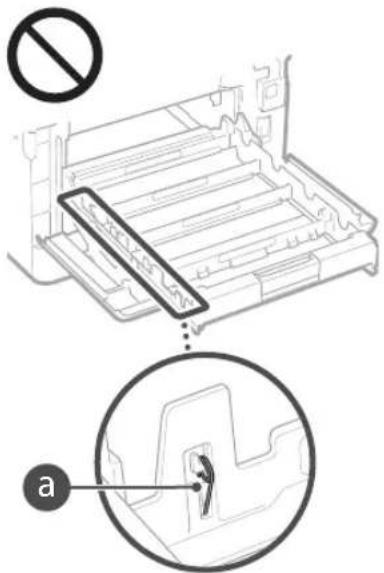
Mny kLeivete ToV diakotn Aeitoupylac kaliny avoyete Ta kaLmuata otav n ouakeun eiva ae leitoupyla. MtopeI va npokAnouv epnokc xapTou.
Kata t n eTaopopa TnC OuaKeunc
Tia va anopuyete 3a3n Tnc ouakeunc kata n metapopoda, npobetae ota e
Apaepote tic kaoetc ycapitn.
- UoKEuaOte tIN OoKEunOTnV apxiknoukeuaia xnpoiioiUviacra uAiko oukeuaiaoc
Uvtnpnon kai eWnpneic
KaBapEe auty n oukeun taktka. Eav ouoawpeutei okovn, n oukeun evbexetai va unv Aletoupyei ootia. Kata tov kaBapiau, npetee tic aokoubec odyiec. Av npauoataei katio npoBnua kata tn Aletoupyia, avatepete otv. Avtietwn npoBnpatw. Eav dev elvat duvat n enlauon tou npoBnatoc n moteet e ot anatei tai emBewpon nnc uokueuc, avatoeTe OTN EvOTa Eav dev elval duvat n enlauon evoc npoBnatoc.
APPOEIAOIOIHAIAN
Piv an tov kaapio, aevepytonote tn oukeun kai yale To kawdo peuataoc ato tvpiKa evaalaoeoupeuaoc. Se avitbetn nepiittwn, npoevi npokanBei npkayia nektona
Anouvse To kou kauwio peuatao kai KaepiTe To eva otewo navi, yia va apapeote mokov kal npwuia Hooowpeuyn okov npoei va anoppapoei uypoaia an tov aepa ka va npokaede npkayid ev epei oetnapr pto peua.
Xpnjopionoiote eva vmo, kala otmupevo navi yia va kaqapioete tn ouakeun. Na ouakeeet To ravi mavo oe vpO. Mny xnpjopoinoite Toovotveua,BeVxvN,diAuniko unoyiacn aalec EupkeTec ouoic, Mny npjopoinoite Xaptoavla n xaptonetoTec. Eadv ta nekptiKaepn oTo eawtepiKtnc ouakeur Epouv ne aonpne uata ra Ukic, uopei va dnnioupynEi otatikoc nektpiaucnva npoknEi npkayia n kekponaixiia.
ELevye Tepio6ka To kaiwio peuatoc kal to opia oakouia, auoyeec anoilec, 0Bopec, puuyue c npetoAik EKtoon eepotntac. Puov ouexion tnc xponc kalwoiu peuatoc npiie qoepoc uipoe va npokaleo npkayia n aeKtonn
AIP0EOXH
2To eoutepiK Tc oukeunc unapxouv EApntnata uipnnc Taonk Kai Bepokpaiaac Evakounmteautaetepnnta,npoe va unoote tpaunatno nkyaujata.Mny aayCETe KAVVA EApntnTc ouakeunc nou dev unoBekveta o tyepidio.
OtroTOnoTeTeXapntn apaipete
muokapioEvo xapnt npooEe va pv kopet
ta xepia oac otkpcocouxapno.
Noukioti nepiopiouoi yia tn xpion tou npoiovtoc kalwv EIKOVWV
H xpnon tnc ouakeunoc ac yia tn oapwn. TnV EKTUNON nTnV ME OIOIOvOBNIOTE aALo Tpno avanapaywn ouykepuevw eyypaow, KaWc KAI XPOON TOW TAPAYOpeuw EIKOWV EKTUNWEW, MOpel va anayopeetai ano Tov vOoKai va exel w anotEeaQa NOWIEC KAI/ aOTiKc EUUVEc AkoLouBc EvbEKTKN Liota Me Ta ouyekpueva eyppda. Autn H niota Elav mOVOEvac onyoc. EaV devote ayoupoi ta YN vomuTNTA TNC xPOnc TNC oukeunoc ac yia tn OApwn, TnV EKTUNON nTnV avanapaywn
evoc yypapou, cthote ek tw npotepov tn ouuoun evoc voukou.
Xaptovopuiqaata
TaEitwnKec emayc
EvroAecnnpwn
Kounovia troop
- IIOIOTIOINTIKA KATAOeoeo
△aβatnpia
- Ppaataoana (akupwvea n npakupwve)
Eyypapa oxetikpa e Tnv Eioofo kai npapovn oaoaow
AikpiKa oToxEia nOnmuata
Xaptooua (akupwueva n un akupwvea)
EppapaKaataaCng
OuOlaya n ooiOayiexpeouc
Emitayec nEvtoale,mpowunncnouekdsovtai anKpatkeumpeiec
Anoeikika kupiotntac eToxw
Aoeec yia oxjmuata kal motoonntiktaftaw
Epya ME KATOxupueva bikaiuata/Epya TExnc xwpiTnv aedia tou katoxou TuV Tneupatukv bikaiupatuw
Regulatory information for users in Jordan
MF635Cx/MF633Cdw includes approved Wireless LAN Module (Model name: AW-NM383). Contains Wireless LAN Module approved by TRC/ SS/2014/38
Papáρτημα
Regulatory information for users in UAE MF635Cx/MF633Cdw includes approved Wireless LAN Module (Model name: AW-NM383).
TRA
REGISTERED No:ER0126617/14
DEALER No: DA0060877/11
Regulatory information for users in Russian PoiTBePekHeHne COOTBETCTBnMInKOMCBaRn PocCn: DeNapauncoOTBETCTBnN D-MJPD-4784 ot 02.05.2017 roDa,JeCTBnTeBHaNo 02.05.2023 roDa,apeYrCTpRpoBaHa a DeepaIbHOM areHTCTBc CBaN 17.05.2017 roDa
RE Directive
(For Europe Only)
RE Declaration of Conformity
English (EN) Hereby, Canon Inc. declares that this equipment is in compliance with Directive 2014/53/EU. The full text of the EU declaration of conformity is available at the following internet address: http://www.canon-europe.com/ce-documentation Wireless LAN Specifications Frequency band(s):2412-2472MHz Maximum radio-frequency power:15.98dBm
CLASS 1 LASER PRODUCT LASER KLASSE 1
APPAREIL A LASER DE CLASSE 1
APPARECCHIO LASER DI CLASSE 1
PRODUCTO LASER DE CLASE 1
APARELHO LASER DE CLASSE 1
LUOKAN 1 LASER-TUOTE
LASERPRODUKT KCLASS 1
Under transport of maskinen
Gor fologende, hvis du vil undgata beskadige maskinen under transport.
MF633Cdw/MF631Cn(F170100)
EMC-kravene i EU-direktivet
Regulatory information for users in Jordan
MF635Cx/MF633Cdw includes approved Wireless LAN Module (Model name:AW-NM383). Contains Wireless LAN Module approved by TRC/ SS/2014/38
Regulatory information for users in UAE
MF635Cx / MF633Cdw includes approved Wireless LAN Module (Model name: AW-NM383).
TRA
REGISTERED No:ER0126617/14 DEALER No:DA0060877/11
Regulatory information for users in Russian Повлтбждени COOTBETCTBIMHKOMCBAN PocCM:ДeКларцИС COOTBETCTBIM NД-МДР-4784 ot 02.05.2017 roda, DeIcHTBNTeNsHa Do 02.05.2023 roda,ЗергчтпробанaВФЕдералнAm eHrTCTBe CB3A17.05.2017 roda
RE Directive
(For Europe Only)
RE Declaration of Conformity
English (EN) Hereby, Canon Inc. declares that this equipment is in compliance with Directive 2014/53/EU. The full text of the EU declaration of conformity is available at the following internet address: http://www.canon-europe.com/cedocumentation Wireless LAN Specifications Frequency band(s):2412-2472MHz Maximum radio-frequency power:15.98dBm
Czech (CS) Timto spelecnost Canon Inc. prohlasej, ze toto zafrzeni je v souladu se smemici 2014/53/EU. Uplne zneni EU prohlaseni o shode je k dispozici na teo internetové adrese: http://www.canon-europe.com/cedocumentation Technické udaje bezdratove LAN Pásmo(a) frevence: 2412-2472 MHz Maximálny fonk radiove frevence: 15.98 dBm
Danish (DA) Hermed erklaerer Canon Inc., at dette udsty er i overensstemmelse med direktiv 2014/53/EU. EU-overensstemmiseserklaringens fulde tekst kan vindes pa folgende internetadresse: http://www.canon-europe.com/cedocumentation Trads LAN specifikationer Frekvensband: 2412-2472 MHz Maks. radio frekvenseffekt: 15.98 dBm
CLASS 1 LASER PRODUCT
LASER KLASSE 1
APPAREIL A LASER DE CLASSE 1
APPARECCHIO LASER DI CLASSE 1
PRODUCTO LASER DE CLASE 1
APARELHO A LASER DE CLASSE 1
LUOKAN 1 LASER-TUOTE
LASERPRODUKT KCLASS 1
Regulatory information for users in Jordan MF635Cx / MF633Cdw includes approved Wireless LAN Module (Model name: AW-NM383). Contains Wireless LAN Module approved by TRC/SS/2014/38
Regulatory information for users in UAE MF635Cx/MF633Cdw includes approved Wireless LAN Module (Model name: AW-NM383).
TRA
REGISTERED No: ER0126617/14
DEALER No: DA0060877/11
Regulatory information for users in Russian Pocn:ДeКларцИС COOTBETCTBnMнHcOMCBn Ora 02.05.2017 roda, DeIcHTBntenla do 02.05.2023 roda,Зерпсгрога в Бдeралбом areIcTBe C8Rn 17.05.2017 roda
RE Directive
(For Europe Only)
RE Declaration of Conformity
English (EN) Hereby, Canon Inc. declares that this equipment is in compliance with Directive 2014/53/EU. The full text of the EU declaration of conformity is available at the following internet address: http://www.canon-europe.com/ce-documentation Wireless LAN Specifications Frequency band(s):2412-2472MHz Maximum radio-frequency power:15.98dBm
CLASS 1 LASER PRODUCT
LASER KLASSE 1
APPARELÁ LASER DE CLASSE 1
APPARECCHIO LASER DI CLASSE 1
PRODUCTO LASER DE CLASE 1
APARELHO A LASER DE CLASSE 1
LUOKAN1 LASER-TUOTE LASERPRODUKT KCLASS 1
Lasersträlen kan staat skadelig for mennesker.
Da stråling som stråles inni produktet skjer
innenfor beskjett kabinett og eksternen deskler,
kan ikke lasersträlenkommen ut fra maskinen mens
brukeren benyfterden. Les falgende merknader
og instruksjoner for skikerhet.
MF633Cdw / MF631Cn (F170100)
Krav til elektromagnetisk kompatilitet (EMC) i EU-directivet
Dette utstyret er i overensstemmelse med vesentlige krav til elektromagnetisk kompatilitet (EMC) i EU-direktivet. Vi erklær at detteprodukter er i samsvar med EMC-kravene i EU-direktivet ved nominell spunning pÅ 230 V, 50 Hz selv om angitt spunning pÅ produit er 220 til 240 V, 50/60 Hz. Bruk av skjermet kabel kevres for ä etterkomme de tekniske EMC-kravene i EU-direktivet.
Regulatory information for users in Jordan
MF635Cx / MF633Cdw includes approved
Wireless LAN Module (Model name: AW-NM383)
Contains Wireless LAN Module approved by TRC/SS/2014/38
Regulatory information for users in UAE MF635Cx/MF633Cdw includes approved Wireless LAN Module (Model name: AW-NM383).
TRA
REGISTERED No:ER0126617/14 DEALER No:DA0060877/11
Regulatory information for users in Russian IpoTBepeKHeIe COOTBETCTBnMIMKCMCBAN PoCCm:JeKApaLcNcoOTBETCTBnNpD-MJPD-4784 02.05.2017 roDa, DeCTBNTeBHaNo 02.05.2023 roDa,3apeHCTPnpOBAHbFDepeAhlomareHTCBe CBAHn17.05.2017 roDa
RE Directive
(For Europe Only)
RE Declaration of Conformity
English (EN) Hereby, Canon Inc. declares that this equipment is in compliance with Directive 2014/53/EU.
The full text of the EU declaration of conformity is available at the following internet address: http://www.canon-europe.com/cedocumentation
Wireless LAN Specifications
Frequency band(s):2412-2472MHz
Maximum radio-frequency power:15.98dBm
Czech (CS) Timto spelecnost Canon Inc. prohlasuje, ze toto zaizenji v souladu se smernici 2014/53/EU.
Uplne zneni EU prohlasei o shode je k dispocizi na teo internetové adrese: http://www.canon-europe.com/cedocumentation Technické udaje bezdrátové LAN Pásmo(a) frekvence: 2412-2472 MHz Maximálni vykón radiové frekvence: 15.98 dBm
CLASS 1 LASER PRODUCT
LASER KLASSE 1
APPAREL A LASER DE CLASSE 1
APPARECCHIO LASER DI CLASSE 1
PRODUCTO LASER DE CLASE 1
APARELHO A LASER DE CLASSE 1
LUOKAN1 LASER-TUOTE
LASERPRODUKT KCLASS 1
MF633Cdw / MF631Cn (F170100)
EMC-krav i EG-direktiven
Regulatory information for users in Jordan
MF635Cx/MF633Cdw includes approved Wireless LAN Module (Model name: AW-NM383). Contains Wireless LAN Module approved by TRC/ SS/2014/38
Regulatory information for users in UAE MF635Cx/MF633Cdw includes approved Wireless LAN Module (Model name: AW-NM383).
TRA
REGISTERED No:ER0126617/14
DEALER No: DA0060877/11
Regulatory information for users in Russian PoiTBePJIeHHe COOTBETCTBNI MINKOMCBAN POCCIM:ДeКлapaцIN COOTBETCTBNI NД-MДРД-4784 02.05.2017 roJ, DeIcTBITeNbHa 02.05.2023 roJda, azeRtICrnpoBaHa B DepepaIbHom areHTCTBe CBAH 17.05.2017 roJa
RE Directive
(For Europe Only)
RE Declaration of Conformity
English (EN) Hereby, Canon Inc. declares that this equipment is in compliance with Directive 2014/53/EU. The full text of the EU declaration of conformity is available at the following internet address: http://www.canon-europe.com/cedocumentation Wireless LAN Specifications Frequency band(s):2412-2472MHz Maximum radio-frequency power:15.98dBm
Czech (CS) Timto spelecnost Canon Inc. prohlasej, ze toto zaifenje v souladu se smemici 2014/53/EU. Uplne zneni EU prohlasei o shode je k dispozici na teo internetové adrese: http://www.canon-europe.com/cedocumentation Technické udaje bezdratové LAN Pásmo(a) frekvence: 2412-2472 MHz Maximáni vykon radiové frekvence: 15.98 dBm
Danish (DA) Hermed erklærer Canon Inc., at dette udsty er i overensstemmelse med direktiv 2014/53/EU. EU-overensstemmelseserklaeringens fulde tekst kan vindes pa falgende internetadresse: http://www.canon-europe.com/cedocumentation Tradios LAN specifikationer Frekvensband: 2412-2472 MHz Maks. radio-frekvenseffekt: 15,98 dBm
Regulatory information for users in Jordan
MF635Cx / MF633Cdw includes approved
Wireless LAN Module (Model name: AW-NM383)
Contains Wireless LAN Module approved by TRC/SS/2014/38
Regulatory information for users in UAE MF635Cx/MF633Cdw includes approved Wireless LAN Module (Model name: AW-NM383).
TRA
REGISTERED No:ER0126617/14
DEALER No: DA0060877/11
Regulatory information for users in Russian
POnTBeKJeHHe COOTBETCTBnMHNKOMCB3n
POCCm:JekapauaCooTBECTBnN#-MMDP4784
02.05.2017 rOa,JeCTBnTeBHa do 02.05.2023
rOa,apeYrCTpnoBaHa B QepepaBbHom areHTCTBe
cB3n17.05.2017 roa
RE Directive
(For Europe Only)
RE Declaration of Conformity
English (EN) Hereby, Canon Inc. declares that this equipment is in compliance with Directive 2014/53/EU. The full text of the EU declaration of conformity is available at the following internet address: http://www.canon-europe.com/cedocumentation Wireless LAN Specifications Frequency band(s):2412-2472MHz Maximum radio-frequency power:15.98dBm
yctaHObTeOpuHnHaI npaBnIbHo
3aONHnTe npeed hauaIOM 3KcnnyaTaun
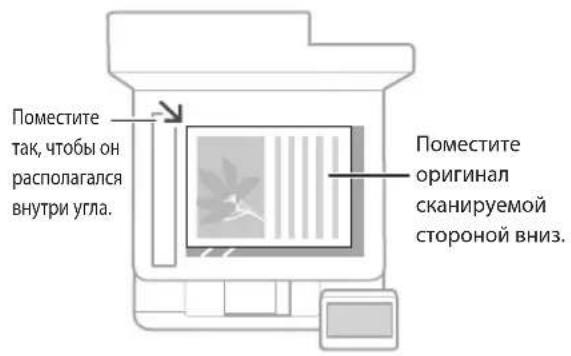
IomeCTnte opuHnHaHa CTeKIO 3KcnoHnpoBaHnA


IopxodnTJIACKaHnpoBaHnCTpaHnU n3KNHn JxypHaNoB,aTaKKeBbpe3OK n3ra3ET.
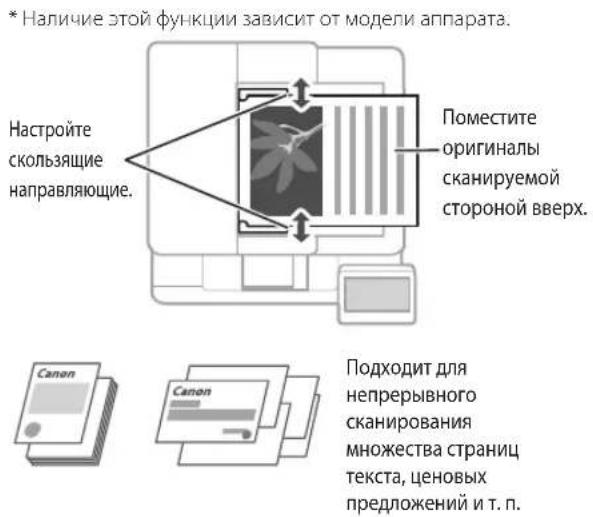
IomeCTnTe opuHnHaBb BycTPOiCTBO nOaH*
3anyctnte onepaunoc naneyn ynpablenna
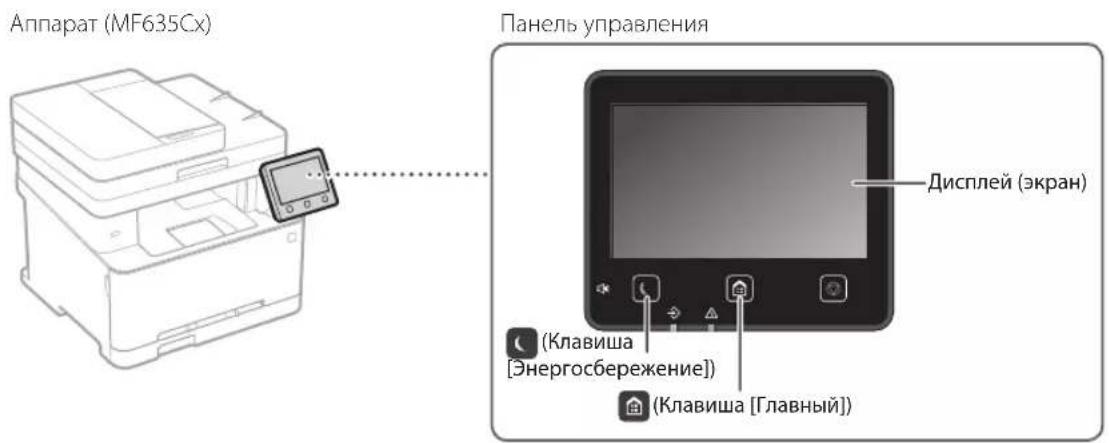

Сан上诉布ане
1.YCTaHOBtEOpnHnHaI.
2. HaxmTe u Bb6epuTe
3. BbIepeTe TIN cKaHIpOBaHn N BBeIte Heo6xoJmMbIe CBeJeHn.
4. Bb6epnte
TnblcKaHnpOBaHn
CoxpaHHTb USB-namrTn
Otnpabntb no 3n. noyTe
OtnpabntbHa faiIOBbI cepBep
CkaHnpoBaHne C
KOMNbIOTepa
MF Scan Utility
PnDpO6Hee
«Санрованe»В
PyKOBOCTBE NIOJB3OBaTeJIa

KoNiPoBaHne
1.YCTaHOBtEOpHnHaI.
2. HaxMMTe a 3aTem Bb6epnte
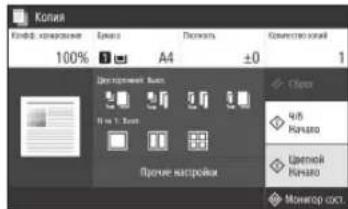
3.YkaxnteTppe6yembleHaCTpoKKn KOnnpoBaHnA.
4. BBeInTe Tpe6yEmoe YmCNo KOnnI.
5. Bb6epTe <4/6 Hauano> nnn
Ione3bIe HacTpoKn KOnnpoBaHn
NHa1
2-ctopohnee nn 1-ctopohnee*
yBENHHeHnIyMeHbWeHne
KoNnpoBaHne IV-KapT
HaHnue 30JyHKUIN 3aBVCIT OT MOnEn annapata.

POnpo6Hee
«KoNipOBaHnE»B
PykoBODCTBE NOIb3OBaTeJIa

Qakc*
1.YCTaHOBnTeOpINHAn.
2. HaxmTe n BbIbepnte
3. BBeDnTe INHΦOpMaζNIO o nOyuaTeNe.
4.укжnteТрбуемьеHaCTpoKnФakca.
5. BbIepeTe
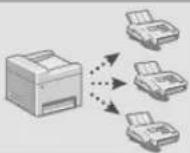
Ione3HbIe yHKuNn akca
IocneBoTaBbHa paCblnKa
PnemB narnTb
■PK-φakc
Pone3HbI He NaCTpOKn neaTn
2-CTOPOHHRA
NHa1
PeeaTb 6poWIOp*
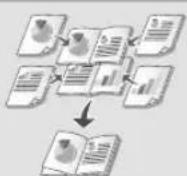
*Hannne 30TouyHKun 3abucnt OT moen annapata.
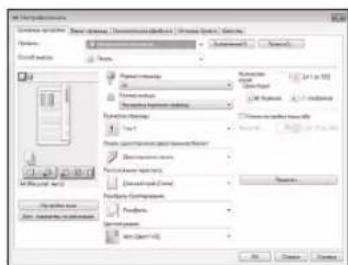
Pdpo6Hee
«ПуаТБ»ВPyKOBOCTBE NOIb3OBaTeJIa
3arpy3ka B kaccety dny 6ymarn
1 BbIbHbTe Kaccety Iy6ymn.
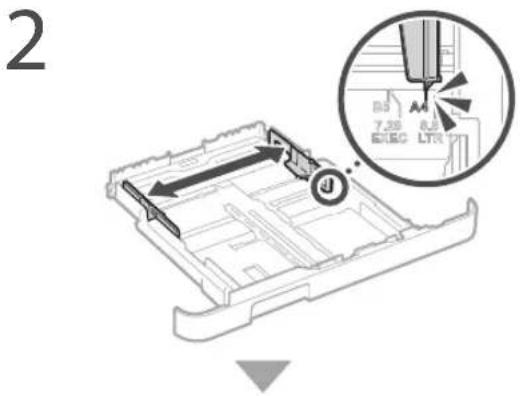
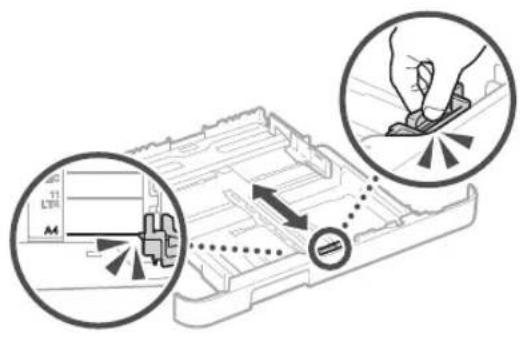
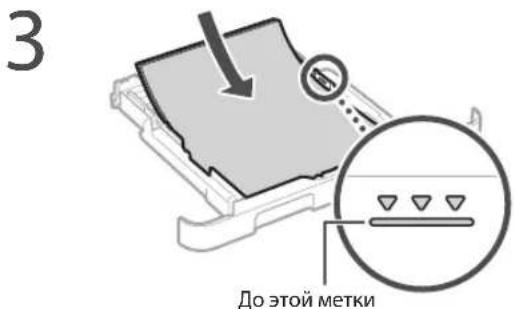
4 YcTaHOBtKe Kaccety nIg 6ymaru Bannapat.
Ecnn opmat nnn Tn 6ymarn ot nnuaotcra ot
oopmata nn Tnpa panee nCnoB3OBaBwee
6ymar, o83ateIbHO n3MeHnte HaCTpOKn.
5 Haxmte Bb6epnte
6 YkaxnTe opMaT n TnB GyMaRn B COOTBeTCTBn C kpaHOM.
3a rgy3ka B loTOK ryHoi noDaun
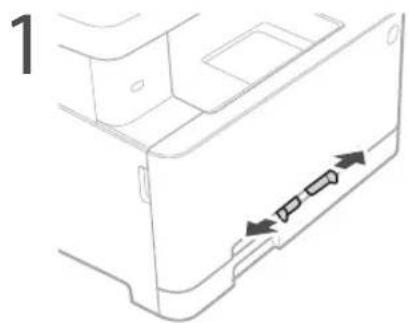
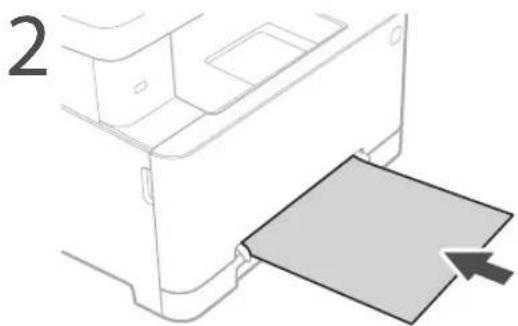
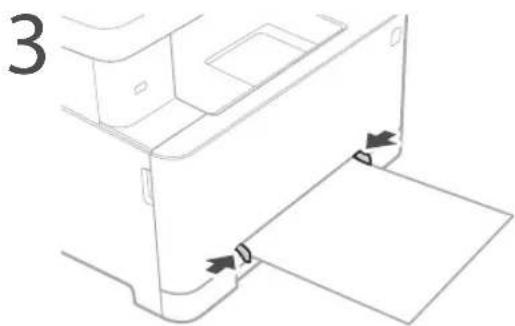
4 Ykajnte opmat n TnB ymaH B COOTBETCTBn C KpaHOM.
Annapat He pa6otaet 3amrae 6ymara
PpOBepeCnEduoee.
BkIIOUeHOIINITAHne?
- Bbien nn annapa n3 cnpuero pekma?
Ecn nncnne n HndkaTop BbIKIOHeHbI, HaxMNTe BbIKIOUaTeNb NITAHIN.
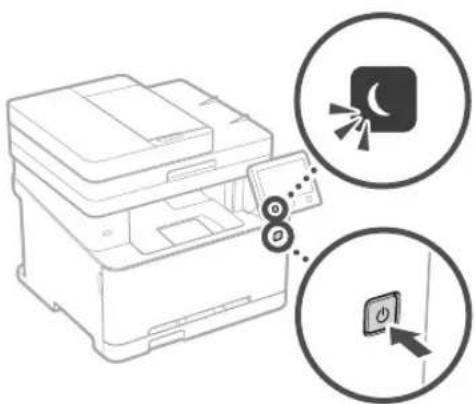
-Праьиьн Ho JI NOKJIQUeH Ka6eB NtAHHa?
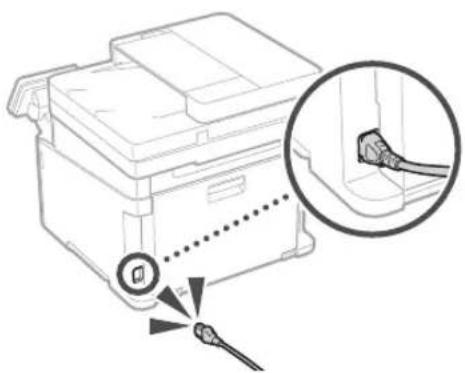
Ecn npo6nema He yctpaHeHa, cm. PykoBoCTBO nonb30BaTeNa
Pn 3amTnn 6ymarn nnoBnetaKpaH, aHaIOnuHbI npUBeHHOMy Hxke.
YcTpaHInTe 3aMTrnE 6yMaRn B COOTBETCTBUN C HHTpyKUAMN Ha 3kPaHe.
3aMeHa KapTpIa cToHepom
3aMeHnTe KapTpNk C TOHePOM B COOTBeTCTBm C HHTpyKUAMn Ha ekpaHe.
Homep moeJn 3anachoro KaptpnJa c ToHEPOM
-Canon Cartridge 045 Black (Hepnbl)
-Canon Cartridge 045Cyan (Bupxozobby)
- Canon Cartridge 045 Magenta (MannHobby)
-Canon Cartridge 045 Yellow (KenTbI)
- Canon Cartridge 045 H Black (UcpHb)
-Canon Cartridge 045 H Cyan (Bupio30b)
-Canon Cartridge 045 H Magenta (MannHObby)
-Canon Cartridge 045 H Yellow (XenTb)
Приложения
Baxhble yka3aHnnoTexHnke 6e3OpacHOCTn
B ATOM pa3Dene npBedeHb BaxhBiye yka3AHnIIO
co6bOeHIO texHKn6be0anachOHTN, KOtOpBe
NOMOTY 136eKabTpaBMMPOBAHNI
nonb3oBATENE STOrO annapa TnpyrNx IIODei,
aTaKe NopuIMyUeCTBa. IpOnTne daHHN
pa3DenpeNd HauAnOMcNoB3oBAHNI annapaTn
nCNe dyTe pnpBEdEHbIM 3deCb INCTpykUHM.
He bInONHNIte KAKNX-ImoDeCTBn, OINCAHne
KOtOpBX OTCYCTBYeT B HAcTOAeM pyKOBODCTBE.
Canon He Hecet OTBeTCTBeHHOCHTs 3JIIOBle
NOBPEXDEHNI, BO3NHKUNe BCNECTBVE
OCUYeCTBNEHJeCTBn, HeYKa3AHNbX B
HACToHMe pyKOBODCTBe, HeHaNJexKaJeero
NCNOLb3oBAHNI yCTPOVCTBa NII PpOBeDEHNI
PEMOHTbX paBOT N BHECEHNI IN3MeHEN
TpeBIMN liCaAMN oPraHN3aUNMI,
HE ABNIOUIMMCn PpeCTABNTeLIMM Canon NINI
HE IMeOUIMM ABTOPINaUM KOMNAHN Canon.
HecoNIOHEne INCTpyKUn No cNOLb3oBAHIO
daHHoro annapata MoKet npBBeCTN K TpaBME
n (m) NOBpeKDeHIO, Tpe6yUOeMy
DOporOCTOUIeR POEMHTA HA KOtOpB MOKET He
pacnPoCTPAHbCB ORpaHHueHHAR rapaHTN.
AOCTOPXHO
Copejnt npdynpexJeHne ob opeaunx, KOTOBBE BCHyae HnPaBbHBO T BYIOHNHEHMOI TPNEBCTK TpaBME NIN IINBIENI INOeJ. DII 6301ACHO EKNPATAUIN annapata bcera dbpaaiTe BHIMAHNE Ha 3TN npdynpexJeHne
BHIMAHNE
CoeepnnpdynpckJeHne 60 npaeHHKOTOPBb Bcnyae HnpeBaBbHOBTOBIOHNHEM MOrT pNBECTN K TpaBMAMIIOE, Dn8 be3oanChO NKcNpyataun annapata Bcerda O6paJnte BHMaHHe Ha 3TN npdynpckJeHH.
BAXKHO
CoepKIT Tpe6oBAHINIO 3KnIyataaUN IN ORpAHnueHN, BHIMATEbHO O3NaKOBMBteC bTMM NIOJKeHNiM B CEJIAX HADNEXKaUeEN 3KcNlYATAuNN annapata IN BO N36ExaHne NOBpeXdHeHN annapata IN IN MnyecCTBa.
YCTaHOBKa
JnB60aHONNERKOH3KcPnyatauny
yCTPOBCTBA CNEuyETBHIMAteNsHO O3HaKOMNTBCr
CnpNBedeHHbIMNHKeMepaMn
npEOCTOPOKHOCTN yCTaHOBTyCTPOIcTBO8
pNEMMEMOMJHEO MecTe.
AOCTOPXHO
HeYCTAHABINBAIte YCTPOIcTBOBMeCTe C BbICOKM PNCKOM BO3OPaHn INN NopaKeHn 3JIeKTPnHECKIM TOKOM.
Mecto,ge3akpbblBeHHNTHIOHHBIEOTBepCTN(CNHUKOMbNI3KOKCTeHaAM,KPOBAITRM,INBaHaAM,KOBpAMNOXOKM06EKTAM)
BlaJXHOHn 3aJIbHeHHO NOMeJeHn.
MeTO,IOBepxEHHO B0dJECTBNO pR
COINeHuHOrO CEBt,IMNHa OTKpHTOMoB
MecTo,IOBBePExHHoe BO3eINCTBNIO BOC TEMNepaTyp.
MeCTOB6n3NOTKpBTOORHA
PADOM CO CNTNPTOM, pACTBOPHTENIMN INpyTMMIJIERKBOOCNNAHEKAUUMMCBAEUECTBaMNI.
PpOue npdeynpeKdHn
He npocenHnTke K daHHOMy annapaty HecepTnHpObaHbIe KaBenn. Heco6JIIOHene 3TO rpe6ObaHN MoKET npBeCTN K NOKAPy INI NPOaKeHN 3JEKTPueckNM TOKOM.
He nomeaie Ha annapat 6pactb npytne MetaIIHueCKNe IpeMeBnNEMKcTc BOJOn. KOHTAKIOCTOPOHNXBEUcETB C 3JIeKTPuHecKMM KOMIOHEHTAMN BHYtPN yCTPOJCTBa MoKeT CTbI pNCHHO BO3TOPaHn HnI NopaxEHHN 3JIeKTPuHecKm TOKOM.
YCTaHaBnBnBnIyDnIaIINJIOHNITbHbIe nPiHApIeKIOCTN,He3a6yIbTe BbIKNIOHTb NITaTHe,OTcoEINHbBNIkyBbHpyaNTaTHA HOTPOsETKm,A3TEMOTcEOINHbTBCE NITepFeCNbIEKa6BenInIbHypNTaHnO rAnnapata.BnPOTNBHomClyuaeBO3MOxHO NOBpeKdHMeUHpyaNTaTHNIM NITepFeCNbIXKa6BeNe,UToMOxETPnBecTN KNOkApYnNopKaKeHIO 3JIeKTPNuecknM TOKOM.
ECINBvCTPOINaJNTnHOpDHBieBeueCTBa,OTKIOHHTeHypNITAHNAOT3NEKTPnIECKoPbIKNnOBpATTEcKMeCTHOMyYNOHMOEHHOMyIINEPyCanon.
He yctaHaBnBaIte yCTpoiCtBO Byka3aHHbIX HNKe MeCTax.
YcpoNCTBOMOKeTynactb,TOPnBBeJETK TpaBME.
- HeyctoynBaB noBepxHocTb.
- Mecto, noDBepKeHHoe Bn6paun.
ABHIMAHHE
He yctaHaBnBaIte yCTpOcTBO Byyka3aHHbIX HNKe MeCTax.
3TOMOKETnpBecTNKIOBpeKdeHNOYCTPOINCTBA.
- MecTa C BbICOKO HIN HN3KO TemnepaTPOH INBnXHOCTbIO.
Mecta, noDBepKHeHHble pe3KMn nepenada TMnepaTpyblnnBnAekHOCTN.
MectaBnnsOBopyoBaHnco3aIOeero MaHTHbIeNNEKTPomarHHTbEBOHbI.
JaabopatopnNdpyne MeCTa,Fe npOcxoarT XMMueckne peakun.
Mecta, noDBepKHeHHbIe BO3dIeCTBIO pa3beJauuHIX N TOKcNHybIX Ra3OB.
Mecta, KOTOpbIe MOrTJeΦoPmIpOBA TbCB NOI MAccOy cTPOINCTBa Nn rIe yCTPOINCTBO MOKET Occtb (HAnpIMep, Ha KoBpe n T. n).
I36eraaTe MeCT yCTAHOBKn C nIOXOBEHTNIAUne.
BoBpMaNCIOJIb3OBAHnA 3TO yCTpoICTBO
TReHepPpyET O30H N DpyTHe Bb6PoCb B MaIbIX
OBbEmax. OHHe ABNtCHOnaCbIMn dI
3DcPOBb. THe Me Hee HBe6PoCb MoTy CTaTB
OuYTMbIMN B TeHeHne DIITeNBHO
HCNOJb3OBAHnB N IIOXo IPOBETPNBaEMBX
nomuehenx. DnI NOpeKahn KOMΦopTHbIX
ycbONB paOToI peKoMeHdyTeCN oEcneyHb
BEHTINAUIO NOMEUHn, B KOTOPM YCTAHOBNEH
annapat. TaKke CneJeT N36eraTb MecT, B KOTOpBX
LIADn HAnboone NoDBepKeHb BO3dEiCTBIO
Bb6PoCByCTpoICTBa.
He yctaHaBnBaIte yCTpoIcTBo B MeTe C NOBbIeHHO KOHdEHCaUeI
Pn INHTHNCBHOM OOBpReBE NOMEeHNA, B KOTOpOM yCTaHOBNEHO YCTPOINCTBO,aTAKKE B CUYAAx NEPeMeUeHNA YCTPOINCTBA IV3 cpeblc 6Oone pOxAaHbIM IINI CYXHM BO3DyXOM B NOMEeHN C OOEbe BtCOKOn TMPePaTyPOI IINI NOBbUeHHbIM YPOBHEM BlAaXHOCTN, BHytPN YcPToCHBa MOYr OpbzObaTBc KaNN BOdy (KOHeHCAT).NcONb3OBAHne YCTPOINCTBA N NOO6HBx YCLOBHx MOKeT PnPBCEK T 3aMaTIO 6Myar, NIOXOMy KaHeCTBy NeaTHN IINI NOBpeJeHNO YcPToINCTBA. PepeHaHAnOM
3Kcnnyataun yctpoCTBO DoJXHO B TeueHHe MeHee DByx YacOB aanTIPoBaTbCa K TempeType INBnaXHOCTN OKpykaioue Cpebl.
ДлгсрднБвсOTe3000MeTpOBи6OЛьш НадуpoBнemMOPR
YCTPOINCTBA C XECTKIM DYNCKOM MORYT PABOTaTB He npabnHbHO Ha Bcote OKOIO 3000 MeTPOB IN BoNBue HAD ypoBIEM MoP.
BbipabHnBaIOJIue HOXKN(TOnbKO nI npOyKTOB, KOToPbe MMOCHaJeHbI)
BbpaHnBaIOuHe HOKKn DOJNkHbOcTaTbCaHa annapate nocne erO yCTaHOKKn. B npOTINHOM cnYae ycTPOIcTBo MOKeT yNaCTb HnHn KaKeHnITbcr, YTO MOKeT IpnBeCTN K TpaBMe NOIN3OBATEIN.
PojknoueHne K TepeohHOH LHHN (TolbKO Jn npOkyTOB, OCHaUeHHbIX yHKUeH fakcUMUNbHO CB3H)
3TOT annapat COOTBETCTBYET CTANAPTY
aHAnorOBo TELEOHOH NINHN. 3TOT annapat
MOKet 6bIb TNOKNIOeHT OJIbKO K TENEFOHOH
cTeN o6eero NOBtBOAHN (TCOIT). NIOKNIOeHHe
annapata K uNFPoBOH NIN BldENEHNO
TENEFOHOH NINHN MOKET HApUHTb ERO paOby
n pInBeCTN K NOBpeJeHHIO. PpeKeJe Cm
NOkLIouyab annapat K TENEFOHOH NINHN,
npOBepbTe ee TIN. EClN Bb XOTNTe NOKNI0HHTb
annapat K OTTOBONIOKHOH NINHN NIN IP-
TENEFOHOH, OOBaTIeTcB K NOCTABuNKAM
COOTBETCTBYuNN yCNYr.
PnncnoJIb3OBaHm6ecnpoBODHOIOKaIbHOI cTeN
(TonbKOJnnpoDKOB,OCaJIeHHbIX ФункIMNoKJIOHeHnK 6ecpnoBOHOHn LOkaJIbHOc CETn)
- YctahOBnIe yCTpOJIcTBO Ha paCCToHn H He 60Jee 50 MetpoB OIT 6ecIpoBoHOro MapuPyTu3aTopa.
YCTAHOBNTE yCTPOBCTBO B MECTe, Tge CBA3b He 6ydyHT HApWATb DpyTHe 06BeKbI (ecnno BO3MOXHO), MoUHcTb CNHaMoXet 3HAHTENbHO NAdaTb PnPpOxOJIeHNupe3 CTHe IINIObl.
YCTAHOBNTyeCTPOCTBOKMOKHOdaJIbweOTUΦpOBIxBecnpoBOHbIXTeNeΦoHOB,MMPOBHOBIXneHnIpyrO06OpyDobAHNA,BRAIOeROCAVTOCHNKOMpaNIOBH.
He nnonb3yTe annapaT pAOM C MeHnHCKM o6opyoBaHMe.PaIOBONHbI, HnyaeMbte annpaTOM,MOYrCo3daBaTb Nomexn Ira paOToM MeHnHCKoro o6opyoBaHry,TO MOxET npINBcTNI NOBpeJeHNIO HNEcHAcTHOMy CNYaHO.
IcTOUHNIITAHN
AOCTOPXHO
IcnoB3yTe TOnbKO TOT NCTOCHN KNTaHnK TOKOpBt OTBeHaT Tpe6oBaHNFM K HApnaEHHIO.HecobIoJeHne 3TOrO npabnA MoKeT CTAb PnHnHO B03RopaHn INN NOPaxEHn 3JNEKTpUHeCKM TKOM.
He nCnOb3yIte DpyrIe 1hHypbl NtAHHN, KcPme 1hHpa, BxOaIeRo B KomnneKT npInTepa,Tak KAK 3To Moxet CTaTb PnUHHoB Bo3roPAHH INI NopaeHH 3NeKtpueckm TOKOM.
Bxodn B KOMIJIeK UHyp nHTAHnnaepHaHaeHN IcNb3oBAHnToNbKO cdaHHbAmnapatom.He noKJkuayte 3OT uHyp npTahnA KdpYfM yCTpOyCTbAM.
He H3MeHnIe, He TAHInTe, He CnBaeTne H DeΦopMpyRe KAKM-Imo BOHNbIM BedyuM K NONOMKe CnOCOBm UHyp NITaHn. He CTABBe TKeJIbe npedMeTbHa UHyp NITaHn. NobpeKdEHHe UHpya NITaHn MOket npINBeCTN K NOkApy NIN NOpaKeHIO 3NeKTPnueckm TOKOM.
He BCTABNIEHTENCEbHypa NITAHINB PO3ETKHy He HsIeNAKeAteero MOKpbIMpykAMI -TOMOKETnPMBcTNI KOpAkeHHIO ANKETPNCKCM TOKOM.
HeNCIOBb3yTe yDINHINTEbHbE HHyhpynn YDHNHINrC HECKOBkMMPOETKAMC JDAHHMycTpoIcBOM.HeCObIOJeHn ETOrTO TpeGobAHMOKeTIPnBECTKNTOKAPY NIOPAKEHNOJEIKPTPNCKHM TOKOM.
He CBopauBaBnTe UHyp NITAHn, He 3aBbBbIe Ero B y3eN, TAK KAKIO MOKET pINBecT N BO3rOpAHN INN NOPaKeHHN ENKTPNueCKNH NOKOM.
BCTABNITRE WENTENb Hypa nHTAHIN B pOcETky cENnpeMeHHORo TOKa NIOHOCTBIO HecobIOeHene3TO rpaBNa MoKet CTaTb npuHNOB3ROPaHNn NnnpaKeHn 3NEKTpyuecknM TokOM.
PONHOCTBIOOTCOENHRETEHTENCEHBTHHPA
NTAHNATPOEETKCENAPEMEHHO TOKA
BOBPMAERpO3bHeBbINONHENE3T0R
PnabnaMOKeTcTaBpNNHOB3GropaHNA
NOPAXEHNAeKTPnueckmTKOMNNI
NOPEXJENHUYCTPOINCTBA.
Y6dTeB,HTO HCTOHNK NITAHNAI ANAPATA pabotaet CTABHNO HE NOIDBepKHe nepenadam HApRKeHN.
He noDBeprainuHypnTahnHarpeBy. HecobnoeHne 3TOrTO TpeoBaanMoKet npINBeCTK TOMy,HTO NOKpBTNe HUpya nTAtN HnAOnABITcR.3TO MOKET CTAb npInHNOB3ropAHnNnnpaKeHHn 2EeKTPDECKHM TOKOM
EcnnpnmeHntbpe3mepHyocnyKobactn coeHNHeHHIHypaNHTAHNN,3TOMOxET npBecNTKeroNpOePckDeHNIKKOTcoeHNHeHHIOPOBODB8HpyrAnnapata. 3TO MOxET CTbTnPHNOBtOOPAHNN
136eaiTe cndyouxn ciyyauyn:
-actoe nOcoeHHeHne NOTcoeHNHTIHypa
-33eBaHHe uHypa nTahnra
CNYbHnE UHpya NITAHINBBO3NE ERO
CAHNT, KOTOPA BCTABNHECH B PO3ETKY, INPPOJOLNIIEBHOPE PIMMEHEHcCNIJK
3NEKTPUeCKo PO3ETKe INHcHtN Hpya
NITAHIN, KOTOPA BCTABNIECTB PO3ETKY.
-mpmeHeHn3nWHei Cnbl K WTeNcEno HHypa NtTaHn.
ABHIMAHINE
Pamctte annapat prdom c cetebon po3ekoi, octabn doctaHNO Mecta BOKpy Tcencel Hhura nTtAHN, 406o erO moXHO bIIO NkEO BbIepHyTB CnYae abapnHOn CNTyaun.
BAKHO
Pn noKnquHn 3neKtponrTaHn
He nocknioate Hhyp nntaHnK hctouHHky becepeboHOrO nHTaHn. 3To MOKet npBecTNI K NOBPEXeHHIO yCTpoiCTBa HApuyehnIO paobOt b CNTEmbl 2NeekpOchabKeHHn.
Ecnu yctpoiCTBO NOKIOUOHO K POSEtKe cTe NpepeMeHIO TOKA C HECONbKIMN THezAMn, He nCIOB3yTe DpyTne He3a dJa NOIqIOUOHNPOOUYCTPOINCTB.
He NknaHte Hyp nTahnK BCtOMrAteBHO po3e Kc TepemHHo TOKa HA KOMKTOpepe.
PpOue MepeI ppeoTOPOXHOCTN
3NeKTPnueckne NOMEXN MORYT PnNBecTN K HEnoJaKaM B paOte yCTPOXCTBa Nn Nn Totepe DaHHbIX.
06paueHne c annpaTOM
AOCTOPXHO
He3aMeIINbHO OTOeOHNHTe WHyp NITAHnH OTOpeTKnOBpaNTeBC KYNONHOOMeHHOMy DInepy Canon,ecnyCTPOHCTBO N3aTe Heo6BnHh Wym,Bdennet HnpNBHnh
3aaxnIbIMnUpe3MepHOHarpeBaETc
IpOdoNKeHnE 3KnpyatauINB TaKx yCNOBAX
MOKeCTaTb PnPHNOB3rpaHnA IN
NopaxKeHn3eKTPnueckmTOKOM.
He pa36bpaate annapat He btaTecb HTOJINBO NAMEHNTB ERO yCTPOACTBE. BHTPN HAXOHTC TOpHne KOMIOHEHTB C BbICOKM HAnpaxKeHnEM.Pa36OpNIOHTKa NIMeHtB YCTPOACTBO aIannapata MOrY IITPnBECTN K IIOKApY INI NopaxHeNIO ANEKTPnueckm TKOM
PaMeCTeYcTPOIcTBaTak,YTObIuHyp TnAHHa, KaBENI dpyTne BHTpeHNHe N EKeKTPnueCkme KOMIOHeHTb HaxOINNCb BHe DOCAraEMoCTdTeN. HeBaINONHeHne 3rTO rycOBIA MOKETnpBecT KHeCuaCTbIM CNYaM.
He paCnblnTe B6m3yCTpoIcTBA
JERKOBOCnnaMeHRAOJIeCEBUEcTBA.KoHTAK
JERKOBOCnnaMeHRAOJIeCXeBEUcETBA
C3NEKTpyueCKMN KOMTOHEHTAMBHYTPN
YCTPOIcTBMOKeCTaTBpNCHON
BO3FOPaHH NIN NopaxHnE3NEKTpyueCKM
TOKOM.
-ПиперемшенихуctpoCTBAob3aTeьнб
ВыкночипсреклочatenNITaHIN,3aTeM
OTcoeHNHTIe UTENCENb SHypa NITAHIN
ИНТЕРФECHBIE KAbEN. BnpOTnSHOM CNYae
BO3MOKHO NOBPEKDEHNE WHPa NITAHIN INI
ИНТЕРФECHBIX KAbEN,HTO MOKeT pINBECTN
КВОБРAPHINO INI NOPAKEHIN
3NeKTOnuCKIM TOKOM.
IocoeHnHnn OTOeHNHa KaebUSB, KOrda WntencB KaebnTahn BCTaBneB PO3ETKcTeN NepemEHORo TOKa, He IpiKacaiTeC K MetaunHeCKO qACTn THe3da, TAK KAK 3TO MOKeT II PnEBCTK N TOpaxEHHO ENEKTPNCHEKAM TKOM.
IIOJIb3yIeMoJyJIbHbIKa6JIbDINHOI MeHbUe 3 METPOB.
IcIOJIb3yIe USB-Ka6eJIb dINHOH MeHbue 3 METPOB.
EcnnBAMMeuAeTWMnpnpaOteyctpoNCTBa EcnnBOnpeJeHNoPaboeepcpeNN peXmE3KcnIpyaTuMWMpaOtaUero annapata npnHHre Heyo6CTBa, peKoMeHdyTeCAHObITbEra ppeJemaM 0fica.
PnncnoB0aHmKapDIOCTMMyTOpA
YCTPOCTBO CO3aET CnaOe MARHHTHOE NOIE, ECNBI HNCNbByete KAPINOCMTMnTOp IN YACTbYEte HekOTOpBie HApUeHnEero paOBTH, OTOJNTDE OT YCTPOCTBA NHEMeDNEHNO 60PATTECBK BPVA.
ABHIMAHHE
He KnaIaIte Ha yCTPOINCTBO TIXKEnbIe nppeMetb, TAK KaOHMOrT yNtAcBn PnPABcETN KTPaBMe.
Buenen6e3oanachocnOTcoedHnTe WHPnNTAHNOI 3NEKTOpcETN, ECN yCTPOcTBO HeNCN0JIbEyETC DOnTFOE BpEM.
Bybte octopoknbl npn OTkpblnn 3akpblnn KpbIeK,TO6bl He TpaBMPOBaT pykn.
136eTaIe KOHTaTpyKIOEKeBbCBAIIKaMn B0bnactN BbOda. IonaadaHne pyKINIOEKeBb MEyBaIIKaMaMOKeT pINBcTn K NOYueHmIO TpaMbI.
B npuece n cpaay kie nooe paobTu BHTpeHHe KOMIOHEHTn I ObnaCTb BOKpyr BbOHO HO NOTKA yCTPOIcTBa OeHb TOpHne. He npKacaiTecb K 3mM ObNACIM, YTO6b He nOlyuNT bOxOrn. Kpome TORO, OTNeHaTaHHaB 6ymara cpa3y noCne BbOda MoKeT bITb Tropaeh, NoTOMy ObaPaaTecb C Hei aKKypatho. B npTNBHOM Cnyae MOxHO nOlyuNT bOxOrn.
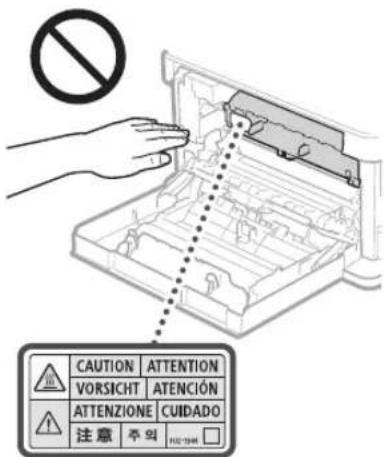
CnneHTE 3a TEM,HTO6bHe ypoHNTb Ha CTKIO 3KIOHOHPOBAHIN TAKeBIn PpEMeT, HAnPIMcP CIOBap.2TO MOKET PnBecTn K IOBPEXdHIO CTKNa 3KIOHOHPOBAHIN TpABM.
Hepehocite annapat cytaHOBNEHHbIMKaccetamnIy6marr. BnpotHBOMcNhyaeNOTOKdIy6marrMOkETBblnactb npnBECTKTOBME.
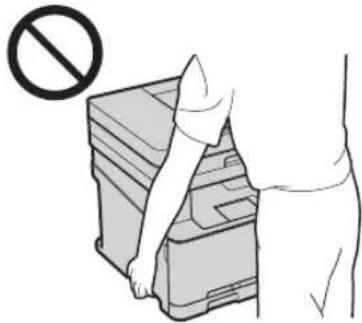
UCTPOINTOPOAUN(TOLBKOINPPOIYKTOB, KOTOPBEOCHAENbIyCTPOINCTBOMNOaUN)
PnKoINPOBAHIMTOCTbIXKNHcOCTeKnA
KCNHOPOBAHNEHAKMMATeHa
yCTPOCTBOIOaHcNMIJKOMCNIbHO.
TOMOKETPNBECTNKNOBpeKeDeHIOCTeKnA
KCNHOPOBAHINTPABMM
3akpbBAA yCTPOAETBO NOaay,co6bKaIte OTOPOXOCbT, Yo6bHe Ne pHueEMITb NaIbCy I He NoyUHTbABM.
3AkpbBra yCToHCTBO NOaH,coBIOaHTe octopoxHOCTb,UTObHe NpHcEMtBnAaBbl 3aHHe NaCTbOyycTOPcTBA NOaHn He NoIpyuH TpaBMY.
ΦHnHep(ToIbKOДЯпpoDyKTOB,KOTOpbE OCHaUeHbФHnHsePOM)
He nomeuaiTe pyKn B Ty Cactb Iotka, TfeBnONHETCH CUNBAHne (pOLOm c PONKAM).Byde tce oco6o octopoxHHc OCTpbIMCKPENKAM, TAK KAK OHMOYI HAECTN TpaBM.
Kacceta DnB yMaN (TOnbKO DnY cTpOHTB, KOTOpBte OChaSeHbI KaccTeOu DnB yMaN)
He nomeuIe pyKn Bannapat, KOrda Kaccet a IyMaHn N3BneHa.3To MoKeT PnBecrK TpaBMe.
KnabuIsha《3Hepros6peXeHne》(TOnbkoDn npOdyKToB,KoTObpe OchauSeHb KnaBuaWei 《3Hepros6peXeHne》
HaxMMte KnaBmUy OHepeoCbepeXeHEn>ecnn annapat He byet nOonb3oBaTcB TceHHe dntenbHOro nepnOda, HApimep Ha HOHB. Ecn annapat He byet nONb3oBaTcBc TceHHe 60nee npOdoNtBHO rnpOda, HApimep BO apemn pazdHnKOB, BblKnOHTe annpAtn HnBnKeTne UTeCenb Hhypa NITaHn H3 po3eKn.
Приложения
Be30nacHocTb npn pa6oTe cna3epaMn
DAnHHeN 3nEepe CEPNTyUPOBaHO KAK
NaepHoe N3dene KnaccA I B COOTBCTBmN CO
CTAHDaTMAI EC60825-1:2014 I EN60825-1:2014.
CLASS 1 LASER PRODUCT
LASER KLASSE 1
APPAREL A LASER DE CLASSE 1
APPARECCHIO LASER DI CLASSE 1
PRODUCTO LASER DE CLASE
APARELHO A LASER DE CLASSE 1
LUOKAN 1 LASER TUOTE
LASERPRODUKT KCLASS1
Ja3epHbI Nyu MoKet 6bIb OaaceH IINI 3DopOBBa
eNoBeka. PockoJIbky N3IyueHHe, rHepePpyEmoe
BHyTpi Annapata, NIOHOCTbIO N3OIIPOBaHO
3aHIHTbIMN KOKyXAMM IN BHEIHNMM KpIbIKAMM,
Ja3epHbI YeH He MOrY pAcPiOcPtPaHITbCB IV
annpata Ha KaKOM-Imo 3tane erO EKCIpyAtmN
nonb3OBatelem.CJeNyIte HIXKePNBeHHbIM
yKa3aHnM NO CoBIIOEHNTO TexHKn
be3oNaCHOCTN.
HnB Koem Cnyae He OTKpbBaIe KaKe-160 KpbuKN annapata, NOMMO yKa3aHHbIX B daHHOM pyKO3OcTBe.
IPOHOKHOBHe Nae3epHOrO 3NlyueHn HApKyH Iero KOHTaKT C rnaAM MoKeT HaHeCTn yUep6 3peHIO.
ABHIMAHHE
NcnoB3oBAHn HnCTpyMeHTOB ynpaBHeHnA HnctpoKa nKcnnyataaannapataC HanyuHnem npBnEHHbX BHaTcOaEM pyKOaCTBe HnCTpyKmMOry pNpBecTH KBO3dEChTBIO OAnCHOrO N3NyHeHn.
PpOueMeMepbIpeoctopoxKHOCTn
Cnedyye kkaaHnHa hakneKe C npdynpexdennm, npkpenenno K yctpoiCTby.
He noDBeprAte annapat cnIbHm MexaHueckM Harpy3kAm N B6paum.
HeOtKpbBaIeH He 3aKpbBaIe DBePbI, KpbuHKn IPOOHE KOMTOHEHtC nPiMeHeHem Cnbl. To MoKet PnBcETN K NOBPEXdHNO yCTPOVCTBA.
He kacainecb KOHTAKTOB KAPTPAACTOHEPOM (),TOMOKETnpBECTKNIOBPEXDEHNOYCTPOINCTBA.
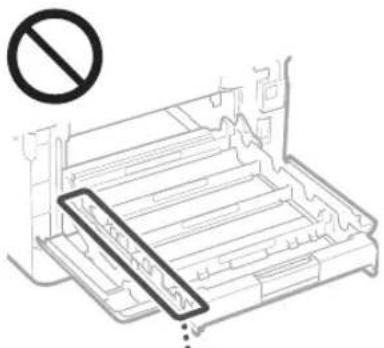
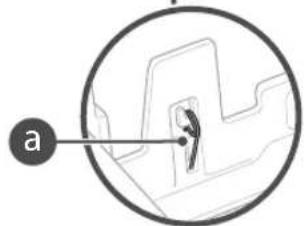
He OTKnouaIte nITAHne H He OTKpbIbaTe KpblkN BO Bpema pa60tbycTpoiCTBa.3To MOKET PnPBECTK 3AMATNIO ByMaIu.
PtpaHcnpTnPoBKe yctpoNCTBa
JINPNDBpaENHNOBpeKHeHNyCTPOICTBA BO BpEMTpaHCnOPTNPOBKN BbINONHTe CneDyIOoee.
-13BneKte KapTpnnkntoHePOM.
HadeXHOynakyIYe cTpoIcBO B opINHaIbHyIO KopoBky CynakOBOaIbMM MaTePnuAAM.
Texnueckoe 6cnyxnbHne n ocmToPbI
BbnoHnIe nepnoDnueckyO ONUCTky yctpoCTBa.PnHakonneHm NbHn yctpoCTBO MoKeT paboTaB HeHaJIeXaIIM Obpa3OM.Bo BpemOnCTKn PnpHepeKJBMaTeCb Cnedyuix npaBn.Ipn Bo3NtHKoBeHM nPo6Nm B paBoTe CM.pa3Den YcTpaHEHeNoJaOk.Ecn npo6NmY Heo3MoKHOycTaPaHTb CAMoTOteBHoN yCtpoJCTBO Heo6xOJIMO oCMOpTeB.O3HAKoBteCb C pa3denOM Ecnn npo6NmY He ydaerty cTpaHntB
AOCTOPXHO
Ipeen OunCTKO TKNIOHTe NITAHNE IOTcOeHNHTE UHPNtAHAHO TPOaETKNepemehnHO ToKA.Heco6NIHOeHE3TOrnpaBUNMOKETCTaTbPnWHO HOZrOpAHINJINOPaKaENHNEJIEKTPNUeCKMTKOMK.
IepnoJnueckn otcoeHNHnTe HHyp nHaHn H ouuauTte uTencB cyXoYTKaHbIO JyadneHn pNn np3n.HakOnnBuAcnr pr3b MoKET BnNTbBaTb Blary N3 Bo3dyxa INBOCnPAmEHnBCnPn CoPnKoCHOBHm C 3JIeKTPNECTBOM.
Длгчснллретаинлльугпьлakнухорошооткатуюткан.Смалвьтканьдгл
чснгн HeobxodmoTOnToBbB. He
HcNoIb3yTe Cnpt,БeH3N, PactbOpnten
KpaackNdpyrue NerKBOocnnaMeHIOpeC
BeueCTBa. He nObl3yTe bymaxkHe
caIqfETKN IIOJIoTeHua.Ecm 3TN BeueCTBa
BCTYITB PEAKUKO KCHKTAMN ININ
3NEKTPnecKIMu ChTAMN BHYTpN cTPOCTBa,
OHMOYIT NpMBECNTK COZDAHIO
CTaTIUECKORO 3NEKTPnecCTBa ININ PpNBECTK
BO3TOPAHNO INI NopaxKeHIO 3NEKTPnecKIM
TOKOM.
BpemcT BpemHn npoepaTe Hyp nHTAHn HNTCenb Ha HANHmpeKABHb, MCKPBHeHn Wbtpe BNkA, hHOca, TpeHH Npe3MePcHOrO BbdeJeHnTeNla. NcnoIb30aHHe WHypa HnTaHn HtTeCen, KOTOpBie He oCnyXBAHcT OJXhBM 6op3AM, MoKet PnBBeCTN K NOKApY mnpaxHeHIO eekpueckn TOMOK.
ABHIMAHHE
HekotopbIe KOMNOHEHTB BHYTPn annapata CnBbHO HArpeBaKOTc INN HAXOITCn NOB BICOKHM HAnpRKeHEM. KOHTAK C TINMM KOMNOHEHTAMMOKETnpNBECTm K TpaBMe Nn OxKoRAM. He npKaacTecB K cHaTm annapata, HE IpepeAChEHHBM B DAHHOM pyKOBOJCTBE.
- Pn3a4py3ke6ymannnnyucpaHenn3amnna 6byteoctopoxhny,HTo6bHeHope3atpykn0 kpan6ymann.
Opnduueckne orpaHnueHna Ha nCnoB3ObaHne npOdyKta n 1306paKeHH
NCTIOB3OBAHNE pnpo6peTeHHOROBAMN3dENI
INCKAHNOBAAH,NEaTN IN
BOCPON3BEHNE ONpEeHnBX DOKMeHTOB
INbIMCNOCoBAMn,aTAKKEVCNLOB3OBAHNE
N3ObpaKeHN,NOyueHnBX BpeYbTate
CKAHPOBaHNA,NEATNNBNCPOB3Be
DpyTM CNOCoOM pni NmOuN pnpo6peHHOROBAMN3dENI,MOKET 6bTB 3aNPeHHO 3aKOHOM
MMOKET NOBHe 3a C6Oy yrONOBHyIO N/INn
rpKaaHckyIO TBETCTBEHHOCb. HenCNIbHn
CNCK TAKNX DOyMeHTOB PnBeEH HNKe.3OT
CNCKPpeHa3AHuey DnIcNtBbBAHN
TOLbK B KaeeCTe OpyeHTnpA. EcnIi
COMHEBaTeCEb B ZAKOHHOCTNVCNtBbBAHN
aTTnapata DnIg CKAnHPoBaHN, Peaytn IINn HNO
BOcPiOn3BeEHN ONpeJeENHOrO DOyMeHTa W/
MN B NCHNtB0AHm NTCKAnHPoBAHbX,
OTNeYATAHHN INN BOcPiOn3BeEHNbIX INbIM
CnOcOBm N3Op6PaKeHn BnDOnKbI 3paAhee
pOKoHcyNJTIPOBaTc C KOpICTOM.
BymaxHbIeJeHbTn
DopokHbueKn
-ⅡntaTeKbIe nOpyuEHH
PpOcBOBbCTBeHHbIe TaHOHbI
-ДeNo3nTHbIe cepTnФKaTbI
- Nacnopta
IIOYTOBbE MapKn (noraueHHbE INHn HENrAueHHBe)
MMMrrpaunOHhBIEOKyMeHtbl
IeHTNnKALNOHHbIE KAPTOCK NIN 3HAKNOTNNH
BHyTppeHHHcMapKreepoBoro c60pa (noraeeHHbI HN HenoraeeHHbe)
HeKcTOpBleDOKyMeHTbHaO6CnYKmBaHHeu nI nepe60HbE Bekcen
- O6niracnn nn npyne doIroBaee ceTnKkTaB
YeknnnepeboHbIeBeKcEa,BydaHbIe RocydapCTBHeHbIMyUpeKeHdHnM
AKUH
- ABTOMOBUNbHbIe npabaNdoKymHeTbIyDcOBePepuOuE npabaCobCTBeHHocn
PonBedeHmOxpaHemble3aKoHaMn06 abTOpckOM npabe/IpONBedeHmNCKycCTBa, 3anpeHHbIeINBocPiOnBedeHm63 paZpeHmOBnndatEn ABTOpcknxnpab
3nakn,CBraHHbIe Cco6HIOJeHNEMTexHKn 6e3oNaCHOCTN
IpeeknoatelnbntaHn:nonokhenE《Bkn》
Opeekio-ataeIbHnAHHNIOJKeHNHeBk
Ipeekuohatienb nntaHn: noonKeHne 《OxuaHHe
Ba paa Haxmte nepeknnoateIb
3aunTHaKJIeMa3a3eMHeHnA
BHytpn onaacHoe HapnKHe He otKpbBaIte KpbuHK, KpOMe TcX, YTO yKa3AHB B HNCTpykUH.
BHIMAHVEITopaaynoBepxHoc7b.He npKacatcb.
O6bpyoBAnHe KnaCaII
IIOBnKHeAactn.He npmbnaKeTaeactnTeaKDBXuIMCAACTM
[ПОНМЕЧАНИЕ]
HeKOTOpBie N3ykaaAHbIX 8blwe CmBBOJOB MOrTy OTCYCTBO8aTb Ha onpeJeHbIX yCtpoiCTBaX.
v1602_00_ru-RU
![CANON iSENSYS MF631Cn - [ПОНМЕЧАНИЕ] - 1](/content/2026/03/489534/images/6bdc410264dcd5450704476311813e8c716f9153eee03d6798c9c63eb1f20fe7.jpg)
HaKneIka nO TexHnKe 6e3oNaChOCTn npn o6paUeHNcJa3epom
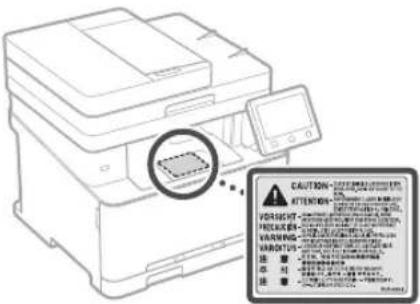
PacxodHbIe MaTepeNaJIbI
AOCTOPXHO
He6pocaiTeOpabOtaHHbkeKapTpynC TOHEPOMBOTKbbltnOToHb.3TOMOKeTnPnBcTNI KXBOCHINAMeHENIO,KAc CJIeCTBNE,KNOJyEOHNOKOROBNN BOHHIKHOBEHNIO NOkapa.
PnCnyaHOM paccbnaHm Tohepa octpoxHO BBTPTNE ToHEp MAnKoBnAekHO TkaHIO, He Bdxxraero. He nCOnb3yTe nbIeocOc DnO uChTKn PocBnHaHOrToHepa. B npOTiHOM CNYae Bo3MOHO NOBpeKeJeHne nbIeocCa HN B3psBnBnB, B3BaHHb CTaTHecKIM PA3PdOM.
BHIMAHHE
XpaHNTe KapTnKc TToHepOM dpyrne paXoHbIe MATEpnaJIb B MECTax, HeIOCTyIHbIX IIN TEETB CIIyue pOITaIBaHN Tohepa HEmeJeHHO oBaPTeBC K BPaY NIN B TOCKNKOJIOTUHeckN LcHTp.
He bttaiTecb pa3bnpaTb KaptpnK c ToHEpOM.ToHep MoKet IpocbIaTbcN nonactb B rna3a nn pot. Pn noanadnn TohepaB rna3a nn pot HEmeJeHNO npomoi Te XxOIOHO BDOH N ObaPHTecb K BpaHy.
Ecnn n3 Kaptpnna npocbnncr Tohep, cTapaTecb He BblxAtb ero n N36eRanTe erO KOHTAKTa C K0kei. Ipn nonanHm Tohepa Ha KOKy cpaBy Jce CMOnTe erO BOJc MblnOM. B Cnyae BblxAHnToHepe npn 8O3HNKHOBeHn KOKHO rpoAipKeHHN 13-3a KOHTAKCTOHEPOM HEmdJIeHNO O6pntTeBc K BPaynn BTOCKKOJIOHueckn LJEHTp.
BAXHO
06pa6oTKa KapTpndJa c ToHepOM
- Udpkmba kaptpiux c tohepom, obaatelho 6epntecb 3a ero pyky.
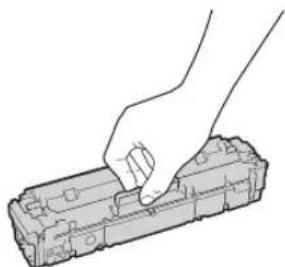
He npapanaite nopepxnoctb 6apabaa ( He noDBepraite ee Bo3eJCTBnO CBeta. He npKacaiTeCk KAnEKTpuNecKM KOHTaTAM ( b) mnyyctpoiCTBy namtn KapTPnJa C TOHEPOM (
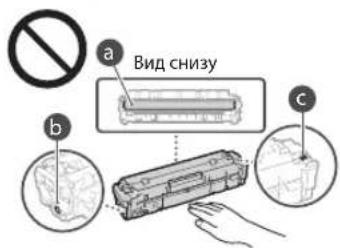
He 3NBeNKeTKe KapTpIuK C TOHepom IN yctPoIcTBa HIN 3auHTHOY YNAKOBKM6e3 Heo6XOvMOCn.
Kaptpnck CTohepom ABnHETcMaHTNbIM n3dennm. Hpe np6nJkaIte ero Kn3dennm, yBCTBnTeBbHbM K MaHETn3My, B Tom cncKe RnKIM N XeCTKM DnCKAM B npOnHBOM cnYae BO3MOKHO NobpeXeHHe NaHHbIX.
XpaHHeHKe KapTpnuJka CTOnepom
XpaHNTe KapTpNk BnpBBeDeHHbIX HnKe ycNoBnx DnO obcepeHnEmy 6e3oNaCHOr nHaNeKaJIero MCNOB3OBaHN. dAna3OH Temnepatyp Dn XpaHeHn:0-35°C dAna3OH BlaNHOCTn Dn XpaHeHn:OT 35% do 85% OTHOCTeBHOH BlaXHOCTn (6e3 KOHeHCauIN)*
XpaHnTe KapTpuiK,OTKpbYyNAKOBYTOIbKO npei CaMbIMCNONB3OBAHm.
- PnH3BneHnKapTpNkCa TOnepom N3 yctpoCTBa DnE EOR COxpaEHn 3akpoTe 6apabAH 3aunTHbIM NOKpblm HIOmeTHe N3BleHHb KAPtpNdx BNCXODHb 3aunTHbN NaKet NnOePHTe EOr TOIcTOn TKAHbK.
He xpaHnTe KapTpynK B BeptnKaIbHOMnnn npeepeepHTOM COCTOHN. 3TO pnpBBeJET K OTBepDeBAHIO TOHEPA, I ERO NCOHAR KOHCNCTEHnMQoT HE BOCCTaHOBNtCBa DaeJe Nocie BCTPxAHnHAHn.
JaKe npxpaHEnB npenExn Ax DnyctmOro
Dnaa3OHa BnAaKHOCTKaNN BObl
(KoHeCAt) MoryT Opa3oBBBaTbCA BHyTpN
KapTpNJa npa3Hnue TempePaTy BHyTpN
n ChapyKn KapTpNJa c ToHEpOM.
KoHeCaunn Ok3bBaet HeratuBHOe
BOdienCTBe Ha KaeeCTBO KapTpJKeY C
TOHEPOM.
He xpaHnTe KapTpIaX C ToHepOM B nepeuCneHHbIX HIXe MeCTax:
B6n30KpbToro0rH;
B Mecrax, NOBEPKHHbX BO3eCTBNO prrmoro CoJIHeHOrO CBaE mNpyrTO RpKORo CbTe, 00Jee NnMnHyt;
Pn noBbIeHHH KOHcHTpaCm cOeB 3 BO3yXe;
B Mectax, noDBePExHHbX BO3dEChTBIO pa3beDauoHx ra3OB (a3pO30n H aMMnak);
I0D B03DeiCTBnEM BBiCOKX TemNepaTp I
NOBbIeHHHO BnAaXIOCTN;
B mectax c pe3kMMI peneaAMM TEMNEPATyPi BNbAaKHOCTN, PnBBOaRIMM K BOHHNKOBHeHIO KOHDeHCata;
B6n3cKoJIeHnIbIa;
BMeCTax,doCTynhBxIaIaTeH;
I36eraTe nCNoB3OBAHnna NoDcEbnbHX KapTpndKe CTOHEPOM
B npdae Bcpeaotc Kaptprpnckn C ToHepom, Hnnnncnepnnpkamn Kaptprpke Canon. Ncnoh3oBaHne nDaeBbHex Kaptprnpke Moket I npBeCTn K yxduheNko KaecTa neatm npabotb yctpoctBa. KomnaHr Canon He Hecet OTBETBEHOCTn 3a KaKeI No6 HeNoiaKn, HecactHbeCnyan nnu yuepe, RnBnIOUeNcpe3yblTATOM nObn3oBAHnr NOdElnbHoro Kapprpda C ToHepom. DononHntenbHe cBeedeHHn CM Ha Be6- CTpaHnue http://canon.com/counterfeit.
OxnaemoeBpemaNOCTyIeHn3aNaChbIX 即TnKAPTpndkeCToHEPOM
3aNaChbueactnKapTpndmCtoHepomdYcTPOCTBA6yUTBipOJaBe BTEeHEnMeMHIMyMcEM(7)NETNOCIECHTARNPOAOBCTBaDAAHHOJMOEJIYcTPOCTBA
YnakoobHbme MaTePnaJIbI KapTpuaToHepa
CoXpaHnTe 3aunTHb nakET KaTpndJa c TOHEPOM 3aunTHoe NOKpbITHe 6ap6aHa. OHMOrT NOAodBcI pN TpaHCnOPTnpOBe 3TOrO yCTpoCTBa
KoHueCTBO,foMa n paMaueHeYnayakoOBHybIX MaTePnaIOB MOry T N3MeHATbCe6e3 npEepuNTbHorO yBcOmTHeN.
YTINN3pyTe 3aunTHyKe NENTy B COOTBETCTBN C MECTHmM 3aKOHMM.
Pn ytnn3aun nCnonb3oBaHHoro KapTpuaKa CTOhepOM
3Akpone6apabah3aunHbimNOKpbTnem, NOCHTeKAPrnpK B 3auHnBn NAKET, T06bl npedotBpataN pocsbnaHne TOhepa,a 3aTeM yTNIN3NPyTe KAPrnpK C ToHepom B COOTBeTCTBnC MecTHbIM 3aOHAM.
Приимechие
Ha3BaHne n3denn
B CEJAX 630nacOCTN 3DJIe NOJHO 6bTb
3aperHCTPnpOBaHO.
B HEKOTOpBx CTpAHax paCNPocPtaHEHNA3DJIe
BMECTO OPINHABHO HO HA3BaHMA MORY T 6bTb
3aperHCTPnpOBaHb CNeIyIOUne H3BaHNA,
yKa3AHhBe B Kpyrblx ckO6kax.
MF635Cx (F170102)
MF633Cdw/MF631Cn (F170100)
Tpe6oBaHnEMC DnpeKtNbBbEC
DaHHeO6obpyoBaHne yOOBnETBopnE
OCHOBHM Tpe6oBAHNIO 3MC DInpeKTHbEC.
MbYTBepXJaEM,TOA daHHe NO3NE
COOTBECTByeTpe6oBAHNIO 3MC YkazAHbIM
BINpeKTHBe EC, pno HOMHaHbHOM BXQHOM
HaPRAKeHHN 230 B N aactote 50 Tc, xotra
DnanaaON paBOHX XapakTePNCtIK DaHORO
HJednn COCTABHnEOT 220 20 240 B,50/60 Tc.
DIn obecieueHHn COOTBCTBnE TexHnecKm
Tpe6oBAHNIO 3MC DInpeKTHBnEC Tpe6yetc
HIOJIb3oBAHNn EKpaHNPBOAHHO K6bEn.
ДиpeктпВа WEEE,ДиpeктпВа 06 aKKyMЛТОРАX
HnOpMaUO O npeKtBWe WEEu napeKtBBe 6aKKMyIHTopax MOxHO HauTN B noCJeDhem pyKOBoCTBe NOb3OBaTeN (B fOpMaTe HTML) Ha Be6-caTc Canon (http://canon.com/oip-manual).
Regulatory information for users in Jordan
MF635Cx / MF633Cdw includes approved
Wireless LAN Module (Model name: AW-NM383).
Contains Wireless LAN Module approved by TRC/SS/2014/38
Приложке
Regulatory information for users in UAE MF635Cx / MF633Cdw includes approved Wireless LAN Module (Model name: AW-NM383).
TRA
REGISTERED No:ER0126617/14
DEALER No: DA0060877/11
Regulatory information for users in Russian Pocim:Джларць COOTBCTBNA MInHKMCBAN 02.05.2017 roda,ДжСТВЕЛБА NO2.05.2023 roda,ЗерчтprpoBaA bФдралhOM aReHCTBe cBAH 17.05.2017 roda
RE Directive
(For Europe Only)
RE Declaration of Conformity
English (EN) Hereby, Canon Inc. declares that this equipment is in compliance with Directive 2014/53/EU.
The full text of the EU declaration of conformity is available at the following internet address: http://www.canon-europe.com/cedocumentation
Wireless LAN Specifications
Frequency band(s):2412-2472MHz
Maximum radio-frequency power:15.98dBm
Czech (CS) Timto spelechost Canon Inc. prohlasje, 2e toto zaifzeni je v souladu se smernici 2014/53/EU.
Uplne zneni EU prohlasei o shode je k dispozici na teto internetové adrese:
http://www.canon-europe.com/cedocumentation
Anapat He npaioe 3actpraHHn panepy
IpepeBipTe HacTyHHe.
- yibimkHeHO XINBneHHr?
- Yu BUNBeHeO anapat 3 peKmMy cHy?
KuO ducnne Ta iHdkaTOp He cBtTaC, HATNCHTb nepemukau XNBneHHA.
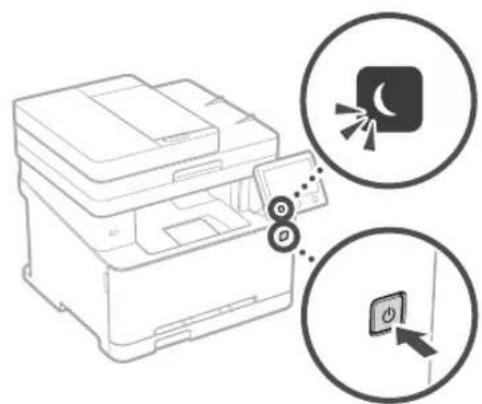
Ypa3i 3actpraHHnanepy BINO6paKaetbcn ekpaH,IK NOKa3aHO Ha ManIOHky HxKye.
Ycyhbe 3actpraHHn nanepy BiinobiHDo iHCTpykui Ha ekpaHi.
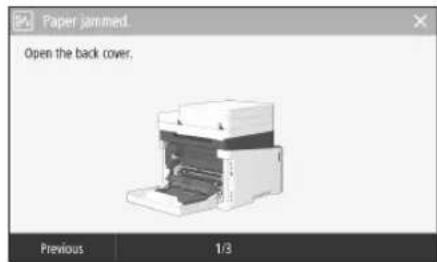
- qn npabnbHO nipkIIOH NeuHyp XINBneHH?
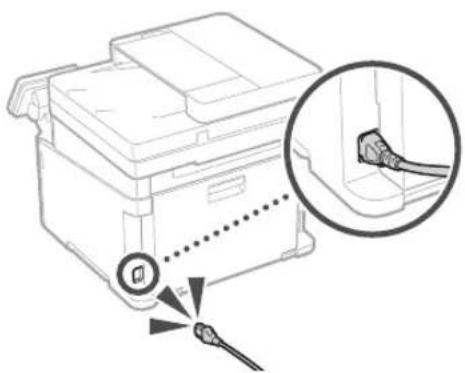
Kuo npo6nema 3aHnaactbca, nB. Noci6nK KopcTya.
3amHa KapTpndka i3 Tohepom
3amHITb KapTpIaK i3 TohepOM BiINOBiDHO do IHCTpykui Ha ekpaHi.
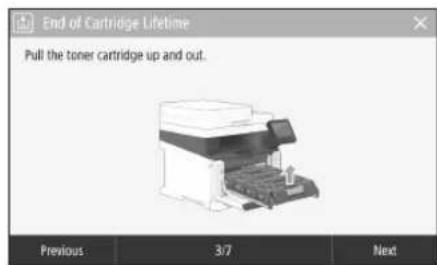
Homep mojeni kaptpnja i3 Tohepom Ha 3amiHy
-Canon Cartridge 045 Black (chpn)
-Canon Cartridge 045 Cyan (6naKHTn)
- Canon Cartridge 045 Magenta (nypnpobu)
-Canon Cartridge 045 Yellow (KOBtNi)
- Canon Cartridge 045 H Black (чорни)
- Canon Cartridge 045 H Cyan (6lnaKTHn)
- Canon Cartridge 045 H Magenta (nypnpoan)
- Canon Cartridge 045 H Yellow (KobTni)
Додатук
Baxklnbi iHctpyku3i3 Texhik6e3neKn
Ybomy po3di HabeEHO Baxnbi I hctpykui 3 texhki6e3ekni, 10 doHOMOxyt 3anobir T tpaMyBaHHo KOPNcYBaH IBoro anapata i HINx oic, a Takox NowKOxHeHIO MaHa. Pepi HIX bKOpCToBvAHT an apat, OaHoiMTeC 3uM pO3inlI OTOpmyte CBTHcPuyki, 106 HALEXHM YIHOM BIKOpCToBvAHT anapata. He BIKOHyTe XODHIX NOpeAulj, kI He OnncAo B LbOMy Noc6HNY. KOMNAH Canon He Hece BiNDaJIbHOCti 3XoDiHI NOKoKHeHH, CNmuHEI BVKOnAHHAM OpeAulj, np RoKi He JeTebcB U cOyM NoC6HNY, HnpBaBnBOIO ekCnPyAtieIO, peMOrAm abo 3MiHm, 3dInChEHMM He KOMNaHIEO Canon abo TpeTboIO CTPOHOHO, ynoBHObaeKHOIO KOMNAHIO Canon. HnpabINbHA eKnpyataUg BoO nparata MoKe npN3BeNT Do TpaMyBaHH Ta/abo NooKoXeHH, 10 noTpe6yBaHTme TpBaNOro pEmOTy, Ha kI MOnke He NOnupBoATNC JIO6MeKeHOI rapaHTII.
ANONEPEDKEHHA
No3Hauae nonepekeHHCTOCOBHO
onepaui,kiMOKYtbPn3BcETNdo
TpaBMyBaHHBpaaiixHeNPaBNbHoro
BkoHaHH.3MeTOKBe3NeuHoro
BkOpuCtAHH anapata 3abKn 3BaKaIte Ha
Li nonepeKeHH.
YBAGA
I03Haac 3acTepeXeHHCTOCOBHO onepaui, RAKMOKytnpBcETNIO TpABMyBaHHBA p31 ix HnPaBbHOro BIKOHAAHH.3MeTOIO 6BeNEHORO BIKOPINHAnapata 3aBKnD 3BaXaIte Ha ci 3acTepeXeHH.
BAKJIINBO
No3HaacdoaTkoBI BMOrTa o6MeKeHHY BvAkhNPOoNTaIeLIOJNOKeHHa Ia3a6NeHHeHnPabInbHO IpOTo nAnapata TaYHKHeHHN OTO HeCnpaBHOCTI A0o NOKoJKeHHMaHa.
YCTaHOBHeHH
Ia 63neHOro Ta 63nepeKoHOrO
BnKOpNCTAHn anapata yBaXHO O3HaOMTeCn 13
3aTepeKeHHAMn Hxue Ta BcTaHOBtB anapaty
BiINOBiHOMy MiCi.
TIOPEEDXEHH
He bctahOBIOIte anapat y mici,Je nooro po6oTa moKe npz3BcTn do noxeki a6o bpaKeHHN eEKeTPuHm CTpyMOM, 3OKpeMa:
yMiCiJ,de6KIOYOTBCBBAEHTNIAIHIOTBPON (HAdTO 6bn3koO CTINH,NiIXOK,DnBaHIB, KINIMMB TaIHINX NODIHINP#EMETIB);
yBONORNXABO3aHnEHNXMICJAX;
yMiCi,kyDiNOTpanPnnc npame coHnHe npOMHHa,abOHaBOpi;
yMiCuxI3BnCOKIOTemnepaTyPOIO;
nopuyI3BIDKPHTMBOHEM
- npuy i3 ankoJem, po3uHnKamu HINHMJIeKO3aMMCTAMM peOBHHAMM.
InnionepeJxehn
He niklouaTe do cbo ranapata Hepekomehoabai Kabeni. Lc moke np3bectn do no kexi abo ypaekHH eneKtpuHMM CTpyMOM.
He knadTb Ha anapat Hamncta, iHui MeTaBeBi npedMeTn abo MICTKcCT 3 pINHOIO. KOHTaKT CTOpOHHH ixpeOBN 3 eNEKTPNHNIM DeTAJIIMB BCEpenHi anapata MoKe PnI3BcTIn Do nokeXi abo ypaKeHHa eNEKTPyUHM CTpyMOM
YCTaHOBIOIOUy Ta BnIaNIOH DoaTKOBE
0bNaHaHH,OBOB3KOBBO BMKMHTb KINBNEHH
BNTBHHT bWtENCeNb I BiKDIOHTb yci
iTEpeChi KaBen ta WHyp KINBEHH BID
anapata.HaKHe WHyp KINBEHH a6o
iTEpeChi KaBen Moxyt b NIOKOITNC, 10
MOKe npABeCTn IO NOXExi a6o ypaexHH
ENKTPNCHMCTpyMOM.
A KIO B Anapat Notpanna CtoPOHH
peOBNHn, BNIMt bntenCt bHpya XNBJIeHH
3 po3Kn MepeXi AMINHO CTpyM Ta
3BepHbCra Do MICeBOro BNOHBaKeHOr
DInepa Canon.
He BCTaHOBIOIe anapat y 3a3HaueHnx HnKxE MicuRx
AIPAATMOXBEBACINABIOPEPEKHNITCR, CIPNCHHHBUNTPaBMyBaHHRAJIOIHO BCTAOHOBNTI:
- Ha HectiKII NOBepxH;
yMiCiPiDiEioCunbHnBixBpaui.
A yBATA
He BCTaHOBIOIe anapat y 3a3HaueHnx HnKcE MicuX
(ueMOKeIpN3BecTINoNtKOJKeHnAnapata):
MICA3DykeBnCOKOHUYeKHN3bKOTEMNepaTPOIOINPBHEMBONOROCTI;
MICU, DE MOKJIINBI p3KI KOINBAHHI TEMNepaTpyu NBOIOROCTI;
nopyu 3oblaHaHHAM,10BUNPOMHIOe MaHTHI YN eEeKTPoMaTHI XBNJI;
yIa6opatopixn npimieHHx,Je BIDbyakotbcximiuipieakui;
yMiCiJ,JeBIOBITpiHABHI KOpO3IHi YI TOKCHHI rA3N
HaIOBepxHx,10 MoKyIb DeOpmyBaTnC HII Baro anapata, a6o Ha IOBepxHx,Je MOKINBe npocdaHH anapata (HapnKnIa,KnIMM ToO).
He BCTaHOBNIouTe anapat y noraHo npoBItpBOAHnx npmiiueHHx
Piac 3BnauHoro BnKOpNCTaHHue anapat
BnIae He3NaHny K1bKcTb O3OHy HINX
peoOBn. Li peoOBnH 6e3neHi dI 3DopOB'a.
Piote BnKnIuXpeoOBnMoE 6ytnOCobNBO
nomIHnO AiHc TpBaIORo BnKOpNCTaHH anapata
abo Ioro eKcnpyaTuB nOrAHO npoBtPioBAHnx
npmUeHNHX. Uc6 3abe3NeHTn 3pyHu pOboue
cepeoBBuH, peKomeHIOBAHO HaneKHMM YHOM
npoBtPioBAuTN npMIIeHH, De BCTaHOBHeHO
anapat. TaKoc cnI yHKaTI MICb, de Ha NIOeJ
MOKe NOIIPoBAuTCra iiapeoBHn, Rk BIINIA
anapat.
He BCTaHOBIOIte anapaTy npMIMeHHI,Je YTbOIOETbcKOHDeHcAT
KIO TemnepatypnpmiiueHH,Je BCTaHOBHeo anapat, uBNKO CAAE BUCOKX N03HAcO kBO 8IO anapat nepeHOCNT 3XOJHO HOrO CyxOro MICB TENTIE ABO OBO TIRE MICUE BCEpNDI anapata MOKYb YBOPKBATNCK PAnRI BOIN (KOHcHcAT). PeyltatoM BIKOPNCtAHn ANAPATA B TaKIN yMOBAX MOKE CTaN 3MHANHNAnepy, norAHA KICTb Dpyky ABO NOIKODKeHN ANAPATA. PEPED BIKOPCTAHNM daTe anapaty npncTOcyBaTnCdo TMnepaTpyn Ta BONORcti HABKONHIhBOr cepedOBuia npOTAROM npHHAIH2 rOHN.
He bctahOBIOIte anapat Ha BenNKII BNCOTI (3000 MetpiB HAD pIBHem Mopra a6o Bnue). Ha BenNKII BNCOTI (3000 MetpiB HAD pIBHem Mopra a6o Bnue) anapaT3 KOpCTKAM DACKOM MOKyTb npaIOBAIT HEKOPEKTHO.
PerynIOBaNbHI HIXKNI (TINbKN DnB Bnp6ib i3 peryIOBaNbHIMN HIXKaMn)
He 3HimaTe peryIOBaIbHI HIXKn NICn BCTaHOBneHH anapata, OCKInbKn BIH MOKe Bnactn abo nepeBepHyTnCn, npN3BIBuD TpaBMyBaHH.
Плклоченг TepehoHoi NiH(TINbKn DnBupo6ib3yHKuieO paKcy)
L'eanapat BIDNOBIDA CTaHdpTAM aHaNOROBHX TeneoOHNX NIIH. L'eanapat MOXHA NIKKOUATNI bKnIO KOMYTOBAHOI TeneoHOI MEpeXI 3aAIBHO ROPNCYBaHHa (PSTN). RaIO NIKKOUHTI ANAPAT IO UIMPOBOI aOb CIEUJIABHOI TeneoHOI NIIH, CEMOKE ZABADITN Ioro HALEXHOMy FHKIOHyBAHNIO ABO npIN3BcETN IO nOIOKOJENH.NOB83K0BO nepeBipTe TNEoHOHNOI NIIH nepeiNDIKKIOHEHN M HeI anapata. RaIO NOPTIOHO NIKKIOHTIC DO uIN TENEoHOHNX NIIH, 3BepHITBC NOCTAHbNKIB nocnyr ontBOONOKHOHoi NIIH aObo NIIH IP-TeneoHII
Bukoprastnahja 6e3dpotobo'nokaIbHOI MEpeki (Tilbkn IaI Bnpo6IB 3ФhNciIcE 6e3dpotobo'nokaIbHOI MEpeki)
YCTAHOBHIOIe anapat HA BIDCTAHIO 50 M BID MapuHTaTopa 6eepoTOBOI NOKANbHOI mepexKI.
3aMOKINBOCTBCTAHOBIOIte anapay MyICUAX, de CTOPOHNI ppeMeTn He 6NOKYIOb 38'3OK. CnHAn MoKe cna6HyTu, npoxOJyN Kpi3b CTHN NPiNDn.
TpmaTe anapat kOMora daJI bIuHPOBIX be3dpoTOBx TeneoHIB, MikPOXbNIOBIX neey uINoro oobnHaHH, 10 BuNPOMIHKe paoXBNI.
He BnKOpNCTOByIte anapat NobH3y MedHHoro 06nadHaHn. PadiXBNi, RkI BnPOMIHOC ue anapat, MoKyTB HeraTINBHO BnIMBaTHaMe MeDnHHe O6nAdHaHn, 1o MoKe npInBeCTn Do Iyo HeCnpBaHocTi aBo HeJauChNX BnAqKIB.
JKepeNo KnBHeHHa
ANTONEPEJXEHHH
BnKOpncToByIte NmEe Te DkepeNo JINBHeHHN Hanyrpa IAKO BINOJIACB KBA3AHIM BMIMOAM. RaIO zuBOI He 3pOBNM,MOKe CTaTCA NOXeka abo ypaKeHHH EJekTPuHN CPTyPMOM
He BnKOpncroByte HsiuHypn 3amCtB uHypa XHBUEHH3 KOMNIeKTy NCTABKN, OCKJIbKNI CE MOKe IpnBcTeN DoIOXekjY npKaJehH ENEKTPNHM CTPYMOM.
HadaHHn HHP XNBHeHn np3HaYeHO dna BIKOpNCTaHH 3 UIM anapatoM. He npEHyTe hHP XNBHeHn DO IHuNX npCtPOB.
He MoHnphiKyIe, He TaHITb, CnBHo He 3rHaHTe HHP KINBEHNA Ta He BIKHOHTe 3HM Byb-ki HIIi Dii, KAI MOKBy IIO ROnKOJNTn. He CTaBe Ha HYP KINBENHBA BAKki npMeTn. PNOKODKeHHuHypa XNBLENHMAoKe NpNBAECTeD JoNoKeKi aOg ypaKeHHA enEeKTPMUM CTpyMOM.
He BCTABJNTE Ta He BNIMaTe UNTENcEnb 3 PO3ETKN MOKPmPykAmn, OCKINbKn Ie MoKe INP3BECTn DpYapKeHHeNEKTPnHIM CTPYMOM.
He BIKOPKIOCTOBYIte 3UIM anapatOM HypinnoIOObOyBaCn PO3aIAYXyBaCNIKBENHRA3 KINbKOMo po3eTkAMi. LMe Moke np3BcETDo n oKekeI aOo ypaKeHHE neKTPuHHM CTpyOMM
Hea3yIuHpyXnBnEHHyBY3ON, OcklbKuCe MoKe npN3BcETNoIOKekiYU pAkeHHneKTPNHiMCTPymOM.
NIOHCTIO BCTABNIITE WTENCENB HYPa
XNBHEHNB POSEK TY MEPEKI 3MIHHORO CTpyM.
Rkno LBOrHO HE 3pOeTNMOKE CTATNCA NOXeka
abo ypaekHHE ENEKTPNHUM CTpyMOM.
Плд сгрозновсIO ьмалte UTENCENBунда КИМЕНHAЗERTK.ЯкSOцбго He3poBNTM,MOKE CTATNCA NOXeka,ypaKeHHEReKTPuHIMCTpymOM a6O noKoJkeHHAnapata.
IpekoHaTeC,0oDkepeoKINBHeHH anapata 63neHt Ta MaC CTabibHy Hnpyr.
TpmaTe UHyp XnBHeHH NoaI Bd DkepeNa TennA;KIO UIO BMIMOIO 3HexTyBaTN, CE MOKe npINBeCTN DO pO3nnabHeHH I01uHOro NOKPMTTH Hpya, IO MoKE CTaTN npINHNO NOXeKJ YpaXeHH eEeKtpNHM CTpymOM.
JAKIO IO 3'EDHYBaJIbHOI qACTHIN HUHpa XMBIEHHA 3ACTOCYBAtN HAIMIPHE 3YCIMII, LE MOKe O6yMOBHT NIOKoDPXeHHA UHpya XMBIEHHA 60 IPOBOID BCEPeHNI ANAPATA MOKyTB PO3EHNATCA. Lc MOKe Pn38ECTIN IO nOKeKI.3AnIOBirte HABeEHM HxKHe CNYaJIFM
-actepnpnEHHHaHHTaBipEHaHHuHpyaXMBNEHH.
-NepeHHOBAHHpeep3HypXMBNEHH. 3nHaHHUHPaXNBHeHHnoBn3y 3eHyBaHbHOHCTNHAt TaPbAHH TCK Ha po3eKy a603eHyBaHbHYaCtNHy.
-3actocybaHHHaHmipHOi CnNdoWtencen HhypaXkBneHH.
YB4A
YcTaHOBIOHTE ue anapat no6n3y eneKtpuHoi pO3ETK, 3aIIWauOuN DOCTAHIO BScAR BInbHoro npocToPpO, 106 3a NoTpe6u WbUdKO BnHATn 1tencelb Hhpya KmBneHH 3 po3ETK.
OBAXJINBO
PiiknueHHH KINBneHHH
He npCndHynte Hpy KxNBnHnO do dkepena 63nepebpBHO ro eKTOPOXNBnEHn. Loe moxe np3BcTeNo HeHanexHoro OyHKUChyBaHHN Hn noJOMKn anapara B paa 300IO XuNBnEHn.
- y pasi niknouehna anapata do pozetkne Mepexi 3mHHoro ctpmy 3 KlnbKOMa THzamn He BkOpNcTOBnye ci HtDpa Dn BBIMKHeHHH hINX npnAig.
He npEduyte uHpy KMBIEHHNIO DOdoatkoB0I po3eTK MepeKl 3MiHHO CTpyMy KaMnTKepi.
IHsi3acTepeXhi 3axoDn
EeKtpuHnnepeukoMokybpnp3BcTnD HecpapbHOCT anapara H BpTaN daHX.
NoBOnKeHHa
IIOPEPEDKHH
POMITIBHnHaMIPHe HarpibaHH anapara a0DIM, He3BnHm 3anax nn Wym BID HbOReHnBOHmTbWtencelbI3 po3ETKnTa3BepHtbcdoBnOBHOaKeHOro DInepaCanon.1paoJIbe BnKOpNCTAHnMoKe npzBcTeNdo nOkokei abo ypaKaHeHH eneKTpyHMM CTpyOMM
He po3bpaHte Ta He moDnphiKyHte anapat.
YepeDenHAn apapa e Detani, kni nepebyaOt b
N BACOKO HAnpyroo a6o po3irpIIO
BnCOKnx Temepatyp. Po3bpaHHa 60
3MHeHHa npapata MoKyTB pN3BCTn IO
noKeHH a6o ypaKeHH eEeKTPnHm CTpyMOM
- Postaunye anapay y MUCU, y KOMy DITHe 3MOKYB JCTATNC DO UHypa XMBHEHNY iHINX Ka6eNIB ABO BHTpyIWix MexAHi3MIB i enektpnHnx Detanei. HeOptnMaHHu ci BAMOR MoKe npinBeCtNo HenepeDabHnx HEaCHNX BNADKB.
He KopnCTyTEcNerKo3aMmCTHMn aepo30nMI NObIM3y anapata. AnpoIeKo3aMnCtI peOBOHn noTpannTb Ha eneKTPuHI detani BCEpeHHi anapata,ue MoXe npINBcTeN do NoXeKjIo aOp ypaKeHHa eneKTPuHHM CTpyMOM.
IpepepeheceHHa anapaTa 06o8a3KOBB BmKHTb XnBHeHnA anapTa, a TOpi BnIMTb IHTepeChi KaBen ta Wntencel b 1 po3eTK. Raio He BnKoHAtu Cii DIO,MOKHa NooKoDITN Uhp XnBHeHn ABO HtEpeChi KaBen, yHaCINOK OTOO MOKe CTATNC POKeKa a Bo BpaKeHH eEnkTPnHMM CTpyMOM.
- PnueHyuOa 60 BIDcHuyu Kaebb USB, KONN WHPyK JMBNEHII PIKJIOUeHO Do po3eTKM EpeK 3MIHHORO CTpyMy, He TOpKaITeCMAeJIeBOI YactINH 3cHHyBaHa, OckInbKn LIEMOKE CnpHHNHT ypaXeHHN EeKtPnHMMCTpyMOM.
BukopncOByTe moyIbHn Ka6eJIb
JIOBxHNO MeHue 3 MetpiB.
BukopncOByte USBKa6eIbIOBxHOK MeHwe 3 MeTPIB.
HenpncmnnwymBippo6oTn anapata
3aIeKHO BID MICaT aYMOB BnKOpOCTAHHr anapat MoKe rHepeyBaTu LyM PaJIMMo BCTaHOBbIOBaT NOro 3a MeKaAMn KaBHy, de IpaQoTb JIoN.
KIO BuKOpNCTOByTcBc KApDIOCTMUYIATOP
Le anapat yTbOeCnabKn MarHITnNotIK.
KIO Bu NKOpNCTeBC KApDIOCTMUYIATOPOM I BIDyBaTe nIporpenHc amOnOHTy npoceci
pOoTo3 3anapatom, BIdiITb BId HbOrTa HeraHO
3BepHtbc Do NlkapA
AYBATA
He cTaBte BaKki npedMeTH Ha anapat, ockibkn BOHMOKyTb Bnactn, pnp3BIBIN No TpaBM.
Anapata.
ObepekHoBjdkpmbaTe Ta3kpmbaTe KpkiK, 06 He TpaBMByTn pyKn.
TpmaTe pyKn OoJ noaI bI pONKB B oNacti BmEeHH. NotpannnHpyk aO OaYB pONKMOKe npINBcCTn Do TineCHX TpaM.
BHyptiHnHaCTHHnAnapataN BvBIDHnNotok dyke rapaui nucac BnkopactaHH Ta Bvdpaoy niciu HbTo. Uo6yHNKHytn Onikia, yHnKaite KOHTAKY 3Umm cactHaHH.Kpim toro, Opaay niciu BvBepeHn po3pykIBK moKytb 6ytu rapaui, ToK NOBoTeC3 HMM oBepeXHo. HeoepexHcTb MoKe np3BecTn Do onikib.
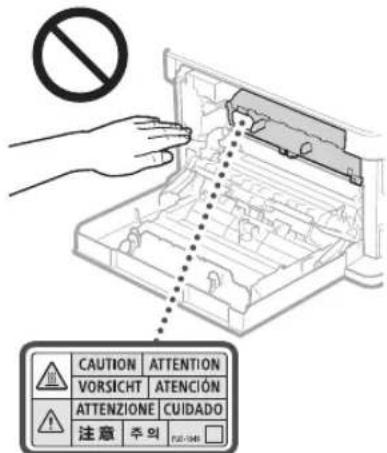
Bybte oobepkhi,ooHe BnyctnHaCKno EKcnoHyBaHH BaKKn npEmT, HApNKlaD CNOHMK. Ce moKe NOWKODHTCKn EKCNOHyBaHH Ta cnpuHHIT TpaBMyBaHH.
HepehocBe anapat3yctanobneHHMn 乌xnndAmn Dnna nepy. IIaKue WxnxIaDn Ipanepy Moke Bnactn Ta cnpnHHTN TpaBMyBaHHa.
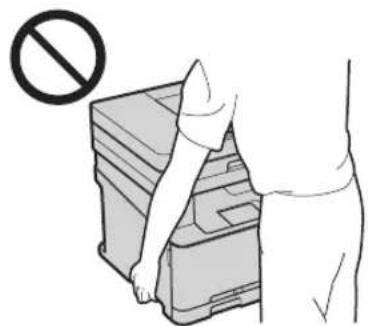
CLASS 1 LASER PRODUCT
LASER KLASSE 1
APPAREL A LASER DE CLASSE 1
APPARECCHIO LASER DI CLASSE 1
PRODUCTO LASER DE CLASE 1
APARELHO ALASER DE CLASSE 1
LUOKAN 1 LASER-TUOTE
LASERPRODUKT KCLASS 1
Ja3epHn npOMHb MOKc 3aBdTu WKOJnIOcbkOMy OprAH3My. OckJIbKn BnPOMIHOBaHHBCEpeHNBI BVPO6y NOBHCTIOIINHAeTBC3aXNCHM KOPrYCOM Ta 3oBHUIHIM NOKpATTmJa3epHn npOMHb He MoKE npOHKNHTaHOBJN iuaC 6y-b-KoI cndPi pObotn. IpOHTaTe HabeHHe Hxue PnpMItu IHCTpyKu3 I3TexIKn6be3neKn.
Hikon He BIKPnBaIte naHEnI, AkuO ce He BkasaHO 3noc6HnKax Do boro anapata.
Akuo naepn npomHb Bnne haobni nOpanntb Ohi, Horo dIO MAe NOKODTN 3ip.
Додатук
YBARA
BukopncTaanHOPrHbKepyBaHHpeYIaTOp8 abo BkoHaHHonepaui,He oncaHx ycbomy noc6Hky,MOKe np3BcTeN do He6e3neHoro na3epHOro onpOMHeHH.
Hni3aCTepexKhi 3axo
DOTPMHMyncbHcIpykui,UO3aHaHEHHaNaHei31nnopeJeHHM,po3aWoBAHHa
- He niiDaaTe anapat ctpcAm abo bippauii.
He HamaraTecnOMINUBBldKpBAta Ta 3aKpNBAtn DBePcIATA,KpUKNTa IHHJtacTHHn. Loe Moke npM3BeCtn Do noKuKoDxHEHn anapata.
He TopkaTecKa KOHTAKIB KAPTpNJaK3 ToHepom (a).Le MoKe npABeCTn Do noKoJxehnAnapata.
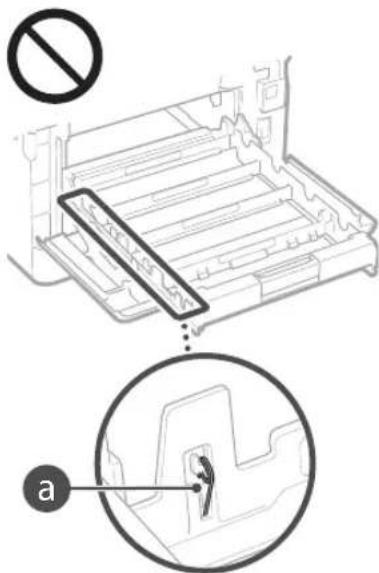
He BIMKaiTe TOnOBHn NepemKaayBHeHHaTa He BiKpBaTe KpnK,doKn anapat npaoe. Lc moKe cnpuHHTn 3MHHaHHaNaepy.
IiJyTpaHcnpTyBaHHa anapata
1063anobirn nowkodkeHHo anapata nijac TpaHcnpotybaHnaKoHaTe HabeHnXue
BUTARHITb KapTpnpjx3 Tohepom.
Hajinho 3aopnHb anapat y nkybaJIbHI MaTepiAn noKanJbI NOr 8 Kopo6Ky 3 KOMNIKETy NOCTaAHHH.
Texhihe 06cnyrobyBaHHa Ta ornain
IepiDnHNOYCTBe anapat.RKIO HAKONyETBC
nI,anapat Moke He npauoBATn HALEXHM.
NHOM.II,uaC uuieHHIOPTPMyTEcH
HabeJeHX HNKeHe IcTpyKuJ. RkUO nI qac
pobotn BnHnKHe np6bEma,DIN.Po3dIn
Bupipinnp6bEmy abo BN BneBHeHI,IO apanpat
notpe6yc cepbicHOrO bcnyroBaHH,NIB.PO3dIn
<RAIO np6bEmy He BdaNoC BupiHTN
IIOIEPEJXEHH
Ipei noaTcKOM uieHnBIMKnHtB XuBHeHH Ta BmIMtB utenCenb uHpya XuBHeHH 3 poTeKN MepeKi 3MHHO rO CTpyM. Raio zboRo He 3pObn, MoKe CTaNcna NokeKa a6o ypaKeHH eNeKtpnHMM CTpyMOM.
HacBIDacyBnIMMaTeWtncEnb3po3eK Ta BnTpaIteCyXIO TKAHNHOIO nn16pyd. HakoNueHnnnNOrnnHaeBOIory 3 NOBITPA, IAKoO Bin BCTyINb B DIO 3 ENkTpIKOIO,MOKe CTATNC NOKEKA.
OuHaaTe anapat BonoIO do6pe BnKpyeHOIO TKAHHIO.3BNOxMyIe 10 TKAHHy IINe BOIO.He BnKOpNCTOByIte nIPT,6EH3OI,poaHHNKaTI a HIIJI eKO3AIMCT peoOBHN. He BnKOpNCTOBYIte KOCMeTHHNI nanip abo nanepoBI pyuHNIk. Raio pueOBHN notpantbHa enEeKtpnHi detai BCEpENHI anapata,BOHMOKyTo yTBOPNT CTATNUHyeEeKTPNY,IO MOKe CTIOHN NIOKEXy HypaxenHRe EeKTPNHN CTpyMOM.
IpeioHnHO npeBipnTe HypKmBHeHHa THTenCbeHa HauBBHCTb ipk, BRINHAHH. 3HOeHH, noBy TpiuH a6o HaMipHe HarpBaHH. BukopncTAHn Hpya KmNeHH a6o TTencEBA H enpndaTHOMy CTHI M0ke npInBeCTn Do noKecki abo spaxekHH eneKTpHMM cTpyMOM.
YBARA
YcepeHHI anapata e Detani, kI nepe6ybaotb
II BncoKO HAnpyro a0o po3lrpiri do
BnCOKIX Temnepatyp. RkUO TopHHTNcR hX
Detanei, MoKyTB BnHNKYtn oNIK. He
TopKaJIeCeT NxH CAAHn anapata, kI He
NoTHaHcEO BUBMY NocIHky.
3aabaTakyaBn npi BmAtn iM'atnnanip cnj nyke opepekno, 0o he npia npkyk pKaam apKyuiB.
IOpuHnHi 6mExeHHaOdo BkOpncTahHbNpOby Ta 3o6paKeHb
BnKOpNCTAHH lybO BVPOByIINCKaHyBaHH,
DpyKy aBO KOniIOBAHH bYb- kIM mIHUM YNHOM
NEBHx DOKyMeHTIB I BnKOpNCTAHH TAKNX
BIDCKAHOBAHH,HApyKoBAHH axo CkONiIOBAHH
bYb- kIM mIHUM YNHOM 36pApkeHb MOKe 6yTn
3abOpOHc HAcOHOM CTan pInuHNO
PnITnEHRe HO KpMHaBHO Ta/abo LcBilHo
BIDIOsIaBHOCT. HenOBHN CTNCOK TAKNX
DOKyMeHTIB HabeHeO HXue. LcE CTNCOK
CTBoeH NmUe Dn DOBikn. RkUO BnHKAIOTB
CmHIb IIpo DO ZAKOIHOCTI BnKOpNCTAHH BnPOBy
dKn CkAhyBaHH, DpyKy aBO KOnIOBAHH bYb- kIM
IHUM YNHOM NEBVHX DOKyMeHT Ta/abo
BnKOpNCTAHH TAKNX BIDCKaHOBAHH,
HApyKoBAHH axo 6yDb- kIM mIHUM YNHOM
CKONlIOBAHH 36pApkeHb, CnI, 3BePhyNUc 33
pO3ACHEHMM IO paANHkBa 3 IopNIVHIX IVTaHB.
- FlanepoBirpoui
·Dopoxhiyekei
nataixhiDopyueHHA
PpOOBbHJTaHOH
-DeNo3HTiCePTNIOkATn - Paccnopti
- Nowtobi Map (noraaehi afo Henoraaehi)
DokymHTHHe6xHdIyIMMIRpa
JeHTnФiKauiHikapTknabo3HaKn po3piHeHH
BHyptiHMapKn rep6oBoro 36opy (norawehi a6o Hnorawehi)
DKyMeHTN ODO BICbKOBoi NOBHHOCTI
O6niraaf1ab0inuiDokymenTnpo6opro306083aHH
YeKn a6o KBNTaHui, BUNaHi yorIOBIMn areHLiAMN
AkuiohepiceprnphiKatn
PocbiueHHBoujraTa ceptiikatnHa npabOBiaCHOCTI
TbOp,IOOxOpOBaTcBA3KoHAMnIPOBtcbNpBaA/BNTbOPMNCTeTBA6eOTPMaHa3TOINBACNHKAABTOPCbXkPAB
CnmboN, nob'3aHI 3 TexhikoO6e3neK
IepemKauXMBHeHHHIOJIOKeHHYBIMK
IpeemkaKJXNBJIeHHHIOJIOKeHHB《BIMK》
IpeMnKaJKNBneHHN NOXeHHN «PexmOykyBaHH
KhoNkoBn nepeMnKau BIMK
3axncha kneMa 3a3eMneHH
He63neHnHpyra acepeHH.He bIKpmbaIe KPIKIMK,RAIO HA CE He 6yIO BKAIBOK.
YBAI!rapaia noBepxHa. He TopkaTnca
O6bnaHnHa KlaCy II
Pyxomi ChactnH:TPMaTe YactHH Tia nOaJI BiD pyxomix actH
[IPPIMITKA]
Ia33HaeHHBnue CmBONIBMOxyTb He BkayBaTnCAanEHOBIDBnPO6y.
v1602_00_uk-UA
Etuketka 3 npabnilamn 6e3nekn iD yac po60Tu 3 Ia3epom
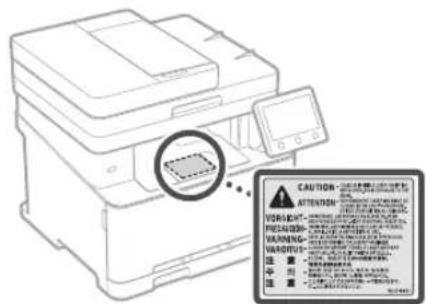
Bntpathi matepiann
ANONEPEDKEHHRA
He KnnaTe BnKOpuctaH KApTpNdx3 ToHepom yBilKnptTu BOHO. Lc MoKe cnpuHHHTaAMHaH N pIn3BeCTNo oNkIB abo NoKexi
RIO TOHep BnnaKOBO po3nnmbcA 60
pO3CnABCB, ObepeKHO 3IPTb PO3CNaHNI
POnoWOK BOLOFO M'KIOO TKaHNO;
CTepeXITBC, IO6 He BmNHyTu Ioro. HIXOI
He npBnPaTe PO3CNaHNI ToHep
PiNOCOCM.Ie MoKe npNBeCTu IIO
HeCnpBaHOCI NnOCCa ABO BV6Byu NnY B
pe3yblatl cTAtNUHOPO3pyD.
YBATA
36epirahe KapriuXi 3 toHepom Ta HuiBnpatHi MATEPIAHI B MICx, HeIOCTyINHXIIaIteN. Y pa3 KOBtAHNo ToHepa HeraiHO3BepHbCdo NkapA bOToKcIKoTOrIHORUeHTpy.
He HamaraiTecr po36pTaKapTpnnk 13 ToHepOM.ToHep MoKe po3CnHaTuCn NoTpanNTB OCHI abo pot.KeIOToHep NotpanTHB OCHI abo pot,HaerHO npomnTe ixXoNOHO BOIO TO Ta 3eepHTBCa Do Nkapn
KIO TOHEP BNCINABCA 3 KAPTNDX, CTAPAIECEH BIXNATI NORO TA CILKNYTE, IOB Hn HE IOTPANNB HA WkIPy. KIO TOHEP IOTPANNTb HA WkIPy, HERAIHO BIMNIte II 3 MNNOM. KIOo BN BIXNHYIN Tope ABO WkIPA NOpa3HeHa BACIIIOK KOHTAky 3 HMM, HeraHNO 3EBEPITBC DO JIKAPAR aBO TOKCINONI4HORO CEHTPY.

BAKJIINBO
TobodkeHH3 KapTpndKem i3 Tohepom
-0608'3KOBOTpMaTeKaTpynkI3ToHepom 3a pyky.
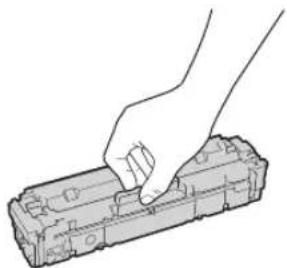
He npa nte noBepxH6apabHa()Ha He ndaaute noo Bnny caTna. He TopKaIteCb eneKtpuHnx KOHTaTIb()abo Hua na namTt KapTpua Ka 3TOhePOM()
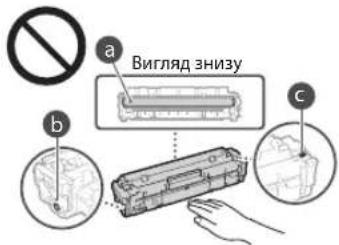
He BnMaIte 6e3 Notpe6n KaTpyk 1 TOHEPOM 3 anapaTa 3aXACHOT NaKeta.
Kaptpnck 3 TOHepOM Mae MaHHTI BIACTIOBcI. He po3raOoByne Ioro 6bn3ko Do BnPO6B, yTuINBnx Do MaHITHOrO NIO, 3OKpeMa Do nicket JnCKOBJD. Le MoKe jpn3bectn do NOwKOJKeHHaHHX.
36epirahnKaKapTpna3ToHepom
-ДябзneuHOrуpe3yIbTaTHBHorO BIKOPcTahHH36epiraTe 83aHaYeHOMY HIXKcce cepedobuii. DianaacOH Temnepatypn 36epiraHH: BiD 0 no 35C
DianaoH Bonorocti 36epiraHHa: BID 35 do 85% BiHOCHOH BonorocTI (6e3yTBOpEHKOHcHcy)
HeBikpBaBnTeKapTpIckI3ToHepomDoNoBOnOBIKOPNCTAHH.
BnMaOCH3aIapataKApTpNIXTOHEPOM 1J63ePIraHHY,yCTAOHOBIT3axNCHyKPNIky 6apabHa NOKNAITb BnHHTM KAPTpNIX 13 TOHEPOM y3AXCNH NAKET I3 KOMNKeTy NOCTaAHNNA A60 3aTropHb NOroBILHy TKAHNHY.
IiHac 36epiraHHaKpTnJka 3 ToHepom He CTABe IHOBepTRKnbHO abo JOrOpn DHom. ToHep 3aTbePHe, nCnO rOHO HopMaJIbHe BIKOPcTAHHNIO MOKe CTaH NEMOKINMM HABITb NICNCTpyuBaHHA.
*Habib 3a yMOB 36epiraHH B peKOMeHIOBAHOmy dianaoHBOIOROCT BCEpeINHI KAPTpNkA 3 TOHEPOM MOXYb YTBoPiOBaHcKpaNBI OAn (KOHHeCAt) qepe3 piHNIOTemPePApyn BCEpeINHI 30BH KAPTpNkA. KOHNHeCAUHa HerA/TBNO BnNtBac Ha RIKCTDpky KAPTpNkA 3 TOHEPOM
He 36epiraute kaptpnix i3 tohepomy taNX micux:
- Nopyu 13 BIDKpUTM BOHEM;
yMiCuXyKnOtnPAnIIOB npMcoHuyi npomHe a6o aKpabe caITNo (npOTaRmPiTn 60 ab60bnHbNt)
yMICx, De NOBITPA nepeHacuhe CoAria;
yMICx,JeNIOBITPAHACHEHO KOP03IHMMIraaMn (Ha 3pa3OK aePO3OJIb iAmiaky);
yMICUXI3BVCOKOIO TEMNepaTPOIO Ta BVCOKOIO BONOTICIO
TAM, DE MOKINBI piki KONIMBAHHI TEMNepaTyPn HBNIOCTI Ta NcKO yTBOPoETbCRA KOHJDEHCAT;
-ydyke3aannileHnxMicuaX;
yMICUX,IOCTYTHNXJHJITeN.
OcTePiraTecraPiDpo6IeHnxKapTpIaXbI3 TOHePOM
Pam'raTae, y npoJyHnBn iipobKn fipmOBnx kaptpndix 3 Tohepm Canon. BkopncTaHH nippoBHeHO Kaptpndka 3 ToHEPM MoXe np3BeCTN do nOPIpeHH RAocTI pOky ABO WbNDKoIT anapata. KomnaHCanon He Hece BiINOBaIbHocTI 3x KOHI HeepaBHOCT, HeuChi BNanKn a60NTKN, Rki E HacNIkOM BnkOpncTaHH nippoBHeHO KAPTPNDKA 3 ToHEPOM.
DoklaHb iDoomocI y 念 http://canon. com/counterfeit.
DocyHicb 3aNaChnx DeTanei kaptpnjxib i3 ToHEpOM
3anaChi detani ta KapTpiKJi 3 ToHepom IaIyoro anapata MOKHa 6ye npuBAtn npotrorn pnuHaMHi cem (7) pokis nCnnpnnHeHH BpO6HHTBa ciT moenl anapata.
NakybalhimaTepiAknapTnDka3TohepOM
36epiraTe 3axnchn naker Kaptpnka 3 TOHEpOM I 3axnHy KPMuKb BapabHa.BoH 3aIIOBnTbcNPiac TpaHcNoptyBaHH anapata.
Pakybalhi MATEPIAMMOKybMaTHPi3Hy FOpy Ta po3aayBaHH,doabatnca H Buaanrca 6e nonepeXehnn.
- YtniBiyTe 3Hrty 3axnCHy CtpHy BjIOBIDHO JIO MICeBOrO 3aKoHOdABCTBa.
Ytni3aui BnKOpntaHOro KapTpua 3 TOHePOM
YCTAHOBITB3axiChy KpybapabHa, NkADJIb KOJIeKTOPOHeBa B3axiCNHnPaKeT, 0o6yHNKHyTNPOCmnaHHaToHEpa,i YtINi3yTe KAPTpNdxI TOHOPM BIDNOIBHO Do MlceBOrO 3AKOHoAObCTBa.
Ppumitka
Ha3Ba npOdykTy
BIDNOBIOHO IO npabnTexHk6e3neKn notpiHO 3apeectpybaTHa3By npdykTy.
Y deKnx periohax npOaKy npOyky HAtomictb MoKe 6ytn 3apeCtpoBaHO TaKi Ha3Bn (B DyKKax); MF635Cx (F170102)
Regulatory information for users in Jordan
MF635Cx/MF633Cdw includes approved Wireless LAN Module (Model name:AW-NM383). Contains Wireless LAN Module approved by TRC/ SS/2014/38
Regulatory information for users in UAE
MF635Cx/MF633Cdw includes approved Wireless LAN Module (Model name: AW-NM383).
TRA
REGISTERED No:ER0126617/14
DEALER No: DA0060877/11
Regulatory information for users in Russian
IIOBETBEPKJHNE COOTBECTCBN MHNKOMCB3N
POCCM:JeKlapaUN COOTBCTCBN NJ-MJPI-4784
OT 02.05.2017 rOJa,JeHCTBnTeBHa D02.05.2023
rOJa, zapeHCTPnpoBaHa B DepealbHom areTCTBe
CBBN 17.05.2017 rOJa
RE Directive
(For Europe Only)
RE Declaration of Conformity
English (EN) Hereby, Canon Inc. declares that this equipment is in compliance with Directive 2014/53/EU.
The full text of the EU declaration of conformity is available at the following internet address: http://www.canon-europe.com/ce-documentation Wireless LAN Specifications
Frequency band(s):2412-2472MHz
Maximum radio-frequency power:15.98dBm
Czech (CS) Timto spelecnost Canon Inc. prohlasje, ze toto zafrzeni je v souladu se smemicf 2014/53/EU.
Uplne zneni EU prohlasei o shode je k dispozici na teto internetové adrese:
http://www.canon-europe.com/ce-documentation Technicke udaje bezdratove LAN
Pásmo(a) frevence: 2412-2472 MHz
Maximáni vykon rádiove frekvence: 15.98 dBm
30-2, Shimomaruku 3-chome, Ohta-ku, Tokyo 146-8501, Japan
One Canon Park, Melville, NY 11747, U.S.A.
CANON EUROPA N.V.
Bovenkerwerweg 59, 1185 XB Amstelveen, The Netherlands
2F Jinbao Building No.89, Jinbao Street, Dongcheng District, Beijing 100005, PRC
CANON SINGAPORE PTE LTD
1 Fusionopolis Place, #15-10, Galaxis, Singapore 138522
CANON AUSTRALIA PTY LTD
Building A, The Park Estate, 5 Talavera Road, Macquarie Park, NSW 2113, Australia
CANON GLOBAL WORLDWIDE SITES
http://www.canon.com/