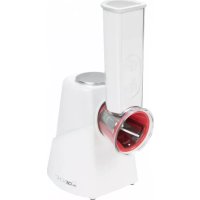
ME 3604 - Food Processor CLATRONIC - Free user manual and instructions
Find the device manual for free ME 3604 CLATRONIC in PDF.



| Product Type | Food Processor |
| Brand | Clatronic |
| Model | ME 3604 |
| Power Supply Voltage | 220-240 V~ |
| Frequency | 50/60 Hz |
| Power Consumption | 150 W |
| Protection Class | II |
| Net Weight | Approx. 1.08 kg |
| Number of Accessories | 5 |
| Included Accessories | Pusher, filling tube, accessory holder, coarse cutting accessory (blue), fine cutting accessory (red), slicing accessory (purple), grating accessory (green), coarse grating accessory (yellow) |
| Switch | On/Off (press and hold for operation) |
| Main Functions | Cutting, grating, slicing, coarse grating |
| Intended Use | Private use, for solid foods (not frozen, not hard) |
| Max Operating Time (hard foods) | 2 minutes |
| Max Operating Time (soft foods) | 5 minutes |
| Required Cooling Time | 90 seconds between uses |
| Care and Cleaning | Accessories washable in hot water, housing with damp cloth. Do not immerse motor unit. Do not put in dishwasher. |
| Safety | Automatic stop when switch is released; must use pusher; sharp blades handle with care |
| Repairability | Contact qualified after-sales service for any repairs |
Frequently Asked Questions - ME 3604 CLATRONIC
User questions about ME 3604 CLATRONIC
0 question about this device. Answer the ones you know or ask your own.
Ask a new question about this device
Download the instructions for your Food Processor in PDF format for free! Find your manual ME 3604 - CLATRONIC and take your electronic device back in hand. On this page are published all the documents necessary for the use of your device. ME 3604 by CLATRONIC.
USER MANUAL ME 3604 CLATRONIC
natural_image
White and five colorful food grater with no visible text or symbols on the main objects.CE
DEUTSCH
Inhalt
Overview of the Components ...... Page 3
Instruction Manual......Page 25
Technical Data Page 28
Disposal Page 28
NEDERLANDS
Inhoud
Thank you for selecting our product. We hope that you will enjoy use of the appliance.
Symbols in this user manual
Important notes for your safety are marked distinctively. Pay absolute attention to them to avoid accidents and damage to the device:

WARNING:
Warns of dangers for your health and indicates potential risks of injury.

CAUTION:
Indicates potential dangers for the device or other objects.

NOTE:
Highlights tips and information for you.
General Notes
Before using this device, carefully read this user manual and keep it together with the Warranty Certificate, cashier receipt and if possible, the original package inclusive its interior packing. If you hand on the device to any third person, include the user manual as well.
- Use the device for private and its intended purpose only. The device is not intended for commercial use.
- Do not use the device outdoors. Protect it from heat, direct sunlight, humidity (do not immerse into liquids under any circumstances) and sharp edges. Do not use the device with wet hands. If the device gets wet, unplug it immediately.
- Always switch off and unplug the device (pull the plug, not the cable) when you do not use the device, or when you attach accessories, during cleaning or malfunctioning.
- Do not leave the device unattended during operation. Always switch off the device when leaving the room. Unplug the device.
- Regularly check the device and cable for signs of damage. Do not continue to operate the device in case of damage.
- Do only use original parts.
- For the safety of your children, keep any packing parts (plastic bags, cartilage, Styrofoam etc.) out of their reach.

WARNING!
Don't let small children play with foils for danger of suffocation!
Special Safety Precautions for this Device

WARNING:
- Always disconnect the appliance from the supply if it is left unattended and before assembling, disassembling or cleaning.
- Do not repair the device by yourself. Please contact authorized personnel. In order to avoid hazards, a damaged mains cable must be replaced with an equivalent cable by the manufacturer, our customer service or any other qualified specialist.
• This appliance shall not be used by children. - Keep the appliance and its cord out of reach of children.
• Children shall not play with the appliance.
WARNING:
- Appliances can be used by persons with reduced physical, sensory or mental capabilities or lack of experience and knowledge if they have been given supervision or instruction concerning use of the appliance in a safe way and if they understand the hazards involved.
- The motor block is not intended for insertion into water for cleaning. Please observe the instructions that we have included for you in the chapter “Cleaning”.
WARNING: Risk of injury!
- The cutting, grating, and rasping inserts are very sharp on the cutting or rasping surfaces! When fitting and removing the inserts and during cleaning you will come into contact with these accessories. Use these accessories with the necessary caution to prevent injuries. Only touch the inserts on the plastic.
- Always only use the pusher to press down the food and not your fingers, a fork or other objects.
Overview of the Components
1 Pusher
2 Feed neck
3 Insert holder
4 Attachment for coarse cutting (blue)
5 Attachment for fine cutting (red)
6 Attachment for grating (purple)
7 Attachment for fine rasping (green)
8 Attachment for coarse rasping (yellow)
9 Motor block
10 On / Off switch
11 Lock for the knife attachments
Intended Use
This appliance serves for the cutting, rasping or grating of solid food.
It is only designed for this use and should only be used for this intended purpose.
It is not designed for chopping meat or frozen foods or food that is too hard such as nutmeg and cooking chocolate, for example.
Only use this device as instructed in this user manual. Do not use this device commercially.
No other use is intended and can cause damage or personal injuries.
The manufacturer is not responsible for any damages incurred due to improper use.
Unpack Device
- Take the device out of its packaging.
- Remove all packaging materials, such as foils, filling materials, cable ties and cartons.
- Check that all accessories are included in the box.
- If the contents of the box are incomplete or if damage is found, do not operate the appliance. Return it to the dealer immediately.

NOTE:
Clean manufacturing residues and dust from the device as described under "Cleaning".
Instructions for use
Assembly / Preparations
- Place the appliance on an even work surface.
- Install the insert holder (3) onto the motor block (9) by twisting it anticlockwise.
-
Select a suitable attachment. Insert this attachment into the opening of the insert holder. (Page 3, Fig. a)
-
Attachment for coarse cutting (blue)
- Attachment for fine cutting (red)
- Attachment for grating (purple)
- Attachment for fine rasping (green)
-
Attachment for coarse rasping (yellow)
-
Lock the attachment with the lock (11): Set it onto the drive shaft and tighten it by turning it counterclockwise. (Page 3, Fig. b)
-
Place a bowl under the insert holder to collect the cut or grated food.
-
Remove the peel from the food if necessary. The peel could clog the insert holder.
-
Chop up large pieces of food to be able to fill them into the insert holder without a problem.

NOTE about the selection of the insert:
If the result of the chopping should not be satisfactory, try it with a different insert. Attach a rasp instead of the grater, for example.
Disassembly
- Remove the lock by turning it clockwise. Remove the lock and the attachment.
- Release the insert holder from the motor block by turning it clockwise.
Electric operation
- Before you plug the mains plug into the outlet, check whether the system voltage that you want to use, matches the one of the appliance. You will find information about it on the type plate.
- Connect the appliance to a correctly installed grounded outlet.
Turning on/off
- You can turn the appliance on with the switch (10).
- The appliance will turn off when you release the switch.

CAUTION: Short-term operation
Observe the following operation times:
- Hard food like for example carrots: Max. 2 minutes;
- Soft food like for example cucumbers: Max. 5 minutes.
• Always let the appliance cool down for approx. 90 seconds between two operations.
Operation

NOTE:
Peel the food, if necessary chop large pieces.
- Fit the desired insert.
- Connect the appliance to a properly installed isolated ground receptacle.
- Fill the food into the feed neck.
- Keep the switch pressed with one hand to turn on the appliance.
- Press the food down with the pusher. Pay attention to the flattened side of the pusher.

WARNING:
Always use the supplied pusher. Never put your fingers or tools into the feed neck!
Ending operation
Disconnect the plug from the outlet.
Cleaning

WARNING:
• Always remove the power cord before cleaning.
- Never immerse the motor block in water. It could result in an electric shock or fire.
- The cutting surfaces of the inserts are sharp. Injury may occur! Always touch the inserts on the plastic.

CAUTION:
- Do not use a wire brush or other abrasive utensils for cleaning.
- Do not use aggressive or abrasive cleaning agents.

NOTE:
Color residues from vegetables (e.g. carrots) are best removed with a cloth and cooking oil.
Immediately clean the appliance after each use.
Accessories
- Remove the insert from the insert holder.
- Twist off the insert holder from the motor block. Remove the pusher.
- You may rinse the accessories in a bowl of hot water and then dry them.
Housing
- Clean the housing with a moist towel.
- Remove any residual water with a dry cloth.
Technical Data
Model: ME 3604
Power supply: 220-240 V\~, 50/60 Hz
Power consumption: 150 W
Protection class: II
Short term operation: 5 minutes
Net weight: .... approx. 1.08 kg
The right to make technical and design modifications in the course of continuous product development remains reserved.
This device complies with all current CE directives, such as electromagnetic compatibility and low voltage directive and is manufactured according to the latest safety regulations.
Disposal
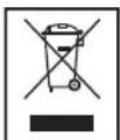
Meaning of the "Wheelie Bin" Symbol
Take care of our environment, do not dispose of electrical appliances via the household waste.
Dispose of obsolete or defective electrical appliances via municipal collection points.
Please help to avoid potential environmental and health impacts through improper waste disposal.
You contribute to recycling and other forms of utilization of old electric and electronic appliances.
Your municipality provides you with information about collecting points.
Instrukcja obsługi
CTC Clatronic Sp. z o.o