GLC120 - Brush cutter BLACK & DECKER - Free user manual and instructions
Find the device manual for free GLC120 BLACK & DECKER in PDF.


| Product type | Cordless string trimmer |
| Brand | Black & Decker |
| Model | GLC120 |
| Battery voltage | 12 V DC |
| Battery capacity | 7.2 Ah |
| Battery type | Lead-acid (diluted sulfuric acid) |
| Charging time | Approximately 16 hours |
| Mains charger | 230 V AC, 50 Hz |
| No-load speed | 10,800 min⁻¹ |
| Cutting line length | 10 m (spool) |
| Weight | 4.6 kg |
| Cutting modes | Edge (trimming) and cut (overhang) |
| Head orientation | Rotating with release button |
| Secondary handle | Adjustable (loosen the button) |
| Safety system | Double switch (lock-off button + trigger) |
| Automatic line feed | Yes, trigger mechanism |
| Protection | Protective guard, cutting blade, guide shoe |
| Sound pressure level | 83 dB(A) |
| Sound power level | 96 dB(A) |
| Hand/arm vibration level | < 2.5 m/s² |
| Routine maintenance | Cleaning the spool and housing, replacing the line |
| Replacement parts | Spool A6481, cutting line A6170 (25 m), A6171 (40 m), A6054 (50 m) |
| Warranty | 12 months, subject to conditions of use |
| Intended use | Domestic, edging and grass cutting in small spaces |
Frequently Asked Questions - GLC120 BLACK & DECKER
User questions about GLC120 BLACK & DECKER
0 question about this device. Answer the ones you know or ask your own.
Ask a new question about this device
Download the instructions for your Brush cutter in PDF format for free! Find your manual GLC120 - BLACK & DECKER and take your electronic device back in hand. On this page are published all the documents necessary for the use of your device. GLC120 by BLACK & DECKER.
USER MANUAL GLC120 BLACK & DECKER
You have chosen a Black & Decker tool. Our aim is to provide quality tools at an affordable price.
We hope that you will enjoy using this tool for many years.
EC DECLARATION OF CONFORMITY

GLC120
Black & Decker declares that these tools conform to: 98/37/EC, 89/336/EEC, 73/23/EEC, EN 60335, EN 786, EN 50260, EN 55014, EN 61000
Level of sound pressure, measured according to 84/538/EEC:
GLC120
L (sound pressure) dB(A) 83
Lw (acoustic power) dB(A) 96

Always wear ear protection if the sound pressure exceeds 85 dB(A).
Hand/arm weighted vibration value according to 98/37/EC:
GLC120
<2.5m/s
Colin Dyke
Vice President of Engineering
Brockville, Ontario K6V 5W6
Canada
INTENDED USE
Your Black & Decker grass trimmer GLC120 has been designed for trimming and finishing lawn edges and to cut grass in confined spaces.
This tool is intended for consumer use only.
Your Black & Decker charger has been designed for charging Black & Decker batteries of the type supplied with this tool.

SAFETY INSTRUCTIONS
Warning symbols
The following symbols are used in this manual:

Denotes risk of personal injury, loss of life or damage to the tool in case of non-observation of the instructions in this manual.

Denotes risk of electric shock.

Read the manual prior to operation.

Fire hazard.
Know your tool

Warning! When using battery-powered tools, basic safety precautions, including the following, should always be followed to reduce the risk of fire, leaking batteries, personal injury and material damage.
Read all of this manual carefully before operating the tool.
Before operating the tool, make sure that you know how to switch it off in an emergency.



ENGLISH
- The intended use is described in this manual. The use of any accessory or attachment or performance of any operation with this tool other than those recommended in this instruction manual may present a risk of personal injury.
Retain this manual for future reference.
Work area
Do not expose the tool to rain. Do not use the tool in damp or wet conditions.
- Only use the tool in daylight or good artificial light.
Personal protection
Wear stout shoes or boots to protect your feet. Do not operate the tool wearing open-toed sandals or when barefoot.
Wear long trousers to protect your legs.
Using your tool
Stay alert. Watch what you are doing. Use common sense.
Do not operate the tool when you are tired.
If the tool begins to vibrate abnormally, immediately switch it off. Allow rotating parts to stop and inspect the tool for damage and loose parts.
Safety of others
Do not allow children or any person unfamiliar with these instructions to operate the tool.
Do not allow children, visitors or animals to come near the work area or to touch the tool.
Remember that the operator may be held responsible for accidents or hazards occurring to other people or their property.
After use
Switch the tool off and ensure that moving parts have stopped rotating before leaving the tool unattended and before changing, cleaning or inspecting any parts of the tool.
- When not in use, the tool should be stored in a dry place. Children should not have access to stored tools.
Inspection and repairs
Before use and after any impact, check the tool for damaged or defective parts. Check for misalignment and seizure of moving parts, breakage of parts, damage to guards and switches and any other conditions that may affect its operation. Check if the lock-off button functions properly.
Do not use the tool if any part is damaged or defective. Do not use the tool if the switch does not turn it on and off.
- Never use the tool when any guard or enclosure is damaged or not in place.
Ensure that the tool will operate properly and perform its intended function.
- Have any damaged or defective parts repaired or replaced by an authorised repair agent.
- Never attempt to remove or replace any parts other than those specified in this manual. Use only Black & Decker replacement parts and accessories.
Additional safety instructions for grass trimmers
The following warning symbols are found on the tool:

Wear safety glasses or goggles when operating this tool.

The cutting line will continue to run for a few seconds after switching the tool off. Never attempt to force the line to come to a standstill.
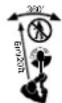
Keep people and animals at least 6 m away from the cutting area.

Do not expose the tool to rain or high humidity.
Before using the tool, check that your cutting path is free from sticks, stones, wire and any other objects.
Only use the tool in the correct position, with the cutting line near the ground, as shown in the illustrations. Never switch the tool on in any other position.



ENGLISH
Switch on the tool only when hands and feet are away from the cutting line.
- Avoid body contact with the cutting line while the tool is running.
Do not work on steep slopes. Be sure of your footing. Be aware that freshly cut grass is damp and slippery.
Take care when trimming near borders and gravel paths or roads, as stones and soil may be moved by the cutting line.
Do not put the tool down until the cutting line has come to a complete standstill.
Use only the appropriate type of Black & Decker cutting line. Never use metal cutting line or fishing line.
Take care to avoid injury from the line trimming blade. Do not touch the blade. After extending new cutting line, always return the tool to its normal operating position before switching on.
Additional safety instructions for batteries and chargers
Battery
- Never attempt to open for any reason.
Do not store in locations where the temperature may exceed 40^
Charge only at ambient temperatures between 5^ and 40^ .
Charge only in a dry, well ventilated area.
Charge only using the charger provided with the tool.
Do not attempt to charge damaged batteries.
Before charging, make sure that the battery connector is dry and clean.
When disposing of the battery, follow the instructions given in the section "Protecting the environment".
Under extreme conditions, battery leakage may occur.

The battery liquid contains diluted sulphuric acid which can be harmful. Sulphuric acid on the skin will cause burns and if in contact with the eyes may cause loss of sight.
In case of skin contact, flush immediately with water. Neutralize with a mild alkaline solution such as milk or bicarbonate of soda.
In case of eye contact, rinse abundantly with clean water for at least 10 minutes. Seek medical attention.
The following symbol is found on the battery:
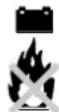
Do not incinerate the battery.
Charger
Use your Black & Decker charger only to charge batteries of the type supplied with your tool. Other batteries could burst, causing personal injury and damage.
Have defective cords replaced immediately.
Do not expose to water.
Do not open the charger.
Do not probe the charger.
The following symbol is found on the charger:

Intended for indoor use only.

ELECTRICAL SAFETY
Your charger has been designed for a specific mains voltage. Always check that the mains voltage corresponds to the voltage on the rating plate.

The charger is designed for use on AC (mains) power supplies only. Do not attempt to use on any other supply.

Your charger is double insulated in accordance with EN 60335; therefore no earth wire is required.

Never attempt to replace the charger unit with a regular mains plug.

ENGLISH
CARTON CONTENTS
The carton contains:
1 Cordless grass trimmer
1 Charger
1 Guard with mounting screw
1 Wall mount
2 Mounting screws
2 Wall plugs
1 Instruction manual
Carefully unpack all parts.
OVERVIEW (fig. A)
- On/off switch
- Lock-off button
- Battery housing
- Secondary handle
- Handle knob
- Head release knob
- Motor housing
- Guard
- Line trimming blade
- Edge guide
- Spool
- Cutting line
- Charger
- Wall mount
ASSEMBLY

Avoid accidentally switching the tool on during assembly.
Fitting the guard (fig. B)
Remove the screw (15) from the guard (8).
Place the guard onto the tool as shown.
Firmly press the guard until it snaps into place.
Secure the guard with the screw (15).

Never use the tool unless the guard is properly fitted.
Mounting the wall mount to the wall (fig. C)
The wall mount (14) is used to provide a convenient storage and charging point for the tool.
Find a suitable indoor location for the wall mount. If you also want to charge the battery on the wall mount, this location must be dry and well ventilated.
Position the wall mount as shown and mark the location of the two mounting holes (16) on the wall. Make sure that there is sufficient space to hang the tool on the wall mount.
Drill a hole (6 mm, approx. 35 mm deep) at each of the marked locations.
Insert the plugs (17) provided into the holes.
If you do not want to use the wall mount location for charging the battery, remove the charging insert from the wall mount.
If you want to use the wall mount location for charging the battery:
-
Guide the cable (19) through one of the slots (20) as shown.
-
Plug the charger (13) into a mains outlet.
Mount the wall mount to the wall using the screws (18) provided.
Fitting the secondary handle (fig. D)
Unscrew the handle knob (5).
- Set the handle onto the tool as shown.
Fasten the handle using the handle knob and screw as shown.
USE

Let the tool work at its own pace.
Do not overload.
Charging the battery (fig. G & H)
The battery needs to be charged before first use and whenever it fails to produce sufficient power on jobs that were easily done before. To maximise the lifetime of the battery, it is recommended to keep the battery connected to the charger whenever the tool is not in use. When the battery is full, the power consumption of the charger is negligible.

Do not charge the battery at ambient temperatures below 5^ or above 40^ . Recommended charging temperature: approx. 24^ .





ENGLISH
To charge the battery on the wall base:
- Make sure the charging insert (21) is fitted in the wall mount (14) (fig. C).
- Hang the tool on the wall mount as shown (fig. F).
To charge the battery elsewhere:
- Insert the plug (32) into the connector (33) on the battery housing.
- Place the tool on a flat and level surface as shown.

Make sure that the tool is out of reach of children and any other persons unfamiliar with this tool.
Make sure that the plug and cable are not trapped under the tool.
Charging process (fig. 1)
Plug the charger into a mains outlet.
While the battery is being charged, the red indicator light (34) on the charger will be lit.
When charging is complete, the red indicator light will stop lighting and the green indicator light (35) will be lit. The battery can be left connected to the charger indefinitely.

When you want to use the tool, disconnect the charger from the battery and unplug the charger.
Adjusting the position of the secondary handle (fig. A & J)
The secondary handle can be adjusted to provide optimum balance and comfort.
Let the guard (8) rest on the ground.
- Slacken the handle knob (5).
Move the handle (4) into the desired position.
Securely tighten the handle knob.
Setting the tool to trimming or edging mode (fig. K, L & M)
The tool can be used in trimming mode as shown in fig. K or in edging mode to trim overhanging grass along lawn edges and flower beds as shown in fig. L.
Trimming mode (fig. K & M)
For trimming, the trimmer head should be in the position shown in fig. K. If it is not:
While holding the secondary handle with one hand, depress the head release knob (6) with the other hand (fig. M).
- Rotate the trimmer head clockwise until it engages in the trimming position.
Release the head release knob.
- Set the edge guide (10) to the retracted position.
Edging mode (fig. L & M)
For edging, the trimmer head should be in the position shown in fig. L. If it is not:
While holding the secondary handle with one hand, depress the head release knob (6) with the other hand (fig. M).
- Rotate the trimmer head counterclockwise until it engages in the edging position.
Release the head release knob.
- Set the edge guide (10) to the forward position.
Switching on and off (fig. N)
For your safety, this tool is equipped with a double switching system. This system is designed to prevent inadvertent operation of the tool.
Switching on
Push the lock-off button (2) forward using your thumb and at the same time squeeze the on/off switch (1).
Release the lock-off button.
Switching off
Release the on/off switch (1).

Never attempt to lock a switch in the on position.
Hints for optimum use
Trimming
Hold the tool as shown in fig. K.
Gently swing the trimmer from side to side as shown in fig. K.
ENGLISH
- When cutting long grass, work in stages from the top.
- Keep the tool away from hard objects and delicate plants.
- If the tool starts running slowly, reduce the load.
Edging
Optimum cutting results are achieved on edges deeper than 50~mm
Do not use the tool to create edges. To create edges, use an edging spade.
Guide the tool as shown in fig. L. Keep the edge guide against the lawn edge.
To make a closer cut, slightly tilt the tool.
General
In order to achieve optimum cutting results, only cut dry grass.
If possible, keep the battery connected to the charger and the charger plugged in whenever the tool is not in use.
MAINTENANCE
Your Black & Decker tool has been designed to operate over a long period of time with a minimum of maintenance. Continuous satisfactory operation depends upon proper tool care and regular cleaning.
Your charger does not require any maintenance apart from regular cleaning.

Unplug the charger before cleaning it.
Regularly clean the spool using a soft brush or dry cloth.
Regularly use a blunt scraper to remove grass and dirt from the underneath of the guard.
Regularly clean the ventilation slots in your tool using a soft brush or dry cloth.
Regularly clean the motor housing using a damp cloth. Do not use any abrasive or solvent-based cleaner.
Fitting a new spool of cutting line (fig. E)
Replacement spools of cutting line are available from your Black & Decker dealer (cat. no. A6481).
- Keep the tabs (22) depressed and remove the spool cover (23) from the housing (24).
Remove the empty spool (25) from the housing.
Remove any dirt and grass from the housing.
Take the new spool and unwind approx. 10cm of cutting line.
Feed the cutting line through the eyelet (26). - Push the spool onto the drive shaft (27) and rotate it slightly until it is seated. Make sure that the cutting line is not trapped under the spool and that 8-10 cm of cutting line protrudes from the housing.
Align the tabs on the spool cover with the holes in the housing. - Push the cover onto the housing until it snaps securely into place.

If the cutting line protrudes beyond the trimming blade (9), cut it off so that it just reaches the blade.
Winding new line onto an empty spool (fig. F)
You may wind new cutting line onto an empty spool. Replacement packs of cutting line are available from your Black & Decker dealer (cat. no. A6170 (25 m), A6171 (40 m), A6054 (50 m)).
Remove the empty spool from the tool as described above.
Remove any old cutting line from the spool.
Feed 2 cm of cutting line into one of the holes (28) in the spool as shown.
Bend the cutting line and anchor it in the L-shaped slot (29).
Wind the cutting line onto the spool in the direction of the arrow (30). Make sure to wind the line on neatly and in layers. Do not crisscross.
- When the wound cutting line reaches the recesses (31), cut the line. Let the line protrude approx. 10cm from the spool and hold a finger on the line to keep it in place.
Proceed as described above to fit the spool on the tool.

Only use the appropriate type of Black & Decker cutting line.





ENGLISH
Storage
When the tool will not be used for several months, ideally leave the battery connected to the charger. Otherwise proceed as follows:
Fully charge the battery.
Store the tool in a secure and dry location. The storage temperature must always remain in the range of +5^ to +40^
Before using the tool after prolonged storage, fully charge the battery again.
TROUBLESHOOTING
If your tool seems not to operate properly, follow the instructions below. If this does not solve the problem, please contact your local Black & Decker repair agent.
Tool runs slowly
- Check that the spool housing can rotate freely. Carefully clean it if necessary.
- Check that the cutting line does not protrude more than 10 - 12cm from the spool housing. If it does, cut it off so that it just reaches the line trimming blade.
Connect the battery to the charger and plug the charger in. Wait until the green indicator light lights up to ensure that the battery is fully charged.
Automatic line feed does not work
- Keep the tabs depressed and remove the spool cover from the spool.
Lift the spool approx. 6mm and pull the cutting line until it protrudes 8 - 10~cm from the housing. If insufficient cutting line is left on the spool, install a new spool of cutting line as instructed above. - Push the spool back into place and rotate it slightly until it is seated.
Align the tabs on the spool cover with the holes in the housing. - Push the cover onto the housing until it snaps securely into place.
- If the cutting line protrudes beyond the trimming blade, cut it off so that it just reaches the blade.
If the automatic line feed still does not work or the spool is jammed, try the following suggestions:
Carefully clean the spool cover and housing.
Remove the spool and check if the lever (32) can move freely (fig. E).
Remove the spool and unwind the cutting line, then wind it on neatly again as described above. Replace the spool as instructed.
- Push the cover onto the housing until it snaps securely into place.
PROTECTING THE ENVIRONMENT
Tools

Should you find one day that your tool needs replacement, or if it is of no further use to you, think of the protection of the environment. Black & Decker repair agents will accept old Black & Decker tools and ensure that they are disposed of in an environmentally safe way.
Battery (fig. O & P)

If you want to dispose of the tool yourself, the battery must be removed as described below and disposed of in accordance with local regulations.

- The battery liquid contains diluted sulphuric acid which can be harmful. Sulphuric acid on the skin will cause burns and if in contact with the eyes may cause loss of sight. In case of skin contact, flush immediately with water. Neutralize with a mild alkaline solution such as milk or bicarbonate of soda. In case of eye contact, rinse abundantly with clean water for at least 10 minutes. Seek medical attention.
Do not short-circuit the battery terminals.
Be aware that the battery is heavy.
If possible, operate the tool to run the battery down completely.
Remove the secondary handle from the tool.

ENGLISH
Place the tool on a firm surface, allowing access to the screws (36) in the handle casing (fig. O).
Remove the screws (36) from the handle casing.
Remove the top part of the handle casing.
Remove the screws (37) from the battery housing (fig. P).
Remove the top part of the battery housing.
Disconnect the wires (38) from the battery terminals (39).
Place the battery in a suitable packaging to ensure that the terminals cannot be short-circuited. Take the battery to your service agent or a local recycling station. Collected batteries will be recycled or disposed of properly.
Technical data
| GLC120 | ||
| Voltage V | dc | 12 |
| Capacity Ah 7.2 | ||
| No-load speed min | -1 | 10,800 |
| Cutting line length m 10 | ||
| Weight kg 4.6 |
| Charger | |
| Input voltage V | 230 |
| Approx. charging time h 16 | |
GUARANTEE
The Black & Decker lawn and garden guarantee provides: 36 months parts and 12 months labour cover in the UK, 24 months parts and labour cover in South Africa, Australia and
New Zealand. Proof of purchase will be required.
Should your Black & Decker product become defective within the guarantee period due to faulty materials or workmanship, we guarantee to either replace all defective parts or -at our discretion- to replace the unit free of charge, provided that:
The product is returned to us or one of our authorised repair agents with proof of purchase.
The product has been used within the parameters of its consumer classification.
The product has not been used for hire purposes.
Repairs have not been attempted by anyone other than our authorised repair agents.
- The failure represents normal wear and tear. This guarantee is offered as an extra benefit and does not affect your statutory rights.
The guarantee policy
The following failures are not covered by the above guarantee:
Replacing worn or damaged blades, nylon lines, chains and power cables. These items are regarded as replacement items which wear during normal usage.
- Failures as a result of sudden impact or obvious abuse.
- Failures due to usage not in accordance with instructions and recommendations contained in this manual.
The use of other than genuine Black & Decker accessories and parts may cause decreased performance or damage to the product and will render the guarantee void.
AFTER SALES SERVICE
Full details on our after-sales service are available on the Internet at www.2helpU.com.
Alternatively, contact our Service and Information Centre at the address towards the back of this manual.
It is our aim that all Black & Decker customers should be totally satisfied with their Black & Decker product and our after sales service. If any help or advice is needed, please contact your local Black & Decker repair agent.
If your product needs repair, please take or send it to an authorised repair agent, providing proof of purchase if claiming a guarantee repair. Black & Decker offers a nationwide network of authorised repair agents.
Full details on our after sales service can be obtained from any of our authorised repair agents.



ENGLISH
OTHER OUTDOOR TOOLS
Black & Decker has a full range of outdoor power tools that make life in the garden easy. If you would like further information on the following products, please contact our Service and Information Centre (see the address page towards the end of this manual) or your local Black & Decker retailer.
String trimmers Chainsaws
Cordless shear Hedgetrimmers
Lawnmowers Lawnrakers
Leafbusters Shredders
Not all products are available in all countries.


DEUTsCH
AKKU-RASENTRIMMER GLC120
HERZLICHEN GLUCKWUNSCH!
Vice President of Engineering
Brockville, Ontario K6V 5W6
Canada
Vice President of Engineering Brockville, Ontario K6V 5W6 Canada
UTILISATION PREVUE
Vice President of Engineering
Brockville, Ontario K6V 5W6
Canada
USO PROGETTATO
Whenever you are in the car, you will be able to use the electronic system. When you are in the car, you will have to use the electronic system.
Caricare completeness la batteria.
Vice President of Engineering
Brockville, Ontario K6V 5W6
Canada
GEBRUK VOLGENS BESTEMMING
Vice President of Engineering
Brockville, Ontario K6V 5W6 Canada
FINALIDAD
Vice President of Engineering Brockville, Ontario K6V 5W6 Canada
Colin Dyke
Vice President of Engineering
Brockville, Ontario K6V 5W6 Canada
ANVÄNDNINGSOMRADE
ANDRA TRÄDGÄRDSREDSKAP
Colin Dyke
Vice President of Engineering
Brockville, Ontario K6V 5W6 Canada
BRUKSORADER
Anvend horevaern, his lydniveauauter overstiger 85 dB(A).
Colin Dyke
Vice President of Engineering
Brockville, Ontario K6V 5W6 Canada
ANVENDESESOMRADE
Vice President of Engineering
Brockville, Ontario K6V 5W6
Canada
KÄYTTÖTARKOITUS
Vice President of Engineering
Brockville, Ontario K6V 5W6
Canada
ENAEEIEIMENH XPHSH
H mXavn pivipiaatoc xoptou GLC120 mc Black & Decker exi oxediaatei yia to pivipiaqa xoptou kai akpwv (mnpovtupa), kaowc kal v konn xoptou o nepiopiaevouc xwpouc. Auto to epyaleio ia tvov nno npoopiietai mvo ia epaatexviik xpon.
Mnatapia (EK. O & P)

Pb
Av thee va anoppiieTe to epyaleio
eaeic, npenei va apapeei n npatia
onwc nepipapeta napakatw kai n
anoppun mc va yiveuupova u tou
tontikouc kavoviaouc.

H natapi aepiexdiauuveo eko oE, to onio evdoextal va anoei euaeC. H enapn tou eukou oEoc to depa npokaei ykaumata kai otnv nepintwn enapnc ta maia unapxoi kivduoc anwaaic tnc opaoNC. nepintwn enapnc to depua, Eanluve aeqowc vepo. Eoudepeote to oE u apai oakaiKO diAulma, ontw yala n dittavpakkiO oda. nepintwn enapnc ta maia, EanluveTe apbovo kahepo vepo yia touaixotov 10 leTTa. Ztnote iatpkni nepithetayln.
Mbpaxukkawte touc nolouc mC μntatapiac.
Na exete unouyn oac ot n mntapia exe i eyalo bapoc.
Av evai duvato, aeitoupynto to epyaleio wote n matapia va eavantnei evtewc.
ApaipoeTe m BononntnKn λaBn ano to εpyaλeio.
Aoumote To epyaleio 0e mtaOaBepn Eiawia, xwpic va emnoizetai nnpoBaon otic biEc (36) oTo npipBnaum TaLapnC (ek. O).
Apaapeote Tc biEe; (36) ano to nepiBnma Tns λaBns.
Apaepote to eavw tna Tou nepiBnmuotc Tns laBns.
ApaipoeTicBIEc37) ano to npipBnmu Tnc mntapiaac (ek.P).
ApaipoeTo eTavw Tmu Tou nepiBnmuatoc Tnc matapia.
AAnouvδoTe Ta Kaλδia (38) ano touc nolouc mC μntaapiac (39).
Suokueuote T mntatapia kataaannla, wote va a e i u e t e to evdexoevo bpayukkwoonc twv nolwv. TeiAte T mntatapia otov avinpopoioaoacn oe evav toniko otaheo avakukwongc. O mntatapie c nou th a oukyevtpwoov, 0a avakukwouv n th a anoppiqouv kataaannwc.
TexikaXapaktnpiTik


- EC DECLARATION OF CONFORMITY
- INTENDED USE
- SAFETY INSTRUCTIONS
- Warning symbols
- Know your tool
- ENGLISH
- Work area
- Personal protection
- Using your tool
- Safety of others
- After use
- Inspection and repairs
- Additional safety instructions for grass trimmers
- Additional safety instructions for batteries and chargers
- Battery
- The following symbol is found on the battery:
- Charger
- The following symbol is found on the charger:
- ELECTRICAL SAFETY
- CARTON CONTENTS
- OVERVIEW (fig. A)
- ASSEMBLY
- Fitting the guard (fig. B)
- Mounting the wall mount to the wall (fig. C)
- Fitting the secondary handle (fig. D)
- USE
- Charging the battery (fig. G & H)
- Adjusting the position of the secondary handle (fig. A & J)
- Setting the tool to trimming or edging mode (fig. K, L & M)
- Trimming mode (fig. K & M)
- Edging mode (fig. L & M)
- Switching on and off (fig. N)
- Switching on
- Switching off
- Hints for optimum use
- Trimming
- Edging
- General
- MAINTENANCE
- Fitting a new spool of cutting line (fig. E)
- Winding new line onto an empty spool (fig. F)
- Storage
- TROUBLESHOOTING
- Tool runs slowly
- Automatic line feed does not work
- PROTECTING THE ENVIRONMENT
- Tools
- Battery (fig. O & P)
- GUARANTEE
- The guarantee policy
- AFTER SALES SERVICE
- OTHER OUTDOOR TOOLS
- DEUTsCH
- AKKU-RASENTRIMMER GLC120
- HERZLICHEN GLUCKWUNSCH!
- UTILISATION PREVUE
- USO PROGETTATO
- GEBRUK VOLGENS BESTEMMING
- FINALIDAD
- ANVÄNDNINGSOMRADE
- ANDRA TRÄDGÄRDSREDSKAP
- BRUKSORADER
- ANVENDESESOMRADE
- KÄYTTÖTARKOITUS
- ENAEEIEIMENH XPHSH
- Mnatapia (EK. O & P)
Brand : BLACK & DECKER
Model : GLC120
Category : Brush cutter