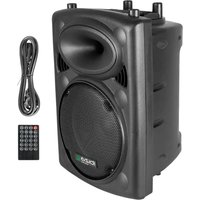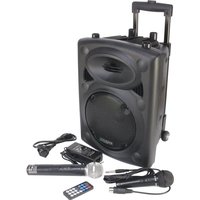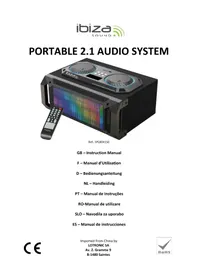
SPLBOX150 - Speaker IBIZA SOUND - Free user manual and instructions
Find the device manual for free SPLBOX150 IBIZA SOUND in PDF.


| Product type | Portable audio system with speaker |
| Brand | Ibiza Sound |
| Model | SPLBOX150 |
| Music power (RMS) | 100 W |
| Music power (max.) | 200 W |
| Woofer (bass speaker) | 6.5" (16 cm) |
| Tweeter | 2 x 3" (7.5 cm) |
| Impedance | 4 Ω |
| Frequency response | 40 Hz - 18 kHz |
| Signal-to-noise ratio | >70 dB |
| Power supply | 220-240 V~, 50/60 Hz |
| Audio sources | Bluetooth, USB, SD, FM, Line in |
| Functions | USB/SD player, FM tuner, USB/SD recording, karaoke with microphone |
| Remote control | Yes (included) |
| Included accessories | Remote control, 3.5mm Jack cable, manual |
| Display type | LED display |
| Microphone input | Yes (jack socket) |
| Line input | Yes (3.5mm jack socket) |
| FM antenna | Built-in, adjustable |
| Light animation | Yes (on front) |
| Care and cleaning | Clean with a soft, dry cloth. Do not use abrasive products. |
| Safety | Do not expose to water or moisture. Do not open the device. |
| Warranty | Consult the retailer. |
Frequently Asked Questions - SPLBOX150 IBIZA SOUND
User questions about SPLBOX150 IBIZA SOUND
0 question about this device. Answer the ones you know or ask your own.
Ask a new question about this device
Download the instructions for your Speaker in PDF format for free! Find your manual SPLBOX150 - IBIZA SOUND and take your electronic device back in hand. On this page are published all the documents necessary for the use of your device. SPLBOX150 by IBIZA SOUND.
USER MANUAL SPLBOX150 IBIZA SOUND
This product is a portable 2.1 audio system supporting Bluetooth, USB, SD card, external sound source input and FM radio.
Precautions
Read the manual prior to first using the product and keep it for further reference.
For best sound performances, keep the unit away from water, moisture, direct sunlight, extreme temperatures.
Place the unit in such a way that it can't fall down.
Never disassemble the unit. Otherwise, it may invalidate the warranty.
Warning:

- The apparatus shall not be exposed to dripping or splashing and no objects filled with liquids, such as vases, shall be placed on the apparatus to avoid any accident.
- To prevent fire or electric shock, please check the compliance of the voltage of power grid with the specified supply voltage of this unit.
Accessories
Unit
User Manual
Remote Control
Line input cable with 3.5mm jack
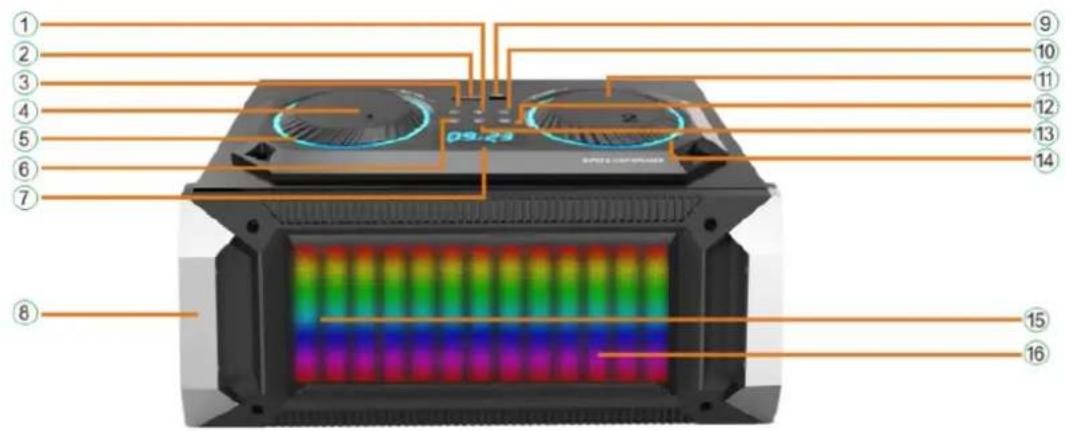
Description of Front Panel
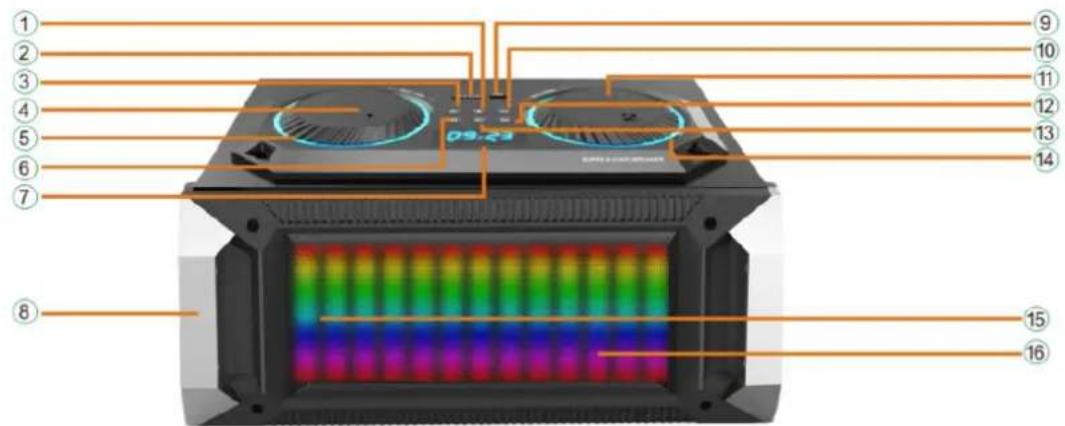
1. Play/Pause
In USB/SD/Bluetooth mode this button has the Play/Pause function
In FM mode: press 2-3 seconds to scan automatically the FM radio channels. Press again to stop auto-searching In LINE mode, this button has no function
2. SD/MMC Input
3. Previous
In USB/SD/Bluetooth mode: press shortly Previous song; Press above 3 Seconds fast backward.
In FM mode: Short press to go to the previous frequency, long press to go directly to previous channel.
4. BASS/TREBLE/Mic volume/Echo Control
5. Flash Light Lens
- Menu Button (adjust Bass/Treble/MIC Vol/Echo)
Press "Menu" button above 3 seconds to restore factory settings
If you encounter problems during use, please press MENU button to restore to factory settings.
7. LED Display Screen
8. Handle
9. USB input
10. Next
In USB/SD/Bluetooth mode: press shortly Next song; Press above 3 Seconds fast forward.
In FM mode: Short press to go to the next frequency, long press to go directly to next channel.
In FM mode, the first time you use this speaker, press and hold PLAY/PAUSE button for 2-3 seconds to search FM channels automatically
In LINE IN mode, this button is not working
11. Main Volume rotary Knob
- Mode (Press shortly to skip to FM/Bluetooth/LINE IN/USB/SD Mode)
- Record (Press and hold above 3 seconds to Record, short press to play) Insert a USB/SD support and plug in the microphone prior to start recording. You can record from the external microphone, Line in and FM input and save your record to the USB/SD storage device. Press and hold the REC button for more than 3 seconds to start recording, Press shortly to play your recording
14. Flash Light Lens
15. Remote control sensor
16. Speaker
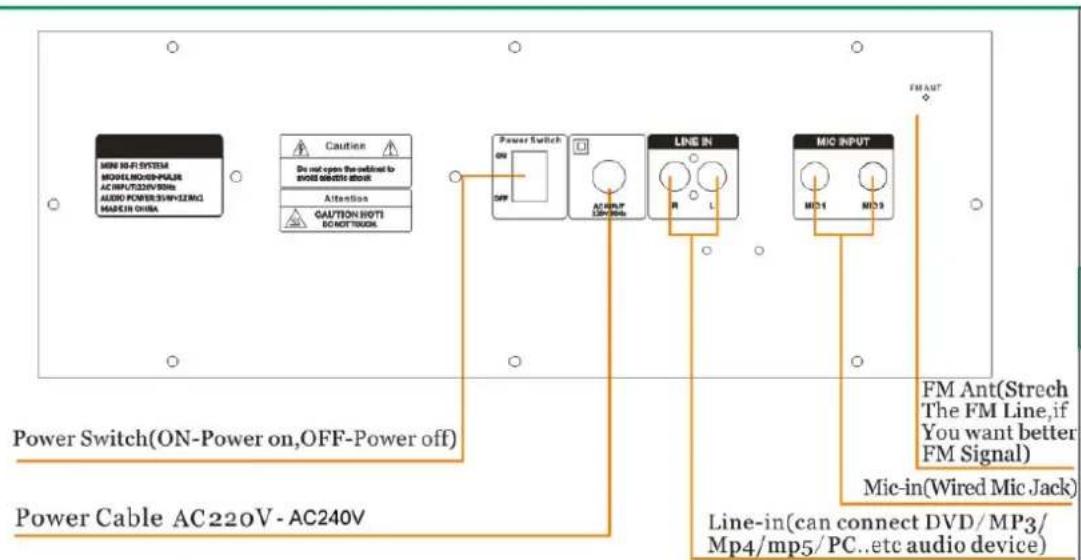
Description of Rear Panel
Power switch ON/OFF
Power input connector (Voltage range AC220V-240V)
FM Ant: Stretch the FM wire antenna to improve FM signal reception
Microphone input
Line input: to connect a DVD/MP3/Mp4/mp5/PC..etc. audio device
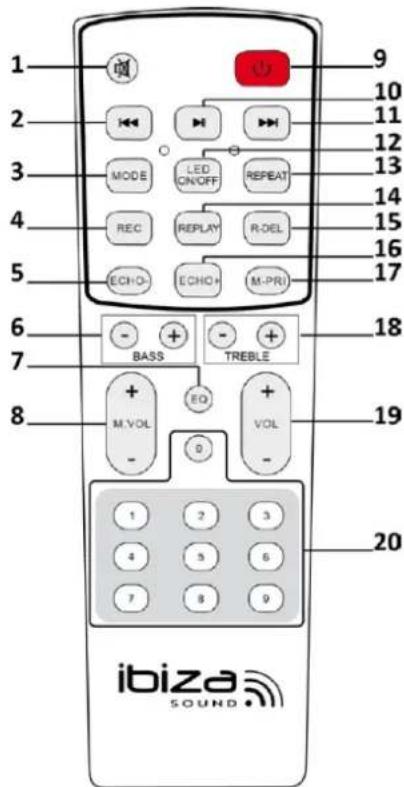
Description of Remote Control
- MUTE: Stops the sound. Press again to switch the sound on again.
- Previous
In USB/SD/Bluetooth mode: press shortly→Previous song; Press above 3 Seconds→fast backward.
In FM mode: Short press to go to the previous frequency, long press to go directly to previous channel.
In LINE mode: no function - Mode: Short press to cycle through FM/Bluetooth/LINE IN/USB/SD Mode
- Record function
- Reduce echo effect
- Adjustment of low frequencies
- EQ: Sound effects: Rock, Jazz, classic, etc.
- Microphone volume adjustment
- Standby button
- Pause/Play
In USB/SD/Bluetooth mode this button has the Play/Pause function In FM mode: press to scan automatically the FM radio channels. Press again to stop auto-searching
In LINE mode, this button has no function
- Next In USB/SD/Bluetooth mode: press shortly Next song; Press above 3 seconds fast forward.
In FM mode: Short press to go to the next frequency, long press to go directly to next channel.
In LINE mode: no function
-
Switches the LEDs on the front panel ON and OFF.
-
Repeat: single-all-cancel repeat
-
Play recorded files on the USB/SD media
-
Delete recorded files on the SD/USB storage device
-
Increase echo effect
-
MIC priority: If you use the Karaoke function and the song is playing at the same time, press this button and the MIC sound will override the sound from USB/SD.
-
Adjustment of high frequencies
-
Volume adjustment
-
Number buttons
In USB/SD mode: press to access directly the track In FM mode: press to select directly a stored radio station In all other modes, these buttons have no function.
Operating Instructions
- Bluetooth Pairing Mode:
Press MODE button on the unit or the remote control until BLUETOOTH is selected.
1). Put the cell phone within 3 meters;
2). Activate the Bluetooth features on your cell phone so that the cell phone starts to search for the Bluetooth device. Please refer to the users' manual for details
3). Select "SPLBOX150" from the device found by the cell phone;
4). For some cell phones, the users have to key in the identification code "0000" and press ENTER key to pair the unit and cell phone.
5). Press RETURN key on the cell phone to exit from the cell phone menu and play music with the unit when there is no barrier between two cell phones within 10 meters. At this time, you can play music with the unit.
6). Shortly press PLAY/PAUSE button to play or pause music. Short press "▶" or "▶" key to select the previous or next track
FM (radio) Mode:
Press MODE button shortly after startup to switch over to "FM" status.
Auto radio station search and storage: Long press on the PLAY/PAUSE button and the unit will automatically search for radio stations in the radio frequency range between 87.5 and 108.0 MHz. 20 radio stations may be stored. Press a number button on the remote to access directly a stored radio station.
- LINE IN MODE:
Press MODE button on the unit or the remote control until LINE is selected. Play the music of the device connected to the LINE input on the rear panel.
- USB Mode:
- After startup, press MODE to select "USB" and insert the USB device. The unit will automatically read and play the music in the USB device.
- Press "▶II" key shortly to pause or play the track.
- Shortly press " 喜 key to skip to the previous track.
- Shortly press "▶" key to skip to the next track.
- SD Mode:
- After startup, press MODE to select "SD" and insert the SD card. The unit will automatically read and play the music in the SD card.
- Press "▶II" key shortly to pause or play the music.
- Shortly press " 一 ^ key to skip to the previous track.
- Shortly press "▶" key to skip to the next track.
Specifications
RMS music power: 100W
Max. music power 200W
Woofer 6.5" / 16cm
Mid-high range. 2× 3^ / 7.5cm
Speaker impedance: 4Ω
Frequency response. 40-18kHz
Signal to noise ratio .>70dB
Input voltage 220-240Vac 50/60Hz
Product dimensions: 43 x 33 x 22cm
Product weight: 6.8kg
The product design and specifications may be changed without prior notice!
Troubleshooting
| Problem | Possible cause | Solution |
| No sound output when power on | 1: No input sound source2: Volume knob in the lowest position3: USB/SD no plug | 1:Connect a Line signal2: Adjust volume3: Insert a USB/SD Card |
| Distortion of sound 1: Volume too loud2: Audio file error | 1:Turn volume lower2:Check and change the audio file3: Adjust Bass/Treble by “MENU” and “Main volume” | |
| No sound from the Microphone | 1:Microphone socket not fully plugged in2: Microphone switch is not on3: Microphone volume in lowest | 1:Completely plug in the microphone socket2:Power on microphone3:Adjust microphone volume |
| No sound from the USB/SD card | 1:incompatible song format2: Illegal operation causes failures3:USB/SD Card not inserted properly | 1:songs format should be MP3/WMA2: Power off, then power on3:Insert USB/SD card properly |
| FM Radio problems | 1:Can’t search radio channels2:FM no sound3:FM Channels too little4:FM sound not clear | 1: The FM ANT is not expanded2: Switch to next Channel and try3: Try and position the FM ANT to a different angle4: Twist FM ANT to other side or try “Auto scan” |
| Speaker has big noise | 1:Wired Microphone too close to the speaker2:Wired Microphone switch on but no use3: Microphone volume too loud4:Mobile phone too close to the speaker5:Too close to the equipment which interfere the speaker | 1:Do not let wired Microphones head point at the speaker2:Turn off wired microphone if not in use3:Reduce microphone volume4: Keep mobile away from the speaker during calls5:Keep the speaker away from other sources of interference |
| Blue-connect Failure | 1: Blue-connect Disconnected2: Blue-connect Connected but no voice3: Blue-connect effective distance too short | 1: Find the right device Name “SPLBOX150”. Or press“MENU” Button to Restore Factory Settings.2: Confirm if you connected the right device Name“SPLBOX150”3: Try to keep away from barriers, such as walls, glasses...etc |
Remarks: If the problem persists, please contact your dealer.
MANUEL D'UTILISATION
Dimensions: 43 x 33 x 22cm
Poids 6.8kg
Description of Front Panel
1. Play/Pause
EC Declaration of Conformity
Hereby we,
LOTRONIC SA
Avenue Zénobe Gramme, 9
1480 SAINTES
Belgique
+32.2.390.91.91
Certify and declare under our sole responsibility that the following product:
Trade name:
ibiza
Product name:
SOUND BOX SYSTEM WITH USB AND BLUETOOTH
Type or model:
SPLBOX100-SPLBOX120-SPLBOX150-SPLBOX200
Conforms to the essential requirements of the:
LVD directive 2006/95/CE and RTTE directive 1999/5/EC
Based on the following specifications applied:
Safety: EN60065:2014
Place and date of issue: Saintes (Belgium), on 02/10/2015
AKBAR Guive
Technical Manager
LOTRONIC SA
Av. Zenobe Gramme 9
1480 Saintes - Belgium
Tel: +32.2.390.91.91
Fax: +32.2,390.93.19
info@lotronic.net

CE
Responsible technique
LOTRONIC SA
Av. Zenobe Gramme 11
1480 Saintes
Belgium
Tel. +32.2.390.91.91
Fax +32.2.390.93.19
TVA BE 0887,125178