
P4 Multispectral - Drone DJI - Free user manual and instructions
Find the device manual for free P4 Multispectral DJI in PDF.
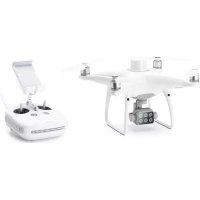



| Brand | DJI |
| Model | P4 Multispectral |
| Category | Drone |
| Product type | Professional multispectral drone |
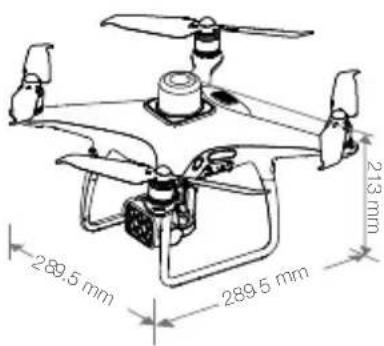
| Dimensions (L x W x H) | 289.5 x 289.6 x 213 mm |
| Takeoff weight | 1487 g |
| Battery power | LiPo 4S, 5870 mAh, 15.2 V, 89.2 Wh |
| Charger power | AC power adapter, 17.4 V, 160 W |
| Max flight time | Approximately 27 minutes |
| Max service ceiling | 6000 m (19685 ft) |
| Max ascent speed | 6 m/s (automatic), 5 m/s (manual) |
| Max descent speed | 3 m/s |
| Key features | Multispectral imaging (6 cameras), integrated RTK, multi-directional obstacle detection, OcuSync transmission up to 7 km, GS Pro app |
| Camera | 6 CMOS 1/2.9" sensors, 2.08 MP, global shutter, B, G, R, RE, NIR filters, plus RGB |
| Gimbal | 3-axis stabilized, tilt -90° to +30° |
| Positioning | Multi-frequency GNSS (GPS, GLONASS, BeiDou, Galileo) + RTK, centimeter accuracy |
| Obstacle detection | Front, rear, downward, infrared (range 0.7 - 30 m) |
| Remote controller | OcuSync, max range 7 km (FCC), LiPo 6000 mAh battery, 6 h battery life |
| Supported memory cards | microSD (Class 10 or UHS-I), max capacity 128 GB |
| Maintenance and cleaning | Clean the lenses with a soft, dry cloth, protect from moisture and dust |
| Safety | Do not start the motors near people, cut the motors in case of emergency (CSC), use in an open outdoor area |
| Spare parts and repairability | Contact DJI after-sales service or an authorized dealer |
| General information | User manual available as PDF on the DJI website, operating temperature 0 to 40 °C |
Frequently Asked Questions - P4 Multispectral DJI
User questions about P4 Multispectral DJI
0 question about this device. Answer the ones you know or ask your own.
Ask a new question about this device
Download the instructions for your Drone in PDF format for free! Find your manual P4 Multispectral - DJI and take your electronic device back in hand. On this page are published all the documents necessary for the use of your device. P4 Multispectral by DJI.
USER MANUAL P4 Multispectral DJI
Contents
EN Quick Start Guide 2
CHS 快速入门指南 8
CHT 快速入門指南 14
JP クイックスタートガイド 20
KR 뭁 스타트 가이드 26
DE Kurzanleitung 32
ES Guía de inicio rápido 38
FR Guide de démarrage rapide 44
IT Guida di avvio rapido 50
NL Snelstartgids 56
PT Guia de início rápido 62
PT-BR Guia de Início Rápido 68
RU Краткое руководство пользователя 74
P4 Multispectral
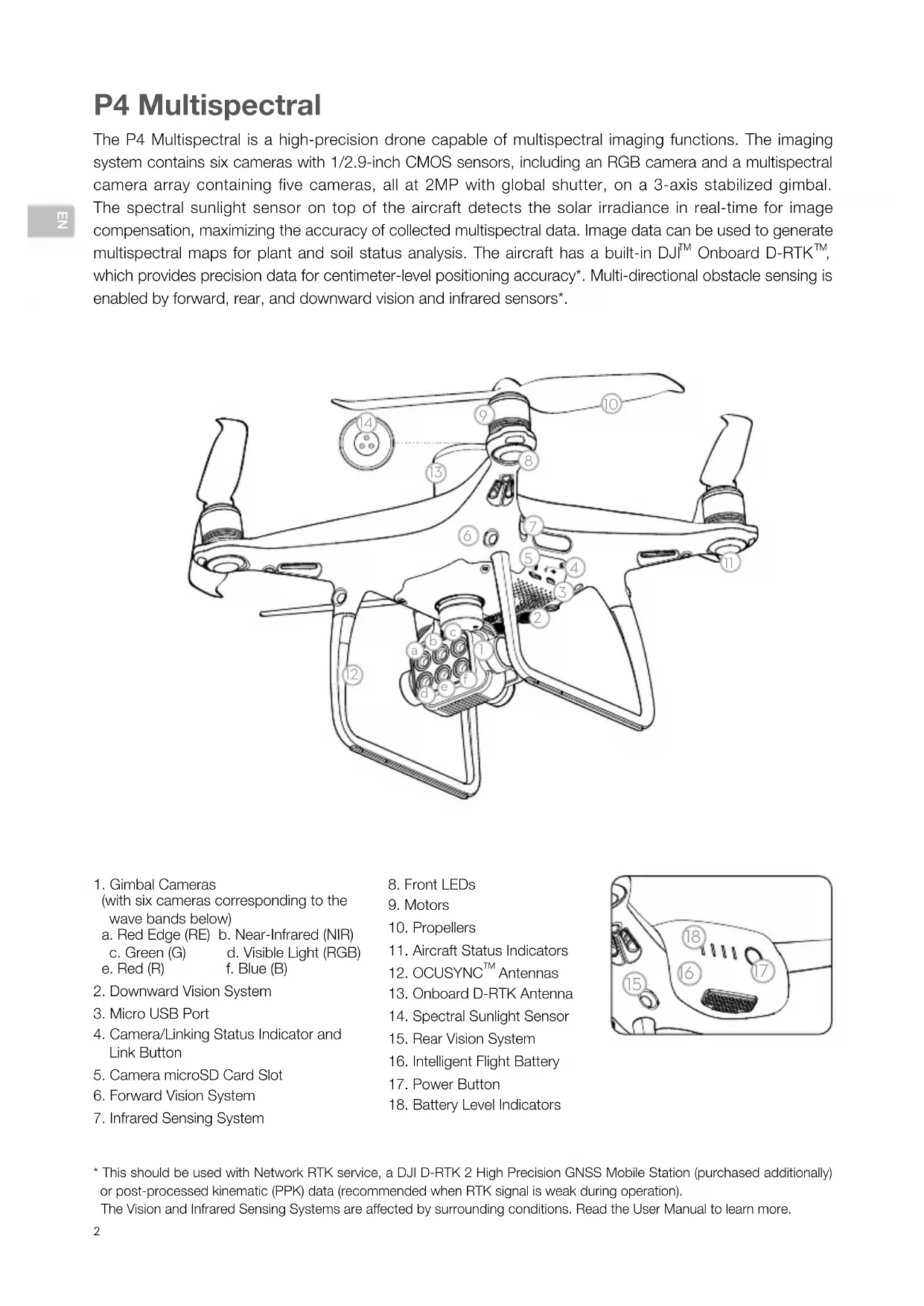
The P4 Multispectral is a high-precision drone capable of multispectral imaging functions. The imaging system contains six cameras with 1/2.9-inch CMOS sensors, including an RGB camera and a multispectral camera array containing five cameras, all at 2MP with global shutter, on a 3-axis stabilized gimbal. The spectral sunlight sensor on top of the aircraft detects the solar irradiance in real-time for image compensation, maximizing the accuracy of collected multispectral data. Image data can be used to generate multispectral maps for plant and soil status analysis. The aircraft has a built-in DJI ™ Onboard D-RTK ™ , which provides precision data for centimeter-level positioning accuracy*. Multi-directional obstacle sensing is enabled by forward, rear, and downward vision and infrared sensors*.
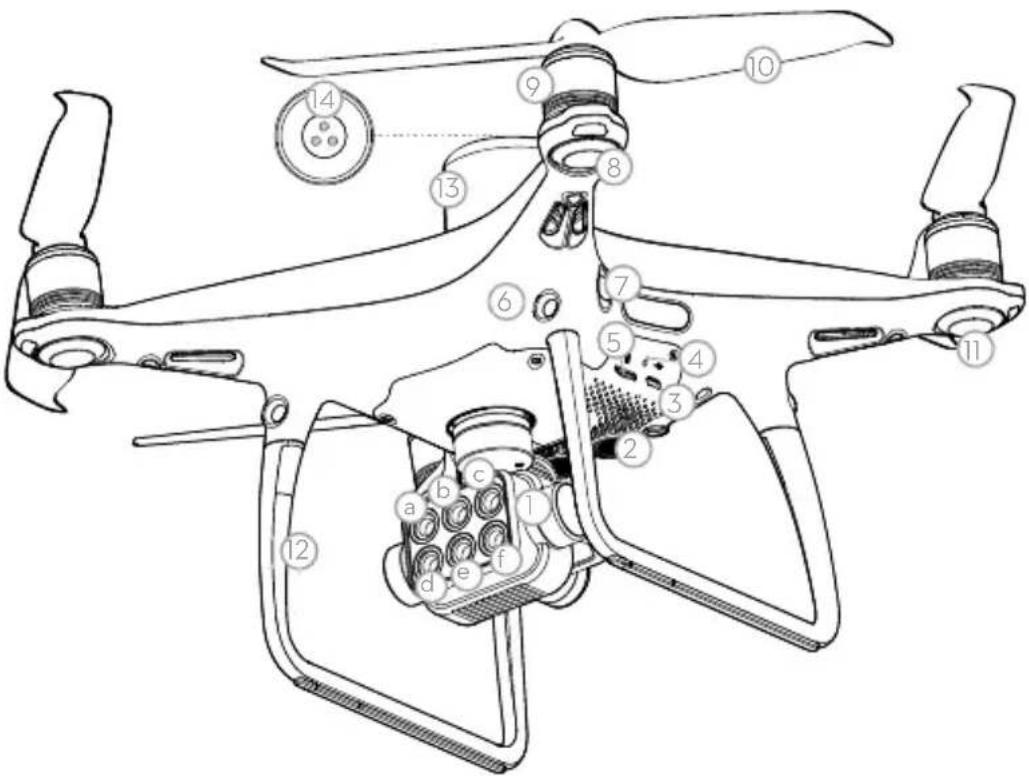
- Gimbal Cameras
(with six cameras corresponding to the wave bands below)
a. Red Edge (RE) b. Near-Infrared (NIR)
c. Green (G) d. Visible Light (RGB)
e. Red (R) f. Blue (B) - Downward Vision System
- Micro USB Port
- Camera/Linking Status Indicator and Link Button
- Camera microSD Card Slot
- Forward Vision System
-
Infrared Sensing System
-
Front LEDs
- Motors
- Propellers
- Aircraft Status Indicators
- OCUSYNC TM Antennas
- Onboard D-RTK Antenna
- Spectral Sunlight Sensor
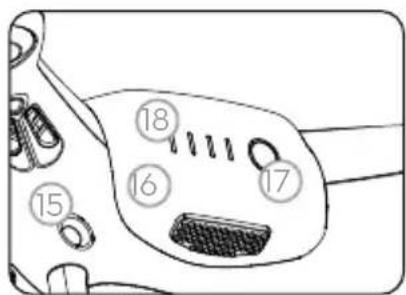
- Rear Vision System
- Intelligent Flight Battery
- Power Button
- Battery Level Indicators
* This should be used with Network RTK service, a DJI D-RTK 2 High Precision GNSS Mobile Station (purchased additionally) or post-processed kinematic (PPK) data (recommended when RTK signal is weak during operation).
The Vision and Infrared Sensing Systems are affected by surrounding conditions. Read the User Manual to learn more.
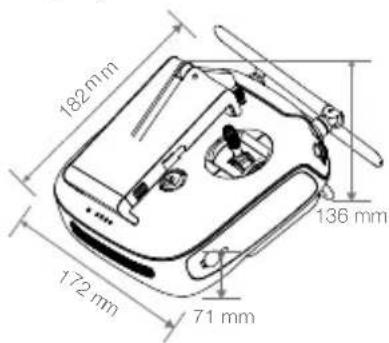
Remote Controller
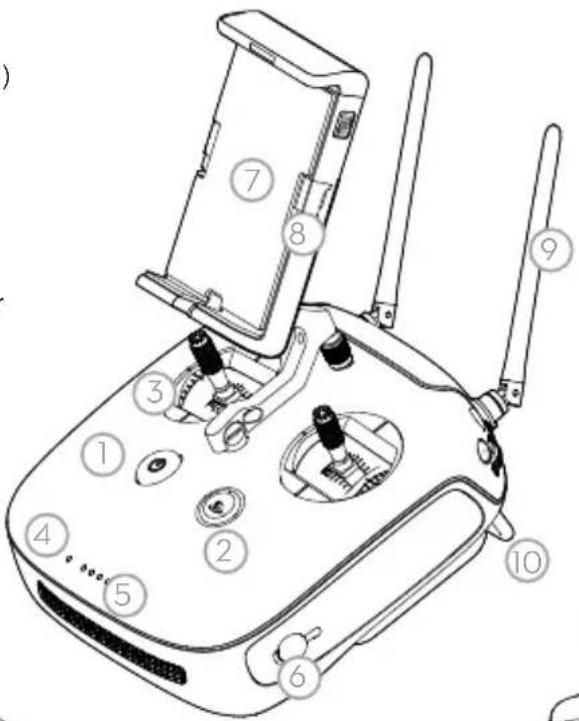
The remote controller features DJI's long-range transmission technology OcuSync that is capable of controlling the aircraft and the gimbal cameras at a maximum transmission range of 4.3 mi (7 km)*. Connect an iPad to the remote controller via the USB port to use the DJI GS Pro app to plan and perform missions. Export the captured images for analysis and create multispectral maps. The remote controller has a rechargeable LiPo battery with a maximum battery life of approximately 6 hours*.
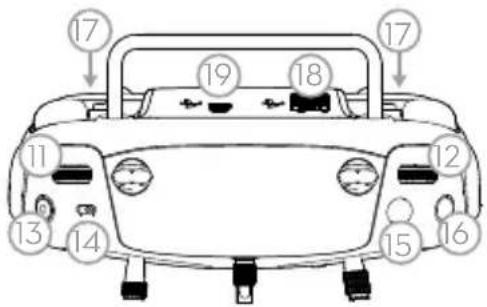
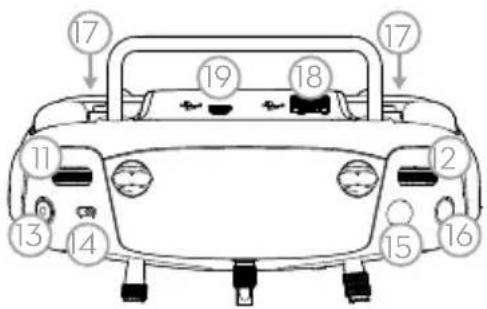
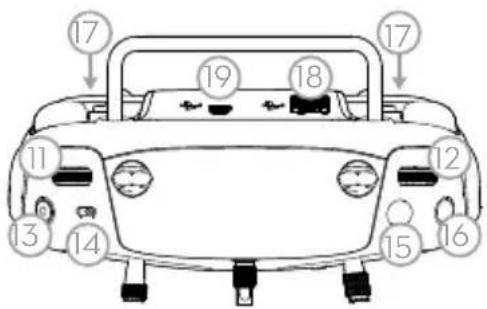
- Power Button
- Return to Home (RTH) Button
- Control Sticks
- Status LED
- Battery Level LEDs
- Power Port
- Mobile Device Holder
- Small Device Positioning Tabs (for mobile phones)
- Antennas
- Handle Bar
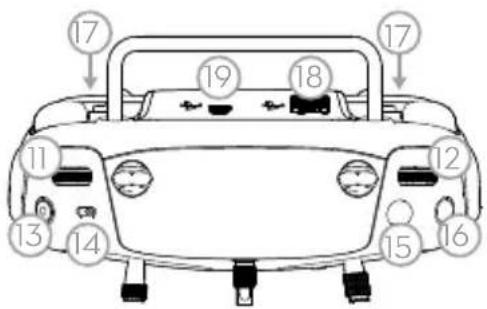
- Gimbal Dial
- Reserved Dial
- Video Recording Button
- Flight Mode Switch
- Shutter Button*
- Reserved Blank Button
- C1 and C2 Buttons (customizable)
- USB Port (for mobile device connection)
- Micro USB Port
The figure below shows the function that each control stick movement performs, using Mode 2 as an example. The left stick controls the aircraft's altitude and heading, while the right stick controls its forward, backward, left and right movements. The gimbal dial controls the camera's tilt.
![graph TD A["Left Stick"] --> B["Up"] B --> C["Down"] D["Turn Right Turn Left"] --> E["Right Stick"] E --> F["Forward"] F --> G["Backward"] H["Gimbal Dial"] --> I["Right Left"] I --> J["Right Stick"]](/content/2026/03/477900/images/30d1429e5fb504bcd412f911994eb21edc132ab32450796ec72cf78a64f597fb.jpg)
* The remote controller is able to reach its maximum transmission distance (FCC/NCC) in a wide open area with no Electro-Magnetic Interference, and at an altitude of about 400 ft (120 m).
The maximum runtime is tested under laboratory environment, only for your reference.
Pictures will only be taken when the shutter button is fully pressed.
Using the P4 Multispectral
1. Downloading the DJI GS Pro App
πZ
The latest version of DJI GS Pro is required when using with the P4 Multispectral. Search for DJI GS Pro* in App Store or scan the QR code to download the app on your iPad.
DJI GS Pro

When using your P4 Multispectral for the first time, activate it using DJI GS Pro. Ensure that your iPad has access to the internet.
* Visit the official DJI website for more information about DJI GS Pro. https://www.dji.com/ground-station-pro
2. Checking Battery Levels
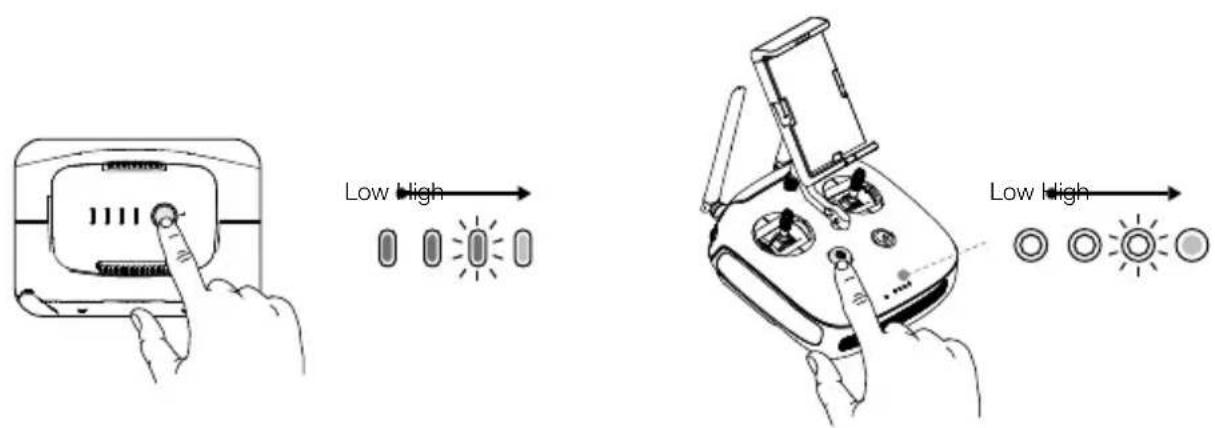
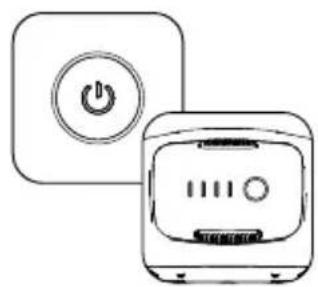
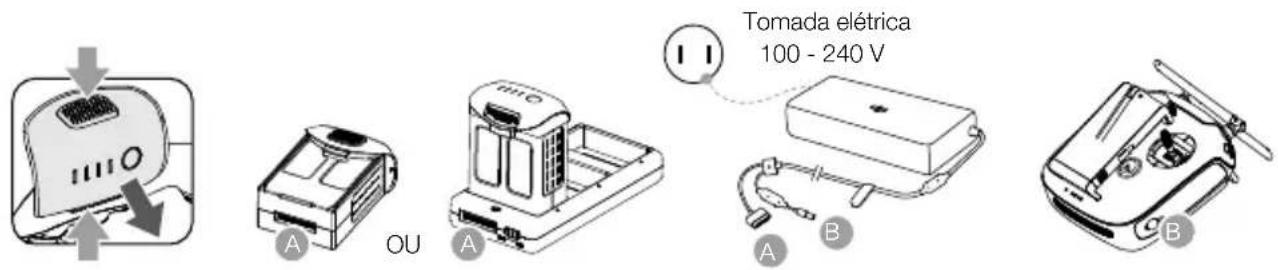
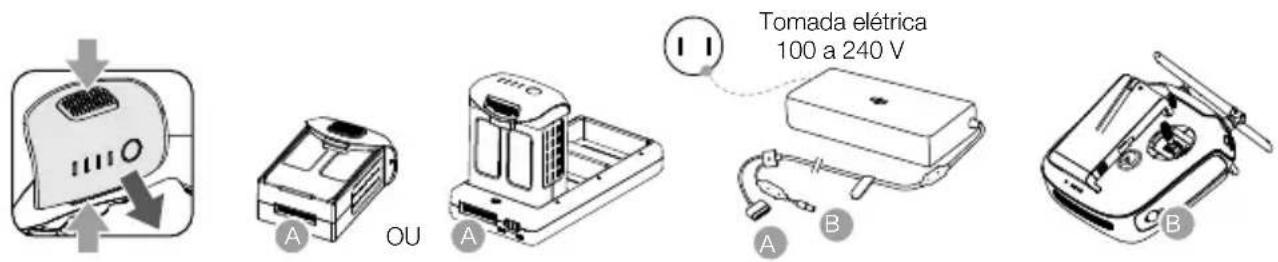
Press once to check the battery level. Press once, then again and hold to turn on/off.
3. Charging the Batteries
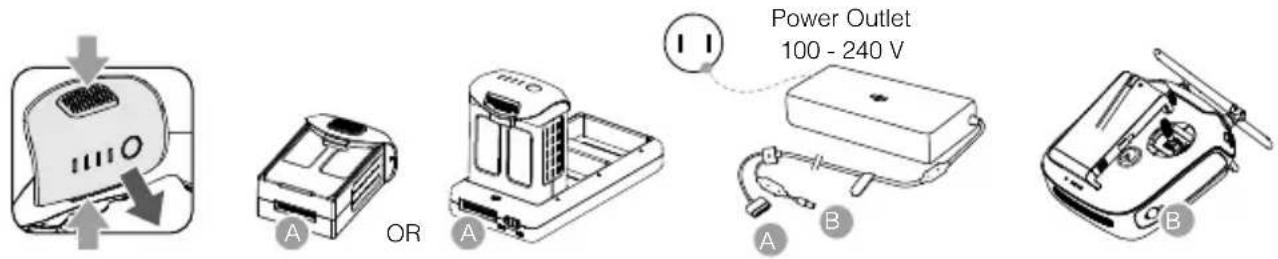

• Fully charge the batteries before using for the first time.
- Ensure to connect the Intelligent Flight Batteries to the charging hub as shown in the figure above.
- Ensure that the Mode Switch of the Intelligent Flight Battery charging hub is set to the Charging Mode position.
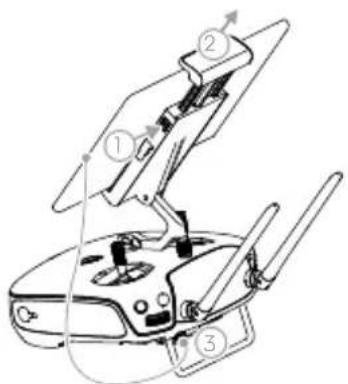
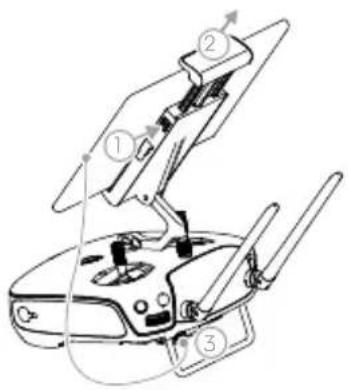
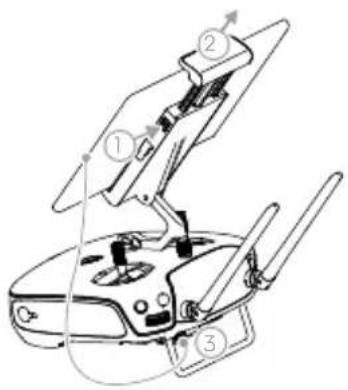
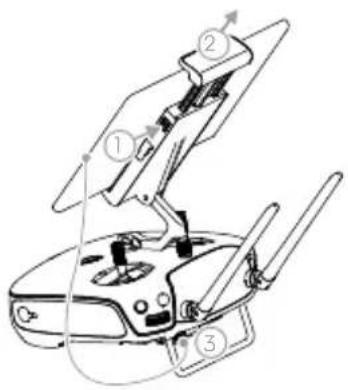
4. Preparing the Remote Controller
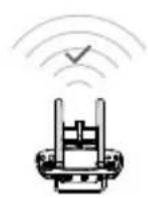
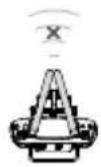
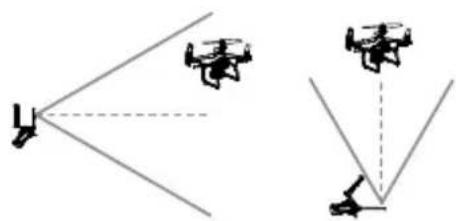
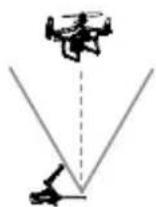
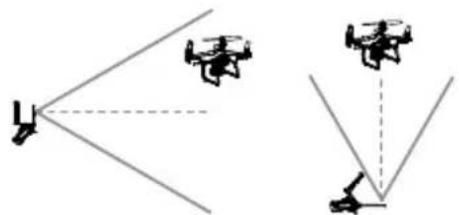
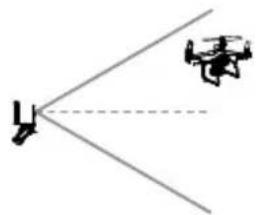
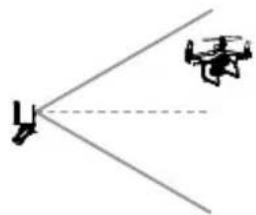
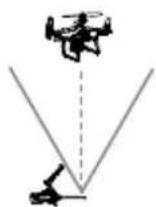
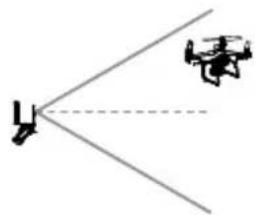
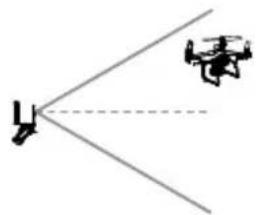
Strong Weak
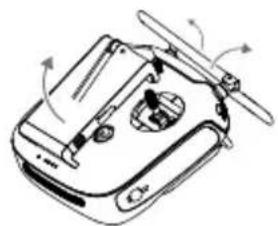
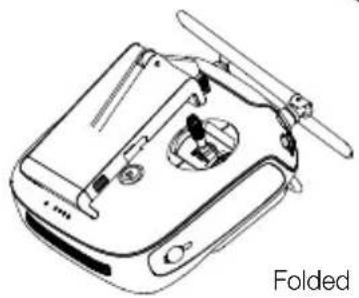
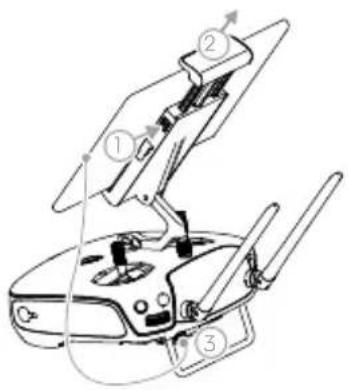
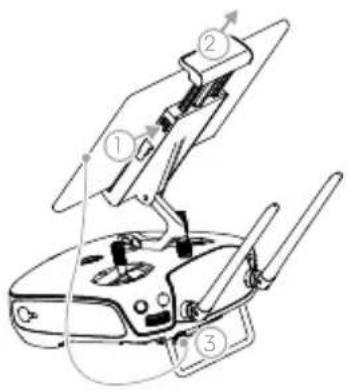
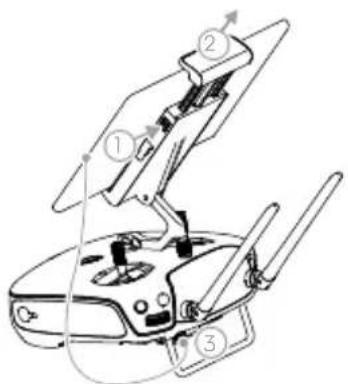
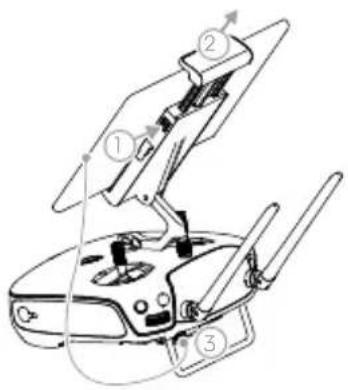
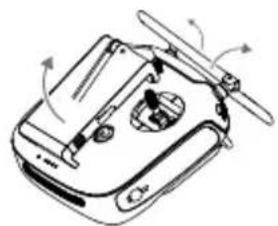
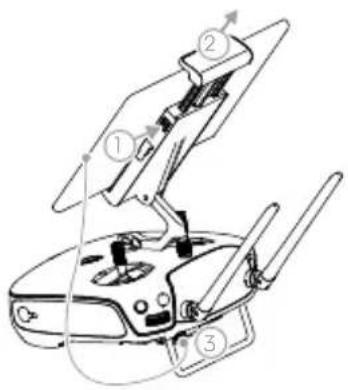
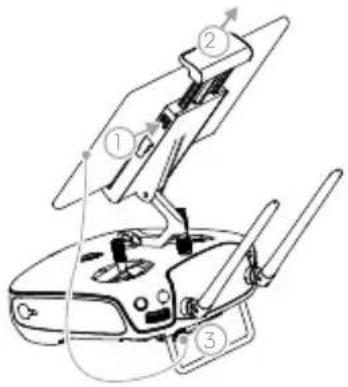
Unfolding the Remote Controller
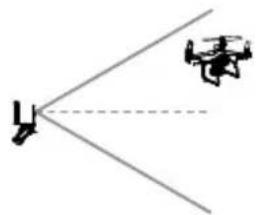
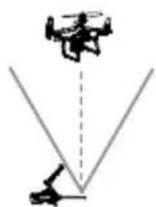
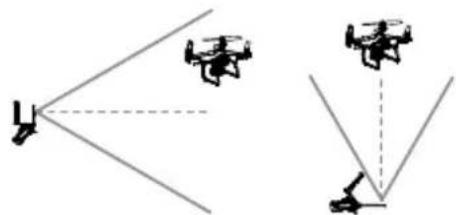
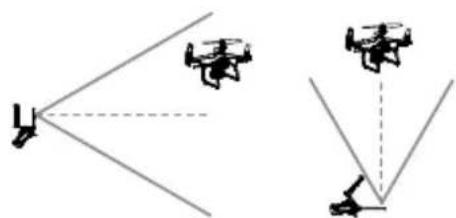
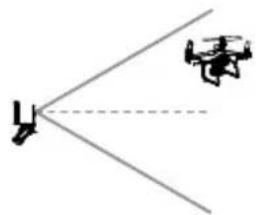
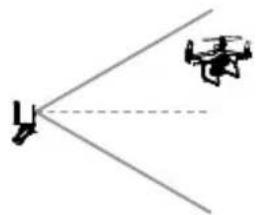
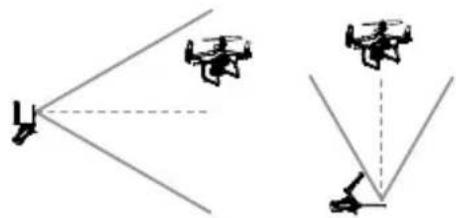
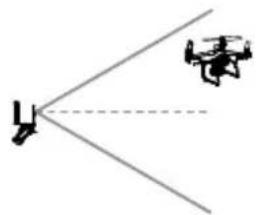
Optimal Transmission Zone
Try to keep the aircraft inside the optimal transmission zone. If the signal is weak, adjust the antennas or fly the aircraft closer.
5. Preparing for Takeoff
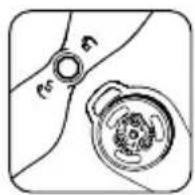
Black propeller rings go on motors with black dots.
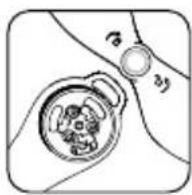
Silver propeller rings go on motors without black dots.
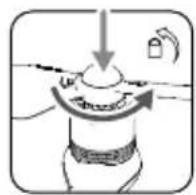
Press the propeller down onto the mounting plate and rotate in the lock direction until secure.

- Check that the propellers are secure before each flight.
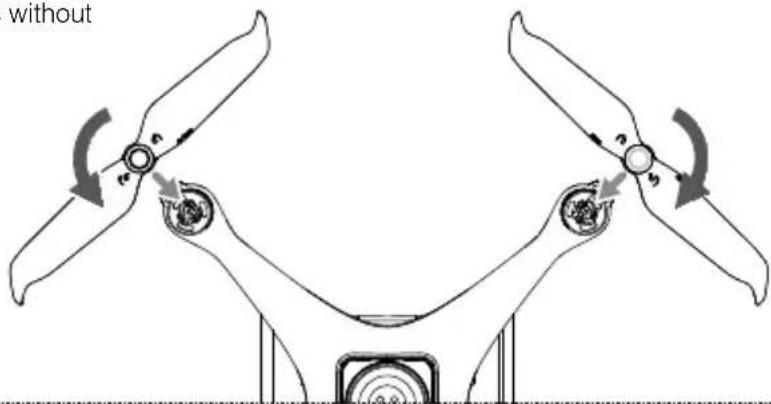
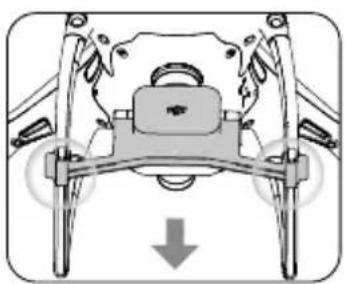
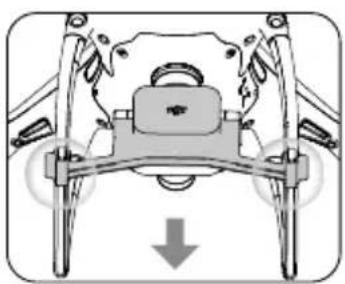
Remove the gimbal clamp from the camera.
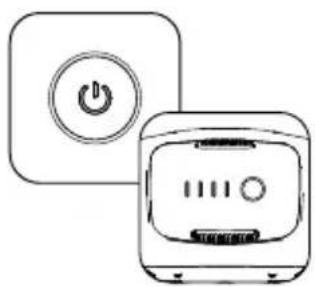
Power on the remote controller and the aircraft.
Launch the app.
6. Flight
For a safe take-off, make sure that the Aircraft Status Indicators blink green slowly (using RTK* or GNSS for positioning).
Takeoff Landing


OR




Left stick (in Mode 2) up slowly to take off
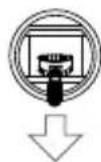
Left stick down slowly until you touch the ground
Hold for three seconds to stop the motors
- Spinning propellers can be dangerous. Stay away from spinning propellers and motors. DO NOT start the motors in confined spaces or when there are people nearby.
• Always keep your hands on the remote controller when the motors are spinning. - Stopping motors mid-flight: Perform the CSC to stop the motors. This function can be enabled in DJI GS Pro. Only stop motors mid-flight in emergency situations when doing so can reduce the risk of damage or injury.
* RTK positioning is recommended. Go to Mission View in DJI GS Pro, tap the icon 📄 or RTK on top of the screen to go to the RTK settings menu, and then select D-RTK 2 or Network RTK Account as the RTK data source. Enable the aircraft RTK at the bottom of the menu. Otherwise, the aircraft cannot use the RTK data.
7. Starting Operations
The following example includes instructions for 3D Map Area missions using DJI GS Pro.

Create a 3D Map Area mission.

Configure mission parameters.

Tap camera preview to enter Camera View to configure camera settings*.

Perform the mission.

pictures.

Generate a map.Export the
* When multispectral camera has been selected in Camera View, this mission will not include RGB photos.
Specifications
- Aircraft
Takeoff Weight 1487 g
Diagonal Distance (Propellers Excluded) 350 mm
Max Service Ceiling Above Sea Level 19685 ft (6000 m)
Max Ascent Speed 6 m/s (automatic flight); 5 m/s (manual control)
Max Descent Speed 3 m/s
Max Speed 31 mph (50 kph) (P-mode); 36 mph (58 kph) (A-mode)
Max Flight Time Approx. 27 minutes
Operating Temperature 0° to 40°C (32° to 104°F)
Operating Frequency
2.4000 GHz to 2.4835 GHz (Europe, Japan, Korea) 5.725 GHz to 5.850 GHz (Other countries/regions) [1]
Transmission Power (EIRP)
2.4 GHz: < 20 dBm (CE / MIC / KCC)
5.8 GHz: < 26 dBm (FCC / SRRC / NCC)
Hover Accuracy Range
RTK enabled and functioning properly:
Vertical: ±0.1 m; Horizontal: ±0.1 m
RTK disabled:
Vertical: ±0.1 m (with vision positioning); ±0.5 m (with GNSS positioning)
Horizontal: ±0.3 m (with vision positioning); ±1.5 m (with GNSS positioning)
Image Position Compensation
The relative positions of the centers of the six cameras' CMOS and the phase center of the onboard D-RTK antenna have been calibrated and are recorded in the EXIF data of each image.
• GNSS
Single-Frequency High-Sensitivity GNSS GPS + BeiDou + Galileo [2] (Asia); GPS + GLONASS + Galileo [2] (other regions)
Multi-Frequency Multi-System High-Precision RTK GNSS
Frequency Used
GPS: L1/L2; GLONASS: L1/L2; BeiDou: B1/B2; Galileo [2] : E1/E5
First-Fixed Time: < 50 s
Positioning Accuracy: Vertical 1.5 cm + 1 ppm (RMS); Horizontal 1 cm + 1 ppm (RMS).
1 ppm indicates error with a 1 mm increase over 1 km of movement.
Velocity Accuracy: 0.03 m/s
- Mapping Functions
Ground Sample Distance (GSD)
(H/18.9) cm/pixel, H indicates the aircraft altitude relative to the area mapped (unit: m)
Rate of Data Collection Max operating area of approx. 0.63 km
2 for a single flight at an altitude of 180 m, i.e., GSD is
approx. 9.52 cm/pixel, with a forward overlap rate of 80% and a side overlap ratio of 60%, during a flight that drains the battery from 100% to 30%.
• Gimbal
Controllable Range Pitch: -90° to +30°
- Vision System
Velocity Range ≤ 31 mph (50 kph) at 6.6 ft (2 m) above ground with adequate lighting
Altitude Range 0 - 33 ft (0 - 10 m)
Operating Range 0 - 33 ft (0 - 10 m)
Obstacle Sensory Range 2 - 98 ft (0.7 - 30 m)
Operating Environment Surfaces with clear patterns and adequate lighting (> 15 lux)
- Camera
Sensors
Six 1/2.9" CMOS, including one RGB sensor for visible light imaging and five monochrome sensors for multispectral imaging.
Each Sensor: Effective pixels 2.08 MP (2.12 MP in total)
Filters
Blue (B): 450 nm ± 16 nm; Green (G): 560 nm ± 16 nm; Red (R): 650 nm ± 16 nm;
Red edge (RE): 730 nm ± 16 nm; Near-infrared (NIR): 840 nm ± 26 nm
Lenses FOV (Field of View): 62.7°
Focal Length: 5.74 mm (35 mm format equivalent: 40 mm), autofocus set at ∞ Aperture: f/2.2
RGB Sensor ISO Range 200 - 800
Monochrome Sensor Gain 1 - 8x
Electronic Global Shutter
1/100 - 1/20000 s (visible light imaging); 1/100 - 1/10000 s (multispectral imaging)
Max Image Size 1600×1300 (4:3.25)
Photo Format
JPEG (visible light imaging) + TIFF (multispectral imaging)
Supported File Systems FAT32 (≤ 32 GB); exFAT (> 32 GB)
Supported SD Cards microSD with a minimum write speed of 15 MB/s. Max Capacity: 128 GB. Class 10 or UHS-I rating required
Operating Temperature 0° to 40°C (32° to 104°F)
- Remote Controller
Operating Frequency
2.4000 GHz to 2.4835 GHz (Europe, Japan, Korea)
5.725 GHz to 5.850 GHz (Other countries/regions) [11]
Transmission Power (EIRP)
2.4 GHz: < 20 dBm (CE / MIC / KCC)
5.8 GHz: < 26 dBm (FCC / SRRC / NCC)
Max Transmission Distance
FCC / NCC: 4.3 mi (7 km); CE / MIC / KCC / SRRC: 3.1 mi (5 km)
(Unobstructed, free of interference)
Built-in Battery 6000 mAh LiPo 2S
Operating Current / Voltage
1.2 A @ 7.4 V
Mobile Device Holder
Tablets and smartphones
Operating Temperature 0° to 40° C (32° to 104° F)
• Intelligent Flight Battery (PH4-5870mAh-15.2V)
Capacity 5870 mAh
Voltage 15.2 V
Battery Type LiPo 4S
Energy 89.2 Wh
Net Weight 468 g
Operating Temperature -10° to 40°C (14° to 104°F)
Charging Temperature 5° to 40°C (41° to 104°F)
Max Charging Power 160 W
• Intelligent Flight Battery Charging Hub (P4CH)
Voltage 17.5 V
Operating Temperature 5° to 40° C (41° to 104° F)
• AC Power Adapter (PH4C160)
Voltage 17.4 V
Rated Power 160 W
※ This Quick Start Guide is subject to change without prior notice.
Download the latest version from
https://www.dji.com/p4-multispectral
[1] To comply with local laws and regulations, this frequency is not available in some countries or regions.
[2] Support for Galileo is coming soon.
认识 P4 MULTISPECTRAL
DJI GS Pro

Internet
展开
最佳通信范围
6. 飞行
DJI GS Pro

展開
最佳通訊範圍
移除雲台鎖扣
開啟遙控器、航拍機電源
執行
DJI GS Pro
6. 飛行
NCC / FCC: 7 km; SRRC / CE / MIC / KCC: 5 km (無干擾、無遮擋)
運作電流/電壓
1.2 A @ 7.4 V
行動裝置支架 適用於平板電腦或手機
操作温度
0℃至40℃
- ジンバルカメラ
折りたたんだ状態
DJI GS Pro
送信機を展開する
最適な伝送範囲
送信機と機体の電源を入れます。
アプリを起動します。
6. 飛行
접은 상태
DJI GS Pro

조종기 펴기
최적 전송 구역
- Gimbal-Kameras
DJI GS Pro


Stark Schwach
5,8 GHz: < 26 dBm (FCC/SRRC/NCC)
Schwebegenauigkeit
• Intelligent Flight Battery (PH4-5870mAh-15.2V)
Kapazität 5.870 mAh
Spannung 15,2 V
Akkutyp LiPo 4S
Energie 89,2 Wh
Nettogewicht 468 g
DJI GS Pro

Despliegue del control remoto
FCC/NCC: 7 km; CE/MIC/KCC/SRRC: 5 km
GS Pro

Zone de transmission optimale
Vitesse max. 50 km/h (31 mph) (Mode P) ; 58 km/h (36 mph) (Mode A)
5.8 GHz : < 26 dBm (FCC/SRRC/NCC)
5,8 GHz : < 26 dBm (FCC/SRRC/NCC)
Distance de transmission max.
DJI GS Pro

Apertura del radiocomando
5.8 GHz: < 26 dBm (FCC/SRRC/NCC)
5.8 GHz: < 26 dBm (FCC/SRRC/NCC)
- Gimbalcamera's
DJI GS Pro

Optimaal zendgebied
Schakel de afstandsbediening en de drone in.
Start de app.
6. Vliegen
• Intelligent Flight Battery (PH4-5870mAh-15.2V)
Capaciteit 5870 mAh
Spanning 15,2 V
Batterijtype LiPo 4S
Vermogen 89,2 Wh
Nettogewicht 468 g
• Intelligent Flight Battery Charging Hub (P4CH)
DJI GS Pro

3. Carregar as baterias

Desembrulhar o telecomando
Ligue o telecomando e a aeronave.
Inicie a aplicação.
6. Voo
5,8 Ghz: < 26 Dbm (FCC/SRRC/NCC)
DJI GS Pro

3. Carregando as baterias

Desdobrando o controle remoto
Ligue o controle remoto e a aeronave.
Abra o aplicativo.
6. Voo

Crie mapas.Exporte as
Especificações
•Aeronave
5,8 GHz: <26 dBm (FCC/SRRC/NCC)
DJI GS Pro

Раскройте пульт
DJI is a trademark of DJI.
Copyright © 2020 DJI All Rights Reserved.
DJI 是大疆创新的商标

For online support, please scan this code with Facebook Messenger
微信扫一扫关注大疆农业服务公众号
- CONTENTS
- P4 MULTISPECTRAL
- REMOTE CONTROLLER
- USING THE P4 MULTISPECTRAL
- DOWNLOADING THE DJI GS PRO APP
- CHECKING BATTERY LEVELS
- CHARGING THE BATTERIES
- PREPARING THE REMOTE CONTROLLER
- PREPARING FOR TAKEOFF
- FLIGHT
- STARTING OPERATIONS
- SPECIFICATIONS
- AIRCRAFT
- GNSS
- MAPPING FUNCTIONS
- GIMBAL
- VISION SYSTEM
- CAMERA
- INTELLIGENT FLIGHT BATTERY (PH4-5870MAH-15.2V)
- INTELLIGENT FLIGHT BATTERY CHARGING HUB (P4CH)
- AC POWER ADAPTER (PH4C160)
- 认识 P4 MULTISPECTRAL
- 飞行
- 飛行
- VLIEGEN
- CARREGAR AS BATERIAS
- VOO
- CARREGANDO AS BATERIAS
- ESPECIFICAÇÕES
- AERONAVE
Brand : DJI
Model : P4 Multispectral
Category : Drone