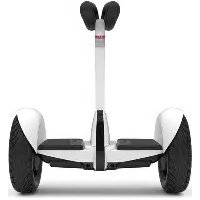
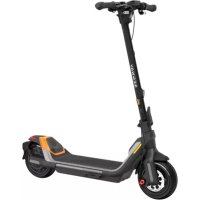
Ninebot S - Scooter SEGWAY - Free user manual and instructions
Find the device manual for free Ninebot S SEGWAY in PDF.



| Product Type | Self-balancing electric scooter / Personal robot |
| Brand | Segway |
| Model | Ninebot S (Loomo) |
| Dimensions | 650 x 310 x 570 mm (H x W x D) |
| Net weight | 19 kg |
| Battery capacity | 329 Wh |
| Battery type | Lithium-ion 42 cells 18650 format |
| Charging time | Approximately 3 hours |
| Maximum speed (vehicle mode) | 18 km/h |
| Maximum speed (robot mode) | 8 km/h |
| Maximum user load | 25 - 100 kg |
| Recommended rider height | 130 - 200 cm |
| LCD screen | 4.3 inches, 480 x 800 pixels |
| Processor | Intel Atom Z8750 (4 cores, 2.56 GHz) |
| RAM | 4 GB |
| Internal storage | 64 GB |
| Operating system | Modified Android 5.1 |
| Sensors | Intel RealSense ZR300, HD 1080p camera, 5 microphones, ultrasonic, infrared, touch, inertial measurement unit |
| Connectivity | Wi-Fi, Bluetooth, USB Type-C 3.0 |
| Power supply | Input 100-240 V AC, Output 58.8 V DC |
| Main features | Self-balancing vehicle mode, robot mode, remote control, person following, photography assistant |
| Maintenance | Clean with damp cloth; inflate tires to 35-50 PSI; do not use solvents |
| Safety | Helmet required; do not exceed weight limits; do not repair yourself |
| Spare parts | Use only parts approved by Segway Robotics |
Frequently Asked Questions - Ninebot S SEGWAY
User questions about Ninebot S SEGWAY
0 question about this device. Answer the ones you know or ask your own.
Ask a new question about this device
Download the instructions for your Scooter in PDF format for free! Find your manual Ninebot S - SEGWAY and take your electronic device back in hand. On this page are published all the documents necessary for the use of your device. Ninebot S by SEGWAY.
USER MANUAL Ninebot S SEGWAY
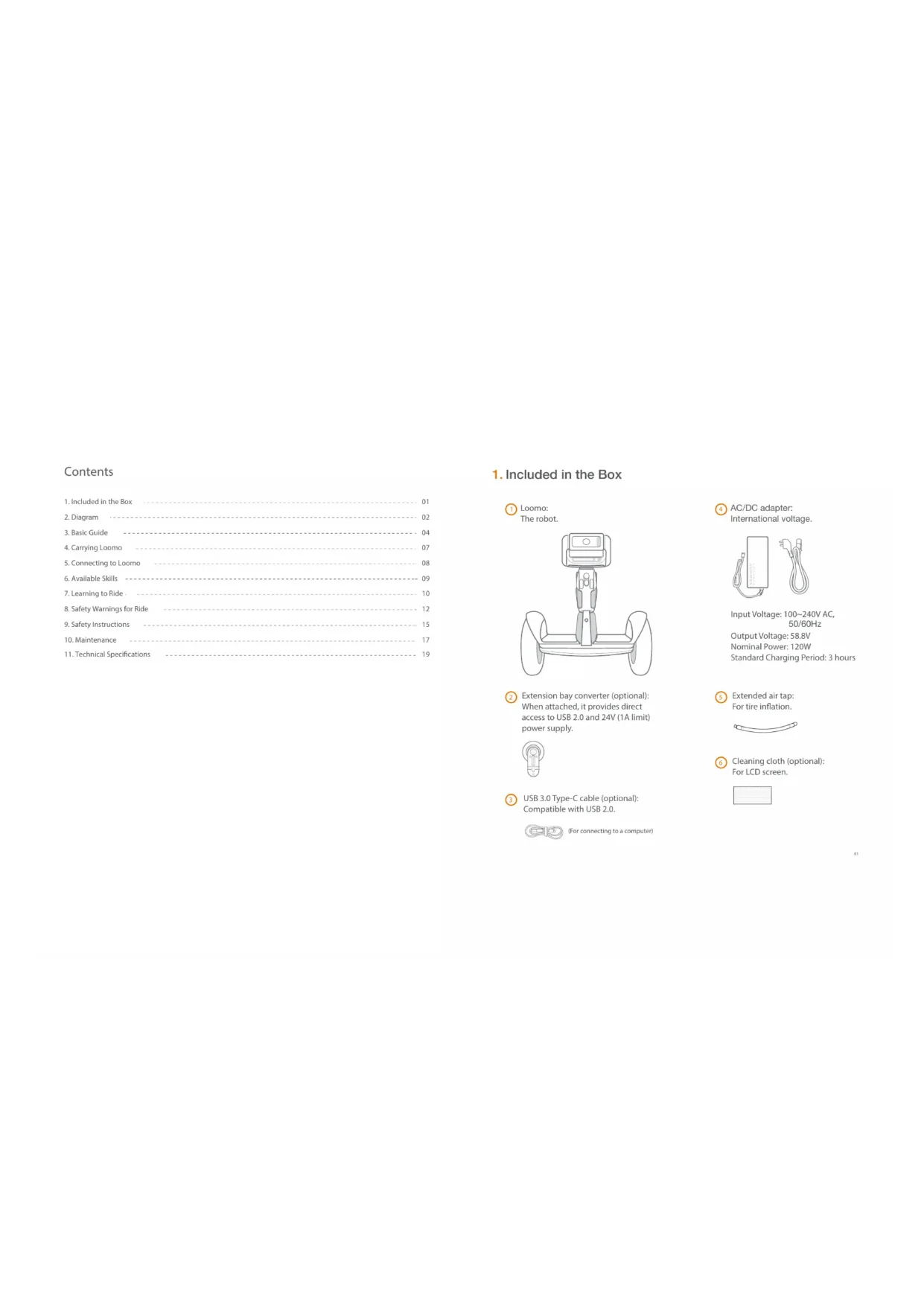
- Included in the Box 01
- Diagram 02
- Basic Guide 04
- Carrying Loomo 07
- Connecting to Loorno 08
- Available Skills 09
- Learning to Ride 10
- Safety Warnings for Ride 12
- Safety Instructions 15
- Maintenance 17
- Technical Specifications 19
1. Included in the Box

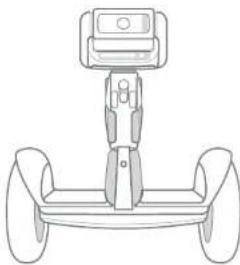
Loomo:
The robot.
natural_image
Line drawing of a four-wheeled vehicle chassis with a mounted sensor or camera (no text or symbols)
Extension bay converter (optional): When attached, it provides direct access to USB 2.0 and 24V (1A limit) power supply.


USB 3.0 Type-C cable (optional): Compatible with USB 2.0.

(For connecting to a computer)

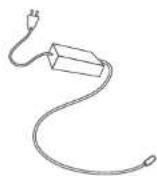
AC/DC adapter: International voltage.
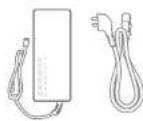
Input Voltage: 100\~240V AC, 50/60Hz
Output Voltage: 58.8V
Nominal Power: 120W Standard Charging Period: 3 hours

Extended air tap: For tire inflation.

Cleaning cloth (optional): For LCD screen.

- Diagram
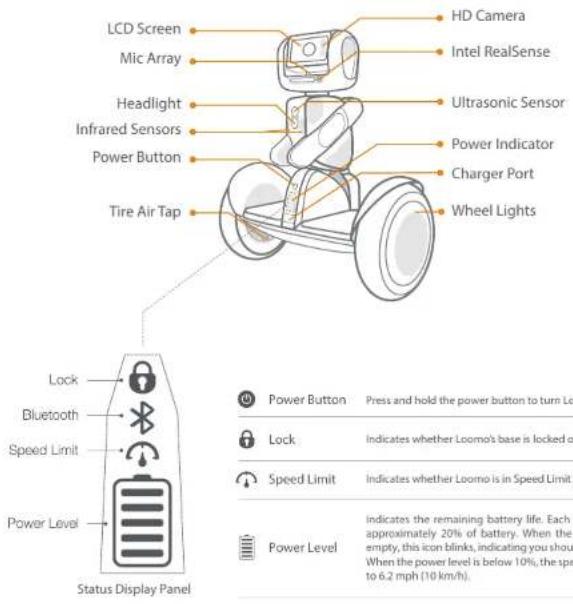
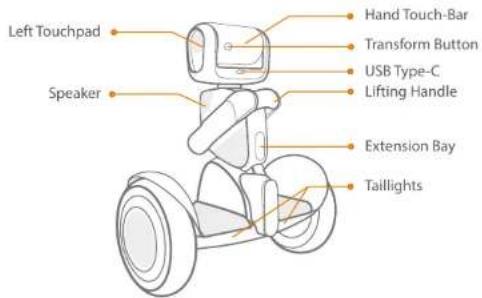
Transform Button
Press to switch Loomo between robot and self-balancing vehicle (SBV) mode.
| Side (Left/Right) Touchpads | Tap the side touchpads to restore Loomo to its default state. |
| Hand Touch-Bar | Hold the hand touch-bar to move Loomo in either robot or SBV mode. |
| Lifting Handle | Touch and hold the inner button inside the handle to stop Loomo's engine temporarily to lift or carry Loomo safely. |
3. Basic Guide
3.1 Powering Loomo on/off and switching between SBV & Robot modes
• Power On:
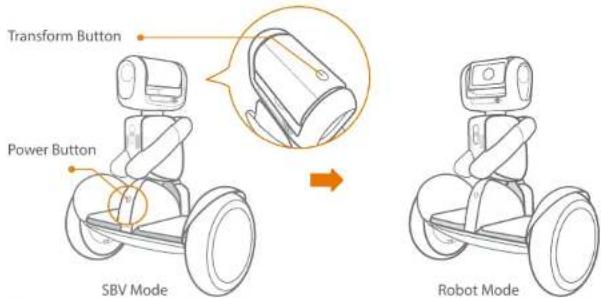
Place Loomo upright, and then press the power button to power Loomo on. Loomo will then activate its self-balancing ability.
Power Off:
Press the power button to power it off. Please note that Loomo will suddenly lose balance when it is powered off. For safety reasons, please hold and manually put Loomo down. Pressing the power button will not work when someone is riding Loomo.
- Transform:
Loomo has two modes, SBV (Self-Balancing Vehicle) mode and robot mode. SBV mode is designed for personal transportation. Robot mode is designed for other robot capabilities. You can switch Loomo between these two modes by pressing the transform button.
- Forced Shutdown:
Press the power button (for about 5s) until Loomo starts to beep, after which Loomo will shut down in 30s. Please use this functionality only when Loomo becomes unresponsive.
3.2 Charging

Charge Loomo only when it is powered off.
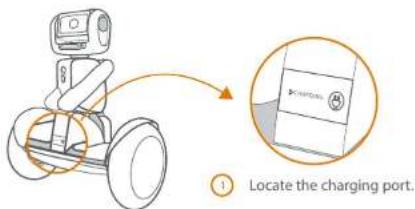
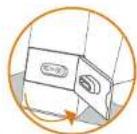


Open the rubber cap.

Insert the plug into the socket.

Do not leave Loomo's batteries uncharged for a long time.
To avoid degradation of the battery, Loomo has to be charged at least every 6 months.
3.3 Extension bay converter (optional)
When attached, it provides direct access to a USB 2.0 port and a 24V (1A limit) power supply.
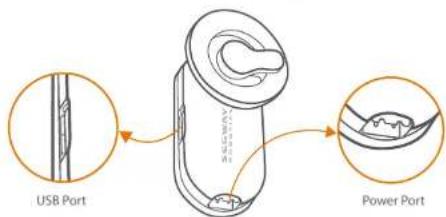
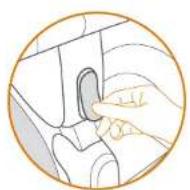
① Remove the rubber cap covering the hardware extension slot.
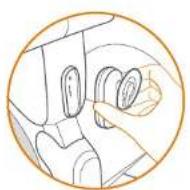
2 Align the extension bay converter with the interface slot, and then press it tightly.
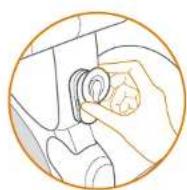
3 Securely fasten the extension bay converter by rotating the knob.
4. Carrying Loomo
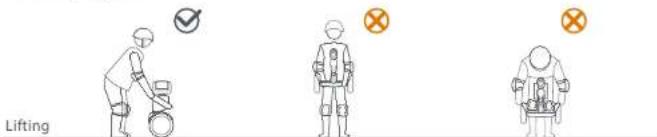
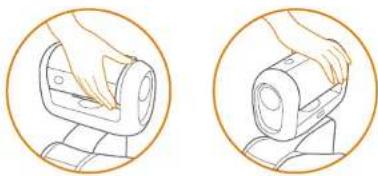
When Loomo is powered on, make sure to use the lifting handle to lift and carry Loomo as shown above. Because of Loomo's self-balancing mechanism, Incorrectly lifting it by its mainframe or fenders may cause its wheels to spin haphazardly. This in turn may bring danger to you and others around you.
Holding the button inside of the handle will temporarily stop Loomo's engine, allowing you to safely carry the robot.
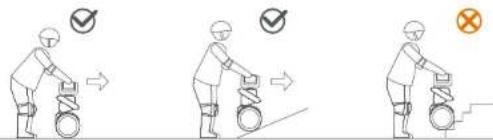
Please make sure to hold the Hand Touch-Bar when pushing or moving Loomo manually.
In order to maintain its current position, Loomo will reject from any external disturbance. If you move Loomo in the incorrect way, you will feel a resistant force.
natural_image
Two circular illustrations showing a hand operating a mechanical device, no text or symbols present.Avoid pushing Loomo over stairs or obstacles.
5. Connecting to Loomo
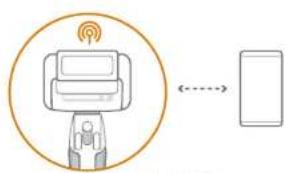
Download the Loomo mobile device app, and connect your mobile device to Loomo.
There are two connection modes to ensure a proper and stable connection.
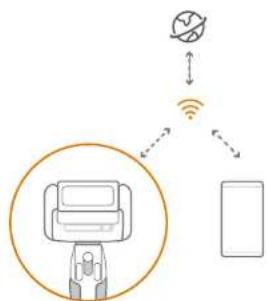
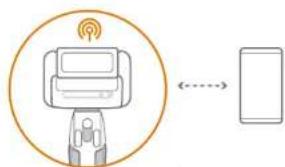
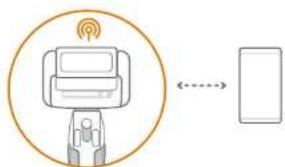
• Wi-Fi mode: You can connect your mobile device to Loomo by joining the same Wi-Fi network.
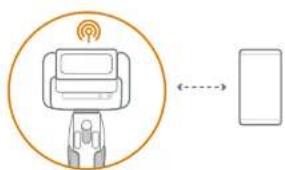
- Hotspot mode: You can also connect your mobile device to Loomo by utilizing Loomo's hotspot.
flowchart
graph TD
    A["Robot"] --> B["Satellite"]
    B --> C["Mobile Device"]
    style A fill:#f9f,stroke:#333
    style B fill:#ccf,stroke:#333
    style C fill:#cfc,stroke:#333
Wi-Fi mode
Hotspot mode
NOTE:
Under Wi-Fi mode, both Loomo and your mobile device will still have access to the internet. However, under hotspot mode, both of them will lose internet access. So, we recommend using Wi-Fi mode to connect to Loomo. You can switch between these two modes in Loomo's main application window.
6. Available Applications
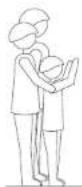

Assistant Photographer
Loomo can be your assistant photographer, and help record your life from a unique perspective.
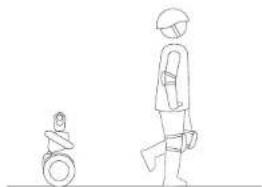
natural_image
Line drawing of a person walking with a helmet and a small object near the left (no text or symbols)Personal Companion
Loomo can follow in your footsteps, turn with you and stop with you.
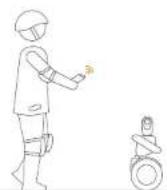
Remote Control Vehicle
Loomo can be remote-controlled and guided through its environment by your mobile device.
7. Learning to Ride
WARNING
Rider must weigh 55\~220 lbs (25\~100 kg) and must be 4'3"\~6'6" (130\~200 cm) tall.
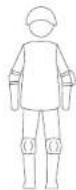
Wear an approved helmet and other protective gear to minimize any possible injury.
After activation, the app will guide you through the New Rider Tutorial. Please follow the instructions in the app and in this manual.
NOTE
Please download the app on your mobile device during first use. The app will lead you through the New Rider Tutorial.
NOTE
Please be sure to read and understand Safe Riding instructions in this manual before attempting to ride Loomo. Failure to follow these warnings could result in death or serious injury due to: loss of balance or control, collisions, and falls.
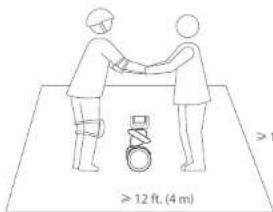
12 ft. (4 m)
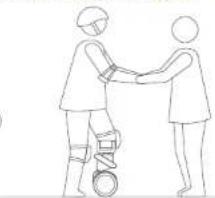
1 Go to a large open area and ask a friend to assist you on your first ride.
WARNING
Always step on/off from the back of Loomo.

natural_image
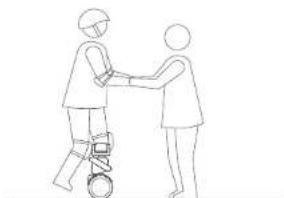
Line drawing of two human figures shaking hands, one holding a circular object (no text or symbols)2 Lightly place one foot on the foot mat, while keeping your other foot on the ground to support your weight. Do not press the steering bar (the central column of Loomo) with your leg.
natural_image
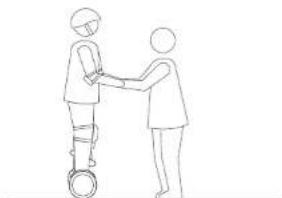
Line drawing of two people interacting with a small robot (no text or symbols)3 Slowly transfer your weight onto Loomo. A beeping sound will indicate that Loomo is now in self-balancing mode. Slowly step on with your other foot.
natural_image
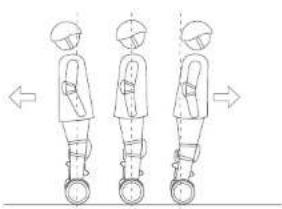
Line drawing of two people shaking hands on a wheeled cart (no text or symbols)4 Stand with your weight evenly distributed on both feet and relax, looking straight ahead.
natural_image
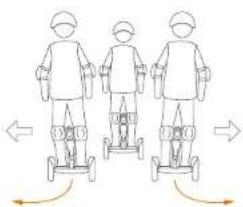
Three identical line drawings of a person standing on a platform, each with a rounded body and directional arrows indicating movement (no text or symbols)5 Gently lean your body forward and backward to control your movement.
natural_image
Three identical line drawings of a person standing on a scooter, each with directional arrows indicating motion (no text or symbols)6 To turn, gently lean left or right against the steering bar.
- Safety Warnings for Ride
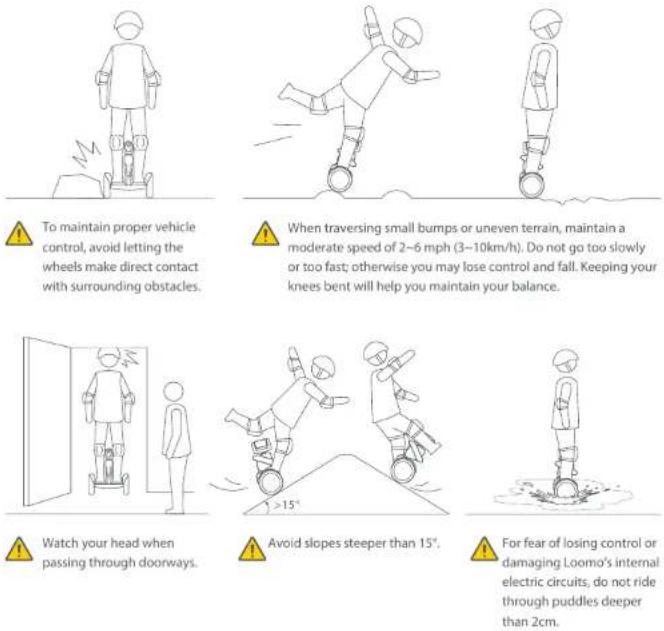
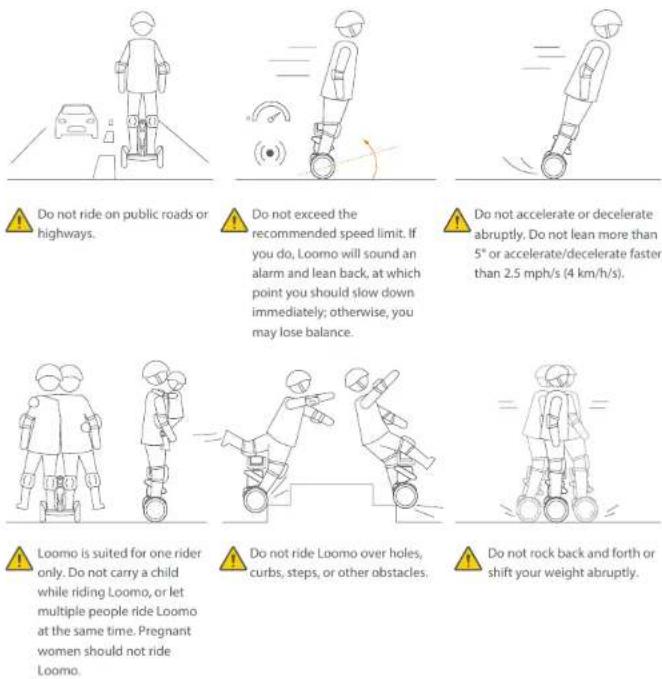
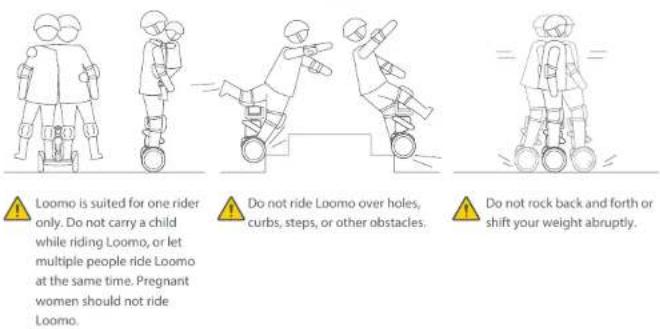
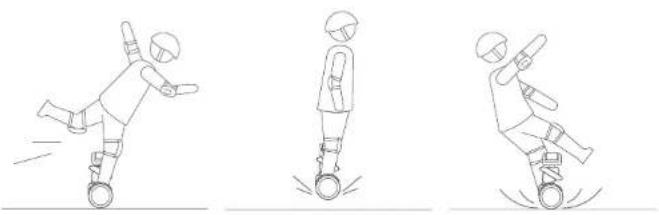

Do not attempt stunts of any kind. Always keep both feet on the foot mats.

Maintain contact with the ground at all times. Do not jump or attempt stunts.

Do not ride on low traction surfaces (including, but not limited to, wet ground, loose sand, loose gravel, and ice).
9. Safety Instructions
- Loomo can be used as a self-balancing vehicle. If you have not used such products before, please read the instructions and warnings. Neither Segway-Ninebot Group nor Segway Robotics Inc. is responsible for any injuries or damage caused by a rider's inexperience or failure to follow the instructions in the manual.
II. Please understand that you can reduce risk of injury by following all the instructions and warnings in this manual, but you cannot eliminate all the risks. Remember that whenever you ride Loomo you risk injury or death from loss of control, collisions, and falls. When entering public spaces always comply with the local laws and regulations. As with other vehicles, faster speed requires longer braking distance. Sudden braking on smooth surfaces could lead to wheel slip, loss of balance, or falls. Be cautious and always keep a safe distance between you and other people or vehicles when riding. Be alert and slow down when entering unfamiliar areas.
III. Respect pedestrians by always yielding the right of way. Pass on the left whenever possible. When approaching a pedestrian from the front, stay to the right and slow down. Avoid startling pedestrians. When approaching from behind, announce yourself and slow down to walking speed when passing.
IV. In places without laws and regulations governing self-balancing electric vehicles, comply with the safety guidelines outlined in this manual. Neither Segway-Ninebot Group nor Segway Robotics Inc. is responsible for any property damage, personal injury/death, accidents, or legal disputes caused by violations of the safety instructions.
V. Do not allow anyone to ride Loomo on his/her own unless they have carefully read the instructions. The safety of new riders is your responsibility. Help spot new riders until they are comfortable with the basic operation of the Loomo. Make sure each new rider wears a helmet and other protective gear.
VI. Before each ride check for loose fasteners, damaged components, and low tire pressure. If Loomo makes abnormal sounds or signals an alarm, immediately stop riding and call your dealer/distributor for service.
VII. Always wear a helmet when riding. Use an approved bicycle or skateboard helmet that fits properly with the chin strap in place; and provides protection for the back of your head. Make sure each new rider wears a helmet.
VIII. Do not attempt your first ride in any area where you might encounter children, pedestrians, pets, vehicles, bicycles, or other obstacles and potential hazards.
IX. Be alert! Scan your surroundings both far ahead and directly in front of Loomo — your eyes are your best tool for safely avoiding obstacles and low traction surfaces (including, but not limited to, wet ground, loose sand and loose ice).
X. To reduce risk of injury, you must read and follow all "CAUTION" and "WARNING" notices in this document. Do not ride at an unsafe speed. Under no circumstances should you ride on roads with motor vehicles. Always follow these safety instructions:
A. The following people should not ride Loomo:
- Anyone under 14 years old or above 60 years old. Riders between 14-18 years old should ride under adult supervision.
• Anyone under the influence of alcohol or drugs.
• Anyone who suffers from disease that puts them at risk if they engage in strenuous physical activity.
- Anyone who has problems with balance or with motor skills that would interfere with their ability to maintain balance.
• Anyone whose height or weight is outside the stated limits (see page 10 Learning to Ride).
B. Comply with local laws and regulations when riding this product. Do not ride where prohibited by local laws.
C. To ride safely, you must be able to clearly see what is in front of you and you must be clearly visible to others.
D. Do not ride in the snow, in the rain, or on roads which are wet, muddy, icy, or that are slippery for any reason. Do not ride over obstacles (sand, loose gravel, or sticks). Doing so could result in a loss of balance or traction and could cause a fall.
E. Do not accelerate or decelerate suddenly. Do not accelerate when Loomo tilts back or sounds an alarm. Do not attempt to override the speed limiter.
XI. Do not insert the power cord if the charge port is wet.
XII. Use a surge protector when charging to help protect your Loomo from damage due to power surges and voltage spikes. Only use the Segway Robotics supplied charger. Do not use a charger from any other product.
XIII. Use only Segway Robotics approved parts and accessories. Do not modify Loomo. Modifications to Loomo could interfere with the operation of Loomo, could result in serious injury and/or damage, and could void the Limited Warranty.
XIV. Do not sit on Loomo's head. Doing so could result in serious injury and/or damage to Loomo.
10. Maintenance
Cleaning and Storage
Use a soft, wet cloth to wipe the mainframe clean. Hard to remove dirt can be scrubbed with a toothbrush and toothpaste, then cleaned with a soft, wet cloth. Scratches on plastic parts can be polished with extra-fine grit sandpaper.
NOTE
Do not wash Loomo with alcohol, gasoline, acetone, or other corrosive/volatile solvents. These substances may damage the appearance and internal structure of Loomo. Do not wash Loomo with a power washer or high-pressure hose.
WARNING
Make sure Loomo is powered OFF, the charging cable is unplugged, and the rubber cap on the charge port is tightly sealed before cleaning; otherwise you may expose yourself to electric shock or damage electronic components.
Store Loomo in a cool, dry place. Do not store it outdoors for extended periods of time. Exposure to sunlight and temperature extremes (both hot and cold) will accelerate the aging process of the plastic components and may reduce battery life.
- Tire Pressure
Inflate tires to 35\~50 psi. Inflate both tires equally.
Battery Pack Maintenance
Do not store or charge the battery at temperatures outside the stated limits (see Specifications). Do not discard or destroy the battery. For more battery information, refer to the sticker on the battery itself. Refer to your local laws and regulations regarding battery recycling and/or disposal. A well-maintained battery can perform well even after many miles of riding. Charge the battery after each ride and avoid draining the battery completely. When used at room temperature (70°F [22°C]) the battery range and performance is at its best; whereas using it at temperatures below 32°F (0°C) can decrease range and performance.
NOTE
Typically, a fully charged battery should retain charge for 120\~180 days in Standby State. A low-power battery should retain charge for 30\~60 days in Standby State. Remember to charge the battery after each use. Completely draining the battery may cause permanent damage to the battery. Electronics inside the battery record the charge-discharge condition of the battery; damage caused by over-discharge or under-discharge will not be covered by the Limited Warranty.
WARNING
Risk of fire. No user serviceable parts. Prolonged Exposure to UV Rays, Rain and the Elements May Damage the Enclosure Materials, Store Indoors When Not in Use.
If so, okay. If not, remove odd capitalization
• AVERTISSEMENT
We recommend against riding when the ambient temperature is below 32^ F ( 0^ C) because low temperature will limit the maximum power/torque. Doing so could cause personal injury or property damage due to slips or falls. Do not attempt to disassemble the battery.
- Technical Specifications
| Hardware Specs | Description |
| Dimensions | Height x Length x Width: 650 x 310 x 570mm |
| Net Weight | ~19 kg (~42 lbs) |
| Battery Capacity | 329 Wh |
| Battery Pack | 42 batteries of 18650 lithium ion |
| Speed Limit | 8 km/h (4.3 mph) in robot mode, 18 km/h (11 mph) in SBV mode |
| Head Rotation Range | Yaw ±150 degrees, pitch -90~180 degrees. Origin is upon transformation |
| LCD Screen | 4.3 inch, 480 x 800 pixels |
| Operating Temperature | 32 ~ 95°F (0 ~ 35°C) |
| Payload | 25 ~ 100 kg (55 ~ 220 lbs) |
| Platform Specs | Description |
| Processor | Intel Atom Z8750, 4 cores 2.56GHz, x86-64 |
| Operating System | Customized system based on Android 5.1 |
| Memory | 4GB |
| Storage | 64GB |
| USB Ports | USB 3.0 Type-C |
| Extension Bay | USB 2.0 and 24V power supply (max. 1A) |
| Sensor Specs | Description |
| RealSense ZR300 | Real-time 30Hz RGB-Depth image streaming (indoor & outdoor) |
| HD Camera | 1080p 30Hz streaming with 104 degrees FOV |
| Mic Array | 5 microphones enabling beamforming and voice localization |
| Ultrasonic Sensor | Frontal obstacle distance measurement |
| Infrared Sensors | Ground cliff detection |
| Touch Sensors | Three touch sensors located at robot head left, right & back |
| Wheel Odometry | About 4 degrees precision |
| Encoders | Hall & magnetic encoders to measure each joint angle |
| IMU | Enables camera stabilization & provides pose feedback |
Loomo 产品说明书
SEGWAY ROBOTICS
目录
natural_image
Line drawing of a four-wheeled vehicle chassis with a mounted sensor or camera (no text or symbols)natural_image
Two circular illustrations showing hands operating a mechanical device, no text or symbols present
热点模式
请注意
natural_image
Simple line drawing of a person holding a child and another person in a wheelchair (no text or symbols)摄影助手
natural_image
Simple line drawing of a person walking with a bicycle, next to a small cylindrical object (no text or symbols)如影随行
natural_image
Line drawing of a person in uniform gesturing toward a small figure in a wheelchair (no text or symbols)无线遥控
12 ft. (4 m)
natural_image
Line drawing of two people shaking hands, one using a wheeled device (no text or symbols)natural_image
Line drawing of two people shaking hands on a wheeled platform (no text or symbols)natural_image
Three identical line drawings of a person standing upright, each with a circular base and a belt, shown in different angles (no text or symbols)natural_image
Three identical line drawings of a person using a walking scooter, with motion arrows indicating direction (no text or symbols)natural_image
Line drawing of a person standing on a mobility device with a lightning bolt indicating motion (no text or symbols)natural_image
Line drawing of two figures performing a kicking motion, one standing and one standing on the ground (no text or symbols)natural_image
Line drawing of a person standing beside a robot inside a door, with no text or symbols present.natural_image
Two figures in action poses on a slope, one rolling down with a ball and the other standing upright (no text or symbols)natural_image
Line drawing of a person using a scooter on a road with a car nearby (no text or symbols)natural_image
Simple line drawing of a person in motion, possibly a pole or cart, with motion lines indicating speed (no text or symbols)natural_image
Line drawing of two figures in dynamic motion, one jumping on a ramp and the other standing on a block (no text or symbols)禁止骑行Locmo上下台阶。
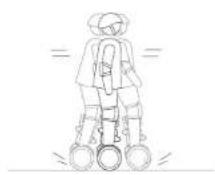
禁止在骑行过程中过快频率地前后晃动。
natural_image
Line drawing of a four-wheeled vehicle chassis with a mounted device on top (no text or symbols)
natural_image
Two circular illustrations showing hands operating a mechanical device, no text or symbols presentnatural_image
Line drawing of a family scene with a person holding a child and a wheelchair, no text or symbols presentAssistant-photographe
natural_image
Line drawing of a person walking with a small object near the left (no text or symbols)Compagnon personnel
natural_image
Simple line drawing of a person in motion with a small figure nearby (no text or symbols)natural_image
Line drawing of two people interacting with a robotic device (no text or symbols)natural_image
Line drawing of two people shaking hands on a wheeled device (no text or symbols)natural_image
Three identical line drawings of a person standing on a platform, showing different leg positions (no text or symbols)natural_image
Three identical line-drawn figures standing on a scooter, each with directional arrows indicating motion (no text or symbols)natural_image
Three sequential line drawings of a person performing a skating motion: standing, kicking a ball, and rolling (no text or symbols)natural_image
Illustration showing four different outdoor scenes: a person standing near a door, a person in a circle, a person mid-jump with a ball, and a person on a seesaw with water below (no text or symbols)natural_image
Three line drawings of a person using a scooter on a road, with motion indicators and vehicle symbols (no text or labels)natural_image
Four sequential line drawings of a person in different poses: standing, moving, balancing, and descending (no text or symbols)natural_image
Three sequential line drawings of a person performing a high kick, no text or symbols presentnatural_image
Line drawing of a four-wheeled vehicle chassis with a mounted sensor or camera (no text or symbols)
Hotspot-Modus
HINWEIS:
natural_image
Line drawing of a family scene with two figures, one holding a child and the other in a wheelchair (no text or symbols)Foto-Assistent
natural_image
Line drawing of a person standing next to a small figure in a wheelchair (no text or symbols)natural_image
Line drawing of a person in a wheelchair interacting with another person (no text or symbols)natural_image
Line drawing of two people shaking hands, one using a wheeled device (no text or symbols)natural_image
Line drawing of two people shaking hands on a scooter (no text or symbols)natural_image
Three identical line drawings of a person standing on a platform, each with a circular head and directional arrows indicating movement (no text or symbols)natural_image
Three identical line drawings of a person standing on a scooter, each with directional arrows indicating motion (no text or symbols)natural_image
Line drawing of a person using a mobility device with motion indicators (no text or symbols)natural_image
Simple line drawing of a person in motion, possibly pushing a wheel or device (no text or symbols)natural_image
Four sequential line drawings of a person using a scooter, demonstrating different motion poses (no text or symbols)natural_image
Three sequential line drawings of a person performing a high kick, no text or symbols presentnatural_image
Line drawing of a four-wheeled vehicle chassis with a mounted camera (no text or symbols)
(Per connettersi al computer)

Adattatore AC/DC:
natural_image
Two circular illustrations showing hands operating a mechanical device, no text or symbols presentModalità Hotspot
NOTA:
natural_image
Simple line drawing of two adults and a small figure in a wheelchair (no text or symbols)natural_image
Simple line drawing of a person walking with a helmet and a small object nearby (no text or symbols)Compagno Personale
natural_image
Line drawing of a person in a wheelchair interacting with a small figure (no text or symbols)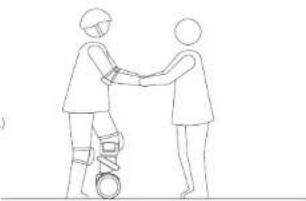
natural_image
Line drawing of two figures shaking hands, one wearing a wristband and the other with a circular object (no text or symbols)natural_image
Line drawing of two people interacting, one holding a bicycle (no text or symbols)natural_image
Line drawing of two people interacting, one standing and one seated, with a small vehicle on the ground (no text or symbols)natural_image
Three identical line drawings of a person standing on a platform, each with a rounded head and directional arrows indicating movement (no text or symbols)natural_image
Three identical line drawings of a person standing on a multi-wheeled scooter, with directional arrows indicating motion (no text or symbols)natural_image
Line drawing of a four-wheeled vehicle chassis with a mounted camera (no text or symbols)flowchart
graph TD
    A["Robot"] --> B["Global"]
    B --> C["Wireless Signal"]
    C --> D["Smartphone"]
와이파이 모드
핫스 fint 모드
주의:
natural_image
Line drawing of a person walking with a helmet and holding a rifle, next to a small cylindrical object (no text or symbols)개인적 동반자
natural_image
Line drawing of two people interacting with a bicycle (no text or symbols)natural_image
Line drawing of two people shaking hands on a wheeled cart (no text or symbols)natural_image
Three identical line drawings of human figures standing on a pole, each with a circular base and directional arrows indicating motion (no text or symbols)natural_image
Three identical line drawings of a person standing on a wheeled platform, each with directional arrows indicating motion (no text or symbols)natural_image
Line drawing of a four-wheeled vehicle chassis with a mounted sensor or camera (no text or symbols)
Зарядочная насадка
(необязательный):
natural_image
Line drawing of a robot with wheels and a sensor, showing motion direction (no text or symbols)

natural_image
Two circular illustrations showing a hand operating a mechanical device, no text or symbols present.flowchart
graph TD
    A["Robot"] --> B["Global"]
    B --> C["Wireless Signal"]
    C --> D["Smartphone"]
Режим Уай-Фай
Режим Хот-спот
ЗАМЕТКА:
natural_image
Line drawing of a person walking with a wheelchair, no text or symbols presentЛичный помощник
natural_image
Line drawing of two figures shaking hands, one holding a ball (no text or symbols)natural_image
Line drawing of two people shaking hands with a small mechanical device (no text or symbols)natural_image
Line drawing of two people shaking hands on a wheeled cart (no text or symbols)natural_image
Three identical line drawings of a person standing on a platform, with arrows indicating movement direction (no text or symbols)natural_image
Three identical line drawings of a person standing on a wheeled cart, with directional arrows indicating motion (no text or symbols)natural_image
Three sequential line drawings of a person performing a high kick, no text or symbols presentnatural_image
Line drawing of a four-wheeled vehicle chassis with a mounted camera (no text or symbols)natural_image
Two circular illustrations showing a hand operating a device, no text or symbols presentflowchart
graph TD
    A["Robot"] --> B["Global"]
    B --> C["Wireless Signal"]
    C --> D["Device"]
Modo Wi-Fi
natural_image
Line drawing of a person holding a child and a small figure in a wheelchair (no text or symbols)Asistente fotógrafo
natural_image
Simple line drawing of a person standing next to a small figure in a wheelchair (no text or symbols)natural_image
Line drawing of a person in a wheelchair interacting with a small figure (no text or symbols)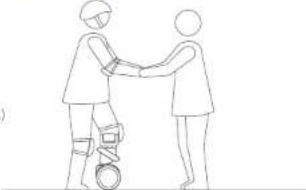
natural_image
Line drawing of two people shaking hands, one holding a circular object (no text or symbols)natural_image
Line drawing of two people interacting, one holding a small object (no text or symbols)natural_image
Line drawing of two people shaking hands on a wheeled cart (no text or symbols)natural_image
Three identical line drawings of a person standing on a platform, with arrows indicating movement direction (no text or symbols)natural_image
Three identical line drawings of a person standing on a wheeled cart, with directional arrows indicating motion (no text or symbols)
- Included in the Box
- Basic Guide
- Charging
- Extension bay converter (optional)
- Carrying Loomo
- Connecting to Loomo
- NOTE:
- Available Applications
- Assistant Photographer
- Personal Companion
- Remote Control Vehicle
- Learning to Ride
- WARNING
- NOTE
- Safety Instructions
- Maintenance
- Cleaning and Storage
- - Tire Pressure
- Battery Pack Maintenance
- • AVERTISSEMENT
- 目录
- 请注意
Brand : SEGWAY
Model : Ninebot S
Category : Scooter