
RHG 5800 IN - Range hood ROSIERES - Free user manual and instructions
Find the device manual for free RHG 5800 IN ROSIERES in PDF.



| Product Type | Extractor hood, recirculation or with external motor |
| Brand | Rosieres |
| Model | RHG 5800 IN |
| Installation | Built-in (IN model) |
| Dimensions (approx.) | Width 60 cm (standard), depth and height vary by model |
| Weight (approx.) | Approximately 15-20 kg |
| Power supply | 230 V / 50 Hz (standard version) or 120 V / 60 Hz depending on country |
| Motor speeds | 4 speeds (1 to 3 normal + 4th intensive speed with automatic return to 3rd after 5 min) |
| Lighting | Lamps (bulbs) to be replaced with identical models |
| Grease filters | Metal, washable by hand or in dishwasher |
| Charcoal filter | Optional (for recirculation version), replace every 6 months |
| Maintenance alarm | Indicator light: after 30 h for grease filter, after 120 h for charcoal filter |
| Timer | Automatic motor stop after 5 minutes (can be activated on each speed) |
| Automatic ICS system | Automatic detection of odors, vapors and gases, speed adjustment (depending on control panel) |
| Controls | Touch panels or buttons (multiple versions depending on model) |
| Remote control | Optional (depending on version) |
| Automatic safety shutdown | Hood goes into standby after 10 h of continuous operation (except 120 V) |
| External cleaning | Damp cloth + neutral detergent; for steel, copper or brass, specific products |
| Internal cleaning | Cloth soaked in denatured ethyl alcohol |
| Installation instructions | Installation by a professional; use the screws provided; observe safety distances |
Frequently Asked Questions - RHG 5800 IN ROSIERES
User questions about RHG 5800 IN ROSIERES
0 question about this device. Answer the ones you know or ask your own.
Ask a new question about this device
Download the instructions for your Range hood in PDF format for free! Find your manual RHG 5800 IN - ROSIERES and take your electronic device back in hand. On this page are published all the documents necessary for the use of your device. RHG 5800 IN by ROSIERES.
USER MANUAL RHG 5800 IN ROSIERES
Fixing A (model with external motor and perimeter extraction).
Fixing C (depending on models).
Fixing C (depending on model).
Device disassembly (for models with mounting type C). During the following operations always support the device.
! The appliance must be installed by a qualified person in compliance with the instructions provided.
Wear gloves when carrying out installation and maintenance operations.
If the supply cord is damaged, it must be replaced by the manufacturer, its service agent or similarly qualified persons in order to avoid a hazard.
Warning: Failure to install the screws or fixing device in accordance with these instructions may result in electrical hazards.
IMPORTANT: So as not to damage your product, during installation use only the screws provided. Make sure these are used as shown in the following instructions.
Prepare the power supply (see "Warning" sheet).
For the ducting version and version with an external motor, prepare the pipe for air evacuation (see "Warnings" sheet).
FILTERING OR DUCTING VERSION?
The hood may be in filtering version, in ducting version or in version with an external motor. Decide from the outset which type is to be installed.
For better efficiency, we recommend installing the hood in the ducting version or in version with an external motor (if possible).

Ducting version
The hood purifies the air and evacuates it to the outside through an exhaust duct.

Version with external motor
The hood purifies the air and evacuates it to the outside through an exhaust duct. The appliance must be connected to a ducting apparatus/motor which works on its own using the appliance as a union for the air to be scavenged.

Filtering version
The hood purifies the air and recycles the clean air back into the room.
CONTROLS
Only for hoods equipped with electronic control:
(in models sold in Scandinavia, the following features are not present)
The 4th speed (intensive) is automatically lowered to 3rd speed after 5 minutes of operation to optimise energy consumption; in hoods with voltage 120V / 60Hz this function is not active and the 4th speed is indicated by the letter b (Booster).
- If the hood is left on (lights and/or motor), after 10 hours in the absence of commands from the user, it will automatically switch to OFF condition with all services switched off. In hoods with voltage 120V / 60Hz this function is not active.
- The Buzzer emits a "beep" each time that a command is set from the keyboard or remote control (optional).
- In the event of interruption of power during the hood, if you restore the hood in the OFF state, then the engine must be reactivated manually.
Controls of Fig. 1:
A) ON/OFF - lamps. This button is also used for the alarm function of the anti-grease and charcoal filters.
Filter alarm: After 30h of motor operation, the L1 RED LED comes ON and remains ON for 30" (the grease filters have to be cleaned). After 120h of motor operation, the L1 RED LED comes ON and flashes for 30" (the charcoal filters have to be changed if the hood is so equipped). The Filter Alarm is ONLY given with the motor is OFF. The Filter Alarm is cancelled (HOUR meter reset) by holding down button A for 2".
B) Press button B to start the motor at Speed 1. The speed is shown by the L1 GREEN LED coming ON. When held down for 2", the motor switches off. A single pressure on the button when the LED is ON activates the timer function (motor ON for 5"), shown by the flashing LED. To cancel the timer function, press the button again ONCE.
C) Press button C to start the motor at Speed 2. The speed is shown by the L2 GREEN LED coming ON.
A single pressure on the button when the led is on activates the timer function (motor on for 5'), shown by the flashing led. To cancel the timer function, press
the button again ONCE.
D) Press button D to start the motor at Speed 3. The speed is shown by the L3 GREEN LED coming ON. A single pressure on the button when the led is on activates the timer function (motor on for 5'), shown by the flashing led. To cancel the timer function, press the button again ONCE.
E) Press button E to start the motor at Speed 4. The speed is shown by the L4 GREEN LED coming ON. A single pressure on the button when the led is on activates the timer function (motor on for 5'), shown by the flashing led. To cancel the timer function, press the button again ONCE.
Controls of Fig. 2:
A) ON/OFF - lamps. This button is also used for the alarm function of the grease and charcoal filters.
Filter alarm: After 30h of motor operation, the L1 LED comes ON and remains ON (the grease filters have to be cleaned). After 120h of motor operation, the L1 LED comes ON and flashes (the charcoal filter have to be changed if the hood is so equipped). The Filter Alarm is ONLY given with the motor is OFF. The Filter Alarm is cancelled (HOUR meter reset) by holding down button A for 2".
B) Press button B to start the motor at Speed 1. The speed is shown by the L2 LED coming ON. When held down for 2", the motor switches off. A single pressure on the button when the LED is ON activates the timer function (motor ON for 5"), shown by the flashing LED. To cancel the timer function, press the button again ONCE.
C) Press button C to start the motor at Speed 2. The speed is shown by the L3 LED coming ON. A single pressure on the button when the led is on activates the timer function (motor on for 5'), shown by the flashing led. To cancel the timer function, press the button again ONCE.
D) Press button D to start the motor at Speed 3. The speed is shown by the L4 LED coming ON. A single pressure on the button when the LED is on activates the timer function (motor on for 5 minutes), shown by the flashing LED. To cancel the timer function, press the button again ONCE.
E) Press button E to start the motor at Speed 4. The speed is shown by the L5 LED coming ON. A single pressure on the button when the LED is on activates the timer function (motor on for 5 minutes), shown by the flashing LED. To cancel the timer function, press the button again ONCE.
Controls of Fig. 3:
A) ON/OFF - lamps. This button is also used for the alarm function of the grease and charcoal filters.
Filter alarm: After 30 hours of motor operation, the L1 LED comes ON and remains ON for 30 seconds (the grease filters have to be cleaned). After 120 hours of motor operation, the L1 LED comes ON and flashes for 30 seconds (the charcoal filter has to be changed if the hood is so equipped). The Filter Alarm is ONLY given when the motor is OFF. The Filter Alarm is cancelled (hour meter reset) by holding down button A for 2 seconds.
B) The button B activates/deactivates sensor function (when activated the sensor is lit by the LED L2).
C) Press button C to start the motor at Speed 1. The speed is shown by the L3 LED coming ON. When held down for 2 seconds, the motor switches off.
D) Press button D to start the motor at Speed 2. The speed is shown by the L4 LED coming ON.
E) Press button E to start the motor at Speed 3. The speed is shown by the L5 LED coming ON.
F) Press button F to start the motor at Speed 4. The speed is shown by the L6 LED coming ON.
SENSOR SENSITIVITY: sensitivity of the sensor may be modified in accordance with individual requirements. Modify the sensitivity by pressing simultaneously on the A and B buttons. The set sensitivity level will be displayed via the 4 flashing LEDs - L3, L4, L5, and L6. The desired sensitivity is set via the C, D, E, and F buttons (C being minimum, F being maximum). Set the sensitivity level to minimum for gas cook tops, medium for glass-ceramic cook tops and maximum for induction cook tops.
WARNING: when LED L1 lights up, this indicates that the grease or charcoal filters require cleaning.
FILTER SENSOR (activated via the B button): this device is equipped with a completely automatic system (Advanced Sensor Control) for management of all hood functions. Thanks to the Advanced Sensor Control (ASC), air circulating in the kitchen is maintained clean and odour-free without requiring any user intervention. The sophisticated sensors are able to capture any type of odour, vapour, smoke or heat caused by cooking. The ASC also captures any possible irregular gases present in the environment.
When the sensor function is activated, the C, D, E and F buttons activate the speed temporarily, to then be overridden by the automatic speed setting.
Warning: in order to avoid damaging the sensor, never use silicone products near the hood!
Controls of Fig. 4:
This device is equipped with a completely automatic system (Advanced Sensor Control) for management of all hood functions. Thanks to the Advanced Sensor Control (ASC), air circulating in the kitchen is maintained
clean and odour-free without requiring any user intervention. The sophisticated sensors are able to capture any type of odour, vapour, smoke or heat caused by cooking. The ASC also captures any possible irregular gases present in the environment.
A) Turns the lights off.
B) Turns the lights on.
C) Reduces the motor speed until reaching zero. If pressed for 2 seconds when the Filter Alarm is active, the HOUR counter is reset.
D) Drives the motor (calling the last speed used) and increases the speed until reaching maximum.
E) Activates/deactivates the sensor (AUTOMATIC or MANUAL mode). In Automatic mode the sensor is active and the letter "A" appears on the display (L).
L) Display:
- signals the running speed
- signals Automatic mode by displaying the letter "A". When the motor speed is changed, the running speed is displayed flashing 3 times, and then the letter "A" reappears.
- signals the filter alarm (with motor off) by displaying the central segment for 30 seconds.
FILTER ALARM: Displayed for 30" when the motor is off:
After 30 hours of operation, the central segment lights up on the display; it indicates that the grease filters need to be cleaned.
After 120 hours of operation, the central segment flashes on the display; it indicates that the grease filters need to be cleaned and the charcoal filters replaced.
After cleaning the grease filters (and/or replacing the charcoal filters), restart the hour counter (RESET) by pressing the C key while the filter alarm is displayed.
Warning: to avoid damaging the sensor, never use silicone products near the hood!
GAS SENSOR SENSITIVITY: The sensitivity of the sensor can be modified to suit your requirements. To modify the sensitivity, the appliance must be in manual mode (i.e., the running speed and not the letter "A" must appear on the display); if not, press the E key.
Modify the sensitivity by simultaneously pressing the D and E keys. The set sensitivity is indicated on the display. Use the C (-) and D (+) buttons to set the desired sensitivity. Store the "new" sensitivity by pressing the E key.
Controls of Fig. 5:
Key A: Turns the LIGHTS off.
Key B: Turns the LIGHTS on.
Key C: Reduces the motor speed until reaching minimum. If pressed for about 2 seconds, it stops the motor and stores the speed.
Key D: Drives the motor (calling the last speed used) and increases the speed until reaching maximum.
L Display
- signals the running speed.
- signals the filter alarm (with motor off) by displaying the central segment for 30°.
- signals Timer activation with a flashing number.
Key E: activates the TIMER (when the motor is running), so that the hood stops automatically after 5'. Also Zero-sets hour metering when the Filter Alarm is active (motor OFF).
FILTER ALARM: Displayed for 30'' when the motor is off:
After 30h of operation, the central segment lights up on the display; It indicates that the grease filters need to be cleaned.
After 120h of operation, the central segment flashes on the display; It indicates that the grease filters need to be cleaned and the charcoal filters replaced.
After cleaning the grease filters (and/or replacing the charcoal filters), restart the hour counter (RESET) by pressing the key E during display of the filter alarm.
Controls of Fig. 6:
A) turns the lights on/off.
B): turns the TIMER on/off: press once to turn the timer on, therefore, after 5 minutes, the motor cuts out (at the same time the selected speed blinks on the display); the timer remains on if the motor speed is changed. Display C): - indicates the selected motor speed (from 1 to 4); - indicates Timer On when the number blinks; - indicates Filter Alarm when the central segments is on or blinking.
D): makes the motor work (at the last speed selected); pushing the button again, the speeds of the motor are sequentially selected from 1 to 4; keeping this button pressed for about 2 seconds shuts down the motor.
R): resets the grease filters or charcoal filters; when the filter alarm appears (i.e. when the central segment on the display goes on), the grease filters must be cleaned (30 hours of operation); when the central segment starts blinking, the grease filters must be cleaned and the charcoal filters replaced (120 hours of operation). Obviously, if the hood is not a filtering model and does not have a charcoal filter, clean the grease filters both when the central segment goes on and when it starts blinking. The filter alarm can be seen when the motor is off and for about 30 seconds. To reset the hour counter, keep the button pressed for 2 seconds while the alarm can be seen.
Controls of Fig. 7:
This device is equipped with a completely automatic system (Advanced Sensor Control) for management of all hood functions. Thanks to the Advanced Sensor Control (ASC), air circulating in the kitchen is maintained clean and odour-free without requiring any user intervention. The sophisticated sensors are able to capture any type of odour, vapour, smoke or heat caused by cooking. The ASC also captures any possible irregular gases present in the environment.
A): switches the lights on/off. B): enables/disables "Automatic" function. When this function is selected, an "A" appears on the display C, and the speed of the motor increases or decreases depending on the smoke, odours and gas present in the kitchen. Display C): - indicates the automatic operation of the sensor (the letter "A" appears); - indicates the motor speed selected automatically by the sensor; indicates the filter alarm whenever the central segment is illuminated or flashing. D): decreases motor speed / Reset; decreases motor speed to zero (stopping); in any case however, after approximately 1 minute, the hood resumes automatic operation at the speed set by the sensor. Whenever the key is pressed during the display of filter alarms, a RESET occurs, and the counting of the hours resumes again. E): increases motor speed; in any case however, after approximately 1 minute, the hood resumes automatic operation at the speed set by the sensor. This device is equipped with a completely automatic system (Advanced Sensor Control) for management of all hood functions. Thanks to the Advanced sensor Control (ASC), air circulating in the kitchen is maintained clean and odour-free without requiring any user intervention. The sophisticated sensors are able to capture any type of odour, vapour, smoke or heat caused by cooking. The ASC also captures any possible irregular gases present in the environment. Modification of sensor sensitivity: sensor sensitivity can be modified by operating as follows: - stop the hood by pressing key B. - Simultaneously press keys D and E (the sensor's sensitivity index will appear on the display) - Pressing keys D or E, the sensor's sensitivity will either increase or decrease (1: minimum sensitivity / 9: maximum sensitivity). - whenever the power supply is interrupted, the sensor will resume operation with a sensitivity index of 5. Warning: in order to avoid damaging the sensor, never use silicone products near the hood! Warning: in order to avoid damaging the sensor, never use silicone products near the hood! Controls of Fig. 8: Switch A: LIGHT; position 0: light off; position 1: light on. Switch B: MOTOR SPEED: makes it possible to select the motor operating speed; position 0: motor off. C: Motor on light. Controls of Fig. 9: A): turns the lights on/off; every 30 hours of operation the corresponding pilot lamp comes on to indicate that the grease filters must be cleaned; every 120 hours of operation the corresponding pilot lamp flashes to indicate that the grease filters must be cleaned and the charcoal filter replaced. To restart the hour counter (RESET), hold the button A pressed down for about 1" (while the pilot lamp is on). B) drives the motor in first speed (the corresponding pilot lamp comes on); when holding it down for about 1", the motor cuts out; when pressing the button a second time (while the pilot lamp is on), the TIMER is activated and thus the motor stops after 5' (the pilot lamp flashes). C): drives the motor in second speed (the corresponding pilot lamp comes on); when pressing the button a second time (while the pilot lamp is on), the TIMER is activated and thus the motor stops after 5' (the pilot lamp flashes). D): drives the motor in third speed (the corresponding pilot lamp comes on); when pressing the button a second time (while the pilot lamp is on), the TIMER is activated and thus the motor stops after 5' (the pilot lamp flashes). E): drives the motor in fourth speed (the corresponding pilot lamp comes on); when pressing the button a second time (while the pilot lamp is on), the TIMER is activated and thus the motor stops after 5' (the pilot lamp flashes).
MAINTENANCE
Before cleaning or maintenance, cut the power.
Cleaning the hood
WHEN TO CLEAN IT: clean in relation to use, at least every 2 months to prevent the risk of fire.
EXTERNAL CLEANING: use a cloth moistened in lukewarm water and neutral detergent (for painted hoods); use specific products for steel, copper or brass hoods.
INTERNAL CLEANING: use a cloth (or brush) soaked in denatured ethyl alcohol.
WHAT NOT TO DO: do not use abrasive or corrosive products (e.g. metal sponges, brushes, too hard brushes, very aggressive detergents, etc.)
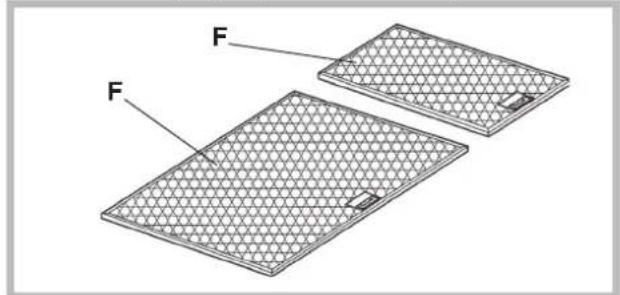
Cleaning the grease filters (F)
WHEN TO CLEAN IT: clean in relation to use, at least every 2 months to prevent the risk of fire.
HOW TO CLEAN THE FILTERS: hand wash or in the dishwasher using a neutral detergent. If washing in the dishwasher, possible discoloration of the filters does not in any way compromise their functioning.
Replacing the charcoal filter
(for filtering version only)
WHEN TO REPLACE IT: replace in relation to use, at least every 6 months.
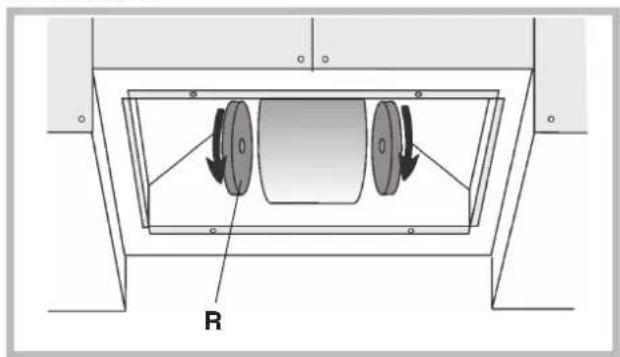
HOW TO REMOVE IT: depending on the model, the unit is equipped with the round charcoal filters or with the rectangular charcoal filter.
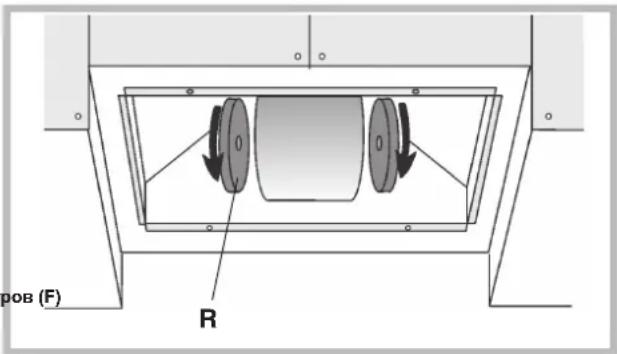
If the unit is equipped with the round charcoal filters (R), remove the charcoal filters with a twisting movement.
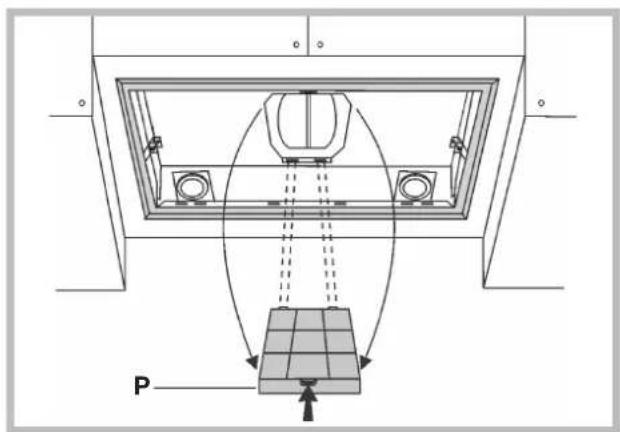
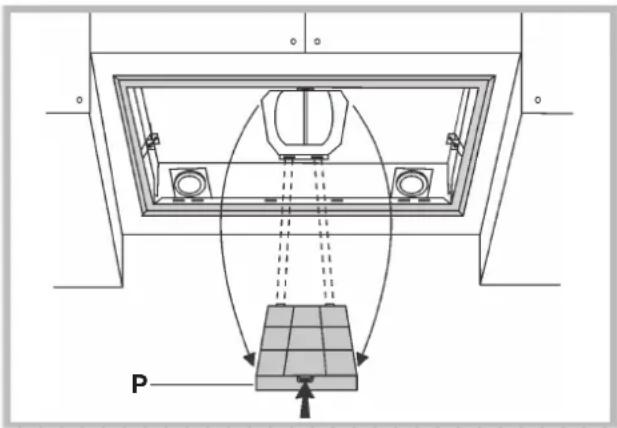
If the unit is equipped with the rectangular charcoal filter (P), press on the clamp and rotate the filter downward until the 2 tabs can be removed from the housing.
Lighting
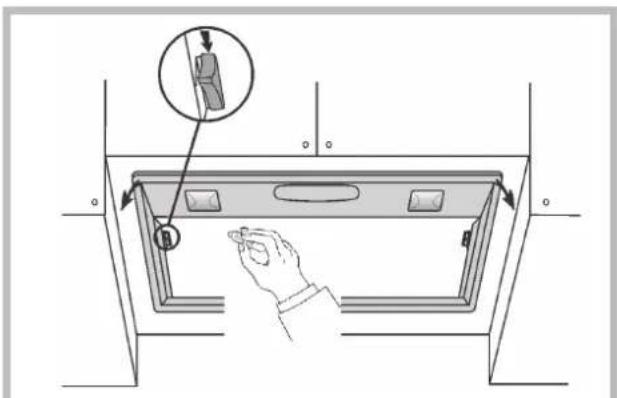
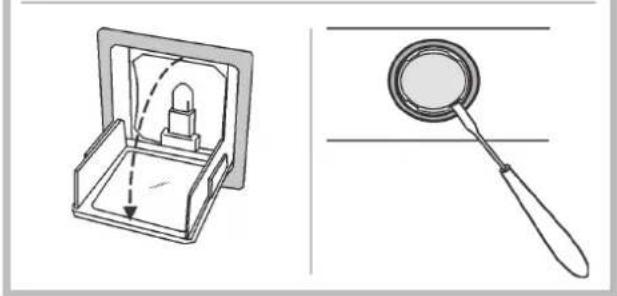
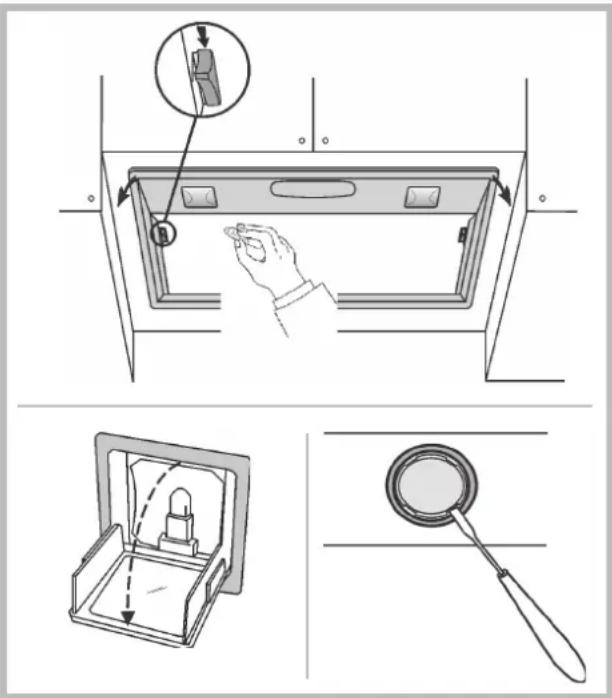
Replace it with lamps of the same type; if a lamp is not listed in the table shown in the "Warning" worksheet, please contact the support center.
MALFUNCTIONS
If something appears not to be working properly, do the following simple checks before calling Technical Service:
The hood is not working
Possible cause (1): Power cord not securely plugged in.
Correction: The hood was never electrically connected by the installer.
Call the electrician/installer.
Possible cause (2): A speed has not been selected.
Correction: Select a speed in the control panel.
If the hood has turned off during normal functioning, check that the power has not been disconnected and that the omnipolar disconnection device has not tripped.
- The blower does not work but the lights do
Possible cause: The blower motor connector is not plugged.
Correction: Locate the blower motor connector and plug it. Check to see if the fan now works. If the problem persists, call Technical Service.
The hood is not operating effectively
Possible cause: Dirty filters/baffles.
Correction: Check to be sure the filter is clean.
For ducting hood and hood with an external motor
Possible cause (1). Ducting requirements inadequate. If your duct length
exceeds the manufacturer's requirements, hood performance will suffer
Air-flow will also be reduced if the house duct work is too small or there are too many elbows in the system.
Comply with the official instructions provided by the competent authorities in merit when installing the disposal duct (example, the air collected must not be conveyed into a duct already used to central heatings systems, thermosiphons, etc.). The room contains air taps.
Contact your installer.
Possible cause (2): Obstruction in duct work.
Correction: make sure nothing is blocking the vent (bird nests or kinks in the duct work).
Possible cause (3): Damper blade may not be opening.
Correction: Make sure the tape is removed from the damper blades and that it swings open freely.
For filtering hood
Possible cause: the charcoal filter/s is saturated.
Correction: replace the charcoal filter(s).
The lamp does not work
Light spot (LED):
If a lamp is not listed in the table shown in the "Warning" worksheet, please contact Technical Service.
Incandescent lamps:
Possible cause: The lamp or socket may be defective or a wire could be disconnected.
Correction: place the lamp in another socket; if the lamp is not working, replace with a lamp of the same type; if the lamp works, the original socket may be defective or a wire may be disconnected. Call Technical Service.
Halogen lamps:
Possible cause: The lamp or socket may be defective or a wire could be disconnected.
Correction: replace with a lamp of the same type. If the problem persists, call Technical Service.
- Remote control not working (where present)
Possible cause (1): Link lost between the remote control and the hood.
Correction: Check to see if the hood works with the control on the hood. Remove power from the hood at the circuit breaker then reapply power. Relink the remote control to the hood, following the instructions supplied with the remote control.
Possible cause (2): Remote battery dead.
Correction: Change the battery.
Vertical telescopic trolley is locked (where present)
If all LEDs flashing, the telescopic trolley is locked. Wait 30° and press the Up/Down button to release the trolley.
If Up/down button flashing, the grease filter is not positioned correctly. Reposition properly.
If the trolley is locked, check that the cable connector is not disconnected. If the problem persists, call Technical Service.
Possible cause: Dirty filters / compartments
Attention, contact technical service.
A): to turn the lights on/off.
Solution: Check if the filter is clean.
The hood purifies the air and expels it outside through the exhaust pipe.

The hood purifies the air and expels it outside through the exhaust pipe. When using the hood, it is necessary to follow the instructions for use.

The hood purifies the air and returns the purified air to the room.
Control panel
(If the hood is not opened, the following functions are not available) In all modes, after 5 minutes of operation at 4-speed (intensive), the hood automatically switches to 3-speed.
- If within 10 hours the control of the hood being on (including lighting or backlight) does not change, all functions automatically turn off and the hood switches to the OFF state.
- As a rule, when a command is given from the remote control (optional version), its execution is confirmed by a sound signal "beep".
- If during operation of the hood a sudden power outage occurs, the hood automatically turns off, and the key is in the OFF position. It is necessary to turn on the hood manually again.
Control buttons according to Fig. 1:
A) Turning on the lighting. The button is used to reset the alarm state of the grease filters and charcoal filters.
The alarm state of the filters after 30 hours of motor operation is indicated by the indicator L1 in red, which remains lit for 30 seconds (time to clean the grease filters).
After 120 hours of motor operation, the indicator L1 lights up in red, which continues to flash for 30 seconds (time to replace the charcoal filters, if the hood is equipped with them). The alarm state of the filters is indicated only when the motor is stopped. Resetting the alarm state of the filters (resetting the hour counter) is done by pressing button A for 2 seconds.
B) Pressing the button causes the motor to turn on at 1st speed. The speed is indicated by the indicator L1 in green. When pressing the button for 2 seconds, the motor turns off. Pressing the button completely, when
C) Pressing the button causes the motor to turn on at 2nd speed. The speed is indicated by indicator L2 in green. Pressing the button once, when the indicator is lit, activates the timer function (the motor continues to run for 5 minutes), which is indicated by the indicator flashing. To cancel the timer function, press the button once again. D) Pressing button D causes the motor to turn on at 3rd speed. The speed is indicated by indicator L3 in green. Pressing the button once, when the indicator is lit, activates the timer function (the motor continues to run for 5 minutes), which is indicated by the indicator flashing. To cancel the timer function, press the button once again. Pressing button E causes the motor to turn on at 4th speed. The speed is indicated by indicator L4 in green. Pressing the button once, when the indicator is lit, activates the timer function (the motor continues to run for 5 minutes), which is indicated by the indicator flashing. To cancel the timer function, press the button once again.
Control panel Fig.2:
A) ON/OFF button. Each press toggles the function of the corresponding coal or charcoal filters. Filter alarm: After 30 hours of operation, the indicator L lights up continuously (this means that the charcoal filters need to be replaced). After 120 hours of operation, the indicator L starts flashing (this means that the coal filters need to be replaced, if the recirculation mode is installed). The filter alarm only resets when the motor is stopped. The filter alarm is reset (counter reset) by holding button A for 2 seconds. B) When pressing button B, the motor starts at first speed. The speed is indicated by the lit indicator L2. If you hold this button pressed for 2 seconds, the motor turns off. If you perform a single press of the button while the indicator is lit, the timer function is activated (the motor turns on for 5 minutes), which is signaled by the flashing indicator. To turn off the timer function, press the button again. C) When pressing button C, the motor starts at second speed. The speed is indicated by the lit indicator L3. If you perform a single press of the button while the indicator is lit, the timer function is activated (the motor turns on for 5 minutes), which is signaled by the flashing indicator. To turn off the timer function, press the button again. D) When pressing button D, the motor starts at third speed. The speed is indicated by the lit indicator L4. If you perform a single press of the button while the indicator is lit, the timer function is activated (the motor turns on for 5 minutes), which is signaled by the flashing indicator. To turn off the timer function, press the button again. E) When pressing button E, the motor starts at fourth speed. The speed is indicated by the lit indicator L5. If you perform a single press of the button while the indicator is lit, the timer function is activated (the motor turns on for 5 minutes), which is signaled by the flashing indicator. To turn off the timer function, press the button again.
Control panel Fig.4:
The device is equipped with an automatic system "ADS" (Advanced Sensor Control), which ensures the highest level of extraction. Thanks to the "ADS" system, the air in the kitchen always remains clean of all odors, without any user intervention. The sensors of the new design are able to detect the presence of all odors, vapors, fumes, or gases in the air being filtered. The "ADS" system also detects the presence of gases and impurities.
A) Turns off the backlight B) Turns on the backlight C) Reduces the motor speed to zero. Pressing the button for 2 seconds when the filter alarm is activated triggers the filter reset. D) Turns on the motor (at the speed that was selected last time) and increases the speed to maximum. E) Activates/deactivates the sensor (automatic or manual mode). In automatic mode, the sensor is activated and the letter "A" appears on the display.
L) Display:
- shows the current speed
- shows the automatic mode with the display of the letter "A". The motor speed indicator shows the current speed with three dashes, then again
displays the letter "A".
- Displays the filter alarm state (with the motor off), during which the central element lights up for 30 seconds.
FILTER ALARM: Displayed with the motor off for 30 seconds.
After 30 hours of operation, the letter "F" appears on the display; this means that the grease filters need to be cleaned.
After 120 hours of operation, the letter "F" appears on the display; this means that the grease filters need to be cleaned and the charcoal filters replaced.
After cleaning the grease filters (or replacing the charcoal filters), to reset the operating hours counter (reset), press the C button while the filter alarm state is displayed.
WARNING! To avoid damaging the sensor, avoid using spray products near the hood!
SENSOR SENSITIVITY: You can change the sensor sensitivity according to your preference. To do this, the device must be in standby mode (i.e., on the display the letter "A" and the current speed should be shown; otherwise, press the E button).
Press the buttons N and E simultaneously. The display will show the selected sensitivity. Press the required sensitivity with the buttons N and E.
Save the "new" sensitivity by pressing button E. Button control Fig. 5
Button A: Turns off the backlight
Button B: Turns on the backlight
Button C: Reduces the motor speed to minimum. Pressing the button for 2 seconds stops the motor and stores the current speed.
Button D: Turns on the motor (with the last used speed) and increases the motor speed to maximum.
Display:
- Shows the current speed
Displays the alarm status of the filters (when the motor is off) by flashing the central segment
- Shows the active timer with hours and minutes
Button E: Activates the timer (when
the motor is on). After the set time, the extraction is automatically switched off after 5 minutes. Resets the hour counter when the filter alarm status is present (when the motor is off).
Filter alarm status: Display when the motor is off:
After 30 hours of operation, the display lights up the central segment, indicating that the grease filters need to be cleaned.
After 120 hours of operation, the display flashes the central segment, indicating that the grease filters need to be cleaned and the charcoal filters need to be replaced.
No filter delay for fat (N/NI replacement of carbon filters), reset restart after hours. Press the button to display the current state of the filters.
Control button per Fig. 6. Control button per Fig. 6
Button A = On/Off light. Button B = On/Off timer; press it once, you turn on the timer; consequently, after 5 minutes the motor stops (simultaneously, the speed decreases, which is normal). The timer remains on if the motor speed changes.
Display C = shows the selected motor speed (from 1 to 4);
- Shows the timer activation when the speed indicator flashes; - shows the alarm state of the filters when the central segment lights up.
Button D = turns on the motor (at the last selected speed). By pressing the button repeatedly, you can cycle the motor speed from 1 to 4, sequentially. Holding the button for 2 seconds approximately turns off the motor.
Button R = reset carbon filters and grease filters. When the alarm signal for the filters is displayed (on the display the horizontal segment lights up), it is necessary to replace the grease filters (they have worked 30 hours). If the horizontal segment flashes, it is necessary to replace the grease filters and change the carbon filters (they have worked 120 hours). Of course, if the hood is not used in recirculation mode, therefore, it is not equipped with carbon filters, you should only replace the grease filters, regardless of whether the central
segment lights up. The alarm state of the filters appears when the motor is on and continues to appear for approximately 30 seconds. To reset the alarm, press and hold the button for 2 seconds during the alarm signal.
Control button per Fig. 7: Control button per Fig. 7
This device is equipped with an electronic control system "ADS" (Advanced Sensor Control), which ensures control of all functions automatically. Thanks to the "ADS" system, the air in the kitchen remains always clean and free of any odors, without any intervention from the user. The sensors are able to detect the presence of any odors, vapors, smoke, or heat due to the cooking process. The "ADS" system also detects the presence of gas in the room.
Button A: Turns on/off the light.
Button B: Turns on/off the function "Automatic mode". When this function is activated, the indicator with the letter "A" appears, and the motor speed increases or decreases automatically according to the saturation of the air with smoke, odors, and gas.
Display C: shows automatic operation of the sensor (with the letter "A" displayed); - shows the rotation speed of the electric motor, automatically set by the sensor; - shows the alarm state of the filters when the central element becomes clogged. Button: decreases the motor speed / Reset: decreases the speed to minimum (stop), however after 1 minute the automatic function of operation resumes at the speed set by the sensor. Pressing the button during the display of the filter alarm state will cause the counter to reset and thus restart the hour count.
Button E: increases the motor speed; however, after 1 minute the automatic operation mode resumes at the speed set by the sensor.
This device is equipped with the "ADS" (Advanced Sensor Control) system, which ensures control of all functions of the hood. Thanks to the "ADS" system, the air in the kitchen always remains clean and free of odors, without any intervention from the user. The advanced design sensors are capable of detecting the presence of any odors, vapors, smoke, or heat resulting from the cooking process. The "ADS" system also detects the presence of harmful impurities.
Sensor adjustment: You can change the sensor sensitivity as follows:
- Stop the hood by pressing button B. - Press buttons D and E simultaneously (the sensor sensitivity indicator will be displayed on the display). - Press button D or E to adjust the sensor sensitivity in the positive or negative direction (1: minimum / 9: maximum sensitivity). - In case of a power outage, the sensor will operate again with sensitivity 5.
CAUTION: Do not damage the sensor; avoid inserting sharp objects into the opening.
Control buttons according to Fig. 8: Control buttons according to Fig. 8:
Switch A = light;
Position 0: off; Position 1: on.
Motor speed: allows adjusting the working speed of the electric motor; Position 0: off.
C = signal for motor operation.
Control buttons according to Fig. 9: Control buttons according to Fig. 9: Button A = turns the light on/off; Every 30 hours of operation, the corresponding indicator lights up, indicating that the grease filters need to be cleaned; Every 120 hours of operation, the corresponding indicator lights up, indicating that the grease filters need to be cleaned and the charcoal filters need to be replaced. To reset the indicator, press button A for 1 second while the indicator is lit. Button B = turns on the electric motor at 1st speed (the corresponding indicator lights up); if you keep it pressed for about 1 second, the motor turns off.
Button C = turns on the electric motor at 2nd speed (the corresponding indicator lights up); when pressed again (while the signal indicator is lit), the timer is activated, as a result of which after 5 seconds the electric motor stops (the signal indicator goes out).
Press button D to turn on the electric drive at 3rd speed (the corresponding lamp lights up); when pressed again (while the signal lamp is on), the timer turns on, after which the electric drive stops after 5 seconds (the signal lamp goes out).
goes out).
Press button E to turn on the electric drive at 4th speed (the corresponding lamp lights up); when pressed again (while the signal lamp is on), the timer turns on, after which the electric drive stops after 5 seconds (the signal lamp goes out).
TECHNICAL MAINTENANCE TECHNICAL MAINTENANCE
Before carrying out technical maintenance, disconnect the power supply.
CLEANING THE EXTRACTOR HOOD CLEANING THE EXTRACTOR HOOD
Clean the hood regularly, at least every 2 months, to avoid the risk of fire.
EXTERNAL CLEANING: Use a cloth dampened with warm water and a mild detergent (for painted hoods).
Use special products for stainless steel, copper, or brass hoods.
INTERNAL CLEANING: Use a cloth (or brush) dampened with denatured ethyl alcohol.
WHAT NOT TO DO: Do not use abrasive or corrosive products (e.g., metallic sponges, too aggressive detergents, aggressive cleaning agents, etc.).
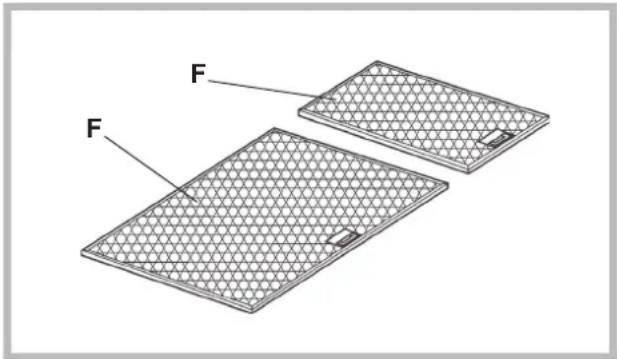
When the grease filters (F) are dirty, clean the grease filters (F) at least every 2 months to avoid the risk of fire.
HOW TO CLEAN THE FILTERS: Wash them by hand with a mild detergent or in a dishwasher. In the case of using a dishwasher, slight discoloration of the filters is possible, which does not affect their functionality.
REPLACING THE CHARCOAL FILTER REPLACING THE CHARCOAL FILTER (only for filters used in recirculation mode)
WHEN TO REPLACE: Replace at least every 6 months depending on usage.
KAKBbHytbΦnltbTP: In accordance with your model, the hood is equipped with carbon filters of rectangular or round shape.
If the hood is equipped with round filters (R), rotate the carbon filters by turning them in the opposite direction.
If the hood is equipped with rectangular carbon filters (P), press the filter retainer and turn the filter downwards to remove it from its seat.
Replace with a lamp of the same type; if the lamp is not indicated in the table "RECOMMENDATIONS", please contact the manufacturer.
TROUBLESHOOTING
If something is not working properly, before calling technical service personnel, please perform the simple checks described below:
- The hood does not workThe hood does not work
Possible cause (1): The power supply wires are not connected or are connected incorrectly.
Solution: The electrical installation has not been
connected properly by the installer. Call an electrician/installer.
Possible cause (2): The speed has not been selected.
Solution: Select the speed on the control panel.
If the hood switches off during normal operation, it should be checked whether the safety (overload) switch has tripped.
Ventilation: The existing ventilation system is working.
Possible cause: The fan power cable is not connected.
Solution: Determine the location of the fan cable
and connect it. Check if the fan is now working.
If the problem is not resolved, call technical
service personnel.
- The hood does not work properly. The hood does not work properly.
Possible cause: Filters are dirty or clogged.
Solution: Check and clean the filters.
For hoods with duct system and hoods with external
motor
Possible cause (1): The duct system is not installed
according to requirements. If the duct length exceeds
the requirements for performance, the hood may not work optimally.
If the duct cross-section is too small or the system has too many bends, the airflow will also be slowed down.
During installation of the exhaust duct, it is necessary to follow
The instructions in the manual, which are provided by the relevant
organizations (for example, the extracted air cannot be directed
into a duct that is already used in the installation of
central heating, thermosiphons, etc.). In the room
where the ventilation openings are located
you should contact the contractor.
Possible cause (2): The duct is blocked.
Solution: Check that the ventilation duct (socket and connections) is not blocked.
Possible cause (3): The throttle valve does not open.
Solution: It is necessary to check whether the tape from the
throttle valve has been removed and whether it moves freely.
In the case of extraction with a filter
Possible cause: The charcoal filter is completely saturated.
Solution: Replace the charcoal filter.
- The lamp does not work. The lamp does not work.
Lamp types (LED):
If a lamp of this type is not listed in the table on
the page with "Notes", please contact the technical
service personnel.
Lamps and indicators:
Possible cause: The lamp or indicator is faulty, or there is a break in the supply wires.
Solution: Install a different indicator; if the lamp
does not work, replace it with another of the same type; if it works,
the indicator or the supply wires are faulty.
Call technical service personnel.
Halogen lamps:
Possible cause: The lamp or indicator is faulty, or there is a break in the supply wires.
Solution: Replace the lamp with another of the same type. If the problem
persists, call technical service personnel.
The remote control does not work (if included in the kit).
Possible cause (1): No connection between the remote control and the extractor hood.
Solution: Check that the control buttons on the extractor hood are correctly installed and working.
Switch off the extractor hood using the electrical circuit breaker;
then switch it back on. Perform the connection between the
remote control and the extractor hood again, following the instructions provided with the remote control.
Possible cause (2): The battery in the remote control is drained.
Solution: Replace the battery with a new one.
- Blocking of the vertical telescopic duct (if it was added to the kit)
If all the LEDs are lit, the telescopic duct is
blocked. Wait 30 seconds and press the "Up" or "Down" button
to unblock the duct.
If the "Up/Down" button flashes, the control board is not installed in the
correct position. It must be installed
properly.
If the duct is blocked, or to check if it was disconnected
If the malfunction is not resolved, call the technical support service of the Region.
The device is now ready for use.
A): Press the ON/OFF button.
B): The device will start operating and as a result the machine's speed will be displayed after 5 seconds (simultaneously the speed level will be indicated by the LEDs). The device remains active even when the speed is changed.
C):
- Shows the machine's speed (from 1 to 4)
- The LED lights up when the device is turned on. It indicates the selected speed level.
The speed level is indicated by the LEDs.
Note: The LED is completely off.
Meaning: The LED is off.
The LED indicator works.
LED indicators:
If the machine's LEDs do not indicate the selected speed, check the connection to the "LED indicators" side.
LED indicators are working.
Note: The LED or its brightness is defective or the LED connection is broken.
Cause: The device does not operate, or if it operates, the device is automatic or the power supply is disconnected. Contact technical support.
Troubleshooting:
Possible cause: The device or its parts are defective or the power supply is disconnected.
Solution: Replace with a new device of the same type. If the problem persists, contact technical support.
The remote control does not work (if included in the kit)
Possible cause 1: There is a connection between the remote control and the receiver.
Solution: Check if the batteries in the receiver are working.
Operate the receiver by pressing the switch, then release it.
Make the connection again between the remote control and the receiver, following the instructions provided with the remote control.
Possible cause 2: Low battery in the remote control.
Solution: Replace the battery with a new one.
For each remote control disc (if included in the kit)
If the LED lights flash, the remote control disc is locked. Wait 30 seconds and then press the up or down button to unlock the disc. If the up/down buttons flash, the disc is not in the correct position. Adjust it.
If the disc is locked, check if the power supply has not been disconnected.
If the problem persists, contact technical support.
Installation must be carried out according to the instructions provided by professionally qualified personnel.



- FILTERING OR DUCTING VERSION
- DUCTING VERSION
- VERSION WITH EXTERNAL MOTOR
- FILTERING VERSION
- CONTROLS
- CONTROLS OF FIG
- MAINTENANCE
- CLEANING THE HOOD
- CLEANING THE GREASE FILTERS (F)
- REPLACING THE CHARCOAL FILTER
- LIGHTING
- MALFUNCTIONS
- THE HOOD IS NOT WORKING
- THE LAMP DOES NOT WORK
- LIGHT SPOT (LED)
- REMOTE CONTROL NOT WORKING (WHERE PRESENT)
- CONTROL PANEL
- CONTROL BUTTONS ACCORDING TO FIG
- CONTROL PANEL FIG
- DISPLAY
- CONTROL BUTTON PER FIG. 6. CONTROL BUTTON PER FIG
- CONTROL BUTTON PER FIG. 7: CONTROL BUTTON PER FIG
- SWITCH A = LIGHT
- C = SIGNAL FOR MOTOR OPERATION
- TECHNICAL MAINTENANCE TECHNICAL MAINTENANCE
- TROUBLESHOOTING
- THE LED INDICATOR WORKS
- THE REMOTE CONTROL DOES NOT WORK (IF INCLUDED IN THE KIT)
Brand : ROSIERES
Model : RHG 5800 IN
Category : Range hood