Nikkor AFS 200mm f2G ED VR II - Camera lens NIKON - Free user manual and instructions
Find the device manual for free Nikkor AFS 200mm f2G ED VR II NIKON in PDF.



| Brand | Nikon |
| Model | Nikkor AFS 200mm f2G ED VR II |
| Category | Camera lens |
| Mount type | Nikon bayonet mount |
| Focal length | 200 mm |
| Maximum aperture | f/2 |
| Optical construction | 13 elements in 9 groups (3 ED elements, 1 Super ED element, nanocrystal elements) |
| Field of view (FX) | 12°20' |
| Field of view (DX) | 8° |
| Minimum focusing distance | 1.9 m |
| Number of diaphragm blades | 9 (circular) |
| Aperture range | f/2 to f/22 |
| Dimensions (diameter x length) | 124 mm x 203.5 mm |
| Weight | 2930 g |
| Vibration reduction (VR) | Yes, NORMAL and ACTIVE modes |
| Autofocus motor | Silent Wave Motor (SWM) |
| Tripod collar | Rotatable 360°, detachable |
| Filters | 52 mm screw-on filter (provided), drop-in filter holder |
| Included accessories | Front/rear caps, HK-31 hood, CL-L1 case, filter holder, NC 52 mm filter, LN-1 strap |
| Maintenance | Clean with a blower or a soft cloth slightly moistened with ethyl alcohol. Store in a dry place away from high heat. |
| Safety | Do not disassemble, avoid flammable gases, do not look at the sun through the lens |
Frequently Asked Questions - Nikkor AFS 200mm f2G ED VR II NIKON
User questions about Nikkor AFS 200mm f2G ED VR II NIKON
0 question about this device. Answer the ones you know or ask your own.
Ask a new question about this device
Download the instructions for your Camera lens in PDF format for free! Find your manual Nikkor AFS 200mm f2G ED VR II - NIKON and take your electronic device back in hand. On this page are published all the documents necessary for the use of your device. Nikkor AFS 200mm f2G ED VR II by NIKON.
USER MANUAL Nikkor AFS 200mm f2G ED VR II NIKON
User's Manual Pg. 16
Jp
■ 主な特長
natural_image
Close-up of a mechanical component with no visible text or symbolsnatural_image
Close-up of a mechanical component with no visible text or symbolsnatural_image
Diagram of a car interior showing a gear shift and directional arrow (no text or symbols)natural_image
Illustration of a hand holding a stopwatch with an arrow symbol, next to a magnifying glass (no text or symbols present)Touching the internal parts of the camera or lens could result in injury. Repairs should be performed only by qualified technicians. Should the camera or lens break open as the result of a fall or other accident, take the product to a Nikon-authorized service representative for inspection after unplugging the product and/or removing the battery.
Turn off immediately in the event of malfunction
Should you notice smoke or an unusual smell coming from the camera or lens, remove the battery immediately, taking care to avoid burns.
Continued operation could result in injury.
After removing or disconnecting the power source, take the product to a Nikon-authorized service representative for inspection.
Do not use the camera or lens in the presence of flammable gas
Operating electronic equipment in the presence of flammable gas could result in an explosion or fire.
Do not look at the sun through the lens or viewfinder
Viewing the sun or other strong light sources through the lens or viewfinder could cause permanent visual impairment.
Keep out of reach of children
Particular care should be taken to prevent infants from putting the batteries or other small parts into their mouths.
Observe the following precautions when handling the camera and lens
- Keep the camera and lens unit dry. Failure to do so could result in fire or electric shock.
- Do not handle or touch the camera or lens unit with wet hands. Failure to do so could result in electric shock.
- When shooting with back-lighting, do not point the lens at the sun or allow sunlight to pass directly down the lens as this may cause the camera to overheat and possibly cause a fire.
- When the lens will not be used for an extended period of time, attach both front and rear lens caps and store the lens away from direct sunlight. Failure to do so could result in a fire, as the lens may focus sunlight onto a flammable object.
Notices for Customers in Europe
natural_image
Symbol of a trash bin crossed with a diagonal line, no text or numbers presentThis symbol indicates that electrical and electronic equipment is to be collected separately.
The following apply only to users in European countries:
- This product is designated for separate collection at an appropriate collection point. Do not dispose of as household waste.
- Separate collection and recycling helps conserve natural resources and prevent negative consequences for human health and the environment that might result from incorrect disposal.
- For more information, contact the retailer or the local authorities in charge of waste management.
Thank you for purchasing the AF-S NIKKOR 200mm f/2G ED VR II lens. Before using this lens, please read these instructions and refer to your camera's user's manual.
En
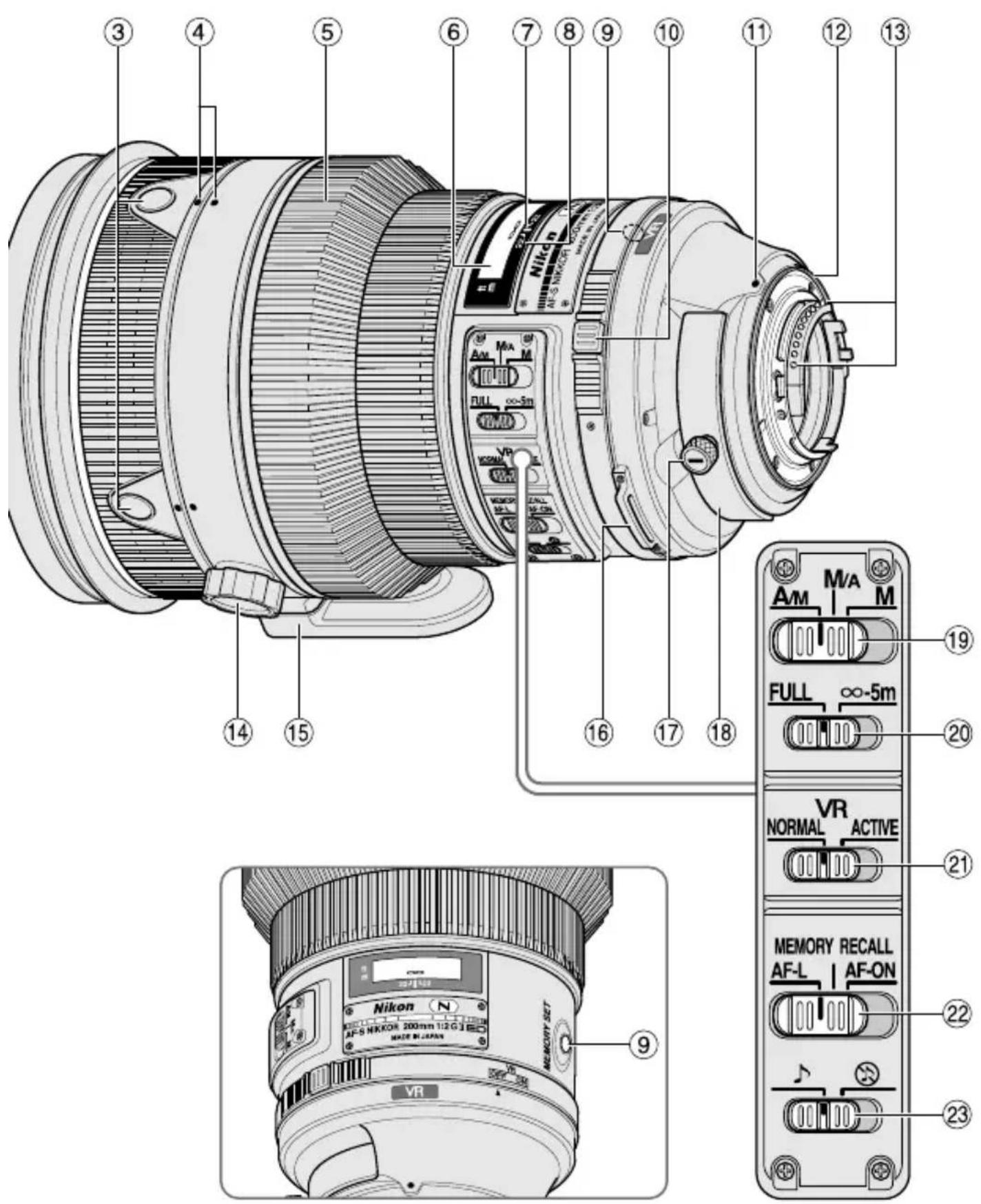
Nomenclature
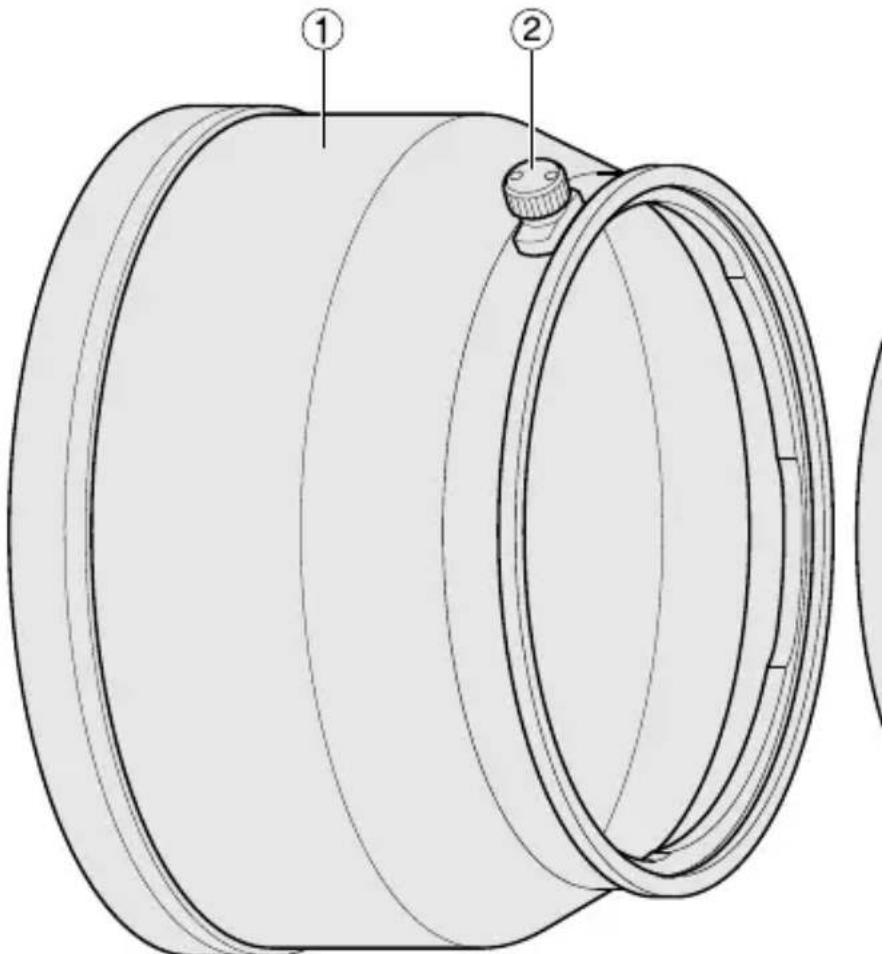
① Lens hood (pg. 28)
② Lens hood screw (pg. 28)
③ Focus operation button (Focus Lock/Memory recall/AF Start) (pg. 23)
④ Lens rotating position index (pg. 27)
⑤ Focus ring (pg. 22)
⑥ Distance scale (pg. 27)
⑦ Distance index line (pg. 27)
⑧ Depth-of-field indicators (pg. 27)
⑨ Memory set button (pg. 24)
⑩ Vibration reduction ON/OFF ring switch (pg. 25)
⑪ Mounting index
⑫ Lens mount rubber gasket (pg. 30)
⑬ CPU contacts (pg. 30)
⑭ Tripod collar ring fastening screw (pg. 27)
⑮ Built-in rotating tripod collar (pg. 27)
⑯ Strap eyelet
⑰ Slip-in filter holder knob (pg. 28)
⑱ Slip-in filter holder (pg. 28)
⑲ Focus mode switch (pg. 22)
⑳ Focusing limit switch (pg. 23)
②Vibrationreductionmode switch (pg. 26)
② Focus operation selection switch (AF-L/MEMORY RECALL/ AF-ON) (pg. 23)
②3 Sound monitor switch (pg. 24)
( ): reference page
En
■ Major features
- The Nano Crystal Coat deposited on some of the lens elements ensures that fine, clear images can be reproduced under various shooting conditions, from the sunny outdoors to spotlighted interior scenes.
- This lens features AF-L, which locks focus during autofocus, AF-ON, which activates autofocus, and MEMORY RECALL, which saves and recalls selected focus distances.
- By enabling vibration reduction, slower shutter speeds (3 stops*) can be used, thus increasing the range of usable shutter speeds, particularly when hand-holding the camera. (*The effects of VR on shutter speed are measured according to Camera and Imaging Products Association (CIPA) standards; FX-format lenses are measured using FX-format digital cameras, DX-format lenses using DX-format cameras. Zoom lenses are measured at maximum zoom.)
- AF-I/AF-STeleconvertersTC-14E/TC-14E II/TC-14E III/TC-17E II/TC-20E/TC-20E II/TC-20E III are usable.
Important
- When mounted on Nikon DX format digital SLR cameras, such as the D300-Series and D7000, the lens' angle of view becomes 8^ and its 35mm equivalent focal length is approx. 300mm.
■ Usable cameras and available functions
There may be some restrictions or limitation for available functions. Refer to camera's user's manual for details.
√: Possible —: Not possible VR: Vibration reduction AF: Autofocus
* Sold exclusively in the USA
** Sold exclusively in the USA and Canada
*1: P includes AUTO and Vari-Program System (Scene modes).
*2: Manual (M) is not available.
*3: When the focus operation selection switch is set to AF-ON, autofocus begins as soon as the focus operation button is pressed while the shutter-release button pressed halfway.
*4: Press the memory set button or a focus operation button while pressing the shutter release button halfway.
*5: Possible, with limited restrictions
| Cameras | Function | Exposure(shooting)mode | |||||||
| VR | AF | Focuslock | Memoryrecall | AF starton the lens | P*1 | S | A | M | |
| Nikon digital SLR (Nikon FX/DX format) cameras,F6, F5, F100,F80-Series/N80-Series*,F75-Series/N75-Series*,F65-Series/N65-Series* | √ | √ | √ √ | √ √ | √ | √ | √ | ||
| Pronea 600i/6i*,Pronea S*2 | — | √ | √ √ | √ √ | √ | √ | √ | ||
| F4-Series, F90X/N90s*,F90-Series/N90*,F70-Series/N70* | — | *^3 | √ | *^4 | *^3 *^5 | √ | √ | — | — |
| F60-Series/N60*,F55-Series/N55-Series*,F50-Series/N50*,F- 401x / N5005*,F-401s/N4004s*,F-401/N4004* | — | — | — | √ | √ | √ | |||
| F-801s/N8008s*,F-801/N8008*,F-601 M/N6000* | — | — | — | √ | √ | — | — | ||
| F3AF, F-601/N6006*,F-501/N2020**,Nikon MF cameras(except F-601 M/N6000*) | — | — | — | — | |||||
■ Focusing
Set your camera focus mode according to the chart below:
| Cameras | Camera focus mode | Lens focus mode switch | ||
| A/M M/A M | ||||
| Nikon digital SLR (Nikon FX/DX format) cameras, F6, F5, F4-Series, F100, F90X/N90s*, F90-Series/N90*, F80-Series/N80-Series*, F75-Series/N75-Series*, F70-Series/N70*, F65-Series/N65-Series*, Pronea 600i/6i*, Pronea S | AF | Autofocus with manual override (AF priority) | Autofocus with manual override (MF priority) | Manual focus (Electronic rangefinder can be used.) |
| MF | Manual focus (Electronic rangefinder can be used.) | |||
| F60-Series/N60*, F55-Series/N55-Series*, F50-Series/N50*, F-801s/N8008s*, F-801/N8008*, F-601 M/N6000*, F-401x / N5005*, F-401s/N4004s*, F-401/N4004* | AF MF | Manual focus (Electronic rangefinder can be used, except with the F-601M/N6000*.) | ||
*Sold exclusively in the USA
AF: Autofocus MF: Manual focus
A/M (Autofocus with manual override. AF priority) mode and M/A (Autofocus with manual override. MF priority) mode
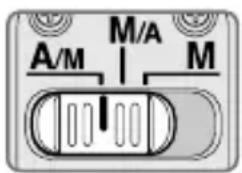
M/A: Autofocus can be overridden by manually focusing with the focus ring.
A/M: Autofocus can be overridden by manually focusing with the focus ring, but focus ring detection sensitivity is lower than in M/A mode. Use this mode to avoid canceling the AF setting by unintentionally moving the focus ring.
1 Set the focus mode switch to A/M or M/A.
2 Autofocus can be manually overridden by rotating the focus ring while pressing the shutter release button halfway, pressing the AF-ON button on the camera or pressing a focus operation button (with focus operation set to AF-ON) on the lens.
3 Pressing the shutter release button halfway, pressing the AF-ON button on the camera again or pressing a focus operation button on the lens again will cancel manual override and return the lens to autofocus mode.
To limit the range of autofocus
This function is only available with autofocus.
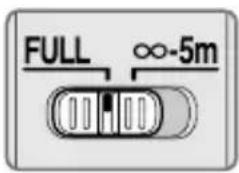
FULL: If the subject is sometimes closer than 5 m (16.4 ft), set the switch to FULL.
∞-5m: If the subject is always 5 m (16.4 ft) or more away, set the switch to ∞-5m to reduce focusing time.
■ Focus operation selection switch and focus operation button (See page 20 for compatible cameras.)
Use the focus operation selection switch to choose a function of the focus operation buttons.
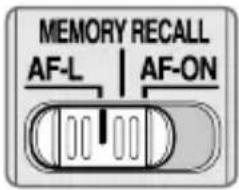
| Position of focus operation selection switch | Focus operation button function |
| AF-L Focus lock | |
| MEMORY RECALL Memory | recall |
| AF-ON | AF start (AF-ON) on the lens |
natural_image
Mechanical component diagram showing a gear assembly with mounting holes (no text or symbols)- Press one of four focus operation buttons to activate each function.
Focus lock (AF-L)
This function is only compatible with autofocus.
1 Set the focus mode switch to A/M or M/A.
2 Set the focus operation selection switch to AF-L.
3 During autofocus mode, focus can be locked by pressing one of the focus operation buttons.
- Focus remains locked while a focus operation button is pressed and held down.
- The AF-L function can be engaged either from the camera or from the lens.
Memory recall (MEMORY RECALL)
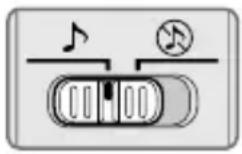
♪: The lens beeps when memory recall is operated. ◎: Memory recall operates without the beep sound. The following operation is with the sound monitor switch set to ♦.
natural_image
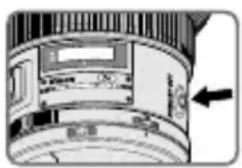
Cross-sectional diagram of a mechanical component with no visible text or symbols1 Focus on a subject and press the memory set button to save the focus distance. - The lens will beep when the focused distance is correctly saved.
- When the focus distance is not correctly saved, the distance scale ring will revolve back and forth some 10 times, while the lens will emit one short and three long beeps. In this case, repeat procedure to save focus distance.
- Memory set is possible regardless of the setting of the focus mode or focus operation selection switch.
- The focus distance is saved even when the camera is turned off or the lens is detached from the camera.
2 Set the focus operation selection switch to MEMORY RECALL.
3 Press a focus operation button. After the lens beeps twice, fully press the shutter release button to take the picture.
- The saved focus distance is recalled when a focus operation button is pressed even when the shutter release button is pressed halfway.
- To take pictures at the saved focus distance, hold the focus operation button down and fully press the shutter release button.
- The lens reverts from memory recall to autofocus or manual focus when the focus operation button is released.
Autofocus (AF) start on the lens (AF-ON)
1 Set the focus mode switch to A/M or M/A.
2 Set the focus operation selection switch to AF-ON.
3 Press a focus operation button to focus on the subject.
- Autofocus is activated while a focus operation button is pressed and held down.
- The AF-ON function can be engaged either from the camera or from the lens.
■ Vibration reduction mode Basic concept of vibration reduction
Low ← Number of vibrations → High
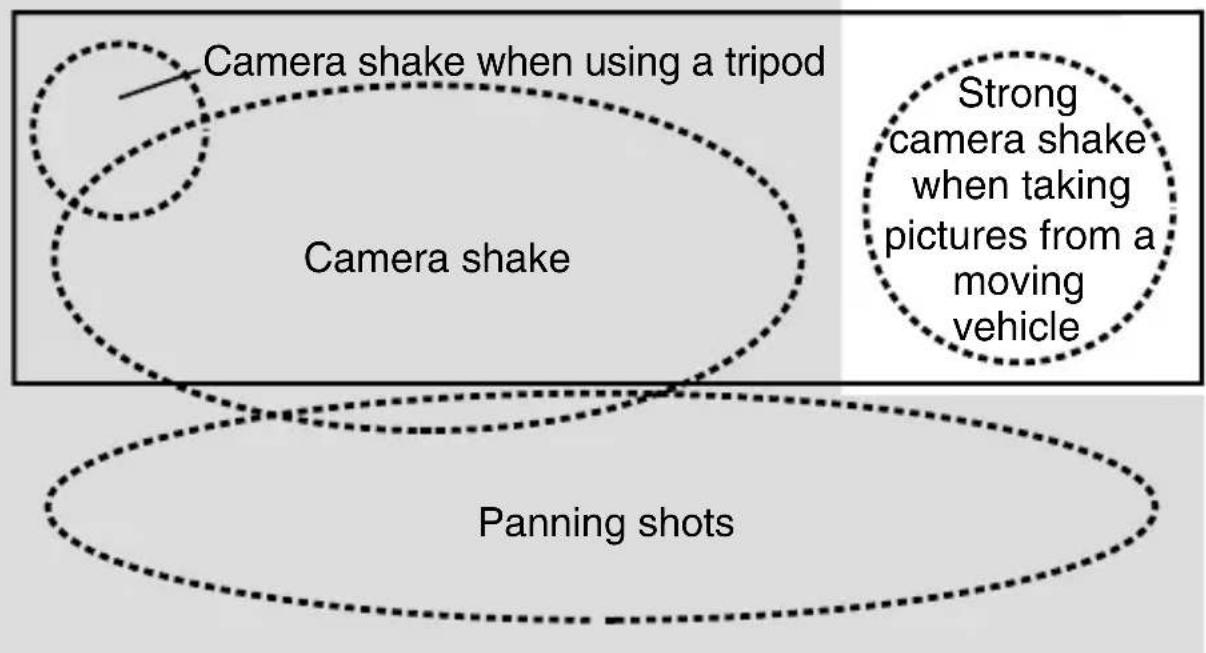
Weak ← Strength of vibrations → Strong
Set the vibration reduction mode switch to NORMAL.
Set the vibration reduction mode switch to ACTIVE.
| When taking pictures | Set the vibration reduction mode switch to either NORMAL or ACTIVE. |
| When taking panning shots | Set the vibration reduction mode switch to NORMAL. |
| When taking pictures from a moving vehicle | Set the vibration reduction mode switch to ACTIVE. |
| When taking pictures using a tripod | Set the vibration reduction mode switch to either NORMAL or ACTIVE. |
Setting the vibration reduction ON/OFF ring switch
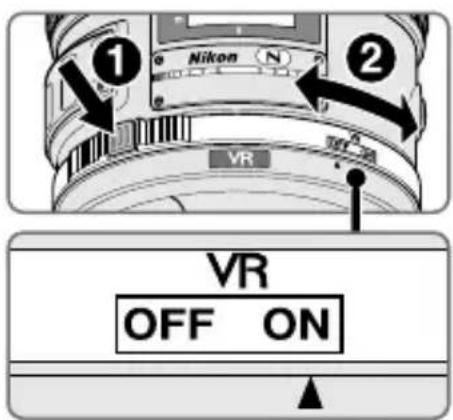
ON: The effects of camera shake are reduced while the shutter-release button is pressed halfway and also at the instant the shutter is released. Because vibration is reduced in the viewfinder, auto/manual focusing and exact framing of the subject are easier.
OFF: The effects of camera shake are not reduced.
Setting the vibration reduction mode switch
Set the vibration reduction ON/OFF ring switch to ON and choose a vibration reduction mode with the vibration reduction mode switch.
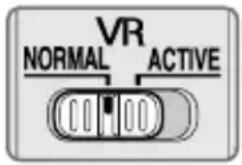
NORMAL: The vibration reduction mechanism primarily reduces the effects of camera shake. The effects of camera shake are also reduced with horizontal and vertical panning.
ACTIVE: The vibration reduction mechanism reduces the effects of camera shake, such as that which occurs when taking pictures from a moving vehicle, whether it be normal or more intense camera shake. In this mode, camera shake is not automatically distinguished from panning motion.
Notes on using vibration reduction
- If this lens is used with cameras that do not have the vibration reduction function (pg. 20), set the vibration reduction ON/OFF ring switch to OFF. With the Pronea 600i/6i camera, in particular, battery power may become quickly depleted if this switch is left ON.
- After pressing the shutter-release button halfway, wait until the image in the viewfinder stabilizes before pressing the shutter-release button the rest of the way down.
- Due to the characteristics of the vibration reduction mechanism, the image in the viewfinder may be blurred after the shutter is released. This is not a malfunction.
- When taking panning shots, be sure to set the vibration reduction mode switch to NORMAL. If the camera is panned in a wide arc, compensation for camera shake in the panning direction is not performed. For example, only the effects of vertical camera shake is reduced with horizontal panning.
- Do not turn the camera off or remove the lens from the camera while vibration reduction is operating. Failure to observe this note could result in the lens sounding and feeling as if an internal component is loose or broken when it is shaken. This is not a malfunction. Turn the camera on again to correct this.
- With cameras featuring a built-in flash, vibration reduction does not function while the built-in flash is charging.
- When using a tripod, set the vibration reduction ON/OFF ring switch to ON to reduce the effect of camera shake. Nikon recommends the switch be set to ON when using the camera on an unsecured tripod head or with a monopod. But when camera shake is very slight, the
vibration reduction function may conversely increase the effect of camera shake by the movement of the system. In such a case, set the vibration reduction ON/OFF ring switch to OFF.
■ Depth of field
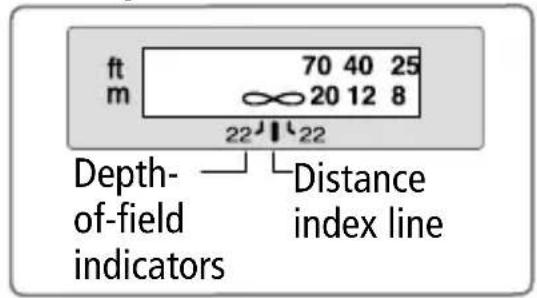
Approximate depth of field can be dete mined by checking the depth-of-field indicators. If your camera has a depth-of field preview (stop-down) button or lever, depth of field can be previewed through the camera viewfinder.
- This lens is equipped with the Internal Focusing (IF) system. As the shooting distance decreases, the focal length also decreases.
- The distance scale does not indicate the precise distance between the subject and the camera. Values are approximate and should be used only as a general guide. When shooting distant landscapes, depth of field may influence operation and the subject may appear in focus at a position that is closer than infinity.
- For more information, see page 236.
■ Setting the aperture
Use the camera to adjust the aperture setting.
■ Using a built-in rotating tripod collar
When using a tripod, attach it to the lens' tripod collar instead of the camera.
- When holding the camera by its handgrip and rotating the camera with the lens in its tripod collar, your hand may bump into the tripod, depending on the tripod in use.
- It's possible to detach the tripod collar by removing the tripod collar lock screw. For details on this procedure, contact your nearest Nikon service center or representative office.
Changing the camera position
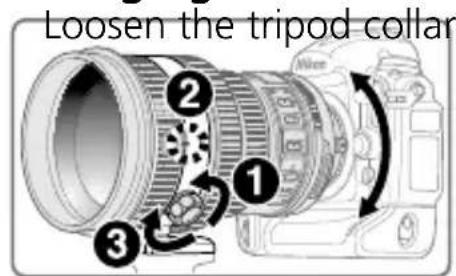
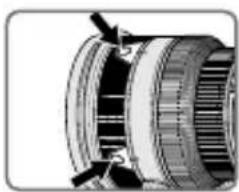
ring fastening screw
(1). Depending on camera position (vertical or horizontal), turn the lens to an appropriate lens rotating position index (2) and tighten the screw (3).
■ The built-in flash and vignetting
To prevent vignetting, do not use the lens hood.
- For the latest information on vignetting with this lens, see the camera manual.
| Cameras | Vignetting occurs at any shooting distance. |
| F65-Series/N65-Series*, F60-Series/N60*, F55-Series/N55-Series*, F50-Series/N50*, F-601/N6006*, Pronea 600i/6i*, Pronea S |
*Sold exclusively in the USA
■ Using the lens hood
Lens hoods minimise stray light and protect the lens.
Attaching the hood
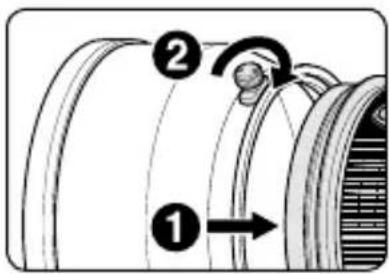
• Fully tighten the lens hood screw (②).
- If the lens hood is not correctly attached, vignetting may occur.
- To store the lens hood, attach it in the reverse position.
■ Slip-in filter holder
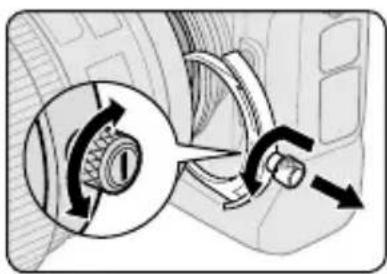
Always use a (52mm screw-on) filter. A 52mm Screw-on Neutral Color NC Filter is attached to the filter holder when shipped from the factory.
natural_image
Diagram showing a car's wheel and gear assembly with directional arrows (no text or labels)1 Press down on the slip-in filter holder knob, and turn counterclockwise until the white line on the knob is at a right angle to the axis of the lens.
2 Pull the slip-in filter holder from the lens body
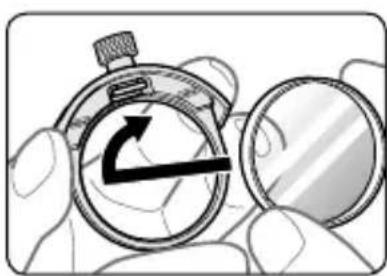
3 Detach the attached filter from the filter holder.
4 Screw a filter onto the side of the filter holder marked with the words "Nikon" and "JAPAN".
- The slip-in filter holder can be attached with the "Nikon" and "JAPAN" facing either the lens or camera side without any effect on your pictures.
natural_image
Illustration of a hand holding a stopwatch and a magnifying glass, with no visible text or symbols.Slip-in Circular Polarizing Filter C-PL3L (optional)
- Blocks reflections from nonmetallic surfaces such as glass and water.
- When a Slip-in Circular Polarizing Filter C-PL3L is attached, the focus distance is different from when a 52mm screw-on filter is attached. The distance scale is shifted from the correct position. The closest focused distance is extended slightly.
- The memory set position may change slightly when using focus preset. Attach the C-PL3L filter before using the memory set function.
■ Recommended focusing screens
Various interchangeable focusing screens are available for certain Nikon SLR cameras to suit any picture-taking situation. The ones recommended for use with this lens are:
| ScreenCamera | A | B | C | E | EC-BEC-E | G1G2 | G3 | G4 | J | L | M | U | |||
| F6 | ◎ | ◎ | — | ◎ | — | — | ◎ | ◎ | |||||||
| F5+DP-30 | ◎ | ◎ | ○ | ◎ | ◎ | ○ | ◎ | ◎ | |||||||
| F5+DA-30 | ◎ | ◎ | ○ | ◎ | ○(+0.5) | ◎ | ◎ |
◎ : Excellent focusing
○: Acceptable focusing
Slight vignetting or moiré patterns appear in the viewfinder, but not on the film.
- : Not available
( ) : Indicates degree of exposure compensation needed (center-weighted metering only). For F6 cameras, compensate by selecting "Other screen" in Custom Setting "b6: Screen comp." and setting the EV level to -2.0 to +2.0 in 0.5 EV steps. When using screens other than type B or E, "Other screen" must be selected even when the required compensation value is "0" (no compensation required). For F5 cameras, compensate using Custom Setting #18 on the camera body. See user's manual of the camera body for more details.
Blank box means not applicable. Since type M screen can be used for both macrophotography at a magnification ratio of 1:1 or above and for photomicrography, it has different applications than other screens.
Important
- For F5 cameras, only EC-B, EC-E, B, E, J, A, L focusing screens are usable in Matrix Metering.
Lens care
- Be careful not to hold the camera body when the lens is attached, as this may cause damage to the camera (lens mount). Be sure to hold both the lens and camera when carrying.
- When the lens is mounted on a camera, do not pick up or hold the camera and lens by the lens hood.
- Be careful not to allow the CPU contacts to become dirty or damaged.
- If the lens mount rubber gasket is damaged, be sure to visit the nearest Nikon-authorized service representative for repair.
- Clean lens surfaces with a blower brush. To remove dirt and smudges, use a soft, clean cotton cloth or lens tissue moistened with ethanol (alcohol) or lens cleaner. Wipe in a circular motion from the center to outer edge, taking care not to leave traces or touch other parts of the lens.
- Never use organic solvent such as thinner or benzene to clean the lens.
- When storing the lens in its case, attach both the front and rear lens caps.
- When the lens will not be used for an extended period of time, store it in a cool, dry place to prevent mold and rust. Be sure to store the lens away from direct sunlight or chemicals such as camphor or naphthalene.
- Do not get water on the lens or drop it in water as this will cause it to rust and malfunction.
- Reinforced plastic is used for certain parts of the lens. To avoid damage, never leave the lens in an excessively hot place.
- Rapid changes in temperature may cause damaging condensation inside and outside the lens. Before taking the lens from a warm to a cold environment or vice versa, place it in a bag or plastic case to slow the change in temperature.
■ Standard accessories
• Dedicated slip-on front lens cap
- Rear Lens Cap
- Lens Hood HK-31
- Semi-soft Case CL-L1
• Dedicated slip-in filter holder
- 52mm Screw-on Neutral Color NC Filter
- Strap LN-1
Important
- The slip-in filter holder, with a 52mm screw-on filter attached, should be inserted in the lens at all times.
■ Optional accessories
- 52mm screw-on filters (except circular polarizing filterⅡ)
- Slip-in Circular Polarizing Filter C-PL3L
• AF-S Teleconverters TC-14EⅡ/TC-14E Ⅲ/TC-17E Ⅱ/TC-20 E Ⅲ
Specifications
Type of lens: G-type AF-S NIKKOR lens with built-in CPU and Nikon bayonet mount
Focal length: 200mm
Maximum f/2
aperture:
Lens construction: 13 elements in 9 groups (3 ED, 1 Super ED and some Nano Crystal Coat-deposited lens elements), as well as 1 protective glass
Angle of view: 12°20' with 35mm (135) format Nikon film SLR cameras and Nikon FX format digital SLR cameras 8° with Nikon DX format digital SLR cameras 9°50' with IX240 system cameras
Distance information: Output to camera
Focusing: Nikon Internal Focusing (IF) system, autofocus using a Silent Wave Motor; manually via separate focus ring
Vibration reduction: Lens-shift method using voice coil motors (VCMs)
Shooting distance scale: Graduated in meters and feet from 1.9 m (7 ft) to infinity ( )
Closest focusing distance: 1.9 m (6.2 ft) from focal plane
No. of diaphragm 9 pcs. (rounded) blades:
Diaphragm: Fully automatic
Aperture range: f/2 to f/22
Exposure Via full-aperture method with cameras with
measurement: CPU interface system
Focusing limit Provided; two ranges available: FULL ( -1.9 m),
switch: or -5 m
Tripod collar: Rotatable through 360°, lens rotating position index at 90°, only tripod collar detachable
Dimensions: Approx. 124 mm dia. x 203.5 mm (extension
from the camera's lens-mount flange)
Weight: Approx. 2,930 g (6.5 lbs)
Specifications and designs are subject to change without any notice or obligation on the part of the manufacturer.
En
⚠️ ACHTUNG
Keinesfalls zerlegen.
natural_image
Symbol of a trash bin crossed with no text or numbers, representing waste sorting or restriction (no text present)De
natural_image
Mechanical component diagram showing a cylindrical assembly with mounting holes and internal channels (no text or symbols)natural_image
Close-up of a mechanical component with no visible text or symbolsnatural_image
Diagram showing a car's wheel and gear assembly with directional arrows (no text or symbols)natural_image
Illustration of a hand holding a stopwatch with an arrow symbol, next to a magnifying glass (no text or symbols present)Zirkularer Einsteck-Polfilter C-PL3L (optional)
natural_image
Symbol of a trash bin crossed out by two diagonal lines, with no text or labels present.natural_image
Close-up of a mechanical component with no visible text or symbolsnatural_image
Close-up of a mechanical component with a curved housing and internal components, no visible text or symbolsnatural_image
Diagram of a car interior showing a rotary knob and directional arrows indicating motion (no text or symbols)natural_image
Illustration of a hand holding a stopwatch with an arrow symbol, next to a magnifying glass (no text or symbols present)| VerreAppareil | A B | C E | EC-BEC-E | G1G2 | G3 G4 J L M U | |||||||
| F6 | ◎ | ◎ — | ◎ | — | — — | — | ◎ | ◎ | ◎ | |||
| F5+DP-30 | ◎ | ◎ | ◎ | ◎ | ◎ | ◎ | ◎ | |||||
| F5+DA-30 | ◎ | ◎ | ◎ | ◎ | (+0,5) | ◎ | ◎ | ◎ | ||||
natural_image
Symbol of a trash bin crossed with two crossed lines, no text or numbers presentnatural_image
Mechanical component diagram showing a cylindrical assembly with internal channels and mounting features (no text or symbols)natural_image
Close-up of a mechanical component with a curved housing and internal components (no visible text or symbols)natural_image
Diagram showing a car interior with a gear shift and directional arrows indicating motion (no text or symbols)natural_image
Illustration of a hand holding a stopwatch with an arrow symbol, next to a magnifying glass (no text or symbols present)natural_image
Symbol of a trash bin crossed with two crossed lines and a solid black rectangle below (no text or labels)① Motljusskydd (s. 86)
② Skruv för motljusskydd (s. 86)
③ Knapp för fokusfunktion (Fokuslås/Minnesåterkallning/AF-start) (s. 82)
④ Markering för objektivrotationsläge (s. 85)
⑤ Fokusring (s. 81)
⑥ Avständsskala (s. 85)
⑦ Distansindikeringslinje (s. 85)
⑧ Indikatorer för skärpedjup (s. 85)
⑨ Minnesinställningsknapp (s. 82)
⑩ VibrationsreducingON/OFF ringbrytare (s. 84)
⑪ Monteringsindikering
⑫ Gummipackning för montering av objektiv (s. 88)
■ Huvudfunktioner
natural_image
Close-up of a mechanical component with no visible text or symbolsnatural_image
Close-up of a mechanical component with a curved top and internal structure, no visible text or symbolsnatural_image
Diagram of a car interior showing a rotary knob and directional arrows indicating motion (no text or symbols)natural_image
Illustration of a hand holding a stopwatch and a magnifying glass, with no visible text or symbols.| SkärmKamera | A B | C E | EC-BEC-E | G1G2 | G3 G4 J L M U | |||||||
| F6 | ◎ | ◎ — | ◎ | — | — — | — | ◎ | ◎ | ◎ | |||
| F5+DP-30 | ◎ | ◎ | ◎ | ◎ | ◎ | ◎ | ◎ | |||||
| F5+DA-30 | ◎ | ◎ | ◎ | ◎ | (+0,5) | ◎ | ◎ | ◎ | ||||
◎ : Utmärkt fokusering
O :Acceptabelfokusering
natural_image
Symbol of a trash bin crossed with two crossed lines, no text or numbers presentnatural_image
Mechanical assembly diagram showing a cylindrical component with internal gears and mounting features (no text or symbols)natural_image
Close-up of a mechanical component with no visible text or symbolsnatural_image
Diagram of a car's wheel and steering wheel assembly with directional arrows indicating rotation (no text or labels)natural_image
Illustration of a hand holding a stopwatch with an arrow symbol, next to a magnifying glass (no text or symbols present)natural_image
Symbol of a trash bin crossed with no text or numbers, representing environmental restriction (no text present)natural_image
Close-up of a mechanical component with arrows indicating assembly or adjustment (no visible text or symbols)natural_image
Close-up of a mechanical component with no visible text or symbolsnatural_image
Diagram showing a mechanical component with an inset view of a gear mechanism (no text or symbols)natural_image
Illustration of a hand holding a stopwatch with an arrow symbol, next to a magnifying glass (no text or symbols present)natural_image
Symbol of a trash bin crossed with two crossed lines, no text or numbers presentnatural_image
Mechanical component diagram showing a cylindrical assembly with internal channels and mounting features (no text or symbols)natural_image
Cross-sectional diagram of a mechanical component with no visible text or symbolsnatural_image
Diagram showing a car's intake mechanism with a magnified inset of the wheel (no text or labels)natural_image
Illustration of a hand holding a stopwatch with an arrow symbol, next to a magnifying glass (no text or symbols present)| SchermoFotocamera | A B | C E | EC-BEC-E | G1G2 | G3 G4 J L M U | |||||||
| F6 | ◎ | ◎ — | ◎ | — | — — | — | ◎ | ◎ | ◎ | |||
| F5+DP-30 | ◎ | ◎ | ◎ | ◎ | ◎ | ◎ | ◎ | |||||
| F5+DA-30 | ◎ | ◎ | ◎ | ◎ | (+0,5) | ◎ | ◎ | ◎ | ||||
natural_image
Symbol of a trash bin crossed with two crossed lines and a solid black rectangle below (no text or labels)natural_image
Mechanical component diagram showing a cylindrical assembly with mounting holes and internal channels (no text or symbols)natural_image
Close-up of a mechanical component with a curved top and internal structure, no visible text or symbolsnatural_image
Diagram showing a mechanical component with directional arrows indicating motion or force (no text or symbols present)natural_image
Illustration of a hand holding a stopwatch with an arrow symbol, next to a magnifying glass (no text or symbols present)natural_image
Symbol of a trash bin crossed with diagonal lines and a blank rectangular base (no text or numbers)① Slnečná clona objektívu (str. 156)
② Skrutka slnečnej clony objektívu (str. 156)
③ Funkčné tlačidlo zaostrovania (Pamät zaostrenia [AF-L]/Vyvolanie zaostrenej vzdialenosti z pamäti [Memory recall]/Aktivácia autofokusu [AF-ON]) (str. 152)
④ Značka pre odčítanie natočenia objektívu (str. 155)
⑤ Zaostrovací krúžok (str. 151)
⑥ Stupnica vzdialeností (str. 155)
⑦ Čiara značky vzdialenosti (str. 155)
⑧ Stupnica híbky ostrosti (str. 155)
⑨ Tlačidlo na uloženie zaostrenej vzdialenosti do pamäte (str. 152)
⑩ Prstencový prepínač stabilizácie obrazu (str. 154)
⑪ Upevňovacia značka objektívu
natural_image
Mechanical component diagram showing a cylindrical assembly with mounting holes (no text or symbols)natural_image
Cross-sectional diagram of a mechanical component with no visible text or symbolsnatural_image
Diagram of a car interior showing a rotary knob and wheel mechanism, with no visible text or symbolsnatural_image
Illustration of a hand holding a stopwatch with an arrow symbol, next to a magnifying glass (no text or symbols present)natural_image
Symbol of a trash bin crossed out by two crossed lines, with no text or labels present.Ro
Ro
natural_image
Close-up of a mechanical component with no visible text or symbolsnatural_image
Close-up of a mechanical component with a circular housing and internal components, no visible text or symbols.natural_image
Diagram showing a car's wheel and gear mechanism with directional arrows (no text or symbols)natural_image
Illustration of a hand holding a stopwatch and a magnifying glass (no text or symbols)natural_image
Symbol of a trash bin crossed with two crossed lines, no text or labels presentUa
■ Основні функції
natural_image
Mechanical component diagram showing a cylindrical assembly with mounting holes and a central shaft (no text or symbols)natural_image
Close-up of a mechanical component with a curved housing and internal structure (no visible text or symbols)natural_image
Diagram of a car's wheel and steering wheel assembly showing gear shift (no text or labels)natural_image
Illustration of a hand holding a stopwatch with an arrow symbol, next to a magnifying glass (no text or symbols present)natural_image
Mechanical component with a cylindrical housing and mounting bracket (no visible text or symbols)natural_image
Close-up of a mechanical component with no visible text or symbolsnatural_image
Diagram showing a car's wheel and steering wheel with directional arrows indicating motion (no text or symbols)natural_image
Illustration of a hand holding a stopwatch with an arrow symbol, next to a magnifying glass (no text or symbols present)C-PL3L插入式圆形偏振滤镜(另购)
| 照相机\对焦屏 | A | B | C | E | EC-BEC-E | G1G2 | G3 | G4 J | L M | U | ||||
| F6 | ◎ | ◎ | — | ◎ | — | — | — | — | ◎ | ◎ | ◎ | |||
| F5+DP-30 | ◎ | ◎ | ○ | ◎ | ◎ | ○ | ◎ | ◎ | ◎ | |||||
| F5+DA-30 | ◎ | ◎ | ○ | ◎ | ◎ | ○(+0.5) | ◎ | ◎ | ◎ |
◎:对焦效果良好
○: 对焦效果一般
① 遮光罩(第 218 頁)
② 遮光罩螺絲(第 218 頁)
Tc
■ 主要特色
natural_image
Close-up of a mechanical component with arrows indicating assembly or adjustment (no visible text or symbols)natural_image
Close-up of a mechanical component with no visible text or symbolsnatural_image
Diagram of a car interior showing a rotary knob and directional arrows indicating motion (no text or symbols)natural_image
Illustration of a hand holding a stopwatch and a magnifying glass (no text or symbols)| 對焦屏相機 | A B | C E | EC-BEC-E | G1G2 | G3 G4 J L M U | |||||||
| F6 | ◎ | ◎ — | ◎ | — | — — | — | ◎ | ◎ | ◎ | |||
| F5+DP-30 | ◎ | ◎ | ◎ | ◎ | ◎ | ◎ | ◎ | |||||
| F5+DA-30 | ◎ | ◎ | ◎ | ◎ | (+0.5) | ◎ | ◎ | ◎ | ||||
◎: 最佳對焦
○: 可接受對焦
Kr
주요 기능
natural_image
Close-up of a mechanical component with no visible text or symbolsnatural_image
Interior view of a cylindrical electronic device with an arrow pointing to a component (no visible text or symbols)natural_image
Diagram of a car interior showing a gear shift mechanism with directional arrows (no text or labels)natural_image
Illustration of a hand holding a stopwatch with an arrow symbol, next to a magnifying glass (no text or symbols present)■ Depth of field (ft)
| Shooting distance Depth of field Reproduction ratio | |||||||||
| f/2 f/2.8 | f/4 f/5.6 f/8 f/11 f/16 f/22 | ||||||||
| 7 | 2 ft 1-9/16 in.2 ft 1-11/16 in. | 2 ft 1-7/16 in.2 ft 1-11/16 in. | 2 ft 1-7/16 in.2 ft 1-13/16 in. | 2 ft 1-7/16 in.2 ft 1-13/16 in. | 2 ft 1-5/16 in.2 ft 1-15/16 in. | 2 ft 1-3/16 in.2 ft 2-1/16 in. | 2 ft 15/16 in.2 ft 2-4/16 in. | 2 ft 12/16 in.2 ft 2-8/16 in. | 1/9.3 |
| 8 | 2 ft 5-3/16 in.2 ft 5-6/16 in. | 2 ft 5-3/16 in.2 ft 5-6/16 in. | 2 ft 5-1/16 in.2 ft 5-8/16 in. | 2 ft 4-15/16 in.2 ft 5-8/16 in. | 2 ft 4-13/16 in.2 ft 5-10/16 in. | 2 ft 4-11/16 in.2 ft 5-14/16 in. | 2 ft 4-7/16 in.2 ft 6-2/16 in. | 2 ft 4-3/16 in.2 ft 6-8/16 in. | 1/10.8 |
| 10 | 3 ft 6/16 in.3 ft 12/16 in. | 3 ft 6/16 in.3 ft 13/16 in. | 3 ft 4/16 in.3 ft 15/16 in. | 3 ft 2/16 in.3 ft 1-1/16 in. | 2 ft 11-14/16 in.3 ft 1-3/16 in. | 2 ft 11-10/16 in.3 ft 1-9/16 in. | 2 ft 11-4/16 in.3 ft 1-15/16 in. | 2 ft 10-13/16 in.3 ft 2-8/16 in. | 1/13.9 |
| 15 | 4 ft 6-8/16 in.4 ft 7-5/16 in. | 4 ft 6-6/16 in.4 ft 7-7/16 in. | 4 ft 6-2/16 in.4 ft 7-11/16 in. | 4 ft 5-12/16 in.4 ft 8-1/16 in. | 4 ft 5-4/16 in.4 ft 8-8/16 in. | 4 ft 4-11/16 in.4 ft 9-4/16 in. | 4 ft 3-13/16 in.4 ft 10-3/16 in. | 4 ft 2-12/16 in.4 ft 11-12/16 in. | 1/21.7 |
| 25 | 7 ft 6-4/16 in.7 ft 8-10/16 in. | 7 ft 5-14/16 in.7 ft 9-2/16 in. | 7 ft 5-3/16 in.7 ft 9-13/16 in. | 7 ft 4-5/16 in.7 ft 10-13/16 in. | 7 ft 3-2/16 in.8 ft 4/16 in. | 7 ft 1-7/16 in.8 ft 2-6/16 in. | 6 ft 11-3/16 in.8 ft 5-10/16 in. | 6 ft 8-3/16 in.8 ft 10-9/16 in. | 1/37.3 |
| 40 | 11 ft 11-4/16 in.12 ft 5-6/16 in. | 11 ft 10-3/16 in.12 ft 6-10/16 in. | 11 ft 8-8/16 in.12 ft 8-8/16 in. | 11 ft 6-6/16 in.12 ft 11-4/16 in. | 11 ft 3-4/16 in.13 ft 3-6/16 in. | 10 ft 11-3/16 in.13 ft 9-8/16 in. | 10 ft 5-14/16 in.14 ft 6-15/16 in. | 9 ft 11-1/16 in.15 ft 10-9/16 in. | 1/60.6 |
| 70 | 20 ft 6-15/16 in.22 ft 1-15/16 in. | 20 ft 3-10/16 in.22 ft 5-14/16 in. | 19 ft 10-11/16 in.23 ft 2/16 in. | 19 ft 4-3/16 in.23 ft 9-6/16 in. | 18 ft 7-11/16 in.24 ft 11-8/16 in. | 17 ft 8-8/16 in.26 ft 10-5/16 in. | 16 ft 6-10/16 in.30 ft 1-3/16 in. | 15 ft 1-13/16 in.36 ft 3-13/16 in. | 1/107.2 |
| ∞ | 565 ft 2-6/16 in.∞ | 407 ft 8-12/16 in.∞ | 288 ft 4-11/16 in.∞ | 204 ft∞ | 144 ft 3-15/16 in.∞ | 102 ft 1-11/16 in.∞ | 72 ft 3-12/16 in.∞ | 51 ft 2-8/16 in.∞ | 1/∞ |
No reproduction in any form of this manual, in whole or in part (except for brief quotation in critical articles or reviews), may be made without written authorization from NIKON CORPORATION.





- ■ 主な特長
- Turn off immediately in the event of malfunction
- Do not use the camera or lens in the presence of flammable gas
- Do not look at the sun through the lens or viewfinder
- Keep out of reach of children
- Observe the following precautions when handling the camera and lens
- Notices for Customers in Europe
- En
- Nomenclature
- ■ Major features
- Important
- ■ Usable cameras and available functions
- ■ Focusing
- A/M (Autofocus with manual override. AF priority) mode and M/A (Autofocus with manual override. MF priority) mode
- To limit the range of autofocus
- ■ Focus operation selection switch and focus operation button (See page 20 for compatible cameras.)
- Focus lock (AF-L)
- Memory recall (MEMORY RECALL)
- Autofocus (AF) start on the lens (AF-ON)
- ■ Vibration reduction mode Basic concept of vibration reduction
- Setting the vibration reduction ON/OFF ring switch
- Setting the vibration reduction mode switch
- Notes on using vibration reduction
- ■ Depth of field
- ■ Setting the aperture
- ■ Using a built-in rotating tripod collar
- Changing the camera position
- ■ The built-in flash and vignetting
- ■ Using the lens hood
- Attaching the hood
- ■ Slip-in filter holder
- Slip-in Circular Polarizing Filter C-PL3L (optional)
- ■ Recommended focusing screens
- Lens care
- ■ Standard accessories
- ■ Optional accessories
- Specifications
- ⚠️ ACHTUNG
- Keinesfalls zerlegen.
- Zirkularer Einsteck-Polfilter C-PL3L (optional)
- ■ Huvudfunktioner
- Ro
- ■ Основні функції
- C-PL3L插入式圆形偏振滤镜(另购)
- ■ 主要特色
- ◎: 最佳對焦
- ○: 可接受對焦
- 주요 기능
Brand : NIKON
Model : Nikkor AFS 200mm f2G ED VR II
Category : Camera lens