
HGB - Blood pressure monitor MEDISANA - Free user manual and instructions
Find the device manual for free HGB MEDISANA in PDF.



| Product Type | Wrist Blood Pressure Monitor |
| Brand | Medisana |
| Model | HGB |
| Dimensions (cuff included) | 70 x 67 x 80 mm |
| Weight | Approx. 140 g (batteries included) |
| Power Supply | 2 AAA alkaline batteries 1.5 V |
| Battery Life | Approx. 250 applications (2 measurements/day) |
| Measurement Method | Oscillometric |
| Blood Pressure Measurement Range | 0 – 280 mmHg |
| Pulse Measurement Range | 40 – 199 beats/min |
| Static Pressure Accuracy | ± 3 mmHg |
| Pulse Accuracy | ± 5 % of the value |
| Memory | 3 users x 30 blocks each |
| Inflation | Automatic by micro-pump |
| Automatic Shut-off | After approx. 60 seconds of inactivity |
| Compatible Wrist Circumference | 13.5 – 19.5 cm |
| Operating Conditions | +10°C to +40°C, humidity 30-85% |
| Storage Conditions | -20°C to +50°C, humidity 10-85% |
| Article Number | 51412 |
| EAN Code | 4015588514128 |
| Care | Clean with a soft cloth slightly dampened with neutral soapy water |
| Safety | Do not use by children; protect from moisture; do not repair yourself |
| Warranty | 3 years from date of purchase |
| Standards | CE compliant, EN 1060, EN 60601-1-2 |
Frequently Asked Questions - HGB MEDISANA
User questions about HGB MEDISANA
0 question about this device. Answer the ones you know or ask your own.
Ask a new question about this device
Download the instructions for your Blood pressure monitor in PDF format for free! Find your manual HGB - MEDISANA and take your electronic device back in hand. On this page are published all the documents necessary for the use of your device. HGB by MEDISANA.
USER MANUAL HGB MEDISANA
Blood pressure measuring device HGB
Please read carefully!
A line attentivement s.v.p.!
Please fold out this page and leave it folded out for quick reference.
1.1 Thank you very much
Thank you for your confidence! You have purchased the blood pressure monitor HGB, a quality product by MEDISANA.
To ensure the best results and long-term satisfaction with your MEDISANA HGB Blood Pressure Monitor, we recommend that you read the following operating and maintenance instructions carefully.
1.2 Tips for your well being
WARNING
Do not take any therapeutic measures based on your own measurements. Never change the quantity of medication prescribed by your doctor.
- Patients suffering from arrhythmia have an irregular pulse and should therefore avoid using oscillometric measuring devices (wrist and upper arm devices). In this case, please let your doctor measure your blood pressure using the traditional stethoscope method.
- Patients suffering from other complaints, e.g. arterial occlusive disease, should also consult their doctor before using the unit.
- The unit may not be used to check the heart rate of patients with a pacemaker.
- Pregnant patients should take their own personal state of health into consideration and take all necessary precautions before using the unit. If in doubt, consult your doctor.
- Should you experience discomfort or other complaints during measurement, for example pain in the wrist, please take the following action: Press the START button ② to deflate the cuff immediately. Loosen the cuff and remove it from your arm. Please contact either your dealer or MEDISANA directly.
1.3 Important considerations
- The unit is only to be used for the specific purpose described in these operating instructions. Any misuse will void the warranty.
- On the rare occasion of a fault causing the cuff to remain fully inflated during measurement, open the cuff immediately.
- Do not use the unit near to equipment emitting a strong electric or magnetic field, such as radios. This may impair the correct functioning of the unit.
- Do not let children operate the unit. Medical products are not toys!
- If a fault occurs, do not try to repair the unit yourself. Attempts to do so will void the warranty. Refer all servicing to authorized service personnel.
- Protect the unit from moisture. Should moisture enter the unit, remove the batteries and stop using it immediately. In this case, please contact either your dealer or MEDISANA directly. You can find details of how to contact us on the address page.
- Only inflate the cuff when it is in position around the wrist
1.4 Items supplied and packaging
Please ensure that the package contents are complete.
These are as follows:
1 MEDISANA Blood pressure monitor HGB
- 2 Batteries (AAA type LR03)
- 1 storage box
- 1 Operating instructions
The packaging can be reused or recycled. Please dispose properly of any packaging material no longer required. If you notice any transport damage during unpacking, please contact your dealer without delay.

WARNING
To avoid risk of suffocation, keep packaging film away from children.
2.1 What is blood pressure?
Blood pressure is the pressure created in the blood vessels by each heart beat. When the heart contracts (= systole) and pumps blood into the arteries, it brings about a rise in pressure. The highest value is known as the systolic pressure and is the first value to be measured. When the cardiac muscle relaxes to take in fresh blood, the pressure in the arteries also falls. Once the arteries are relaxed, a second reading is taken – the diastolic pressure.
2.2 How is blood pressure measured?
The HGB is a blood pressure computer which is used to measure blood pressure at the wrist. The measurement is carried out by a microprocessor, which, via a pressure sensor, measures vibrations resulting from the inflation and deflation of the cuff over the artery.
2.3 Why should you take your blood pressure at home?
MEDISANA has had many years of experience in the field of blood pressure measurement. The high precision of MEDISANA devices has been confirmed by extensive clinical tests, carried out according to strict international standards. One strong argument in favour of taking blood pressure at home is the fact that the readings are taken in familiar surroundings under relaxed conditions. The most important reading is the so-called "baseline value", the one taken before breakfast, directly after getting up in the morning.
As far as it is possible, you should always try to take your blood pressure at the same time and under the same conditions each day. This ensures comparable results and helps in detecting the first signs of high blood pressure. If high blood pressure remains undetected, it increases the risk of further cardiovascular diseases.

THEREFORE WE RECOMMEND:
Take a blood pressure reading daily and on a regular basis, even if you are experiencing no apparent complaints.
2.4 Blood pressure classification
The following table shows the classification of high and low blood pressure, without taking age into consideration. This blood pressure assessment scale corresponds to the guidelines of the World Health Organisation (WHO).
Low blood pressure Normal blood pressure
systolic below < 100 systolic 100-140
diastolic below < 60 diastolic 60-90
Types of high blood pressure
mild hypertension medium hypertension serious hypertension
systolic 140 - 159 systolic 160 - 179 systolic >=180
diastolic 90 - 99 diastolic 100 - 109 diastolic >=110

WARNING
Blood pressure that is too low represents just as great a health risk as blood pressure that is too high! Fits of dizziness may lead to dangerous situations arising (e.g. on stairs or in traffic)!
2.5 Fluctuations in blood pressure
There are many factors that can influence blood pressure. Readings can be affected by stress, fear, heavy physical exertion or the time of day at which they are taken. Your personal blood pressure values are subject to considerable fluctuation during the course of the day and the year. These fluctuations are particularly pronounced in the case of patients suffering from hypertension. Blood pressure is usually at its highest during physical exertion and at its lowest at night when asleep.
2.6 Influencing and evaluating readings
- Measure your blood pressure several times, then record and compare the results. Do not draw any conclusions from a single reading.
- Your blood pressure readings should always be evaluated by a doctor who is also familiar with your personal medical history. When using the unit regularly and recording the values for your doctor, you should visit the doctor from time to time to keep him updated.
- When taking readings, remember that the daily values are influenced by several factors. Smoking, consumption of alcohol, drugs and physical exertion influence the measured values in various ways.
Measure your blood pressure before meals. - Before taking readings, allow yourself at least five minutes rest.
- If the systolic and diastolic readings seem unusual (too high or too low) on several occasions, despite correct use of the unit, please inform your doctor. This also applies to the rare occasions when an irregular or very weak pulse prevents you from taking readings.
3.1 Inserting / removing batteries
Insertion: Press firmly with your thumb to open the cover of the battery compartment ① on the exterior of the unit and pull back the cover. Remove the cover and insert the two batteries included with the unit (alkaline batteries, AAA type). Remember to insert the batteries as indicated in the diagram in the battery compartment. Replace the cover, pressing it until it snaps into place.
Removal: If the unit does not begin to take a reading after pressing the START button 2, please replace the batteries. First remove the used batteries by pulling on the tab in the compartment.
Please note that your settings and stored readings will be lost when you replace the batteries.
BATTERY SAFETY INFORMATION:
- Keep away from children. - Do not recharge.
- Do not short-circuit. - Do not throw into fire.
- Do not dispose of old batteries with your household waste, but dispose of them at a battery collection station at a recycling site or in a shop.
3.2 Setting time and date
The time and date are shown at the top of the display. The settings are shown in the following order: month - day / hours:minutes.
- Press the MODE button 5 once. The first number will start to flash and can be increased by 1 with a press of the SET button 4. If you hold down the SET button 4, you will scroll through the numbers of the months until you let go of the button.
- After a further press of the MODE button 5, the next number will start to flash. You can now set the day of the month using the SET button 4.
- After another press of the MODE button 5, the hours will start to flash and can be set using the SET button 4.
- You can set the time of day in the same way. You can store the settings by pressing the MODE button 5 one more time.
The difference between a.m. and p.m. is shown by the small P symbol (for p.m.) below the colon between hours and minutes.
3.3 Setting the user
The MEDISANA HGB has 30 memory slots available for each of three separate users. When the unit is switched off, press the MEMORY button ③. The display ① will show the number of the currently selected user and, at the bottom right, the number of stored readings. To select a different user, press the SET button ④.
You can confirm the selection with a press of the MEMORY button 3. The results of the next blood pressure reading will now be assigned to this user when stored in the memory.
4.1 Fitting the cuff
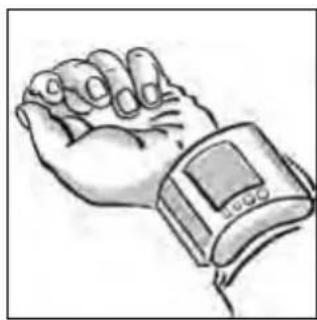
a. Fit the pressure cuff around your left wrist. Make sure that
- the display panel is positioned on the inside of the wrist.
- the wrist is free of jewellery, watches etc. The unit must rest directly on the skin, as a reading cannot be taken through clothing.
b. Fasten the cuff in such a way that it fits tightly but does not constrict the arm. The cuff must not be twisted in any way.
4.2 The correct position for taking readings
Take readings while in a seated position.
Relax your arm and rest it lightly on a surface such as a table.
- Raise your wrist so that the pressure cuff is on the same level as the heart.
- Relax during the measuring process: do not move or talk, as this can affect the results.
4.3 Measuring blood pressure
a. Press the START button 2.
- All symbols will appear on the display for approx. 1 second, followed shortly afterwards by the user number.
The cuff will then inflate. - Pressing the START button ② during inflation will stop the inflation process. The cuff will deflate and the display will show the user number.
b. The measuring process begins automatically when inflation is complete by releasing the pressure built up in the cuff.
c. Initially, deflation of the cuff occurs at a constant speed.
As soon as the pulse can be determined, deflation is synchronised with the beating of the heart until the measurement ends. During this time the heart symbol will flash. The measurement is complete when the cuff 6 suddenly deflates and readings appear on the display under SYS, DIA and PUL.
4.4 Displaying stored readings and averages
The results of each reading are automatically stored and assigned to the previously selected user. The memory slot number corresponds to the number of readings previously taken, e.g. the third reading will be stored in memory slot 3. When the 30 memory slots are all full, the oldest reading will be deleted.
To display previously stored readings, press the MEMORY button 3 when the unit is switched off. The display will show the current user number and the number of stored readings.
A further press of the MEMORY button 3 will display the average value of all the stored readings for this user, as indicated by the flashing "A" (Average) at the bottom left of the display. Continuing to press the MEMORY button 3 will display the stored readings individually, starting with the most recent one. The time and date of each reading is shown at the top of the display.
4.5 Display Symbols
Symbol Meaning What to do?

This symbol appears while a reading is being taken and flashes when determining the pulse.
Keep your arm still.

The battery symbol appears when the batteries are low.
Replace both batteries with new ones.

Blood pressure could not be precisely determined.
Take another reading after opening and then re-fitting the cuff.

This symbol appears after a reading has been started using the START button 2.
Carry out the reading with the unit on the wrist, while keeping still and relaxing.
4.6 Switching off the unit
The unit switches off automatically after approx. 60 seconds if no further buttons are pressed, or can be switched off using the START button . The display showing the date, time and user will remain visible.
5.1 Care and maintenance
- Remove the batteries before cleaning the unit.
- Never use strong detergents or hard brushes.
- Clean the unit with a soft cloth, moistened with mild soapy water. Do not let water enter the unit. After cleaning, only use the unit when completely dry.
- Remove the batteries from the unit if you do not wish to use it for an extended period of time, otherwise there is a risk of battery leakage.
- Do not expose the unit to direct sunlight, and protect it from dust and moisture.
- Only inflate the cuff when it is in position around the wrist.
Servicing and calibration (only applies in the case of commercial use): The unit has been calibrated by the manufacturer for a period of two years' use. The unit must be inspected and, if necessary, re-calibrated at least once every two years. The inspection, which is subject to a charge, may only be carried out by an appropriate authority or authorized service personnel as laid down in the medical product suppliers' regulations.
5.2 Disposal

This product must not be disposed together with the domestic waste.
All users are obliged to hand in all electrical or electronic devices, regardless of whether or not they contain toxic substances, at a municipal or commercial collection point so that they can be disposed of in an environmentally acceptable manner.
Please remove the batteries before disposing of the equipment. Do not dispose of old batteries with your household waste, but dispose of them at a battery collection station at a recycling site or in a shop.
Consult your municipal authority or your dealer for information about disposal.
5.3 Directives / Norms
This blood pressure computer conforms to the European regulations EN 1060 part 1 / 1995 and EN 1060 part 3 / 1997.
The unit conforms to the requirements of the European Norm standard EN 60601-1-2.
The requirements of the EEC Directives 93 / 42 / EEC for Class II a medical products have been fulfilled.
The CE-mark of this device refers to the EC-Directive 93/42 EEC.
Device classification: Class BF
Intended use:
This unit is suitable for non-invasive blood pressure measurement in adults (i.e., suitable for external use).
5.5 Specifications
Name and model : MEDISANA Blood pressure monitor HGB
Measuring technique : Oscillometric
Power supply : 3 V=, 2 x 1,5 V Mignon AAA Alkaline
Battery life : approx. 250 readings (at 2 readings/day)
Memory capacity : 3 x 30 slots
Blood pressure measuring
range : 0 - 280 mmHg
Pulse measuring range : 40 - 199 beats / min.
Maximum error tolerance
for static values : ± 3 mmHg
Maximum error tolerance
for pulse rate : ± 5 % of the reading
Pressure generation : Automatic, using micro pump
Deflation
Automatic
Automatic cut-off : After approx. 60 seconds
Operating conditions : + 10 °C to + 40 °C, 30 - 85 % humidity
Storage conditions : - 20 °C to + 50 °C, 10 - 95% humidity
Dimensions : incl. cuff 70 x 67 x 80 mm
Wrist diameter : 13,5 – 19,5 cm
Weight : approx. 140 g incl. batteries
Article number : 51412
EAN number : 4015588514128
C€ 0297
In accordance with our policy of continual product improvement, we reserve the right to technical and design changes without notice.
6.1 Warranty and repair terms
Please contact your dealer or the service centre in case of a claim under the warranty. If you have to send in the unit, please enclose a copy of your receipt and state what the defect is.
The following warranty terms apply:
- The warranty period for MEDISANA products is three years from date of purchase. In case of a warranty claim, the date of purchase has to be proven by means of the sales receipt or invoice.
- Defects in material or workmanship will be removed free of charge within the warranty period.
- Repairs under warranty do not extend the warranty period either for the unit or for the replacement parts.
- The following is excluded under the warranty:
a. All damage which has arisen due to improper treatment, e.g. non-observation of the user instructions.
b. All damage which is due to repairs or tampering by the customer or unauthorised third parties.
c. Damage which has arisen during transport from the manufacturer to the consumer or during transport to the service centre.
d. Accessories which are subject to normal wear and tear.
- Liability for direct or indirect consequential losses caused by the unit are excluded even if the damage to the unit is accepted as a warranty claim.
MEDISANA AG
Itterpark 7-9
D-40724 Hilden
Tel.: +49 (0) 2103 / 2007-60
Fax: +49 (0) 2103 / 2007-626
The service centre address is shown on the last page.
1.1 Merci
INSTRUCTIONS DE SECURITE RELATIVES AUX PILES:
3.1 Colocar / retiring as pilhas
Xaunn nieon Duoioloyikn nieon
< 100 100 - 140
City Business Centre 41 St.
Olav's Court Surrey Quays
London SE16 2XB
Tel.: +44/207-2378899
Fax: +44/207-2522299
eMail: info@medisana.co.uk
Internet: www.medisana.co.uk
F/NL/B/L
MEDISANA Benelux NV
Euregiopark 18
6467 JE Kerkrade
Tel.: +31/45-5280389
Fax: +31/45-5233518
eMail: info@medisana.nl
1
SANICO S.R.L.
Via G. Ferraris 31
20090 Cusago (MI)
Tel.: +39/02-90390038
Fax: +39/02-90 39 02 79
eMail: info@sanicare.it
Internet: www.sanicare.it
E
MEDISANA HEALTHCARE, S.L.