SBR1E - Loudspeaker TECHNICS - Free user manual and instructions
Find the device manual for free SBR1E TECHNICS in PDF.



| Product type | 3.5-way bass reflex speaker |
| Brand | Technics |
| Model | SBR1E |
| Number of drivers | 6 (4 x 16 cm woofers, 1 x 16 cm/2.5 cm flat coaxial midrange/tweeter) |
| Nominal impedance | 4 Ω |
| Power handling (IEC) | 300 W (MAX), 150 W (nominal) |
| Sound pressure level | 88 dB (2.83 V/m) / 85 dB (W/m) |
| Frequency response | 20 Hz to 100 kHz (-16 dB) / 28 Hz to 90 kHz (-10 dB) |
| Crossover frequency | 300 Hz / 3 kHz |
| Unit weight | Approx. 72 kg |
| Power supply | Passive (requires external amplifier) |
| Operating temperature | 0 °C to +40 °C |
| Operating humidity | 20 % to 80 % (non-condensing) |
| Included accessories | 4 spikes, 4 spacers, 2 short cables, 1 grille, 1 cleaning cloth |
| Maintenance | Wipe with the provided cloth; for stubborn dirt, use a damp cloth then dry. Do not use solvents. |
| Safety | Do not disassemble, do not place on unstable surface, keep spikes out of reach of children, do not insert objects into bass reflex ports. |
| Wiring type | Single-wiring or bi-wiring (cables not included) |
| Floor fixation | Spikes or spacers provided for stabilization |
| Warranty | Refer to manual for details (limited warranty) |
Frequently Asked Questions - SBR1E TECHNICS
User questions about SBR1E TECHNICS
0 question about this device. Answer the ones you know or ask your own.
Ask a new question about this device
Download the instructions for your Loudspeaker in PDF format for free! Find your manual SBR1E - TECHNICS and take your electronic device back in hand. On this page are published all the documents necessary for the use of your device. SBR1E by TECHNICS.
USER MANUAL SBR1E TECHNICS
Music is borderless and timeless,
touching people's hearts across cultures and generations.
Each day the discovery of a truly emotive experience
from an unencountered sound awaits.
Let us take you on your journey to rediscover music.
Rediscover Music
Technics
Thank you for purchasing this product.
Please read these instructions carefully before using this product, and save this manual for future use.
For the U.S.A. and Canada
If you have any questions, visit:
U.S.A.: www.panasonic.com/support
Canada: www.panasonic.ca/english/support
Register online at www.panasonic.com/register(U.S. customers only)
For the United Kingdom and Ireland customers
Sales and Support Information
Customer Communications Centre
For customers within the UK: 0333 222 8777
For customers within Ireland: 014475229
- Monday-Friday 9:00 am - 5:00 pm, (Excluding public holidays).
For further support on your product, please visit our website: www.technics.com/uk/
Safety precautions
WARNING
- Do not disassemble or modify the product. Doing so may cause damage or fire.
- Do not place the speakers in unstable locations, such as on a wobbly table or sloping surface. Do not place the speakers on high or uneven surfaces or on surfaces vulnerable to vibrations or shocks. If the speakers tip over or fall, personal injury may result.
- Keep the spikes out of reach of children. If accidentally ingested, there will be adverse physical effects. Should you suspect that the spikes have been ingested, consult your physician immediately.
- Do not hang the speakers from the ceiling or on the wall. Doing so may cause the speaker to fall off, causing personal injury.
- Do not insert objects into the holes of the bass reflex ports on the rear side. Doing so may cause a fire or personal injury. Be extra cautious when children are near.
CAUTION
- Do not stand on or hang down from the speakers. If the speakers tip over or are damaged, personal injury may result.
-
Do not use the speakers over a long period of time when the sound is distorted. Doing so may cause the speakers to overhear, resulting in a malfunction or fire.
-
Do not place heavy or large items on the speakers. If the speakers tip over or fall, personal injury may result.
- Do not touch the diaphragms. Doing so may deform the diaphragms, and as a result, sound may not be output correctly.
- Keep the speakers out of reach of children, including infants. Not doing so may cause personal injury if the speakers tip over.
- Do not place the speakers in locations subject to extremely high temperatures. In particular, avoid locations exposed to direct sunlight and near heating equipment. Please also note that doing so may cause the outer casing or internal components to deteriorate.
- Do not place the speakers in locations subject to greasy fumes or steam, or in humid or dusty locations. Doing so may cause electricity to be conducted through oil, moisture or dust, resulting in a fire or electric shock.
- Keep magnetic items away from the product. Powerful magnets inside the speakers and speaker nets may damage debit cards, travel cards (transit passes), clocks and other objects.
- Do not insert a finger into the bass reflex ports on the rear of the speakers. Pay close attention to children as doing so may cause personal injury.
- Do not connect the speakers to an amplifier with an output greater than their allowable input. Doing so may cause the speakers to overheat, resulting in a fire.
Each speaker must be carried and installed by at least two people. Dropping it may cause injury. - Secure the speakers against tipping over. If they tip over in a disaster such as a powerful earthquake or in an accident, personal injury may result.
Product Identification Marking is located on the bottom of the unit.

Disposal of Old Equipment
Only for European Union and countries with recycling systems
This symbol on the products, packaging, and/or accompanying documents means that used electrical and electronic products must not be mixed with general household waste.
For proper treatment, recovery and recycling of old products, please take them to applicable collection points in accordance with your national legislation.
By disposing of them correctly, you will help to save valuable resources and prevent any potential negative effects on human health and the environment.
For more information about collection and recycling, please contact your local municipality.
Penalties may be applicable for incorrect disposal of this waste, in accordance with national legislation.
Table of contents
Safety precautions. 4
Accessories. 5
About this unit 6
Installation 7
Connections 11
Attaching the speaker nets 14
Notes on use. 15
Unit care. 15
Specifications 15
Limited Warranty (ONLY FOR U.S.A.) 124
Limited Warranty (ONLY FOR CANADA) 125
About descriptions in this Owner's Manual
The illustrations shown may differ from your unit.
Accessories
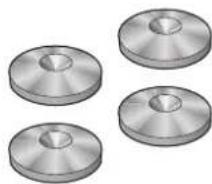
4 Spikes (RGQ0860)
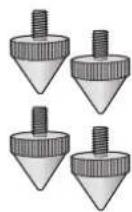
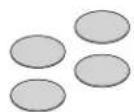
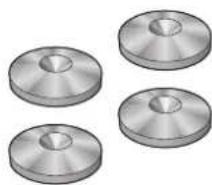
4 Spacers (RGQ0862)
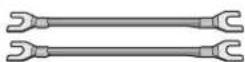
2 Short wires (RJL1W001B02)
4 Spike shoes (RGQ0861)
1 Cleaning cloth (RGQ0863)
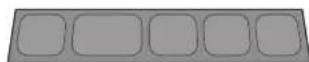
1 Speaker net (RYB0402)


- Product numbers provided in this Owner's Manual are correct as of November 2014. These may be subject to change.
- The speakers are not supplied with speaker cables. For connection, use commercially-available speaker cables.
About this unit
Names of parts and features of the speakers
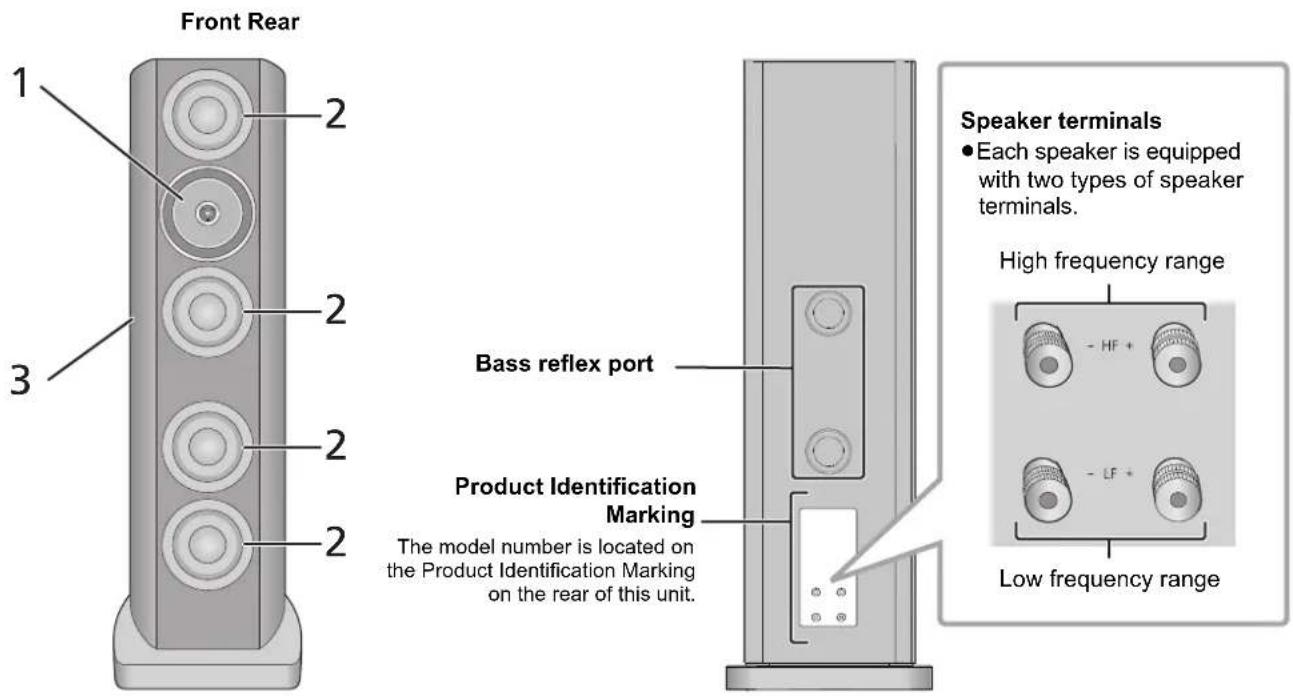
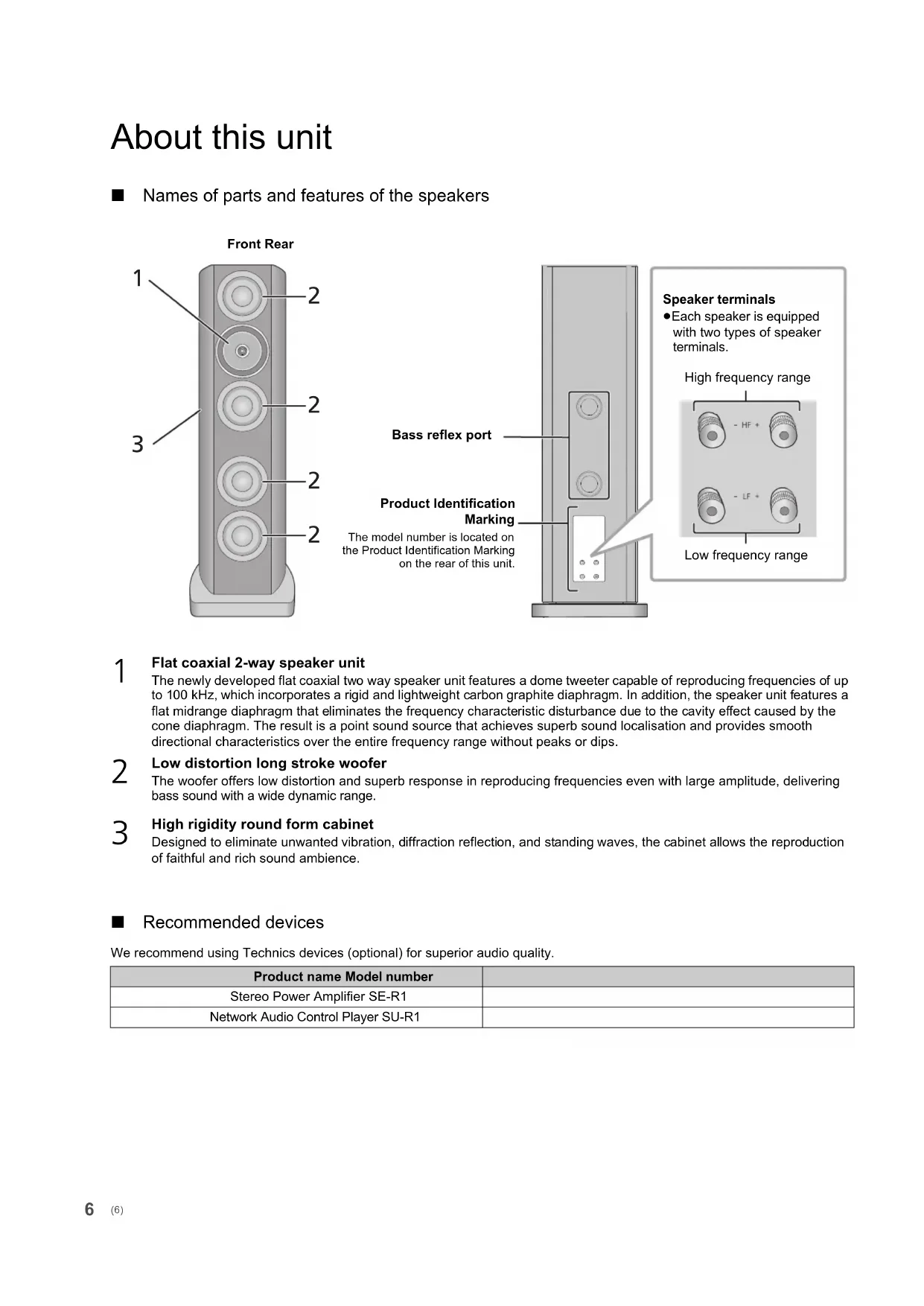
1 Flat coaxial 2-way speaker unit
The newly developed flat coaxial two way speaker unit features a dome tweeter capable of reproducing frequencies of up to 100kHz , which incorporates a rigid and lightweight carbon graphite diaphragm. In addition, the speaker unit features a flat midrange diaphragm that eliminates the frequency characteristic disturbance due to the cavity effect caused by the cone diaphragm. The result is a point sound source that achieves superb sound localisation and provides smooth directional characteristics over the entire frequency range without peaks or dips.
Low distortion long stroke woofer
The woofer offers low distortion and superb response in reproducing frequencies even with large amplitude, delivering bass sound with a wide dynamic range.
High rigidity round form cabinet
Designed to eliminate unwanted vibration, diffraction reflection, and standing waves, the cabinet allows the reproduction of faithful and rich sound ambience.
Recommended devices
We recommend using Technics devices (optional) for superior audio quality.
| Product name Model number | |
| Stereo Power Amplifier SE-R1 | |
| Network Audio Control Player SU-R1 |
Installation
e.g.,

※ Speaker units
Each speaker must be carried and installed by at least two people.
- Do not touch the speaker units. Doing so may result in incorrect audio quality.
- Place the speakers at approximately the same distance from the listening position.
- The speakers produce bass sound from the bass reflex ports on the rear as well as from the front. Install the speakers at least 5cm ( 2'' ) away from the walls so that they do not cover the bass reflex ports on the rear.
- Keep the amplifier or any other device and the speakers at least 1cm(^13 / _32^ ) away from each other.
For optimum position
The quality and volume of the bass sound, sound localisation performance, sound ambience, and other factors that determine the audio quality vary depending on the installation location of this unit, listening position, room conditions, and other factors. Refer to the information below when installing the speakers.
Determining an installation location.
Each speaker has a mass of approximately 72kg (159 lbs). Check that the installation location is strong enough to bear this mass.
If you need to secure the speakers against tipping over, consult an installation specialist. The strength of the floor and wall must be verified. (→ 10)
- Put the speakers on a flat safe surface.
If the speakers wobble when placed, use the spacers. (⇒ 8)
To minimise the gap in audio quality between the left and right speakers, install them so that acoustic conditions (reflection and absorption of sound) around them are the same.
Adjusting the distances between the rear of the speakers and the walls
If you install the speakers close to a wall or in a corner, the bass sound will be more powerful; however, when the speakers are too close to it, sound localisation performance and sound ambience may deteriorate. If this occurs, adjust the distance between the speakers and the front wall, which should be between 30 cm (12") to 60 cm (24"). (Please note that the distance between the speakers and the side walls should be greater than 60 cm (24").)
- Do not drag the speakers with force. Doing so may cause the pads on their feet to peel off, damaging the speakers and floor.
Adjusting the angle of the speakers
Angle the front side of the speakers toward the listener. Following these steps will help the speakers deliver more precise sound localisation.
Adjusting the acoustics of the room and speaker layout
Depending on the room environment (including the size and shape of the room, distance to the walls and reverberation level), certain sounds may be exaggerated or suppressed, making them difficult to hear. In such cases, adjusting the reverberation level by moving the speakers, changing your listening position or covering the walls and windows with thick curtains may help resolve the problem.
The spikes may enhance the audio quality. ( 8)
About the spacers and spikes
- Keep the spikes out of reach of children to prevent swallowing.
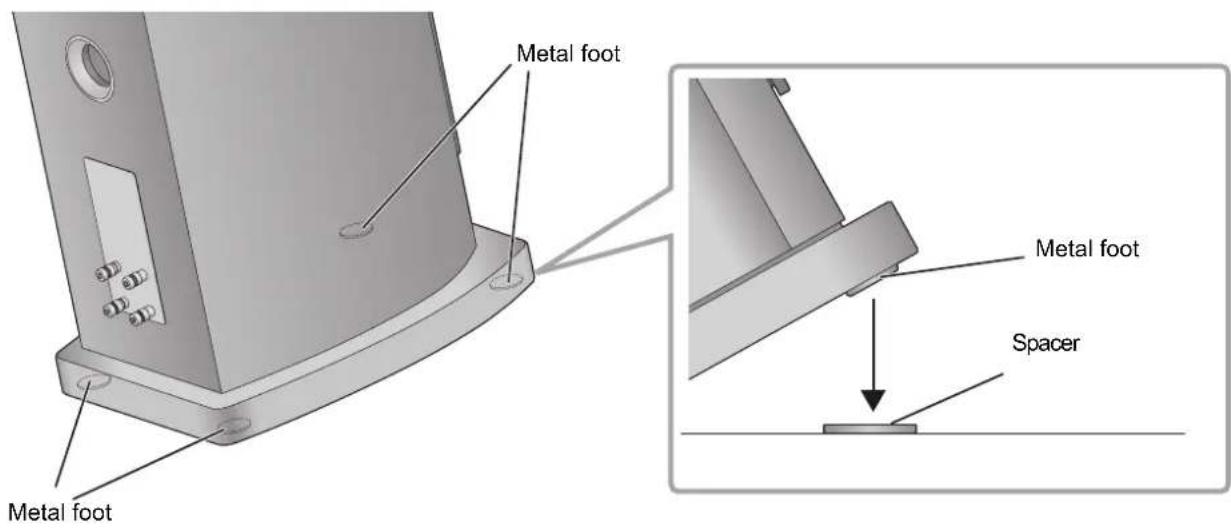
Attaching the spacers
Place the speakers on a surface that will not be damaged, such as a carpeted floor, or on a surface that you do not mind damaging.
- If the speakers wobble, place the spacers under the metal feet. This will prevent the metal feet from wobbling on the speaker locations.
Attaching the spikes
The spikes may enhance the audio quality.
- Panasonic is not responsible for any accidents or damage caused by improper assembly or handling of the product. Do not attach the accessories in any other way than instructed in this Owner's Manual.
Each speaker has a mass of approximately 72kg (159 lbs). When tilting the speakers to attach the spikes, ensure that the work is done by at least two people. When attaching the spikes, exercise caution to avoid catching your fingers or toes between the speakers and floor or tipping the speakers over. In addition, ensure that you spread a thick mat or similar item on the side of the floor where you will be tilting the speakers to prevent damage to the floor. - Since each spike supports a mass of at least approximately 18kg (39.68 lbs), the spikes may leave marks and indentations on the installation location. To prevent the spikes from damaging the area, use the supplied spike shoes or purchase spike shoes with large contact surfaces and adequate strength.
- Moving the speakers with the spikes attached may cause damage to the floor. Before changing the installation location, remove the spikes.
① Tilt the speaker backwards, and screw the spikes into the screw holes on the front metal feet. When using the spike shoes, place them under the spikes.
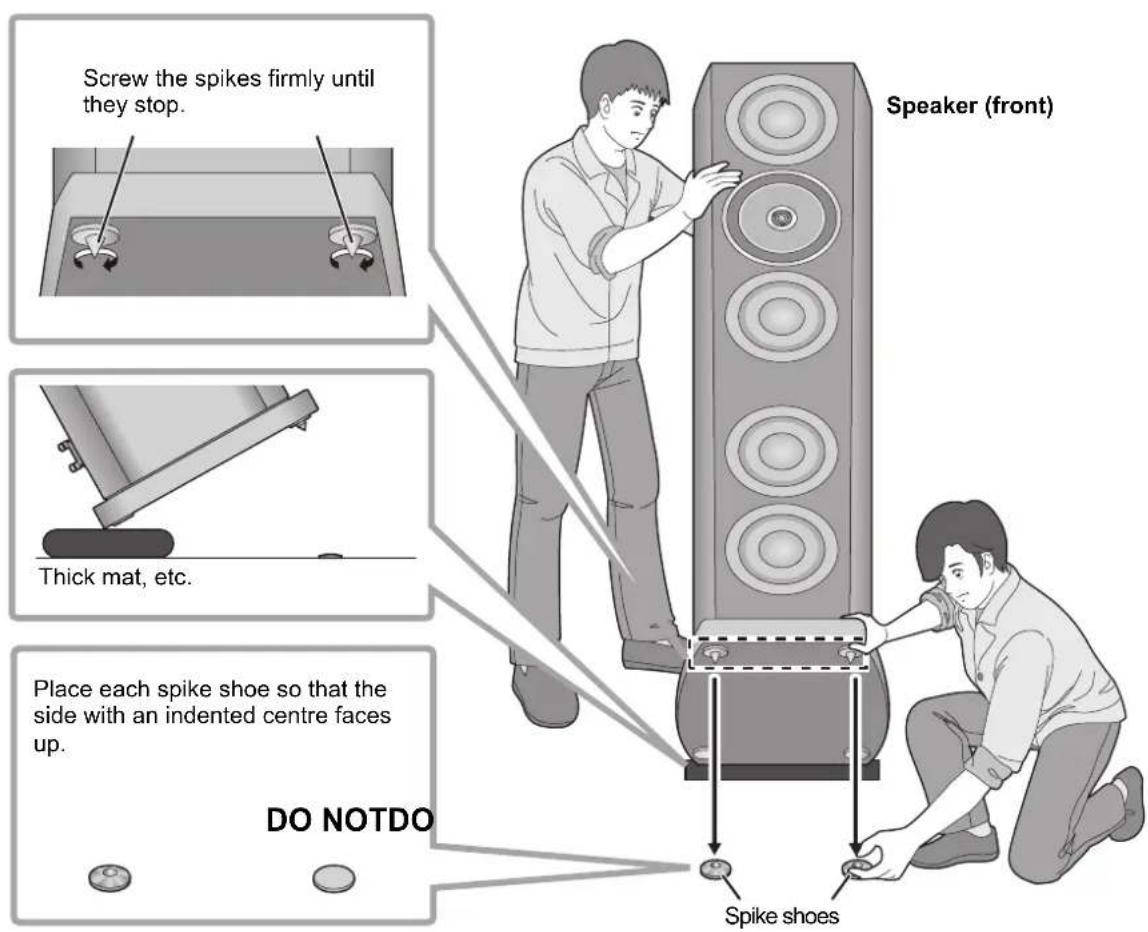
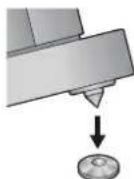
② While aligning the tips of the spikes with the indentations on the spike shoes, slowly bring the speaker back to the upright position.
③ In the same way as Step ①, tilt the speaker forward and screw the spikes into the screw holes on the rear metal feet. When using the spike shoes, place them under the spikes.
④ If the speakers wobble, place the spacers under the spike shoes. (⇒ 8)
Preventing the speakers from tipping over
The speakers may tip over in a disaster such as a powerful earthquake or in an accident. For your safety, be sure to secure the speakers against tipping over.
Each speaker weighs approximately 72kg (159 lbs) in total. Verify that the speaker locations are strong enough to withstand this weight.
For details, consult an installation specialist.
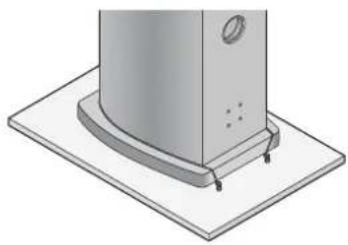
When securing the speakers to a horizontal surface (floor, etc.)
Secure each speaker to the floor with wires or similar items as shown in the illustration.
When securing the speakers to a vertical surface (wall, etc.)
Loop a band or similar item around each speaker, and connect it to a sturdy wall or column with a stout wire, chain or similar item, as shown in the illustration.
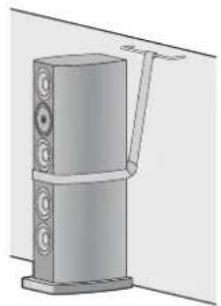

- The measures described above do not guarantee protection against all disasters and accidents, including earthquakes. Please note that Panasonic is not responsible for any damage to the speakers, their installation locations or other objects caused by the work performed to secure the speakers from tipping over.
- Use of the spikes will make the speakers more vulnerable to tipping over.
Connections
Connecting the speaker cables
The speakers are not supplied with speaker cables. For connection, use commercially-available speaker cables.
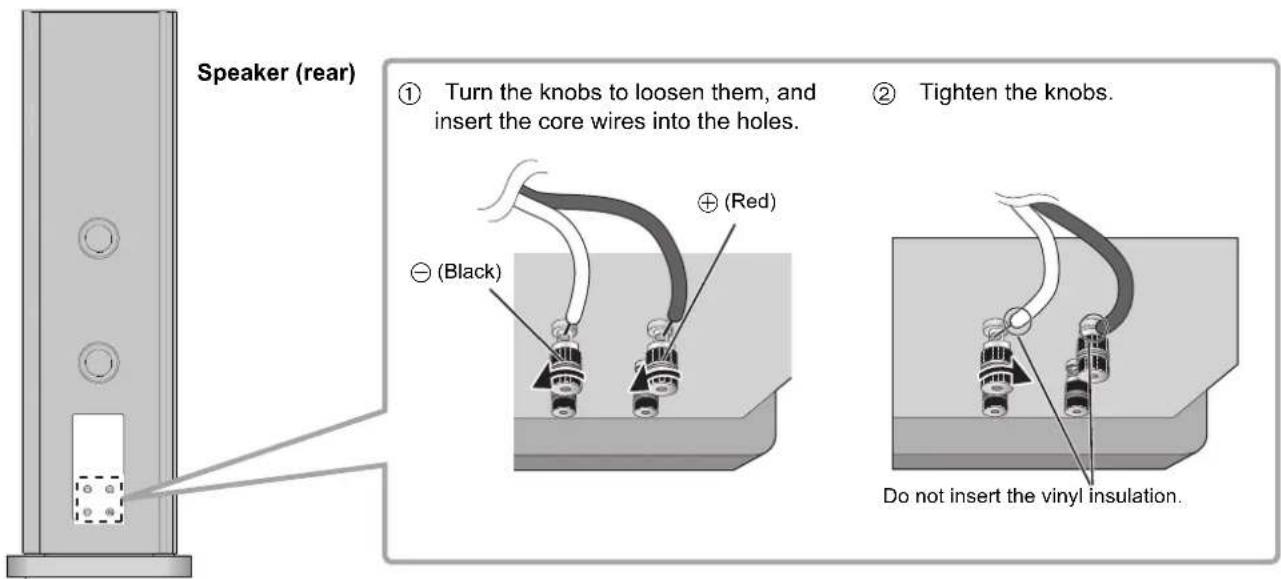

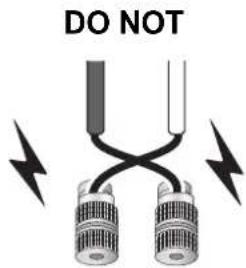
- Be careful not to cross (short-circuit) or reverse the polarity of the speaker wires as doing so may damage the amplifier.
Connecting with an amplifier
- Before connection, turn off the amplifier and disconnect its power cord.
- For details, refer to the operating instructions of the amplifier.
Single wiring connection
① Connect the short wires.
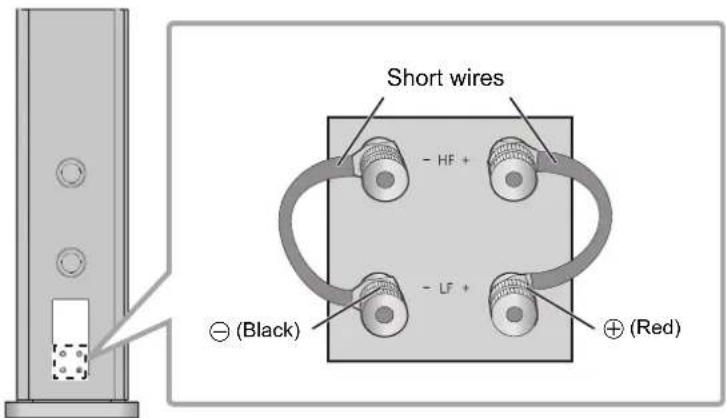
Speaker (rear)
② Connect the amplifier and speakers with speaker cables (commercially-available).
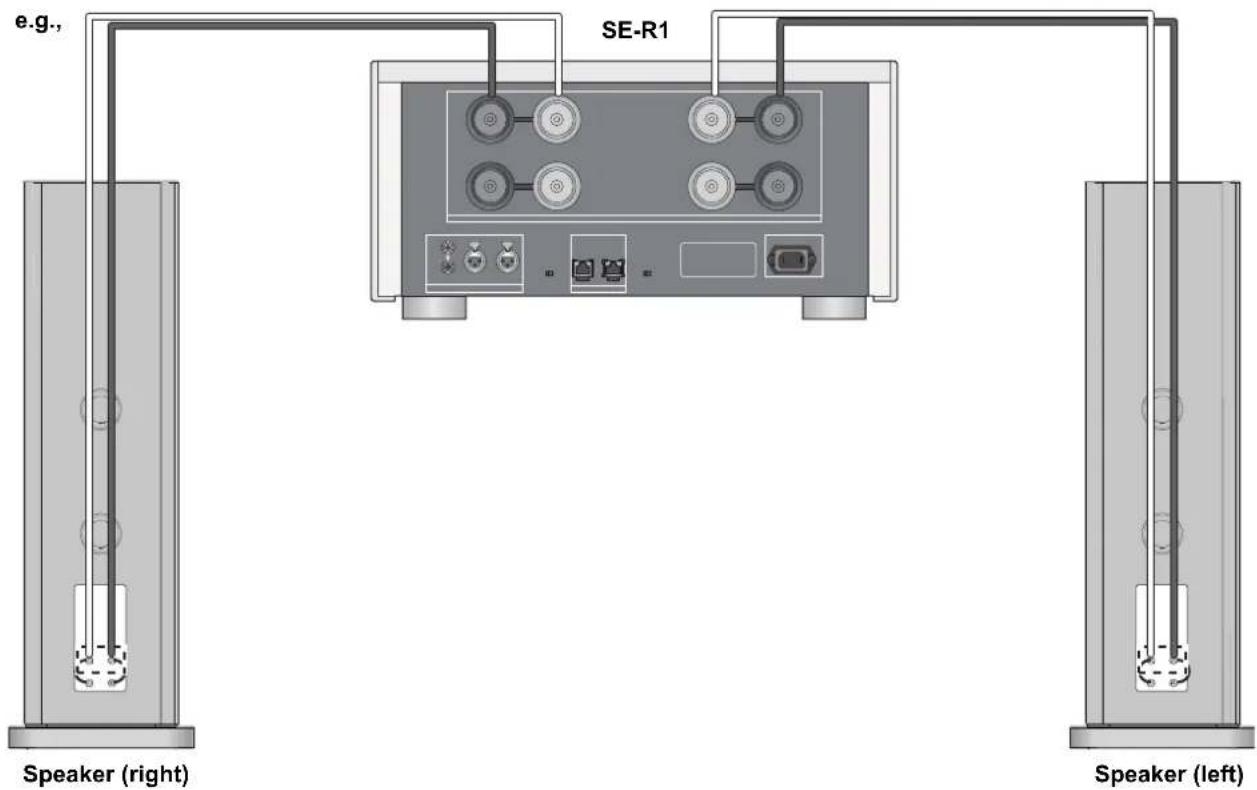
Bi-wiring connection
The short wires (supplied) are not used for bi-wiring connection.
e.g.,
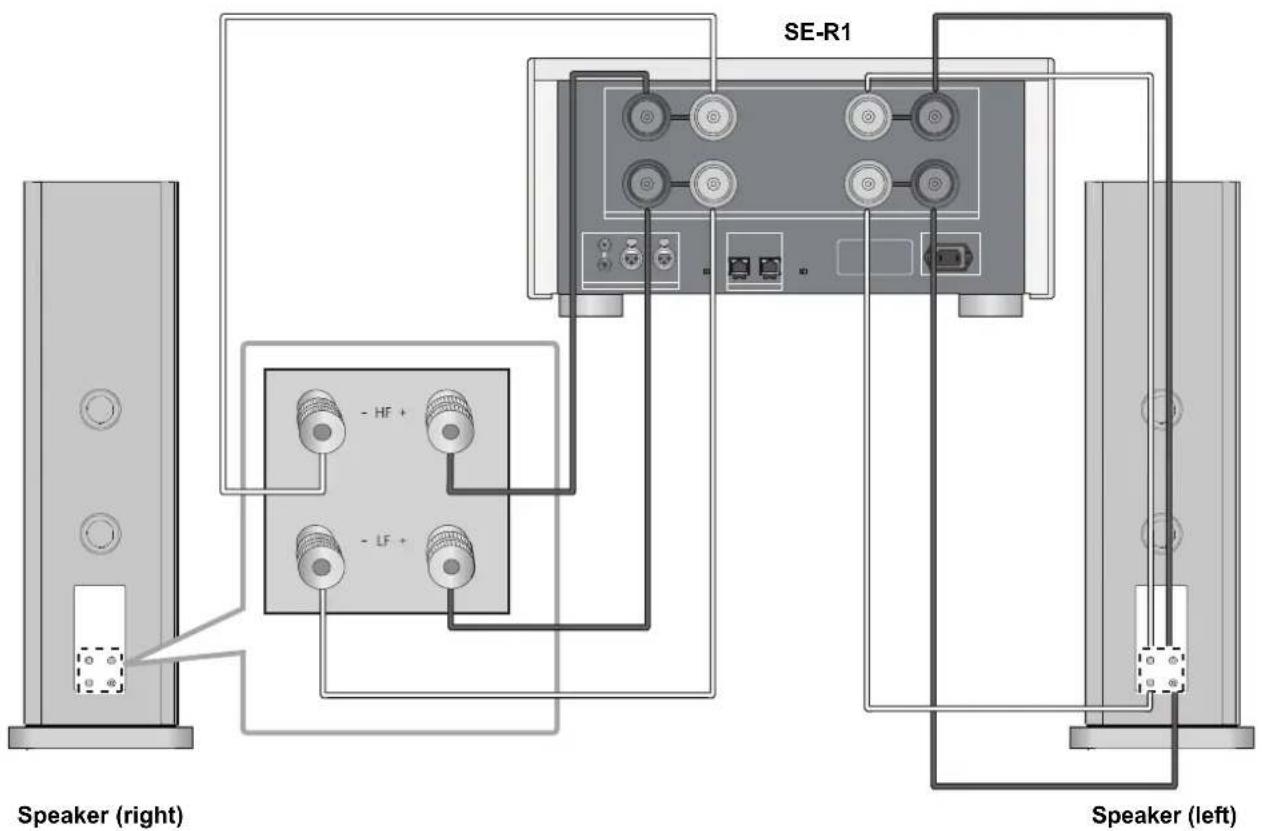

- Do not move the speaker while the speaker cables are connected. This may cause a short circuit.
- When the connections are completed, pull the speaker cables lightly to check that they are connected firmly.
- Wire the polarity (+/-) of the terminals correctly. Not doing so may adversely affect stereo effects or cause malfunction.
Attaching the speaker nets
The speakers are supplied with speaker nets, which protect the speaker units from dust.
Use the magnets to fix the speaker nets to the speaker units.
To attach the speaker nets correctly, check their up/down orientation by referring to the illustration below.
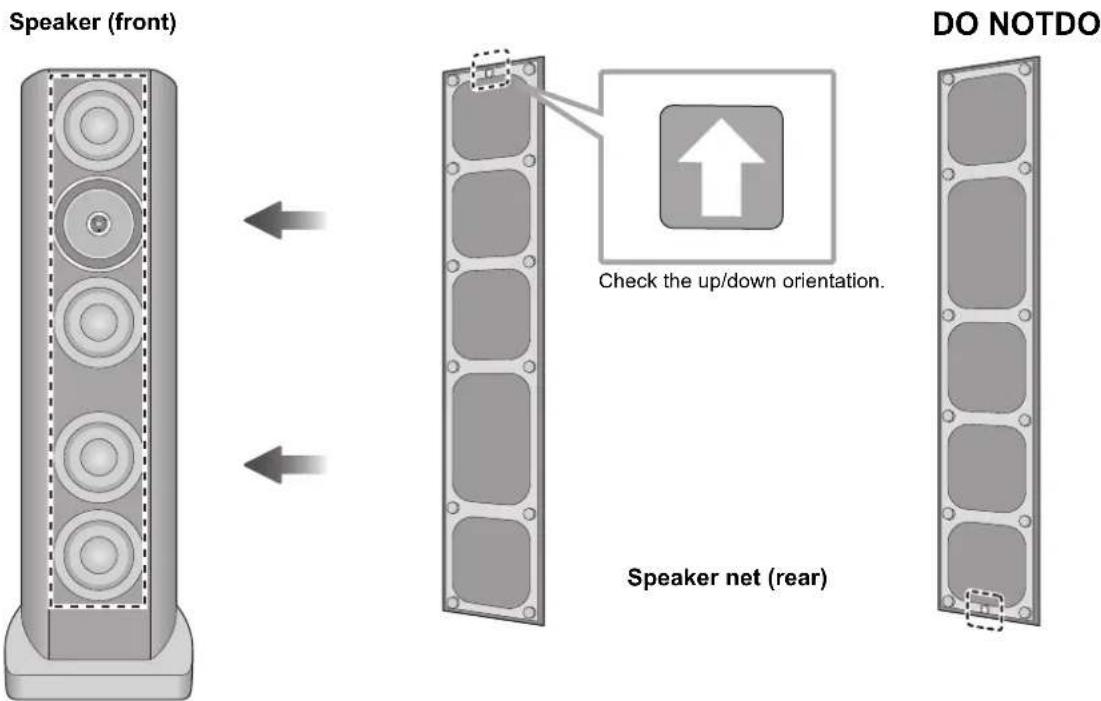

- You can enjoy superior quality audio by removing the speaker nets before playback.
Notes on use
To protect the speakers from damage caused by excessive input, observe the following precautions:
- Reduce the volume in the following cases to avoid damage:
- When playing distorted sound.
- When the speakers are receiving howling from a microphone or record player, noise from FM broadcasts, or continuous signals from an oscillator, test disc, or electronic instrument.
- When adjusting the sound quality.
- When turning the amplifier on or off.
- Avoid raising the volume level too much when enhancing the treble sound with a graphic equalizer or any other controls.
- Avoid outputting excessively loud sound with a small power amplifier. Doing so will increase the amplifier's harmonic distortion and may damage the speakers.
- You can damage your speakers and shorten their useful life if you play sound at high levels over extended periods.
- Do not touch the speaker terminals with your hands or other objects while the speakers are in use. Depending on the conditions of use, doing so may expose you to high voltage.
Unit care
Wipe the speakers with the supplied cleaning cloth.
- When dirt is heavy, wring a wet cloth tightly to wipe the dirt, and then wipe it with a dry cloth.
- Do not use solvents including benzine, thinner, alcohol, kitchen detergent, a chemical wiper, etc. This might cause the exterior case to be deformed or the coating to come off.
Specifications
Type 3.5-way 6 speakers, bass-reflex type
(coaxial 2-way midrange/built-in tweeters)
Speaker unit
Woofer 16 cm (6
1 / 2^ ) cone type × 4
Midrange/Tweeter Coaxial 16 cm (6
1 / 2^ ) flat type × 1 / 2.5cm(1^ ) dome type × 1
Impedance 4 Ω
Input power (IEC) 300 W (MAX)
150 W (RATED)
Sound pressure level 88 dB (2.83 V/m)
85 dB (W/m)
Frequency range
20 Hz to 100 kHz (-16 dB)
28 Hz to 90 kHz (-10 dB)
Crossover frequency
300 Hz, 3 kHz
Dimensions (W× H× D)
408 mm×1,260 mm×522 mm (16 1/16"×49 19/32"×20 9/16")
Mass (Weight)
Approx. 72kg (159 lbs)
Operating temperature range
0^ to +40^(+32^ to +104^)
Operating humidity range
20% to 80% RH (no condensation)

- Specifications are subject to change without notice.
Mass and dimensions are approximate.

m = 311 ;
4 supports a pointe (RGQ0861)
1 chiffon de nettoyage (RGQ0863)

Connessione mono-wiring
① Collegareicavetti.
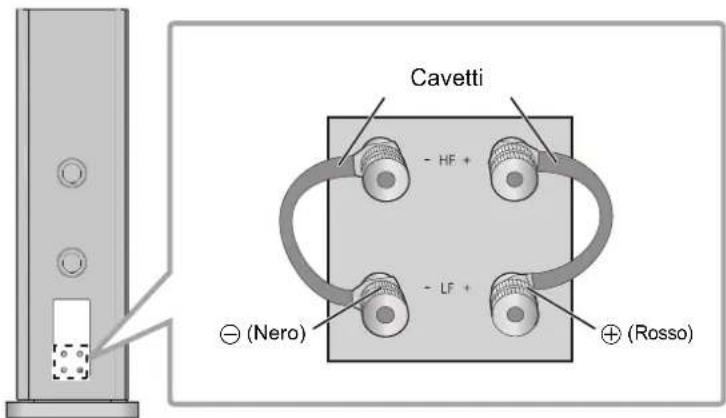
Altoparlante (Parte posteriore)
Connessione bi-wiring
Limited Warranty (ONLY FOR U.S.A.)
Technics Products - Limited Warranty
Limited Warranty Coverage (For USA Only)
If your product does not work properly because of a defect in materials or workmanship, Panasonic Corporation of North America (referred to as "the warrantor") will, for the length of the period indicated on the chart below, which starts with the date of original purchase ("warranty period"), at its option either (a) repair your product with new or refurbished parts, (b) replace it with a new or a refurbished equivalent value product, or (c) refund your purchase price. The decision to repair, replace or refund will be made by the warrantor.
| Product or Part Name Parts | Labor | |
| Technics Stereo Power Amp | 5 (five) years 5 (five) years | Technics A |
| Technics Speaker System |
During the "Labor" warranty period there will be no charge for labor. During the "Parts" warranty period, there will be no charge for parts. This Limited Warranty excludes both parts and labor for non-rechargeable batteries, antennas, and cosmetic parts (cabinet). This warranty only applies to products purchased and serviced in the United States. This warranty is extended only to the original purchaser of a new product which was not sold "as is".
Mail-In Service-Online Repair Request
Online Repair Request
To submit a new repair request and for quick repair status visit our Web Site at www.panasonic.com/support.
When shipping the unit, carefully pack, include all supplied accessories listed in the Owner's Manual, and send it prepaid, adequately insured and packed well in a carton box. When shipping Lithium Ion batteries please visit our Web Site at www.panasonic.com/BatteryHandling as Panasonic is committed to providing the most up to date information. Include a letter detailing the complaint, a return address and provide a daytime phone number where you can be reached. A valid registered receipt is required under the Limited Warranty.
IF REPAIR IS NEEDED DURING THE WARRANTY PERIOD, THE PURCHASER WILL BE REQUIRED TO FURNISH A SALES RECEIPT/PROOF OF PURCHASE INDICATING DATE OF PURCHASE, AMOUNT PAID AND PLACE OF PURCHASE. CUSTOMER WILL BE CHARGED FOR THE REPAIR OF ANY UNIT RECEIVED WITHOUT SUCH PROOF OF PURCHASE.
Limited Warranty Limits and Exclusions
This warranty ONLY COVERS failures due to defects in materials or workmanship, and DOES NOT COVER normal wear and tear or cosmetic damage. The warranty ALSO DOES NOT COVER damages which occurred in shipment, or failures which are caused by products not supplied by the warrantor, or failures which result from accidents, misuse, abuse, neglect, mishandling, misapplication, alteration, faulty installation, set-up adjustments, misadjustment of consumer controls, improper maintenance, power line surge, lightning damage, modification, introduction of sand, humidity or liquids, commercial use such as hotel, office, restaurant, or other business or rental use of the product, or service by anyone other than a Factory Service Center or other Authorized Servicer, or damage that is attributable to acts of God.
THERE ARE NO EXPRESS WARRANTYES EXCEPT AS LISTED UNDER "LIMITED WARRANTY COVERAGE". THE WARRANTYOR IS NOT LIABLE FOR INCIDENTAL OR CONSEQUENTIAL DAMAGES RESULTING FROM THE USE OF THIS PRODUCT, OR ARISING OUT OF ANY BREACH OF THIS WARRANTY. (As examples, this excludes damages for lost time, travel to and from the servicer, loss of or damage to media or images, data or other memory or recorded content. The items listed are not exclusive, but for illustration only.) ALL EXPRESS AND IMPLIED WARRANTYES, INCLUDING THE WARRANTY OF MERCHANTABILITY, ARE LIMITED TO THE PERIOD OF THE LIMITED WARRANTY.
Some states do not allow the exclusion or limitation of incidental or consequential damages, or limitations on how long an implied warranty lasts, so the exclusion may not apply to you.
This warranty gives you specific legal rights and you may also have other rights which vary from state to state. If a problem with this product develops during or after the warranty period, you may contact your dealer or Service Center. If the problem is not handled to your satisfaction, then write to:
Consumer Affairs Department
Panasonic Corporation of North America
661 Independence Pkwy
Chesapeake, VA 23320
PARTS AND SERVICE, WHICH ARE NOT COVERED BY THIS LIMITED WARRANTY, ARE YOUR RESPONSIBILITY.
Shop Accessories!
for all your Technics gear
Go to
www.panasonic.com/accessories
Get everything you need to get the most out of your Technics products
Accessories & Parts for your Camera, Phone, A/V products, TV, Computers & Networking, Personal Care, Home Appliances, Headphones, Batteries, Backup Chargers & more...
Customer Services Directory
For Product Information, Operating Assistance, Parts, Owner's Manuals, Dealer and Service info go to www.panasonic.com/support
For the hearing or speech impaired TTY: 1-877-833-8855
As of October 2014
The model number and serial number of this product can be found on either the back or the bottom of the unit. Please note them in the space provided below and keep for future reference.
MODEL NUMBER
SB-R1
SERIAL NUMBER
User memo:
DATE OF PURCHASE
DEALER NAME
DEALER ADDRESS
TELEPHONE NUMBER
Limited Warranty (ONLY FOR CANADA)
Panasonic Canada Inc.
5770 Ambler Drive, Mississauga, Ontario L4W 2T3
TECHNICS PRODUCT - LIMITED WARRANTY
Panasonic Canada Inc. warrants this product to be free from defects in material and workmanship under normal use and for a period as stated below from the date of original purchase agrees to, at its option either (a) repair your product with new or refurbished parts, (b) replace it with a new or a refurbished equivalent value product, or (c) refund your purchase price. The decision to repair, replace or refund will be made by Panasonic Canada Inc.
| Technics Stereo Power Amp | 5 (five) years parts and labourTechnics Network Audio Control Player |
| Technics Speaker System |
This warranty is given only to the original purchaser, or the person for whom it was purchased as a gift, of a Technics brand product mentioned above sold by an authorized Panasonic dealer in Canada and purchased and used in Canada, which product was not sold "as is", and which product was delivered to you in new condition in the original packaging.
IN ORDER TO BE ELIGIBLE TO RECEIVE WARRANTY SERVICE HEREUNDER, A PURCHASE RECEIPT OR OTHER PROOF OF DATE OF ORIGINAL PURCHASE, SHOWING AMOUNT PAID AND PLACE OF PURCHASE IS REQUIRED
LIMITATIONS AND EXCLUSIONS
This warranty ONLY COVERS failures due to defects in materials or workmanship, and DOES NOT COVER normal wear and tear or cosmetic damage. The warranty ALSO DOES NOT COVER damages which occurred in shipment, or failures which are caused by products not supplied by Panasonic Canada Inc., or failures which result from accidents, misuse, abuse, neglect, mishandling, misapplication, alteration, faulty installation, set-up adjustments, misadjustment of consumer controls, improper maintenance, power line surge, lightning damage, modification, introduction of sand, humidity or liquids, commercial use such as hotel, office, restaurant, or other business or rental use of the product, or service by anyone other than an Authorized Servicer, or damage that is attributable to acts of God.
Dry cell batteries are also excluded from coverage under this warranty.
THIS EXPRESS, LIMITED WARRANTY IS IN LIEU OF ALL OTHER WARRANTYES, EXPRESS OR IMPLIED, INCLUDING ANY IMPLIED WARRANTY OF MERCHANTABILITY AND FITNESS FOR A PARTICULAR PURPOSE. IN NO EVENT WILL PANASONIC CANADA INC. BE LIABLE FOR ANY SPECIAL, INDIRECT OR CONSEQUENTIAL DAMAGES RESULTING FROM THE USE OF THIS PRODUCT OR ASING OUT OF ANY BREACH OF ANY EXPRESS OR IMPLIED WARRANTY. (As examples, this warranty excludes damages for lost time, travel to and from the Authorized Servicer, loss of or damage to media or images, data or other memory or recorded content. This list of items is not exhaustive, but for illustration only.)
In certain instances, some jurisdictions do not allow the exclusion or limitation of incidental or consequential damages, or the exclusion of implied warranties, so the above limitations and exclusions may not be applicable. This warranty gives you specific legal rights and you may have other rights which vary depending on your province or territory.
WARRANTY SERVICE
For product operation, repairs and information assistance, please visit our Support page on: www.panasonic.ca/english/support
IF YOU SHIP THE PRODUCT TO A SERVICENTRE
Carefully pack and send prepaid, adequately insured and preferably in the original carton. Include details of the defect claimed, and proof of date of original purchase.
Certificat de garantie limitee
Panasonic Canada Inc.
5770, Ambler Drive, Mississauga (Ontario) L4W 2T3
PRODUIT TECHNICS - GARANTIE LIMITEE
Delivering the Ultimate Emotive Musical Experience to All
At Technics we understand that the listening experience is not purely about technology but the magical and emotional relationship between people and music.
We want people to experience music as it was originally intended and enable them to feel the emotional impact that enthuses and delights them.
Through delivering this experience we want to support the development and enjoyment of the world's many musical cultures. This is our philosophy.
With a combination of our love of music and the vast high-end audio experience of the Technics team, we stand committed to building a brand that provides the ultimate emotive musical experience by music lovers, for music lovers.
Director
Michiko Ogawa
Headquarter Address/Adresse du siege social: Panasonic Corporation
Kadoma, Osaka, Japan
Panasonic Testing Centre
Winsbergring 15, 22525 Hamburg, Germany
For the U.S.A.
Panasonic Corporation of North America
Two Riverfront Plaza, Newark, NJ 07102-5490
http://www.panasonic.com
For Canada
Panasonic Canada Inc.
5770 Ambler Drive,
Mississauga, Ontario,
L4W 2T3
www.panasonic.com
For the United Kingdom and Ireland
For Continental Europe
For Australia and New Zealand
Panasonic Corporation
Web Site: http://panasonic.net
EnCfGeFrItSpDaDuSwfi
© Panasonic Corporation 2014
Printed in Japan

SQT0465-1
F1214BM1015

- For the U.S.A. and Canada
- For the United Kingdom and Ireland customers
- Sales and Support Information
- Safety precautions
- WARNING
- CAUTION
- Disposal of Old Equipment
- Table of contents
- Accessories
- About this unit
- Installation
- For optimum position
- Determining an installation location.
- Adjusting the distances between the rear of the speakers and the walls
- Adjusting the angle of the speakers
- Adjusting the acoustics of the room and speaker layout
- About the spacers and spikes
- Attaching the spacers
- Attaching the spikes
- Preventing the speakers from tipping over
- When securing the speakers to a horizontal surface (floor, etc.)
- When securing the speakers to a vertical surface (wall, etc.)
- Connections
- Connecting the speaker cables
- Connecting with an amplifier
- Single wiring connection
- Bi-wiring connection
- Attaching the speaker nets
- Notes on use
- Unit care
- Specifications
- Connessione mono-wiring
- Connessione bi-wiring
- Limited Warranty (ONLY FOR U.S.A.)
- Technics Products - Limited Warranty
- Limited Warranty Coverage (For USA Only)
- Online Repair Request
- Limited Warranty Limits and Exclusions
- Shop Accessories!
- Limited Warranty (ONLY FOR CANADA)
- TECHNICS PRODUCT - LIMITED WARRANTY
- IN ORDER TO BE ELIGIBLE TO RECEIVE WARRANTY SERVICE HEREUNDER, A PURCHASE RECEIPT OR OTHER PROOF OF DATE OF ORIGINAL PURCHASE, SHOWING AMOUNT PAID AND PLACE OF PURCHASE IS REQUIRED
- LIMITATIONS AND EXCLUSIONS
- WARRANTY SERVICE
- IF YOU SHIP THE PRODUCT TO A SERVICENTRE
- Certificat de garantie limitee
- PRODUIT TECHNICS - GARANTIE LIMITEE
- Delivering the Ultimate Emotive Musical Experience to All
- For the U.S.A.
- For Canada
- For the United Kingdom and Ireland
- For Continental Europe
- For Australia and New Zealand
Brand : TECHNICS
Model : SBR1E
Category : Loudspeaker