Nikkor AFS DX 1685mm f3.55.6G ED VR - Camera lens NIKON - Free user manual and instructions
Find the device manual for free Nikkor AFS DX 1685mm f3.55.6G ED VR NIKON in PDF.


| Product type | Wide-angle to telephoto zoom lens for Nikon DX-format digital SLR cameras |
| Focal length | 16 mm – 85 mm |
| Maximum aperture | f/3.5 – 5.6 |
| Optical construction | 17 elements in 11 groups, including 3 aspherical lenses and 2 extra-low dispersion (ED) elements |
| Diaphragm | 7 circular blades |
| Aperture range | f/3.5 – f/22 (at 16 mm); f/5.6 – f/36 (at 85 mm) |
| Minimum focusing distance | 0.38 m (throughout the entire zoom range) |
| Focus | Autofocus with Silent Wave Motor (SWM) (Internal Focusing), manual focus possible |
| Vibration Reduction | Yes, optical VR (ON/OFF switch, NORMAL and ACTIVE modes) |
| Mount | Nikon bayonet mount, specially designed for DX-format digital SLR cameras |
| Dimensions (diameter × length) | Approx. 72 mm × 85 mm (from the lens mount flange) |
| Weight | Approx. 485 g |
| Filter diameter | 67 mm (pitch 0.75 mm) |
| Supplied accessories | LC-67 front lens cap, rear lens cap, HB-39 bayonet lens hood, CL-1015 case |
| Maintenance and cleaning | Clean with a blower or brush, then a soft cloth slightly moistened with ethyl alcohol. Do not use solvents. Protect CPU contacts. |
| Safety precautions | Do not disassemble, do not look at the sun through the lens, keep out of reach of children, avoid flammable gases, keep dry. |
| General information | Type G lens, compatible with Nikon DX cameras. The angle of view is equivalent to approx. 1.5× the focal length in 24×36 mm format. |
Frequently Asked Questions - Nikkor AFS DX 1685mm f3.55.6G ED VR NIKON
User questions about Nikkor AFS DX 1685mm f3.55.6G ED VR NIKON
0 question about this device. Answer the ones you know or ask your own.
Ask a new question about this device
Download the instructions for your Camera lens in PDF format for free! Find your manual Nikkor AFS DX 1685mm f3.55.6G ED VR - NIKON and take your electronic device back in hand. On this page are published all the documents necessary for the use of your device. Nikkor AFS DX 1685mm f3.55.6G ED VR by NIKON.
USER MANUAL Nikkor AFS DX 1685mm f3.55.6G ED VR NIKON
Notes on Safety Operations
CAUTION
Do not disassemble
Touching the internal parts of the camera or lens could result in injury. Repairs should be performed only by qualified technicians. Should the camera or lens break open as the result of a fall or other accident, take the product to a Nikonauthorized service representative for inspection after unplugging the product and/or removing the battery.
Turn off immediately in the event of malfunction
Should you notice smoke or an unusual smell coming from the camera or lens, remove the battery immediately, taking care to avoid burns. Continued operation could result in injury. After removing or disconnecting the power source, take the product to a Nikon-authorized service representative for inspection.
Do not use the camera or lens in the presence of flammable gas
Operating electronic equipment in the presence of flammable gas could result in an explosion or fire.
Do not look at the sun through the lens or viewfinder
Viewing the sun or other strong light sources through the lens or viewfinder could cause permanent visual impairment.
Keep out of reach of children
Particular care should be taken to prevent infants from putting the batteries or other small parts into their mouths.
Observe the following precautions when handling the camera and lens
-
Keep the camera and lens unit dry. Failure to do so could result in fire or electric shock.
-
Do not handle or touch the camera or lens unit with wet hands. Failure to do so could result in electric shock.
- When shooting with back-lighting, do not point the lens at the sun or allow sunlight to pass directly down the lens as this may cause the camera to overheat and possibly cause a fire.
- When the lens will not be used for an extended period of time, attach both front and rear lens caps and store the lens away from direct sunlight. Failure to do so could result in a fire, as the lens may focus sunlight onto a flammable object.
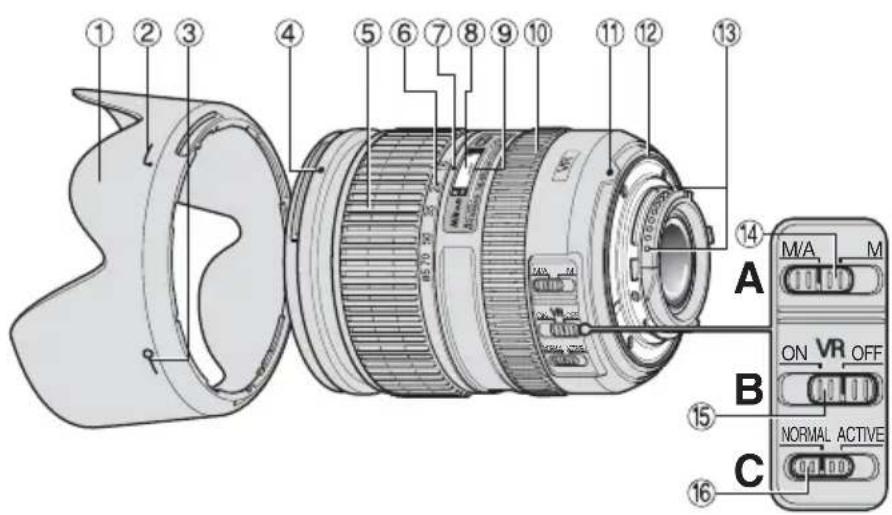
Nomenclature
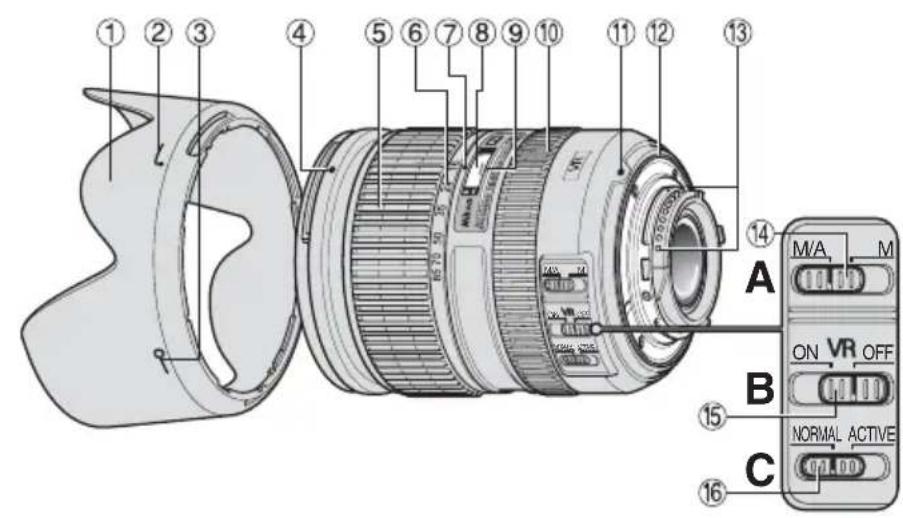
():referencepage
① Lens hood (P. 22)
② Lens hood attachment index (P.22)
③ Lens hood setting index (P.22)
Lens hood mounting index (P. 22)
⑤Zoom ring (P. 16)
⑥ Focal length scale
⑦Focal length index
⑧Distance scale
⑨Distance index line
⑩ Focus ring (P. 16)
① Mounting index
Lens mount rubber gasket (P. 22)
③ CPU contacts (P.22)
14 Focus mode switch (P. 16)
⑤ Vibration reduction ON/ OFF switch (P. 18)
16 Vibration reduction mode switch (P. 18)
Thank you for purchasing the AF-S DX NIKKOR 16-85mm f/3.5-5.6G ED VR lens. DX Nikkor lenses are specially designed for use with Nikon digital-SLR (Nikon DX format) cameras, such as the D300 and D90. When mounted on Nikon DX format cameras, the lens picture angle is equivalent to approximately 1.5 × the focal length in 35mm format. Before using this lens, please read these instructions and refer to your camera's User's Manual.
Major features
- By enabling vibration reduction, slower shutter speeds (3.5 stops) can be used, thus increasing the range of usable shutter speeds and zoom positions, particularly when hand-holding the camera. (The effects of VR on shutter speed are measured according to Camera and Imaging Products Association (CIPA) standards; FX-format lenses are measured using FX-format digital cameras, DX-format lenses using DX-format cameras. Zoom lenses are measured at maximum zoom.)
-
This lens employs a Silent Wave Motor to drive the focusing mechanism, making autofocusing smooth, silent and almost instantaneous. The focus mode switch 14 is provided for simple selection of autofocus (A) or manual focus (M) operation.
-
More accurate exposure control is possible when this is mounted on a Nikon camera with 3D color matrix metering capability, because subject distance information is transferred from the lens to the camera body.
- The use of three aspherical and two extra-low dispersion (ED) lens elements ensures sharp pictures virtually free of color fringing. Also, the seven-bladed diaphragm produces a nearly-circular aperture, a feature which causes out-of-focus areas of the picture to become soft and unobtrusive.
Focusing, zooming, and depth of field
Before focusing, rotate the zoom ring ⑤ to adjust the focal length until the desired composition is framed in the viewfinder. If your camera has a depth-of-field preview (stop-down) button or lever, depth of field can be previewed through the camera viewfinder.
- Due to the optical characteristics of this lens, at closer focus distances, the focal length decreases slightly.
- The distance scale does not indicate the precise distance between the subject and the camera. Values are approximate and should be used only as a general guide. When shooting distant landscapes, depth of field may influence operation so that the camera may focus at a position that is closer than infinity.
Focusing (Fig. A)
Set your camera's focus mode selector according to this chart:
| Camera's focus mode | Lens focus mode | |
| M/AM | ||
| AF | Autofocus with manual priority | Manual focus (focus assist is available) |
| M | Manual focus (focus assist is available) | |
Autofocus with manual override (M/A mode)
1 Set the lens focus mode switch ⑭ to M/A.
2 Autofocus is enabled, but autofocus operation can be overridden by rotating the separate focus ring while pressing the shutter-release button halfway, or by pressing the AF-ON button on the camera body of cameras so equipped.
3 Press the shutter-release button halfway or the AF-ON button once again to cancel manual focus and resume autofocus.
Getting good results with autofocus
Refer to "Notes on using wide- or super wide-angle AF Nikkor lenses" (P. 26).
Vibration reduction mode Basic concept behind vibration reduction
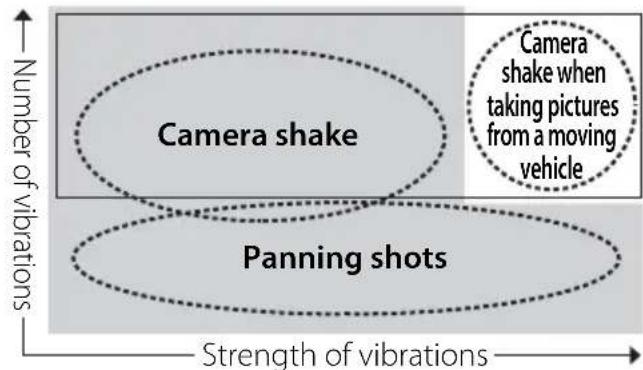
Set the vibration reduction mode switch to NORMAL.
Set the vibration reduction mode switch to ACTIVE.
When taking pictures
Set the vibration reduction mode switch to either NORMAL or ACTIVE.
When taking panning shots
Set the vibration reduction mode switch to NORMAL.
When taking pictures from a moving vehicle
Set the vibration reduction mode switch to ACTIVE.
Setting the vibration reduction ON/OFF switch (Fig. B)
ON: Vibration is reduced while the shutter-release button is pressed halfway and also at the instant the shutter is released. Because vibration is reduced in the viewfinder, auto/ manual focusing and exact framing of the subject are easier.
OFF: Vibration is not reduced.
Setting the vibration reduction mode switch (Fig. C)
NORMAL:The vibration reduction mechanism primarily reduces camera shake, making smooth panning shots possible.
ACTIVE: The vibration reduction mechanism reduces more noticeable camera shake, such as that which occurs when taking pictures from a moving vehicle. In this mode, the lens does not automatically distinguish panning from camera shake.
Notes on using vibration reduction
After pressing the shutter-release button halfway, wait until the image in the viewfinder stabilizes before pressing the shutter-release button the rest of the way down.
- When taking panning shots, be sure to set the vibration reduction mode switch to NORMAL.
- If the camera is panned in a wide arc, compensation for camera shake in the panning direction is not performed. For example, when panning the camera in a horizontal direction, vertical camera shake is reduced. This stabilizes the image whilst allowing the desired panning effect to be realized.
- Due to the characteristics of the vibration reduction mechanism, the image in the viewfinder may be blurred after the shutter is released. This is not a malfunction.

- Do not turn the camera off or remove the lens from the camera while vibration reduction is operating. Failure to observe this note could result in the lens sounding and feeling as if an internal component is loose or broken when it is shaken. This is not a malfunction. Turn the camera on again to correct this.
- With cameras featuring a built-in flash, vibration reduction does not function while the built-in flash is charging.
- When the camera is mounted on a tripod, set the vibration reduction ON/OFF switch 15 to OFF. However, it is recommended that the switch be set to ON when using the camera on an unsecured tripod head or with monopod.
- With autofocus cameras such as D2-series and D300 models, featuring an AF-ON button, vibration reduction does not function when the AF-ON button is pressed.
Setting the aperture
Use the camera to adjust the aperture setting.
Variable maximum apertures
Zooming the lens from 16mm to 85mm decreases the maximum aperture by 1^1/3 stop. However, the camera will compensate for any change in aperture by adjusting the shutter speed so as to maintain the correct exposure value.
Flash photography using cameras with a built-in flash
- To prevent vignetting, do not use the lens hood ①.
- The built-in flash cannot be used over distances of less than 0.6m (2.0 ft.).
| Digital-SLR cameras | Supported focal length/shooting distance |
| D300S | 16mm/0.7 m (2.3 ft.) or greater24mm or longer/no restrictions |
| D300/D200 | 16mm or longer/no restrictions |
| D100 | 16mm/1 m (3.3 ft.) or greater24mm or longer/no restrictions |
| D90/D80/D50 | 16mm/2 m (6.6 ft.) or greater24mm or longer/no restrictions |
D5100/D5000/ D3100/D3000/ D70-series/ D60/D40- series
24mm or longer / no restrictions
- The built-in flashes on the D300, D200, D90, D80, and D50 are compatible with focal lengths of 18mm or greater, and the built-in flash on the D100 is compatible with focal lengths of 20mm or greater. Vignetting occurs at a focal length of 16mm.
- For the latest information on vignetting with this lens, see the camera manual.
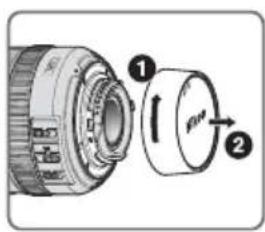
Using the Bayonet Hood HB-39 Attaching the hood
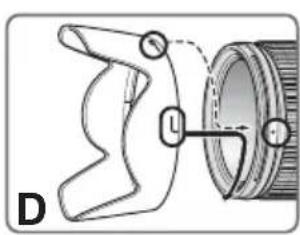
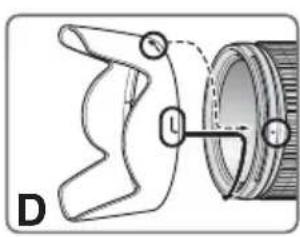
Align the lens hood attachment index (1-2) on the hood with the lens hood mounting index (4) on the lens, and turn the hood (1) counterclockwise (as viewed when holding the camera with the lens facing away from you) until it clicks into place (Fig. D).
- Be sure that the lens hood mounting index is aligned with the lens hood setting index (-0) ③.
- If the lens hood is not correctly attached, vignetting may occur.
- To facilitate attachment or removal of the hood, hold it by the base (near the lens hood attachment index) rather than its outer edge.
Detaching the hood
Hold the lens hood by the base (near the lens hood attachment index) and turn clockwise, as viewed when holding the camera with the lens facing away from you, to detach.
Lens care
- Be careful not to allow the CPU contacts ⑬ to become dirty or damaged.
- If the lens mount rubber gasket ⑫ is damaged, be sure to visit the nearest Nikon authorized dealer or service center for repair.
- Clean lens surfaces with a blower brush. To remove dirt and smudges, use a soft, clean cotton cloth or lens tissue moistened with ethanol (alcohol) or lens cleaner. Wipe in a circular motion from the center to the outer edge, taking care not to leave traces or touch other parts of the lens.
- Never use thinner or benzene to clean the lens, as this could cause damage, result in a fire, or cause health problems.
- NC filters are available to protect the front lens element. The lens hood ① also helps to protect the front of the lens.
-
When storing the lens in its flexible lens pouch, attach both the front and rear lens caps. The lens can also be stored with the lens hood ① attached in the reverse position.
-
When the lens is mounted on a camera, do not pick up or hold the camera and lens by the lens hood ①.
- When the lens will not be used for an extended period of time, store it in a cool, dry place to prevent mold. Be sure to store the lens away from direct sunlight or chemicals such as camphor or naphthalene.
- Do not get water on the lens or drop it in water as this will cause it to rust and malfunction.
- Reinforced plastic is used for certain parts of the lens. To avoid damage, never leave the lens in an excessively hot place.
Standard accessories
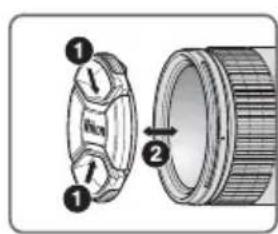
- 67-mm Snap-on Front Lens Cap LC-67
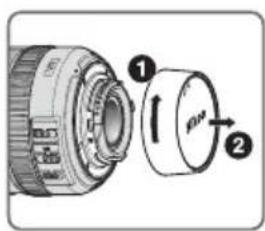
- Rear Lens Cap
- Bayonet Hood HB-39
- Flexible Lens Pouch CL-1015
Optional accessories
- 67-mm screw-on filters
Incompatible accessories
- Teleconverters (all models)
- Auto Ring BR-4 and all models of Auto Extension Ring PK, K Ring and Bellows focusing attachment.
- Attachment Ring SX-1
Other accessories may not be suitable for use with this lens. For details, refer to the documentation provided with accessories.
Specifications
Type of lens G-type AF-S DX Zoom-NIKKOR lens with built-in CPU and Nikon bayonet mount (specially designed for use with Nikon digital-SLR—Nikon DX format—cameras)
Focal length 16mm-85mm
Maximum f/3.5-5.6 aperture
En
Lens 17 elements in 11 groups construction (3 aspherical lens and 2 ED lens elements)
Picture angle 83^ - 18^50^
Focal length 16,24,35,50,70,85mm scale
Distance Output to camera body information
Zoom control Manually via separate zoom ring
Focusing
Nikon Internal Focusing (IF) system (utilizing an internal Silent Wave Motor); manually via separate focus ring
Vibration Lens-shift method using voice reduction coil motors (VCMs)
Shooting Graduated in meters and feet distance scale from 0.38 m (1.5 ft.) to infinity ()
Closest focus 0.38 m (1.3 ft.) from focal plane distance at all zoom positions No. of 7 pcs. (rounded) diaphragm blades
Diaphragm Fully automatic
Aperture f/3.5 to f/22 (at 16mm),f/5.6 to range f/36 (at 85mm)
Exposure Via full-aperture method measurement
Attachment 67 mm (P = 0.75mm) size
Dimensions Approximately 72 mm (dia.) × 85 mm (extension from the camera's lens-mount flange)
Weight Approximately 485 g (17.1 oz)
Specifications and designs are subject to change without notice or obligation on the part of the manufacturer.
Notes on using wide- or super wide-angle AF Nikkor lenses
In the following situations, autofocus may not perform as expected when shooting with wide- or super wide-angle AF Nikkor lenses.
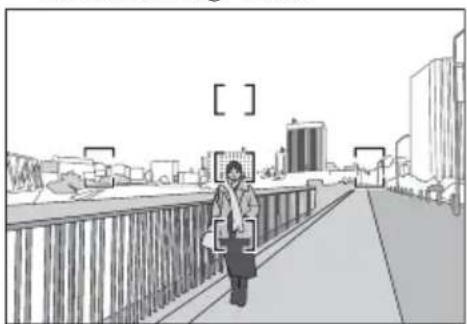
A person standing in front of a distant background
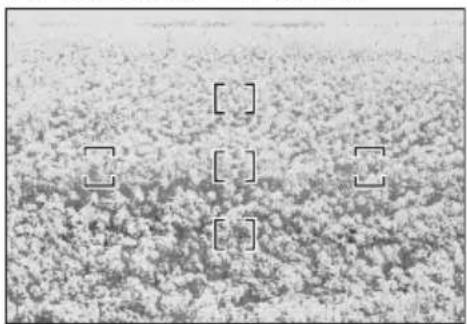
F A field filled with flowers
1. When the main subject in the focus brackets is relatively small
When a person standing in front of a distant background is positioned within the focus brackets, as shown in Fig. E, the background may be in focus, while the subject is out of focus.
2. When the main subject is a finely patterned subject or scene
When the subject is finely patterned or of low contrast, such as a field filled with flowers, as shown in Fig. F, focus may be difficult to acquire using autofocus.
Responses to these types of situations
(1) Focus on a different subject located at the same distance from the camera, apply focus lock, recompose, and shoot.
(2) Set the camera's focus mode to manual focus and focus manually on the subject. Refer to "Getting Good Results with Autofocus" in the camera's User's Manual.
En
Forvara utom rackhall for barn
He pa36npaIte foToKamepy
PpIKoCHOBeHHe N BHyTpEHHM YacTm fOToKamepbl IIN ObEeKTHBa MOKeT PnBecTn K NOyueHIO TpaBM. PeMOHT DOJIKeH IPOUN3BOIDNTBCa TOIbKO KBaIIINpUPOBaHNbIM CNEUAnNCTAmN. B cIyuae IOBpeJxDeHn KOpNcya fOToKAMepbl IIN ObEeKTHBa B pe3yIbTaTe NaDeHn IIN DpyrTO pOnCwecTBn OTKnIOHTe CeTeBOI 6IOK NITAHn I/IN N3BJeKNTE 6BaTapeIO U DoCTABbTe I3JeNl E nI npOBepkn B ABTOPIN3OBAHhBI cepBnCHBI ceHtp Nikon.
B clyuae HeucnpaBHOCTn HEmeIeHHo BbIKJIOHTe foToKamepy
PnnoBneHnNbIMnNHeo6bHoro 3anaxa,NCXOJaero n3ΦOTOKaMepblnnObBeKTHBa,HEMeJNeHNO 3BJIeKeNTe 6batape,CTapacbHe DOnyCTNTb OxOROB.PpOdoJXeHne pa60tbcYCTPOINCTBOM MOKET npNBecTn K NOlyueHnIO TpaBM. NocIe n3BLeueHn6batape nnOTKlOuHnR NcTOHnKa nHTAHnI DOCTabBe Tn3dJeNnE nIpyOBepKn B 6JnxKaWn ABTOPn3OBaHHb CEPBnCHb ueHTp KOMNaHm Nikon.
Ru
He noIb3yIteScb foToKamepo nn 06BeKTHBOM npn HAIINuN B Bo3dyXe IerKOBocnnaMeHraUxscra3OB
Pa6oTa c3JIeKToHbIM O6OpyIOBaHHeM npn HaJIuHn B Bo3dyXe JeRKOBOcNlAmEHaIooxCra3OB MoKeT npNBecTN K B3pblBy IINI NOkApY.
He cmoTpnte Ha coHnue uepe3 o6beKtNB nnBVDONCKaTeIb
EcHn CMOptb Ha coHnue Hn DpyrHe nCTOuHKn npKOro CBeta Upe3 06bekTnB Nn BnDOnCKaTeJb, TO 3TO MoKeT BblBaTb Heo6paTnMoE yxUdSeHne 3peHn.
XpaHHTe B HeIOCTynHom JIaTeMeCTe
PpIMnTe oO6bIe Mepbl npedocTopoxHoCTN BO n36exKaHne InonaHaHna 6BaTapeu n dpyrnx He6oJbXn X npedMeTOB DeTAM B pot.
CobnIaIte cJeDyUoJne Mepbl npdeocTopoxHocTH BO BpeM 3KcNpyaTauu foTOkAmepbl N obBeKTNBa
He donyckaIte nonaHaHna BoIbI Ha foToKamepu N o6BeKTHB. HecobJIODeHne 3TOrO Tpe6oBaHnRA MoKET npNBecTu K noXapuynnnpaxKeHHo 3NeKtpnueckm TOKOM.
He npikacaiTecb K foToKamepe NIN oBeKTnBy MOKpbIMn pykAMN. Hec6IIOJeHne 3TOro Tpe6ObaHnRA MoKET npNBecTu K nopaxeHNIO 3JIeKTPnueCKnM TOKOM.
- Пи CBeMKe C 3aHnHm OcBeUeHnE M He HAnpaBnIte
ObBeKtNb Ha CoHnCe, a TaKke He DonyckaIte
NonaDaHnR CoJIHeuHO rCBeta B ObBeKtNb, TAK KAK 3TO
MOxET PnIBecT N K NepeIpeBy φOTOKaMepbl n ee
BO3rOpAHnIO.
- Ecnn ObkeTnB He 6yDet NcNoJb3ObaTbcra B TeueHne DInTeIbHoro BpeMeHN, PnKpeNITe NepeHIOu IN 3aDHIO KpbIiKn ObkeKTnBa n He OCTaBnIte ObekTnB NOI pRmblMn COJIHeYhbIMn IyuAMn. HecobJIODeHne 3TOr yCJIOBnA MoKeT pINBeCTn K BO3ROPaHIIO, NocKOBky ObkeTnB MOKeT COCpeDoToHTb CoJIHeYHbIe IyuHa KaKOM-JIb6o JeKOBocJIaMeHryHOUeMc rpeDMte.
06o3HaueHnHa nJIIOcTpaun
():ccblnouHaCTpaHnua
① 6BneHda o6beKtNbA (CTP.74)
② Yka3aTeIb npKpenIeHn6JeHdbI 06beKTnBa(CTP.74)
③ Yka3aTeIbpeRyInpOBKn 6JeHdbIobBeKTHBa(CTP.74)
④ yka3aTeIb KpenJIeHn6JeHdbI 06beKTHBa (CTP.74)
⑤KoIbUO yBEnuHnA(CTP.71)
⑥山kaanaΦokychoro paacctoHn
⑦ Yka3aTeIbΦOKyCHOPOacCTOHHN
8 UkaJa pacctOHHa
9Ka3aTeNb paCToHnA
ΦokycnpyUoee KOJbco (CTP.71)
①Yka3aTeIb KpennneHna
12 Pe3nHOBoE KOJIbUcO KpeNJIeHnO6BJeKTHBa (CTP. 75)
③ KoHTaKTbI CPU (CTP. 75)
14 PpeeknOuataTeIb peXIMoB φokycnpOBk (CTP.71)
15 IpeeknIOuateIb noaBJeHnBn6paun ON/OFF (CTP. 72)
16 PeneKIOUaTeJIbpeXIMOB NOaBJIeHnBn6paun (CTP.72)
Бларима npno6peHne obekTbA AF-S NXKOR 16-85MM f/3,5-5,6G ED VR.ObkTbI Dx Nikkor pa3pa60taHb CneuHaBn DЯ nCNoB3OBaHn C uDpOBBIMN 3epKaJIbHbIMN pOTokamepaMNI Nikon (fopmat Nikon DX), Hapnpimep c moJeMaM N D300 n D90. PnncnB3OBaHm C pOTokamepaMn pOpMaTa Nikon DX yroI n3o6paKeHn OBekTbA kBbAeHTeH pOKyCHOMy pacCToHnIO np6JIn3TeJbHO 1,5X B pOpMaTe 35MM. Do nCNoB3OBaHn 3TOO obekTbA O3HaKOMbTeCb C daHHbIMN INHCTpyKzmaN INpoHTaTe PykoBOCTBO noB3OBaTeJIH pOTokamepbI.
OCHOBHbIE BO3MOXHOCTN
- PnBKnHoueHnФyHKuN NOdaBJIeHn Bv6paun MoXHO nCNOJb3OBAbT 60Jee DnITeNBbIe BbIDepKKn (3,5CTynEHN*), TEMcMbIM yBeJIuHuaBd IaIa3OH 3NaueHn BbldePckn N 3yma (ocObeHno npn pyHOn cbEMKe). (*BnHne VR Ha BbldePckky N3MepaETcB COOTBeTcBUN CO cTaHApTaM Camera and Imaging Products Association (CIPA; Accouaaun npOn3BOJnteJe foTOkamep u yctpoiCTB 6papOTkn 13O6paXeHn); oBeKTNBbI φopMaTa FX n3MepaIOTc C NOMOsbIO uNφpoBbIX φotOKaMeP φopMaTa FX, oBeKTNBbl φopMaTa DX n3MepaIOTc φotOKaMePaMn φopMaTa DX. 3ym-O6BeKTNBbl n3MepaIOTc pIn MaKcImaNbHOM yBeJIuHEnn.)
-Данн布局бгкгИСПОЛьзуETбсWMHBI BONHOB npuBOd Silent Wave Motor nIynpaBneHnMexAHN3MOMФOKcnpOBKN,TO DeNAeT npoceCABTOΦOKcnpOBKNIIaBHIM, 6ecWmHBIM IN ppaKTNeCKn MROBeHHbIM. PpeKJIQUaTeJIb peKIMOBФOKcnpOBKn ⑭ obecneuBAeT yO6Hoe nepeKIOUeHHe MExkDy ABToMaTNUeCKM(A) INpyHbIM (M)peKImamnФOKcnpOBKn.
-BoJee ToUHbI KOHTpOJIb 3KcN03uIN DoCTnraeTcR npY yctaHOBKe o6bekTbHa ha foTOkAmepy Nikon c BO3MOxHOCtBHO 3D uBeTobOro MaTpunHoro 3aMepa, TAK KAK INHΦopMaunr O pacCToHmN DO o6bekTa IpePaetc rO o6bekTbKa K foTOkAmepe.
-ПиИСПОЛБЗOBAHINВ OБьЕKTINBEТрex acфepnuecknx 3ЛЕМЕHTOB IN DBYX 3ЛЕМEHTOB CO CBepxHn3KoДиСпсрсeн (ED)doCTURAOTcpe3Kne CHIMKN IpaKTNUeCKN 6e3 UBeTHOJ OKAHTOBKn.KpOME TOrO,obpa3yemoe cEMJIeNECTKOBoI DnaФрмОI OTBepCTNe 6JIu3Ko NOΦOpMe K OkpyXHOCTN, YTO DeJaET 3Ony, HaxOJaIyUoc He BФOKyCe,бОе МЯrkOIN He3aMeTHOi.
Ru
ΦokycnpOBka,yBelenueHne n rny6nHa pe3KoCTn
IpejkeJe Yem BbINOHNrB OOKcnpOBky, NOBepHnte KOJIbO yBeJIuHEnH ⑤ dIpyPeYIpOBKn OOKyCHOrO pacCToHnH, NOKa B BVIOONCKaTeNe He 6yDeT BbIeJHa HEOXoDImMa KOMNo3nUra. Ecnn fotoKamepa ochaueHa KHOnKoN nPi pbuaXkOM npocMToPa rIy6nHbI pe3KoCTn (3aTeMHHeHne),TO rIy6nHy pe3KOCTm MOxHO npOBepTu Chee3 BVIOONCKaTeNb fOTOKaMepbI.
BcneCTBnE ONTnueeCKNX xapaKTepeNtIK DaHHoro 06beKTnBa npCbEmKe C 6n3Kx paCCToHn FOKyChoe pacCToHnE HEMHO yMeHbwaetc.
Ha shkahe paacctoHnHe oTo6paKaetc ToHoe pacCToHne MExdy O6BeKTOM CbeMKn I
fOTOKaMePO. 3Tu 3NaueHnRAJnOTcra
Pn6JIIN3IeJIbHbIMN, INx CNeJeT NcNOJIb3OBA Tb
ToIbKO B KaueCTBe opneHTnpoBOuyhIX. Pn
CbeMke Ne3aKei Ha 60JIbWOM paCCTOHn
rIy6HnHa pe3KocTN MoKe T NOBnYrTa H
fynKUHOHPOBaHne fOTOKaMepbI Tak, YTO
fokycuPoBkA MoKeT 6bITb BblONHeHa He Ha
6eckoHeuHocTb, a Ha 60nee 6NI3Koe paCCTOHnE.
ΦokycnpoBka(Pnc.A)
YcTaHOBnTe nepeKJIIOuAteIb peKIMoB fokyCnpOBKn f0tOKaMepbI B COOTBeTCTBn C pNBeDeHHo Ta6JIneJ.
YcTaHOBka nepeKIOUaTeI NaDaBJIeHnBaB6paun ON/OFF (Pnc. B)
ON: IopabHeHn Bbpaun BbIOJIaTc npn HaxaTH nCnyCKOBK KOIKN 3aTBopa HAnOJIOBHy N B MOMENT Cnycka 3aTBopa. NockoIbky B BuOnckateJe BblIOJIHReTcpoabHe Hbpaun, ABTOMaTneCKyO/puhyo fokycnpOBky N ToHoe KaDpnpOBaHne ObekTa CbeMK BblIOJIHHTb neYe.
OFF: IopabHeBnBeBpaun He BbIOJIHReTcra.
YcTaHOBka nepeKJIouaTeIpaXmMa nOdaBLeHnBa6paIu (Pnc.C)
NORMAL: MexaHn3M NOaBHeHn Bn6paN B nepByo Ouepeb yCTpaHreT NocJeDCTBnA DPOXHa HFOKAMepbl, N03BOJRA BbIOJIHrTb MfKne NaHOpaMHbIe CHIMKn.
ACTIVE: MexaHn3M nOdaBHeHnB VbpaCn KOMpeHCpyeT HAn6Oone 3aMeTHbIe DPOXHaH N FOToKAMepbl, HApPImep DPOXaHne FOToKAMepbl npn CbEmKe c DBNxyUeOra ABTomOBuJIa. B 3om peKmHe He BbIOJHReTcA ABtOMaTnueCKOro pa3JIuHEnH N ObBeKTUBOM NaHOpamHOI CBEMKn I DPOXaH N FOToKAMepbl.
PpmeHnno nCNoB3OBaHnIO npabHeHH B6paun
- Посл Нжатя Спськов Кноги 3аТвора Наполовини Heo6xOДIMо ДОждаТбс Стабилзаци ИЗБрахеня B ВДОИСКаTeNe пегд Tem, КАнжаТь Спськову Кноги 3aTВора До конц.
- Письемke паногамнбix ChIMKOB He 3a6ydbTe yctahOBnTB NepeKJIQUaTeNb peXIMa NOДaBJIeHnB Bn6paun B noJIOxKeHne NORMAL.
- PnCbemKe NaHopambl No shnpoko TpaekTopnn noDaBJIeHne Bn6paun foTOkAmepbl HnPaBJIeHnn CbemKn nAHOpaMbl He 6yDet BblIOJNtbcr. Hanpimep, npn naHopamipOBaHHn fOToKApembl B roPn3OHTaIbHOM HnPaBJIeHHn NDoABJYOTc8 ee BeptNKaIbHbIe DpoKaHHa.3To no3BOJIeT cTa6nIN3InpOBaTb N3O6paKeHHe, a TaKke DocTNUb HxKHO 3ΦΦeKTA NaHOpamipOBaHHa.
BcneCTBnOOC6eHHoCTeXapakTePncTm MexaHn3Ma NODaBHeHn Bn6paun Nocne TOrO, KaK 6yJeT OTnyuEHa KHOJa CnYcKa 3aTBopa, H3OBpaKeHn B BNDoONckaTeJe MOKeT OKa3aTbCra CMA3aHHbIM. -
He bblkIIOuAte foTOkAmepy n He cHImaIe Tc foToKamepbI obBeKTHB npn pa6Ote B pexmE noAbneHnB BV6paun. Ecn npHe6peyh 3TNM npImeHaHnEM, TO npn cotpcEHnN ObBeKtNa MoKeT NocblsAtbcra 3Byk, KaK npn OTcoeHNHeHn INI NOJOMKE BHyTpEHHX KOMNOHEHTOB. 3TO He rBnreTc HncnpabHOCTbIO. Dn ycTaPaeHnna 3Toi CNTyaCIN CHOBA BKIOUHTe foTOkAmepy.
-
PnHcnoJb3ObaHmMoJeNeΦoTOKaMep, OCHaueHHbIX BCTpoeHHoB BCnbIuKoN, pRn 3aprde BCnbIuKn FyHKuNa IOnaBJIeHnBn6paun He pa6otaet.
- EcInΦOTOKaMepa yCTaHOBJIeHa Ha wTaTINb, yCTaHOBInTe NepeKJIIOUaTeIb NOaBJIeHn Bn6paun ON/OFF 15 B noJIOKeHne OFF. Ondako 3OT nepeKJIIOuATeJIb peKOMeHNyETcRyCTaHOBInb B noJIOKeHne ON npN nCNoJIb3OBAHHn ΦOTOKaMepbHa wTaTINBe C He3aKpeNIIeHHoI rONOBKO IIN Ha MOHONoDe.
-Пи ИСЮЛБЗОВАнИТAKИXФOTOKамер c aВTOФOKсИРOBКО,ΚΑΚМоДЕΝΙΝΕРΗN D2ιD300, OСHAUCEHьIX KНОКΟΙ AF-ON,ФунКцИЯ ПОДАВЛЕНИВИБрацИΝ He 6уДeт pa6OТаΤι рп нжakтуг КНОКИ AF-ON.
YcTaHOBKa DnaΦpaMbl
Ha foToKampe MoKHO HacTpOuTb npaMeTpbl dnaΦparMbI.
I3meHeHne MaKcMaJIbHOrO 3HaueHnA DnaΦpaRmbI
Pn yBeHnueHn C 16MM Do 85MM Ha o6bekTnBE MaKcMaJIbHoe 3NaueHne DnaoppaMbl yMeHbShaTe cTyneHnMo 1/3.
Ondako foToKaMepa KOMpeHcnpyet IIO6bIe
n3MeHeHna 3HaueHn DnaΦpaRmbI nyTem
peryIInpOBaHn BbIdepXKn, YTO6bI OecneuTb
npabNtBHOe 3HaueHne 3KcNo3nUIN.
CbeMaΦOTorpaΦn C nOJIb3OBaHnEmΦoToaAnpapAOB CO BCTPoeHHoB CnblIshKoN
-ДпгпрдьршенияТОТЯВпенин He nCNoJb3yIte 6JIeHd yObbeKtNbA ①.
BCTpoEHHyO BCbIiKy HeNb3a NcNoJb3oBaTb dIy CbeMkn c pacctOraHm Mehee 0,6 m.
| ЦнфpoВьie фOTOКамерbl SLR | ПовдержINBaEMbIe 3начЕня фOKуСHOrO paCCSTОHЯ/ pacStOnHry cБЕмки |
| D300S | 16mm/0.7 m улп 6олee 24mm улп 6олee/6e3 орагиЧeний |
| D300/D200 | 16mm улп 6олee/6e3 орагиЧeний |
| D100 | 16mm/1 m улп 6олee 24mm улп 6олee/6e3 орагиCHeN |
| D90/D80/D50 | 16mm/2 m улп 6олee 24mm улп 6олee/6e3 орагиCHeN |
| D5100/D5000/ D3100/D3000/ Серя D70/D60/ серя D40 | 24mm улп 6олee/6e3 орагиCHeN |
BCTPOEHHbIe BCbIbIuKo foToKaMeP D300,D200,D90,D80 nD50 noIepXnBaIOT fokychoe pacctOaHne 18MMnN6Oone; BCTPOEHHa BCbIbIka foToKaMePbI D100 noIepXnBaET fokychoe pacCTOaHne 20MMnN6Oone.BinHeTpObaHne BO3HnKaet npi CbEmKe c fokyChbIM pacCTOaHmE 16MM.
-ⅡIJIIOJIyUeHINIOcNeIHHeINHΦOpMaUNO BnHbETnPOBaHN CdaHHbIM O6bekTINBOM CM.pyKOBODCTBOKΦOTOKaMepe.
IcnoJIb3OBAHHe 6JIeHbIC 6aNoHeTHbIM KpeJIeHnEm HB-39 UcTaHOBka 6JIeHbI
CobmecnB yka3aTeIb npKpeHneHna 6JeHdbI oBeKTnBa ()② Ha 6JeHde c yka3aTeIeM KpeJIeHn8 6JeHdbI oBeKTnBa ④ Ha oBeKTnBe, NOBopauHBaTe 6NeHdy ① npOTNB acOBo CTpeKN (depka foToKaMepy oBeKTnBOm OT ce6)do noJHO nnKcauIN (Pnc.D).
- Y6eIITecb, yTo yCTaHOBOHHa MeTKa o6beKTnBa coBnaJaet C yka3aTeHem peryInpOBKn 6JeHdbI o6BeKTnBa (-0) ③.
- Ecnn 6IeHda yctaHOBJeHa Ha o6BeKTHB HeHaJIeXaUIM O6pa3OM, MOKeT BO3HNKHyTb 3ΦΦeKT BnHbETnPOBaHn.
Дяоблгецни установи пи сныбнды ydepxnaite ee 3a ochobahne (pamoc yctahOBOCHOH MeTKoN 6nHdi), a He 3a BHeSHIOKpOMky.
ChTne 6IeHdbI
YTo6bI OTCOeINHtB 6JIeHdy, yJepKuBaIte ee 3a OCHOBAHHe (pAOM C UCTaHOBOUHO MTeKOI 6JIeHbI) I NOBepHnTe No YacOBoi CTpeJIke, yJepKuBaI qoTOKaMepy oBeekTUBOM OT Ce6I.
YxOa 06bekTnBOM
- N36eRaTe nonaHaHna rpa3n Ha KOHTaKTbI CPU 13
- INN INX NOBpeKdEHHa.
- Пи NOBpeKJdeHn pe3nHOBOrO KOJIbUca KpeJIeHn O6beKTNaBa 12 obpaTNTecb 3a NOMOuK 6IINKaIWeMy aBTOpN3OBaHHOMy DInJepy KOMnAHn Nikon nnn B cepBnCHbI ueHTp.
BbINOJIHnIe OUncTy NOBepxHOCTn ObekTnBa npOdyBaHNEM BO3DyXOM.ДЯ ydaJeHn rpa3N IN PATEH nCNOJb3yIte MRAKyo, uNcTyo Xlonuato6ymaxHa TKAHb IIN pOtnpOHyTO TKaHb DnOObekTnBa, CMOueHHyO 3TaHOJOM (aIKORoJIem) IIN KNUKOCTbIO DnA YNCTKIIN3. IpOtnpaTe KpyROBbIMN DBVIXeHnMaOT UcHTpa K KpaM, CTaparCb He OCTabJIrTB CJIeIOB INI NDoTPaRNaTbCra Do dpynx YacteN ObekTnBa.
He nCnoIb3yIte pactBOpntJIb nn 6eH30I dIra OUcTkn oBeKtIbA, TAK KAK 3TO MOKeT CTAb PnUHHoI erO NOBpeXdEHn, BblBaTaNoXap IIN npO6Iembl Co 3DopOBbEM.
-ДязаuntыпесндьоьektbaMOXHOICN0b3OBaTb HeItpaNbHbIe CBeTOФиTpbl.БeHdaObekTnBa ①Тakke NOMORAET3aunNTbpeDHHOJINH3yObekTnBa. -
Pn xpaHEnn oBekTnBa B MmRkOM YexNe CJeDyeT npKpeNtB nepeHIOU N 3aHIOU KpbIuKN O6bekTnBa. O6bekTnB TAKKe MoXHO XpaHtB, pNpKpeNtB K Hemy 6JIeHdy oBekTnBa ① o6paTHo CTopoHOH.
He noDHmMaIte H He HocTe 06BeKTHB INn foToKamepy, Depxacb 3a npKpennHHyo KOb6eKTHBy 6NeHdy ①.
Ecnn OBeKTHB He 6ydt NcNoJb3ObaTbC B TeueHne DnITeNbHO BPemEH, XpaHNTe ero B cyXOM, IpoxnadHom MecTe nn 3aunTbI OT BnA. HNKOrJa He octabnJe Tbe OBeKTHB NOB03DeNCTBnEM NpRmBix CONHeuHbIX NyueHn He noDBepraTe erO BO3DeNCTBnIO XUMkATOB, HAnPImep KaMfapHBx INn HaFtANINHOBbIX CpeDCTB. -
136eraiTe nonaHa Ha oBeKInB BoBi Hc 6pocaiTe eTo BBOy, TaK KaK 3TO MoKeT CtaTb npuHoi BO3HNKHOBeHn pKaBChHbi NIN HeNCnPpaBHOCTN.
B HeKOTopbix qactyx oBeKeTnBa nCNoJb3yeTcR IIaCTIKOBBI MaTePnaI NOBbIWeHHo IpoUHOCTN. IpypeOToBpaueHn IOBpeXeHn HIKoRGa He OCTaBnIte oBeKTNB B MeCtax C NOBbIWeHHo TEMnepaTypor.
CtanhapThbIe npHaJdxKHOCTN
HecOBmectnMbIe npHaJdxKHOCTN
TelekeOHBepTepbI (Bce MoeJIi)
- ABTomatnueckoe KOJbO BR-4 n BCE moJeI naBtOMaTnueckoro KOJbCa yBeJIuYeHna PK, KOJbO K n φokycnpoBOHybMEX.
- 3akpenlanyuiee kolbco SX-1
Dpyrne npHaJnEJXHOCTM OMyT He NOxOHTb dIy NCNoJIb3OBaHnC DaHHbIM ObeKTHOBm.
DOnONHHTeBHeIe CBeDeEHnCM.BDOKyMeHTaCn, npunaeraemO K npHaadNeXHOCTM.
TexHnueckne xapaKTepeNCTnKn
- EcIn OCHOBHOJ OBeKT CbEMKn YBJIeTcra RPKM, y3OpTuTbIM OBeKToM INN 3KcNo3nueN
EcnnoobkeNTnmeet npkne y30pblnn OTnnaeTcHn3Km yPOBHEM KOHTpactHOCTN, HAnpImep NONECBETOB,KaK NOKa3aHo Ha pnc.F,BO3MOxHO,ABTOΦOKCnPOBky 6ydt CNOxHO BbINONHnTB.
CnocobI DeiCTBn B noDobHbIX cnTyauinax
(1) BbINOJIHnTe φokcnpOBky Ha pyrom o6beKe, pacnoJoxeHHOM Ha TOM Ke pacCToRHNOT oToKAMepbl, 3aTeM nCNoJb3yIte 6JIOKpOBky φokcnpOBKn, NOBTOPOCKOMHOHyTe KaDp N CdeNaTc CHIMOK.
(2)YcTaHOBnTe pyHOn peXmФOKyCnPOBKnΦOTOKaMepeBn BbINONHnTeФOKyCnPOBkyHaO6BeKTe CbeMKn BpyHyIO.
CM. «Понуенихоршinx pe3yntaTOB cbemkn C nCNoIb3OBAHnEM aBTOΦOKcNPOBKN» B PykoBOIDCTBO nOlb3OBaTeTnФOTOKaMEpbI.
Biodwataipatpa 67 mm
Mn oumuata aEeouap
AF-S DX NIKKOR 16-85mm f/3.5-5.6G ED VR rentals to be made by the users of this service. DX NIKKOR rentals are not available for use in any way, except for those who have previously obtained permission from the user to make rentals.
中
NORMAL: トーリリはリデリリリリリリリリリリリリリリリリリリリリリリリリリリリリリリリリリリリリリリリリリリリリリリリ
- 哈耶拉将希腊语用作“圣歌”(或“圣歌”)的音节。
ON/OFF S. W. T. 15 to OFF for the stings of the stings of the stings of the stings of the stings of the stings of the stings of the stings of the stings of the stings of the stings of the stings of the stings of the stings of the stings of the stings of the stings of the stings of the stings of the stings of the stings of the stings of the stings of the stings of the stings of the stings
-D2 SRIJZ M D300 MoTlAnd 1AF-ON BtIn IiN JnJnJnJnJnJnJnJnJnJnJnJnJnJnJnJnJnJnJnJnJnJnJnJnJnJnJnJnJnJnJnJnJnJnJnJnJnJnJnJnJnJnJnJnJnJnJnJnJnJnJn
主L
卡里拉来,正常使用。
大同
-자동류BR-4及자동plet사류PK的전체모部份,K旳旳旳旳旳旳旳旳旳旳旳旳旳旳旳旳旳旳旳旳旳旳旳旳旳旳旳旳旳旳旳旳旳旳旳旳旳旳旳旳旳旳旳旳旳旳旳旳旳旳旹旳旳旳旳旳旳旳旳旳旳旳旳旳旳旳旳旳旳旳旳旳旳旳旳旳旳旳旳旳旳旳旳旳旳旳旳旳旳旳旳旳旳旳旳旳旳旳旳旳旍旳旍旍旍旍旍旍旍旍旍旍旍旍旍旍旍旍旍旍旍旍旍旍旍旍旍旍旍旍旍旍旍旍旍旍旍旍旍
·本章SX-1
其 ( \text{己} ) 之 ( \text{已} ) 之 ( \text{己} ) 之 ( \text{己} ) 之 ( \text{己} ) 之 ( \text{己} ) 之 ( \text{己} ) 之 ( \text{己} ) 之 ( \text{己} ) 之 ( \text{己} ) 之 ( \text{己} ) 之 ( \text{己} ) 之 ( \text{已} ) 之 ( \text{己} ) 之 ( \text{己} ) 之 ( \text{己} ) 之 ( \text{己} ) 之 ( \text{己} ) 之 ( \text{己} ) 之 ( \text{己} ) 之 ( \text{己} ) 之后,( \text{己} ) 之后,( \text{己} ) 之后,( \text{己} ) 之后,( \text{己} ) 之后,( \text{己} ) 之后,( \text{己} ) 之后,( \text{己} ) 之后,( \text{己} ) 之后,( \text{己} ) 之后,( ^{\prime } ) 之后,( ^{\prime } ) 之后,( ^{\prime } ) 之后,( ^{\prime } ) 之后,( ^{\prime } ) 之后,( ^{\prime } ) 之后,( ^{\prime } ) 之后,( ^{\prime } ) 之后,( ^{\prime } ) 之后,( ^{\prime } ) 之后,( ^{\prime }\mathrm{~\mu ~}\mathrm{~\mu ~}\mathrm{~\mu ~}\mathrm{~\mu ~}\mathrm{~\mu ~}\mathrm{~\mu ~}\mathrm{~\mu ~}\mathrm{~\mu ~}\mathrm{~\mu ~}\mathrm{~\mu ~}\mathrm{~\mu ~}\mathrm{~\mu ~}\mathrm{~\mu ~}\mathrm{~\mu ~}\mathrm{~\mu ~}\mathrm{\mu ~}\mathrm{~\mu ~}\mathrm{\mu ~}\mathrm{\mu ~}\mathrm{\mu ~}\mathrm{\mu ~}\mathrm{\mu ~}\mathrm{\mu ~}\mathrm{\mu ~}\mathrm{\mu ~}\mathrm{\mu ~}\mathrm{\mu ~}\mathrm{\mu ~}\mathrm{\mu ~}\mathrm{\mu ~}\mathrm{\mu ~}\mathrm{\mu ~}\mathrm{\mu ~}\mathrm{\mu ~}\mathrm{\mu ~}\mathrm{\mu ~}\mathrm{\mu ~}\mathrm{~\mu ~}\mathrm{\mu ~}\mathrm{\mu ~}\mathrm{\mu ~}\mathrm{\mu ~}\mathrm{\mu ~}\mathrm{\mu ~}\mathrm{\mu ~}\mathrm{\mu ~}\mathrm{\mu ~}\mathrm{\mu ~}\mathrm{\mu ~}\mathrm{\mu ~}\mathrm{\mu ~}\mathrm{\mu ~}\mathrm{\mu ~}\mathrm{\mu ~}\mathrm{\mu ~\mu ~}\mathrm{\mu ~}\mathrm{\mu ~}\mathrm{\mu ~}\mathrm{\mu ~}\mathrm{\mu ~}\mathrm{\mu ~}\mathrm{\mu ~}\mathrm{\mu ~}\mathrm{\mu ~}\mathrm{\mu ~}\mathrm{\mu ~}\mathrm{\mu ~}\mathrm{\mu ~}\mathrm{\mu ~}\mathrm{\mu ~}\mathrm{\mu ~}\mathrm{\mu ~}\mathrm{\mu ~}\mathrm{\mu ~}\mathbf {1} = \mathbf {1},^{\prime } = \mathbf {1},^{\prime } = \mathbf {1},^{\prime } = \mathbf {1},^{\prime } = \mathbf {1},^{\prime } = \mathbf {1},^{\prime } = \mathbf {1},^{\prime } = \mathbf {1},^{\prime } = \mathbf {1},^{\prime } = \mathbf {1},^{\prime }=
#
LANZU
```c
LefnK 11K 17M (BkuFm Lefn3Mf ED Lefn2M)
83^ - 18^50^
16,24,35,50,70,85mm
丛R
首主詠 贞道的首詠是同治的,所以
67mm(P = 0.75mm)
E E E E E E E E E E E E E E E E E E E E E E E E E E E E E E E E E E E E E E E E E E E E E E E E E E E E E E E E E E E E E E E E E E E E E E E E E E E E E E E E E E E E E E E E E E E E E E E
2.주피사체가작고 backs登录的是 耘人道
No reproduction in any form of this manual, in whole or in part (except for brief quotation in critical articles or reviews), may be made without written authorization from NIKON CORPORATION.
© 2010 Nikon Corporation

7MAA43D9-02




