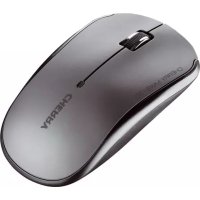
MW 2100 - Mouse Cherry - Free user manual and instructions
Find the device manual for free MW 2100 Cherry in PDF.



| Product type | Wireless optical mouse |
| Brand | Cherry |
| Model | MW 2100 |
| Connection technology | 2.4 GHz wireless with USB nano receiver |
| Range | Up to 10 meters |
| Sensor | Infrared optical |
| Sensor resolution | 1000 / 1500 / 2000 DPI (switchable) |
| Number of buttons | 5 programmable buttons (including clickable scroll wheel and DPI button) |
| Power supply | 1 LR6 (AA) alkaline battery 1.5 V |
| Battery life | Approximately 366 hours continuous use (2200 mAh battery) |
| Power consumption (mouse) | Max. 7 mA |
| Power consumption (receiver) | Max. 40 mA |
| LED indicator | Yes, for battery status and resolution change |
| Customization software | KeyM@n (free download at cherry.de) |
| Operating temperature | 0 °C to +40 °C |
| Storage temperature | -40 °C to +55 °C |
| Cleaning | Soft cloth slightly damp with mild detergent; avoid solvents and abrasives |
| Safety | Use on light, structured surface; avoid reflective surfaces |
| Warranty | Legal warranty (contact the retailer) |
| Package contents | Mouse, USB receiver, alkaline battery, instruction manual |
Frequently Asked Questions - MW 2100 Cherry
User questions about MW 2100 Cherry
0 question about this device. Answer the ones you know or ask your own.
Ask a new question about this device
Download the instructions for your Mouse in PDF format for free! Find your manual MW 2100 - Cherry and take your electronic device back in hand. On this page are published all the documents necessary for the use of your device. MW 2100 by Cherry.
USER MANUAL MW 2100 Cherry
Display for battery status and DPI setting
DPI conversion and on/off switch
CHERRY has developed and produced innovative input systems for computers since 1967. You can now experience the difference in quality, reliability and design with your new favorite accessory.
Always insist on original CHERRY products.
For information on other products, downloads and much more, visit us at www.cherry.de
Your CHERRY mouse stands out especially due to the following features:
- Extremely low power consumption
- Nano USB receiver with up to 10 m range
- Infrared sensor with adjustable resolution for precise work with the DPI switch on the underside of the mouse (1000/1500/2000 dpi)
- You can configure the mouse buttons using the KeyM@n software (as a free download at: www.cherry.de/ deutsch/service/download.php)
1 Switching on the mouse
After inserting the battery, the mouse is activated.
- Press the DPI switch for 3 seconds. The LED gives off one long flash and then five short ones when the battery is fully charged. The LED flashes only once briefly when the battery is almost discharged.
2 Switching off the mouse
The mouse switches to energy-saving mode if it is not moved for 0.2 seconds. It detects any movement and does not need to be switched on again.
However, it still consumes power in the energy-saving mode, therefore you should switch it off manually for longer periods of disuse or for transporting.
- Press the DPI/ switch for 3 seconds. The LED lights up and goes out gradually.
3 Adjusting the sensitivity of the mouse (dpi number)
You can change the resolution of the mouse sensor between 1000, 1500 and 2000 dpi for precise work.
- Briefly press the DPI/ switch.
The LED flashes depending on the setting:
$$ 1 x = 1 0 0 0 \text {d p i} (\text {d e f a u l t}) $$
$$ 2 x = 1 5 0 0 \mathrm {d p i} $$
$$ 3 x = 2 0 0 0 \mathrm {d p i} $$
4 Tips
4.1 Battery status
When the battery status is low, the LED flashes to remind you to replace the battery.
4.2 Battery service life
When the battery with 2200mAh supplied is used, a service life of 366 hours (for 6mAh) is achieved. Assuming the mouse is used constantly for one hour a day and 230 work days a year, you will only need to change the battery after approx. 18 months.
4.3 Surface under the mouse
A bright, structured surface under the mouse saves energy, increases effectiveness and ensures optimum motion detection.
A reflective surface is not suitable for using the mouse on.
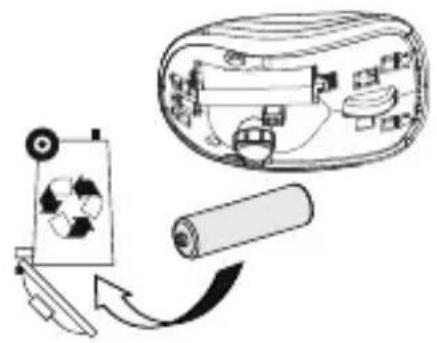
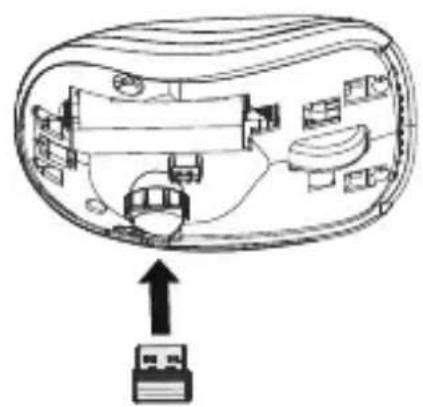
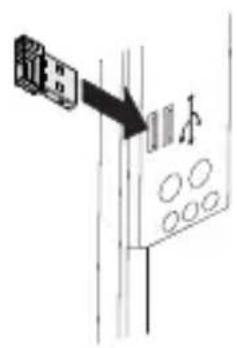
4.4 Storing the receiver in the mouse
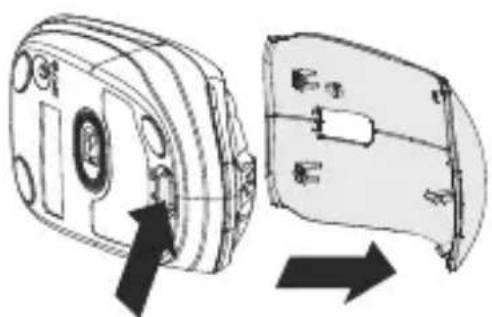
The receiver is so small that it can stay in the USB socket of a laptop while being transported. To avoid any damage, you can also pull out the receiver and deposit it in the mouse to protect it from dirt and loss. To do this you need to remove the cover (see overview page).
4.5 Cleaning the mouse

CAUTION: damage caused by aggressive cleaning agents or liquid in the mouse
- Do not use solvents such as benzene, alcohol, scouring agents or abrasive scourers for cleaning the mouse.
- Prevent any liquid from getting inside the mouse.
1 Switch the mouse off.
2 Clean the mouse with a slightly damp cloth and some mild detergent (such as dishwashing liquid).
3 Dry the mouse with a soft, lint-free cloth.
4.6 RSI syndrome

RSI stands for "Repetitive Strain Injury". RSI arises due to small movements continuously repeated over a long period of time.
Typical symptoms are discomfort in the fingers or neck. For further information see: www.cherry.de/english/service/servicedownload_rsi.htm
- Set up your workspace ergonomically.
- Position the keyboard and mouse in such a manner that your upper arms and wrists are outstretched and to the sides of your body.
- Take several short breaks, with stretching exercises if necessary.
- Change your posture often.
4.7 Troubleshooting
1 Switch the mouse on and off again.
2 Check whether the battery is inserted correctly and has sufficient voltage.
3 Connect the receiver to another USB port on the PC.
5 Disposal
5.1 Disposing of the device
Dispose of the used device at an official collection point for electronic waste or at your local dealer.
5.2 Disposing of the battery

This device contains an alkaline battery.
Do not dispose of it in the household waste. Batteries may contain pollutants which can harm the environment and health. Dispose of the bat
OPERATING MANUAL
CHERRY MW 2100// Wireless Mouse
teries with the device in a retail outlet or at your local recycling depot. Returning the device is compulsory and free of charge. All batteries are recycled. This enables valuable resources to be restored such as iron, zinc or nickel. Recycling batteries is the easiest contribution you can make towards environmental protection.
Thank you for your cooperation.
6 Technical data
| Designation Value | |
| Mouse supply voltage | 0.9 ... 1.65 V SELV |
| Receiver supply voltage | 5.0 V ±5 % SELV |
| Mouse power consumption | Max. 7 mA |
| Receiver power consumption | Max. 40 mA |
| Mouse battery 1 alkaline battery, type LR6 (AA) | |
| Storage temperature | -40 °C ... +55 °C |
| Operating temperature | 0 °C ... +40 °C |
7 Contact
ZF Friedrichshafen AG Electronic Systems
CherrystaBe
91275 Auerbach
Germany
Please provide the following information about the device when you make an enquiry:
- Item and serial no. of the product
- Name and manufacturer of your system
- Operating system and, if applicable, installed service pack version
8 General advice
CHERRY, a brand of ZF Friedrichshafen AG, continuously optimizes its products as new technologies are developed. For this reason we reserve the right to make technical alterations. The evaluation of product reliability and the definition of the product's technical performance are carried out according to our own requirements in order to meet internationally recognized regulations and standards.
Requirements in addition to these can be met through mutual cooperation. Improper usage, handling, storage and external influences could lead to faults and defects during use. We do not accept warranty for defects caused by alterations to our product by the user and shall not be held liable for unauthorized modifications. All repairs must be made by us or an officially appointed organization or person. Possible compensation claims against ZF Friedrichshafen AG or its nominated officers - whatever the legal justification including physical or stress related injuries - are excluded. Exceptions to this exist in the case of intent or gross negligence on the part of ZF Friedrichshafen AG infringements of Product Liability Law or in cases of injury, bodily harm or risk to health. These operating instructions only apply to the accompanying product.
Full details can be obtained from your distributor or direct from us.
9 Warranty
The statutory warranty applies. Please contact your specialist dealer or contractual partner. You can find more information on the warranty under www.cherry.de.
10 Certifications
10.1 CE Declaration of Conformity
Hereby, ZF Friedrichshafen AG, Electronic Systems business area, Auerbach/Opf., Germany, declares that this Radio-Frequency peripheral is in compliance with the essential requirements and other relevant provisions of Directive 1999/5/EC. The CE Declaration of Conformity can be retrieved by accessing the following internet address:
Once accessed, click on the relevant product name to retrieve the CE Declaration of Conformity.
10.2 Federal Communications Commission (FCC) Radio Frequency Interference Statement
Information to the user: This equipment has been tested and found to comply with the limits for Class B digital device, pursuant to Part 15 of the FCC Rules. These limits are designed to provide reasonable protection against harmful interference in a residential installation. This equipment generates, uses and can radiate radio frequency energy and, if not installed and used in accordance with the instructions, may cause harmful interference to radio communications. However, there is no guarantee that interference will not occur in a particular installation. If this equipment does cause harmful interference to radio or television reception, which can be determined by
turning the equipment off and on, the user is encouraged to try to correct the interference by one or more of the following measures:
- Reorientate or relocate the receiving antenna.
- Increase the separation between the equipment and receiver.
- Connect the equipment into an outlet on a circuit different from that to which the receiver is connected.
- Consult the dealer or an experienced radio/TV technician for help.
Caution: Any changes or modifications not expressly approved by the party responsible for compliance could void the user's authority to operate the equipment.
10.3 For UL
For use with Listed Personal Computers only!
MODED'EMPLOI
CHERRY MW 2100// Wireless Mouse
Felicitations...
4.4 Colocar receptor no rato
4xy 共线 OQ 与 CDA
eeped siod uoeuweKxH 2
| 0.0+***0.0 | Repe# |
| 0.9+***0.0 | Depe# |
| (∀) (∀) | |
| New | |
| ∀0.0'0' | |
| New | |
| ∀λ ∑S % ≠ ∧ 0' | |
| λ ∈ S ∧ 0'1' ... 6'0 | |
suee eae 9
BnKemepwMn 000 Kuepe
nne nnnnne nee nnnnne nee nnnnne nee nnnnne nee nnnnne nee nnnnne nee nnnnne nee nnnnne nee nnnnne nee nnnnne nee nnnnne nee nnnnne nee nnnnne nee nnnnne nee nnnnne nee nnnnne nee nnnnne nee nnnnnee nee nnnnne nee nnnnne nee nnnnne nee nnnnne nee nnnnne nee nnnnne nee nnnnne nee nnnnne nee nnnnne nee nnnnne nee nnnnne nee nnnnne nee nnnnne nee nnnnne nee nnnnne nee nnnnne nee nennnne nee nnnnne nee nnnnne nee nnnnne nee nnnnne nee nnnnne nee nnnnne nee nnnnne nee nnnnne nee nnnnne nee nnnnne nee nnnnne nee nnnnne nee nnnnne nee nnnnne nee nnnnne nee nnnnne neee
idp000z=xε idp00G1=x2
(8uuiuueuueueue)dp 0001 = x
:8
eepnnepepepepepepepepepepepepepepepepepepepepepepepepepepepepepepepepepepepepepepepepepepepepepepepepepepepepepepepepepepepepepepepepepepepepepepepepepepepepepepepepepepepepepepepepepepepepe
Q/ldq s1eepdo do knnn
0002 0001 000 I uessnnnssnnns nnnn nn nnnn nnnn nnnn nnnn nnnn nnnn nnnn nnnn nnnn nnnn nnnn nnnn nnnn nnnn nnnn nnnn nnnn nnnn nnnn nnnn nnnn nnnn nnnn nnnn nnnn nnnn nnnn nnnn nnnn nnnn nnnn nnnn nnnn nnnn
uess (idp jueee) sinu ap uan piae oae 8
eezBueeepoea do ppe
/ld0
sTepdoepnepoees Eooon
Prrnne nnnnne nnnnne nnnnne nnnnne nnnnne nnnnne nnnnne nnnnne nnnnne nnnnne nnnnne nnnnne nnnnne nnnnne nnnnne nnnnne nnnnne nnnnne nnnnne nnnnne nnnnne nnnnne nnnnne nnnnne nnnnne nannnee
nepn eeyseegreepnpeepnpeepnpeepnpeepnpeepnpeepnpeepnpeepnpeepnpeepnpeepnpeepnpeepnpeepnpeepnpeepnpeepnpeepnpeepnpeepnpeepnpeepnpeepnpeepnpeepnpeepnpeepnpeepnpeepnpeepnpeepnpeepnpeepnpecpneepnpneepnpneepnpneepnpnpnpnpnpnpnpnpnpnpnpnpnpnpnpnpnpnpnpnpnpnpnpnpnpnpnpnpnpnpnpnpnpnpnpnpnpnpnpnpnpnpnpnpnpnpnpnpnpnpnpnpnpnpnpnpnpnpnpnpnpnpnpnpnpnpnpnpnpnpnpnpnpnpnpnpnpnpnpnpnpnpnpnpnpnpnpnpnpnpnpnpnpnpnp

W
pR pOq qnnu aepn uasn 0
eeppeeppeeppeeppeeppeeppeeppeeppeeppeeppeeppeeppeeppeeppeeppeeppeeppeeppeeppeeppeeppeeppeeppeeppeeppeeppeeppeeppeeppeeppeeppeeppeeppeeppeeppeeppeeppe
nssnnn nnnnne nnnnne nnnnne nnnnne nnnnne nnnnne nnnnne nnnnne nnnnne nnnnne nnnnne nnnnne nnnnne nnnnne nnnnne nnnnne nnnnne nnnnne nnnnne nnnnne nnnnne nnnnne nnnnne nnnnne nnnnne nnnnnee nnnnne nnnnne nnnnne nnnnne nnnnne nnnnne nnnnne nnnnne nnnnne nnnnne nnnnne nnnnne nnnnne nnnnne nnnnne nnnnne nnnnne nnnnne nnnnne nnnnne nnnnne nnnnne nnnnne nnnnne nnnn ne
nennnnn nnnnnnne nnnnnnne nnnnnnne nnnnnnne nnnnnnne nnnnnnne nnnnnnne nnnnnnne nnnnnnne nnnnnnne nnnnnnne nnnnnnne nnnnnnne nnnnnnne nnnnnnne nnnnnnne nnnnnnne nnnnnnne nnnnnnne nnnnnnne nnnnnnnee nannnne nannnne nannnne nannnne nannnne nannnne nannnne nannnne nannnne nannnne nannnne nannnne nannnne nannnne nannnne nannnne nannnne nannnne nannnne nannnne nannnne nannnne nannnne nannnne nannnne nannnnee

eennnne nnnnne
(ueepeee eae ee eae ee eae ee eae ee eae ee eae ee eae ee eae ee eae ee eae ee eae ee eae ee eae ee eae ee eae ee eae ee eae ee eae ee eae ee eae ee eae ee eae ee eae ee eae ee eae ee eae ee eae ee eae ee eae ee eae ee eae ee eae ee eae ee eae ee
snw!reepowjeBunenqdoT
aennnnnne nnnnne
8
e 18888888888888888888
/lda uaepeepn
1dp 0002 80 009I '000I
Weweewewewewewewewewewewewewewewewewewewewewewewewewewewewewewewewewewewewewewewewewewewewewewew
80 888888888888888888888888
epunxes ! /ldu uaepeed k
mnnn nnnn nnnn nnnn nn nnnn nnnn nnnn nnnn nnnn nnnn nnnn nnnn nnnn nnnn nnnn nnnn nnnn nnnn nnnn nnnn nnnn nnnn nnnn nnnn nnnn nnnn nnnn nnnn nnnn nnnn nnnn nnnn nnnn nnnn nnnn nnnn nnnn nnnn
aepnneepnpeepnepnepnepnepnepnepnepnepnepnepnepnepnepnepnepnepnepnepnepnepnepnepnepnepnepnepnepnepnepnepnepnepnepnepnepnepnepnepnepnepnepnepnepnepnepnepnepnepnepnepnp
(11e-1d)
e
Xn JQ OJU
/epwpeepeeepeeepeeepeeepeeepeeepeeepeeepeeepeeepeeepeeepeeepeeepeeepeeepeeepeeepeeepeeepeeepeeepeeepeeepeeepeeepeeepeeepeeepeeepeeepeeepeeepeeepeeepeeepeeepeeepeeepeeepeeepeeepeeepeeepeeepeeepeeepeeepeeepeeepe
(1dp 0002/0091/0001) uesn w
Ae uepn ed uen Ppaes
Ee ene epee nee
eepn
WOTI ddo peweRerwnenN
01s1w3y
Rnrrnnrnnn nnnn nn nnnn nnnn nnnn nnnn nnnn nnnn nnnn nnnn nnnn nnnn nnnn nnnn nnnn nnnn nnnn nnnn nnnn nnnn nnnn nnnn nnnn nnnn nnnn nnnn nnnn nnnn nnnn nnnn nnnn nnnn nnnn nnnn nnnn nnnn nnne
…
| 0.0+*** | 0.0 |
| 0.9+*** | - |
| (∀) 17 d' | |
| - | [SNW] |
| ∀w0 | |
| w0 | |
| w | |
| w0 | |
| w0 | |
| w0 | |
| w0 | |
| w0 | |
| w0 | |
| w0 | |
| w0 | |
| w0 | |
| w0 | |
| w0 | |
| w0 | |
| w0 | |
| w0 | |
| w0 | |
| w0 | |
| w0 |
e e
esn nnnn nn nnnn nnnn nnnn nnnn nnnn nnnn nnnn nnnn nnnn nnnn nnnn nnnn nnnn nnnn nnnn nnnn nnnn nnnn nnnn nnnn nnnn nnnn nnnn nnnn nnnn nnnn nnnn nnnn nnnn nnnn nnnn nnnn nnnn nnnn nn
nns nnnnne nnnnne nnnnne nnnnne nnnnne nnnnne nnnnne nnnnne nnnnne nnnnne nnnnne nnnnne nnnnne nnnnne nnnnne nnnnne nnnnne nnnnne nnnnne nnnnne nnnnne nnnnne nnnnne nnnnne nnnnne nnnnnee nnnnne nnnnne nnnnne nnnnne nnnnne nnnnne nnnnne nnnnne nnnnne nnnnne nnnnne nnnnne nnnnne nnnnne nnnnne nnnnne nnnnne nnnnne nnnnne nannnee
Rnrrnnrnnnne nnnnne nnnnne nnnnne nnnnne nnnnne nnnnne nnnnne nnnnne nnnnne nnnnne nnnnne nnnnne nnnnne nnnnne nnnnne nnnnne nnnnne nnnnne nnnnne nnnnne nnnnne nnnnne nnnnne nnnnne nnnnne

nne nnnnne
idp 000z = xε
idp 009I = x2
idp 000I = xI
Pnreep
/daeddeepnckn
(1e-1d)
e e 1
Pnne Pnnne Pnnne Pnnne Pnnne Pnnne Pnnne Pnnne Pnnne Pnnne Pnnne Pnnne Pnnne Pnnne Pnnne Pnnne Pnnne Pnnne Pnnne Pnnne Pnnne Pnnne Pnnne Pnnne Pnnne Pnnne Pnnne Pnnne Pnnne Pnnne Pnnne Pnnne Pnnne Pnnne Pnnn ne
uansw Ae eaeus 2
Rnne nnnnne nee nee nee nee nee nee nee nee nee nee nee nee nee nee nee nee nee nee nee nee nee nee nee nee nee nee nee nee nee nee nee nee nee nee nee nee nee nee nee nee nee nee nee nee nee nee nee nee nee nee neee
uəsnwgeISI
Ddupeomop/oe
yepnepd 1ed 8uuppe
pae sre) uWeywne Wp w
seesrreee eee rreeeessnssn . (dp 0002 /0091/0001) episapun suesnn
ed aee dRnns nnnnnae
-sddn reepn paaespsrnnn .
ppp
WOTt Ddn pawewenow-NSN-NE
Bnwnnwnnnsn .
:ehsnes nssnre RnHcHn .
epaennnnnnnnnnnnnnnnnnnnnnnnnnnnnnnnnnnnnnnnnnnnnnnnnnnnnnnnnnnnnnnnnnnnnnnnnnnnnnnnnnnnnnnnnnnnnnnnnnnnnnnnnnnnnnnnnnnnnnnnnnnnnnnnn nn
…
四
联墨
耿星
aennnnnne aannnnnne
nneennnnn
nneep nee nnnnnspn


- Switching on the mouse
- Switching off the mouse
- Adjusting the sensitivity of the mouse (dpi number)
- Tips
- Battery status
- Battery service life
- Surface under the mouse
- Storing the receiver in the mouse
- Cleaning the mouse
- CAUTION: damage caused by aggressive cleaning agents or liquid in the mouse
- RSI syndrome
- RSI stands for "Repetitive Strain Injury". RSI arises due to small movements continuously repeated over a long period of time.
- Troubleshooting
- Disposal
- Disposing of the device
- Disposing of the battery
- OPERATING MANUAL
- Technical data
- Contact
- General advice
- Warranty
- Certifications
- CE Declaration of Conformity
- Federal Communications Commission (FCC) Radio Frequency Interference Statement
- For UL
- MODED'EMPLOI
- Felicitations...
- Colocar receptor no rato
- eeped siod uoeuweKxH 2
- suee eae 9
- BnKemepwMn 000 Kuepe
- eennnne nnnnne
- snw!reepowjeBunenqdoT
- (11e-1d)
- e
- e e
- nne nnnnne
- (1e-1d)
- uansw Ae eaeus 2
- uəsnwgeISI
- …
Brand : Cherry
Model : MW 2100
Category : Mouse