ManualGo.com
WX330.1 - Drill WORX - Free user manual and instructions
Find the device manual for free WX330.1 WORX in PDF.



Download the instructions for your Drill in PDF format for free! Find your manual WX330.1 - WORX and take your electronic device back in hand. On this page are published all the documents necessary for the use of your device. WX330.1 by WORX.
USER MANUAL WX330.1 WORX
WX330.1 WX330.2 WX330.2WX330D
6. ADJUSTABLE DEPTH STOP
7. REPLACEMENT DRILL CHUCK LOCKING RING (WX330)
12. SDS PLUS TYPE CHUCK (WX330.1 WX330.2)
13. 13mm KEYED CHUCK AND ADAPTER (WX330.2)
Not all the accessories illustrated or described are included in standard delivery.Rotary hammer EN
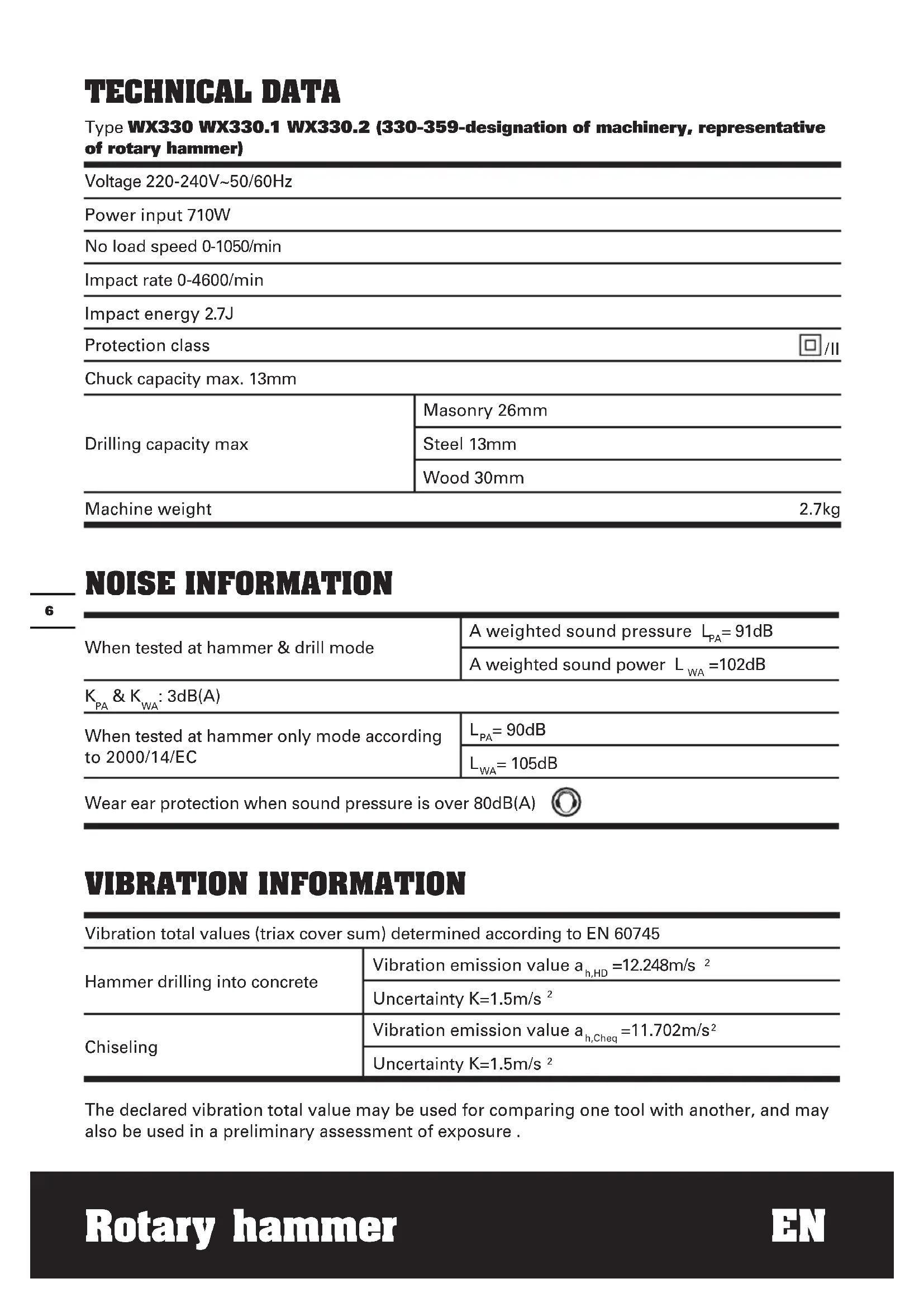
TECHNICAL DATA Type WX330 WX330.1 WX330.2 (330-359-designation of machinery, representative of rotary hammer) Voltage 220-240V~50/60Hz Power input 710W No load speed 0-1050/min Impact rate 0-4600/min Impact energy 2.7J Protection class /II Chuck capacity max. 13mm Drilling capacity max Masonry 26mm Steel 13mm Wood 30mm Machine weight 2.7kg NOISE INFORMATION When tested at hammer & drill mode A weighted sound pressure L
= 91dB A weighted sound power L
: 3dB(A) When tested at hammer only mode according to 2000/14/EC
= 105dB Wear ear protection when sound pressure is over 80dB(A) VIBRATION INFORMATION Vibration total values (triax cover sum) determined according to EN 60745 Hammer drilling into concrete Vibration emission value a h,HD =12.248m/s
The declared vibration total value may be used for comparing one tool with another, and may also be used in a preliminary assessment of exposure .Rotary hammer EN
WARNING: The vibration emission value during actual use of the power tool can differ
from the declared value depending on the ways in which the tool is used dependant on the following examples and other variations on how the tool is used: How the tool is used and the materials being drilled. The tool being in good condition and well maintained. The use the correct accessory for the tool and ensuring it is sharp and in good condition. The tightness of the grip on the handles and if any anti vibration accessories are used. And the tool is being used as intended by its design and these instructions. This tool may cause hand-arm vibration syndrome if its use is not adequately managed.
WARNING: To be accurate, an estimation of exposure level in the actual conditions of
use should also take account of all parts of the operating cycle such as the times when the tool is switched off and when it is running idle but not actually doing the job. This may significantly reduce the exposure level over the total working period. Helping to minimize your vibration exposure risk. ALWAYS use sharp chisels, drills and blades. Maintain this tool in accordance with these instructions and keep well lubricated (where appropriate). If the tool is to be used regularly then invest in anti vibration accessories. Avoid using tools in temperatures of 10
C or less. Plan your work schedule to spread any high vibration tool use across a number of days. ACCESSORIES WX330 WX330.1 WX330.2 Auxiliary handle 1 1 1 Depth gauge 1 1 1 SDS drill bits 3 3 3 SDS flat chisel 1 1 1 13mm Precision keyed chuck with chuck key 1 / / Drill chuck with adapter and chuck key / / 1 We recommend that you purchase your accessories from the same store that sold you the tool. Use good quality accessories marked with a well-known brand name. Choose the type according to the work you intend to undertake. Refer to the accessory packaging for further details. Store personnel can assist you and offer advice.Rotary hammer EN
1. Wear ear protectors. Exposure to noise
can cause hearing loss.
2. Use auxiliary handles supplied with
the tool. Loss of control can cause personal injury.
3. Always wear a dust mask.
4. Hold power tools by insulated
gripping surfaces when performing an operation where the cutting tool may contact hidden wiring or its own cord. Contact with a ‘live’ wire will make exposed metal parts of the tool ‘live’ and shock the operator. SYMBOLS To reduce the risk of injury, user must read instruction manual Warning Double insulation Wear eye protection Wear ear protection Wear dust mask Waste electrical products should not be disposed of with household waste. Please recycle where facilities exist. Check with your local authority or retailer for recycling advice.Rotary hammer EN
OPERATING INSTRUCTIONS NOTE: Before using the tool, read the instruction book carefully. INTENDED USE The machine is intended for hammer drilling in concrete, brick and stone as well as for light chiseling work. It is also suitable for drilling without impact in wood, metal, ceramic and plastic.
- Removing the replacement drill chuck
WARNING: Before removing the
replacement drill chuck, always remove the tool or bit! With the drill pointing toward you, grasp the locking ring (7) of the SDS-plus “quik-change” chuck and pull forward firmly, then rotate it to the side. The SDS-plus “quik-change” chuck will come free.
- Attaching the replacement drill chuck When mounting the precision keyed chuck, grasp the precision keyed chuck with the whole hand, pull it back as far as it will go, then rotate it to the side until it can clearly be heard to latch. The precision keyed chuck locks itself. Check locking by pulling on the precision keyed chuck. Make replacements in a corresponding manner.
Take care that the dust protection cap (9) is not damaged when changing tools.
- INSERTING Clean and lightly oil the bit before inserting. Insert the dust-free bit into the bit holder with a twisting motion until it latches. The bit locks itself. Check the locking by pulling on the tool.
- REMOVING Retract back the bit holder locking sleeve (8) and pull out the bit. WARNING! Your new WORX Rotary Hammer Drill generates powerful forces to get your job done quickly and effectively. These forces may cause inferior quality SDS bits to break and jam in the chuck, We therefore recommend that only high quality SDS bits be used with this tool.
3. MOUNTING OF BIT IN KEYED CHUCK
WARNING: Do not use tools without
SDS-plus for hammer drilling or chiseling! Before mounting the drill bit, attaching the 13 mm keyed chuck, insert bit between the chuck jaws as far as it will go. Ensure drill bit is in the center of the chuck jaws. Using the chuck key provided, there are three holes in which the chuck key should be inserted. Tighten them equally in turn at each of the three holes, not just at one hole. Your drill bit is now locked in the chuck. The bit can be removed by reversing the above procedure (See Fig. B).
- Inserting the drill chuck To work with tools without SDS-plus (e.g., drills with cylindrical shafts), a suitable drill chuck must be used. Insert the adapter (14) of the drill chuck (13) with a twisting motion into the SDS-plus chuck (12) until it can be heard to lock. The adapter locks itself. Check the locking by pulling on the drill chuck.
- Removing the drill chuck To remove the drill chuck (13), pull the locking sleeve (8) to the rear, hold in this position and remove the drill chuck from the tool holder.
5. ON/OFF SWITCH WITH VARIABLE
SPEED CONTROL Depress to start and release to stop your tool. This tool has a variable speed switch (1) that delivers higher speeds with increased trigger pressure - speed is controlled by varying the pressure applied to the switch. (See Fig. D)
6. SWITCH LOCK-ON BUTTON
Depress the on/off switch (1) then the lock on button (2) (See Fig. D); release the on/off switch first and the lock-on button second. Your switch is now locked on for continuousRotary hammer EN
use. To switch off your tool just depress and release the on/off switch.
Slide the handle onto the drill and rotate to the desired working position. To clamp the auxiliary handle rotates the handle clockwise. To loosen the auxiliary handle rotate the handle anti-clockwise (See Fig. E).
WARNING: Always use the auxiliary
CONTROL With the drill pointing away from you, push the forward/reverse-lever (3) to the left “ “for forward rotation. Push the forward/ reverse-lever (3) to the right for reverse rotation “ “.
WARNING: Never change the
direction of rotation while the tool is rotating, wait until it has stopped.
9. ADJUSTABLE DEPTH STOP
Fit the drill bit into the chuck. Loosen the depth stop by rotating the handle anti-clockwise. Slide the depth stop until the distance between the depth stop end and the drill bit end is equal to the depth of hole/screw you wish to make. Then clamp the depth stop by rotating the handle clockwise.
10. FUNCTION MODE SELECTION (See Fig. F)
The operation of the gearbox for each application is set with the function mode selection switch (4), To change between functions, depress the unlocking button (15) and rotate the selector to the desired operating mode. For simultaneous drilling and impacting of concrete or masonry, choose the Hammer drilling position. For screw driving, drilling into steel, wood and plastics choose the Rotary drilling position. For impacting only - for light chipping, chiseling and demolition applications choose the Hammer position.
WARNING: The operating mode
selector switch may be actuated only at a standstill.
WARNING: Prolonged use will cause
the aluminum housing to become hot, do not touch.
YOUR DRILL (HAMMER) If your power tool becomes over heated, set the speed to maximum and run no load for 2-3 minutes to cool the motor. SDS-plus tungsten carbide drill bits should always be used for concrete and masonry. When drilling in metal, only use HSS drill bits in good condition. Always use a magnetic bit holder when using short screwdriver bits. Where possible use a pilot hole before drilling a large diameter hole. MAINTENANCE Remove the plug from the socket before carrying out any adjustment, servicing or maintenance. Your power tool requires no additional lubrication or maintenance. There are no user serviceable parts in your power tool. Never use water or chemical cleaners to clean your power tool. Wipe clean with a dry cloth. Always store your power tool in a dry place. Keep the motor ventilation slots clean. Keep all working controls free of dust. If the supply cord is damaged, it must be replaced by the manufacturer, its service agent or similarly qualified persons in order to avoid a hazard. ENVIRONMENTAL PROTECTION Waste electrical products should not be disposed of with household waste. Please recycle where facilities exist. Check with your local authorities or retailer for recycling advice.Rotary hammer EN
PLUG REPLACEMENT (UK & IRELAND ONLY) If you need to replace the fitted plug then followthe instructions below. IMPORTANT The wires in the mains lead are colored in accordance with the following code: Blue =Neutral Brown = Live As the colors of the wires in the mains lead of thisappliance may not correspond with the coloured markings identifying the terminals in your plug,proceed as follows. The wire which is coloured blue must be connected to the terminal which is marked with N. The wire which is coloured brown must be connected to the terminal which is marked with L.
WARNING: Never connect live or
neutral wires to the earth terminal of the plug. Only fit an approved 13ABS1363/A plug and the correct rated fuse. NOTE: If a moulded plug is fitted and has to be removed take great care in disposing of the plug and severed cable, it must be destroyed to prevent engaging into a socket. Connect Blue to N (neutral) Outer sleeve firmly clamped Cable grip Brown L (live) 13 Amp fuse approved to BS1362 DECLARATION OF CONFORMITY We, POSITEC Germany GmbH Konrad-Adenauer-Ufer 37 50668 Köln Declare that the product, Description WORX Rotary hammer Type WX330 WX330.1 WX330.2 (330-359-designation of machinery, representative of rotary hammer) Function Hammering various materials Complies with the following directives, Machinery directive 2006/42/EC Electromagnetic compatibility directive 2004/108/EC RoHS directive 2011/65/EU Standards conform to EN 55014-1 EN 55014-2 EN 61000-3-2 EN 61000-3-3 EN 60745-2-6 EN 60745-1 The person authorized to compile the technical file, Name: Russell Nicholson Address: Positec Power Tools (Europe) Ltd, PO Box 152, Leeds, LS10 9DS, UK 2014/09/09 Yujin Tang POSITEC Quality Manager12 Bohrhammer D