EasyManual
HmIPWHS2 - Smart Home Homematic IP - Free user manual and instructions
Find the device manual for free HmIPWHS2 Homematic IP in PDF.


User questions about HmIPWHS2 Homematic IP
0 question about this device. Answer the ones you know or ask your own.
Ask a new question about this device
Download the instructions for your Smart Home in PDF format for free! Find your manual HmIPWHS2 - Homematic IP and take your electronic device back in hand. On this page are published all the documents necessary for the use of your device. HmIPWHS2 by Homematic IP.
USER MANUAL HmIPWHS2 Homematic IP
Installation and operating manual

1 Package contents. 16
2 Information about this manual. 16
3 Hazard information 16
4 Function and device overview 17
5 General system information 18
6 Installation 18
7 Start-up 19
7.1 Installation instructions 19
7.2 Installation 20
7.3 Connections 21
7.3.1 Boiler connection 21
7.3.2 Air dehumidifier connection 21
7.4 Pairing 21
8 Troubleshooting 22
8.1 Command not confirmed 22
8.2 Duty cycle 23
8.3 Error codes and flashing sequences 24
9 Restoring factory settings 25
10 Maintenance and cleaning. 25
11 General information about radio operation 25
12 Disposal 26
13 Technical specifications 27
Documentation © 2017 eQ-3 AG, Germany
All rights reserved. Translation from the original version in German. This manual may not be reproduced in any format, either in whole or in part, nor may it be duplicated or edited by electronic, mechanical or chemical means, without the written consent of the publisher.
Typographical and printing errors cannot be excluded. However, the information contained in this manual is reviewed on a regular basis, and any necessary corrections will be implemented in the next edition. We accept no liability for technical or typographical errors or the consequences thereof.
All trademarks and industrial property rights are acknowledged.
Changes in line with technical progress may be made without prior notice.
150929 (web) | Version 1.2 (05/2024)
1 Package contents
Switching actuator for heating systems - 2 channels
4x Screws, 3.0 × 30 ~mm
4x Wall plugs, 5 mm
1x Operating manual
2 Information about this manual
Please read this manual carefully before operating your Homematic IP components. Keep the manual so you can refer to it at a later date if you need to. If you hand over the device to other persons for use, please hand over this manual as well.
Symbols used:

Important! This indicates a hazard.

Please note: This section contains important additional information!
3 Hazard information

Do not open the device. It does not contain any parts that need to be maintained by the user. In the event of an error, please have the device checked by an expert.

For safety and licensing reasons (CE), unauthorised changes and/or modifications to the device are not permitted.

The device may only be operated in dry and dust-free environment and must be protected from the effects of moisture, vibrations, solar or other methods of heat radiation, cold and mechanical loads.

The device is not a toy: do not allow children to play with it. Do not leave packaging material lying around. Plastic films/bags, pieces of polystyrene, etc., can be dangerous in the hands of a child.

We accept no liability for damage to property or personal injury caused by improper use or the failure to observe the hazard warnings. In such cases, all warranty claims are void. We accept no liability for any consequential damage.

The device may only be used for fixed installations. The device must be securely attached within a fixed installation.

Please take the technical data (in particular the maximum permissible effective installed load of the device and the type of load to be connected) into account before connecting a load! All load data relates to ohmic loads. Do not exceed the capacity specified for the device.

When connecting to the device terminals, observe the cables and cable cross-sections permitted for this purpose.

The actuator is part of the building installation. Observe the relevant national standards and directives during planning and set-up. Only qualified electricians (to VDE 0100) are permitted to carry out work on the 230V mains. The applicable accident prevention regulations must be observed while such work is being carried out. To avoid electric shocks from the device, please disconnect the mains voltage (trip the miniature circuit-breaker). Non-compliance with the installation instructions can cause fire or introduce other hazards.

The device has not been designed to support safety disconnection.

Exceeding this capacity could lead to the destruction of the device, fires or electric shocks.

Before the actuator is connected, remove the fuse from the fuse box.

Observe the installation instructions for installation in distribution systems (DIN VDE 0100-410).

The device is only suitable for use in residential environments.

Using the device for any purpose other than that described in this operating manual does not fall within the scope of intended use and will invalidate any warranty or liability.
4 Function and device overview
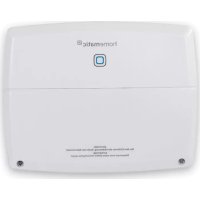
The Homematic IP Switch Actuator for heating systems reliably switches heat pumps, circulation pumps, boilers, electrical radiators and other loads via two channels.
This allows comfortable and demand-based regulation of the room and water temperature according to your personal needs via the Homematic IP smartphone app.
The device can be used in conjunction with the Homematic IP Access Point or the Homematic Central Control Unit CCU3, e.g. as a heating demand relay for controlling heat pumps in conjunction with radiator thermostats.
Device overview:
(A) System button (pairing button and LED)
(B) Cover
(C) Connecting terminals for L (phase conductor)
(D) Connecting terminals for N (neutral conductor)
(E) Connecting terminals PE (protective conductor)
(F) Connecting terminals for switching channel 1 (N.O. contact)
(G) Connecting terminals for switching channel 2 (change-over contact)
(H) LEDs for connection display
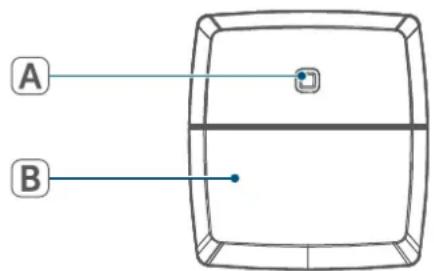
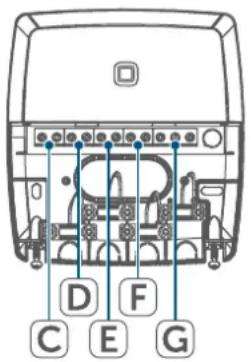
Figure 1
5 General system information
This device is part of the Homematic IP Smart Home system and communicates via the Homematic IP wireless protocol. All devices in the Homematic IP system can be configured easily and individually with a smartphone using the Homematic IP app. The available functions provided by the system in combination with other components are described in the Homematic IP User Guide. All current technical documents and updates can be found at www.homematic-ip.com.
6 Installation
You can flexibly mount the switch actuator for heating systems on walls using the supplied screws and plugs. To do this, proceed as follows:
- Please select a suitable mounting location close to your heating system.

Make sure that no electricity or similar lines run in the wall at this location!
- Open the cover (B). To do this, unscrew both lower screws with an appropriate screwdriver and then remove the cover.
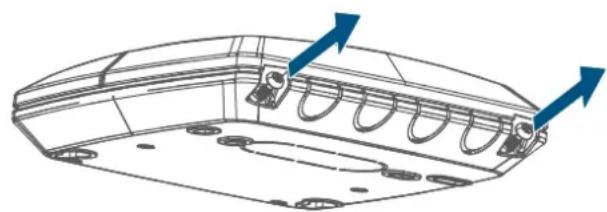
Figure 2
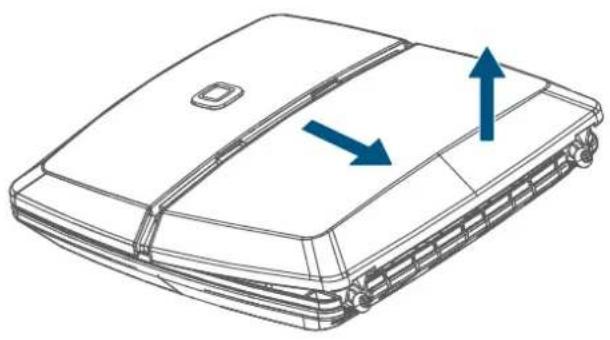
Figure 3
- Use a pen to mark the positions of the four bore holes of the switch actuator on the wall.
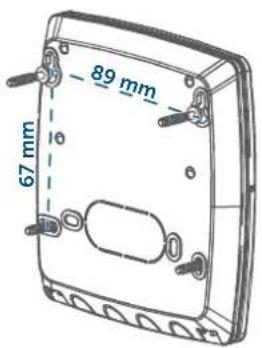
Figure 4
- Use an appropriate drill to make the 5mm holes as illustrated.
- Use the screws and plugs supplied to fasten the switch actuator.
7 Start-up
7.1 Installation instructions

Please read this entire section before starting the pairing procedure.

Please note! Only to be installed by persons with the relevant electro-technical knowledge and experience!*

Please note! Only to be installed by persons with the relevant electro-technical knowledge and experience!*
Incorrect installation can endanger
- your own life,
and the lives of other users of the electrical system.
Incorrect installation also means that you are running the risk of serious damage to property, e.g. from fire. You risk personal liability for personal injury and property damage.
Consult an electrician!
*Specialist knowledge required for installation:
The following specialist knowledge is particularly important during installation:
- The "5 safety rules" to be used: Disconnect from the mains; Safeguard against switching on again; Check that system is deenergised; Earth and short circuit; Cover or cordon off neighbouring live parts;
- Select suitable tool, measuring equipment and, if necessary, personal safety equipment;
- Evaluation of measuring results;
- Selection of electrical installation material for safeguarding shut-off conditions;
IP protection types; - Installation of electrical installation material;
- Type of supply network (TN system, IT system, TT system) and the resulting connecting conditions
(classic zero balancing, protective earthing, required additional measures etc.).

The circuit to which the device and the load will be connected must be protected by a circuit breaker in accordance with EN 60898-1 (tripping characteristic B or C, max. 16 A rated current, min. 6 kA breaking capacity, energy limitation class 3). Installation regulations according to VDE 0100 and HD382 or 60364 must be observed. The circuit breaker must be easily accessible to the user and marked as the disconnecting device for the actuator.

Please observe the hazard information in section (see 3 Hazard information" on page 16) during installation.
Permitted cable cross sections for the connecting terminals C - F are:
| Rigid cable Flexible | cable with/without fer- rule |
| 1.0 - 2.5 mm² 1.0 - | 2.5 mm² |
Permitted cable cross sections for the connecting terminals G are:
| Rigid cable Flexible | cable with/without fer- rule |
| 1.0 - 1.5 mm² 0.5 - | 1.0 mm² |
The permitted cable diameters for all cable bushings are 8 to 11mm
7.2 Installation

For comfortable installation you can pull the cable through the cable inlets after having removed the breakout openings.
To install the switch actuator, please proceed as follows:
- Open the cover (B). To do this, unscrew both lower screws with an appropriate screwdriver and then remove the cover ( see figure).
- Connect the phase conductor to connecting terminal L (C).
- Connect the neutral conductor to connecting terminal N (D).
- Connect the protective conductor to connecting terminal PE (E).
- Connect e.g. the boiler to connecting terminal 1 (F) or a circulation pump to the connecting terminals of the switching channel 2 (G).
- You can expand the installation depending on the installation conditions or according to your personal needs. For further information regarding the connection options please refer to section (see „7.3 Connections" on page 21).
- Close the cover again. To do this, push the latches of the cover into the openings provided and fasten the screws.
7.3 Connections
7.3.1 Boiler connection
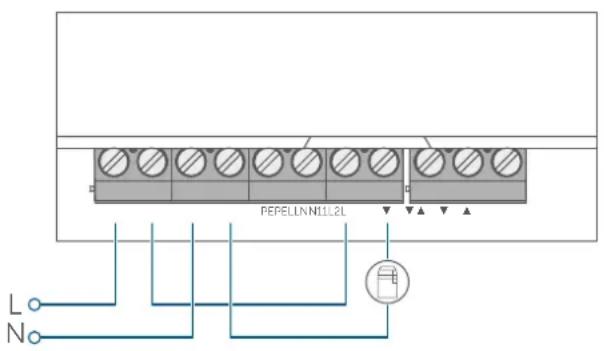
Figure 5
7.3.2 Air dehumidifier connection

This type of connection can be realised only in conjunction with a Homematic IP Access Point or Homematic Central Control Unit CCU3.
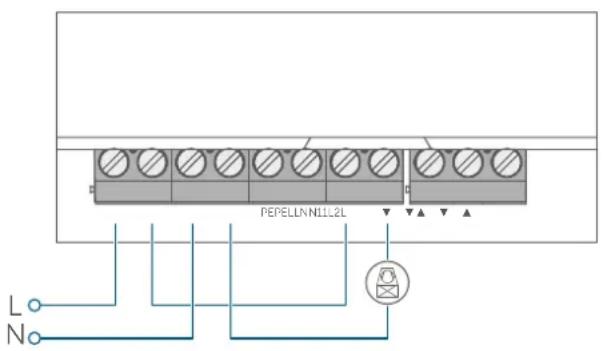
Figure 6
7.4 Pairing

Please read this entire section before starting the pairing procedure.

You can connect the device either to the Homematic IP Access Point or the Central Control Unit CCU3. Further information is available in the Homematic IP User Guide (available to download in the Downloads section at www.homematic-ip.com).

First set up your Homematic IP Access Point using the Homematic IP app so that you can use other Homematic IP devices in the system. For further information, please refer to the Access Point operating manual.
To integrate the switch actuator into your system and enable it to communicate with other devices, you must add it first.
To add your switch actuator to the access point, please proceed as follows:
- Open the Homematic IP app on your smartphone.
-
Select "Add device".
-
Briefly press the system button (A) until the LED starts to flash orange slowly. The pairing mode is active for 3 minutes.
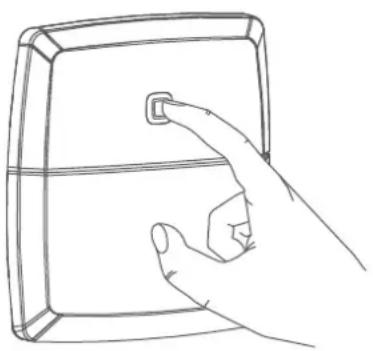

Figure 7
You can manually start the pairing mode for another 3 minutes by briefly pressing the system button (A) ( see figure).
Your device will automatically appear in the Homematic IP app.
- To confirm, enter the last four digits of the device number (SGTIN) in your app, or scan the QR code. The device number can be found on the sticker supplied or attached to the device.
- Wait until pairing is complete.
If pairing was successful, the LED lights up green. The device is now ready for use.
If the LED lights up red, please try again. - In the app, select in which applications you want to use your device.
- In the app, give the device a name and allocate it to a room.
8 Troubleshooting
8.1 Command not confirmed
If at least one receiver does not confirm a command, the device LED (A) lights up red at the end of the failed transmission process. The reason for the failed transmission may be radio interference (see "11 General information about radio operation" on page 25).
This may be caused by the following:
- Receiver cannot be reached.
- Receiver is unable to execute the command (load failure, mechanical blockage, etc.).
- Receiver is faulty.
8.2 Duty cycle
The duty cycle is a legally regulated limit of the transmission time of devices in the 868 MHz range. The aim of this regulation is to safeguard the operation of all devices working in the 868 MHz range.
In the 868 MHz frequency range we use, the maximum transmission time of any device is 1% of an hour (i.e. 36 seconds in an hour). Devices must cease transmission when they reach the 1% limit until this time restriction comes to an end. Homematic IP devices are designed and produced with 100% conformity to this regulation.
During normal operation, the duty cycle is not usually reached. However, repeated and radio-intensive pairing processes mean that it may be reached in isolated instances during start-up or initial installation of a system. If the duty cycle is exceeded, this is indicated by three slow red flashes of the device LED, and may manifest itself in the device temporarily working incorrectly. The device starts working correctly again after a short period (max. 1 hour).
8.3 Error codes and flashing sequences
| Flashing code Meaning Solution | ||
| Short orange flashes | Radio transmission/attemptsing to transmit/data transmission | Wait until the transmis-sion is completed. |
| 1x long green flash Transmis-sion confirmed | You can continue oper-a-tion. | |
| 1x long red flash | Transmission failed or duty cycle limit reached | Please try again (see „8.1 Command not confirmed" on page 22) or (see „8.2 Duty cycle" on page 23). |
| Short orange flashes (every 10 s) | Pairing mode active (pair-ing with the access point) | Enter the last four digits of the device serial number to confirm (see „7.4 Pair-ing" on page 21). |
| Fast orange flashing | Pairing mode of both de-vices active (pairing) | Wait for confirmation of the device LED (see „8.3 Error codes and flash-ing sequences" on page 24). |
| 1x long red flash | Transmission failed or duty cycle limit is reached | Please try again (see „8.1 Command not confirmed" on page 22) or (see „8.2 Duty cycle" on page 23). |
| 6x long red flashes Device defective | Please see your app for error messages or contact your retailer. | |
| 1x orange and 1x green lit up | Test display | You can continue once the test display has stopped. |
9 Restoring factory settings

The factory settings of the device can be restored. If you do this, you will lose all your settings.
To restore the factory settings of the switch actuator, please proceed as follows:
- Press and hold the system button (A) for 4 seconds until the LED (A) starts to quickly flash orange ( see figure).
- Release the system button.
- Press and hold the system button again for 4 seconds, until the LED lights up green.
- Release the system button to finish restoring the factory settings.
The device will perform a restart.
10 Maintenance and cleaning

The product does not require any maintenance. Enlist the help of an expert to carry out any repairs.
Clean the device using a soft, clean, dry and lint-free cloth. dampen the cloth a little with lukewarm water to remove more stubborn marks. Do not use any detergents containing solvents, as they could corrode the plastic housing and label.
11 General information about radio operation
Radio transmission is performed on a non-exclusive transmission path, which means that there is a possibility of interference occurring. Interference can also be caused by switching operations, electrical motors or defective electrical devices.

The transmission range within buildings can differ significantly from that available in open space. Besides the transmitting power and the reception characteristics of the receiver, environmental factors such as humidity in the vicinity play an important role, as do on-site structural/screening conditions.
eQ-3 AG, Maiburger Strasse 29, 26789 Leer, Germany, hereby declares that the radio equipment type Homematic IP HmIP-WHS2 is compliant with Directive 2014/53/EU. The full text of the EU declaration of conformity can be found at www.homematic-ip.com
12 Disposal
Instructions for disposal

This symbol means that the device must not be disposed of as house
I hold waste, general waste, or in a yellow bin or a yellow bag.
For the protection of health and the environment, you must take the product and all electronic parts included in the scope of delivery to a municipal collection point for old electrical and electronic equipment to ensure their correct disposal. Distributors of electrical and electronic equipment must also take back obsolete equipment free of charge.
By disposing of it separately, you are making a valuable contribution to the reuse, recycling and other methods of recovery of old devices.
Please also remember that you, the end user, are responsible for deleting personal data on any used electrical and electronic equipment before disposing of it.
Information about conformity

The CE mark is a free trademark that is intended exclusively for the authorities and does not imply any assurance of properties.

For technical support, please contact your retailer.
13 Technical specifications
Device short description: HmIP-WHS2
Supply voltage: 230V / 50Hz
Current consumption: 16 A max.
Power consumption in standby: < 0.2 W
Protection rating: IP20
Ambient temperature: 0 to 50^
Load type: Resistive load
Max. switching capacity:
Switching channel 1: 3680 W
Switching channel 2: 1150 W
Method of operation: 1.B
switching cycle: 10000
Relay: Changeover contact: 1-pole, contact
NO contact: 1-pole, contact
Withstand voltage: 2,500 V
Temperature glow wire test: 850^
Temperature ball pressure test: 125^
Construction: Independently mounted electronic regulation and control device
Pollution degree: 2
Protection rating: IP20
Protection class:
Dimensions (W x H x D): 120 x 130 x 30 mm
Weight: 165 g
Radio frequency band: 868.0 - 868.6 MHz
869.4 - 869.65 MHz
Maximum radiated power: 10 dBm
Receiver category: SRD category 2
Typical range in open space: 250 m
Subject to modifications.
Table des matieres
Apparaatcode: HmIP-WHS2
Voedingsspanning: 230V / 50Hz
Stroomopname: 16 A max.
Free download of the Homematic IPapp!


Download on the
App Store


GET IT ON
Google Play
Bevollmächtiger des Herstellers: Manufacturer's authorised representative.

eQ-3 AG
Maiburger Straße 29
26789 Leer / GERMANY
www.eQ-3.de