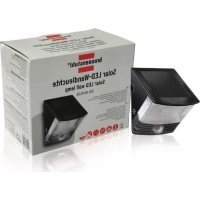
SOL 04 PLUS - Lighting BRENNENSTUHL - Free user manual and instructions
Find the device manual for free SOL 04 PLUS BRENNENSTUHL in PDF.



User questions about SOL 04 PLUS BRENNENSTUHL
0 question about this device. Answer the ones you know or ask your own.
Ask a new question about this device
Download the instructions for your Lighting in PDF format for free! Find your manual SOL 04 PLUS - BRENNENSTUHL and take your electronic device back in hand. On this page are published all the documents necessary for the use of your device. SOL 04 PLUS by BRENNENSTUHL.
USER MANUAL SOL 04 PLUS BRENNENSTUHL
Installations- and Operating Instructions Solar LED wall lamp SOL 04 PLUS
Introduction
The lamp works with a built-in motion detector that constant scans for heat sources moving in its monitoring area. As soon as a heat source (such as a person or a car) is detected in this area, the light comes on and remains on as long as the heat source moves in the monitored area.
INSTALLATION TIPS
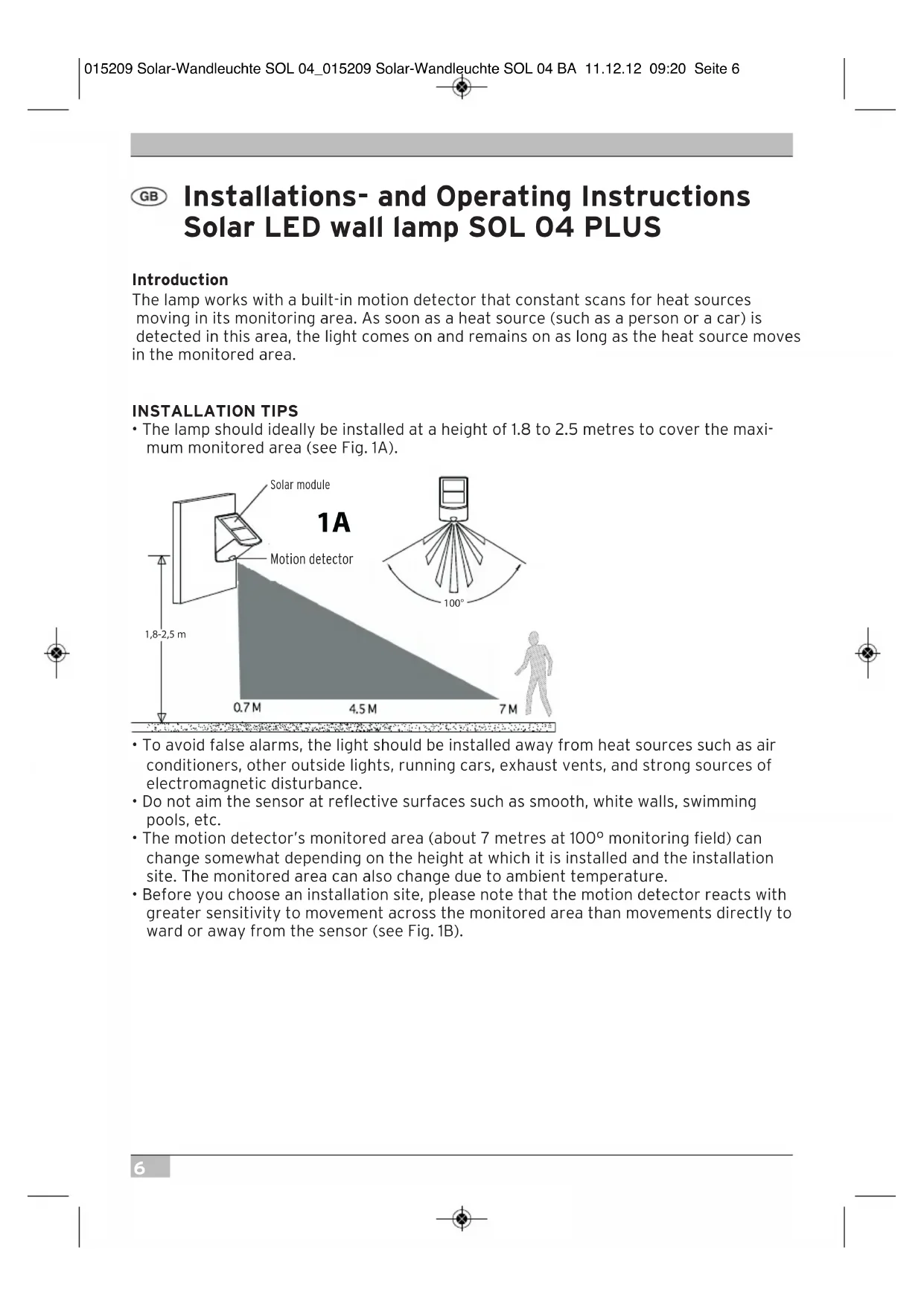
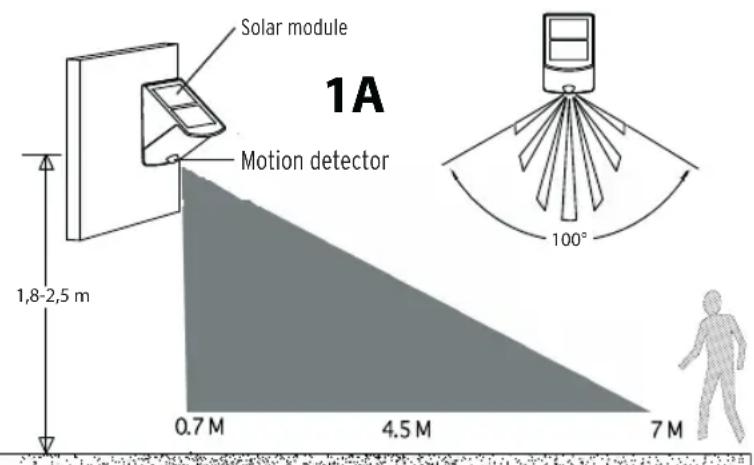
- The lamp should ideally be installed at a height of 1.8 to 2.5 metres to cover the maximum monitored area (see Fig. 1A).
- To avoid false alarms, the light should be installed away from heat sources such as air conditioners, other outside lights, running cars, exhaust vents, and strong sources of electromagnetic disturbance.
- Do not aim the sensor at reflective surfaces such as smooth, white walls, swimming pools, etc.
- The motion detector's monitored area (about 7 metres at 100^ monitoring field) can change somewhat depending on the height at which it is installed and the installation site. The monitored area can also change due to ambient temperature.
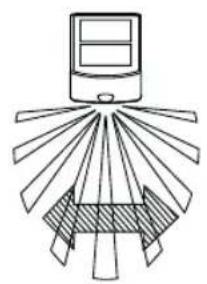
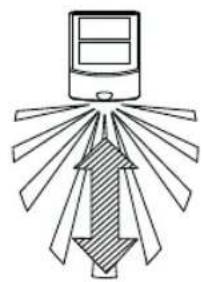
- Before you choose an installation site, please note that the motion detector reacts with greater sensitivity to movement across the monitored area than movements directly to ward or away from the sensor (see Fig. 1B).
good detection poor detection
1B
- Mount the lamp such that the solar module receives the maximum possible DIRECT SUNLIGHT during the day.
INSTALLATION STEPS
- Remove the light's mounting plate by opening the locking mechanism using the enclosed key and turning it toward "OPEN".
2.Drill two holes in the wall on which you wish to install the lamp and mount the mounting plate with the screws (see Fig. 2).
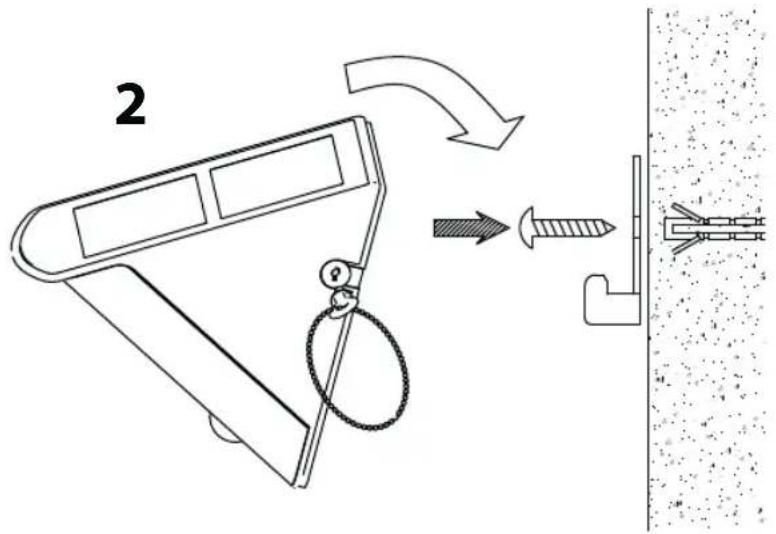
- Mount the lamp on the mounting plate and secure it by turning the key to „LOCK". Remove the key and keep it for future use.
OPERATION
- The rechargeable batteries inside are charged by the solar module. The longer the solar module is exposed to direct sunlight during the day, the longer the light can remain on. Before starting to use the light, the batteries should be charged in sunlight for at least 3 to 4 days (slider switch set to OFF). Alternately, the batteries can be charged with a standard battery charger.
- After the batteries are charged, the lamp can be used. The following operational modes can be set on the slider switch on the back of the housing.
AUTO: Normal operation through the integrated motion detector
ON: Constant light(e.g. as emergency light)
OFF: Deactivation for storage and for charging
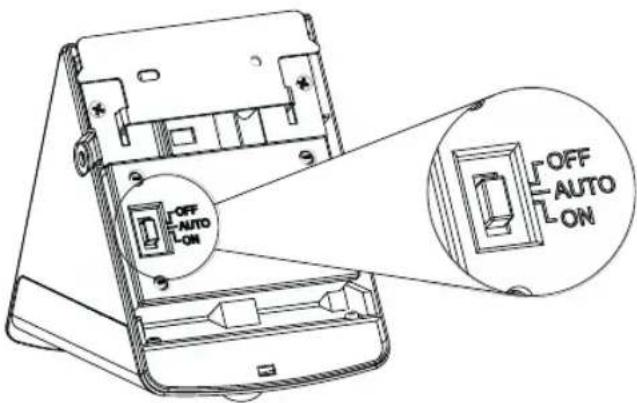
FUNCTION
- When the light is turned on for the first time, the LEDs light up and the motion detector begins to warm up. The LEDs will stay on for around 40 seconds and then blink 3 times and switch into operational mode.
- The light is equipped with a dimmer switch, i.e. the light switches into "AUTO" mode when it gets dark. The LEDs activate when movement is detected in the monitored area and stay on around 60 seconds after the last movement. If motion is detected when the light is already on, the lighting period begins again and the LEDs stay on for another 60 seconds.
- In daylight or in bright surroundings, the light is not activated by motion.
REPLACING THE RECHARGEABLE BATTERIES
- Set the switch to the OFF-position.
- Remove the screws from the battery cover on the back of the light.
- Remove the old batteries and replace them with new rechargeable AA Ni-MH 1.2 V batteries. Make sure the +/- poles are correctly connected.
- The batteries should be charged in direct sunlight for at least 3 to 4 days prior the first use of the light (slider switch in OFF-position).
TROUBLESHOOTING
Problem Light does not activate when there is movement in the monitored area.
Possible Cause Suggested Solution
- Batteries are dead Recharge batteries
2.Nearby lights too bright. Aim the unit away from the light source
Problem Light activates for no apparent reason (false alarm).
Possible Cause Suggested Solution
- Heat sources such as air Place the light beyond these sources conditioners, exhaust vents, ventilation openings, other outdoor lights, running cars, activate the sensor.
- Animals, e.g. martens or house pets. Re-aiming the light can help.
- Reflections from pool or Re-aim light from reflecting surfaces.
NOTE: Motion detectors are more sensitive in dry and cold surroundings than in moist and hot surroundings.
TECHNICAL DATA
Battery: 3 x AA 1,2 V / 600 mAh
Number of LEDs: 2 × 0.5 W
Light duration: 60 ± 2 Sec.
Monitored angle: 100^
Range: max. 7 metres
Response sensitivity: adjustable from daylight to night
Protection Class: IP44

DISPOSAL

Dispose of electronic devices in an eco-friendly fashion! Electronic devices do not belong in your household waste. Compliant with European Guideline 2002/96/EG for electric and electronic devices, used electronic devices must be collected
separately and taken in for environmentally sound re-cycling. Options for disposing of used devices may be obtained from your township, city or municipal government

Incorrect disposal of batteries rechargeable batteries can harm the environment!
Batteries and rechargeable batteries do not belong in the household waste. They can contain poisonous heavy metals and are subject to treatment as hazardous
wastes. Take your used batteries to a municipal collection site.

INSTALLATIONSFÖRSLAG
BbIKI:OTKnIOueHnE nIy XpaHnN IJIIN3apAdkn
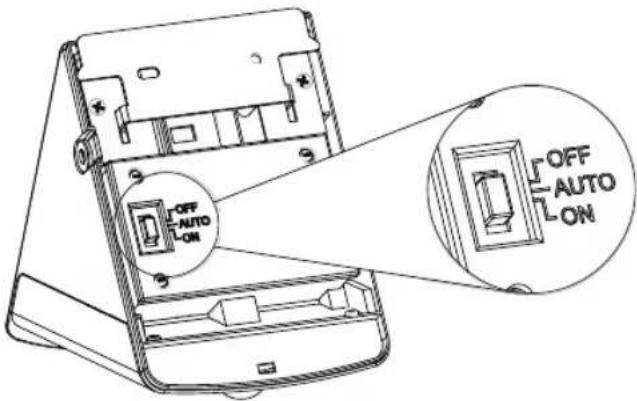
ФУHKLЛЯ
- Ecnn lamna BknoaetcBnepBbie, CBeToNOdb 3aropaTc, n daTnK DnHexeHna HauHaet nporpeBaTcBc. CBeToNOdb OCTaIOCTc BkNoueHHbIMn pImepHO Ha 40 cekyHd, 3aTeM OH mraIOT 3 pa3a n MeHIOCTc B peXm pa6Otbl.
- lamna OchauheHa CTyneHuaTbIM BbIKIOUaTeIeM IJI CHNKeHnO CBeueEHHOCHTN, T.e. lamna BkIOuayetcB PexKHe ME KcNpyataun,ABTO" ToIbKO KOrda cTaHOBUNCTeMHO.CBeToNDoBb BkIOUaOTcPn DvIXeHN B O6NaCTn H6NIoDEHn N OCTaOTc BkIOUeHHbIMN pImepHo eue Ha 60 cekHynd nocle nocJeHero DvIXeHn.Ecnn BO Bpem CBeueHn paCNo3HaETcD BVXeHne, dInTeNbHOCTb CBeueHn HaUnHaETc ChauJana, IN CBeToNDoBb OCTaOTc BkIOUeHHbIMN cIedyUOuine 60 cekHyd.
- npn DHeBHom CBeTe nn CBetnom OkpyKeHnn Iamna He aKTHBnpyeTc npn BO3HNKHOBEHn nBuXKeHn.
3AMEHA IPEPE3APRAXAEMOTO AKKUMYJRTOPA
1.BctabbTe BblKIOuatoB bnoJoxHe BblKI.
2.3aTeM OTOeHNHTe 6oNTbHa KOpNcE C 3aHHe cTOpOhbl NaMnbl.
3. BbTaunTe aKKymyIaTOp n3 Kopnyca n 3aMeHnTe Ha Tprn HObIx nepezapJxaeMbIX aKKymyIaTopa AA Ni-MH 1,2 B. Ppi noKJIoueHnn aKKymyIaTopa co6IouaTe npabNbHOCTb NOJaPHOCTn.
4. OctabTe BbIKIouaTeIb B TeueHne MNHMym 3-4 coNHeuHbIX DHeB N03nUN «BbIKJI», YTO6bl obecneuTb, yTo aKKyMylAtopt 6bl INoHocTbIO 3apJxH nepeD OKOHaTeNbHOH NaCTpOIKoN I daIbHeiUM HopMaIbHbIM peKIMOM pa6Otbl.
YCTPAHNEHNE HENOLADOK
PpO6nema:JaMaHa He BkIIOUaTeTc Pn IIOBLeHmN DmXKeHn B O6NaCTn Ha6JIIODeHn.
Bo3MOxHa npuHa
PpeJIOXeHHoe yCTpaHeHHe HcnpaBHOCTn
1.6aTapeu nucTbIe 3apdntb 6aTapeu
2. pacnoJoxeHHoe 6n3n OTdAnntb yCTpoNCTBO OT daHHbIX NCTOCHNKOB OCBeueHHe CnIshKOM npKoe. n3nyehnCBeTa
Ipo6nema Iamna 3aropaeTcno HenoHrTHo npuHne (noxHa TpeBora).
Bo3MOxHn npuHa
PpeJIOXeHHoe yCTpaHHe HEmCnPaBHOCTN
- INCTOUYHKI TeIIa, KaK KOHNiCNoHepbI, DaHHbIX NCTOUYKOB. paCNOLOXKeYCTPOINCTBO BdaIIN OT BEHTNIAUHOHbIe OTBepCTnI, DbIMOXoDbI, dpyrIe np6Opbl yInuHoro OCBeueHn I BnJxUHeCMAuHbI aKTINBnpyOT daTtIK.
- 3Bepn, Hapnpimep KUHnua nn MoKet NOMOyb HOBaHaCTPOIka NaMnbl. DOMaWHHe JINBOTHbI.
- OTPaKeHnO T6accEHa NIN BbIPOBHrTb 3aHOBO DaTHNK OTPaKaIOxN NOBepXHocTei.
BhImaHne:B cyxoh n npoxlaHoi okpykaioe cpe, daTunk pearnpyert 6oJee yBCTbntbHO, Yem BO BnaXHoi n JapKoN OKpykaioe cpe.
TEXHNUECKNE DAHHbIE
akymyIaTOp:3xAA1,2V/600mAh
KoJ-Bo CnI: 2× 0,5W
ДИЛТЕЛБНOCТСBEЧЕНИА:60±2ceK.
yrolnHa6JIOpEnHn:100°
paDnyc DeiCTBnA: MaKc. 7 MeTpOB
CytBCTBNTeJIbHOCTb Cpa6aTbIBAHNHaCTpANBaETcO T DHeBHO CBETA K HOUHOMY
Klacc 3aunTbI:IP44
C
YTNIN3AUIN

3JNeKtponp6OpbI Bb6paCbBAIOB T COOTBeTCTBN C yCIOBnMn OKpykaIouei Cpebl! 3JNeKtponp6OpbI He OTHocrTa K DomaHemy Mycopy. Cornacho EbponeNcKo DnpeKtNBe 2002 / 96 / EC o ctabbIX 3JNeKtpuuecknx np6opax, n3paXoObaHHbE 3JNeKtponp6OpbI
dONKbI CO6npaTbc OTeNbHO N 6bITb NOBepHyTb IOBTOPOHMY NCNOJb3OBAHIO B COOTBETCTBn C OKpykaUoSei CpeoB. Bby y3Haete BO3MOXHOCTN O6 yTuIN3aUN OTXODOB OTCnyKIB- Wero yctpoiCTBa B Baem KOMMyHaJIbHOM ynpabJeHHN IIN MyHNzIIaNTe.

3aarpnaHne okpykaioe cpebl BCnepCTBne HnpabnIbHO yTnn3auu 6aTapeu n aKKymyIaTOpob!
BaTapeu n aKKymyIaTOPbI He OTHoCraTc K eKeJHeBHomMy DomaHemMy Mycopy. OHn MOryt copeKatab JIOBtble TAgKeIbIe MetaIIbI n IODNeXaT o6pa6OTke CneOToXoIDob. IOnrTomy otDaIte n3pacxOIOBaAHHbIe aKKymyIaTOPbIe BaTapeu Ha 06ueCTBeHHbI pyHKT c6opa Mycopa.


- Installations- and Operating Instructions Solar LED wall lamp SOL 04 PLUS
- Introduction
- INSTALLATION TIPS
- INSTALLATION STEPS
- OPERATION
- FUNCTION
- REPLACING THE RECHARGEABLE BATTERIES
- TROUBLESHOOTING
- Possible Cause Suggested Solution
- TECHNICAL DATA
- DISPOSAL
- INSTALLATIONSFÖRSLAG
- ФУHKLЛЯ
- 3AMEHA IPEPE3APRAXAEMOTO AKKUMYJRTOPA
- YCTPAHNEHNE HENOLADOK
- Bo3MOxHa npuHa
- PpeJIOXeHHoe yCTpaHeHHe HcnpaBHOCTn
- Bo3MOxHn npuHa
- PpeJIOXeHHoe yCTpaHHe HEmCnPaBHOCTN
- TEXHNUECKNE DAHHbIE
- C
- YTNIN3AUIN
Brand : BRENNENSTUHL
Model : SOL 04 PLUS
Category : Lighting