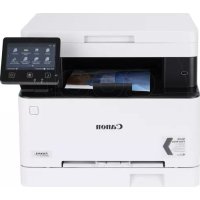
Turn on the device, follow the on-screen instructions to select language, country/region, time zone, then configure the network connection (Wi-Fi, Ethernet, or USB) and install the driver from the CD or Canon website.
How to connect the printer to Wi-Fi?
Make sure the Wi-Fi router is on and nearby. On the printer screen, select the SSID and enter the network key. If the router supports WPS, use this simplified method.
What to do in case of a paper jam?
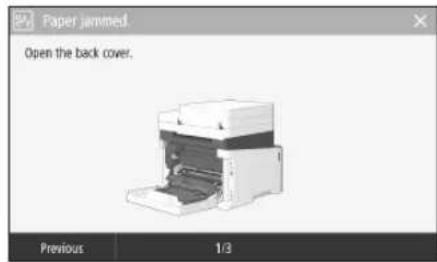
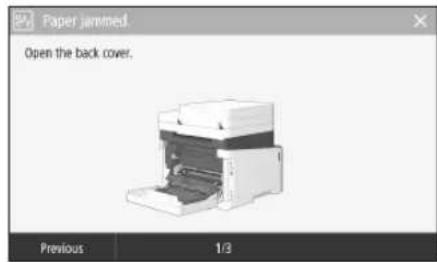
The screen displays instructions to clear the jam. Open the indicated covers, carefully remove the jammed paper following the instructions, then close. If the problem persists, refer to the user guide.
How to replace a toner cartridge?
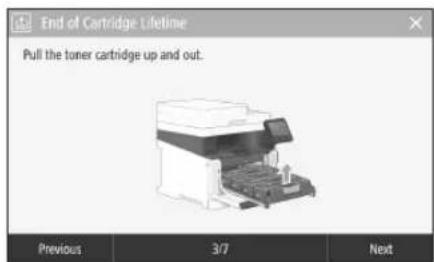
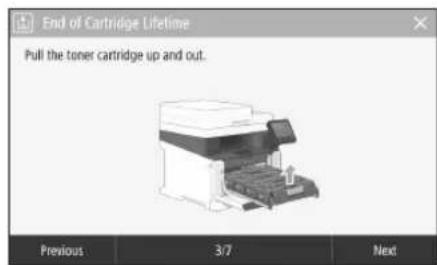
Open the front cover, remove the used cartridge by pulling it by the handle. Take out the new cartridge from its packaging, remove the adhesive tape, then insert it until it clicks into place. Follow the on-screen instructions.
How to clean the printer?
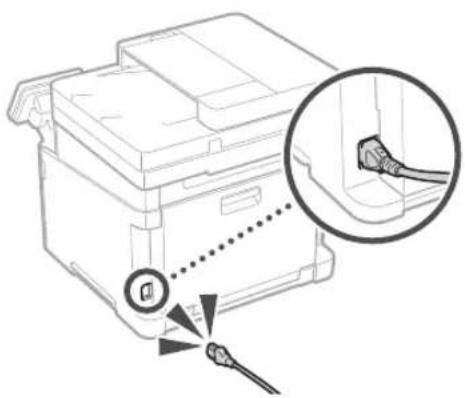
Before cleaning, turn off the device and unplug the power cord. Use a soft, slightly damp cloth (water only) to wipe the exterior. Never use alcohol, benzene, or flammable products.
How to scan a document to a computer?
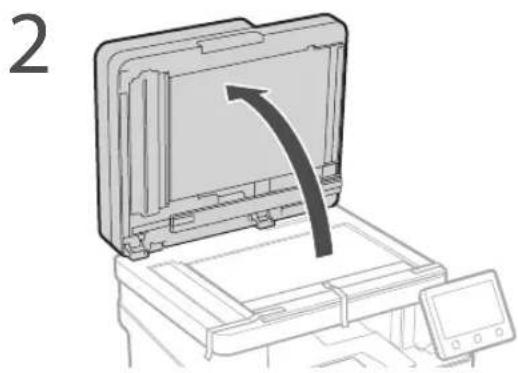
Place the original on the glass or in the feeder. On the screen, press Scan, choose the destination (email, folder, etc.) and settings. From the computer, use MF Scan Utility to start scanning.
How to set up the fax function?
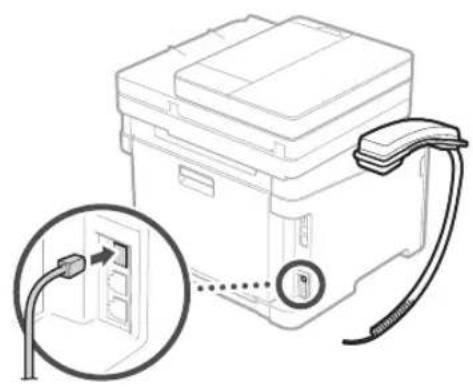
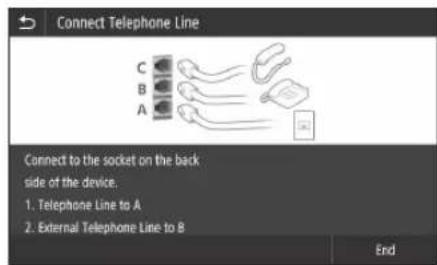
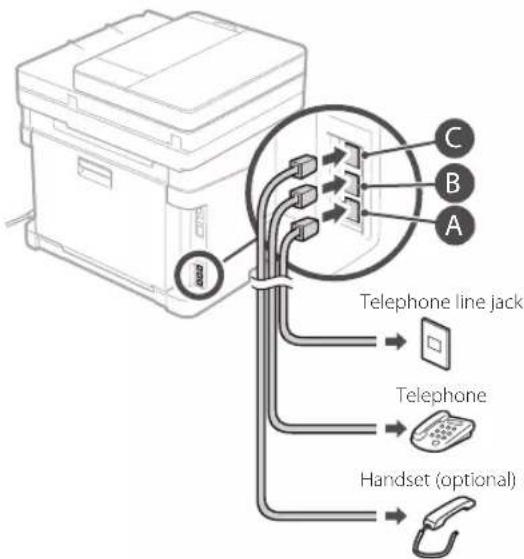
Connect the device to an analog telephone line. Follow the on-screen instructions to register your fax number and name, then choose the reception mode. You can send faxes from the control panel or from a PC.
How to save energy with the printer?
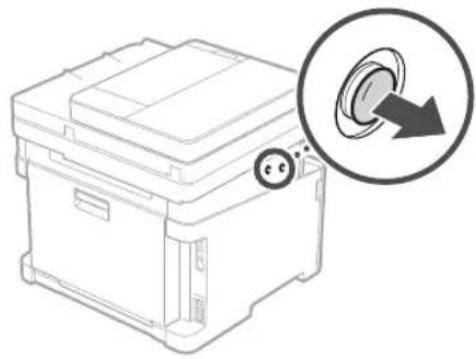
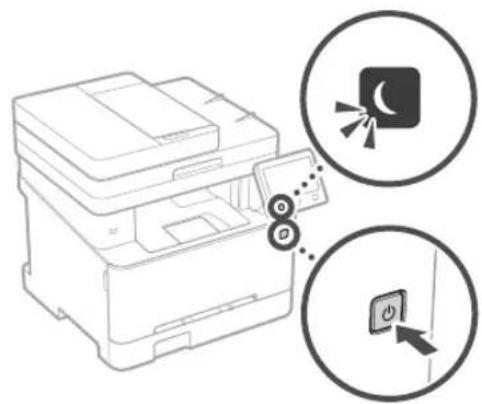
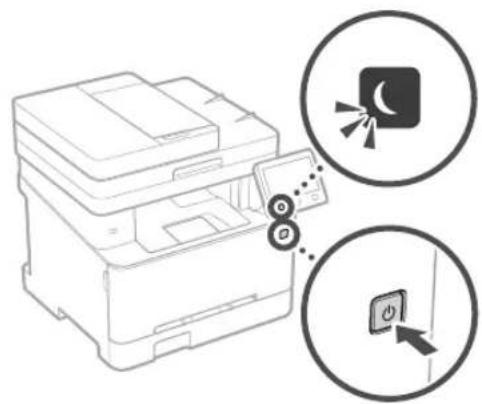
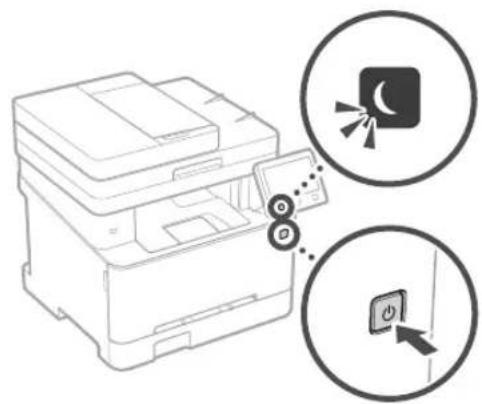
Press the Energy Save button to put the device into standby. For extended periods, turn off the main switch and unplug the power cord. Use the configurable automatic standby mode in settings.
What to do if the printer does not turn on?
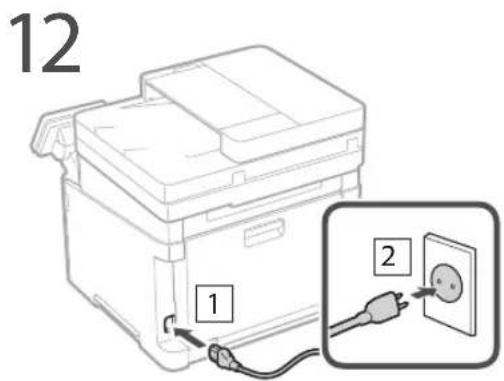
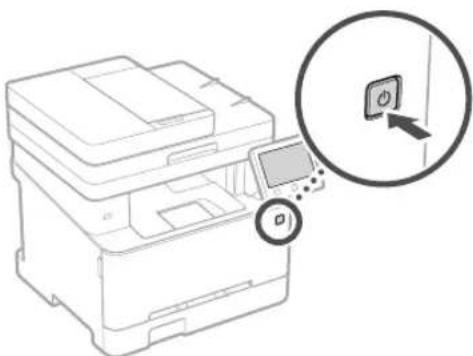
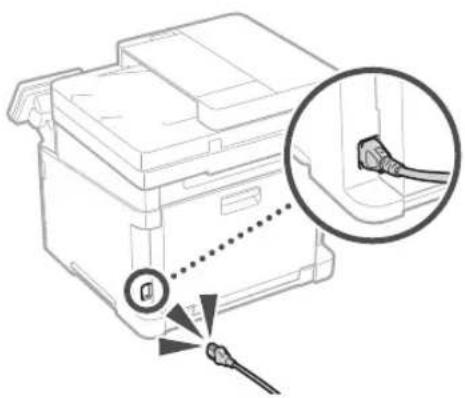
Check that the power cord is properly connected to the device and to a working power outlet. Press the power switch. If the screen remains black, unplug the cord, wait 10 seconds, then plug it back in. If the problem persists, contact customer service.
What are important safety precautions?
Place the printer on a stable surface, away from moisture and dust. Use only the supplied power cord. Never disassemble the device. If there is smoke or an unusual odor, unplug immediately and contact a qualified service technician.
User questions about ISensys MF641Cw CANON
1 question about this device. Answer the ones you know or ask your own.
Ask a new question about this device
How to install or update the driver for the Canon iSensys MF641Cw printer?
Frequently Asked Questions -07/04/2026
Response Notice-Facile
To install or update the driver for your Canon iSensys MF641Cw printer, follow the steps suitable for your operating system.
Installation on Windows:
Go to the official Canon France support page for the iSensys MF641Cw.
Download the "Generic Plus UFR II Printer Driver" (version 2.90 or newer) as well as "ScanGear" (version 11.3 or newer) to use all scanning features.
Double-click the downloaded file to start the automatic installation.
Follow the on-screen instructions, selecting your connection type (USB, Ethernet, or Wi-Fi depending on your setup).
If the installation screen does not appear, manually search for the file "MInst.exe" by accessing "D:" (or the letter of your CD/DVD drive) in Windows Explorer.
Once the installation is complete, restart your computer for the driver to be fully operational.
Installation on macOS:
Visit the Canon France support page for the iSensys MF641Cw and download the driver version compatible with your version of macOS.
Depending on the purchase date of your device, the driver for macOS may not be included on the supplied CD-ROM, but the latest versions are always available for download on the Canon website.
Launch the downloaded file and follow the installation wizard.
Refer to the detailed driver manual for macOS-specific configurations if necessary.
For updates: Regularly visit the Canon France support page for the iSensys MF641Cw to check for new driver versions. Updates often bring compatibility fixes and performance improvements.
If you encounter problems during installation, ensure that the device is properly connected to your computer (USB or network) and that your operating system is up to date.
Respond (be the first)
Download the instructions for your Printer in PDF format for free! Find your manual ISensys MF641Cw -
CANON and take your electronic device back in hand. On this page are published all the documents necessary for the use of your device. ISensys MF641Cw by CANON.
USER MANUAL ISensys MF641Cw CANON
Please read "Important Safety Instructions" before operating this product. After you finish reading this guide, store it in a safe place for future reference.
The information in this document is subject to change without notice.
canon.com/oip-manual
Quick Setup
Getting Started
Please read "Important Safety Instructions" before operating this product.
P.78
After you finish reading this guide, store it in a safe place for future reference.
The information in this document is subject to change without notice.
Mise en route
```bash
canon.com/oip-manual to read the User's Guide that describes all functions of this machine.
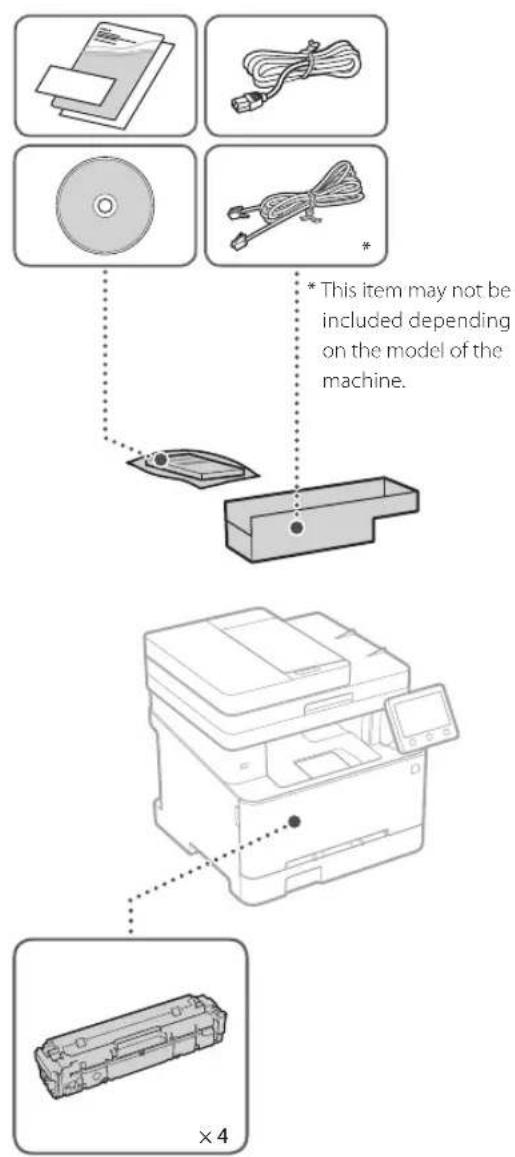
Items Included with the Machine Installing the Machine
Starter toner cartridges are included.
Before starting the installation
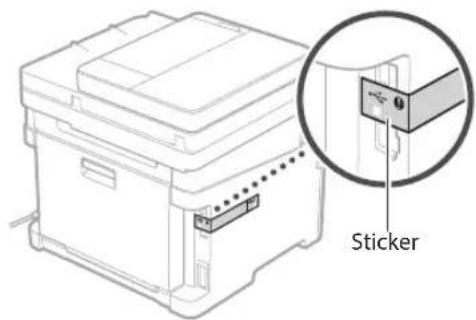
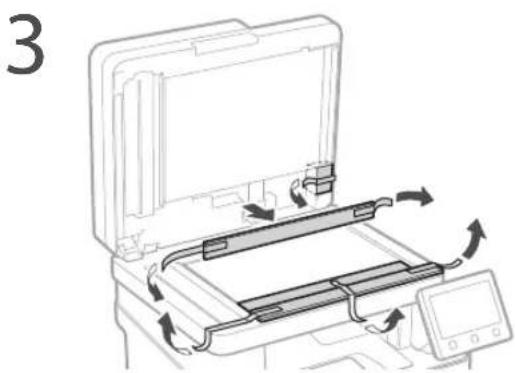
Remove all of the tape.
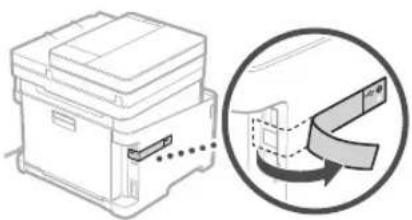
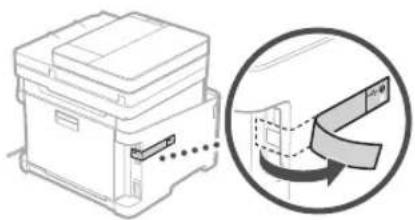
Do not remove the sticker that covers the USB port.
Installation Requirements
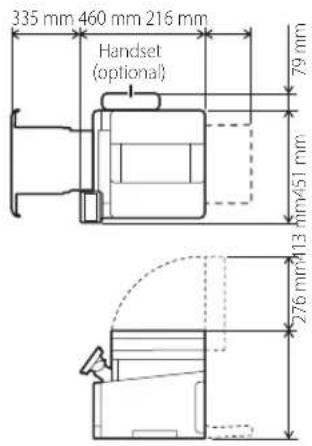
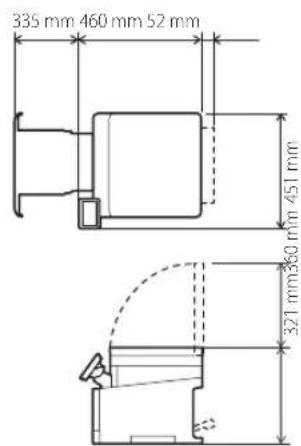
Provide a space of 100mm or more around the machine.
MF645Cx/MF643Cdw
MF641Cw
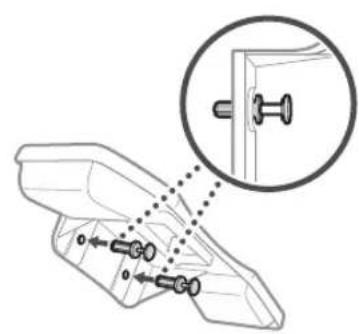
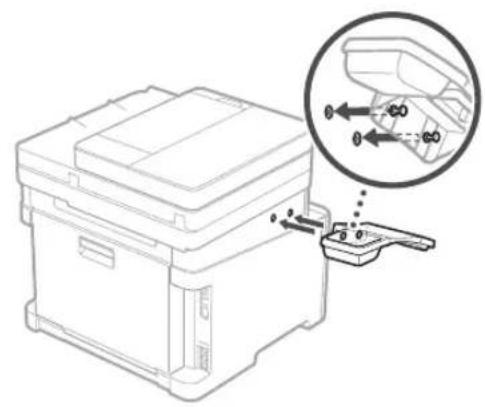
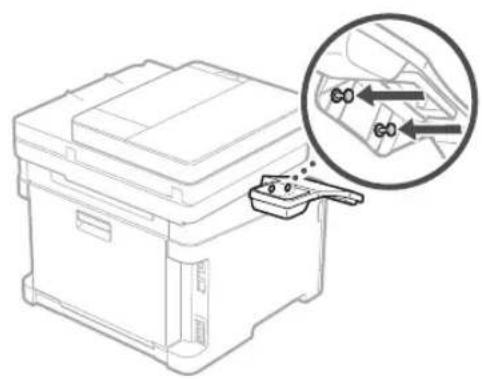
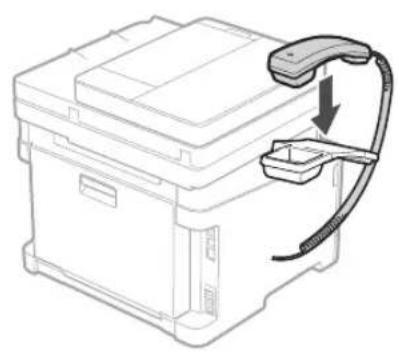
11 Attach the handset (optional).
Next, proceed to configure the machine.
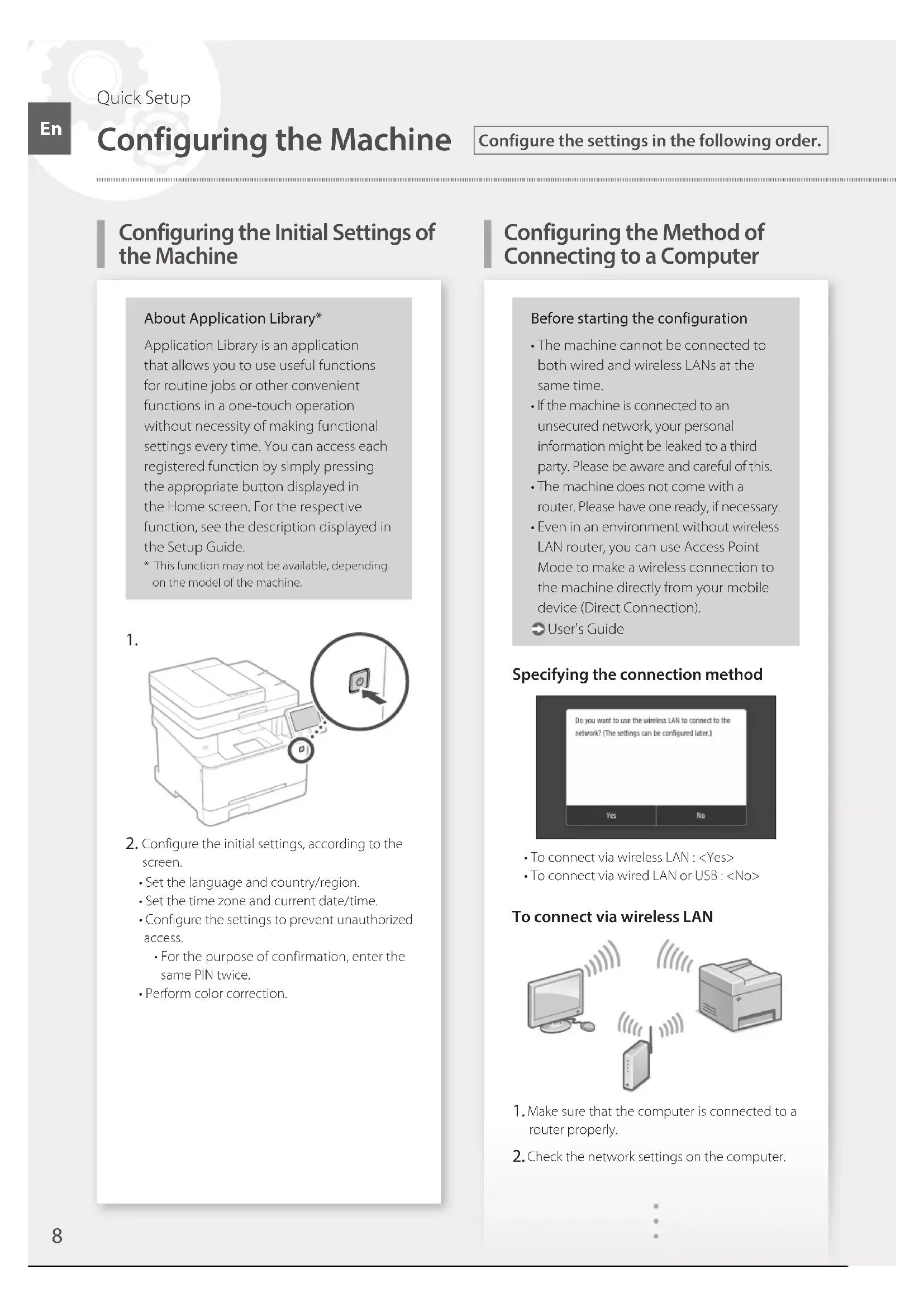
Configuring the Initial Settings of the Machine
About Application Library*
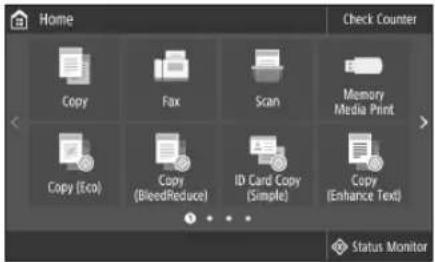
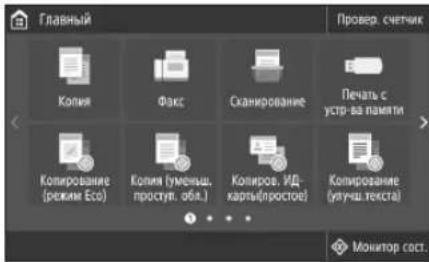
Application Library is an application that allows you to use useful functions for routine jobs or other convenient functions in a one-touch operation without necessity of making functional settings every time. You can access each registered function by simply pressing the appropriate button displayed in the Home screen. For the respective function, see the description displayed in the Setup Guide.
This function may not be available, depending on the model of the machine.
1.
Configure the initial settings, according to the screen.
Set the language and country/region.
Set the time zone and current date/time.
Configure the settings to prevent unauthorized access.
For the purpose of confirmation, enter the same PIN twice.
Perform color correction.
Configuring the Method of Connecting to a Computer
Before starting the configuration
The machine cannot be connected to both wired and wireless LANs at the same time.
If the machine is connected to an unsecured network, your personal information might be leaked to a third party. Please be aware and careful of this.
The machine does not come with a router. Please have one ready, if necessary.
- Even in an environment without wireless LAN router, you can use Access Point Mode to make a wireless connection to the machine directly from your mobile device (Direct Connection).
User's Guide
**Specifying the connection method**
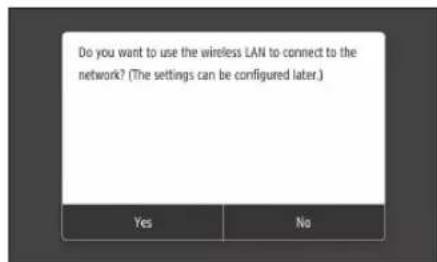
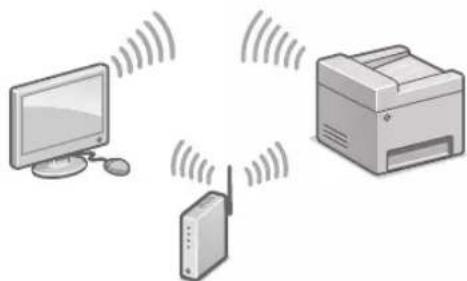
To connect via wireless LAN:
To connect via wired LAN or USB:
To connect via wireless LAN
Make sure that the computer is connected to a router properly.
Check the network settings on the computer.
Take note of the SSID and network key.
Check the label on the router. User's Guide
The setting operation is easier if the router is provided with a WPS mark. User's Guide
Set the access point and network key according to the screen below.
Select OK>
Select .
Select
Select the access point (SSID), and select .
Enter a WEP key (network key), and select .
Select .
Wait until message is displayed.
Select.
The IP address will be automatically configured in a few minutes.
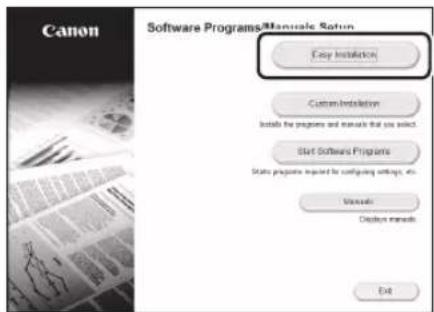
Install the driver and software.
P.10 "Installing the software"
Now you are finished with the configuration of the initial settings.
If your machine is provided with the fax function, proceed to configuring the fax settings. P.11
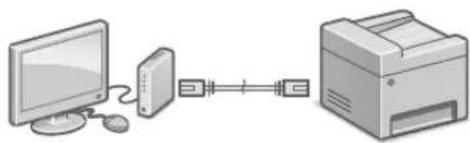
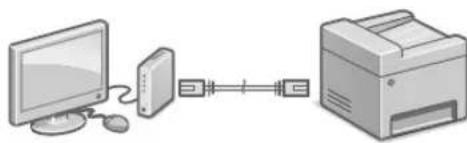
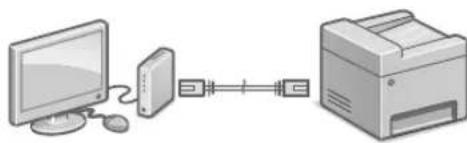
To connect via wired LAN
The machine does not come with a LAN cable. Please have one ready, if necessary.
Make sure that the computer is connected to a router properly.
Check the network settings on the computer.
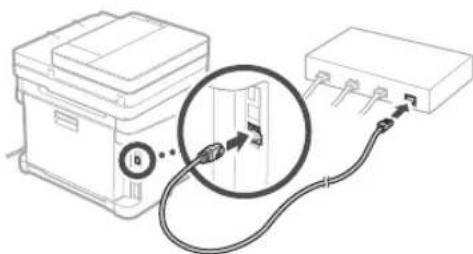
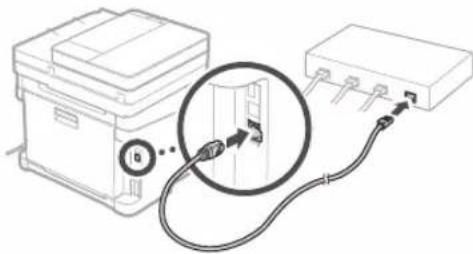
Connect the LAN cable.
After connecting the cable, wait a few minutes (until the IP address is set automatically).
If a static IP address has been set on the computer, set the machine's IP address manually.
4.Install the driver and software.
P.10 "Installing the software"
Now you are finished with the configuration of the initial settings.
If your machine is provided with the fax function, proceed to configuring the fax settings. P.11
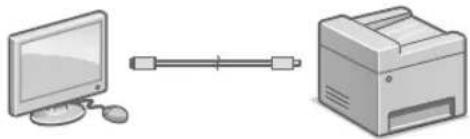
To connect via USB
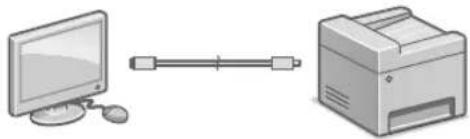
The machine does not come with a USB cable. Please have one ready, if necessary.
Make sure that the USB cable you use has the following mark.
- Do not connect the USB cable before installing the driver. If you did, disconnect the USB cable from the computer, close the dialog box, and then perform the following procedure from step 1.
Install the driver and software.
P.10 "Installing the software"
When a screen with instructions for connecting the USB cable to the machine is displayed, remove the sticker that covers the USB port.
Now you are finished with the configuration of the initial settings.
If your machine is provided with the fax function, proceed to configuring the fax settings. P.11
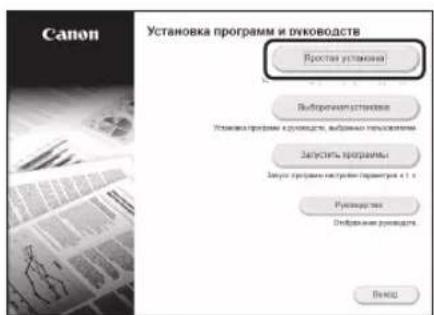
Installing the software
The procedure described here is only applicable when your computer runs on the Windows OS. For more details on the software installation procedure, see the driver's manual.
- For the installation when your computer runs on the macOS, see the driver's manual.
- Your machine may not come with the driver for the macOS, depending on the time of purchase. New drivers are uploaded to the Canon website, and you can download and use the latest one.
1.
2.
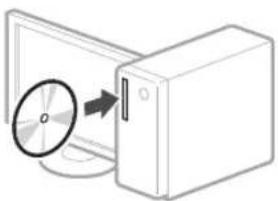
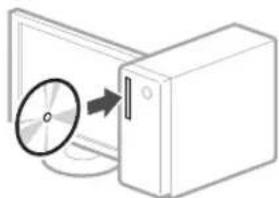
If the screen is not displayed properly, reinsert the CD-ROM/DVD-ROM or search for "D:\Minst.exe" on the Windows platform (This description assumes that "D:" is the CD-ROM/DVD-ROM drive name).
Using the scanner conveniently
Configuring the network settings with "Send Function Setting Tool" allows you to directly send scanned originals with e-mail or I-Fax or store them in a shared folder or on the FTP server.
In the screen displayed in step 2, select [Start Software Programs] [Send Function Setting Tool] to start the Send Function Setting Tool.
Configuring Fax Settings
Before starting the configuration:
If your machine does not come with a telephone cable, have one ready, as necessary.
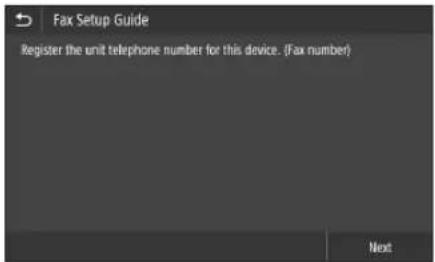
Configure the fax settings, according to the screen below.
Select .
Select .
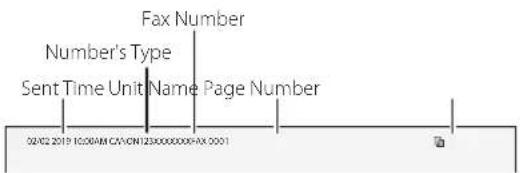
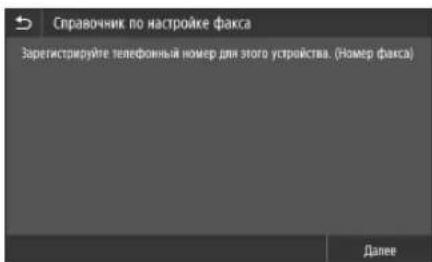
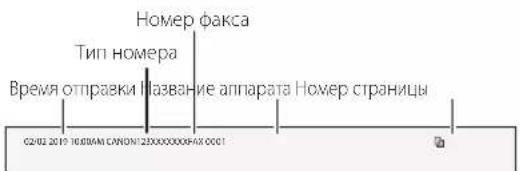
Register the machine's telephone number (fax number) and abbreviated user name.
The information below will be printed at the top part of the paper output from the destination machine as sender information.
Set the reception mode.
Make the setting by answering the questions on your purposes of using the fax function.
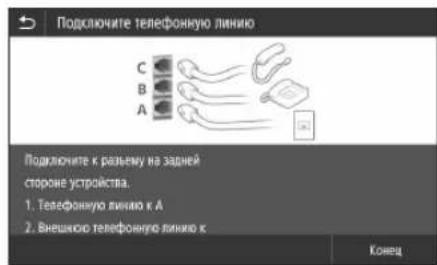
Connect to a telephone line.
Select
Select
Now you are finished with the configuration.
U's adequat de I'escaner
Pnpoopoeic yia to Application Library (B1BIOOeKnEapouync)*
S.46 "Installation of software"
念 S.46 "Installation of software"
Installation of softwares
Verbinding makes via bedraad LAN
Selecteer.
Selecteer.
Ctp.66《VCTaHOBKa nporpaMMHOrO 06ecneueHn
Tenepb 3aDaanHe NcXoHbIX Hactpoek 3aBepseHo.
EcnB annapate npedymotpeha aKcmmnbHag yHKnna, nepexoJte K 3aHaHIO HAcTpoek aKaCa.
Ctp.67
IopKJIoueHne no npoBOHOcTn
Kabenb nokaibhoi cetn He BXoNT B KOMnneKT annapata.
PnHoe6xOaMIOCTN NOIgROTOBbTe Ka6eNb.
1.Y6eNTecbBTOM,HTO KOMNbIOTep npabINbHO NOKJIIOHcK MapuPyTu3aTOpY.
2.Поверпге Настpoик сети На КOMьTepe.
3. Npoknouhte ka6ebnb nokaibHOI cTe.
-Подклочьkaбь,нодожиte Heckoьko MNHyT (noka IP-apec He 6yden3aHa ABTomaHTueCKn).
- Ecnn Ha KOMmbIope 3aHa CTaTneckn IP-aDpec, 3aJaTe IP-aDpec annapata BpyHyIO.
UCTaHOBInTe IpaIbep IN nporpaMMHoe oecneueHne.
Ctp.66《YCTaHOBKa nporpaMMHOrO 0eceueehn
Tenepb 3aJaHHe nCXoHNbIX HAcTpoek 3aBepSeHo.
EcnnBannapate npedymotpeha aKcmmnIbHa yHKun, nepexoJnte K 3aDaHnIO HAcTpoE kakca.
Crp.67
PoiKJIoueHne no USB
Ka6eNB USB He BXoNT B KOMnneKt annpaTa. Pn Heo6xOmoCTN NOrTOOBTe Ka6eNb.
Y6eNTecbBTOM,TO nCnoIb3yEmbKa6eb USB Nmee TcNeDyUOuO MapKnipOBky.
He nooknouaKe Ka6eNB USD do yctaHOBKn npaBepa. EcnB bTo cenann, oTcoeHNHTe Ka6eNB USB OT KOMNIOTEpa, 3akpoTne DnaIoroBoe OKHO N BbINONHITe npuBedeHHyIO Hnke npoueDpyc wara 1.
1.YcTaHOBnTe DpaIbep N nporpaMMHoe o6ecneueHHe.
Ctp.66《YctaHOBKa nporpaMMHOro 06ecneueHn
Ecnn OTo6paKaAeTcKpAH cyka3aHHeM noKnIOuHTb Ka6eNB USB K annapaty, CHMITE HakNeKy, 3aKpbBaIOUyIO nopt USB.
Tenepb 3aandaHne mCXoIbIX HacTpoek 3aBepweHo.
EcnB aannapate npedymotpeha akcmmnbna yHKnna, nepexoute K 3aHaHIO Hactpoek aKa ca.
3apeHnCTpnpyTe HOpE TenefoHa (HOpE pakca) annapata n cokpaueHHoe mI NOIb30BATEJI.
JaHbIe, npBedeHbIe HNKe, 6yDyT neaTaBcB BBepy XnCTa 6ymarH, BbBOIMORo Ha annapate NOyatena, B KaueCTBe CBeHn 06 OTnpaBntene.
4.3aJaTepeXKIMnpEma.
-ⅡHACTPOKNIOTBeTBTe HA BONPOcBIOueJIAX NCIOIb3OBAHnFAKCMUNIBHOHfYHKUIN.
NpoknIOHTec k TeneoHHHINH
BbIepeNTe .
BbIepeTe
KpaTkoe pykoBODCTBO NO 3KcnIyatauIN
Ru
Ubnka ekcnnyataia
UK
Place the Original Properly
Remember before You Start Operation
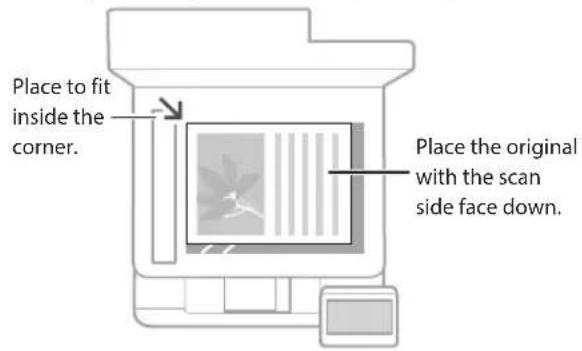
Place your original on the platen glass
Suitable for scanning book pages, magazine pages and newspaper clips.
This function may not be included depending on the model of the machine.
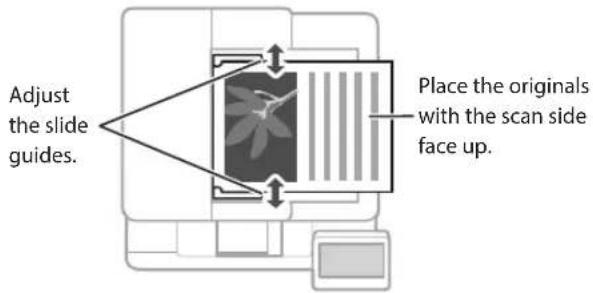
Place your originals into the feeder*
Suitable for continuously scanning many pages of literature, quotation, etc.
Start the Operation from the Operation Panel
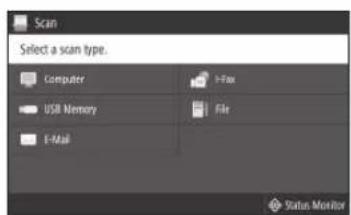
Scanning
Place the original.
Press and select.
Select the type of scan, and enter the necessary information.
Select,or .
Types of scan
Store in USB memory device
Send e-mail
Send to file server
To scan from a computer
MF Scan Utility
For details
"Scanning" in the User's Guide
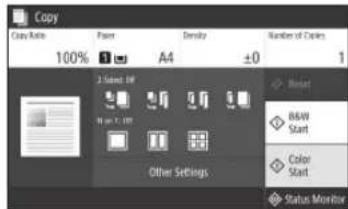
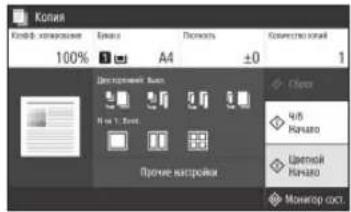
Copying
Place the original.
Press and then select <Copy> .
Specify the copy settings, as necessary.
Enter the desired number of copies.
Select or .
Useful copy settings
Non 1
2-Sided or 1-Sided*
Enlarging or reducing
- Copying ID cards
Passport Copy
This function may not be available, depending on the model of the machine.
For details
"Copying" in the User's Guide
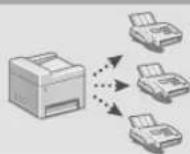
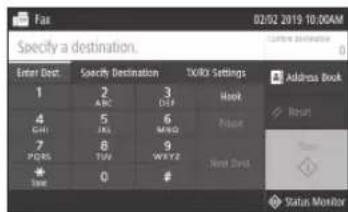
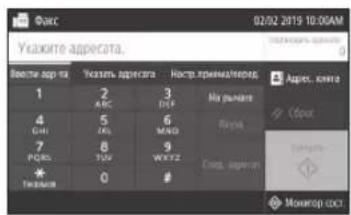
Faxing*
Place the original.
Press and select .
Enter the destination information.
Specify the fax settings, as necessary.
Select.
This function may not be available, depending on the model of the machine.
Useful fax functions
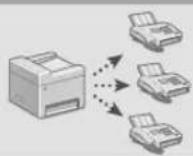
Sequential Broadcast
Memory Reception
PC Fax
For details
^ "Faxing" in the User's Guide
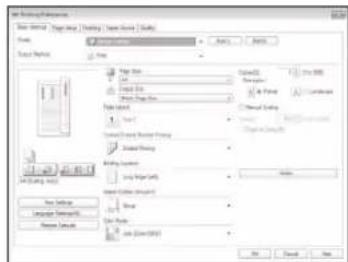
Printing
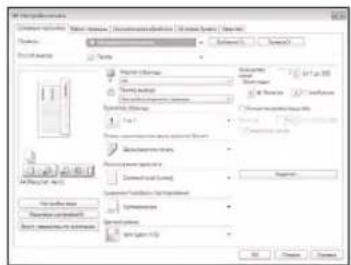
Open the document to print, and select the print function of the application.
Select the printer driver for the machine, and select [Preferences] or [Properties].
Specify the paper size.
Specify the paper source and paper type.
Specify the print settings, as necessary.
Select [OK].
Select [Print] or [OK].
Useful print settings
2-sided
Non1
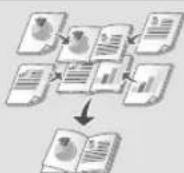
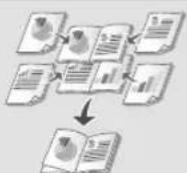
■ Booklet Printing
This function may not be available, depending on the model of the machine.
For details
"Printing" in the User's Guide
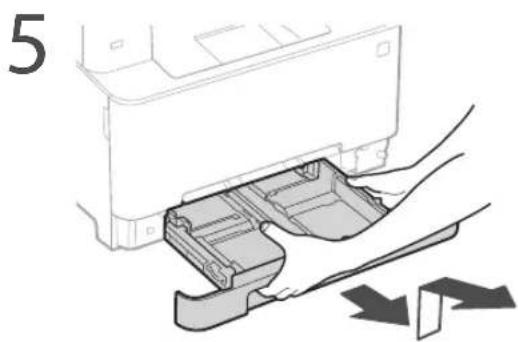
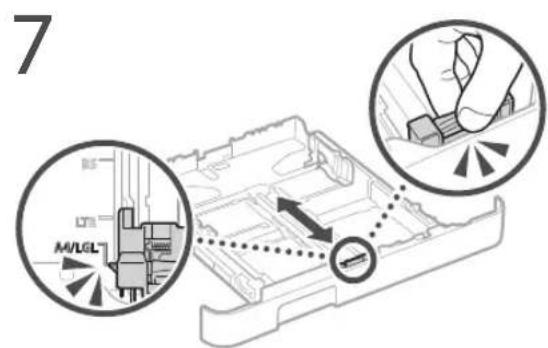
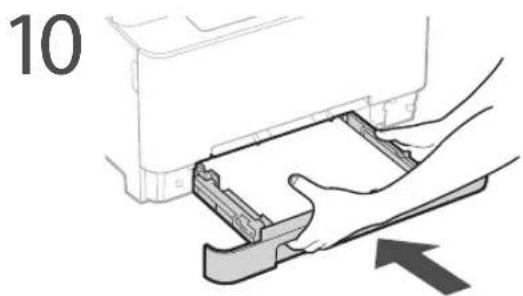
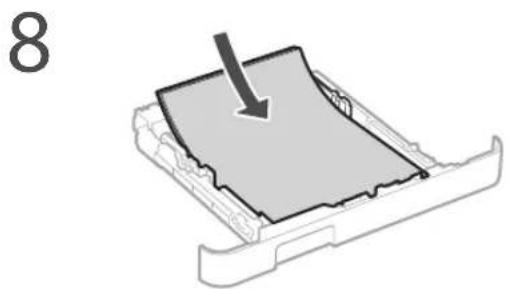
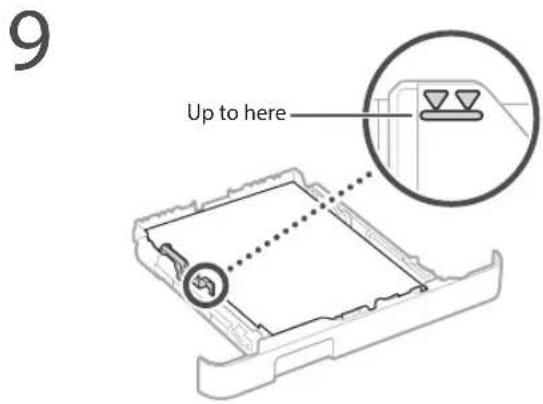
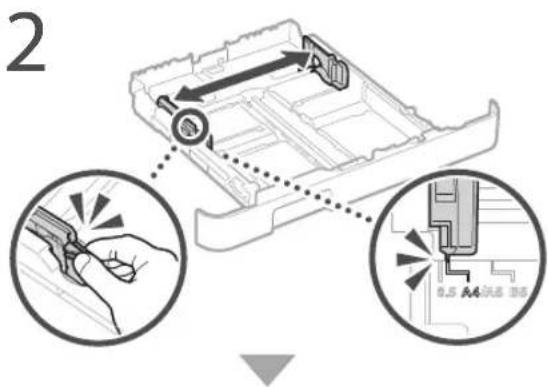
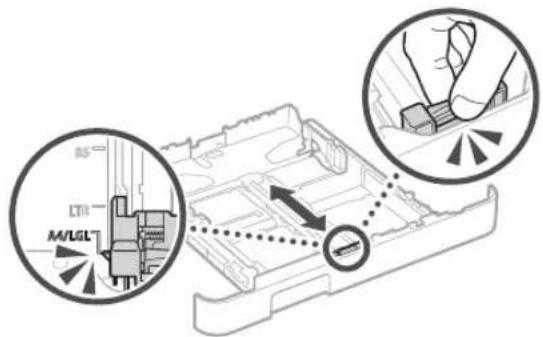
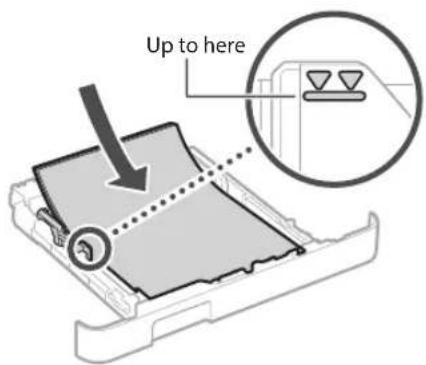
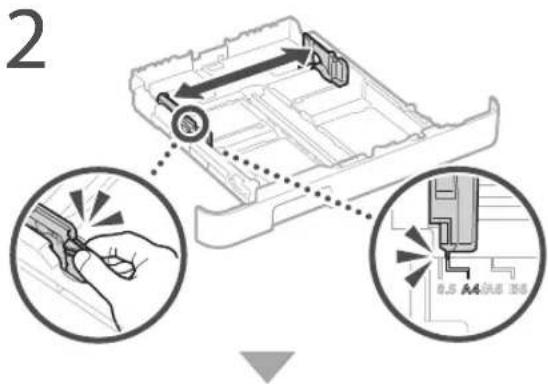
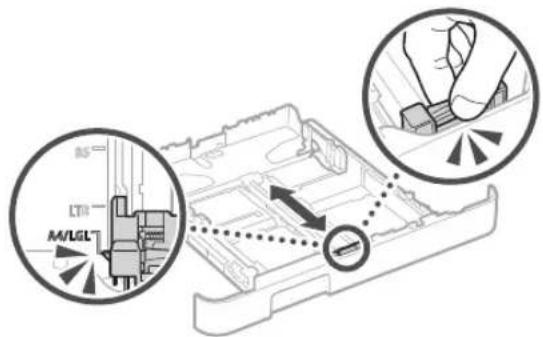
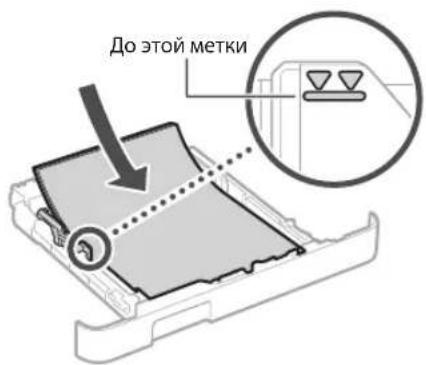
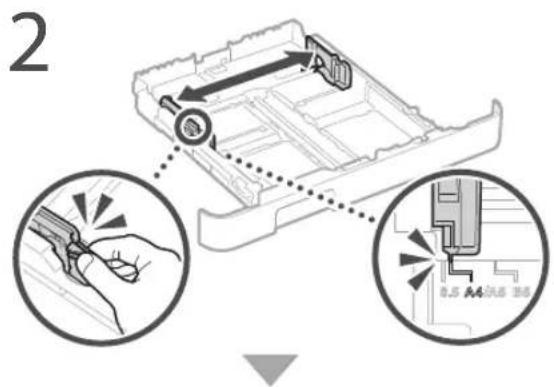
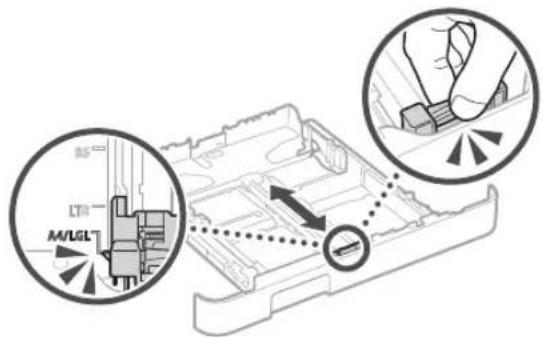
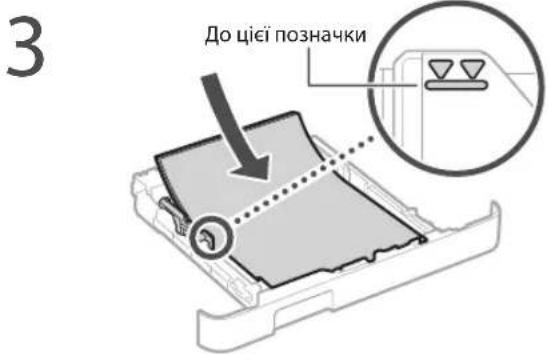
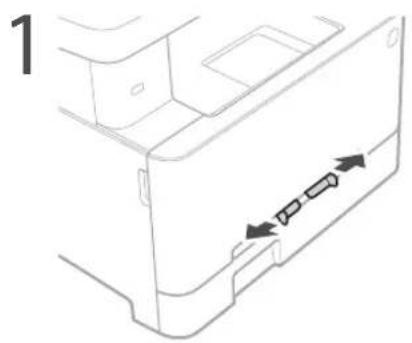
Pull out the paper drawer.
3
4 Insert the paper drawer into the machine.
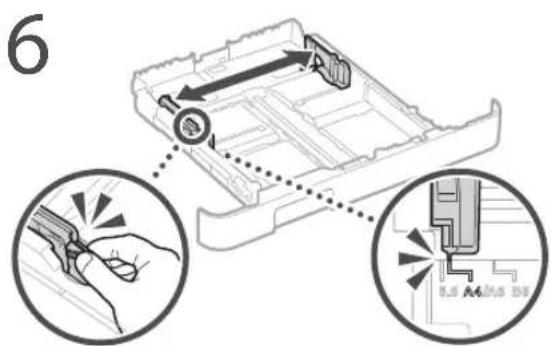
If you load a different size or type of paper from the one before, make sure to change the settings.
Press nd select .
6 Specify the size and type of paper, according to the screen.
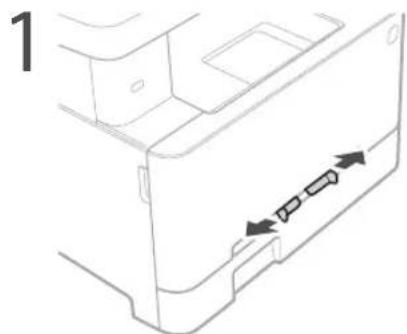
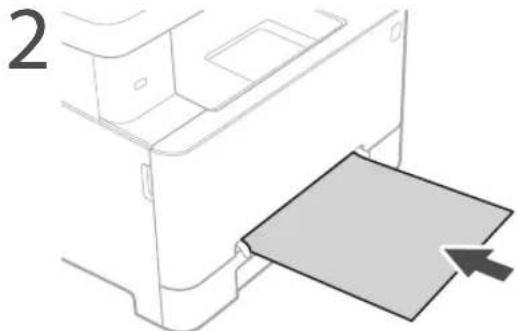
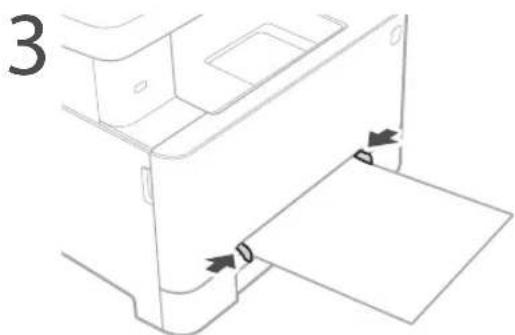
Loading in the Manual Feed SlotLoading
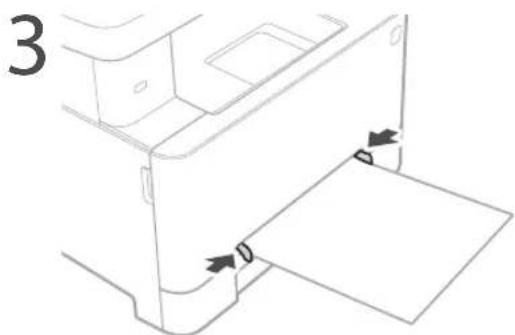
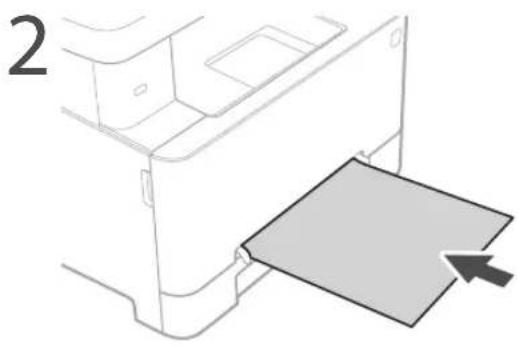
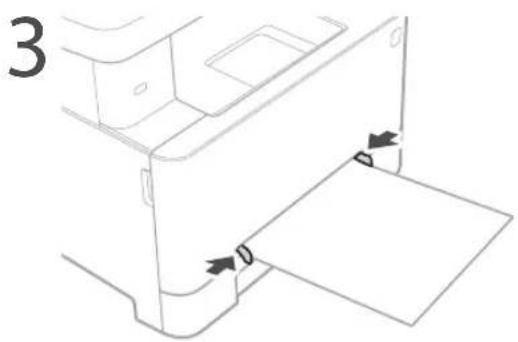
4 Insert the paper slowly into the manual feed slot until it reaches the back of the slot.
5 Specify the size and type of paper, according to the screen.
The Machine Does Not Seem to Work
Check the following.
Is the power turned ON?
Is the machine out of sleep mode?
If both the display and are not lit, press the power switch.
Is the power cord connected correctly?
If the problem persists, see the User's Guide.
Paper Jams Have Occurred
Clear the paper jams, according to the on-screen instructions.
Replacing the Toner Cartridge
Replace the toner cartridge, according to the onscreen instructions.
Model number of replacement toner cartridge
Canon Cartridge 054 Black
Canon Cartridge 054 Cyan
Canon Cartridge 054 Magenta
Canon Cartridge 054 Yellow
Canon Cartridge 054 H Black
Canon Cartridge 054 H Cyan
Canon Cartridge 054 H Magenta
Canon Cartridge 054 H Yellow
Appendix
Important Safety Instructions
This chapter describes important safety instructions for the prevention of injury to users of this machine and others, and damage to property. Read this chapter before using the machine, and follow the instructions to use the machine properly. Do not perform any operations not described in this manual. Canon will not be responsible for any damages resulting from operations not described in this manual, improper use, or repair or changes not performed by Canon or a third party authorized by Canon. Improper operation or use of this machine could result in personal injury and/or damage requiring extensive repair that may not be covered under your Limited Warranty.
WARNING
Indicates a warning concerning operations that may lead to death or injury to persons if not performed correctly. To use the machine safely, always pay attention to these warnings.
CAUTION
Indicates a caution concerning operations that may lead to injury to persons if not performed correctly. To use the machine safely, always pay attention to these cautions.
0IMPORTANT
Indicates operational requirements and restrictions. Be sure to read these items carefully to operate the machine correctly and avoid damage to the machine or property.
Installation
To use this machine safely and comfortably, carefully read the following precautions and install the machine in an appropriate location.
WARNING
Do not install in a location that may result in a fire or electrical shock
A location where the ventilation slots are blocked (too close to walls, beds, sofas, rugs, or similar objects)
A damp or dusty location
A location exposed to direct sunlight or outdoors
A location subject to high temperatures
A location exposed to open flames
Near alcohol, paint thinners or other flammable substances
Other warnings
Do not connect unapproved cables to this machine. Doing so may result in a fire or electrical shock.
Do not place necklaces and other metal objects or containers filled with liquid on the machine. If foreign substances come in contact with electrical parts inside the machine, it may result in a fire or electrical shock.
When installing and removing the optional accessories, be sure to turn OFF the power, unplug the power plug, and then disconnect all the interface cables and power cord from the machine. Otherwise, the power cord or interface cables may be damaged, resulting in a fire or electrical shock.
If any foreign substance falls into this machine, unplug the power plug from the AC power outlet and contact your local authorized Canon dealer.
CAUTION
Do not install in the following locations
The machine may drop or fall, resulting in injury.
An unstable location
A location exposed to vibrations
Other cautions
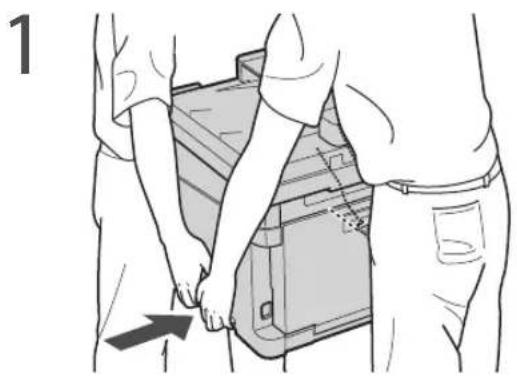
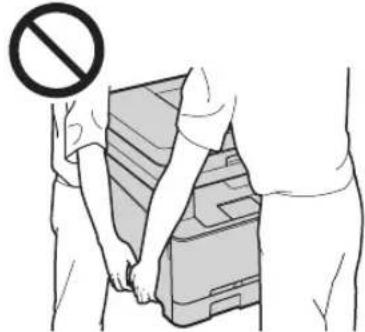
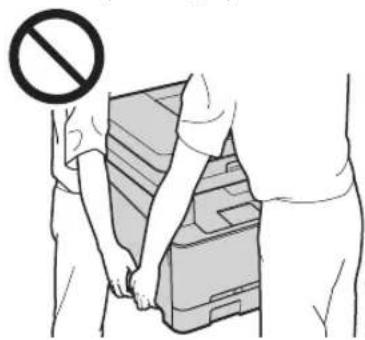
When carrying this machine, follow the instructions in this manual. If carried improperly, it may fall, resulting in injury
When installing this machine, be careful not to get your hands caught between the machine and the floor or walls. Doing so may result in injury.
0IMPORTANT
Do not install in the following locations
Doing so may result in damage to the machine.
A location subject to temperature and humidity extremes, whether low or high
- A location subject to dramatic changes in temperature or humidity
- A location near equipment that generates magnetic or electromagnetic waves
A laboratory or location where chemical reactions occur
A location exposed to corrosive or toxic gases
- A location that may warp from the weight of the machine or where the machine is liable to sink (a carpet, etc.)
Avoid poorly ventilated locations
This machine generates a slight amount of ozone and other emissions during normal use. These emissions are not harmful to health. However, they may be noticeable during extended use or long production runs in poorly ventilated rooms. To maintain a comfortable working environment, it is recommended that the room where the machine operates be appropriately ventilated. Also avoid locations where people would be exposed to emissions from the machine.
Do not install in a location where
condensation occurs
Water droplets (condensation) may form inside the machine when the room where the machine is installed is heated rapidly, and when the machine is moved from a cool or dry location to a hot or humid location. Using the machine under these conditions may result in paper jams, poor print quality, or damage to the machine. Let the machine adjust to the ambient temperature and humidity for at least 2 hours before use.
In altitudes of above sea level 3,000 m or higher
Machines with a hard disk may not operate properly when used at high altitudes of about 3,000 meters above sea level, or higher.
Connecting the Telephone Line
This machine conforms to a analog telephone line standard. The machine can be connected to the public switched telephone network (PSTN) only. If you connect the machine to a digital telephone line or a dedicated telephone line, it might impede proper operation of the machine and could be the cause of damage. Make sure to confirm a type of telephone line before connecting the machine. Contact your optical fiber line or IP telephone line service providers if you want to connect the machine to those telephone lines.
When using wireless LAN
Install the machine at a distance of 50 meters or less from the wireless LAN router.
- As far as possible, install in a location where communication is not blocked by intervening objects. The signal may be degraded when passing through walls or floors.
Keep the machine as far as possible from digital cordless phones, microwave ovens, or other equipment that emits radio waves.
Do not use near medical equipment. Radio waves emitted from this machine may interfere with medical equipment, which may result in malfunctions and accidents.
If the operating noise concerns you
Depending on the use environment and operating mode, if the operating noise is of concern, it is recommended that the machine be installed in a place other than the office.
Power Supply
WARNING
Use only a power supply that meets the specified voltage requirements. Failure to do so may result in a fire or electrical shock.
The machine must be connected to a socket-outlet with grounding connection by the provided power cord.
- Do not use power cords other than the one provided, as this may result in a fire or electrical shock.
The provided power cord is intended for use with this machine. Do not connect the power cord to other devices.
- Do not modify, pull, forcibly bend, or perform any other act that may damage the power cord. Do not place heavy objects on the power cord. Damaging the power cord may result in a fire or electrical shock.
- Do not plug in or unplug the power plug with wet hands, as this may result in an electrical shock.
- Do not use extension cords or multi-plug power strips with the machine. Doing so may result in a fire or electrical shock.
- Do not wrap the power cord or tie it in a knot, as this may result in a fire or electrical shock.
- Insert the power plug completely into the AC power outlet. Failure to do so may result in a fire or electrical shock.
- Remove the power plug completely from the AC power outlet during a thunder storm. Failure to do so may result in a fire, electrical shock, or damage to the machine.
Make sure that the power supply for the machine is safe, and has a steady voltage.
- Keep the power cord away from a heat source; failure to do this may cause the power cord coating to melt, resulting in a fire or electrical shock.
Avoid the following situations:
If excessive stress is applied to the connection part of the power cord, it may damage the power cord or the wires inside the machine may disconnect. This could result in a fire.
Connecting and disconnecting the power cord frequently.
Tripping over the power cord.
The power cord is bent near the connection part, and continuous stress is being applied to the power outlet or the connection part.
Applying excessive force on the power plug.
CAUTION
Install this machine near the power outlet and leave sufficient space around the power plug so that it can be unplugged easily in an emergency.
0IMPORTANT
When connecting power
Do not connect the power cord to an uninterrupted power source. Doing so may result in malfunction of or damage to the machine at power failure.
If you plug this machine into an AC power outlet with multiple sockets, do not use the remaining sockets to connect other devices.
- Do not connect the power cord to the auxiliary AC power outlet on a computer.
Other precautions
Electrical noise may cause this machine to malfunction or lose data.
Handling
WARNING
Immediately unplug the power plug from the AC power outlet and contact an authorized Canon dealer if the machine makes an unusual noise, emits an unusual smell, or emits smoke or excessive heat. Continued use may result in a fire or electrical shock.
Do not disassemble or modify this machine. There are high-voltage and high-temperature components inside the machine. Disassembly or modification may result in a fire or electrical shock.
Place the machine where children will not come in contact with the power cord and other cables or gears and electrical parts inside the machine. Failure to do so may result in unexpected accidents.
Do not use flammable sprays near this machine. If flammable substances come into contact with electrical parts inside this machine, it may result in a fire or electrical shock.
When moving this machine, be sure to turn OFF the power of this machine, and then unplug the power plug and interface cables. Failure to do so may damage the power cord or interface cables, resulting in a fire or electrical shock.
When plugging or unplugging a USB cable when the power plug is plugged into an AC power outlet, do not touch the metal part of the connector, as this may result in an electrical shock.
If you are using a cardiac pacemaker
This machine generates a low level magnetic flux and ultrasonic waves, if you use a cardiac pacemaker and feel abnormalities, please move away from this machine and consult your physician immediately.
CAUTION
Do not place heavy objects on this machine as they may fall, resulting in injury.
For your safety, please unplug the power cord if the machine will not be used for a long period of time.
Use caution when opening and closing covers to avoid injury to your hands.
Keep hands and clothing away from the rollers in the output area. If the rollers catch your hands or clothing, this may result in personal injury.
The inside of the machine and the output slot are very hot during and immediately after use. Avoid contact with these areas to prevent burns. Also, printed paper may be hot immediately after being output, so use caution when handling it. Failure to do so may result in burns.
Be careful not to drop a heavy object, such as a dictionary, on the platen glass. Doing so may damage the platen glass and result in injury.
Do not carry the machine with any of the paper drawer or optional paper feeder installed. Otherwise, they may fall, resulting in injury.
Feeder or platen glass cover
Do not press down hard on the feeder or the platen glass cover when using the platen glass to make copies of thick books. Doing so may damage the platen glass and result in personal injury.
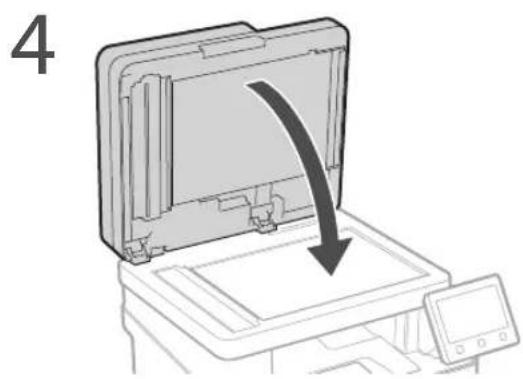
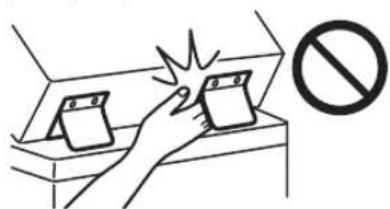
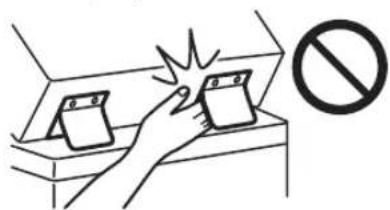
Close the feeder or the platen glass cover gently to avoid catching your hands, as this may result in personal injury.
Be careful not to put your hands or fingers into the feeder or the platen glass cover. Otherwise, you may be injured.
Paper drawer
Do not insert your hand into the machine while the paper drawer is removed, as this may result in personal injury.
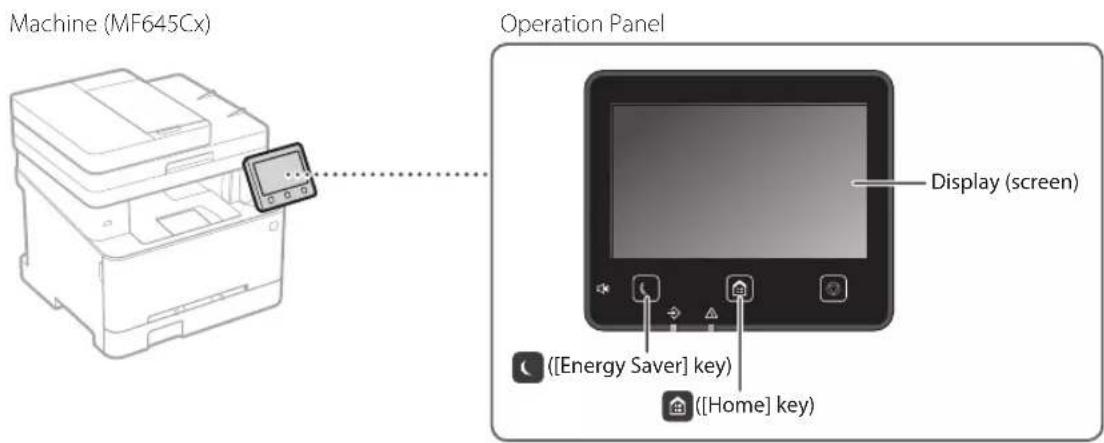
Energy Saver key
Press (Energy Saver) for safety when the machine will not be used for a long period of time, such as overnight. Also, turn OFF the main power switch, and disconnect the power cord for safety when the machine will not be used for an extended period of time, such as during consecutive holidays.
Laser Safety
This product is confirmed as a Class 1 laser product in IEC60825-1:2014 and EN60825-1:2014.
CLASS 1 LASER PRODUCT
LASER KLASSE 1
APPAREL A LASER DE CLASSE 1
APPARECCHIO LASER DI CLASSE 1
PRODUCTO LASER DE CLASE 1
APARELHO A LASER DE CLASSE 1
LUOKAN 1 LASER-TUOTE
LASERPRODUKT KCLASS 1
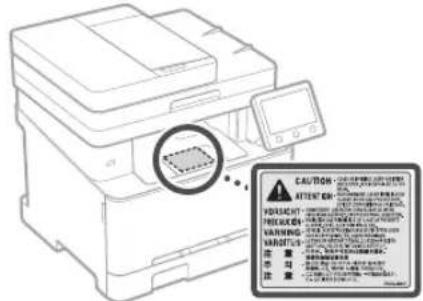
The laser beam can be harmful to human bodies. Since radiation emitted inside the product is completely confined within protective housings and external covers, the laser beam cannot escape from the machine during any phase of user operation. Read the following remarks and instructions for safety.
Never open covers other than those instructed in the manuals for this machine.
If the laser beam should escape and enter your eyes, exposure may cause damage to your eyes.
Use of controls, adjustments, or performance of procedures other than those specified in this manual may result in hazardous radiation exposure.
Laser Safety Caution
OIMPORTANT
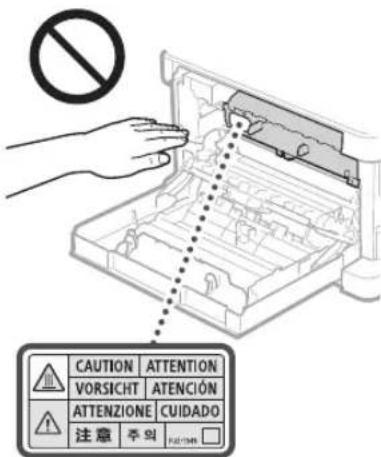
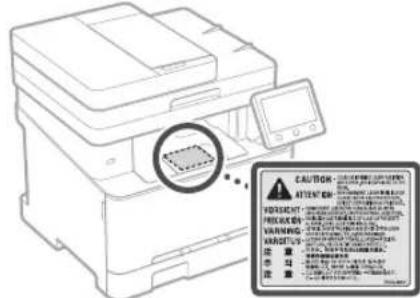
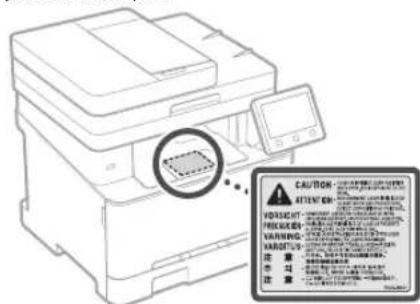
Follow the instructions on the caution label attached to this machine.
- Do not subject the machine to strong shocks or vibration.
- Do not forcibly open and close doors, covers, and other parts. Doing so may result in damage to the machine.
- Do not turn the main power switch OFF or open the covers while the machine is in operation. This may result in paper jams.
- Use a modular cable that is shorter than 3 meters.
Use a USB cable that is shorter than 3 meters.
Appendix
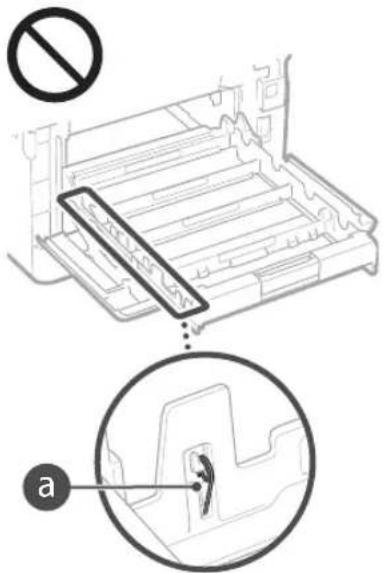
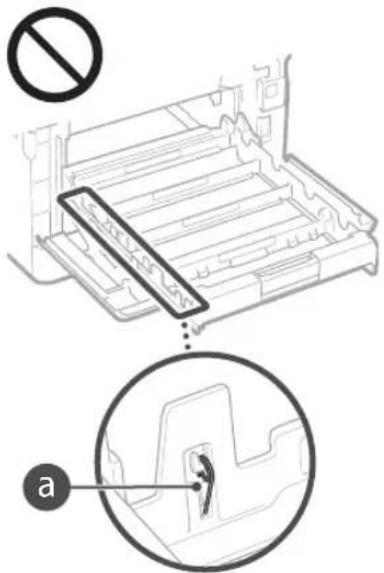
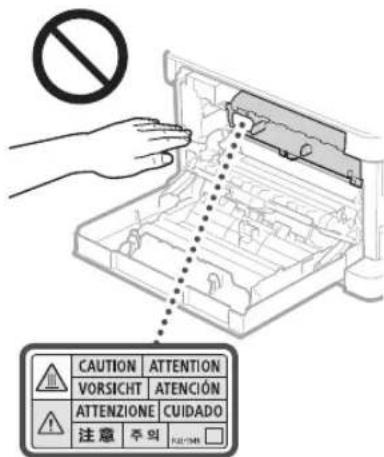
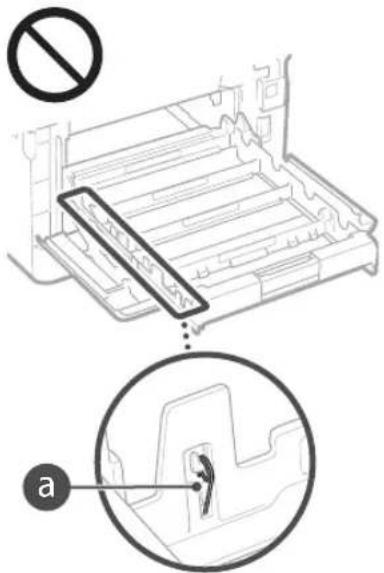
Do not touch the contacts (a) inside the machine. Doing so may result in damage to the machine.
When transporting the machine
To prevent damage to the machine during transport, perform the following.
Remove the toner cartridges.
Securely pack the machine in the original box with packing materials.
Safety-Related Symbols
Power switch: "ON" position
Power switch: "OFF" position
Power switch: "STAND-BY" position
Push-push switch "N" "OF
Protective earthing terminal
Dangerous voltage inside. Do not open covers other than instructed.
CAUTION: Hot surface. Do not touch.
Class II equipment
Moving parts:Keep body parts away from moving parts
CAUTION: An electrical shock may occur. Remove all the power plugs from the power outlet.
There are sharp edges. Keep body parts away from sharp edges.
[NOTE]
Some of symbols shown above may not be affixed depending on the product.
Maintenance and Inspections
Clean this machine periodically. If dust accumulates, the machine may not operate properly. When cleaning, be sure to observe the following. If a problem occurs during operation, see "Troubleshooting" in the User's Guide. If the problem cannot be resolved or you feel the machine requires an inspection, see "When a Problem Cannot Be Solved" in the User's Guide.
WARNING
Before cleaning, turn OFF the power and unplug the power plug from the AC power outlet. Failure to do so may result in a fire or electrical shock.
Unplug the power plug periodically and clean with a dry cloth to remove dust and grime. Accumulated dust may absorb humidity in the air and may result in a fire if it comes into contact with electricity.
Use a damp, well wrung-out cloth to clean the machine. Dampen cleaning cloths with water only. Do not use alcohol, benzine, paint thinner, or other flammable substances. Do not use tissue paper or paper towels. If these substances come into contact with electrical parts inside the machine, they may generate static electricity or result in a fire or electrical shock.
Check the power cord and plug periodically for damage. Check the machine for rust, dents, scratches, cracks, or excessive heat generation. Use of poorly-maintained equipment may result in a fire or electrical shock.
CAUTION
The inside of the machine has high-temperature and high-voltage components. Touching these components may result in burns. Do not touch any part of the machine that is not indicated in the manual.
- When loading paper or removing jammed paper, be careful not to cut your hands with the edges of the paper.
Consumables
WARNING
Do not dispose of used toner cartridges or the like in open flames. Also, do not store toner cartridges or paper in a location exposed to open flames. This may cause the toner to ignite, and result in burns or fire.
If you accidentally spill or scatter toner, carefully gather the toner particles together or wipe them up with a soft, damp cloth in a way that prevents inhalation. Never use a vacuum cleaner that does not have safeguards against dust explosions to clean up spilled toner. Doing so may cause a malfunction in the vacuum cleaner, or result in a dust explosion due to static discharge.
CAUTION
Use caution not to inhale any toner. If you should inhale toner, consult a physician immediately.
Use caution so that toner does not get into your eyes or mouth. If toner should get into your eyes or mouth, immediately wash with cold water and consult a physician.
Use caution so that toner does not come into contact with your skin. If it should, wash with soap and cold water. If there is any irritation on your skin, consult a physician immediately.
Keep the toner cartridges and other consumables out of the reach of small children. If toner is ingested, consult a physician or poison control center immediately.
Do not disassemble or modify the toner cartridge or the like. Doing so may cause the toner to scatter.
When removing the sealing tape from the toner cartridge, pull it out completely but without using excessive force. Doing otherwise may cause the toner to scatter.
OIMPORTANT
Handling the toner cartridge
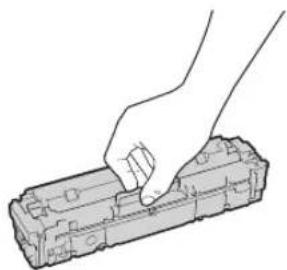
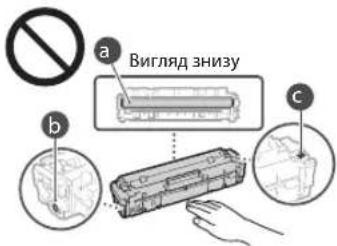
Be sure to hold the toner cartridge using the handle.
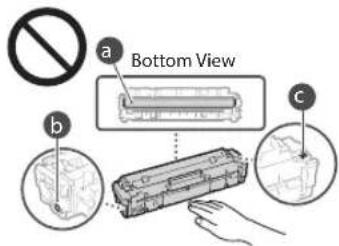
Do not touch the toner cartridge memory (a) or the electrical contacts (b). To avoid scratching the surface of the drum inside the machine or exposing it to light, do not open the drum protective shutter (c).
Except when necessary, do not take out the toner cartridge from the packing material or from this machine.
- The toner cartridge is a magnetic product. Do not move it close to products susceptible to magnetism including floppy disks and disk drives. Doing so may result in data corruption.
Storing the toner cartridge
Store in the following environment to ensure safe and satisfactory use. Storage temperature range: 0 to 35^ Storage humidity range: 35 to 85% RH (relative humidity/no condensation)*
Store without opening until the toner cartridge is to be used.
When removing the toner cartridge from this machine for storage, place the removed toner cartridge in the original packing material.
When storing the toner cartridge, do not store it upright or upside down. The toner will solidify and may not return to its original condition even if it is shaken.
Even within the storable humidity range, water droplets (condensation) may develop inside the toner cartridge if there is a difference of temperature inside and outside the toner cartridge. Condensation will adversely affect the print quality of toner cartridges.
Do not store the toner cartridge in the following locations
Locations exposed to open flames
Locations exposed to direct sunlight or bright light for five minutes or more
Locations exposed to excessive salty air
Locations where there are corrosive gases (i.e. aerosol sprays and ammonia)
Locations subject to high temperature and high humidity
Locations subject to dramatic changes in temperature and humidity where condensation may easily occur
Locations with a large amount of dust
Locations within the reach of children
Be careful of counterfeit toner cartridges
Please be aware that there are counterfeit Canon toner cartridges in the marketplace. Use of counterfeit toner cartridge may result in poor print quality or machine performance. Canon is not responsible for any malfunction, accident or damage caused by the use of counterfeit toner cartridge. For more information, see global.canon/ctc.
Availability period of repairing parts and toner cartridges and the like
The repairing parts and toner cartridges and the like for the machine will be available for at least seven (7) years after production of this machine model has been discontinued.
Toner cartridge packing materials
Save the packing materials for the toner cartridge. They are required when transporting this machine.
The packing materials may be changed in form or placement, or may be added or removed without notice.
After you pull out the sealing tape from the toner cartridge, dispose of it in accordance with the applicable local regulations.
When disposing of a used toner cartridge or the like
When discarding a toner cartridge or the like, place it in the original packing material to prevent toner from scattering from inside, and dispose of it in accordance with the applicable local regulations.
Notice
Product Name
Safety regulations require the product's name to be registered. In some regions where this product is sold, the following name(s) in parentheses () may be registered instead.
MF645Cx(F175002)
MF643Cdw / MF641Cw (F175000)
EMC requirements of EC Directive
This equipment conforms with the essential EMC requirements of EC Directive. We declare that this product conforms with the EMC requirements of EC Directive at nominal mains input 230V 50Hz although the rated input of the product is 220 to 240V 50 / 60Hz . Use of shielded cable is necessary to comply with the technical EMC requirements of EC Directive.
EU WEEE and Battery Directives
You can see the WEEE and Battery Directives information in the latest User's Guide (HTML manual) from the Canon website (canon.com/ oip-manual).
Wireless LAN Regulatory Information
Regulatory information for users in Jordan MF645Cx/MF643Cdw/MF641Cw includes approved Wireless LAN Module (Model name: Type1KA). Contains Wireless LAN Module approved by TRC/LPD/2017/19
Regulatory information for users in UAE
MF645Cx / MF643Cdw / MF641Cw includes approved Wireless LAN Module (Model name: Type1KA).
TRA
REGISTERED No: ER51217/17
DEALER No: DA0073692/11
RE Directive
(Only for European radio equipment)
RE Declaration of Conformity
English (EN) Hereby, Canon Inc. declares that this equipment is in compliance with Directive 2014/53/EU. The full text of the EU declaration of conformity is available at the following internet address: http://www.canon-europe.com/ce-documentation/Wireless LAN Specifications Frequency band(s):2412-2472MHz Maximum radio-frequency power: 15.9 dBm
Czech (CS) Timto spelecnost Canon Inc. prohlasej, ze toto zaifen je v souladu se smemici 2014/53/EU. Upiné zneni FU prohlaseni o shode je k dispozici na teto internetové adrese: http://www.canon-europe.com/ce-documentation Technicke udaje bezdratovi LAN Pásmo(a) frekcvence: 2412-2472 MHz Maximálny vykon radiové frekvence: 15.9 dBm
Danish (DA) Hermed erklærer Canon Inc., at dette udstyr er i overensstemmelse med direktiv 2014/53/EU. EU-overensstemmelmseserklaeringens fulde tekst kan findes pa folgende internetadresse: http://www.canon-europe.com/ce-documentation Tradios LAN specifikationer Frekvensband: 2412-2472 MHz Maks. radio-frekvenseffekt: 15.9 dBm
Legal Limitations on the Usage of Your Product and the Use of Images
Using your product to scan, print or otherwise reproduce certain documents, and the use of such images as scanned, printed or otherwise reproduced by your product, may be prohibited by law and may result in criminal and/or civil liability. A non-exhaustive list of these documents is set forth below. This list is intended to be a guide only. If you are uncertain about the legality of using your product to scan, print or otherwise reproduce any particular document, and/or of the use of the images scanned, printed or otherwise reproduced, you should consult in advance with your legal advisor for guidance.
Paper Money
Travelers Checks
Money Orders
Food Stamps
Certificates of Deposit
Passports
Postage Stamps (canceled or uncanceled)
Immigration Papers
- Identifying Badges or Insignias
- Internal Revenue Stamps (canceled or uncancelled)
- Selective Service or Draft Papers
Bonds or Other Certificates of Indebtedness
- Checks or Drafts Issued by Governmental Agencies
Stock Certificates
Motor Vehicle Licenses and Certificates of Title
Copyrighted Works/Works of Art without Permission of Copyright Owner
Disclaimers
The information in this document is subject to change without notice.
CANON INC. MAKES NO WARRANTY OF ANY KIND WITH REGARD TO THIS MATERIAL, EITHER EXPRESS OR IMPLIED, EXCEPT AS PROVIDED HEREIN, INCLUDING WITHOUT LIMITATION, THEREOF, WARRANTY AS TO MARKETABILITY, MERCHANTABILITY, FITNESS FOR A PARTICULAR PURPOSE OF USE, OR NON-INFRINGEMENT. CANON INC. SHALL NOT BE LIABLE FOR ANY DIRECT, INCIDENTAL, OR CONSEQUENTIAL DAMAGES OF ANY NATURE, OR LOSSES OR EXPENSES RESULTING FROM THE USE OF THIS MATERIAL.
About This Manual
Keys and Buttons Used in This Manual
The following symbols and key names are a few examples of how keys to be pressed are expressed in this manual.
Operation panel keys: [Key icon] Example:
- Display: .
- Buttons and items on the computer display: [Preferences]
Illustrations and Displays Used in This Manual Illustrations and displays used in this manual are which of MF645Cx unless specified.
Trademarks
Mac is a trademark of Apple Inc.
Microsoft, Windows, Windows Vista, Windows Server, Internet Explorer, Excel, and PowerPoint are either registered trademarks or trademarks of Microsoft Corporation in the United States and/or other countries.
Other product and company names herein may be the trademarks of their respective owners.
Third Party Software
This Canon product (the "PRODUCT") includes third-party software modules. Use and distribution of these software modules, including any updates of such software modules (collectively, the "SOFTWARE") are subject to license conditions (1) through (9) below.
(1) You agree that you will comply with any applicable export control laws, restrictions or regulations of the countries involved in the event that this PRODUCT including the SOFTWARE is shipped, transferred or exported into any country.
(2) Rights holders of the SOFTWARE retain in all respects the title, ownership and intellectual property rights in and to the SOFTWARE. Except as expressly provided herein, no license or right, expressed or implied, is hereby conveyed or granted by rights holders of the SOFTWARE to you for any intellectual property of rights holders of the SOFTWARE.
(3) You may use the SOFTWARE solely for use with the PRODUCT.
(4) You may not assign, sublicense, market, distribute, or transfer the SOFTWARE to any third party without prior written consent of rights holders of the SOFTWARE.
(5) Notwithstanding the foregoing, you may transfer the SOFTWARE only when (a) you assign all of your rights to the PRODUCT and all rights and obligations under the license conditions to transferee and (b) such transferee agrees to be bound by all these conditions.
(6) You may not decompile, reverse engineer, disassemble or otherwise reduce the code of the SOFTWARE to human readable form.
(7) You may not modify, adapt, translate, rent, lease or loan the SOFTWARE or create derivative works based on the SOFTWARE.
(8) You are not entitled to remove or make separate copies of the SOFTWARE from the PRODUCT.
(9) The human-readable portion (the source code) of the SOFTWARE is not licensed to you.
Notwithstanding (1) through (9) above, the PRODUCT includes third-party software modules accompanying the other license conditions, and these software modules are subject to the other license conditions. Please refer to the other license conditions of third-party software modules described in Appendix of Manual for the corresponding the PRODUCT. This Manual is available at http://conon.com/oip-manual.
By using the PRODUCT, you shall be deemed to have agreed to all applicable license conditions. If you do not agree to these license conditions, please contact your service representative.
V_180517
CLASS 1 LASER PRODUCT
LASER KLASSE 1
APPAREL A LASER DE CLASSE 1
APPARECCHIO LASER DI CLASSE 1
PRODUCTO LASER DE CLASE
APARELHO A LASER DE CLASSE 1
LUOKAN 1 LASER-TUOTE
LASERPRODUKT KCLASS 1
MF643Cdw / MF641Cw (F175000)
Exigences CEM de la directive europeenne
Regulatory information for users in Jordan MF645Cx/MF643Cdw/MF641Cw includes approved Wireless LAN Module (Model name: Type1KA).
Contains Wireless LAN Module approved by TRC/ LPD/2017/19
Regulatory information for users in UAE MF645Cx/MF643Cdw/MF641Cw includes approved Wireless LAN Module (Model name: Type1KA).
TRA
REGISTERED No: ER51217/17
DEALER No: DA0073692/11
RE Directive
(Only for European radio equipment)
RE Declaration of Conformity
English (EN) Hereby, Canon Inc. declares that this equipment is in compliance with Directive 2014/53/EU.
The full text of the EU declaration of conformity is available at the following internet address: http://www.canon-europe.com/cedocumentation
Wireless LAN Specifications
Frequency band(s):2412-2472MHz
Maximum radio-frequency power: 15.9 dBm
Czech (CS) Timto spelecnost Canon Inc. prohlase, je toto zafneni je v souladu se smemici 2014/53/EU.
Uplne zneni FU prohlasei o shode je k dispozici na teto internetové adrese:
http://www.canon-europe.com/cedocumentation
Technické udaje bezdrátov LAN
Pásmo(a) frekvence: 2412-2472 MHz
Maximánlí vykon rádiove frekvence: 15.9 dBm
CLASS 1 LASER PRODUCT
LASER KLASSE 1
APPAREL A LASER DE CLASSE 1
APPARECCHIO LASER DI CLASSE 1
PRODUCTO LASER DE CL
APARELHO A LASER DE CLASSE 1
LUOKAN 1 LASER-TUOTE
LASERPRODUKT KCLASS 1
MF643Cdw / MF641Cw (F175000)
Regulatory information for users in Jordan
MF645Cx / MF643Cdw / MF641Cw includes approved Wireless LAN Module (Model name: Type1KA).
Contains Wireless LAN Module approved by TLPD/2017/19
Regulatory information for users in UAE MF645Cx/MF643Cdw/MF641Cw includes approved Wireless LAN Module (Model name: Type1KA).
TRA
REGISTERED No: ER51217/17
DEALER No: DA0073692/11
RE Directive
(Only for European radio equipment)
RE Declaration of Conformity
English (EN) Hereby, Canon Inc. declares that this equipment is in compliance with Directive 2014/53/EU. The full text of the EU declaration of conformity is available at the following internet address: http://www.canon-europe.com/ce-documentation/Wireless LAN Specifications Frequency band(s):2412-2472MHz Maximum radio-frequency power: 15.9 dBm
Czech (CS) Timto spelecnost Canon Inc. prohlasej, ze toto zafrzeni je v souladu se smemici 2014/53/FU. Uplne zneni FU prohlaseni o shode je k dispozici na teo internetové adrese: http://www.canon-europe.com/ce-documentation Technicke udaje bezdratovi LAN Pasma(a) frekcvce:2412-2472 MHz Maximaliy kon radiove frekvence:15.9 dBm
CLASS 1 LASER PRODUCT
LASER KLASSE 1
APPAREL A LASER DE CLASSE 1
APPARECCHIO LASER DI CLASSE 1
PRODUCTO LASER DE CLASE
APARELHO A LASER DE CLASSE 1
LUOKAN 1 LASER-TUOTE
LASERPRODUKT KCLASS 1
MF643Cdw / MF641Cw (F175000)
Regulatory information for users in Jordan
MF645Cx / MF643Cdw / MF641Cw includes approved Wireless LAN Module (Model name: Type1KA). Contains Wireless LAN Module approved by TRC/ LPD/2017/19
Regulatory information for users in UAE
MF645Cx / MF643Cdw / MF641Cw includes approved Wireless LAN Module (Model name: Type1KA).
TRA
REGISTERED No: ER51217/17
DEALER No: DA0073692/11
RE Directive
(Only for European radio equipment)
RE Declaration of Conformity
English (EN) Hereby, Canon Inc. declares that this equipment is in compliance with Directive 2014/53/EU. The full text of the EU declaration of conformity is available at the following internet address: http://www.canon-europe.com/ce-documentation/Wireless LAN Specifications Frequency band(s):2412-2472MHz Maximum radio-frequency power: 15.9 dBm
Czech (CS) Timto spelecnost Canon Inc. prohlasej, ze toto zafrzeni je v souladu se smemici 2014/53/FU. Uplne zneni FU prohlaseni o shode je k dispozici na teo internetové adrese: http://www.canon-europe.com/ce-documentation Technicke udaje bezdratovi LAN Pasma(a) frekcvce:2412-2472 MHz Maximaliy kon radiove frekvence:15.9 dBm
CLASS 1 LASER PRODUCT
LASER KLASSE 1
APPAREL A LASER DE CLASSE 1
APPARECCHIO LASER DI CLASSE 1
PRODUCTO LASER DE CLASE
APARELHO A LASER DE CLASSE 1
LUOKAN 1 LASER-TUOTE
LASERPRODUKT KCLASS 1
MF643Cdw / MF641Cw (F175000)
Directiva de la CE sobre compatibiliad electromagnética
Regulatory information for users in Jordan
MF645Cx / MF643Cdw / MF641Cw includes approved Wireless LAN Module (Model name: Type1KA).
Contains Wireless LAN Module approved by TRC/LPD/2017/19
Regulatory information for users in UAE
MF645Cx / MF643Cdw / MF641Cw includes approved Wireless LAN Module (Model name: Type1KA).
TRA
REGISTERED No: ER51217/17
DEALER No: DA0073692/11
RE Directive
(Only for European radio equipment)
RE Declaration of Conformity
English (EN) Hereby, Canon Inc. declares that this equipment is in compliance with Directive 2014/53/EU.
The full text of the EU declaration of conformity is available at the following internet address: http://www.canon-europe.com/ce-documentation Wireless LAN Specifications Frequency band(s):2412-2472MHz Maximum radio-frequency power: 15.9 dBm
CLASS 1 LASER PRODUCT
LASER KLASSE 1
APPAREL A LASER DE CLASSE 1
APPARECCHIO LASER DI CLASSE T
PRODUCTO LASER DE CLASE 1
APARELHO ALASER DE CLASSE 1
LUOKAN 1 LASER-TUOTE
LASERPRODUKT KCLASS1
MF643Cdw / MF641Cw (F175000)
Regulatory information for users in Jordan
MF645Cx/MF643Cdw/MF641Cw includes approved Wireless LAN Module (Model name Type1KA).
Contains Wireless LAN Module approved by TRC/LPD/2017/19
Regulatory information for users in UAE
MF645Cx / MF643Cdw / MF641Cw includes approved Wireless LAN Module (Model name: Type1KA).
TRA
REGISTERED No: ER51217/17
DEALER No: DA0073692/11
RE Directive
(Only for European radio equipment)
RE Declaration of Conformity
English (EN) Hereby, Canon Inc. declares that this equipment is in compliance with Directive 2014/53/EU.
The full text of the EU declaration of conformity is available at the following internet address: http://www.canon-europe.com/ce-documentation Wireless LAN Specifications Frequency band(s):2412-2472MHz Maximum radio-frequency power: 15.9 dBm
Czech (CS) Timto spelecnost Canon Inc. prohlasej, ze toto zafrzeni je v souladu se smemici 2014/53/FU. Uplne zneni FU prohlaseni o shode je k dispozici na teo internetové adrese: http://www.canon-europe.com/ce-documentation Technicke udaje bezdratove LAN Pasma(a) frekcvence:2412-2472 MHz Maximaliy kon radiove frekvence:15.9 dBm
CLASS 1 LASER PRODUCT
LASER KLASSE 1
APPAREL A LASER DE CLASSE 1
APPARECCHIO LASER DI CLASSE 1
PRODUCTO LASER DE CLASE 1
APARELHO A LASER DE CLASSE 1
LUOKAN 1 LASER-TUOTE
LASERPRODUKT KCLASS 1
Regulatory information for users in Jordan
MF645Cx/MF643Cdw/MF641Cw includes approved Wireless LAN Module (Model name: Type1KA). Contains Wireless LAN Module approved by TRC/ LPD/2017/19
Regulatory information for users in UAE
MF645Cx/MF643Cdw/MF641Cw includes approved Wireless LAN Module (Model name: Type1KA).
TRA
REGISTERED No: ER51217/17
DEALER No: DA0073692/11
RE Directive
(Only for European radio equipment)
RE Declaration of Conformity
English (EN) Hereby, Canon Inc. declares that this equipment is in compliance with Directive 2014/53/EU. The full text of the EU declaration of conformity is available at the following internet address: http://www.canon-europe.com/ce-documentation/Wireless LAN Specifications Frequency band(s):2412-2472MHz Maximum radio-frequency power: 15.9 dBm
Czech (CS) Timto spelecnost Canon Inc. prohlasej, ze toto zafrzeni je v souladu se smernici 2014/53/FU. Uplne zneni FU prohlaseni o shode je k dispozici na teo internetové adrese: http://www.canon-europe.com/ce-documentation Technické udaje bezdratovi LAN Pásmo(a) frekcvce: 2412-2472 MHz Maximálny fon kárové frekvence: 15.9 dBm
Danish (DA) Hermed erklærer Canon Inc., at dette udstyr er i overensstemmelse med direktiv 2014/53/EU. EU-overensstemmelseserklaeringens fulde tekst kan findes paf folgende internetadresse: http://www.canon-europe.com/ce-documentation Trdlos LAN specoficationer Frekvensbänd:2412-2472 MHz Maks. radio-frekvenseffekt: 15.9 dBm
CLASS 1 LASER PRODUCT
LASER KLASSE 1
APPAREL A LASER DE CLASSE 1
APPARECCHIO LASER DI CLASSE 1
PRODUCTO LASER DE CLASE
APARELHO A LASER DE CLASSE 1
LUOKAN 1 LASER-TUOTE
LASERPRODUKT KCLASS 1
MF643Cdw / MF641Cw (F175000)
Regulatory information for users in Jordan MF645Cx/MF643Cdw/MF641Cw includes approved Wireless LAN Module (Model name Type1KA).
Contains Wireless LAN Module approved by TRC/ LPD/2017/19
Regulatory information for users in UAE MF645Cx/MF643Cdw/MF641Cw includes approved Wireless LAN Module (Model name: Type1KA).
TRA
REGISTERED No: ER51217/17
DEALER No: DA0073692/11
RE Directive
(Only for European radio equipment)
RE Declaration of Conformity
English (EN) Hereby, Canon Inc. declares that this equipment is in compliance with Directive 2014/53/EU.
The full text of the EU declaration of conformity is available at the following internet address: http://www.canon-europe.com/ce-documentation Wireless LAN Specifications Frequency band(s):2412-2472MHz Maximum radio-frequency power: 15.9 dBm
Czech (CS) Timto spelecnost Canon Inc. prohlasej, ze toto zafrzeni je v souladu se smemici 2014/53/FU. Uplne zneni FU prohlaseni o shode je k dispozici na teo internetové adrese: http://www.canon-europe.com/ce-documentation Technicke udaje bezdratovi LAN Pasma(a) frekcvce:2412-2472 MHz Maximaliy kon radiove frekvence:15.9 dBm
Danish (DA) Hermed erklærer Canon Inc., at dette udsty er i overensstemmelse med direktiv 2014/53/EU. EU-overensstemmelseserklaeringens fulde tekst kan findes pa folgende internetadresse: http://www.canon-europe.com/ce-documentation Trads LAN specifikationer Frekvensband: 2412-2472 MHz Maks. radio-frekvenseffekt: 15.9 dBm
CLASS 1 LASER PRODUCT
LASER KLASSE 1
APPAREL A LASER DE CLASSE 1
APPARECCHIO LASER DI CLASSE 1
PRODUCTO LASER DE CLASE 1
APARELHO A LASER DE CLASSE 1
LUOKAN1 LASER-TUOTE
LASERPRODUKT KCLASS 1
Haiepeuvaivai eimbaicvi to
ovpnuoopa.Epoovnaktioiaou
ekuetaotoeewtekoTupoiavtoc
tepiogetaievtocuvipootateutikuy
nipaunwakowvauw evotepkukw kaumpatuw,
naktioiaekepevoeae
Not e nvofoyete kaumuata aaa ano auta nou npoBEnovta ota eyxepidia yia autn Tn ouakeun.
Eav n akiva aeicep diaquykei kai epeoi e Etaqn me ta maia oac, n ekbeon autn Evexetai va npokaloei baaon ota paiaoc.
Hxon xepiopniv kai pubuoeuv n EKTEeON EVPEYEV DIAPOETKwv ano autc NOU NEpypapovat oTO npov EYEpiDIO, EVExTeAva Osnnoe OE EKBeOn OE ENIKVouN AkuvoBolia.
Ppoooh-Aktiofoiaaieiep
OZHMMANTIKO
AkoouoTheTICOdyieCOTNVETIKeTnpoopuaEncnoevaiKoAImEvnOTN OOKeU.
MnyekTeTe Tn ouakeun ae loxupa Xtuunmuata npkaaouc
Mny avoyokkeivete npotkia, kaiumuata kai daaa eapntjata aokovtac utepBoaikn dovamn Mnpoe va npokAnB1A2Bn atn oovokeun.
Mny kAivete tov biakonn n Aitoupyia kai npy ovoyiete ta kauuipata otav n ouakeun eliva ae Aotupya. Mnpoe va npokAnBouv EpiAokc, xapTIO.
XpnoiOnoiote evo anoonuwevo kawio 1e npKoc iipotepo ano 3 tpa.
Xpnoiionoiote kaiwio USB nKoc pikoepo an 3 eTpa.
Regulatory information for users in Jordan
MF645Cx / MF643Cdw / MF641Cw includes approved Wireless LAN Module (Model name: Type1KA).
Contains Wireless LAN Module approved by TRC/ LPD/2017/19
Regulatory information for users in UAE MF645Cx/MF643Cdw/MF641Cw includes approved Wireless LAN Module (Model name: Type1KA).
TRA
REGISTERED No: ER51217/17
DEALER No: DA0073692/11
RE Directive
(Only for European radio equipment)
RE Declaration of Conformity
English (EN) Hereby, Canon Inc. declares that this equipment is in compliance with Directive 2014/53/EU. The full text of the EU declaration of conformity is available at the following internet address: http://www.canon-europe.com/ce-documentation/Wireless LAN Specifications Frequency band(s):2412-2472MHz Maximum radio-frequency power: 15.9 dBm
Czech (CS) Timto spelecnost Canon Inc. prohlasej, ze toto zafrzeni je v souladu se smemici 2014/53/FU. Uplne zneni FU prohlaseni o shode je k dispozici na teo internetové adrese: http://www.canon-europe.com/ce-documentation Technicke udaje bezdratovi LAN Pasma(a) frekcvce:2412-2472 MHz Maximaliy kon radiove frekvence:15.9 dBm
Danish (DA) Hermed erklærer Canon Inc., at dette udstyr er i overensstemmelse med direktiv 2014/53/EU. EU-overenstemmelseserklaeringens fulde tekst kan findes pa folgende internetadresse: http://www.canon-europe.com/ce-documentation Trads LAN specoficationer Frekvensband: 2412-2472 MHz Maks. radio-frekvenseffekt: 15.9 dBm
Ved drug at tradost LAN
CLASS 1 LASER PRODUCT
LASER KLASSE 1
APPAREL A LASER DE CLASSE 1
APPARECCHIO LASER DI CLASSE 1
PRODUCTO LASER DE CLASE 1
APARELHO ALASER DE CLASSE 1
LUOKAN1 LASER-TUOTE
LASERPRODUKT KCLASS 1
Under transport of maskinen
Opbevar违法犯罪 Opbevar isn't a good idea.
MF645Cx (F175002)
MF643Cdw / MF641Cw (F175000)
EMC-kravene i EU-direktivet
Regulatory information for users in Jordan
MF645Cx / MF643Cdw / MF641Cw includes approved Wireless LAN Module (Model name: Type1KA).
Contains Wireless LAN Module approved by TP LPD/2017/19
Regulatory information for users in UAE MF645Cx/MF643Cdw/MF641Cw includes approved Wireless LAN Module (Model name: Type1KA).
TRA
REGISTERED No: ER51217/17
DEALER No: DA0073692/11
RE Directive
(Only for European radio equipment)
RE Declaration of Conformity
English (EN) Hereby, Canon Inc. declares that this equipment is in compliance with Directive 2014/53/EU. The full text of the EU declaration of conformity is available at the following internet address: http://www.canon-europe.com/ce-documentation Wireless LAN Specifications Frequency band(s):2412-2472MHz Maximum radio-frequency power: 15.9 dBm
CLASS 1 LASER PRODUCT
LASER KLASSE 1
APPAREL A LASER DE CLASSE 1
APPARECCHIO LASER DI CLASSE 1
PRODUCTO LASER DE CLASE
APARELHO A LASER DE CLASSE 1
LUOKAN 1 LASER-TUOTE
LASERPRODUKT KCLASS 1
MF643Cdw / MF641Cw (F175000)
Regulatory information for users in Jordan
MF645Cx/MF643Cdw/MF641Cw includes approved Wireless LAN Module (Model name Type1KA). Contains Wireless LAN Module approved by T LPD/2017/19
Regulatory information for users in UAE
MF645Cx / MF643Cdw / MF641Cw includes approved Wireless LAN Module (Model name: Type1KA).
TRA
REGISTERED No: ER51217/17
DEALER No: DA0073692/11
RE Directive
(Only for European radio equipment)
RE Declaration of Conformity
English (EN) Hereby, Canon Inc. declares that this equipment is in compliance with Directive 2014/53/EU.
The full text of the EU declaration of conformity is available at the following internet address: http://www.canon-europe.com/ce-documentation Wireless LAN Specifications Frequency band(s):2412-2472MHz Maximum radio-frequency power: 15.9 dBm
Czech (CS) Timto spelecnost Canon Inc. prohlasej, ze toto zafrzeni je v souladu se smemici 2014/53/FU. Uplne zneni FU prohlaseni o shode je k dispozici na teo internetové adrese: http://www.canon-europe.com/ce-documentation Technické udaje bezdratovi LAN Pásmo(a) frekcvence:2412-2472 MHz Maximálny fon kárové frekvence: 15.9 dBm
CLASS 1 LASER PRODUCT
LASER KLASSE 1
APPAREL A LASER DE CLASSE 1
APPARECCHIO LASER DI CLASSE 1
PRODUCTO LASER DE CLASE
APARELHO A LASER DE CLASSE 1
LUOKAN 1 LASER-TUOTE
LASERPRODUKT KCLASS 1
Laserstralen kan vaere skadelig for messnesker. Da straling som strales inni Produktek skjer innenfor et beskyttet kabinett og eksterne deskler, kan ikke laserstralen komme ut fra maskinen mens brukeren benyttter den. Les folgende merknader og instruktjoner for sikkerhet.
Regulatory information for users in Jordan
MF645Cx / MF643Cdw / MF641Cw includes
approved Wireless LAN Module (Model name: Type1KA).
Contains Wireless LAN Module approved by TRO LPD/2017/19
Regulatory information for users in UAE
MF645Cx / MF643Cdw / MF641Cw includes approved Wireless LAN Module (Model name: Type1KA).
TRA
REGISTERED No: ER51217/17
DEALER No: DA0073692/11
RE Directive
(Only for European radio equipment)
RE Declaration of Conformity
English (EN) Hereby, Canon Inc. declares that this equipment is in compliance with Directive 2014/53/EU. The full text of the EU declaration of conformity is available at the following internet address: http://www.canon-europe.com/ce-documentation/Wireless LAN Specifications Frequency band(s):2412-2472MHz Maximum radio-frequency power: 15.9 dBm
Czech (CS) Timto spelecnost Canon Inc. prohlasej, ze toto zafrzeni je v souladu se smemici 2014/53/FU. Uplne zneni FU prohlaseni o shode je k dispozici na teo internetové adrese: http://www.canon-europe.com/ce-documentation Technicke udaje bezdratovi LAN Pasma(a) frekcvce:2412-2472 MHz Maximaliy kon radiove frekvence:15.9 dBm
Danish (DA) Hermed erklær Canon Inc., at dette udsty er i overensstemmelse med direktiv 2014/53/EU. EU-overensstemmiseserklæringens fulde tekst kan vindes pfa ffolgende internetadresse: http://www.canon-europe.com/ce-documentation Trdlos LAN specofikationer Frekvensband: 2412-2472 MHz Maks. radio-frekvenseffekt: 15.9 dBm
CLASS 1 LASER PRODUCT
LASER KLASSE 1
APPAREL A LASER DE CLASSE 1
APPARECCHIO LASER DI CLASSE 1
PRODUCTO LASER DE CLASE
APARELHO ALASER DE CLASSE 1
LUOKAN1 LASER-TUOTE
LASERPRODUKT KCLASS 1
MF643Cdw / MF641Cw (F175000)
EMC-krav iEG-direktiven
Regulatory information for users in Jordan
MF645Cx / MF643Cdw / MF641Cw includes approved Wireless LAN Module (Model name: Type1KA).
Contains Wireless LAN Module approved by TRC/LPD/2017/19
Regulatory information for users in UAE
MF645Cx/MF643Cdw/MF641Cw includes approved Wireless LAN Module (Model name: Type1KA).
TRA
REGISTERED No: ER51217/17
DEALER No: DA0073692/11
RE Directive
(Only for European radio equipment)
RE Declaration of Conformity
English (EN) Hereby, Canon Inc. declares that this equipment is in compliance with Directive 2014/53/EU.
The full text of the EU declaration of conformity is available at the following internet address: http://www.canon-europe.com/ce-documentation Wireless LAN Specifications Frequency band(s):2412-2472MHz Maximum radio-frequency power: 15.9 dBm
Czech (CS) Timto spelecnost Canon Inc. prohlasej, ze toto zafrzeni je v souladu se smemici 2014/53/FU. Uplne zneni FU prohlaseni o shode je k dispozici na teo internetové adrese: http://www.canon-europe.com/ce-documentation Technicke udaje bezdratovi LAN Pasma(a) frekcvce:2412-2472 MHz Maximaliy kon radiove frekvence:15.9 dBm
CLASS 1 LASER PRODUCT
LASER KLASSE 1
APPARELÀ LASER DE CLASSE 1
APPARECCHIO LASER DI CLASSE 1
PRODUCTO LASER DE CLASE
APARELHO A LASER DE CLASSE 1
LUOKAN 1 LASER-TUOTE
LASERPRODUKT KCLASS 1
MF643Cdw / MF641Cw (F175000)
Regulatory information for users in Jordan
MF645Cx / MF643Cdw / MF641Cw includes approved Wireless LAN Module (Model name: Type1KA).
Contains Wireless LAN Module approved by TRC/LPD/2017/19
Regulatory information for users in UAE
MF645Cx / MF643Cdw / MF641Cw includes approved Wireless LAN Module (Model name: Type1KA).
TRA
REGISTERED No: ER51217/17
DEALER No: DA0073692/11
RE Directive
(Only for European radio equipment)
RE Declaration of Conformity
English (EN) Hereby, Canon Inc. declares that this equipment is in compliance with Directive 2014/53/EU.
The full text of the EU declaration of conformity is available at the following internet address: http://www.canon-europe.com/ce-documentation Wireless LAN Specifications Frequency band(s):2412-2472MHz Maximum radio-frequency power: 15.9 dBm
PykoBODCTBE IOJIb3OBaTeTIA
KoNiPoBaHne
1.YCTaHOBtEOpHnHaI.
2. Haxmte a 3aTe M Bb6epnte .
3.YkaKnte Tpe6yeMbte HAcTpOyKn KOnnIpOBaHa.
4. BBeInTe Tpe6yEmoe HcNo KOnn.
5. Bb6epuTe </6 Haanyo> nn.
Pone3HbIe HAcTpoNkKoNipOBaHn
NHa1
2-CTopoHHee IINI 1-CTopoHHee*
yBennueHne nn yMeHbWeHne
KoNipOBaHne IД-kaP
Konna nacnpota
HaHnue 3tof yHKuIN 3aBcNt OT moEn aPapata.
Pdpo6Hne
«KoNipobaHne»B
PykoBocBe Nolb3OBaTeNa
Qakc*
1.YctahOBHTeOpHnHaI.
2. HaxMMTe n BbI6epnte
3. BbeInTe HhOpMaunio O nonyataene.
4. Yukakinte Tpe6yeMbte HacptoKn paKa ca.
5. BbIepeTe
Ione3HbIe yHKuIN aKaCa
PocneoBaTeBHaPaaccBlnka
PnemB narnTb
■PK-φakc
Pdpo6Hee
aKcB PykoBoDCTBe
nonb3ObaTeTn
Neuatab
OtkpoTe DokymeHTI nI neaTn N Bbl6epTe yHKUIO neaTnB npuJIOKeHH.
Bb6epnte npaBep npnHTepa nna annapata, 3aTeM Bb6epnte [Hactpoka] nn [CboiCTba].
3.Ykaxnte fopmat6yma.
4.YkakKHTeNCTOCHNKbymaHnNTuNbymaHn.
5.YkaKNTe Tpe6yemble HacTPOkNneatn.
BbIepeNTE [OK].
BbIepeHTe [IeuaTb] nn [OK].
Pone3HbIe HacTpoKn neaTu
2-CTOPOHHRA
NHa1
- Pechatb 6poaohop*
Hannue 3tof yHKn 3abncit OT moen annapata.
Pdpo6Hee
eTuBbPyKOBoDCTBE
N01b3O8aTeTn
3arpy3ka B kaccety dny 6ymarn
1 BbIbHbTe Kaccety Iy6ymn.
3
4 YcTaHOBInTe Kaccety dny 6ymarN Bannapat.
Ecnn opmat nnn TnN 6ymarn OTnnaTcra ot
oopmata nn Tnna pahee nCnObn30BaBwee
6ymarn, o8a3aTeNbHO n3MeHInTe HAcTPOkN.
5 Haxmte Bb6epnte .
6 YkaxnTeΦopMaT N TnBymarN B COOTBETCTBm C kpaHOM.
3a rgy3ka B loTOK ryHoi noDaun
4 MeHnHO BCTaBnIe 6yMary B OTBepCTne IpyHoi nOaHu, noka OHa He DocTnHET TbIbHO CTOpOHb OTBepCTn.
5 YkaxnTe opMat n TnB yMaH B COOTBeTCTBn C kpaHOM.
Regulatory information for users in Jordan
MF645Cx / MF643Cdw / MF641Cw includes approved Wireless LAN Module (Model name: Type1KA). Contains Wireless LAN Module approved by TRC/ LPD/2017/19
Regulatory information for users in UAE MF645Cx/MF643Cdw/MF641Cw includes approved Wireless LAN Module (Model name: Type1KA).
TRA
REGISTERED No: ER51217/17
DEALER No: DA0073692/11
RE Directive
(Only for European radio equipment)
RE Declaration of Conformity
English (EN) Hereby, Canon Inc. declares that this equipment is in compliance with Directive 2014/53/EU. The full text of the EU declaration of conformity is available at the following internet address: http://www.canon-europe.com/ce-documentation/Wireless LAN Specifications Frequency band(s):2412-2472MHz Maximum radio-frequency power: 15.9 dBm
Czech (CS) Timto spelecnost Canon Inc. prohlasej, ze toto zafrzeni je v souladu se smemici 2014/53/FU. Uplne zneni FU prohlaseni o shode je k dispozici na teo internetové adrese: http://www.canon-europe.com/ce-documentation Technicke udaje bezdratovi LAN Pasma(a) frekcvce:2412-2472 MHz Maximaliy kon radiove frekvence:15.9 dBm
Danish (DA) Hermed erklær Canon Inc., at dette udstyr er i overensstemmelse med direktiv 2014/53/EU. EU-overensstemmelseserklaeringens fulde tekst kan vindes pa folgende internetadresse: http://www.canon-europe.com/ce-documentation Trads LAN specifikationer Frekvensband: 2412-2472 MHz Maks. radio-frekvenseffekt: 15.9 dBm
1 BnTnHtB Notok nnaepy.
4 BCTaBTe IOTOK dIa nanepy b anapat.
Kkuo 3aBaHTaxyEtbc iHm npO3mip a60 Tnnpanepy, Hx paHiwe, o6OB'ra3koBO 3miHtbpapametpn.
5 Hatachitb knaBiyu 6epiB (Iapametpn nanepy).
6 Bkaxitb po3mip i Tn nanepy BiinobiDHO do IHctpykui Ha ekpaHi.
3aBaHTaJKeHHB npicTpipyHOro nOdaBaHHa
4 NobinbHO BCTaTe nanip y npucpi pyuHoro noDaBaHH, oKu BiH neocarHe Ioro 3aHbOro 60ky.
5 Bkajitb po3mip i tnn nanepy BiinobiIdno do IHctpykuH a ekpaHI.
-Canon Cartridge 054 H Black (chopn)
-Canon Cartridge 054 H Cyan (6lnaKTHn)
- Canon Cartridge 054 H Magenta (nypnpoov)
-Canon Cartridge 054 H Yellow (KobTni)
ДодаТOK
Baxklnbi iHctpyku3i3Texhik6e3neKn
Ycbomypo3diniHabeJeHoBaxJinbiHCTpyKu3
TexHKi6Be3eKn,IOOJIoONMOyTb3aONoBITn
TPaBMyaBHIOKOpNCTyBaHUBorO anapara
IHIXXOBcIOB,ATAKOXNoKoDKeHNHOMaHJa.1ep
HXBKOpNCTOByBaTHAnapat,03HaOMTeC3UM
pO3NJIOIOTPmYINTECBHCTpyKu,IOo6
HAJIeKNHMUHOM BIKOpNCTOByBaTHAnapat.He
BVKOHnyTe JOOnHx ONepaui,IKHe OInCaHBO
bOmynocHbky,KomnaHCanon He Hece
BIIDNOBIAHbHOCT3aXoHNIONoKoDKeHNH,
CIPNUHHe HbKOHaHHOM Opeaui,INOKe I
HETbEB C bOMync6HbNy,HenpaBNIbHOkO
ekCNyTAuaIQIO,pemHOTom aBO 3MIHAMi,
3dIIcHEMMHKeMOnaHcIO CoMnAHIcEO Canon.
HenpaBnBaHbE KcNpyatauIzbuO ran apata MoKe
PnB3BcNTDO TpABMyBaHHTa/aBO
NOKoDKeHH,IOOTpe6yBaTMMe TpBaNoro
peMOHTy,HaKaN MoKe He NoWpiobAtnc D8
OBMeKeHOI rapaHTII.
AIOIPEIXKHH
Pi3Naueae NonepeKHeHHCTOCOBHO Onepaui,ki MOKYb npnBcTNO TpABMeHHBa paiix HnpaBVHOrO BKNOKHaHH.3METo063NEyHOrO BIKOPINCTAHAnapata 3abKJIM 3baKaJTe Ha NI nonepeKHeHH.
YBAGA
No3Hauac 3actepexehnCTOCOBHO
OIEpaui, AkiMOxyb PnBECTINdo
TPaBMyBaHH B pasi IX HENPABINBOHORIO
BUNOHHAHH. 3METIO 6e3NeHVoro
BKNOpNCaTHHa anapaTa 3aXKn 3BaXaKeIte Ha
LI 3actepexehnH.
OBAXJIIBO
I03Haae DoaTkoBI BVMOIT Ta OMeKeHHA.
YBaXHO NPOHHTAIe TLI NOJOKHeHHA DnA
3a63NeueHHN PpABuBHOI PObOTn apapTa
Ta YNHKeHHN Ioro HecnPabHIOCTI a60
NOKoKoXeHHMaHa.
Leyanapat biNIOBIA cTahaptam anHanoBHX
Tepeohnix nHHI. LcAnapat moKa hniKIOuATn
TIbHKoKOyWBOAHI TEpeOHNOH MEeKepi 3aIbHOrO
kopcTuBaHH (PSTN). KIOIO NIKIOUHTn anapat do
IoPBo BO A O CneuaJIbHO TEpeOHIOH NIIH, LE MoKE
3aBAHTNI Ioro HANekHO My FHKIOHyBAHHIO a0
npINBCTDO TIO NOKIOXHEH.NOBK BIKOBO NEpebiTE
TIN TEpeOHNOI NIII nepeD iNkIOUChEHN M Do HE
anapata. KIO IO NTIOHO NIOKIOHMC JO NIX
TepeOHIOH NIIH, 3ePHITCB Go NOCTAHNBHK
nocnyr OTTOBONOKHOI NIIH a0 bio II IP-TepeOHII.
He npnDHyte UHyp KJbneHHo Do Jxepena 3bepepbHoro EneKtPOKJBHeHH. Lc Moote npN3BcTeNo HeHaNEXHOO FyHKIOHyBaHHa Hn NIONOMKK anapata B p3i 3000 XJbHeHH.
Y pa3i niknoeHH anapata do po3eKn MEpeKl 3MHHO CTpyM 3 KInbKOa rH3dAMn He bKnopicto8yIe ci H3da nB BBmKHeHH iHINX npnaiJb.
He npueHyte uHyp kNBIENHHJIOdoaTKBOI PO3ETK MEPEKI 3MHORO CTpyMy HA KOMTIOTepi.
Hw3acTepeKHi 3axoDn
EeKtpuHnI nepeukm MOnyIb np3Bectn do HecnpaBnOci anapata H BpTa n daHX.
TobodkeHH
PONEPEDJXEHH
ПOMITINHINHADMIPHe HarpipAHHHAnapataaboDM,He3BnHIM 3aNax NIyWM BID HbOHERaHIO BNIMtBHTncEnbIs p0eTKTa3BepHtBCrdoBNOHBaKeHOro DInepaCanon. PdAJIbIe BIKOPcTahHMOpe npzBeCTn do Noxexi abo ypaXeHHENEeKTPNHCM CTpyMOM.
He po3bpaTae Ha MoDnOkiyIte anapat. YcepeiHni anapata e detani,pi nepe6ybaIO TB ndi BACOKoHO HAnpyrOHO a0o p03irpITIO BOBCOKHX TEMNepaTpyp. PO3bHnHnA 3MIHEHnA npApTaMOKYb PnINBECTIN DO noXeKHi ABO ypaKeHHn ENEKTPuHHM CTpyOM.
Po3a7yIe anapat y Mci, y komy dHn He 3MOkyTb DICTATC NO Hpypa KMBneHHy nIHnx Ka6enB abo BHTpiHix MexaH3MIB i enektpnHx deTaeN. HeDptnMaHHu ciE BmOtn MoXe npInBcTe n Do HepepeBcAeHHx HuaacnX BnnaKJB.
He Kopnctyntech JIeKo3aHmNCTHMn aepoo1HMMIO6bMBy anapata.Keio IeKo3aHmNCTI peOBOHNn oTpaNNHb Ha enektpnHi dani BcepeDnHi anapata,ue MOKE pnpBBeCTn JoIOeKki aObo ypaKeHHa enektpnHMM CTpyMOM.
IpeepepeheceHHm anapata 06oB'3KoBO BIMKHTb KINBEHnAanpata, a ToDj BIMMtb IHTpepechKi Kabeni ta Wtncenb Is po3etkn. Raio He BIKOHATN Li DII MOKH NaWKODITN UHP KINBEHn ABO IHTpepechKi Kabeni, yHaCNIkO YoO MoKe CTaTcNA PoKekA BO BpaKeHHA ENEKTPHNH CTPyMOM.
PnncnhyoohaoBicnHyocnKa6enbUSB, KOHJHpyKJKBNEHHIINKIOeHOpo03eKN MEpeki 3mHHoro CTpyMy,He TOpKaITecr MetaJIeBOI YactHNI 3'EDHyBaHaOCKINbKUc MoKe cnpuHNHTy ppaekHHE enkETpnuHIM CTpyMOM.
AkuO BuKOpNCToBvETbcN KApDIOCTMnyTOp
Lle anapat yTBopoe cnaekn MarHITNn notik nytbpAByKOJI XBNI. RIO Bn KOpCtYecra KapIOCTMmYrATOpOM iBHyBaTe noripuHnramoONOyTTy npoueci pOBoTn 3 anapatom, BiDIIbB HbTO Ta HeraHO 3BepHI5cNIOknap.
He BCTABNITe pyKbB anapat, KOIN BnHATO 1yXnYDnI napepy, OCKINKcE MOKe np3BecTn Do TpaBMByaHH.
Klouehepro36pekeHH
HaTnCHbKhoNky (HeeroRo3epepeXHH) B UInax
Be3neKn, kAn o anapat He BNkOpCTOBaYBaTMETCB
npOTAROM TpBNaONTO Yacy (HApKNAd Ha HIN).
TaOK BmIKKaIte ToBHN NepemKau KMBNEHH
Ta BImaTe 1tENCeB hHpya KnaNeHH 3
po3ETKn B uXnx Be3neKn, kAn o anapat He
BnKOpCTOBaYBaTMETCB npOTAROM DoBIOHO
nepioNy aCy (HApknad Ha BxNdi).
IepiDnHNO HcTbe anapat. KIO HAKONUyEbcraNN, anapat moKe He npauoBATn HaneKHM uHOM. Npuac nueHHa DpumYNEe HabeJeHNHX HNHEc HcTpykui, KIOuPiHac pOoBtBNbHNIe NPO6Lema, DNB.p03in YCyHeHHnH eHnonaKoH yNoc1bIKy KOpCytBaHa, RIOu BAM He bAnOcR BnUIHTN TPO6NeMy, aBO BN BnEBHJI, Ou anapat Notpe6ye cepelCHO 06ctryOBvBAHH, DNB. po3dN 'Ako np6neMy He BnAOeBnUIHTN' BnOIOBNIky KOpCytBaHa.
IIOIEPEJXEHH
IpeidNoaTcKMOUeHHBIMKHTbJKBnEHH Ta BmMItb tncenb uhypa JxBnEHH3 po3eTK Mepexi 3MHHO CTpyM. RIOuLBO He 3pO6HTM MOKe CTAtCA NPOeKa a60 ypaKeHH eNEKTPVHMMCTpyOM.
YacBIDaCyBIMMaIeTtENcEnb13poTeKIN Ta BHTnPaIe CYXIO TKAHHOIO NIN I6pyd. HAKONUHeNNIINNNOHNHeBOIry 3 NOBITPA, IIKIO BIN BCTyNTB BJIO 3 eNEKTpNKOIO,MOKe CTATNCNoXeKa.
OuHaaTe anapat BoIoroIO dope BnKpyHeHOIO TKAHHIO.3BOnokyIte 10 TKaHHY Ie HIOIO.He BnKopcTOByTe CnIPT,BeHN3IO,pOCHINIKI Ta IHJIIEKO3AMNCT peoBHIN.He BnKopcTOByTe KOCMeTHHnnanip a6o nanePobI pyuHNKn. Raio peoBHNIOTpanPiHTb Ha eEeKTPnHi detani BCEpEINI Anapata,BOHMOkyT yBTOpHn CTAnHHy EeKTPNKy,IO MOKe CTPNHNI NOKExy HypaKeHHA eEeKTPNHm CTpyMOM.
Perynpho nepebipriTe wHyp XmBHeHH Ta Wtncenb Ha HABHCTb NOKodKeHb. NpebipriNe anapat Ha HAMiphe HarpibAHn Abo HABHCTb ipk, 3a76nH, NoDpnnn, TpiuH. BnkopncTHa OBndHaHN B norahOMy cTAH MoKe npmbecn Do noXeKi abo ypaXeHH eneKtpnHMM CTpyMOM.
AYBARA
YcepeHHI anapatae Detani, kni nepebyaotb nID BVCKOHO HANpyo HO aO bO pO3IRPII do BcOKHX TEMNepatyp. RIO TOKHYNCIHX DETANE, MOKyTB BNHNKHyTN OIKN. He TOPKaHTEcT XIX qACTNH anapata, kI HE NO3HaHeHO B CbOMy NocBnky.
3aBHTaKyBatn nanip cn BIMAMtimn nanip cn nyke oBepekHo, 06 He npotatny pkyk KaHMA apKyUis.
BntpaTHi MaTepiAn
TIOIPEJXEHH
He Kua Te Bkopcta H Kapt Pnki 3 Tohepom
Too y BiKpntn BOrOb. TaKoK He
3epirare Kapnpki 3 Tohepom nn npip y
Micx nobnBy BiKpntoro BoHIO.Je MoKe
CTPnuHn 3aMaHHn np3BcTn do onikib
a6o Nokeki.
Rkto Tohep BnndkoBo po3nnmbcA abo
po3cnnaBc, o6epeKHO 36epitb Hn 3iipitb
P3CNNAHIN NPOOOK BONORO MAKKO
TKAHNOK, yNHKaOHu BnXnAHn. HIKON He
np6npaTe po3cnnaHn ToHe pNNOCocm, y
yKOMy He npede6bueHo 3anobkHex 3axoJIB
npOTn Bn6xiv Npy. Lc MoKe Pn3BeCTn Do
HeCnPABHncti nnococa ABO BV6xy Nny B
pe3ynbTaI CTaNTHOro PO3pdy.
AYBARA
Bynbte obepeKHI, 066 He BmNHytn npoioK Tohepa. JkiO ce tanoC8, HeraiHo 3eepHtbc8 Jo likapra.
Bybte o6eepkhi, 06 tohe He noTpann8 do Oeyi potoboi npokHHH. RaOu Ce taooc, HeraHc npomnte ix XoNOHOIO BOIO Ta 3epHITBCdIO knap.
Bydbte oobepkhi,iooTohe HnptanBa H kkiy. Ako ce cTALOc, 3mnte noro XONIOHO BOIO 3 MINOM. y pa3I NOBn CmmTOMIB NODpaHHeHHa Kipn HeraHo 3BepHbCdo nikapr.
36epiraIte Kaptpnki 3 Tohepm Ta HII BnTpaHII MATEPIH N B MICX, HEOCTyHHN dI nTe. Y pasi KOBtaHH Tohepa HeraiHO 3ePHitcdo Nikapar a60 TokckonorHOro ceHTpy.
He po36bpaai Te Ta He moDnphiKyIte Kaprpiuxi 3 Tohepom u6y-bky iHwy actHy anapata. Lc moKe np3Baectn do po3cnnaHnTohepa.
3HIMAOHN 3axnCHy CTPIKy 3 Kaprnpkka 3 TOHEPOM, NOBHCTO BHTIHTb II, ane He DOKNAJATE HApMIPHX 3ycnB. IHaKwTe ToHE MOKE POscnATNC.
Regulatory information for users in Jordan
MF645Cx / MF643Cdw / MF641Cw includes approved Wireless LAN Module (Model name: Type1KA).
Contains Wireless LAN Module approved by TRC/ LPD/2017/19
Regulatory information for users in UAE MF645Cx/MF643Cdw/MF641Cw includes approved Wireless LAN Module (Model name: Type1KA).
TRA
REGISTERED No: ER51217/17
DEALER No: DA0073692/11
RE Directive
(Only for European radio equipment)
RE Declaration of Conformity
English (EN) Hereby, Canon Inc. declares that this equipment is in compliance with Directive 2014/53/EU. The full text of the EU declaration of conformity is available at the following internet address: http://www.canon-europe.com/ce-documentation Wireless LAN Specifications Frequency band(s):2412-2472MHz Maximum radio-frequency power: 15.9 dBm
Czech (CS) Timto spelecnost Canon Inc. prohlasej, ze toto zafrzeni je v souladu se smemici 2014/53/FU. Uplne zneni FU prohlaseni o shode je k dispozici na teo internetové adrese: http://www.canon-europe.com/ce-documentation Technicke udaje bezdratovi LAN Pasma(a) frekcvce:2412-2472 MHz Maximaliy kon radiove frekvence:15.9 dBm
Danish (DA) Hermed erklær Canon Inc., at dette udstyr er i overensstemmelse med direktiv 2014/53/EU. EU-overensstemmelseserklaeringens fulde tekst kan vindes pa folgende internetadresse: http://www.canon-europe.com/ce-documentation Trads LAN specifikationer Frekvensband: 2412-2472 MHz Maks. radio-frekvenseffekt: 15.9 dBm
Inoctpaui Ta 3o6paKeHH eKpaHa, BnKOpncTaH Bcbomy noci6Hmky
PnKnnaIIOCTpaT Ta 3o6paxeH ekpaHa, 10B NKOPNTOBYIObC B Ubomy NocihKy,BIaNOBaIbToB moDeni MF645Cx, AkoHe 3aHaHEHO IHue.
ToprobblnMapkn
Mac toproebelhoIO mapkoIO kOMnaiII Apple Inc.
Microsoft,Windows,Windows Vista,Windows
Server,Internet Explorer,ExcelIPowerPoint e
3apeCTpobAHMMTOPROBELHMMMMapkAMnabo
TOPROBEBHMMMMapkAMnKOPnpaui
MaIKpocodTy CnoNyuehenx Htatax Ta/ab0
B IHINIX KpaiahX.
3a3NaChEi B LbOmy DOKyMeHTI INHI Ha3BN
POnyTBI KOMnAIH E TO ProOBMM MapkAMn
BIDNOBIDHX BnACHNIK.
BnKOpNCTOByOuYn Cei BNPI6, BN norOxyTeec 3 yCima 3aCtOCOBHMM yMOBAM nIeH3II. KIO O B He norOxyTeec 3 cMm yMOBAM nIeH3II, 3BePHTbCn DO cBO rpeDCTAHNkca NyXbON TexHHORO o6cnyrobyaHHN.
V_180517
uk
Memo
Memo
Canon
CANON INC.
30-2, Shimomaruco 3-chome, Ohta-ku, Tokyo 146-8501, Japan
One Canon Park, Melville, NY 11747, U.S.A.
CANON EUROPA N.V.
Bovenkerwerweg 59, 1185 XB Amstelveen, The Netherlands
💬 Hi! I'm your manual assistant.I know your CANON ISensys MF641Cw.
How can I help you? (use, settings, error codes, maintenance, explaining a step from the manual, etc.)💡 Examples :
• How do I use it ?
• Error code E3 ?
• How do I clean it ?