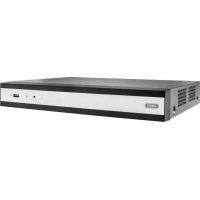
TVVR36800 - Digital Video Recorder ABUS - Free user manual and instructions
Find the device manual for free TVVR36800 ABUS in PDF.



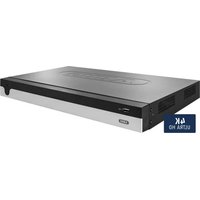
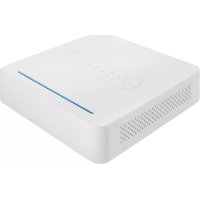
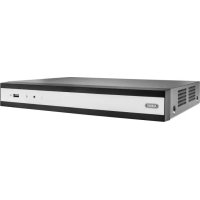
| Product type | 8-channel PoE Network Video Recorder (NVR) |
| Brand | ABUS |
| Model | TVVR36800 |
| Number of channels | 8 PoE channels (Power over Ethernet) |
| Power supply | 48 V DC power adapter (included) |
| Dimensions (approx.) | 260 x 230 x 50 mm |
| Weight (approx.) | 1.5 kg |
| Connectivity | 8 PoE ports, 1 RJ45 network port, 1 HDMI output, 1 VGA output, USB ports |
| Recording resolution | Up to 8 MP (4K) per camera (depending on camera) |
| Video compression | H.265+ / H.265 / H.264+ / H.264 |
| Storage | 1 SATA hard drive bay (up to 10 TB) |
| Main functions | Continuous and motion detection recording, remote playback, access via CMS and mobile app |
| Configuration | Setup wizard, web interface, USB mouse included |
| Security | Administrator password, camera password, data encryption |
| Maintenance and cleaning | Wipe with a dry cloth, do not use liquids or harsh cleaners |
| Spare parts and repairability | Replaceable hard drive, external power supply, ABUS technical support |
| Operating conditions | Temperature: 0 °C to 40 °C, humidity: 10% to 90% non-condensing |
| Package contents | Recorder, 48 V power adapter, USB mouse, 1 m network cable, CD, quick start guide |
| Warranty | 2 years (European conformity) |
| Certifications | CE, RoHS, compliant with European directives |
Frequently Asked Questions - TVVR36800 ABUS
User questions about TVVR36800 ABUS
0 question about this device. Answer the ones you know or ask your own.
Ask a new question about this device
Download the instructions for your Digital Video Recorder in PDF format for free! Find your manual TVVR36800 - ABUS and take your electronic device back in hand. On this page are published all the documents necessary for the use of your device. TVVR36800 by ABUS.
USER MANUAL TVVR36800 ABUS
Security Tech Germany
ABUS


TVVR36400 / TVVR36800
QUICKGUIDE FÜR IP- REKORDER
Scope of delivery 24
Warnings 25
Connections 26
Tips for camera installation 28
Hardware installation 29
System activation 31
Software set-up 32
Instructions, software and app 38
Français
Hardwareinstallation
Systemaktivering 85
Softwareopsætning 86
Vejledning ^+ software ^+ app 92
Svenska
Leveransomfang 96
Varningar 97
Ansluttingar 98
Tips for kamerainstallation 100
Security Tech Germany
Security Tech Germany


SYSTEMAKTIVIERUNG

Security Tech Germany
1

https://www.abus.com/product/TVR36400
https://www.abus.com/product/TVVR36800
Soft ware:

Download on the App Store

GET ON Google Play

Security Tech Germany
ABUS


TVVR36400/TVVR36800
QUICK- START GUIDE FOR
IP RECODER
This quick-start guide describes the initial installation steps for your IP recorder.
More detailed information can be found in the user guide.


Dear Customer,
Thank you for purchasing one of our products. This product complies with current European and national regulations.
Conformity has been proven, and all related certifications are available from the manufacturer on request: ABUS Security-Center GmbH & Co. KG, Linker Kreuthweg 5, 86444 Affing, GERMANY.
To ensure that this standard is maintained and that safe operation is guaranteed, you are obliged to observe the stipulations set out in this user guide. Read the entire user guide before putting the product into operation, and pay attention to all operating instructions and safety information.
All company names and product descriptions are trademarks of the corresponding owner. All rights reserved. If you have any questions, please contact your specialist dealer.
SCOPE OF DELIVERY
TVR36400:
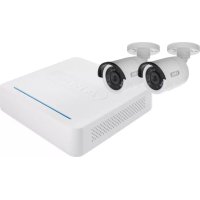
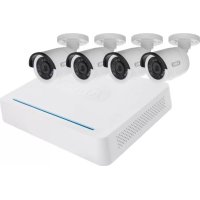
4-channel PoE recorder
- 48 V power supply unit
- Wireless USB mouse
- 1 m network cable
CD
Quick-start guide
TVVR36800:
8-channel recorder
48V power supply unit
- Wireless USB mouse
- 1 m network cable
CD
Quick-start guide



WARNING

Security Tech Germany
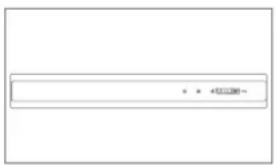
Keep the recorder away from strong magnetic fields.

Ensure an uninterrupted power supply.

Keep liquids away from the recorder.

Only operate and store the recorder in the ambient conditions recommended by the manufacturer.

Turn the recorder off before connecting or removing peripheral devices.

Ensure that there is always sufficient ventilation.
CONNECTIONS



TIPS FOR CAMERA INSTALLATION

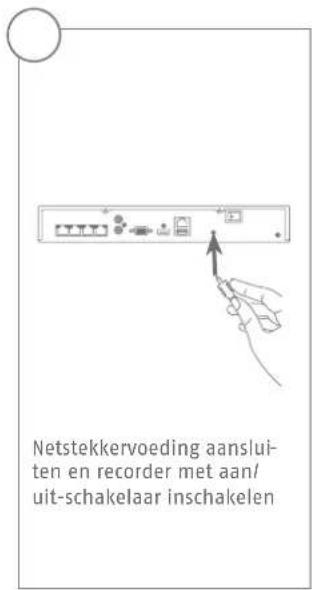
Connect the recorder to the power supply. Connect the cameras to the recorder's PoE port using a network cable. It takes approx. three minutes for the camera to be added to the recorder automatically.
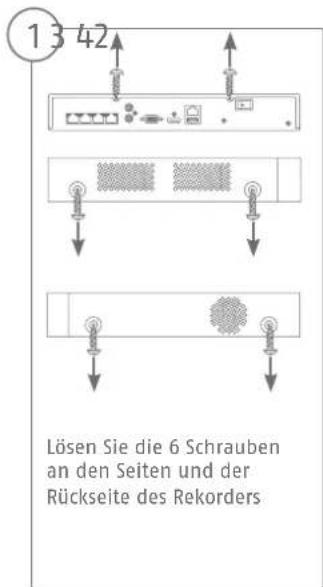
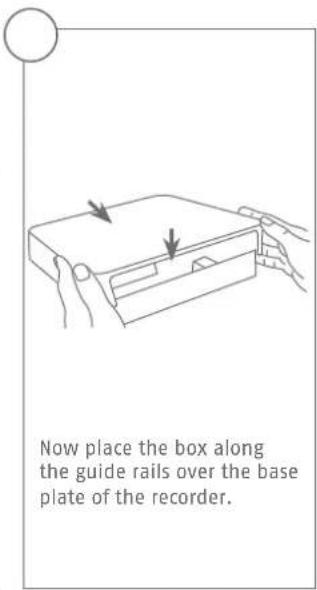
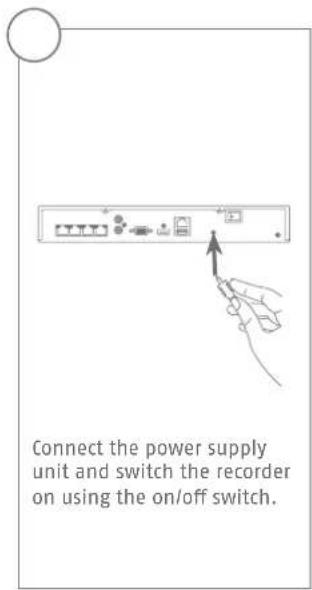
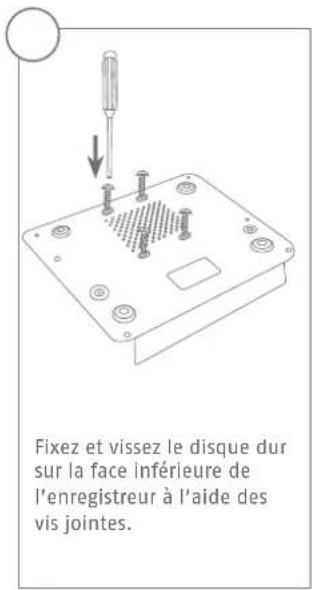
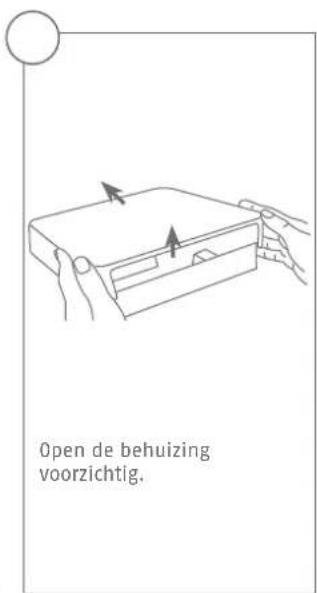
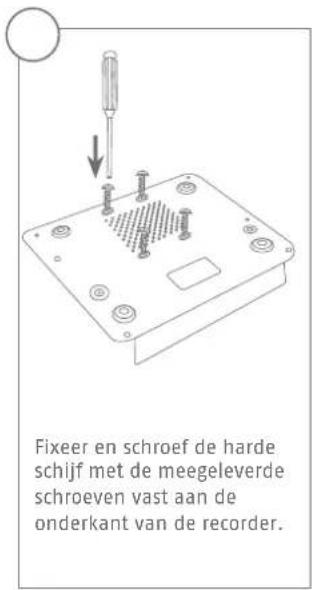
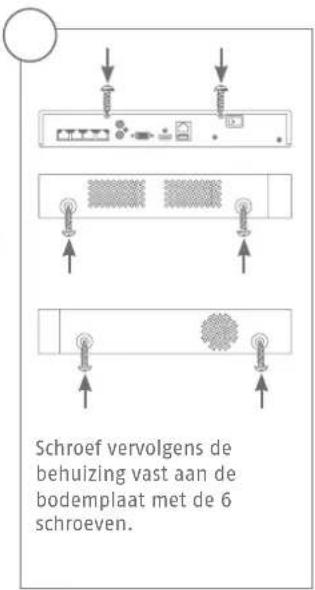
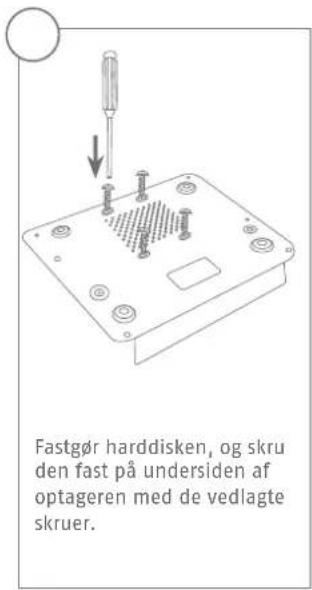
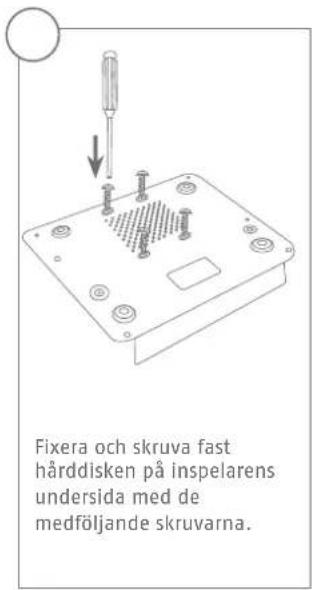
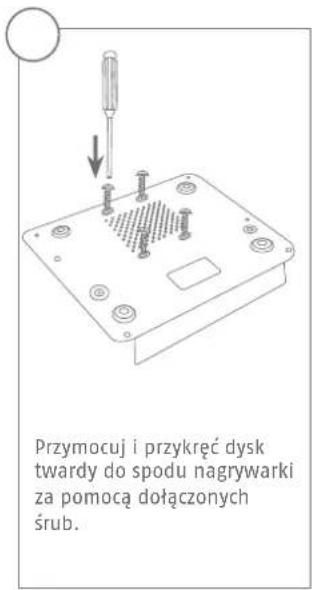
HARDWARE INSTALLATION

Security Tech Germany



SYSTEM ACTIVATION

Security Tech Germany
1

In the field "New password" enter a password for the admin user.
The password must meet the specified minimum requirements.
Recommendation: Use a password that is as complex as possible and is classified as "strong".
2

Re-enter the password to confirm it. Make a note of the password in the quick-start guide as well and keep it in a safe place. The admin password can only be reset by ABUS technical support.
3

You should also enter the activation password for the cameras here. If you activate a camera via the recorder, the recorder uses this password for it. Then click on "OK". The device is now activated and all of its functions can be used.
Admin password:
SOFTWARE SET-UP

1
Select the desired language and click "Apply".

2
If you untick the checkbox, the set-up wizard will no longer automatically pop up the next time the software starts up. Click on "Next".

3
Set the time zone, date, date format and system time. Close the screen by clicking "Next".


7
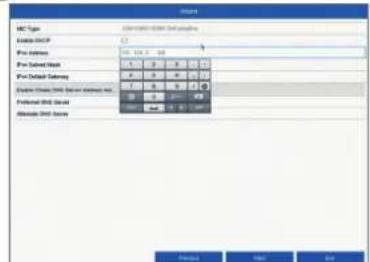
The first three positions of the IP address must correspond to the default gateway value. The final digit identifies devices addressed by the default gateway and is individually set for each device. For the recorder, choose e.g. 64: i.e. xxx.xxx.xxx.64.
8

The subnet mask is a network segment in which IP addresses with the same network address are used. The standard value is normally 255.255.255.0 in such cases. To determine the value for the default gateway, use a Windows PC connected to the network.
9

Enter the IP address of your router here. You can find the address with "cmd" and the command "ipconfig" on your Windows PC.

10

The DNS server "translates" an internet address into an IP address. Enter the value of the default gateway under "Preferred DNS server".
11

You can manage and, if necessary, edit your ports here. We recommend that the default values are maintained.
12
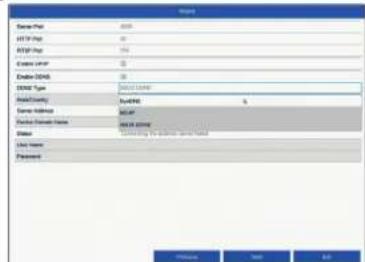
If you wish to set up remote access, tick the "Enable DDNS" checkbox. Then select your DDNS type using the entry field.
13

Next, save the server address and the device domain name, user name and password. Go to the next screen with "Next".
14

Following installation, the hard disk drive must be initialised before use. Select the hard disk drive to be initialised.
15
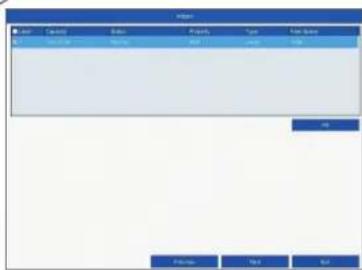
Click on "Init" and confirm the successful initialisation by clicking on "OK". Go to the next screen with "Next".

16

Click on "Search" to look for available network cameras in the network.
17

You will find all the compatible network cameras below. Tick the checkbox of the network cameras you wish to use and click on "Add". Go to the next screen with "Next".
18

Select the recording type. It is possible to select between "Continuous" and "Motion detection". Close the set-up wizard by clicking "OK".
INSTRUCTIONS, SOFTWARE AND APP
Instructions:

instructions for operating the online and recorder interfaces can be found under the "Downloads"
tab at the following link:
https://www.abus.com/product/TWR36400
https://www.abus.com/product/TVVR36800
Soft ware:

1 ABUS Central Monitor Station (CMS) allows you to monitor, control and manage the video data from your
ABUS recorder on your PC:
BUS IP Installer to fi nd your recorder in the network, to check for and install firmware updates and pad instruction manuals and quick-start guides directly to your PC:
rate access to your recorder:

Download on the
App Store

GETITON
Google Play

Security Tech Germany
ABUS


TVVR36400/TVVR36800
GUIDE DE DEMARRAGE RAPIDEPOUR ENREGISTREUR IP
Chere cliente, cher client,
Security Tech Germany
Security Tech Germany


Security Tech Germany
1

MANUEL + LOGICIEL + APPLICATION
Manuels :
https://www.abus.com/product/TVVR36400
https://www.abus.com/product/TVVR36800
Logiciel:

Security Tech Germany
ABUS


TVVR36400 / TVVR36800
Security Tech Germany
Security Tech Germany




ACTIVERING VAN HET SYSTEEM

Security Tech Germany
1

https://www.abus.com/product/TWR36400
https://www.abus.com/product/TVVR36800
Soft ware:

Security Tech Germany
ABUS


TVVR36400 / TVVR36800
KVIKGUIDE TIL IP-OPTAGER
Security Tech Germany
Security Tech Germany




SYSTEMAKTIVERING

Security Tech Germany
1

http://www.abus.com/product/TWR36400
https://www.abus.com/product/TVVR36800
Soft ware:

Security Tech Germany
ABUS


TVVR36400/TVVR36800
Security Tech Germany
Security Tech Germany


Security Tech Germany
1

I faltet "Nytto Iosenord" anger du ett Iosenord for admin-anvandaren. Iosenordet maste folja de minimikrav som stalls. Rekommendation: Skapa ettsa komplex tosenord du kan sa att detfar markeringen "Starkt".
2

Anglosenordetigenforattbekraftdet.Notera dessutomosenordet i snabbguidenochforvara detpen saker plats. Attaterstalla admin-losendortgargendastattgora viaABUSteknska support.
3

nur https://www.abus.com/product/TWR36400
https://www.abus.com/product/TVVR36800
Programvara:

N11001 ABUS Central Monitor Station (CMS) kan du overvaka, styra och administrera videodata frän din
ABUS-inspelare pátatorn:
Security Tech Germany
ABUS


TVVR36400 / TVVR36800
GUIDA RAPIDA PER
REGISTRATORE IP
Security Tech Germany
Security Tech Germany
1

https://www.abus.com/product/TVWR36800
Soft ware:

ll software Central Monitor Station (CMS) TVSW11001 di ABUS consente di monitorare, controllare e gestire i dati video del registratore ABUS direttamente sul PC: http://www.abus.com/ger/Objektssicherheit/Videoeuberwachung/Analog/Aufzeichnungssysteme/VideomanagementSoft ware/ABUS-CMSSoft ware

Security Tech Germany
ABUS


TVVR36400/TVVR36800
Security Tech Germany
Security Tech Germany


5678
Security Tech Germany
1

https://www.abus.com/product/TVVR36800
Soft ware:

Soft ware/ABUS-CMS

Security Tech Germany
ABUS


TVVR36400 / TVVR36800
KROTKI PRZEWODNIK DONAGRYWARKI IP
Security Tech Germany
Security Tech Germany



5678
Security Tech Germany
1

https://www.abus.com/product/TWR36400
https://www.abus.com/product/TVWR36800
Oprogramowanie:

- Français
- Svenska
- SYSTEMAKTIVIERUNG
- SCOPE OF DELIVERY
- TVR36400:
- TVVR36800:
- WARNING
- CONNECTIONS
- TIPS FOR CAMERA INSTALLATION
- HARDWARE INSTALLATION
- SYSTEM ACTIVATION
- SOFTWARE SET-UP
- 7
- 8
- 9
- 10
- 11
- 12
- 13
- 14
- 15
- 16
- 17
- 18
- INSTRUCTIONS, SOFTWARE AND APP
- GUIDE DE DEMARRAGE RAPIDEPOUR ENREGISTREUR IP
- MANUEL + LOGICIEL + APPLICATION
- ACTIVERING VAN HET SYSTEEM
- KVIKGUIDE TIL IP-OPTAGER
- SYSTEMAKTIVERING
- KROTKI PRZEWODNIK DONAGRYWARKI IP
Brand : ABUS
Model : TVVR36800
Category : Digital Video Recorder