GR101H - Sports smartwatch OREGON SCIENTIFIC - Free user manual and instructions
Find the device manual for free GR101H OREGON SCIENTIFIC in PDF.



User questions about GR101H OREGON SCIENTIFIC
0 question about this device. Answer the ones you know or ask your own.
Ask a new question about this device
Download the instructions for your Sports smartwatch in PDF format for free! Find your manual GR101H - OREGON SCIENTIFIC and take your electronic device back in hand. On this page are published all the documents necessary for the use of your device. GR101H by OREGON SCIENTIFIC.
USER MANUAL GR101H OREGON SCIENTIFIC
With Wireless Remote Display
Model: GR101H
User Manual
Oregon
SCIENTIFIC
Body Fat Monitor
with Wireless Remote Display
(GR101)
User Manual

Table of Contents
Introduction. 1
Key Features. 2
Getting Started. 2
Unpacking the Product 3
Placing the Units 3
Before You Start 3
User Profile 4
SettingUserProfile 4
User Profile Measurements. 4
Memory Mode 5
Erasing Memory/Changing User Profile 6
Guest Mode 6
Other Settings. 7
Alarm. 7
Low Battery Warning 7
Reset. 7
How the Body Fat Monitor Works.... 8
Body Mass Index. 8
What is Body Mass Index (BMI)? 8
How to Interpret BMI 8
Body Fat Percentage 9
What is Body Fat Percentage? 9
How Body Fat is Measured... 10
How to Interpret Body Fat Levels. 10
How Body Fat Percentage Fluctuates 11
Body Water. 11
What is Body Water? 11
How to Interpret Body Water Levels. 11
Weight Conversion Table. 12
Troubleshooting Guide 12
Safety and Care 13
Warnings 14
Specifications 14
About Oregon Scientific 15
Introduction
Thank you for selecting the Oregon Scientific™ Body Fat Monitor as your healthcare product of choice. Your GR101 Body Fat Monitor is designed to give you many years of reliable service. Some of its features include:
Automatic calculation of weight, body mass index (BMI), body fat percentage, and body water percentage/weight
- Wireless Remote Monitor with 8-meter range and a large LCD display
Patented step-on technology that automatically turns on the scale whenever you step onto it (guest mode)
Storage of up to 4 different height and age information for four different users (guest mode available)
Storage of up to 30 previously recorded weight, BMI, body fat percentage, and body water percentage/weight
This manual contains important safety and care information, and provides step-by-step instructions for using this product. Read the manual thoroughly, and keep it in a safe place in case you need to later refer to it.
Key Features
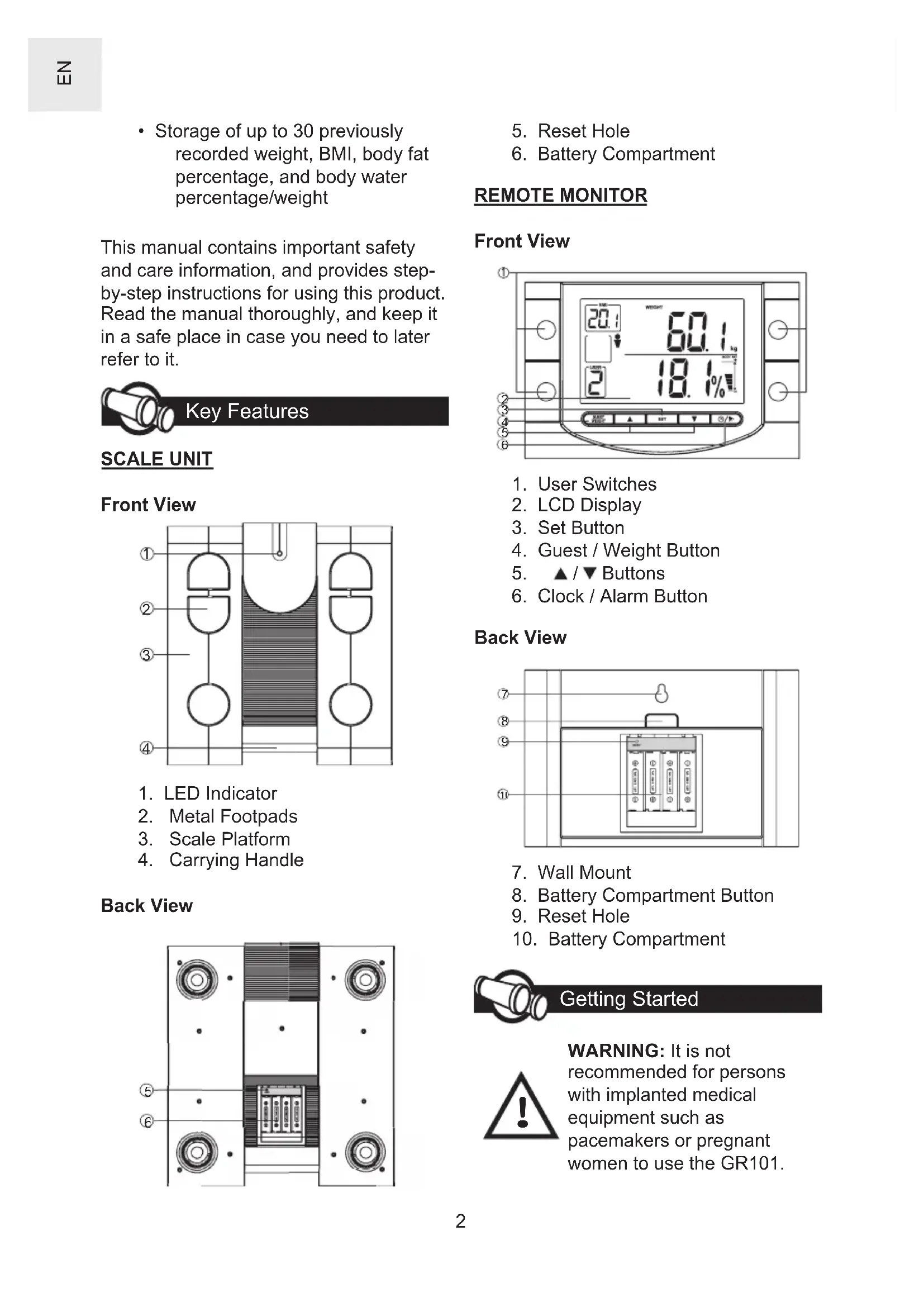
SCALE UNIT
Front View
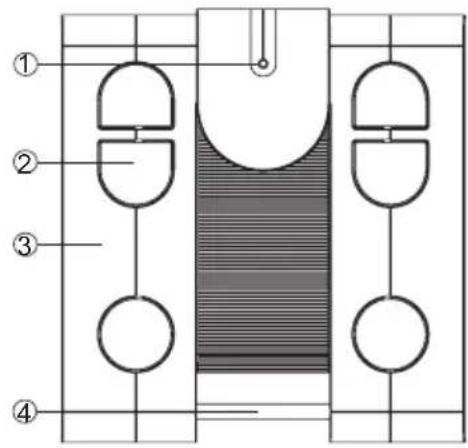
- LED Indicator
- Metal Footpads
- Scale Platform
- Carrying Handle
Back View
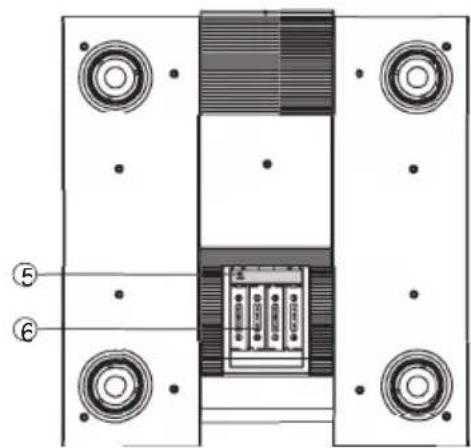
- Reset Hole
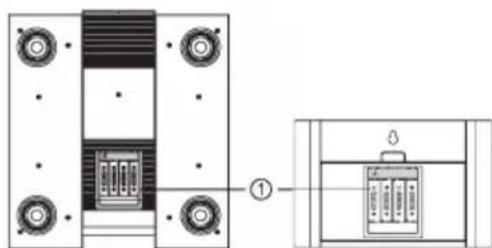
- Battery Compartment
REMOTE MONITOR
Front View
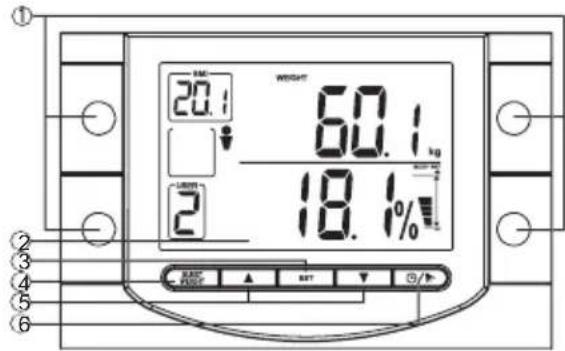
- User Switches
- LCD Display
- Set Button
- Guest / Weight Button
- / Buttons
- Clock / Alarm Button
Back View
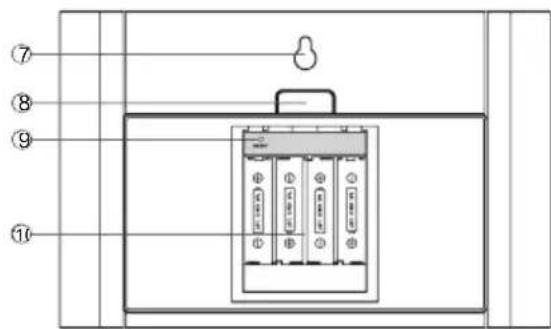
- Wall Mount
- Battery Compartment Button
- Reset Hole
- Battery Compartment
Getting Started
WARNING: It is not recommended for persons with implanted medical equipment such as pacemakers or pregnant women to use the GR101.
UNPACKING THE PRODUCT
When you unpack your product, make sure to keep all the packing materials in a safe place, in case you need to later transport or return it for servicing. In the box, you will find:
| Scale Unit Remote Unit | |
| 8x AA Batteries 4x Carpet Feet | |
| User Manual Warranty Card | |
| Oregon | Oregon |
PLACING THE UNITS
The Scale and the Remote Monitor should be within 8 metres of each other, in order to ensure proper reception.
Remote Monitor Installation
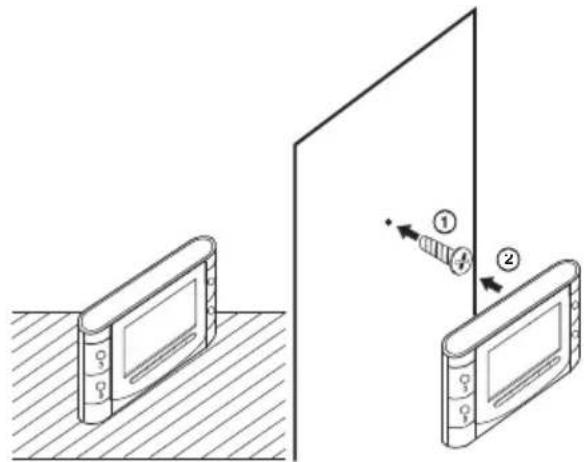
Mount or place the Remote Monitor on a wall or a flat surface as shown below. For best results, it should be located within 8 meters of the Scale. Avoid obstructions such as walls or heavy furniture.
Scale Placement
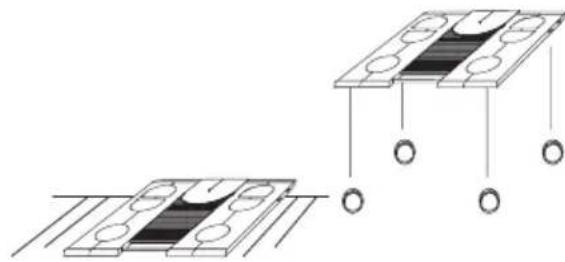
For best results, place the Scale on a flat, even surface. Use the supplied carpet feet if the Scale is to be placed on carpet.
NOTE Leave the Scale on the floor for 5 seconds to allow for self-calibration.
BEFORE YOU START
- Install the supplied batteries into both the Scale and Remote Monitor.
- On the Remote Monitor, press and hold SET to select, in order:
NOTE Press / to adjust the values of each setting. Press SET to confirm. Press L to exit any time.
a. Weight unit: kg (kilogram), lb (pound), or st-lb (stone)
b. 12- or 24-hour format
c. Current hour
d. Current minute
e. Current year
f. Date/Month or Month/Date format
g. Current Month
h. Current Date
User Profile
SETTING USER PROFILE
With this product, you can set and store the age, gender, and height for up to four people (User 1 to 4) who regularly use the Body Fat Monitor.
NOTE If the batteries are low, you cannot store the height and age to memory.
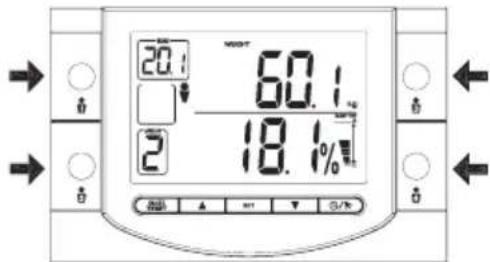
- On the Remote Monitor, each user is represented by one of the four User Switches. Press 1, 2, 3, or 4 to select a user.
NOTE Make sure not to store your height and birth date over someone else's existing profile.
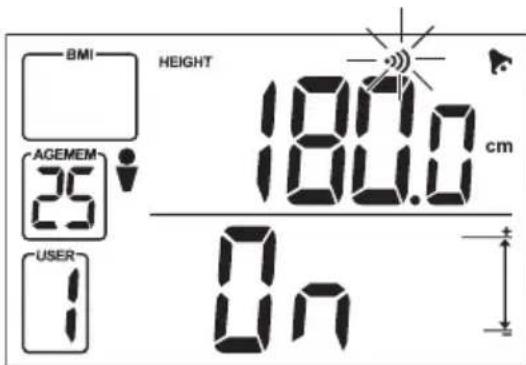
- Press and hold SET. The Remote Monitor will prompt you for:
a. Gender: Male / Female b. Birth Month c. Birth Year icon appears
d. Height: In centimetre (cm) if kg (kilogram) weight unit was selected. In feet and inches if lb (pound) or st-lb (stone) weight unit was selected.
NOTE Press / to adjust the values of each setting. Press SET to confirm. Press to exit any time.
USER PROFILE MEASUREMENTS
Once you set a User Profile, the GR101 can automatically calculate the body mass index (BMI), Body Fat Percentage, and Body Water measurements.
- Press the User Switch (1 to 4) that has your User Profile configured.
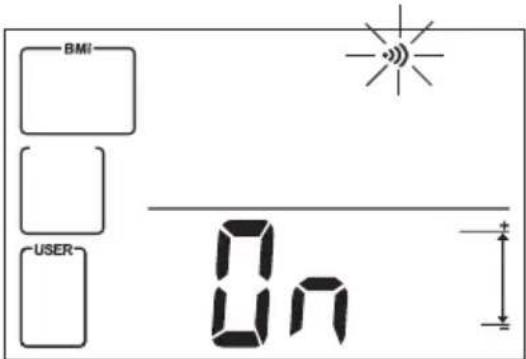
- Your profile will appear on-screen. Once the Reception icon blinks and the Scale's LED Indicator is blank, the Remote Monitor is ready to receive your weight information.
- Step onto the Scale. Stand still while the measurement is being taken. The Scale's green LCD Indicator will blink.
NOTE It is recommended that you step onto the scale with your bare feet. The electric signal sent from the scale cannot give readings if socks or shoes are worn. As a result, only weight and BMI will be measured.
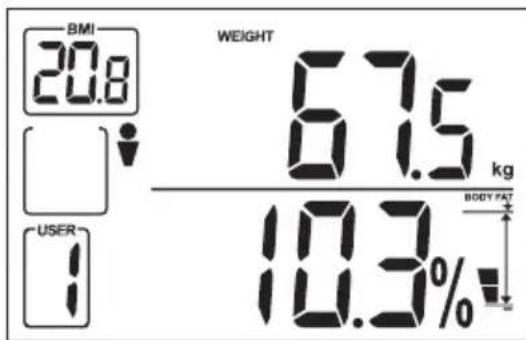
- Your weight and BMI will first appear on the Remote Monitor. Remain still, and the green LED Indicator will blink more rapidly to record your Body Fat and Body Water measurements.
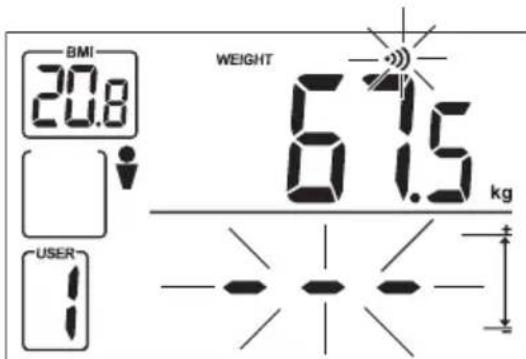
NOTE If is shown on the Remote Monitor, the maximum loading capacity for the Scale has been exceeded. Step off the Scale and try again with less than 150kg of weight.
NOTE If you wait for too long before stepping on the Scale, your measurements will not be taken correctly. Step off the Scale and follow these instructions again.
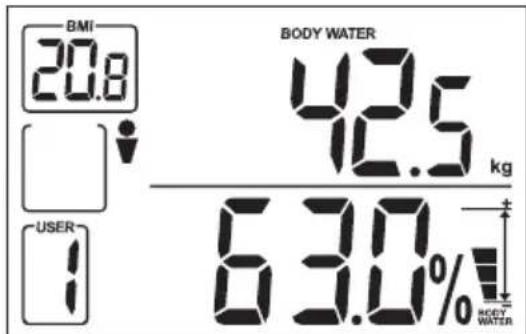
- Once the green LED stops blinking, your Body Fat and Body Water measurements will be alternately displayed on the Remote Monitor.
Weight, Body Fat and BMI Display:
Body Water Weight and Percentage Display:
MEMORY MODE
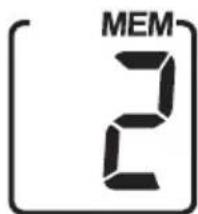
The GR101 can automatically store up to 30 previous measurements. To display previous measurements taken by a user with a profile:
-
Press the User Switch (1 to 4) corresponding to your User Profile.
-
Press / to cycle through your previous measurements. The MEM box will indicate the current memorized measurements that you are viewing.
ERASING MEMORY/CHANGING USER PROFILE
If you change your birthdate or height information in your User Profile, the previously stored measurements in memory may no longer be applicable.
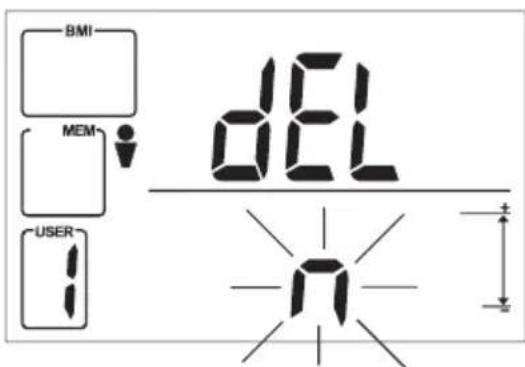
So, when you make any modifications to the User Profile, the Remote Monitor will ask you if you would like to erase your previously stored measurements.
NOTE If you change the gender of a User Profile, the previous measurements in that profile will automatically be deleted.
Press / to select to erase memory, or to keep existing memory. Press SET to confirm.
Guest Mode
With the Guest Mode, you can quickly measure your weight and BMI without needing to set up a User Profile. However, in this mode, your measurements will not be stored.
- Press Guest/Weight. Once the Reception icon blinks and the Scale's LED Indicator is blank, the Remote Monitor is ready to receive your weight information.
- Follow Steps 3 and 4 of the USER PROFILE MEASUREMENTS section.
NOTE You can choose to skip the next set of instructions in this section if you do not want to measure your Body Fat and Body Water levels.
- Once the green LED stops blinking, the Remote Monitor will prompt you for:
NOTE Press / to adjust the values of each setting. Press SET to confirm. Press to exit anytime.
a. Gender: Male / Female b. Birth Month c. Birth Year icon appears
d. Height:
In centimetre (cm) if kg (kilogram) weight unit was selected.
In feet and inches if lb (pound) or st-lb (stone) weight unit was selected.
- When completed, your Body Fat and Body Water measurements will be alternately displayed on the Remote Monitor.
Other Settings
ALARM
The Remote Monitor also has alarm function with snooze.
Set Alarm
- Press
The BMI box will indicate that you are now in Alarm Mode.
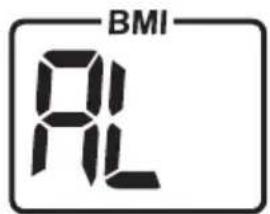
- To adjust the alarm time:
a. Press and hold SET.
b. Press / to adjust the hour and minute. Press SET to confirm.
3. To turn alarm on/off, press / . When turned on, the icon will appear.
4. Press any time to return to normal clock display.
Snoopze
When the alarm rings:
Press to turn alarm / snooze off.
- Press any other buttons to temporarily disable the alarm for 8 minutes ( SNOOZE icon will appear).

LOW BATTERY WARNING
Scale
The LED Indicator also functions as a warning indicator. When you step on the scale, the following LED colour indicates:
- Green - Adequate battery level.
- Yellow - Low battery level. Replace the batteries.
Red - Scale is in error. Consult the TROUBLESHOOTING GUIDE for more information.
Remote Monitor
The LCD Display can show Low Battery Warning symbols for both the Scale and the Remote Monitor:
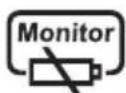
The Remote Monitor's batteries are low.
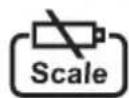
The Scale's batteries are low.
RESET
The RESET hole is used whenever the product is not performing as expected (such as when the Remote Monitor cannot detect the Scale) or when new batteries are inserted. This will return the settings to default values.
Both the Scale and Remote Monitor have RESET holes located inside the Battery Compartment. Use a blunt stylus such as a paper clip to press into the hole.
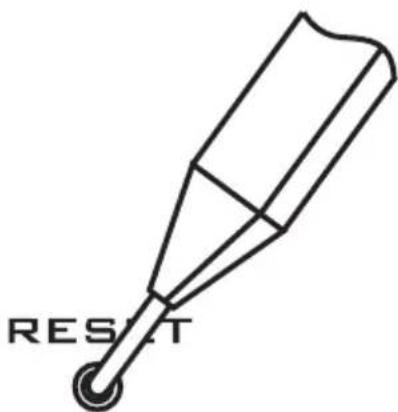
NOTE The time information will be erased when the RESET hole is pressed on the Remote Monitor. All other values, such as date and month, will not be affected.

How the Body Fat Monitor Works
When you step on the scale, a weight measurement is taken. The GR101 can also help you to automatically calculate your Body mass index (BMI) and Body Fat Percentage, two internationally accepted indicators of health and obesity levels.
Weight alone is not a good enough indicator of health because it does not differentiate between muscles, tissues, bones, and fat. As such, when a person loses weight, it may be a result of the loss of muscles or body water but not fat. In order to better understand your body composition and current health level, both the BMI and Body Fat Percentage should be observed.
Neither the BMI nor the Body Fat Percentage, taken individually, gives the complete picture of your health. For example, bodybuilders often have high BMI (considered obese) but low Body Fat Percentage (considered healthy). The BMI, in this case, does not take into account that the extra weight is from muscles and water but not fat. Conversely, a very thin person may have low Body Fat Percentage (considered healthy) but also lower-than-accepted BMI (considered unhealthy). This means that the person is still at risk health-wise, despite the low Body Fat Percentage.
NOTE Consult your physician before you begin a new diet or exercise program.
BODY MASS INDEX
What is Body Mass Index (BMI)?
Body mass index (BMI) is a widely used international standard that measures height-to-weight ratio to determine obesity. BMI is calculated using the following:
$$ \mathrm {B M I} = \frac {\text {B o d y w e i g h t (k g)}}{[ \text {B o d y h e i g h t (m)} ] ^ {2}} $$
NOTE Refer to WEIGHT CONVERSION TABLE to convert between weight units.
The BMI is only a general indicator of your health level. As such, accuracies may vary depending on your body type and composition. Consult your physician to find out more about your current health.
NOTE BMI should not be used as a guideline for health risks for the following groups:
| Group Reason | |
| Children / teenagers | BMI ranges are only based on adult heights. |
| Athletes and body-builders | BMI does not differentiate between fat and muscle, thus making it inaccurate for persons with high muscle volumes. |
| Pregnant or nursing women | This group generates naturally high fat reserves as part of the pregnancy. |
| People over the age of 65 | Fat reserves naturally tend to be higher with older persons. |
How to Interpret BMI
Use the resulting BMI value with the chart below to determine your current level of health:
| Health Indication | BMI Range | Description |
| Under-weight | Less than 20.0 | Your body weight is currently lower than average. Work toward healthy, regular food intake and exercise routine to build up your health to recommended levels. |
| *Asian BMI: Less than 18.5 | ||
| Recommended | 20.0 – 25.0 | Your health is at the recommended level. Maintain a balanced diet and exercise to keep your current level of health. |
| *Asian BMI: 18.5 – 23.0 | ||
| Over-weight | 25.1 – 29.9 | Your body weight may be above normal. Increase your exercise and work out a diet plan to lower your risk for serious illness. |
| *Asian BMI: 23.1 – 29.9 | ||
| Obese 30.0 | or greater | At this level, you may be at risk for heart disease, high blood pressure, and other illnesses. Consult with your doctor to develop a proper health and fitness plan. |
| *Asian BMI: 30.0 or greater |
NOTE Asians have a separate BMI range due to their different body composition.
References:
- Jequier, E. (1987)
Energy, obesity, and body weight standards. - American Journal of Clinical Nutrition, 45, 1035-1047
- Japan Society for the Study of Obesity
- The Weight Loss Research Center
- myDr. (www.mydr.com.au)
BODY FAT PERCENTAGE
What is Body Fat Percentage?
Body Fat Percentage is a measurement of the total percentage of fat in your body. For example, if you weigh 70kg and your Body Fat Percentage is 15% , then you are retaining 10.5kg of fat. The remaining weight is composed of muscles, bones, tissues, and water weight.
Among overweight people, it is excess fat and not weight alone that carries health risks. Since the body comprises elements of varying densities, weight or BMI cannot fully measure exactly how much excess fat a person carries. For example, two people of the same weight and BMI may have big differences in body composition. One may carry excess fat while the other carry acceptable level of fat needed to regulate the body. As such, a Body Fat Percentage measurement is an effective assessment of your current health level.
NOTE Essential fat is necessary for bodily functions, since it helps to maintain body temperature an insulate organs and tissues.
How Body Fat is Measured
The GR101 uses the method of Bioelectrical Impedance Analysis (BIA) to measure body fat. This method is completely safe, and is widely used in the medical field. The principle of BIA is as follows: GR101 sends a low, harmless electrical signal through your body that flows freely through fluids but not fat. As such, the machine measures the opposition to the signal and uses this to calculate the body fat percentage (along with the person's age, height and weight).
How to Interpret Body Fat Levels
Use the resulting Body Fat Percentage value with the chart below to determine your current level of health:
ADULT MEN
| Body Fat Level | Age Group in Years | |||
| <30 | 30-39 | 40-49 | >49 | |
| Very High | >28% | >29% | >30% | >31% |
| High | 22-28% | 23-29% | 24-30% | 25-31% |
| Normal | 11-21% | 12-22% | 13-23% | 14-24% |
| Low | 6-10% | 7-11% | 8-12% | 9-13% |
| Very Low | <6% | <7% | <8% | <9% |
ADULT WOMEN
| Body Fat Level | Age Group in Years | |||
| <30 | 30- | 40- | >49 | |
| 39 | 49 | |||
| Very High | >32% | >33% | >35% | |
| High | 26 - 32% | 27 - 33% | 28 - 34% | 29 - 35% |
| Normal | 15 - 25% | 16 - 26% | 17 - 27% | 18 - 28% |
| Low | 12 - 14% | 13 - 15% | 14 - 16% | 15 - 17% |
| Very Low | <12% | <13% | <15% | |
| Body Fat Standard | Reason |
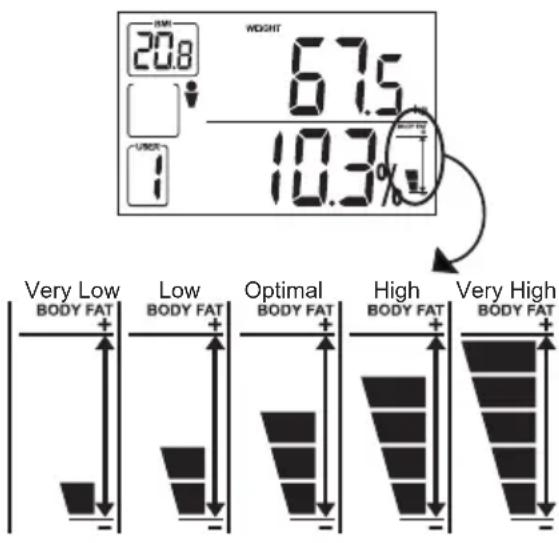
| Very High | Percent fat at this level indicates the person is seriously obese to a degree that this can have adverse health consequences. Maintaining this level of fat for a long period of time places the person at risk of hypertension, heart disease, and diabetes. Consult your doctor on a long-term weight loss and exercise program. |
| High It is | likely that the person is obese. Careful implementation and monitoring of diet and exercise is recommended. |
| Optimal This is the ideal level of body fat for the average person. | |
| Low For | athletes, this is a desirable level of body fat. For regular persons, a regular diet should be considered to improve the balance of body composition. |
Very Low
The level of body fat is too low. Consult a physician for advice.
In addition to displaying your Body Fat Percentage, the GR101 provides a Body Fat Level Indication on the LCD screen to help you immediately gauge your level of body fat without referring to the chart above.
Reference:
- Robert M. Ross, Andrew S. Jackson: Exercise concepts, calculations, and computer applications.
Carmel, Ind.: Benchmark Press, 1990.
How Body Fat Percentage Fluctuates
It is recommended that you choose a time slot to measure body fat and then monitor it regularly at the same condition. Ideally, body hydration level is most stable during late afternoon, right before dinner. Please note the many factors may alter an individual's body fat measurement, including alcohol consumption, taking a bath or exercising, waking up, eating, fever and illnesses.
BODY WATER
What is Body Water?
Total Body Water is the amount of water retained in the body, and comprises between 50% -70% of the total body weight. Generally, men tend to have higher water weight than woman due to a greater amount of muscle. Athletes also tend to have 5 - 8% more Total Body Water due to more muscle mass. Staying within the proper Body Water range is very important in order to stay healthy. It plays an important role in the regulation of body temperature, removal of waste from the body, cell metabolism, and keeping skin and tissues moist.
NOTE A person's Body Water level can fluctuate by 2kg during the day.
NOTE A person under the influence of alcohol, medicine, Dropsy, or heavy exercise may exhibit lower-than-normal Body Water level due to dehydration.
How to Interpret Body Water Levels
Use the resulting Body Water Percentage value with the chart below to determine your current level of body water:
| Body Water Level | Male Female |
| High >70% | >65% |
| Slightly High 65 - 70% 60 - 65% | |
| Normal 53 | 65% 50 - 60% |
| Slightly Low 48 - 53% 48 - 50% | |
| Low <48% | <48% |
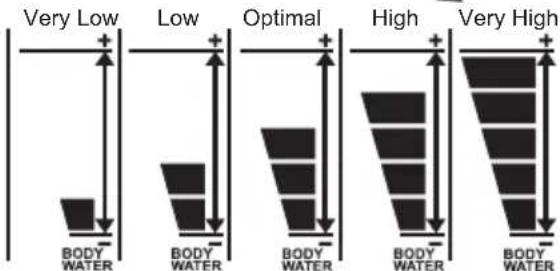
| Body Water Level | Advice |
| High Consult your physician for advice. | |
| Slightly High | Observe your normal water intake. |
| Normal This is the ideal level of body water. | |
| Slightly Low | Drink more water to keep proper hydration. |
| Low Consult your physician for advice. | |
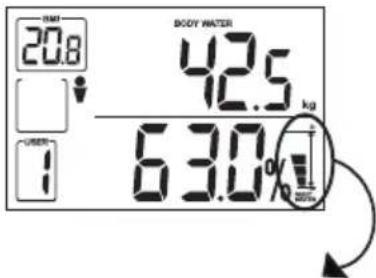
The GR101 provides a Body Water Level Indication on the LCD screen to help you immediately gauge your level of body water without referring to the chart above.

Weight Conversion Table
| Unit | Name Conversion |
| kg | Metric kilogram |
| lb | Imperial pound |
| st-lb | British stone pound |
| 1 kg = 2.20 lb 1 kg = 0.16 st-lb | |
| 1 lb = 0.45 kg 1 lb = 0.07 st-lb | |
| 1 stone = 14.0 lb 1 stone = 6.35 kg | |
Troubleshooting Guide
This section includes a list of frequently asked questions for problems you may encounter with your Body Fat Monitor. If the product is not operating as you think it should, check here before arranging for servicing.
| Symptom | Check Remedy | |
| The Remote Monitor's display is dim or blank | The batteries are low or exhausted | |
| Batteries are inserted incorrectly | ||
| The measurement is inaccurate | The scale is uneven or on carpet | |
| Socks or shoes are worn | ||
| The entered gender, birth date, or height is wrong | ||
| Measurements vary after a short period | ||
| Symptom Check Remedy | ||
| Scale shows when weighing | The scale is over-loaded | The maximum weight is 150kg (330 lb / 23st - 8lb). Remove the weight from the scale. |
| Weight does not display | Retry measuring | Wait until the Reception icon appears. |
| Err1 shown on the display | The weight on the scale is unevenly distributed or unstable | Make sure to remain still and place the scale on a flat surface. Use the carpet feet if the ground is carpeted or uneven. |
| Err2 shown on the display | You have stepped on the scale too early | For guest user, wait until the LCD is blank. For user with saved settings, wait until the display shows 0n before stepping on. |
| Err3 shown on the display | The Scale is not properly calibrated | Lift the Scale up, then place it back on the floor to allow for self-calibration. |

CARING FOR YOUR BODY FAT MONITOR
To ensure you receive the maximum benefit from using this product, please observe the following guidelines.
| Clean with a damp cloth. Do not use abrasive or corrosive cleaning agents. | |
| Do not attempt to repair the product yourself. Contact the dealer or a qualified repairman if the product requires servicing. | |
| Do not store the Scale in an upright position. | |
| Do not place objects on the Scale or Remote Monitor. | |
| MAX 150kg | Do not expose the product to excessive force, dust, temperature fluctuations, or humidity. |
| cool 30 min hot | Allow the Scale to settle for at least 30 minutes whenever there is a sudden change in ambient environment (e.g., from an outdoor area to an air conditioned room). |
SAFETY PRECAUTIONS
Please observe the following safety precautions when setting up and using your Body Fat Monitor.
| Do not immerse the product in water or place the scale on a wet surface. | |
| Keep the product away from heat sources such as radiators, stoves, and heaters. | |
| Do not use the Scale on an uneven surface. | |
| Use carpet feet (supplied) if you place the Scale on a carpet. |
Warnings
This product has been engineered and manufactured to the highest safety standards. The product is designed to provide you with many years of reliable service, provided that it is properly used and cared for. To ensure your safety and prolong the life of the product, please observe the following precautions.
ABOUT THE DEVICE
WARNING: It is not recommended for persons with implanted medical equipment such as pacemakers or pregnant women to use the GR101.
- The GR101 is intended for home use only, not for hospital diagnosis purposes.
-
The BMI, Body Fat Percentage, and Body Water measurements done with the GR101 should only be treated as an approximate indication of your health level. Consult with your physician for a full and thorough evaluation.
-
Body Fat Percentage and Body Mass Index measurements are less accurate for professional athletes, bodybuilders, children, teenagers, and persons over the age of 65 due to the difference in their body compositions. However, this device can still help individuals in the groups above to track their body fat trends over time.
GENERALWARNINGS
- Read and observe all warnings and instructions. Contents of this user manual are subject to change without further notice. Figures and display examples are for reference only, and may slightly differ from the actual product.
- Batteries - Reversing the battery polarity may damage the product. Remove the batteries if the Body Fat Monitor will be in storage for an extended period of time.
- Liquids, moisture, and foreign objects - Never insert foreign objects in or spill liquids on the product, as this can cause electric shock and damage to the unit. Do not immerse this product in water.
Technical specifications are subject to change without further notice. - Unauthorized reproduction of this document is prohibited without the permission of the manufacturer.
- Due to printing limitation, the displays shown in this manual may differ from the actual display.
Specifications
SCALE UNIT
Dimension 315(W) x 340(D) x 50(H) mm
Weight 1.8 kg (excluding batteries)
Battery 4 x LR06 / AA / UM-3 1.5V
Power Save Auto-off after 5 - 10 seconds
REMOTE MONITOR
Dimension 186(W) x 120(H) x 33(T) mm
Weight 380g (excluding batteries)
Battery 4 x LR06 / AA / UM-3 1.5V
WEIGHT_MEASUREMENT
Mechanism 4 load cell strain gauges
Unit kilogram (kg) / pounds (lb) / stone pounds (st-lb)
Maximum 150kg / 330 lb / 23st-8lb
Resolution 0.1kg / 0.2lb
BODYFAT MEASUREMENT
Mechanism 6 conductive pads
Range 5-75%
Resolution 0.1%
Gender Male/Female
Age 7 to 99 years old
BMI MEASUREMENT
Range 1.8 - 50 kg/m
HEIGHT
Unit centimetres (cm) / feet () and inches (^ )
Range 80.0 - 230.0 cm / 2^7.5^ - 7^6.6^
Resolution 0.1 cm or 0.1"
Gender Male/Female
Age 7 to 99 years old
TEMPERATURE
Operation 5^ - 45^/ 41^ - 113^ at ≤ 85% relative humidity
Storage -20^ - 60^/ -4^ - 140^ at ≤ 85% relative humidity
About Oregon Scientific
Visit our website (www.oregonscientific.com) to learn more about Oregon Scientific products such as digital cameras; MP3 players; children's electronic learning products and games; projection clocks; health and fitness gear; weather stations; and digital and conference phones. The website also includes contact information for our customer care department in case you need to reach us, as well as frequently asked questions and customer downloads.
We hope you will find all the information you need on our website, however if
you'd like to contact the Oregon Scientific Customer Care department directly, please visit: www2.oregonscientific.com/service/support
OR
Call 949-608-2848 in the US.
For international enquiries, please visit: http://www2.oregonscientific.com/about/international/default.asp

Help us protect the environment.
Recycle the packaging, batteries, and product after you no longer need them.
OREGON
SCIENTIFIC
Quellen:
1. Jequier, E. (1987) Energy, obesity, and body weight standards.
2. American Journal of Clinical Nutrition, 45, 1035-1047
3. Japan Society for the Study of Obesity
4. The Weight Loss Research Center
5. myDr. (www.mydr.com.au)
KÖRPERFETTANTEIL
- Robert M. Ross, Andrew S. Jackson: Exercise concepts, calculations, and computer applications.
Carmel, Ind.: Benchmark Press, 1990.
- Pulse para desactivar la alarma / el snooze.
- Pulse该如何用到?
- Pulse could be used to help you deal with the following conditions:
- Pulse could be used to help you deal with the following conditions:
- Pulse could be used to help you deal with the following conditions:
- Pulse could be used to help you deal with the following conditions:
- Pulse could be used to help you deal with the following conditions:
- Pulse could be used to help you deal with the following conditions:
- Pulse could be used to help you deal with the following conditions:
- Pulse could be used to help you handle any other condition.
- Jequier, E. (1987) Energy, obesity, and body weight standards.
- American Journal of Clinical Nutrition, 45, 1035-1047
- Japan Society for the Study of Obesity
- The Weight Loss Research Center
- myDr. (www.mydr.com.au)
PORCENTAJE DE GRASA CORPORAAL
- Robert M. Ross, Andrew S. Jackson: Exercise concepts, calculations, and computer applications.
Carmel, Ind.: Benchmark Press, 1990.
- Jequier, E. (1987) Energy, obesity, and body weight standards.
- American Journal of Clinical Nutrition, 45, 1035-1047
- Japan Society for the Study of Obesity
- The Weight Loss Research Center
- myDr. (www.mydr.com.au)
- Robert M. Ross, Andrew S. Jackson: Exercise concepts, calculations, and computer applications.
Carmel, Ind.: Benchmark Press, 1990.
INDICE DELLA MASSA CORPOREA
- Jequier, E. (1987) Energy, obesity, and body weight standards.
- American Journal of Clinical Nutrition, 45, 1035-1047
- Japan Society for the Study of Obesity
- The Weight Loss Research Center
- myDr. (www.mydr.com.au)
PERCENTUALE DI MASSA GRASSA
- Robert M. Ross, Andrew S. Jackson: Exercise concepts, calculations, and computer applications.
Carmel, Ind.: Benchmark Press, 1990.
WAARSCHUWING ZWAKKE BATTERIJEN
De weegschaal
ALGEMENE WAARSCHUWINGEN
INDICE DE MASSA CORPORA(LBMI)
stone pounds (st-lb)
Maximo 150 kg / 330 lb / 23 st - 8 lb
Resolucao 0,1 kg / 0,2 lb
UPPACKING AV PRODUKTEN
PLACERING AV PRODUKTEN
BORTTAGNING AV MINNESPROFIL/ ANDRING AV MINNESPROFIL
- Jequier, E. (1987)
Energy, obesity, and
body weight standards. - American Journal of Clinical
Nutrition, 45, 1035-1047 - Japan Society for the Study of
Obesity - The Weight Loss Research
Center - myDr. (www.mydr.com.au)
KROPPSFETT I PROCENT
- Robert M. Ross, Andrew S. Jackson: Exercise concepts, calculations, and computer applications.
Carmel, Ind.: Benchmark Press, 1990.
- Jequier, E. (1987) Energy, obesity, and body weight standards.
2.American Journal of Clinical Nutrition, 45, 1035-1047 - Japan Society for the Study of Obesity
- The Weight Loss Research Center
5.myDr. (www.mydr.com.au)
身体脂肪百分比身体脂肪百分比
何謂身體脂肪百分比何謂身體脂肪百分比
- Robert M. Ross, Andrew S.Robert M. Ross, Andrew S.
Jackson: Exercise concepts, Jackson: Exercise concepts,
如何理解體內的水分含量水平?如何理解體內 calculations, and computercalculations, and computer
- Jequier, E. (1987) Energy, obesity, and body weight standards.
2.American Journal of Clinical Nutrition, 45, 1035-1047 - Japan Society for the Study of Obesity
- The Weight Loss Research Center
5.myDr. (www.mydr.com.au)
身体脂肪百分比身体脂肪百分比
何谓身体脂肪百分比何谓身体脂肪百分比
- Robert M. Ross, Andrew S.Robert M. Ross, Andrew S.
Jackson: Exercise concepts, Jackson: Exercise concepts,
如何理解体内的水分含量水平?如何理解体内 calculations, and computational calculations, and computer
applications.application.
Carme1,Ind.:Benchmark Press, 1990.