SE331 - Sports smartwatch OREGON SCIENTIFIC - Free user manual and instructions
Find the device manual for free SE331 OREGON SCIENTIFIC in PDF.



| Product type | Sport smartwatch with heart rate monitor |
| Brand | Oregon Scientific |
| Model | SE331 |
| Watch power supply | 1 lithium CR2032 battery, 3V |
| Chest strap power supply | 1 lithium CR2032 battery, 3V |
| Water resistance | Up to 50 meters (164 feet) |
| Operating temperature (watch) | 0°C to 40°C |
| Operating temperature (strap) | 5°C to 40°C |
| Maximum memory | 99 workout sessions |
| Calorie scale | 0 to 9,999 Kcal |
| Target heart rate zones | 5 zones: 50-60%, 61-70%, 71-80%, 81-90%, 91-100% |
| Main functions | Time display, stopwatch, heart rate, training zones, memory, backlight, key lock, beep |
| Maintenance and cleaning | Clean with a soft cloth and warm soapy water. Do not use abrasive or corrosive products. |
| Safety | Do not disassemble the device. Use only recommended batteries. Consult a doctor before starting an exercise program. |
| General information | Brand: Oregon Scientific. Model: SE331. Manufactured in accordance with European Directive 2004/108/EC. |
Frequently Asked Questions - SE331 OREGON SCIENTIFIC
User questions about SE331 OREGON SCIENTIFIC
0 question about this device. Answer the ones you know or ask your own.
Ask a new question about this device
Download the instructions for your Sports smartwatch in PDF format for free! Find your manual SE331 - OREGON SCIENTIFIC and take your electronic device back in hand. On this page are published all the documents necessary for the use of your device. SE331 by OREGON SCIENTIFIC.
USER MANUAL SE331 OREGON SCIENTIFIC
Control Buttons / LCD Display 2
Starting Your Watch (First Time) 2
Navigating Through the Options 2
Key Press Prompts 2
Tap on Lens 3
3
SetUserProfile 3
Fitness level 3
Setting Mode 4
Wearing the Chest Belt 5
Transmission Signal 6
StartExercising 7
Start Taking Measurements 8
Pause,Resume/Stop 8
Understanding the Displays 9
Normal Conditions 9
During Exercise 9
Alerts 9
Understanding Heart Rate 10
Heart Rate Zones and Exercise 10
Memory 11
Clear Records 12
Other Operations and Settings 12
Activate Backlight 12
Beep Tone On/Off 12
Replace Battery 12
Keypad Lock 13
Water Resistance 13
Specifications 14
Precautions 14
About Oregon Scientific 15
EU-Declaration of Conformity 15
CONTROL BUTTONS / LCD DISPLAY
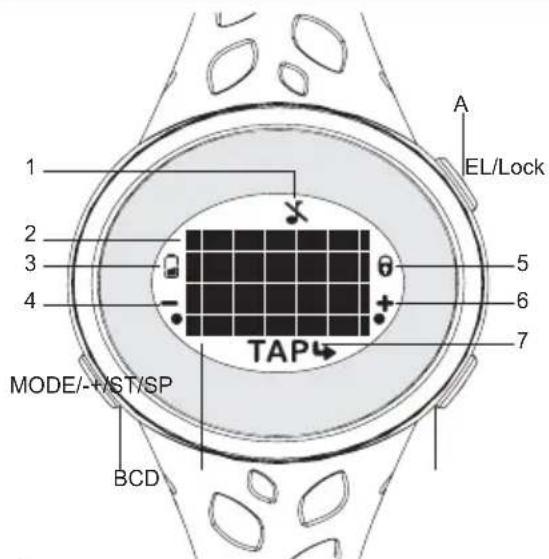
- Key tone deactivated
- Time; heart rate measurements; mode banners; exercise time / data
- Now battery indicator
- key press prompt (press MODE/-)
- Keypad locked
- press prompt (press +/ST/SP)
- Key press prompt (Tap on lens): Teater sub setting mode; TAP setting
A. EL/LOCK: Activate backlight; lock / unlock keypad
B. MODE/: toggle between modes; exit current display and
return to previous screen; initiate search for HR signal; decrease value of the setting; toggle setting options
C. Tap on lens: enter setting mode; confirm setting; toggle through displays
D. +/ST/SP: start / stop stopwatch; increase value of the setting; toggle setting options
STARTING YOUR WATCH (FIRST TIME)
Press all 3 buttons to activate watch for the first time. The watch will prompt you to set your user profile. (Go directly to 'Set user profile' section, step 4).
IMPORTANT
To ensure accurate calculations with your exercise, you are strongly encouraged to set the watch and user profiles before exercising.
- Remember to set the profiles after every battery replacement or reset.
NOTE When the watch is left idle for 30 seconds during set up, it will automatically exit the setting mode and display the time.
NAVIGATING THROUGH THE OPTIONS
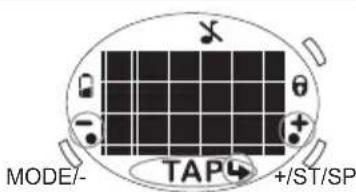
KEY PRESS PROMPTS
The watch has been designed with prompts to guide you through the settings and displays.
TAP ON LENS
The tap on lens feature allows you to toggle through real time fitness data while you are exercising; review stored data of an entire work-out session (memory mode) as well as navigate through the settings (setting mode).
To use the tap on lens: Simply tap on the lens.
MODES
There are 4 modes. Press MODE/- to toggle through the different modes.
| MODE BANNER MAIN DISPLAY | ||
| Time(Default display) | TIME | 12:30 |
| Exercise | EVE | HR BELT SKIP |
| Memory | MEN | 120EC 12FH |
| Set up | SET | TIME TAP |
SET USER PROFILE
When prompted to set user profile after starting the watch for the first time, the screen below will be shown. Go directly to step 4.
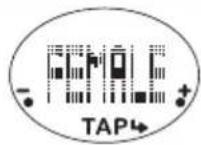
For normal setting procedure:
- Press MODE- repeatedly to select "SET", "TIME" will be displayed shortly after.
- Press + / ST / SP repeatedly to navigate to "USER".
- Tap on lens to enter user profile setting options.
- Set user profile according to the following order: gender, age, weight unit, weight, height unit, height, fitness level, by pressing the following buttons:
+/ST/SP to increase value or toggle options
- MODE/- to decrease value or toggle options
- Tap on lens to confirm
"DONE" indicates user profile setting has been completed. This is only shown when setting the watch for the first time or after battery reset.
FITNESS LEVEL
The fitness level is based on your own self-assessment of how fit you are (depending on the amount of exercise you regularly perform).
| FITNESS LEVEL | DESCRIPTION |
| BEG | Beginner - You do not usually participate in programmed recreation sports or exercise. |
| INT | Intermediate - You are engaged in modest physical activity (such as golfing, horseback riding, table tennis, calisthenics, bowling, weight lifting or gymnastics) 2-3 times a week, totaling 1 hour per week. |
| ATH | Athelete - You actively and regularly participate in heavy physical exercise (such as running, jogging, swimming, cycling, or skipping rope) or engage in vigorous aerobic exercise (such as tennis, basketball or handball). |
NOTE You must enter the fitness level to calculate the calories burnt.
TIP The watch generates calculations based on the inputted data to show the calories / fat burnt and the period exercised at the chosen intensity (target HR zone range) to help you track your progress over time. As you progress, update weight and fitness level to help the watch give you an up-to-date reflection of your physical condition.
SETTING MODE
After setting your user profile, the "USER" screen below will be shown. You can continue with the other settings by pressing +/ST/SP repeatedly (see step 2 below).
However, if the user profile was set for the first time or after
battery reset, the watch will automatically return to the default time display. Start with step 1.
- Press MODE/- repeatedly to select "SET", "TIME" will be displayed shortly after.
- Press + / ST / SP to toggle between settings.
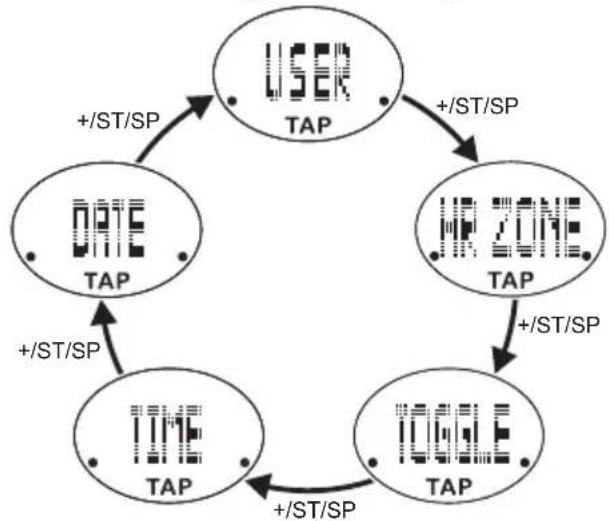
- Tap on lens to enter into individual setting.
- Start setting the selected option by pressing the following buttons:
+ST/SP to increase value or toggle options
- MODE/- to decrease value or toggle options
- Tap on lens to confirm
- Repeat steps 2-4 for all settings.
| Settings | Setting options (Press +/-ST/SP or MODE/- and Tap to confirm) |
| TIME | Hour format Hour / minute |
| DATE | Display format (day-month or month-day) Year Month Day |
| USER | Gender Age Weight unit Weight Height unit Height Activity level |
| HR ZONE | On / Off HR Zone range* |
| TOGGLE | On/Off (Enable display to auto toggle during exercise ) |
- For further details please refer to the "Understanding Heart Rate" section in this manual.
WEARING THE CHEST BELT
If you only wish to use the stopwatch function (and not record any fitness data), skip to 'Start exercising' section.
Chest belt
The chest belt counts your heartbeat and transmits this data to the watch.
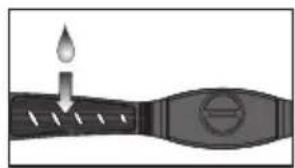
- Wet the conductive pads on the underside of the chest belt with a few drops of water or conductive gel to ensure solid contact.
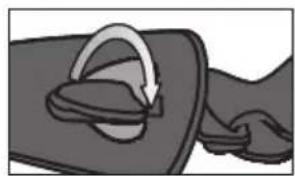
- Holding the elastic strap, thread the plastic tab through the eyelet of the chest belt unit. Turn it slightly and snap into place.
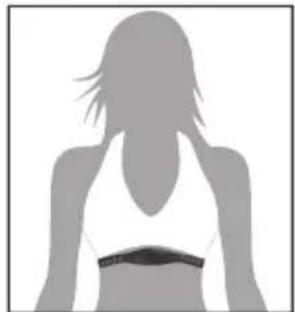
- Place the heart rate chest belt slightly below your chest and wrap the strap around your chest. Pass the other tab through the remaining eyelet and snap into place.
To ensure an accurate heart rate signal, adjust the strap until the belt sits snugly below your pectoral muscles.
TIPS
The position of the chest belt affects its performance.
- In dry, cold climates, it may take several minutes for the chest belt to function steadily. This is normal and should improve with several minutes of exercise.
NOTE To maintain the best performance of your chest belt, please handle it with care according to the following:
- Do not wrap the chest belt in a wet towel nor with other wet materials.
- Do not store the chest belt in a hot (about 50^ ) and humid (about 90% ) environment.
- Do not place or wash the chest belt under running water, instead clean it with a wet cloth.
- Do not place the conductive rubber face down on a metal table or surface.
- Properly dry the chest belt immediately after use.
TRANSMISSION SIGNAL
The heart rate chest belt and watch have a maximum transmission range of about 62.5 centimeters. They are equipped with the latest digital coding system to reduce signal interference from the environment, as well as analog technology.
Search for heart rate signal:
- Press MODE/- to select "EXE", "HR BELT" will be displayed shortly after to indicate system is searching for chest belt signal.
NOTE Whenever the watch is searching for the chest belt signal (manual or automatic search), make sure that the chest belt is no further than 10cm from the watch.
Your watch will advise you which system it is using and the signal status by displaying the following icons:
| Icon Description | |
| HR BELT skip | Searching for a signal (Press +/-ST/SP to skip search and only use stopwatch function) |
| HR DIGITAL | A signal has been found and the digital system is being used |
| HR ANALOG | A signal has been found and the analog system is being used |
| NO HR BELT (no symbol) | No signal has been found |
Signal unsuccessful?
The signal search will take approximately 30 seconds. If after 30 seconds the "NO HR BELT" is displayed, then your signal search has been unsuccessful. You can either:
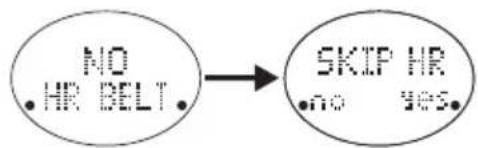
- Press + / ST / SP and proceed to use the watch as a stopwatch (without exercise recording function); or
- Press MODE/- to force another signal search.
Analog or Digital?
The digital signal is less susceptible to signal interference and is suitable in crowded areas or where there are other monitors / equipment. You should only switch to the analog transmission signal if the situation in point 2 occurs (see 'Encountering difficulties?' below).
To switch from digital to analog or analog to digital system:
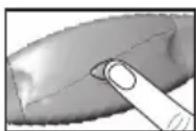
- Press the chest belt button for more than 6 seconds.
- Press and hold MODE/- on the watch to force a signal search.
Encountering difficulties?
In the event that you experience a weak signal or your signal is disrupted by interference in the environment, follow the instructions below to identify and resolve the situation.
-
The signal is weak - the watch may only show "--":
-
Shorten the distance between the heart rate chest belt and watch.
- Re-adjust the position of the heart rate chest belt.
- Check the conductive pads are moist enough to ensure solid contact.
- Check the batteries. If they are low or exhausted, the transmission range may be shortened.
-
Press and hold MODE/- to force a signal search.
-
The gym equipment does not seem to work with your chest belt and the digital icon is displayed:
-
Most gym equipment is compatible with the analog system. Press and hold the chest belt button for more than 6 seconds to change from digital to analog. Then press and hold MODE/- to force a signal search.
- Interference from another person's heart rate monitor - their heart rate readings appear on your watch, or the readings may fluctuate:
- Force another signal search by pressing the chest belt button then press and hold MODE/- on the watch. Do not press and hold the chest belt button, as it will change the transmission signal from digital to analog.
- The signal is jammed - "NO HR BELT" appears on the display after several tries:
There is too much interference in the environment for your heart rate monitor to function. Move to an area where the watch can register your heart rate reading.
WARNING Signal interference in the environment can be caused by electromagnetic disturbances. These may occur near high voltage power lines, traffic lights, overhead lines of electric railways, electric bus lines or trams, televisions, car motors, bike computers, some motor driven exercise equipment, cellular phones or when you walk through electric security gates. Under interference, the heart rate reading may become unstable and inaccurate.
START EXERCISING
If you wish to receive comprehensive calculations (such as your heart rate and the calories / fat burnt) for an exercise session, before you start, allow the watch a few seconds to search for chest belt first. For detailed information or
if encountering difficulties, refer to "Transmission signal" section above.
START TAKING MEASUREMENTS
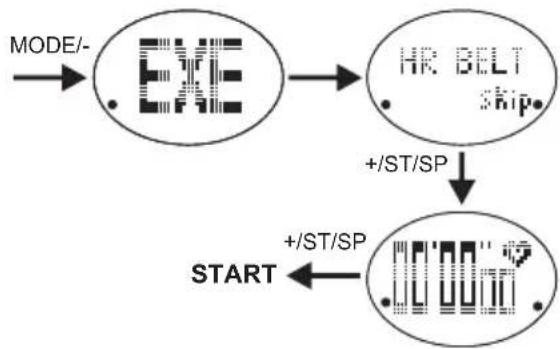
If using only the stopwatch function:
- Press MODE/- to select "EXE", "HR BELT" will be displayed shortly after to indicate system is searching for chest belt signal.
- Press + / ST / SP twice to skip heart rate signal search and start stopwatch.
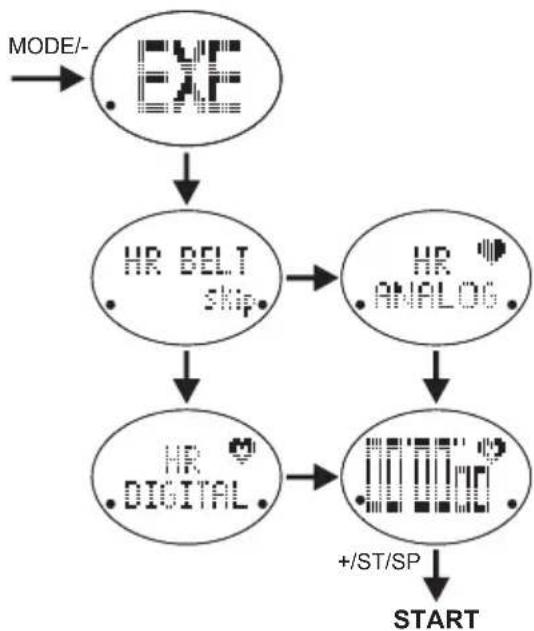
If using chest belt to receive and record fitness data:
- Press MODE/- to select "EXE", "HR BELT" will be displayed shortly after to indicate system is searching for chest belt signal. Watch will display system used (analog / digital), then the stopwatch screen.
- Press + / ST / SP to start stopwatch.
TIP You can view the time while exercising. Press MODE/- to view time. To return, press MODE/- again.
PAUSE, RESUME/STOP
If you need to take a break during exercise, press +/ST/SP.
When ready, press + / ST / SP to resume exercise.
To stop exercise and save data: Press + / ST / SP to pause, then press MODE/-.
After a long pause, the watch will time out and automatically save the data.
UNDERSTANDING THE DISPLAYS
NORMAL CONDITIONS
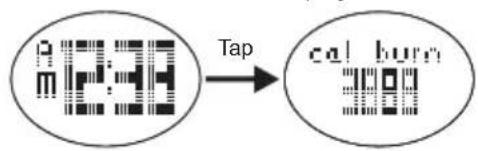
To view total calories burnt since last reset: tap on lens when screen shows default time display.
DURING EXERCISE
To toggle between displays during exercise: tap on lens.
TIP If 'Toggle' function has been enabled (refer to "Setting mode" section), the below 4 screens will automatically toggle.
| Exercise time |
| Current heart rate |
| Calories burnt (kcal) |
| Fat burnt (g) |
ALERTS
This watch
enables you
to select a
target HR zone according to your fitness goals. By
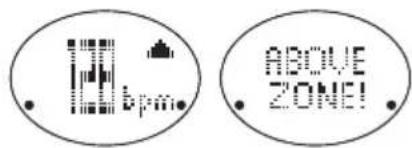
setting the target HR zone and personal data, the watch can monitor how well you do. The watch will send out visual and audible alerts if you are pushing yourself too hard or need to put more effort in.
For details of HR zones, refer to "Understanding heart rate" section in this manual.
If alert has been enabled and heart rate zone has been set:
| ICON BEEP(S) DESCRIPTION | ||
| / ABOVE ZONE! | 2 | You have gone above your upper HR limit |
| / BELOW ZONE! | 1 | You have gone below your lower HR limit |
Remember, these alerts are based on a calculation of your maximum heart rate and the HR zone you selected. As such, it is an estimation and is only for guidance. If you feel you are working too hard, most likely you are. Adjust the HR zone to one that works for you.
UNDERSTANDING HEART RATE
HEART RATE ZONES AND EXERCISE
Heart rate is an indicator of the intensity of the exercise on your body. It is a useful tool for determining how effective a work-out is.
This watch uses an estimation of your maximum heart rate (220 - age = MHR) to arrive at 5 HR zone settings specific to you.
| HR Zone | Corre-sponding watch setting | Description / benefit derived | Examples |
| Fat burning | 50% - 60% | For beginners and those with health problems. Gets body used to exercise and improves health. | Brisk walking |
| 61% - 70% | Improves heart's ability to deliver oxygen. Calories burnt mostly from stored body fat. | Jogging, easy cycling. |
| Aerobic 71% - 80% | Increases endurance and muscle strength. Breathing is faster and deeper promoting proper circulation of oxygenated blood. | Running, aerobic dance, jumping rope. | |
| Anaerobic | 81% - 90% | Builds muscle and enhances speed, power and performance levels. Body requires more oxygen than it can provide. | Weight-lifting, resistance machine. |
| 91% - 100% | For athletes. Vigorous training, usually done in short bursts to enhance power and performance. May increase chance of injury and soreness. | Sprinting | |
*The upper and lower heart rate limits are calculated by multiplying your maximum heart rate (MHR) by the percentages.
It is important to pace yourself, especially if you haven't exercised for a while. Start off slow, aiming for the lowest range (50%-60%). As you become more comfortable, challenge yourself by increasing in speed and duration.
To benefit most from your work-out, determine your fitness goal and exercise at a proper intensity. The most common zone range is from 50% to 80% of your maximum heart rate. This is where you achieve cardiovascular benefits, burn fat and become more fit.
Remember, if you rush in too quickly and push your body too hard before it's ready, it can be counterproductive. You can hurt your muscles / tendons and may even result in injury and be a real step back from your goal.
IMPORTANT Always warm up before exercise and select the HR zone setting that best suits your physique. Exercise regularly, 20 to 30 minutes per session, three to four times a week for a healthier cardiovascular system.
WARNING Determining a suitable exercise intensity is a critical step in the process towards an efficient and safe training program. Please consult your doctor or health professional to help you determine exercise frequency and duration appropriate for your age, condition and specific goals.
MEMORY
- Press MODE- repeatedly to select "MEM". After 2 seconds, display will show the time and date of the most recent exercise session recorded or "NO RECORD" if there is no data.
- Press + / ST / SP to navigate to desired record.
- Tap on lens to toggle through the displays related to selected exercise session.
| total exe .12020 | Total time taken for entire exercise |
| in zone .12020 | Effectiveness of training: Amount of time when heart rate was within selected HR zone (achieved intended goal) |
| max .142 | Maximum heart rate |
| Rue .142 | Average heart rate |
| cal .142 | Total calories burnt (kcal) |
| fat .142 | Total fat burnt (g) |
To return to previous screen at any time: Press MODE/-
CLEAR RECORDS
This watch can contain data for up to 99 exercise sessions. Individual memory cannot be selected and deleted. The watch only allows for all data to be deleted.
To delete memory:
- Press MODE/- repeatedly to select "MEM".
- Press + / ST /SP repeatedly until "DELETE" will be displayed.
- Press MODE/- to confirm. DONE indicates the record has been cleared.
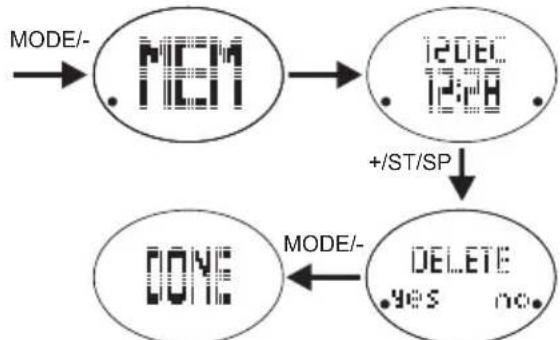
When starting an exercise and memory is full, "FULL" will be displayed, followed by "DELETE".
- Press MODE/- to delete all records
OR - Press + / ST / SP to ignore and start an exercise without recording data for it.
OTHER OPERATIONS AND SETTINGS
ACTIVATE BACKLIGHT
Press EL/LOCK. (Press any key to extend backlight for another 5 seconds).
NOTE The backlight function will not operate if " " is displayed.
BEEP TONE ON / OFF
When time is displayed, press +/ST/SP to activate / deactivate beep tone.
indicates beep tone is deactivated.
REPLACE BATTERY
If the battery power of your watch or chest belt is low, the watch will display:
Watch

Chest belt "HR BELT LOW BATT"
To replace watch battery:
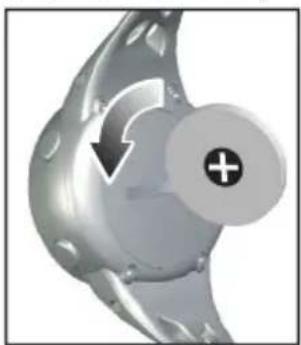
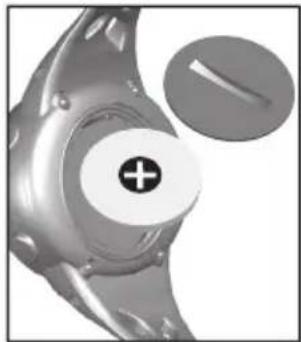
- Use a coin to open the battery compartment lid by turning it anticlockwise.
- Remove the old battery and insert a new CR2032, 3V lithium battery.
- Secure the lid by turning the coin clockwise.
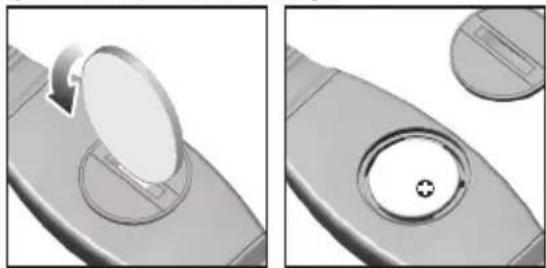
To replace the chest belt battery:
- Use a coin to open the battery compartment lid by turning it anticlockwise.
- Remove the old battery and insert a new CR2032, 3V lithium battery.
- Secure the lid by turning the coin clockwise.
IMPORTANT Remember to set the profiles after every battery replacement or reset.
KEYPAD LOCK
Press and hold EL/LOCK to lock or unlock keypad.
indicates keypad is locked.
WATER RESISTANCE
The SE331 is water-resistant up to 50 meters (164 feet)
| RAIN SPLA- SHES ETC | SHOWER- ING (WARM/ COOL WATER ONLY) | LIGHT SWIM- MING/ SHALLOW WATER | SHALLOW DIVING / SURFING/ WATER SPORTS | SNORKEL- ING/ DEEP WATER DIVING |
| 50M / 164 FT | OK OK | OK OK NO |
- Ensure the buttons and battery compartment are secured and intact before exposing the watch to excessive water.
- Avoid pressing the buttons while in the water or during heavy rainstorms, as this may cause water to enter the watch, leading to malfunction.
NOTE Even if both the watch and the chest belt are water resistant, as radio signals do not carry in water, signal transmission between the watch and chest belt will still be impossible in water.
SPECIFICATIONS
| CLOCK | |
| Time format 12/24 hour format with hour / minute | |
| Date format DD. MM.YY or MM.DD.YY | |
| Year range 2010 | -2059 |
| TRAINING | |
| Target heart rate zone | 50-60%; 61-70%; 71-80%; 81-90%; 91-100% |
| Maximum memory | 99 records |
| Calorie range 0 to 9,999 kcal | |
| POWER | |
| Watch 1 x CR20 | 32 3V lithium battery |
| Chest belt 1 x CR | R2032 3V lithium battery |
| OPERATING ENVIRONMENT | |
| Operating temperature | For watch:0°C to 40°CFor chest belt:5°C to 40°C |
| Storage temperature | For watch and chest belt:-20°C to 60°C |
PRECAUTIONS
To ensure you use your product correctly and safely, read these warnings and the entire user manual before using the product:
- Should the unit experience an electrostatic discharge, it may trigger the watch to change modes or displays.
Simply press MODE/- to exit or to toggle back to previous display. This is normal.
- Use a soft, slightly moistened cloth. Do not use abrasive or corrosive cleaning agents, as these may cause damage. Use luke warm water and mild soap to clean the watch and chest belt thoroughly after each training session. Never use the products in hot water or store them when wet.
- Do not bend or stretch the transmitter part of the chest belt.
- Do not subject the product to excessive force, shock, dust, temperature changes, or humidity. Never expose the product to direct sunlight for extended periods. Such treatment may result in malfunction.
- Do not tamper with the internal components. Doing so will terminate the product warranty and may cause damage. The main unit contains no user-serviceable parts.
- Do not scratch hard objects against the LCD display as this may cause damage.
Take precautions when handling all battery types. - Remove the batteries whenever you are planning to store the product for a long period of time.
- When replacing batteries, use new batteries as specified in this user manual.
- The product is a precision instrument. Never attempt to take this device apart. Contact the retailer or our customer service department if the product requires servicing.
- Do not touch the exposed electronic circuitry, as there is a danger of electric shock.
- Check all major functions if the device has not been used for a long time. Maintain regular internal testing
and cleaning of your device. Have your watch serviced by an approved service center annually.
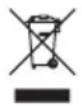
- When disposing of this product, ensure it is collected separately for special treatment and not as normal household waste.
- Due to printing limitations, the displays shown in this manual may differ from the actual display.
- The contents of this manual may not be reproduced without the permission of the manufacturer.
NOTE The technical specifications for this product and the contents of the user manual are subject to change without notice.
NOTE Features and accessories will not be available in all countries. For more information, please contact your local retailer.
ABOUT OREGON SCIENTIFIC
Visit our website (www.oregonscientific.com) to learn more about Oregon Scientific products.
If you're in the US and would like to contact our Customer Care department directly, please visit: www2.oregonscientific.com/service/support.asp
For international inquiries, please visit: www2.oregon scientific.com/about/international.asp
EU-DECLARATION OF CONFORMITY
Hereby, Oregon Scientific, declares that this Zone Trainer 1.0 Heart Rate Monitor (Model: SE331) is in compliance with EMC directive 2004/108/EC. A copy of the signed and dated Declaration of Conformity is available on request via our Oregon Scientific Customer Service.




Zonentrainer 1.0
Herzfrequenzmonitor
Model: SE331
www2.oregonscientific.com/about/international.asp.
EUROPE - DÉCLARATION DE CONFORMITÉ
NORMALA FÖRHALLANDEN
© 2010 Oregon Scientific. All rights reserved.
300102759-00001-10