
KXHGT100 - Cordless phone PANASONIC - Free user manual and instructions
Find the device manual for free KXHGT100 PANASONIC in PDF.
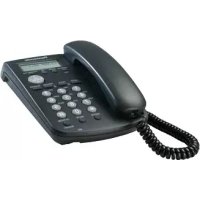

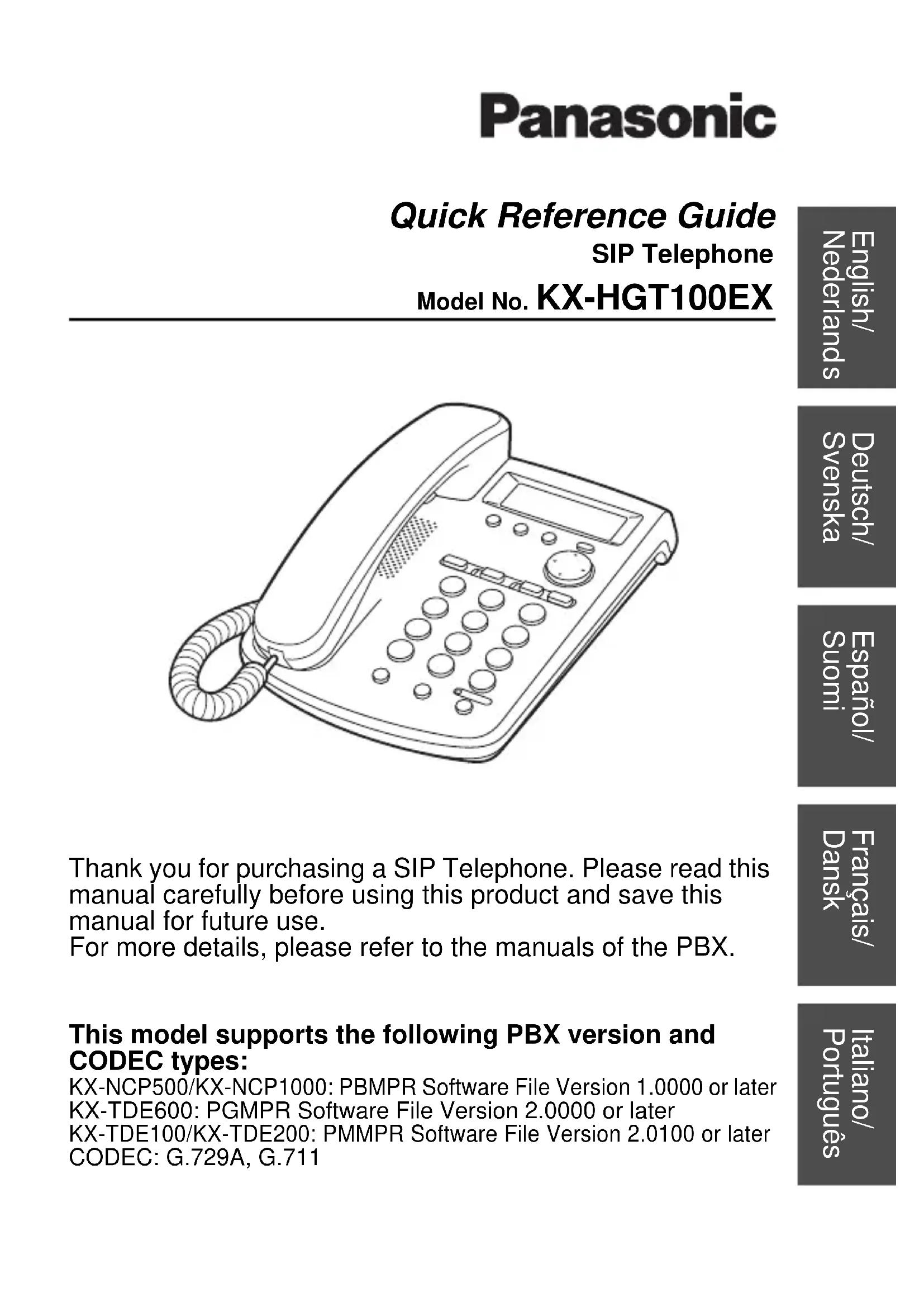


| Product type | IP cordless telephone (VoIP) for Panasonic PBX system |
| Approximate base dimensions | 150 x 100 x 50 mm |
| Approximate base weight | 200 g |
| Power supply | Power over Ethernet (PoE) IEEE 802.3af Class 1 or Panasonic AC adapter KX-A239CE (PQLV206CE) |
| Display type | Liquid crystal display (LCD) with contrast adjustment |
| Main functions | Hands-free calls, headset (2.5 mm jack), call transfer, hold, redial (last 10 numbers), speed dial (10 keys), voicemail (SMV), call log, system directory, intercom |
| Adjustable volume | Handset volume, speaker volume, headset volume, and ringer volume |
| Connectivity | 1 RJ45 Ethernet port (LAN/PoE), 1 PC port (Ethernet), headset jack |
| Network protocol | DHCP or static IP, compatible with Panasonic PBX |
| Care and cleaning | Clean with a soft, dry cloth. Do not use abrasive products, benzene, or thinner. |
| Safety | Disconnect if smoke, abnormal odor, or unusual noise occurs. Do not expose to rain or humidity. Excessive headset volume can damage hearing. |
| Spare parts and repairability | Repair only by an authorized Panasonic service center. Use exclusively the original handset and the mentioned AC adapter. |
| General information | Do not use near water, heat sources, or direct sunlight. Operating temperature: 5 °C to 40 °C. In case of power failure, keep a backup telephone independent of the mains. |
Frequently Asked Questions - KXHGT100 PANASONIC
User questions about KXHGT100 PANASONIC
0 question about this device. Answer the ones you know or ask your own.
Ask a new question about this device
Download the instructions for your Cordless phone in PDF format for free! Find your manual KXHGT100 - PANASONIC and take your electronic device back in hand. On this page are published all the documents necessary for the use of your device. KXHGT100 by PANASONIC.
USER MANUAL KXHGT100 PANASONIC
Model No. KX-HGT100EX
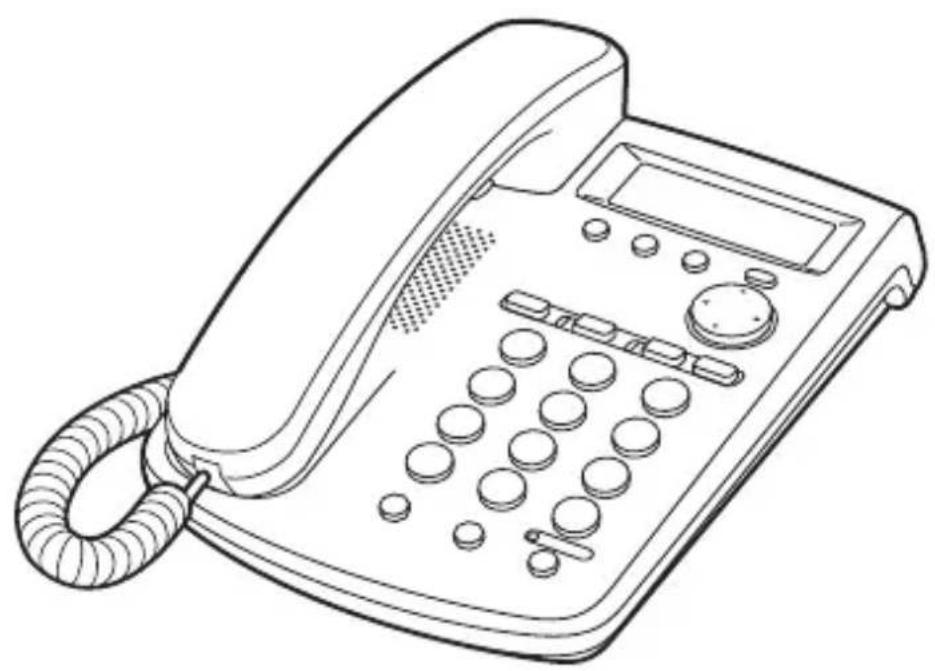
Thank you for purchasing a SIP Telephone. Please read this manual carefully before using this product and save this manual for future use.
For more details, please refer to the manuals of the PBX.
This model supports the following PBX version and CODEC types:
KX-NCP500/KX-NCP1000: PBMPR Software File Version 1.0000 or later KX-TDE600: PGMPR Software File Version 2.0000 or later KX-TDE100/KX-TDE200: PMMPR Software File Version 2.0100 or later CODEC: G.729A, G.711
Quick Reference Guide
SIP Telephone
Model No. KX-HGT100EX
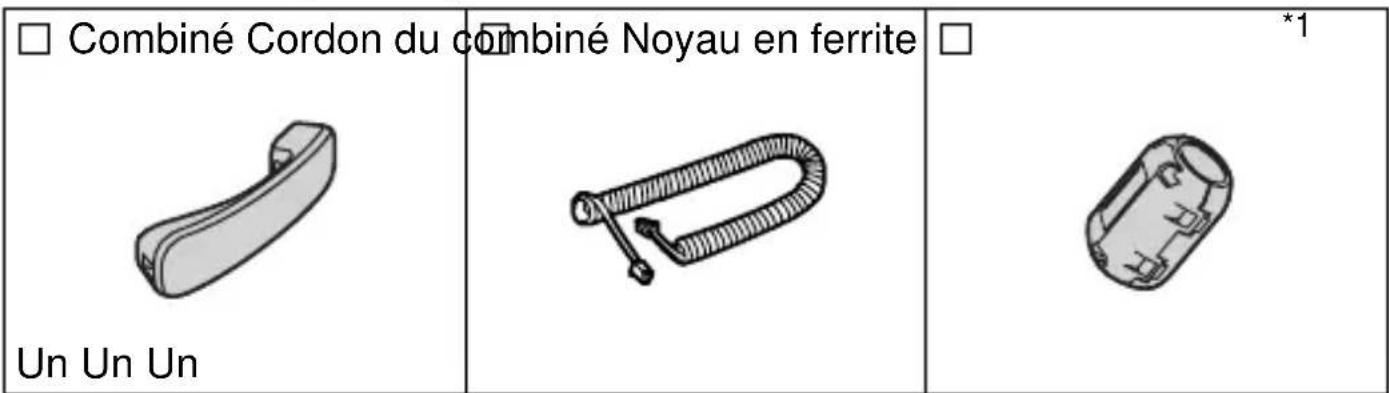
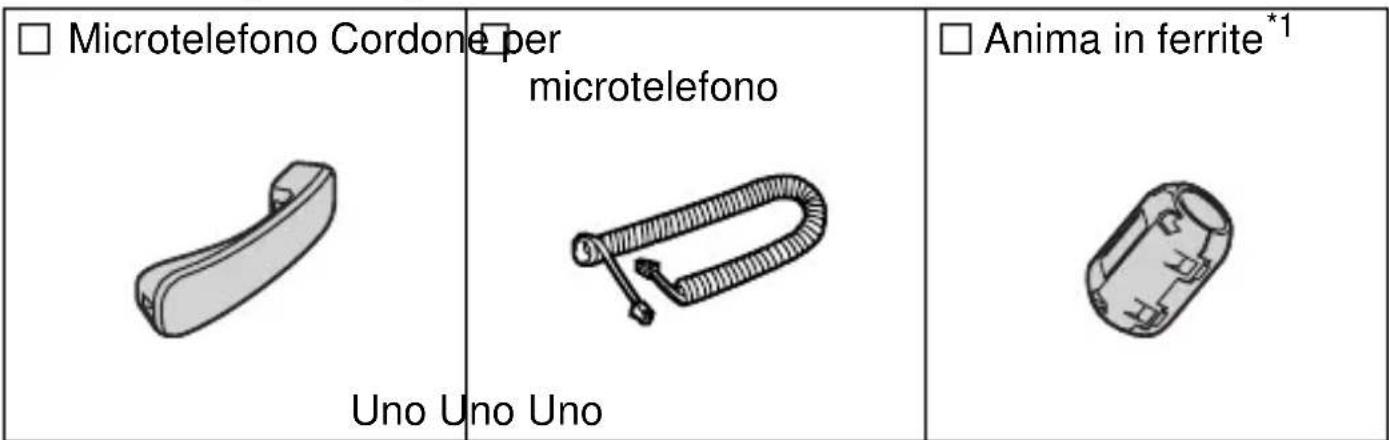
Accessories (included)
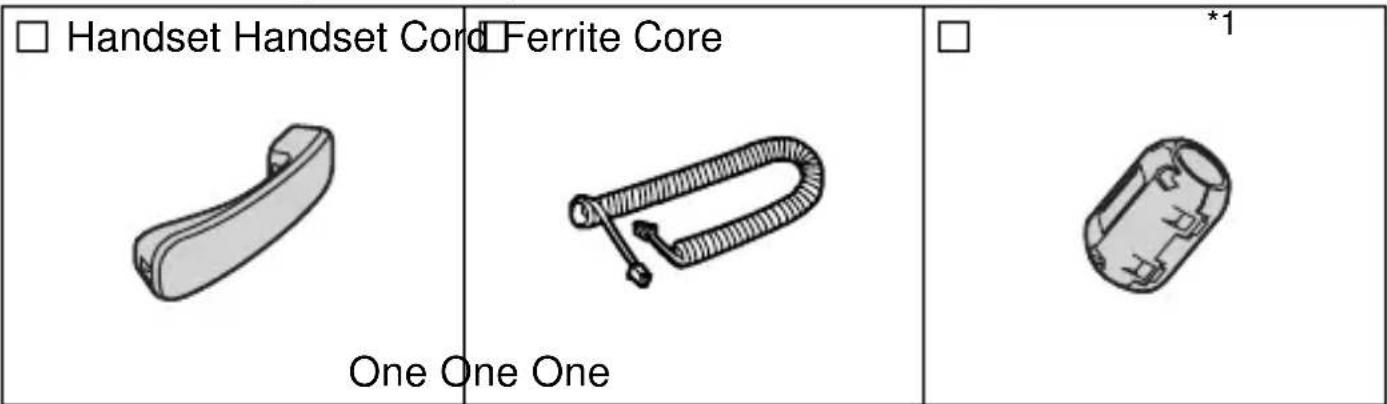
*1 For AC adaptor (not included).
Note: In this manual, the suffix of each model number is omitted unless necessary.
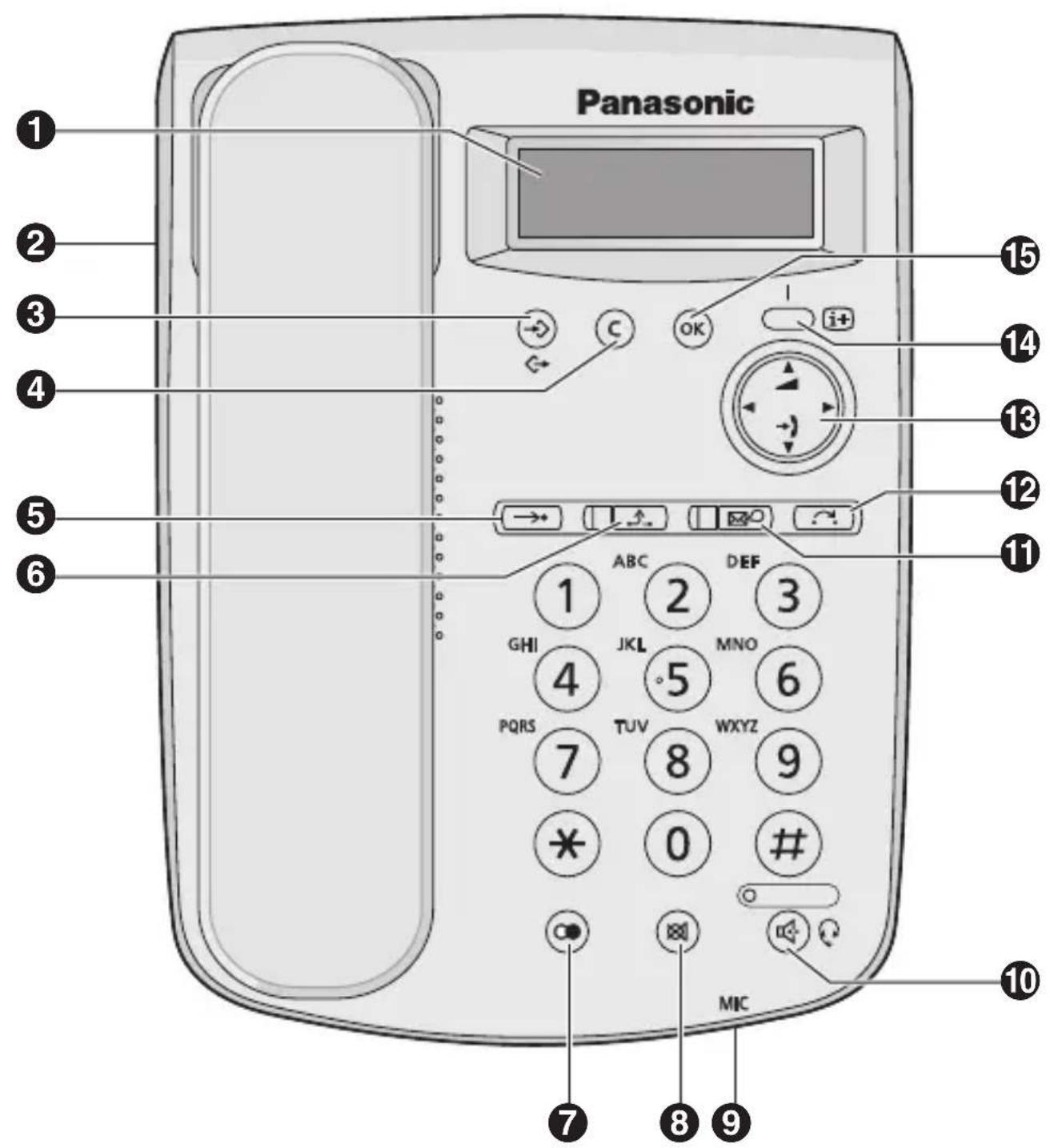
1 LCD (Liquid Crystal Display) 2 Headset Jack 3 PROGRAM/EXIT: Used to enter and exit the personal programming mode. CLEAR: Used to erase some or all call logs, or clear digits or characters. AUTO: Used for Speed Dialling. HOLD *1: Used to place a call on hold. 7 REDIAL: Used to redial the last 10 dialled numbers. MUTE: Used to mute the microphone/handset/headset during a conversation. MIC (Microphone): Used for hands-free conversations.
SP-PHONE (Speakerphone)/HEADSET*1: Used for performing hands-free operations. Also used to make or answer calls if a headset is connected. MESSAGE *1: Used to access the Voice Mail feature*2 or to call back the party who left the message waiting indication. The indicator turns red in both cases. 12 TRANSFER: Used to transfer a call to another party. Navigator Key*3: Used to adjust the volume and display contrast, select desired items, or view call logs. 14 INFORMATION: Used to display your extension number, the status of the unit, and the network settings on the LCD display. 15 OK: Used to select the items. Also used as end of dialling.
Initial Settings
You can program the following functions using the LCD display.
Note: C. Confirmation Tone
| Program Settings | |
| Save speed dial? | See page 8. |
| Set date & time*1 | While on-hook →OK year (2 digits)→ OK Day.Month (4 digits) hour (01-12) minute (00-59) OK select "AM/PM/24H" hour (13-00) minute (00-59) OK C.Tone |
| My Caller ID*2 LCD contrast? Ringer tone? Ringer volume? Set hold music? Keytone volume? Time AM/PM 24H Change language?*3 | While on-hook →OK OK C.Tone |
1. The date and time will be set automatically when the unit is connected to a PBX that can update the time setting. 2. You can select whether to block or unblock your Caller ID when calling to an outside party. *3. The default language is English.
| Program Settings | |
| Set network | For DHCP Setting While on-hook → ← OK C. Tone → |
| For STATIC IP Setting While on-hook → ← OK IP address (12 digits) → ok subnet mask (12 digits) default gateway (12 digits) OK C. Tone | |
Speaker/Handset/Headset/Ringer Volume
| Speaker volume | While in a hands-free conversation | Press Up to increase or Down to decrease the volume. |
| Handset/Headset volume*1 | While using the handset or headset | |
| Ringer volume While receiving a call | ||
*1 If you hear your own voice through the handset or headset, decrease the volume.
Features List
Icon Meanings
Off-hook = On-hook = Feature number Talk = Confirmation Tone
Making Calls
| Calling | |
| To an extension To an outside party extension no. >GwS | 0/9 >outside phone no. >GwS |
| To call back using the incoming call log | |
| Redial | |
| To redial the last number dialled >OK >GwS | |
| To redial using the outgoing call log | |
| Speed Dialling | |
| To store OK >speed dial no. (0-9) | desired no.* (max. 32 digits) |
| C. Tone >C | |
| To dial >→ speed dial no. (0-9) | GwS |
| System Speed Dialling |
| To dial • • • • system speed dial no. (3 digits) • • • • |
| Doorphone Call |
| • • ③ ① • doorphone no. (2 digits) • • • • |
During a Conversation
| Call Hold | |
| To hold To retrieve a call at the holding extension | |
| Call Transfer | |
| extension no. To an extension 0/9 outside phone no. To an outside party | GwC |
Making Use of the Voice Mail Service
Note: VPS = Voice Processing System
| Listening to a message | |
| While theMESSAGE indicator is red * When theMESSAGE button is pressed, the latest recorded message may be heard, or a call back may be performed directly, depending on the type of message. | |
| From your own extension VPS extension no. Mailbox Password* * If you have no password, you can skip the last step. | KX-TVM series 1 Listen to Message 2 Deliver Message 3 Mailbox Management 4 Automated Attendant 5 Message Notification 6 Other Features End Call |
From someone else's extension
VPS extension no.
6 * mailbox no.Mailbox Password* * If you have no password, you can skip the last step. | KX-TVP series 1 Listen to Message 2 Deliver Message 3 Check Mailbox Distribution 4 Automated Attendant 5 Mailbox Management 6 Other Features End Call |
Leaving a message

VPS extension no.
From your own extension
Mailbox Password*
From someone else's extension

- If you have no password, you can skip the last step.

Enter the desired mailbox number

Leave a message


To send the message immediately
① ② (KX-TVM series)
(2) (KX-TVP series)
To set the delivery time
① ①
Follow the guidance
During playback

Repeat Voice Guidance

Exit
- Consult your dealer or the network administrator for more details regarding feature numbers.
- Control panel/button names and descriptions can be found in "Location of Controls" on page 4.
PC connection
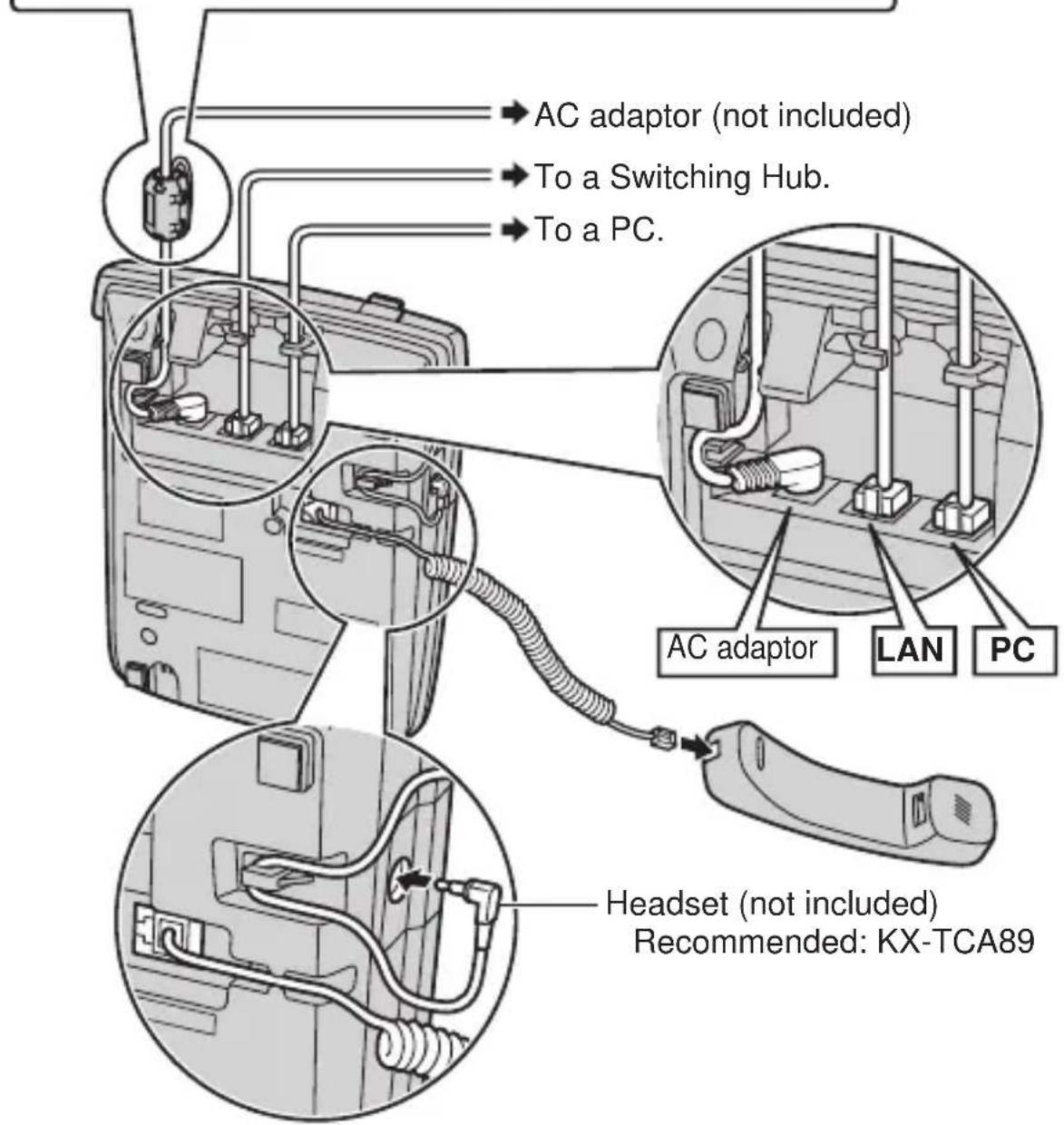
- Use a straight CAT 5 (or higher) Ethernet cable (not included) that is 6.5 mm in diameter or less.
- For further information on the connection to a PC, refer to the documentation provided for the PBX.
Switching Hub connection (for LAN port)
- Use a straight CAT 5 (or higher) Ethernet cable (not included) that is 6.5 mm in diameter or less.
- It is recommended to connect to a switching hub that complies with the IEEE 802.3af Power-over-Ethernet (PoE) standard.
- If PoE is available, an AC adaptor is not needed. This unit complies with the PoE Class 1 standard.
AC adaptor (not included)
- Use only a Panasonic KX-A239CE (PQLV206CE)/KX-A239BX (PQLV206CE) AC adaptor.
- The AC adaptor is used as the main disconnect device. Ensure that the AC outlet is located near the unit and is easily accessible.
CAUTION:
When selecting Ethernet cables
- Use flexible, high-quality, snagless (without strain relief) cables. Do not use cables with coating that may tear or crack when bent.
When connecting cables
- Do not connect the Ethernet cable connected to the PoE hub to the PC port of the KX-HGT100. Doing so may cause severe damage to the KX-HGT100.
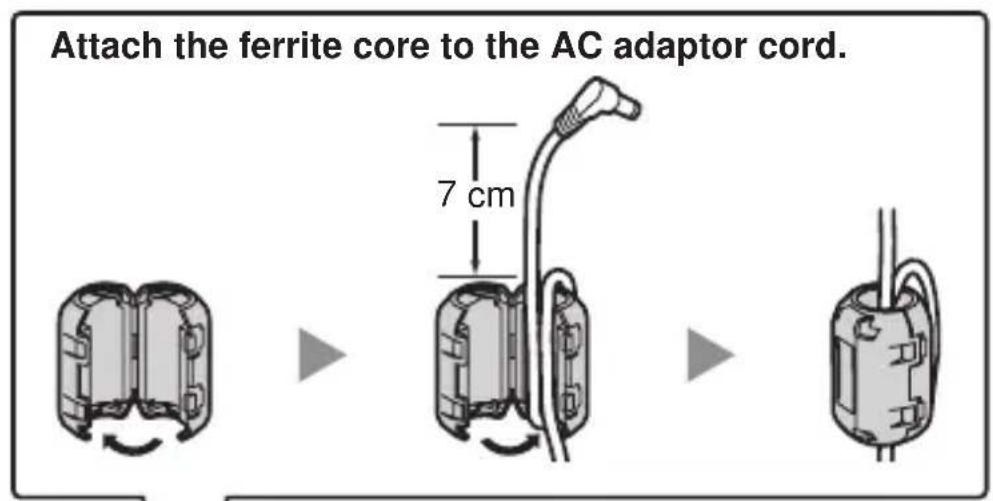
- Ensure that the Ethernet cables and the AC adaptor cord are inserted in the grooves to prevent damage to the connectors.
When connecting a headset and AC adaptor
- Ensure that the headset cord and the AC adaptor cord are wound around the hook to prevent damage to the connectors.
When using a KX-HGT100, keep the following conditions in mind.
- If the unit does not operate properly, disconnect the unit from the AC outlet and the Ethernet cable and then connect again.
- If you are having problems making calls, disconnect the Ethernet cable and connect a known working KX-HGT100. If the known working KX-HGT100 operates properly, have the defective KX-HGT100 repaired by an authorised Panasonic factory service centre. If the known working KX-HGT100 does not operate properly, check the PBX and the Ethernet cable.
- Wipe the unit with a soft cloth. Do not clean the unit with abrasive powders or with chemical agents such as benzene or thinner.
- Use only the correct Panasonic handset.
- Do not disassemble this unit. Dangerous electrical shock could result. The unit must only be disassembled and repaired by qualified service technicians.
- If damage to the unit exposes any internal parts, immediately disconnect the cable or cord. If the power is supplied from the network to the KX-HGT100 [Power-over-Ethernet], disconnect the Ethernet cable. Otherwise, disconnect the AC adaptor cord. Then return this unit to a service centre.
- Never attempt to insert wires, pins, etc. into the vents or other holes of this unit.
- This unit is designed to aid the visually handicapped to locate dial keys and buttons.
- This unit is designed to be installed under controlled conditions of ambient temperature and a relative humidity.
- Avoid installing the unit in damp or humid environments, such as bathrooms or swimming pools.
Take special care to follow the safety suggestions listed below.
Safety
1) The unit should only be connected to a power supply of the type described in the Quick Reference Guide or as shown on the label on the unit. 2) When left unused for a long period of time, the optional AC adaptor should be unplugged from the AC outlet. If you are using Power-over-Ethernet, disconnect the Ethernet cable.
Installation
Environment
1) Do not use this unit near water, for example, near a bathtub, washbowl or sink. Damp basements should also be avoided. 2) Keep the unit away from heating appliances and devices that generate electrical noise, such as fluorescent lamps, motors, and televisions. These noise sources can interfere with the performance of the unit. It also should not be placed in rooms where the temperature is less than 5°C or greater than 40°C.
Placement
1) Do not place heavy objects on top of this unit. 2) Care should be taken so that objects do not fall onto, and liquids are not spilled into, the unit. Do not subject this unit to excessive smoke, dust, moisture, mechanical vibration, shock, or direct sunlight. 3) Place the unit on a flat surface.
WARNING:
TO PREVENT POSSIBLE FIRE OR ELECTRIC SHOCK, DO NOT EXPOSE THIS UNIT TO RAIN OR MOISTURE.
THIS HANDSET EARPIECE IS MAGNETISED AND MAY RETAIN SMALL FERROUS OBJECTS.
THE USE OF EXCESSIVE SOUND VOLUME THROUGH EARPHONES, HEADPHONES, OR HEADSETS MAY CAUSE HEARING LOSS.
DISCONNECT THIS UNIT FROM POWER OUTLET/THE ETHERNET CABLE IF IT EMITS SMOKE, AN ABNORMAL SMELL OR MAKES UNUSUAL NOISE. THESE CONDITIONS CAN CAUSE FIRE OR ELECTRIC SHOCK. CONFIRM THAT SMOKE HAS STOPPED AND CONTACT AN AUTHORISED SERVICE CENTRE.
IMPORTANT NOTICE:
- Under power failure conditions, the KX-HGT100 may not operate. Please ensure that a separate telephone, not dependent on local power, is available for use in remote sites in case of emergency.
- For information regarding network setup of the KX-HGT100 such as IP addresses, please refer to the Installation Manual for the Panasonic PBX.
- If an error message is shown on your display, consult your dealer or the network administrator.
- The firmware of the KX-HGT100 is protected by copyright laws and international treaty provisions, and all other applicable laws. It cannot be reverse engineered, decompiled, or disassembled.
Information for Users on Collection and Disposal of Old Equipment and used Batteries

These symbols on the products, packaging, and/or accompanying documents mean that used electrical and electronic products and batteries should not be mixed with general household waste.
For proper treatment, recovery and recycling of old products and used batteries, please take them to applicable collection points, in accordance with your national legislation and the Directives 2002/96/EC and 2006/66/EC.
By disposing of these products and batteries correctly, you will help to save valuable resources and prevent any potential negative effects on human health and the environment which could otherwise arise from inappropriate waste handling.
For more information about collection and recycling of old products and batteries, please contact your local municipality, your waste disposal service or the point of sale where you purchased the items.
Penalties may be applicable for incorrect disposal of this waste, in accordance with national legislation.
For business users in the European Union
If you wish to discard electrical and electronic equipment, please contact your dealer or supplier for further information.
Information on Disposal in other Countries outside the European Union
These symbols are only valid in the European Union. If you wish to discard these items, please contact your local authorities or dealer and ask for the correct method of disposal.
Note for the battery symbol (bottom two symbol examples):
This symbol might be used in combination with a chemical symbol. In this case it complies with the requirement set by the Directive for the chemical involved.

Cd
6 Mailbox - No Mailbox Password*
Accessories (included)
Model No. KX-HGT100EX
Accessories (included)
Note: VRS = Voice Processing System
Connect the headset and the adapter.
Open Source Software
Parts of this product use Open Source Software. Relevant conditions apply to this software. Panasonic cannot accept inquiries regarding the content of the following copyright and license information.
< >
This product uses a part of NetBSD kernel.
The use of a part of NetBSD kernel is based on the typical BSD style license below.
Copyright (c)
The Regents of the University of California. All rights reserved.
Redistribution and use in source and binary forms, with or without modification, are permitted provided that the following conditions are met:
1) Redistributions of source code must retain the above copyright notice, this list of conditions and the following disclaimer. 2) Redistributions in binary form must reproduce the above copyright notice, this list of conditions and the following disclaimer in the documentation and/or other materials provided with the distribution. 3) All advertising materials mentioning features or use of this software must display the following acknowledgement: This product includes software developed by the University of California, Berkeley and its contributors. 4) Neither the name of the University nor the names of its contributors may be used to endorse or promote products derived from this software without specific prior written permission.
THIS SOFTWARE IS PROVIDED BY THE REGENTS AND CONTRIBUTORS "AS IS" AND ANY EXPRESS OR IMPLIED WARRANTIES, INCLUDING, BUT NOT LIMITED TO, THE IMPLIED WARRANTIES OF MERCHANTABILITY AND FITNESS FOR A PARTICULAR PURPOSE ARE DISCLAIMED. IN NO EVENT SHALL THE REGENTS OR CONTRIBUTORS BE LIABLE FOR ANY DIRECT, INDIRECT, INCIDENTAL, SPECIAL, EXEMPLARY, OR CONSEQUENTIAL DAMAGES (INCLUDING, BUT NOT LIMITED TO, PROCUREMENT OF SUBSTITUTE GOODS OR SERVICES; LOSS OF USE, DATA, OR PROFITS; OR BUSINESS INTERRUPTION) HOWEVER CAUSED AND ON ANY THEORY OF LIABILITY, WHETHER IN CONTRACT, STRICT LIABILITY, OR TORT (INCLUDING NEGLIGENCE OR OTHERWISE) ARISING IN ANY WAY OUT OF THE USE OF THIS SOFTWARE, EVEN IF ADVISED OF THE POSSIBILITY OF SUCH DAMAGE.
However, parts of the NetBSD Kernel are provided with the following copyright notices.
Copyright (c) 1980, 1983, 1988, 1993 The Regents of the University of California. All rights reserved.
Copyright (c) 1980, 1986, 1989, 1993 The Regents of the University of California. All rights reserved.
Copyright (c) 1980, 1986, 1991, 1993 The Regents of the University of California. All rights reserved.
Copyright (c) 1980, 1986, 1993 The Regents of the University of California. All rights reserved.
Copyright (c) 1982, 1985, 1986, 1988, 1993, 1994 The Regents of the University of California. All rights reserved.
Copyright (c) 1982, 1986, 1988, 1990, 1993 The Regents of the University of California. All rights reserved.
Copyright (c) 1982, 1986, 1988, 1990, 1993, 1994, 1995 The Regents of the University of California. All rights reserved.
Copyright (c) 1982, 1986, 1988, 1990, 1993, 1995 The Regents of the University of California. All rights reserved.
Copyright (c) 1982, 1986, 1988, 1991, 1993 The Regents of the University of California. All rights reserved.
Copyright (c) 1982, 1986, 1988, 1993 The Regents of the University of California. All rights reserved.
Copyright (c) 1982, 1986, 1988, 1993, 1995 The Regents of the University of California. All rights reserved.
Copyright (c) 1982, 1986, 1989, 1991, 1993 The Regents of the University of California. All rights reserved.
Copyright (c) 1982, 1986, 1989, 1993 The Regents of the University of California. All rights reserved.
Copyright (c) 1982, 1986, 1990, 1991, 1993 The Regents of the University of California. All rights reserved.
Copyright (c) 1982, 1986, 1990, 1993 The Regents of the University of California. All rights reserved.
Copyright (c) 1982, 1986, 1990, 1993, 1994 The Regents of the University of California. All rights reserved.
Copyright (c) 1982, 1986, 1991, 1993 The Regents of the University of California. All rights reserved.
Copyright (c) 1982, 1986, 1991, 1993, 1994 The Regents of the University of California. All rights reserved.
Copyright (c) 1982, 1986, 1991, 1993, 1995 The Regents of the University of California. All rights reserved.
Copyright (c) 1982, 1986, 1993 The Regents of the University of California. All rights reserved.
Copyright (c) 1982, 1986, 1993, 1994 The Regents of the University of California. All rights reserved.
Copyright (c) 1990, 1993 The Regents of the University of California. All rights reserved. Copyright (c) 1991, 1993 The Regents of the University of California. All rights reserved. Copyright (c) 1991, 1993, 1994 The Regents of the University of California. All rights reserved. Copyright (c) 1992 Regents of the University of California. All rights reserved. Copyright (c) 1992, 1993 The Regents of the University of California. All rights reserved. Copyright (c) 1993 The Regents of the University of California. All rights reserved. Copyright (c) 1993 Adam Glass Copyright (C) 1993 by Sun Microsystems, Inc. All rights reserved. Copyright (c) 1994 Gordon W. Ross Copyright (c) 1994 Winning Strategies, Inc. All rights reserved. Copyright (c) 1995 The Regents of the University of California. All rights reserved. Copyright (C) 1995, 1996, 1997, and 1998 WIDE Project. All rights reserved. Copyright (c) 1996 The Regents of the University of California. All rights reserved. Copyright (c) 1996 John S. Dyson All rights reserved. Copyright (c) 1996 Matt Thomas. All rights reserved. Copyright (c) 1996 Matthew R. Green. All rights reserved. Copyright (c) 1996 Paul Kranenburg Copyright (c) 1996, 1997, 1999, 2001 The NetBSD Foundation, Inc. All rights reserved. Copyright (c) 1996, 2000 Christopher G. Demetriou. All rights reserved. Copyright (c) 1996, 1999 by Internet Software Consortium. Copyright (c) 1996-1999 by Internet Software Consortium. Copyright (c) 1997 Jonathan Stone and Jason R. Thorpe. All rights reserved. Copyright (c) 1997 Christos Zoulas. All rights reserved. Copyright (c) 1997 Manuel Bouyer. All rights reserved. Copyright (c) 1997, 1998 The NetBSD Foundation, Inc. All rights reserved. Copyright (c) 1997, 1998, 1999, 2000 The NetBSD Foundation, Inc. All rights reserved. Copyright (c) 1997, 1998, 1999, 2001 The NetBSD Foundation, Inc. All rights reserved. Copyright (c) 1997, 1998, 1999, 2002 The NetBSD Foundation, Inc. All rights reserved. Copyright (c) 1997, 1998, 2000, 2001 The NetBSD Foundation, Inc. All rights reserved. Copyright (c) 1997, 1998, 2001 The NetBSD Foundation, Inc. All rights reserved.
Copyright (c) 1997,98 The NetBSD Foundation, Inc. All rights reserved. Copyright (C) 1997-2000 Sony Computer Science Laboratories Inc. All rights reserved. Copyright (c) 1997-2002 The NetBSD Foundation, Inc. All rights reserved. Copyright (c) 1998 The NetBSD Foundation, Inc. All rights reserved. Copyright (c) 1998 Todd C. Miller Todd.Miller@courtesan.com All rights reserved. Copyright (c) 1998, 1999 The NetBSD Foundation, Inc. All rights reserved. Copyright (c) 1998, 1999, 2000 The NetBSD Foundation, Inc. All rights reserved. Copyright (c) 1998, 1999, 2000, 2001 The NetBSD Foundation, Inc. All rights reserved. Copyright (c) 1998, 2000 The NetBSD Foundation, Inc. All rights reserved. Copyright (c) 1998, 2000, 2001 The NetBSD Foundation, Inc. All rights reserved. Copyright (c) 1999 The NetBSD Foundation, Inc. All rights reserved. Copyright (C) 1999 WIDE Project. All rights reserved. Copyright (c) 1999, 2000 Jason L. Wright (jason@thought.net) All rights reserved. Copyright (c) 1999, 2000 The NetBSD Foundation, Inc. All rights reserved. Copyright (c) 1999, 2000, 2001 The NetBSD Foundation, Inc. All rights reserved. Copyright (c) 1999, 2001 The NetBSD Foundation, Inc. All rights reserved. Copyright (c) 2000 The NetBSD Foundation, Inc. All rights reserved. Copyright (c) 2000, 2001 The NetBSD Foundation, Inc. All rights reserved. Copyright (c) 2000, 2001, 2002 The NetBSD Foundation, Inc. All rights reserved. Copyright (c) 2001 The NetBSD Foundation, Inc. All rights reserved. Copyright (c) 2002 The NetBSD Foundation, Inc. All rights reserved. Copyright 1998 Massachusetts Institute of Technology. All rights reserved. Copyright 2001 Wasabi Systems, Inc. All rights reserved. Portions Copyright (c) 1993 by Digital Equipment Corporation. Portions Copyright (c) 1995 by International Business Machines, Inc. Copyright (c) 1983, 1989 The Regents of the University of California. All rights reserved. Copyright (c) 1996 by Internet Software Consortium. All rights reserved. Copyright (c) 1980, 1986, 1989 Regents of the University of California. All rights reserved. Copyright (c) 1988 The Regents of the University of California. All rights reserved. Copyright (c) 1992, 1993 The Regents of the University of California. All rights reserved. Copyright (c) 1994 Christopher G. Demetriou. All rights reserved. Copyright (c) 1997 The NetBSD Foundation, Inc. All rights reserved. Copyright (c) 1999 The NetBSD Foundation, Inc. All rights reserved. Copyright (c) 2001 The NetBSD Foundation, Inc. All rights reserved.
Copyright (c) 1996 Gardner Buchanan gbuchanan@shl.com All rights reserved.
Parts of the NetBSD Kernel are provided with the licenses that are slightly different from the above Berkeley-formed license. Please refer the source code of the NetBSD Kernel about the details.
The source code of the NetBSD Kernel is provided by the NetBSD CVS Repositories (http://cvsweb.netbsd.org/bsdweb.cgi/), and this product includes parts of the source code in the following directories.
The product includes software developed by the OpenSSL Project and it is used under the following license.
LICENSE ISSUES
The OpenSSL toolkit stays under a dual license, i.e. both the conditions of the OpenSSL License and the original SSLeay license apply to the toolkit. See below for the actual license texts. Actually both licenses are BSD-style Open Source licenses. In case of any license issues related to OpenSSL please contact openssl-core@openssl.org.
OpenSSL License
Copyright (c) 1998-2006 The OpenSSL Project. All rights reserved. Redistribution and use in source and binary forms, with or without modification, are permitted provided that the following conditions are met: 1. Redistributions of source code must retain the above copyright notice, this list of conditions and the following disclaimer. 2. Redistributions in binary form must reproduce the above copyright notice, this list of conditions and the following disclaimer in the documentation and/or other materials provided with the distribution. 3. All advertising materials mentioning features or use of this software must display the following acknowledgment: "This product includes software developed by the OpenSSL Project for use in the OpenSSL Toolkit. (http://www.openssl.org/)"
- The names "OpenSSL Toolkit" and "OpenSSL Project" must not be used to endorse or promote products derived from this software without prior written permission. For written permission, please contact openssl-core@openssl.org.
- Products derived from this software may not be called "OpenSSL" nor
- may "OpenSSL" appear in their names without prior written
- permission of the OpenSSL Project.
- Redistributions of any form whatsoever must retain the following
- acknowledgment:
- "This product includes software developed by the OpenSSL Project
- for use in the OpenSSL Toolkit (http://www.openssl.org/)".
- THIS SOFTWARE IS PROVIDED BY THE OpenSSL PROJECT "AS IS"
- AND ANY EXPRESSED OR IMPLIED WARRANTIES, INCLUDING, BUT
- NOT LIMITED TO, THE IMPLIED WARRANTIES OF MERCHANTABILITY
- AND FITNESS FOR A PARTICULAR PURPOSE ARE DISCLAIMED. IN
- NO EVENT SHALL THE OpenSSL PROJECT OR ITS CONTRIBUTORS
- BE LIABLE FOR ANY DIRECT, INDIRECT, INCIDENTAL, SPECIAL,
- EXEMPLARY, OR CONSEQUENTIAL DAMAGES (INCLUDING, BUT
- NOT LIMITED TO, PROCUREMENT OF SUBSTITUTE GOODS OR
- SERVICES; LOSS OF USE, DATA, OR PROFITS; OR BUSINESS
- INTERRUPTION) HOWEVER CAUSED AND ON ANY THEORY OF
- LIABILITY, WHETHER IN CONTRACT, STRICT LIABILITY, OR TORT
- (INCLUDING NEGLIGENCE OR OTHERWISE) ARISING IN ANY WAY
- OUT OF THE USE OF THIS SOFTWARE, EVEN IF ADVISED OF THE
- POSSIBILITY OF SUCH DAMAGE.
- This product includes cryptographic software written by Eric Young
- (eay@cryptsoft.com). This product includes software written by Tim
- Hudson (tjh@cryptsoft.com).
Original SSLeay License
/* Copyright (C) 1995-1998 Eric Young (eay@cryptsoft.com) All rights reserved. This package is an SSL implementation written by Eric Young (eay@cryptsoft.com). The implementation was written so as to conform with Netscapes SSL.
- This library is free for commercial and non-commercial use as long as
- the following conditions are aheared to. The following conditions apply
- to all code found in this distribution, be it the RC4, RSA, Ihash, DES,
etc., code; not just the SSL code. The SSL documentation included with
- this distribution is covered by the same copyright terms except that the
- holder is Tim Hudson (tjh@cryptsoft.com).
* Copyright remains Eric Young's, and as such any Copyright notices in
- the code are not to be removed.
- If this package is used in a product, Eric Young should be given
- attribution as the author of the parts of the library used.
- This can be in the form of a textual message at program startup or in
- documentation (online or textual) provided with the package.
- Redistribution and use in source and binary forms, with or without
- modification, are permitted provided that the following conditions are
- met:
- Redistributions of source code must retain the copyright notice, this list of conditions and the following disclaimer.
- Redistributions in binary form must reproduce the above copyright
- notice, this list of conditions and the following disclaimer in the
- documentation and/or other materials provided with the distribution.
- All advertising materials mentioning features or use of this software
- must display the following acknowledgement:
- "This product includes cryptographic software written by Eric Young
* (eay@cryptsoft.com)"
- The word 'cryptographic' can be left out if the rouines from the
- library being used are not cryptographic related :-).
- If you include any Windows specific code (or a derivative thereof) from the
- apps directory (application code) you must include an
- acknowledgement:
- This product includes software written by Tim Hudson
(tjh@cryptsoft.com)
- THIS SOFTWARE IS PROVIDED BY ERIC YOUNG "AS IS" AND ANY
- EXPRESS OR IMPLIED WARRANTIES, INCLUDING, BUT NOT
- LIMITED TO, THE IMPLIED WARRANTY OF MERCHANTABILITY
- AND FITNESS FOR A PARTICULAR PURPOSE ARE DISCLAIMED. IN
- NO EVENT SHALL THE AUTHOR OR CONTRIBUTORS BE LIABLE
- FOR ANY DIRECT, INDIRECT, INCIDENTAL, SPECIAL, EXEMPLARY,
- OR CONSEQUENTIAL DAMAGES (INCLUDING, BUT NOT LIMITED
- TO, PROCUREMENT OF SUBSTITUTE GOODS OR SERVICES; LOSS
- OF USE, DATA, OR PROFITS; OR BUSINESS INTERRUPTION)
- HOWEVER CAUSED AND ON ANY THEORY OF LIABILITY,
- WHETHER IN CONTRACT, STRICT LIABILITY, OR TORT (INCLUDING
- NEGLIGENCE OR OTHERWISE) ARISING IN ANY WAY OUT OF THE
- USE OF THIS SOFTWARE, EVEN IF ADVISED OF THE POSSIBILITY
- OF SUCH DAMAGE.
- The license and distribution terms for any publicly available version or
- derivative of this code cannot be changed. i.e. this code cannot simply be
- copied and put under another distribution license [including the GNU
- Public License.]
*/ < >
This software uses the Source Code of RSA Data Security, Inc. described in the RFC1321 (MD5 Message-Digest Algorithm).
Copyright (C) 1991-2, RSA Data Security, Inc. Created 1991. All rights reserved.
License to copy and use this software is granted provided that it is identified as the "RSA Data Security, Inc. MD5 Message-Digest Algorithm" in all material mentioning or referencing this software or this function.
License is also granted to make and use derivative works provided that such works are identified as "derived from the RSA Data Security, Inc. MD5
Message-Digest Algorithm" in all material mentioning or referencing the derived work.
RSA Data Security, Inc. makes no representations concerning either the merchantability of this software or the suitability of this software for any particular purpose. It is provided "as is" without express or implied warranty of any kind.
These notices must be retained in any copies of any part of this documentation and/or software.
>
The MT19937 software that Takuji Nishimura and Makoto Matsumoto developed is contained, and this product shall be used subject to the following license conditions.
Copyright (C) 1997 - 2002, Makoto Matsumoto and Takuji Nishimura, All rights reserved.
Redistribution and use in source and binary forms, with or without modification, are permitted provided that the following conditions are met:
1) Redistributions of source code must retain the above copyright notice, this list of conditions and the following disclaimer. 2) Redistributions in binary form must reproduce the above copyright notice, this list of conditions and the following disclaimer in the documentation and/or other materials provided with the distribution. 3) The names of its contributors may not be used to endorse or promote products derived from this software without specific prior written permission.
THIS SOFTWARE IS PROVIDED BY THE COPYRIGHT HOLDERS AND CONTRIBUTORS "AS IS" AND ANY EXPRESS OR IMPLIED WARRANTIES, INCLUDING, BUT NOT LIMITED TO, THE IMPLIED WARRANTIES OF MERCHANTABILITY AND FITNESS FOR A PARTICULAR PURPOSE ARE DISCLAIMED. IN NO EVENT SHALL THE COPYRIGHT OWNER OR CONTRIBUTORS BE LIABLE FOR ANY DIRECT, INDIRECT, INCIDENTAL, SPECIAL, EXEMPLARY, OR CONSEQUENTIAL DAMAGES (INCLUDING, BUT NOT LIMITED TO, PROCUREMENT OF SUBSTITUTE GOODS OR SERVICES; LOSS OF USE, DATA, OR PROFITS; OR BUSINESS INTERRUPTION) HOWEVER CAUSED AND ON ANY THEORY OF LIABILITY, WHETHER IN CONTRACT, STRICT LIABILITY, OR TORT (INCLUDING NEGLIGENCE OR OTHERWISE) ARISING IN ANY WAY OUT OF THE USE OF THIS SOFTWARE, EVEN IF ADVISED OF THE POSSIBILITY OF SUCH DAMAGE.
The thttpd software that ACME Labs developed is contained, and this product shall be used subject to the following license conditions.
Copyright 1995,1998,1999,2000 by Jef Poskanzer jef@acme.com.
All rights reserved.
Redistribution and use in source and binary forms, with or without modification, are permitted provided that the following conditions are met:
1) Redistributions of source code must retain the above copyright notice, this list of conditions and the following disclaimer. 2) Redistributions in binary form must reproduce the above copyright notice, this list of conditions and the following disclaimer in the documentation and/or other materials provided with the distribution.
THIS SOFTWARE IS PROVIDED BY THE AUTHOR AND CONTRIBUTORS "AS IS" AND ANY EXPRESS OR IMPLIED WARRANTIES, INCLUDING, BUT NOT LIMITED TO, THE IMPLIED WARRANTIES OF MERCHANTABILITY AND FITNESS FOR A PARTICULAR PURPOSE ARE DISCLAIMED. IN NO EVENT SHALL THE AUTHOR OR CONTRIBUTORS BE LIABLE FOR ANY DIRECT, INDIRECT, INCIDENTAL, SPECIAL, EXEMPLARY, OR CONSEQUENTIAL DAMAGES (INCLUDING, BUT NOT LIMITED TO, PROCUREMENT OF SUBSTITUTE GOODS OR SERVICES; LOSS OF USE, DATA, OR PROFITS; OR BUSINESS INTERRUPTION) HOWEVER CAUSED AND ON ANY THEORY OF LIABILITY, WHETHER IN CONTRACT, STRICT LIABILITY, OR TORT (INCLUDING NEGLIGENCE OR OTHERWISE) ARISING IN ANY WAY OUT OF THE USE OF THIS SOFTWARE, EVEN IF ADVISED OF THE POSSIBILITY OF SUCH DAMAGE.
Panasonic Communications Co., Ltd.
1-62, 4-chome, Minoshima, Hakata-ku, Fukuoka 812-8531, Japan
Copyright:
This material is copyrighted by Panasonic Communications Co., Ltd., and may be reproduced for internal use only. All other reproduction, in whole or in part, is prohibited without the written consent of Panasonic Communications Co., Ltd.
© 2008 Panasonic Communications Co., Ltd. All Rights Reserved.

PNQX1424ZA KK0808YH0 (EX)


- MODEL NO. KX-HGT100EX
- THIS MODEL SUPPORTS THE FOLLOWING PBX VERSION AND CODEC TYPES
- QUICK REFERENCE GUIDE
- SIP TELEPHONE
- ACCESSORIES (INCLUDED)
- INITIAL SETTINGS
- FEATURES LIST
- ICON MEANINGS
- MAKING CALLS
- DURING A CONVERSATION
- MAKING USE OF THE VOICE MAIL SERVICE
- MAILBOX NO
- LEAVING A MESSAGE
- DURING PLAYBACK
- PC CONNECTION
- SWITCHING HUB CONNECTION (FOR LAN PORT)
- AC ADAPTOR (NOT INCLUDED)
- CAUTION
- WHEN SELECTING ETHERNET CABLES
- WHEN CONNECTING CABLES
- WHEN CONNECTING A HEADSET AND AC ADAPTOR
- WHEN USING A KX-HGT100, KEEP THE FOLLOWING CONDITIONS IN MIND
- TAKE SPECIAL CARE TO FOLLOW THE SAFETY SUGGESTIONS LISTED BELOW
- SAFETY
- INSTALLATION
- ENVIRONMENT
- PLACEMENT
- WARNING
- IMPORTANT NOTICE
- INFORMATION FOR USERS ON COLLECTION AND DISPOSAL OF OLD EQUIPMENT AND USED BATTERIES
- FOR BUSINESS USERS IN THE EUROPEAN UNION
- INFORMATION ON DISPOSAL IN OTHER COUNTRIES OUTSIDE THE EUROPEAN UNION
- NOTE FOR THE BATTERY SYMBOL (BOTTOM TWO SYMBOL EXAMPLES)
- CONNECT THE HEADSET AND THE ADAPTER
- OPEN SOURCE SOFTWARE
- LICENSE ISSUES
- OPENSSL LICENSE
- PANASONIC COMMUNICATIONS CO., LTD
- COPYRIGHT
Brand : PANASONIC
Model : KXHGT100
Category : Cordless phone