LS 50 - Scale BEURER - Free user manual and instructions
Find the device manual for free LS 50 BEURER in PDF.



User questions about LS 50 BEURER
0 question about this device. Answer the ones you know or ask your own.
Ask a new question about this device
Download the instructions for your Scale in PDF format for free! Find your manual LS 50 - BEURER and take your electronic device back in hand. On this page are published all the documents necessary for the use of your device. LS 50 by BEURER.
USER MANUAL LS 50 BEURER
Read these instructions for use carefully and keep them for later use, be sure to make them accessible to other users and observe the information they contain.
Dear customer,
Thank you for choosing one of our products. Our name stands for high-quality, thoroughly tested products for applications in the areas of heat, gentle therapy, blood pressure/diagnosis, weight, massage, beauty, air and babycare.
With kind regards,
Your Beurer team.
Table of contents
- Getting to know your device 10
- Signs and symbols 10
- Important notes 10
- Device description 11
- Operation 12
5.1 Charging the powerbank of the LS50 12
5.2 Charging a mobile device using the LS50 12
5.3 Weighing items of luggage 13
5.4 Switching on the LED torch 13
- What if there are problems? / Error messages 14
7.Disposal 14 - Technical data 15
- Warranty/service 15
Included in delivery
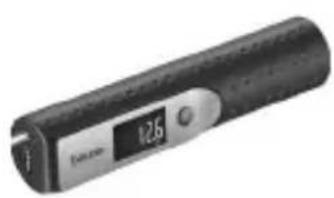
1x LS 50
1x strap
1x micro USB charging cable
1x instructions for use
1. Getting to know your device
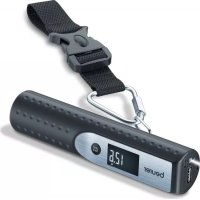
Using the LS 50 Travelmeister, you can easily weigh your luggage everywhere. The LS 50 also has an integrated powerbank. The powerbank integrated into the device is a mobile and rechargeable power source which you can use to charge your smartphone or another rechargeable electronic device using the USB port. Thanks to its compact design, you can easily take the LS 50 away with you when you travel, for example.
Furthermore, the device also has an LED torch.
2. Signs and symbols
The following symbols appear in these instructions for use:
| WARNING Warning instruction indicating a risk of injury or damage to health | |
| IMPORTANT Safety note indicating possible damage to the device/accessory | |
| Note Note on important information |
3. Important notes

WARNING
- Only use the luggage scale which is integrated in the device to weigh luggage items. Do not use the luggage scale to weigh people or animals!
- Keep packaging material away from children (risk of suffocation).
- Keep the device away from children. The device is not a toy!
- Do not use any additional parts that are not recommended by the manufacturer or offered as accessories.
- Do not use the karabiner on the strap for climbing! Only use the karabiner on the strap for weighing items of luggage as described in the instructions for use.
- Repairs must only be carried out by Customer Services or authorized suppliers. Under no circumstances should you open or repair the device yourself, as faultless functionality could no longer be guaranteed thereafter. Failure to comply will result in voiding of the warranty.
- The maximum weight capacity of the device is 50kg (110 lb, 1763.7 oz), graduation in 10g (0.02 lb, 0.35 oz).
- The precision of the device may be impaired by strong electromagnetic fields (e.g. mobile phones).
- The device is not intended for commercial use.
- If you are taking the LS50 on a flight, take note of the relevant airline's transport conditions.
-
If your skin or eyes come into contact with battery fluid, rinse the affected areas with water and seek medical assistance.
-
Risk of explosion! Do not throw the device into open fire.
- Protect batteries from excessive heat.
- Do not disassemble, split or crush the batteries.
- Only use the micro USB charging cable included in delivery to charge the powerbank of the LS 50.
- Batteries must be charged correctly prior to use. The instructions from the manufacturer and the specifications in these instructions for use regarding correct charging must be observed at all times.
- In order to achieve as long a battery service life as possible, fully charge the battery at least twice per year.

IMPORTANT
- Protect the device from knocks, damp, dust, chemicals, marked temperature fluctuations, and nearby sources of heat (ovens, heaters).
- You can clean the device with a damp cloth, using a little washing-up liquid if necessary. Never submerge the device in water. Do not rinse the device under running water.
4. Device description
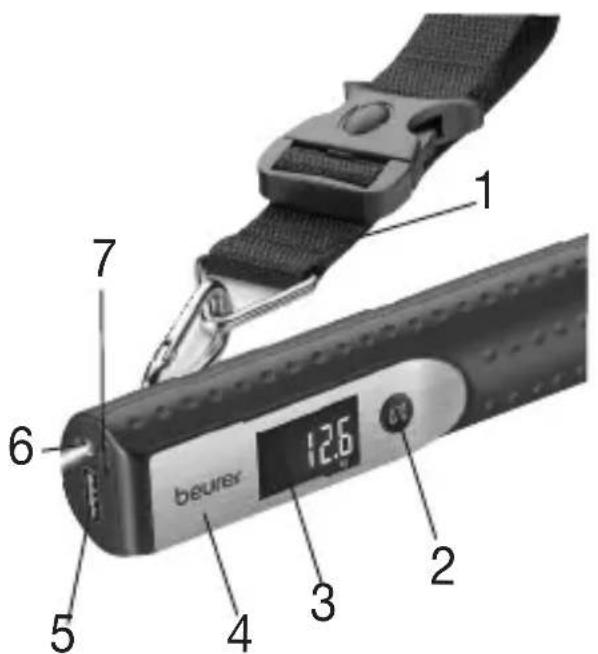
Device
| 1 | Strap |
| 2 | Unit button / TARE button |
| 3 | Display |
| 4 | Sliding switch |
| 5 | USB connection |
| 6 | LED torch |
| 7 | Micro USB connection |
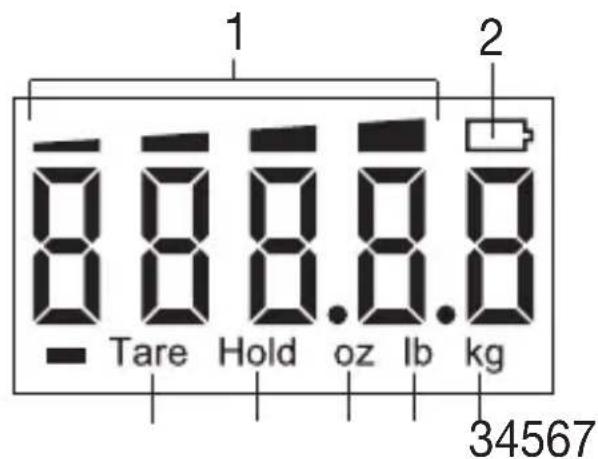
Display
| 1 Battery state |
| 2 Battery symbol |
| 3 Unit of measurement for weight - kilograms (kg) |
| 4 Unit of measurement for weight - pounds (lb) |
| 5 Unit of measurement for weight - ounces (oz) |
| 6 Hold weight display (Hold) |
| 7 Tare display |
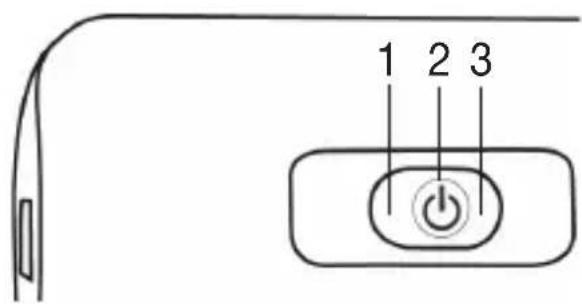
Sliding switch
1 LED torch
2 LS 50 switched off
3 LS 50 switched on
5. Operation
5.1 Charging the powerbank of the LS 50
Fully charge the powerbank of the LS 50 prior to initial use.
To charge the powerbank, proceed as follows:
- Insert the large end of the supplied micro USB charging cable into a computer which is switched on.
- Insert the small end of the supplied micro USB charging cable into the micro USB connection of the LS 50.
- Once the powerbank is completely charged, all 4 bars of the battery state in the display of the LS 50 are permanently visible.
- When you remove the charging cable from the LS50 after the charging process and switch it on using the sliding switch, the bars for the bat
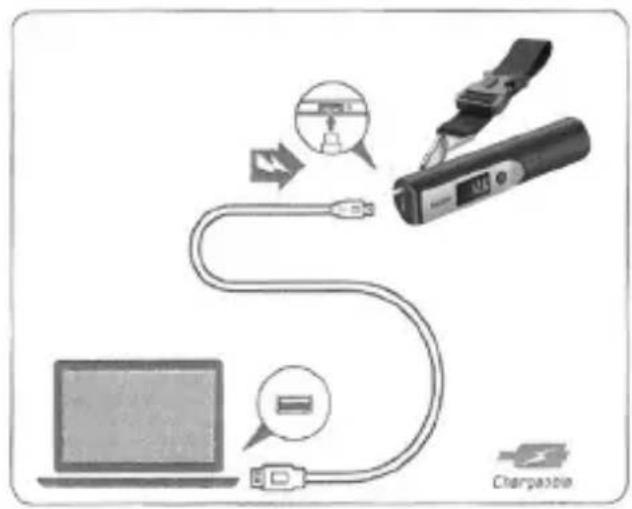
tery state appear on the display (charging mode). To leave charging mode, wait 5 seconds until the display switches off and then press the unit button/TARE button. "0.00" appears on the display. You can only weigh luggage again once you have left charging mode.
5.2 Charging a mobile device using the LS 50
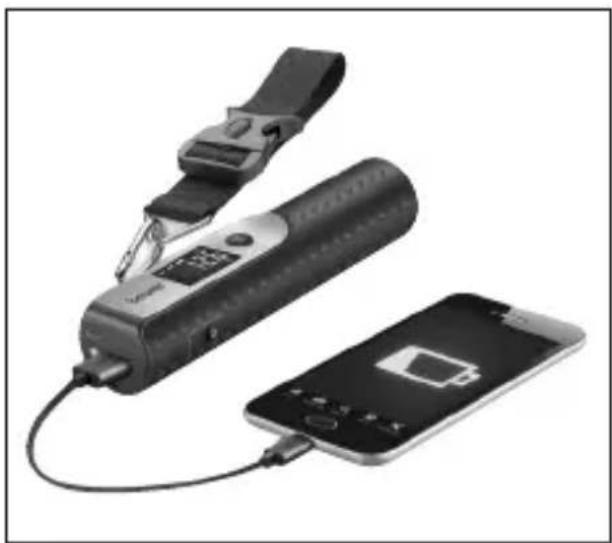
To charge your mobile device (e.g. smartphone) using the LS 50, proceed as follows:
- Slide the sliding switch in the direction of the unit button until it clicks into place. The LS50 is now switched on.
- Connect the LS 50 with your mobile device using the charging cable of your mobile device.
1 Note
If you have charged the LS 50 powerbank and would like to charge a mobile device using the LS 50 immediately afterwards, you must first of all switch the LS 50 off and back on again.
5.3 Weighing items of luggage

Whilst weighing the luggage, ensure that the LS 50 is always in a horizontal position. Incorrect measurements may otherwise occur.
| 1. Pass the strap of the luggage scale through the handle of your luggage as shown. | 2. Secure the clip of the strap as shown. | 3. Slide the sliding switch in the direction of the unit button until it clicks into place. Wait until “OK” appears in the display. | 4. Hold the LS 50 horizontally with the item of luggage attached and lift upwards. The weight is displayed on the display. As soon as the weight is stable, it is fixed on the screen and “HOLD” is displayed. |
Tare function
The LS 50 also has a tare function. To activate the tare function, proceed as follows:
- Weigh an item of luggage as described in chapter "5.3 Weighing items of luggage".
- As soon as "Hold" appears in the display, press the unit button / TARE button. "Tare" and "000" now appear in the display. The weight of the previously weighed item of luggage is now stored internally and you can weigh an additional load. This process can be repeated as often as required.
5.4 Switching on the LED torch
To switch on the LED torch of the LS 50, hold the sliding switch on the side in the direction of the connection ports. The LED torch is switched on. As soon as you release the sliding switch, the LED torch is switched off again.
6. What if there are problems? / Error messages
| Problem / Error message Solution | |
| “Err” is shown on the display. | The item of luggage being weighed exceeds the maximum weight capacity (50 kg, 110 lb, 1763.7 oz) of the LS 50. |
| “Lα” is shown on the display and the battery symbol is flashing. | The battery in the LS 50 is depleted. Recharge the battery as described in “5.1 Charging the powerbank of the LS 50”. |
| “Un5t” is shown on the display. | The item of luggage has been weighed too soon. Before each measurement, wait until “000” appears on the display. |
| After the LS 50 has been charged, the display shows and you can not weigh any luggage. | When the display shows , wait 5 seconds until the display switches off and then press the unit button/TARE button. “000” appears on the display. You can now weigh luggage again. |
7. Disposal
The empty, completely flat rechargeable batteries must be disposed of using specially designated collection boxes, recycling points or electronics retailers. You are legally required to dispose of the rechargeable batteries.
The codes below are printed on rechargeable batteries containing harmful substances:
Pb = Battery contains lead,
Cd = Battery contains cadmium,
Hg = Battery contains mercury.
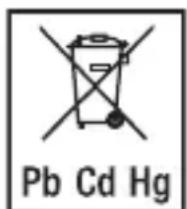
For environmental reasons, do not dispose of the device in the household waste at the end of its useful life.
Dispose of the device at a suitable local collection or recycling point. Dispose of the device in accordance with EC Directive - WEEE (Waste Electrical and Electronic Equipment). If you have any questions, please contact the local authorities responsible for waste disposal.
The device battery must be disposed of separately. The battery must not be disposed of with domestic waste.
For information on disposal, please contact the authorised seller or the public authority responsible for waste disposal.
Dispose of packaging in an environmentally friendly manner.


8. Technical data
Model: LS50
Weight capacity: up to 50kg (110 lb, 1763.7 oz)
Graduation: 10 g, (0.02 lb, 0.35 oz)
- Battery capacity: 5000 mAh (Li-Ion)
- Transport conditions: -20^ to +60^ ; 20-95% relative humidity
Storage conditions: -20^ to +60^ ; 20-95% relative humidity
- Operating conditions: 0^ to +40^ ; 25-85% relative humidity
Please contact the specified service address to obtain further information, such as the CE Declaration of Conformity.
9. Warranty/service
In case of a claim under the warranty please contact your local dealer or the local representation which is mentioned in the list "service international".
In case of returning the unit please add a copy of your receipt and a short report of the defect.
The following warranty terms shall apply:
- The warranty period for BEURER products is either 5 years or- if longer- the country specific warranty period from date of Purchase.
In case of a warranty claim, the date of purchase has to be proven by means of the sales receipt or invoice.
- Repairs (complete unit or parts of the unit) do not extend the warranty period.
- The warranty shall not be valid for damages because of
a. improper treatment, e.g. nonobservance of the user instructions.
b. repairs or tampering by the customer or unauthorised third parties.
c. transport from the manufacturer to the consumer or during transport to the service centre.
d. The warranty shall not be valid for accessories which are subject to normal wear and tear (cuff, batteries etc.).
- Liability for direct or indirect consequential losses caused by the unit are excluded even if the damage to the unit is accepted as a warranty claim.
FRANÇAIS

Chere cliente, cher client,
| الإستعمال الإستعمالية 或الإستعمالية بعبيعة或者其他 مΒΧΙΑΟΥ | Δ |
| الإستعمال الإستعمالية 或ال,enGLISH/ENGLISH/ENGLISH/ENGLISH/ENGLISH/ENGLISH/ENGLISH/ENGLISH/ENGLISH/ENGLISH/ENGLISH/ENGLISH/ENGLISH/ENGLISH/ENGLISH/ENGLISH/ENGLISH/ENGLISH/ENGLISH/ENGLISH/ENGLISH/ENGLISH/ENGLISH/ENGLISH/ENGLISH/ENGLISH/ENGLISH/ENGLISH/ENGLISH/ENGLISH/ENGLISH/ENGLISH/ENGLISH/ENGLISH/EN | |
| الإستعمال الإستعمالية 或the organization of the organization of the organization of the organization of the organization of the organization of the organization of the organization of the organization of the organization of the organization of the organization of the organization of the organization of the organization of the organization of the organization of the organization of the organization of the organization of the organization of the organization of the organization of the organization of the organization of the organization of the organization of the organization of the organization of the organization of the organization of the organization of the organization of the organization of the organisation of the organization of the organization of the organization of the organization of the organization of the organization of the organization of the organization of the organization of the organization of the organization of the organization of the organization of the organization of the organization of the organization of the organization of the organization of the organization of the organization of the organization of the organization of the organization of the organization of the organization of the organization of the organization of the organization of the organization of the organization of the organization of the organization of the organizationof the organization of the organization of the organization of the organization of the organization of the organization of the organization of the organization of the organization of the organization of the organization of the organization of the organization of the organization of the organization of the organization of the organization of the organization of the organization of the organization of the organization of the organization of the organization of the organization of the organization of the organization of the organization of the organization of the organization of the organization of the organization of the organization of the organization ofthe organization of the organization of the organization of the organization of the organization of the organization of the organization of the organization of the organization of the organization of the organization of the organization of the organization of the organization of the organization of the organization of the organization of the organization of the organization of the organization of the organization of the organization of the organization of the organization of the organization of the organization of the organization of the organization of the organization of the organization of the organization of the organization of the organization ofthe organisation of the organisation of the organisation of the organisation of the organisation of the organisation of the organisation of the organisation of the organisation of the organisation of the organisation of the organisation of the organisation of the organisation of the organisation of the organisation of the organisation of the organisation of the organisation of the organisation of the organisation of the organisation of the organisation of the organisation of the organisation of the organisation of the organisation of the organisation of the organisation of the organisation of the organisation of the organisation of the organisation of the organisation of the organization of the organisation of the organisation of the organisation of the organisation of the organisation of the organisation of the organisation of the organisation of the organisation of the organisation of the organisation of the organisation of the organisation of the organisation of the organisation of the organisation of the organisation of the organisation of the organisation of the organisation of the organisation of the organisation of the organisation of the organisation of the organisation of the organisation of the organisation of the organisation of the organisation of the organisation of the organisation of the organisation of the organisationof the organisation of the organisation of the organisation of the organisation of the organisation of the organisation of the organisation of the organisation of the organisation of the organisation of the organisation of the organisation of the organisation of the organisation of the organisation of the organisation of the organisation of the organisation of the organisation of the organisation of the organisation of the organisation of the organisation of the organisation of the organisation of the organisation of the organisation of the organisation of the organisation of the organisation of the organisation of the organisation of the organisation ofthe organisation of the organisation of the organisation of the organisation of the organisation of the organisation of the organisation of the organisation of the organisation of the organisation of the organisation of the organisation of the organisation of the organisation of the organisation of the organisation of the organisation of the organisation of the organisation of the organisation of the organisation of the organisation of the organisation of the organisation of the organisation of the organisation of the organisation of the organisation of the organisation of the organisation of the organisation of the organisation of the organisationof the organization of the organisation of the organisation of the organisation of the organisation of the organisation of the organisation of the organisation of the organisation of the organisation of the organisation of the organisation of the organisation of the organisation of the organisation of the organisation of the organisation of the organisation of the organisation of the organisation of the organisation of the organisation of the organisation of the organisation of the organisation of the organisation of the organisation of the organisation of the organisation of the organisation of the organisation of the organisation of the organisation ofthe organisationof the organisation of the organisation of the organisation of the organisation of the organisation of the organisation of the organisation of the organisation of the organisation of the organisation of the organisation of the organisation of the organisation of the organisation of the organisation of the organisation of the organisation of the organisation of the organisation of the organisation of the organisation of the organisation of the organisation of the organisation of the organisation of the organisation of the organisation of the organisation of the organisation of the organisation of the organisation of the organisation of theorganisation of the organisation of the organisation of the organisation of the organisation of the organisation of the organisation of the organisation of the organisation of the organisation of the organisation of the organisation of the organisation of the organisation of the organisation of the organisation of the organisation of the organisation of the organisation of the organisation of the organisation of the organisation of the organisation of the organisation of the organisation of the organisation of the organisation of the organisation of the organisation of the organisation of the organisation of the organisation of the organisation of the organisationの organisationof the organisationof the organisationof the organisationof the organisationof the organisationof the organisationof the organisationof the organisationof the organisationof the organisationof the organisationof the organisationof the organisationof the organisationof the organisationof the organisationof the organisationof the organisationof the organisationof the organisationof the organisationof the organisationof the organisationof the organisationof the organisationof the organisationof the organisationof the organisationof the organisationof the organisationof the organisationof the organisationof the organisationof theorganisationofthe organisationofthe organisationofthe organisationofthe organisationofthe organisationofthe organisationofthe organisationofthe organisationofthe organisationofthe organisationofthe organisationofthe organisationofthe organisationofthe organisationofthe organisationofthe organisationofthe organisationofthe organisationofthe organisationofthe organisationofthe organisationofthe organisationofthe organisationofthe organisationofthe organisationofthe organisationofthe organisationofthe organisationofthe organisationofthe organisationofthe organisationofthe organisationofthe organisationofthe organisation ofthe organisationofthe organisationofthe organisationofthe organisationofthe organisationofthe organisationofthe organisationofthe organisationofthe organisationofthe organisationofthe organisationofthe organisationofthe organisationofthe organisationofthe organisationofthe organisationofthe organisationofthe organisationofthe organisationofthe organisationofthe organisationofthe organisationofthe organisationofthe organisationofthe organisationofthe organisationofthe organisationofthe organisationofthe organisationofthe organisationofthe organisationofthe organisationofthe organisationofthorganisationofthe organisationofthe organisationofthe organisationofthe organisationofthe organisationofthe organisationofthe organisationofthe organisationofthe organisationofthe organisationofthe organisationofthe organisationofthe organisationofthe organisationofthe organisationofthe organisationofthe organisationofthe organisationofthe organisationofthe organisationofthe organisationofthe organisationofthe organisationofthe organisationofthe organisationofthe organisationofthe organisationofthe organisationofthe organisationofthe organisationofthe organisationofthe organisationofthe organisationfomgationofthe organisationfomgationofthe organisationfomgationofthe organisationfomgationofthe organisationfomgationofthe organisationfomgationofthe organisationfomgationofthe organisationfomgationofthe organisationfomgationofthe organisationfomgationofthe organisationfomgationofthe organisationfomgationofthe organisationfomgationofthe organisationfomgationofthe organisationfomgationofthesystemfomgationofthesystemfomgationofthesystemfomgationofthesystemfomgationofthesystemfomgationofthesystemfomgationofthesystemfomgationofthesystemfomgationofthesystemfomgationofthesystemfomgationofthesystemfomgationofthesystemfomgationofthesystemfomgationofthesystemfomgationofthesystemfongationofthesystemfomgationofthesystemfomgationofthesystemfomgationofthesystemfomgationofthesystemfomgationofthesystemfomgationofthesystemfomgationofthesystemfomgationofthesystemfomgationofthesystemfomgationofthesystemfomgationofthesystemfomgationofthesystemfomgationofthesystemfomg. |
aale 3
#
y 1
()
111 1
y
y
1J 1
y j 2.00001111111111111111111111
J 1
Jnllg 1
0.35,0.02)10 1763.7,110)50
()
J 1
aaln jll aill bgyalee L50 1
aaii jaiia 1
psslll lalil jiey1 pae, jiall jw ie Jaleill e 1
1
a 1