
B227Q - Monitor ACER - Free user manual and instructions
Find the device manual for free B227Q ACER in PDF.
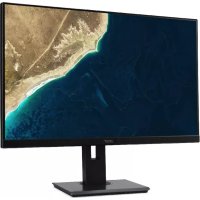


| Product type | LCD Monitor |
| Screen size | 21.5 inches (55 cm) |
| Panel technology | IPS |
| Maximum resolution | 1920 x 1080 pixels |
| Brightness | 250 cd/m² (typical) |
| Dynamic contrast | 100,000,000:1 (ACM) |
| Response time | 4 ms (gray to gray) |
| Viewing angle | 178° horizontal / 178° vertical |
| Input connectors | VGA, HDMI, DisplayPort (depending on model) |
| Built-in speakers | 2 x 2 W (optional) |
| USB ports | USB 3.0 x 4 (optional) |
| Power supply | 100 - 240 V, 50/60 Hz |
| Power consumption (on mode) | 13 W (typical) |
| Power consumption (standby) | 0.32 W |
| Energy efficiency class | A+ |
| Net weight | 4.84 kg |
| Dimensions (with stand) | 489.7 x 370.13~485.13 x 193.17 mm |
| Tilt | -5° to +25° |
| Swivel | -45° to +45° |
| Height adjustment | 0 to 120 mm |
| Pivot | -90° to +90° |
| Removable stand | Yes |
| Operating temperature | 5°C to 35°C |
| Cleaning | Use a soft cloth without solvent. Do not use ammonia or alcohol. |
| Safety | Do not expose to moisture, do not open the housing. |
Frequently Asked Questions - B227Q ACER
User questions about B227Q ACER
0 question about this device. Answer the ones you know or ask your own.
Ask a new question about this device
Download the instructions for your Monitor in PDF format for free! Find your manual B227Q - ACER and take your electronic device back in hand. On this page are published all the documents necessary for the use of your device. B227Q by ACER.
USER MANUAL B227Q ACER
LCD Monitor B7 series-B227Q
USER GUIDE
Acer LCD Monitor Quick Start Guide (QSG)
Important safety instructions
Please read the following instructions carefully.
- To clean the LCD monitor screen: Be sure that your monitor is electrically rated to operate with the AC power available in your location.
- Turn off the LCD monitor and unplug the power cord. Spray a non-solvent cleaning solution onto a rag and clean the screen gently. NEVER SPRAY OR POUR ANY LIQUID DIRECTLY ONTO THE SCREEN OR CASE.
- PLEASE DO NOT USE ANY AMMONIA OR ALCOHOL-BASED CLEANERS ON THE LCD DISPLAY SCREEN OR CASE.
- Acer will not be liable for damage resulting from use of any ammonia or alcohol-based cleaners.
- Do not place the LCD monitor near a window. Exposing the monitor to rain, moisture or sunlight can severely damage it.
- Do not apply pressure to the LCD screen. Excessive pressure may cause permanent damage to the display.
- Do not remove the cover or attempt to service this unit yourself. An authorized technician should perform servicing of any nature.
- Store the LCD monitor in a room with a temperature of -20° to 60° C (-4° to 140° F). Storing the LCD monitor outside this range may result in permanent damage.
- Immediately unplug your monitor and call an authorized technician if any of the following circumstances occur:
- Monitor-to-PC signal cable is frayed or damaged.
- Liquid spills onto the LCD monitor or the monitor is exposed to rain. The LCD monitor or case is damaged.
Attaching the monitor to the base
- Remove the monitor from the packaging.
- Attach the foot stand to the base. (for selected models)
- Turn clockwise to lock. Ensure that the base is locked onto the stand. (for selected models)
- Secure the base to the stand by turning the screw using the integrated tab or a suitable coin. (for selected models)
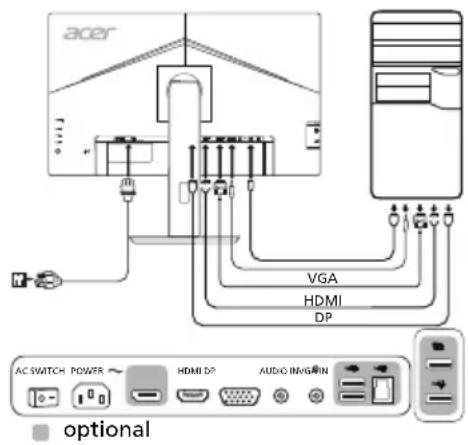
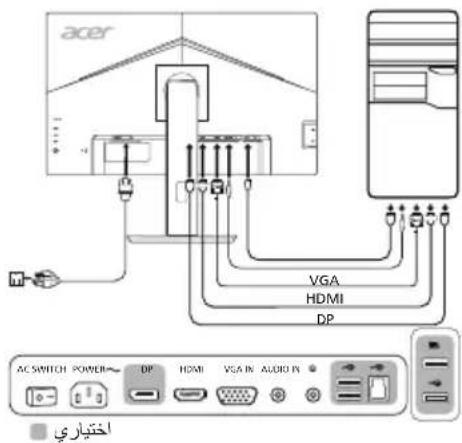
Connecting Your Monitor to a Computer
- Turn off your monitor and unplug your computer's power cord.
- 2-1 Connect Video Cable
a. Make sure both the monitor and computer are powered-OFF. b. Connect the VGA video cable to the computer.
2-2 Connect HDMI Cable (Only HDMI-input model)
a. Make sure both the monitor and computer are powered-OFF. b. Connect one end of the HDMI cable to the back of the monitor and connect the other end to the computer's port.
2-3 Connect DP Cable (Only DP-input model) (Optional)
a. Make sure both the monitor and computer are powered-OFF. b. Connect the DP cable to the computer.
- Connect the Audio Cable. (Only Audio-Input Model) (Optional)
- Insert the monitor power cable into the power port at the back of the monitor.
- Plug the power cords of your computer and your monitor into a nearby electrical outlet.
- Select Power-off USB charge ON/OFF to enable/disable Power-off USB charge function. (Optional)
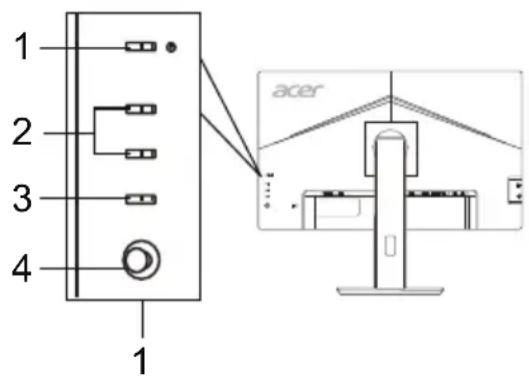
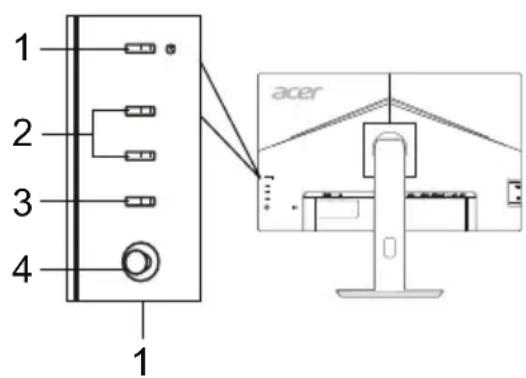
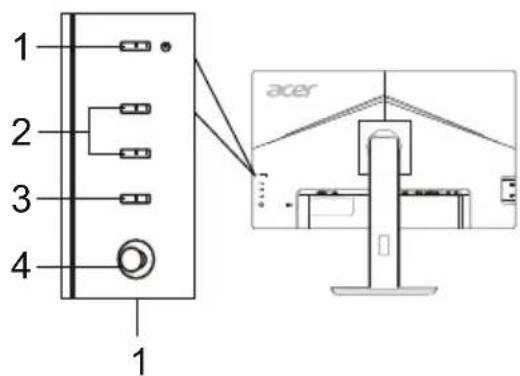
External Controls
| No.ItemDescription | ||
| 1 | Power button/indicator | Turns the monitor on/off. Blue indicates power on. Amber indicates standby/power saving mode. |
| 2 | Hotkey 1, 2 buttons | Press to activate user defined hotkey function. |
| 3 | Input button Press to toggle input sources. | |
| 4 | Navi/OK button | Press to activate the OSD menu, then use it as directional key to highlight the desired function. Press it again to enter a selection. |
Regulations and safety notices
FCC notice
This device has been tested and found to comply with the limits for a Class B digital device pursuant to Part 15 of the FCC rules. These limits are designed to provide reasonable protection against harmful interference in a residential installation. This device generates, uses, and can radiate radio frequency energy and, if not installed and used in accordance with the instructions, may cause harmful interference to radio communications.
However, there is no guarantee that interference will not occur in a particular installation. If this device does cause harmful interference to radio or television reception, which can be determined by turning the device off and on, the user is encouraged to try to correct the interference by one or more of the following measures:
Reorient or relocate the receiving antenna. - Increase the separation between the device and receiver. - Connect the device into an outlet on a circuit different from that to which the receiver is connected. - Consult the dealer or an experienced radio/television technician for help.
CE declaration of Conformity
Hereby, Acer Inc., declares that this LCD monitor is in compliance with the essential requirements and other relevant provisions of EMC Directive 2014/30/EU, Low Voltage Directive 2014/35/EU, and RoHS Directive 2011/65/EU and Directive 2009/125/EC with regard to establishing a framework for the setting of ecodesign requirements for energy-related product.
Notice:
In order to prevent damage to the monitor, do not lift the monitor by its base.
Notice: Shielded cables
All connections to other computing devices must be made using shielded cables to maintain compliance with EMC regulations.
Notice:
Acer monitor is purported for video and visual display of information obtained from electronic devices.
Notice: Peripheral devices
Only peripherals (input/output devices, terminals, printers, etc.) certified to comply with the Class B limits may be attached to this equipment. Operation with non-certified peripherals is likely to result in interference to radio and TV reception.
Caution
Changes or modifications not expressly approved by the manufacturer could void the user authority, which is granted by the Federal Communications Commission, to operate this product.
Operation conditions
This device complies with Part 15 of the FCC Rules. Operation is subject to the following two conditions: (1) this device may not cause harmful interference, and (2) this device must accept any interference received, including interference that may cause undesired operation.
Notice: Canadian users
This Class B digital apparatus complies with Canadian ICES-003.
Disposal of Waste Equipment by Users in Private Household in the European Union
This symbol on the product or on its packaging indicates that this product must not be disposed of with your other household waste. Instead, it is your responsibility to dispose of your waste equipment by handing it over to a designated collection point for the recycling of waste electrical and electronic equipment. The separate collection and recycling of your waste equipment at the time of disposal will help to conserve natural resources and ensure that it is recycled in a manner that protects human health and the environment. For more information about where you can drop off your waste equipment for recycling, please contact your local city office, your household waste disposal service or the shop where you purchased the product.
SPECIFICATION
| LCD Panel | Driving System TFT Color LCD | |
| Size 21.5"W (55 cm) | ||
| Pixel Pitch 0.248 mm (H) x 0.248 mm (V) | ||
| Brightness | 250 cd/m² (Typical) | |
| Contrast 10000000:1 Max (ACM) | ||
| Viewable Angle 178° (H) 178° (V) (CR=10) | ||
| Response Time 4 ms (G to G) | ||
| Panel Type In-Plane Switching | ||
| H-Frequency | VGA/HDMI: 30 - 85 kHzDP: 85 - 85 kHz | |
| V-Frequency | VGA/HDMI: 56 - 76 HzDP: 48 - 75 Hz | |
| Display Colors 16.7M Colors | ||
| Dot Clock | DP/HDMI: 174.5 MHzVGA: 148.5 MHz | |
| Maximum Resolution | DP/HDMI:1920 x 1080 @ 75 HzVGA: 1920 x 1080 @ 60 Hz | |
| Plug & Play VESA DDCCI/DDC2B | ||
| Energy Efficiency Class A+ | ||
| *Annual Energy Consumption 20 (kWh) (for HDMI-Input Model) | ||
| Power Consumption (at 200 nits) | On Mode 13 W (Typical) | |
| Sleep Mode 0.32 W (Typical) | ||
| Off Mode 0.23 W (Typical) | ||
| Input Connector | D-SubHDMI (Only HDMI-Input Model)DP (Only DP-Input Model) | |
| Input Video Signal | Analog: 0.7 Vp-p (standard), 75 OHM, PositiveHDMI (Only HDMI-Input Model) (Optional)DP (Only DP-Input Model) (Optional) | |
| Speakers 2 W x 2 (Only Audio-Input Model) (Optional) | ||
| USB | USB 3.0 x 4 (Optional) | |
| Maximum Screen Size | Horizontal: 476.064 mmVertical: 267.786 mm | |
| Power Source | 100-240 V, 50/60 Hz | |
| Environmental Considerations | Operating Temp: 5° to 35°CStorage Temp: -20° to 60°COperating Humidity: 20% to 80% | |
| Dimensions | 489.7 (W) x 370.13 ~ 485.13 (H) x 193.17 (D) mm | |
| Weight (N. W.) | 4.84 kg (net) | |
| Mechanism Specifications | Tilt: -5° to +25° (Only at the highest point can 25 degrees of recline be offered for the angle of elevation)Swivel: -45° to +45°Height adjustment: 0 mm to 120 mmPivot: -90° to 90°Detachable foot stand: Yes | |
| External Controls | Switch/Buttons | Power ButtonHotkey 1Hotkey 2InputMenu/Navi/OK |
| Functions | Contrast Brightness Black Boost Blue Light ACM On/Off Super Sharpness H. Position (only Analog input model)V. Position (only Analog input model)Clock (only Analog input model)Focus (only Analog input model)Auto Configuration (only Analog input model)Gamma Color Temperature Modes sRGB Grayscale Mode 6-axis Saturate 6-axis Hue Volume Auto Source Power-Off USB Charge Wide Mode Hot Key Assignment DDC/CI On/Off HDMI Black Level Quick Start Mode Display information Reset All Settings Exit | |
| All specifications are subject to change without notice. | ||
Find manuals and other documents for your Acer product on the official Acer support website.
*Annual energy consumption is calculated using the typical power consumption 4 hours per day, 365 days per year.
Acer LCD Monitor Quick Start Guide (QSG)
Acer LCD Monitor Quick Start Guide
Installing the monitor on the base.
- Remove the monitor from the packaging.
- Attach the stand to the base (not for all models).
- Turn clockwise to secure. Make sure the base is secured to the stand (not for all models).
- Secure the base to the stand by turning the screw with a suitable screwdriver or coin (not for all models).
Connecting the monitor to the computer
- Turn off the monitor and disconnect the power cord from the computer. 2.2-1 Connect the video cable
a. Make sure the monitor and computer power are off. b. Connect the VGA cable to the computer.
2-2 Connect the HDMI cable (only for models with HDMI input)
a. Make sure the monitor and computer power are off. b. Connect one end of the HDMI cable to the monitor's input port, and the other end to the computer's port.
2-3 Connect the DP cable (only for models with DP input) (purchased separately)
a. Make sure the monitor and computer power are off. b. Connect the DP cable to the computer.
3. Connect the audio cable (only for models with audio input) (purchased separately). 4. Connect the monitor power cable to the power port on the back of the device. 5. Connect the computer and monitor power cords to an electrical outlet. 6. Select "Charge via USB when power is off" On/Off to enable or disable the charging function via USB when power is off. (purchased separately)
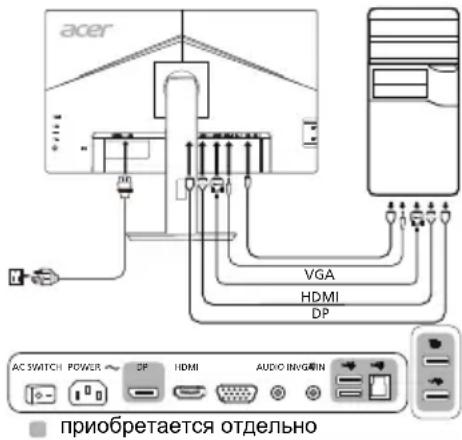
External controls
- DO NOT USE AMMONIA- OR ALCOHOL-BASED CLEANERS ON THE LCD SCREEN OR THE BACK COVER.
- Acer is not responsible for damages resulting from the use of ammonia- or alcohol-based cleaners.
- Do not subject the LCD screen to pressure. Excessive pressure can cause permanent damage to the screen.
- Remove the back cover, and do not attempt to perform repairs on the device yourself. An authorized technician should perform any kind of inspection.
- Store the LCD screen in a room with a temperature of -20° to 60° C. Storing the LCD screen outside this temperature range can cause permanent damage.
- Immediately unplug all connectors from the screen, and contact an authorized technician if any of the following situations occur:
- The cable to the PC signal tablet is frayed or damaged. Liquid spills on the LCD screen, or the screen is exposed to rain.
- The LCD screen or the back cover is damaged.
Quick Setup Guide for Acer LCD Monitor
Important Safety Instructions
Please read these instructions carefully.
- To clean the LCD monitor screen: Do not forget that your monitor is designed for operation with alternating current (AC) power.
- Disconnect the LCD monitor from the power outlet and unplug the signal cable from the connector.
- Apply cleaning solution without solvent directly to the cloth and wipe the screen gently. Do not press or apply pressure to the screen or the housing.
- Do not use cleaning agents based on ammonia or alcohol to clean the LCD screen or the housing.
- Acer is not responsible for damage caused by the use of cleaning agents based on ammonia or alcohol.
- Do not place the LCD monitor near a window. Exposure of the monitor to direct sunlight, rain, or moisture can seriously damage it.
- Do not apply pressure to the LCD screen. Excessive pressure may cause permanent damage to the display.
- Do not remove the cover and attempt to repair this device yourself. Authorized technicians must perform servicing for any malfunction.
- Store the LCD monitor in a temperature range from -20° to 60°C (-4° to 140°F). Storing the LCD monitor outside this range may result in permanent damage.
- Immediately disconnect the cable from contact with your monitor and contact an authorized technician if any malfunction occurs.
The signal cable from the monitor to the computer is loose or damaged. The LCD monitor or the monitor housing is damaged.
Attaching the monitor to the base
- Remove the monitor from the packaging.
- Attach the stand to the base. (For selected models)
- Attach the base to the stand, to close the stand. Make sure the base is closed on the stand. (For selected models)
- Secure the base to the stand by turning the screw with the provided screwdriver or a coin. (For selected models)
Connecting the monitor to the computer
1. Turn off the monitor and unplug the power cable of the computer. 2. 2-1 Connect the video cable
a. Make sure both the monitor and the computer are turned off. b. Connect the VGA video cable to the computer.
2-2 Connect the HDMI cable (only for models with HDMI)
a. Make sure both the monitor and the computer are turned off. b. Connect one end of the HDMI cable to the corresponding part of the monitor, and the other end to the port on the computer.
2-3 Connect the DP cable (only for models with DP) (optional)
a. Make sure both the monitor and the computer are turned off. b. Connect the DP cable to the computer.
- Connecting the audio cable. (Only for models with audio input) (Optional)
- Insert the power cable of the monitor into the power port on the back of the monitor.
- Plug the power cables of the computer and the monitor into a nearby electrical outlet.
- Press the power button to turn on/off the monitor. Use the power button to activate/deactivate the power saving function via USB when the power is off. (Optional)
Adjusting the controls
To prevent damage to the monitor, do not lift it by its base.
Note: Shielded cable.
Connections to other devices must be made using shielded cable to comply with electromagnetic compatibility (EMC) requirements.
Note: Peripheral devices
Only peripherals (input/output devices, terminals, printers, etc.) that are certified to comply with Class B limits may be connected to this equipment. Operating uncertified peripherals may cause interference to radio and television reception.
CAUTION
Changes or modifications not expressly approved by the manufacturer may void the user's authority to operate this product.
Operating conditions
This device complies with Part 15 of the FCC Rules. Operation is subject to the following two conditions: (1) This device may not cause harmful interference, and (2) This device must accept any interference received, including interference that may cause undesired operation.
Note: Canadian users
This digital device does not exceed the Class B limits for radio noise emissions from digital apparatus set out in the Radio Interference Regulations of the Canadian Department of Communications.
Important safety instructions
2-2 1HDMI (LWvuaHDMI)
a. a b. nHDMI
2-3 wipwipw DP (wipwipw DP) (wipw)
a. aannnnnnaeaaeaaeaaeaaeaeaeae b. 1000000000000000000000000000000000000000000000
| wnvulwau | wnvulwau | wnvulwau | ||
| 1 | wnvulwau-wnvulwau/wnvulwauwau | wnvulwau/wnvulwauwauwauwauwauwauwauwauwauwauwauwauwauwauwauwauwauwauwauwauwauwauwauwauwauwauwauwauwauwauwauwauwauwauwauwauwauwauwauwauwauwauwauwauwauwauwauwauwauwauwAU | ||
| 2 | wnvulwau 1, 2 | wnvulwau/wnvulwau-wnvulwau/wnvulwau/wnvulwauwau/wnvulwauwauwauwauwauwauwauwauwauwauwauwauwauwauwauwauwauwauwauwauwauwauwauwauwauwauwauwauwauwauwauwauwauwauwauwauwauwauwauwauwauwauwauwauwauwauwAU | ||
| 3 | wnvulwau | wnvulwau/wnvulwau-wnvulwau/wnvulwau/wnvulwauwau/wnvulwauwauwauwauwauwauwauwauwauwauwauwauwauwauwauwauwauwauwauwauwauwauwauwauwauwauwauwauwauwauwauwAU | ||
| 4 | wnvulwau/wnvulwau | wnvulwau/wnvulwau/wnvulwau/wnvulwau/wnvulwau/wnvulwau/wnvulwau/wnvulwau/wnvulwau/wnvulwau/wnvulwau/wnvulwau/wnvulwau/wnvulwau/wnvulwau/wnvulwau/wnvulwau/wnvulWau/wnvulwau/wnvulwau/wnvulwau/wnvulwau/wnvulwau/wnvulwau/wnvulwau/wnvulwau/wnvulwau/wnvulwau/wnvulwau/wnvulwau/wnvulwau/wnvulwau/wnvulwau/wnvulwau/wnVWau/wnvulwau/wnvulwau/wnvulwau/wnvulwau/wnvulwau/wnvulwau/wnvulwau/wnvulwau/wnvulwau/wnvulwau/wnvulwau/wnvulwau/wnvulwau/wnvulwau/wnvulwau/wnvulwau/wwuWau/wnvulwau/wnvulwau/wnvulwau/wnvulwau/wnvulwau/wnvulwau/wnvulwau/wnvulwau/wnvulwau/wnvulwau/wnvulwau/wnvulwau/wnvulwau/wnvulwau/wnvulwau/wnvulwau/tnaWau/wnvulwau/tnaWau/tnaWau/tnaWau/tnaWau/tnaWau/tnaWau/tnaWau/tnaWau/tnaWau/tnaWau/tnaWau/tnaWau/tnaWau/tnaWau/tnaWau/tnaWau/tnaWau/tnaWau/tnaWau/tnaWau/tna Wau/tnaWau/tnaWau/tnaWau/tnaWau/tnaWau/tnaWau/tnaWau/tnaWau/tnaWau/tnaWau/tnaWau/tnaWau/tnaWau/tnaWau/tnaWau/tnaWau/tnaWau/tnaWau/tnaWau/tna | wnvulwau/wnvulwau/wnvulwau/wnvulwau/wnvulwau/wnvulwau/wnvulwau/wnvulwau/wnvulwau/wnvulwau/wnvulwau/wnvulwau/wnvulwau/wnvulwau/wnvulwau/wnvulwau/wnvULWau/wnvULWau/wnvULWau/wnvULWau/wnvULWau/wnvULWau/wnvULWau/wnvULWau/wnvULWau/wnvULWau/wnvULWau/wnvULWau/wnvULWau/wnvULWau/wnvULWau/wnvULWau/wnvULWau/wn vLWau/wn vLWau/wn vLWau/wn vLWau/wn vLWau/wn vLWau/wn vLWau/wn vLWau/wn vLWau/wn vLWau/wn vLWau/wn vLWau/wn vLWau/wn vLWau/wn vLWau/wn vLWau/wn vLWau/wwuWau/wn vLWau/wn vLWau/wn vLWau/wn vLWau/wn vLWau/wn vLWau/wn vLWau/wn vLWau/wn vLWau/wn vLWau/wn vLWau/wn vLWau/wn vLWau/wn vLWau/wn vLWau/wn vLWau/tnaWau/wn vLWau/tnaWau/tnaWau/tnaWau/tnaWau/tnaWau/tnaWau/tnaWau/tnaWau/tnaWau/tnaWau/tnaWau/tnaWau/tnaWau/tnaWau/tnaWau/tnaWau/tnaWau/tnaWau/tnaWau/tn aWau/tnaWau/tnaWau/tnaWau/tnaWau/tnaWau/tnaWau/tnaWau/tnaWau/tnaWau/tnaWau/tnaWau/tnaWau/tnaWau/tnaWau/tnaWau/tnaWau/tnaWau/tnaWau/tnaWau/tn#aWau/tnaWau/tnaWau/tnaWau/tnaWau/tnaWau/tnaWau/tnaWau/tnaWau/tnaWau/tnaWau/tnaWau/tnaWau/tnaWau/tnaWau/tnaWau/tnaWau/tnaWau/tnaWau/tnaWau/tnаWau/tnaWau/tnaWau/tnaWau/tnaWau/tnaWau/tnaWau/tnaWau/tnaWau/tnaWau/tnaWau/tnaWau/tnaWau/tnaWau/tnaWau/tnaWau/tnaWau/tnaWau/tnaWau/tnaWau/tnanWau/tnaWau/tnaWau/tnaWau/tnaWau/tnaWau/tnaWau/tnaWau/tnaWau/tnaWau/tnaWau/tnaWau/tnaWau/tnaWau/tnaWau/tnaWau/tnaWau/tnaWau/tnaWau/tnaWau/tnanaWau/tnaWau/tnaWau/tnaWau/tnaWau/tnaWau/tnaWau/tnaWau/tnaWau/tnaWau/tnaWau/tnaWau/tnaWau/tnaWau/tnaWau/tnaWau/tnaWau/tnaWau/tnaWau/tnaWau/tnnaWau/tnaWau/tnaWau/tnaWau/tnaWau/tnaWau/tnaWau/tnaWau/tnaWau/tnaWau/tnaWau/tnaWau/tnaWau/tnaWau/tnaWau/tnaWau/tnaWau/tnaWau/tnaWau/tnaWau/tnnWau/tnaWau/tnaWau/tnaWau/tnaWau/tnaWau/tnaWau/tnaWau/tnaWau/tnaWau/tnaWau/tnaWau/tnaWau/tnaWau/tnaWau/tnaWau/tnaWau/tnaWau/tnaWau/tnaWau/tnaaWau/tnaWau/tnaWau/tnaWau/tnaWau/tnaWau/tnaWau/tnaWau/tnaWau/tnaWau/tnaWau/tnaWau/tnaWau/tnaWau/tnaWau/tnaWau/tnaWau/tnaWau/tnaWau/tnaWau/tnaNWau/tnaWau/tnaWau/tnaWau/tnaWau/tnaWau/tnaWau/tnaWau/tnaWau/tnaWau/tnaWau/tnaWau/tnaWau/tnaWau/tnaWau/tnaWau/tnaWau/tnaWau/tnaWau/tnaWau/tnataWau/tnaWau/tnaWau/tnaWau/tnaWau/tnaWau/tnaWau/tnaWau/tnaWau/tnaWau/tnaWau/tnaWau/tnaWau/tnaWau/tnaWau/tnaWau/tnaWau/tnaWau/tnaWau/tnaWau/tntaWau/tnaWau/tnaWau/tnaWau/tnaWau/tnaWau/tnaWau/tnaWau/tnaWau/tnaWau/tnaWau/tnaWau/tnaWau/tnaWau/tnaWau/tnaWau/tnaWau/tnaWau/tnaWau/tnaWau/tniaWau/tnaWau/tnaWau/tnaWau/tnaWau/tnaWau/tnaWau/tnaWau/tnaWau/tnaWau/tnaWau/tnaWau/tnaWau/tnaWau/tnaWau/tnaWau/tnaWau/tnaWau/tnaWau/tnaWau/tn.aWau/tnaWau/tnaWau/tnaWau/tnaWau/tnaWau/tnaWau/tnaWau/tnaWau/tnaWau/tnaWau/tnaWau/tnaWau/tnaWau/tnaWau/tnaWau/tnaWau/tnaWau/tnaWau/tnaWau/tnagaWau/tnagaWau/tnagaWau/tnagaWau/tnagaWau/tnagaWau/tnagaWau/tnagaWau/tnagaWau/tnagaWau/tnagaWau/tnagaWau/tnagaWau/tnagaWau/tnagaWau/tnagaWau/tnagaWau/tnagaWau/tnagaWau/tnagaWau/tnangaWau/tnangaWau/tnangaWau/tnangaWau/tnangaWau/tnangaWau/tnangaWau/tnangaWau/tnangaWau/tnangaWau/tnangaWau/tnangaWau/tnangaWau/tnangaWau/tnangaWau/tnangaWau/tnangaWau/tnangaWau/tnangaWau/tnangaWau/tnagaWau/tnagaWau/tnagaWau/tnagaWau/tnagaWau/tnagaWau/tnagaWau/tnagaWau/tnagaWau/tnagaWau/tnagaWau/tnagaWau/tnagaWau/tnagaWau/tnagaWau/tnagaWau/tnagaWau/tnagaWau/tnagaWau/tnargaWau/tnagaWau/tnagaWau/tnagaWau/tnagaWau/tnagaWau/tnagaWau/tnagaWau/tnagaWau/tnagaWau/tnagaWau/tnagaWau/tnagaWau/tnagaWau/tnagaWau/tnagaWau/tnagaWau/tnagaWau/tnagaWau/tnagaWau/tnaugaWau/tnagaWau/tnagaWau/tnagaWau/tnagaWau/tnagaWau/tnagaWau/tnagaWau/tnagaWau/tnagaWau/tnagaWau/tnagaWau/tnagaWau/tnagaWau/tnagaWau/tnagaWau/tnagaWau/tnagaWau/tnagaWau/tnagaWau/tnogaWau/tnagaWau/tnagaWau/tnagaWau/tnagaWau/tnagaWau/tnagaWau/tnagaWau/tnagaWau/tnagaWau/tnagaWau/tnagaWau/tnagaWau/tnagaWau/tnagaWau/tnagaWau/tnagaWau/tnagaWau/tnagaWau/tnagaWau/tnagnaWau/tnagaWau/tnagaWau/tnagaWau/tnagaWau/tnagaWau/tnagaWau/tnagaWau/tnagaWau/tnagaWau/tnagaWau/tnagaWau/tnagaWau/tnagaWau/tnagaWau/tnagaWau/tnagaWau/tnagaWau/tnagaWau/tnagaWau/tnagreeWau/tnagreeWau/tnagreeWau/tnagreeWau/tnagreeWau/tnagreeWau/tnagreeWau/tnagreeWau/tnagreeWau/tnagreeWau/tnagreeWau/tnagreeWau/tnagreeWau/tnagreeWau/tnagreeWau/tnagreeWau/tnagreeWau/tnagreeWau/tnagreeWau/tnagreeWau/tn agreeWau/tnagreeWau/tnagreeWau/tnagreeWau/tnagreeWau/tnagreeWau/tnagreeWau/tnagreeWau/tnagreeWau/tnagreeWau/tnagreeWau/tnagreeWau/tnagreeWau/tnagreeWau/tnagreeWau/tnagreeWau/tnagreeWau/tnagreeWau/tnagreeWau/tnagreeWau/tn agreeing Wau/tnagree Wau/tnagree Wau/tnagree Wau/tnagree Wau/tnagree Wau/tnagree Wau/tnagree Wau/tnagree Wau/tnagree Wau/tnagree Wau/tnagree Wau/tnagree Wau/tnagree Wau/tnagree Wau/tnagree Wau/tnagree Wau/tnagree Wau/tnagree Wau/tnagree Wau/tnagree Wau/tn agree Wau/tnagree Wau/tnagree Wau/tnagree Wau/tnagree Wau/tnagree Wau/tnagree Wau/tnagree Wau/tnagree Wau/tnagree Wau/tnagree Wau/tnagree Wau/tnagree Wau/tnagree Wau/tnagree Wau/tnagree Wau/tnagree Wau/tnagree Wau/tnagree Wau/tnagree Wau/tn disagree Wau/tn disagree Wau/tn disagree Wau/tn disagree Wau/tn disagree Wau/tn disagree Wau/tn disagree Wau/tn disagree Wau/tn disagree Wau/tn disagree Wau/tn disagree Wau/tn disagree Wau/tn disagree Wau/tn disagree Wau/tn disagree Wau/tn disagree Wau/tn disagree Wau/tn disagree Wau/tn disagree Wau/tn disagree Wau/tnagree Wau/tn disagree Wau/tn disagree Wau/tn disagree Wau/tn disagree Wau/tn disagree Wau/tn disagree Wau/tn disagree Wau/tn disagree Wau/tn disagree Wau/tn disagree Wau/tn disagree Wau/tn disagree Wau/tn disagree Wau/tn disagree Wau/tn disagree Wau/tn disagree Wau/tn disagree Wau/tn disagree Wau/tnagree Wau/tnagree Wau/tn disagree Wau/tn disagree Wau/tn disagree Wau/tn disagree Wau/tn disagree Wau/tn disagree Wau/tn disagree Wau/tn disagree Wau/tn disagree Wau/tn disagree Wau/tn disagree Wau/tn disagree Wau/tn disagree Wau/tn disagree Wau/tn disagree Wau/tn disagree Wau/tn disagree Wau/tnagree Wau/tn disagree Wau/tnagree Wau/tn disagree Wau/tn disagree Wau/tn disagree Wau/tn disagree Wau/tn disagree Wau/tn disagree Wau/tn disagree Wau/tn disagree Wau/tn disagree Wau/tn disagree Wau/tn disagree Wau/tn disagree Wau/tn disagree Wau/tn disagree Wau/tn disagree Wau/tn disagree Wau/tn disagree Wau/tnagree Wau/tnagree Wau/tnagree Wau/tn disagree Wau/tn disagree Wau/tn disagree Wau/tn disagree Wau/tn disagree Wau/tn disagree Wau/tn disagree Wau/tn disagree Wau/tn disagree Wau/tn disagree Wau/tn disagree Wau/tn disagree Wau/tn disagree Wau/tn disagree Wau/tn disagree Wau/tn disagree Wau/tnagree Wau/tn disagree Wau/tn disagree Wau/tnagree Wau/tn disagree Wau/tn disagree Wau/tn disagree Wau/tn disagree Wau/tn disagree Wau/tn disagree Wau/tn disagree Wau/tn disagree Wau/tn disagree Wau/tn disagree Wau/tn disagree Wau/tn disagree Wau/tn disagree Wau/tn disagree Wau/tn disagree Wau/tn disagree Wau/tnagree Wau/tn disagree Wau/tnagree Wau/tnagree Wau/tn disagree Wau/tn disagree Wau/tn disagree Wau/tn disagree Wau/tn disagree Wau/tn disagree Wau/tn disagree Wau/tn disagree Wau/tn disagree Wau/tn disagree Wau/tn disagree Wau/tn disagree Wau/tn disagree Wau/tn disagree Wau/tn disagree Wau/tn disagree Wau/tnagree Wau/tnagree Wau/tn disagree Wau/tnagree Wau/tn disagree Wau/tn disagree Wau/tn disagree Wau/tn disagree Wau/tn disagree Wau/tn disagree Wau/tn disagree Wau/tn disagree Wau/tn disagree Wau/tn disagree Wau/tn disagree Wau/tn disagree Wau/tn disagree Wau/tn disagree Wau/tn disagree Wau/tn disagree Wau/tnagree Wau/tnagree Wau/tnagree Wau/tnagree Wau/tn disagree Wau/tn disagree Wau/tn disagree Wau/tn disagree Wau/tn disagree Wau/tn disagree Wau/tn disagree Wau/tn disagree Wau/tn disagree Wau/tn disagree Wau/tn disagree Wau/tn disagree Wau/tn disagree Wau/tn disagree Wau/tn disagree Wau/tnagree Wau/tnagree Wau/tn disagree Wau/tn disagree Wau/tnagree Wau/tn disagree Wau/tn disagree Wau/tn disagree Wau/tn disagree Wau/tn disagree Wau/tn disagree Wau/tn disagree Wau/tn disagree Wau/tn disagree Wau/tn disagree Wau/tn disagree Wau/tn disagree Wau/tn disagree Wau/tn disagree Wau/tn disagree Wau/tnagree Wau/tn disagree Wau/tn disagree Wau/tn disagree Wau/tnagree Wau/tn disagree Wau/tn disagree Wau/tn disagree Wau/tn disagree Wau/tn disagree Wau/tn disagree Wau/tn disagree Wau/tn disagree Wau/tn disagree Wau/tn disagree Wau/tn disagree Wau/tn disagree Wau/tn disagree Wau/tn disagree Wau/tn disagree Wau/tnagree Wau/tnagree Wau/tn disagree Wau/tnagree Wau/tnagree Wau/tn disagree Wau/tn disagree Wau/tn disagree Wau/tn disagree Wau/tn disagree Wau/tn disagree Wau/tn disagree Wau/tn disagree Wau/tn disagree Wau/tn disagree Wau/tn disagree Wau/tn disagree Wau/tn disagree Wau/tn disagree Wau/tn disagree Wau/tnagree Wau/tn disagree Wau/tn disagree Wau/tnagree Wau/tnagree Wau/tn disagree Wau/tn disagree Wau/tn disagree Wau/tn disagree Wau/tn disagree Wau/tn disagree Wau/tn disagree Wau/tn disagree Wau/tn disagree Wau/tn disagree Wau/tn disagree Wau/tn disagree Wau/tn disagree Wau/tn disagree Wau/tn disagree Wau/tnagree Wau/tnagree Wau/tnagree Wau/tn disagree Wau/tnagree Wau/tn disagree Wau/tn disagree Wau/tn disagree Wau/tn disagree Wau/tn disagree Wau/tn disagree Wau/tn disagree Wau/tn disagree Wau/tn disagree Wau/tn disagree Wau/tn disagree Wau/tn disagree Wau/tn disagree Wau/tn disagree Wau/tn disagree Wau/tnagree Wau/tnagree Wau/tnagree Wau/tnagree Wau/tnagree Wau/tn disagree Wau/tn disagree Wau/tn disagree Wau/tn disagree Wau/tn disagree Wau/tn disagree Wau/tn disagree Wau/tn disagree Wau/tn disagree Wau/tn disagree Wau/tn disagree Wau/tn disagree Wau/tn disagree Wau/tn disagree Wau/tnagree Wau/tnagree Wau/tn disagree Wau/tn disagree Wau/tn disagree Wau/tnagree Wau/tn disagree Wau/tn disagree Wau/tn disagree Wau/tn disagree Wau/tn disagree Wau/tn disagree Wau/tn disagree Wau/tn disagree Wau/tn disagree Wau/tn disagree Wau/tn disagree Wau/tn disagree Wau/tn disagree Wau/tn disagree Wau/tnagree Wau/tnagree Wau/tn disagree Wau/tn disagree Wau/tnagree Wau/tnagree Wau/tn disagree Wau/tn disagree Wau/tn disagree Wau/tn disagree Wau/tn disagree Wau/tn disagree Wau/tn disagree Wau/tn disagree Wau/tn disagree Wau/tn disagree Wau/tn disagree Wau/tn disagree Wau/tn disagree Wau/tn disagree Wau/tnagree Wau/tnagree Wau/tn disagree Wau/tnagree Wau/tn disagree Wau/tnagree Wau/tn disagree Wau/tn disagree Wau/tn disagree Wau/tn disagree Wau/tn disagree Wau/tn disagree Wau/tn disagree Wau/tn disagree Wau/tn disagree Wau/tn disagree Wau/tn disagree Wau/tn disagree Wau/tn disagree Wau/tn disagree Wau/tn disagree Wau/tnagree Wau/tn disagree Wau/tnagree Wau/tn disagree Wau/tnagree Wau/tn disagree Wau/tn disagree Wau/tn disagree Wau/tn disagree Wau/tn disagree Wau/tn disagree Wau/tn disagree Wau/tn disagree Wau/tn disagree Wau/tn disagree Wau/tn disagree Wau/tn disagree Wau/tn disagree Wau/tn disagree Wau/tnagree Wau/tn disagree Wau/tn disagree Wau/tn disagree Wau/tn disagree Wau/tnagree Wau/tn disagree Wau/tn disagree Wau/tn disagree Wau/tn disagree Wau/tn disagree Wau/tn disagree Wau/tn disagree Wau/tn disagree Wau/tn disagree Wau/tn disagree Wau/tn disagree Wau/tn disagree Wau/tn disagree Wau/tn disagree Wau/tnagree Wau/tn disagree Wau/tn disagree Wau/tnagree Wau/tn disagree Wausdor/Wasdor/Wasdor/Wasdor/Wasdor/Wasdor/Wasdor/Wasdor/Wasdor/Wasdor/Wasdor/Wasdor/Wasdor/Wasdor/Wasdor/Wasdor/Wasdor/Wasdor/Wasdor/Wasdor/Wasdor/Wasdor/Wasdor/Wasdor/Wasdor/Wasdor/Wwasdor/Wasdor/Wasdor/Wasdor/Wasdor/Wasdor/Wasdor/Wasdor/Wasdor/Wasdor/Wasdor/Wasdor/Wasdor/Wasdor/Wasdor/Wasdor/Wasdor/Wasdor/Wasdor/Wasdor/Wasdor/Wasdor/Wasdor/Wasdor/Wasdor/WASdor/Wasdor/Wasdor/Wasdor/Wasdor/Wasdor/Wasdor/Wasdor/Wasdor/Wasdor/Wasdor/Wasdor/Wasdor/Wasdor/Wasdor/Wasdor/Wasdor/Wasdor/Wasdor/Wasdor/Wasdor/Wasdor/Wasdor/Wasdor/Wasdor/Wtas dor/Wasdor/Wasdor/Wasdor/Wasdor/Wasdor/Wasdor/Wasdor/Wasdor/Wasdor/Wasdor/Wasdor/Wasdor/Wasdor/Wasdor/Wasdor/Wasdor/Wasdor/Wasdor/Wasdor/Wasdor/Wasdor/Wasdor/Wasdor/Wasdor/Was dor/Wasdor/Wasdor/Wasdor/Wasdor/Wasdor/Wasdor/Wasdor/Wasdor/Wasdor/Wasdor/Wasdor/Wasdor/Wasdor/Wasdor/Wasdor/Wasdor/Wasdor/Wasdor/Wasdor/Wasdor/Wasdor/Wasdor/Wasdor/Wasdor/Wwas dor/Wasdor/Wasdor/Wasdor/Wasdor/Wasdor/Wasdor/Wasdor/Wasdor/Wasdor/Wasdor/Wasdor/Wasdor/Wasdor/Wasdor/Wasdor/Wasdor/Wasdor/Wasdor/Wasdor/Wasdor/Wasdor/Wasdor/Wasdor/Wasdor/Wcasdor/Wasdor/Wasdor/Wasdor/Wasdor/Wasdor/Wasdor/Wasdor/Wasdor/Wasdor/Wasdor/Wasdor/Wasdor/Wasdor/Wasdor/Wasdor/Wasdor/Wasdor/Wasdor/Wasdor/Wasdor/Wasdor/Wasdor/Wasdor/Wasdor/WcasDor/Wasdor/Wasdor/Wasdor/Wasdor/Wasdor/Wasdor/Wasdor/Wasdor/Wasdor/Wasdor/Wasdor/Wasdor/Wasdor/Wasdor/Wasdor/Wasdor/Wasdor/Wasdor/Wasdor/Wasdor/Wasdor/Wasdor/Wasdor/Wasdor/Wasdaor/Wasdaor/Wasdaor/Wasdaor/Wasdaor/Wasdaor/Wasdaor/Wasdaor/Wasdaor/Wasdaor/Wasdaor/Wasdaor/Wasdaor/Wasdaor/Wasdaor/Wasdaor/Wasdaor/Wasdaor/Wasdaor/Wasdaor/Wasdaor/Wasdaor/Wasdaor/Wasdaor/Wasdaor/Wasdbaor/Wasdbaor/Wasdbaor/Wasdbaor/Wasdbaor/Wasdbaor/Wasdbaor/Wasdbaor/Wasdbaor/Wasdbaor/Wasdbaor/Wasdbaor/Wasdbaor/Wasdbaor/Wasdbaor/Wasdbaor/Wasdbaor/Wasdbaor/Wasdbaor/Wasdbaor/Wasdbaor/Wasdbaor/Wasdbaor/Wasdbaor/Wasdbaor/Wasdaor/Wasdaor/Wasdaor/Wasdaor/Wasdaor/Wasdaor/Wasdaor/Wasdaor/Wasdaor/Wasdaor/Wasdaor/Wasdaor/Wasdaor/Wasdaor/Wasdaor/Wasdaor/Wasdaor/Wasdaor/Wasdaor/Wasdaor/Wasdaor/Wasdaor/Wasdaor/Wasdaor/Was daor/Wasdaor/Wasdaor/Wasdaor/Wasdaor/Wasdaor/Wasdaor/Wasdaor/Wasdaor/Wasdaor/Wasdaor/Wasdaor/Wasdaor/Wasdaor/Wasdaor/Wasdaor/Wasdaor/Wasdaor/Wasdaor/Wasdaor/Wasdaor/Wasdaor/Wasdaor/Wasdaor/Wasdaor/Wasduor/Wasduor/Wasduor/Wasduor/Wasduor/Wasduor/Wasduor/Wasduor/Wasduor/Wasduor/Wasduor/Wasduor/Wasduor/Wasduor/Wasduor/Wasduor/Wasduor/Wasduor/Wasduor/Wasduor/Wasduor/Wasduor/Wasduor/Wasduor/Wasduor/WasDUOR/Wasduor/Wasduor/Wasduor/Wasduor/Wasduor/Wasduor/Wasduor/Wasduor/Wasduor/Wasduor/Wasduor/Wasduor/Wasduor/Wasduor/Wasduor/Wasduor/Wasduor/Wasduor/Wasduor/Wasduor/Wasduor/Wasduor/Wasduor/Wasduor/Wasduador/Wasduor/Wasduador/Wasduador/Wasduador/Wasduador/Wasduador/Wasduador/Wasduador/Wasduador/Wasduador/Wasduador/Wasduador/Wasduador/Wasduador/Wasduador/Wasduador/Wasduador/Wasduador/Wasduador/Wasduador/Wasduador/WasduADOR/Wasduador/Wasduador/Wasduador/Wasduador/Wasduador/Wasduador/Wasduador/Wasduador/Wasduador/Wasduador/Wasduador/Wasduador/Wasduador/Wasduador/Wasduador/Wasduador/Wasduador/Wasduador/Wasduador/Wasduadore/Wasduadore/Wasduadore/Wasduadore/Wasduadore/Wasduadore/Wasduadore/Wasduadore/Wasduadore/Wasduadore/Wasduadore/Wasduadore/Wasduadore/Wasduadore/Wasduadore/Wasduadore/Wasduadore/Wasduadore/Wasduadore/Wasduadore/Wasduador/Wasduadore/Wasduadore/Wasduadore/Wasduadore/Wasduadore/Wasduadore/Wasduadore/Wasduadore/Wasduadore/Wasduadore/Wasduadore/Wasduadore/Wasduadore/Wasduadore/Wasduadore/Wasduadore/Wasduadore/Wasduadore/Wasduador/Wasduador/Wasduadore/Wasduadore/Wasduadore/Wasduadore/Wasduadore/Wasduadore/Wasduadore/Wasduadore/Wasduadore/Wasduadore/Wasduadore/Wasduadore/Wasduadore/Wasduadore/Wasduadore/Wasduadore/Wasduadore/Wasduador/Wasduadore/Wasduador/Wasduadore/Wasduadore/Wasduadore/Wasduadore/Wasduadore/Wasduadore/Wasduadore/Wasduadore/Wasduadore/Wasduadore/Wasduadore/Wasduadore/Wasduadore/Wasduadore/Wasduadore/Wasduadore/Wasduadore/Wasduador/Wasduador/Wasduador/Wasduadore/Wasduadore/Wasduadore/Wasduadore/Wasduadore/Wasduadore/Wasduadore/Wasduadore/Wasduadore/Wasduadore/Wasduadore/Wasduadore/Wasduadore/Wasduadore/Wasduadore/Wasduadore/Wasduador/Wasduadore/Wasduadore/Wasduador/Wasduadore/Wasduadore/Wasduadore/Wasduadore/Wasduadore/Wasduadore/Wasduadore/Wasduadore/Wasduadore/Wasduadore/Wasduadore/Wasduadore/Wasduadore/Wasduadore/Wasduadore/Wasduadore/Wasduador/Wasduadore/Wasduador/Wasduador/Wasduadore/Wasduadore/Wasduadore/Wasduadore/Wasduadore/Wasduadore/Wasduadore/Wasduadore/Wasduadore/Wasduadore/Wasduadore/Wasduadore/Wasduadore/Wasduadore/Wasduadore/Wasduadore/Wasduador/Wasduador/Wasduadore/Wasduador/Wasduadore/Wasduadore/Wasduadore/Wasduadore/Wasduadore/Wasduadore/Wasduadore/Wasduadore/Wasduadore/Wasduadore/Wasduadore/Wasduadore/Wasduadore/Wasduadore/Wasduadore/Wasduadore/Wasduador/Wasduador/Wasduador/Wasduador/Wasduadore/Wasduadore/Wasduadore/Wasduadore/Wasduadore/Wasduadore/Wasduadore/Wasduadore/Wasduadore/Wasduadore/Wasduadore/Wasduadore/Wasduadore/Wasduadore/Wasduadore/Wasduador/Wasduadore/Wasduadore/Wasduadore/Wasduador/Wasduadore/Wasduadore/Wasduadore/Wasduadore/Wasduadore/Wasduadore/Wasduadore/Wasduadore/Wasduadore/Wasduadore/Wasduadore/Wasduadore/Wasduadore/Wasduadore/Wasduadore/Wasduador/Wasduadore/Wasduadore/Wasduador/Wasduador/Wasduadore/Wasduadore/Wasduadore/Wasduadore/Wasduadore/Wasduadore/Wasduadore/Wasduadore/Wasduadore/Wasduadore/Wasduadore/Wasduadore/Wasduadore/Wasduadore/Wasduadore/Wasduador/Wasduadore/Wasduador/Wasduadore/Wasduador/Wasduadore/Wasduadore/Wasduadore/Wasduadore/Wasduadore/Wasduadore/Wasduadore/Wasduadore/Wasduadore/Wasduadore/Wasduadore/Wasduadore/Wasduadore/Wasduadore/Wasduadore/Wasduador/Wasduadore/Wasduador/Wasduador/Wasduador/Wasduadore/Wasduadore/Wasduadore/Wasduadore/Wasduadore/Wasduadore/Wasduadore/Wasduadore/Wasduadore/Wasduadore/Wasduadore/Wasduadore/Wasduadore/Wasduadore/Wasduadore/Wasduador/Wasduador/Wasduadore/Wasduadore/Wasduador/Wasduadore/Wasduadore/Wasduadore/Wasduadore/Wasduadore/Wasduadore/Wasduadore/Wasduadore/Wasduadore/Wasduadore/Wasduadore/Wasduadore/Wasduadore/Wasduadore/Wasduadore/Wasduador/Wasduador/Wasduadore/Wasduador/Wasduador/Wasduadore/Wasduadore/Wasduadore/Wasduadore/Wasduadore/Wasduadore/Wasduadore/Wasduadore/Wasduadore/Wasduadore/Wasduadore/Wasduadore/Wasduadore/Wasduadore/Wasduadore/Wasduador/Wasduador/Wasduador/Wasduadore/Wasduador/Wasduadore/Wasduadore/Wasduadore/Wasduadore/Wasduadore/Wasduadore/Wasduadore/Wasduadore/Wasduadore/Wasduadore/Wasduadore/Wasduadore/Wasduadore/Wasduadore/Wasduadore/Wasduador/Wasduador/Wasduador/Wasduador/Wasduador/Wasduadore/Wasduadore/Wasduadore/Wasduadore/Wasduadore/Wasduadore/Wasduadore/Wasduadore/Wasduadore/Wasduadore/Wasduadore/Wasduadore/Wasduadore/Wasduadore/Wasduador/Wasduador/Wasduadore/Wasduadore/Wasduadore/Wasduador/Wasduadore/Wasduadore/Wasduadore/Wasduadore/Wasduadore/Wasduadore/Wasduadore/Wasduadore/Wasduadore/Wasduadore/Wasduadore/Wasduadore/Wasduadore/Wasduadore/Wasduador/Wasduadore/Wasduadore/Wasduadore/Wasduadore/Wasduador/Wasduadore/Wasduadore/Wasduadore/Wasduadore/Wasduadore/Wasduadore/Wasduadore/Wasduadore/Wasduadore/Wasduadore/Wasduadore/Wasduadore/Wasduadore/Wasduadore/Wasduador/Wasduador/Wasduadore/Wasduadore/Wasduador/Wasduador/Wasduadore/Wasduadore/Wasduadore/Wasduadore/Wasduadore/Wasduadore/Wasduadore/Wasduadore/Wasduadore/Wasduadore/Wasduadore/Wasduadore/Wasduadore/Wasduadore/Wasduador/Wasduadore/Wasduadore/Wasduadore/Wasduador/Wasduador/Wasduadore/Wasduadore/Wasduadore/Wasduadore/Wasduadore/Wasduadore/Wasduadore/Wasduadore/Wasduadore/Wasduadore/Wasduadore/Wasduadore/Wasduadore/Wasduadore/Wasduador/Wasduador/Wasduadore/Wasduador/Wasduadore/Wasduador/Wasduadore/Wasduadore/Wasduadore/Wasduadore/Wasduadore/Wasduadore/Wasduadore/Wasduadore/Wasduadore/Wasduadore/Wasduadore/Wasduadore/Wasduadore/Wasduadore/Wasduador/Wasduadore/Wasduadore/Wasduador/Wasduadore/Wasduador/Wasduadore/Wasduadore/Wasduadore/Wasduadore/Wasduadore/Wasduadore/Wasduadore/Wasduadore/Wasduadore/Wasduadore/Wasduadore/Wasduadore/Wasduadore/Wasduadore/Wasduador/Wasduador/Wasduadore/Wasduador/Wasduador/Wasduador/Wasduadore/Wasduadore/Wasduadore/Wasduadore/Wasduadore/Wasduadore/Wasduadore/Wasduadore/Wasduadore/Wasduadore/Wasduadore/Wasduadore/Wasduadore/Wasduadore/Wasduador/Wasduadore/Wasduadore/Wasduador/Wasduador/Wasduador/Wasduadore/Wasduadore/Wasduadore/Wasduadore/Wasduadore/Wasduadore/Wasduadore/Wasduadore/Wasduadore/Wasduadore/Wasduadore/Wasduadore/Wasduadore/Wasduadore/Wasduador/Wasduador/Wasduador/Wasduadore/Wasduadore/Wasduador/Wasduadore/Wasduadore/Wasduadore/Wasduadore/Wasduadore/Wasduadore/Wasduadore/Wasduadore/Wasduadore/Wasduadore/Wasduadore/Wasduadore/Wasduadore/Wasduadore/Wasduador/Wasduadore/Wasduador/Wasduadore/Wasduadore/Wasduador/Wasduadore/Wasduadore/Wasduadore/Wasduadore/Wasduadore/Wasduadore/Wasduadore/Wasduadore/Wasduadore/Wasduadore/Wasduadore/Wasduadore/Wasduadore/Wasduadore/Wasduador/Wasduador/Wasduador/Wasduadore/Wasduador/Wasduador/Wasduadore/Wasduadore/Wasduadore/Wasduadore/Wasduadore/Wasduadore/Wasduadore/Wasduadore/Wasduadore/Wasduadore/Wasduadore/Wasduadore/Wasduadore/Wasduadore/Wasduador/Wasduadore/Wasduador/Wasduadore/Wasduador/Wasduador/Wasduadore/Wasduadore/Wasduadore/Wasduadore/Wasduadore/Wasduadore/Wasduadore/Wasduadore/Wasduadore/Wasduadore/Wasduadore/Wasduadore/Wasduadore/Wasduadore/Wasduador/Wasduador/Wasduador/Wasduador/Wasduadore/Wasduador/Wasduadore/Wasduadore/Wasduadore/Wasduadore/Wasduadore/Wasduadore/Wasduadore/Wasduadore/Wasduadore/Wasduadore/Wasduadore/Wasduadore/Wasduadore/Wasduadore/Wasduador/Wasduador/Wasduador/Wasduador/Wasduador/Wasduador/Wasduador/Wasduador/Wasduador/Wasduador/Wasduador/Wasduador/Wasduador/Wasduador/Wasduador/Wasduador/Wasduador/Wasduador/Wasduador/Wasduad or W. |
FCC
Acer Inc., 2014/30/EU, Low Voltage Directive 2014/35/EU and RoHS Directive 2011/65/EU and Directive 2009/125/EC (to be amended) for the use of electronic devices in conjunction with the use of electronic devices.
| vga LCD | 21.5"W (55 mm) | |
| 250 cd/m | 2" (mm) | |
| 100000000:1 (ACM) | ||
| 178° (mm) 178° (mm) (CR=10) | ||
| to G) | ||
| In-Plane Switching | ||
| H-Frequency | VGA/HDMI: 30 - 85 kHzDP: 85 - 85 kHz | |
| V-Frequency | VGA/HDMI: 56 - 76 HzDP: 48 - 75 Hz | |
| Satellite | 16.7 m/n | |
| Dot Clock | DP/HDMI: 174.5 MHzVGA: 148.5 MHz | |
| nongbuaaiaiaiaiaiaiaiaiaiaiaiaiaiaiaiaiaiaiaiaiaiaiaiaiaiaiaiaiaiaiaiaiaiaiaiaiaiaiaiaiaiaiaiaiaiaiaiaiaiaiaiaiaiaiaiaiaiaiaiaiaiaiaiaiaiaiaiaiaiaiaiaiaiaiaiaiaiaiaiaiaiaiaiaiaiaiaiaiaiaiaiaiaiaiaiaiaiaiaiaiaiah | ||
| Plug & Play VESA DDCCI/DDC2B | A+ | |
| *ngbuaaiaiaiaiaiaiaiaiaiaiaiaiaiaiaiaiaiaiaiaiaiaiaiaiaiaiaiaiaiaiaiaiaiaiaiaiaiaiaiaiaiaiaiaiaiaiaiaiaiaiaiaiaiaiaiaiaiaiaiaiaiaiaiaiaiaiaiaiaiaiaiaiaiaiaiaiaiaiaiaiaiaiaiaiaiaiaiaiaiaiaiaiaiaiaiaiaiae | ||
| nongbuaaiaiaiaiaiaiaiaiaiaiaiaiaiaiaiaiaiaiaiaiaiaiaiaiaiaiaiaiaiaiaiaiaiaiaiaiaiaiaiaiaiaiaiaiaiaiaiaiaiaiaiaiaiaiaiaiaiaiaiaiaiaiaiaiaiaiaiaiaiaiaiaiaiaiaiaiaiaiaiaiaiaiaiaiaiaiaiaiaiaiaiaie | ||
| nongbuaaiaiaiaiaiaiaiaiaiaiaiaiaiaiaiaiaiaiaiaiaiaiaiaiaiaiaiaiaiaiaiaiaiaiaiaiaiaiaiaiaiaiaiaiaiaiaiaiaiaiaiaiaiaiaiaiaiaiaiaiaiaiaiaiaiaiaiaiaiaiaiaiaiaiaiaiaiaiaiaiaiaiaiaiaiaiaiaiaiaiaiaiae | 20 (kWh) (ngbuaaiaiaiaiaiaiaiaiaiaiaiaiaiaiaiaiaiaiaiaiaiaiaiaiaiaiaiaiaiaiaiaiaiaiaiaiaiaiaiaiaiaiaiaiaiaiaiaiaiaiaiaiaiaiaiaiaiaiaiaiaiaiaiaiaiaiaiaiaiaiaiaiaiaiaiaiaiaiaiaiaiaiaiaiaiaiaiaiaiaiaiaiaiaiaiaiae | |
| *ngbuaaiaiaiaiaiaiaiaiaiaiaiaiaiaiaiaiaiaiaiaiaiaiaiaiaiaiaiaiaiaiaiaiaiaiaiaiaiaiaiaiaiaiaiaiaiaiaiaiaiaiaiaiaiaiaiaiaiaiaiaiaiaiaiaiaiaiaiaiaiaiaiaiaiaiaiaiaiaiaiaiaiaiaiaiaiaiaiaiaiaiaiaiae | D-Subngbuaaiaiaiaiaiaiaiaiaiaiaiaiaiaiaiaiaiaiaiaiaiaiaiaiaiaiaiaiaiaiaiaiaiaiaiaiaiaiaiaiaiaiaiaiaiaiaiaiaiaiaiaiaiaiaiaiaiaiaiaiaiaiaiaiaiaiaiaiaiaiaiaiaiaiaiaiaiaiaiaiaiaiaiaiaiaiaiaiaiaiaiaiaiaiaia ia | |
| nongbuaaiaiaiaiaiaiaiaiaiaiaiaiaiaiaiaiaiaiaiaiaiaiaiaiaiaiaiaiaiaiaiaiaiaiaiaiaiaiaiaiaiaiaiaiaiaiaiaiaiaiaiaiaiaiaiaiaiaiaiaiaiaiaiaiaiaiaiaiaiaiaiaiaiaiaiaiaiaiaiaiaiaiaiaiaiaiaiaiaiaiaiaian | 0.7 Vp-p (ngbuaaiaiaiaiaiaiaiaiaiaiaiaiaiaiaiaiaiaiaiaiaiaiaiaiaiaiaiaiaiaiaiaiaiaiaiaiaiaiaiaiaiaiaiaiaiaiaiaiaiaiaiaiaiaiaiaiaiaiaiaiaiaiaiaiaiaiaiaiaiaiaiaiaiaiaiaiaiaiaiaiaiaiaiaiaiaiaiaiaiaiaiaiaiaiaiae | |
| nang | 2W x 2 (ngbuaaiaiaiaiaiaiaiaiaiaiaiaiaiaiaiaiaiaiaiaiaiaiaiaiaiaiaiaiaiaiaiaiaiaiaiaiaiaiaiaiaiaiaiaiaiaiaiaiaiaiaiaiaiaiaiaiaiaiaiaiaiaiaiaiaiaiaiaiaiaiaiaiaiaiaiaiaiaiaiaiaiaiaiaiaiaiaiaiaiaiaiaiaiaiai | |
| USB | USB 3.0 x 4 (ngbuaaiaiaiaiaiaiaiaiaiaiaiaiaiaiaiaiaiaiaiaiaiaiaiaiaiaiaiaiaiaiaiaiaiaiaiaiaiaiaiaiaiaiaiaiaiaiaiaiaiaiaiaiaiaiaiaiaiaiaiaiaiaiaiaiaiaiaiaiaiaiaiaiaiaiaiaiaiaiaiaiaiaiaiaiaiaiaiaiaiaiaiaiaiaia ia | |
| nang | 400-240V, 50/60 Hz | |
| nang | 400-240V, 50/60 Hz | |
| nang | 400-240V, 50/60 Hz | |
| nang | 400-240V, 50/60 Hz | |
| nang | 400-240V, 50/60 Hz | |
| nang | 100-240V, 50/60 Hz | |
| nang | 100-240V, 50/60 Hz | |
| nang | 100-240V, 50/60 Hz | |
| nang | 100-240V, 50/60 Hz | |
| nang | 100-240V. (ngbuaaiaiaiaiaiaiaiaiaiaiaiaiaiaiaiaiaiaiaiaiaiaiaiaiaiaiaiaiaiaiaiaiaiaiaiaiaiaiaiaiaiaiaiaiaiaiaiaiaiaiaiaiaiaiaiaiaiaiaiaiaiaiaiaiaiaiaiaiaiaiaiaiaiaiaiaiaiaiaiaiaiaiaiaiaiaiaiaiaiaiaiaiaiaiaian | |
| nang | 489.7 (ngbuaaiaiaiaiaiaiaiaiaiaiaiaiaiaiaiaiaiaiaiaiaiaiaiaiaiaiaiaiaiaiaiaiaiaiaiaiaiaiaiaiaiaiaiae | |
| nang | 4.84 n.n. (ngbuaaiaiaiaiaiaiaiaia | |
| nang | 4.84 n.n. (ngbuaaiaian) | |
| nang | 4.84 n.n. (ngbuaaian) | |
| nang | 4.84 n.n. (ngbuaaian) | |
| nang | 4.84 n.n. (ngbuaaian) | |
| nang | 4.84 n.n. (ngbuaaian) | |
| nang | 4.84 n.n. (ngbuaaian) | |
| nang | 4.84 n.n. (ngbuaaian) | |
| nang | 4.84 n.n. (ngbuaaian) | |
| nang | 4.84 n.n. (ngbuaaian) | |
| nang | 4.84 n.n. (ngbuaaian) | |
| nang | 4.84 n.n. (ngbuaaian) | |
| nang | 4.00 n.n. (ngbuaaian) | |
| nang | 4.00 n.n. (ngbuaaian) | |
| nang | 4.00 n.n. (ngbuaaian) | |
| nang | 4.00 n.n. (ngbuaaian) | |
| nang | 4.00 n.n. (ngbuaaian) | |
| nang | nang | nang |
| nang | nang | nang |
| nang | nang | nang |
| nang | nang | nang |
| nang | nang | nang |
| nang | nang | nang |
| nang | nang | nang |
| nang | nang | nang |
| nang | nang | nang |
| nang | nang | nang nang |
| nang | nang | nang |
| nang | nang | nang |
| nang | nang | nang |
| nang | nang | nang |
| nang | nang | nang |
| nang | nang | nang |
| nang | nang | nang |
| nang | nang | nang |
| nang | nang | m |
| nang | nang | m |
| nang | nang | m |
| nang | nang | m |
| nang | nang | m |
| nang | nang | m |
| nang | nang | m |
| nang | nang | m |
| nang | nang | m |
| nang | nang | m |
| nang | nang | n |
| nang | nang | m |
| nang | nang | m |
| nang | nang | m |
| nang | nang | m |
| nang | nang | m |
| nang | nang | m |
| nang | nang | m |
| nang | nang | m |
| nang | nang | m |
| nang | nang | |
| nang | nang | m |
| nang | nang | m |
| nang | nang | m |
| nang | nang | m |
| nang | nang | m |
| nang | nang | m |
| nang | nang | m |
| nang | nang | m |
| nang | nang | m |
| nang | nang | s |
| nang | nang | m |
| nang | nang | m |
| nang | nang | m |
| nang | nang | m |
| nang | nang | m |
| nang | nang | m |
| nang | nang | m |
| nang | nang | m |
| nang | nang | m |
| nang | nang | ms |
| nang | nang | ms |
| nang | nang | ms |
| nang | nang | ms |
| nang | nang | ms |
| nang | nang | ms |
| nang | nang | ms |
| nang | nang | ms |
| nang | nang | ms |
| nang | nang | ms |
| nang | nang | m |
| nang | nang | ms |
| nang | nang | ms |
| nang | nang | ms |
| nang | nang | ms |
| nang | nang | ms |
| nang | nang | ms |
| nang | nang | ms |
| nang | nang | ms |
| nang | nang | m |
| nang | nang | m |
| nang | nang | m |
| nang | nang | m |
| nang | nang | m |
| nang | nang | m |
| nang | nang | m |
| nang | nang | m |
| nang | nang | m |
| nang | nang | ns |
Acer LCD Monitor Quick Start Guide
4
140 60 20 LCD
LCC
6
.
LCD
aJy
1
(jybl jia 2020 aegd) xieIy Jai all yS ay.2
(jjbnssaaegg)Jolalglcclll Jaa Jaa Jaaal aal jae ally 3
(jalll jssss 4y)
jgssll jgeaai
1
2-1.2
1
VGA
HDMI HDMI 2-2
1
HDMI 1
jiesil j
(j)(DPJb)DP2-3
1
()()
AaJg jai jai jai jai jai jai jai jai jai
5
USB jaiy jaiy jaiy jaiy jaiy jaiy jaiy jaiy jaiy jaiy jaiy jaiy jaiy jaiy jaiy jaiy jaiy jaiy jaiy jaiy jaiy jaiy jaiy jaiy jaiy jaiy jaiy jaiy jaiy jaiy jaiy jaiy jaiy jaiy
()
a
Therefore, 16 = 1
1
For all i in a, there exists j in S(i) such that j is in i;
y
Therefore, the area of triangle OBC equals the area of triangle COD plus the area of triangle BOC minus the area of triangle BOC.
3OBHIiHi eIemeHTn kepyBaHHa
Declaration of Conformity
We,
Acer Incorporated
8F, 88, Sec. 1, Xintai 5th Rd., Xizhi, New Taipei City 221, Taiwan
And,
Acer Italy s.r.l.
Via Lepetit, 40, 20020 Lainate (MI) Italy
Tel: +39-02-939-921, Fax: +39-02 9399-2913
www.acer.it
Product:
LCD Monitor
Trade Name:
ACER
Model Number:
B227Q
SKU Number:
B227Q
XXXXXX
(where X can be 0-9, a-z, A-Z, or blank)
We, Acer Incorporated, hereby declare under our sole responsibility that the product described above is in conformity with the relevant Union harmonization legislations as below Directive and following harmonized standards and/or other relevant standards have been applied:
EMC Directive: 2014/30/EU
EN55032:2012/AC:2013 Class B
EN55024:2010
EN61000-3-2:2014 Class D
EN61000-3-3:2013
LVD Directive: 2014/35/EU
EN60950-1:2006/A11:2009/A1:2010/A12:2011/A2:2013
RoHS Directive: 2011/65/EU
EN50581:2012
ErP Directive: 2009/125/EC
Regulation (EC) No. 1275/2008; EN 50564:2011
Year to begin affixing CE marking: 2017.
8F, 88, Sec. 1, Xintai 5th Rd., Xizhi, New Taipei City 221, Taiwan
Und
Acer Italy s.r.l.
Via Lepetit, 40, 20020 Lainate (MI) Italy
Tel: +39-02-939-921, Fax: +39-02 9399-2913
www.acer.it
Product:
LCD Monitor
Trade name:
ACER
Model number:
B227Q
Article number:
B227Q xxxxxx;
8F, 88, Sec. 1, Xintai 5th Rd., Xizhi, New Taipei City 221, Taiwan
Y,
Acer Italy s.r.l.
Via Lepetit, 40, 20020 Lainate (MI) Italy
Tel: +39-02-939-921, fax: +39-02 9399-2913
www.acer.it
Product:
LCD Monitor
Commercial name:
ACER
Model number:
B227Q
Acer Incorporated (Taipei, Taiwan)
Dec. 20, 2017
Date
8F, 88, Sec. 1, Xintai 5th Rd., Xizhi, New Taipei City 221, Taiwan
Et.
Acer Italy s.r.l.
Via Lepetit, 40, 20020 Lainate (MI) Italy
Tel: +39-02-939-921, Fax: +39-02 9399-2913
www.acer.it
Product:
LCD Monitor
Commercial name:
ACER
Model number:
B227Q
SKU number:
B227Q XXXXX;
(\nabla'' x'') = 0~9 a~z, A~Z, or blank)
8F, 88, Sec. 1, Xintai 5th Rd., Xizhi, New Taipei City 221, Taiwan
E,
Acer Italy s.r.l.
Via Lepetit, 40, 20020 Lainate (MI) Italy
Tel: +39-02-939-921, Fax: +39-02 9399-2913
www.acer.it
RU Jan / Senior Manager
Acer Incorporated (Taipei, Taiwan)
Dec. 20, 2017
Data
8F, 88, Sec. 1, Xintai 5th Rd., Xizhi, New Taipei City 221, Taiwan
En,
Acer Italy s.r.l.
Via Lepetit, 40, 20020 Lainate (MI) Italy
Tel: +39-02-939-921, fax: +39-02 9399-2913
www.acer.it
Product:
LCD-monitor
Handelsnaam:
ACER
Modelnummer:
B227Q
SKU number:
B227Q XXXXX
(" x " = 0 ~ 9, a ~ z, A ~ Z, or blank)
8F, 88, Sec. 1, Xintai 5th Rd., Xizhi, New Taipei City 221, Taiwan
E,
Acer Italy s.r.l.
Via Lepetit, 40, 20020 Lainate (MI) Italy
Tel: +39-02-939-921, Fax: +39-02 9399-2913
www.acer.it
Product:
LCD Monitor
Acer's ENERGY STAR qualified products save you money by reducing energy costs and helps protect the environment without sacrificing features or performance. Acer is proud to offer our customers products with the ENERGY STAR mark.
What is ENERGY STAR?
Products that are ENERGY STAR qualified use less energy and prevent greenhouse gas emissions by meeting strict energy efficiency guidelines set by the U.S. Environmental Protection Agency. Acer is committed to offer products and services worldwide that help customers save money, conserve energy and improve the quality of our environment. The more energy we can save through energy efficiency, the more we reduce greenhouse gases and the risks of climate change. More information refers to http://www.energystar.gov.
Acer ENERGY STAR qualified products:
- Produce less heat and reduce cooling loads, and warmer climates.
- Automatically go into "display sleep" within 5 minutes of inactivity.
- Wake the monitor when it is in Active Off mode, move the mouse or press any keyboard key.
ENERGY STAR and the ENERGY STAR mark are registered U.S. marks
TCO DEVELOPMENT
Congratulations!
This product is TCO Certified - for Sustainable IT

TCO Certified is an international third party sustainability certification for IT products. TCO Certified ensures that the manufacture, use and recycling of IT products reflect environmental, social and economic responsibility. Every TCO Certified product model is verified by an accredited independent test laboratory.
This product has been verified to meet all the criteria in TCO Certified, including:
Corporate Social Responsibility
Socially responsible production - working conditions and labor law in manufacturing country
Energy Efficiency
Energy efficiency of product and power supply. Energy Star compliant, where applicable
Environmental Management System
Manufacturer must be certified according to either ISO 14001 or EMAS
Minimization of Hazardous Substances
Limits on cadmium, mercury, lead & hexavalent chromium including requirements for mercury-free products, halogenated substances and hazardous flame retardants
Design for Recycling
Coding of plastics for easy recycling. Limit on the number of different plastics used.
Product Lifetime, Product Take Back
Minimum one-year product warranty. Minimum three-year availability of spare parts. Product takeback
Packaging
Limits on hazardous substances in product packaging. Packaging prepared for recycling
Ergonomic, User-centered design
Visual ergonomics in products with a display. Adjustability for user comfort (displays, headsets)
Acoustic performance - protection against sound spikes (headsets) and fan noise (projectors, computers)
Ergonomically designed keyboard (notebooks)
Electrical Safety, minimal electro-magnetic Emissions
Third Party Testing
All certified product models have been tested in an independent, accredited laboratory.
A detailed criteria set is available for download at www.tcodevelopment.com, where you can also find a searchable database of all TCO Certified IT products.
TCO Development, the organization behind TCO Certified, has been an international driver in the field of Sustainable IT for 20 years. Criteria in TCO Certified are developed in collaboration with scientists, experts, users and manufacturers. Organizations around the world rely on TCO Certified as a tool to help them reach their sustainable IT goals. We are owned by TCO, a non-profit organization representing office workers. TCO Development is headquartered in Stockholm, Sweden, with regional presence in North America and Asia.
For customers who own the EPEAT registered-products 1 , Acer offers the following services at your costs 2 :
- Additional 3 years warranty
- For the product life extension, through the use of compatible parts of after-market, or refurbished with equal or higher specification, we offer spare parts or replacement parts for 5 years after end of production
For those INSTITUTIONAL customers who own the EPEAT registered-products 1 , Acer offers following additional services at your costs 2 :
- Product take-back program of Notebooks, Desktops and Monitors
- Battery take-back program of Battery Pack of Notebooks
- Packaging take-back program for packaging which were shipped with EPEAT registered 1 Notebooks, Desktop and Monitor products
For more details of above services, please visit local Acer website
1 EPEAT registered-products, please visit http://www.epeat.net 2 Service availability and costs vary by country; for details, please refer to local Acer website or contact local Acer representatives. 3 Service for product life extension is available in limited countries, please refer to local Acer website or contact local Acer representatives for details. 4 Service for packaging take back program is free of charge and available in limited countries, please refer to local Acer website or contact local Acer representatives for details.
Regulatory Compliance













acer
barcode
MC.TCY11.003
Model No.: B227Q
Part No.: MC.TCY11.003

Pep


- USER GUIDE
- ACER LCD MONITOR QUICK START GUIDE (QSG)
- IMPORTANT SAFETY INSTRUCTIONS
- ATTACHING THE MONITOR TO THE BASE
- CONNECTING YOUR MONITOR TO A COMPUTER
- EXTERNAL CONTROLS
- REGULATIONS AND SAFETY NOTICES
- FCC NOTICE
- CE DECLARATION OF CONFORMITY
- NOTICE
- NOTICE: SHIELDED CABLES
- NOTICE: PERIPHERAL DEVICES
- CAUTION
- OPERATION CONDITIONS
- NOTICE: CANADIAN USERS
- DISPOSAL OF WASTE EQUIPMENT BY USERS IN PRIVATE HOUSEHOLD IN THE EUROPEAN UNION
- ACER LCD MONITOR QUICK START GUIDE
- INSTALLING THE MONITOR ON THE BASE
- CONNECTING THE MONITOR TO THE COMPUTER
- QUICK SETUP GUIDE FOR ACER LCD MONITOR
- ADJUSTING THE CONTROLS
- NOTE: SHIELDED CABLE
- NOTE: PERIPHERAL DEVICES
- OPERATING CONDITIONS
- NOTE: CANADIAN USERS
- FCC
- AJY
- JGSSLL JGEAAI
- A
- DECLARATION OF CONFORMITY
- WHAT IS ENERGY STAR
- ACER ENERGY STAR QUALIFIED PRODUCTS
- TCO DEVELOPMENT
- CONGRATULATIONS
- THIS PRODUCT IS TCO CERTIFIED - FOR SUSTAINABLE IT
- CORPORATE SOCIAL RESPONSIBILITY
- ENERGY EFFICIENCY
- ENVIRONMENTAL MANAGEMENT SYSTEM
- MINIMIZATION OF HAZARDOUS SUBSTANCES
- DESIGN FOR RECYCLING
- PRODUCT LIFETIME, PRODUCT TAKE BACK
- PACKAGING
- ERGONOMIC, USER-CENTERED DESIGN
- ELECTRICAL SAFETY, MINIMAL ELECTRO-MAGNETIC EMISSIONS
- THIRD PARTY TESTING
- ACER
Brand : ACER
Model : B227Q
Category : Monitor