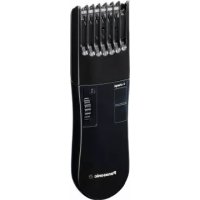
ER2302 - Beard trimmer PANASONIC - Free user manual and instructions
Find the device manual for free ER2302 PANASONIC in PDF.


| Product type | Beard trimmer |
| Brand | Panasonic |
| Model | ER2302 |
| Power supply | AC adaptor RE9-36 (automatic voltage conversion) |
| Motor voltage | 1.2 V DC |
| Charging time | 8 hours |
| Runtime | Approximately 30 minutes |
| Cutting length | 2 mm to 18 mm (6 positions) |
| Use with cord | Yes (works even with low battery) |
| Blades | Fixed blade and moving blade, with cleaning lever |
| Lubrication | Oil supplied, apply before use and after cleaning |
| Cleaning | Brush supplied, clean after each use |
| Blade lifespan | Approximately 3 years (for 10 min use every 3 days) |
| Battery lifespan | Approximately 6 years (for 3 charges per month) |
| Battery type | Nickel-metal hydride (NiMH) built-in, not user-replaceable |
| Safety | Do not immerse, do not use near water, do not disassemble |
| Intended use | Household only, do not use on animals |
| Included accessories | Comb, adaptor, oil, cleaning brush |
Frequently Asked Questions - ER2302 PANASONIC
User questions about ER2302 PANASONIC
0 question about this device. Answer the ones you know or ask your own.
Ask a new question about this device
Download the instructions for your Beard trimmer in PDF format for free! Find your manual ER2302 - PANASONIC and take your electronic device back in hand. On this page are published all the documents necessary for the use of your device. ER2302 by PANASONIC.
USER MANUAL ER2302 PANASONIC
Operating Instructions
AC/Rechargeable Beard/Hair Trimmer
Model No. ER2302
English 2 Dansk 32 Cesky 62
Deutsch 7 Portuguès 37 Slovensky 67
François 12 Norsk 42 Magyar 72
Italiano 17 Svenska 47 Romänă 77
Before operating this unit, please read these instructions completely and save them for future use.
Important
Cautions for charging
- Use the ER2302 Beard/Hair Trimmer with the RE9-36 adaptor only.
- Charge the appliance at temperatures between 5^ and 35^ where it will not be exposed to direct sunlight or other heat sources.
- Charging should not be continued for more than 48 hours as it may damage the battery.
- The appliance may become warm during operation and charging. This is normal.
- Charge the trimmer for at least 16 hours when charging it for the first time or when it has not been used for more than 6 months.
- The supply cord cannot be replaced. If the cord is damaged, the appliance should be scrapped.
Cautions for use and storage
- Warning - Keep the appliance dry.
- The appliance should not be immersed in water.
- The appliance should not be used near or over basins filled with water.
- The appliance should not be used with wet hands.
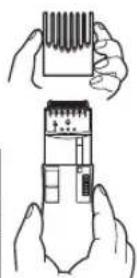
- Turn off the appliance before changing the trimming length or removing the comb attachment.
- This appliance is not intended for use by persons (including children) with reduced physical, sensory or mental capabilities, or lack of experience and knowledge, unless they have been given supervision or instruction concerning use of the appliance by a person responsible for their safety. Children should be supervised to ensure that they do not play with the appliance.
- Moving parts should not be tampered with.
- Do not pick up the appliance by the cord. It may become detached, causing damage or injury.
-
The appliance should not be used on animals.
-
The appliance should not be disassembled. Take it to a qualified serviceperson when service or repair is required.
- The appliance should be stored in a place that is not exposed to direct sunlight or near a heater or other source of heat.
Cautions for cleaning
- Clean the housing only with a soft cloth slightly dampened with tap water or soapy tap water. Caustic cleaners such as benzine or bleach should not be used.
Specifications
Power source: See the name plate on the product. (Automatic voltage conversion)
Motor voltage: 1.2 V DC
Charging time: 8 hours
This product is intended for household use only.
Airborne Acoustical Noise: 61 (dB (A) re 1 pW)
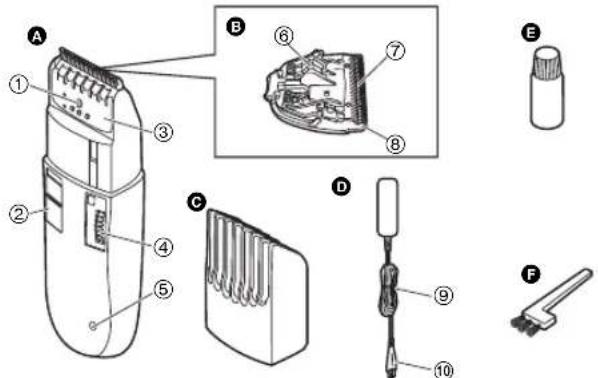
Parts identification
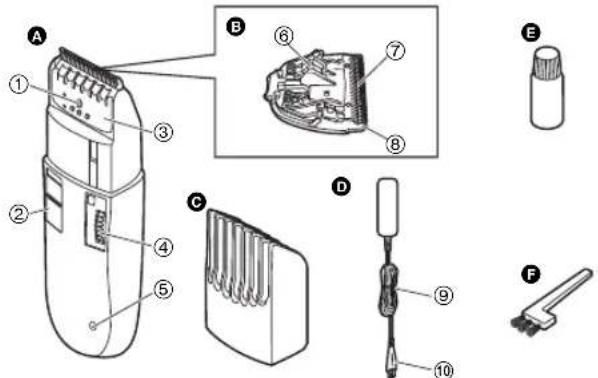
A Main body
① Thinning plate lock button
② Switch
(3) Thinning plate
④ Dial
⑤ Charge indicator lamp
Comb attachment
Adaptor (RE9-36)
⑨ Power cord
⑩ Appliance plug
E Oil
F Cleaning brush
Blade block
⑥ Cleaning lever
⑦ Moving blade
(8) Stationary blade
Charge
Charging the trimmer
You can fully charge the trimmer in 8 hours if it is losing speed.
A full charge supplies enough power for approximately 30 minutes of use.
- Insert the appliance plug into the trimmer.
-
Plug in the adaptor into a household outlet.
-
The charge indicator lamp lights and stays on until the adaptor is removed from a household outlet.
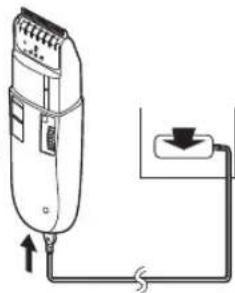
Cord Trimming
If you insert the appliance plug to the trimmer and plug in the adaptor into a household outlet, you can use it even if the battery capacity is low.
- If the trimmer does not work, continue charging it for approx. 1 minute.
Use
Using the trimmer
Trimming your beard and moustache
1. Apply a few drops of the oil to the blades. (See page 5.)
2. Turn the dial to move the comb attachment to the desired trimming length (between 2 mm and 18 mm).
| Indicator | Trimming length | Indicator | Trimming length |
| 1 2.0 | mm 4 | 0.5 mm | |
| • 3.0 | mm • 1 | 2.0 mm | |
| 2 4.5 | mm 5 | 3.5 mm | |
| • 6.0 | mm • 1 | 5.0 mm | |
| 3 7.5 | mm 6 | 6.5 mm | |
| • 9.0 | mm • 1 | 8.0 mm |
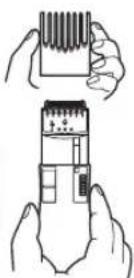
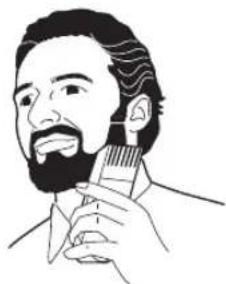
- Slide the switch on the main body upwards to turn on the trimmer.
- Place the angled face of the comb against the skin and cut the beard by moving the trimmer in all directions to obtain a uniform cut.
With curly facial hair, the comb attachment may not cut all of the hair. In this case, remove the comb attachment and use a conventional comb to draw out the remaining uncut hair.
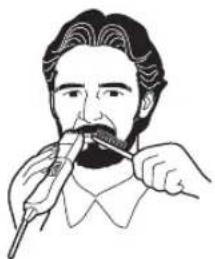
Shaping your moustache
- Remove the comb attachment.
- Place the angled edge against the skin and make the border of the beard even.
Using the thinning function
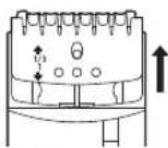
- Slide the thinning plate up to "1/3" until it clicks.
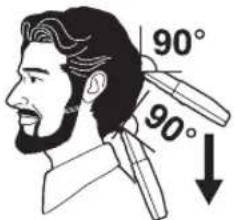
- Run the trimmer slowly across the head as if combing the hair with applying the blade point at right angles (90^) to the hair.
- Thin the hair gradually while checking the overall balance.
- Push the thinning plate lock button to slide the thinning plate back.
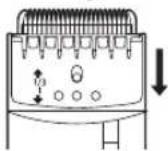
Notes for thinning
- Confirm that the thinning plate is set to the 1/3 (right) position. Incorrect setting may result in excessive cutting.
- If a difference in level is produced, lightly thin to compensate.
- If thick and thin portions are produced, or if there are portions with an excessive amount of hair, thin the appropriate portions to compensate.
Clear
Cleaning the trimmer
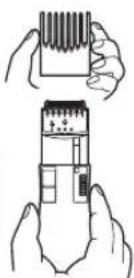
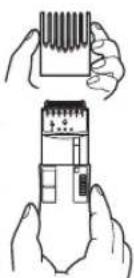
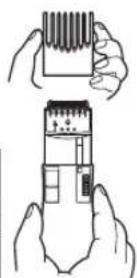
- Remove the comb attachment.
-
Brush off any hair trimmings from the main body and from around the blade.
-
Hold the main body, place your thumb against the blades and then push them away from the main body.
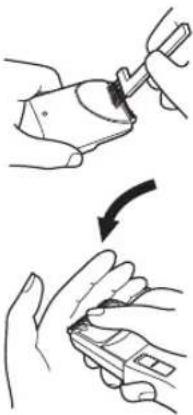
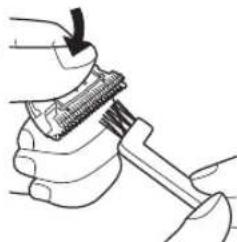
- Brush any hair trimmings out from between the stationary blade and the moving blade while pressing down the cleaning lever to raise the moving blade.
Lubrication
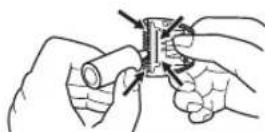
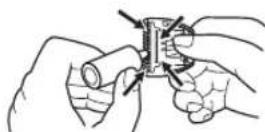
Lubricate the blades before using them or after cleaning them.
- Apply a drop of the oil to the points indicated by the arrows.
Remounting the blade
Fit the mounting hook into the blade mounting on the trimmer and then push in until it clicks.
Blade life
Blade life varies according to the frequency and length of use of the trimmer.
For example, the blade life is approximately 3 years when using the trimmer for 10 minutes every 3 days. Replace the blades if cutting efficiency reduces substantially despite proper maintenance.
Battery life
Battery life varies according to the frequency and length of use of the appliance.
For example, the battery life is approximately 6 years when the battery is charged 3 times a month.
The appliance should not be left for more than 6 months without charging it. The charge drains from the battery and the battery life may be shortened.
Removing the built-in rechargeable battery
The battery in this trimmer is not intended to be replaced by consumers. However, the battery may be replaced at an authorized service center.
The procedure described below is intended only for removal of the rechargeable battery for the purpose of proper disposal.
- Disconnect the power cord from the trimmer.
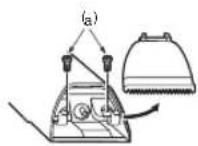
- Remove the blade from the trimmer. Remove the 2 screws (a).
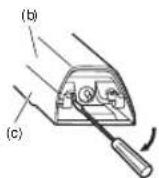
- Insert the blade of the screwdriver between (b) and (c) of the housing. Pry apart (b) and (c).
- Remove the battery from the chassis.
- Discharge the battery completely before removing it.
- Be careful not to short the + and - terminals of the battery after removing it.
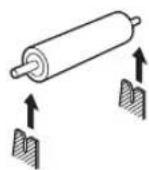
For environmental protection and recycling of materials This trimmer contains a Nickel-Metal Hydride battery. Please make sure that the battery is disposed of at an officially assigned location, if there is one in your country.
Please read "Information for Users on Collection and Disposal of Old Equipment and used Batteries" on page 87.
Wichtig
Precautions concerning la recharge
| Indicator | Trimlengte Indicator Trimlengte | ||
| 1 2,0 | mm 4 10,5 mm | ||
| •3,0 | mm • 12,0 mm | ||
| 2 4,5 | mm 5 18,5 mm | ||
| •6,0 | mm • 15,0 mm | ||
| 3 7,5 | mm 6 16,5 mm | ||
| •9,0 | mm • 18,0 mm | ||
Identification of dele
Apparats krop
① Udtyndingsskaerets laseknap
② Taend/sluk-kontakt
③ Udtyndingsskaer
④ Drejeknap
⑤ Opladningsindikatorlampe
Afstandskam
Adapter (RE9-36)
⑨ Strømledning
Stik ti apparatus
Olie
F Rengoringsborste
Skaerenhed
| Indikator | Trimmelaengde | Indikator | Trimmelaengde |
| 1 2,0 mm 4 10,5 mm | |||
| •3,0 mm • 12,0 mm | |||
| 2 4,5 mm 5 18,5 mm | |||
| •6,0 mm • 15,0 mm | |||
| 3 7,5 mm 6 16,5 mm | |||
| •9,0 mm • 18,0 mm | |||
Lubrifique as laminas antes de as usar ou depuis de as limpar.
- Aplique una gota do oleo nos pontos indicados pelas setas.
Advarsler for rengjoring
Motorspenning: 1,2 V likestrom
Ladetid: 8 timer
Dette Produktet er kun beregnet til husholdningsbruk.
Akustiskstoy:61dBA)re1pW
| Indicator | Trimmelengde Indikator | Trimmelengde | |
| 1 2,0 mm 4 10,5 mm | |||
| •3,0 | mm • 12,0 mm | ||
| 2 4,5 | mm 5 13,5 mm | ||
| •6,0 | mm • 15,0 mm | ||
| 3 7,5 | mm 6 16,5 mm | ||
| •9,0 | mm • 18,0 mm | ||
| Indicator | Lungime de tuns | Indicator | Lungime de tuns |
| 1 2,0 | mm 4 10,5 mm | ||
| •3,0 | mm • 12,0 mm | ||
| 2 4,5 | mm 5 18,5 mm | ||
| •6,0 | mm • 15,0 mm | ||
| 3 7,5 | mm 6 16,5 mm | ||
| •9,0 | mm • 18,0 mm |
Information for Users on Collection and Disposal of Old Equipment and used Batteries
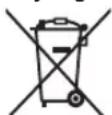
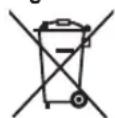
These symbols on the products, packaging, and/or accompanying documents mean that used electrical and electronic products and batteries should not be mixed with general household waste.
For proper treatment, recovery and recycling of old products and used batteries, please take them to applicable collection points, in accordance with your national legislation and the Directives 2002/96/EC and 2006/66/EC.
By disposing of these products and batteries correctly, you will help to save valuable resources and prevent any potential negative effects on human health and the environment which could otherwise arise from inappropriate waste handling.
For more information about collection and recycling of old products and batteries, please contact your local municipality, your waste disposal service or the point of sale where you purchased the items.
Penalties may be applicable for incorrect disposal of this waste, in accordance with national legislation.
For business users in the European Union If you wish to discard electrical and electronic equipment, please contact your dealer or supplier for further information.
[Information on Disposal in other Countries outside the European Union]
These symbols are only valid in the European Union. If you wish to discard these items, please contact your local authorities or dealer and ask for the correct method of disposal.
![PANASONIC ER2302 - [Information on Disposal in other Countries outside the European Union] - 1](/content/2026/03/449304/images/a3dc2ac7a80be018a4b08f74c7df36481234209fec4fe104c4a7048f4fcfed4c.jpg)
Note for the battery symbol (bottom two symbol examples):
This symbol might be used in combination with a chemical symbol. In this case it complies with the requirement set by the Directive for the chemical involved.
Deutsch
m = 311 ;
m = 311 ;
m = 311 ;



- Important
- Cautions for charging
- Cautions for use and storage
- Cautions for cleaning
- Specifications
- Parts identification
- Charge
- Charging the trimmer
- Cord Trimming
- Use
- Using the trimmer
- Notes for thinning
- Clear
- Cleaning the trimmer
- Lubrication
- Remounting the blade
- Blade life
- Battery life
- Removing the built-in rechargeable battery
- Wichtig
- Precautions concerning la recharge
- Identification of dele
- Advarsler for rengjoring
- Information for Users on Collection and Disposal of Old Equipment and used Batteries
- For business users in the European Union If you wish to discard electrical and electronic equipment, please contact your dealer or supplier for further information.
- [Information on Disposal in other Countries outside the European Union]
- Note for the battery symbol (bottom two symbol examples):
- Deutsch
Brand : PANASONIC
Model : ER2302
Category : Beard trimmer