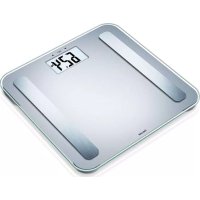
BF 1000 - Scale BEURER - Free user manual and instructions
Find the device manual for free BF 1000 BEURER in PDF.



User questions about BF 1000 BEURER
0 question about this device. Answer the ones you know or ask your own.
Ask a new question about this device
Download the instructions for your Scale in PDF format for free! Find your manual BF 1000 - BEURER and take your electronic device back in hand. On this page are published all the documents necessary for the use of your device. BF 1000 by BEURER.
USER MANUAL BF 1000 BEURER
EN Diagnostic bathroom scale
Instructions for use 18
FR Pese-personne impedancemetre
Mode d'emploi 33
ES Báscula diagnóstica
[SET]ERATEINSTELLEN" [SBT]
[SET] PERSON ANDERN" [SST]
| - | ||||
| 1-26%>26% | ||||
| 22,1-27%>27% | ||||
| 20-29 | <18% | 18-23% | 23,1-28% | >28% |
| 30-39 | <19% | 19-24% | 24,1-29% | >29% |
| 40-49 | <20% | 20-25% | 25,1-30% | >30% |
| 50-59 | <21% | 21-26% | 26,1-31% | >31% |
| 60-69 | <22% | 22-27% | 27,1-32% | >32% |
| 70-100 | <23% | 23-28% | 28,1-33% | >33% |
https://www.beurer.com/web/we-landingpages/de/cedclarationofconformity.php
18. Garantie/Service
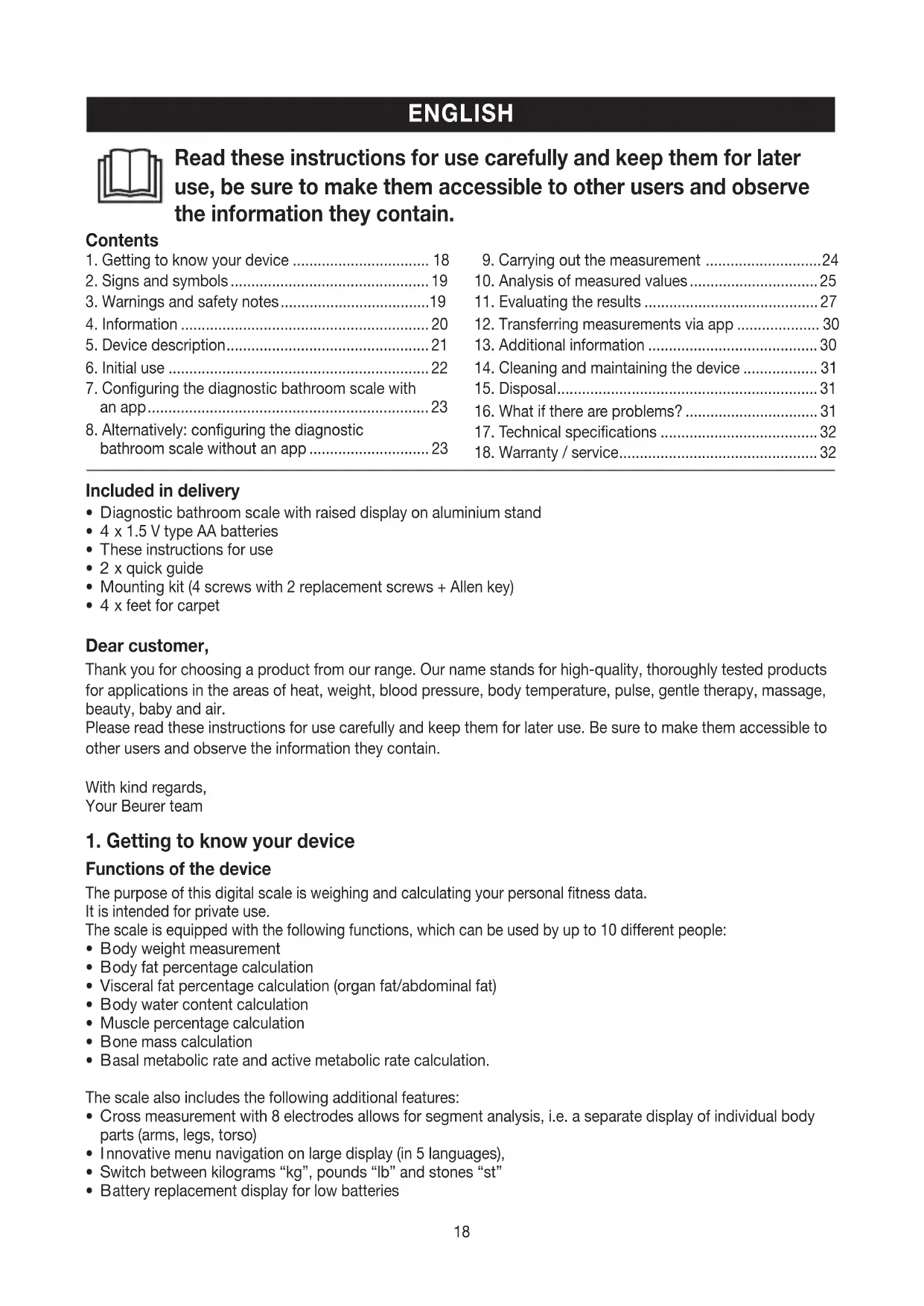
Read these instructions for use carefully and keep them for later use, be sure to make them accessible to other users and observe the information they contain.
Contents
- Getting to know your device 18
- Signs and symbols 19
3.Warnings and safety notes.. 19
4.Information 20 - Device description 21
- Initial use 22
- Configuring the diagnostic bathroom scale with an app. 23
-
Alternatively: configuring the diagnostic bathroom scale without an app 23
-
Carrying out the measurement 24
- Analysis of measured values 25
- Evaluating the results 27
- Transferring measurements via app 30
- Additional information 30
- Cleaning and maintaining the device 31
- Disposal 31
16.What if there are problems? 31 - Technical specifications 32
18.Warranty / service. 32
Included in delivery
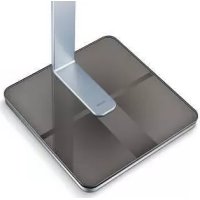
Diagnostic bathroom scale with raised display on aluminium stand
- 4 × 1.5 ~V type AA batteries
These instructions for use
- 2 x quick guide
- Mounting kit (4 screws with 2 replacement screws + Allen key)
- 4 x feet for carpet
Dear customer,
Thank you for choosing a product from our range. Our name stands for high-quality, thoroughly tested products for applications in the areas of heat, weight, blood pressure, body temperature, pulse, gentle therapy, massage, beauty, baby and air.
Please read these instructions for use carefully and keep them for later use. Be sure to make them accessible to other users and observe the information they contain.
With kind regards,
Your Beurer team
1. Getting to know your device
Functions of the device
The purpose of this digital scale is weighing and calculating your personal fitness data.
It is intended for private use.
The scale is equipped with the following functions, which can be used by up to 10 different people:
- Body weight measurement
- Body fat percentage calculation
- Visceral fat percentage calculation (organ fat/abdominal fat)
- Body water content calculation
- Muscle percentage calculation
- Bone mass calculation
- Basal metabolic rate and active metabolic rate calculation.
The scale also includes the following additional features:
Cross measurement with 8 electrodes allows for segment analysis, i.e. a separate display of individual body parts (arms, legs, torso)
- Innovative menu navigation on large display (in 5 languages),
- Switch between kilograms "kg", pounds "lb" and stones "st"
- Battery replacement display for low batteries
Automatic user recognition
- Storage of the last 30 measurements for 10 users if the data cannot be transferred to the app
Guest mode (without memory function).
2. Signs and symbols
The following symbols appear in these instructions for use:

WARNING
Warning instruction indicating a risk of injury or damage to health.

IMPORTANT
Safety note indicating possible damage to the unit/accessory.

Note Note on important information.
3.Warnings and safety notes

WARNING
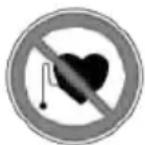
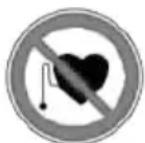
- The scale may not be used by people with medical implants (e.g. pacemakers), as this may affect their functionality.
- Do not use during pregnancy.
- Never step onto the outer edge of the scale on just one side as this could cause the scale to tip!
- Keep packaging material away from children (risk of suffocation).
- Important, do not step onto the scale with wet feet or if the surface of the scale is damp - danger of slipping!

Notes on handling batteries
- If your skin or eyes come into contact with battery fluid, rinse the affected area with water and seek medical assistance.
- Choking hazard! Small children may swallow and choke on batteries. Store batteries out of the reach of small children.
- Observe the plus (+) and minus (-) polarity signs.
- If a battery has leaked, put on protective gloves and clean the battery compartment with a dry cloth.
- Protect batteries from excessive heat.
- Risk of explosion! Do not throw batteries into a fire.
- Do not charge or short-circuit batteries.
- If the device is not to be used for a relatively long period, take the batteries out of the battery compartment.
- Use identical or equivalent battery types only.
- Always replace all batteries at the same time.
- Do not use rechargeable batteries.
- Do not disassemble, open or crush the batteries.

General notes
- The device is only suitable for personal use, not for medical or commercial purposes.
- Please note that measuring tolerances are possible for technical reasons as this scale is not calibrated for use in a professional medical context.
- In cases of differing measurements (between the scale and app), only use the measured values displayed on the scale.
- The scale's maximum capacity is 200kg (440 lb/31 st). The results for weight measurement are displayed in increments of 50 g (0.1 lb).
- Measurements of body fat, body water and muscle content are displayed in increments of 0.1% .
- The calorie requirement and visceral fat are given in increments of 1 kcal and whole numbers.
- When supplied to the customer, the scale is set to weigh and measure in "kg" and "cm".
- Place the scale on an even, hard surface; a hard surface is crucial for achieving accurate measurements.
- Repairs may only be carried out by Beurer Customer Services or authorised retailers. Before submitting a complaint, please check the batteries first and replace them if necessary.
Storage and maintenance
The accuracy of the measurements and service life of the device depend on its careful handling:

IMPORTANT
- Do not use any abrasive cleaning products and never submerge the device in water.
- Make sure that no liquids come into contact with the scale. Never submerge the scale in water. Never rinse it in running water.
- Do not place any objects on the scale when not in use.
- Protect the device from knocks, damp, dust, chemicals, marked temperature fluctuations and nearby sources of heat (ovens, heaters).
- Do not press the buttons violently or with pointed objects.
- Do not expose the scale to high temperatures or strong electromagnetic fields.
4. Information
The measurement principle
This scale works on the principle of B.I.A. (bioelectrical impedance analysis). This involves the calculation of body content in a matter of seconds, using a current that cannot be felt, is completely harmless and does not pose any risk.
When this measurement of the electrical resistance (impedance) is considered alongside constants and/or individual values (age, height, gender, activity level), the body fat percentage and other variables in the body can be calculated. Muscle tissue and water conduct electricity well and therefore have a lower resistance. In contrast, bones and fat tissue have low conductivity as the fat cells and bones are barely able to conduct the current due to very high levels of resistance.
The electrical contact to the body is enhanced through 4 hand electrodes and 4 foot electrodes to achieve a higher measurement accuracy and better analysis. This sensitive analysis technology means readings may change slightly when measurements are repeated. This is caused by changes during the impedance measurement (e.g. different electrical contact to the electrodes by the hands and feet, different distribution of water in the body).
Please note that the values calculated by the diagnostic bathroom scale only represent an approximation of the actual medical analytical values for the body. Only a specialist doctor can precisely establish the body fat, body water, muscle percentage and bone structure using medical methods (e.g. computer tomography).
General tips
- As far as possible, weigh yourself at the same time every day (ideally in the morning), after having been to the toilet, on an empty stomach and without clothing, in order to obtain results which can be compared.
- Important point regarding the measurement: the calculation of body fat may only be carried out using measurement with the hands and bare feet; the soles of the feet may be lightly dampened where appropriate.
Results may be unsatisfactory if the soles of the feet are completely dry or have a large amount of hard skin since conductivity will be impaired. - Stand up straight and still during measurement.
- Wait a few hours after any physical exertion to which your body is unaccustomed.
- Wait approx. 15 minutes after getting up so that the water stored in your body can disperse.
- Remember that only the long-term trend is important. Short-term changes in weight within a few days are normally caused by loss of fluids; however, body water plays an important role in terms of well-being.
Limitations
When calculating body fat and the other values, unusual and implausible results may occur in the case of:
Children under approx. 10 years of age
- Persons with a fever, persons undergoing dialysis, persons with oedema symptoms and persons suffering from osteoporosis
- Persons taking cardiovascular medication (affecting the heart and vascular system)
- Persons taking vasodilative or vasoconstrictive medication
- Persons with significant anatomical abnormalities in their legs compared with their overall body height (leg length significantly shorter or longer)
Performance athletes and bodybuilders.
5. Device description
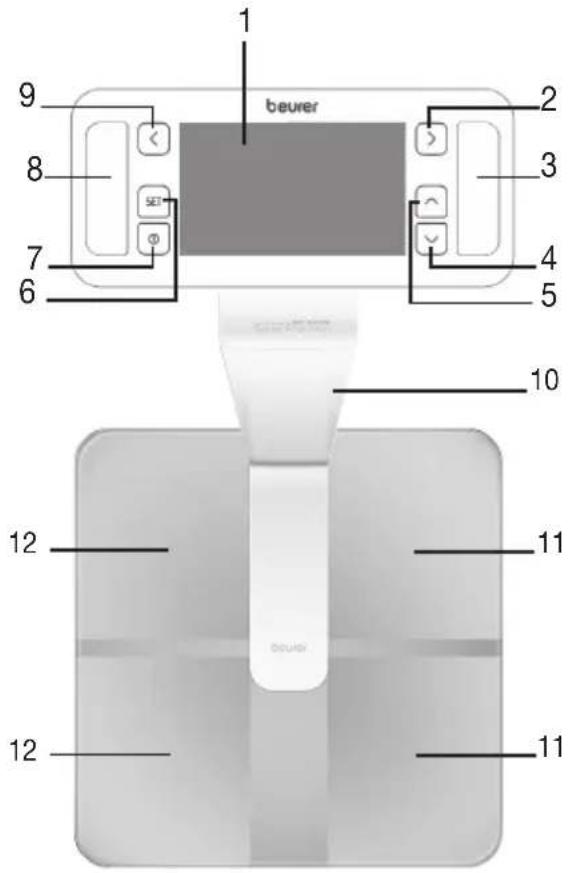
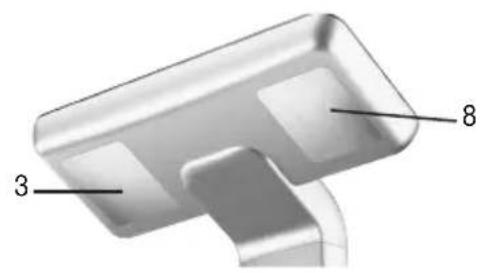
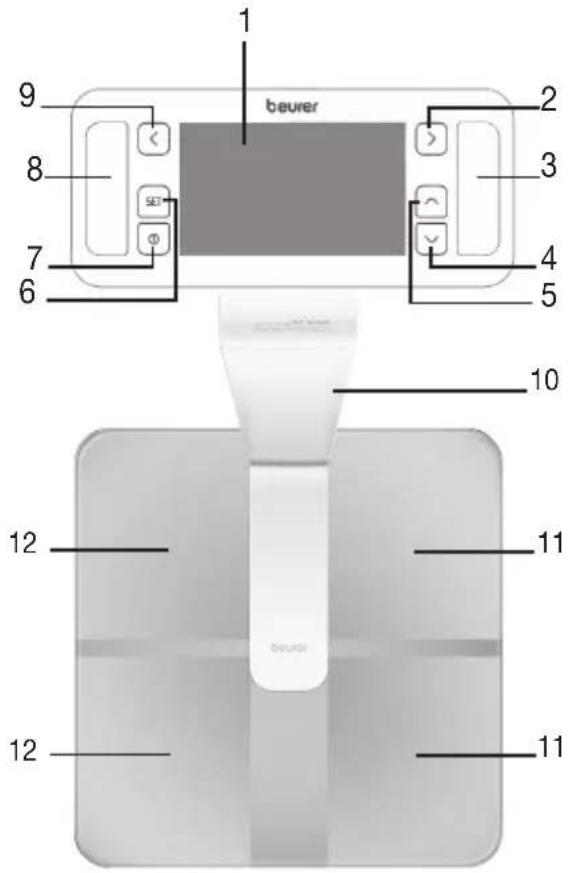
| 1. Display |
| 2. Menu: right button |
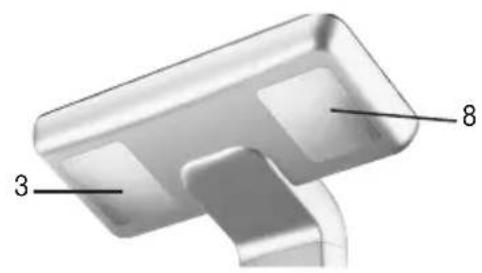
| 3. Electrodes, right hand |
| 4. Menu: down button |
| 5. Menu: up button |
| 6. Set button, confirm the entry |
| 7. ON button |
| 8. Electrodes, left hand |
| 9. Menu: left button |
| 10. Aluminium stand |
| 11. Foot electrodes, right foot |
| 12. Foot electrodes, left foot |
Display
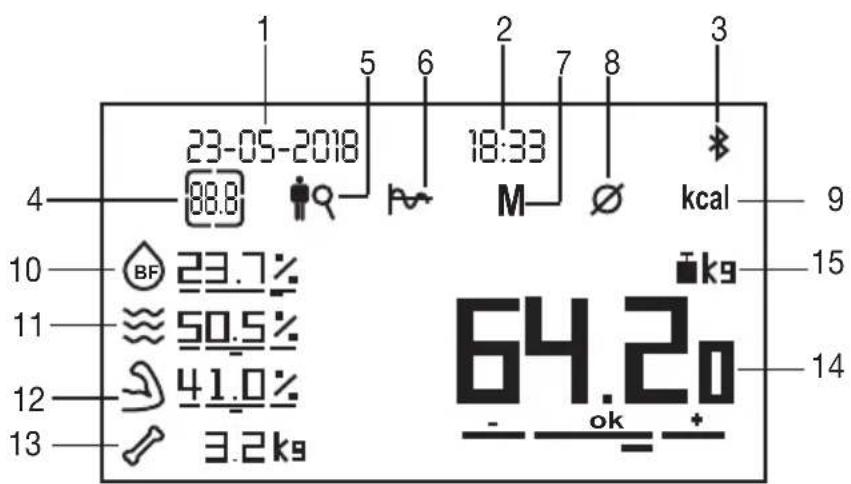
| 1. Date | 9. Calorie consumption |
| 2. Time | 10. Body fat percentage with interpretation |
| 3. Bluetooth® | 11. Body water content with interpretation |
| 4. General overview | 12. Muscle percentage with interpretation |
| 5. Segment analysis | 13. Bone mass with interpretation |
| 6. Graphic representation | 14. Body weight with BMI interpretation |
| 7. User memory | 15. Weight unit (kg, lb or st) |
| 8. Average values |
6. Initial use
Positioning the scale
Place the scale on a flat and stable surface. A solid surface is a prerequisite for a precise measurement.
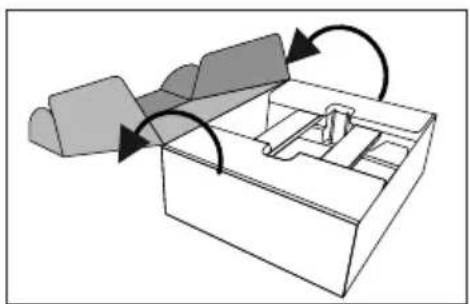
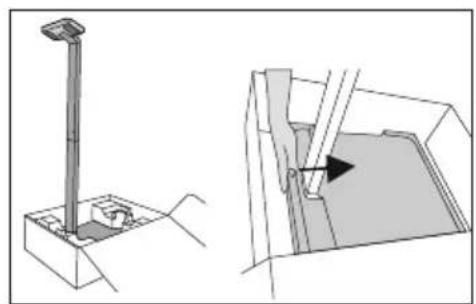
- Open the cardboard box. 5. Position the aluminium stand upright in the card
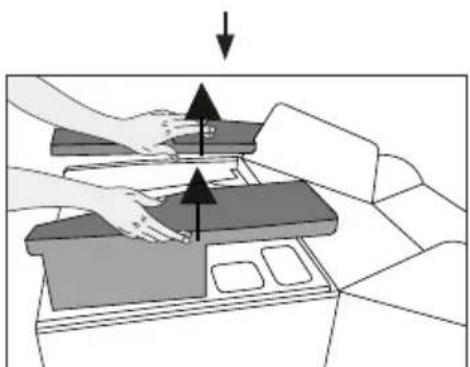
- Remove the polystyrene cover on the left and right.
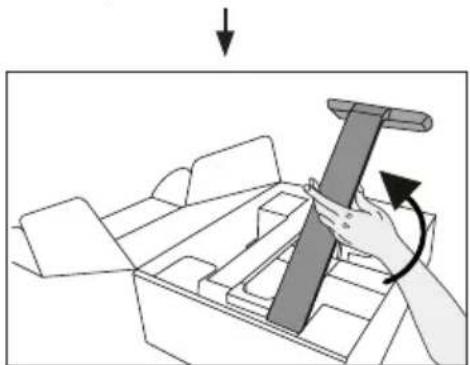
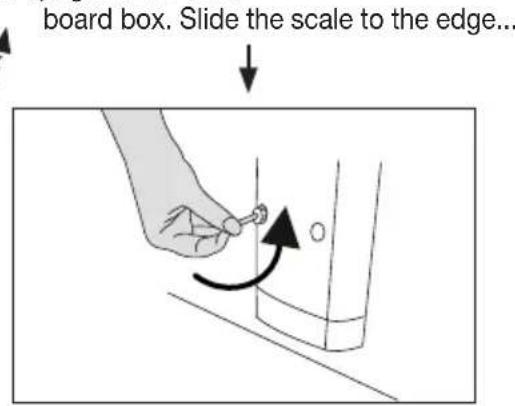
- ...and secure with screws at the bottom.
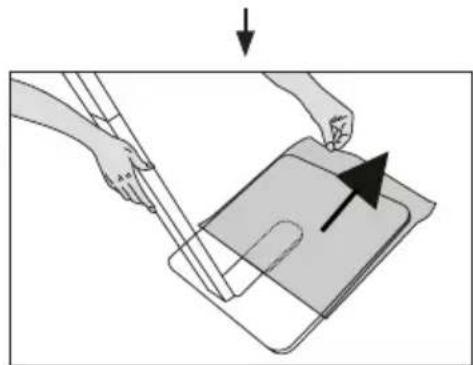
- Lift up the upper and lower part of the aluminium stand at the same time.
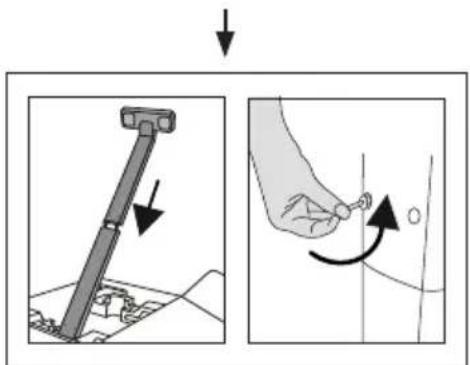
- Hold the stand in place with one hand and remove the film with the other.
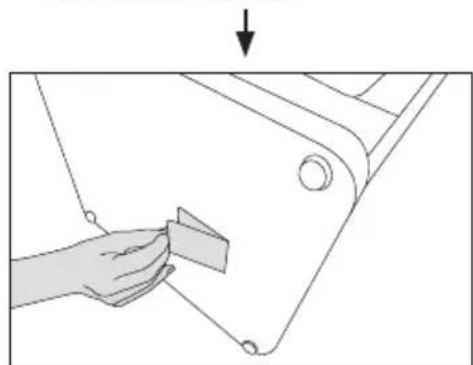
-
Insert the upper part of the aluminium stand into the lower part and secure with screws at the top.
-
Insert batteries the correct way round in the underside of the scale (+ / -) . Stand the scale upright on a flat surface.
7. Configuring the diagnostic bathroom scale with an app
To calculate your body fat percentage and additional body values, you must save the personal user data on the scale.
The scale has 10 user memory spaces which allows, for example, you and your family members to save personal settings.
It is also possible to activate users via other mobile end devices on which the "beurer HealthManager" app has been installed or by changing the user profile in the app (see the app settings).
Keep the smartphone close to the scale in order to maintain an active Bluetooth® connection during initial use.
- Activate Bluetooth® in your smartphone's settings.
- Download the free "beurer HealthManager" app from the Apple App Store (iOS) or from Google Play (Android™).
-
Start the app and follow the instructions.
-
The following settings must be set or entered in the "beurer HealthManager" app:
| User data Set values | ||
| Initials Max. 3-digit (A-Z), 0-9) | ||
| Gender Male ( | ), female ( ) | |
| Height 100 to 250 cm (3' 3.5" to 8' 02") | ||
| Date of birth Year, month, day | ||
| Activity level | The medium-term and long-term perspective is decisive when selecting the activi-ty level: | |
| Physical activity | ||
| 1 None. | ||
| 2 | Low: little and light physical exertion (e.g. going for walks, light gardening, simple gymnastics). | |
| 3 | Medium: physical exertion, at least 2 to 4 times a week for 30 minutes each. | |
| 4 High: physical exertion, at least 4 to 6 times a week for 30 minutes each. | ||
| 5 | Very high: intensive physical exertion, intensive training or hard physical work for at least 1 hour every day. | |
| Target weight kg/lb/st (for progress graph) | ||
- The app assigns the next free user memory space (person 1 to person 10) to you.
- Carrying out the measurement: For automatic personal recognition, the first measurement must be assigned to your personal user data. The app will prompt you to do this. For how to do this, please see chapter "9. Carrying out the measurement".
8. Alternatively: configuring the diagnostic bathroom scale without an app
We recommend using the app for the initial use and implementing all settings. See chapter "7. Configuring the diagnostic bathroom scale with an app". However, this can also be carried out on the device itself.
Specify device/time/user settings on the control unit. To do so, use the [ ] and [ ] buttons to make your selection and confirm with [SET] respectively.
a.) Setting the time
[SET] SETTIME
| Sequence | Set values |
| Date | Year–Month–Day |
| Time | Hours–Minutes |
b.) Specifying device settings
[SET] SET UNIT [SE]
| Sequence Set values | |
| Language | DE EN FR ES IT |
| Measurement unit kg-lb-st | |
| Time 24 h-12 h | |
| Guest mode ON-OFF | |
| Bluetooth® | ON-OFF When set to “OFF”, a Bluetooth® connection is only possible if the scale is switched on. This can be useful for extending the battery life or to prevent undesirable radio radiation. |
c.) Setting user data
[SET] SETUSER [SET]
| User data Set values | |
| Initials Max. 3-digit | it (A-Z, 0-9) |
| Gender Male ( | ), female ( |
| Height | 100 to 250 cm (3' -03" to 8' -02") |
| Date of birth | Year, month, day |
| Activity level | 1 to 5 (see section 7) |
| Target weight | kg/lb/st (for progress graph) |
| User PIN | Assigned automatically for Bluetooth® use at a later time. This information is only required for app set-up in the future, if existing scale users are to be added during app installations at a later time. |
Logging in to the app at a later time
If you have carried out the initial use of the scale without using the app, you can add your existing scale user to the "beurer HealthManager" app. This requires you to enter your 4-digit user "PIN". This process is described in the app.
9. Carrying out the measurement
9.1 Body weight measurement
- Press the button on the control unit. 0.0 kg appears in the display.
- The scale is then ready to take a weight measurement. To measure your weight, step onto the scale with your weight distributed evenly on both feet. The weight data will not be stored; user allocation will not be possible, as there is no BIA measurement via the hands or feet.
9.2 Carrying out guest measurement
For one-time measurement or if no user data is to be stored. For this, guest mode must be switched on in the device settings.
[ ] "Guest" [SET] or switch scale on
| User data Set values | |
| Gender Male ( | ), female ( |
| Height | 100 to 250 cm (3' -03" to 8' -02") |
| Date of birth | Year, month, day |
| Activity level | 1 to 5 (see section 7) |
9.3 User measurement, total body analysis
| - Press the button on the control unit. 0.0 kg appears in the display. If guest mode has been activated in the scale settings, step onto the scale when it is switched off. - Stand on the scale barefoot holding the control unit in your hands. Hold the control unit with the underside of your thumbs on the front electrodes and with your fingers pressed firmly against the back electrodes. - Stand still with your weight distributed equally on both feet. Make sure there is no skin contact between your two feet, legs, calves and thighs. | |
| - If the scale recognises you automatically, the impedance for the analysis will be measured after the weight measurement. This is indicated by the symbol showing current passing through the body. - As soon as the total body analysis is complete, the overview will be shown. The measurement is automatically stored. | 23-05-2018 18:33 Initials Segment analysis |

Note: The measurement will not be saved if the following applies:
- The user is not automatically detected. This happens if your measured weight differs from the previous measurement by + / - 3 kg or if another user has similar values ( +/ - 3 kg) to yours. In this case,press the [ ] button to select the user manually and to carry out the measurement again.
- The user is standing on the scale with shoes on.
- The user is not holding the handheld unit with their hands.
10. Analysis of measured values

The results will be analysed automatically after taking the measurement or after selecting the user manually on the control unit. Select your user using the [1] button. Confirm using the [SET] button or wait 3 seconds.

General overview
The general overview appears at a glance in the display either before or after a total body analysis for your user.
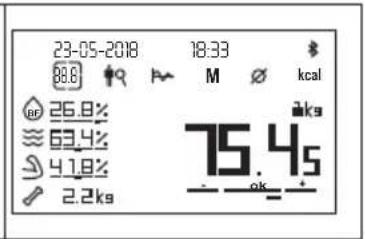

ment analysis for body fat and muscle percentage
a) Body fat in left and right arm
- Press the menu button [ ] until is selected. The segment analysis for body fat in the left and right arm appears in the display.
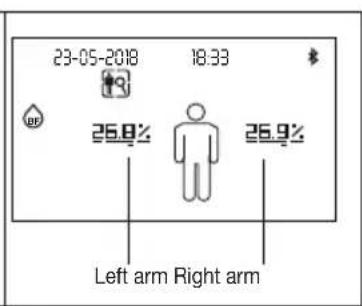
| b) Body fat in left and right leg - Use the [ ] button to select the detailed display of body fat for the left and right leg. | 23-05-2018 18:33 |
| c) Body fat in the torso - Use the [ ] button to select the detailed display of body fat in the torso. | 23-05-2018 18:33 |
| d) Visceral fat (organ fat/abdominal fat) - Use the [ ] button to select the detailed display of visceral fat. | 23-05-2018 18:33 |
| a) Muscle percentage in left and right arm - Use the [ ] button to select the detailed display of muscle percentage in the left and right arm. | 23-05-2018 18:33 |
| b) Muscle percentage in left and right leg - Use the [ ] button to select the detailed display of muscle percentage in the left and right leg. | 23-05-2018 18:33 |
| g) Muscle percentage in torso - Use the [ ] button to select the detailed display of muscle percentage in the torso. | 23-05-2018 18:33 |

Graphic representation
| a) Body weight - Press the menu button [ ] until is selected. The trend for your body weight appears in the display. The trend for your body weight is shown from measurement to measurement. Later measurements are added on the right. The reference line shows your target weight. You can change your target weight in the user data at any time. | 23-05-2018 18:33 78 14ks |
| b) Body fat - Use the [ ] button to switch to showing body fat values . The trend for your body fat values is shown from measurement to measurement. The reference line represents the average value for all body fat measurements; the bars show whether the values have gone up or down. | 23-05-2018 18:33 79 252% 20.2 |
| c) Water proportion ≈ - Use the [ ] button to switch to showing water proportion . ≈ The trend for your body's water proportion is shown from measurement to measurement. The reference line represents the average value for all water proportion measurements; the bars show whether the values have gone up or down. | 23-05-2018 18:33 64.3 62.3 63.3% 62.3 |
| d) Muscle percentage ≈ - Use the [ ] button to switch to showing muscle percentage . ≈ The trend for your muscle percentage is shown from measurement to measurement. The reference line represents the average value for all muscle percentage measurements; the bars show whether the values have gone up or down. | 23-05-2018 18:33 42.4 40.4 41.4% |
M Showing stored measurements
-
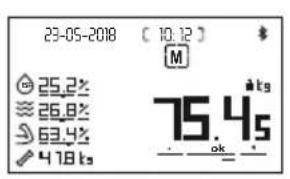
Press the menu button [ ] until M is selected. The most recent measured stored measurement appears in the display. The measurement date and the memory space number are shown at the top, e.g. (03-03) means the third memory space = the last of a total of 3 occupied memory spaces.
-
Use the [ ] buttons to cycle through the memory spaces.
Average values
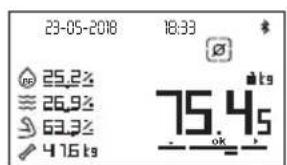
- Press the menu button [ ] until is selected. All average values in the stored measurements are shown in the display.
The dates of the first and the last measurement are shown at the top.
kcal Calorie consumption
- Press the menu button [ ] until kcal is selected. The theoretically calculated basal metabolic rate BMR and the active metabolic rate AMR are shown in Kcal.
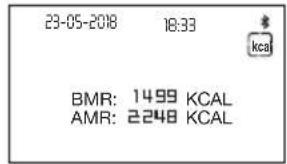
Switching off the scale (standby mode)
- Wait until the display switches itself off or press the button on the control unit to switch the display off manually. The date and time remain visible.
11. Evaluating the results
Body fat percentage
Body fat values are shown in the display and analysed with the bar chart. The subsequent body fat percentages serve as a guideline (for further information ask your doctor).
Male Female
| Age | Low | Normal | High | Very high |
| 10-14 | <11% | 11-16% | 16.1-21% | >21% |
| 15-19 | <12% | 12-17% | 17.1-22% | >22% |
| 20-29 | <13% | 13-18% | 18.1-23% | >23% |
| 30-39 | <14% | 14-19% | 19.1-24% | >24% |
| 40-49 | <15% | 15-20% | 20.1-25% | >25% |
| 50-59 | <16% | 16-21% | 21.1-26% | >26% |
| 60-69 | <17% | 17-22% | 22.1-27% | >27% |
| 70-100 | <18% | 18-23% | 23.1-28% | >28% |
| Age | Low | Normal | High | Very high |
| 10-14 | <16% | 16-21% | 21.1-26% | >26% |
| 15-19 | <17% | 17-22% | 22.1-27% | >27% |
| 20-29 | <18% | 18-23% | 23.1-28% | >28% |
| 30-39 | <19% | 19-24% | 24.1-29% | >29% |
| 40-49 | <20% | 20-25% | 25.1-30% | >30% |
| 50-59 | <21% | 21-26% | 26.1-31% | >31% |
| 60-69 | <22% | 22-27% | 27.1-32% | >32% |
| 70-100 | <23% | 23-28% | 28.1-33% | >33% |
Values will often be lower for fitness enthusiasts. Depending on the sporting activities performed, the training intensity and the physical constitution, the results may still be below the stated standard values. Please note, however, that there may be a risk to health in the case of extremely low values.
Visceral fat (organ fat/abdominal fat)
Visceral fat denotes fat that surrounds the internal organs within the abdominal cavity. Visceral fat is suspected of contributing to conditions such as high blood pressure or diabetes.
Visceral fat is shown in the display as a value between 1 and 59.
| Visceral fat percentage value | Rating |
| 1-12 | Your visceral fat percentage is in the normal range. |
| 13-59 | Your visceral fat percentage is too high. |
Body water content
The body water content in % is normally within the following ranges:
Male Female
| Age | Poor | Good | Very good |
| 10-100 | <50% | 50-65% | >65% |
| Age | Poor | Good | Very good |
| 10-100 | <45% | 45-60% | >60% |
Body fat contains relatively little water, therefore body water content may be below the standard values in persons with a high body fat percentage. On the other hand, endurance athletes may exceed the standard values due to having low levels of fat and a high muscle percentage.
The body water calculation performed using this scale is not suitable for drawing medical conclusions, for example in the case of age-related water retention. Consult your doctor where necessary. A high body water content is generally desirable.
Muscle percentage
The muscle percentage measurement measures the skeletal muscle mass. No organ muscles are taken into account. The muscle percentage is normally within the following ranges:
Male Female
| Age Low | Normal High | Age Low Normal High | |
| 10-14 | <4% 44-57% | >57% 10-14 <36% 36 | -43% >43% |
| 15-19 | <43% 43-56% | >56% 15-19 <35% 35 | -41% >41% |
| 20-29 | <42% | 42-54% | >54% |
| 30-39 | <41% | 41-52% | >52% |
| 40-49 | <40% | 40-50% | >50% |
| 50-59 | <39% | 39-48% | >48% |
| 60-69 | <38% | 38-47% | >47% |
| 70-100 | <37% | 37-46% | >46% |
| ak | |||
| 20-29 | <34% | 34-39% | >39% |
| 30-39 | <33% | 33-38% | >38% |
| 40-49 | <31% | 31-36% | >36% |
| 50-59 | <29% | 29-34% | >34% |
| 60-69 | <28% | 28-33% | >33% |
| 70-100 | <27% | 27-32% | >32% |
Bone mass
Like the rest of our body, our bones are subject to natural growth, shrinking and ageing processes. Bone mass increases rapidly during childhood and reaches its peak between the ages of 30 and 40. As we age, our bone mass then begins to reduce. You can combat this reduction to an extent with the help of a healthy diet (particularly calcium and vitamin D) and regular physical exercise. The stability of the skeleton can be further increased by means of targeted muscle build-up. Note that this scale identifies the mineral content of the bone. It is very difficult to influence the bone mass, although it does fluctuate within the scope of influencing factors (weight, height, age, gender). There are no recognised guidelines or recommendations.

Important
Please do not confuse bone mass with bone density. The bone density can only be determined by means of a medical examination (e.g. computer tomography, ultrasound). It is therefore not possible to draw conclusions on changes to bones and bone hardness (e.g. osteoporosis) using this scale.
BMR
The basal metabolic rate (BMR) is the amount of energy required by the body at complete rest in order to maintain its basic functions (e.g. lying in bed 24 hours a day). This value is primarily dependent on weight, height and age. It is displayed on the diagnostic scale in the unit kcal/day and calculated using the scientifically recognised Mifflin St. Jeor equation.
This is the amount of energy that is required by your body under all circumstances and must be re-supplied to the body in the form of food. If your energy intake is below this level in the longer term, this can result in damage to health.
AMR
The active metabolic rate (AMR) is the amount of energy that the active body consumes each day. An individual's energy requirement increases when the level of physical activity increases; the diagnostic bathroom scale calculates this by means of the activity level (1-5) that has been entered.
To maintain the current weight, the energy that the body uses must be replaced in the form of food and drink. If less energy is taken in than is used over a long period of time, the body primarily takes the difference from the fat stores with resulting weight loss. However, if the amount of energy taken in exceeds the calculated active metabolic rate (AMR) for a longer period, the body cannot burn off the excess energy. The excess is stored in the body as fat, leading to weight gain.
Temporal context of the results

Please note that only the long-term trend is significant. Brief deviations in weight within a few days are normally caused by loss of fluids.
The interpretation of the results is based on changes in total body weight, percentage of body fat, body water and muscle content, as well as on the length of time over which these changes occur. Rapid changes within the scope of a few days are to be considered separately from medium-term changes (in the scope of weeks) and long-term changes (months).
It can be said as a basic rule that short-term changes in weight are almost entirely changes in water content, whereas medium-term and long-term changes may also relate to the fat percentage and the muscle percentage.
If your weight drops in the short term but your body fat percentage increases or stays the same, you have only lost water, for example following a training session, visit to the sauna or a diet aimed only at fast weight loss.
- On the other hand, if your weight increases in the medium term and your body fat percentage drops or stays the same, you may have built up valuable muscle mass.
If your weight and body fat percentage both fall at the same time, then your diet is working--you are losing fat mass.
- Ideally, you should support your diet with physical activity, fitness or strength training. This enables you to increase your muscle percentage in the medium term.
- Body fat, body water and muscle percentages should not be totalled (muscle tissue also contains components made of body water).
12. Transferring measurements via app
If the app is not open, the newly assigned measurements are saved on the scale. A maximum of 30 measurements per user can be saved on the scale. The saved measurements are transferred automatically to the app when you open the app within the Bluetooth range. It is possible to automatically transfer data when the scale is switched off if Bluetooth® is enabled in the device settings.
13. Additional information
Deleting scale data
a) Delete user with all settings and saved values
- A fter switching on, select your user by pressing the [ ] button. If necessary, press the button several times and confirm with [SET].
- When 0.0 appears in the display, hold down the [SET] button for 12 seconds to delete the user.
- Use the [O, O] buttons to select "YES" and confirm the prompt using the [SET] button. If you do not want to delete the user, confirm "NO" using the [SET] button.

All saved values and settings for this user will be deleted.
b) Delete individual saved value for a user
- S elect a measured value in the user memory and briefly press the [SET] button on the control unit to delete the stored value displayed.
- You can also do this immediately after the measurement is taken.
- Use the [O, O] buttons to select "YES" and confirm the prompt using the [SET] button. If you do not want to delete the value, confirm "NO" using the [SET] button.
c) Delete all stored values for a user
- Open the user memory and press the [SET] button on the control unit for around 5 seconds to delete all values.
- Use the [☑, ☑] buttons to select "YES" and confirm the prompt using the [SET] button. If you do not want to delete, confirm "NO" using the [SET] button.
Changing the batteries
The control unit has a low battery indicator. "LOW BATTERY" appears in the display if the batteries in the scale are too weak. In this case, the batteries should be replaced. Connect the scale to the app again. The system time is updated.

NOTE:
-
When replacing the batteries, use batteries of the same type, make and capacity.
-
Do not use rechargeable batteries.
- Use batteries free from heavy metals.
14. Cleaning and maintaining the device
The device should be cleaned from time to time.
This should be done using a damp cloth and, if necessary, a small amount of detergent.

IMPORTANT
- Never use harsh solvents or cleaning products!
- Never submerge the device in water!
- Do not clean the device in the dishwasher.
15. Disposal
Empty, completely flat batteries must be disposed of through specially designated collection boxes, recycling points or electronics retailers. You are legally required to dispose of the batteries.
The codes below are printed on batteries containing harmful substances:
Pb = Battery contains lead, Cd = Battery contains cadmium, Hg = Battery contains mercury.
For environmental reasons, do not dispose of the device in the household waste at the end of its service life.
Dispose of the device at a suitable local collection or recycling point in your country.
Dispos of the device in accordance with EC Directive - WEEE (Waste Electrical and Electronic Equipment).
If you have any questions, please contact the local authorities responsible for waste disposal.
Dispose of packaging in an environmentally friendly manner

16. What if there are problems?
If the scale encounters an error during measurement, the following is displayed:
| Display Cause Solution | ||
| ERROR:OVERLOAD | Maximum weight capacity of 200 kg exceeded. | Loads must be limited to 200 kg. |
| LOW_BATTERY | Batteries are nearly flat. Replace the batteries (see section on changing the batteries). | |
| MEMORY_FULL | 30 measurements have been stored. Transfer the measured values. | |
| ERROR:CONTACT ERROR | The electrical resistance between the electrodes and the soles of the feet is too high (e.g. with very hard skin). | Repeat the measurement barefoot. dampen the soles of your feet slightly. If necessary, remove hard skin on the soles.Hold the hand electrodes with the fingers behind and the balls of the thumb in front. |
| ERROR_DATA | The BIA measurement was successful, but the fat percentage is outside the measurable range (less than 3% or greater than 65%). | Please repeat the measurement barefoot, or with the soles of the feet lightly dampened if necessary. If necessary, change your set activity level. |
| Empty display Batteries are completely flat. Replace the batteries (see section on changing the batteries). | ||
| The batteries are not inserted properly. Check for correct polarity, (see “Initial use” -> “Changing the batteries”). | ||
| Only weight is displayed, no diagnosis | Unknown measurement as it is outside the user assignment limit or a unique assignment is not possible. | Select user on the scale using the [ ] button or repeat user assignment in the app.Hold the electrodes of the handheld unit and stand barefoot on the scales. |
Incorrect weight measurement
| Possible faults Solution | |
| Incorrect zero point of scale. Switch the scale on, wait approx. 5 seconds and repeat the measurement. | |
| Scale is on a carpet. Place the scale on a flat, solid surface. Stand on the outside of the scale as far as possible without it tipping. When using on carpeted floors, please attach the supplied feet for the carpet. | |
| Incorrect weight is displayed. Stand as still as possible. | |
| Incorrect weight is displayed. Wait until the scale switches itself off. Then repeat the measurement. | |
No Bluetooth® connection (symbol is missing)
| Possible faults Solution | |
| Radio connection | The range in the open is approx. 10 m. Walls and ceilings reduce the range. Other radio waves may interfere with the transmission. Therefore, do not position the scale near devices such as WIFI routers, microwaves, induction hobs etc. |
| Bluetooth® connection | Completely close the app (including in the background). Switch Bluetooth® off and back on again. Switch the smartphone off and back on again. Remove the batteries in the scale for a short period and reinsert them. See FAQs at www.beurer.com. |
| Connection set-up taking too long | Faster Bluetooth interval when the scale is switched on. |
17. Technical specifications
| Scale dimensions 380 x 390 x 1000 mm | |
| Scale batteries 4 x 1.5 V type AA | |
| Measurement range 8 kg to 200 kg | |
| Data transfer via Bluetooth® wireless technology This product uses Bluetooth® low energy technol-ogy, frequency band 2.402 - 2.480 GHz, transmis-sion power max. 0 dBm, compatible with Blue-tooth® 4.0 smartphones/tablets | |
| A list of compatible smartphones, plus information and software for the devices can be found at the following link: connect.beurer.com | |
| System requirements for the "beurer HealthManager" app | iOS ≥ 9.0, Android™ ≥ 5.0Bluetooth® ≥ 4.0 |
Subject to technical changes.
We hereby confirm that this product complies with the European RED Directive 2014/53/EU.
The CE Declaration of Conformity for this product can be found under:
https://www.beurer.com/web/we-landingpages/de/cedeclarationofconformity.php
18. Warranty / service
In case of a claim under the warranty please contact your local dealer or the local representation which is mentioned in the list "service international".
In case of returning the unit please add a copy of your receipt and a short report of the defect.
The following warranty terms shall apply:
- The warranty period for BEURER products is either 5 years or – if longer – the country specific warranty period from date of Purchase.
In case of a warranty claim, the date of purchase has to be proven by means of the sales receipt or invoice.
-
Repairs (complete unit or parts of the unit) do not extend the warranty period.
-
The warranty shall not be valid for damages because of
a. improper treatment, e.g. nonobservance of the user instructions.
b. repairs or tampering by the customer or unauthorised third parties.
c. transport from the manufacturer to the consumer or during transport to the service centre.
d. The warranty shall not be valid for accessories which are subject to normal wear and tear (cuff, batteries etc.).
- Liability for direct or indirect consequential losses caused by the unit are excluded even if the damage to the unit is accepted as a warranty claim.
FRANÇAIS

Chere cliente, cher client,
https://www.beurer.com/web/we-landingpages/de/cedeclarationofconformity.php
18. Garantie/Maintenance
[SET]“CONFIG._TIEMPO” [SBT]
[SET]“ONFIG._APTO.”[SBF]
https://www.beurer.com/web/we-landingpages/de/cdeclarationofconformity.php
[SET] "IMPOSTA ORA" [SET]
[SET] "IMPOSTA APPAR." [SBT]
| ... | ||||
| Età | bassa | normale | alta | molto alta |
| 10-14 | <11% | 11-16% | 16,1-21% | >21% |
| 15-19 | <12% | 12-17% | 17,1-22% | >22% |
| 20-29 | <13% | 13-18 | 18,1-23% | >23% |
| 30-39 | <14% | 14-19 | 19,1-24% | >24% |
| 40-49 | <15% | 15-20% | 20,1-25% | >25% |
| 50-59 | <16% | 16-21% | 21,1-26% | >26% |
| 60-69 | <17% | 17-22% | 22,1-27% | >27% |
| 70-100 | <18% | 18-23% | 23,1-28% | >28% |
| - | ||||
| Età | bassa | normale | alta | molto alta |
| 10-14 | <16% | 16-21% | 21,1-26% | >26% |
| 15-19 | <17% | 17-22% | 22,1-27% | >27% |
| 20-29 | <18% | 18-23% | 23,1-28% | >28% |
| 30-39 | <19% | 19-24% | 24,1-29% | >29% |
| 40-49 | <20% | 20-25% | 25,1-30% | >30% |
| 50-59 | <21% | 21-26% | 26,1-31% | >31% |
| 60-69 | <22% | 22-27% | 27,1-32% | >32% |
| 70-100 | <23% | 23-28% | 28,1-33% | >33% |
| uk | |||
| 30-39 | <33% | 33-38% | >38% |
| 40-49 | <31% | 31-36% | >36% |
| 50-59 | <29% | 29-34% | >34% |
| 70-100 | <27% | 27-32% | >32% |
Massa ossea
https://www.beurer.com/web/we-landingpages/de/cdeclarationofconformity.php
[SET]“ET UNIT (BIRIMAYARI)” [SBT]
https://www.beurer.com/web/we-landingpages/de/cedeclarationofconformity.php
18. Garanti/servis
C HanJyUHMMN NOXKeHaHnA M
KOMnHaNnBeurer
1. O3HaKOMTeJIbHaj nHΦopMaζη
Функциnpибopa
IaHHbIe 3JneKTPoHbIe BeCbI NcIOJIb3yIOTcI IJIra B3BeUINBaHnI n OnpedeJIeHnBaIUX qHTHeC-napametpoB.
Oh npedha3hAeHb I DOMaUHeRo IcnoJb3ObaHn.
BecbI IMeOT CNeDyUOJIme FyHKUIM, KOtOpbIMN MOrYT NOnb3OBaTbcra do 10 yeIOBeK:
- N3MpeHne MaCCbI TeJa;
OppeJeHne DoJIJ KInPOBOM MaccbI;
-ДОЛи ВИСЦерально КИра (ЖИРOBье HaKоПлЕнь В орraх/бюшон NOLOCTN);
-ДОЛТКаHEBOJЖИДКOCTN; - D0JI MblIeHON MaCCbI;
MaccbI KOCTe; - 3 Nauchenius OchoBHOO OMeHa BeIeCTB N OMeHa BeIeCTB C yETOM m3nuecko aKTNBHOCTN.
Kpome TOrO,doCTyINbI CneIyIOUe yHKnIn.
- CerMeHTbIaHaJIaN3, T. e. npeCTaBJIeHne OTdJIbHbIX yUacTKOB TeJa (pyKn, HOrn, KopNyC) 6laRoJapra nepeKpeCTHomy N3MepeHNIc C 8 3NeKTpOamN.
- INHHOBaIIOHHa HABINaIINo MEHIO Ha 60JIbWOM IuCnIeee (Ha OJHOM N3 5 Ra3bIKOB).
-
IpekeKIOUeHne MEXy eINHuaMn N3MepeHna: KJIoRpaMM (kg), fHT (lb) nN cToyn (st).
-
INHdkaJn Heo6xOIMOCtN 3aMeHb 6aTapeEeK, ecn OH pa3pndJIncb.
- ABTomatnueckoe onpepeJeHne noJb3OBaTeJIa.
XpaheHne 30 nocJeHHnx n3MepeHn Ira 10 yeNoBek npn HeBo3MOxHOCTn nepeHoCA daHHbIX B npNJIOKeHne. - FocTeBOH peXm GUEST_MODE(6e3 fYHKUIN nAmrTu).
2.ПОЯСHEняКсИМВОЛам
B INHCTpykCNI NO pIIMeHEnIO nCnOJIb3yIOTc SLeDyIOUne CmMBOJIbI.

PPEyPEXKDEHNE PpeynpexkaetobnacnoT TpaBmpoBaHnI yuep6a Iny 3dopoBb.

BHIMAHHE Yka3bBaet Ha BO3MOXHbIe IOBpeKdEHNr Ipn60pa/npHaNdJeKHOCTe.

Yka3aHne CoepKnt BaXHyU HΦopMaζNIO.
3. Праздостешийуka3анno no texnike 6e3onachoctn

PNEyPPEKDEHNE
- 3anpeuaetcnoB3oBaTbCBeCamaN MuC yCTaHOBHeHHbIMM MeduHCKMM NmPnHaTata (Hapnpemep, KapnoctmmyJrTopom). B npotNBHom cIyue KaeeCTBO pa60tbi NmPnHaTata MoKET yxUHTbcra.
-He nCnoJIb3ObaTb BO BpEm 6epeMeHHoCTn.
- HNKOrda He BCTaBaIte Ha BHeUHNI KpaBecOB C OJHOI CTOpOHbI. CyIeCTByET OnaCHOCTb onpOKuDbIbAHnI!
-He daBaIte ynaKOBouHbMaTeepnAaTm (OnaChOCTb yduWeHnA).
- BHIMAHHe! He BCTaBaTe Ha BeCbI BnaXHbIMn HORAMn Ha BnaXHyIO NOBepXHOCTb BEcOB - ONaCHOCTb NocKOJIb3HyTbcr!

Yka3aHnno o6paueHnO c 6aTapeKamn
- Ppi nnonaHnn JnKIOCTn 3aKKMyIaTopa Ha KOKy IIN B rIa3a Heo6xOIMo IpombITb COOTBeTCTBvUcN yuactok 60JIbIIM KOnIueCTBOM BObl N O6paTuTBcK BpaHy.
- Onachoctb nporjtaibAHn MeJKNX npeMetOB! MaJIeHbKne Detn MOrT npoIOTNb 6aTaepKn I npoaBntbcra MM. Po3tomy 6aTaapeKn Heo6xoJUMO XpaHNTb B HeIOCTyNHom dJa DeTei MecTe.
- O6paaTe BHHMaHHe Ha 3HaKn POnJaPhOCTn: PJIoc (+) n MmHyc (-).
- E cn 6aTapeiKa nOteKna, ouHCTnTe oTceK dIy 6aTapeeK cyXoI caIpeTKoI, npedBapuTeJbHo HaJeB 3aUHT HbIe nepTuAtKn.
-3aunuainTe 6atapeKn OT ue3MepHoro BO3dienCTBna TeTNa. - Onachoctb B3pbIb! He 6pocaite 6atapeKn B orOhb.
- He 3apjaKeTe 6aTapeKn n He DonyckaTe INX KOPOTKOTo 3ambKaHn.
- E cnnpn6op nnntbHoe Bpemr He nCnoJIb3yeTcR, n3BJeKeNTe N3 Hero 6aTapeKn.
- IcnoIb3yIte 6aTapeiKu TOnbKO OndHOTo Tnna nn paBHOceHHbIX TnIOB.
-BceIda 3aMeHnTe BCE 6aTapeKn cpa3y.
-He nCnoJb3yIe aKkymyIaTOpbl! - He pa36npaTHe, He oKpbIbAaTe n He pa36nBaTBe 6aTapeiKn.

O6uyeka3aHn
- Pnp6op npedHa3HaeH NCKIIOHTeBHO Iy qactHO NOb3OBaHn, 3anpeaaetcNcNoJb3OBAHne B MeINuHNcknx IN KOMMepuecknx cEJx.
- O6paTnTe BHNMaHne, YTO NO TEXHNueCKNm PnPHnHAM Bo3MOXHbI NORpeWHOCTn N3MepeHn, TaK KaK peYb IeT He O KaIN6pOBAHHbIX BeCax DnI pNoceCCNOHaJIbHOrO INcNoJIb3OBAHnB MeINuHcknx UeJx.
-Bcnyae npolyeHna pa3hIxpe3yIbTaTOB n3MepeHn(Ha Becax IV B npuOKeHN)CneDyeT nCNoIb3OBaTb TOlbKO 3NaueHn,yKa3aHHbIe Ha Becax. - Maksimabha Harpy3ka Дя Всob coctabnaet 200 kr (440 Фунтов, 31 сюн). Пп Измерен И вацpeztыоты OTбрахаOTСС c warom 50 r (0,1 Фунта).
- Pe3yIbTaTbI N3MepeHnI DoJIIN JxNPOBOM Maccbl, TKAHeBOJ XNIDKOCTN MBIJEUHOJ MACcbl OTO6paKaIOTCa C TOUHOCTBIO 0,1%.
- PacheTbI paXoI aHepn I n oKa3aTeIb BnCepaIbHoro Xnpa yKa3bIBaOTcra C 1 KkaI IN B cJeIbIX noka3aTeJIax.
- Pn noctabke Ha Becax yCTaHOJIeHbI eINHUNbI N3MepeHnRAK
- YcTaHOBnTe BeCbI Ha POBHyIO TBepDyIO NOBepXHocTb; TBepDaI NOBepXHOCTb RaBJeTcR Heo6xOIMMbIM ycIOBnEM DJI TOUHO I3MepeHnI.
- Pemonthble pa60bldoJXHbI npo3BODITbcra TOnbKO cepBucHO cnjx6oBeurer nAn aBTOpn3OBAHHbIMN ToproBbIMn ppeCTaBHTeJIaMn. Ipeed npedbYBHeHEm npTeH3n npOBepbTe n npn Heo6xoImocTn 3aMeHnte 6atapeKn.
XpaHHeHn yxOJ
ToHocTb n3MepeHHn i cpoK cnJx6bl npu6opa 3aBncrT ot 6epeXHOro obaueHHn C Hm.

BHIMAHHE
He nCnoJIb3yIte eKne YnCTaIe CpeIcTba Hn B Koem cLyae He noPpykaTe np6Op B Body.
- Y6eNTecb, yTo Ha BeCbI He IOnaJaT HnKaKaJ XnKoCTb. HnKOrIa He IOnpyKaIte BeCbI B Body. He npomBaIte nx nOd npOTouHoi BOIo.
He cTaBbTe HnKaKne PpeMeTbHa BeCbI, KOrDa OHn He NcNoJb3yOTcR.
- Pnp6op cIeDyET npedoxpaHrToYdApOB, BnaXHOCTN, Nbln, BO3deiCTBnX HMMKATOB, CNJbHbIX KOJIe6aHm TeMnepaTpybI n He yCTaHaBnBaTb INx B6JIn3n IcTOHHKOB Tepla (neuei, paNaTOpOB OTOIIeHn).
He HaxmaiTe KhoNky CnIuKOM CInbHO He IcNoJb3yTe dIra 3TOrO ocTpbie npedMeTbl.
He noDBepraTe BeCbI Bo3JeCTBnIO BbICOKIX TeMnepaTyp IIN CNJIbHbIX 3JIeKTPOMarHHTbIX NOJei.
4.Инфорmaцья
PnHcHn n3MepeHna
DaHbIe BeCbI pa6oTaIOT no npHcuny BIA (6NoHMneJaHcometpy). 3a cHTaHbIe ceKHyDbI c NOMOuBIO Hea-METHoro, a6COJIHO 6e3Opachoro 3JeKtpnueckoro TOka ONpeJelAeTc COCTaB TeLa YeJIOBeKa.
IocpeCTBOM n3MepeHn 3JKeTpuCeCKo COnpoTnBHeHn (nMneHaHca) C yyeTOM nOCToHHbIX BeJIuHn INn HNDVBdyaNbHbIX napameTPOB (BO3pact, POCT, CTeNEh aKTNUBHOCTN) MOXHO ONpeDenITb DOJIIO XkpOBoM Maccbl INn dpyrNX BeUecTB B OprAHn3Me. MbIeHna TKAHb N BOa ImeIoT XopoUyIO 3JKeTpuCeCKyIO npOBODMOCTb, IO3tOMy yPoBeHb COpiOTNBLeHn 3deCb HeBeNIK. KcTn I XkpOBa TKAhB, HAObOpT, IMeIoT He6OJIbUyIO 3JKeTpuCeCKyIO npOBODMOCTb, TaK KaK XkpOBbIe KJIeTKN I KOCTN I3-3a OueHb BbcOKoro CoPOTnBHeHn IpaK-Tnueckn He IpOBoDrT TOK.
3JIeKtpnueckn KOHTaKT C TeIOM ONTmN3InpObAH npi NOMOu 4 pyHbIX 4 HOXhIX 3JIeKTPoDOB, YTO NOBblIaET ToHocTb I3MepeHn n aHaIIN3a. Blaorapra TaKoY CyBCTBnTEJbHOCTn I3MePntEJBHO TExHNI KPNIOBTOpHBIX I3MepeHnX 3HaueHnM OryT He3HaUHTeJbHO pa3LIuATbcr. PnUHoiN 3TOr RaJIaOTc OTKIOHeHNO BO BpEMr I3MepeHn COpOTNBLeHnR (HaPnPmep, I3MeHeHne 3JIeKTPuCeCKOrO KOHTaKTa pyK n HOr C 3JIeKTPoDaMn, INHOe pAcnpedeJeHne XNDKOCTn B TeIe).
YuHTbIaIte, YTO 3HaueHnA, ONpeJeHHeBle DnAraHocTneCKmB BecAMU, ABJIOTcJ NlMb npi6JIHXeHHbIMK peaJIbHbIM MeDnCnHckIM 3HaueHnA, NOyueHHbIM B pe3yJIbTaTe aHaJIIN3a. DoJIIO JxIpOBoM Maccbl, TkaHeBOJXnKoCTN, MbIWeHOn MaCCbl N CTpoEHNe KOCTe MoKeT ONpeJeNTb TOJIbKO BpaU, INCIOJIb3yR MeDuHNCKMeToDbI (HaNPImep, KOMNbIoTePHyK ToMOrpapnIO).
06uue coBeTbI
- Пя полуеня pe3ynbTaTOB, Heo6xOdIMbIX ДЯ СРавеня, NO BO3MOxHOCn B3BeuINBaITeCb B OJHO n To JKe BpeM cyTOK (JIyuWe BCero yTpOM), NocNe TOrO, KaK CXODnTe B TyaJIeT, Ha rOIoNbI JKeJyDOK n 6e3 OdEJKbl.
Baxho npn m3mepeHH. DOny KnpoBoMaccbMoKet OnpedTcToIbKO BpyHyu 6e3 06yBN, npn 3TOM nOdoWBbl CTOnbl DOJXHbI 6bITb CJIeRka yBnaXHeHbl.
A6coIHTHO cyxne NOOswBbI CTynHeN NIN NOOswBbI CTynHeN C cnIbHo opoROBeWIMn yacTkAMN KOKN IMeOT cIIuKOM Hn3KyIO pnoBOIMOCtB, YTO MOKeT PnIBecTN K HeydoBNETBOpNTeJIbHbIM pe3yJIbTaTAM n3MepeHn.
Bo BpemBa3BWeuBaHnCToTte npaMo n HeNoDbuxKHO! - Pocne fH3nuecko Harpy3Kn B HenpnbHIO 60JbWOM oBbeMe BO3eepXHTecb OT N3MepeHNI B TeHeHNE HeCKOJIbKnx YacOB.
BCTab ytpom, noDoxknte npimepno 15 MmHyT, TTo6bI B0da, coepkaaiaer B opraHn3Me, pacnpedeJnilacb no Hemy.
Baxho: 3haueHne IMeIOT ToIbKO dOJIROBpeMeHHbIe TeHdEhCm. KaK npaBnlo, KpaTKOBpeMeHHbIe OTKIOHeHn Beca B TeueHne HeCKoJIbKnx DHeN obycIobNeHbI nOtepei XnIDKocT; OndaKO TkaHeBaJ XnIDKocTb Nrgaet Ira camOhyCBtBn6OJIbShyUo pONb.
OrpanuHneHn
Pn onpeeneHn DOnn KnpoBm Macb n npynx 3NaeHn CnIbHbIe OTKIOHeHn 3NaeHn Hn HeIOCTOBepHbIe pe3yIbTaTbMOryt Na6JIOdaTbcra y cIeMyuixrpynn IIOJe.
-ДeТи npimepHNo do 10 jeT.
- Лица с повшиени Темпера typо; Лица, пождялес leченье Дималзом, a ТAKKE Лица с СИМТOMAMN OTEKOB ИИN OCTeONOPO3a.
- Nua, npnHMaOuIe cepueHo-cocyDuctbe npenapatbl (Jna leeuHnA cepua n KPOBeHOCHbIX COcyDob).
- Nua, npnHmHaOuIe cocydopacupraIOUne nn cocydocyKNaIOUne npenapaTbI.
- JIuca C cyueCTBeHHbIMn aHaTOMUeCKMm OTKIOHeHnMn (JINHa HOr N O OTHOseHnK PoCtY YeJIObEka 3HaHTeJIbHO MeHbSe IIN 3HaHTeJIbHO 6OJIbWe).
- PpoeecnHaBhIe CnpTcMeHbI KyIbTypnCTbl.
5.Опсане пибopa
[SET] SET_TIME [SBT]
[SET] SET_USER [SET]
Guest [SET] INN BKNIOUHTb BecbI
BncapeaJIbHbI JnP (KnpOBBe HaKoJIeHnB OpraHax/6pUShOH NoIOCTn)
BnucpepalbHbJxup-3To xup, KOTOpbIKpUkaeBT BHyTpeHHne opraHbI B 6pUshOHIPOCTN.IpeDnolaraetcA,TO BnucpepalbHbJxup cNooc6CTByET pa3BHTNO TaKnx 60Je3He,Kak rInepToHnIu nIcaxapHbI dna6eT. PokaTeJIb BnucpepalbHoro Xupa OTo6paXaetcHa DnCnnee B Dnana3OHe ot 1 do 59.
https://www.beurer.com/web/we-landingpages/de/cedclarationofconformity.php
18.「apaHTn/cepBnchoe 6cbnyKbHaHne
Bolnee noDpo6Hna INΦopMaζηn no rapaHTn/cepBnCy haxoDtca B rapaHTnHOM/cepBnCHom TaIOnHe, KOTOpbI BxOuT B KOMNJIeKT NoCTaBKn.
POLSKI

[SET] SET UNIT (WPROWADZ USTAWIENIA URZADZENIA)" [SBT]
[SET] SET USER (ZMIEN OSOBE)" [SE]
| Wiek Mało Standardo | wO Duzo Wiek Mało Standardowo Duzo | ||
| 10-14 | <44% 44-57% | >57% 10-14 <36% 36-43% >43% | |
| 15-19 | <43% 43-56% | >56% 15-19 <35% 35-41% >41% | |
| 20-29 | <42% 42-54% | >54% 20-29 <34% 34-39% >39% | |
| 30-39 | <41% 41-52% | >52% 30-39 <33% 38-38% >38% | |
| 40-49 | <40% 40-50% | >50% 40-49 <31% 31-36% >36% | |
| 50-59 | <39% 39-48% | >48% 50-59 <29% 29-34% >34% | |
| 60-69 | <38% 38-47% | >47% 60-69 <28% 28-33% >33% | |
| 70-100 | <37% 37-46% | >46% 70-100 <27% 27-32% >32% | |
Kobieta
| ... | ... | ... | ... |
Masa kostna
https://www.beurer.com/web/we-landingpages/de/cedclarationofconformity.php
The Bluetooth® word mark and logos are registered trademarks owned by Bluetooth SIG, Inc. and any use of such marks by Beurer GmbH is under license. Other trademarks and trade names are those of their respective owners.
Apple and the Apple logo are trademarks of Apple Inc., registered in the U.S. and other countries. App Store is a service mark of Apple Inc., registered in the U.S. and other countries.
Google Play and the Google Play logo are trademarks of Google LLC.
Android is a trademark of Google LLC.