
DEEBOT 901 - Vacuum Cleaner ECOVACS - Free user manual and instructions
Find the device manual for free DEEBOT 901 ECOVACS in PDF.



| Product type | Robot vacuum |
| Brand | ECOVACS |
| Model | DEEBOT 901 (DE5G) |
| Robot power supply | 12 V DC (Li-ion battery 3000 mAh) |
| Docking station | Model CH1630A, input 100-240 V~ 50/60 Hz 25 W, output 20 V DC 0.8 A |
| Sensors | Laser LDS, anti-collision and bumper sensors, drop sensors |
| Connectivity | Wi-Fi 2.4 GHz (2412-2472 MHz), ECOVACS app (iOS 9.0+, Android 4.0+) |
| Cleaning modes | Automatic, return to station, app scheduling |
| Suction options | Main brush (deep cleaning) and direct suction (anti-hair) |
| Side brushes | 4 brushes included, replacement every 3 to 6 months |
| Filters | Sponge filter and high-efficiency filter, replacement every 3 to 6 months |
| Regular maintenance | Weekly cleaning of filters and brushes; multifunction cleaning tool included |
| Safety | Drop sensors, obstacle stop, indoor use only |
| Package contents | Robot, docking station, 4 side brushes, main brush, direct suction option, sponge filter, high-efficiency filter, multifunction cleaning tool, instruction manual, quick start guide |
| Warranty | Contact ECOVACS customer service |
Frequently Asked Questions - DEEBOT 901 ECOVACS
User questions about DEEBOT 901 ECOVACS
0 question about this device. Answer the ones you know or ask your own.
Ask a new question about this device
Download the instructions for your Vacuum Cleaner in PDF format for free! Find your manual DEEBOT 901 - ECOVACS and take your electronic device back in hand. On this page are published all the documents necessary for the use of your device. DEEBOT 901 by ECOVACS.
USER MANUAL DEEBOT 901 ECOVACS
EU-Declaration of conformity....102
Congratulations on the purchase of your ECOVACS ROBOTICS DEEBOT! We hope it brings you many years of satisfaction. We believe that your new robot will help keep your home clean and give you more quality time to do other things.
Live Smart. Enjoy Life.
Should you encounter situations that have not been properly addressed in this Instruction Manual, please contact our Customer Service Center where a technician will be able to help you with your specific problem or question.
For more information, please visit the ECOVACS ROBOTICS official website: www.ecovacs.com
The company reserves the right to make technological and/or design changes to this product for continuous improvement.
Thank you for choosing DEEBOT!
Contents
- Important Safety Instructions....4
- Package Contents and Technical Specifications ....8
- Operating and Programming......11
- Maintenance....16
- Troubleshooting ....20
1. Important Safety Instructions
IMPORTANT SAFETY INSTRUCTIONS
When using an electrical Appliance, basic precautions should always be followed, including the following:
READ ALL INSTRUCTIONS BEFORE USING THIS APPLIANCE SAVE THESE INSTRUCTIONS
-
This Appliance can be used by children aged from 8 years and above and persons with reduced physical, sensory or mental capabilities or lack of experience and knowledge if they have been given supervision or instruction concerning use of the Appliance in a safe way and understand the hazards involved. Children shall not play with the Appliance. Cleaning and user maintenance shall not be made by children without supervision.
-
Clear the area to be cleaned. Remove power cords and small objects from the floor that could entangle the Appliance. Tuck rug fringe under the rug base, and lift items such as curtains and tablecloths off the floor.
-
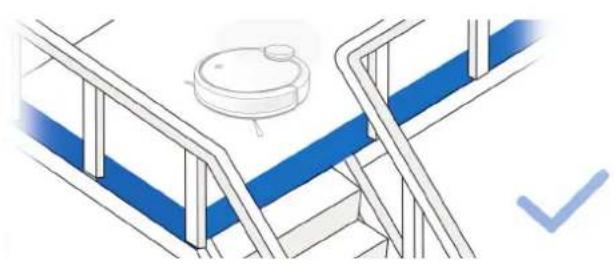
If there is a drop off in the cleaning area due to a step or stairs, you should operate the Appliance to ensure that it can detect the step without falling over the edge. It may become necessary to place a physical barrier at the edge to keep the unit from falling. Make sure the physical barrier is not a trip hazard.
-
Only use as described in this manual. Only use attachments recommended or sold by the manufacturer.
-
Please make sure your power supply source voltage matches the power voltage marked on the Docking Station.
-
For INDOOR household use ONLY. Do not use the Appliance in outdoor, commercial or industrial environments.
-
Use only the original rechargeable battery and Docking Station provided with the Appliance from the manufacturer. Non-rechargeable batteries are prohibited. For battery information, please refer to Specifications section.
1. Important Safety Instructions
- Do not use without dust bin and/or filters in place.
- Do not operate the Appliance in an area where there are lit candles or fragile objects.
- Do not use in extremely hot or cold environments (below -5^/23^ or above 40^/104^ ).
- Keep hair, loose clothing, fingers, and all parts of body away from any openings and moving parts.
- Do not operate the Appliance in a room where an infant or child is sleeping.
- Do not use Appliance on wet surfaces or surfaces with standing water.
- Do not allow the Appliance to pick up large objects like stones, large pieces of paper or any item that may clog the Appliance.
-
Do not use Appliance to pick up flammable or combustible materials such as gasoline, printer or copier toner, or use in areas where they may be present.
-
Do not use Appliance to pick up anything that is burning or smoking, such as cigarettes, matches, hot ashes, or anything that could cause a fire.
- Do not put objects into the suction intake. Do not use if the suction intake is blocked. Keep the intake clear of dust, lint, hair, or anything that may reduce air flow.
- Take care not to damage the power cord. Do not pull on or carry the Appliance or Docking Station by the power cord, use the power cord as a handle, close a door on the power cord, or pull power cord around sharp edges or corners. Do not run Appliance over the power cord. Keep power cord away from hot surfaces.
- If the power cord is damaged, it must be replaced by the manufacturer or its service agent in order to avoid a hazard.
- Do not use the Docking Station if it is damaged. The power supply is not to be repaired and not to be used any longer if it is damaged or defective.
1. Important Safety Instructions
-
Do not use with a damaged power cord or receptacle. Do not use the Appliance or Docking Station if it is not working properly, has been dropped, damaged, left outdoors, or come in contact with water. It must be repaired by the manufacturer or its service agent in order to avoid a hazard.
-
Turn OFF the power switch before cleaning or maintaining the Appliance.
-
The plug must be removed from the receptacle before cleaning or maintaining the Docking Station.
-
Remove the Appliance from the Docking Station, and turn OFF the power switch to the Appliance before removing the battery for disposal of the Appliance.
-
The battery must be removed and discarded according to local laws and regulations before disposal of the Appliance.
-
Please dispose of used batteries according to local laws and regulations.
-
Do not incinerate the Appliance even if it is severely damaged. The batteries can explode in a fire.
-
When not using the Docking Station for a long period of time, please unplug it.
-
The Appliance must be used in accordance with the directions in this Instruction Manual. ECOVACS ROBOTICS cannot be held liable or responsible for any damages or injuries caused by improper use.
-
The robot contains batteries that are only replaceable by skilled persons. To replace the robot's battery, please contact Customer Service.
-
If the robot will not be used for a long time, power OFF the robot for storage and unplug the Docking Station.
-
WARNING: For the purposes of recharging the battery, only use the detachable supply unit CH1630A provided with the appliance.
1. Important Safety Instructions
For EU Countries

Correct Disposal of this Product
This marking indicates that this product should not be disposed of with other household waste throughout the EU. To prevent possible harm to the environment or human health from uncontrolled waste disposal, recycle it responsibly to promote the sustainable reuse of material resources. To recycle your used device, please use the return and collection systems or contact the retailer where the product was purchased. They can safely recycle this product.
| [6VT4] | Class II |
 | Short-circuit-proof safety isolating transformer |
 | Switch mode power supply |
 | For indoor use only |
2. Package Contents and Technical Specifications
2.1 Package Contents

Note: Figures and illustrations are for reference only and may differ from actual product appearance. Product design and specifications are subject to changes without notice.
2. Package Contents and Technical Specifications
2.2 Specifications 2.3 Product Diagram
| Model DE5G | |||
| Working voltage 12V | DC | ||
| Docking Station Model | CH1630A | ||
| Input | 100-240V AC, 50/60Hz, 25W | Output | 20V DC, 0.8A |
| Battery ZJ1517-HFR | 3000mAh | ||
| Laser | max. power: 2.5mWFrequency: 1.8KHzRotate Speed: 300±5 circle/min | ||
| Frequency bands 24 | 12-2472MHz | ||
| Maximum RF power transmitted in the frequency band | Max PA output power at 72.2 Mbps: 17.5 dBm | ||
| Max PA output power in 11b mode: 21.5 dBm | |||
Output power of the WIFI module is less than 100mW.
Note: Technical and design specifications may be changed for continuous product improvement.

text_image
Robot LDS (Laser Distance Sensor) Anti-collision Sensors and Bumper Wi-Fi Indicator Light AUTO Mode Button Power Switch Upgrade Port RESET Button2. Package Contents and Technical Specifications
Bottom View

text_image
Main Brush Option Charging Contacts Anti-drop Sensors Direct Suction Option Side Brushes Universal Wheel3. Operating and Programming
3.1 Notes Before Cleaning
WARNING: Do not use DEEBOT on wet surfaces or surfaces with standing water.

natural_image
Illustration of a robotic device and a fabric swatch with directional arrows (no text or symbols)Before using the product on a rug with tasseled edges, please fold the rug edges under.

natural_image
Illustration of a robotic vacuum cleaner next to a wall-mounted power outlet (no text or symbols)Remove power cords and small objects from the floor that the robot could be obstructed by, and tidy up the area to be cleaned by putting furniture, such as chairs, in their proper place.
natural_image
Isometric line drawing of a staircase with blue flooring and a circular object on top (no text or symbols)It may be necessary to place a physical barrier at the edge of a drop to stop the unit from falling over the edge.
3. Operating and Programming
3.2 Quick Start
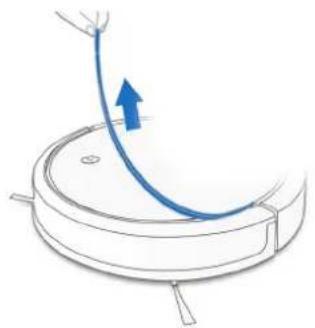
1 Remove Protective Strip
natural_image
Diagram of a robotic vacuum cleaner with a blue curved arrow indicating motion (no text or symbols)2 Docking Station Placement

text_image
0.5m (1.6') 0.5m (1.6') 1.5m (5)3 Install Side Brushes

text_image
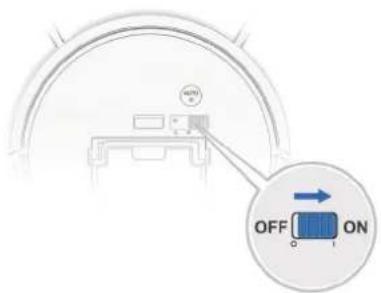
Diagram of a helicopter's flight path with labeled components and an inset showing flight direction and aircraft movement4 Power ON

text_image
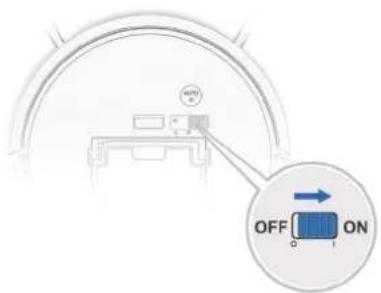
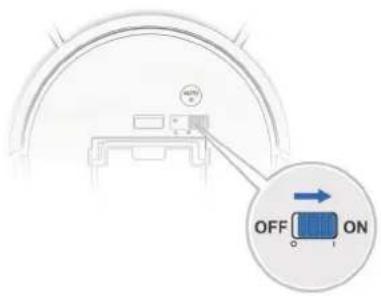
OFF ON C I3. Operating and Programming
5 Charge DEEBOT

text_image
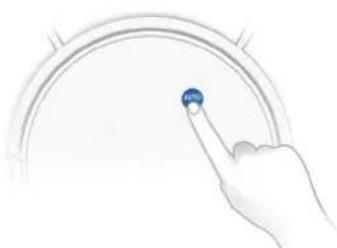
4h = ONNote: When DEEBOT completes the cleaning cycle or when battery power gets low, DEEBOT automatically returns to the Docking Station to recharge itself. DEEBOT can also be sent back to the Docking Station at any time by using ECOVACS App or by pressing the AUTO Button on the robot for 3 seconds.
6 Start

natural_image
Hand pointing at a circular gauge with a blue 'NATE' button (no text or symbols on the gauge itself)7 Pause
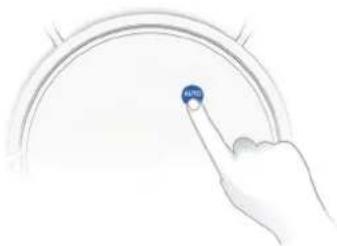
natural_image
Hand pointing at a blue circular button on a curved interface (no text or symbols visible)Note: The robot's Control Panel stops glowing after the robot is paused for a few minutes. Press the AUTO Mode Button on DEEBOT to wake up the robot.
8 Power OFF

text_image
AUTO OFFNote: When DEEBOT is not working, it is recommended to keep it switched ON and charging.
3. Operating and Programming
Note: For models with app-connectivity, various functions can be performed using the ECOVACS App.

text_image
Download on the App Store GET IT ON Google Play ECOVACS iOS 9.0 or later Android 4.0 or later3.3 Choosing a Suction Option
Main Brush Option: The best choice for deep cleaning, with a combination of the Main Brush and strong suction.

natural_image
Top-down diagram of a robotic vacuum cleaner with a blue control panel nearby (no text or symbols)Direct Suction Option: The best choice for daily cleaning. This Suction Option is specifically designed to pick up hair without getting clogged by it, and is ideal for pet owners.

natural_image
Line drawing of a robotic vacuum cleaner with a circular head and a small blue printer icon on the right (no text or symbols)3. Operating and Programming
Install the Direct Suction Option
1

natural_image
Diagram of a robotic device with a magnified inset showing internal components (no text or symbols)2

natural_image
Technical line drawing of a mechanical device with a blue component and directional arrow (no text or symbols)3

natural_image
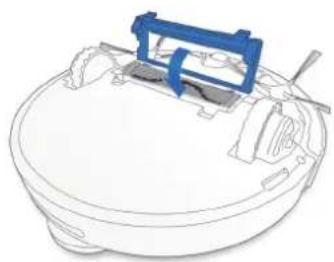
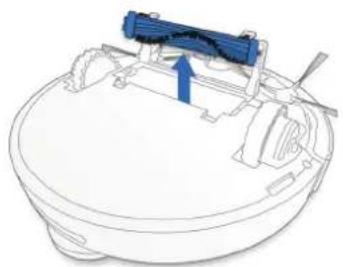
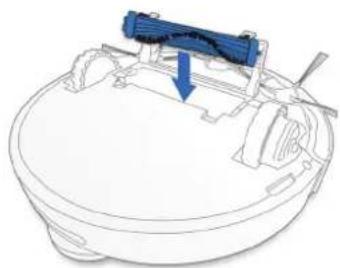
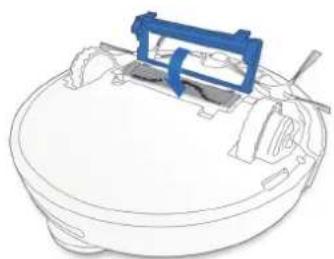
Line drawing of a mechanical component with a blue plastic clip attached (no text or symbols)Install the Main Brush Option
1

natural_image
Technical line drawing of a mechanical device with a blue component and an inset view showing internal components (no text or symbols)2
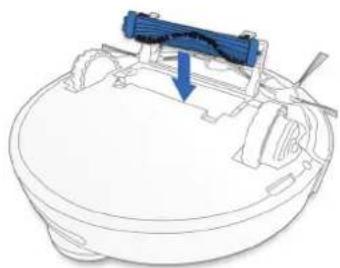
natural_image
Technical line drawing of a mechanical component with a blue arrow indicating a specific part (no text or symbols present)3
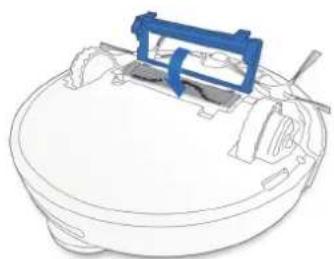
natural_image
Line drawing of a mechanical component with a blue bracket and cylindrical body (no text or symbols)4. Maintenance
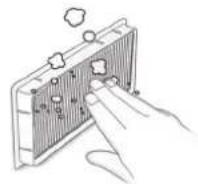
Before performing cleaning and maintenance tasks on DEEBOT, turn the robot OFF and unplug the Docking Station.
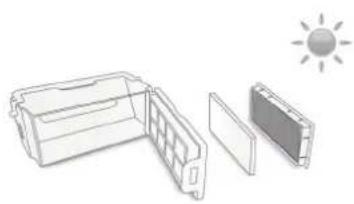
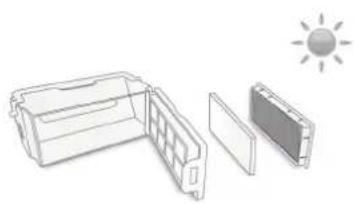
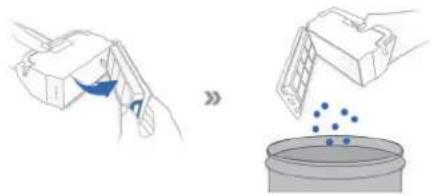
4.1 Dust Bin and Filters
Dust Bin

text_image
Filter Net High Efficiency Filter Sponge Filter2

natural_image
Illustration showing a hand pouring liquid into a container with scattered blue dots (no text or symbols)4

natural_image
Line drawing of a hand holding a device with a grid panel and two abstract geometric shapes above (no text or symbols)1

natural_image
Illustration of a hand placing a small object into a device inside a container (no text or symbols visible)3
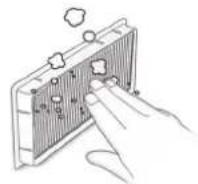
5

natural_image
Line drawing of a solar panel with open lid, internal compartments, and a sun icon (no text or symbols)4. Maintenance
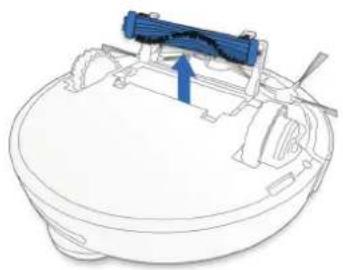
4.2 Main Brush, Direct Suction Option and Side Brushes
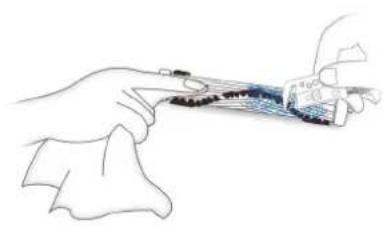
Note: A Multi-Function Cleaning Tool is provided for easy maintenance. Handle with care, this cleaning tool has sharp edges.
Main Brush
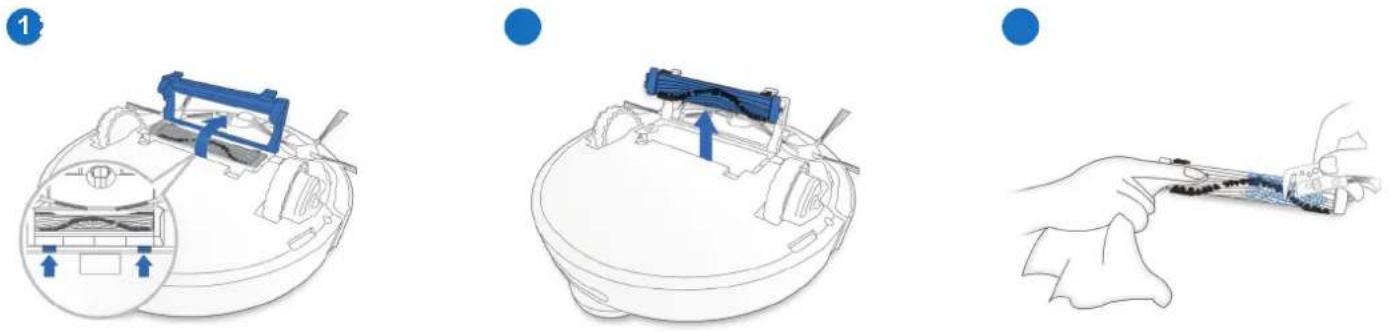
Direct Suction Option Side Brushes
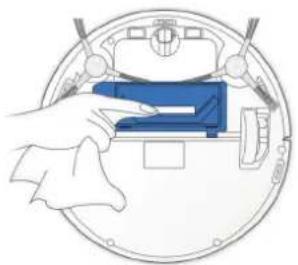
natural_image
Illustration of a hand holding a blue rectangular object inside a circular device (no text or symbols visible)
natural_image
Illustration of a medical device with a blue connector and a hand holding a tool (no text or symbols visible)4. Maintenance
4.3 Other Components

natural_image
Top-down schematic of a circular device with internal components and a blue sphere on top (no text or symbols)
natural_image
Illustration of a hand holding a device with a circular frame and internal components (no text or symbols)
natural_image
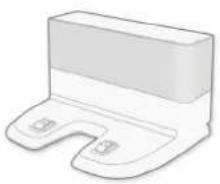
Illustration of a hand cleaning a blue robotic vacuum cleaner (no text or symbols)Note: Before cleaning the robot's Charging Contacts and Docking Station Pins, turn the robot OFF and unplug the Docking Station.
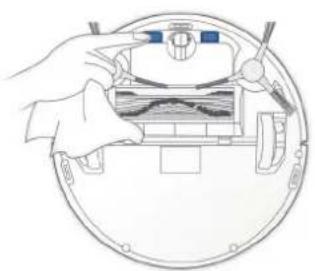
natural_image
Illustration of a hand holding a device inside a circular device with internal components (no text or symbols)
natural_image
Illustration of a hand pressing a small electronic device with two buttons (no text or symbols)4. Maintenance
4.4 Regular Maintenance
To keep DEEBOT running at peak performance, perform maintenance tasks and replace parts with the following frequencies:
| Robot Part Maintenance | Frequency Replacement Frequency | |
| Side Brush Once every 2 | weeks Every 3-6 months | |
| Main Brush Once per week | Every 6-12 months | |
| Sponge Filter/ High Efficiency Filter | Once per week Every 3-6 months | |
| Universal WheelAnti-Drop SensorsBumperCharging ContactsDocking Station Pins | Once per week / |
A multi-function Cleaning Tool is provided for easy maintenance. Handle with care, this cleaning tool has sharp edges.
Note: ECOVACS manufactures various replacement parts and fittings. Please contact Customer Service for more information on replacement parts.
5. Troubleshooting
DEEBOT will tell you something is wrong with an alarm indicator light and sounds.
More detailed support is available through the ECOVACS App and online.
| No. | Malfunction Possible Causes Solutions | ||
| 1 | DEEBOT is not charging. | DEEBOT is not switched ON. Switch ON DEEBOT. | |
| DEEBOT has not connected to the Docking Station. | Be sure that the robot's Charging Contacts have connected to the Docking Station Pins. | ||
| The battery is completely discharged. | Re-activate the battery. Switch ON Place DEEBOT on the Docking Station by hand, remove after charging for 3 minutes, repeat 3 times; then charge normally. | ||
| 2 | DEEBOT cannot return to the Docking Station. | The Docking Station is not correctly placed. Refer to section 3.2 to correctly place the Docking Station. | |
| 3 | DEEBOT gets stuck while working and stops. | DEEBOT is tangled with something on the floor (electrical wires, curtains, carpet fringing, etc.). | DEEBOT will try various ways to free itself. If it is unsuccessful, manually remove the obstacles and restart. |
| 4 | DEEBOT returns to the Docking Station before it has finished cleaning. | When the battery gets low, DEEBOT automatically switches to Return to Charger Mode and returns to the Docking Station to recharge itself. | This is normal. No solution necessary. |
| Working time varies according to floor surface, room complexity and the Cleaning Mode selected. | This is normal. No solution necessary. | ||
5. Troubleshooting
| No. | Malfunction Possible Causes Solutions | ||
| 5 | DEEBOT does not clean automatically at the scheduled time. | Time Scheduling function is cancelled. | Program DEEBOT to clean at specific times using the ECOVACS App. |
| The Continued Cleaning function is turned ON and DEEBOT has just finished cleaning the scheduled cleaning area. | This is normal. No solution necessary. | ||
| DEEBOT is switched OFF. Switch ON DEEBOT. | |||
| The robot's battery is low. | Keep DEEBOT switched ON and connected to the Docking Station to make sure it has a full battery to work at any time. | ||
| The robot's Suction Intake is blocked and/or there is debris stuck in its components. | Power OFF DEEBOT, clean the Dust Bin and invert the robot. Clean the robot's Suction Intake, Side Brushes and the Main Brush as described in section 4. | ||
| 6 | DEEBOT does not clean the whole area | The cleaning area is not tidy. | Remove small objects from the floor and tidy up the cleaning area before DEEBOT starts cleaning. |
| 7 | DEEBOT is not able to connect to the home Wi-Fi network. | Incorrect home Wi-Fi username or password entered. | Enter the correct home Wi-Fi username and password. |
| DEEBOT is not within range of your home Wi-Fi signal. | Make sure DEEBOT is within range of your home Wi-Fi signal. | ||
| Network setup started before DEEBOT was ready. | Turn ON Power Switch. Press the RESET Button using a needle for 3 seconds. DEEBOT is ready for network setup when it plays a musical tune and its Wi-Fi Indicator light flashes slowly. | ||
| Your smartphone's operating system needs to be updated. | Update your smartphone's operating system. The ECOVACS App runs on iOS 9.0 and above, Android 4.0 and above. |
natural_image
Illustration of a robotic device and a fabric swatch with directional arrows (no text or symbols)natural_image
Illustration of a robotic vacuum cleaner next to a wall-mounted power outlet (no text or symbols)natural_image
Isometric line drawing of a staircase with blue flooring and a circular object on top (no text or symbols)natural_image
Diagram of a robotic vacuum cleaner with a blue curved arrow indicating motion (no text or symbols)text_image
0.5m (1.6') 0.5m (1.6') 1.5m (5)text_image
Diagram illustrating a mechanical or robotic system with labeled components and a magnified inset showing a hand holding a tool.4 Einschalten
text_image
ON OFF ONnatural_image
Hand pointing at a circular gauge with a blue indicator finger (no text or symbols visible)7 Pause
natural_image
Hand pointing at a blue circular button labeled 'SATE' (no other text or symbols)natural_image
Diagram of a robotic vacuum cleaner with a blue device on top (no text or symbols present)natural_image
Line drawing of a robotic vacuum cleaner with a circular head and a small blue device on the right (no text or symbols)natural_image
Diagram of a robotic device with a magnified inset showing internal components (no text or symbols)2

natural_image
Technical line drawing of a mechanical device with a blue component and directional arrow (no text or symbols)3
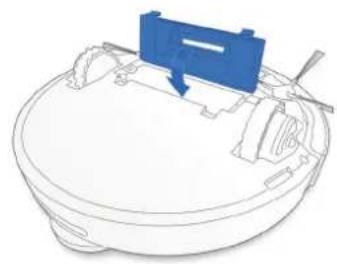
natural_image
Line drawing of a mechanical component with a blue arrow indicating direction (no text or symbols)natural_image
Technical line drawing of a mechanical device with a blue component and an inset view showing internal components (no text or symbols)2

natural_image
Technical line drawing of a mechanical device with a blue component and arrow indicating direction (no text or symbols)3
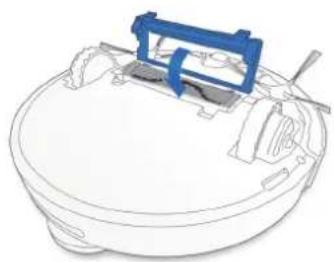
natural_image
Line drawing of a mechanical device with a blue bracket and cylindrical components (no text or symbols)4. Wartung
natural_image
Illustration showing a hand pouring liquid into a container with scattered blue dots (no text or symbols)4

natural_image
Line drawing of a hand holding a device with a grid panel and two hanging objects (no text or symbols)1
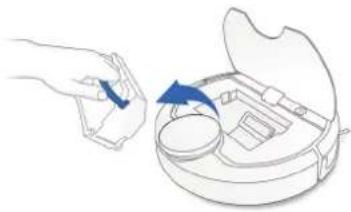
natural_image
Illustration of a hand placing a small object into a device inside a container (no text or symbols visible)3

5

natural_image
Line drawing of a solar panel with its open lid, showing the sun icon above (no text or symbols)4. Wartung
natural_image
Technical diagram of a robotic vacuum cleaner with internal components and a magnified inset showing internal structure (no text or labels)●
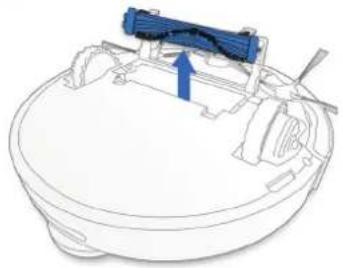
natural_image
Technical line drawing of a mechanical component with a blue arrow indicating direction (no text or symbols)●

natural_image
Line drawing of a hand holding a pen or stylus with a small object inside, no text or symbols presentnatural_image
Illustration of a hand pressing a blue component on a circular device (no text or symbols visible)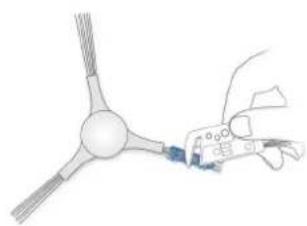
natural_image
Illustration of a medical or laboratory procedure showing a hand holding a device with a blue component, no visible text or symbols.4. Wartung
natural_image
Top-down schematic of a circular device with internal components and a blue sphere on top (no text or symbols)
natural_image
Illustration of a hand holding a device with a circular frame and internal components (no text or symbols)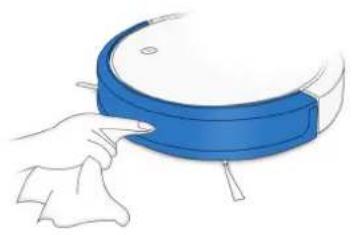
natural_image
Illustration of a hand cleaning a blue robotic vacuum cleaner (no text or symbols)natural_image
Diagram of a robotic vacuum cleaner inside a circular housing, showing hand positioning and internal components (no text or symbols)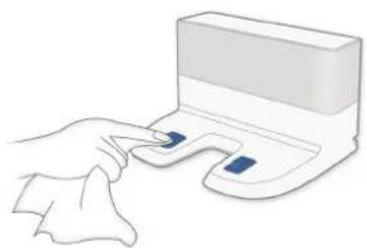
natural_image
Illustration of a hand pressing a small electronic device with two buttons (no text or symbols)4. Wartung
natural_image
Simple line drawing of a circular ring with a central dot and curved arms (no text or symbols)Robot
natural_image
3D rendered image of a white plastic electronic component with a U-shaped base and two small circular ports (no text or symbols)Estación de carga
natural_image
Illustration of a vacuum cleaner next to a fabric swatch, with no visible text or symbolsnatural_image
Illustration of a robotic vacuum cleaner next to a wall-mounted power outlet (no text or symbols)natural_image
Isometric line drawing of a staircase with blue flooring and a circular object on top (no text or symbols)natural_image
Diagram of a robotic vacuum cleaner with a blue curved arrow indicating motion (no text or symbols)text_image
0.5m (1.6') 0.5m (1.6') 1.5m (5)text_image
Diagram illustrating a mechanical or fluid system with labeled components and a magnified inset showing a hand holding a valve.4 Encendido
text_image
ON OFF ONnatural_image
Hand pointing at a circular interface element with a blue button labeled 'SATE' (no text or symbols on the diagram itself)natural_image
Diagram of a robotic vacuum cleaner with a circular head and blue particles, next to a blue rectangular device (no text or symbols)natural_image
Line drawing of a robotic vacuum cleaner with a paper printer nearby (no text or symbols)natural_image
Diagram of a robotic device with a magnified inset showing internal components (no text or symbols)2

natural_image
Technical line drawing of a mechanical device with a blue component and directional arrow (no text or symbols)3

natural_image
Line drawing of a mechanical component with a blue arrow indicating direction (no text or symbols)natural_image
Technical line drawing of a mechanical device with a blue component and an inset view showing internal components (no text or symbols)2

natural_image
Technical line drawing of a mechanical device with a blue component and arrow indicating direction (no text or symbols)3
natural_image
Line drawing of a mechanical device with a blue bracket and cylindrical components (no text or symbols)4. Mantenimiento
natural_image
Illustration showing a hand pouring liquid into a container with scattered blue dots (no text or symbols)4

natural_image
Line drawing of a device with a screen and two hanging panels (no text or symbols)1

natural_image
Illustration of a hand placing a small object into a device inside a container (no text or symbols visible)3
5
natural_image
Illustration of a solar panel with its open lid, showing the sun icon above (no text or symbols)4. Mantenimiento
natural_image
Technical diagram of a robotic device with a close-up inset showing internal components (no text or symbols)●

natural_image
Technical line drawing of a mechanical component with a blue arrow indicating direction (no text or symbols)●
natural_image
Line drawing of a hand holding a small object with a blue and black mark, possibly a device or tool (no text or symbols present)natural_image
Illustration of a hand pressing a blue component on a circular device (no text or symbols visible)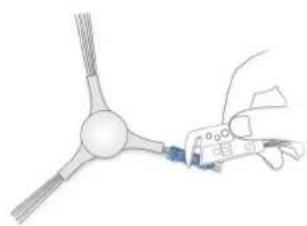
natural_image
Illustration of a medical or laboratory procedure showing a hand holding a device with a blue component, no visible text or symbols.4. Mantenimiento
natural_image
Top-down schematic of a circular device with internal components and a blue sphere on top (no text or symbols)
natural_image
Diagram of a hand holding a device with a circular frame and internal components (no text or symbols)
natural_image
Illustration of a hand cleaning a blue robotic vacuum cleaner (no text or symbols)natural_image
Diagram of a robotic vacuum cleaner inside a circular housing, showing hand positioning and internal components (no text or symbols)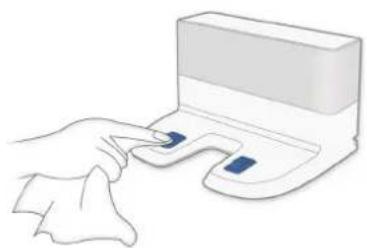
natural_image
Illustration of a hand pressing a small electronic device with two buttons (no text or symbols)4. Mantenimiento
natural_image
Simple line drawing of a circular ring with a central dot and curved arms (no text or symbols)Robot
natural_image
Illustration of a white plastic electronic component with a U-shaped base and two small circular ports (no text or symbols)Station d'accueil
natural_image
Illustration of a robotic device and a fabric swatch with directional arrows (no text or symbols)natural_image
Illustration of a robotic vacuum cleaner next to a wall-mounted power outlet (no text or symbols)natural_image
Isometric line drawing of a staircase with blue flooring and a circular object on top (no text or symbols)natural_image
Diagram of a robotic vacuum cleaner with a blue curved line indicating motion or airflow (no text or symbols)text_image
Diagram illustrating a mechanical or fluid system with labeled components and a magnified inset showing a hand holding a valve.4 Mise sous tension
text_image
OFF ONnatural_image
Hand pointing at a circular interface element with a blue button labeled 'SATE' (no text or symbols beyond the button)natural_image
Hand pointing at a circular gauge with a blue indicator finger (no text or symbols visible)8 Mise hors tension

text_image
AFC OFFnatural_image
Top-down diagram of a robotic vacuum cleaner with a blue box nearby (no text or symbols)natural_image
Line drawing of a robotic vacuum cleaner with a circular head and handle, next to a blue printer (no text or symbols)natural_image
Diagram of a robotic device with a magnified inset showing internal components (no text or symbols)natural_image
Technical line drawing of a mechanical device with a blue component and an inset view showing internal components (no text or symbols)2
natural_image
Technical line drawing of a mechanical device with a blue component and directional arrow (no text or symbols)2
natural_image
Technical line drawing of a mechanical component with a blue arrow indicating a specific part (no text or symbols present)3

natural_image
Line drawing of a mechanical component with a blue plastic clip attached (no text or symbols)3
natural_image
Line drawing of a mechanical component with a blue bracket and cylindrical body (no text or symbols)4. Entretien
natural_image
Illustration showing a hand pouring liquid into a container with scattered blue dots (no text or symbols)4

natural_image
Line drawing of a person using a device with a monitor and stand (no text or symbols)1

natural_image
Illustration of a hand placing a small object into a device inside a container (no text or symbols visible)3

5
natural_image
Line drawing of a solar panel with open compartments and a sun symbol above (no text or labels)4. Entretien
natural_image
Diagram of a robotic vacuum cleaner with a blue clamp and internal components, showing no text or symbols.●

natural_image
Technical line drawing of a mechanical component with a blue arrow indicating direction (no text or symbols)●

natural_image
Line drawing of a hand holding a pen or stylus with a small object inside, no text or symbols presentnatural_image
Illustration of a hand pressing a blue component on a circular device (no text or symbols visible)
natural_image
Illustration of a medical or laboratory procedure showing a hand holding a device with a blue component, no visible text or symbols.4. Entretien
natural_image
Top-down schematic of a circular device with internal components and a blue sphere on top (no text or symbols)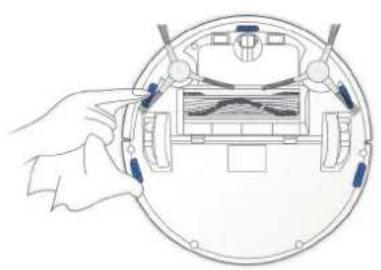
natural_image
Diagram of a hand holding a device with a circular frame and internal components (no text or symbols)
natural_image
Illustration of a hand cleaning a blue robotic vacuum cleaner (no text or symbols)natural_image
Diagram of a robotic vacuum cleaner inside a circular housing, showing hand positioning and internal components (no text or symbols)
natural_image
Illustration of a hand pressing a small electronic device with two buttons (no text or symbols)4. Entretien
natural_image
Simple line drawing of a circular mechanical component with a central hub and a small circle at the top (no text or symbols)Robot

natural_image
Illustration of a white plastic electronic component with a U-shaped base and two small circular ports (no text or symbols)Docking Station

Manuale d'uso
natural_image
Illustration of a vacuum cleaner next to a fabric swatch with blue arrows indicating texture changes (no text or symbols)natural_image
Illustration of a robotic vacuum cleaner next to a wall-mounted power outlet (no text or symbols)natural_image
Isometric line drawing of a staircase with blue flooring and a circular object on top (no text or symbols)natural_image
Diagram of a robotic vacuum cleaner with a blue curved arrow indicating motion (no text or symbols)text_image
0.5m (1.6') 0.5m (1.6') 1.5m (5)text_image
Diagram of a helicopter's flight path with labeled components and an inset showing flight direction and aircraft movement4 Accensione

text_image
OFF ON C Inatural_image
Hand pointing at a circular gauge with a blue 'NATE' button (no text or symbols on the gauge itself)7 Pausa

natural_image
Hand pointing at a circular interface element with a blue button (no text or symbols visible)natural_image
Top-down diagram of a robotic vacuum cleaner with a blue box nearby (no text or symbols)natural_image
Line drawing of a robotic vacuum cleaner with a circular head and handle, next to a blue printer (no text or symbols)natural_image
Diagram of a robotic device with a magnified inset showing internal components (no text or symbols)2
natural_image
Technical line drawing of a mechanical device with a blue component and directional arrow (no text or symbols)3

natural_image
Line drawing of a mechanical component with a blue arrow pointing to a component (no text or symbols)natural_image
Technical line drawing of a mechanical device with a blue component and an inset view showing internal components (no text or symbols)2

natural_image
Technical line drawing of a mechanical device with a blue component and arrow indicating direction (no text or symbols)3

natural_image
Line drawing of a mechanical device with a blue bracket and cylindrical components (no text or symbols)4. Manutenzione
natural_image
Illustration of a hand placing a small object into a device inside a container (no text or symbols visible)2
natural_image
Illustration showing a hand holding a container being poured into a petri dish with scattered blue dots (no text or symbols)3

4

natural_image
Line drawing of a hand holding a device with a grid panel and two hanging objects (no text or symbols)5

natural_image
Line drawing of a solar panel with its open lid, showing the sun icon above (no text or symbols)4. Manutenzione
natural_image
Technical diagram of a robotic vacuum cleaner with internal components and a magnified inset showing internal structure (no text or labels)●

natural_image
Technical line drawing of a mechanical component with a blue arrow indicating direction (no text or symbols)●

natural_image
Line drawing of a hand holding a small electronic device with a screen (no text or symbols)natural_image
Illustration of a hand pressing a blue component on a circular device (no text or symbols visible)
natural_image
Illustration of a medical or laboratory procedure showing a hand holding a device with a blue component, no visible text or symbols.4. Manutenzione
natural_image
Top-down schematic of a circular device with internal components and a blue sphere on top (no text or symbols)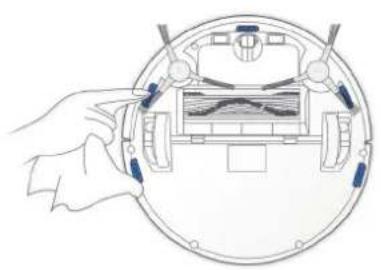
natural_image
Illustration of a hand holding a device with a circular frame and internal components (no text or symbols)
natural_image
Illustration of a hand cleaning a blue robotic vacuum cleaner (no text or symbols)natural_image
Diagram of a hand holding a device inside a circular device, showing internal components and wiring (no text or symbols)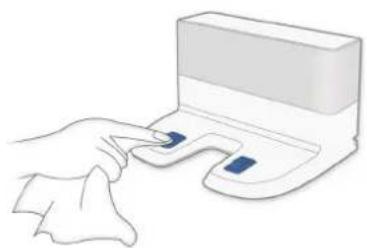
natural_image
Illustration of a hand pressing a small electronic device with two buttons (no text or symbols)4. Manutenzione
EU-Declaration of conformity
Document number:0027
Manufacturer: Ecovacs Robotics Co., Ltd.
Address: No.18, Youxiang Road, Wuzhong District, Suzhou City, Jiangsu Province, China.
We hereby declare that the following products listed below are in accordance with the provisions in the latest version of EC in this document.
Product designation:
Brand:
Automatic battery-operated cleaner
| ECOVACSROBOTICS |
Model:
DE5G, DE5G.**(*=0-9)(the first * denote different colours, the second * denote different accessories.)
Specification:
Electrical appliances for household and similar purposes
EC Regulations or Directives:
RED
Directive 2014/53/EU
RoHS
Directive 2011/65/EU
WEE
Directive 2002/96/EC
REACH
Directive1907/2006/EC
Eco-design
Directive 2009/125/EC
Standards the product is in conformity with:
EN 60335-2-2:2010 + A11:2012 + A1:2013
EN 55014-1:2006+A1:2009+A2:2011
Draft EN 301 489-1 V2.2.0
EN 60335-1:2012+A11:2014+AC:2014
EN 55014-2:2015
Draft EN 301 489-17 V3.2.0
EN 61558-1:2005 + A1:2009
EN 61000-3-2:2014
EN 62311:2008
EN 61558-2-16:2009 + A1:2013
EN 61000-3-3:2013
IEC62321:2008
EN 62233:2008
EN 300 328 V2.1.1
EN 50564: 2011

Signature:
General Manager: Zhuang Jianhua
Date: 2018-01-25
Ecovacs Robotics Co., Ltd
No. 18 You Xiang Road, Wuzhong District, Suzhou City,
Jiangsu Province, P.R.China
DE5G-EU01-IM2017R01