SBCRP421 - Remote control PHILIPS - Free user manual and instructions
Find the device manual for free SBCRP421 PHILIPS in PDF.


User questions about SBCRP421 PHILIPS
0 question about this device. Answer the ones you know or ask your own.
Ask a new question about this device
Download the instructions for your Remote control in PDF format for free! Find your manual SBCRP421 - PHILIPS and take your electronic device back in hand. On this page are published all the documents necessary for the use of your device. SBCRP421 by PHILIPS.
USER MANUAL SBCRP421 PHILIPS
Instructions for Use
Mode d'emploi
Bedienungsanleitung
Gebruiksanawijzing
Important: You cannot damage your equipment by pressing a wrong button on your remote control.
INTRODUCTION
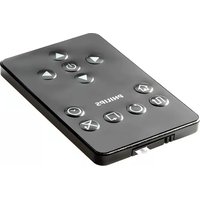
You've just made a great choice by buying this Philips Universal Remote Control! The RP421 is a remote control designed to replace all Philips Television remote controls of 1980 and after. It also control basic functions of VCRs of all main European brands. Keep this manual for future reference.
INSTALLING THE BATTERIES
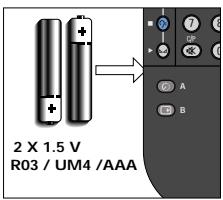
- Insert the batteries according to the indications in the battery compartment (rear of the remote).
- Replace the batteries when the transmission distance becomes too short.
Note: After changing the batteries you may have to setup the keys again. To avoid this, do not touch the keys while changing the batteries.
GETTING STARTED
To operate: aim at your TV and press the button with the correct symbol. To activate one of the secondary functions, keep the sidebutton ① pressed and press the button with the correct symbol above. These secondary functions include VCR functions and special TV functions. The RP421 is ready to work with almost all Phillips VCRs. For other brands of VCR, it needs to be set up first- see Setting up your VCR.
Important notes:
Not all TVs have all the features listed hereafter. Please check the instructions for use of your TV to determine which functions your TV has.
The keys of the RP 421 work like the keys of your original remote control even though the symbol on the keys may be slightly different.
PROGRAM and VOLUME CONTROLS
Function
② -O-TV Stand-by
③ -P+-Programup/down
④ Program selection
-0.9 - Numeric selection keys
--1-- 1 digit/2 digits
⑤-+Volumeup/down
6-Mute
Secondary function with side button ① pressed:
② -VCR Stand-by
③ --P + -VCR program up/down
④ VCR Program selection
-0.9 - Numeric selection keys
--1 digit/2 digits
⑥ -C/P-Channel/Program (TV)
MENUVCR
With side button ① pressed:
⑦ MENU CONTROLS
MENU-MENU on /Menu off
- Cursor up/ Menu +
- Cursor right/ Menu +
- Cursor Left /Menu -
- Cursor down /Menu -
MENU - Menu off
With or + pressed:
VCR CONTROLS
With side button ① pressed:
Red
Green
- Yellow
Cyan
- Brightness up/down
Colour up/down - Treble up/down
Bass up/down -
Balance right/left
-
VCR record
- VCR rewind
VCR wind
VCRstop - VCR play
TELETEXT/PIP
⑧ TELETEXT FUNCTIONS
With side button ① pressed:
⑧ PIP (PICTURE IN PICTURE) FUNCTIONS
- Teletext on/off
- Page hold
? -Reveal/conceal - TV-teletext mixed
- Actual time on screen
-
Cancel teletext picture temporarily
-
PIP on/off
-PIP shift - PIP freeze
- PIP swap
-PIP select -
Multi-picture display
-
Enlarge
Memory out
-Enter - TV-mode
⑧ SOUND FUNCTIONS
I-II - First or second language
- Spatial sound effect
- Speech/Music
- Crispener
ADDITIONAL
8- 品 -Install
(9) (Video) input/output.
10- -Personal Preference
(1) - miscellaneous
-
- Sleeptimer
-0SD/1-12
P4P - Previous Program
13/24 - 13-24
(9) - 2 (Video) input/output 2
10 -Automatic search tuning
(11) miscellaneous - Programmable:
A-PIP step up
B-PIP step down
C-Movie expand
D-DNR
A-
B-
C
D-
SETTING UP YOUR VCR
This remote is ready to work with any Philips VCR. For other brands, it needs to be set up first. That only takes a couple of seconds, thanks to Philips' Simple System Setup!
Before you start, make sure the equipment is switched on. Sit right in front of it.
If you know the brand of your VCR, look at the code list at the back of this book, and find the first 3-digit code for your equipment.
- Press and hold 'Menu' and '7' simultaneously for at least 3 seconds.
- Enter the 3-digit code using the keypad.
That's it! Now, press a few keys on the remote to check that the equipment responds correctly. If it doesn't, try again using the next code in the list. In the rare instance that none of the codes work, follow the instructions below.
Tip: Make a note of the code on the back of the remote and in the back of this booklet in case you ever need to setup again.
If you don't know the brand of your VCR or if you can not find it in the coderlist, setup still won't take long. Phillips' patented Handsfree autosearch tests all the codes one after another and finds the right one for you! Maximum search time is 3 minutes for VCRs.
Make sure the VCR is switched on, insert a tape and start playback. You will know when the correct code has been found because the VCR will stop playback.
- Press and hold 'Menu' and '7' simultaneously for at least 3 seconds.
- Press to start the search. Keep the remote pointed at your VCR. Every 1.5 seconds another code is sent. When the right code is found, the VCR either switches off or will stop playback).
- Immediately press to stop the search.
If you missed the correct code because the search went too far, switch the VCR back on and start playback again, then press - P to send the previous code again. Keep pressing - P until the VCR stops playback again.
4. Once you've found the correct code, press to lock it in memory.
That's it! Now, switch the VCR manually on again, then press a few keys on the remote to check that the VCR responds correctly. In the rare instance that it doesn't, try again from step 1 to find a better code.
TROUBLESHOOTING
If you're having problems with operating your equipment or if your missing certain functions on your remote, please check the points listed below:
The remote control does not function
- Check mains power on equipment.
- The batteries may be empty or not installed.
- The TV is produced before 1980 (RC-4).
To control the matchline TXT system on older sets.
- Press and hold 'Menu' and '3' simultaneously for 6 seconds. Now you can control teletext.
To replace the colour keys for older TV sets.
- Press and hold 'Menu' and '1' simultaneously for 6 seconds. Now the colour keys function like those on the original remote control.
To replace all menu (cursor) functions of RC 7535
- Press and hold 'Menu' and '4' simultaneously for 6 seconds. Now you can control the cursor keys like you were used to.
To replace all PIP functions of RC 5992, 5390, 5391, 5392 or 5393:
- Press and hold menu and '6' simultaneously for 6 seconds.
To access directly programs 11 and 12 on some older types of TV:
- Press and hold menu and '5' simultaneously for 6 seconds.
To restore all default settings,
- Press 'Menu' and '0' simultaneously for 6 seconds.
Not all functions of my original RC are present on the RP 421.
First, try the secondary functions, see: CONTROLS. If some functions are still missing, you can program up to 4 TV functions under buttons A, B, C, D. To program the function you require, look at the code list at the back of this book, and find the 3-digit code for this specific function.
Press and hold 'Menu' and key A, B, C or D simultaneously for at least 3 seconds. Enter the 3-digit code using the keypad. Activate the programmed function by pressing A, B, C or D together with the sidekey.
Remark: Not all codes are listed on page 41-42. If you require functions that are not listed, please contact our free-phone helpline (see below). By entering code 199 the original function is restored.
NEED HELP?
If you have questions about your remote or if you are missing certain functions on your remote, call our free-phone helpline! Before you call, please read the manual carefully. Most questions will clear themselves.
If your having problems with setting up your VCR, please make a note of your VCR in the table below this makes it easier for the operators to help you quickly. Look for model numbers in the equipment instruction manual, or on the back of the equipment. Be in front of the equipment, this way our operators can help you verify the functionality of your remote.
In the UK call 0800 968 118
In Ireland 1800553136
The model number of your Philips universal remote control is: SBC RP421
Date of purchase:
/ Day/month/year
| Equipment | Brand | Model nr. | Model number of original remote | Code |
| VCR |
(8) FONCTIONS PIP (PICTURE IN PICTURE = IMAGE DANS L'IMAGE)
8 FUNCIONES DE PIP (IMAGEN DENTRO DE IMAGEN)
⑧ PIP-FUNCTIONS (PICTURE IN PICTURE = BEELD IN BEELD)
UMA BREVE APPRENTACAO
⑧ TEKSTI-TV TOIMINNOT
⑧ PIP-TOIMINNOT (KUVA KUVASSA)
⑧ PIP (PICTURE IN PICTURE) FUNCTIONS
目-Tekst-TVpa/av
国-Side hold
? - Vis/skjul
- TV-tekt-STV blandet
Klokkeslett paskjerm
-Avbryt tekst-TV midlertidig
- PIP pã/av
- PIP shift
-PIPfrys
-PIPbytt
-PIP valg - Flerbildevisning
-Forsterr
- Minne ut
- Inngj
- TV-modus
⑧ LYDFUNKSJONER
II -Forstelsellerandresprak
- Lyd med romvirkning
Tale/Musikk
- Tydeliggjoring
TILLEGGSFUNKSJONER
(8) - ✔ ✔ - Installer
(9) - (Video) inn/ut
10 -□ - Personlig valg
11 - forskjellig
C: -Innsovingtimer
-OSD/1-12
P4P - Forrige program
13/24 - 13-24
G-(BivTeo)εiaywyn/εEaywn.

Atoaikc npotmuno

△iφopa
: - Sleeptimer
- -OSD/1-12
Pp - Pnpoyouμevo npoypaμa
13/24 - 13-24
To nλayio koumi ① narŋεvo:

500* Showview/ VCR plus
501* TV/VCR
502* LP/SP
503* OK/goto
- only if available on your equipment.
A
ASA. .064,108
Aiwa .027,334,375,379
Akai. 312, 315, 068, 076, 080, 133, 308, 342
Akiba. 099
Akura 298
Alba..322,047,099,236,305,342,379
Ambassador .047
Amstrad. 027, 305, 352, 359
Anitech. 099
Aristona 108,411,430
Asuka .064
B
Baird .027,068,131,134
Bang & Olufsen 526, 527
Basic Line .047,099,305
Blaupunkt.033,030,043,061,181 189,222,253,254,430
Brand 347,214,348,520
Brandt Electronic .068
Brionvega 371
Bush. .099,236,305,320,379
C
CGE .027
Catron .047
Cimline 099
Clatronic. .047
Combitech 379
Condor. 047
Crown .047,099,305
Cyrus 108
D
Daewoo. .047,305
Dansai .099
De Graaf .069, 193
Decca. .027, 108
Denon. .069
Dual. 068
Dumont .027,108,131,132
E
ESC. 267, 305
Elbe 065
Elcatech 099
F
Ferguson. 347, 068, 111, 125, 134 348, 520
Fidelity .027
Finlandia 108, 131
Finlux .027,069,108,131,132
Firstline.072,064,070,099,236
Fisher .081,073,074,131
Frontech .047
Funai .027
G
GEC 108
General .047
GoldHand .099
GoldStar. .064, 252
Goodmans.027,047,064,089,099
305,430
Graetz. 032, 068, 131, 267, 371
Granada.073,108,131,312,351
Grandin .027,064,099
.108,222,234,253,320,374,376,430
H
HCM .099,320
Hanseatic. 064
Hinari.....031,099,235,267,320,379
Hitachi.....027,031,068,069,132,172
193,262,267,312
Hypson .099
1
ITT..032,068,073,131,133,267,371 411
ITV .064,305
Imperial .027
Ingersol .031
Interfunk. 108
J
JVC.035,068,094,111,233,234 411,513
K
Kaisui .099
Kendo. 133, 236
Kenwood .068
Korpel. .099
L
Lenco. 305
Leyco .099
Loewe. 033, 031, 064, 108, 189
Logik 031,267
Luxor.070,089,073,075,131,133
M
M Electronic .027, 065
Manesth. .072, 099
Marantz.089,322,033,030,108
Matsui.....322,031,063,115,235,236 375,379
Memorex .027, 064, 073, 131
Memphis. .099
Metz. .033, 030, 189, 222, 254, 374
Minerva .033,043,222
Mitsubishi.070,094,108
Multitech 027,099
Murphy. .027
N
NEC. 065, 068, 094
Neckermann 108,371
Nesco .099
Nokia.068,073,131,133,267,371
Nordmende.....347,068,324,348,411 521
0
Oceanic 027, 068
Okano. 342, 375
Orion.....322,031,063,115,235,236 375,379
Osaki. .027,064,099
Otto Versand. 108
P
Palladium. 033, 064, 068, 099
Panasonic 189,253,254
Pathe Cinema. .063
Pathe Marconi .068
Pentax. .069, 132
Perdio .027
Philco .065
Philips 108,411,430
Phonola 108
Pioneer. 094,108,262
Portland. .047
Profex. 349
Profitronic 267
Proline. .027,320
Pye 108
0
Quartz. 073
Quelle. 108,371
R
RFT 430
Radiola. 108
Rex. .068, 411
Roadstar .064,099,267,305
S
SBR 108
SEG 267,349
SEI. 031, 108
Saba. 347, 068, 233, 234, 324, 348, 411, 521
Saisho....031,063,115,172,235,236
Salora .070,073,133,351
Samsung 267,459
Sansui 068,094,298
Sanyo 073,131
Saville 379
Schaub Lorenz..032,027,068,131,371
Schneider. 027, 099, 108
Seleco .068
Sentra .047
Sharp 075, 089
Shintom. 099, 131
Shorai. 031
Siemens...081, 033, 030, 043, 064, 108, 131, 222
Silva .064
Singer. .072
Sinudyne. 031, 108
Solavox 047
Sonolor. .073
Sontec .064
Sony. 038,059,060,061
Sunkai 375
Sunstar. 027
Suntronic. .027
T
Tashiko .027
Tatung. 027, 068, 108
Tec. .047
Technics. 189, 253
Teleavia. 068, 520
Telefunken.....347,068,214,348,411 520,521
Tenosal .099
Tensai. 027, 349
Thomson...347,068,411,520,521,555
Thorn. 063, 068, 111, 131
Toshiba .072,068,070,108,411
Towada 349
Triumph 235
U
Uher 267,371
Ultravox. .076,371
Universum.....033,027,043,064,076 108,133,222,267,352
W
White Westinghouse. 371
Y
Yamishi .099
Yokan .099
Yoko .047,267