
5195cc - Razor BRAUN - Free user manual and instructions
Find the device manual for free 5195cc BRAUN in PDF.
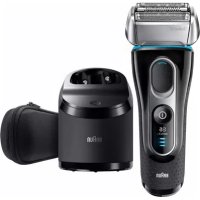



| Product type | Electric shaver |
| Brand | Braun |
| Model | 5195cc |
| Power supply | Rechargeable, cordless operation |
| Battery life | Up to 50 minutes of shaving |
| Quick charge | Yes (low charge indicator) |
| Water use | Washable under running water, usable in the shower |
| Shaving head | Floating head with MultiHeadLock lock (5 positions) |
| Trimmer | Retractable long hair trimmer |
| Display | Screen with indicators: charge, cleaning, travel lock, low battery |
| Travel lock | Yes (activate by holding on/off for 3 seconds) |
| Cleaning system | Clean&Charge station included (cleaning, charging, lubrication, drying) |
| Cleaning cartridge | CCR cartridge (ethanol/isopropanol-based liquid), lasts ~4 weeks |
| Manual cleaning | Under running water (with or without mild liquid soap) or with a brush |
| Lubrication | Oil supplied, apply once a week if cleaning with water |
| Shaving cassette | Replacement recommended every 18 months, model 52S/52B |
| Charging temperature | 5 °C to 35 °C |
| Safety | Use by children over 8 years under supervision; special cord non-replaceable |
| Warranty | 2 years, legal extension in France (hidden defects) |
| Included accessories | Special cord, Clean&Charge station, cleaning cartridge, protective cover, travel pouch (depending on model), oil |
Frequently Asked Questions - 5195cc BRAUN
User questions about 5195cc BRAUN
0 question about this device. Answer the ones you know or ask your own.
Ask a new question about this device
Download the instructions for your Razor in PDF format for free! Find your manual 5195cc - BRAUN and take your electronic device back in hand. On this page are published all the documents necessary for the use of your device. 5195cc by BRAUN.
USER MANUAL 5195cc BRAUN
(Sharecall charged at local rates)
www.service.braun.com
English
Our products are designed to meet the highest standards of quality, functionality and design. Thank you for your trust in Braun's quality and we hope you enjoy your new Braun product.
Read these instructions completely, they contain safety information. Keep them for future reference.
Warning
Your appliance is provided with a special cord set, which has an integrated Safety Extra Low Voltage power supply. Do not exchange or tamper with any part of it, otherwise there is risk of an electric shock. Only use the special cord set provided with your appliance.
If the appliance is marked C 492, you can use it with any Braun power supply coded 492-XXXX.
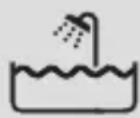
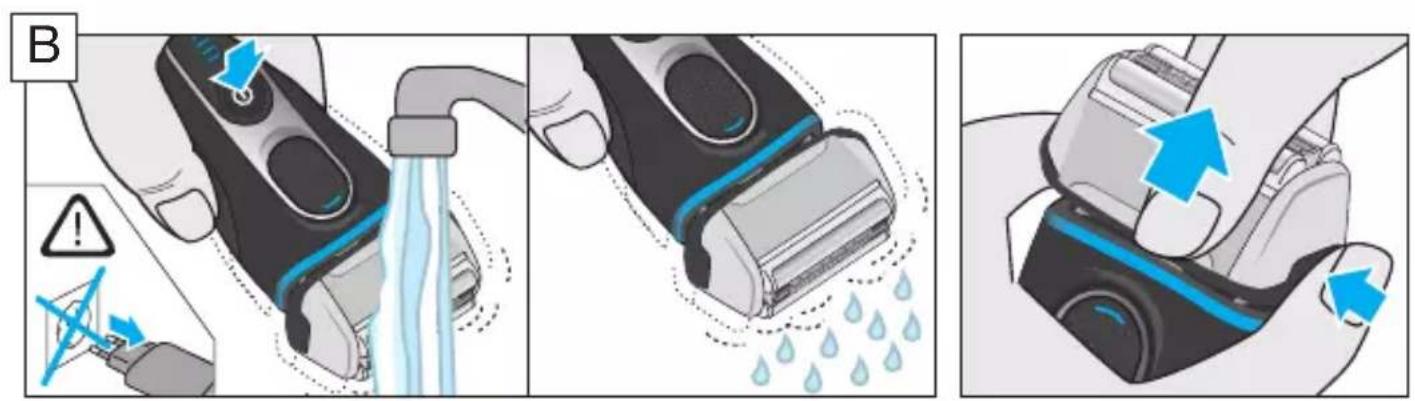
This appliance is suitable for cleaning under running water and use in a bathtub or shower. For safety reasons it can only be operated cordless.
Detach the shaver from the power supply before using it with water.
Do not shave with a damaged foil or cord.
This appliance can be used by children aged from 8 years and above and persons with reduced physical, sensory or mental capabilities or lack of experience and knowledge if they have been given supervision or instruction concerning the safe use of the appliance and understand the hazards involved. Children shall not play with the appliance. Cleaning and user maintenance shall not be made by children unless they are older than 8 years and supervised.
Clean&Charge Station
To prevent the cleaning fluid from leaking, ensure that the Clean&Charge Station is placed on a flat surface. When a cleaning cartridge is installed, do not tip, move suddenly or transport the station in any way as cleaning fluid might spill out of the cartridge. Do not place the station inside a mirror cabinet, nor place it on a polished or lacquered surface.
The cleaning cartridge contains a highly flammable liquid so keep it away from sources of ignition. Do not expose to direct sunlight and cigarette smoking nor store it over a radiator.
Do not refill the cartridge and use only original Braun refill cartridges.
Shaver
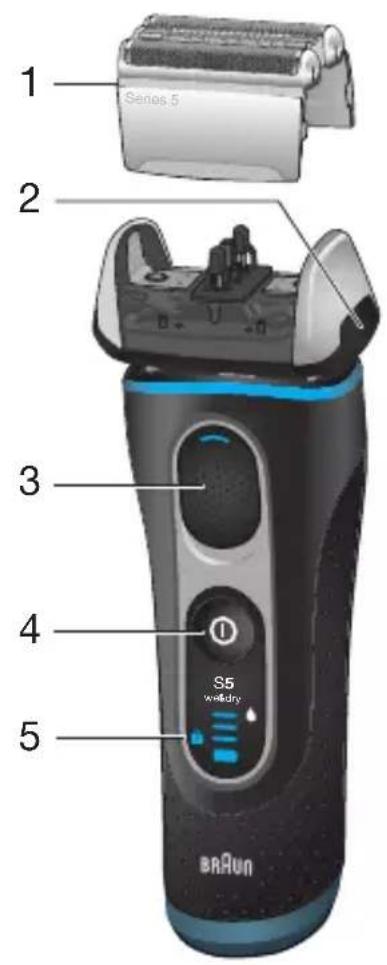
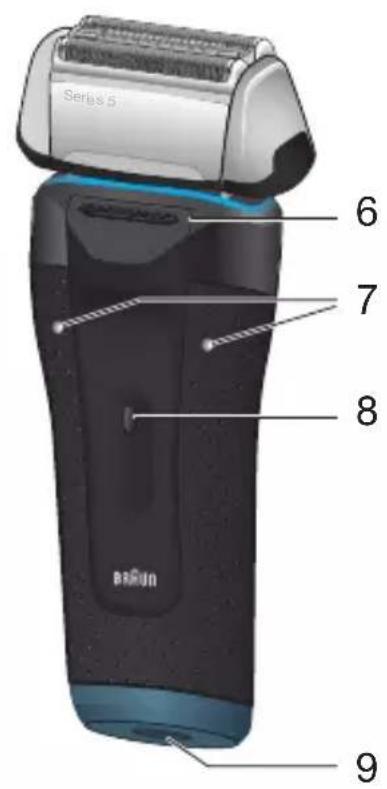
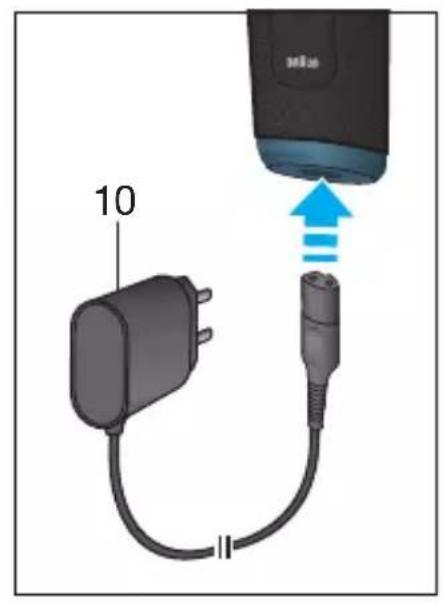
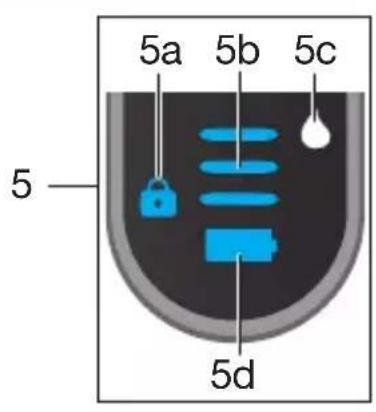
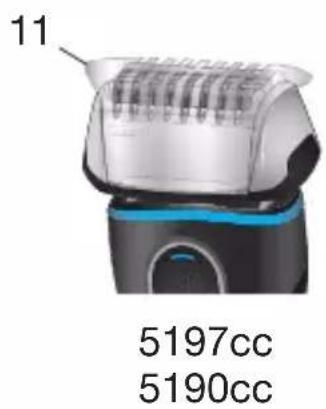
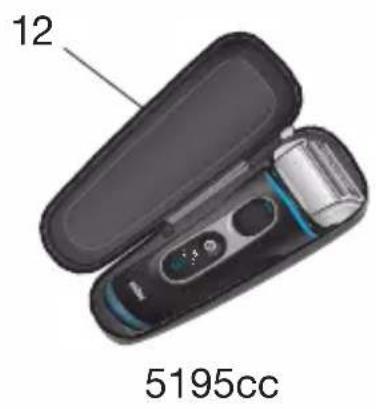
1 Foil & Cutter cassette 2 Cassette release button 3 MultiHeadLock switch 4 On/off switch 5 Shaver display 5a Lock symbol (travel lock) 5b Charging segments 5c Cleaning indicator 5d Battery symbol 6 Long hair trimmer 7 Shaver-to-station contacts 8 Release button for long hair trimmer 9 Shaver power socket 10 Special cord set (design can differ) 11 Protection cap 12 Travel case
* not with all models
First use and Charging
Connect the shaver to an electrical outlet by snapping the special cord set (10) into the shaver power socket (9) or via the Clean&Charge Station (see Chapter «Clean&Charge Station»).
Basic operating information
- A full charge provides up to 50 minutes of cordless shaving time. This may vary according to your beard growth and environmental temperature.
- Recommended ambient temperature for charging is 5°C to 35°C. The battery may not charge properly or at all under extreme low or high temperatures. Recommended ambient temperature for storage and shaving is 15°C to 35°C.
- Do not expose the appliance to temperatures higher than 50°C for extended periods of time.
- When the shaver will be connected to an electrical outlet, it may take some minutes until the display illuminates.
Charging / low charge
The charge status is shown in the shaver display (5).
- During charging the respective charging segment (5b) will blink.
- When the shaver is fully charged and connected to an electrical outlet, all 3 charging segments will light up for a few seconds. Then the display turns off.
- The battery symbol (5d) will flash red when the battery is running low. You should be able to finish your shave. When switching off the shaver, a beep sound reminds you of the low charge status.
Using the shaver
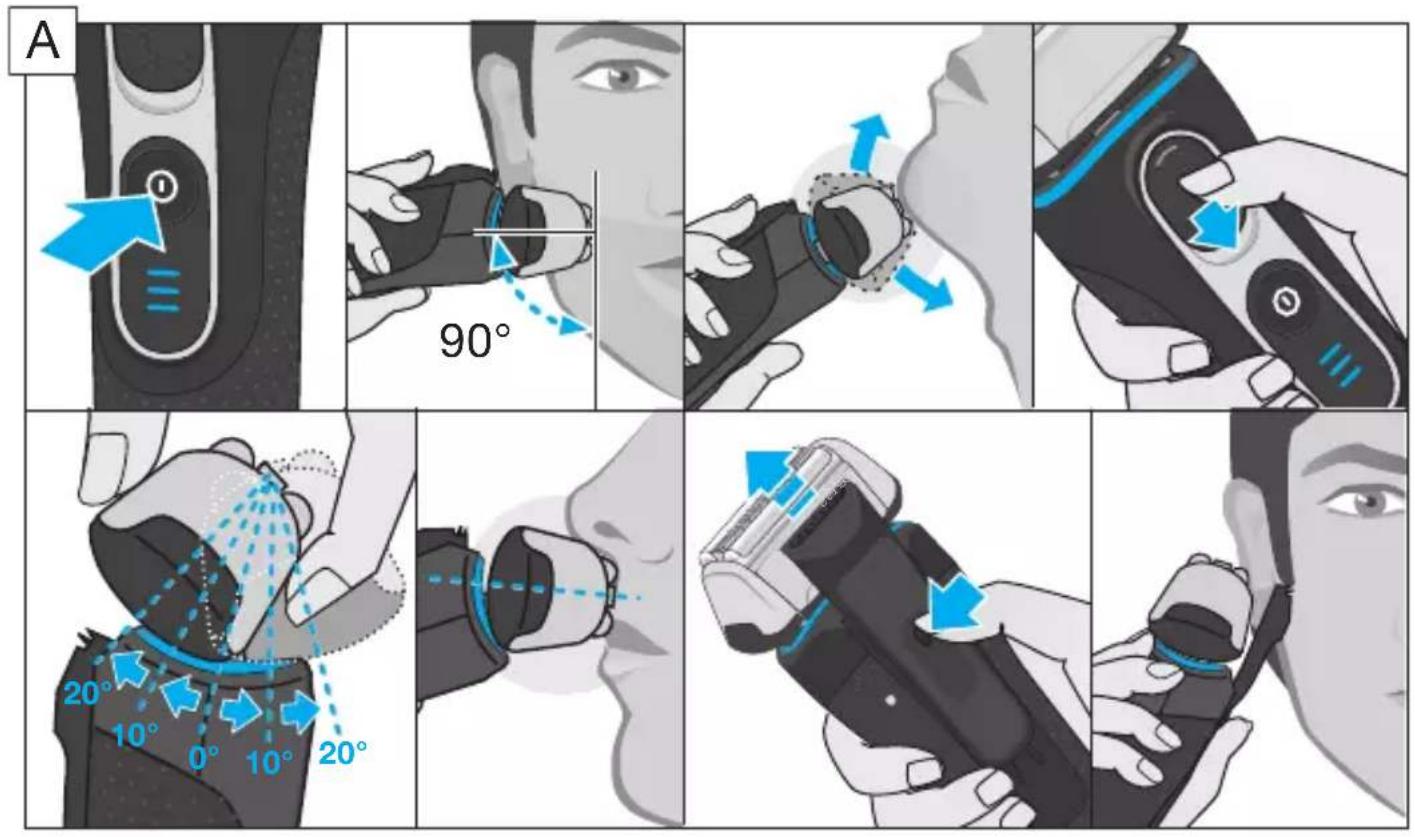
Press the on/off switch (4) to operate the shaver.
Tips for a perfect dry shave
For best results, Braun recommends you to follow 3 simple steps:
- Always shave before washing your face.
- At all times, hold the shaver at the right angle (90°) to your skin.
- Stretch your skin and shave against the direction of your beard growth.
MultiHeadLock switch (head lock)
- To shave hard-to-reach areas (e.g. under the nose) slide the MultiHeadLock switch (3) down to lock the shaver head. The shaver head can be locked in five positions.
- To change position, move the shaver head with your thumb and forefinger back or forth. It will automatically click into the next position.
- For automatic cleaning in the Clean&Charge Station the head lock should be released.
Long hair trimmer
To trim sideburns, moustache or beard press the release button (8) and slide the long hair trimmer (6) upwards.
Travel lock
The lock symbol (5a) lights up in the display when the shaver has been locked to avoid unintended starting of the motor (e.g. for storing it in a suitcase).
- Activation: By pressing the on/off switch (4) for 3 seconds the shaver is locked. This is confirmed by a beep sound and the lock symbol in the display. Afterwards the display turns off.
- Deactivation: By pressing the on/off switch for 3 seconds again the shaver is unlocked.
Manual cleaning of the shaver
Cleaning under running water
- Switch on the shaver (cordless) and rinse the shaver head under hot running water until all residues have been removed. You may use liquid soap without abrasive substances. Rinse off all foam and let the shaver run for a few more seconds.
- Next, switch off the shaver, press the release button (2) to remove the Foil & Cutter cassette (1) and let it dry.
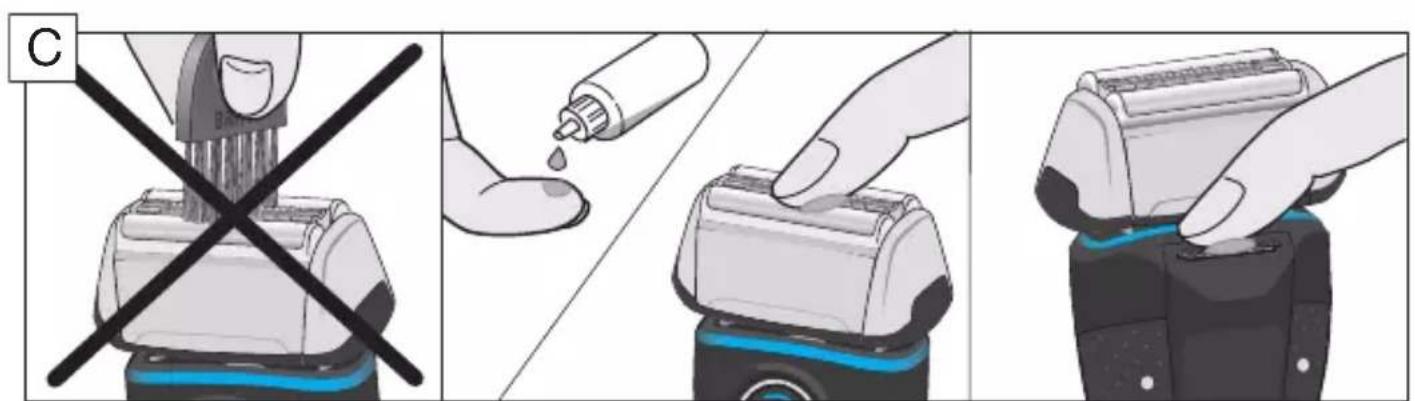
- If you regularly clean the shaver under water, then once a week apply a drop of light machine oil on top of the Foil & Cutter cassette.
The shaver should be cleaned after each foam usage.
Cleaning with a brush
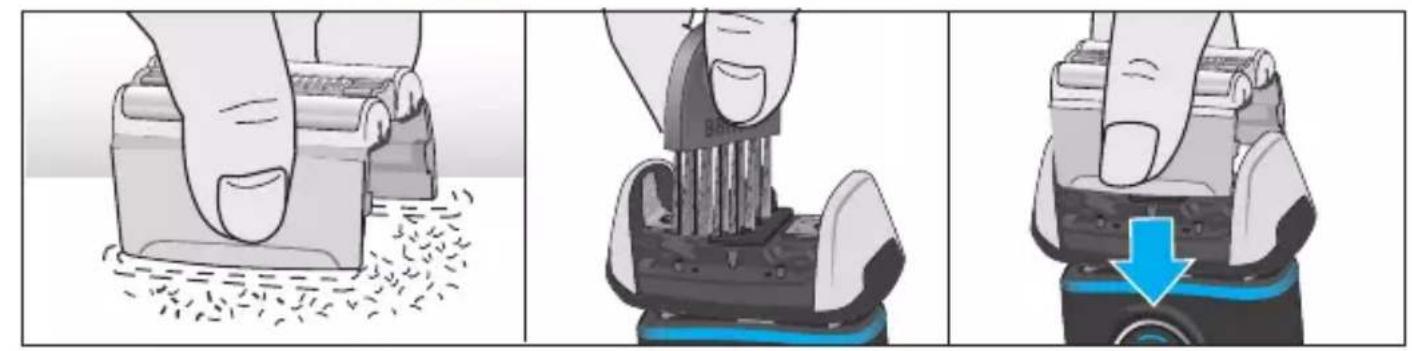
Switch off the shaver. Remove the Foil & Cutter cassette (1) and tap it out on a flat surface. Using the brush, clean the inner area of the pivoting head. Do not clean the cassette with the brush as this may damage it!
Clean&Charge Station (C&C)
The Clean&Charge Station has been developed for cleaning, charging, lubricating, disinfecting, drying and storing your Braun shaver.
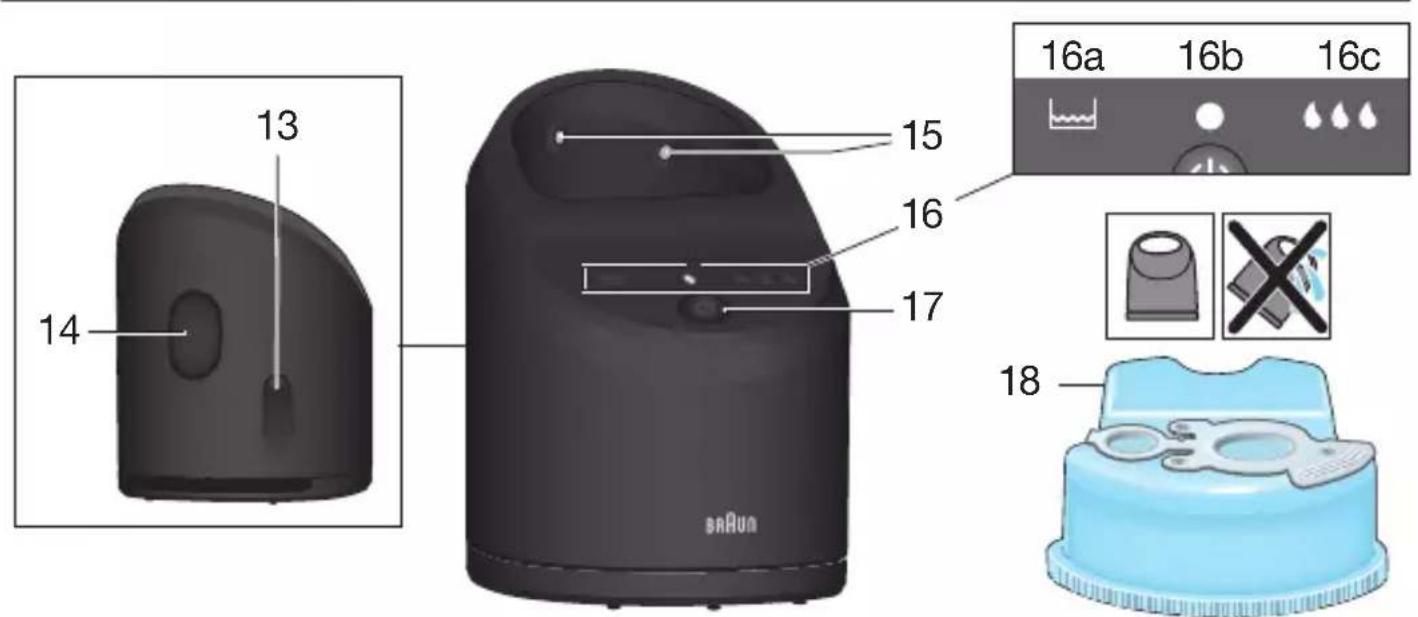
13 Station power socket 14 Lift button for cartridge exchange 15 Station-to-shaver contacts 16 Clean&Charge Station display 16a Level indicator 16b Status light 16c Cleaning program indicators 17 Start button 18 Cleaning cartridge
Installing the C&C
- Remove the protection foil from the C&C display.
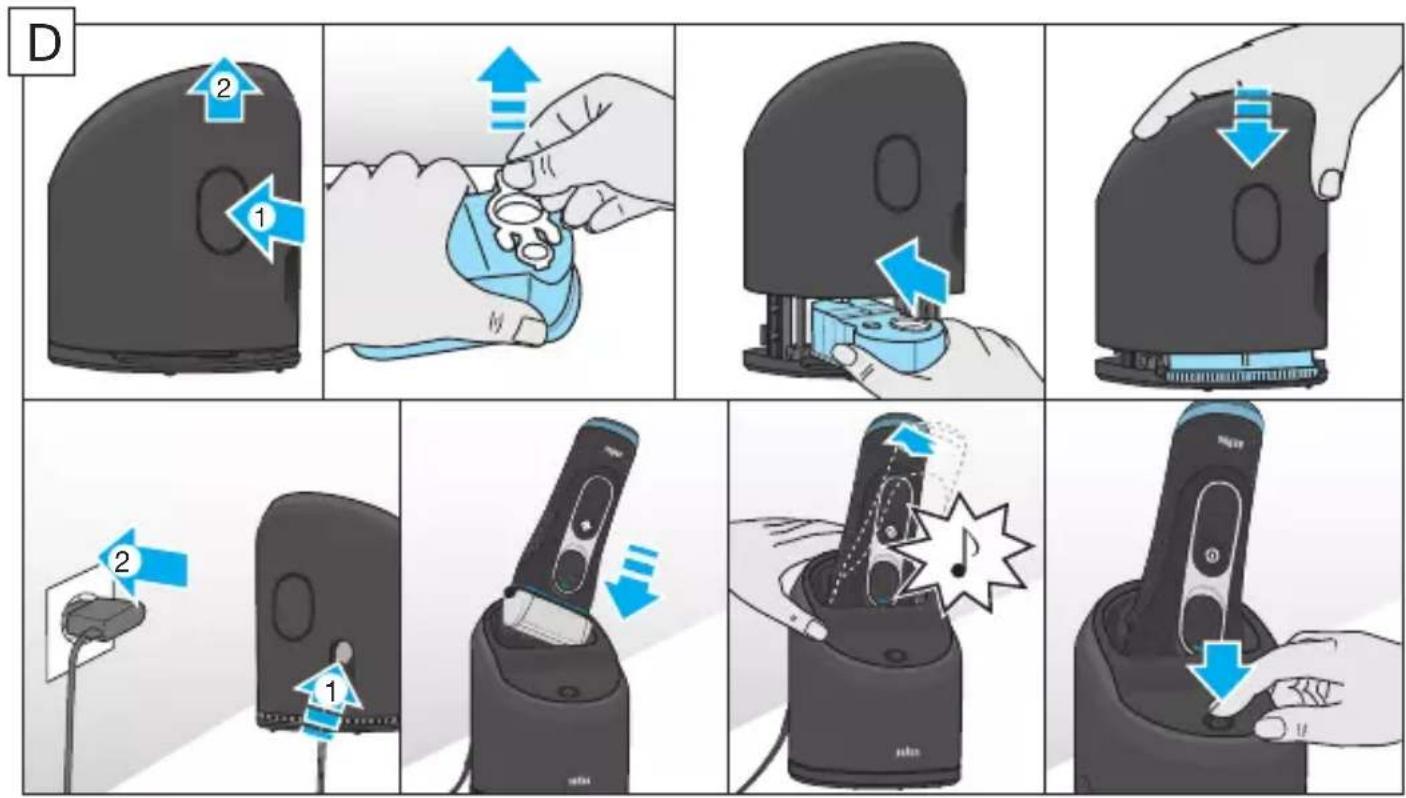
- Press the lift button (14) at the rear side of the C&C to lift up the housing.
- Hold the cleaning cartridge (18) down on a flat, stable surface (e.g. table).
- Carefully remove the lid from the cartridge.
- Slide the cartridge from the rear side into the base of the station until it snaps into place.
- Slowly close the housing by pushing it down until it locks.
- Using the special cord set (10), connect the station power socket (13) to an electrical outlet.
Using the C&C
Important: The shaver needs to be dry and free from any foam or soap residue!
Insert the shaver in the C&C upside down, with the front showing and released head lock (3).
The contacts (7) on the back of the shaver need to align with the contacts (15) in the C&C. Push the shaver in the correct position. A beep sound confirms that the shaver sits properly in the C&C.
The C&C analyzes the hygiene status. The status is shown by the cleaning program indicators (16c) in the C&C display (16).
Charging the shaver in the C&C
Charging will start automatically when the shaver has been placed in properly.
Cleaning the shaver in the C&C
When the cleaning indicator (5c) lights up in the shaver display, insert the shaver into the C&C, as described above.
Cleaning programs
short economical cleaning, normal level of cleaning, high intensive cleaning
Start automatic cleaning
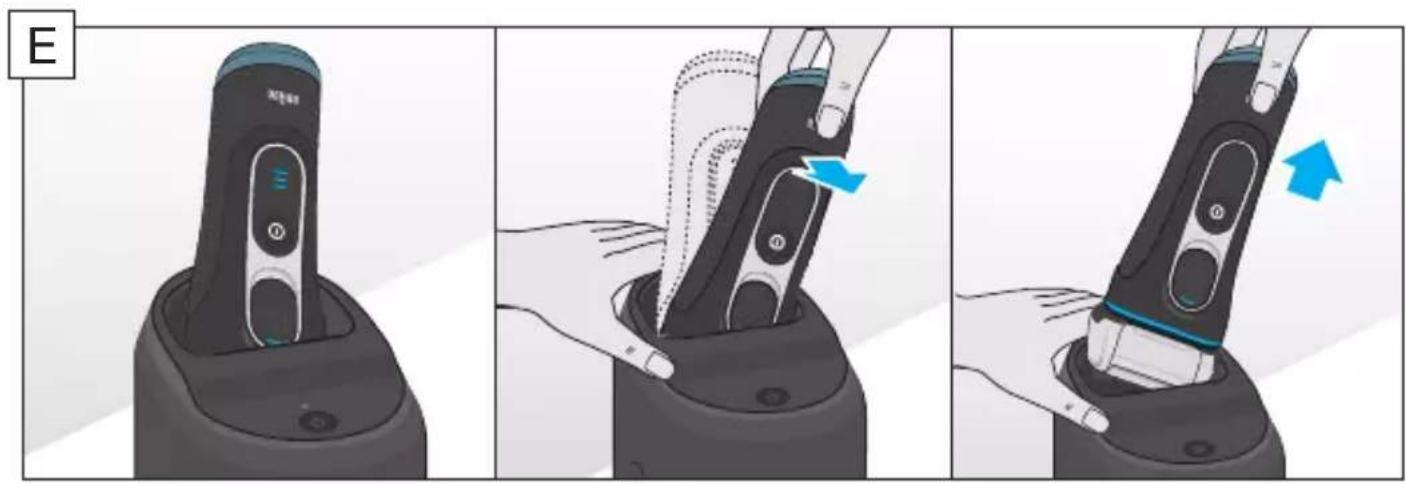
Start the cleaning process by pressing the start button (17). If the status light (16b) does not shine (the C&C switches to stand-by after about 10 minutes), press the start button twice. Otherwise, cleaning will not start. For best shaving results, we recommend cleaning after each shave.
Each cleaning program consists of several cycles, where cleaning fluid is flushed through the shaver head. Depending on your Clean&Charge Station model and/or program selected, the cleaning time takes up to 3 minutes. During this time, the status light blinks. Leave the shaver in the station for drying. It takes several hours until remaining moisture evaporates, depending on the climatic conditions.
After completing the cleaning and charging procedure, all indicators turn off.
Removing the shaver from the C&C
Hold the C&C with one hand and tilt the shaver slightly to the front to release it.
Cleaning cartridge / Replacement
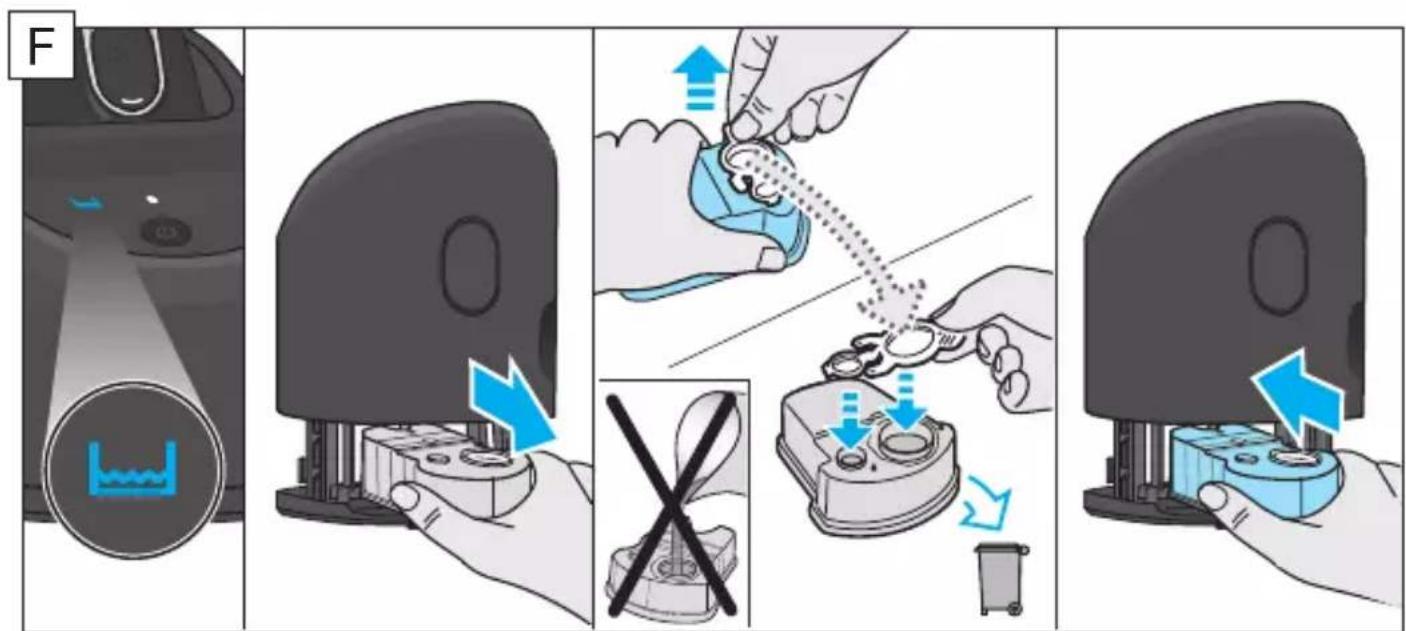
When the level indicator (16a) lights up permanently red, the remaining fluid in the cartridge is sufficient for about 3 more cycles. When the level indicator blinks red, the cartridge needs to be replaced - about every 4 weeks when used daily.
After having pressed the lift button (14) to open the housing, wait for a few seconds before removing the used cartridge to avoid any dripping. Before discarding the used cartridge, make sure to close the openings using the lid of the new cartridge, since the used cartridge will contain contaminated cleaning solution.
The hygienic cleaning cartridge contains ethanol or isopropanol (specification see cartridge), which once opened will naturally evaporate slowly. Each cartridge, if not used daily, should be replaced after approximately 8 weeks to ensure optimal disinfection. The cleaning cartridge also contains lubricants for the shaving system, which may leave residual marks on the outer foil frame and the cleaning chamber of the C&C. These marks can be removed easily by wiping gently with a damp cloth.
Accessories
Braun recommends changing your shaver's Foil & Cutter cassette every 18 months to maintain your shaver's maximum performance.
Available at your dealer or Braun Service Centres:
- Foil & Cutter cassette: 52S/52B
- Cleaning Cartridge: CCR
- Braun Shaver cleaner spray
Environmental notice
Product contains batteries and/or recyclable electric waste. For environment protection do not dispose of in household waste, but for recycling take to electric waste collection points provided in your country.
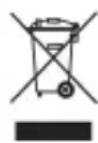
The cleaning cartridge can be disposed of with regular household waste.
Subject to change without notice.
For electric specifications, see printing on the special cord set.
Trouble-Shooting
| Problem Possible | reason Remedy | |
| SHAYER | ||
| Shaver does not charge completely and keeps blinking. | Ambient temperature is out of valid range. | Recommended ambient temperature for charging is 5 °C to 35 °C. |
| Charging does not start when connected to power socket. | 1. Sometimes charging could start delayed (e.g. after long storage). 2. Ambient temperature is out of valid range. 3. Special cord set is not plugged in properly. | 1. Wait a few minutes, if charging will start automatically. 2. Recommended ambient temperature for charging is 5 °C to 35 °C. 3. Special cord set needs to snap into place. |
| Unpleasant smell from the shaver head. | 1. Shaver head is cleaned with water. 2. Cleaning cartridge is in use for more than 8 weeks. | 1. When cleaning the shaver head with water only use hot water and from time to time some liquid soap (without abrasive substances). Remove Foil & Cutter cassette to let it dry. 2. Change cleaning cartridge at least every 8 weeks. |
| Battery performance dropped significantly. | 1. Foil and cutter are worn which requires more power for each shave. 2. Shaver head is regularly cleaned with water but not lubricated. | 1. Renew Foil & Cutter cassette. 2. If the shaver is regularly cleaned with water, apply a drop of light machine oil on top of the foil once a week for lubrication. |
| Shaving performance dropped significantly. | 1. Foil and cutter are worn. 2. Shaving system is clogged. | 1. Renew Foil & Cutter cassette. 2. Soak the Foil & Cutter cassette into hot water with a drop of dish liquid. After-wards rinse it properly and tap it out. Once dry apply a drop of light machine oil on the foil. |
| Shaver head is damp. | 1. Drying time after automatic cleaning was too short. 2. Drain of the Clean&Charge Station is clogged. | 1. Clean directly after shaving to allow enough time for drying. 2. Clean the drain with a wooden tooth-pick. |
| CLEAN&CHARGE STATION | ||
| Cleaning does not start when pressing the start button. | 1. Shaver is not placed properly in the Clean&Charge Station. 2. Cleaning cartridge contains not enough cleaning fluid (display blinks red). | 1. Insert shaver into the Clean&Charge Station and push it to the rear side of the station (contacts of the shaver need to align with contacts in the station). 2. Insert new cleaning cartridge. Press start button again. |
| Increased consumption of cleaning fluid. | Drain of the Clean& Charge station is clogged. | - Clean the drain with a wooden tooth-pick. - Regularly wipe the tub clean. |
Guarantee
We grant a 2 year guarantee on the product commencing on the date of purchase.
Within the guarantee period we will eliminate any defects in the appliance resulting from faults in materials or workmanship, free of charge either by repairing or replacing the complete appliance at our discretion.
This guarantee extends to every country where this appliance is supplied by Braun or its appointed distributor.
This guarantee does not cover: damage due to improper use, normal wear or use as well as defects that have a negligible effect on the value or operation of the appliance. The guarantee becomes void if repairs are undertaken by unauthorised persons and if original Braun parts are not used.
To obtain service within the guarantee period, hand in or send the complete appliance with your sales receipt to an authorised Braun Customer Service Centre (address information available online at www.service.braun.com).
For UK only:
This guarantee in no way affects your rights under statutory law.
Clean&Charge Station
Clean&Charge Station (C&C)
Installation of the Clean&Charge Station
Clean&Charge Station
Clean&Charge Station (C&C)
Installation of the Clean&Charge Station
Transport lock
Use of the self-cleaning station
Press the on/off button (4) to activate the self-cleaning station.
For perfectly dry shaving
For best results, we recommend that you follow these steps:
- Wet the shaver before shaving your face.
- Hold the shaver at a right angle (90°) to the skin. Stretch the skin with your free hand and shave against the direction of hair growth.
Head lock (lock the head)
For shaving hard-to-reach areas (e.g., under the nose), use the head lock (3) to tilt the head of the shaver. The head of the shaver can be locked in 5 positions. To change the position, press the head of the shaver with your finger and move it forward or backward. It will automatically click into the next position. For automatic cleaning in the cleaning and charging station, the head lock must be released.
Long hair trimmer
For trimming sideburns, mustache, and beard, use the long hair trimmer (8) and the long hair trimmer attachment (6).
Locking for travel
The lock symbol (5a) appears on the display when the shaver needs to be locked to prevent unintentional starting of the motor (e.g., when packing in a suitcase).
- Activation: The shaver is locked by pressing the on/off button (4) for 3 seconds. This is confirmed by an acoustic signal and the lock symbol on the display. After that, the display goes out.
- Deactivation: The shaver is unlocked by pressing the on/off button for 3 seconds.
Cleaning the shaver
Charging the shaver in the cleaning station
Charging starts automatically when the shaver is placed in the station correctly.
To charge the battery (5c) of the shaver, place the shaver in the C&C as described above.
Quick charge, normal charge, high-intensity charge
The battery indicator (5d) lights up red when the battery is charging. You can finish the shaving process. When the shaver is turned off, a sound signal will remind you of a low battery.
Using the shaver
Press the button (4) to turn the shaver on or off.
Tips for a perfect dry shave
For optimal shaving, Braun recommends following 3 simple steps:
- Always shave before washing your face.
- Always hold the shaver at the correct angle (90°) to your skin.
- Stretch your skin and move the shaver in the direction opposite to hair growth.
MultiHeadLock system (head lock)
When the cleaning indicator (5c) appears on the shaver display, insert the shaver into the C&C block, following the instructions above.
Cleaning program
Quick clean, normal clean, high-intensity clean
Start automatic cleaning
To start the cleaning process, press the start button (17). If the status light (16b) does not turn on (the device switches to standby mode after about 10 minutes), press the start button twice. Otherwise, the cleaning process will not start. For a better result, it is recommended to run the cleaning cycle after each shaving procedure.
Each cleaning program consists of several cycles of passing the cleaning fluid through the shaver head. The cleaning time takes up to 3 minutes and depends on the model of the Clean&Charge unit and/or the selected program. During this time, the status light will blink. Leave the shaver to dry in the unit. Any remaining moisture will evaporate over several hours (time depends on climatic conditions).
When the cleaning and charging processes are complete, all indicators go out.
Removing the shaver from the Clean&Charge unit
Hold the Clean&Charge unit with one hand, tilt the shaver slightly forward and pull it out.
Replacing the cleaning cartridge
If the level indicator (16a) is constantly lit red, this means that there is approximately 3 cycles of cleaning fluid left in the cartridge. When the level indicator flashes red, the cartridge must be replaced - with daily use, this should be done approximately every 4 weeks.
After pressing the release button (14) to open the shaver head, wait a few seconds before removing the cartridge to prevent dripping. To avoid re-contamination of the used cartridge, close the opening with the cap. Remove the new cartridge, as the used cartridge may contain contaminated cleaning solution.
The cleaning cartridge contains ethanol or isopropanol (characteristics are indicated on the cartridge body), which evaporates slowly after opening. For optimal disinfection of each cartridge, if it is not used daily, it should be replaced approximately every 8 weeks. The cleaning cartridge also contains lubricating materials for the shaving system, which may remain on the outside of the shaving foil and in the cutter chamber of the Clean&Charge unit. These residues can be easily removed by carefully wiping the surfaces with a damp cloth.
Accessories
To maintain optimal shaving performance, Braun recommends replacing the shaver head with the foil and cutter block every 18 months.
Available from your dealer or Braun Service Centers:
Shaver head with foil and cutter block: 52S/52B - Cleaning cartridge: CCR - Braun Shaver Cleaner
Environmental protection
The product contains batteries and/or recyclable electrical waste. To protect the environment, do not dispose of the appliance with household waste. Take it to a collection point for electrical waste in your country.
The device can be used together with ordinary household waste.
The content may be changed without prior notice.
Electrical characteristics are indicated on the cable marking.
If a malfunction occurs, measures can be taken to eliminate it.
| Брітва | ||
| Брітва не заря-хается полно-стю и вce В装配 мигаet. | Temпература okружаю-шей среы нахочич.TВе дочимого диana-зona. | Рекомендуется заряжать ріпбор ріп Temператуpe okружаюшей среы ot 5°C до 35°C. |
| Заряда не нашинается ріп пожлічесни к олікгіческій розетke. | 1. Иногда заряда может начatable с задержков (нанри-Mер, посы діл'tь-Horо xpanehу).2. Temпература okружаюшей сreme нахов-DITСВЕДОПТСВЕДОПТСВЕДОПТСВЕДОПТСВЕДОПТСВЕДОПТСВЕДОПТСВЕДОПТСВЕДОПТСВЕДОПТСВЕДОПТСВЕДОПТСВЕДОПТСВЕДОПТСВЕДОПТСB. | 1. П\'о\'ождnte HeCKOLBJKO MInHyT,Заряда Начн\'ется АВТOMATUCHESКИ.2. Р\'ekomer\'detyETcZap\'жать р\'пбор р\'п Temператуpe okружаюшey creme ot 5°C до 35°C.3. С\'ецальній к\'абелі пітанney Heo6-xODIMO 3aФИКСИРOBaTB DoJIXHbIMобразом. |
| Н\'ер\'ягній 3azanax, кOTOPь INCXODIT OT rOLOBKN BrpNTbI. | 1. Брітвения г olOBka npombyta BOДОД.2.Чисьшій kartrpv'dж Ис\'ользOBаЛВ Teue-Hne CSPOKA,п\'р\'вьlaшa-юшero 8 HeDEJIb. | 1. П\'р\'п\'омь\'ванNiBnO HeiRtBENHOJ rOLOBKN BOДОД ИС\'ОЛьЗУМ TeJny BOY U BPEMЯ O TВPEMeH NEMHOrO XnDkoGOMbIa (6e3 a6pa-3INBbIX BeIeCTB). C`h`m`te 6peI0-7uO CEkTuN I pexyuzni 6BJOK n da'nte NIM BblCOxHytB.2. 3amEny ChivstяшERO kartrpv'dж с\'e-dyetПр\'obODITb MInHmym pa3 B 8 HeDEJIb. |
| П\'р\'иЗвodіntelb-Hoc'tb akKumlya-Topa cyuge-CTBeHNO CHNXeHa | 1. Д�� кадо\"пpoze-dуры 6brp'tь TTreby-etcra NOBVIIshHoe KOJIuceCTBO 3HeprNi BCJIeDCSTBVE I3HOCa CETKN I pexyuzeRo 6lOka.2.Пр\'omb\'ьKa 6brp'tьн-Hoуг-л\'ярno, Ho 6e3 sma3bl-BaHnia. | 1. 3amEnite Kaccety c cetko i pexy-zimm 6Jokom.2. E\'cn BYI peyIy\rno pr\'ombyBaete 6prTBy BOДОI, pa3 B HeDeJIIO HaHO-CITE kaPJIIO CBETLORO MaShINHOrO MacJa HaberpX CETKN ДЯ eCma3bl-BaHnia. |
| Ф�ф�тИВHOCТь брITья суUCE- СТВЕННО СHI- ЖЕHA | 1. ИЗнош�а сетka и рекуший бlosк. 2. 3асорва срITBEнная систema. | 1. 3amehnte kaccety c cetkoi n pejux- шим sbLOkom. 2. 3amoyte kaccety c spITbENHOI cetkoi n pejuxim sbLOkom B tenloI BOde C kaJIpei cpeICTBa ДЯ МыТь посydы. Пocle замачиваня Тца- Teьно помоITE ee i CTpЯxнITE OCTaTKI BOdI. Пocle ВьICbIXAHNY HaHECnTE Ha CETKY KApIIIO CBETILOTO MaUHHOrO MaCla. |
| БрITВЕннaya ГOLOBКA Влж- най. | 1. Врем Yblscbixanria посл abTOMaTuce- ской очNTКи БлJO нedoctaToCHbIM. 2. 3асорен cSTOK bLOka пОдзapYДКи I OChSTKIN Clean&Charge. | 1. Ochшaite spITBY HeNOCpeIcTBENHO пocle spITbY,ЧТБы OCTaВИТь ДОCTaTOUHO BpeMeH NДЯ BvICbIXa- ня. 2. Cnomoшью 3ybouNCTKN IIpouchntite CTOK. |
| Блok поэзардки и очAstКи Clean&Charge | ||
| При Нжатини Na КнОПКУ рUCKa ОчAstКа He pro- иxCODIT. | 1. БрITВа He nprabIVbHo уstahOBJIeHa B sbLOke пдзapYДКи I OChSTKIN Clean&Charge. 2.Чисшй karTpriJx coderpXIT HeDOSTA- TOUHoe KOJIuYeCTBO pactBOPa (эКраH MIRaET КpacHBIM CLE- Tom). | 1. BcTaBte spITBy B sbLOk loDzapYdkn и очAstКи Clean&Chargeи пpr- ЖмITE ee K TblbHOn CTOpOHe bLOka (KoHTaKTbI spITbI DoJXHbI COBna- ДАТь с кOTaKTaMn bLOka). 2. UctahOBtte HOBVЧИSTЯшni Kap- tridж. Вовь нахмITE KhoNkY pUCKa |
| Повышени pacxOD chnstя- шero pactBopa. | 3асорен cSTOK bLOka пдзapYДКи I OChSTKIN Clean&Charge. | - Cnomoшью 3ybouNCTKN IIpouchntite CTOK. - PerugЯрно пotиралу Te EMKOCTb doUncSta. |
The electric shaver Braun Type 5769 with power supply unit 492-XXX and cleaning and charging system Type 5430.
If the device (for example, on the handle) is marked 492, it can be used with all Braun power supplies marked 492-XXXX.
Type 492-XXXX power supply means that only Braun power supplies marked 492-XXXX can be used.
Power supplies of type 492-XXX are a series of power supplies with identical electrical characteristics; instead of the letters "X" there can be digits from 0 to 9: they are used for internal differentiation of the manufacturer.
Trimmer for long hair
For beard, mustache, or sideburns, press the release button (8) and insert the long hair trimmer (6) into the device.
Locking and Transport
The lock symbol (5a) appears on the display when the device has been locked to prevent unintentional start (e.g., for storage in a suitcase).
- Activation: The shaver is locked by pressing and holding the on/off switch (4) for three seconds. This is confirmed by an acoustic signal and the lock symbol on the display. After that, the display goes out.
- Deactivation: The shaver is unlocked by pressing and holding
- the on/off switch again for three seconds.
Pуне очишени брntви
OuHnHnPiNpOToHIO BDOIO
- YbIMKHiTb 6pntBy (6e3 πiδ'εdHaHnJa Do Jxepela KINBHeHHa) Ta npomnTe iI roJIbKy πiD rapiyOIO npOTouHOIO BOIOO, DOKN He 6yde yCyHyTO Bci 3aIIuKn BOLOCCra. MoXHa BVkOpNCToBvTu PiKe MIno 6e3 a6pa3NBHX peOBoH. 3MnTe BCIo NiHy Ta He BmNKaIte 6pntBy ige DeKiIbKa cekyHd. -Писяцьог ВIMКНИТБбPNTBY,нATNCHITbHa KHONKY BUNBIBHHeHHa KACETn (2),цo6 BnHЯТи kaceTy Foil & Cutter (1),i BnCywiTb ii. -ЯкшоBN peуларno MneTe 6pntbY y BoDi,TO pa3 Ha TnXdEnb HaneCiTb KpaPnHy JERKOro MaunHHoro MaCTnla Ha nobepxHIO kacetn Foil & Cutter.
OuHsEHHaIToyKoIO
BnMknItb 6pntBy. BnMiTb kaceTy Foil & Cutter (1) i noctykaite Heio no nlocki nOBepxHi. BnKOpncTObyuOuH uToUky, ouNCTiTB BHyTpIshHIO 3OHy rOlIBKn, yKa oBeptaetbcra. He Tpe6a uNCTnTu KaceTy uToUkoIO, 6o ce MoKe NowKOdHTn II.
Пристрий заочиени Та зарджанна Clean&Charge (C&C)Опс та komплектнICTь
CTaHcIIO Clean&Charge 6yI0 po3pObeHo IJRA OUYUeHHN, 3ApJxKaHHN, 3MaUyBaHHN, De3iHfikyBaHHN, BvCyuYBaHHN Ta 36epirAHN BaWoI 6pntBn Braun.
13 Po3'Em XnBJIeHHa CtaHci 14ПиДиOMHa KHONKaДЯЗamiHiKapTpNiJaKa 15 KoHTaKTn MIX CTaHciEIO Ta 6pntBOIO 16 Dincnpei ctaHci Clean&Charge 16a IndkaTop pIBHpiDHHnOuOuHHeHH 16b CbiTIOBni iHnKaTOp cTaTycy 16c IndikaTopi npoqrmaOn Ounuienn 17 Khonka 3anycky 18 YnCTayn KApTpnuK
YctaHOBJIeHHcC&C
3Himitb 3axnchny nIiBky 3 dincnpea C&C. - Hatnchitb niDiomHy KhoNky (14) ha 3aDiHni naHeni C&C, 0o6 NiDnTn Kopnyc. - POKlaɪdɪt b u nctəyɪn Kaptpnɪdʒ (18) h a n llocky ctiɪkny nobepxHIO (hʌnpɪklaɪd h a ctiɪl). - ObepexHo 3HiMiTb KpNtKy 3 KapTpNtJka. - Пocуньт e Kaptrnix i3 3aHbOi nAneI IO OCHOBN CTaHcii TaK, uO6 BIn BCTaB Ha MicuE. - NobilbHO 3akpniTe Kopnyc, HatnCKaIOuHa HbOro, Do KlaaHnra. 3a donomoroio cneuaibnoro npoBody (10) n'd'ecnHaite po3'em XNBHeHnaCTaHci (13) do eIektpuHoi pO3eTKn.
BnKOpncTaanHcC&C
Baxnbo: 6pntba ma e 6ytn cyxoo i he miCTtu nHH a6o 3aunskib mna.
BcTaBTe 6pntbY HxKhboIO paHeJIIO doIopn y C&C, 0o6 6ylo BnIDHO nepeHIO qactHy Ta BnBilbHeHNI φikCaTOp roJIbKn (3).
KoHTaKTn (7) Ha 3aHni yacTHi 6pntBn MaOTb 6yTu npuNacObaH i Do KOHTaKTiB (15) y C&C. WToBXHITb 6pNTBy B npaBnIbHe NIOJoxeHHra. 3ByKObN CNHaJI NiTBePdntb, 0o 6pNTBa pO3MiUeHa HaleXHM YHOM y C&C.
C&C aHaJI3ye cTaTyc ririEHIuHocTi. IHNiKaTOpN npoRpaMn OUnIeHHa (16c) BiO6paXaIoTB cTaTyc Ha IincnJIe i C&C (16).
The appliance is automatic; calibration will be carried out by a reliable unit.
Calibration in C&C
When the calibration indicator (5c) lights up, insert the brush into the C&C, as described above.
Cleaning programs
Short economical cleaning cycle Intensive cleaning
Wear automatic cleaning
Press the start button (17) to start the cleaning process.
If the status indicator light (16b) does not light up (the C&C switches to standby mode after approximately 10 minutes), press the start button again.
The cleaning cycle does not start. For best results, we recommend cleaning after each use.
When the cleaning program consists of several cycles, the brush is rinsed during them. Depending on your Clean&Charge station and/or the selected cleaning program, this takes up to three minutes. During this time, the status indicator light flashes. Leave the brush in the station to dry. Depending on climatic conditions, water residues may evaporate over several hours.
The warranty does not cover the following cases: damage caused by improper use, normal wear of parts (e.g., brushes for the handle or the shaver head), defects that have a negligible effect on the operation of the device. The warranty becomes void if repairs are carried out by unauthorized persons or if non-original spare parts from the manufacturer are used.
The service life of Braun products is covered by a warranty for two years from the date of purchase or from the date of manufacture, if the date of purchase cannot be determined.
In the event of a claim under the terms of this warranty, return the product in its complete packaging as described in the original operating instructions together with the warranty card to any service center officially authorized by the manufacturer.
All other claims, together with claims for damages due to wear of parts, are excluded unless liability is established by law.
The manufacturer does not provide a warranty for:
- Defects caused by force majeure circumstances;
- Use for professional purposes or for the purpose of obtaining profit;
- Violation of operating instructions; - Incorrect installation of other power supply networks (if applicable);
- Changes due to technical modifications; - Mechanical damage
- For saws that work with guide bars - working with unsuitable or worn guide bars, damage caused by worn or cracked guide bars;
- Damage caused by animals, rodents, and insects (including cases of rodents and insects found inside the devices) - due to gnawing or damage to the wiring.
Country of origin: Germany Year of manufacture
To determine the year of manufacture, refer to the 4-digit production code starting with PC located near the type plate. The first digit of the production code refers to the last digit of the year of manufacture. The next three digits refer to the day in the year of manufacture. Example: "PC6059" - The product was manufactured on day 059 of 2016.
(1) 20 (2)
gblg aagj 1
2
wgl 3
4
5
()5a
J 5b
5c
4yj 5d
6
abdoJy aisloJI cLwOxo 7
JgBj 8
4y11 4slo 1y85 wla9
(10
Clean&Charge 19 (9)

Clean&Charge
Please note down the suggested replacement date (in 18 months from now) below replacement part reference number.
52S/52B

FR: Please note the suggested replacement date (18 months from now) below the part numbers. PL: Please note the suggested replacement date (18 months from now) below the main part numbers. CZ: Please note the suggested replacement date (18 months from now) below the main part numbers. SK: Please note the suggested replacement date (18 months from now) below the main part numbers. HU: Please note the suggested replacement date (18 months from now) below the main part numbers. HR: Please note the suggested replacement date (18 months from now) below the main part numbers. SL: Please note the suggested replacement date (18 months from now) below the main part numbers. TR: Please note the suggested replacement date (18 months from now) below the part numbers. RO: Please note the suggested replacement date (18 months from now) below the part numbers. BG: Please note the suggested replacement date (18 months from now) below the main part numbers. RU: Please note the suggested replacement date (18 months from now) below the main part numbers. UA: Please note the suggested replacement date (18 months from now) below the main part numbers.

- ENGLISH
- WARNING
- CLEAN&CHARGE STATION
- SHAVER
- FIRST USE AND CHARGING
- BASIC OPERATING INFORMATION
- CHARGING / LOW CHARGE
- USING THE SHAVER
- TIPS FOR A PERFECT DRY SHAVE
- MULTIHEADLOCK SWITCH (HEAD LOCK)
- LONG HAIR TRIMMER
- TRAVEL LOCK
- MANUAL CLEANING OF THE SHAVER
- CLEANING UNDER RUNNING WATER
- CLEANING WITH A BRUSH
- CLEAN&CHARGE STATION (C&C)
- INSTALLING THE C&C
- USING THE C&C
- IMPORTANT: THE SHAVER NEEDS TO BE DRY AND FREE FROM ANY FOAM OR SOAP RESIDUE
- CHARGING THE SHAVER IN THE C&C
- CLEANING THE SHAVER IN THE C&C
- CLEANING PROGRAMS
- START AUTOMATIC CLEANING
- REMOVING THE SHAVER FROM THE C&C
- CLEANING CARTRIDGE / REPLACEMENT
- ACCESSORIES
- ENVIRONMENTAL NOTICE
- TROUBLE-SHOOTING
- GUARANTEE
- FOR UK ONLY
- INSTALLATION OF THE CLEAN&CHARGE STATION
- TRANSPORT LOCK
- USE OF THE SELF-CLEANING STATION
- FOR PERFECTLY DRY SHAVING
- HEAD LOCK (LOCK THE HEAD)
- LOCKING FOR TRAVEL
- CLEANING THE SHAVER
- CHARGING THE SHAVER IN THE CLEANING STATION
- MULTIHEADLOCK SYSTEM (HEAD LOCK)
- CLEANING PROGRAM
- REMOVING THE SHAVER FROM THE CLEAN&CHARGE UNIT
- REPLACING THE CLEANING CARTRIDGE
- ENVIRONMENTAL PROTECTION
- TRIMMER FOR LONG HAIR
- LOCKING AND TRANSPORT
- PУНЕ ОЧИШЕНИ БРNTВИ
- OUHNHNPINPOTOHIO BDOIO
- OUHSEHHAITOYKOIO
- ПРИСТРИЙ ЗАОЧИЕНИ ТА ЗАРДЖАННА CLEAN&CHARGE (C&C)ОПС ТА KOMПЛЕКТНICTЬ
- YCTAHOBJIEHHCC&C
- BNKOPNCTAANHCC&C
- BAXNBO: 6PNTBA MA E 6YTN CYXOO I HE MICTTU NHH A6O 3AUNSKIB MNA
- CALIBRATION IN C&C
- WEAR AUTOMATIC CLEANING
- COUNTRY OF ORIGIN: GERMANY YEAR OF MANUFACTURE
- CLEAN&CHARGE
Brand : BRAUN
Model : 5195cc
Category : Razor