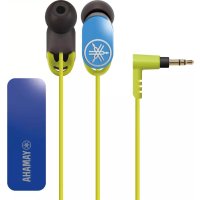
EPHWS01 - Earphones YAMAHA - Free user manual and instructions
Find the device manual for free EPHWS01 YAMAHA in PDF.


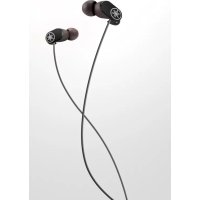
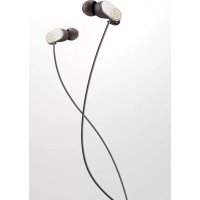
| Product type | In-ear wireless headphones |
| Brand | Yamaha |
| Model | EPH-WS01 (earphones) / EPH-BR01 (receiver) |
| Power | Rechargeable lithium-polymer battery, charging via microUSB, 2 h charge, 5 h battery life in playback/communication |
| Connectivity | Bluetooth 4.0, profiles A2DP, AVRCP, HFP, HSP, codecs SBC and aptX®, range ~10 m |
| Main functions | Play/pause, volume control, track selection, answering calls, voice control/Siri, multipoint connection (2 devices) |
| Microphone | Built-in on Bluetooth receiver |
| Water resistance | Earphones resistant to rain and perspiration (receiver and plug are not waterproof) |
| Included accessories | Earphone tips (4 sizes: L, M, S, XS), ear hooks, smart cable support, USB cable |
| Care and cleaning | Clean with a soft dry cloth; let dry completely if earphones get wet; do not use a hairdryer |
| Safety | Do not use while driving; avoid prolonged listening at high volume; keep out of reach of children; do not disassemble |
| Spare parts | Replaceable earphone tips (multiple sizes), ear hooks |
| Reparability | Have any repairs done by an authorized Yamaha dealer |
| Warranty | 1 year (Canada); CEE/CH coverage according to terms |
| General information | FCC/IC certifications, WEEE directive, compatible with most Bluetooth devices |
Frequently Asked Questions - EPHWS01 YAMAHA
User questions about EPHWS01 YAMAHA
0 question about this device. Answer the ones you know or ask your own.
Ask a new question about this device
Download the instructions for your Earphones in PDF format for free! Find your manual EPHWS01 - YAMAHA and take your electronic device back in hand. On this page are published all the documents necessary for the use of your device. EPHWS01 by YAMAHA.
USER MANUAL EPHWS01 YAMAHA
MANUAL DE INSTRUÇÕES
Refer to “Part names / how to use” on P. 1.
FCC INFORMATION (for US customers)
1 IMPORTANT NOTICE: DO NOT MODIFY THIS UNIT!
This product, when installed as indicated in the instructions contained in this manual, meets FCC requirements. Modifications not expressly approved by Yamaha may void your authority, granted by the FCC, to use the product.
2 IMPORTANT: When connecting this product to accessories and/or another product use only high quality shielded cables. Cable/s supplied with this product MUST be used. Follow all installation instructions. Failure to follow instructions could void your FCC authorization to use this product in the USA.
3 NOTE: This product has been tested and found to comply with the requirements listed in FCC Regulations, Part 15 for Class “B” digital devices. Compliance with these requirements provides a reasonable level of assurance that your use of this product in a residential environment will not result in harmful interference with other electronic devices.
This equipment generates/uses radio frequencies and, if not installed and used according to the instructions found in the users manual, may cause interference harmful to the operation of other electronic devices.
Compliance with FCC regulations does not guarantee that interference will not occur in all installations. If this product is found to be the source of interference, which can be determined by turning the unit “OFF” and “ON”, please try to eliminate the problem by using one of the following measures:
Relocate either this product or the device that is being affected by the interference. Utilize power outlets that are on different branch (circuit breaker or fuse) circuits or install AC line filter/s.
In the case of radio or TV interference, relocate/reorient the antenna. If the antenna lead-in is 300 ohm ribbon lead, change the lead-in to coaxial type cable.
If these corrective measures do not produce satisfactory results, please contact the local retailer authorized to distribute this type of product. If you can not locate the appropriate retailer, please contact Yamaha Corporation of America A/V Division, 6600 Orangethorpe Ave., Buena Park, CA 90620, USA.
The above statements apply ONLY to those products distributed by Yamaha Corporation of America or its subsidiaries.
COMPLIANCE INFORMATION STATEMENT
(DECLARATION OF CONFORMITY PROCEDURE)
Responsible Party: Yamaha Corporation of America A/V Division
Address: 6600 Orangethorpe Avenue, Buena Park, CA 90620, USA
Telephone: 1-714-522-9011
Type of Equipment: Earphones
Model Name: EPH-WS01
This device complies with Part 15 of the FCC Rules.
Operation is subject to the following two conditions:
1) this device may not cause harmful interference, and
2) this device must accept any interference received including interference that may cause undesired operation of this device.
See user manual instructions if interference to radio reception is suspected.
NOTICE
This equipment has been tested and found to comply with the limits for a Class B digital device, pursuant to part 15 of the FCC Rules. These limits are designed to provide reasonable protection against harmful interference in a residential installation.
This equipment generates, uses and can radiate radio frequency energy and, if not installed and used in accordance with the instructions, may cause harmful interference to radio communications. However, there is no guarantee that interference will not occur in a particular installation. If this equipment does cause harmful interference to radio or television reception, which can be determined by turning the equipment off and on, the user is encouraged to try to correct the interference by one or more of the following measures:
– Reorient or relocate the receiving antenna.
– Increase the separation between the equipment and receiver.
- Connect the equipment into an outlet on a circuit different from that to which the receiver is connected.
- Consult the dealer or an experienced radio/TV technician for help.
This equipment complies with FCC/IC radiation exposure limits set forth for uncontrolled equipment and meets the FCC radio frequency (RF) Exposure Guidelines and RSS-102 of the IC radio frequency (RF) Exposure rules. This equipment has very low levels of RF energy that it deemed to comply without maximum permissive exposure evaluation (MPE). But it is desirable that it should be installed and operated with at least 20 cm and more between the radiator and person's body.
This transmitter must not be co-located or operated in conjunction with any other antenna or transmitter.
FCC CAUTION
Change or modifications not expressly approved by the party responsible for compliance could void the user's authority to operate the equipment.
This device complies with Industry Canada licence-exempt RSS standard(s).
Operation is subject to the following two conditions:
(1) this device may not cause interference, and
(2) this device must accept any interference, including interference that may cause undesired operation of the device.
This device and its antenna(s) must not be co-located or operated in conjunction with any other antenna or transmitter, except tested built-in radios. The County Code Selection feature is disabled for products marketed in the US/Canada.
FOR CANADIAN CUSTOMERS
This Class B digital apparatus complies with Canadian ICES-003.
CAN ICES-3(B)/NMB-3(B)
Thank you for selecting this Yamaha product.
To assure the finest performance, please read this owner's manual carefully. Keep it in a safe place for future reference.
WARNING
x• Doxnotxlistenxwithxthexearphonesxwhilexdrivingxorxcycling.
Also avoid using them where hearing must not be impaired, like at a railroad crossing and a site of construction. Reduced ability to hear surrounding sound increases the risk of an accident.
- Do not damage the USB power supply cable.
- Do not place heavy objects on it.
- Do not fasten it with staples.
- Do not modify it.
- Do not place it near heating equipment.
- Do not subject it to excessive strain.
Using a cable that has exposed conductors could cause fire or electric shock.
• Never charge this product if it is leaking.
Doing so could cause electric shock, or fire or malfunction due to a shorted electronic circuit.
- If this product is dropped or damaged, you must request the dealer to inspect and repair it. Continued use in such a condition could cause fire or electric shock.
- Do not disassemble or modify this product.
Doing so could cause fire or electrical shock. Ask a dealer to perform any repairs or adjustments.
CAUTION
■Cautions against hearing damage
- Avoid continuous earphones-use at high volume. It may cause hearing loss. Using the earphones for a long time with the device at a high volume, may result in hearing loss. Do not exceed 40 hours/week at 80 dB(A) or 5 hours/week at 89 dB(A).
- Minimize the volume from the device to be connected before connecting the plug.
For your safety
• In case the earphones irritate your skin, stop use immediately.
- Keep the product out of reach of children to avoid them swallowing small parts.
- Do not use the earphones with the earpieces detached or broken. Otherwise, they may cause injury or illness.
- Securely attach the earpieces to the earphones. If the earpieces are detached from the earphones and stuck in your ears, they may cause injury or illness.
- Do not place or hold the earphones in the vicinity of a clock, magnetic card, or other object that can be affected by the magnetic field of the product. Otherwise, the data on the affected device may be destroyed.
- When disconnecting a USB plug, do not pull the USB power supply cable. Doing so could damage the cable, causing fire or electric shock.
- Do not place this product in direct sunlight, or where abnormally high temperatures may occur (such as near a heater). Doing so could deform the external finish or adversely affect the internal circuitry, causing fire.
Notes on use
• Refer also to the manuals supplied with the devices to be connected.
- When removing the plug from the connected device, be sure to pull out by the plug itself, not the cable. Bending or pulling the cable forcefully may damage it.
- Do not disassemble the earphones. Do not use earphones that are malfunctioning.
- Your ears may tingle in geographical locations where the air is very dry. This is not a malfunction of the earphones, but is caused by static electricity on your body or a connected device.
- If the earpieces are not securely positioned in your ears, you may not hear the bass range clearly. To enjoy better sound quality, adjust the earpieces so they will fit your ears perfectly. For example, you might replace poor-fitting earpieces with earpieces of an appropriate size.
- Clean the earphones with a soft dry cloth. Do not leave the plug dirty otherwise the sound may be distorted.
- Do not expose the earphones to direct sunlight, dirt, heat or moisture.
• Take care not to pinch your finger in the clip of Bluetooth receiver.
Etiquette
Do not use the earphones at high volume in a public place. Sound leakage from the earphones will be a nuisance to people around you.
Products with CE marking comply with the R&TTE Directive (1999/5/EC), the EMC Directive (2001/108/EC), and the Low Voltage Directive (2006/95/EC) issued by the Commission of the European Community.
* For the device which tests accordance to EN60950-1:2006+A11:2009+A1:2010+A12:2011, it is mandatory to perform audio tests for EN50332.
This device have been tested to comply with the Sound Pressure Level requirement laid down in the applicable EN50332-1 and/or EN50332-2 standards.
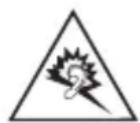
CAUTION: Permanent hearing loss may occur if earphones or headphones are used at high volume for prolonged periods of time.
Warning statement: To prevent possible hearing damage, do not listen at high volume levels for long periods.
This product in compliance with Directive 2002/95/EC of the European Parliament and of the Council of 27 January 2003, on the restriction of the use of certain hazardous substances in electrical and electronic equipment (RoHS) and its amendments.
We, Yamaha Music Europe GmbH hereby declare that this unit is in compliance with the essential requirements and other relevant provisions of Directive 1999/5/EC.
Yamaha Music Europe GmbH
Siemensstr. 22-34 25462 Rellingen, Germany
Tel: +49-4101-303-0
Information for Users on Collection and Disposal of Old Equipment and Used Batteries
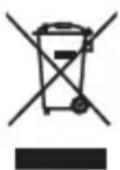
These symbols on the products, packaging, and/or accompanying documents mean that used electrical and electronic products and batteries should not be mixed with general household waste.
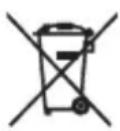
For proper treatment, recovery and recycling of old products and used batteries, please take them to applicable collection points, in accordance with your national legislation and the Directives 2002/96/EC and 2006/66/EC.
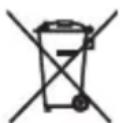
By disposing of these products and batteries correctly, you will help to save valuable resources and prevent any potential negative effects on human health and the environment which could otherwise arise from inappropriate waste handling.
For more information about collection and recycling of old products and batteries, please contact your local municipality, your waste disposal service or the point of sale where you purchased the items.
[Information on Disposal in other Countries outside the European Union]
These symbols are only valid in the European Union. If you wish to discard these items, please contact your local authorities or dealer and ask for the correct method of disposal.
Note for the battery symbol (bottom two symbol examples):
This symbol might be used in combination with a chemical symbol. In this case it complies with the requirement set by the Directive for the chemical involved.

RISK OF EXPLOSION IF BATTERY IS REPLACED BY AN INCORRECT TYPE. DISPOSE OF USED BATTERIES ACCORDING TO THE INSTRUCTIONS.
Features
- YouxcanxenjoyxmusicxwirelesslBlvietoothxconnection.x
-
Internalxmicxletsxyouxanswerxcallsxandxcarryxonxconversations.
-
Earxcuffsxincludedxwithxthexearphonesxcanxbexattachedxforxanxidealxfitxthatxis unlikelyxtoxbexdislodgedxevenxduringxsports.
• Water-resistantxearphonesxcanxbexusedxduringxsportsxwithoutxworryingx aboutxrainxorxsweat.
Part names / how to use
Wear the earphones with the L mark in your left ear, and the one with the R mark in your right ear.
AlsoxreferxtoxthexillustrationxonxP.xiixatxthexbeginningxofxthisxmanual
A Ear Pieces
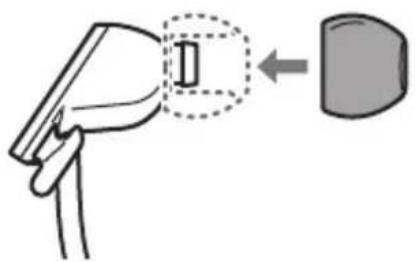
Replacing the Ear Pieces
Using the ear pieces is recommended. Ear pieces are supplied in four sizes (L, M, S, XS). The S size ear pieces are attached to the earphones on purchase. Use the most suitable size.
natural_image
Diagram showing a hand holding a device with a magnified inset highlighting a component (no text or symbols present)B Smart Cable Holder
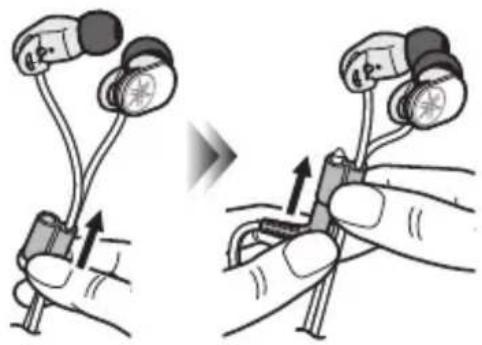
Using the Smart Cable Holder
When not using the earphones, slide the Smart Cable Holder for tangle-prevention fully upward. Furthermore, insert the plug in the Smart Cable Holder to avoid the whole cable becoming tangled.
natural_image
Illustration of two hands holding a medical device with attached earphones, showing a change in the use of a device (no text or symbols present)C L-shaped Plug
D Ear Cuffs (P.2)
E BluetoothReceiver (P.3)
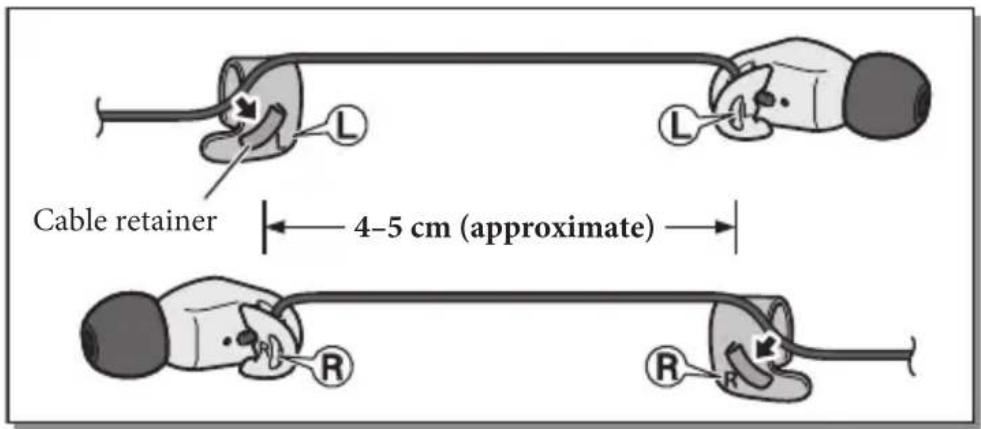
Using the ear cuffs
There is one ear cuff each for the left and right ears.
① Pass the cable through the ear cuff's cable retainer.
2 Place the ear cuff on your ear so that the protruding tab of the ear cuff is behind your ear.
The cable should pass through the cable retainer and hang down behind your ear.
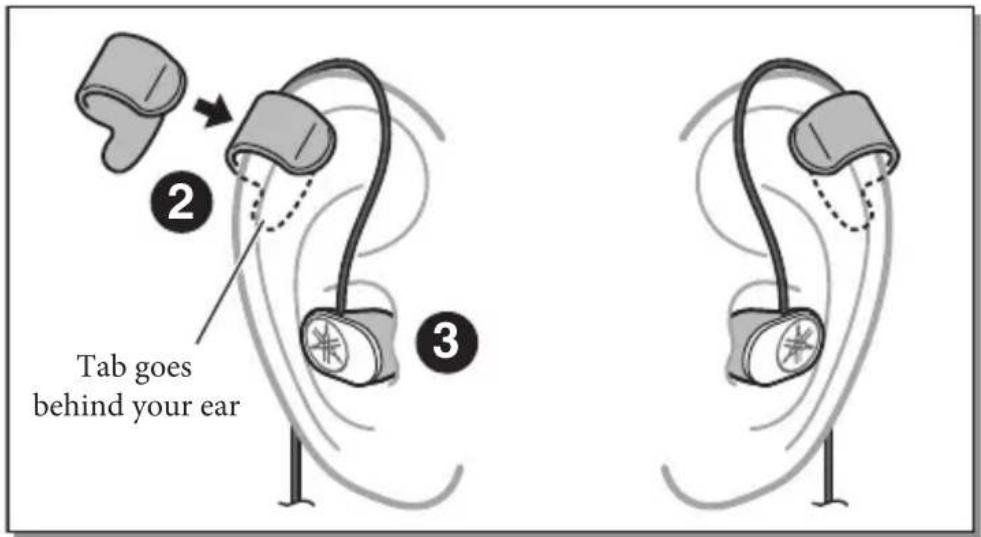
3 Adjust the length of the cable, and insert the earphones into your ear.
Description of each part
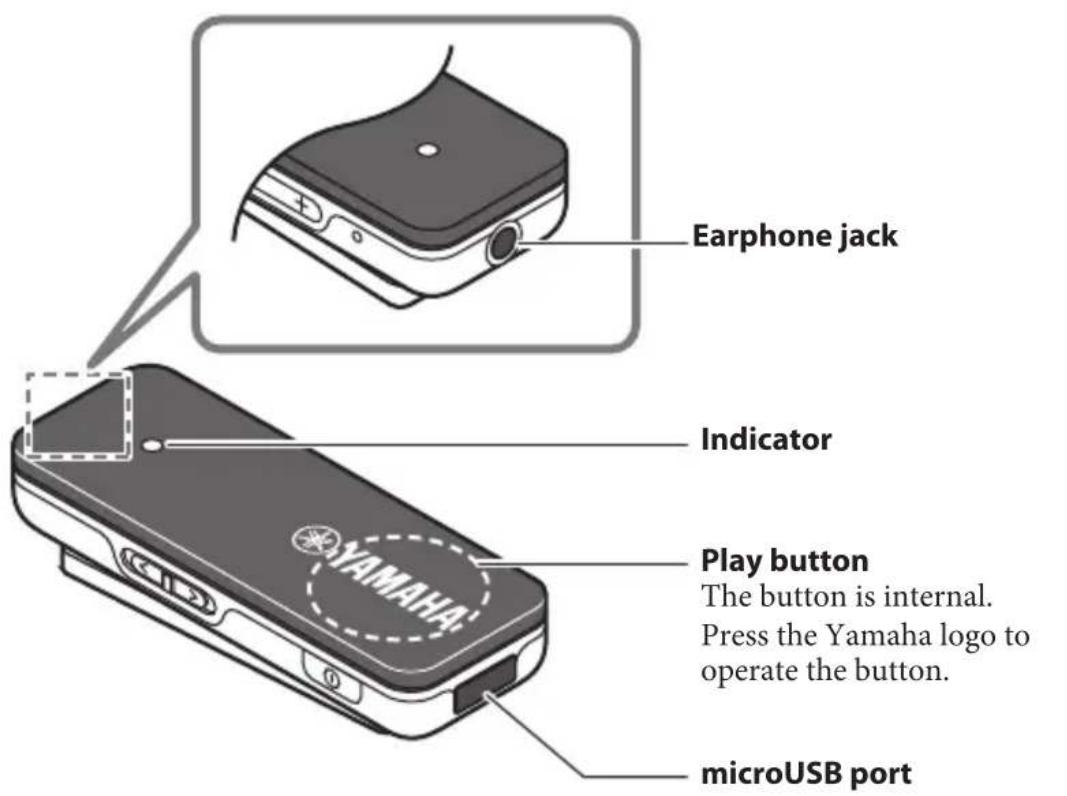
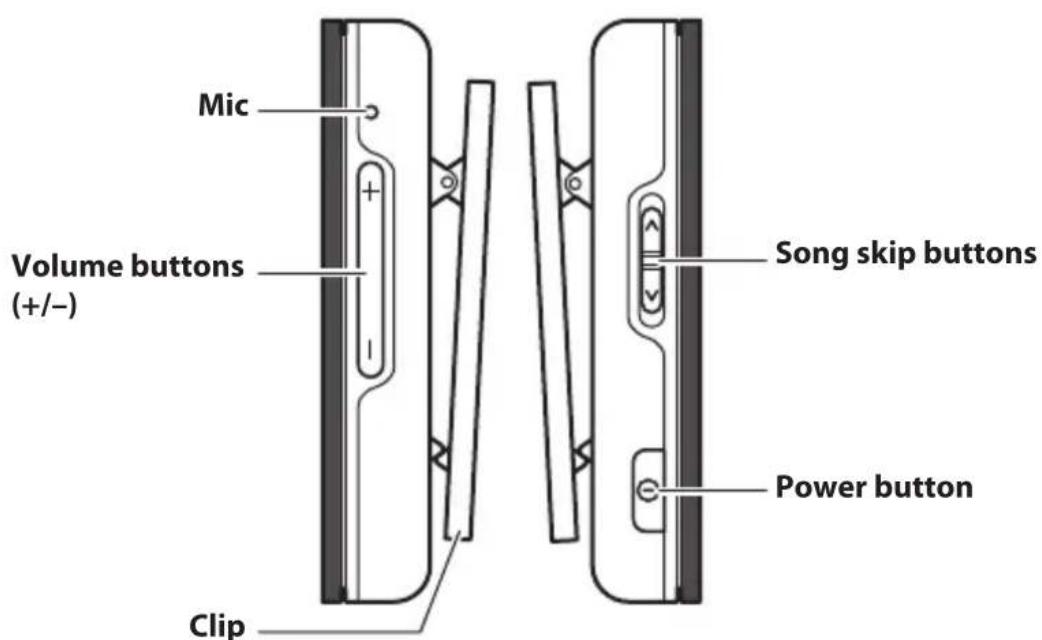
You can use the clip to attach the receiver to your clothing.
Use the included USB power cable to connect the receiver to a computer or other charging device.
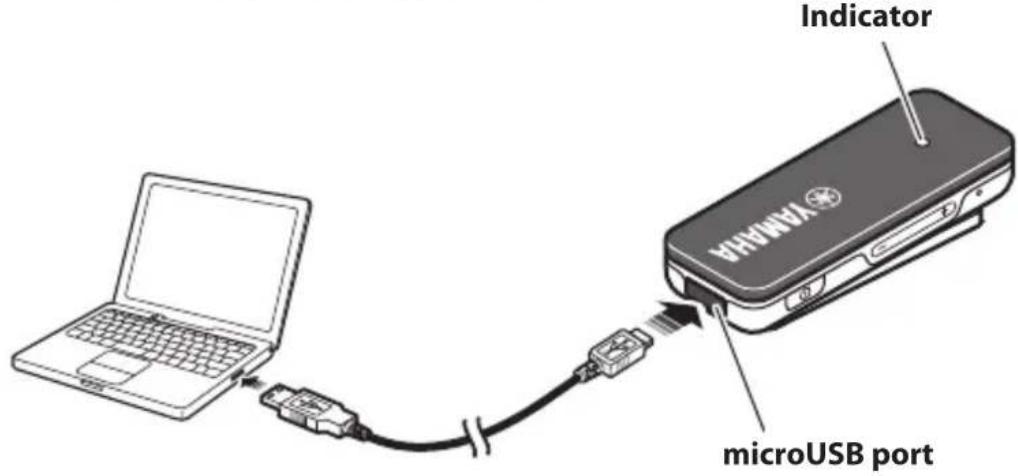

- The indicator lights red while charging is taking place. When charging is complete, the indicator lights blue.
- Charging will complete in approximately two hours.
Turning the power on/off
Press and hold the power button (approximately two seconds).
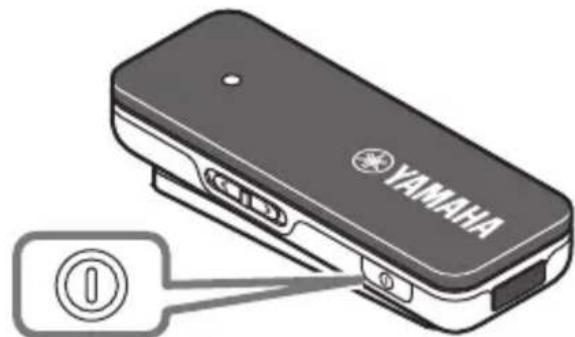
Power button

A melody plays from the earphones.
Checking the power supply status
If you are not sure whether the receiver is powered-on, such as if the indicator is unlit, you can check this as follows.
Briefly press any button other than the play button.
If the indicator blinks once or twice, the power is on.
“Pairing” is the process of registering a Bluetooth device with the receiver. Pairing must be performed when you use a Bluetooth connection for the first time, or if the pairing data has been deleted.
- Turn off the power of the receiver.
- Press and hold the power button (approximately four seconds).
The indicator blinks rapidly; the receiver is waiting for pairing.
-
Perform the pairing process on your Bluetooth device (for details, refer to the owner's manual of your Bluetooth device).
-
Access the Bluetooth settings screen on your Bluetooth device.
- If the Bluetooth setting is disabled, enable it.
- In the list of detected devices, tap "EPH-BR01 Yamaha" to select it.
Pairing is completed.

- This receiver can pair with up to eight Bluetooth connections. When pairing has succeeded with the ninth device, pairing data is deleted for the device with the oldest Bluetooth connection.
- If three minutes elapses before pairing is completed, the receiver stops waiting for pairing.
- If you are asked to enter a pass key, enter the numerals "0000."
Establishing a Bluetooth connection
Turn on the power of the receiver.
A Bluetooth connection is established with the most-recently connected Bluetooth device.

- If the connection does not occur automatically, briefly press the power button once more.
- If you turn off the Bluetooth setting of the Bluetooth device, a Bluetooth connection is not established with that device when you turn on the power of the receiver.
Ending a Bluetooth connection
If a Bluetooth connection exists, you can end it in either of the following ways.
• Turn off the power of the receiver.
• End Bluetooth connection on your Bluetooth device.
Press the following buttons as needed.
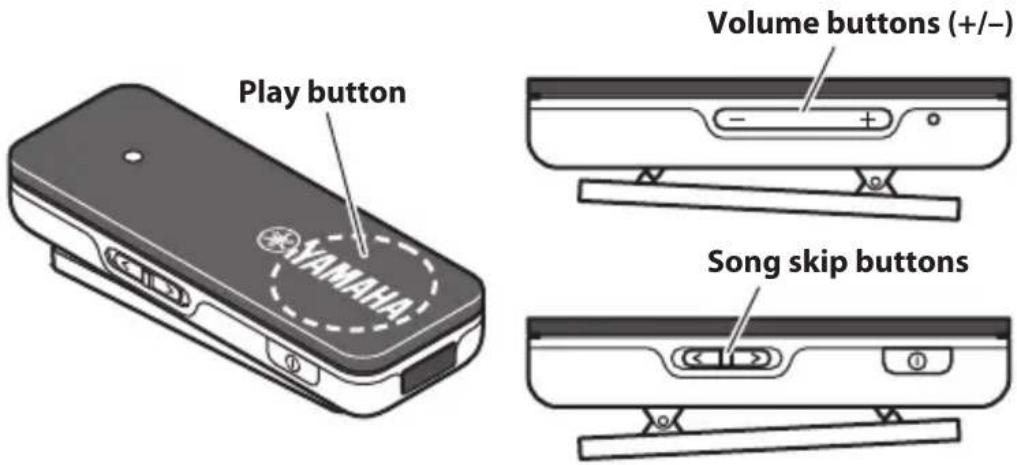
| Play | Press the play button once.* If you want to select a specific song and play it, perform the appropriate operations on your Bluetooth device. |
| Pause | While the song is playing, press the play button once. |
| Stop (only for supported devices) | Press and hold the play button (approximately two seconds) |
| Next song | Slide the song skip button toward [<] |
| Previous song | Slide the song skip button toward [>] |
| Adjust the volume | Press the volume buttons (+/−) |
Using the phone
Press the following buttons as needed.
| Receive a phone call | When a call comes in, press the play button once |
| End a call | During the conversation, press the play button once |
| Ignore a call | When a call comes in, press and hold the play button until you hear a beep |
| Switch the audio (earphones ⇔ Bluetooth device) | During the conversation, quickly press the play button twice |
| Adjust the volume | Press the volume buttons (+/-) |
Quickly press the play button twice.
Voice control / Siri starts.

This works only for a device that supports Siri or other voice control.
Viewing the indicator
The indicator lights to show the status of the receiver.
| Status of the receiver Indicator | |
| When the power turns on | Lights 2.5 seconds |
| When the power turns off | Lights 2.5 seconds |
| When waiting for pairing | Blinks rapidly |
| No Bluetooth connection (power on) | Blinks slowly |
| Playing music | Blinks twice at 2.5 second intervals |
| During a phone conversation | Blinks once at 2.5 second intervals |
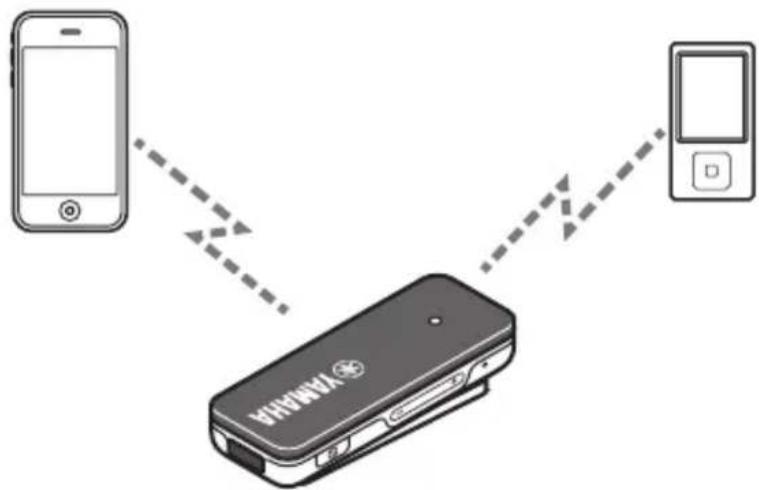
Using multiple Bluetooth devices (multi-point connection)
It is possible to have a Bluetooth connection with two devices simultaneously.
flowchart
graph TD
    A["Smartphone"] -->|dotted arrow| B["VAMMAI Device"]
    C["App"] -->|dotted arrow| B
    B -->|dotted arrow| D["Mobile"]

- To establish a Bluetooth connection with the second device, perform the process on that Bluetooth device.
- Audio from the second connected Bluetooth device can be switched by playing or stopping music.
Troubleshooting
If the situation does not improve even after trying the following actions, or if any abnormalities not listed below are observed, contact the nearest authorized Yamaha dealer or service center.
| If this happens Check this | |
| No sound / Sound is heard only from one channel | Check that the plug is inserted all the way into the earphone jack.Check Bluetooth connection between the receiver and the Bluetooth device.Make sure that the output destination of your Bluetooth device is specified as the receiver (EPH-BR01 Yamaha).Check whether the volume might be minimized on the receiver or on your Bluetooth device. |
| Can't establish a Bluetooth connection | Make sure that the Bluetooth function of your Bluetooth device is turned on.If you can't establish a connection, try performing the pairing operation once again. |
Specifications
Bluetooth version ...... Version 4.0
Supported profiles ...... A2DP, AVRCP, HFP, HSP
Number of devices that can be registered .... Up to eight devices (two simultaneous connections)
Supported codecs.... SBC, aptX®
Maximum communication distance ...... Approximately 10 m (Class 2)
Internal rechargeable battery .... Lithium polymer battery
Recharging time .... Approximately 2 hours
Continuous standby time .... Approximately 160 hours
Continuous talk time .... Approximately 5 hours*
Continuous music playback time .... Approximately 5 hours*
* Depends on the conditions of use.
* Specifications and appearances are subject to change for improvement without notice.
* © 2013 CSR plc and its group companies.
The aptX ^® mark and the aptX logo are trade marks of CSR plc or one of its group companies and may be registered in one or more jurisdictions.
* Siri is a trademark of Apple Inc., registered in the U.S. and other countries.
Bluetooth
- Bluetooth is a technology for wireless communication between devices within an area of about 10 meters (33 ft.) employing the 2.4 GHz frequency band, a band which can be used without a license.
- Bluetooth is a registered trademark of the Bluetooth SIG and is used by Yamaha in accordance with a license agreement.
Handling Bluetooth communications
- The 2.4 GHz band used Bluetooth compatible devices is a radio band shared by many types of equipment. While Bluetooth compatible devices use a technology minimizing the influence of other components using the same radio band, such influence may reduce the speed or distance of communications and in some cases interrupt communications.
- The speed of signal transfer and the distance at which communication is possible differs according to the distance between the communicating devices, the presence of obstacles, radio wave conditions and the type of equipment.
- Yamaha does not guarantee all wireless connections between this unit and devices compatible with Bluetooth function.
Do not use this unit within 22 cm (9 inches) of persons with a heart pacemaker implant or defibrillator implant.
Radio waves may affect electro-medical devices.
Do not use this unit near medical devices or inside medical facilities.
Caution Regarding the Waterproofing
The earphones of this product feature a water-resistant design that allows them be used even if they are exposed to a certain amount of rain or sweat, but please be aware of the following precautions.
x• Doxnotxallowxlargexamountsxofxwaterxtoxcontactxthexearphones. If the earphones are exposed to a large amount of water, let them dry out in a dry location for at least one day before using them. When letting them dry, do not use a hair drier or similar device, since this may cause the earphones to malfunction or to become deformed.
x• Doxnotxplacexthexearphonesxinxwater.
They may malfunction if they fall into water.
x• Ifxaxlargexamountxofxsweatxorxwaterxdropletsxshouldxadherextoxthisx product,xwipexitxoffxwithxaxdryxclothxasxsoonxasxpossible.
x• DoxnotxallowxthexL-shapedxplugxBhathoxthxreceiverxtoxgetxwet.x
Since the L-shaped plug and the Bluetooth receiver are not water-resistant, doing so could cause malfunctions.
Malfunctions caused by water entering the earphones due to incorrect handling will not be covered by the warranty even if the warranty period is still in effect.
The user shall not reverse engineer, decompile, alter, translate or disassemble the software used in this unit, whether in part or in whole. For corporate users, employees of the corporation itself as well as its business partners shall observe the contractual bans stipulated within this clause. If the stipulations of this clause and this contract cannot be observed, the user shall immediately discontinue using the software.
This device contains a lithium-ion battery. After usage, you may recycle the battery, but never attempt to remove it by yourself. Dispose of it properly according to relevant environmental laws and disposal rules in your area.
Warranty policy for European Economic Area (EEA) and Switzerland, Australia customer
In the unlikely event that your Yamaha product needs guarantee service, please contact the dealer from whom it was purchased. If you experience any difficulty, please contact Yamaha representative office in your country. You can find full details on our website.
EEA and Switzerland: (http://europe.yamaha.com/warranty/)
Australia: (http://au.yamaha.com/)
Warranty policy for U.S. and Canada customer
Your Yamaha product is covered by a limited warranty for one year from the date of purchase. In the unlikely event of failure due to defective materials or workmanship, Yamaha will repair or replace them at no charge.
Please visit our website for full details.
U.S.: (http://usa.yamaha.com/), Canada: (http://ca.yamaha.com/)

DECLARATION D'INFORMATIONS DE CONFORMITE
(DECLARATION DE PROCEDURE DE CONFORMITE)
Entité responsable: Yamaha Corporation of America A/V Division
Adresse: 6600 Orangethorpe Avenue, Buena Park, CA 90620, USA
Téléphone: 1-714-522-9011
natural_image
Diagram showing a device with a magnified inset (no text or symbols)B Support de câble intelligent
natural_image
Illustration of two hands holding a device with earbuds, showing a change in the grip (no text or symbols present)flowchart
graph TD
    A["Smartphone"] -->|Dotted Arrow| B["VANOMA"]
    C["Smartphone"] -->|Dotted Arrow| B
    B -->|Arrow Up| D["Mobile Device"]

natural_image
Illustration of a hand holding a small electronic device with two earbuds, showing a change in the use of a device (no text or symbols present)flowchart
graph TD
    A["Smartphone"] -->|Dotted Arrow| B["VAMOYA"]
    B -->|Dotted Arrow| C["Smartphone"]

natural_image
Illustration of a hand holding a device with a magnified inset showing a small object (no text or symbols)C L-formad kontakt
D Öronklämmor (S. 2)
E Bluetooth-mottagare (S.3)
flowchart
graph TD
    A["Smartphone"] -->|Signal Flow| B["Device"]
    B -->|Signal Flow| C["Mobile Phone"]

natural_image
Diagram showing a hand holding a device with a magnified inset highlighting a component (no text or symbols)B Fissacavi intelligente
natural_image
Illustration of two hands holding earbuds with a magnified view showing the change (no text or symbols present)C Spina sagomata a L
D Cuffie (P.2)
E Ricevitore Bluetooth (P.3)
flowchart
graph TD
    A["Smartphone"] -->|Dashed arrow| B["VAMARIA"]
    C["Apple"] -->|Dashed arrow| B
    B -->|Arrow down| D["Mobile"]

© Conector en L
E Receptor Bluetooth (P.3)
flowchart
graph TD
    A["Smartphone"] -->|Dotted Arrow| B["VAMARIA Device"]
    C["Smartphone"] -->|Dotted Arrow| B
    B -->|Arrow Down| D["Mobile Phone"]

natural_image
Diagram showing a hand holding a device with a magnified inset highlighting a component, alongside a separate grayscale shape (no text or symbols)natural_image
Illustration of two hands holding a small electronic device with wires, showing a change in the process (no text or symbols present)C L-vormige stekker
D Oorklemmen (P. 2)
E Bluetooth-ontvanger (P.3)
flowchart
graph TD
    A["Smartphone"] -->|Dashed arrow| B["VAMARIA"]
    C["Smartphone"] -->|Dashed arrow| B
    B -->|Arrow right| D["Device"]

Bluetooth-communicaties hanteren
natural_image
Illustration of a hand holding a device with a magnified inset showing a rectangular object (no text or symbols)B Retentor inteligente do cabo
natural_image
Illustration of two hands holding test probes with a magnified view showing the probe's tip and cable (no text or symbols present)flowchart
graph TD
    A["Smartphone"] -->|Wireless Signal| B["YAMARIA Device"]
    B -->|Wireless Signal| C["Smartphone"]

natural_image
Illustration of a hand holding a device with a magnified inset showing a rectangular object (no text or symbols)natural_image
Illustration of two hands holding a device with earphones and connectors, showing a change in the process (no text or symbols present)C L-образный штекер
natural_image
Illustration of a hand holding a device with a magnified inset showing a small object (no text or symbols)B 迷你线夹
使用迷你线夹
natural_image
Illustration of two hands holding earbuds with arrows indicating movement (no text or symbols)C L型插头
D 耳骨夹 (第2页)
flowchart
graph TD
    A["Smartphone"] -->|Signal Flow| B["YAMAR Device"]
    B -->|Signal Flow| C["Mobile App"]

natural_image
Illustration of a hand holding a device with a magnified inset showing a rectangular object (no text or symbols)B 스마트 케이블 홀더
스마트 케이블 홀더 사용하기
natural_image
Illustration of two hands holding a small electronic device with earphones and wires, showing a change in the process (no text or symbols present)C L자형 플러그
D 이어 커프 (P.2)
E Bluetooth수신기(P.3)
이어 커프 사용하기
flowchart
graph TD
    A["Smartphone"] -->|Data Flow| B["YAMHA Device"]
    B -->|Data Flow| C["App"]

natural_image
Diagram showing a hand holding a device with a magnified inset highlighting a component (no text or symbols present)B スマートケーブルホルダー
スマートケーブルホルダーを使用する
C L型プラグ
D イヤカフ (P.2)
flowchart
graph TD
    A["Smartphone"] -->|Dotted arrow| B["VAMAR Device"]
    C["Mobile Device"] -->|Dash arrow| B
    B -->|Dash arrow| D["Mobile Device"]

※ 2013 CSR plc and its group companies.
Printed in China ZP71300-2

- FCC INFORMATION (for US customers)
- IMPORTANT NOTICE: DO NOT MODIFY THIS UNIT!
- COMPLIANCE INFORMATION STATEMENT
- (DECLARATION OF CONFORMITY PROCEDURE)
- NOTICE
- FCC CAUTION
- FOR CANADIAN CUSTOMERS
- Thank you for selecting this Yamaha product.
- WARNING
- x• Doxnotxlistenxwithxthexearphonesxwhilexdrivingxorxcycling.
- CAUTION
- ■Cautions against hearing damage
- For your safety
- Notes on use
- Etiquette
- Yamaha Music Europe GmbH
- Information for Users on Collection and Disposal of Old Equipment and Used Batteries
- [Information on Disposal in other Countries outside the European Union]
- Note for the battery symbol (bottom two symbol examples):
- Features
- Part names / how to use
- A Ear Pieces
- Replacing the Ear Pieces
- B Smart Cable Holder
- Using the Smart Cable Holder
- C L-shaped Plug
- D Ear Cuffs (P.2)
- E BluetoothReceiver (P.3)
- Using the ear cuffs
- ① Pass the cable through the ear cuff's cable retainer.
- Place the ear cuff on your ear so that the protruding tab of the ear cuff is behind your ear.
- Adjust the length of the cable, and insert the earphones into your ear.
- Description of each part
- Turning the power on/off
- Checking the power supply status
- Establishing a Bluetooth connection
- Turn on the power of the receiver.
- Ending a Bluetooth connection
- If a Bluetooth connection exists, you can end it in either of the following ways.
- Using the phone
- Quickly press the play button twice.
- Viewing the indicator
- Using multiple Bluetooth devices (multi-point connection)
- Troubleshooting
- Specifications
- Bluetooth
- Handling Bluetooth communications
- Caution Regarding the Waterproofing
- Warranty policy for European Economic Area (EEA) and Switzerland, Australia customer
- Warranty policy for U.S. and Canada customer
- DECLARATION D'INFORMATIONS DE CONFORMITE
- B Support de câble intelligent
- C L-formad kontakt
- D Öronklämmor (S. 2)
- E Bluetooth-mottagare (S.3)
- B Fissacavi intelligente
- C Spina sagomata a L
- D Cuffie (P.2)
- E Ricevitore Bluetooth (P.3)
- © Conector en L
- E Receptor Bluetooth (P.3)
- C L-vormige stekker
- D Oorklemmen (P. 2)
- E Bluetooth-ontvanger (P.3)
- Bluetooth-communicaties hanteren
- B Retentor inteligente do cabo
- C L-образный штекер
- B 迷你线夹
- 使用迷你线夹
- C L型插头
- D 耳骨夹 (第2页)
- B 스마트 케이블 홀더
- 스마트 케이블 홀더 사용하기
- C L자형 플러그
- D 이어 커프 (P.2)
- E Bluetooth수신기(P.3)
- 이어 커프 사용하기
- B スマートケーブルホルダー
- スマートケーブルホルダーを使用する
- C L型プラグ
- D イヤカフ (P.2)
Brand : YAMAHA
Model : EPHWS01
Category : Earphones