
EPH52 - Earphones YAMAHA - Free user manual and instructions
Find the device manual for free EPH52 YAMAHA in PDF.



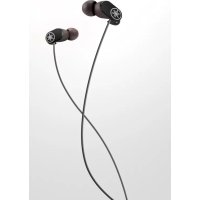
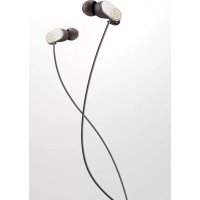
| Product Type | In-ear headphones |
| Brand | YAMAHA |
| Model | EPH-52 (also available in versions with remote EPH-R52, EPH-R32, EPH-R22) |
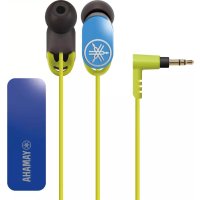
| Connector | 3.5mm jack, L-shaped plug on models with remote |
| Cable length | 1.2 m (approximate) |
| Weight | Approximately 15 g (estimated) |
| Ear tips | 4 sizes available: XS, S, M, L (size S pre-installed) |
| Key features | Play/Pause, calls, volume control (on models with remote) |
| Microphone | Integrated on EPH-R52/R32/R22 models |
| Cable clip | Smart cable clip included to prevent tangles |
| Maintenance and cleaning | Clean with a soft, dry cloth. Clean the plug regularly. |
| Safety instructions | Do not use while driving or in hazardous situations. Do not expose to heat, moisture, or direct sunlight. |
| Hearing protection | Avoid prolonged use at high volume. Follow these limits: 40 hours/week at 80 dB(A) or 5 hours/week at 89 dB(A). |
| Warranty | 1 year (Canada), statutory warranty for the European Community and Switzerland |
| Included accessories | Replacement ear tips (4 sizes), cable clip |
Frequently Asked Questions - EPH52 YAMAHA
User questions about EPH52 YAMAHA
0 question about this device. Answer the ones you know or ask your own.
Ask a new question about this device
Download the instructions for your Earphones in PDF format for free! Find your manual EPH52 - YAMAHA and take your electronic device back in hand. On this page are published all the documents necessary for the use of your device. EPH52 by YAMAHA.
USER MANUAL EPH52 YAMAHA
Refer to "Part names / how to use" on P. 3.
Thank you for selecting this Yamaha product.
To assure the finest performance, please read this owner's manual carefully. Keep it in a safe place for future reference.
WARNING
Do not listen with the earphones while driving or cycling. Also avoid using them where hearing must not be impaired, like at a railroad crossing and a site of construction. Reduced ability to hear surrounding sound increases the risk of an accident.
CAUTION
Cautions against hearing damage
- Avoid continuous earphones-use at high volume. It may cause hearing loss. Using the earphones for a long time with the device at a high volume, may result in hearing loss. Do not exceed 40 hours/week at 80dB(A) or 5 hours/week at 89dB(A) .
- Minimize the volume from the device to be connected before connecting the plug.
■For your safety
- In case the earphones irritate your skin, stop use immediately.
- Keep the product out of reach of children to avoid them swallowing small parts.
-
Do not use the earphones with the ear pieces detached or broken. Otherwise, they may cause injury or illness.
-
Securely attach the ear pieces to the earphones. If the ear pieces are detached from the earphones and stuck in your ears, they may cause injury or illness.
-
Do not place or hold the earphones in the vicinity of a clock, magnetic card, or other object that can be affected by the magnetic field of the product. Otherwise, the data on the affected device may be destroyed.
Notes on use
- Refer also to the manuals supplied with the devices to be connected.
- When removing the plug from the connected device, be sure to pull out by the plug itself, not the cable. Bending or pulling the cable forcefully may damage it.
- Do not disassemble the earphones. Do not use earphones that are malfunctioning.
- Your ears may tingle in geographical locations where the air is very dry. This is not a malfunction of the earphones, but is caused by static electricity on your body or a connected device.
- If the ear pieces are not securely positioned in your ears, you may not hear the bass range clearly. To enjoy better sound quality, adjust the ear pieces so they will fit your ears perfectly. For example, you might replace poor-fitting ear pieces with ear pieces of an appropriate size.
- Clean the earphones with a soft dry cloth. Do not leave the plug dirty otherwise the sound may be distorted.
- Do not expose the earphones to direct sunlight, dirt, heat or moisture.
Etiquette
Do not use the earphones at high volume in a public place. Sound leakage from the earphones will be a nuisance to people around you.
Part names / how to use
Wear the earphones with the L mark in your left ear, and the one with the R mark in your right ear.
Also refer to the illustration on P. ii at the beginning of this manual.
A Ear Pieces
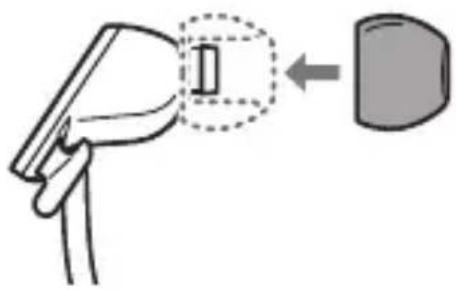
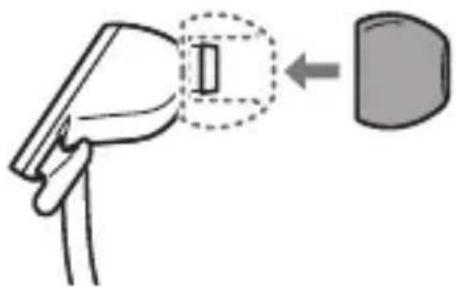
Replacing the Ear Pieces
Using the ear pieces is recommended. Ear pieces are supplied in four sizes (L, M, S, XS). The S size ear pieces are attached to the earphones on purchase. Use the most suitable size.
B Smart Cable Holder
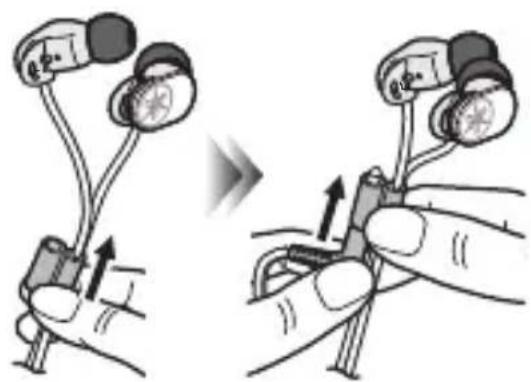
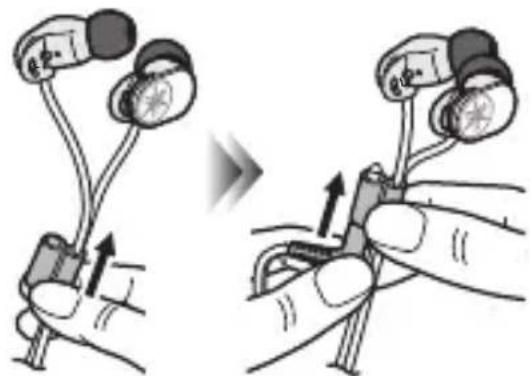
Using the Smart Cable Holder
When not using the earphones, slide the Smart Cable Holder for tangle-prevention fully upward. Furthermore, insert the plug in the Smart Cable Holder to avoid the whole cable becoming tangled.
Remote Control EPH-R52/R32/R22 only (P.4)
D L-shaped Plug
EPH-R52/R32/R22 only
Using the remote control
This product uses a remote control cable with a built-in microphone. You can easily receive an incoming call, talk over the phone, play back music, etc.
Front view Side view Rear view
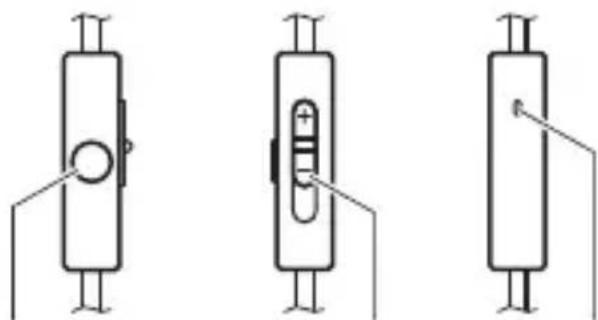
Volume button MicrophoneCenter button
| Operation Function | |
| Play music or video | Press the center button once. |
| Pause music or video | |
| Receive a phone call | |
| End a phone call | |
| Adjust the volume Slide the volume | me button. |
- Pausing music or video playback might not work for some smartphones.
- The volume of the connected device itself cannot be adjusted.
- Minimizing the volume with the remote control does not completely mute the sound.
- During a call, the conversation is possible without moving the microphone close to the mouth.
Troubleshooting
If the situation does not improve even after trying the following actions, or if any abnormalities not listed below are observed, contact the nearest authorized Yamaha dealer or service center.
| SymptomAction | |
| No sound · Make | sure the plug is fully inserted in the jack on the playback device. · Make sure the playback device is not paused. · Make sure the playback device is turned on. · Make sure the volume is not set low on the remote control and/or the playback device. |
| Sound is heard only from one channel | Make sure the plug is fully inserted in the jack on the playback device. |
| Earphones volume is too high/low | Adjust the volume on the remote control and/or the playback device. |
| Remote control does not work (EPH-R52/R32/R22 only) | · Make sure the plug is fully inserted in the jack on the playback device. · Remote control might not work for some playback devices. |
Warranty policy for European Economic Area (EEA) and Switzerland, Australia customer
In the unlikely event that your Yamaha product needs guarantee service, please contact the dealer from whom it was purchased. If you experience any difficulty, please contact Yamaha representative office in your country. You can find full details on our website. EEA and Switzerland: (http://europe.yamaha.com/warranty/) Australia: (http://au.yamaha.com/)
Warranty policy for U.S. and Canada customer
Your Yamaha product is covered by a limited warranty for one year from the date of purchase. In the unlikely event of failure due to defective materials or workmanship, Yamaha will repair or replace them at no charge.
Please visit our website for full details.
U.S.: (http://usa.yamaha.com/), Canada: (http://ca.yamaha.com/)
Information for Users on Collection and Disposal of Old Equipment
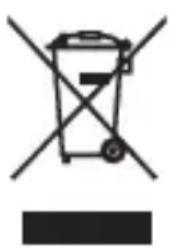
This symbol specified in the Directives 2002/96/EC indicates that used electrical and electronic products should not be mixed with general household waste. For proper treatment to avoid harmful effect on human health and environment, please contact your local municipality, your waste disposal service or the point of sale where you purchased the items.
He nCIOJIb3yIe HayHnKn IIpN BbICOKnx yPOBHX rPOMKOCTN B o6IeCTBeHHbIX MeCTax. 3ByK n3 HayHnKOB 6yJeT IIpNCHrTB HeIIpNTHOCTN IJIa OKpyKaIOxN.
Ha3BaHne DeTaJeN INX NcNoIb3OBaHne
BcTaBJIaIe HayIIHnK c OTMeTKoI L B IeBOe yXO, a HayIIHnK c OTMeTKoI R-B IIpaBOe.
Cm. TaKke pncyHok Ha cTp. ii B haaJIe daHHoro pyKOBoIcTba.

Am6yupbI
3ameha am6yup
PeKOMeHJyETcI NCIOJIb3OBaTb am6yIIOpbI. B KOMIIeKT BXOJrT am6yIIOpbI YeTbIpex pa3MepoB (L, M, S, XS). IIpn IOKyIke Ha HayIHHkax yCTaHOBJIeHbI am6yIIOpbI pa3Mepa S. IcnoJIb3yIte Hau6OJIee IOJXOJIu pa3Mep.

CneuaNbHbI depKaTeIb Ira Ka6eIa
IcnoIb3OBaHnE cneuaJIbHOro dePkaTeJЯ间隙 Ka6eJЯ
Korda HayuHnKn He
NcIOJIb3yIOTc, CdBnHbTe
CIIeIaJIbHbI IepKaTeJIb
IIa Ka6eIa IO yIopa BBepx,
YTO6bI IIpeIoTbPaTNTb
CITbBAHne. IIITeKeP TaKke
BCTaBBTe B IepKaTeJIb, YTO6bl
IIpeIOTBpaTNTb CITyTBaHne
BCero Ka6eJIa.

Дистанционhoe упразьени.
- Thank you for selecting this Yamaha product.
- WARNING
- CAUTION
- Cautions against hearing damage
- ■For your safety
- Notes on use
- Etiquette
- Part names / how to use
- A Ear Pieces
- Replacing the Ear Pieces
- B Smart Cable Holder
- Using the Smart Cable Holder
- Remote Control EPH-R52/R32/R22 only (P.4)
- D L-shaped Plug
- EPH-R52/R32/R22 only
- Using the remote control
- Front view Side view Rear view
- Troubleshooting
- Warranty policy for European Economic Area (EEA) and Switzerland, Australia customer
- Warranty policy for U.S. and Canada customer
- Information for Users on Collection and Disposal of Old Equipment
- Ha3BaHne DeTaJeN INX NcNoIb3OBaHne
- Am6yupbI
- 3ameha am6yup
- CneuaNbHbI depKaTeIb Ira Ka6eIa
- IcnoIb3OBaHnE cneuaJIbHOro dePkaTeJЯ间隙 Ka6eJЯ
- Дистанционhoe упразьени.
Brand : YAMAHA
Model : EPH52
Category : Earphones