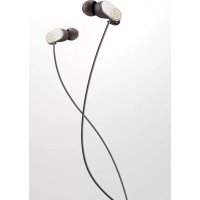
EPHR22 - Earphones YAMAHA - Free user manual and instructions
Find the device manual for free EPHR22 YAMAHA in PDF.



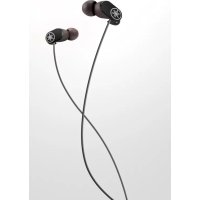
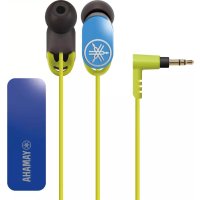
| Product type | In-ear headset with microphone and remote control |
| Model | EPHR22 |
| Connector | 3.5 mm stereo L-shaped plug |
| Cable length | Approximately 1.2 m |
| Ear tips | 4 sizes (L, M, S, XS) included |
| Remote control | Central button and volume slider |
| Microphone | Built-in |
| Weight | Approximately 20 g (with cable) |
| Dimensions (earpiece) | Approximately 20 mm diameter |
| Included accessories | Replacement ear tips, smart cable clip |
| Main functions | Play/pause, answer/end call, volume control |
| Safety | Do not use while driving or in hazardous situations |
| Hearing protection | Do not exceed 40 h/week at 80 dB(A) or 5 h/week at 89 dB(A) |
| Maintenance | Clean with a soft, dry cloth |
| Warranty | 2 years (EEC and Switzerland) |
Frequently Asked Questions - EPHR22 YAMAHA
User questions about EPHR22 YAMAHA
0 question about this device. Answer the ones you know or ask your own.
Ask a new question about this device
Download the instructions for your Earphones in PDF format for free! Find your manual EPHR22 - YAMAHA and take your electronic device back in hand. On this page are published all the documents necessary for the use of your device. EPHR22 by YAMAHA.
USER MANUAL EPHR22 YAMAHA
MANUAL DE INSTRUÇÕES
Refer to “Part names / how to use” on P. 3.
Thank you for selecting this Yamaha product.
To assure the finest performance, please read this owner's manual carefully. Keep it in a safe place for future reference.
WARNING
Do not listen with the earphones while driving or cycling. Also avoid using them where hearing must not be impaired, like at a railroad crossing and a site of construction. Reduced ability to hear surrounding sound increases the risk of an accident.
CAUTION
■Cautions against hearing damage
- Avoid continuous earphones-use at high volume. It may cause hearing loss. Using the earphones for a long time with the device at a high volume, may result in hearing loss. Do not exceed 40 hours/week at 80 dB(A) or 5 hours/week at 89 dB(A).
- Minimize the volume from the device to be connected before connecting the plug.
For your safety
• In case the earphones irritate your skin, stop use immediately.
- Keep the product out of reach of children to avoid them swallowing small parts.
- Do not use the earphones with the ear pieces detached or broken. Otherwise, they may cause injury or illness.
- Securely attach the ear pieces to the earphones. If the ear pieces are detached from the earphones and stuck in your ears, they may cause injury or illness.
- Do not place or hold the earphones in the vicinity of a clock, magnetic card, or other object that can be affected by the magnetic field of the product. Otherwise, the data on the affected device may be destroyed.
Notes on use
• Refer also to the manuals supplied with the devices to be connected.
- When removing the plug from the connected device, be sure to pull out by the plug itself, not the cable. Bending or pulling the cable forcefully may damage it.
- Do not disassemble the earphones. Do not use earphones that are malfunctioning.
- Your ears may tingle in geographical locations where the air is very dry. This is not a malfunction of the earphones, but is caused by static electricity on your body or a connected device.
- If the ear pieces are not securely positioned in your ears, you may not hear the bass range clearly. To enjoy better sound quality, adjust the ear pieces so they will fit your ears perfectly. For example, you might replace poor-fitting ear pieces with ear pieces of an appropriate size.
- Clean the earphones with a soft dry cloth. Do not leave the plug dirty otherwise the sound may be distorted.
- Do not expose the earphones to direct sunlight, dirt, heat or moisture.
Etiquette
Do not use the earphones at high volume in a public place. Sound leakage from the earphones will be a nuisance to people around you.
Part names / how to use
Wear the earphones with the L mark in your left ear, and the one with the R mark in your right ear.
Also refer to the illustration on P. ii at the beginning of this manual.
A Ear Pieces
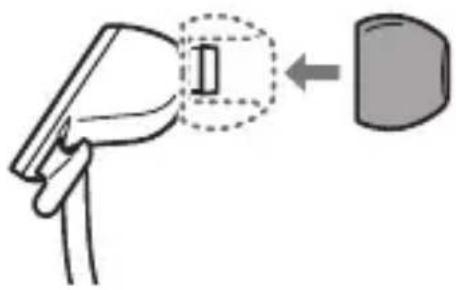
Replacing the Ear Pieces
Using the ear pieces is recommended. Ear pieces are supplied in four sizes (L, M, S, XS). The S size ear pieces are attached to the earphones on purchase. Use the most suitable size.
natural_image
Diagram showing a device being inserted into a container, with no visible text or symbolsB Smart Cable Holder
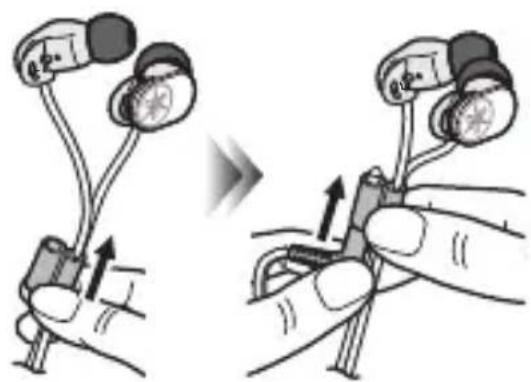
Using the Smart Cable Holder
When not using the earphones, slide the Smart Cable Holder for tangle-prevention fully upward. Furthermore, insert the plug in the Smart Cable Holder to avoid the whole cable becoming tangled.
natural_image
Illustration of two hands holding test probes with arrows indicating movement (no text or symbols)C Remote Control EPH-R52/R32/R22 only (P. 4)
D L-shaped Plug
EPH-R52/R32/R22 only
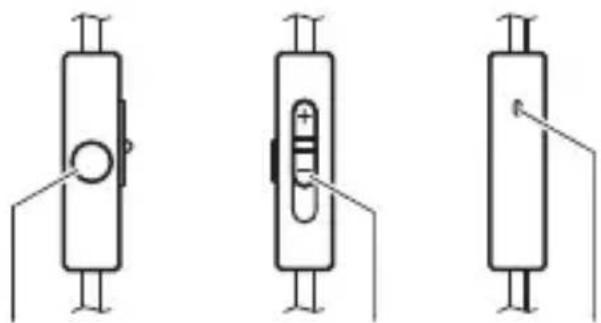
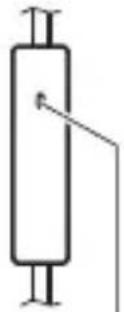
■Using the remote control
This product uses a remote control cable with a built-in microphone. You can easily receive an incoming call, talk over the phone, play back music, etc.
Front view Side view Rear view
natural_image
Three schematic diagrams of cylindrical electronic components with pins and connectors, no text or symbols present.Volume button MicrophoneCenter button
| Operation Function | |
| Play music or videoPause music or videoReceive a phone callEnd a phone call | Press the center button once. |
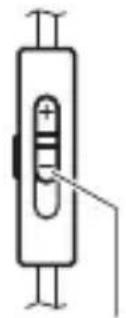
| Adjust the volume Slide the volume button. | |
* Pausing music or video playback might not work for some smartphones.
* The volume of the connected device itself cannot be adjusted.
* Minimizing the volume with the remote control does not completely mute the sound.
* During a call, the conversation is possible without moving the microphone close to the mouth.
Troubleshooting
If the situation does not improve even after trying the following actions, or if any abnormalities not listed below are observed, contact the nearest authorized Yamaha dealer or service center.
| SymptomAction | |
| No sound • Make | sure the plug is fully inserted in the jack on the playback device.• Make sure the playback device is not paused.• Make sure the playback device is turned on.• Make sure the volume is not set low on the remote control and/or the playback device. |
| Sound is heard only from one channel | Make sure the plug is fully inserted in the jack on the playback device. |
| Earphones volume is too high/low | Adjust the volume on the remote control and/or the playback device. |
| Remote control does not work (EPH-R52/R32/R22 only) | • Make sure the plug is fully inserted in the jack on the playback device.• Remote control might not work for some playback devices. |
Warranty policy for European Economic Area (EEA) and Switzerland, Australia customer
In the unlikely event that your Yamaha product needs guarantee service, please contact the dealer from whom it was purchased. If you experience any difficulty, please contact Yamaha representative office in your country. You can find full details on our website. EEA and Switzerland: (http://europe.yamaha.com/warranty/) Australia: (http://au.yamaha.com/)
Warranty policy for U.S. and Canada customer
Your Yamaha product is covered by a limited warranty for one year from the date of purchase. In the unlikely event of failure due to defective materials or workmanship, Yamaha will repair or replace them at no charge.
Please visit our website for full details.
U.S.: (http://usa.yamaha.com/), Canada: (http://ca.yamaha.com/)
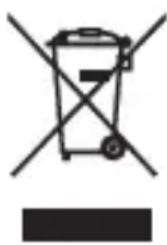
Information for Users on Collection and Disposal of Old Equipment
natural_image
Symbol of a trash bin with crossed lines indicating no waste or restriction, and a solid black rectangle below (no text or symbols)This symbol specified in the Directives 2002/96/EC indicates that used electrical and electronic products should not be mixed with general household waste. For proper treatment to avoid harmful effect on human health and environment, please contact your local municipality, your waste disposal service or the point of sale where you purchased the items.
natural_image
Diagram showing a hand holding a device with a magnified inset highlighting a component (no text or symbols present)B Support de câble intelligent
natural_image
Illustration of two hand positions showing a device being adjusted, with no visible text or symbols.natural_image
Three schematic diagrams of cylindrical electronic components with pins and connectors, no text or symbols present.(http://europe.yamaha.com/warranty/).
Garantie Canadienne
natural_image
Symbol of a trash bin with no text or numbers, crossed by two crossed lines and a solid black rectangle below (no text or symbols present)natural_image
Illustration of a hand holding a device with a magnified inset showing a component (no text or symbols)natural_image
Illustration of two hands holding earphones with arrows indicating movement (no text or symbols)natural_image
Three schematic diagrams of cylindrical electronic components with no text or symbolsLautstärkeregler MikrofonMittlere Taste
natural_image
Illustration of a hand holding a device with a magnified inset showing a component (no text or symbols)C Fjärrkontroll Endast EPH-R52/R32/R22 (S. 4)
D L-formad kontakt
Endast EPH-R52/R32/R22
natural_image
Three schematic diagrams of cylindrical electronic components with no text or symbolsVolymknappen MikrofonMittknapp
natural_image
Symbol of a trash bin crossed with a diagonal line, no text or numbers presentnatural_image
Diagram showing a hand holding a device with a magnified inset highlighting a component (no text or symbols present)B Fissacavi intelligente
natural_image
Illustration of two hands holding test probes with arrows indicating movement (no text or symbols)Telecomando Solo EPH-R52/R32/R22 (P. 4)
D Spina sagomata a L
Solo EPH-R52/R32/R22
natural_image
Three schematic diagrams of cylindrical electronic components with pins and connectors, no text or symbols present.natural_image
Symbol of a trash bin with crossed lines indicating no waste, and a solid black rectangle below (no text or labels)natural_image
Illustration of a hand holding a device with an arrow pointing to a component (no text or symbols present)natural_image
Illustration of two hands holding test probes with arrows indicating movement (no text or symbols)© Mando a distancia
Solo para EPH-R52/R32/R22
(Ⅰ P. 4)
D Conector en L
Solo para EPH-R52/R32/R22
natural_image
Three schematic diagrams of electrical components with no text or symbolsnatural_image
Symbol of a trash bin with crossed lines indicating no waste, and a solid black rectangle below (no text or labels)natural_image
Diagram showing a device being inserted into a device (no text or symbols present)natural_image
Illustration of two hands holding test probes with arrows indicating movement (no text or symbols)C Afstandsbediening Alleen EPH-R52/R32/R22 (P. 4)
D L-vormige stekker
Alleen EPH-R52/R32/R22
natural_image
Three schematic diagrams of electrical components with no text or symbolsVolumeknop MicrophoneMiddelste knop
natural_image
Symbol of a trash bin with crossed lines indicating no waste, and a solid black rectangle below (no text or labels)natural_image
Diagram showing a hand holding a device with an arrow pointing to a component (no text or symbols present)B Retentor inteligente do cabo
natural_image
Illustration of two hands holding test probes with arrows indicating movement (no text or symbols)C Controle remoto
Apenas para EPH-R52/R32/R22
(Ⅰ P. 4)
natural_image
Three schematic diagrams of cylindrical electronic components with mounting holes and internal contacts (no text or symbols)natural_image
Symbol of a trash bin with no text or numbers, crossed by diagonal lines and a solid black rectangle below (no text or symbols present)natural_image
Diagram of a handheld device with a rectangular component and an arrow pointing to a rounded rectangle (no text or symbols)natural_image
Illustration of two hands holding test probes with arrows indicating movement (no text or symbols)natural_image
Pure electrical circuit lines without any symbolsКНОПКА
natural_image
Pure electrical circuit lines without any symbolsРегулятор громкости
natural_image
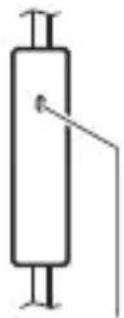
Pure electrical circuit lines without any symbolsМикрофонЦентральная
natural_image
Symbol of a recycling bin with no text or numbers presentnatural_image
Diagram of a hand holding a device with an arrow pointing to a component (no text or symbols present)B 迷你线夹
使用迷你线夹
natural_image
Illustration of two hands holding test probes with arrows indicating movement (no text or symbols)natural_image
Pure electrical circuit lines without any symbols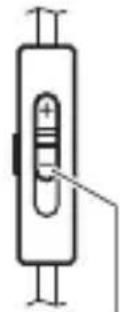
音量按钮 麦克风中央按钮
natural_image
Diagram showing a device interacting with a device, with an arrow indicating direction (no text or symbols present)B 스마트 케이블 홀더
스마트 케이블 홀더 사용하기
natural_image
Three schematic diagrams of electrical components with no text or symbols볼륨 버튼 마이크가운데 버튼
B スマートケーブルホルダー
スマートケーブルホルダーを使用する
natural_image
Illustration of two hands holding a device with earphones, showing a change in the grip (no text or symbols present)natural_image
Three schematic diagrams of cylindrical electronic components with pins and connectors, no text or symbols present.ボリュームボタン マイクセンターボタン
故障かな?と思ったら

- Thank you for selecting this Yamaha product.
- WARNING
- CAUTION
- ■Cautions against hearing damage
- For your safety
- Notes on use
- Etiquette
- Part names / how to use
- A Ear Pieces
- Replacing the Ear Pieces
- B Smart Cable Holder
- Using the Smart Cable Holder
- C Remote Control EPH-R52/R32/R22 only (P. 4)
- D L-shaped Plug
- EPH-R52/R32/R22 only
- ■Using the remote control
- Troubleshooting
- Warranty policy for European Economic Area (EEA) and Switzerland, Australia customer
- Warranty policy for U.S. and Canada customer
- Information for Users on Collection and Disposal of Old Equipment
- B Support de câble intelligent
- Garantie Canadienne
- C Fjärrkontroll Endast EPH-R52/R32/R22 (S. 4)
- D L-formad kontakt
- Endast EPH-R52/R32/R22
- B Fissacavi intelligente
- Telecomando Solo EPH-R52/R32/R22 (P. 4)
- D Spina sagomata a L
- Solo EPH-R52/R32/R22
- © Mando a distancia
- D Conector en L
- Solo para EPH-R52/R32/R22
- Alleen EPH-R52/R32/R22
- B Retentor inteligente do cabo
- C Controle remoto
- B 迷你线夹
- 使用迷你线夹
- B 스마트 케이블 홀더
- 스마트 케이블 홀더 사용하기
- B スマートケーブルホルダー
- スマートケーブルホルダーを使用する
- 故障かな?と思ったら
Brand : YAMAHA
Model : EPHR22
Category : Earphones