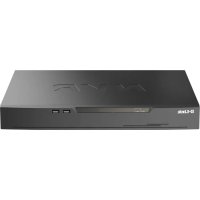
DNR402016P - VCR D-LINK - Free user manual and instructions
Find the device manual for free DNR402016P D-LINK in PDF.



| Product Type | 16-Channel PoE H.265 Network Video Recorder (NVR) |
| Brand | D-Link |
| Model | DNR-4020-16P |
| Number of Channels | 16 PoE Channels |
| Video Compression | H.265 |
| Maximum Recording Resolution | Up to 4K (3840x2160) |
| Power Supply | AC Power (power cord included) |
| Network Connectivity | 1 x 10/100/1000 Mbps LAN port, 16 x PoE ports |
| Video Outputs | 1 x HDMI, 1 x VGA |
| USB Ports | 2 x USB 2.0 (front and rear) |
| Audio | Audio input (microphone), audio output (speaker) |
| Alarm I/O | Alarm input/output ports for sensors |
| Internal Storage | 2 x SATA hard drive bays (not included) |
| Remote Management | JustConnect+ app (iOS/Android), web interface |
| Dimensions (W x D x H) | 440 x 280 x 44 mm (19-inch rackmount) |
| Weight | Approximately 3.5 kg |
| Operating Temperature | 0°C to 40°C |
| Security | Default administrator password and channel password |
| Maintenance and Cleaning | Disconnect before cleaning; use a dry, lint-free cloth |
| Warranty | D-Link limited warranty (refer to website) |
Frequently Asked Questions - DNR402016P D-LINK
User questions about DNR402016P D-LINK
0 question about this device. Answer the ones you know or ask your own.
Ask a new question about this device
Download the instructions for your VCR in PDF format for free! Find your manual DNR402016P - D-LINK and take your electronic device back in hand. On this page are published all the documents necessary for the use of your device. DNR402016P by D-LINK.
USER MANUAL DNR402016P D-LINK
Quick Installation Guide
JustConnect 16-Channel H.265 PoE Network Video Recorder
DNR-4020-16P
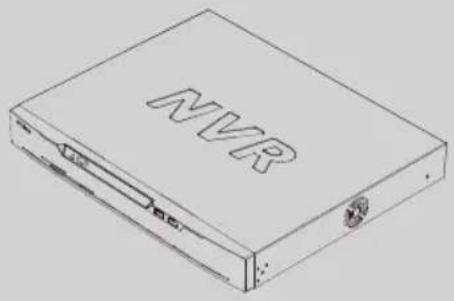
This Quick Installation Guide gives you step-by-step instructions for setting up your DNR-4020-16P JustConnect 16-Channel H.265 PoE Network Video Recorder. The model you have purchased may appear slightly different from the one shown in the illustrations. For more detailed information about the NVR, please refer to the User Manual.
Package Contents
This DNR-4020-16P package should include the following items:
- DNR-4020-16P JustConnect 16-Channel H.265 PoE Network Video Recorder
Power cord - 8 x hard disk screw
- 2x rack mount bracket
- 6× rack mount bracket screw
- 2 x terminal block
- Documentation
If any of the above items are damaged or missing, please contact your local D-Link reseller.
System Requirements
Microsoft Windows®
- Microsoft Edge, Internet Explorer, Firefox, Chrome, or Safari
Hardware Overview
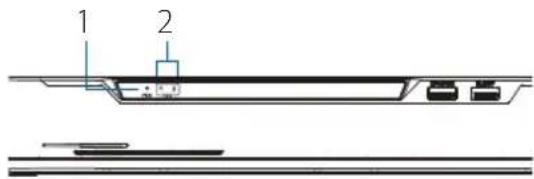
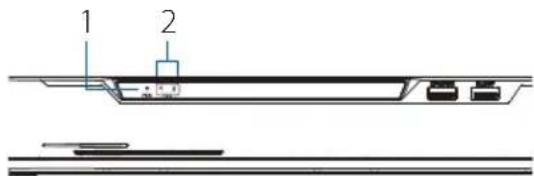
Front Panel LED Indicators
Figure 1: Front Panel LED Indicators
Table 1: Front Panel LED Indicator Descriptions
| # | LED Description | Condition |
| 1 | Power Indicator | Lights up when the device is receiving power and the power switch is turned on. |
| 2 | HDD Indicator | Hard disk status indicator. This indicator flashes when data is being transmitted. |
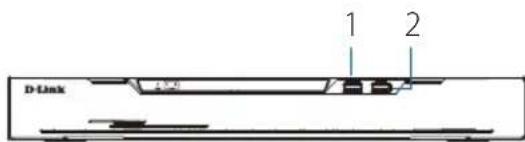
Front Panel Interface Connectors
Figure 2 Front Panel Interface Connectors
Table 2: Front Panel Interface Connector Descriptions
| # | Interface Description | |
| 1 | KB/Mouse Port | USB port for a keyboard or mouse. |
| 2 | Backup Port | USB port for a flash drive. |
Rear Panel Interface Connectors
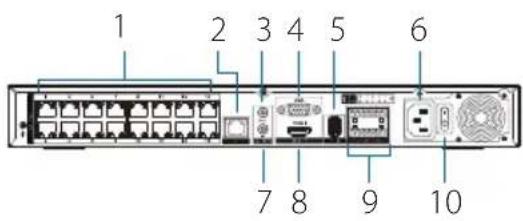
Figure 3: Rear Panel Interface Connectors
Table 3: Rear Panel Interface Connector Descriptions
| # Feature Description | |
| 1 PoE Ports | PoE ports that offer direct connection to up to 16 cameras. |
| 2 LAN | Uses a standard Ethernet cable to connect to a switch or router. |
| 3 Audio OUT | Connect external speakers for live audio or audio playback. |
| 4 VGA Output | Output connector for a VGA monitor. |
| 5 USB 2.0 Port | Connect a USB storage device such as a flash drive. |
| 6 Power | Connect the supplied power cord to the input port. |
| 7 Audio IN | Connect a microphone to use 2-way communication with your camera(s). |
| 8 HDMI Output | Output connector for an HDMI monitor. |
| 9 Alarm I/O | Alarm I/O ports for connecting to sensors or other devices. |
| 10 Power Switch | Press "1" to turn the device on, "0" to turn it off. |
Hardware Installation
Before You Begin
Observe the following precautions to help prevent shutdowns, equipment failures, and personal injury:
- Install the DNR-4020-16P in a cool and dry place.
- Install the DNR-4020-16P in a site free from strong electromagnetic sources, vibration, dust, excessive moisture, and direct sunlight.
- Visually inspect the power connector and make sure that it is fully secure.
- Do not stack any devices on top of the DNR-4020-16P.
Hard Drive Installation
Note: The hard drive of the device is not included and must be provided by the user.
- Remove the fixing screws from the top cover of the DNR-4020-16P, then remove the top cover from the device.
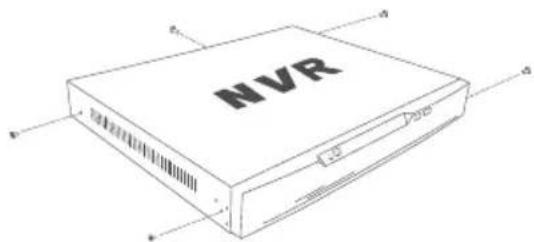
Figure 4: Unscrewing the Cover
- Insert two screws into the holes near the rear panel of the hard drive. Turn the screws twice, so that they protrude slightly.
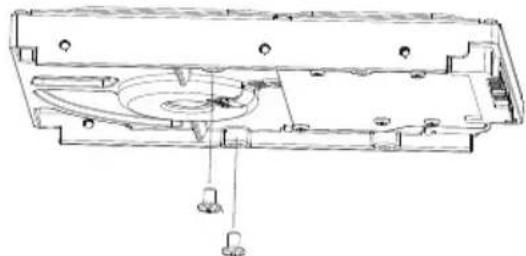
Figure 5: Attaching Screws to the Hard Drive
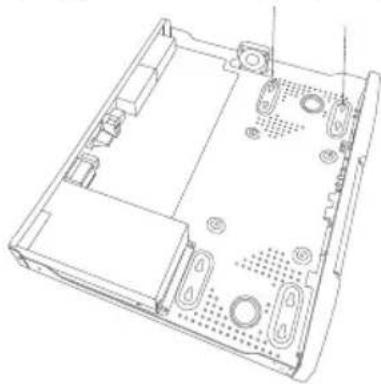
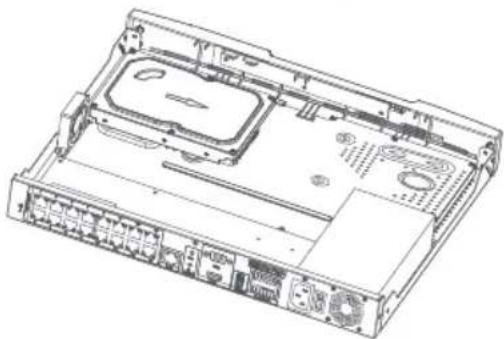
- Insert the hard drive into the drive bay of the DNR-4020-16P, fitting the heads of the two screws into the slots indicated in Figure 6: Inserting the Hard Drive. Slide the hard drive toward the center of the DNR-4020-16P so that it locks into position.
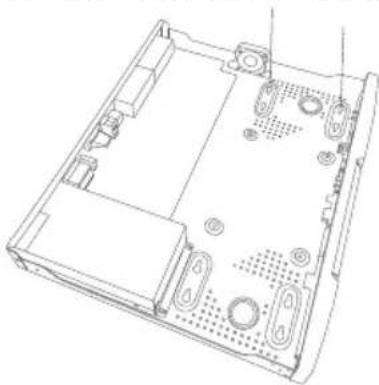
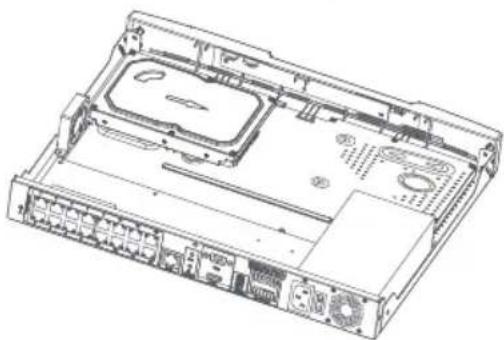
Figure 6: Inserting the Hard Drive
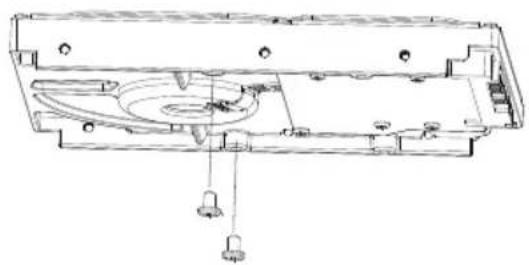
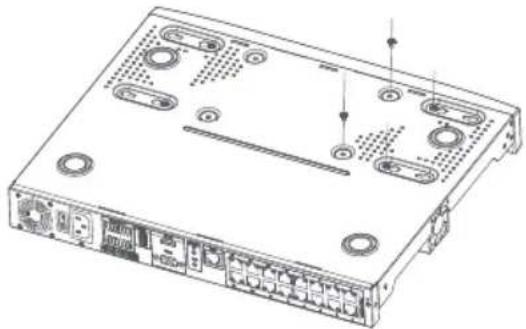
- Turn the device over and secure the hard drive inside the device by screwing the provided screws into the four remaining holes on the bottom of the DNR-4020-16P.
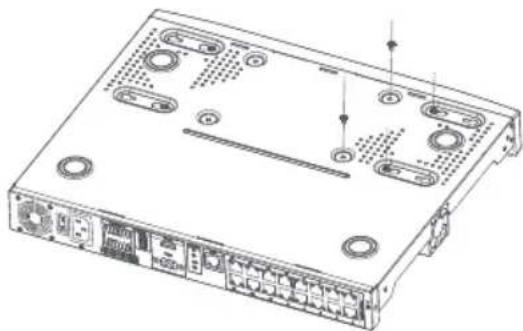
Figure 7: Securing the Hard Drive
- If desired, install a second hard drive by repeating steps 1-4. Attach the hard disk data cable and power cable to the device, then reattach the top cover and fasten the fixing screws.
Management Options
VGA or HDMI Connection
- Connect your network cameras directly by using the PoE ports on the back of the device, or connect them to a switch or router that is connected to the DNR-4020-16P.
- Connect the power cord to the port on the rear panel of the DNR-4020-16P and turn the power switch on.
-
Connect a VGA or HDMI display to the corresponding port on the back of the device. To control the GUI, connect a USB mouse to the USB port on the front panel.
-
The Activation window will appear in the center of the screen. Select your preferred language, and enter a password that will be used to access the management interface. Confirm the password by retyping it.
- In the Default channel password field, enter the password that will be used to view and configure the device's channels. Click OK to continue.
- On the next screen, reenter the admin password and click Login to access the management interface.
Mobile Interface
Once the DNR-4020-16P has been activated, it can also be managed using the JustConnect+ mobile app.
- Download the JustConnect+ app from the App Store or Google Play by scanning the following QR code.
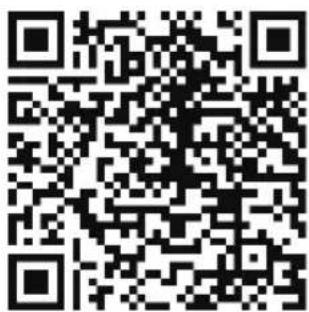
- Open the JustConnect+ app and follow the onscreen instructions to discover and connect to NVRs on the same network as your mobile device. Alternately, enter the domain name or IP address of your DNR-4020-16P to connect to it remotely.
By default, the DNR-4020-16P will receive its IP address via DHCP. It will default to 192.168.0.20 if it is unable to receive an IP address from a DHCP server.
WebUserInterface
The DNR-4020-16P can also be controlled using a web browser.
- Open a web browser and enter the IP address of the device in the address field.
- Log in to the web user interface using the same information used to access the management interface.
Additional Information
If you are encountering problems setting up your device, please refer to the user manual.
Additional help is available online. To find out more about D-Link products or marketing information, please visit the D-Link support website at http://dlink.com/support/.
Warranty Information
The D-Link Limited Lifetime Warranty information is available at the following website: http://warranty.dlink.com/.
TECHNICAL SUPPORT dlink.com/support
eu.dlink.com/support
Quick Installation Guide
Avant de commencer
http://warranty.dlink.com/.
ASSISTANCE TECHNIQUE
eu.dlink.com/support
Quick Installation Guide
Antes de empezar
eu.dlink.com/support
Prima di iniziare
http://warranty.dlink.com/.
SUPPORTO TECNICO
eu.dlink.com/support
Паранчалов pa6OTbl
JaHHepyKOBODCTBO COePKeIT NOwaROBbIe HnCTpyKcNn No yCTaHOBke cTeBOrO BnDeoperncptopap DNR-4020-16P. POMHInTe, YTO npNo6peTehHa BamMoJeNb MoKet OTnUaTbcraOT n3o6paKeHHoHa nnIOCTpauJx. INa NOnyuEnHn PoDpo6HoH INΦOpMaun O cTeBOM BnDeoperncptatope 6bPaNTecb K pyKOBoCDBy NOlb3ObaTeJI.
KOMNJIeKT NOCTaBKn
KOMNJIeKT NOCTaBKn COePknT CneDyIOUne KOMNOHEHTbl:
-16-KaHaJIbHbI CEteBOB BnDEoperncTpaTop c noJdepKkO PoE DNR-4020-16P
Ka6eBnNTaHn
- 8 BnHTOBДЯ KpePJIeHINJ KecTKNX INCKOB
2KpeNEXHbIX KPOHHTeHa DnY yCTaHOBKN B CTOIky
- 6 BnHToB DnKpeNneHn KpoHHTeHOB
2 KJIeMMHbIX 6JIOKA
OKyMeHTaU
EcnnyTO-ln6oOTcyTCTByetnnnoBpeKdEHO, 6bpaNTecb K BaWemy NoctabuNky.
CnCTeMHbIe Tpe6ObaHna
Microsoft Windows
- Microsoft Edge, Internet Explorer, Firefox, Chrome UNN Safari
063op annapathon qactn
HdNkaTopbI nepeHne nane
PncyHok 1: INdkaTopbI nepeDnei naHei
Ta6nua 1:OnncanHe nHdkaTopoB nepeDne naHenn
Tog: A - 2010, B - 2011, C - 2012, D - 2013, E - 2014, F - 2015, G - 2016, H - 2017, I - 2018, J - 2019, O - 2020.
Mecu: 1- nBapb, 2- feBpaIb, ..., 9- cHTa6pb, A- OKT86pb, B-Ho86pb, C-deKa6pb.
IpnO6hApUxKeHn HncnPabHocTn yCtpoNCTBa o6paTntecb B cepBnChbI ceHTp nIIN rpynny TexHnuecko NopdEpxKn D-Link.
TEXHnueCKaIPOdEPKKA
OboBHeHnIporpamMHorO oecneueHn IOKyMeHTaunia DocTyNbHa NHTepHer-CanTe D-Link. D-Link npedocTabnre 6ecnnaTHyIO noDepkky Ira KIneHTOB TeeyHne rapaHTnHoro cpoKa. KIneHTbMOrT obpaTntbcra B rpynny TexHHuecko nOdepkKn D-Link no TenefoHy nnupe3 INHTepHeT.
Texnueckar noDepkka KOMnAHm D-Link pa6oTaET B kpyrnoCytoHOM pexime exeJHeBHO, KpOME oFnuaIbHbIX np3dHvHbIX dHei. 3BOHOK 6ecnnaTHbIN NO BcEN PoCCuN.
Texnuecka noepkka D-Link:
8-800-700-5465
Texnuecka noidepka uepe3 HntepHeT:
http://www.dlink.ru
e-mail: support@dlink.ru
N3rTOBNTeIb:
Д-ЛинкКорпоршн,11494,TaBbA,b,Ta63,HaXyДиСТРК,CnHxY 3-Poyd,N289
YnoHMOueHHbI npedcTaBnteIb, HmnpTeP:
OOO“-JINK Tpei
390043, r. Pərənəb, np. Wə6yɪnɪha, d.16
Ten.: +7 (4912) 575-305
OΦNcbl
Pocn
MockBa, TpaΦckn nepeynok, 14
Tei.: +7 (495) 744-00-99
E-mail: mail@dlink.ru
yKpaiHa
KnIB,ByI.MeKunipcbka,87-A
Tei.: +38 (044) 545-64-40
E-mail: ua@dlink.ua
Moldova
Chisinau; str.C.Negruzzi-8
Tel: +373 (22) 80-81-07
E-mail:info@dlink.md
Bénapycb
MiHck, np-T He3aIexxHacci, 169
Tən.: +375 (17) 218-13-65
E-mail: support@dlink-by
Ka3aKCTAH
AnMaTbI,KypMaHaFa3blK-ci,143y
Tei.: +7 (727) 378-55-90
E-mail: almaty@dlink.ru
zuiuunw
bhuu,unlpu2tu3-pn
puunuufuu,23/5
2bn. +374 (10) 39-86-67
E1. qhnuun.info@dlink.am
Latvija
Riga, Lielirbes iela 27
Tel.: +371 (6) 761-87-03
E-mail: info@dlink.lv
Lietuva
Vilnius,Zirmunu 139-303
Tel.: +370 (5) 236-36-29
E-mail: info@dlink.lt
Eesti
E-mail: info@dlink.ee
Türkiye
Uphill Towers Residence A/99
Atasehir /ISTANBUL
Tel: +90 (216) 492-99-99
Email: info.tr@dlink.com.tr

KomnJIeKT noCTaayHHa
KOMNJIeKT NOCTaHaHHaMICITb HAcTyHHi KOMNOHeHTI:
16-KaHaBbHm MepeXeBn BiDeopeceCtpatop 3 NiTpumKoIO PoE DNR-4020-16P
Ka6eJIbKINBHeHHA
- 8 rBnHTiB dIЯ KpInneHHЯ JOpCTKnx DnCKiB
·2KPOHHTeHnДЯBCTaHOBHeHHB CTiIky
- 6 rBnHtB dЯ KpInneHHKpoHHTeHb
- 2 KJIeMHnIX 6JOKI
-ДOKум entaць
Kaio 0 He6yB BiCyTH a6o NookKeHe, 3BepHtcbn Do BaWOro nocayalbHka.
CnCTemHi Bumorn
Microsoft Windows
- Microsoft Edge, Internet Explorer, Firefox, Chrome a6o Safari
Orn anapathoi qactHH
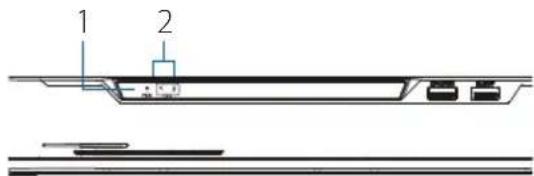
IhdkaTopn nepeHboi naHei
MaHIOK 1: INdkaTopn nepedhboi naheI
Ta6nua 1:Onnc iHdkaTopib nepedhboi nahei
BcTaHOBHeHHxOpCTKOrO DnCKa
Pnmitka:Kopctkn DnCK He BXoDnTb Do KOMJIeKTy NOCTaHaHH.
- BnKpyiTb rBnHTn Ha 3aHni naHeni i 6iHynx naHEnx npICtpoI. Notim 3HimiTb BepXHIO naHEnb 3 npICtpoI.
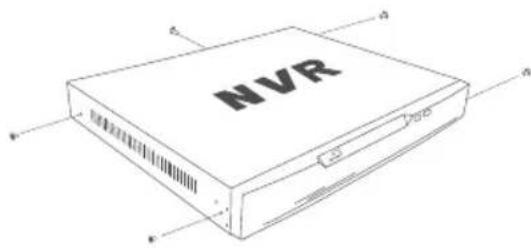
MaHIOHOK 4:PiIroTOBka Do 3HrTTB BepXhBoi naHeni
2.BCTABTeDbTaBnHTN BOTBOpH,po3TaOBoHi nopyu i3 3aHbOIO naHeIIO JxOpCTKOro DnCKa. Diuhi NOBepHIb TbHN ToK, uO6 BOHn TPOXn BNCTypan.
ManIOHOK 5:KpInnHeHHrBnHTIBdoXOpCTKOrO DnCKa
- BCTABTe JopcTKn DnCK y BiDcik TaK, 06 rONIBKn DBOx TBnHTiB CnIBnAn 3 OTBOPAMN, NOKa3aHmM Ha MaJIOnHKy 6. NocyHbTe JopcTKn DnCK B HApRMky UeHTpy DNR-4020-16P dIg fikcaii.
MaHIOHOK 6:BCTaHOBHeHH JOpCTKOrO DnCKa
- IpeBepHitb npncpti i npnKpyiTb KOpCTKn DnCK 3a DOonomoTO BnHTIB (BXOJrTb Do KOMNKeTy NOCTaHaHH).
ManIOHOK 7:KpinneHHJXOpCTKOrO DnCKa
- RaKIO notpi6HO BCTaHOBuTn DpyrN JopctKn IINCK, NOBTOPiB KpOKN 1-4. NIKIOUHTb Ka6eNb DaHnx IINJXOPcTKoro INCKaTa Ka6eNb XNBJIeHNHaOpCTPOI. NotIM BCTaHOBiTB BepxHIO NaHeJIb i npKpyITb TBHNT Do 3aHbOIi 6iHNX NaHeJIe NpNCPTPOI.
KepyBaHHa
Пдклоченя пистpoь
1.Пдкючь Мержеви Камер 6e3nocepHbOdo noptiB PoEHa3aHni naheni npncTropo a6oDo KOMyTaTopa a6oMapupyTu3aTopa,piKluyeHoro do DNR-4020-16P.
2.Пдкнчсьka6ьжИВеHHЯdo BiINOBiHOro po3'Emy Ha 3aHnI naHeni DNR-4020-16P i yBIMKHTbЖИВeHHa npICtpOu 3a DonOMOrO KHOKNHa NOrO 3aHnI naHeni.
3.Пдкнчы MOHITOP 3 noptom VGA a60 HDMIdo BiinobiHoro npTy Ha 3aHnI nane npncTpoU.ДЯ KepyBaHHa 3a DonOMOrO rpaifuHoro iHTepeCy, npn3HaueHoro dJa KOpNCTyBaHa, niklouHb USB-muSy do USB-nopty Ha nepeHi nane npcTpoU
4.Y ueHpi ekpaHy 3'ABNTbcB iKHO Activation (AKnBaui). Bn6epiB nOTpiHy MOBy i npoJI, kNn 6yJe BnKOpNCTOBvBaTcNdI DOCTUpy Do iHTepFeey CepyBaHH. PITbepDITb npoJI, BBiIN NOrO NOBtOPOHO.
5.BBeiB npoB, Kotpn 6yde BnKOpNCTOByBaTncI dnn nepeRny Ta HanaHTyBaHHKaHAnIB npicTpOIO,B nOJe Default channel password (Papob KaHAnIB 3a 3amOBuyBaHHm).HaTnCHITb OK nnpoDBxKeHH.
6. B HactynHomy BiKHi BBeDiItb ue pa3 napoIb aMHHCTpaTopa iHaTNCHTb Login (YbiTu) dIg OTpMaHH DOCTpyN Do iHtpecy KepyBaHH.
Mo6iNbHn iHTepfeic
IicnaakTnBaui BiedeopeectpaTopa DNR-4020- 16P kepybaHHN Hm MoXHa 3iinCHIOBATn 3a donOMOrIO MOiNbHorO DoaTkY JustConnect+.
1.СачайтEOДАТOKJustConnect+3App StoreaboGooglePlay,npocKaHyBaBn NaCTyHnQR-KoI.
- BiKpnTe DoaToK JustConnect+ i DToPmMyTecb NOrO Bka3iBok, 0o63HaHTN iPiKIOuHTnc DO BiDeopeeCtpatopIB TIN JKe MepeXi, B kIn 3HaxOuNTbcra BaI MOiJIbHn PnCTpi. RaJIbTePHaTHNBn BapiaHT, BBeIDITb DomHe im'a 60 IP-
aDecy BiideopeeCTpaTopa DNR-4020-16P, 06 niKNUHTnCdo HbOro BiDaneHo.
3a 3amOByBaHHm DNR-4020-16P OTPMaE IP-aDpeCy BiD DHCP-cepBepa. Rkio OTpMaTn IP-aDpeCy BiD DHCP-cepBepa He BdaCTbC, To IPaDpecoIO 3a 3amOByBaHHm 6yJe 192.168.0.20
Web-iHTeppeic
KepyBaHHN DNR-4020-16P TaKoX MoXHa 3iinCHOBaTH Yepe3 Web-6pay3ep.
- BiДкриite Web-6pay3ep i BVEiITbВ aIpeCHOMy pIky IP-aIpeCy npIcTpoIO.
- Ybiinitb Web-iHTepphiic, BnKOpncTOBHyOuH Ty K iHOpMaUIO, 0i dna doCTyNy do iTepcecy KepyBaHHa.
IodatkoBaiHΦopmaia
Kiio n iac HanaHTyBaHH npncTpo y Bac BnHKnI npo6nemN,3BepHiTbcra Do KepiBnTba KopNCtYbau.
http://warranty.dlink.com/.
Regulatory Statements (Only for Class A product)
Federal Communication Commission Interference Statement
This equipment has been tested and found to comply with the limits for a Class A digital device, pursuant to part 15 of the FCC Rules. These limits are designed to provide reasonable protection against harmful interference when the equipment is operated in a commercial environment. This equipment generates, uses, and can radiate radio frequency energy and, if not installed and used in accordance with the instruction manual, may cause harmful interference to radio communications. Operation of this equipment in a residential area is likely to cause harmful interference in which case the user will be required to correct the interference at his own expense.
Non-modification Statement
Any changes or modifications not expressly approved by the party responsible for compliance could void the user's authority to operate the equipment.
Caution
This device complies with Part 15 of the FCC Rules. Operation is subject to the following two conditions:
(1) This device may not cause harmful interference, and (2) this device must accept any interference received, including interference that may cause undesired operation.
Innovation, Science and Economic Development Canada (ISED) Statement:
This Class A digital apparatus complies with Canadian ICES-003.
This equipment is compliant with Class A of CISPR 32. In a residential environment this equipment may cause radio interference.
English
CEEMIClassAWARNING
This equipment is compliant with Class A of CISPR 32. In a residential environment this equipment may cause radio interference.
SAFETY INSTRUCTIONS
The following general safety guidelines are provided to help ensure your own personal safety and protect your product from potential damage. Remember to consult the product user instructions for more details.
- Static electricity can be harmful to electronic components. Discharge static electricity from your body (i.e. touching grounded bare metal) before touching the product.
- Do not attempt to service the product and never disassemble the product. For some products with a user replaceable battery, please read and follow the instructions in the user manual.
- Do not spill food or liquid on your product and never push any objects into the openings of your product.
- Do not use this product near water, areas with high humidity, or condensation unless the product is specifically rated for outdoor application.
- Keep the product away from radiators and other heat sources.
Always unplug the product from mains power before cleaning and use a dry lint free cloth only.
DISPOSING AND RECYCLING YOUR PRODUCT

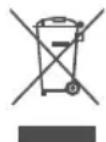
This symbol on the product or packaging means that according to local laws and regulations this product should be not be disposed of in the household waste but sent for recycling. Please take it to a collection point designated by your local authorities once it has reached the end of its life, some will accept products for free. By recycling the product and its packaging in this manner you help to conserve the environment and protect human health.
CE EMI KLASSE A-WAARSCHUWING
AFVALVERWERKING EN RECYCLING VAN UW PRODUCT

MISE AU REBUT ET RECYCLAGE DE VOTRE PRODUIT
IPOEIOIOIHsCEEMKAAASHA
Auto o eGOTAIIOOc OUMOPPwETaIe TNV Klaon A Tou CISPR 32. ZE oIKiako TEPiBaAlov, autoc o EOTAIIOOc EvExTAl VA TPOKAeoi paIoITapEoAeC.
O△HΓIEΣ AΣΦΑΛΕΙΑΣ
Oi akolouegevikee oayie aopalaia napexovta ie toxva oac bonnoouv va povtiete nTv npoawntikn oag aopalaia kai va tpoatauouv to pioiov oac ano evdojev n Baa. Ountheite va avatpeete otig oyniec xphotn tou pioiovtoaoc a yia Tepiootepec aeTTOpepieec.
O otatikos nektpiogos mtoeia eivai etiIaaicns ia ta nektpovika exaptnmuata. EkoptioTe to otatiko nektpiao aTTOsigma (T.x. ayyicovtac eva yiewve yuuvo metaaloo) Tpiv ayyieTe to ppoiov.
Mny TPOOHTHOEVA EIOKEUAOETO TPOIOV KAI TOTe MNY TO aTOOuvapmoaynoTe. Ia Opiapeva TPOIOvTA ME MTATAPIA AVTIKAIOITWMEVN ATTOV XpnoT, DIABaote KAI AKOLOHnTe TIG OBNYIECS TOU TEPIEXOVTA OTO EYEIPIDIO XpnoT.
- PpooEe va uny TEOouv TPOeC n Uypa EINAVW OTo TPOIOv KAI mV EIOAYET EOTc AVTKIEUva Peaa Ota avoIymuata Tou TPOIOvTOc.
MnV xpnoiopoioite To TPOIOv Kovra evepo n e TEPIOXe me uynn Uypaia n ouumukwon ubpatmu, EKTOc eav To TPOIOv Eivai pnta xapaktnpiapevo wC kataaANo yia epappuoye c EgWTEPIKOUc Xwpouc.
KpatnoTe To npoiov paepia aTIO kaLopipep kai aaEs Tnyes ePOTnTac.
- Na aioouvdeTe navTa to pioiov aTo nTv npoxn peuatoa o Tpiv va To kaapiae TE Kai va Xpooiopoite Meo eva oteyvo navi xwpi xvoudia.
ANOPPIH KAI ANAKYKΛΩΣH TOY ΠPOIONTO
AutoTo ouuBoAoTo TPOiov n otn oukeuaia onpaivei oti, ouuwpwa Te NTV toTNIV opoTeia Kai Touc kavovioouc, To TPOiov dev TpETe i va atoppittetai aci e oikia atoppmuataa aa va atooTtAAeTai ia avakukwon. Otav taeoi oTo TEAC tsC wns Tou, PPOOKOIATE TO e eva onueio auLoync KaOpiApoevo aTo TcTOnIKEc apxec: opiaeva onueia dExovta TPOIOvTa xWpic xpewn. Avakukluovntac To TPOiov KAI Tn oukeuaia tou Me autov Tou pTo, Oumbaalete OTN V TPOOTAOIA Tou TTepiBaalovTOc KAI TNS avPwTIVnc Uyeiac.
Hungarian [Magyar]
CE EMIA OSZTALYU FIGYELMEZTETES
UTYLIZACJA I RECYKLING PRODUKTU

Slovenian [Slovenski]
OPOZORILO CE EMI ZA RAZRED A
DESECHAR Y RECICLAR EL PRODUCTO


CE EMI KCLASS A-VARNING
This D-Link product includes software code developed by third parties, including software code subject to the GNU General Public License ("GPL") or GNU Lesser General Public License ("LGPL"). As applicable, the terms of the GPL and LGPL, and information on obtaining access to the GPL code and LGPL code used in this product, are available to view the full GPL Code Statement at:
The GPL code and LGPL code used in this product is distributed WITHOUT ANY WARRANTY and is subject to the copyrights of one or more authors. For details, see the GPL code and the LGPL code for this product and the terms of the GPL and LGPL.
Written Offer for GPL and LGPL Source Code
Where such specific license terms entitle you to the source code of such software, D-Link will provide upon written request via email and/or traditional paper mail the applicable GPL and LGPLsource code files via CD-ROM for a nominal cost to cover shipping and media charges as allowed under the GPL and LGPL.
Please direct all inquiries to:
Email:
GPLCODE@dlink.com
Snail Mail:
Attn:GPLSOURCE REQUEST
D-Link Systems, Inc.
Fountain Valley, CA 92708
Notes
Notes
Notes
Notes




Ver. 1.00(WW)_90x130
2020/09/28
101-010-0199-01

- Quick Installation Guide
- Package Contents
- System Requirements
- Hardware Overview
- Rear Panel Interface Connectors
- Hardware Installation
- Before You Begin
- Hard Drive Installation
- Management Options
- VGA or HDMI Connection
- Mobile Interface
- WebUserInterface
- Additional Information
- Warranty Information
- Avant de commencer
- Antes de empezar
- Prima di iniziare
- Паранчалов pa6OTbl
- KOMNJIeKT NOCTaBKn
- CnCTeMHbIe Tpe6ObaHna
- 063op annapathon qactn
- TEXHnueCKaIPOdEPKKA
- Texnuecka noepkka D-Link:
- Texnuecka noidepka uepe3 HntepHeT:
- N3rTOBNTeIb:
- YnoHMOueHHbI npedcTaBnteIb, HmnpTeP:
- OΦNcbl
- KomnJIeKT noCTaayHHa
- CnCTemHi Bumorn
- Orn anapathoi qactHH
- BcTaHOBHeHHxOpCTKOrO DnCKa
- KepyBaHHa
- Пдклоченя пистpoь
- Mo6iNbHn iHTepfeic
- Web-iHTeppeic
- IodatkoBaiHΦopmaia
- Regulatory Statements (Only for Class A product)
- Federal Communication Commission Interference Statement
- Non-modification Statement
- Caution
- Innovation, Science and Economic Development Canada (ISED) Statement:
- English
- CEEMIClassAWARNING
- SAFETY INSTRUCTIONS
- DISPOSING AND RECYCLING YOUR PRODUCT
- CE EMI KLASSE A-WAARSCHUWING
- AFVALVERWERKING EN RECYCLING VAN UW PRODUCT
- MISE AU REBUT ET RECYCLAGE DE VOTRE PRODUIT
- IPOEIOIOIHsCEEMKAAASHA
- O△HΓIEΣ AΣΦΑΛΕΙΑΣ
- ANOPPIH KAI ANAKYKΛΩΣH TOY ΠPOIONTO
- Hungarian [Magyar]
- UTYLIZACJA I RECYKLING PRODUKTU
- Slovenian [Slovenski]
- DESECHAR Y RECICLAR EL PRODUCTO
- CE EMI KCLASS A-VARNING
- Written Offer for GPL and LGPL Source Code
- Email:
- Snail Mail:
- Notes
Brand : D-LINK
Model : DNR402016P
Category : VCR