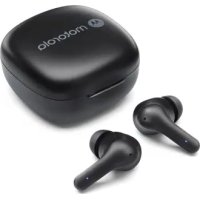
Moto Buds 135 - Earplug MOTOROLA - Free user manual and instructions
Find the device manual for free Moto Buds 135 MOTOROLA in PDF.



| Product Type | True Wireless In-Ear Headphones |
| Brand | Motorola |
| Model | Moto Buds 135 |
| Earbud Dimensions | 24 x 17 x 15 mm |
| Case Dimensions | 60 x 40 x 25 mm |
| Earbud Weight | 4.5 g each |
| Case Weight | 32 g |
| Power | Rechargeable lithium-ion battery via USB-C |
| Charging Indicator | Blue LED: flashes during charging, solid when fully charged |
| Main Functions | Hands-free calls, music control, voice assistant, Google Fast Pair |
| Multifunction Button | Single, double, triple press, hold 2 seconds |
| Compatibility | Android 6.0+ and iOS smartphones |
| Connectivity | Bluetooth |
| Ear Tips | Replaceable, sizes S, M, L |
| Care and Cleaning | Clean with a soft, dry cloth; avoid moisture |
| Safety | Do not expose to extreme temperatures; use only the provided charger |
| Spare Parts and Repairability | Ear tips available separately; no user-serviceable parts |
| General Information | Automatic power on when case is opened; Google Fast Pair |
Frequently Asked Questions - Moto Buds 135 MOTOROLA
User questions about Moto Buds 135 MOTOROLA
0 question about this device. Answer the ones you know or ask your own.
Ask a new question about this device
Download the instructions for your Earplug in PDF format for free! Find your manual Moto Buds 135 - MOTOROLA and take your electronic device back in hand. On this page are published all the documents necessary for the use of your device. Moto Buds 135 by MOTOROLA.
USER MANUAL Moto Buds 135 MOTOROLA
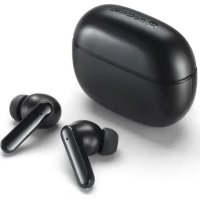
- Multi-function buttons (MFB)
- Replaceable earcaps (size M)
- Earbud charging contacts
- Microphone
- Charging case
- USB-C charging socket
- Battery level and charging status indicator
- Charging case charging contacts
2. Charge
-
Remove all the tapes on the earbuds before charging.
-
Plug the Type C cable into the USB-C charging socket of the charging case. The LED indicator flashes blue during charging the battery. It turns solid blue when charging is complete.
-
Put the earbuds into the charging case and close the top lid to start charging.
3. On/Off/Pair
- Turn on earbuds: Open the charging case top lid and take out the earbuds from the charging case, the earbuds will turn on automatically. (Read section 6)
- Turn off earbuds: Put the earbuds into the charging case and close the top lid, the earbuds will be off automatically.
- Pairing: MOTO BUDS 065 supports Google fast pairing. Open the charging case top lid and take out the earbuds from the charging case. For Motorola smartphone or Android phone with Android version 6.0 or above, simply confirm MOTO BUDS 065 directly on your device screen. For other devices, select MOTO BUDS 065 from the Bluetooth menu of your device. When pairing is successful, you will find a notification on your phone and hear a connected tone on the earbuds.
4. Fit and comfort
- Choose the suitable earcap size.
- Fit into the earbuds.
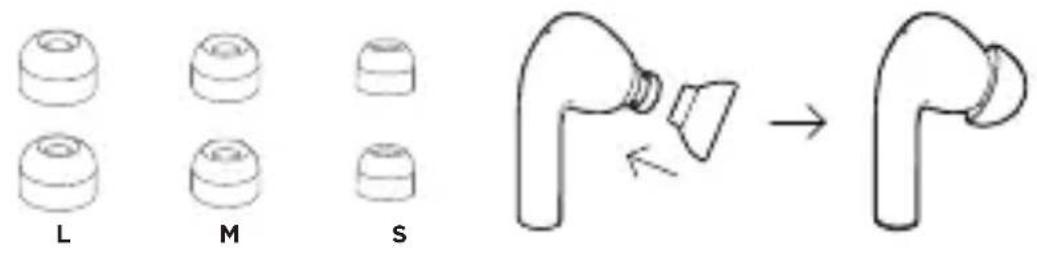
Fig. 4a
5. Operation
| Call Button | |
| Answer/End a call Left/right | MFB: Tap once |
| Reject a call | Left/right MFB: Press and hold for 2 seconds |
| 3-way call | |
| Pick up calls/Put calls on hold/swi tch calls | Left/right MFB: Tap once |
| Reject calls/Continue the current call | Left/right MFB: Press and hold for 2 seconds |
| End the current call and resume on hold calls | Left/right MFB: Tap twice |
| Music | |
| Play/Pause Left/right MF | B: Tap once |
| Previous track Left/right | MFB: Tap 3 times |
| Next track Left/right MF | B: Tap twice |
| Activate voice assistant | |
| Siri, Google | Left/right MFB: Press and hold for 2 seconds. *Need to enable the corresponding voice assistant features on your smartphone. |
For a full explanation of all features and instructions, please download the user guide from motorolasound. com.
6. Important notes
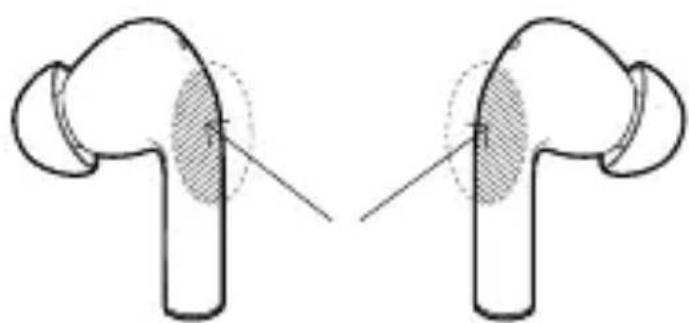
The multi-function button (MFB) of your earbuds has touch sensors that enable different functions.
Note
- Avoid touching the MFB when taking out the earbuds.
- When inserting the earbuds into ears, hold the sticks and avoid touching the MFB.
1. Auf einen Blick
DE
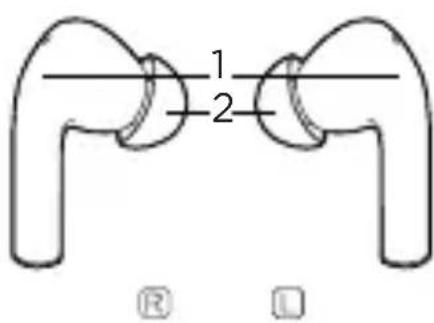
Abb. 1a
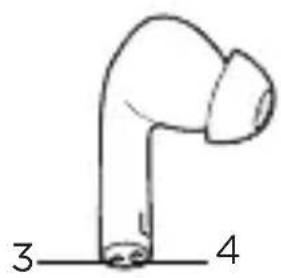
Abb. 1b
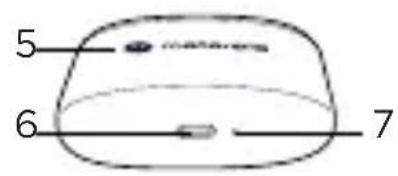
Abb. 1c
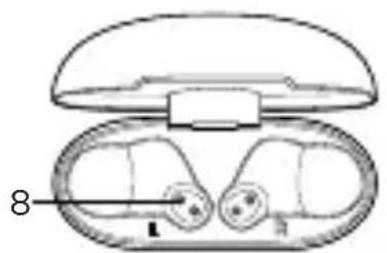
Abb. 1d
- Frequency band: 2.402 to 2.480GHz
Maximum RF power: 6 dBm (for CE only) - Working temperature: 0^ to +45^
CE Declaration
This product is in compliance with the essential requirements and other relevant provisions of the RED Directive 2014/53/EU.
UK Declaration of Conformity
Hereby, MZGW declares that this product is in compliance with the requirements for UKCA marking.
The CE and UK Declaration of Conformity can be obtained at motorolasound.com.
Imported and Distributed by:
A.I.&E., Adriaan Mulderweg 9-11, 5657 EM Eindhoven, The Netherlands.
Edco UK Ltd, 1st Floor, Two Chamberlain Square, Birmingham, B3 3AX, UK.
Manufactured, distributed or sold by Meizhou Guo Wei Electronics Co. LTD., official licensee for this product. MOTOROLA and the Stylized M Logo are trademarks or registered trademarks of Motorola Trademark Holdings, LLC. and are used under license. All other trademarks are the property of their respective owners. © 2024 Motorola Mobility LLC. All rights reserved.
Version 1.0 (EU)
Printed in China

Brand : MOTOROLA
Model : Moto Buds 135
Category : Earplug