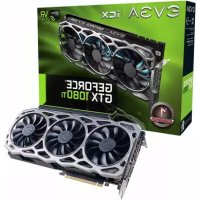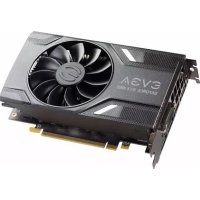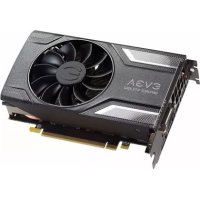
GeForce GTX 1060 3GB SC - Graphic card EVGA - Free user manual and instructions
Find the device manual for free GeForce GTX 1060 3GB SC EVGA in PDF.



| Technical Specifications | EVGA GeForce GTX 1060 3GB SC |
|---|---|
| Architecture | NVIDIA Pascal |
| Video Memory | 3 GB GDDR5 |
| Memory Bus | 192 bits |
| Base Clock | 1506 MHz |
| Boost Clock | 1708 MHz |
| Power Connectors | 1 x 6-pin |
| Video Ports | 1 x HDMI, 1 x DisplayPort, 1 x DVI-D |
| Recommended Usage | 1080p video games, multimedia applications |
| Maintenance | Regular fan cleaning, driver updates |
| Safety | Avoid overheating, use a well-ventilated case |
| Compatibility | Compatible with most modern operating systems |
| General Information | Power consumption: 120W, Dimensions: 9.5 inches |
Frequently Asked Questions - GeForce GTX 1060 3GB SC EVGA
User questions about GeForce GTX 1060 3GB SC EVGA
0 question about this device. Answer the ones you know or ask your own.
Ask a new question about this device
Download the instructions for your Graphic card in PDF format for free! Find your manual GeForce GTX 1060 3GB SC - EVGA and take your electronic device back in hand. On this page are published all the documents necessary for the use of your device. GeForce GTX 1060 3GB SC by EVGA.
USER MANUAL GeForce GTX 1060 3GB SC EVGA
Intelligent Innovation
Table of contents
Overview 2
Hardware Installation 3
Quick Start 3
Hardware Installation Details 4
Graphics Cards Requiring Additional Power 4
SLI Installation 5
Software Installation 5
Setting up Multiple Displays 6
QuickFixes 7
Additional Support 8
Compliance Information 9
SVSA
Intelligent Innovation
Overview
Thank you for purchasing a genuine EVGA graphics card. EVGA is an NVIDIA® Authorized Solution Provider that builds high performance 3D cards. Our graphics cards are fully compatible with the latest 2D and 3D graphical requirements.
Before installing your EVGA graphics card, it is highly recommended to first register the product to receive the full support and warranty. You can register your card online at www.evga.com/register.
EVGA also strives to provide a full range of programs and services to enhance the customer experience including but not limited to:
EVGA Advanced RMA (EAR) Program:
The EVGA Advanced RMA (EAR) Program is a program to protect yourself and your product in the case of product failure. For more information please visit www.evga.com/support/sar.
EVGA Step-Up* Program:
In order to give our customers the greatest amount of flexibility when purchasing EVGA graphics cards, we have instituted the EVGA Step-Up® Program. For more information please visit www.esva.com/stepup.
EVGA Online Community:
To visit the EVGA community forums, please visit www.evga.com/forums for more information.
EVGA Precision XOCM
Designed from the ground up to support new GPU technology, EVGA Precision XOCT redefines what overclocking software should be. For more information please visit www.evga.com/precisionxoc.
EVGA FAQ:
To search our knowledge base and product FAQ, please visit www.evga.com/faq for more information.
EVGA GamingTM
If you live to game, this is the place for you! We have the best tournaments, prizes and game servers. For more information please visit www.evgagaming.com.
Folding@EVGA:
Distributed computing for the greater good. Did you know that you can turn your graphics card into a shared supercomputer? For more information please visit www.evga.com/folding.
CV3A
Intelligent Innovation
EVGA Social NetworksTM:
Stay up to date on contests, promotions, tech tips, new products, driver releases and more by following EVGA on your favorite social network! For more information please visit www.evga.com/sonel.
MODS RIGS
$1K Sponsorships for every 200 posts. Come show off your rig and join in on one of the biggest things happening at EVA. For more information please visit www.modsrings.com.
Hardware Installation

Preparing Your Computer
WARNING: Turn off the power to your system and discharge your body's static electric charge by touching a grounded surface - for example, the metal surface of the power supply or chassis - before performing any hardware procedure. EVGA assumes no liability for any damage, caused directly or indirectly, by Improper installation of any components. If you do not feel comfortable with performing
the installation procedure, consult a qualified computer technician. Damage to the system components, the graphics card, and injury to yourself may result if power is applied during installation. Now that you have prepared your computer, you are ready to install your graphics card.
Quick Start
- Before starting installation, it is recommended to completely remove all drivers for your existing graphics card (if you have one).
- Power off the computer and all attached devices (keyboard, mouse, etc.).
- Disconnect the display cable from your current display adapter on the back of the computer.
- Remove your existing graphics card (if you have one) from your computer. You will do this by removing the retaining screw and pulling the card out in a straight up fashion. Please note that your motherboard may have a PCI Express (PCI-E) latch on the slot that needs to be pressed in first.
(NOTE: If your motherboard has integrated or onboard video, you may need to disable it first, please contact your system or motherboard manufacturer for additional information.)
CVSA
Intelligent Innovation
- Align your new card with the appropriate slot, (see illustration below) and press it in firmly until the card is fully seated. Make sure that the metal contacts of the card are completely pushed into the expansion slot.
- Connect the supplemental PCI Express (PCI-E) power adapter(s) to the card if applicable. (See illustration below.)
- Replace the retaining screw to fasten the card into place, and then replace the computer cover.
- Reconnect any devices that you detached during installation, and then connect the monitor's video cable to your new graphics card.
- Apply power to your system, boot to the operating system and install the proper drivers.
Hardware Installation Details
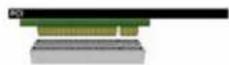
PCI Express (PCI-E) and PCI slots are different, so prior to installation; please verify that the graphics card bus type and available slot are the same.
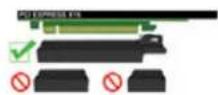
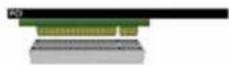
FCI Graphics Cards FCI Express (FCI-G) Graphics Cards
Graphics Cards Requiring Additional Power
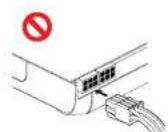
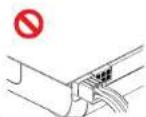
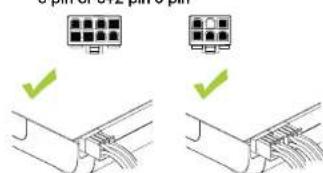
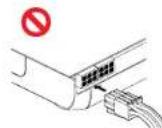
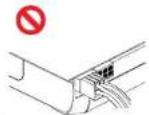
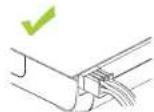
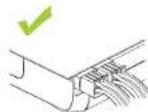
If your graphics card is equipped with a supplemental power adapter, it is required that it be connected at the time of installation. This supplemental power adapter ensures that your graphics card receives the necessary power that will allow it to function at optimal performance levels. Your card may require one or more 6 or 8-pin PCI Express (PCI-E) supplemental power connectors. Please note that the 8-pin PCI-E power connector is not the same as the 8-pin CPU power connector. Please see the below illustration.
Always use the PCIE power cables from your Power Supply first, only use included adapters when your Power Supply does NOT have the appropriate connectors. 8-pin or 6-12 pin 6-pin
CV3A
Intelligent Innovation
SLI Installation (optional)
On some EVGA graphics cards, it is possible to link multiple graphics cards together for improved performance, this is called SLI. To install multiple cards in SLI, follow the below instructions, please note that in SLI setups both cards must be the same model. For a video overview of setting up SLI, please visit www.evga.com/slivideo. Also, you can view FAQ about SLI at http://www.evga.com/support/faq/?f=58605.
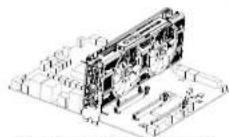
Install your first Gel orange graphics cardinto the Primary PCI Express x16 abo
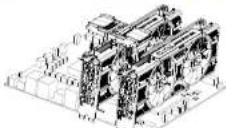
2-way SLI install your second Get one graphics card in to the secondary PCI Express X16 slot. Connect the two cards together using the 2 way/ new 2 way SLI bridge connector that came with your SLI-ready motherboard.
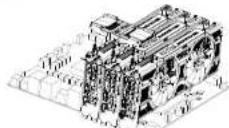
3-way SLI install the third Gear once card into the tertiary PCI Express slot on the motherboard. Connect the Gear once card together using two 3-way SLI brojo connector this comes with your SLI-ready motherboard.
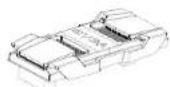
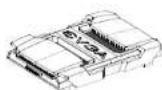
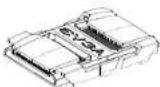
New-2-way SLF 2-way SLI 3-way SLI 4-way SLI
For ALL SLI configurations, please consult your motherboards user manual for proper placement of cards in the given FO Express slots. Always install the cards in 8x or 16x acts. As SLI will not function in 4x, the specific act Information should be available in the motherboards users manual.
The above SU bridge are included with your SU ready motherboard depending on the configurations it supports. In order for your SU setup to work properly, you will need to use the appropriate bridge based on the number of cards you are connecting. 'New 2 way SU bridge for GTX 10 series. SU technology is not supported by GTX 1050 / 1050T / 1050
Software Installation
When you boot up your computer for the first time after installing your new graphics card, Windows may detect a new display device and attempt to install the drivers. If it gives you the option to cancel, please do so, otherwise wait for Windows to complete the installation (a reboot may be necessary).
After this process has been completed, it is necessary to install the recommended drivers for your graphics card. To begin, it is recommended to download the latest drivers from www.evga.com/support, alternatively, you can install the drivers off the EVGA Installation DVD.
5
English English
CVSA
Intelligent Innovation
NOTE: If adding a secondary card to an existing PC, you may be required to REINSTALL the driver again.
Note: If the autorun driver installation menu does not appear, it can be launched manually by clicking on the "Computer" or "My Computer" icon, and double clicking the icon for your DVD/CD drive. After that double click on the "autorun.exe" file.
Once the autorun installation menu appears, select the "Install Video Drivers" button. This will start the driver installation process.
Note: During installation, you may be prompted by the Microsoft WHQL (Windows Hardware Quality Labs) warning, please select the "Continue" or "Install this driver software anyway" option, as it is safe to do so.
Setting up Multiple Displays
The NVIDA® Control Panel allows you to configure a multi-display environment, whether it is through multiple computer monitors or by using a monitor in conjunction with an HDTV. The ability to use multiple displays within Windows can simplify many everyday tasks by spreading out the Windows Desktop area, or make working with an HDTV even easier by allowing you to watch a movie on one of the displays, while performing other tasks on the other display. Multiple display configurations can be made in the "Set up Multiple Displays" subsection located in the NVIDIA® Control Panel. To access the NVIDIA® control panel, simply right click on the desktop, and select "NVIDIA" Control Panel".
Single Mode
Select just one checkbox for the monitor you wish to use as your single display. This will disable the secondary output and is the default setting if you only have one monitor connected to the graphics card.
Extended Mode
Select two or more checkboxes to enable more than one monitor. Once checked, right click on the monitors in the section below to set the desired mode. Extended desktop mode can independently control resolution and refresh rate settings for each display.
Duplicate Displays
Select two or more checkboxes to enable more than one monitor. Once checked, right click on the monitors in the section below to set them to duplicate display mode, and select the primary monitor. Duplicate displays require identical resolutions between both displays.
Enabling SLI (optional)
If you installed multiple cards in SLI mode, you will need to enable SLI to get the maximum performance from your system. To enable SLI, visit the NVIDIA® control panel by right clicking on the desktop, and select "NVIDIA® Control Panel." Next, select "Set SLI and PhysX configuration." Finally, select "Maximize 3D Performance" and select apply. To see a video overview of the SLI installation procedure, please visit www.evga.com/sfvideo.
6
CV3A
Intelligent Innovation
Quick Fixes
Problem: At boot-up, all you hear is a series of beeps from the computer, but see no image on the screen.
Cause: The beep sounds are a warning sound from the motherboard BIOS that says it cannot initialize the graphics card, this can mean one of four things:
1) The card is not seated properly.
2) There is a problem with the motherboard's graphics card slot.
3) Supplemental PCI-E power is not connected to the graphics card.
4) There is a problem with the graphics card.
Solution: Remove the card from the computer and reinsert it, making sure that the card is seated properly in the slot, and then try to boot the computer again. If this does not work then the problem is either with the motherboard or the graphics card and you should contact your hardware manufacturer for further assistance.
Problem: The integrated video adapter has not been disabled prior to installing the new graphics card, and/or the previous adapter's drivers have not been properly uninstalled.
Cause: The integrated video adapter has not been disabled prior to installing the new graphics card and/or not having uninstalled the display drivers from your previous display adapter.
Solution: Ensure the integrated video adapter has been disabled through your motherboard's BIOS or the Windows Device Manager prior to installing the new graphics card, and that you have uninstalled the drivers through the Windows Control Panel. After the new card has been installed, connect the monitor cable and if required, any supplemental power adapters to the new card before booting up the system.
Problem: Games lock up or crash to the desktop.
Solution: Verify that all the necessary hardware drivers are installed and up to date, including the chipset, video and sound card drivers. Reinstall the latest version of DirectX (located on EVGA installation disc) or the game itself. Also, verify the game has all the necessary patches installed that are available from the developer.
Problem: Where can I find the latest drivers for my graphics card?
Solution: The latest drivers can be found at www.evga.com/support/drivers.
English English
SV3A
Intelligent Innovation
Problem: When viewing my PC on an HDTV, the entire desktop is not visible, and certain areas: such as the Windows taskbar, reside offscreen.
Solution: Firstly, ensure that you are running at the correct resolution for your display. If it is, try adjusting the "Resize Desktop" feature. This lets you compensate for HDTV overscan so that the entire desktop is visible. In this case, to view display elements that appear offscreen, NVIDIA recommends using the Overscan Shift feature to pan the desktop. You can access the Overscan Shift controls from the TV Settings page of the NVIDIA panel.
Note: For problems not listed in this document, please visit the EVGA Knowledge Base at www.evga.com/faq.
Additional Support
Should you require any assistance with the installation or troubleshooting of your EVGA graphics card, please visit the support section of our website at www.evga.com/support. There you will be able to download drivers, check out our extensive Knowledge Base, and submit technical and customer support inquiries. Be sure to also visit the EVGA forums at www.evga.com/forum.
Alternatively, we can be reached by phone. Before contacting Customer Service, please review this manual. If you need to contact Customer Service, please have your system configuration as well as your card's model number and serial number ready. You will need to register your product before a support technician can assist you. You may register your card online at www.evga.com/register.
Hours of Operation: 24/7 Technical Phone Support
Phone Support: (888) 880-EVGA (3842)
- Tech Support Web Site: www.evga.com/support
Warranty Program to Fit your Needs
Most EVGA products are covered under a 3 Year Warranty. For more information please visit www.evga.com/support/ws
CV3A
Intelligent Innovation
Compliance Information
FCC Compliance Information
This device complies with FCC Rules Part 15. Operation is subject to the following two conditions: This device may not cause harmful interference, and this device must accept any interference received, including interference that may cause undesired operation. This equipment has been tested and found to comply with the limits for a Class B digital device, pursuant to Part 15 of the FCC Rules. These limits are designed to provide reasonable protection against harmful interference in a residential installation. This equipment generates, uses and can radiate radio frequency energy and, if not installed and used in accordance with the manufacturer's instructions, may cause harmful interference to radio communications. However, there is no guarantee that interference will not occur in a particular installation. If this equipment does cause harmful interference to radio or television reception, which can be determined by tuning the equipment off and on, the user is encouraged to try to correct the interference by one or more of the following measures:
Increase the separation between the equipment and signal source. Connect the equipment to an outlet on a circuit different from that to which the signal source is connected. Consult the dealer or an experienced computer technician for help. The use of shielded cables for connection of the monitor to the graphics card is required to ensure compliance with FCC regulations. Changes or modifications to this unit not expressly approved by the party responsible for compliance could void the user's authority to operate the equipment.
CE Compliance Information
EMC Directive 80/336/EEC and Amendment 92/31/EEC, Class B Digital Device EN 50081-14, Generic Emissions Standard for Residential, Commercial and Light Industrial Products (EN 55022/CISPR 22, Limits and Methods of Measurement of Radio), EN 55022/CISPR 22, Limits and Method of Measurement of Radio Interference Characteristics Information (Technology Equipment) Warning: This is a Class B product. In a domestic environment this product may cause radio interference in which case the user may be required to take adequate measure. EN 50082-1, Genetic Immunity Standard for Residential, Commercial and Light Industrial Products (EC 801-2, IEC 801-3, IEC 801-4).
Macrovision Product Notice
This product may incorporate copyright protection technology that is protected by U.S. patents and other intellectual property rights. Use of this copyright protection technology must be authorized by Macrovision, and is intended for home and other limited viewing uses only unless otherwise authorized by Macrovision. Reverse engineering or disassembly is prohibited.
Trademark Information
62001-2017 All rights reserved. The manual is the property of EVGA Corp, and is protected by copyright, trademark and other Intellectual property laws, and no part may be reproduced, transmitted, stored or translated into any other computer or foreign language without the express prior written permission of EVGA corp. EVGA Corp, EVGA, the EVGA logo and combinations thereof are trademarks of EVGA Corp. All brands and companies are trademarks of registered Trademarks of their respective companies and may not be used without permission. All other trademarks are the property of their respective owners. The information contained in this manual may be subject to change without notice. EVGA reserves the right to terminate this license if there is a violation of its terms or default by the Original Purchaser. Upon termination, for any reason, all copies of the Software must be immediately returned to EVGA and the Original Purchaser shall be liable to EVGA Corp. For any and all damages suffered as a result of the violation or default. This information contained herein is subject to change without notice and is provided "AS IS" without warranty of any kind (express or milled). Users are advised to obtain the latest version of relevant information to verify this information being relied on in current and complex.
9
English
SVSA
Intelligent Innovation
Inhaltsverzeichnis
Intelligent Innovation
Ubersicht
EVGA-Online-Community:
Intelligent Innovation
EVGA-Social-NetworksTM:
Hardwareinstallation

Intelligent Innovation
Hardwareinstallationsdetails
Intelligent Innovation
SLI-Installation (optional)
Intelligent Innovation
Softwareinstallation
Intelligent Innovation
Klon-Modus
Intelligent Innovation
Intelligent Innovation
Herstellergarantie
This device complies with FCC Rules Part 15. Operation is subject to the following two conditions: This device may not cause harmful interference, and this device must accept any interference received, including interference that may cause undesired operation. This equipment has been issued and found to comply with the limits for a Class B digital device, pursuant to Part 15 of the FCC Rules. These limits are designed to provide reasonable protection against harmful interference in a residential installation. This equipment generates, uses and can radiate radio frequency energy and, if not installed and used in accordance with the manufacturer's instructions, may cause harmful interference to radio communications. However, there is no guarantee that interference will occur in a particular installation. If this equipment does cause harmful interference to radio or television reception, which can be determined by timing the equipment of use, and on, the user is encouraged to try to correct the Interference by one or more of the following measures:
Increase the separation between the equipment and signal source. Command (the equipment to an outlier) on a circuit different from that to which the signal source is connected. Consult the dealer or an experienced computer technician for hep. The use of advanced cables for connection of the monitor to the graphics card is required to ensure compliance with FCC regulations. Changes or modifications to this unit not expressly approved by the party responsible for compliance could void the user's authority to operate the equipment.
EMO Directive 95/336/EEC and Antimicrobial 02/31/EEC, Class B Digital Device EN 50081-14. Generic Emissions Standard for Residential, Commercial and Light Industrial Products EN 55022/OISPR 22, Limits and Methods of Measurement of Radio, EN 55022/OISPR 22, Limits and Method of Measurement of Radio Interference Characteristics Information Technology Equipment Warning: This is a Class B product. In a domestic environment this product may cause radio interferences in which case the user may be required to take adequate measure. IN EC/BRP-1, Generic Immunity Standard for Residential, Commercial and Light Industrial Products (EC 801-2, IEC 801-3, IEC 801-4)
This product may incorporate copyright protection technology that is protected by U.S. patents and other intellectual property rights. Use of this copyright protection technology must be authorized by Macrovision, and is intended for home and other limited viewing uses only unless otherwise authorized by Macrovision. Reverse engineering or disassembly is prohibited.
©2001-2017 All rights reserved. The manual is the property of EVGA Corp. and is protected by copyright, trademark and other intellectual property laws, and no part may be reproduced, transmitted, stored or translated into any other computer or foreign language without the express prior written permission of EVGA Corp. EVGA Corp. EVGA logo and combinations thereof are trademarks of EVGA Corp. All brands and companies are trademarks of registered Trademarks of their respective companies and may not be used without permission. All other trademarks are the property of their respective owners. The information contained in this manual may be subject to change without notice. EVGA reserves the right to terminate this license if there is a violation of its terms or default by the Original Purchaser. Upon termination, for any reason, all copies of the Software must be immediately returned to EVGA and the Original Purchaser shall be liable to EVGA Corp. for any and all damages suffered as a result of the violation or default. The information contained herein is subject to change without notice and is provided "AS IS" without warranty of any third expression or implied. Users are advised to obtain the latest version of relevant information to verify that Information being relied on is current and complete.
DeutschDeutsch
CV3A
Intelligent Innovation
Tabla de Contenidos
Intelligent Innovation
Información General
Intelligent Innovation
EVGA Redes SocialesM
Intelligent Innovation
Intelligent Innovation
Intelligent Innovation
Intelligent Innovation
Consultas freqentes
Intelligent Innovation
Intelligent Innovation
Intelligent Innovation
Table des mat
Introduction 29
Intelligent Innovation
Aperçu
Intelligent Innovation
EVGA Social NetworksTM:
Intelligent Innovation
Intelligent Innovation
Intelligent Innovation
Intelligent Innovation
Dépannage rapide
Intelligent Innovation
Intelligent Innovation
Intelligent Innovation
Indices
Intelligent Innovation
Visao geral
Intelligent Innovation
Redes sociais EVGA:
Intelligent Innovation
Intelligent Innovation
Instalacao de SLI (optional)
Intelligent Innovation
Intelligent Innovation
Soluções rapiadas
Intelligent Innovation
Intelligent Innovation
Intelligent Innovation
目次
概要 47
八一德の不思トル 48
48
八一德文のルの詳細 49
外部電力の必要なガラフィック力一 49
SLI環境の構築 50
7FtWfAofnIe 50
卡尔德斯为藻法 51
トラルシャーネング 52
その他サボートにと 53
互换性に. 54
日本語
CV3A
Intelligent Innovation
概要
EVGAGLAFFKADF 10742044044044044044044044044044044044044044044044044044044044044044044044044044044044044044044044044044044
Intelligent Innovation
EVGA一莎尔诺夫一
CONIONSH、FRONTOMONTH、TLK、LAK、LAK、LAK、LAK、LAK、LAK、LAK、LAK、LAK、LAK、LAK、LAK、LAK、LAK、LAK、LAK、LAK、LAK、LAK、LAK、LAK、LAK、LAK、LAK、LAK、LAK、LAK、LAK、LAK、LAK、LAK、LAK、LAK、LAK
八一DwE的INsT-1

CONBUN-夕を準備する
Intelligent Innovation
Intelligent Innovation
SLI環境の構築(才PON)
Intelligent Innovation
Intelligent Innovation
トラルシャーネンダ
Intelligent Innovation
Intelligent Innovation
互换性中
This device complies with FCO Rules Part 15. Operation is subject to the following two conditions: This device may not cause harmful interference, and this device must accept any interference received, including interference that may cause unlicensed operation. This equipment has been tested and found to comply with the limits for a Class B digital device, pursuant to Part 15 of the FCC Rules. Those limits are designed to provide reasonable protection against harmful interference in a residential installation. This equipment generates, uses and can radiate radio frequency energy and, if not installed and used in accordance with the manufacturer's instructions, may cause harmful interference to radio communications. However, there is no guarantee that interference will not occur in a particular installation. If this equipment does cause harmful interference to radio or television reception, which can be determined by turning the equipment off and on, the user is encouraged to try to correct the interference by one or more of the following measures:
Increase the separation between the equipment and signal source. Connect the equipment to an outlet on a circuit different from that to which the signal source is connected. Consult the dealer or an experienced computer technician for help. The use of shielded cables for connection of the monitor to the graphics card is required to ensure compliance with FCC regulations. Changes or modifications to this unit not expressly approved by the party responsible for compliance could void the user's authority to operate the equipment.
(1互换性-2.7
EMC Directive 89/336/EEC and Amendment 02/31/EEC. Class B Digital Device EN 50061-14, Generic Emissions Standard for Residential, Commercial and Light Industrial Products EN 55022/CIISR 22, Limits and Methods of Measurement of Radio, EN 55022/CIISR 22, Limits and Method of Measurement of Radio Interference Characteristics, Information Technology (Equipment), Warning: This is a Class B product. In a domestic environment this product may cause radio interference in which case the user may be required to take adequate measures. EN 50082-1, Generic Immunity Standard for Residential, Commercial and Light Industrial Products (IEC 601-2, IEC 801-3, IEC 801-4)
法律情報
This product may incorporate copyright protection technology that is protected by U.S. patents and other intellectual property rights. Use of this copyright protection technology must be authorized by Macrovision, and is intended for home and other limited viewing uses only unless otherwise authorized by Macrovision. Reverse engineering or disassembly is prohibited.
商標によう
©2001-2017 All rights reserved. The manual is the property of EVGA Corp. and is protected by copyright, trademarks and other Intellectual property laws, and no part may be reproduced, transmitted, stored or translated into any other computer or foreign language without the express prior written permission of EVGA Corp. EVGA Corp, EVGA logo and combinations thereof are trademarks of EVGA Corp. All brands and companies are trademarks of registered Trademarks of their respective companies and may not be used without permission. All other trademarks are the property of their respective owners. The information contained in this manual may be subject to change without notice. EVGA reserves the right to terminate this license if there is a violation of its terms or default by the Original Purchaser. Upon termination, for any reason, all copies of the Software must be immediately returned to EVGA and the Original Purchaser shall be liable to EVGA Corp. for any and all damages suffered as a result of the violation or default. The information contained herein is subject to change without notice and is provided "AS IF" without warranty of any third expression or implicit. Users are advised to colimit the latest version of relevant information to verify that information being relied on is current and complete.
CVSA
Intelligent Innovation
目錄
概论 56
硬體安装 57
快速指南 57
硬體安装細節 58
顯示卡需額外電源 58
SLI安装 59
軟體安装 59
多重串联显示设置 60
疑难排解 60
附加支援 61
產品規範聲明 62
5556
CVSA
Intelligent Innovation
概論
参EVGAC上社群封论原-欧迎至twEvga.com/forum
EVGA Precision XOCTM - 超鋼於彎指之間
微视频是为了支撑GeForce版的GPU技术,EVA PrecisionXOC™将密级软随机定位。截至www.eva.com/precisionxoc
EVGA 間與答:
Intelligent Innovation
EVGA社群網路:
Intelligent Innovation

PCIF#FPCIFExceP(PCIE)
顯示卡需額外電源
Intelligent Innovation
SLI安装(选择性安装)
Intelligent Innovation
Intelligent Innovation
Intelligent Innovation
為您量身設計的保固方案
This device complies with FCG Rules Part 15. Operation is subject to the following two conditions: This device may not cause harmful interference, and this device must accept any interference received, including interference that may cause undesired operation. This equipment has been tested and found to comply with the limits for a Class B digital device, pursuant to Part 15 of the FCC Rules. These limits are designed to provide reasonable protection against harmful interference in a residential installation. This equipment generates, uses and can radiate radio frequency energy and, if not installed and used in accordance with the manufacturer's instructions, may cause harmful interference to radio communications. However, there is no guarantee that interference will not occur in a particular installation. If this equipment does cause harmful interference to radio or television reception, which can be determined by turning the equipment off and on, the user is encouraged to try to correct the interference by one or more of the following measures: Increase the separation between the equipment and signal source. Connect the equipment to an outlet on a circuit different from that to which the signal source is connected. Consult the dealer or an experienced computer technician for help. The use of shielded cables for connection of the monitor to the graphics card is required to ensure compliance with FCC regulations. Changes or modifications to this unit do not expressly approved by the party responsible for compliance could aid the user's authority to operate this equipment.
CE Compliance Information
E 801-4)
Macrovision 聲明
This product may incorporate copyright protection technology that is protected by U.S. patents and other intellectual property rights. Use of this copyright protection technology must be authorized by Macrovision, and is intended for home and other limited stowing uses only unless otherwise authorized by Macrovision. Revoir engineering or disassembly is prohibited.
註冊商標資訊
0001-2017 All rights reserved. The manual is the property of EVGA Corp, and is protected by copyright, trademark and other intellectual property laws, and no part may be reproduced, transmitted, stored or translated into any other computer or foreign language without the express prior written permission of EVGA Corp. EVGA Corp. EVGA, the EVGA logo and combinations thereof are trademarks of EVGA Corp. All brands and companies are trademarks of registered Trademarks of their respective companies and may not be used without permission. All other trademarks are the property of prior repressive owners. The information contained in this manual may be subject to change without notice. EVGA reserves the right to terminate this license if there is a violation of its terms or default by the Original Purchaser. Upon termination, for any reason, all copies of the Software must be immediately returned to EVGA and the Original Purchaser shall be liable to EVGA Corp., for any and all damages suffered as a result of the violation or default. The information contained herein is subject to change without notice and is provided "AS IS" without warranty of any kind (express or implied). Users are advised to contain the latest version of relevant information to verify that information being relied on is current and complete.
繁中文繁中文
CVSA
Intelligent Innovation
目录
Intelligent Innovation
概论
Intelligent Innovation
EVGA社区网络
Intelligent Innovation
Intelligent Innovation
SLI安装(选择性安装)
Intelligent Innovation
Intelligent Innovation
Intelligent Innovation
为您量身设计的保修方案
This device complies with FCD Rules Part 15. Operation is supted to the following two conditions: This device may not cause harmful interference, and this device must accept any interference received, including interference that may cause undesired operation. This equipment has been tested and found to comply with the limits for a Class B digital device, pursuant to the FCC rules. These limits are assigned to provide reasonable protection against harmful interference in a residential installation. This equipment generated users and can be used in radio frequency energy and/or if installed and used in accordance with the manufacturer's instructions, may cause harmful interference to radio communications. However, there is no guarantee this interference will not occur in a particular installation. If this equipment does cause harmful interference to radio or television reception, which can be determined by turning the equipment off and on, the user is encouraged to try to correct the interference by one or more of the following measures:
Increase the separation between the equipment and signal sources. Connect the equipment to an outlet on a circuit different from that to which the signal source is connected.
Consul the dealer or an expersaned commer technician for help. The use of shilded cables for conrction of the monitor to the graphics card is required to ensure compliance with FCC regulations. Changes or modications to this unit not expressly approved by the party responsible for compliance could wuld the user's authority to operate the equipment.
CE Compliance Information
EMC Directive 89/336/EEC and Amornment 02/31/EEC, Class B Digital Device EN 50061 14, Generic Emissions Standard for Residential, Commercial and Light Industrial Products EN 55022/CISFP 22, Limits and Methods of Measurement of Radio, EN 55022/CISFP 22, Limits and Method of Measurement of Radio Interference Characteristics Information Technology Equipment Warning: This is a Class B product. In a domestic environment this product may cause radio interference in which case the user may be required to take adequate measure. EN 55022-1, Generic Immunity Standard for Residential, Commercial and Light Industrial Products (EC 801-2, IEC 801-3, IEC 801-4)
Macrovision声明
This product may incorporate copyright protection technology that is protected by U.S. patents and other intellectual property rights. Use of this copyright protection technology must be authorized by Macrovision, and is intended for home and other limited viewing uses only unless otherwise authorized by Macrovision. Reverse engineering or disassembly is prohibited.
注册商标信息
2001-2017 All rights reserved. The manual is the property of EVGA Corp, and is protected by copyright, trademark and other intellectual property laws, and no part may be reproduced, transmitted, stored or translated into any other computer, foreign language without the express prior written permission of EVGA Corp, EVGA Corp. EVGA, the EVGA logo and combinations thereof are trademarks of EVGA Corp. All brands and companies are trademarks of registered Trademarks of their respective companies and may not be used without permission. All other trademarks are the property of their respective owners. The information contained in the manual may be subject to change without notice. EVGA reserves the right to terminate this license if there is a violation of its terms or default by the Original Purchaser. Upon termination, for any reason, all copies of the Software must be immediately returned to EVGA and the Original Purchaser shall be liable to EVGA Corp, for any and all damages suffered as a result of the violation or default. The information contained herein is subject to change without notice and is provided "AS IS" without warranty of any and express or implied. Users are advised to obtain the latest version of relevant information to verify that information being relied on is current and complete.
CVSA
Intelligent Innovation
Daftar isi
Intelligent Innovation
Garis Besar
EVGA Online Community:
Intelligent Innovation
EVGA Social Networks
Intelligent Innovation
FCI Graphics CardsPCl Express (PCI): Graphics Cards
Intelligent Innovation
instalasi SLI (opsional)
Intelligent Innovation
Intelligent Innovation
Perbaikan Cepat
Intelligent Innovation
Masalah: Saat melihat PC says aada HDTV, tampilan desktoptidak terihat seluruhnya, dan daerah-daerah tertentu; seputi taskbar Windows.
Intelligent Innovation
Informasi Kepatuhan
Informasi FCC
Intelligent Innovation
Table of contents
Intelligent Innovation
Panorama
EVGA Online Community:
Per partecipare ai forum della community EVGA, visita www.evga.com/forums.