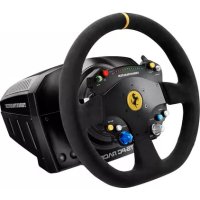
TSPC Racer Ferrari 488 Challenge Ed. - Controller THRUSTMASTER - Free user manual and instructions
Find the device manual for free TSPC Racer Ferrari 488 Challenge Ed. THRUSTMASTER in PDF.


| Product Type | Race Wheel with Force Feedback |
| Brand | Thrustmaster |
| Model | TSPC Racer Ferrari 488 Challenge Ed. |
| Base Dimensions (W x D x H) | Approximately 40 x 30 x 20 cm (estimate) |
| Wheel Diameter | Approximately 30 cm (11.8 inches) |
| Total Weight | Approximately 8 kg (heavy product) |
| Power Supply | External TURBO POWER power supply (mains input, specific output) |
| Connectivity | USB (detachable cable) for PC; connector for pedal set and TH8A shifter |
| Rotation Angle | 1080° (auto-calibration) |
| Force Feedback Technology | Force Feedback |
| Number of Buttons | 10+ (including sequential paddles, D-pad, rotary switch, MODE) |
| Mounting | Screw mounting system; compatible with cockpit, table or desk |
| Cooling System | Internal fan, starts on power-up, stops after inactivity |
| PC Compatibility | Windows via drivers downloadable from Thrustmaster website |
| Ecosystem Compatibility | T3PA/T3PA-PRO pedals, TH8A shifter, additional Thrustmaster wheels |
| Software Features | Configuration panel to test buttons, axes, forces, and adjust rotation angle |
| Firmware Update | Via support.thrustmaster.com (wheel / TS-PC RACER / Firmware) |
| Maintenance and Cleaning | Unplug before cleaning; use a soft dry cloth; do not block ventilation slots |
| Safety | Do not open the product; use only the provided power supply; do not play barefoot with pedals; keep out of reach of children under 16 years |
| Spare Parts and Repairability | No user-serviceable parts; contact technical support for repairs |
| Warranty | 2 years in the European Union (compliance); 1 year in other countries; transferable warranty under conditions |
| General Information | Made in China; © 2017 Guillemot Corporation S.A.; illustrations not contractually binding |
Frequently Asked Questions - TSPC Racer Ferrari 488 Challenge Ed. THRUSTMASTER
User questions about TSPC Racer Ferrari 488 Challenge Ed. THRUSTMASTER
0 question about this device. Answer the ones you know or ask your own.
Ask a new question about this device
Download the instructions for your Controller in PDF format for free! Find your manual TSPC Racer Ferrari 488 Challenge Ed. - THRUSTMASTER and take your electronic device back in hand. On this page are published all the documents necessary for the use of your device. TSPC Racer Ferrari 488 Challenge Ed. by THRUSTMASTER.
USER MANUAL TSPC Racer Ferrari 488 Challenge Ed. THRUSTMASTER
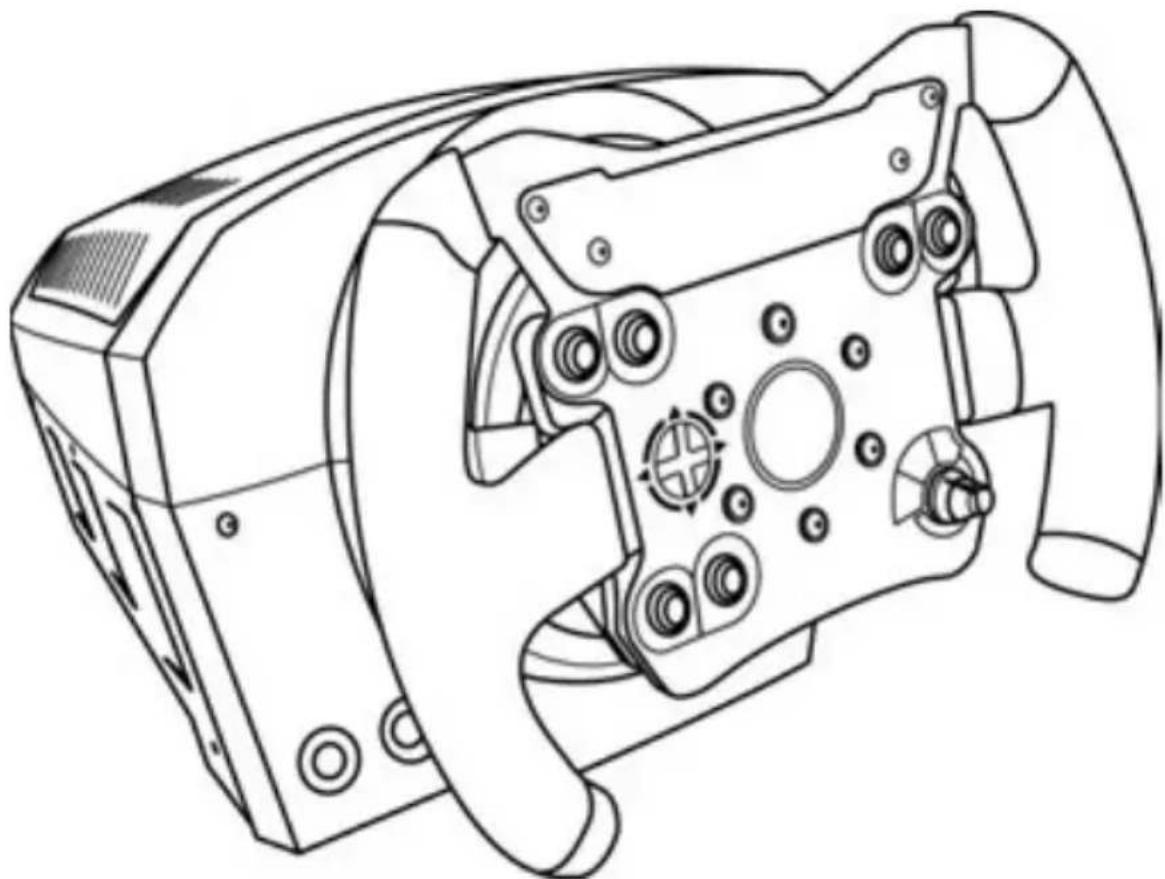
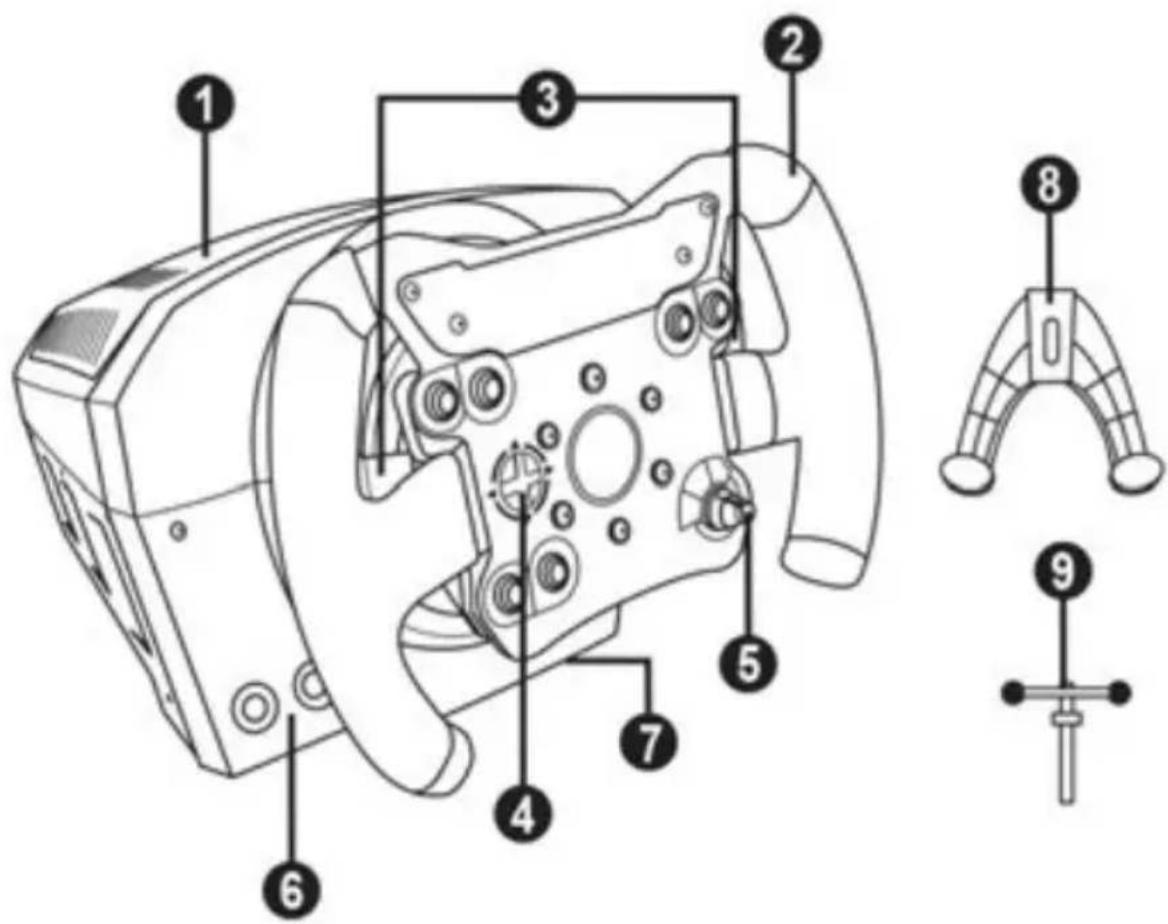
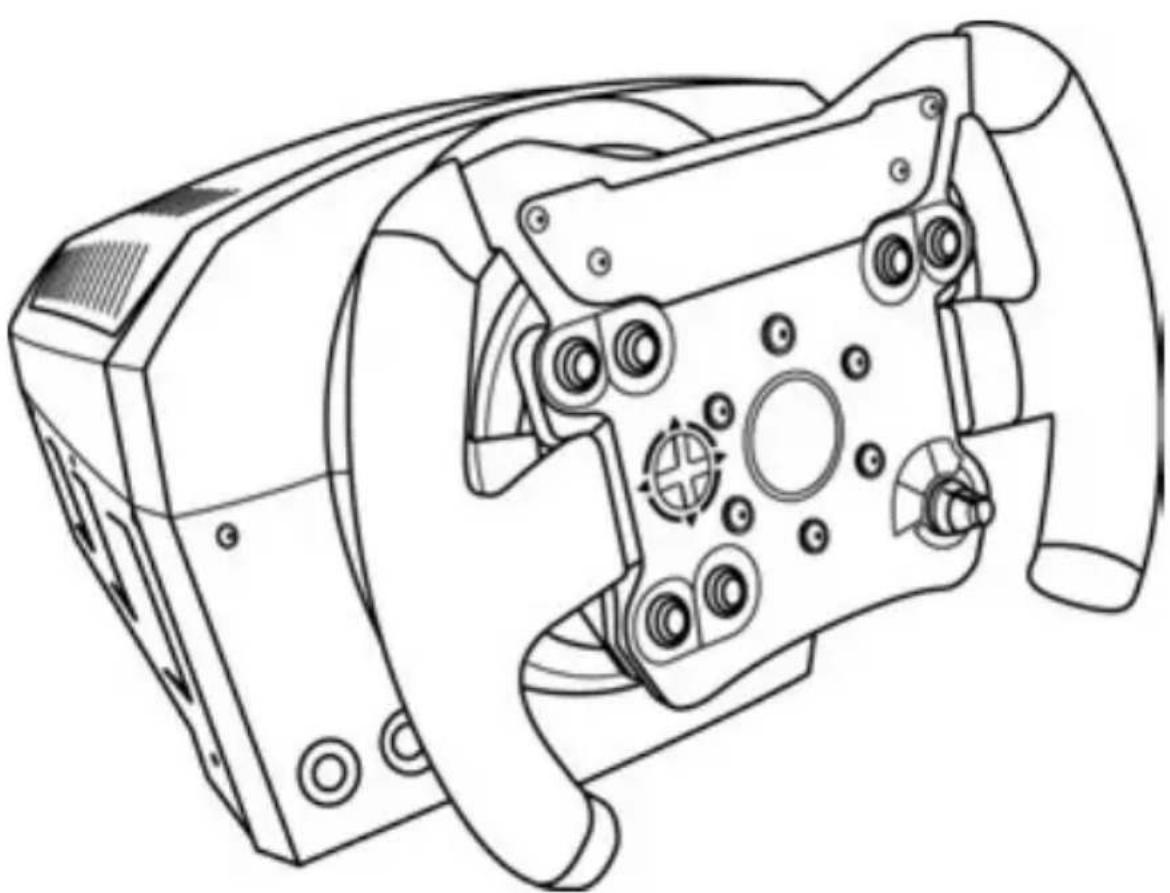
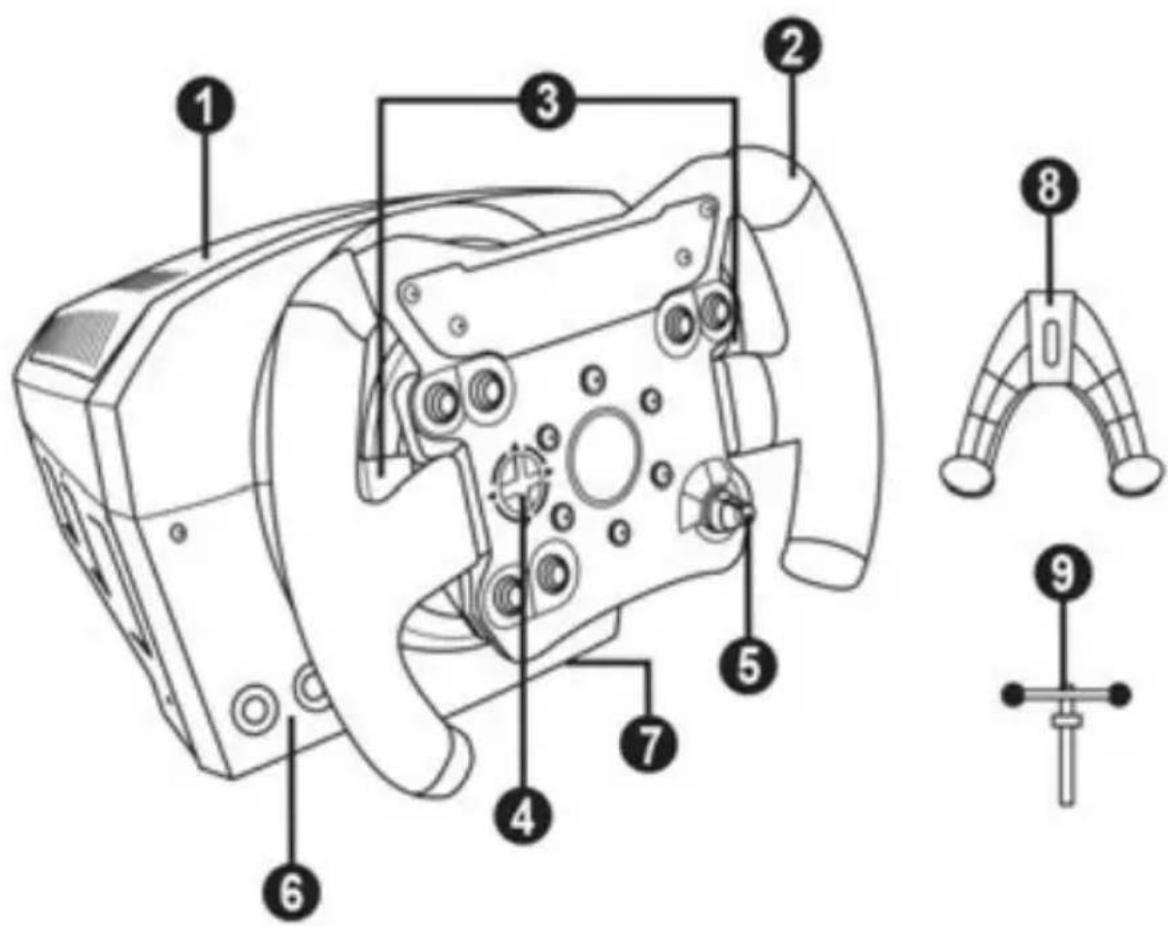
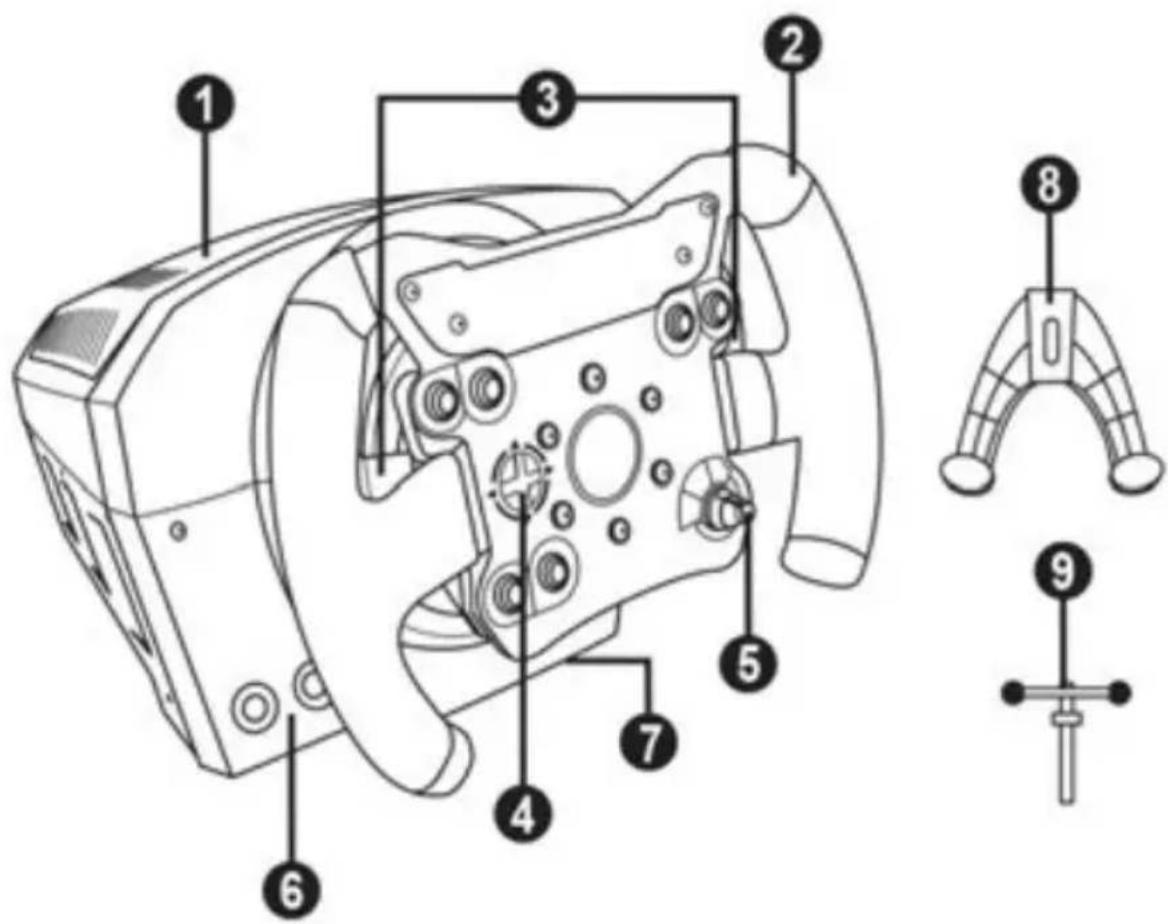
1 Base
2 Wheel
3 2 sequential paddle shifters (up & down)
4 D-pad
5 Rotary switch with push function
6 MODE button + red/green indicator light
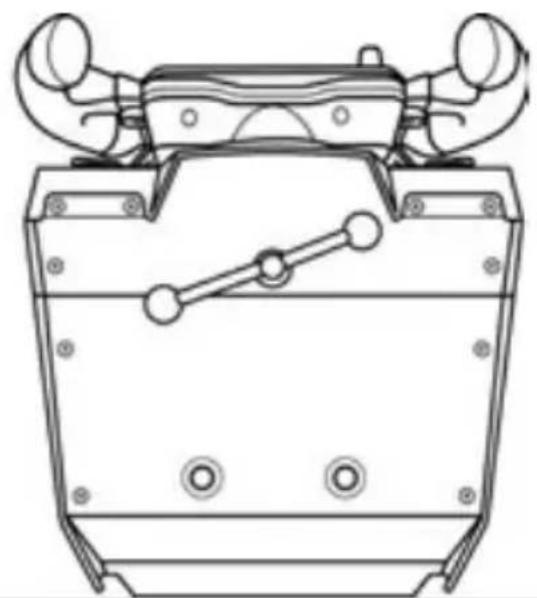
7 Large threaded hole (for attachment system and fastening screw)
8 Attachment system
9 Metal fastening screw
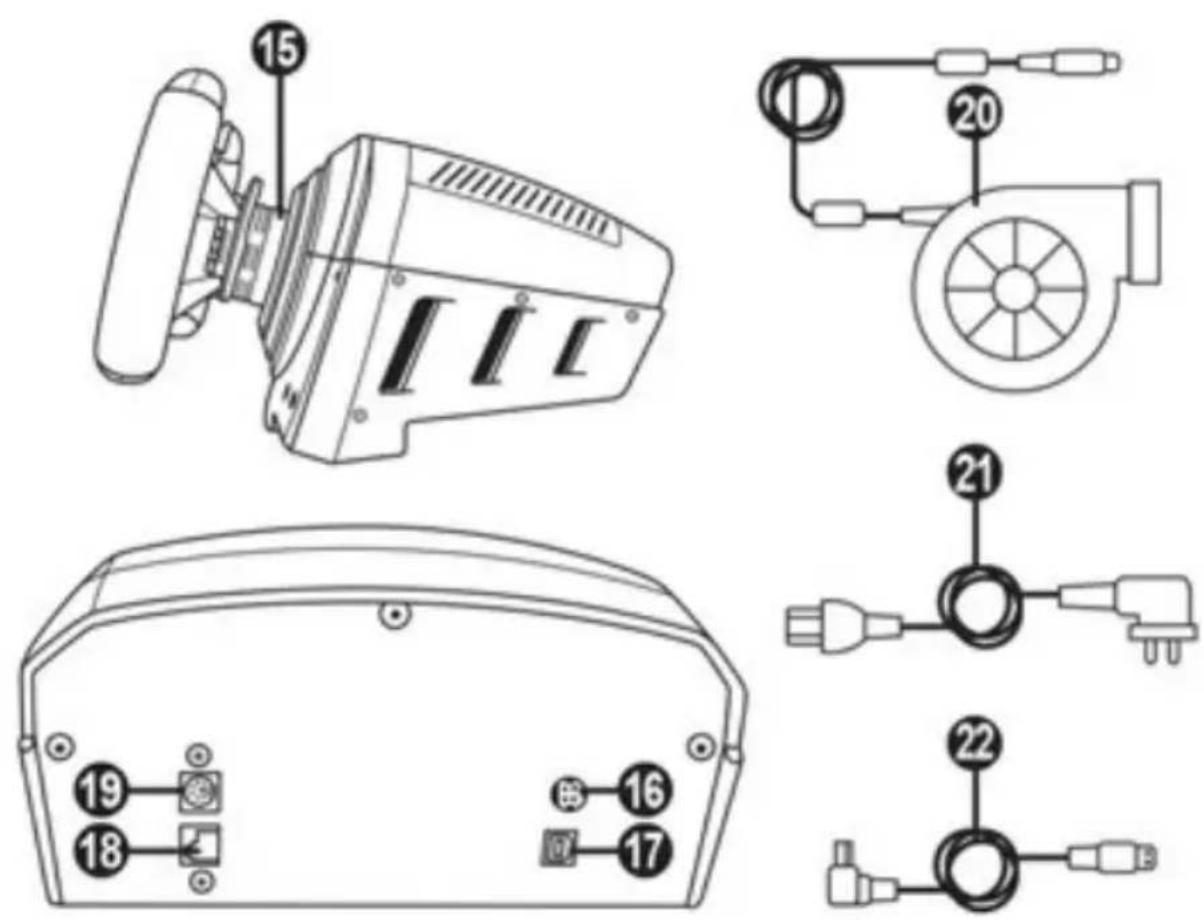
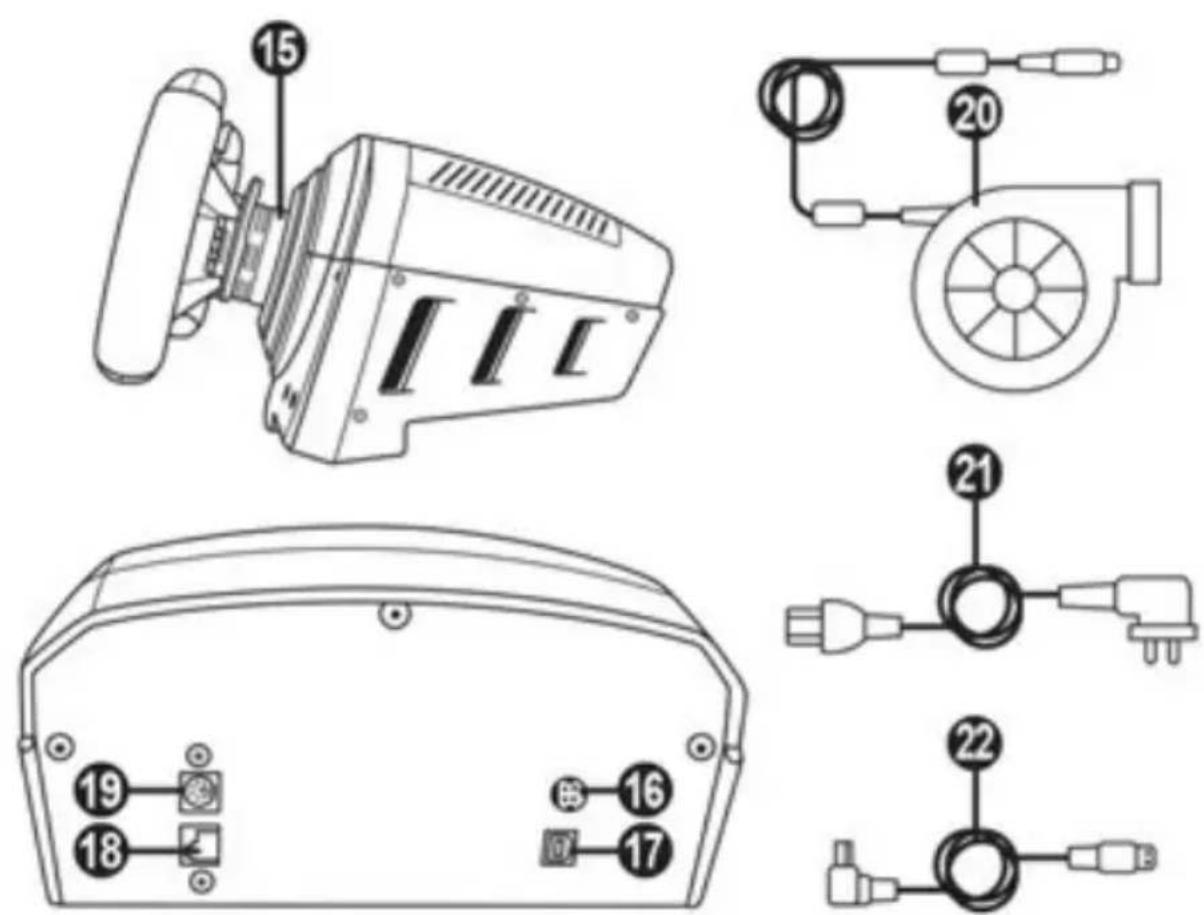
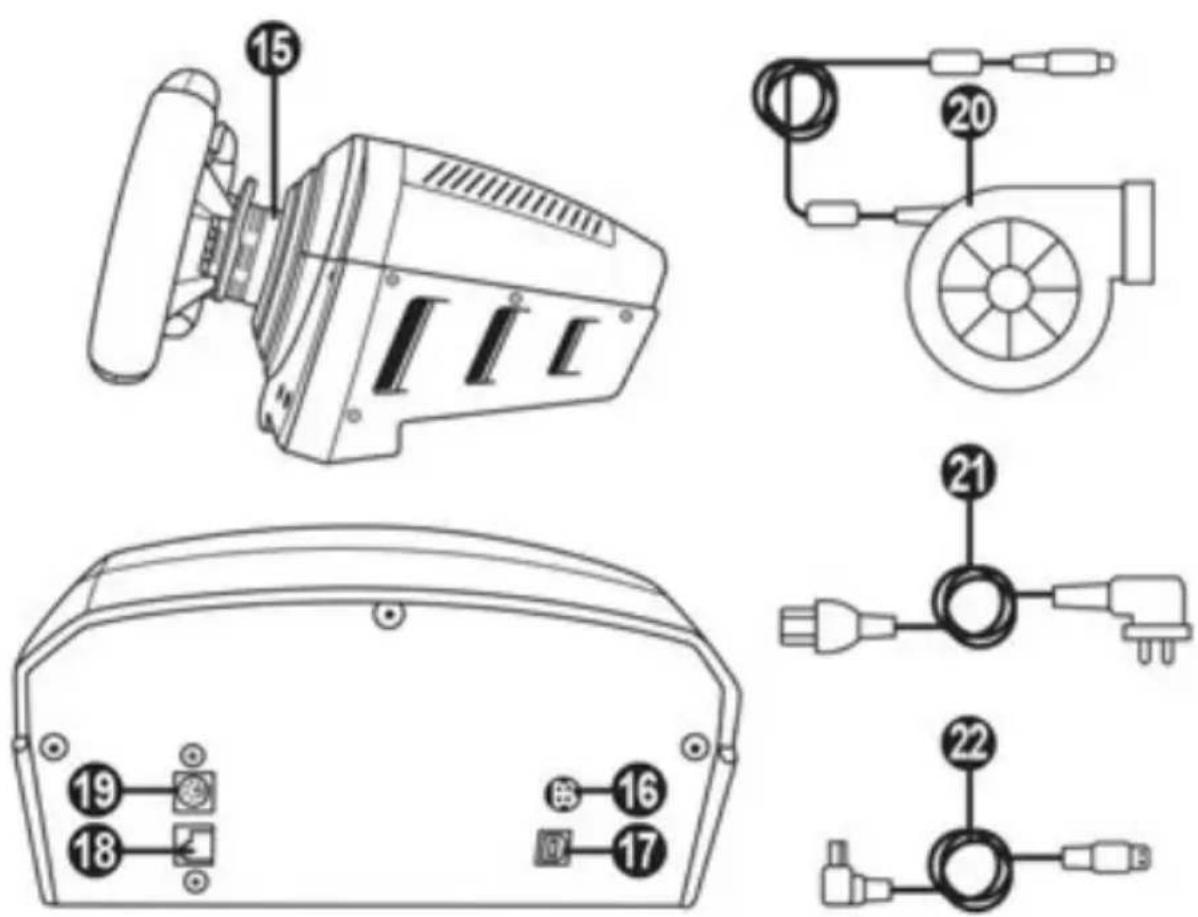
15 Thrustmaster Quick Release
16 Connector for TURBO POWER power supply
17 Connector for removable USB cable
18 Connector for pedal set (pedal set sold separately)
19 Connector for TH8A shifter (shifter sold separately)
20 TURBO POWER power supply
21 Power supply cable
22 Removable USB cable
PLUGGING THE WHEEL INTO AN ELECTRICAL OUTLET: PLEASE READ CAREFULLY!

Never plug the TURBO POWER power supply into an electrical outlet with a different
voltage! The TURBO POWER power supply's voltage is indicated on the label located above the female connector for the power supply cable.

Never connect a power supply other than the TURBO POWER power supply to the TS-PC
RACER base, even if the connector is compatible! For example, never connect the power adapter for the T500 RS wheel to the TS-PC RACER base.
WARNING
Before using this product, please read this manual carefully and save it for later reference.

Warning - Electrical shock
- Keep the product in a dry location and do not expose it to dust or sunlight.
- Do not twist or pull on the connectors and cables.
- Do not spill any liquid on the product or its connectors.
- Do not short-circuit the product.
- Never dismantle the product; do not throw it onto a fire and do not expose it to high temperatures.
- Do not use a power supply cable other than the one provided with your racing wheel.
- Do not use the power supply cable if the cable or its connectors are damaged, split or broken.
- Make sure that the power supply cable is properly plugged into an electrical outlet, and properly connected to the connector at the rear of the racing wheel's base.
- Do not open up the racing wheel: there are no user-serviceable parts inside. Any repairs must be carried out by the manufacturer, its authorised representative or a qualified technician.
- Only use attachment systems/accessories specified by the manufacturer.
- If the racing wheel is operating abnormally (if it is emitting any abnormal sounds, heat or odours), stop using it immediately, unplug the power supply cable from the electrical outlet and disconnect the other cables.
- If you will not be using the racing wheel for an extended period of time, unplug its power supply cable from the electrical outlet.
- The electrical outlet must be located near the equipment and must be easily accessible.

Air vents
Make sure not to block any of the air vents on the racing wheel's base. For optimal ventilation, make sure to do the following:
- Position the wheel's base at least 10 cm away from any wall surfaces.
- Do not place the base in any tight spaces.
- Do not cover the base.
- Do not let any dust build up on the air vents.

For safety reasons, never use the pedal set with bare feet or while wearing only socks on your feet.
THRUSTMASTER © DISCLAIMS ALL RESPONSIBILITY IN THE EVENT OF INJURY RESULTING FROM USE OF THE PEDAL SET WITHOUT SHOES.

Warning - Injuries due to Force Feedback and repeated movements
Playing with a Force Feedback racing wheel may cause muscle or joint pain. To avoid any problems:
- Avoid lengthy gaming periods.
- Take 10 to 15 minute breaks after each hour of play.
- If you feel any fatigue or pain in your hands, wrists, arms, feet or legs, stop playing and rest for a few hours before you start playing again.

Warning - Injuries due to Force Feedback and repeated movements (continued)
- If the symptoms or pain indicated persist when you start playing again, stop playing and consult your doctor.
- Keep out of children's reach.
- During gameplay, always leave both hands correctly positioned on the wheel without completely letting go.
- During gameplay, never place your hands or your fingers under the pedals or anywhere near the pedal set.
- During calibration and gameplay, never place your hand or your arm through the openings in the racing wheel.
- Make sure that the racing wheel's base is properly secured, as per this manual's instructions.

Product to be handled only by users 16 years of age or older
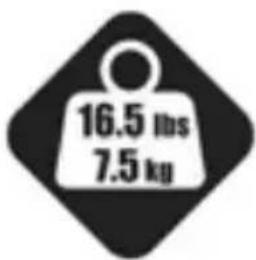
HEAVY PRODUCT
Be careful not to drop the product on yourself or on anyone else!
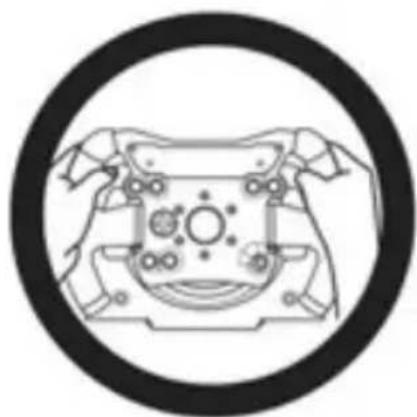
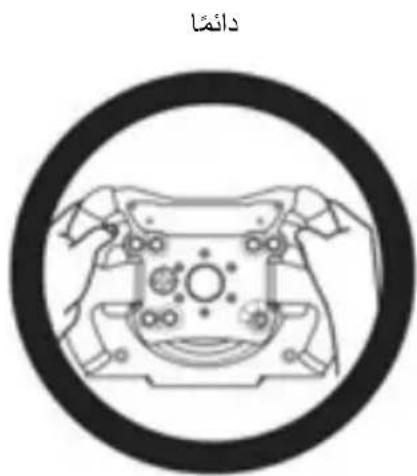
ALWAYS
INSTALLING THE WHEEL ON ITS BASE
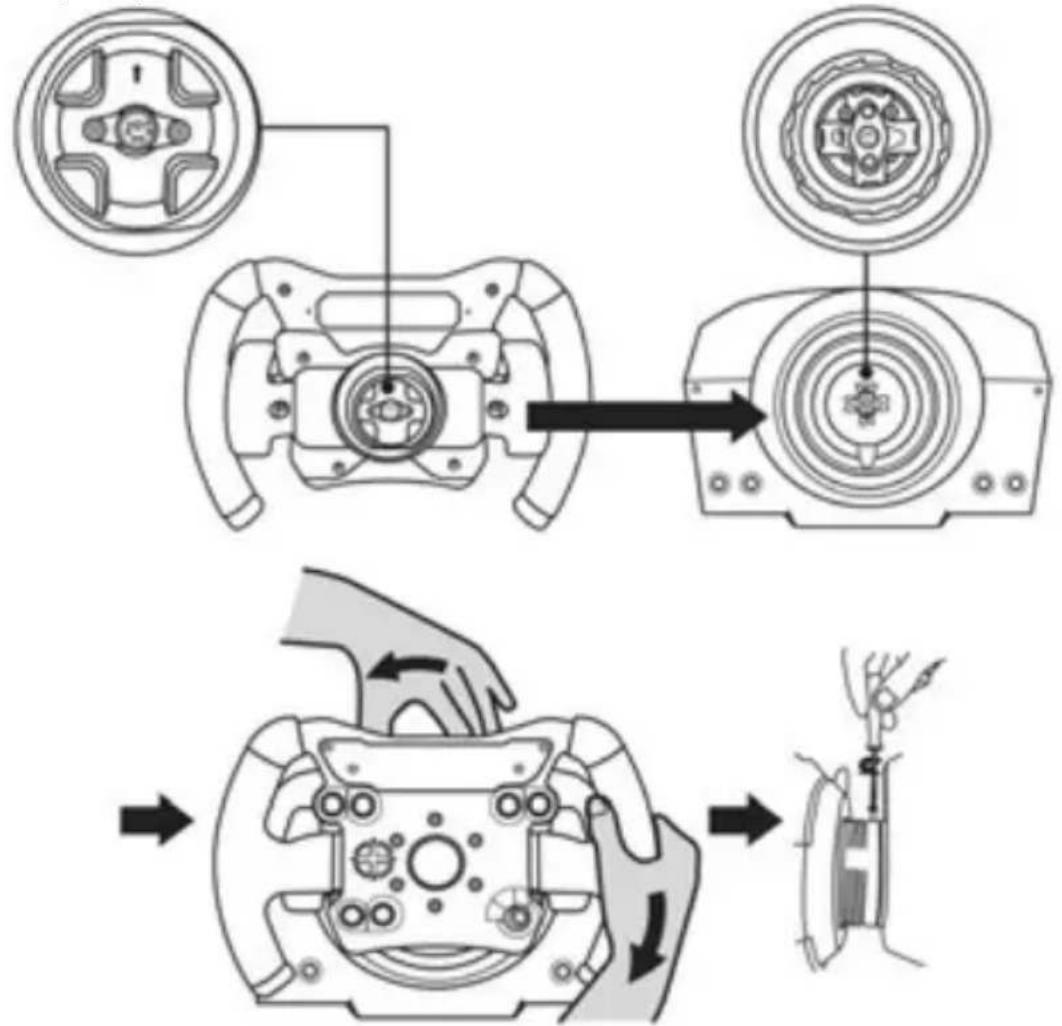
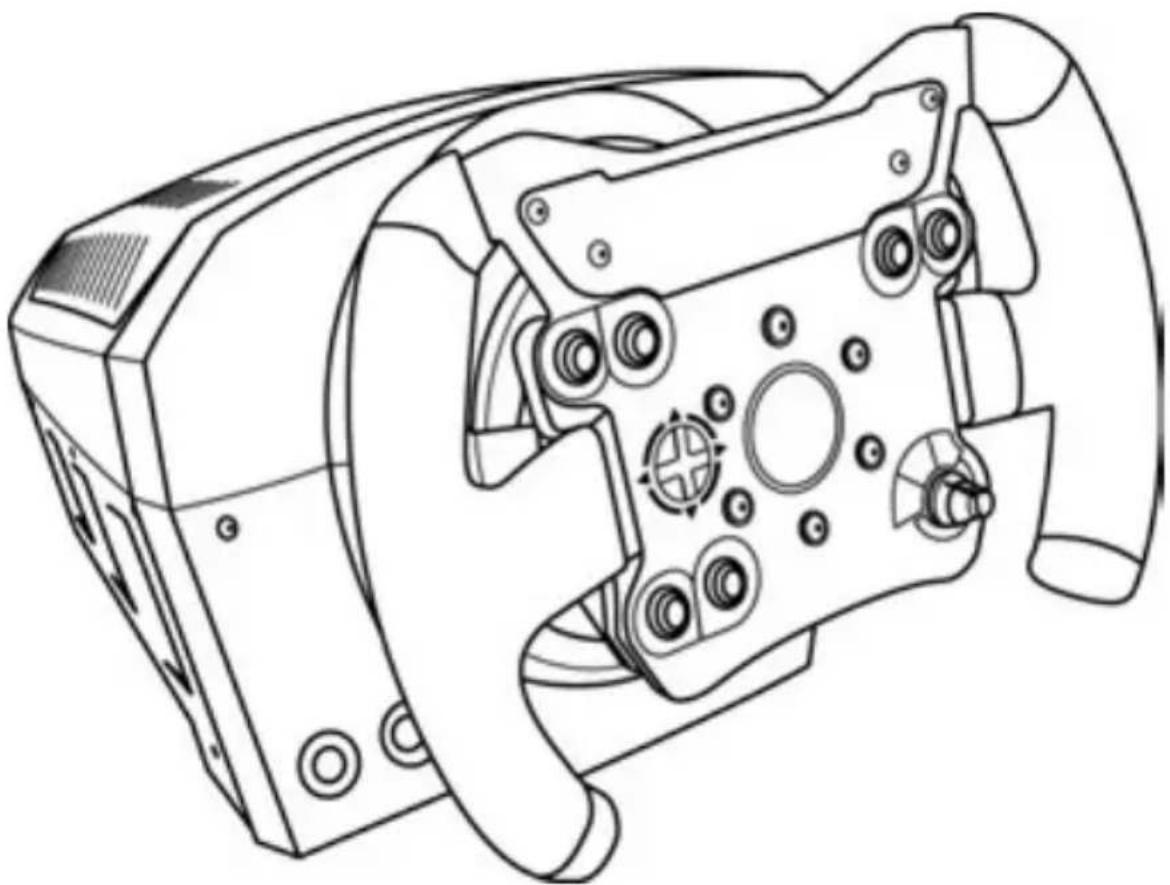
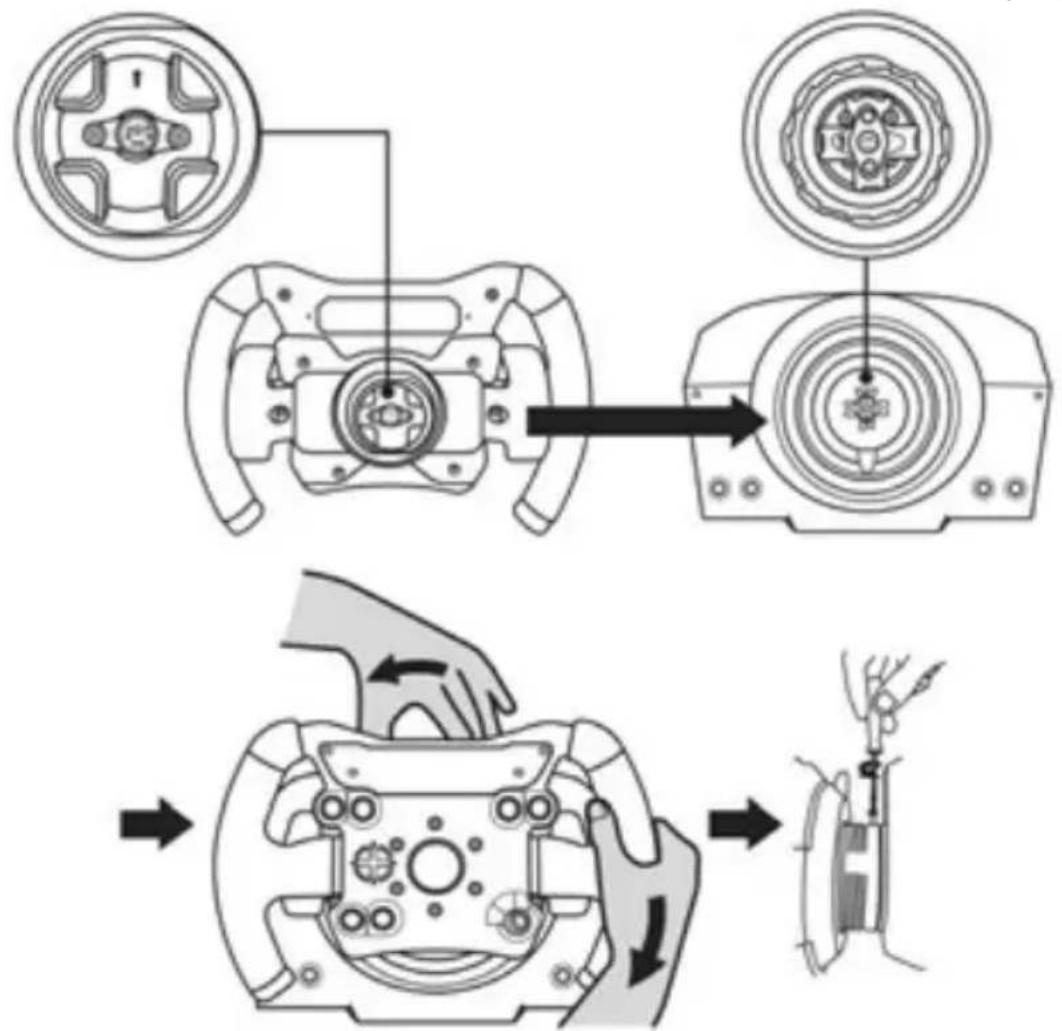
Align the connector positions using the arrows:
Base (1) connector: Arrow pointing upwards
Racing wheel (2) connector: Arrow pointing upwards
Once the connectors are correctly positioned, simply rotate the Thrustmaster Quick Release (15) device's ring anticlockwise, while holding the racing wheel (2) in position.
Then, tighten the ring as much as you can: to do so, hold the ring in position and rotate the racing wheel clockwise.
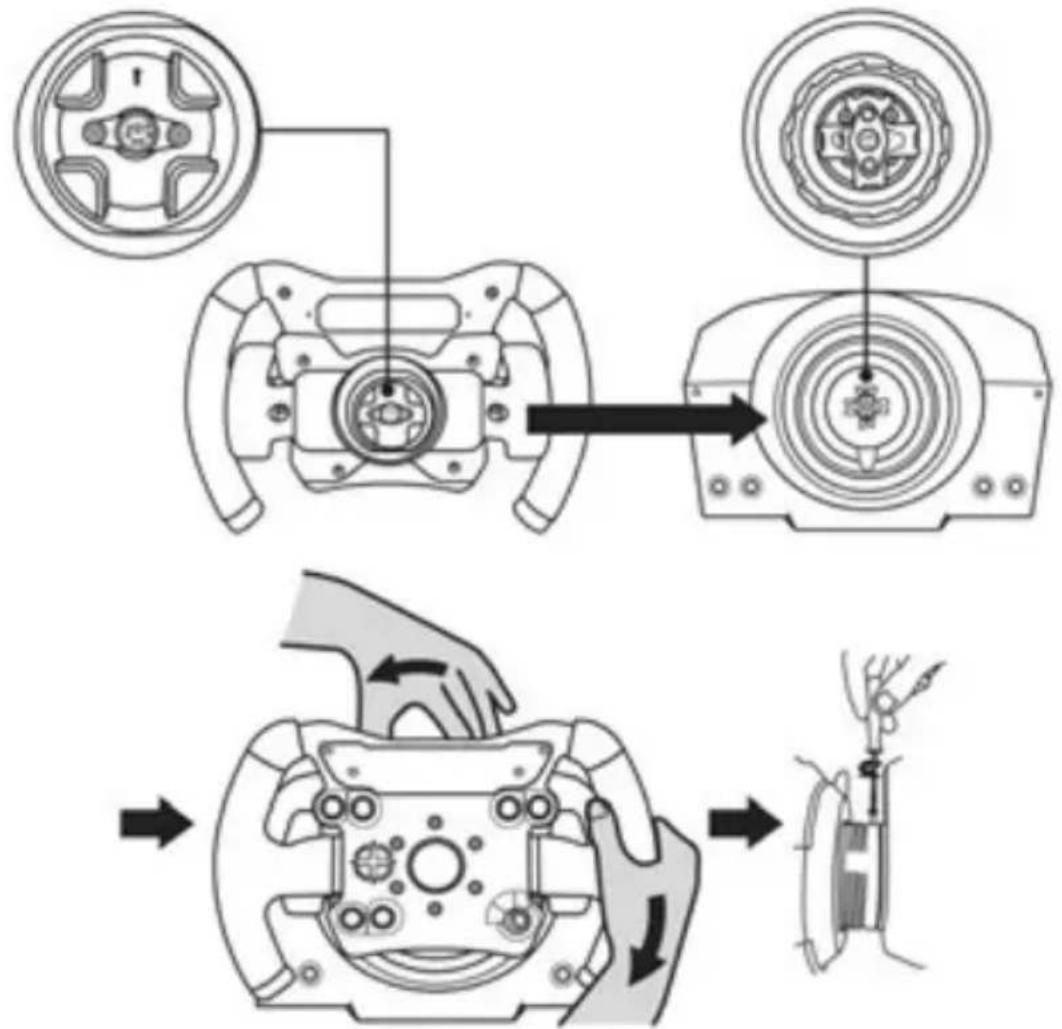
Once you have installed the wheel, rotate it 180^ (when facing the wheel, the TM logo should be upside down) to access the small attachment screw located on the ring of the Thrustmaster Quick Release (15) device. Use a large Phillips screwdriver to tighten the small attachment screw (do not use excessive force), turning it clockwise.

When using a Philips screwdriver, ensure NOT to use excessive force
when tightening the small attachment screw!
Stop turning the screw as soon as you feel some resistance.
ATTACHING THE RACING WHEEL
Attaching the racing wheel's base to a cockpit
- Place the racing wheel's base on the cockpit shelf.
- Drive two M6 screws (not included) through the cockpit shelf, then feed them into the two small screw threads located on the underside of the racing wheel. Important: The length of the two M6 screws must not exceed the thickness of the shelf + 12 mm; longer screws could cause damage to internal components located in the racing wheel's base.
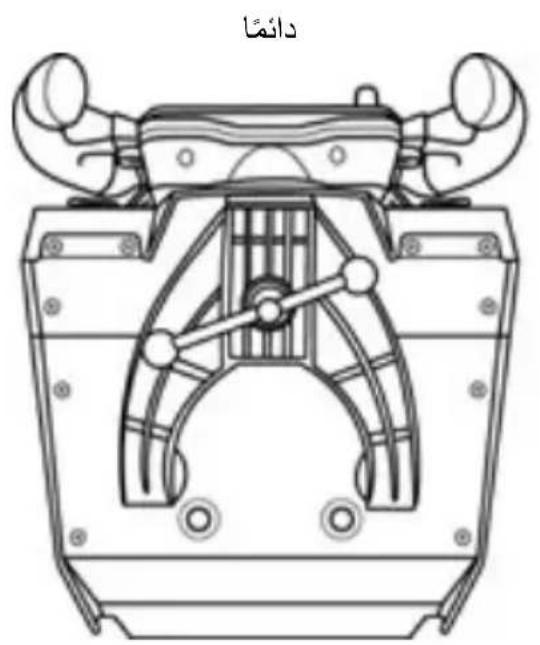
- If required, tighten the standard attachment system by inserting the fastening screw in the large threaded hole.
Attaching the racing wheel to a table or a desktop
- Place the racing wheel on a table or any other horizontal, flat and stable surface.
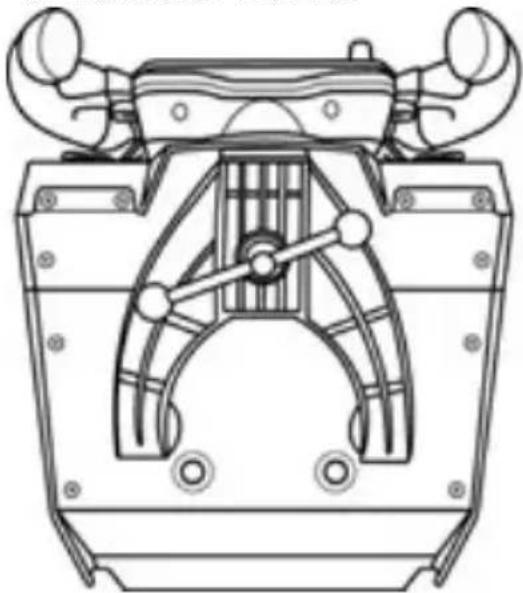
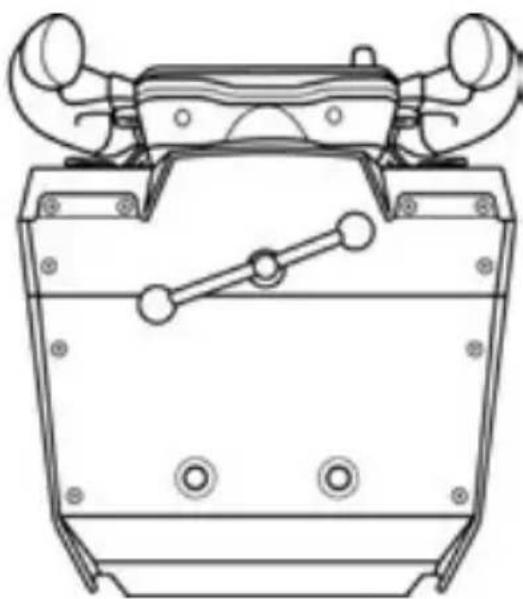
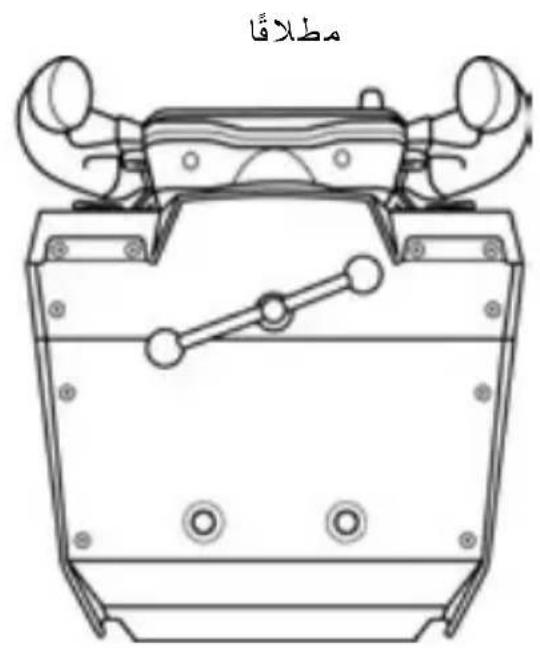
- Insert the fastening screw (9) in the attachment system (8), then tighten the device by turning the screw anticlockwise, so that it feeds into the large threaded hole (7) located beneath the racing wheel, until the wheel is perfectly stable.
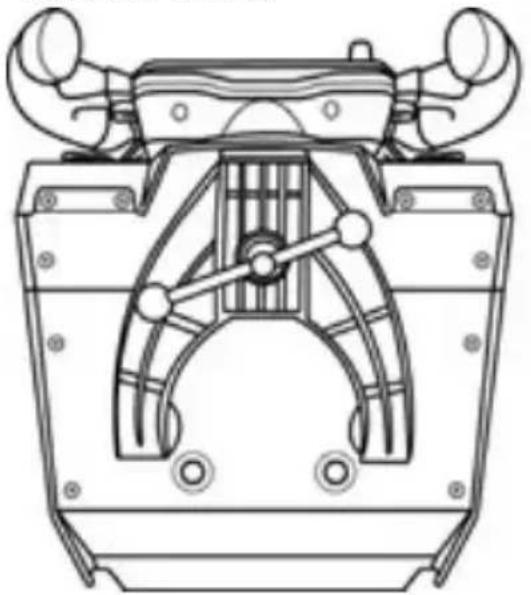
ALWAYS NEVER
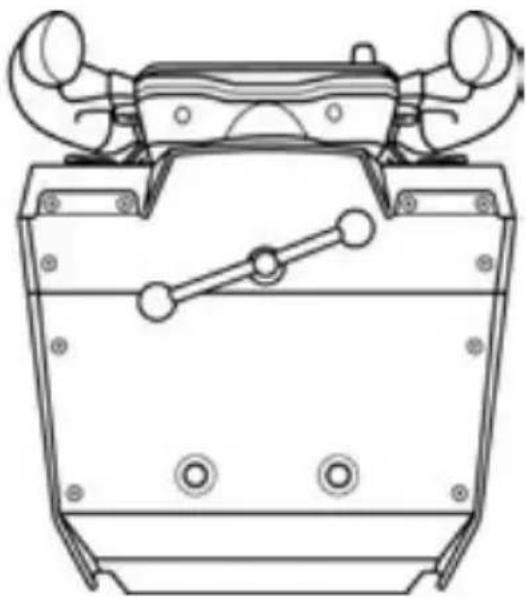
WARNING:
- Never tighten the screw alone, without the attachment system in place (this could damage the racing wheel).
| ATTACHMENT / REMOVAL | DIRECTION |
| To tighten: Turn the screw anticlockwise | |
| To release: Turn the screw clockwise |
SETTING UP THE RACING WHEEL FOR PC
- Go to http://support.thrustmaster.com to download the drivers and the force feedback software for PC. Click Racing Wheels / TS-PC RACER, then select Drivers.
- Once the download is complete, launch the installation, and follow the on-screen instructions to connect the wheel's USB plug to your computer and complete the installation.
- Once the installation is complete, click Finish and restart your computer.
- Select Start / All Programs / Thrustmaster / FFB Racing Wheel / Control Panel to open the Game Controllers window.
The Game Controllers window displays the racing wheel's name Thrustmaster TS-PC RACER with the status OK.
-
Click Properties to configure your wheel in the TS-PC RACER control panel:
-
Test Input tab: allows to test and view the action buttons, directional buttons, wheel and pedals axes, and to adjust the wheel's rotation angle in your PC games.
- Test Forces tab: allows to test 12 force feedback effects.
- Gain Settings tab: allows to adjust the power of the force feedback effects in your PC games.
You are now ready to play!
General notes:
- On PC, click OK to close the Game Controllers window before launching the game.
- Your wheel's firmware version is displayed in the upper right-hand corner of the control panel tabs.
UPDATING YOUR RACING WHEEL'S FIRMWARE
The firmware included in your racing wheel's base can be updated to a more recent version featuring product enhancements.
To display the firmware version that your racing wheel is currently using and update it if required: on PC, visit http://support.thrustmaster.com. Click Racing Wheels / TS-PC RACER, then select Firmware and follow the instructions describing the download and installation procedure.
AUTOMATIC RACING WHEEL CALIBRATION
The wheel automatically self-calibrates when you plug the racing wheel into an electrical outlet and connect the racing wheel's USB connector.
During this phase, the racing wheel will rotate quickly towards the left and the right, covering a 1080 degree angle, before stopping at the center.

WARNING:
Never touch the racing wheel during the self-calibration phase! (This could result in improper calibration and/or personal injuries.)
If your racing wheel does not function correctly, or if it seems to be improperly calibrated:
Power off your PC and completely disconnect the racing wheel. Then reconnect all cables (including the power supply cable and the pedal set), and restart your PC and your game.
INTERNAL COOLING SYSTEM FOR THE WHEEL'S BASE
The internal cooling system for the wheel's base
- starts working when the wheel is powered on.
- switches off after a few minutes of inactivity when the internal temperature cools down to a low level.
- switches on again when you use the wheel.
MODE BUTTON AND INDICATOR LIGHT (6)
MODE button for the pedal set
You can electronically swap the accelerator and clutch pedals if you are using a Thrustmaster T3PA or T3PA-PRO pedal set connected to the connector for pedal set (18).
To do so, simply press the MODE button (6) for 2 seconds.
The racing wheel's internal memory stores whether the pedals have been swapped around or not.
| GAS AND CLUTCH PEDALS | Colour of the MODE indicator light (6) |
| NORMAL | RED |
| SWAPPED AROUND | GREEN |
Other information regarding the MODE button
To learn more about the MODE button and indicator light, please visit http://support.thrustmaster.com. Click Racing Wheels / TS-PC RACER, and then select Manual or FAQ.
HELP FILES AND FAQs (NOT INCLUDED IN THIS MANUAL)
Please visit http://support.thrustmaster.com. Click Racing Wheels / TS-PC RACER, and then select Manual or FAQ.
COMPATIBILITY WITH THE THRUSTMASTER ECOSYSTEM
Pedal sets
The TS-PC RACER base is compatible with:
- the Thrustmaster T3PA and T3PA-PRO pedal sets that connect directly to the connector for pedal set (18).
- the Thrustmaster DB9 PEDALS T.RJ12 ADAPTER that enables the non-Thrustmaster pedal sets equipped with a DB9 connector to connect to the connector for pedal set (18).
- all the USB pedal sets on the market (in games supporting MULTI-USB and USB pedal sets).
Wheels
The TS-PC RACER base is compatible with all Thrustmaster detachable wheels, including:
Ferrari 599XX EVO 30 Wheel Add-On Alcantara Edition
-Ferrari F1 Wheel Add-On
Ferrari GTE Wheel Add-On Ferrari 458 Challenge Edition
- TM Leather 28 GT Wheel Add-On
- TM Open Wheel Add-On
-etc.
Shifters
The TS-PC RACER base is compatible with:
- the Thrustmaster TH8A Shifter Add-On that connects directly to the connector for TH8A shifter (19) for the "Sequential (+/-)" mode, or to a USB port for the "H-pattern (7 + 1) " and ANALOG / HANDBRAKE modes.
- all the USB shifters on the market (in games supporting MULTI-USB and USB shifters).
CONSUMER WARRANTY INFORMATION
Worldwide, Guillemot Corporation S.A., whose registered office is located at Place du Granier, B.P. 97143, 35571 Chantepie, France (hereinafter "Guillemot") warrants to the consumer that this Thrustmaster product shall be free from defects in materials and workmanship, for a warranty period which corresponds to the time limit to bring an action for conformity with respect to this product. In the countries of the European Union, this corresponds to a period of two (2) years from delivery of the Thrustmaster product. In other countries, the warranty period corresponds to the time limit to bring an action for conformity with respect to the Thrustmaster product according to applicable laws of the country in which the consumer was domiciled on the date of purchase of the Thrustmaster product (if no such action exists in the corresponding country, then the warranty period shall be one (1) year from the original date of purchase of the Thrustmaster product).
Notwithstanding the above, rechargeable batteries are covered by a warranty period of six (6) months from the date of original purchase.
Should the product appear to be defective during the warranty period, immediately contact Technical Support, who will indicate the procedure to follow. If the defect is confirmed, the product must be returned to its place of purchase (or any other location indicated by Technical Support).
Within the context of this warranty, the consumer's defective product shall, at Technical Support's option, be either replaced or returned to working order. If, during the warranty period, the Thrustmaster product is subject to such reconditioning, any period of at least seven (7) days during which the product is out of use shall be added to the remaining warranty period (this period runs from the date of the consumer's request for intervention or from the date on which the product in question is made available for reconditioning, if the date on which the product is made available for reconditioning is subsequent to the date of the request for intervention). If permitted under applicable law, the full liability of Guillemot and its subsidiaries (including for consequential damages) is limited to the return to working order or the replacement of the Thrustmaster product. If permitted under applicable law, Guillemot disclaims all warranties of merchantability or fitness for a particular purpose.
This warranty shall not apply: (1) if the product has been modified, opened, altered, or has suffered damage as a result of inappropriate or abusive use, negligence, an accident, normal wear, or any other cause unrelated to a material or manufacturing defect (including, but not limited to, combining the Thrustmaster product with any unsuitable element, including in particular power supplies, rechargeable batteries, chargers, or any other elements not supplied by Guillemot for this product); (2) if the product has been used for any use other than home use, including for professional or commercial purposes (game rooms, training, competitions, for example); (3) in the event of failure to comply with the instructions provided by Technical Support; (4) to software, said software being subject to a specific warranty; (5) to consumables (elements to be replaced over the product's lifespan: disposable batteries, audio headset or headphone ear pads, for example); (6) to accessories (cables, cases, pouches, bags, wrist-straps, for example); (7) if the product was sold at public auction.
This warranty is nontransferable.
The consumer's legal rights with respect to laws applicable to the sale of consumer goods in his or her country are not affected by this warranty.
Additional warranty provisions
During the warranty period, Guillemot shall not provide, in principle, any spare parts, as Technical Support is the only party authorized to open and/or recondition any Thrustmaster product (with the exception of any reconditioning procedures which Technical Support may request that the consumer carry out, by way of written instructions – for example, due to the simplicity and the lack of confidentiality of the reconditioning process – and by providing the consumer with the required spare part(s), where applicable).
Given its innovation cycles and in order to protect its know-how and trade secrets, Guillemot shall not provide, in principle, any reconditioning notification or spare parts for any Thrustmaster product whose warranty period has expired.
In the United States of America and in Canada, this warranty is limited to the product's internal mechanism and external housing. In no event shall Guillemot or its affiliates be held liable to any third party for any consequential or incidental damages resulting from the breach of any express or implied warranties. Some States/Provinces do not allow limitation on how long an implied warranty lasts or exclusion or limitation of liability for consequential or incidental damages, so the above limitations or exclusions may not apply to you. This warranty gives you specific legal rights, and you may also have other rights which vary from State to State or Province to Province.
Liability
If permitted under applicable law, Guillemot Corporation S.A. (hereinafter "Guillemot") and its subsidiaries disclaim all liability for any damages caused by one or more of the following: (1) the product has been modified, opened or altered; (2) failure to comply with assembly instructions; (3) inappropriate or abusive use, negligence, an accident (an impact, for example); (4) normal wear; (5) the use of the product for any use other than home use, including for professional or commercial purposes (game rooms, training, competitions, for example). If permitted under applicable law, Guillemot and its subsidiaries disclaim all liability for any damages unrelated to a material or manufacturing defect with respect to the product (including, but not limited to, any damages caused directly or indirectly by any software, or by combining the Thrustmaster product with any unsuitable element, including in particular power supplies, rechargeable batteries, chargers, or any other elements not supplied by Guillemot for this product).

COPYRIGHT
© 2017 Guillemot Corporation S.A. All rights reserved. Thrustmaster® is a registered trademark of Guillemot Corporation S.A. All other trademarks are the property of their respective owners. Illustrations not binding. Contents, designs and specifications are subject to change without notice and may vary from one country to another. Made in China.
ENVIRONMENTAL PROTECTION RECOMMENDATION
In the European Union: At the end of its working life, this product should not be disposed of with standard household waste, but rather dropped off at a collection point for the disposal of Waste Electrical and Electronic Equipment (WEEE) for recycling.
This is confirmed by the symbol found on the product, user manual or packaging. Depending on their characteristics, the materials may be recycled. Through recycling and other forms of processing Waste Electrical and Electronic Equipment, you can make a significant contribution towards helping to protect the
environment.
Please contact your local authorities for information on the collection point nearest you.
For all other countries: Please adhere to local recycling laws for electrical and electronic equipment.
Retain this information. Colours and decorations may vary.
Plastic fasteners and adhesives should be removed from the product before it is used.
www.thrustmaster.com
*Applicable to EU and Turkey only



TS-PC RACER
INFORMATIONS RELATIVES A LA GARANTIE AUX CONSOMMATEURS
www.thrustmaster.com
www.thrustmaster.com
www.thrustmaster.com
www.thrustmaster.com
www.thrustmaster.com
www.thrustmaster.com
www.thrustmaster.com



TS-PC RACER
PykoBoDCTBO noIb3OBaTeJIa
TEXHNUECKNEXAPAKTEPNCN
1 Ba3a cncTeMbI
2 Pynb
3 2 neneKTKOBbIX nepeKnIOyateTnBn3)
4 MHORON03NIJIOHHa KHONKa
5 NOBOPOTbI IpeekNIOaTeIb C HAXMHOH KHOKoi
6 KhoNka MODE + KpacHbI/3eJIeHbI INdNKaTOp
7 Pe3b6a noD 60nbWOn BnHT (dna CnCTEmbl KpeIeHnN KpeNexKHO BnHTa)
8 CnCTema KpenJIeHnIa
9 MeTajnueckn KpeNexHbBnHT
15 CnCTema KpenJeHna Thrustmaster Quick Release
16 Pa3bEm dIa 6Ioka nITaHnTURBO POWER
17 Pa3bemДЯ CBemHOrO USB-ka6eJRA
18 Pa3bEm nna neaIbHoro 6noka (nedanbHbI 6nok npuOpeMaemc omdeIbHo)
19 Pa3bEm nIeepKIOUcATEnTH8A (nepeKIOUcAmel npuO6pemaemc omdeJIbHo)
20 BLOK NITaHnTURBO POWER
21 Ka6eJIb 6Ioka nITaHnIa
22 Cbemhbl USB-ka6ebn
ПОДКЛIOUЧЕНЕ РУLEBOИ ССТЕМБИ K ЗЛЕKTPOРО3ETKE BHIMATEЛьНО ПСОТNTE CLEDEYIOUIEE!

Hu e koem cnyae He nodknouaume 6nok numanu TURBO POWER K 3nekmpocemu c
HedonycmumbIM HanpexeHem! Donycmumoe HanpexeHue 6noka numaHua TURBO POWER yka3aHo Ha npIke Haid He3dOm nnoKnloyeHua KaBena.

Hu e koem cnyae He nodknouaume K 6a3e TS-PC RACER uHou 6nok numaun, kpoMe
TURBO POWER, daxe e cnyae coemecmu pa3bema! B yacmocmu, HeIb3ra nodknouamb K 6a3e TS-PC RACER cemeo adanmep dny T500 RS.
PPEyPPEKDEHNA
Ipeed 3Kcnpnyataunei DaHHoro N3dEInB HnMaTeIbHo O3HaKOMbTeCb C NaCTOaee INHCTpyKUmei coxpaHnte ee Ha 6yuee.

BHHMaHHe onaChocTb nopaxeHna 3JeKtpnueckm TOKOM!
*I3deJIne cneDyET xpaHnTB B cyXOM MecTe, I36erag nonaHa Ha Hero nbJIu N COJIHeCHoro CBeta.
He donyckaetcpekpyuBaHne pa3bEmoN KabeJIe; Ka6eJIi HeJIb3r TaHyTb.
He donyckaetc nonaahanhe xukoctn ha n3deJne ero pa3beMbl.
He donyckaetc kopotkoe 3ambikaHne B ceni n3deJnA.
3anpezaetcpa3bnpaTb n3dene, bpcatb n3dene B OROH N NOBepraTb erO BO3dIeCTBnHO BblCOKNX TemnepaTyp.
He donyckaetcnaocnb30bAHne dpyrnx ka6e neiHTaHn, Kpome ka6eJI, BXoJauero B KOMPJIeKt pyJeBOu CnCTeMbI.
HeJIb3a nCNoJIb3OBAt b KaIeJIb NITaHnI, ecJIH OH NJIH erO pa3bEmbl NOBpeKdEhbl, IOTpeCKaJIncb NIIcNOMaHbI.
* Y6eIntecb,ЧTO Ka6eIb ПИТAHЯ ДОЛЖнБIM O6pa3OM ПОДКПЮчЕН K ЗЛЕКТpopo3eTke И К pa3beMy Ha 3aIHeN CTOpOHe 6a3blpyNeBOrO KOleca.
* Henb3a BckpbBaTb CnCTemy pyneBoro Koneca B HeH HET DeTaJe, KOtOpbIe MOryT 06cJyKbBaTbCra NOJb3OBaTeJeM. JIO6oB peMOHT DOJXeH BblNOJIHrTbcr IpoU3BOdnteJeM, ero ABTOpN3OBaHHbIM PpeDCTaBNTeMe NII KBAJIINΦuNipOBAHHbIM TEXHNueCKM CneLNaJIvCTOM.
*Onyckaetcnaonb3OBaHne TOnbKO Odo6peHHbIX PpOu3BOUnteIeM CnCTeM KpePHeHnA akceccyapOB.
^ B cIyuae HeHOpMaJIbHOro yHKUHOHnPOBaHnpyJEBOI CNCTeMbI (PpN BO3HNKHOBeHHN IOCTOPOHHX 3ByKO, npeIpeBE IIN 3aIaxe) CneJyET HEmdJIeHHO IpeKpaITb IcNOJIb3OBaHHe CNCTeMbI, BBIKJIIOHTb Ka6JIb IINTAHn I3 PO3ETKN IOTCOEINHITb BCE OCTJIbHbIe Ka6JIIn.
Ecn npednoaraetc, yTo pyneBa cnCTema He 6ydet nCNoIb3OBAbcs npoDOnKnteHoe BpeMn, OTKIOUHTe Ka6JIb NiTaHnO rO p03ETKn.
* 3JneKtpopo3eTka IOnkHa HaxoDntbcra N6JIIN3OCTn OT CNTcEmb IB yIo6Hom DoCTyne.

BeHTnlaIauIOHbIe OTBepCTna
He donyckaetc6IokupobAHne BENTUNaHbIX OTBepTn Ha 6a3e pyJeBOu CnCTembl. Ipn oecneueHn ONTMaJIbHOB BENTUNaU BbINONHte CnEduOuNe yka3aHn:
- pa3MeaTe 6a3y pyJHa paCCToRHN He MeHee 10 cm OT CTen;
- He pa3meuTe 6a3y B CTeCHEHOM IPOCTpaHCTBe;
- HNCHEM He NaKpbIBaIte 6a3y;
- He donyckaJIte cKoJIneHnI NBIIHa BeHTnJIaCIOHbIX OTBepCTINX.

I3 coo6paXeHn 6e3OnaNCHoTn HNKoTn He HaxmMaTe Ha neJaN 6ocOHorO nn HorO B HOcke (6e3 06yBn).
KOMNAHNA THRUSTMASTER OTKA3bIBAETCRAOTJIIOBOI OTBETCTBEHHOCTN B CIIyAE NOLYUHEHNA TPABMbIBPE3yblTATE HAXIMAHNA HA IENDAJIN HEOBYtBIMH HOrAMN.

BhMaHne - pnc TpaBMPOBaHHa B pe3yIbTaTe nobTOpAOnxCra DBNXeHN I
DeiCTBnCINOBOn o6paTHoC8a3N
IcnoIb3OBaHne pyneBOn CnCTeMbICnIOBOO 6oPaTHO CB3bIO MOXe TB13BaTb 60JIb B Mbluax IIN cycTAbax. CoBeTb IO npedOTBpaueHnIO npo6nem CO 3dOpOBbEM:
- He npobodnte 3a ngpoi npoDOnknteJbHoe Bpemr;
* nocne kaxdofo yaca ngpbl deaIte 10-15-mnHyThbI nepepbIB;
*ecnB KnCTaX, 3aAcbx, PpePnpebax, CTonax Hn Horax NOBnacb yctanoctb nn 6oJI, npeKpaTnte ngpy n OTdoxHnTe B TeueHne HeckOJIbKnx Yacob, npexJe CHOBA npncTyInb K nIge.
*ecnn Bblweyka3aHHbIe npn3HaKn npoBJIOTc CHOBa npu BO3BpaueHn K nIpe, npekpataTe irpy n 6baTntecb K BpaCy; - DépЖиTe CnCTeMy BHe DoCTyNa DeTei;
* BO Bpemr npbipnpaBnBHO paCnoIarate oBe pyKn Ha pyJeBOM KOece H He No3BOJrTe emy Bpaatbc6eckoHTpoBHo;
* BO Bpemn Hn B KOem cnlyae He 3acobbBaIe pykn nn nanbucI NOd neaIIHn He depKnte nx PraDOM C neDaIbHbIM 6JIOKOM; - BO Bpem Kani6poBKN INrPbI HN B KOeM CJIyae He 3acOBblBaIte pyKn BpyJneBOE KOJIeCO;
* o6ecneyte HaedexHyo fNkcauio 6a3bl pyneBoro KOleca B COOTBeTCTBm C yka3aHnA M INHCTpyKUIN NO 3KcnnyatauIN.

He donyckaetcncnoIb3ObaHne n3deJnna NuaMm MoJoxe 16 net

TJXEIOE N3ENNE
He poHraIte n3dJIe Ha ce6a nn Ha dpynx Iu!
PABINbHO
YCTAHOBKA PYJIEBORO KOLECA HA BA3Y
C NOMOULIO CTpeIOK COOTHEcHTe pa3beMbI.
Pa3beHa6a3e(1):CTpeJIkaYKa3bIBaetBBePx.
Pa3beM ha pyne (2): CTpeJIka yKa3bIBaet BBepX.
Iocne npabnblhoro no3nHnoHPOBaHH pa3bEMOB npocTo nobepHnte KOJIbO KpeNEXHO CNTEmbl Thrustmaster Quick Release (15) npotuB yacoboi cTpeKN, ydepKIBaHa MeCTe pylb (2).
3aTeM c MaKcMaJIbHbIM ycINHe M 3aTAHTE KOJIbO, ydePxHBa ero Ha MeCTe N NOBOpaYIBa pyIb (no YacOBov CTpeNke).
YctaHOBnB pyNb, nobepHnTe erHa 180° (ecn CMOTpeTb Ha pyNb, norotn TM doJxen 6bItb nepeBepHyr «BBePx HOrAmu»), qTo6bl nOlyuHTb DoCTyn K MaIOMy KpeNexHomy BnHTy Ha KOJIbc cncTeMbThrustmaster Quick Release (15). C nOmoU bOJbwo OTBepTKn Phillips 3aTAHnTe MaIbI KpeNexHb BnHT (6e3 Upe3MepHoro ycInna) no yacoboi cTpeKe.

He npnaraTe ype3MepHbIX ycHIn npn 3aTARBaHN MaIoro KpenexKHO R BnHTa (c nOmoBIO OTBeptKn Phillips)!
Ppekpatnte 3aTnBaHne, kak TOnbko NOuyBCTByeTe cOnpoTnBneHne
YCTAHOBKA PYJEBOI CNTEMbl
3aKpeHne 6a3bI pyNeBOrO KOleca Ha KOKnITE
- Pa3mecntTe 6a3y pyIeBoro KOJeca Ha uTKe KOKnTa.
- Yepe3 OTBepCTnB uNTke KOKnTa BCTaBbTe Dba BNHTa M6 (He BXoJrT B KOMnJIeKT) B dBa He6OJIbXIN X BNHTOBbIX OTBepCTnHa HIXKHe N CTOpOHe 6a3blpyI. BaxHo! Dnua BuHmoe M6 He donxHa npeBbIaMb monuHy uumka + 12 MM; 6onee nnHHBe BuHmb MoZym 6b36amb nopekdeHue EhympehHX demaneu 6a3blpyI.
- Pn Heo6xOIMOCn 3aTAHnTe CTAHdAPTHyIO CNCTeMy KpeNneHn, BCTaBnB KpeNexHbI BnHT B 60JIbJooe pe3b6OBoE OTBepCTne.
BHIMAHHE! Henb3a cnHMaTb npoknAKn n3 neHbHa HmXHei cToPoHe 6a3bl pyneBoB cnCTembl! 3Tu npoknAKn ycHnBaIOT 3ΦΦeKtbl CnCTembl T-DFB npu yctahOBnEHOM pyne.
Pa3MeueHne pyIeBoro KOleca Ha cTone.
- PacnoJIOXHTe roHOUHbI pyJIb Ha cTOJe IIN INHOI rOpN3OHTaJIbHOI pIOCKoN yCTOuYBOI NOBEPXHOCTN.
- BCTaBbTe KpeNexHbI BNHT (9) B CnCTeMy KpeNneHn (8) n HaNExKHO 3aΦHKcnpynte pyNb, 3aTnBaBnHT IpOTNB YacBOB CTpeKN, TaK YTO6bl OH BOWeB 6OJIbUoe pe3b6OBoe OTBepCTne (7), paCNoJoxEHHOE HHXe pyJr.
PABUNbHO HEJb3a
BHIMAHHE!
- HeIb3a3akpyuBaTb BnHT 6e3 cnCTembl KpePHeHna! (B npomueHom cnYyae 803MOxHO noepexdeHue pynebou cucmembl.).
| UCTAHOBKA/ ДемоNTAJ | НAPРавлиЕС |
| Фиksаць Зakрочаиме Бuinm npomue часов смрелкu | |
| Остоб lienце Раскруваиме Бuinm no часов смрелкe |
HACTPOIKA PYIeBOI CNTEMbl IJIa PIK
- 3arpy3nte npaBepb n PO cnIOBOO o6paTHo CBraN dna PIK c caTa
http://support.thrustmaster.com. BbIbePte «PyJIeBbIe CnCTEmbl / TS-PC RACER», 3aTeM BbIbePte "ДраиВеры". - После заBERPSEHIN 3aRpy3KN 3aNcTIne npOceC yCTaHOBKn N BbINOJIHnTe yKa3aHnHa 3KpaHe no podknIOUeHnIO USB-ka6eI K KomnbIOTepy n 3aBepseHnIO yCTaHOBKn.
- Nocne 3aBepweHn yCTaHOBKn UeKHNTe KONky «FToBO» n nepe3anyctnte KOMnbIbTeP.
- Быберпe «Пуск / Вспоррамь / Thrustmaster / FFB Racing Wheel / Control Panel», утобьг. OTКр岫ь OkHo «Ировьie устюйства».
B OkHe «ИrpoBbIe yCtpoiCtBa» oTo6paKaetc pyJeBaI cnCTema Thrustmaster TS-PC RACER c coCTOaHnEM «OK».
- Κεικητέ «С bóɪčТа», чтόы Ḥаст点点头 наразугь рулесь CTeMbī TS-PC RACER ha naHEI ynpaBneHЯ:
BklaJaKa Test Input (Tecr BXOa): BO3MOXHOCTh npoTeCHPOBaTb n IpocMOTpeTb
Функционьные Кноги и Кноги наразnéни, осу пяи поалей,а тадже OTperулровы.Tугл поворота руя виграх на ПК;
BknaKa Test Forces (Tect cnIOBoi o6paTHo CBa3N): BO3MOxHocTb npOteTnpOBaTb 12 3000eKTOB CNIOBOI O6paTHo CBa3N;
BknaJa Gain Settings (IapameTpbl ycnneHn): perynnpOBKa MOuHocTn 3oPekTOB CNOBOO o6paTHo CBa3N B nprax Ha NK.
Tenepece 2omoo dna uapbl!
06nne npmeuHaHna:
- npeed 3anyckom ngpbHa Nk ueKHNte OK, yTo6b3akpbTb okHO «IrpoBbIe ycTpoiCTBa»;
- Bepcn npounBk npyra OTo6paKaetcB BepxHem npabom yrny Ha BknaKax naHeiynpnpaBnneHn
OBHOBJIeHHe IPOUINBKN PYJEBOTO KOJEA
IpoWbky B 6a3e pyneBoro KOleca MoXHO O6HOBnTb Do 6oJee P03dHeBercn, cOePkaueycoBepseHCTBOBaHn.
Для посмOTpa yCTaHOBJIeHHoB B ДаньIM MOMENT Верси пошИВКИ N ee obHOBJIeHЯ рп HeobXODIMOCTN OTKpoIte caIHT http://support.thrustmaster.com. БыбepITE Гончные руЛ / TSPCRACER, 3aTeM ПошИВKa BbINOJIHInTE yKa3aHЯ NO 3aRpy3Ke n yCTaHOBKe.
ABTOMATUQUEKAR KALINIEPOBKA PYJI
KaII6pOBka roHOUHOrO pyJIy BbIINJHReTcA bTOMaTHueCKn npN pOdkJIIOUeHmpyJeBOI CnCTEmbl K 3NeKtpopo3Etke n K USB-pa3bemy.
Bo Bpem 3toi npoceDpybI pylb 6blcTpo BpaaetcBnEBO n BnpaBO, COBepua noBopot Ha 1080 rpaDycob, n 3aTeM OCTaHaBnBaETcB U cHTpe.

BHIMAHNE!
Bo Bpemr abToKaH6pOBKn HeJIb3a DoTpparNaBtbc aD pyIa!
(B npomueHOM cnyae 03MOKeH c6ou kaU6poKu u/Un meNecHa mpaema).
Ecn roohbI pyIb He pa6oTaET dONXHbIM o6pa3OM IIN KaxeTc HEBepHO OTkann6pOBAHHbIM:
BbIKHouHTe PIK n PONHOCTbIO OTCOeINHITe pyNeByIO CnCTeMy; 3aTeM 3aHOBO NODKNHOHTe BCE Ka6eN (B TOM YNCNE Ka6eN INTahNIA n PeDaNbHoro 6noka) n nepe3anycTte PIK n irpy.
BCTPOEHHAR CNTEMA OXIAJDEHINI IJI BA3bl PYJI
BcTpoEHnA cnCTema oxJaXdHnI nI 6a3bI pyJr:
- Naunhaet paobotb npn BKHoueHH npJy;
- BbIKIIOUaETcNoCHe HeCKoJIbKINx MNHyT 6e3dEInCTBnA, KOrJa BHyTpEnHnA TeMnepaTypa yCTpoiCTBa naaet Do Hn3KOro ypOBHra;
-CHOBA BKNIOUOaETC npN INCNOJb3OBaHnpyJr.
KHONKA IN INHДИКATOP MODE(6)
Khonka MODE nja neaJbHoro 6loka
Ecn K pa3bemy dny neaIbHoro 6noka (18) noKluoyen neaIbHbI 6nok Thrustmaster T3PA nnn T3PA-PRO, neaIra3a n ciuenneHmOxHO nOmeHrB MeCTAm 3JIeKTPoHHbIM cNoocobom.
Длг STORO DoCTaTOH HoKaTb KhoNkY MODE (6) Ha 2 ceK.
Bo BCTpoEHHOI pAMrTI pyJIeBOI CnCTeMbI COXpAHrIOrTa DAHbIe O IpeHoCe IeJaJIe.
www.thrustmaster.com


TS-PC RACER
Eyxεipidio xpns
TEXNIKA XAPAKTHPIETIKA
1 Bao
2 Tióvi
3 2 poxloi aalayng taxutntwv oepiaikns diatae (Tavw & katw)
4 Σταρός κATEUθύνοεων
5PiEcoevoc TEPiOTpeoEvoc diaKoTTnc
6 Kouπi AEITOYPTIA + Luxyia evδειης κόκινο/πρασιν χρωμα
7 Otnn eyaou oTepwatoC (yia ouotnpa TpoaaptnoNc kai bida ouoqifns)
8 Σuθημa προσαρτησ
9 MetaaIIkni Bida ouoqiEnc
15 Thrustmaster Quick Release
16 YTOOxYiAPoxPεuTURBO POWER
17 YTtOoxn yia aqaipouevo kaawio USB
18 Ytiooxynia oet nevtal (to oet nevtal nwlεitai xwiota)
19 YIIOOxH yia moXo aAALayns taxutntwv TH8A (o moXIoC πwAeirai xWpiotá)
20 Iapoxn pεuμatoc TURBO POWER
21 Kaωδio troφoδσiα
22 Apaipoumuvo kaawio USB
SYN△E∑H TH∑ TIMONIEPA∑ Ε ΠPIZA: ΔIABA∑TE ΠPOSEKTIKA!

Tne unv ouvde et ne npaox npuaparos TURBO POWER o npica diaopoperikns raons! H
raan nns npoxns ppuatos TURBO POWER avaypapetai otnv etiketaou piokei aavw anto 0nluko bua yia to kalwio tropofoosia.

Not ouvdses npoxn ppuoR eKros n npoxns ppuaros TURBO POWER or
www.thrustmaster.com
^* IoXúéI μóvo ΕE Kai Touρkia


TS-PC RACER
Kullanma Kilavuzu
www.thrustmaster.com
ZGODNOSC Z PRODUKTAMI THRUSTMASTER
Zestawy pedałów
www.thrustmaster.com
a a a a a a a a a a a a a a a a
Jdally piaiial abw y Jaiuui d a jy. jilll 10e
Jaa 1
aaiiaaiis jaii lssai gill ciaal / 100gill ci gil 2! picii i
e 1
s
y 1
aagaa aagaa aagaa aagaa aagaa aagaa aagaa aagaa aagaa aagaa aagaa aagaa aagaa aagaa aagaa aagaa aagaa aagaa aagaa aagaa aagaa aagaa aagaa aagaa aagaa aagaa aagaa aagaa aagaa aagaa aagaa aagaa aagaa aagaa aegaa aegaa aegaa aegaa aegaa aegaa aegaa aegaa aegaa aegaa aegaa aegaa aegaa aegaa aegaa aegaa aegaa aegaa aegaa aegaa aegaa aegaa aegaa aegaa aegaa aegaa aegaa aegaa aegaa aegaa
blalj p jll 1
a 1 a 2 a 3 a 4 a 5 a 6 a 7 a 8 a 9 a 10
a1 = 2,a2 = - 4
bila jn 10 nj Jai Y aIua gle sclllg
aai jslai gdoell 2*
sclll 2
y

a 1
b#
HTRUSTMASTER
13 2

a 1
i 1
15 10 a
- = ( x1,y1) , = ( x2,y2)
()

.J1b2 = c1b2
a 1000
a a a a a a a a a a a a a a a a a a a a a
a a a a a a a a a a a a a a a a a a a a a a a a
1 1

16jc jy y 2022aabw y piai
j0j1 jai

1 1
gicie 1e
yoljuiu jua gai gai gai y
Thrustmaster Quick Release (15)
d
Jae 1
a
:
aclll jie
TM = 1
Thrustmaster Quick jck 10000000000000000000000000000000000000000000000000000000000
aclulljolc olzil

y
aagaae aee eae aee aee aee aee
a
1 2
c 1
1 2
()
J / FFB J Lc/ Thrustmaster / (All Programs) cJL (Start) 1J .4 JU JI J (Control Panel)
Thrustmaster TS-ssJl aLc (Game Controllers)uU Jp> oJPC RACER .(OK)"J" uJUPL
:TS-PC RACER aJg JIaL Properties"alas" 5
JrJrJrJrJrJrJrJrJrJrJrJrJrJrJrJrJrJrJrJrJrJrJrJrJrJrJrJrJrJrJrJrJrJrJrJrJrJrJrJrJrJrJrJrJrJrJrJrJrJrJ rR J12 JIbI (Test Forces) Ggll JtGn oAe .
Je 12 (Gain Settings) IaIcIy Ile Lgagkog aLe .
jai jai
aolc Ub>Uo
aull s0d 100 (OK)"ggo" Uc jnrjnsuSsJlge Ulc. aull G (Game Controllers)
aull lll aagl jll ucl g aol cll aal Jauu Jauu Jauu Jauu Jauu Jauu Jauu Jauu Jauu Jauu Jauu Jauu Jauu Jauu Jauu Jauu Jauu Jauu Jauu Jauu Jauu Jauu Jauu Jauu Jauu Jauu Jauu Jauu Jauu Jauu Jauu Jauu Jauu Jauu
a aalaae aee
.
Racing)http://support.thrustmaster.com jyjzj (Firmware) TS-PC RACER < (Wheels

:
1a 1
()
a 1 1 1 1 1 1 1 1 1 1 1 1 1 1 1 1 1
L) CILS J S Jg jy d 100
a aalal alalal jagaaal
aay
T3PA-Thrustmaster T3PA 1
. (18)
MODE (6) jll le baiil dle lo. sill
J 1
:LaLusuThrustmaster TS-PC RACER
Ferrari 599XX EVO 30
Ferrari F1 -
Ferrari 458 aEe eae
TM Leather 28 GT -
TM Open
S AOB = S COD + S_ BOC
J
TS-PC RACER
TH8A (19)JyIg JzThrustmaster TH8A Shifter
Aulll/aiyI 100"H-(7+1) 1aai" selal USB iaia o." (+ / - ) aieial""
.USB, MULTI-USB
i 1 1 1 1 1 1 1 1 1 1 1 1 1 1 1 1 1 1 1 1 1 1 1 1 1 1 1 1
y g go y (Jidllg aiaaall y) clayd lill gclayl lclg gao no dall jy (y) Technical Support http://support.thrustmaster.com
jaiy jaiy jaiy jaiy jaiy jaiy jaiy jaiy jaiy jaiy jaiy jaiy jaiy jaiy jaiy jaiy jaiy jaiy jaiy jaiy jaiy jaiy jaiy jaiy jaiy jaiy jaiy jaiy jaiy jaiy jaiy jaiy jaiy jaiy jali y
Gullemot
www.thrustmaster.com
ReiHnIe HnEe Ee Ee Ee Ee Ee Ee Ee Ee Ee Ee Ee Ee Ee Ee Ee Ee Ee Ee Ee Ee Ee Ee Ee Ee Ee Ee Ee Ee Ee Ee Ee Ee Ee Ee Ee Ee Ee Ee Ee Ee Ee Ee Ee Ee Ee Ee Ee Ee Ee Ee
TeiIeIeIaNtckHaeReIeIeHnEeHnEeHnEeHnEeHnEeHnEeHnEeHnEeHnEeHnEeHnEeHnEeHnEeHnEeHnEeHnEeHnEeHnEeHnEeHnEeHnEeHnEeHnEeHnEeHnEeHn
- RaiiHnIe HnIe Ie HnIe HnIe HnIe HnIe HnIe HnIe HnIe HnIe HnIe HnIe HnIe HnIe HnIe HnIe HnIe HnIe HnIe HnIe HnIe HnIe HnIe HnIe HnIe HnIe HnIe HnIIe HnIIe HnIIe HnIIe HnIIe HnIIe HnIIe HnIIe HnIIe HnIIe HnIIe HnIIe HnIIe HnIIe HnIIe HnIIe HnIIe HnIIe HnIIe HnIIe HnIIe HnIIe HnIIe HnIIe HnIIe HnIe HnIIe HnIIe HnIIe HnIIe HnIIe HnIIe HnIIe HnIIe HnIIe HnIIe HnIIe HnIIe HnIIe HnIIe HnIIe HnIIe HnIIe HnIIe HnIIe HnIIe HnIIe HnIIe HnIIe HnIe HnIe HnIe HnIe HnIe HnIe HnIe HnIe HnIe HnIe HnIe
2.조일나사(9)을부chin siusetb(8)에상일한후,나사를 기재 backs遍방hog로들어서 기기를조일nio.이这时候,래이심만을일에 odds는다형 나사구명(7)에 나사를 썼워서 기기가 출전하고정일 때 사일會議于此.

回三
戸大
#
- トクスははい直しの上人山
(L)
ReiHnIeBbIeSaeFepaHJnEeHnEeHnEeHnEeHnEeHnEeHnEeHnEeHnEeHnEeHnEeHnEeHnEeHnEeHnEeHnEeHnEeHnEeHnEeHnEeHnEeHnEeHnEeHnEeHnEeHnEeHa
ReiHnIe HnIe I HnEe HnEe HnEe HnEe HnEe HnEe HnEe HnEe HnEe HnEe HnEe HnEe HnEe HnEe HnEe HnEe HnEe HnEe HnEe HnEe HnEe HnEe HnEe HnEe HnEe HnEae HnEe HnEe HnEe HnEe HnEe HnEe HnEe HnEe HnEe HnEe HnEe HnEe HnEe HnEe HnEe HnEe HnEe HnEe HnEe HnEe HnEe HnEe HnEe HnEe HnEee HnEee HnEee HnEee HnEee HnEee HnEee HnEee HnEee HnEee HnEee HnEee HnEee HnEee HnEee HnEee HnEee HnEee HnEee HnEee HnEee HnEee HnEee HnEee HnEee HnE ee Hn Eee Hn Eee Hn Eee Hn Eee Hn Eee Hn Eee Hn Eee Hn Eee Hn Eee Hn Eee Hn Eee Hn Eee Hn Eee Hn Eee Hn Eee Hn Eee Hn Eee Hn Eee Hn Eee Hn Eee Hn Eee Hn Eee Hn Eee Hn Eee Hn Eee Hn EEEH n EEEH n EEEH n EEEH n EEEH n EEEH n EEEH n EEEH n EEEH n EEEH n EEEH n EEEH n EEEH n EEEH n EEEH n EEEH n EEEH n EEEH n EEEH n EEEH n EEEH n EEEH n EEEH n EEEH n EEEH n EEEH
ReiHnIeJ
ReiHg H 1
i 1080

者告保定的同安整大R信思建都用进德利吉


- PLUGGING THE WHEEL INTO AN ELECTRICAL OUTLET: PLEASE READ CAREFULLY!
- WARNING
- Warning - Electrical shock
- Air vents
- Warning - Injuries due to Force Feedback and repeated movements
- Warning - Injuries due to Force Feedback and repeated movements (continued)
- INSTALLING THE WHEEL ON ITS BASE
- ATTACHING THE RACING WHEEL
- Attaching the racing wheel's base to a cockpit
- Attaching the racing wheel to a table or a desktop
- WARNING:
- SETTING UP THE RACING WHEEL FOR PC
- General notes:
- UPDATING YOUR RACING WHEEL'S FIRMWARE
- AUTOMATIC RACING WHEEL CALIBRATION
- INTERNAL COOLING SYSTEM FOR THE WHEEL'S BASE
- MODE BUTTON AND INDICATOR LIGHT (6)
- MODE button for the pedal set
- Other information regarding the MODE button
- HELP FILES AND FAQs (NOT INCLUDED IN THIS MANUAL)
- COMPATIBILITY WITH THE THRUSTMASTER ECOSYSTEM
- Pedal sets
- Wheels
- Shifters
- CONSUMER WARRANTY INFORMATION
- Additional warranty provisions
- Liability
- COPYRIGHT
- ENVIRONMENTAL PROTECTION RECOMMENDATION
- TS-PC RACER
- INFORMATIONS RELATIVES A LA GARANTIE AUX CONSOMMATEURS
- TEXHNUECKNEXAPAKTEPNCN
- ПОДКЛIOUЧЕНЕ РУLEBOИ ССТЕМБИ K ЗЛЕKTPOРО3ETKE BHIMATEЛьНО ПСОТNTE CLEDEYIOUIEE!
- PPEyPPEKDEHNA
- BHHMaHHe onaChocTb nopaxeHna 3JeKtpnueckm TOKOM!
- BeHTnlaIauIOHbIe OTBepCTna
- BhMaHne - pnc TpaBMPOBaHHa B pe3yIbTaTe nobTOpAOnxCra DBNXeHN I
- DeiCTBnCINOBOn o6paTHoC8a3N
- YCTAHOBKA PYJIEBORO KOLECA HA BA3Y
- YCTAHOBKA PYJEBOI CNTEMbl
- 3aKpeHne 6a3bI pyNeBOrO KOleca Ha KOKnITE
- Pa3MeueHne pyIeBoro KOleca Ha cTone.
- BHIMAHHE!
- HACTPOIKA PYIeBOI CNTEMbl IJIa PIK
- Tenepece 2omoo dna uapbl!
- OBHOBJIeHHe IPOUINBKN PYJEBOTO KOJEA
- ABTOMATUQUEKAR KALINIEPOBKA PYJI
- BHIMAHNE!
- BCTPOEHHAR CNTEMA OXIAJDEHINI IJI BA3bl PYJI
- KHONKA IN INHДИКATOP MODE(6)
- Khonka MODE nja neaJbHoro 6loka
- TEXNIKA XAPAKTHPIETIKA
- SYN△E∑H TH∑ TIMONIEPA∑ Ε ΠPIZA: ΔIABA∑TE ΠPOSEKTIKA!
- www.thrustmaster.com
- ZGODNOSC Z PRODUKTAMI THRUSTMASTER
- Zestawy pedałów
- ()
- Thrustmaster Quick Release (15)
- a
- c 1
- aay
- TeiIeIeIaNtckHaeReIeIeHnEeHnEeHnEeHnEeHnEeHnEeHnEeHnEeHnEeHnEeHnEeHnEeHnEeHnEeHnEeHnEeHnEeHnEeHnEeHnEeHnEeHnEeHnEeHnEeHnEeHn
- #
- ReiHnIeJ
Brand : THRUSTMASTER
Model : TSPC Racer Ferrari 488 Challenge Ed.
Category : Controller