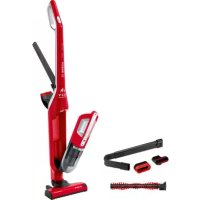
USER MANUAL Flexxo 2in1 Zoo BOSCH
natural_image
Interior design layout with minimalist furniture and wall art (no text or symbols visible)
ВЕНО.../ВСНО
BOSCH
de Consonmenting
序 1038-1040
- 2014年1月1日
da Onquartures
- 2017年1月1日
in 08-09-18 15
■ 1970-2021 (3.20)
d. Industrials
-
10000
-
10,486
■ 10000000
- 2017年1月1日
Please keep this instruction manual for future reference.
When passing the vacuum cleaner on to a third party, please also pass on this instruction manual.
Intended use
This appliance is intended for domestic use only. This appliance is intended for use up to a maximum height of 2000 metres above sea level. Only use this vacuum cleaner in accordance with the instructions in this instruction manual.
In order to prevent injuries and damage, the vacuum cleaner must not be used for:
■ Vacuuming persons or animals.
■ Vacuuming up:
- Hazardous, sharp-edged, hot or red-hot substances.
- Damp or liquid substances.
- Highly flammable or explosive substances and gases.
- Ash, soot from tiled stoves and central heating systems.
- Toner dust from printers and copiers.
Spare parts, accessories
Our original spare parts, original (special) accessories are designed to work with the features and requirements of our vacuum cleaners. We therefore recommend that you only use our original spare parts, original (special) accessories. This will ensure that your vacuum cleaner has a long service life and that the quality of its cleaning performance will remain consistently high throughout.
Please note
- Using unsuitable or inferior-quality spare parts, (special) accessories can damage your vacuum cleaner. Damage caused by the use of such products is not covered by our guarantee.
This vacuum cleaner complies with the recognised rules of technology and the relevant safety regulations.
■ The appliance may be used by children over the age of 8 years and by persons with reduced physical, sensory or mental capacity or by persons with a lack of experience or knowledge if they are supervised or have been instructed on the safe use of the appliance and have understood the potential dangers of using the appliance.
■ Children must never play with the appliance.
■ Cleaning and user maintenance must never be carried out by children without supervision.
■ Plastic bags and films must be kept out of the reach of children and disposed of.
= There is a risk of suffocation.
Proper use
■ To charge, only use the charging cable included in the scope of supply.
■ The charging cable must only be connected and operated as specified on the rating plate.
■ The appliance must only be stored and charged indoors.
■ Do not expose the appliance to temperatures below 0 °C or above 40 °C.
■ Never vacuum without the dust bag or dust container, motor protection or exhaust filter.
= This may damage the vacuum cleaner.
- Keep the vacuum cleaner away from your head when using nozzles and tubes. => This could cause injury.
■ Do not use a damaged charging cable. Replace it with an original charging cable.
■ When disconnecting the charging cable from the mains, pull the plug itself to remove it; do not pull on the power cord.
■ Do not pull the charging cable over sharp edges or allow it to become trapped.
■ Before carrying out any work on the vacuum cleaner, switch off the appliance and disconnect it from the charging cable and the mains.
■ Do not operate the vacuum cleaner if it is damaged.
If a fault is detected, switch off the appliance and disconnect it from the charging cable and the mains.
■ For safety reasons, only authorised after-sales service personnel are permitted to carry out repairs and fit replacement parts to the vacuum cleaner.
In the following cases, you must stop the appliance immediately and contact the after-sales service:
- If you have accidentally vacuumed up some liquid or liquid has entered the inside of the appliance;
- If the appliance has been dropped and damaged.
■ Protect the vacuum cleaner from outside weather conditions, moisture and sources of heat.
- Do not pour flammable substances or substances containing alcohol onto the filters (dust bag, motor protection filter, exhaust filter, etc.).
■ The vacuum cleaner is not suitable for use on construction sites. => Vacuuming up building rubble may damage the appliance.
■ Switch off the appliance when it is not in use.
■ The packaging is designed to protect the vacuum cleaner from being damaged during transportation. We therefore recommend keeping the packaging for the purpose of future transportation.
Batteries
Your appliance is fitted with rechargeable lithium-ion batteries which, for safety reasons, are only accessible to professional repair specialists.
For battery replacement, please contact your nearest after-sales centre or an authorised specialist dealer.
Notes on transport
The lithium-ion batteries in the appliance are subject to the requirements of dangerous goods legislation. The batteries can be transported by the user by road without any further requirements. In the event that they are dispatched by a third party (e.g. transported by air or freight carrier), special requirements regarding packaging and identification must be met. In this case, a dangerous goods expert must be consulted when preparing the goods for dispatch.
Vacuum cleaners, batteries, accessories and packaging should be recycled in an environmentally friendly manner.
Do not dispose of the vacuum cleaner or the batteries in the household rubbish.
Packaging
The packaging is designed to protect the vacuum cleaner from being damaged during transportation. It is made of environmentally friendly materials and can be recycled. Dispose of packaging that is no longer required at an appropriate recycling point.
■ Old appliances
This appliance contains rechargeable lithium-ion batteries. The appliance must therefore only be disposed of by an authorised after-sales service or dealer.
Batteries
Please follow the notes on transport.
Integrated batteries may only be removed by specialist personnel for the purpose of disposal. Opening the housing shell may damage the vacuum cleaner.
Even in the case of complete discharge, the battery still contains a residual capacity that may be released in the event of a short circuit.
fr
= Fare for kvelning!
Tiltenkt bruk
natural_image
Simple line drawing of an open book with a curved arrow indicating rotation (no text or symbols)
Gerätebeschreibung
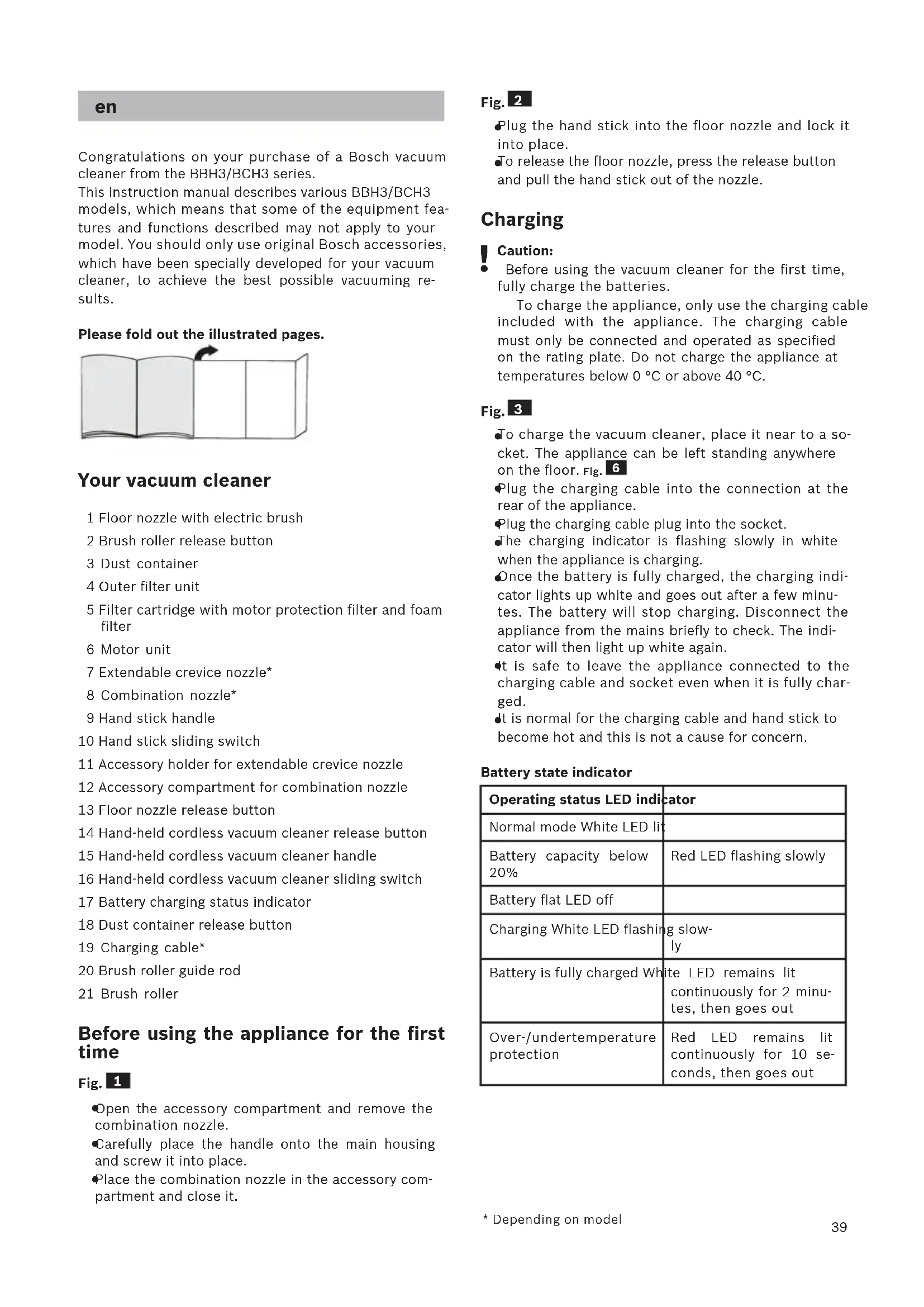
Congratulations on your purchase of a Bosch vacuum cleaner from the BBH3/BCH3 series.
This instruction manual describes various BBH3/BCH3 models, which means that some of the equipment features and functions described may not apply to your model. You should only use original Bosch accessories, which have been specially developed for your vacuum cleaner, to achieve the best possible vacuuming results.
Please fold out the illustrated pages.

natural_image
Simple line drawing of an open book with a curved arrow indicating rotation (no text or symbols)
Your vacuum cleaner
1 Floor nozzle with electric brush
2 Brush roller release button
3 Dust container
4 Outer filter unit
5 Filter cartridge with motor protection filter and foam filter
6 Motor unit
7 Extendable crevice nozzle*
8 Combination nozzle*
9 Hand stick handle
10 Hand stick sliding switch
11 Accessory holder for extendable crevice nozzle
12 Accessory compartment for combination nozzle
13 Floor nozzle release button
14 Hand-held cordless vacuum cleaner release button
15 Hand-held cordless vacuum cleaner handle
16 Hand-held cordless vacuum cleaner sliding switch
17 Battery charging status indicator
18 Dust container release button
19 Charging cable*
20 Brush roller guide rod
21 Brush roller
Before using the appliance for the first time
Fig. 1
- Open the accessory compartment and remove the combination nozzle.
- Carefully place the handle onto the main housing and screw it into place.
Place the combination nozzle in the accessory compartment and close it.
Fig. 2
Plug the hand stick into the floor nozzle and lock it into place.
To release the floor nozzle, press the release button and pull the hand stick out of the nozzle.
Charging
Caution:
Before using the vacuum cleaner for the first time, fully charge the batteries.
To charge the appliance, only use the charging cable included with the appliance. The charging cable must only be connected and operated as specified on the rating plate. Do not charge the appliance at temperatures below 0 °C or above 40 °C.
Fig. 3
To charge the vacuum cleaner, place it near to a socket. The appliance can be left standing anywhere on the floor. Fig. 6
Plug the charging cable into the connection at the rear of the appliance.
Plug the charging cable plug into the socket.
The charging indicator is flashing slowly in white when the appliance is charging.
Once the battery is fully charged, the charging indicator lights up white and goes out after a few minutes. The battery will stop charging. Disconnect the appliance from the mains briefly to check. The indicator will then light up white again.
It is safe to leave the appliance connected to the charging cable and socket even when it is fully charged.
It is normal for the charging cable and hand stick to become hot and this is not a cause for concern.
Battery state indicator
| Operating status LED indicator |
| Normal mode White LED lit | |
| Battery capacity below 20% | Red LED flashing slowly |
| Battery flat LED off | |
| Charging White LED flashing slowly | |
| Battery is fully charged White LED remains lit continuously for 2 minutes, then goes out | |
| Over-/undertemperature protection | Red LED remains lit continuously for 10 seconds, then goes out |
Using the hand stick vacuum cleaner
Vacuuming
Fig. 4
- Actuate the sliding switch in the direction of the arrow.
Controlling the suction level
Fig. 5
Slide the sliding switch into the required position in order to set the suction power:
Position 1 1
Vacuuming with the electric brush switched on.
For routine cleaning tasks on all surfaces.
The appliance achieves the maximum run time at this level.
Position 2 2
Vacuuming with the electric brush switched on.
For stubborn cleaning tasks on all surfaces (carpets, in particular).
The appliance achieves a shorter runtime at this level.
Runtime
Like every other Li-Ion battery the battery is subject to natural wear as well. That means the battery capacity and thus runtime decrease over time. This is a natural aging process and not the result of a material/production failure or a product defect.
| BBH3/BCH325,2V | BBH3/BCH321,6V |
| On normal mode with electrical nozzle for normal cleaning tasks | Up to 55 min. | Up to 50 min. |
| Turbo mode with electrical floor nozzle or hand-held for demanding cleaning tasks | Up to 20 min. | Up to 18 min. |
Fig. 6
During short pauses in vacuuming, the appliance can be left standing anywhere in the room. To do this, tilt the vacuum cleaner forwards slightly in the direction of the nozzle.
Caution: When the appliance is left standing, it
- must be switched off because, if the brush is turning while the appliance is standing still, it could cause damage to the floor covering.
Using the hand-held cordless vacuum cleaner
Fig. 7
- Unlock the hand-held cordless vacuum cleaner by pressing the release button and remove it from the hand stick.
Vacuuming with accessories
Fig. 8 Crevice nozzle
For vacuuming in difficult-to-reach places and overhead.
- Open the accessory holder using the recessed grip and remove the crevice nozzle. Place it on the air intake opening of the cordless handheld vacuum cleaner and click into place.
The crevice nozzle can be extended as required. To do this, press the unlock button, pull out the crevice nozzle and engage it in the end position.
After use, push the crevice nozzle together again, place it in the accessory holder and close the holder.
Fig. 9 Combination nozzle
Combination nozzle with furniture brush and upholstery nozzle for vacuuming window frames, cupboards, furniture, etc.
- Open the accessory compartment and remove the combination nozzle. Place it on the air intake opening of the upright vacuum cleaner and click into place.
The furniture brush attachment can be pushed to the side. The upholstery nozzle is located underneath.
The combination nozzle can also be placed on the tip of the crevice nozzle.
After use, place the combination nozzle back in the accessory compartment for storage, close the accessory compartment, clicking it into place.
Charging the hand-held cordless vacuum cleaner
Fig. 10
To charge the hand-held cordless vacuum cleaner, insert it into the hand stick and lock into place. Make sure that it is seated correctly.
After using the appliance
Fig. 11
Switch off the appliance after vacuuming.
Emptying the dust container
In order to achieve the best possible vacuuming results, the dust container should be emptied after every use or, at the latest, when dust at one point in the dust container has reached the marking.
We recommend that you not fill the dust container beyond the marking, as this leads to considerable soiling of the filter.
Fig. 12
Remove the hand-held cordless vacuum cleaner from the hand stick. Fig. 7
Using the release button, unlock the dust container and remove it from the motor unit.
Fig. 13
Take the filter unit out of the dust container.
●Empty the dust container.
Fig. 14
- Remove any dirt which may have been lodged underneath the container ejector opening.
a) Insert the filter unit into the dust container, making sure it is correctly seated
b) Insert the dust container in the appliance, so that it 'clicks' audibly into place
! Caution: If you notice any resistance when inserting the dust container, check that the filter is complete and that the filter unit and dust container are correctly seated.
Cleaning the filter
The outer filter unit and filter cartridge should be cleaned at regular intervals in order to ensure optimum operation of the vacuum cleaner.
! Caution: The filter can only be cleaned if the appliance is switched off.
Never vacuum without the outer filter unit and its fitted filter cartridge.
Fig. 15 Cleaning the outer filter unit
Switch off the appliance. Fig. 11
Remove the hand-held cordless vacuum cleaner from the hand stick. Fig. 7
Using the release button, unlock the dust container and remove it from the motor unit. Fig. 12
Take the filter unit out of the dust container.
a) It is usually sufficient to lightly shake or tap out the whole filter unit when the dust container is emptied in order to dislodge any particles of dirt.
b) If this is not sufficient, you can use a dry cloth to remove dirt particles from the surface.
Fig. 16 Cleaning the filter cartridge
a) Remove the filter cartridge from the filter unit.
b) Firstly, clean the filter cartridge by tapping out the dirt.
c) Pull out the foam filter from the motor protection and rinse separately.
Allow the foam filter and motor protection filter to dry completely (approx. 24 hours)
After fitting the foam filter, insert the filter unit into the dust container.
New filters can be obtained from our after-sales service, if required.
Cleaning the floor nozzle
Before carrying out any maintenance, switch off the vacuum cleaner and disconnect it from the charging cable.
Fig. 17
Use the release button to release the brush roller and pull it sideways out of the floor nozzle.
Using the groove provided, cut through threads and hairs wound round the rollers with scissors.
Push the brush roller in sideways along the guide rod in the floor tool and lock in place using the release button.
! Caution: The floor nozzle must only be put into operation with the brush roller fitted.
Caution:
- Floor nozzles are subject to a certain amount of wear, depending on the type of hard floors you have (e.g. rough, rustic tiles). You must therefore check the underside of the floor tool at regular intervals. Worn undersides of floor nozzles may have sharp edges that can damage delicate hard floors, such as parquet or linoleum. The manufacturer does not accept any responsibility for damage caused by worn floor tools.
Care
Before cleaning the hand stick vacuum cleaner or handheld cordless vacuum cleaner, it must be switched off and disconnected from the charging cable. The vacuum cleaner and accessories can be cleaned using a standard commercially-available plastic cleaner.
Caution: Do not use abrasive materials, glass-
- cleaning agents or all-purpose cleaning products. Never immerse the vacuum cleaner in water.
Subject to technical modifications.
fr
natural_image
Simple line drawing of an open book with a curved arrow indicating rotation (no text or symbols)
natural_image
Simple line drawing of an open book with a curved arrow indicating rotation (no text or symbols)
natural_image
Simple line drawing of an open book with a curved arrow indicating rotation (no text or symbols)
natural_image
Simple line drawing of an open book with a curved arrow indicating rotation (no text or symbols)
Beskrivelse
natural_image
Simple line drawing of an open book with a right-pointing arrow on the page (no text or symbols)
natural_image
Simple line drawing of an open book with a curved arrow indicating rotation (no text or symbols)
Produktbeskrivning
natural_image
Simple line drawing of an open book with a curved arrow indicating rotation (no text or symbols)
Laitteen kuvaus
natural_image
Simple line drawing of an open book with a curved arrow indicating rotation (no text or symbols)
natural_image
Simple line drawing of an open book with a curved arrow indicating rotation (no text or symbols)
natural_image
Simple line drawing of an open book with a right-pointing arrow on the page (no text or symbols)
natural_image
Simple line drawing of an open book with a right-pointing arrow indicating the page (no text or symbols present)
Cihaz açıklaması
natural_image
Simple line drawing of an open book with a right-pointing arrow indicating the page (no text or symbols present)
Opis urządzenia
natural_image
Simple line drawing of an open book with a right-pointing arrow indicating the page (no text or symbols present)
A készülék leírása
natural_image
Simple line drawing of an open book with a curved arrow indicating rotation (no text or symbols)
Popis spotřebiče
natural_image
Simple line drawing of an open book with a right-pointing arrow indicating the page (no text or symbols present)
Описание прибора
natural_image
Simple line drawing of an open book with a curved arrow indicating rotation (no text or symbols)
您的吸塵器
natural_image
Simple line drawing of an open book with a curved arrow indicating rotation (no text or symbols)
2.4.4.5.6.7.8.9.10.11.12.13.14.15.16.17.18.19.20.21.22.23.24.25.26.27.28.29.30.31.32.33.34.35.36.37.38.39.40.41.42.43.44.45.46.47.48.49.50.51.52.53.54.55.56.57.58.59.60.61.62.63.64.65.66.67.68.69.70.71.72.73.74.75.76.77.78.79.80.81.82.83.84.85.86.87.88.89.90.91.92.93.94.95.96.97.98.99.100
AE United Arab Emirates,

BSH Home Appliances FZE
Round About 13
Plot Nr MO-0532A
Jebel Ali Free Zone – Dubai
Tel.: 04 881 4401
mailto:service.uae@bshg.com
www.bosch-home.com/ae
AL Republika e Shqiperise, Albania
ELEKTRO-SERVIS sh.p.k
Rr. Shkelqim Fusha, Selite,
Pallati "Matrix Konstruksion",
Kati 0 dhe +1
1023 Tirane
Tel.: 4 2278 130, -131
Fax: 4 2278 130
mailto:info@elektro-servis.com
EXPERT SERVIS
Rruga e Kavajes,
Kulla B Nr 223/1 Kati I
1023 Tirane
Tel.: 4 480 6061
Tel.: 4 227 4941
Fax: 4 227 0448
Cel: +355 069 60 45555
mailto:info@expert-servis.al
Gate 1, 1555 Centre Road
Clayton, Victoria 3168
Tel.: 1300 369 744*
Fax: 1300 306 818
mailto:aftersales.au@bshg.com
www.bosch-home.com.au
* Mo-Fr: 24 hours
BA Bosna i Hercegovina, Bosnia-Herzegovina
"HIGH" d.o.o.
Gradačačka 29b
71000 Sarajevo
Tel.: 061 10 09 05
Fax: 033 21 35 13
mailto:bosch_siemens_sarajevo@
yahoo.com
Business center FPI, floor 5,
Cherni vrah Blvd. 51B
1407 Sofia
Tel.: 0700 208 17
mailto:informacia.servis-bg@bshg.com
www.bosch-home.bg
BH Bahrain,
Khalaifat Est.
P.O. Box 5111
Manama
Tel.: 01 7400 553
mailto:service@khalafat.com
To arrange an engineer visit, to order spare parts and accessories or for product advice please visit www.bosch-home.co.uk or call Tel.: 0344 892 8979*
* Calls are charged at the basic rate, please check with your telephone service provider for exact charges
GR Greece, Ελλάς
BSH Ikiakes Siskeves A.B.E.
Central Branch Service
17 km E.O. Athinon-Lamias & Potamou 20
14564 Kifisia
Unit 1 & 2, 3rd Floor,
North Block, Skyway House,
3 Sham Mong Road
Tai Kok Tsui, Kowloon
Hong Kong
Tel.: 2565 6151
Fax: 2565 6681
mailto:bosch.hk.service@bshg.com
www.bosch-home.cn
HR Hrvatska, Croatia
www.bosch-home.com/hr
www.bosch-home.com/hu
IE Republic of Ireland
BSH Home Appliances Ltd.
M50 Business Park
Ballymount Road Upper
Walkinstown
Dublin 12
To arrange an engineer visit, to order spare parts and accessories or for product advice please call
Tel.: 01450 2655*
www.bosch-home.ie
* Calls are charged at the basic rate, please check with your telephone service provider for exact charges.
IL Israel,
C/S/B/ Home Appliance Ltd.
1, Hamasger St.
North Industrial Park
Lod, 7129801
Tel.: 08 9777 222
Fax: 08 9777 245
mailto:csb-serv@csb-ltd.co.il
www.bosch-home.co.il
IN India, Bhārat, भारत
BSH Household Appliances Mfg. Pvt. Ltd.
Arena House, Main Bldg, 2nd Floor,
Plot No. 103, Road No. 12,
MIDC, Andheri East
Mumbai 400 093
Toll Free 1800 266 1880*
www.bosch-home.com/in
* Mo-Sa: 8.00am to 8.00pm
(exclude public holidays)
IS Iceland
Smith & Norland hf.
Noatuni 4
105 Reykjavik
Tel.: 0520 3000
Fax: 0520 3011
www.sminor.is
IT Italia, Italy
www.bosch-home.com/it
KZ Kazakhstan, Казақстан
IP Anackiy A.N. PTN-Service
Kuyshi Dina str.23/1 N3
Astana
Tel.: 717 236 64 55
mailto: ptnservice@mail.ru
Technodom Service
Utegen Batira Str. 73
480096 Almaty
Tel.: 727 258 85 44
mailto: lsr@technodom.kz
www.technodom.kz
Kombitechnocentr
Zhambyl st. 117
480096 Almaty
Tel.: 727 338 45 55
mailto:cts_pavel@bk.ru
www.cts.kz
TOO Evrika Service
Shimkent, Riskulova 22.
Shimkent 160018
Tel.: 727 252 44 63 75
mailto:evrika_kz@mail.ru
www.evrika.com
AV SERVICE
Abulhair hana Str. 51
Uralsk 090000
Tel.: 711 293 99 49
mailto:oastafiev@avservice.kz
www.avservice.kz
LB Lebanon,
Teheni, Hana & Co.
Boulevard Dora 4043 Beyrouth
P.O. Box 90449
Jdeideh, 1202 2040
Tel.: 01 255 211
mailto:Info@Teheni-Hana.com
LT Lietuva, Lithuania
Senuku prekybos centras UAB
Jonavos g. 62
44192 Kaunas
Tel.: 037 212 146
Fax: 037 212 165
www.senukai.lt
UAB "AG Service"
R. Kalantos g. 32
52494 Kaunas
Tel.: 070 055 655
Fax: 037 331 363
mailto:servisas@agservice.lt
www.agservice.lt
Baltic Continent Ltd.
Lukšio g. 23
09132 Vilnius
Tel.: 870 055 595
Fax: 052 741 722
mailto:info@balticcontinent.lt
www.balticcontinent.lt
UAB Emtoservis
S.R.L. "Rialto-Studio"
ул. Щусева 98
2012 Кишинев
Unit F 2, 4 Orbit Drive
Mairangi Bay
Auckland 0632
Tel.: 0800 245 700*
Fax: 0800 256 535
mailto:aftersales.nz@bshg.com
www.bosch-home.co.nz
* Mo-Fr: 8.30 am to 5.00 pm (exclude public holidays)
PL Polska, Poland
and Airconditioning Co. Ltd.
BOSCH Service centre,
Kilo 5 Old Makkah Road
(Next to Toyota), Jamiah Dist.
P.O.Box 7997
Jeddah 21472
Tel.: 800 127 9999
mailto:palakkaln@alj.com
www.aljelectronics.com.sa
SE Sverige, Sweden
BSH Home Appliances AB
Landsvägen 32
169 29 Solna
Tel.: 0771 19 70 00 local rate
Tel.: 0771 11 22 77 local rate
mailto:Bosch-Service-SE@bshg.com
www.bosch-home.se
SG Singapore, 新加坡
BSH Home Appliances Pte. Ltd.
Block 4012, Ang Mo Kio Avenue 10
01-01 Techplace 1
Singapore 569628
Tel.: 6751 5000*
Fax: 6751 5005
mailto:bshsgp.service@bshg.com
www.bosch-home.com.sg
* Mo-Fr: 8.30am to 7.00pm, Sa: 8.30am to 5.30pm (exclude public holidays)
SI Slovenija, Slovenia
BSH Hišni aparati d.o.o.
Litostrojska 48
1000 Ljubljana
Tel.: 01 583 07 00
Fax: 01 583 08 89
mailto:informacije.servis@bshg.com
www.bosch-home.com/si
SK Slovensko, Slovakia
www.bosch-home.com/tr
BSH Home Appliances Private Limited
台北市內湖區洲子街80號11樓
11F., No.80, Zhouzi St., Neihu Dist.
Taipei City 11493
Tel.: 0800 368 888
Fax: 02 2627 9788
mailto:bshtzn-service@bshg.com
Service-General SH.P.K.
Rruga Mag Prishtine-Ferizaj
70000 Ferizaj
Tel.: 0290 321 434
Tel.: 0290 330 723
mailto:a_service@
gama-electronics.com
XS Srbija, Serbia
BSH Kućni aparati d.o.o.
15th Road Randjespark
Private Bag X36, Randjespark
1685 Midrand – Johannesburg
Tel.: 086 002 6724
Fax: 086 617 1780
mailto:applianceserviceza@bshg.com
www.bosch-home.com/za
natural_image
Symbol of a trash bin crossed with no text or numbers, representing waste sorting or disposal (no text present)
de
This appliance is labelled in accordance with European Directive 2012/19/EU concerning used electrical and electronic appliances (waste electrical and electronic equipment - WEEE). The guideline determines the framework for the return and recycling of used appliances as applicable throughout the EU.
fr
natural_image
Symbol of a trash bin crossed with no text or numbers, representing environmental restriction (no text present)
pt
GB Conditions of guarantee
For this appliance the guarantee conditions as set out by our representatives in the country of sale apply. Details regarding same may be obtained from the dealer from whom the appliance was purchased. For claims under guarantee the sales receipt must be produced.
FR Conditions de garantie
Bosch Su Isitici (Kettle)
Bosch Mikser
Bosch Mutfak Robotu
www.bosch-home.com/tr
www.bosch-yetkiliservisi.com
bosch-infoteam@bshg.com