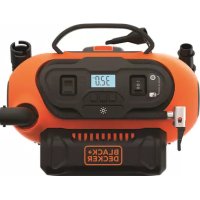
BDCINF18 - Compressor BLACK & DECKER - Free user manual and instructions
Find the device manual for free BDCINF18 BLACK & DECKER in PDF.



| Product type | Cordless & corded compressor/inflator |
| Brand | Black & Decker |
| Model | BDCINF18 |
| Weight | 2 kg (without battery) |
| Power source | 18V Li-Ion battery, 12V DC (cigarette lighter), 230V AC |
| Battery type | Li-Ion (capacities from 1.3 Ah to 4.0 Ah depending on model) |
| Maximum pressure | 160 psi (for accessories) |
| Maximum continuous use | 2 minutes at 65 psi, then 5 minutes rest |
| Inflation modes | High pressure (tires) and High volume (air mattresses, boats) |
| Auto shut-off | Yes, in high pressure mode (adjustable pressure) |
| Pressure gauge function | Yes, measures pressure without inflating |
| Deflation function | Yes, via high volume hose |
| LCD screen | Yes, displays pressure and battery status |
| Included accessories | High pressure hose, high volume hose, universal valve adapter, tapered nozzle, brass fitting, needle valve, 230V cord, 12V cable |
| Maintenance | Clean ventilation slots with a soft brush; motor block with a damp cloth; no abrasive detergents |
| Safety | Double insulation (Class II), do not expose to water, do not leave unattended |
| Warranty | 24 months |
| Repairability | Repair by authorized repairer; spare parts available |
| Intended use | Inflation of tires, balls, air mattresses, inflatable boats, floats |
Frequently Asked Questions - BDCINF18 BLACK & DECKER
User questions about BDCINF18 BLACK & DECKER
0 question about this device. Answer the ones you know or ask your own.
Ask a new question about this device
Download the instructions for your Compressor in PDF format for free! Find your manual BDCINF18 - BLACK & DECKER and take your electronic device back in hand. On this page are published all the documents necessary for the use of your device. BDCINF18 by BLACK & DECKER.
USER MANUAL BDCINF18 BLACK & DECKER
www.blackanddecker.eu
natural_image
Technical line drawing of a mechanical device with labeled parts (no readable text or symbols)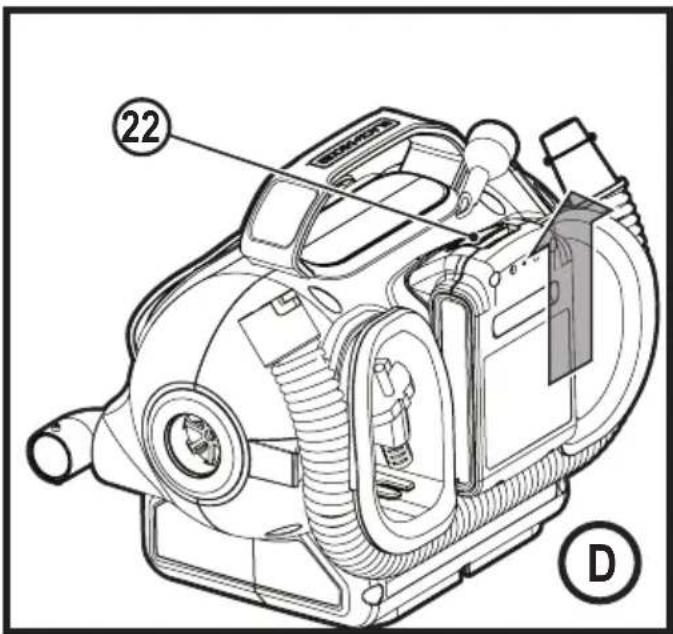
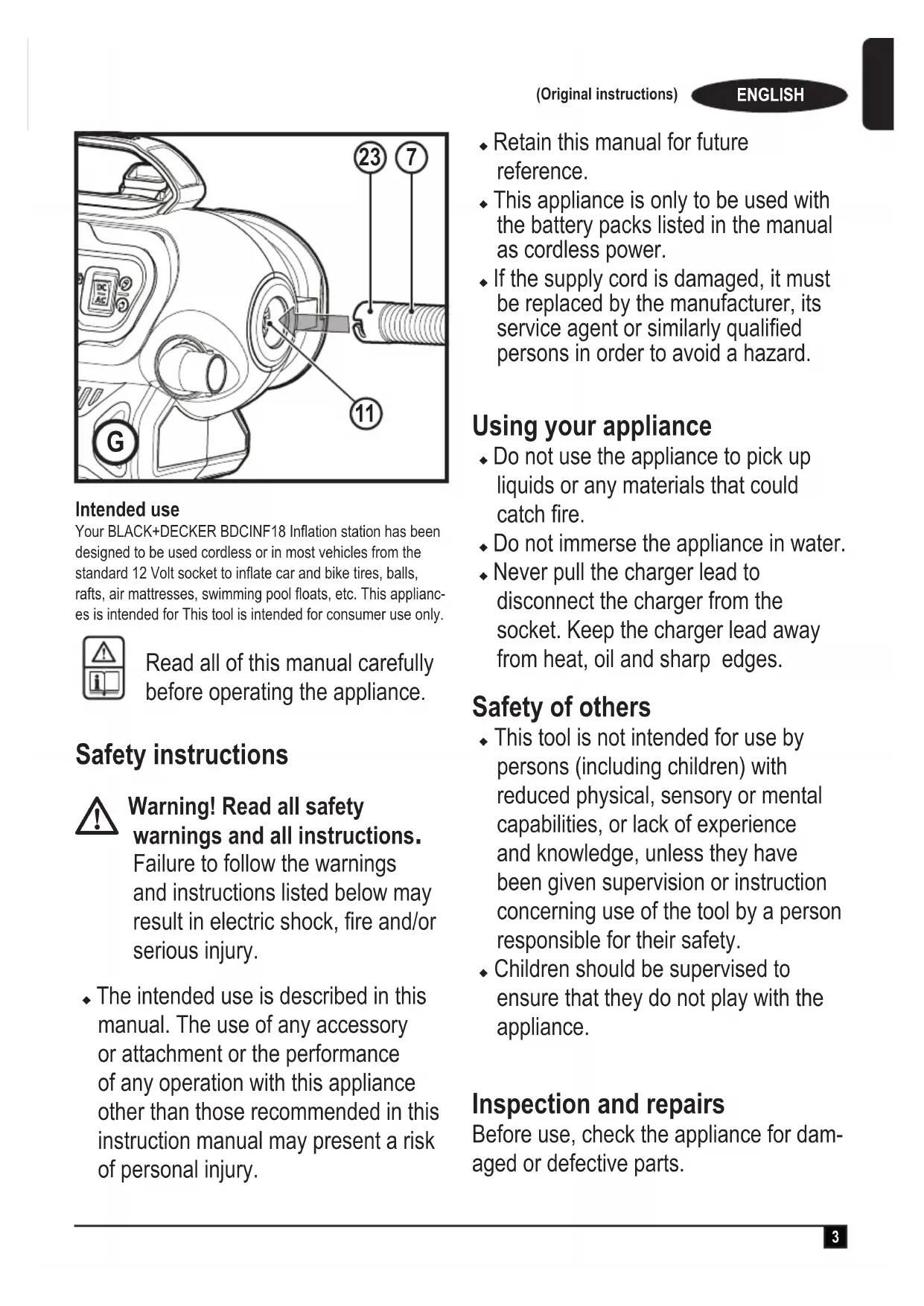
Intended use
Your BLACK+DECKER BDCINF18 Inflation station has been designed to be used cordless or in most vehicles from the standard 12 Volt socket to inflate car and bike tires, balls, rafts, air mattresses, swimming pool floats, etc. This appliances is intended for This tool is intended for consumer use only.
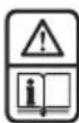
Read all of this manual carefully before operating the appliance.
Safety instructions

Warning! Read all safety warnings and all instructions.
Failure to follow the warnings and instructions listed below may result in electric shock, fire and/or serious injury.
- The intended use is described in this manual. The use of any accessory or attachment or the performance of any operation with this appliance other than those recommended in this instruction manual may present a risk of personal injury.
- Retain this manual for future reference.
- This appliance is only to be used with the battery packs listed in the manual as cordless power.
- If the supply cord is damaged, it must be replaced by the manufacturer, its service agent or similarly qualified persons in order to avoid a hazard.
Using your appliance
- Do not use the appliance to pick up liquids or any materials that could catch fire.
- Do not immerse the appliance in water.
- Never pull the charger lead to disconnect the charger from the socket. Keep the charger lead away from heat, oil and sharp edges.
Safety of others
- This tool is not intended for use by persons (including children) with reduced physical, sensory or mental capabilities, or lack of experience and knowledge, unless they have been given supervision or instruction concerning use of the tool by a person responsible for their safety.
- Children should be supervised to ensure that they do not play with the appliance.
Inspection and repairs
Before use, check the appliance for damaged or defective parts.
Check for breakage of parts, damage to switches and any other conditions that may affect its operation.
- Do not use the appliance if any part is damaged or defective.
- Have any damaged or defective parts repaired or replaced by an authorized repair agent.
- Regularly check the charger lead for damage. Replace the charger if the lead is damaged or defective.
- Never attempt to remove or replace any parts other than those specified in this manual.
Additional safety instructions
- Inflate bike tires, balls, rafts, swimming pool floats, air mattresses, and more in and around the home. Recommended maximum continuous duty at 65 psi is 2 minutes on with 5 minutes off.
- The compressed air from your inflator is not safe for breathing. Never inhale air from your inflator or from a breathing device connected to the inflator.
- Too much air pressure causes a hazardous risk of bursting. Check the manufacturer's maximum pressure rating for objects being inflated.
- Do not leave inflator running unattended. It could burst tires or other items.
-
Use a tire gauge to check the tyres pressure before each use and while inflating tyres; see the tyre sidewall for the correct tyre pressure.
-
Do not modify or attempt to repair. Never drill into, weld, or make any modifications to the inflator or its attachments.
◆ Operate only with the accessories included or air handling parts acceptable for not less than 160 psi. - The use of any accessory not recommended for use with this tool could be hazardous.
- Never “horseplay.” High pressure air is dangerous. Don’t direct air-flow at yourself or others.
Warning! Always leave the valve adaptor lever open when not in use.
- Inflator can become hot during use. Allow inflator to cool 30 minutes before storing away.
After use
- Unplug the charger before cleaning.
- When not in use, the appliance should be stored in a dry place.
- Children should not have access to stored appliances.
Residual risks
Additional residual risks may arise when using the tool which may not be included in the enclosed safety warnings. These risks can arise from misuse, prolonged use etc.
Even with the application of the relevant safety regulations and the implementation of safety devices, certain residual risks can not be avoided. These include:
- Injuries caused by touching any rotating/moving parts.
- Injuries caused when changing any parts, blades or accessories.
- Injuries caused by prolonged use of a tool. When using any tool for prolonged periods ensure you take regular breaks.
◆ Impairment of hearing. - Health hazards caused by breathing dust developed when using your tool (example:- working with wood, especially oak, beech and MDF.)
Batteries
- Never attempt to open for any reason.
- Do not expose the battery to water.
- Do not store in locations where the temperature may exceed 40 °C.
- Charge only at ambient temperatures between 10 °C and 40 °C.
- Charge only using the charger provided with the tool.
- If the appliance is to be stored unused for a long period, the batteries should be removed.
- When disposing of batteries, follow the instructions given in the section "Protecting the environment".

Do not attempt to charge damaged batteries.
Chargers
- Use your BLACK+DECKER charger only to charge the battery in the tool with which it was supplied. Other batteries could burst, causing personal injury and damage.
-
Never attempt to charge non-rechargeable batteries.
-
Have defective cords replaced immediately.
- Do not expose the charger to water.
- Do not open the charger.
- Do not probe the charger.
Electrical safety
Symbols on the charger

Read all of this manual carefully before using the appliance.

his tool is double insulated; therefore no earth wire is required. Always check that the power supply corresponds to the voltage on the rating plate.

The charger is intended for indoor use only.
Labels on appliance
The following symbols appear on this appliance along with the date code.

Warning! To reduce the risk of injury, the user must read the instruction manual.

Do not expose the appliance to rain or high humidity.
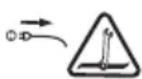
Before performing maintenance or cleaning on the appliance, unplug the supply cord.

Do not leave the inflator unattended.

Class II appliance
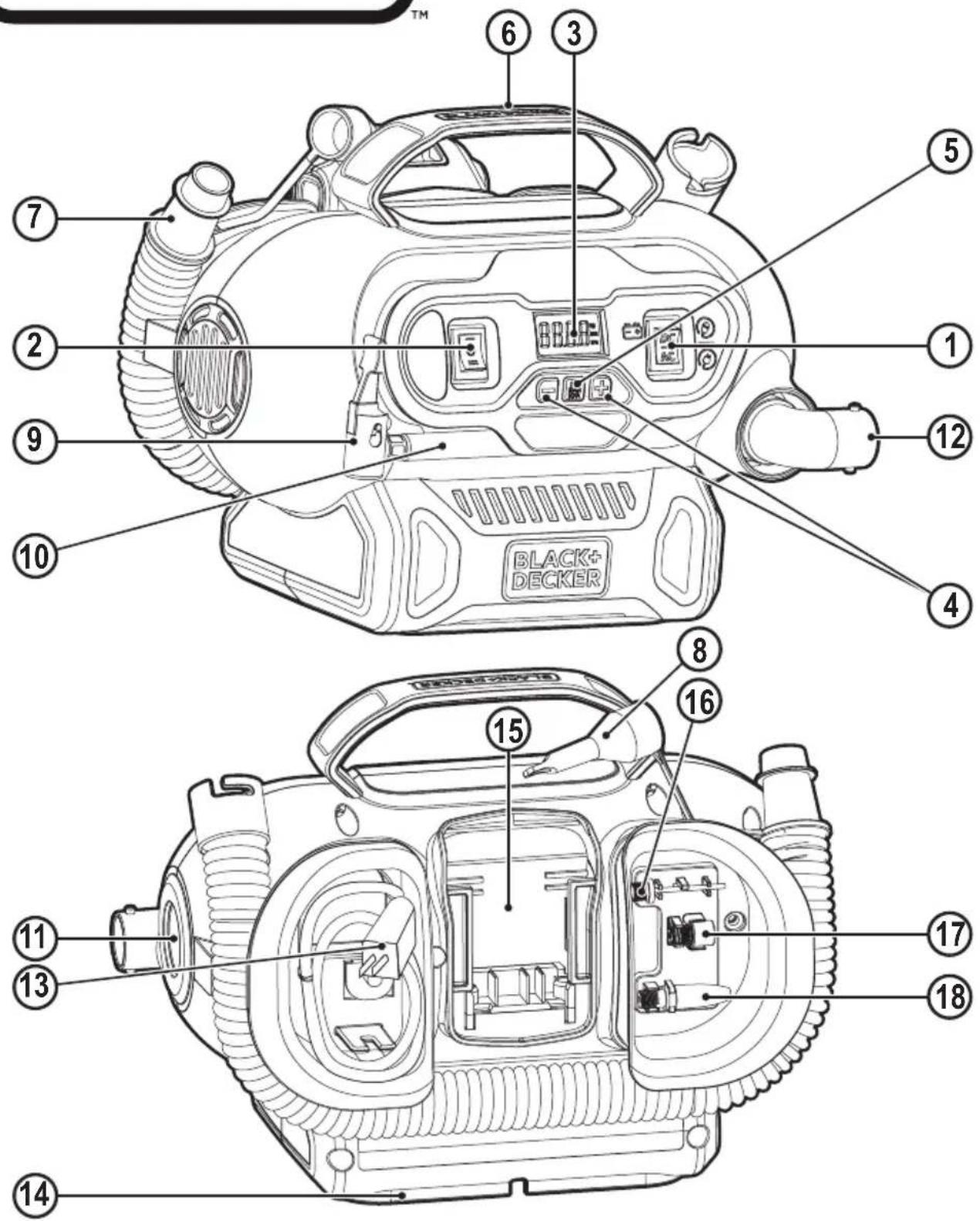
Features
This tool includes some or all of the following features.
- AC/DC power switch
- Mode power switch
- LCD
- Pressure setting buttons
ENGLISH
(Original instructions)
- Pressure Mode / Reset Button
- Handle
- High-volume hose
- Tapered nozzle
- Universal valve adapter
- High-pressure hose
- High-volume pump deflate connection
- High volume pump inflator connection
- 230V AC cord
- 12V DC vehicle connector
- 18V MAX* battery slot
- Inflator needle valve
- Brass coupler adapter
- Tapered nozzle
Assembly
12V DC Cord Storage
- Wrap the 12V DC cord around the cord retainer located in the base of the inflator and snap the 12V DC connector (14) into its storage location on the cord retainer.
Air Hose Storage
- The high-pressure hose (10) is located in a storage channel around the face of the unit. Wrap the highpressure hose inside the channel.
High-Volume Hose Storage
- The high-volume hose (7) is located in a storage channel around the back of the unit. Wrap the high-volume hose inside the channel.
Accessories Storage
◆ The accessories (16) (17) (18) are stored in the back of the unit inside the accessory storage area.
Fitting the accessories
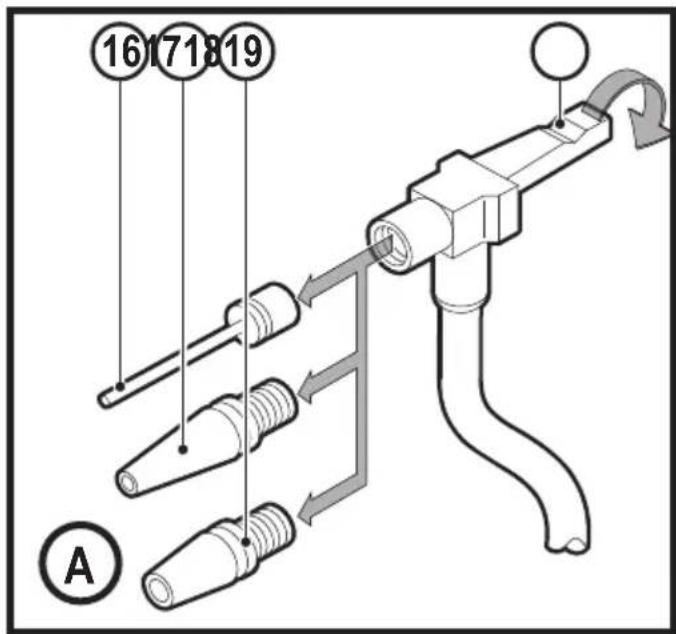
Universal valve adapter (Fig. A)
- Your inflator is supplied with the standard tapered nozzle (18), a brass coupler (17), and the inflator needle valve (16), located on the back of the unit.
◆ To use the universal valve adaptor (9), make sure the lever is in the up position.
◆ Place the valve adapter over the stem of the inflator needle valve, brass coupler adaptor or tapered nozzle.
◆ Press the lever (19) on the universal valve adapter down to lock it in place.
◆ Place the inflator needle valve, brass coupler adapter or tapered nozzle into the item to be inflated.
Note: Always make sure that the lever is in the up position when not in use. Operate your inflator only with the universal valve adaptor or with the included nozzles.
Note: Make sure the universal valve adapter is firmly locked in place before turning the inflator on.
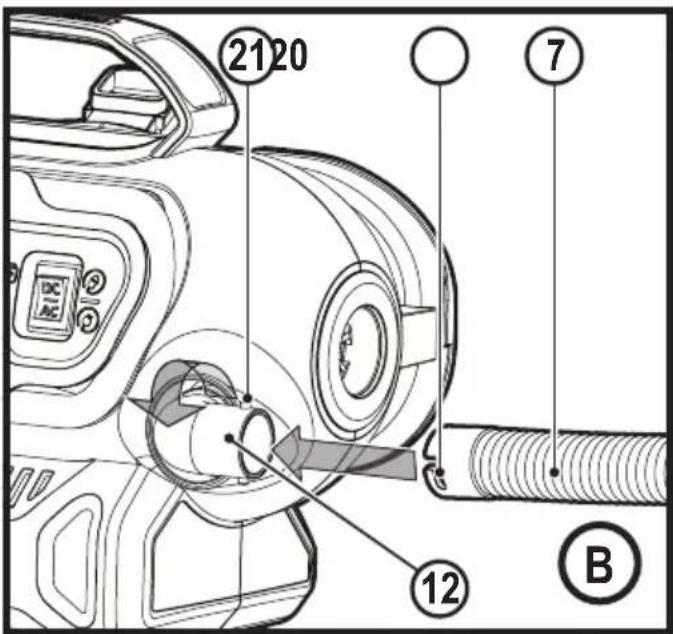
High-volume hose (Fig. B)
◆ Remove the high-volume hose 7 from the storage location.
- Line up the notches 20 of the hose with the nubs (21) of the high volume pump inflator connection (12). Then, slide the hose on and twist counter-clockwise to secure.
◆ To remove, twist the hose clockwise and slide hose off.
Note: Many inflatables have an internal flap that prevents air loss during inflation, especially air mattresses. Unless this flap is displaced by the nozzle the inflatable will not inflate. Push the nozzle firmly into the valve to make sure that you push this flap out of the way.
Warning! Risk of Bursting. Excessive air pressure may cause a hazardous risk of bursting or personal injury. Check the manufacturer's maximum pressure rating for items being inflated.
Note: If the pressure rating for the item being inflated is above 100 psi, note that the maximum run time is 10 minutes, leave to rest for 20 minutes before reusing.
Operation
Warning! To reduce the risk of serious personal injury, turn unit off and disconnect it from power source and remove the battery pack before making any adjustments or removing/installing attachments or accessories. An accidental start-up can cause injury.
Warning! Do not operate the inflator when the car engine is running.
Note: Make sure that your 12 Volt accessory socket is live. On some vehicles the accessory socket may only become live when the ignition key is in the accessory position.
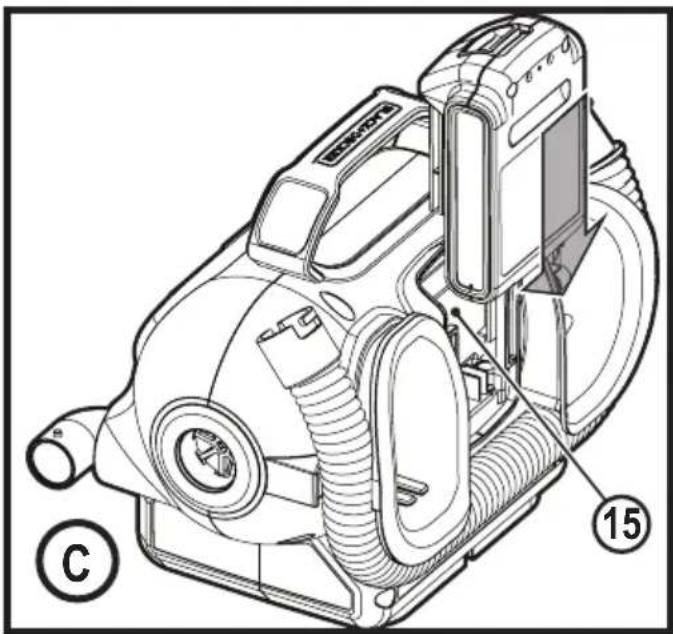
Installing and Removing the Battery Pack (Fig. C, D)
Note: For best results, make sure your battery pack is fully charged.
- To install the battery pack into the battery port (15), align the battery pack with the rails inside the battery port and slide it into the handle until the battery pack is firmly seated in the tool and ensure that it does not disengage.
- To remove the battery pack from the tool, press the release button (22) and firmly pull the battery pack out of the tool handle. Insert it into the charger as described in the charger section of this manual.
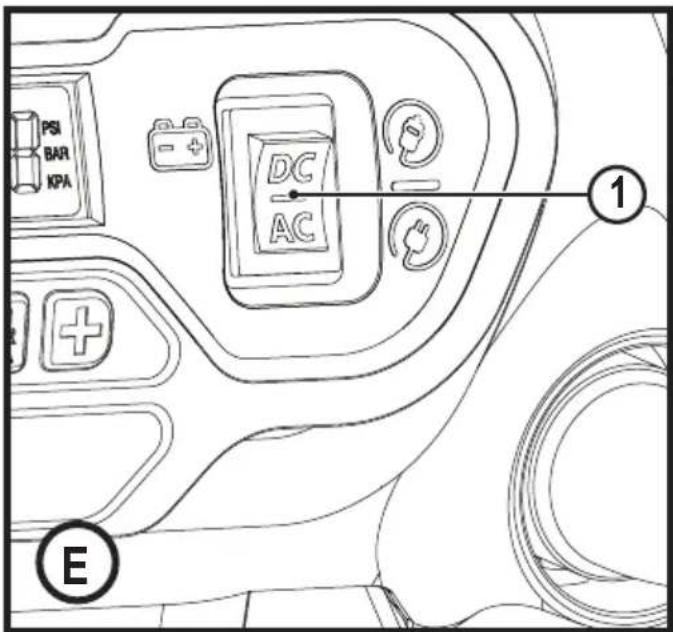
Switching On (Fig. E, F)
Warning! Risk of Bursting. Do not leave unit running unattended. Overinflation of tires and other items could result in serious injury and property damage.
Note: When power is supplied to the inflator by 12v, 20v battery, or 230V AC the LCD display will remain on for approximately 10 minutes before the display shuts off/goes into sleep mode.
This occurs when the unit is not operating.
To wake up the system, the user will need to push the pressure mode / reset button (5). At this time the LCD will turn on and the inflator is ready for use.
Before switching your inflator on decided which power source you will be using; 12V DC adapter, 230V AC plug or a 20V MAX* battery pack.
- To use the 12V DC adapter, or 20V MAX* battery pack press the AC/DC power switch (1) located on the front of the unit to DC.
◆ If using the 12V DC cord, ,always fully extend the 12V DC cord before each use.
◆ Connect the 12V DC adapter 14 into your vehicles 12V DC accessory socket.
To use the 230V AC cord, press the AC/DC switch 1 located on the front of the unit to AC.
◆ If using the 230V AC cord 13, always fully extend the cord before each use.
- Connect the 230V AC plug 13 into either a wall outlet or an appropriate sized extension cord that is plugged into a wall outlet.
To turn on high-volume
The high-volume hose is meant to be used for objects that hold large amounts of air, such as air mattresses, rafts, and swimming pool floats.
Note: The high-volume mode DOES NOT have an auto shut-off feature.
- Attach the high-volume hose (7) to the high volume pump inflator connection (12) as described in the "High volume hose" section.
- Insert the high-volume hose (7), or it's tapered nozzle (8) into the object being inflated.
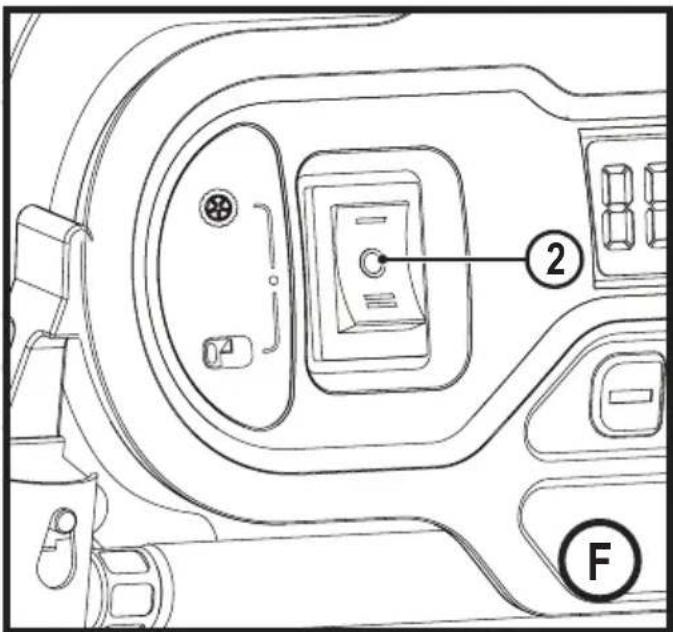
◆ Press the high-volume side of the mode power switch (2), indicated by the air mattress symbol.
◆ To turn off, push the power switch to the center position.
To turn on high-pressure
The high-pressure hose is meant to be used for objects that need more air pressure, such as tires and basketballs.
◆ Remove the high-pressure hose (10) from the storage.
- Attach a nozzle as described in the “Universal valve adapter” section.
◆ Insert the nozzle into the object being inflated.
- Press the high-pressure side of the mode power switch (2), indicated by the tire symbol.
◆ To turn off, push the power switch to the center position.
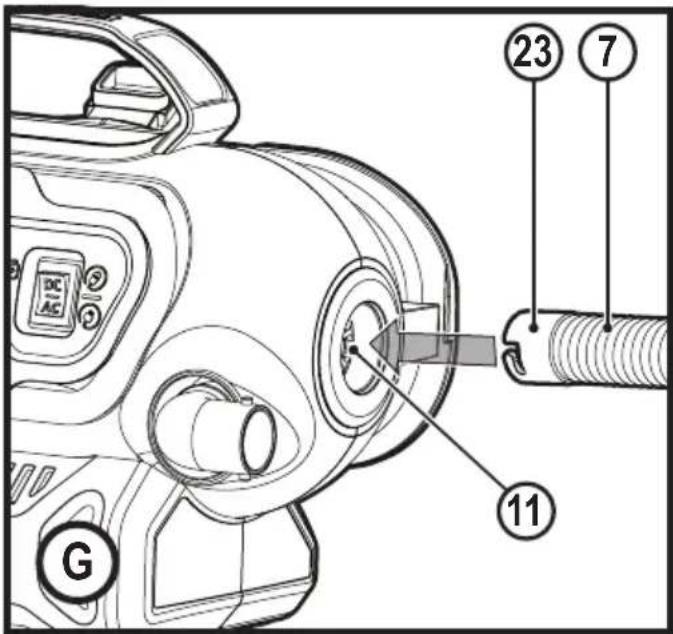
Deflate using the high-volume hose (Fig. H)
Warning! Beware of objects being ejected. When deflating, large amounts of air will exit the high volume pump inflator connection (12). Ensure the universal valve adapter is not pointed at anyone or anything.
◆ Remove the high-volume hose (7) from the storage location.
- Line up the hose end (23) with the high-volume pump deflate connection (11). Then, firmly slide in the hose so it is securely in place.
- Insert the hose, or it's tapered nozzle (8) into the object being deflated.
◆ Press the high-volume side of the mode power switch (2), as shown in figure G, indicated by the air mattress symbol.
◆ To turn off, push the power switch to the center position.
◆ To remove the hose, twist the hose clockwise and slide hose off.
Setting the automatic shut-off pressure
Note: The LCD will only show inflation pressures when the inflator is being used. In both inflation and pump mode the unit will show battery status.
- To switch between the different units (psi, bar or kPa), press the pressure mode button (5) until the required units are displayed.
◆ Press the - or + pressure setting buttons (4) until the required pressure is displayed.
- After 3 seconds the display will flash and return to a reading of "0.0". This is normal.
- Connect the universal valve adaptor and accessories, if required, to the item to be inflated, making sure that the lever of the valve adaptor is in the down position to lock it in place.
◆ To start the inflator press the mode power switch (2), towards the side of the tire symbol.
When the item to be inflated has reached the preset value the unit will automatically turn off. NOTE: You may notice the actual pressure reading may drop after a couple of seconds. This is normal.
◆ To stop the inflator at any time, press the main power button back to the center position.
Note: If the AC/DC power switch is turned off, all settings will be lost and will need to be reentered. This is a safety feature to prevent the risk of items over inflating.
Using the inflator as a pressure gauge
- Connect the universal valve adaptor (9) to the item to be checked.
◆ Press the mode power switch (2), on the side of the tyre symbol.
◆ The LCD will display the item's pressure. - After checking, press the mode power switch (2) back to the center position and return the air hose to the storage location.
Maintenance
Your BLACK+DECKER cordless appliance has been designed to operate over a long period of time with a minimum of maintenance. Continuous satisfactory operation depends upon proper tool care and regular cleaning.
Warning! Before performing any maintenance on cordless appliances:
◆ Run the battery down completely if it is integral and then switch off.
◆ Unplug the charger before cleaning it. Your charger does not require any maintenance apart from regular cleaning.
- Regularly clean the ventilation slots in your appliance/charger using a soft brush or dry cloth.
◆ Regularly clean the motor housing using a damp cloth. Do not use any abrasive or solvent-based cleaner.
Protecting the environment

Separate collection. Products and batteries marked with this symbol must not be disposed of with normal household waste.
Products and batteries contain materials that can be recovered or recycled reducing the demand for raw materials.
Please recycle electrical products and batteries according to local provisions.
Further information is available at
www.2helpU.com
Technical Data
| EDCINF18 | |
| Voltage 18V | |
| Weight 2.0Kg | (Excluding Battery) |
| Class II | |
| Battery* BL1318 | ||
| Voltage V | _dc | 18 |
| Capacity Ah | 1.3 | |
| Type Li-Ion | ||
| Battery* BL1518 | ||
| Voltage V | _dc | 18 |
| Capacity Ah | 1.5 | |
| Type Li-Ion | ||
| Battery* BL2018 | ||
| Voltage V | _dc | 18 |
| Capacity Ah 2.0 | ||
| Type Li-Ion | ||
| Battery* BL4018 | ||
| Voltage V | _dc | 18 |
| Capacity Ah | 4.0 | |
| Type Li-Ion | ||
| Battery* BL1 | 554 | |
| Voltage V | _dc | 18 |
| Capacity mAh | 2500 | |
| Type Li-Ion | ||
| Battery* BL2554 | ||
| Voltage V | _dc | 18 |
| Capacity mAh 2500 | ||
| Type Li-Ion | ||
| Alternative Bluetooth Battery pack* | BL1518ST BL2018ST | ||
| Voltage V | _dc | 18 18 | |
| Capacity Ah | 1.5 | 2 | |
| Type | Li-Ion | Li-Ion | |
| Charger* | SSC-250040X | |
| Input voltage | V_AC | 230 |
| Output voltage | V_DC | 8 - 20 |
| Current | mA | 400 |
* Not supplied with unit
Guarantee
Black & Decker is confident of the quality of its products and offers consumers a 24 month guarantee from the date of purchase. This guarantee is in addition to and in no way prejudices your statutory rights. The guarantee is valid within the territories of the Member States of the European Union and the European Free Trade Area.
To claim on the guarantee, the claim must be in accordance with Black & Decker Terms and Conditions and you will need to submit proof of purchase to the seller or an authorised repair agent. Terms and conditions of the Black & Decker 2 year guarantee and the location of your nearest authorised repair agent can be obtained on the Internet at www.2helpU.com, or by contacting your local Black & Decker office at the address indicated in this manual.
ENGLISH
(Original instructions)
Please visit our website www.blackanddecker.co.uk to register your new Black & Decker product and receive updates on new products and special offers.
DEUTSCH

- Intended use
- Safety instructions
- Warning! Read all safety warnings and all instructions.
- Using your appliance
- Safety of others
- Inspection and repairs
- Additional safety instructions
- After use
- Residual risks
- Batteries
- Chargers
- Electrical safety
- Symbols on the charger
- Labels on appliance
- Features
- ENGLISH
- (Original instructions)
- Assembly
- 12V DC Cord Storage
- Air Hose Storage
- High-Volume Hose Storage
- Accessories Storage
- Fitting the accessories
- Universal valve adapter (Fig. A)
- High-volume hose (Fig. B)
- Operation
- Installing and Removing the Battery Pack (Fig. C, D)
- Switching On (Fig. E, F)
- To turn on high-volume
- To turn on high-pressure
- Deflate using the high-volume hose (Fig. H)
- Setting the automatic shut-off pressure
- Using the inflator as a pressure gauge
- Maintenance
- Protecting the environment
- Guarantee
- DEUTSCH
Brand : BLACK & DECKER
Model : BDCINF18
Category : Compressor