Trinovid 10x42 HD - Binoculars LEICA - Free user manual and instructions
Find the device manual for free Trinovid 10x42 HD LEICA in PDF.



| Product Type | Binoculars |
| Brand | Leica |
| Model | Trinovid 10x42 HD |
| Magnification | 10x |
| Objective diameter | 42 mm |
| Exit pupil | 4.2 mm |
| Twilight factor | 20.5 |
| Light transmission | 90% |
| Field of view at 1000 m | 113 m |
| Exit pupil position | 15.5 mm |
| Close focus limit | Approx. 1.60 m |
| Diopter compensation | ±5 dpt (for ∞) |
| Eyecup for eyeglass wearers | Yes |
| Eyecup | Adjustable and removable, with 5 clicks |
| Adjustable interpupillary distance | 58-76 mm |
| Focusing | Internal via central focusing wheel |
| Dimensions (L x H x D) | 117 x 65 x 145 mm |
| Weight | Approx. 760 g |
| Operating temperature | -25°C to +55°C |
| Storage temperature | -40°C to +85°C |
| Waterproof | Up to 4 m water depth |
| Body material | Magnesium, nitrogen-filled |
| Included accessories | Adventure Strap, carrying strap, optical cleaning cloth, eyepiece protection cap, 2 objective protection caps, instruction manual, warranty certificate, inspection certificate |
| Care and cleaning | Clean with a soft, lint-free cloth; remove large particles with a brush; rinse with lukewarm water if necessary; do not use alcohol or chemicals |
| Safety | Never look at the sun or a bright light source with binoculars; do not use while walking |
Frequently Asked Questions - Trinovid 10x42 HD LEICA
User questions about Trinovid 10x42 HD LEICA
0 question about this device. Answer the ones you know or ask your own.
Ask a new question about this device
Download the instructions for your Binoculars in PDF format for free! Find your manual Trinovid 10x42 HD - LEICA and take your electronic device back in hand. On this page are published all the documents necessary for the use of your device. Trinovid 10x42 HD by LEICA.
USER MANUAL Trinovid 10x42 HD LEICA
VORWORT
natural_image
Technical line drawing of a handheld device with two lenses and a handle (no text or symbols)ANBRINGEN DER OBJEKTIV-SCHUTZDECKEL
natural_image
Simple line drawing of two binoculars with a central screen, no text or symbols present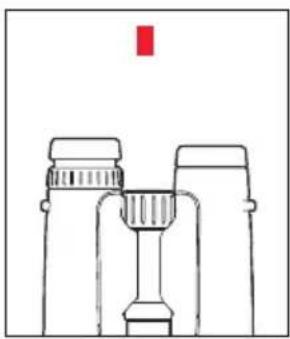
natural_image
Simple line drawing of binoculars with a red vertical bar on top (no text or symbols)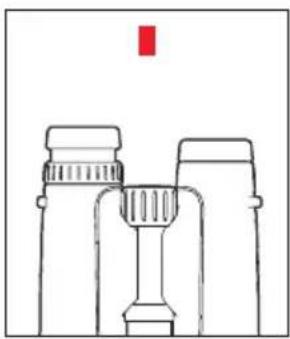
natural_image
Simple line drawing of binoculars with a red vertical bar on top (no text or symbols)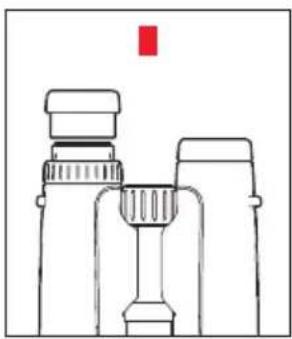
natural_image
Line drawing of binoculars with a red square marker above (no text or symbols)Vorgehensweise
The name Leica is synonymous worldwide with the highest quality, precision mechanics, extreme reliability and long service life.
We wish you a great deal of fun and success with your new Leica Trinovid HD binoculars. In order that you can make full use of their possibilities, we recommend that you first read these instructions.
PACKAGE CONTENTS
- Binoculars
- Adventure strap (only 8x42HD/10x42HD)
- Carrying strap
- Lens cloth
- Eyepiece cap
- 2 lens caps
- Instructions
- Warranty card
- Test certificate
DESIGNATION OF PARTS
1 Eyes for carrying strap
2 Diopter ring
3 Eyecups
Position a: fully screwed out, e.g. for use of the binoculars without spectacles
Position b: fully screwed in, e.g. for use of the binoculars with spectacles
4 Diopter scale
5 Central focusing wheel
6 Pivot exes for adjustment of the interocular distance
TABLE OF CONTENTS
Potential applications....18
Attachment of carrying strap and eyepiece cap 18
Fitting of lens cap 18
Adjustment of the eyecups / Use with and without glasses 19
Adjustment of the interocular distance....20
Adjustment of the focus / Diopter adjustment 21
Diopter scale reading....22
Care / Cleaning....22
Accessories 23
Spare parts....23
Malfunctions and their resolution .... 24
Technical data 25
Leica service addresses 26
Caution:
- Never look at the sun or other bright sources of light through your binoculars! You may damage your eyes!
- Never look through your binocular while you are walking! You might not see obstacles!
POTENTIAL APPLICATIONS
The Leica Trinovid HD binoculars have a hermetically sealed, nitrogen-filled magnesium housing. They are therefore suitable for outdoor use. Wet weather is no problem – the binoculars are absolutely water-tight to a depth of 4m and the internal lenses do not fog.
ATTACHING THE CARRYING STRAP AND THE EYEPIECE CAP
In the delivered condition, the Adventure Strap is already attached to your binoculars (only 8x42HD/10x42HD). This carrying strap can also be used as a bag. Please refer to the enclosed instructions for details of its use.
If you want to attach a different carrying strap: you will find a relevant illustration on the back of the cover.
Note:
If you want to attach the eyepiece cap to the carrying strap, this must be done at the same time as the carrying strap is attached.
natural_image
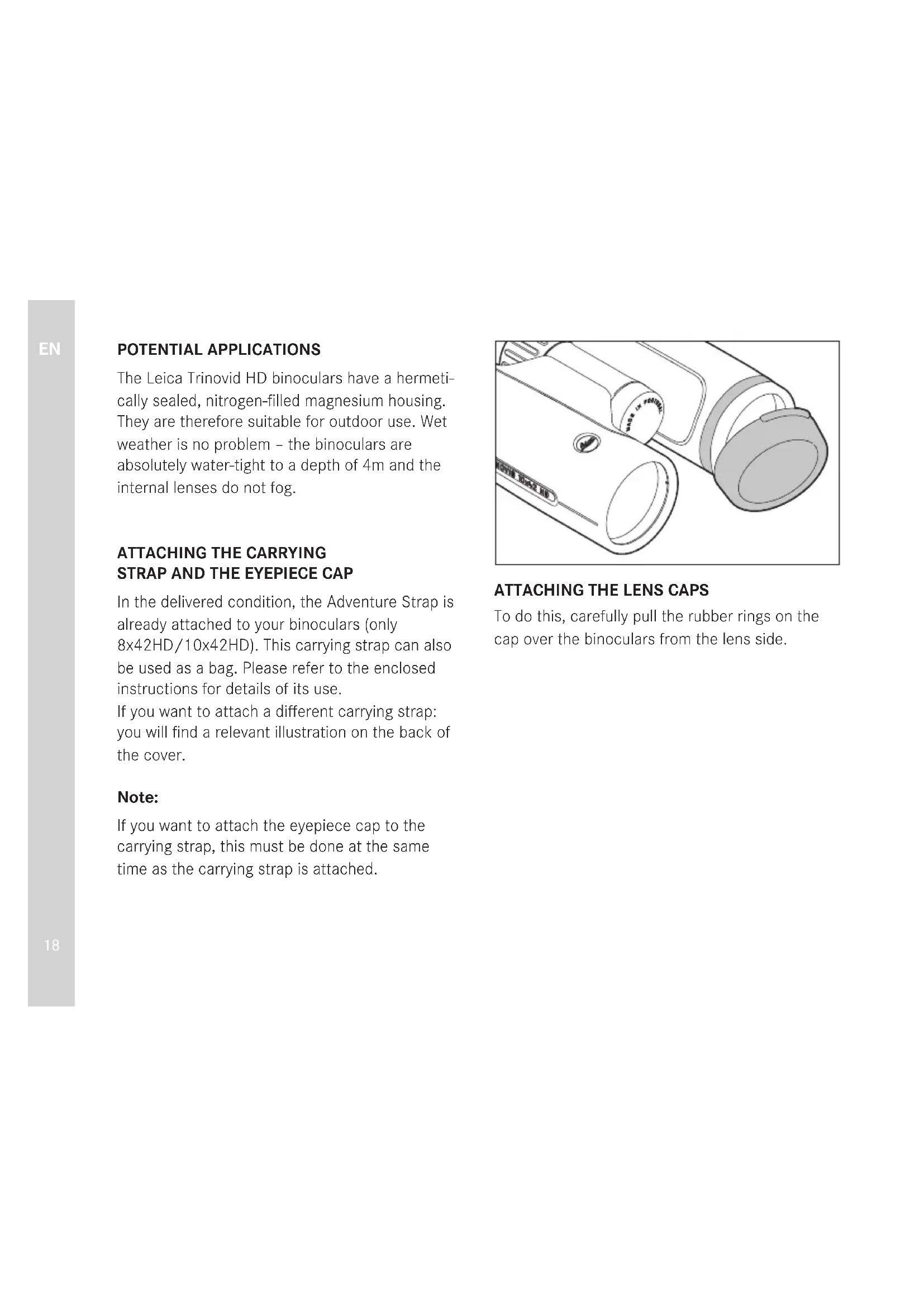
Technical line drawing of a handheld device with two lenses and a handle (no text or symbols)ATTACHING THE LENS CAPS
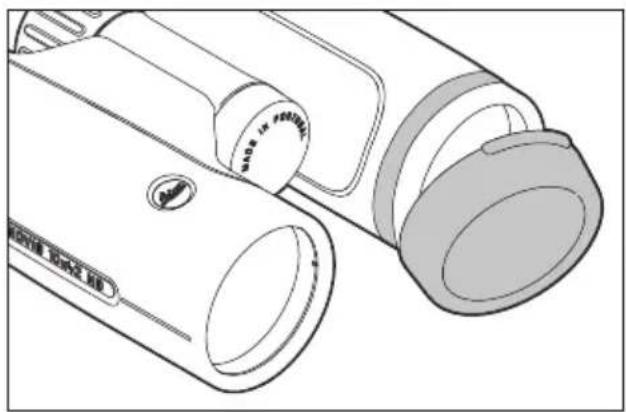
To do this, carefully pull the rubber rings on the cap over the binoculars from the lens side.
natural_image
Simple line drawing of two binoculars with a central screen, no text or symbols present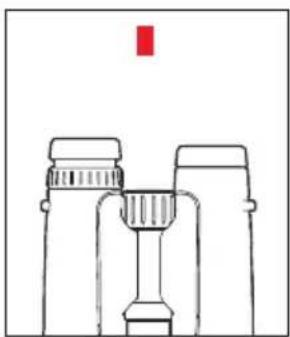
natural_image
Simple line drawing of binoculars with a red vertical bar above (no text or symbols)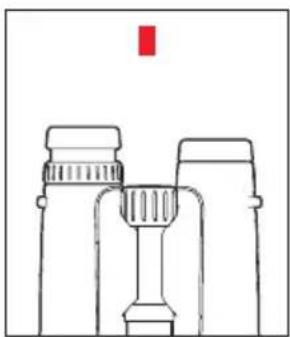
natural_image
Simple line drawing of binoculars with a red vertical marker above (no text or symbols)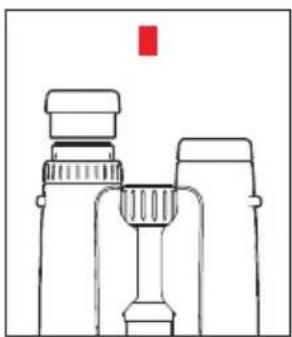
natural_image
Line drawing of binoculars with a red square marker (no text or symbols)ADJUSTMENT OF THE EYECUPS/ USE WITH AND WITHOUT GLASSES
The eyecups 3 can be easily adjusted by turning and they lock securely in the selected positions. They can be removed completely for thorough cleaning.
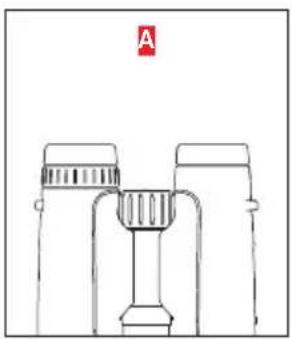
If you want to use the binoculars with spectacles, they remain fully screwed in (picture A), or slightly screwed out. For use of the binoculars without spectacles they can be screwed out by turning in counter-clockwise direction. Two positions are available for optimum adjustment.
If the eyepieces are heavily soiled, we recommend removing the eyecups for cleaning. To do this, simply pull out of the completely screwed out position (pictures C, D).
ADJUSTMENT OF THE INTEROCULAR DISTANCE
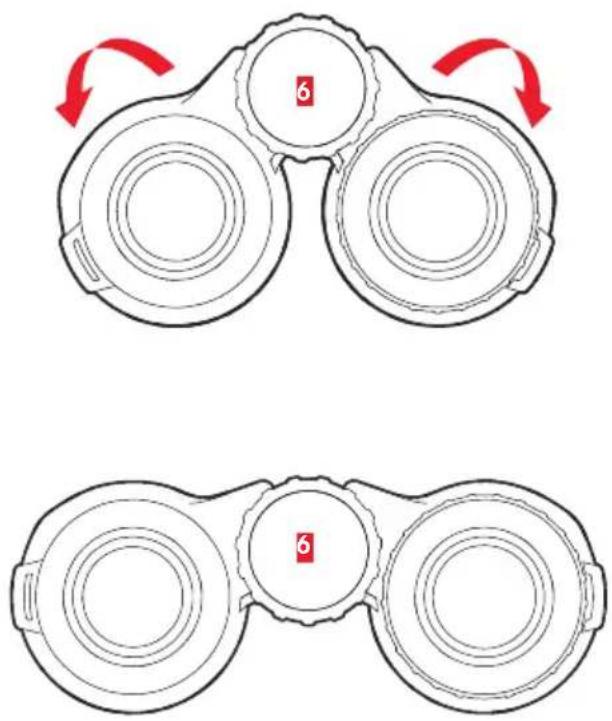
The individual interocular distance can be adjusted by bending the binoculars about the pivot axes 6. When the interocular distance has been set correctly, the right and left visual field merge into a circular image.
ADJUSTMENT OF THE FOCUS/ DIOPTER ADJUSTMENT
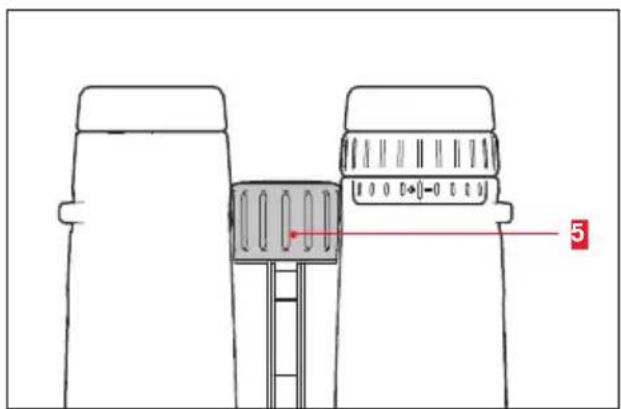
The focus for objects at different distances is adjusted on the Leica Trinovid HD binoculars using the central focusing wheel 5.
The diopter ring is used to adjust for individual visual impairments so the binoculars can be used without spectacles; 2 this changes only the focus of the right-hand system.
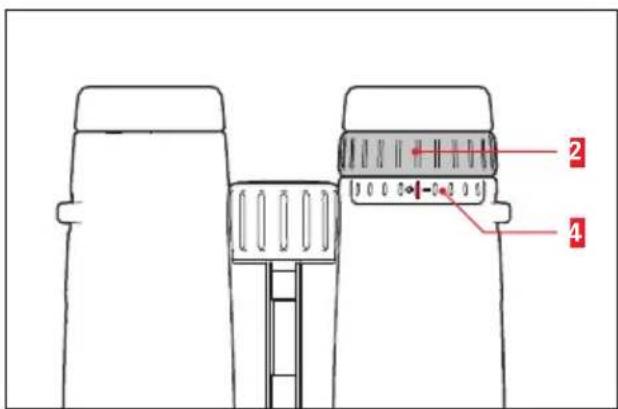
Procedure
-
Close your right eye or cover the right-hand lens. Then adjust the central focusing wheel so that you can see the target object with optimum focus through the left-hand binocular tube.
-
Close your left eye or cover the left-hand lens. Then adjust the diopter wheel so that you can see the target object with optimum focus through the right-hand binocular tube.
DIOPTER SCALE READING
The user's individual value determined using the focus adjustment can then be adjusted again within seconds using the scale setting that has been determined once.
CARE/CLEANING
Your Leica Trinovid HD binoculars have been designed for constant use outdoors. No particular care is needed other than occasional cleaning. Fingerprints, droplets of water, etc. on lenses and eyepieces can be wiped off using a soft, lint-free cloth. Breathing on the lenses beforehand may help. Coarse soiling on the glass surfaces, such as sand, should be removed using a fine brush or blown off. In the case of severe soiling, the binoculars may be cleaned by rinsing them under running water that is hand-hot at most. Salt water should also be washed off. Alcohol or other chemical solutions may not be used for cleaning.
Important:
- Make sure not to touch the glass surfaces with your fingers, especially if you previously been applying hand cream, insect repellent, etc. These substances may contain chemicals that damage or destroy the coatings on the glass surfaces.
- Do not apply excessive pressure when cleaning heavily soiled lens surfaces. Although the coating is abrasion-resistant, it can nevertheless be damaged by sand or salt crystals.
ACCESSORIES
You will find details of the extensive range of accessories for your Leica Trinovid HD binoculars on the Leica Camera AG website:
www.leica-camera.com
SPARE PARTS
Should you require spare parts for your binoculars, e.g. eyecups, caps or carrying straps, please contact our Customer Care department or your national Leica agency. The addresses can be found on your warranty card.
MALFUNCTIONS AND THEIR RESOLUTION
| Fault Cause Remedy | ||
| No circular image is obtained during viewing. | a) The binoculars are not sufficiently adapted to your personal interocular distance. | a) Correct the distance between the two binocular tubes simply by bending the pivot axis more or less. |
| b) The pupils of the viewer are not in the exit pupil of the binoculars. | b) Correct head, eye and binocular position. | |
| c) The position of the eyecups does not correspond to correct use with and without spectacles. | c) Correct adjustment: Wearers of spectacles screw the eyecups in; when viewing without spectacles: screw eyecups out. | |
| d) The position of left and right eyecups is different. | d) Move both eyecups to the same position. |
TECHNICAL DATA
| LEICA TRINOVID 8 x 32 HD LEICA TRINOVID 10 x 32 HD | ||
| Magnification 8 x 10 x | ||
| Lens diameter 32 mm 32 mm | ||
| Exit pupil 4 mm 3.2 mm | ||
| Twilight factor 16 17.9 | ||
| Light transmission 90% 90% | ||
| Subjective viewing angle/visual field to 1,000m | 53.5°/124m | 61.3°/114m |
| Exit pupil position 17mm 15.5 | mm | |
| Closest focusing distance (at 0 diopter) approx.1m approx. 1m | ||
| Diopter adjustment/at∞ | ± 5dpt. ± -5dpt. | |
| Eyepiece for wearers of spectacles | yes yes | |
| Eyecup | Adjustable and removable with 5 locking steps | |
| Adjustable interocular distance | 58-76mm | |
| Focusing | Internal focusing via center wheel | |
| Working/storage temperature | -25°+55°/-40°+85° | |
| Water tightness | Pressure water tight to 4 m water depth | |
| Dimensions (W x H x D) 117 x 65 x 130mm | ||
| Weight | approx. 630 g | approx. 640 g |
TECHNICAL DATA
| LEICA TRINOVID 8 x 42 HD LEICA TRINOVID 10 x 42 HD | ||
| Magnification 8 x 10x | ||
| Lens diameter 42 mm 42 mm | ||
| Exit pupil 5.25 mm 4.2 mm | ||
| Twilight factor 18.33 20.5 | ||
| Light transmission 90% 90% | ||
| Subjective viewing angle/visual field to 1,000m | 53.5°/124m | 61.3°/113m |
| Exit pupil position 17mm 15.5 | mm | |
| Closest focusing distance (at 0 diopter) | approx.1.8m | approx. 1.6 m |
| Diopter adjustment/at∞ | ± 5dpt. | ± 5dpt. |
| Eyepiece for wearers of spectacles | yes yes | |
| Eyecup | Adjustable and removable with 5 locking steps | |
| Adjustable interocular distance | 58-76mm | |
| Focusing | Internal focusing via center wheel | |
| Working/storage temperature | -25°+55°/-40°+85° | |
| Water tightness | Pressure water tight to 4 m water depth | |
| Dimensions (W x H x D) | 117 x 65 x 145mm | |
| Weight | approx. 750 g | approx. 760 g |
LEICA PRODUCT SUPPORT
The Leica Camera AG Product Support department can provide you with an answer to any technical application questions relating to the Leica range either in writing, on the telephone or by e-mail.
Leica Camera AG
Product Support
Am Leitz-Park 5
D-35578 Wetzlar, Germany
Telephone: +49(0)6441-2080-111 /-108
Fax: +49(0)6441-2080-490
info@leica-camera.com
LEICA CUSTOMER CARE
Authorized Leica agents and Leica Camera AG Customer Care department are available in your country for the service and repair of your Leica equipment (a list of addresses is provided on your Guarantee Card).
Leica Camera AG
Customer Care
Am Leitz-Park 5
D-35578 Wetzlar, Germany
Telephone: +49(0)6441-2080-189
Fax: +49(0)6441-2080-339
customer.care@leica-camera.com
AVANT-PROPOS
Chère cliente, cher client,
natural_image
Technical line drawing of a handheld device with two lenses and a handle (no text or symbols)MISE EN PLACE DES CAPUCHONS DE PROTECTION DES OBJECTIFS
natural_image
Simple line drawing of two binoculars with a central screen, no text or symbols present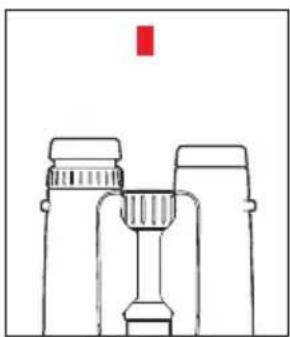
natural_image
Simple line drawing of binoculars with a red vertical bar above (no text or symbols)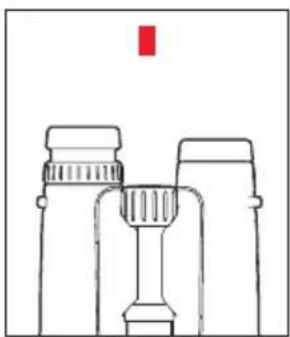
natural_image
Line drawing of binoculars with a red vertical marker above (no text or symbols)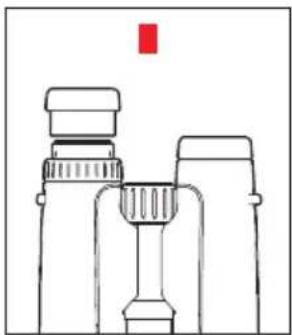
natural_image
Line drawing of binoculars with a red square marker above (no text or symbols)RÉGLAGE DES BONNETTES / UTILISATION AVEC OU SANS LUNETTES
MISE AU POINT /COMPENSATION DIOPTRIQUE
Procédure
DYSFONCTIONNEMENTS ET SOLUTIONS
natural_image
Technical line drawing of a handheld device with two lenses and a handle (no text or symbols)natural_image
Simple line drawing of two binoculars with a central screen, no text or symbols present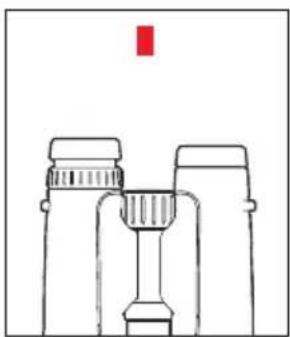
natural_image
Simple line drawing of binoculars with a red vertical bar above (no text or symbols)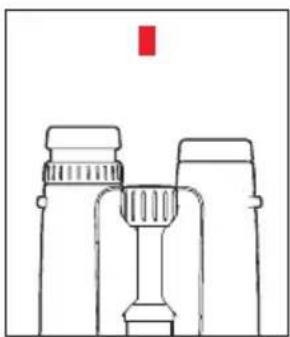
natural_image
Line drawing of binoculars with a red vertical marker above (no text or symbols)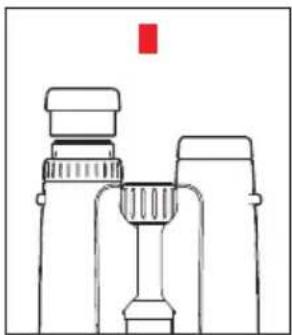
natural_image
Line drawing of binoculars with a red square marker above (no text or symbols)INSTELLEN VAN DE OOGSCHELPEN / GEBRUIK MET EN ZONDER BRIL
INSTELLEN VAN DE SCHERPTE / DIOPTRIECOMPENSATIE
Werkwijze
natural_image
Technical line drawing of a handheld device with two lenses and a handle (no text or symbols)APPLICAZIONE DEL COPRIOBIETTIVO
natural_image
Simple line drawing of two binoculars with a central screen, no text or symbols present
natural_image
Simple line drawing of binoculars with a red vertical bar above (no text or symbols)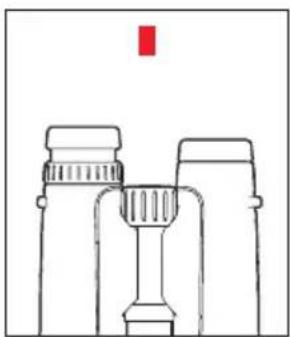
natural_image
Simple line drawing of binoculars with a red vertical marker above (no text or symbols)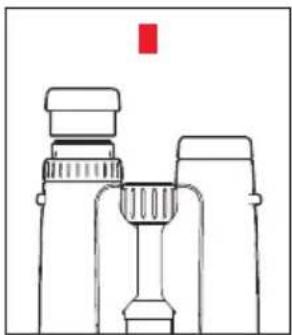
natural_image
Line drawing of binoculars with a red square marker above (no text or symbols)REGOLAZIONE DELLE CONCHIGLIE OCULARI / UTILIZZO CON E SENZA OCCHIALI
Procedura
natural_image
Technical line drawing of a handheld device with two lenses and a handle (no text or symbols)natural_image
Simple line drawing of two binoculars with a central screen, no text or symbols present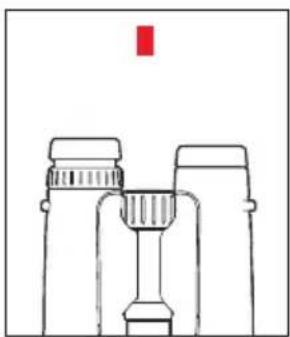
natural_image
Simple line drawing of binoculars with a red vertical bar above (no text or symbols)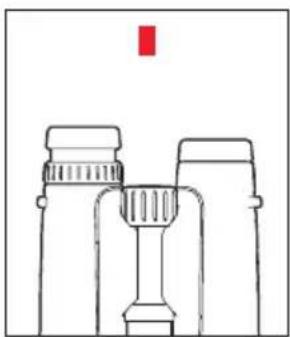
natural_image
Line drawing of binoculars with a red vertical marker above (no text or symbols)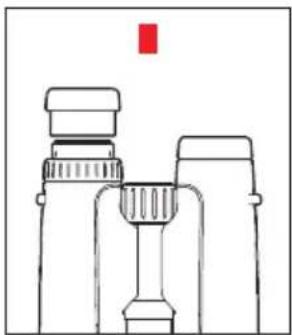
natural_image
Line drawing of binoculars with a red square marker above (no text or symbols)Modo de proceder
natural_image
Technical line drawing of a handheld device with two lenses and a handle (no text or symbols)FESTING AV OBJEKTIVDEKSELET
natural_image
Simple line drawing of two binoculars with a central screen, no text or symbols present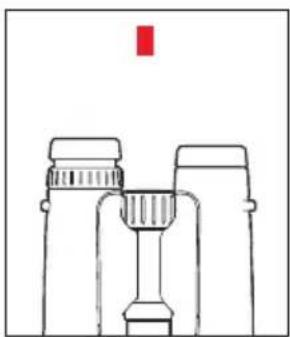
natural_image
Simple line drawing of binoculars with a red vertical bar above (no text or symbols)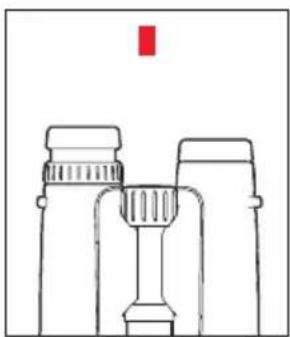
natural_image
Line drawing of binoculars with a red vertical marker above (no text or symbols)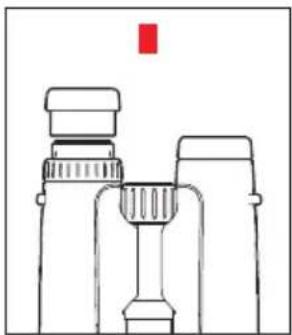
natural_image
Line drawing of binoculars with a red square marker above (no text or symbols)INNSTILLING AV ∅YEMUSLINGER / BRUK MED OG UTEN BRILLER
INNSTILLING AV SKARPHET/ DIOPTRIKOMPENSASJON
Framgangsmåte
natural_image
Technical line drawing of a handheld device with two lenses and a handle (no text or symbols)natural_image
Simple line drawing of two binoculars with a central screen, no text or symbols present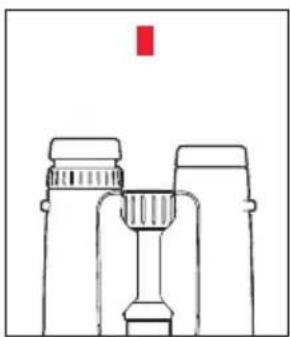
natural_image
Simple line drawing of binoculars with a red vertical bar above (no text or symbols)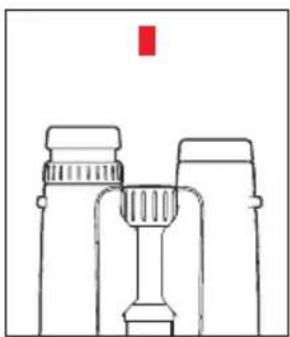
natural_image
Simple line drawing of binoculars with a red vertical marker above (no text or symbols)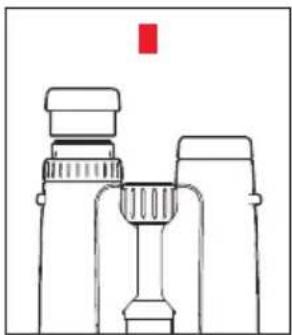
natural_image
Line drawing of binoculars with a red square marker above (no text or symbols)Порядок действий
natural_image
Technical line drawing of a handheld device with two lenses and a handle (no text or symbols)レンズキャップの取り付け方
natural_image
Simple line drawing of a binoculars with no text or symbols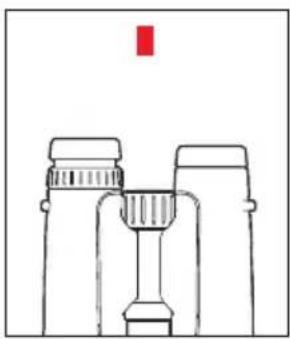
natural_image
Simple line drawing of binoculars with a red vertical bar above (no text or symbols)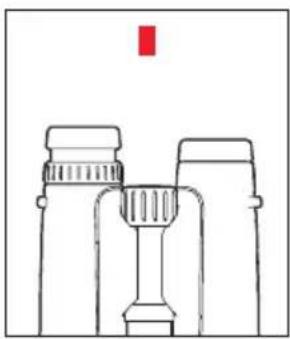
natural_image
Simple line drawing of binoculars with a red vertical marker above (no text or symbols)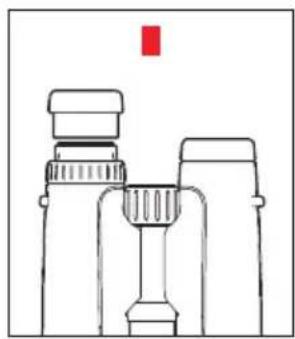
natural_image
Line drawing of binoculars with a red square marker above (no text or symbols)アイカップの調節 / メガネの使用時
ピント合わせ/視度調整
ピントを合わせる/視度を調整する

- VORWORT
- ANBRINGEN DER OBJEKTIV-SCHUTZDECKEL
- Vorgehensweise
- PACKAGE CONTENTS
- DESIGNATION OF PARTS
- TABLE OF CONTENTS
- Caution:
- POTENTIAL APPLICATIONS
- ATTACHING THE CARRYING STRAP AND THE EYEPIECE CAP
- Note:
- ATTACHING THE LENS CAPS
- ADJUSTMENT OF THE EYECUPS/ USE WITH AND WITHOUT GLASSES
- ADJUSTMENT OF THE INTEROCULAR DISTANCE
- ADJUSTMENT OF THE FOCUS/ DIOPTER ADJUSTMENT
- Procedure
- DIOPTER SCALE READING
- CARE/CLEANING
- Important:
- ACCESSORIES
- SPARE PARTS
- LEICA PRODUCT SUPPORT
- LEICA CUSTOMER CARE
- AVANT-PROPOS
- MISE EN PLACE DES CAPUCHONS DE PROTECTION DES OBJECTIFS
- RÉGLAGE DES BONNETTES / UTILISATION AVEC OU SANS LUNETTES
- MISE AU POINT /COMPENSATION DIOPTRIQUE
- Procédure
- INSTELLEN VAN DE OOGSCHELPEN / GEBRUIK MET EN ZONDER BRIL
- INSTELLEN VAN DE SCHERPTE / DIOPTRIECOMPENSATIE
- Werkwijze
- APPLICAZIONE DEL COPRIOBIETTIVO
- REGOLAZIONE DELLE CONCHIGLIE OCULARI / UTILIZZO CON E SENZA OCCHIALI
- Procedura
- Modo de proceder
- FESTING AV OBJEKTIVDEKSELET
- INNSTILLING AV ∅YEMUSLINGER / BRUK MED OG UTEN BRILLER
- INNSTILLING AV SKARPHET/ DIOPTRIKOMPENSASJON
- Framgangsmåte
- Порядок действий
- レンズキャップの取り付け方
- アイカップの調節 / メガネの使用時
- ピント合わせ/視度調整
- ピントを合わせる/視度を調整する
Brand : LEICA
Model : Trinovid 10x42 HD
Category : Binoculars