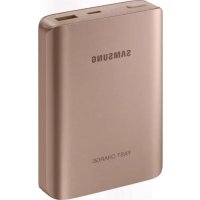
EBPN930 - Cellphone SAMSUNG - Free user manual and instructions
Find the device manual for free EBPN930 SAMSUNG in PDF.

 FR
FR
 BG
BG
 CS
CS
 DA
DA
 DE
DE
 EL
EL
 EN
EN
 ES
ES
 ET
ET
 FI
FI
 HU
HU
 IT
IT
 KK
KK
 KO
KO
 LT
LT
 LV
LV
 NL
NL
 NO
NO
 PL
PL
 PT
PT
 RO
RO
 RU
RU
 SK
SK
 SL
SL
 SV
SV
 TR
TR
 UK
UK
 ZH
ZH
| Product Type | External battery / Power bank |
| Brand | Samsung |
| Model | EBPN930 |
| Power supply | Recharge via micro-USB or USB port (charger sold separately) |
| Main functions | Charging of mobile devices, Adaptive fast charging (if compatible device) |
| Battery level indicator | 4 LED indicators (0-100%) |
| Output ports | 1 USB port, 1 micro-USB port (for recharging) |
| Safety | Use only Samsung-approved chargers and cables; do not expose to extreme temperatures |
| Maintenance and cleaning | Clean with a dry, soft cloth |
| Spare parts and repairability | In case of malfunction, contact a Samsung after-sales service center; no spare parts available at retail |
| General information | User manual provided; box contents: battery pack, quick start guide |
Frequently Asked Questions - EBPN930 SAMSUNG
User questions about EBPN930 SAMSUNG
0 question about this device. Answer the ones you know or ask your own.
Ask a new question about this device
Download the instructions for your Cellphone in PDF format for free! Find your manual EBPN930 - SAMSUNG and take your electronic device back in hand. On this page are published all the documents necessary for the use of your device. EBPN930 by SAMSUNG.
USER MANUAL EBPN930 SAMSUNG
Please read this manual before using the device to ensure safe and proper use.
- Images may differ in appearance from the actual product. Content is subject to change without prior notice.
- Before using the battery pack, make sure it is compatible with your device.
Instructional icons

Warning: situations that could cause injury to yourself or others

Caution: situations that could cause damage to your device or other equipment

Notice: notes, usage tips, or additional information
Getting started
Package contents
Check the product box for the following items:
- Battery pack
- Quick start guide

- The items supplied with the device and any available accessories may vary depending on the region or service provider.
- The supplied items are designed only for this device and may not be compatible with other devices.
- Appearances and specifications are subject to change without prior notice.
- You can purchase additional accessories from your local Samsung retailer. Make sure they are compatible with the device before purchase.
- Use only Samsung-approved accessories. Using unapproved accessories may cause the performance problems and malfunctions that are not covered by the warranty.
- Availability of all accessories is subject to change depending entirely on manufacturing companies. For more information about available accessories, refer to the Samsung website.
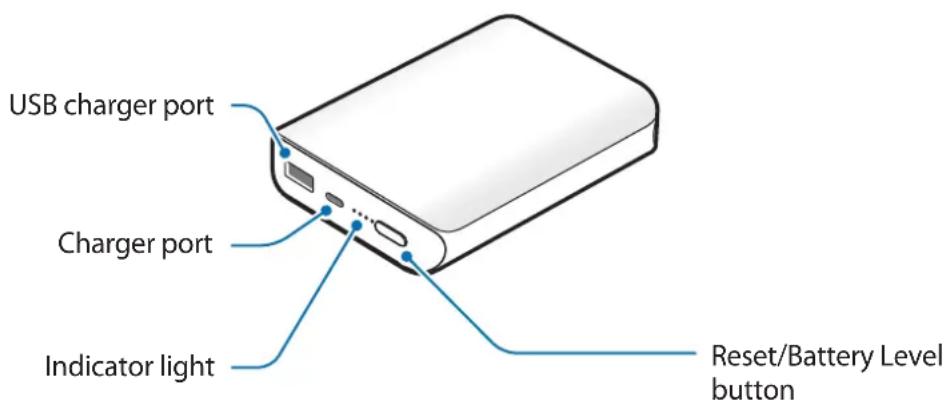
Device layout
Charging the battery pack
Battery charging tips and precautions
- You can charge the battery pack using the charger (sold separately).
- Depending on the type of charger you are using, you may need to use the Micro USB connector.
- Using a power source other than the charger, such as a computer, may result in a slower charging speed due to a lower electric current.
- The battery pack can be used while it is charging, but it may take longer to fully charge the battery.
- While charging, the battery pack may heat up. This is normal and should not affect the battery pack's lifespan or performance. If the battery gets hotter than usual, the charger may stop charging.
- The actual capacity (Wh) is measured based on the battery's output current and voltage. It may differ from the capacity (Wh) indicated on the device, depending on the output power condition, the connected device's circuit configuration, and the operation environment.
- If the battery pack is not charging properly, take the battery pack and the charger to a Samsung Service Centre.
Charging
Charge the battery before using the battery pack for the first time or when the battery pack has been unused for extended periods.

- Use only Samsung-approved chargers and cables. Unapproved chargers or cables can cause the battery to explode or damage the battery pack.
- To use Fast charging on your device, connect it to a battery charger that supports Adaptive fast charging.
1 Connect the battery pack to a charger.
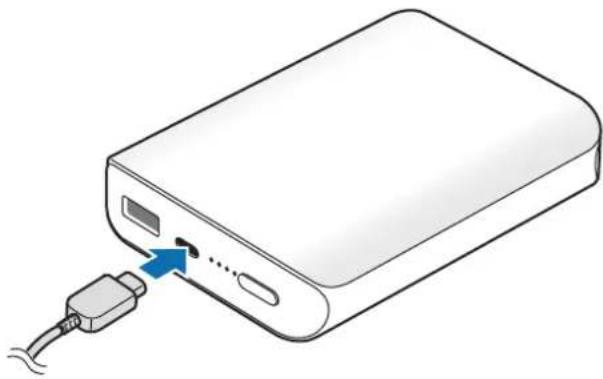
natural_image
Illustration of a power bank with an attached USB cable and a blue arrow indicating a connection point (no text or symbols present)
Connecting the charger improperly may cause serious damage to the battery pack. Any damage caused by misuse is not covered by the warranty.
2 After fully charging, disconnect the battery pack from the charger.

- To save energy, unplug the charger when not in use. The charger does not have a power switch, so you must unplug the charger from the electric socket when not in use to avoid wasting power. The charger should remain close to the electric socket and easily accessible while charging.
- The socket-outlet shall be installed near the equipment and shall be easily accessible.
Checking the remaining battery power
Check the remaining battery power by pressing the Reset/Battery Level button.
The indicator lights alerts you to the remaining battery power.
| Remaining battery power | Indicator light status |
| 75–100% Four indicator lights on | |
| 50–75% Three indicator lights on | |
| 25–50% Two indicator lights on | |
| 5–25% One indicator light on | |
| 0–5% One indicator light blinking | |
Using the battery pack
Charging the mobile device
1 Connect one end of the USB cable to the battery pack's USB charger port. Then, plug the other end of the USB cable into the mobile device's multipurpose jack.
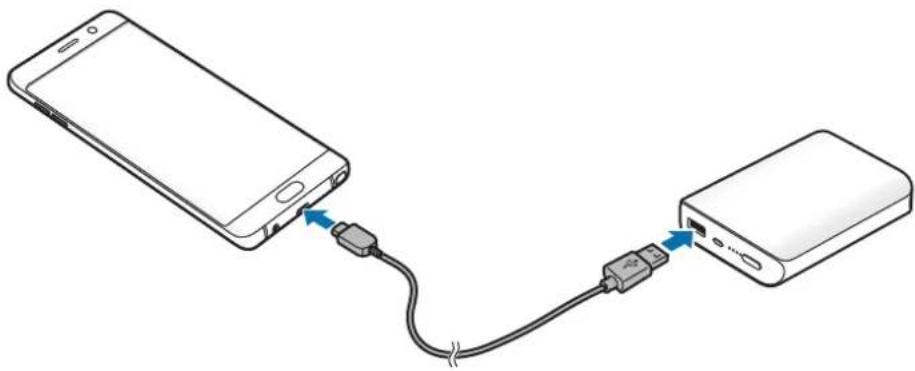
natural_image
Diagram showing connection between a smartphone and a power bank via USB cable (no text or symbols)2 After the mobile device is fully charged, disconnect the USB cable from both devices.

- Depending on your mobile device's multipurpose jack, you may need to use the Micro USB connector.
- To begin fast charging, connect a mobile device that supports fast charging to the battery pack.
- If the mobile device is not charging after being connected to the battery pack, press the Reset/Battery Level button.
- The battery pack is an auxiliary external battery. It may not fully charge some mobile devices.
- If the battery pack is exposed to extremely hot or cold temperatures or an error occurs, the indicator light will flash white. Disconnect the mobile device from the battery pack, and then reconnect them.
Copyright
Copyright © 2016 Samsung Electronics
This manual is protected under international copyright laws.
No part of this manual may be reproduced, distributed, translated, or transmitted in any form or by any means, electronic or mechanical, including photocopying, recording, or storing in any information storage and retrieval system, without the prior written permission of Samsung Electronics.
Trademarks
• SAMSUNG and the SAMSUNG logo are registered trademarks of Samsung Electronics.
• All other trademarks and copyrights are the property of their respective owners.
natural_image
Illustration of a power bank with an attached USB port and cable, showing no text or symbols.
natural_image
Diagram showing connection between a smartphone and a power bank via USB cable (no text or symbols)Copyright © 2016 Samsung Electronics
natural_image
Illustration of a power bank with an attached USB port and cable, showing no text or symbols.
natural_image
Diagram showing connection between a smartphone and a power bank via USB cable (no text or symbols)Copyright © 2016 Samsung Electronics
natural_image
Line drawing of a power bank with an attached USB port and cable (no text or symbols)
natural_image
Diagram showing connection between a smartphone and a power bank via USB cable (no text or symbols)Copyright © 2016 Samsung Electronics
natural_image
Line drawing of a power bank with an attached USB port and cable (no text or symbols)
natural_image
Diagram showing connection between a smartphone and a power bank via USB cable (no text or symbols)Copyright © 2016 Samsung Electronics
natural_image
Illustration of a power bank with an attached USB port and cable, showing no text or symbols.
natural_image
Diagram showing connection between a smartphone and a power bank via USB cable (no text or symbols)Copyright © 2016 Samsung Electronics
natural_image
Illustration of a power bank with an attached USB port and cable, showing no text or symbols.
natural_image
Diagram showing connection between a smartphone and a power bank via USB cable (no text or symbols)Copyright © 2016 Samsung Electronics
natural_image
Illustration of a power bank with an attached USB port and cable, showing no text or symbols.
natural_image
Diagram showing connection between a smartphone and a power bank via USB cable (no text or symbols)natural_image
Illustration of a power bank with an attached USB port and cable, showing no text or symbols.
natural_image
Diagram showing connection between a smartphone and a power bank via USB cable (no text or symbols)Copyright © 2016 Samsung Electronics
natural_image
Illustration of a power bank with a USB cable inserted, showing internal components and a blue arrow indicating a connection point (no text or symbols present)
Neispravno priključivanje punjača može izazvati ozbiljna oštećenja na baterijskom kompletu. Oštećenja izazvana pogrešnim rukovanjem nisu pokrivena jamstvom.
2 Nakon što se u potpunosti napunio, isključite baterijski komplet s punjača.

natural_image
Diagram showing connection between a smartphone and a power bank via USB cable (no text or symbols)Copyright © 2016 Samsung Electronics
natural_image
Illustration of a power bank with a USB cable inserted, showing internal components and a blue arrow indicating a connection point (no text or symbols present)
Nepravilno priključivanje punjača može da dovede do ozbiljnih oštećenja pakovanja baterije. Sva šteta nastala nepravilnim korišćenjem nije pokrivena garancijom.
natural_image
Diagram showing connection between a smartphone and a power bank via USB cable (no text or symbols)Copyright © 2016 Samsung Electronics
Ovaj priručnik je zaštićen međunarodnim zakonima o autorskim pravima.
Nijedan deo ovog priručnika se ne sme reprodukovati, distribuirati, prevoditi niti prenositi ni u jednom obliku niti bilo kojim putem, elektronskim niti mehaničkim, što podrazumeva fotokopiranje, snimanje i skladištenje u okviru bilo kog skladišta informacija i sistema za preuzimanje, bez prethodne dozvole kompanije Samsung Electronics u pisanom obliku.
Trgovačke marke
- SAMSUNG i SAMSUNG logotip su registrovane trgovačke marke kompanije Samsung Electronics.
• Sve ostale trgovačke marke i autorska prava su vlasništvo njihovih vlasnika.
Leia primeiro
natural_image
Illustration of a power bank with an attached USB cable and a blue arrow indicating a connection point (no text or symbols present)
natural_image
Diagram showing connection between a smartphone and a power bank via USB cable (no text or symbols)Copyright © 2016 Samsung Electronics
Este manual está protegido pelas leis internacionais de copyright.
natural_image
Illustration of a power bank with a USB cable inserted, showing internal components and a blue arrow indicating a connection point (no text or symbols present)
natural_image
Diagram showing connection between a smartphone and a power bank via USB cable (no text or symbols)natural_image
Line drawing of a power bank with an attached USB port and cable (no text or symbols)
natural_image
Diagram showing connection between a smartphone and a power bank via USB cable (no text or symbols)natural_image
Illustration of a power bank with a USB cable inserted, showing internal components and a blue arrow indicating a connection point (no text or symbols present)
natural_image
Diagram showing connection between a smartphone and a power bank via USB cable (no text or symbols)Copyright © 2016 Samsung Electronics
natural_image
Illustration of a power bank with an attached USB port and cable, showing no text or symbols.
natural_image
Diagram showing connection between a smartphone and a power bank via USB cable (no text or symbols)Copyright © 2016 Samsung Electronics
natural_image
Line drawing of a power bank with an attached USB port and cable (no text or symbols)
natural_image
Diagram showing connection between a smartphone and a power bank via USB cable (no text or symbols)Copyright © 2016 Samsung Electronics
natural_image
Illustration of a power bank with a USB cable inserted, showing internal components and a blue arrow indicating a connection point (no text or symbols present)
Hvis du kobler til laderen feil, kan dette føre til alvorlige skader på batteripakken. Skader som er forårsaket av feil bruk, dekkes ikke av garantien.
2 Etter fullading kobler du batteripakken fra laderen.

natural_image
Diagram showing connection between a smartphone and a power bank via USB cable (no text or symbols)Copyright © 2016 Samsung Electronics
natural_image
Illustration of a power bank with a USB cable inserted, showing internal components and a blue arrow indicating a connection point (no text or symbols present)
natural_image
Diagram showing connection between a smartphone and a power bank via USB cable (no text or symbols)Copyright © 2016 Samsung Electronics
natural_image
Illustration of a power bank with a USB cable inserted, showing internal components and a blue arrow indicating a connection point (no text or symbols present)
natural_image
Diagram showing connection between a smartphone and a power bank via USB cable (no text or symbols)natural_image
Illustration of a power bank with an attached USB port and cable, showing no text or symbols.
natural_image
Diagram showing connection between a smartphone and a power bank via USB cable (no text or symbols)natural_image
Illustration of a power bank with an attached USB port and cable, showing no text or symbols.
natural_image
Diagram showing connection between a smartphone and a power bank via USB cable (no text or symbols)2 Ko je mobilna naprava v celoti napolnjena, odklopite kabel USB z obeh naprav.

natural_image
Illustration of a power bank with an attached USB port and cable, showing no text or symbols.
natural_image
Diagram showing connection between a smartphone and a power bank via USB cable (no text or symbols)Copyright © 2016 Samsung Electronics
natural_image
Line drawing of a power bank with an attached USB port and cable (no text or symbols)
natural_image
Diagram showing connection between a smartphone and a power bank via USB cable (no text or symbols)Copyright © 2016 Samsung Electronics
natural_image
Line drawing of a power bank with an attached USB port and cable, showing no text or symbols.
natural_image
Diagram showing connection between a smartphone and a power bank via USB cable (no text or symbols)Telif hakkı © 2016 Samsung Electronics
natural_image
Line drawing of a power bank with an attached USB port and cable, showing no text or symbols.natural_image
Diagram showing connection between a smartphone and a power bank via USB cable (no text or symbols)natural_image
Illustration of a power bank with an attached USB port and cable, showing no text or symbols.natural_image
Diagram showing connection between a smartphone and a power bank via USB cable (no text or symbols)Copyright © 2016 Samsung Electronics
olerance that is in the
natural_image
Line drawing of a power bank with cable routing (no text or symbols)natural_image
Illustration of a white power bank with a USB cable inserted, showing internal components and a blue arrow pointing to the cable outlet (no text or symbols present)
natural_image
Diagram showing connection between a smartphone and a power bank via USB cable (no text or symbols)© Samsung Electronics, 2016.
natural_image
Line drawing of a power bank with cable routing (no text or symbols)natural_image
Illustration of a power bank with an attached USB port and cable, showing no text or symbols.
natural_image
Diagram showing connection between a smartphone and a power bank via USB cable (no text or symbols)© Samsung Electronics, 2016
natural_image
Illustration of a power bank with an attached USB port and cable, showing no text or symbols.
natural_image
Diagram showing connection between a smartphone and a power bank via USB cable (no text or symbols)Copyright © 2016 Samsung Electronics
Please read this manual before using the device to ensure safe and proper use.
- Images may differ in appearance from the actual product. Content is subject to change without prior notice.
- Before using the battery pack, make sure it is compatible with your device.
Instructional icons

Warning: situations that could cause injury to yourself or others

Caution: situations that could cause damage to your device or other equipment

Notice: notes, usage tips, or additional information
Getting started
Package contents
Check the product box for the following items:
- Battery pack
- Quick start guide

- The items supplied with the device and any available accessories may vary depending on the region or service provider.
- The supplied items are designed only for this device and may not be compatible with other devices.
- Appearances and specifications are subject to change without prior notice.
- You can purchase additional accessories from your local Samsung retailer. Make sure they are compatible with the device before purchase.
- Use only Samsung-approved accessories. Using unapproved accessories may cause the performance problems and malfunctions that are not covered by the warranty.
- Availability of all accessories is subject to change depending entirely on manufacturing companies. For more information about available accessories, refer to the Samsung website.
Device layout

Charging the battery pack
Battery charging tips and precautions
- You can charge the battery pack using the charger (sold separately).
- Depending on the type of charger you are using, you may need to use the Micro USB connector.
- Using a power source other than the charger, such as a computer, may result in a slower charging speed due to a lower electric current.
- The battery pack can be used while it is charging, but it may take longer to fully charge the battery.
- While charging, the battery pack may heat up. This is normal and should not affect the battery pack's lifespan or performance. If the battery gets hotter than usual, the charger may stop charging.
- The actual capacity (Wh) is measured based on the battery's output current and voltage. It may differ from the capacity (Wh) indicated on the device, depending on the output power condition, the connected device's circuit configuration, and the operation environment.
- If the battery pack is not charging properly, take the battery pack and the charger to a Samsung Service Center.
Charging
Charge the battery before using the battery pack for the first time or when the battery pack has been unused for extended periods.

- Use only Samsung-approved chargers and cables. Unapproved chargers or cables can cause the battery to explode or damage the battery pack.
- To use Fast charging on your device, connect it to a battery charger that supports Adaptive fast charging.
1 Connect the battery pack to a charger.
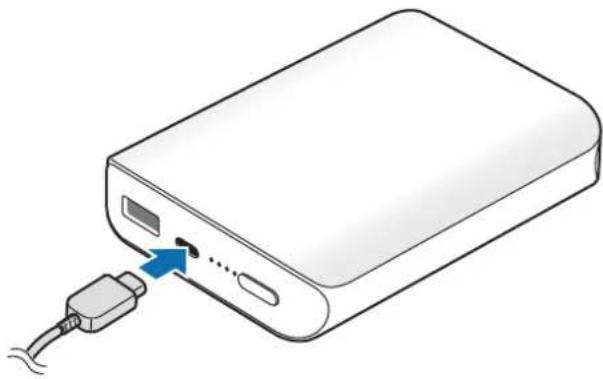
natural_image
Illustration of a power bank with an attached USB cable and a blue arrow indicating a connection point (no text or symbols present)
Connecting the charger improperly may cause serious damage to the battery pack. Any damage caused by misuse is not covered by the warranty.
2 After fully charging, disconnect the battery pack from the charger.

To save energy, unplug the charger when not in use. The charger does not have a power switch, so you must unplug the charger from the electric socket when not in use to avoid wasting power. The charger should remain close to the electric socket and easily accessible while charging.
Checking the remaining battery power
Check the remaining battery power by pressing the Reset/Battery Level button.
The indicator lights alerts you to the remaining battery power.
| Remaining battery power | Indicator light status |
| 75–100 % Four indicator lights on | |
| 50–75 % Three indicator lights on | |
| 25–50 % Two indicator lights on | |
| 5–25 % One indicator light on | |
| 0–5 % One indicator light blinking | |
Using the battery pack
Charging the mobile device
1 Connect one end of the USB cable to the battery pack's USB charger port. Then, plug the other end of the USB cable into the mobile device's multipurpose jack.
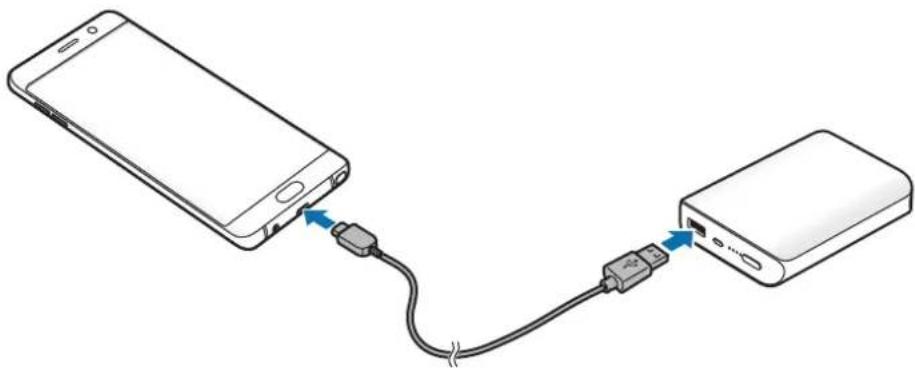
natural_image
Diagram showing connection between a smartphone and a power bank via USB cable (no text or symbols)2 After the mobile device is fully charged, disconnect the USB cable from both devices.

- Depending on your mobile device's multipurpose jack, you may need to use the Micro USB connector.
- To begin fast charging, connect a mobile device that supports fast charging to the battery pack.
- If the mobile device is not charging after being connected to the battery pack, press the Reset/Battery Level button.
- The battery pack is an auxiliary external battery. It may not fully charge some mobile devices.
- If the battery pack is exposed to extremely hot or cold temperatures or an error occurs, the indicator light will flash white. Disconnect the mobile device from the battery pack, and then reconnect them.
Copyright
Copyright © 2016 Samsung Electronics
This manual is protected under international copyright laws.
No part of this manual may be reproduced, distributed, translated, or transmitted in any form or by any means, electronic or mechanical, including photocopying, recording, or storing in any information storage and retrieval system, without the prior written permission of Samsung Electronics.
Trademarks
• SAMSUNG and the SAMSUNG logo are registered trademarks of Samsung Electronics.
- All other trademarks and copyrights are the property of their respective owners.
natural_image
Illustration of a power bank with an attached USB port and cable, showing no text or symbols.
natural_image
Diagram showing connection between a smartphone and a power bank via USB cable (no text or symbols)Copyright © 2016 Samsung Electronics
natural_image
Line drawing of a power bank with an attached USB cable and a blue arrow indicating signal flow (no text or symbols)
natural_image
Diagram showing connection between a smartphone and a power bank via USB cable (no text or symbols)natural_image
Illustration of a power bank with an attached USB cable and a blue arrow indicating signal input (no text or symbols)
natural_image
Diagram showing connection between a smartphone and a power bank via USB cable (no text or symbols)Copyright © 2016 Samsung Electronics
本手册受國際版權法保護。
natural_image
Line drawing of a power bank with an attached USB port and cable (no text or symbols)
natural_image
Diagram showing connection between a smartphone and a power bank via USB cable (no text or symbols)© Samsung Electronics, 2016.
natural_image
Illustration of a power bank with a USB cable inserted, showing internal components and a blue arrow indicating a connection point (no text or symbols present)
natural_image
Diagram showing connection between a smartphone and a power bank via USB cable (no text or symbols)natural_image
Illustration of a power bank with an attached USB cable and a blue arrow indicating signal flow (no text or symbols)
natural_image
Diagram showing connection between a smartphone and a power bank via USB cable (no text or symbols)
Brand : SAMSUNG
Model : EBPN930
Category : Cellphone