EasyManual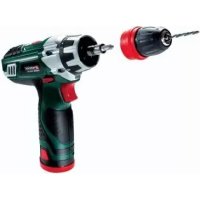
PABSW 10.8 A1 - Screwdriver PARKSIDE - Free user manual and instructions
Find the device manual for free PABSW 10.8 A1 PARKSIDE in PDF.


Frequently Asked Questions - PABSW 10.8 A1 PARKSIDE
User questions about PABSW 10.8 A1 PARKSIDE
0 question about this device. Answer the ones you know or ask your own.
Ask a new question about this device
Download the instructions for your Screwdriver in PDF format for free! Find your manual PABSW 10.8 A1 - PARKSIDE and take your electronic device back in hand. On this page are published all the documents necessary for the use of your device. PABSW 10.8 A1 by PARKSIDE.
USER MANUAL PABSW 10.8 A1 PARKSIDE
natural_image
Black and white photo of a Parker electric drill with a drill bit, next to a website URL (www.lidl-service.com) icon (no text on the drill or background)PERCEUSE-VISSEUSE SANS FIL PABSW 10.8 A1
FR BE
PERCEUSE-VISSEUSE SANS FIL
Operation and Safety Notes
Original operating instructions
IAN 86583

BE
FR BE
Before reading, unfold the page containing the illustrations and familiarise yourself with all functions of the device.
GB Operation and Safety Notes Page 50
-2-


text_image
1 2 3 4 5 6 7 8 10 11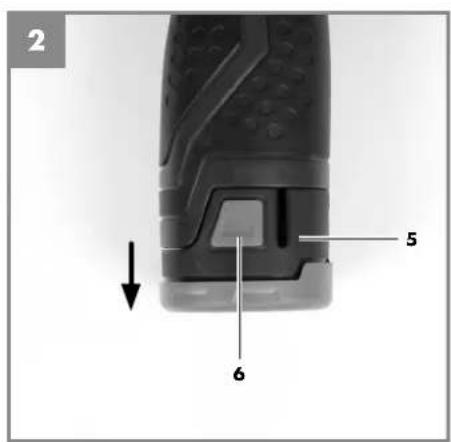
text_image
2 5 6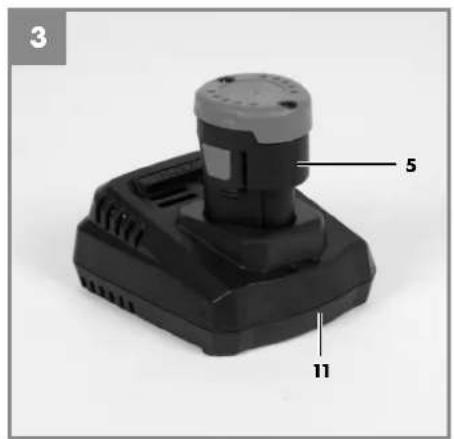
text_image
3 5 11-3-


text_image
4 1 2 3 a LO HI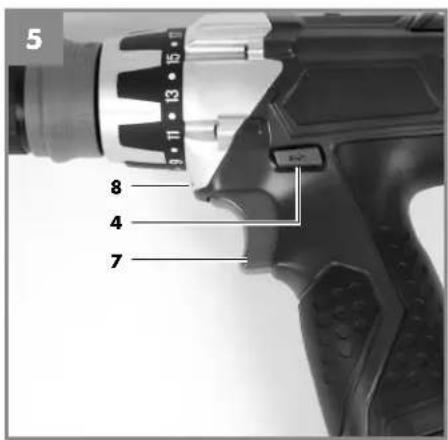
text_image
5 8 4 7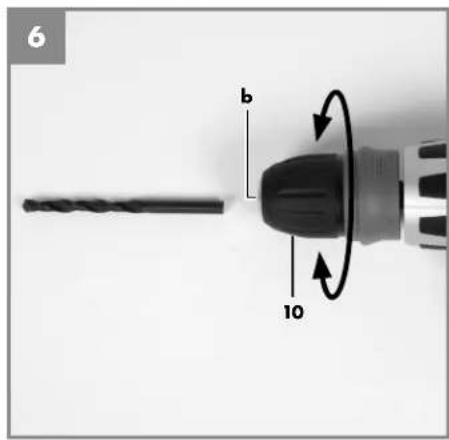
text_image
6 b 10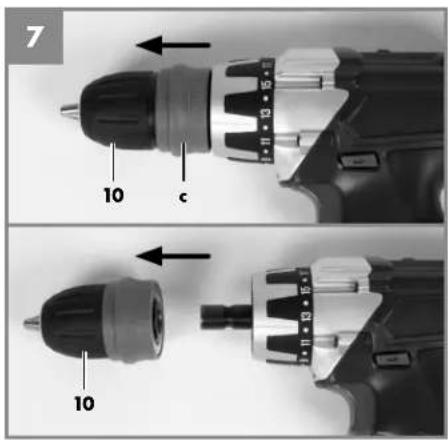
text_image
7 10 c 10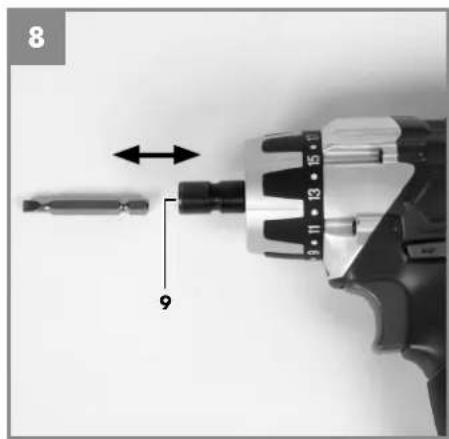
natural_image
Close-up of a drill bit with a screwdriver inserted, showing mechanical assembly (no text or symbols visible)-4-
FR/BE
Sommaire
flowchart
graph TD
    A["Warning"] --> B["Transmission"]
    B --> C["ISC"]
    D["ISO"] --> B
Visser sans percussion
Noise measured: L_ = dB (A) ; guaranteed L_ = dB (A)
P = KW; L/∅ = cm
Notified Body:
2006/28/EC
Emission No.
Standard references: EN 60745-1; EN 60745-2-1; EN 60745-2-2; EN 55014-1; EN 55014-2; EN 61000-3-2; EN 61000-3-3; EN 60335-1; EN 60335-2-29
Subject to change without notice
Archive-File/Record: NAPR005201
Documents registrar: Georg Riedel
Wiesenweg 22, D-94405 Landau/Isar
FR/BE
12. Bon de garantie
Chère Cliente, Cher Client,
Noise measured: L_max = dB (A) ; guaranteed L_min = dB (A)
P = KW; L/∅ = cm
Notified Body:
2006/28/EC
Emission No.
Standard references: EN 60745-1; EN 60745-2-1; EN 60745-2-2; EN 55014-1; EN 55014-2; EN 61000-3-2; EN 61000-3-3; EN 60335-1; EN 60335-2-29
Subject to change without notice
Archive-File/Record: NAPR005201
Documents registrar: Georg Riedel
Wiesenweg 22, D-94405 Landau/Isar
NL/BE
12. Garantiebewijs
Geachte klant,
Rechargeable batteries and cordless electric machines and tools contain materials that are potentially harmful to the environment. Never place any cordless electric machines or tools in your household refuse. When cordless electric machines or tools become defective or worn, remove the rechargeable batteries and return them to iSC GmbH (address: Eschenstrasse 6, D-94405, Germany). If the rechargeable batteries cannot be removed, return the complete cordless machine or tool.
You can then be sure that the equipment will be correctly disposed of by the manufacturer.
When shipping or disposing of batteries and cordless tools, always ensure that they are packed individually in plastic bags to prevent short circuits and fi res.
Do not lose these safety instructions
3. Layout and items supplied
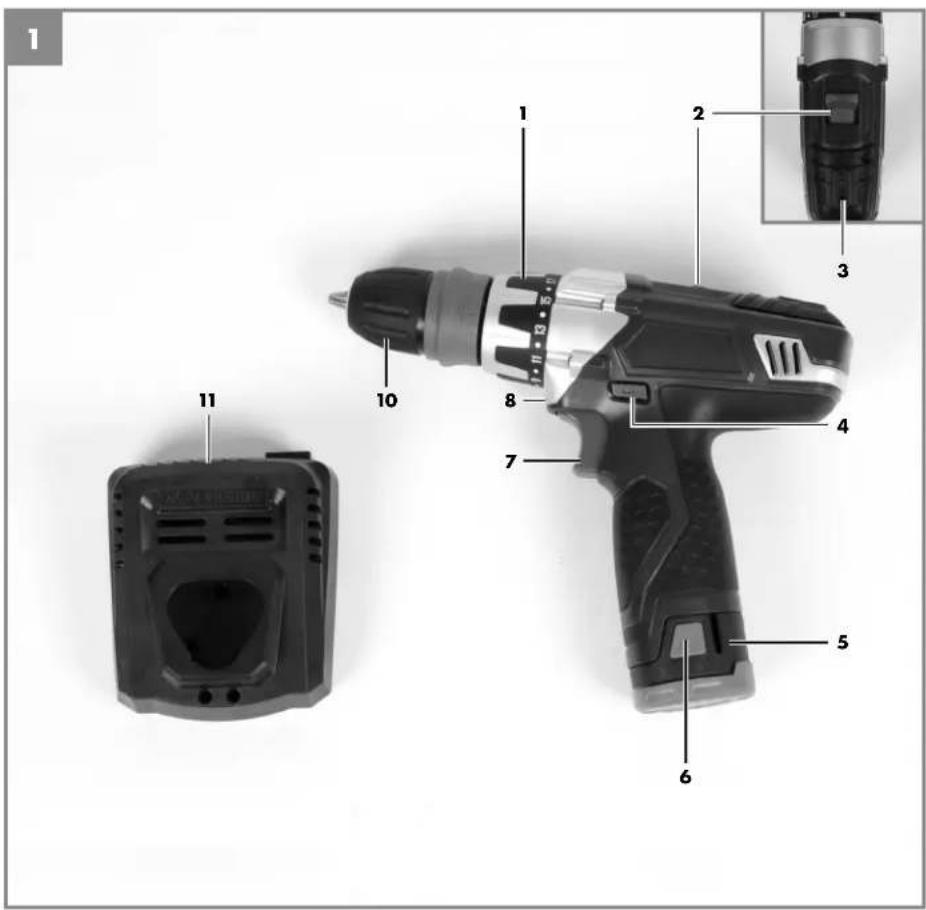
3.1 Layout (Fig. 1/8)
- Torque selector
- Selector switch for 1st gear - 2nd gear
- Battery capacity indicator
- Changeover switch
- Battery
- Pushlock button
- On/Off switch
- LED light
- Integrated magnetic bit mount
- Quick-change drill chuck
- Charging unit
3.2 Items supplied
- Open the packaging and take out the equipment with care.
- Remove the packaging material and any packaging and/or transportation braces (if available).
• Check to see if all items are supplied. - Inspect the equipment and accessories for transport damage.
• If possible, please keep the packaging until the end of the guarantee period.
Important!
The equipment and packaging material are not toys. Do not let children play with plastic bags, foils or small parts. There is a danger of swallowing or suffocating!
- Cordlessdrill
- Batterycharger
- Batterypack
- OperatingInstructions
GB
4. Properuse
The cordless drill is designed for tightening and undoing screws, as well as for drilling in wood, metal and plastic.
The equipment is to be used only for its prescribed purpose. Any other use is deemed to be a case of misuse. The user / operator and not the manufacturer will be liable for any damage or injuries of any kind caused as a result of this.
Please note that our equipment has not been designed for use in commercial, trade or industrial applications. Our warranty will be voided if the machine is used in commercial, trade or industrial businesses or for equivalent purposes.
5.Technical data
Voltage supply 10.8 V d.c.
Idling speed: 0-300/0-1050 rpm
Torque settings: 17+1
Forward and reverse rotation ....yes
Chuck clamping width 1-10 mm
Battery type: Lithium-ion
Battery pack capacity: 1.3 Ah
Number of cells: 3
Battery charging voltage....10.8 V d.c.
Battery charging current 1500 mA
Mains voltage for charger .... 100-240 V \~ 50 Hz
Weight 1.0 kg
Max. screw diameter: 6 mm
Sound and vibration
Sound and vibration values were measured in accordance with EN 60745.
L_pA sound pressure level 65.3 dB(A)
K_pA uncertainty 3 dB
L_WA sound power level .....76.3 dB(A)
K_WA uncertainty 3 dB
Wear ear-muffs.
The impact of noise can cause damage to hearing.
Total vibration values (vector sum of three directions) determined in accordance with EN 60745.
Drilling in metal
Vibration emission value a_h < 2.5 m/s^2
K uncertainty = 1.5 m/s²
Screwing without hammer action
Vibration emission value a_h < 2.5 m/s^2
K uncertainty = 1.5 m/s ^2
Warning!
The specified vibration value was established in accordance with a standardized testing method. It may change according to how the electric equipment is used and may exceed the specified value in exceptional circumstances.
The specified vibration value can be used to compare the equipment with other electric power tools.
The specified vibration value can be used for initial assessment of a harmful effect.
Keep the noise emissions and vibrations to a minimum.
- Only use appliances which are in perfect working order.
• Service and clean the appliance regularly. - Adapt your working style to suit the appliance.
• Do not overload the appliance. - Have the appliance serviced whenever necessary.
- Switch the appliance off when it is not in use.
• Wear protective gloves.
GB
For the protection of the operator it is essential to specify safety measures which are based on an estimate of the exposure during the actual conditions of use (all stages of the operating cycle must be considered, e.g. times in which the electric tools are switched off and times in which the tool is switched on but operates without load).
Residualrisks
Even if you use this electric power tool in accordance with instructions, certain residual risks cannot be rules out. The following hazards may arise in connection with the equipment's construction and layout:
- Lung damage if no suitable protective dust mask is used.
- Damage to hearing if no suitable ear protection is used.
- Health damage caused by hand-arm vibrations if the equipment is used over a prolonged period or is not properly guided and maintained.
6. Before starting the equipment
Be sure to read the following information before you use your cordless screwdriver for the first time:
- Charge the battery pack with the charger supplied. An empty battery pack requires a charging period of approximately one hour.
- Only ever use sharp drill bits and screwdriver bits which are suitable for the purpose and in faultless condition.
- Always check for concealed electric cables and gas and water pipes when drilling and screwing in walls.
7. Operation
7.1 Charging the LI battery pack (Fig. 2-3)
The battery is protected from exhaustive discharge. An integrated protective circuit automatically switches off the equipment when the battery is fl at. In this case the bit chuck will cease to turn.
Warning! Do not press the ON/OFF switch any more if the protective circuit has actuated. This may damage the battery.
- Remove the battery pack (5) from the handle, pressing the pushlock buttons (6) on the left and right sides to do so.
- Check that your mains voltage is the same as that marked on the rating plate of the battery charger. Insert the power plug of the charger (11) into the mains socket outlet. The green LED will then begin to flash.
- Insert the battery pack (5) into the battery charger (11).
- In section 10 „Charger indicator“ you will find a table with an explanation of the LED indicator on the charger.
If the battery pack fails to become charged, please check
• whether there is voltage at the socket-outlet
- whether there is proper contact with the charging contacts in the battery charger (11).
If the battery still fails to become charged, please return
• the charger and charging adapter
• the battery pack
to our Customer Service Department.
To ensure that the LI battery pack provides long service you should take care to recharge it promptly. You must recharge the battery pack when you notice that the power of the cordless screwdriver drops.
GB
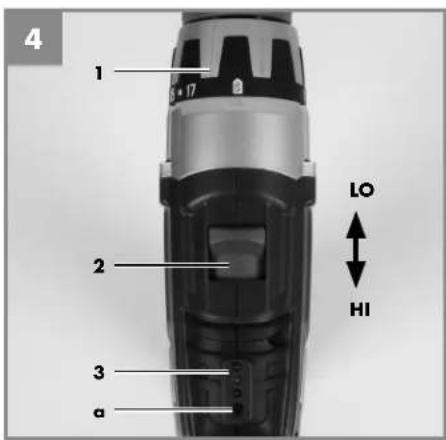
7.2 Torque setting (Fig. 4 / Item 1)
The cordless screwdriver is fitted with a mechanical torque selector.
The torque for a specific size of screw is selected with the set-collar (1). The correct torque depends on several factors:
- on the type and hardness of material in question
• on the type and length screws used - on the requirements needing to be met by the screwed joint.
The clutch disengages with a grating sound to indicate when the set torque is reached.
Important! The tool must be at a standstill when you set the torque with the setting ring.
7.3 Drilling (Fig. 4 / Item 1)
For drilling purposes, move the set-collar to the last step „Drill“. In this setting the slip clutch is inactive. The maximum torque is available in drilling mode.
7.4 Selecting 1st gear to 2nd gear (Fig. 4/Item 2)
By adjusting the selector switch, you can work with a faster or slower turning speed. Change the gear only when the drill is at a standstill. If you fail to observe this point, the gearing may be damaged.
7.5 Battery capacity indicator (Fig. 4/Item. 3)
Press the button for the battery capacity indicator (a). The battery capacity indicator (3) indicates the charge state of the battery on 3 coloured LEDs.
7.6 Forward/Reverse switch (Fig. 5 / Item 4)
With the slide switch above the On/Off switch you can select the direction of rotation of the battery-powered drill/screwdriver and secure it against being switched on accidentally. You can choose between clockwise and anticlockwise rotation. To avoid causing damage to the gearing
it is advisable to change the direction of rotation only when the tool is at a standstill. The On/Off switch is blocked when the slide switch is in centre position.
7.7 On/Off switch (Fig. 5 / Item 7)
Infinitely variable speed control is possible with the On/Off switch. The further you press the switch, the higher the speed of the battery-powered drill/screwdriver.
7.8 LED lamp (Fig. 5/Item 8)
The LED lamp (8) can be used in poor lighting conditions to illuminate the area where you want to drill or screw. The LED lamp (8) will be lit automatically as soon as you press the ON/OFF switch (7).
7.9 Changing the tool (Fig. 6)
Important. Set the changeover switch (4) to its centre position whenever you carry out any work (for example changing the tool, maintenance work, etc.) on the cordless screwdriver.
- The cordless screwdriver is fitted with a quick-action chuck (10) with an automatic spindle stop.
- Open the chuck (10). The chuck opening (b) must be large enough to hold the tool (drill bit or screwdriver bit).
- Select the suitable tool. Push the tool as far as possible into the chuck opening (b).
- Tighten the chuck (10) and then check that the tool is secure.
7.10 Screwdriving
We recommend using self-centering screws (e.g. Torx screws, recessed head screws) designed for reliable working. Be sure to use a bit that matches the screw in shape and size. Set the torque, as described elsewhere in these operating instructions, to suit the size of screw.
7.11 Integrated magnetic bit mount (Fig. 7-8)
The cordless drill/screwdriver has an integrated magnetic bit mount (9) for 1/4-inch (6.35mm) bit inserts.
GB
To use it, remove the quick-change drill chuck (10) by pressing the rear drill chuck sleeve (c) towards the drill chuck.
You can now plug a suitable bit insert into the integrated magnetic bit mount (9).
To mount the drill chuck again, plug it onto the bit mount and turn it slightly until it can be pushed on completely. Lock the drill chuck in place by pushing the drill chuck sleeve (c) towards the machine.
8. Cleaning, maintenance and ordering of spare parts
Always pull out the mains power plug before starting any cleaning work.
8.1 Cleaning
- Keep all safety devices, air vents and the motor housing free of dirt and dust as far as possible. Wipe the equipment with a clean cloth or blow it with compressed air at low pressure.
- We recommend that you clean the device immediately each time you have finished using it.
- Clean the equipment regularly with a moist cloth and some soft soap. Do not use cleaning agents or solvents; these could attack the plastic parts of the equipment. Ensure that no water can seep into the device.
8.2 Maintenance
There are no parts inside the equipment which require additional maintenance.
8.3 Ordering replacement parts:
Please quote the following data when ordering replacement parts:
• Type of machine
• Article number of the machine
• Identification number of the machine
For our latest prices and information please go to www.isc-gmbh.info
9. Disposal and recycling
The unit is supplied in packaging to prevent its being damaged in transit. This packaging is raw material and can therefore be reused or can be returned to the raw material system.
The unit and its accessories are made of various types of material, such as metal and plastic. Defective components must be disposed of as special waste. Ask your dealer or your local council.

For EU countries only
Never place any electric power tools in your household refuse.
To comply with European Directive 2002/96/EC concerning old electric and electronic equipment and its implementation in national laws, old electric power tools have to be separated from other waste and disposed of in an environment-friendly fashion, e.g. by taking to a recycling depot.
Recycling alternative to the return request: As an alternative to returning the equipment to the manufacturer, the owner of the electrical equipment must make sure that the equipment is properly disposed of if he no longer wants to keep the equipment. The old equipment can be returned to a suitable collection point that will dispose of the equipment in accordance with the national recycling and waste disposal regulations. This does not apply to any accessories or aids without electrical components supplied with the old equipment.
GB
- Chargerindicator
| Indicatorstatus | Explanations and actions | |
| RedLEDGreenLED | ||
| OffFlashingReadyforuse | The charger is connected to the mains and is ready for use; there is no battery pack in the charger. | |
| OnOffCharging | The charger is charging the battery pack in quick charge mode. | |
| Off On The battery pack is fully charged (charging completed).Action:Take the battery pack out of the charger. Disconnect the charger from the mains supply. | ||
| Flashing FlashingFault | Charging is no longer possible. The battery pack is defective.Action:Never charge a defective battery pack. Take the battery pack out of the charger. | |
| OnOnTemperature fault | The battery pack is too hot (e.g. due to direct sunshine) or too cold (below 0°C).Action:Remove the battery pack and keep it at room temperature (approx. 20°C) for one day. | |
-61-
11. Declaration of conformity
Noise measured: L_ = dB (A) ; guaranteed L_ = dB (A)
P = KW; L/∅ = cm
Notified Body:
2006/28/EC
Emission No.
Standard references: EN 60745-1; EN 60745-2-1; EN 60745-2-2; EN 55014-1; EN 55014-2; EN 61000-3-2; EN 61000-3-3; EN 60335-1; EN 60335-2-29
Subject to change without notice
Archive-File/Record: NAPR005201
Documents registrar: Georg Riedel
Wiesenweg 22, D-94405 Landau/Isar
GB
12. Warranty certifi cate
Dear Customer,
All of our products undergo strict quality checks to ensure that they reach you in perfect condition. In the unlikely event that your device develops a fault, please contact our service department at the address shown on this guarantee card. Of course, if you would prefer to call us then we are also happy to offer our assistance under the service number printed below. Please note the following terms under which guarantee claims can be made:
- These guarantee terms cover additional guarantee rights and do not affect your statutory warranty rights. We do not charge you for this guarantee.
- Our guarantee only covers problems caused by material or manufacturing defects, and it is restricted to the rectification of these defects or replacement of the device. Please note that our devices have not been designed for use in commercial, trade or industrial applications. Consequently, the guarantee is invalidated if the equipment is used in commercial, trade or industrial applications or for other equivalent activities. The following are also excluded from our guarantee: compensation for transport damage, damage caused by failure to comply with the installation/assembly instructions or damage caused by unprofessional installation, failure to comply with the operating instructions (e.g. connection to the wrong mains voltage or current type), misuse or inappropriate use (such as overloading of the device or use of non-approved tools or accessories), failure to comply with the maintenance and safety regulations, ingress of foreign bodies into the device (e.g. sand, stones or dust), effects of force or external influences (e.g. damage caused by the device being dropped) and normal wear resulting from proper operation of the device. This applies in particular to rechargeable batteries for which we nevertheless issue a guarantee period of 12 months. The guarantee is rendered null and void if any attempt is made to tamper with the device.
- The guarantee is valid for a period of 3 years starting from the purchase date of the device. Guarantee claims should be submitted before the end of the guarantee period within two weeks of the defect being noticed. No guarantee claims will be accepted after the end of the guarantee period. The original guarantee period remains applicable to the device even if repairs are carried out or parts are replaced. In such cases, the work performed or parts fitted will not result in an extension of the guarantee period, and no new guarantee will become active for the work performed or parts fitted. This also applies when an on-site service is used.
- In order to assert your guarantee claim, please send your defective device postage-free to the address shown below. Please enclose either the original or a copy of your sales receipt or another dated proof of purchase. Please keep your sales receipt in a safe place, as it is your proof of purchase. It would help us if you could describe the nature of the problem in as much detail as possible. If the defect is covered by our guarantee then your device will either be repaired immediately and returned to you, or we will send you a new device.
Of course, we are also happy offer a chargeable repair service for any defects which are not covered by the scope of this guarantee or for units which are no longer covered. To take advantage of this service, please send the device to our service address.
IAN 86583
text_image
Blank lined notebook page with a pencil icon and a color palette at the top
text_image
Blank lined notebook page with a pencil icon and a color palette at the top-65-



IAN: 86583 PABSW 10.8 A1
Einhell Germany AG
Wiesenweg 22
D-94405 Landau/Isar
Version des Informations · Stand van de Informatie