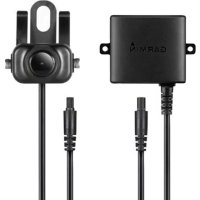
BC 35 - Dashboard camera GARMIN - Free user manual and instructions
Find the device manual for free BC 35 GARMIN in PDF.


| Brand | Garmin |
| Model | BC 35 |
| Product type | Wireless rear dash camera |
| Power supply | 9 to 28 V DC |
| Current consumption | 150 mA at 12 V DC |
| Transmitter fuse | 500 mA, fast-acting |
| Water resistance (camera) | IPX7 (immersion up to 1 m for 30 min) |
| Water resistance (transmitter) | Not waterproof |
| Operating temperature range | -20 to 70 °C |
| Wireless transmission range | Approximately 13.5 m (45 ft) |
| Maximum number of cameras that can be paired | 4 |
| Main features | Wireless rear view, pairing with Garmin navigator, installation on license plate or rear of vehicle |
| Package contents | Camera, transmitter, mounting bracket, cables, screws, nuts, Allen key |
| Recommended installation | By an experienced automotive electrician |
| Safety | In-line fuse mandatory, wear protective equipment during installation |
| Maintenance | Check seal of connections if exposed to weather |
| Included documents | Installation manual and user guide (downloadable at garmin.com/manuals/BC35) |
Frequently Asked Questions - BC 35 GARMIN
User questions about BC 35 GARMIN
0 question about this device. Answer the ones you know or ask your own.
Ask a new question about this device
Download the instructions for your Dashboard camera in PDF format for free! Find your manual BC 35 - GARMIN and take your electronic device back in hand. On this page are published all the documents necessary for the use of your device. BC 35 by GARMIN.
USER MANUAL BC 35 GARMIN
BC™ 35 WIRELESS BACKUP CAMERA
Installation Instructions 2
Installation Instructions
Introduction
WARNING
See the Important Safety and Product Information guide in the product box for product warnings and other important information.
Garmin strongly recommends having an experienced installer with the proper knowledge of electrical systems install the device. Incorrectly wiring the power cable can result in damage to the vehicle or the battery and can cause bodily injury.
When connecting the power cable, do not remove the in-line fuse holder. To prevent the possibility of injury or product damage caused by fire or overheating, the appropriate fuse must be in place as indicated in the product specifications. In addition, connecting the power cable without the appropriate fuse in place will void the product warranty.
CAUTION
Always wear safety goggles, ear protection, and a dust mask when drilling, cutting, or sanding.
NOTICE
When drilling or cutting, always check what is on the opposite side of the surface.
These installation instructions do not apply to a specific vehicle type, and are meant as a guide when installing this product on your vehicle. For questions specific to your vehicle, you should contact the vehicle manufacturer.
Device Overview
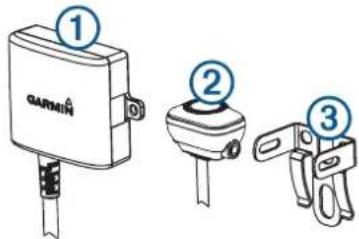
Item Description
| ① | Transmitter |
| ② | Camera |
| ③ | Camera mounting bracket |
Tools Needed
- Drill and 10mm or size X (0.397 in.) drill bit
2 Phillips screwdriver
- Screws, bolts, or cable ties (to secure the transmitter)
- Solderless wire-splice connector or solder and heat-shrink tubing
RV sealant (optional)
Installation
Camera Mounting Considerations
When selecting a location to mount the camera, observe these considerations.
- You should test a mounting location before you permanently mount the camera.
-
Installing the camera higher on the back of the vehicle provides a better viewing angle.
-
The included bracket can be clipped onto a license plate or other similar surface, or it can be fastened to the back of the vehicle using the included self-tapping, panhead screws.
Transmitter Location and Wiring Considerations
NOTICE
The transmitter is not intended to be held or worn on your body while it is in use.
When selecting a location to install the wireless transmitter, observe these considerations.
- You should test a proposed installation location before you permanently install the transmitter.
- Some vehicles do not provide constant minimum voltage to the reverse lamps. You should use an automotive relay when connecting the transmitter and camera to a power source that does not provide constant voltage.
- Although the transmitter can transmit the video signal approximately 45 ft (13.5 m), the location of the transmitter can affect this range.
The closer you install the transmitter to the device, the more reliable the signal.
The signal transmits from the flat front and back surfaces of the transmitter. The transmitter provides the best signal when either flat surface points toward the receiver.
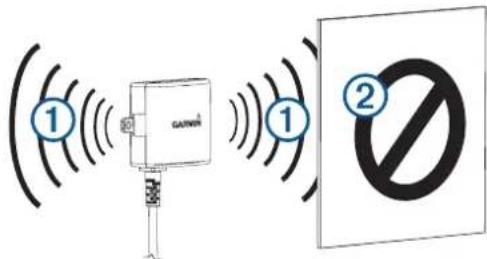
-
Dense metal or appliances ② in the path of the transmitter greatly reduce the transmission distance.
The fewer solid objects that exist between the path of the transmitter and the device, the more reliable the signal. -
The fuse holder located near the transmitter is not waterproof. Installing the fuse holder in a location that is exposed to the elements is not recommended.
-
The connector between the camera and the transmitter is not waterproof. If you make this connection in a location exposed to the elements, you must make sure that the connection is waterproof.
- If you are installing the camera on a boat trailer or other location that may be exposed to water, you must waterproof all wiring connections and the fuse holder in the transmitter cable.
Testing the Camera and Transmitter Location
1 Temporarily secure the camera in the preferred mounting location.
2 Temporarily place the transmitter in the preferred installation location, and connect it to power and to the camera. TIP: If you do not want to splice into the wiring of your vehicle for this test, you can connect the transmitter and camera to a 12 Vdc battery.
3 Test the transmitter for correct operation by viewing the camera on the compatible Garmin device.
NOTE: You may need to pair the camera to the Garmin device before you can view the image and test the transmitter location (Pairing the Camera with a Garmin Navigation Device, page 3).
If you do not see video on the Garmin device at the preferred installation location, move the transmitter to another location and test it again.
4 Repeat steps 2-3 until the transmitter operates correctly.
5 Test the camera view by observing the video on the device.
6 If the camera does not provide the optimal view for your vehicle, move it to another location and test it again.
7 Repeat steps 5-6 until the camera mounting location provides the optimal view for your vehicle.
TIP: Make note of the camera orientation when you are testing the camera view to ensure correct permanent installation.
Mounting the Camera
Before you permanently mount the camera, you should test the mounting location for the optimal view for your vehicle (Testing the Camera and Transmitter Location, page 2).
If you have already connected the camera to the bracket, you must first disassemble it.
1 Place the bracket ① in the mounting location.
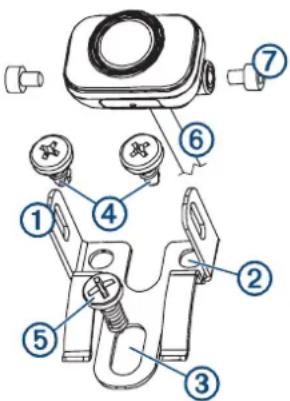
2 Select an option:
- If you are mounting the bracket directly on the surface of your vehicle, mark the locations of the two holes on the bracket ②.
- If you are installing the bracket on a license plate, remove one of the license plate screws and clip the bracket onto the license plate, aligning the hole on the bracket ③ with the hole on the license plate.
3 Secure the bracket to the vehicle using either the included self-tapping screws ④ or the license-plate screw you removed in step 2 ⑤
4 Place the camera in the bracket, and determine the best place for the camera cable ⑥ to enter the vehicle.
5 Using an appropriate drill bit, drill a hole for the camera cable to enter the vehicle.
6 Feed the camera cable through the hole and route it to the transmitter location.
7 Secure the camera in the bracket using the included hex bolts ⑦.
8 Adjust the angle of the camera and tighten the hex bolts using the included hex key.
9 Apply RV sealant around the cable where it enters the vehicle (optional).
Installing the Transmitter
Before you permanently install the transmitter, you must test the installation location for correct operation (Testing the Camera and Transmitter Location, page 2).
1 Secure the transmitter to the installation location using hardware appropriate for the location, such as screws, bolts, or cable ties.
The fuse holder located near the transmitter is not waterproof. Installing the fuse holder in a location that is exposed to the elements is not recommended.
2 Connect the camera and transmitter cables.
The connector between the camera and the transmitter is not waterproof. If you make this connection in a location exposed to the elements, you must make sure that the connection is waterproof.
3 Connect the power cable 1 from the transmitter to a 12- 24 VDC power source, preferably a reverse lamp ② using asolderless wire-splice connector (not included).
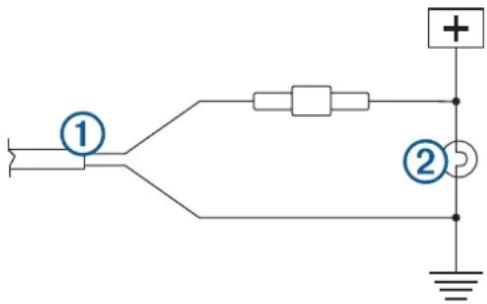
NOTE: Connecting the transmitter to an always-on 12-24 VDC source (such as a running lamp) instead of a reverse lamp requires you to manually switch power to the transmitter. The transmitter may drain your vehicle battery if it is left on.
4 If you did not use a solderless wire-splice connector, solder and heat-shrink the electrical connections to protect them from the elements.
Pairing the Camera with a Garmin Navigation Device
1 Turn on the compatible Garmin navigation device, and bring it within 3m (10 ft.) of the camera.
2 Select Apps > Rear View.
3 Select Add New Camera.
4 Follow the on-screen instructions.
Multiple Cameras
You can pair up to 4 wireless cameras with a compatible Garmin device. For example, you can pair one backup camera installed on the cab and a second backup camera installed on a trailer. See the BCTM 35 Owner's Manual for information about pairing multiple cameras.
Appendix
Getting the Owner's Manual
You can get the most recent owner's manual from the web.
1 Go to garmin.com/manuals/BC35.
2 View or download the full owner's manual in your preferred format.
Specifications
| Camera and transmitter input voltage | From 9 to 28 Vdc |
| Transmitter fuse 500 mA, fast-blow | |
| Camera and transmitter current usage | 150 mA at 12 Vdc |
| Water rating (camera) IEC 60529 IP×7* | |
| Water rating (transmitter) Not waterproof | |
| Operating temperature range From | 20° to 70°C (from -4° to 158°F) |
*The camera withstands incidental exposure to water of up to 1 m for up to 30 min. For more information, go to www.garmin.com /waterrating.
CAMÉRA DE RECUL SANS FIL BC™ 35
- BC™ 35 WIRELESS BACKUP CAMERA
- INSTALLATION INSTRUCTIONS
- INTRODUCTION
- WARNING
- CAUTION
- NOTICE
- DEVICE OVERVIEW
- TOOLS NEEDED
- 2 PHILLIPS SCREWDRIVER
- INSTALLATION
- CAMERA MOUNTING CONSIDERATIONS
- TRANSMITTER LOCATION AND WIRING CONSIDERATIONS
- TESTING THE CAMERA AND TRANSMITTER LOCATION
- MOUNTING THE CAMERA
- INSTALLING THE TRANSMITTER
- PAIRING THE CAMERA WITH A GARMIN NAVIGATION DEVICE
- MULTIPLE CAMERAS
- APPENDIX
- GETTING THE OWNER'S MANUAL
- CAMÉRA DE RECUL SANS FIL BC™ 35
Brand : GARMIN
Model : BC 35
Category : Dashboard camera