HG2000 532 - Alarm system Schwaiger - Free user manual and instructions
Find the device manual for free HG2000 532 Schwaiger in PDF.



| Product type | Wireless alarm system |
| Brand | Schwaiger |
| Model | HG2000 532 |
| Outdoor siren power supply | 4 LR20 (D) batteries |
| Remote control power supply | 1 12V A27 button cell battery |
| Window/door sensor power supply | 2 AAA (LR03) batteries |
| Motion detector power supply | 1 9V (6LR61) battery |
| Siren sound level | 120 dB (max) |
| Operating frequency | 868,35 MHz |
| Radio range detector/sensor | 250 m (without obstacle) |
| Radio range remote control | 60 m (without obstacle) |
| Maximum number of sensors | 250 |
| Adjustable alarm duration | 1 / 3 / 5 minutes |
| Activation delay | 5 or 30 seconds |
| Detection angle (motion detector) | < 110° |
| Motion detector sensitivity | High (≤13m), Medium (≤6m), Low (≤4m) |
| Outdoor siren housing | ABS plastic, weather-resistant |
| House security code | 4-pin jumper, adjustable |
| Mounting types | Siren: wall-mounted, indoor/outdoor; Detector and sensor: indoor |
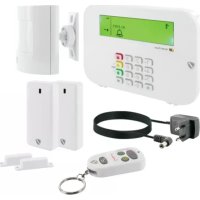
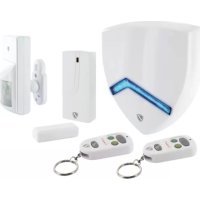
| Package contents | Outdoor siren, 2 remote controls, magnetic door/window sensor, PIR motion detector, mounting hardware, user manual |
Frequently Asked Questions - HG2000 532 Schwaiger
User questions about HG2000 532 Schwaiger
0 question about this device. Answer the ones you know or ask your own.
Ask a new question about this device
Download the instructions for your Alarm system in PDF format for free! Find your manual HG2000 532 - Schwaiger and take your electronic device back in hand. On this page are published all the documents necessary for the use of your device. HG2000 532 by Schwaiger.
USER MANUAL HG2000 532 Schwaiger
- Introduction and general safety instructions 12
- Contents of packaging 12
- Proper use 13
- First commissioning 13
4.1. Commissioning the outdoor siren (centre) 13
4.1.1. Setting the alarm duration 13
4.1.2.Setting the switch-on delay 13
4.2. Commissioning the remote control 13
4.2.1. Addition of the remote control 14
4.2.2. Deletion of a remote control (for example, in the event of loss) 14
4.3. Commissioning the window sensor with magnetic contact 14
4.4. Commissioning the movement sensor 14
4.4.1. Setting the sensitivity of the movement sensor 14
- Assembly and place of assembly 14
5.1. Assembly instructions for the outdoor siren 14
5.2. Assembly instructions for the movement sensor 15
5.3. Assembly instructions for the door and window sensor with magnetic contact 15
- Device settings 15
6.1. Resetting the system 15
6.2. Functions of the remote operation 16
6.2.1. Query of the alarm duration 16
6.2.2. Query of the battery status 16
6.2.3. Battery change mode (deactivation of the sabotage protection) 16
6.3.House security code 17
- Addition of further components 17
8.Practical example 17 - Technical data 17
Disclaimer 18
Disposal 18
EC Declaration of Conformity 18
GB
1. INTRODUCTION
Congratulations and thank you for purchasing a product from the SECURE-4-YOU series. In the following, you will receive helpful tips on handling this product.
Therefore, please read the operating instructions carefully and in full.
General safety and maintenance instructions
- This product is intended for private, non-commercial household use.
- This product is an electronic product that must be kept away from children. Therefore, keep it out of reach of children.
- Protect the product from moisture, water, rain, snow or drizzle and use the product only in dry environments, if nothing is specifically pointed out to the contrary.
- Do not allow the product to fall and do not expose it to strong shaking.
- Do not introduce any objects into the product's connections or openings.
- Do not disassemble the product into its individual parts. The device does not contain any parts that require maintenance by the user. Incorrect assembly can lead to electric shocks or improper functioning.
- Clean this product only using a lint-free, damp cloth that is as light as possible and do not use any aggressive cleaning agents. In doing this, especially ensure that no water (no fluid or moisture) gets into the product.
Caution! Risk of hearing loss
Loud alarm tone. Do not expose your hearing to this tone over a longer period of time, because otherwise, severe hearing loss could be the consequence. Do not activate the alarm when it is very near to your ears.
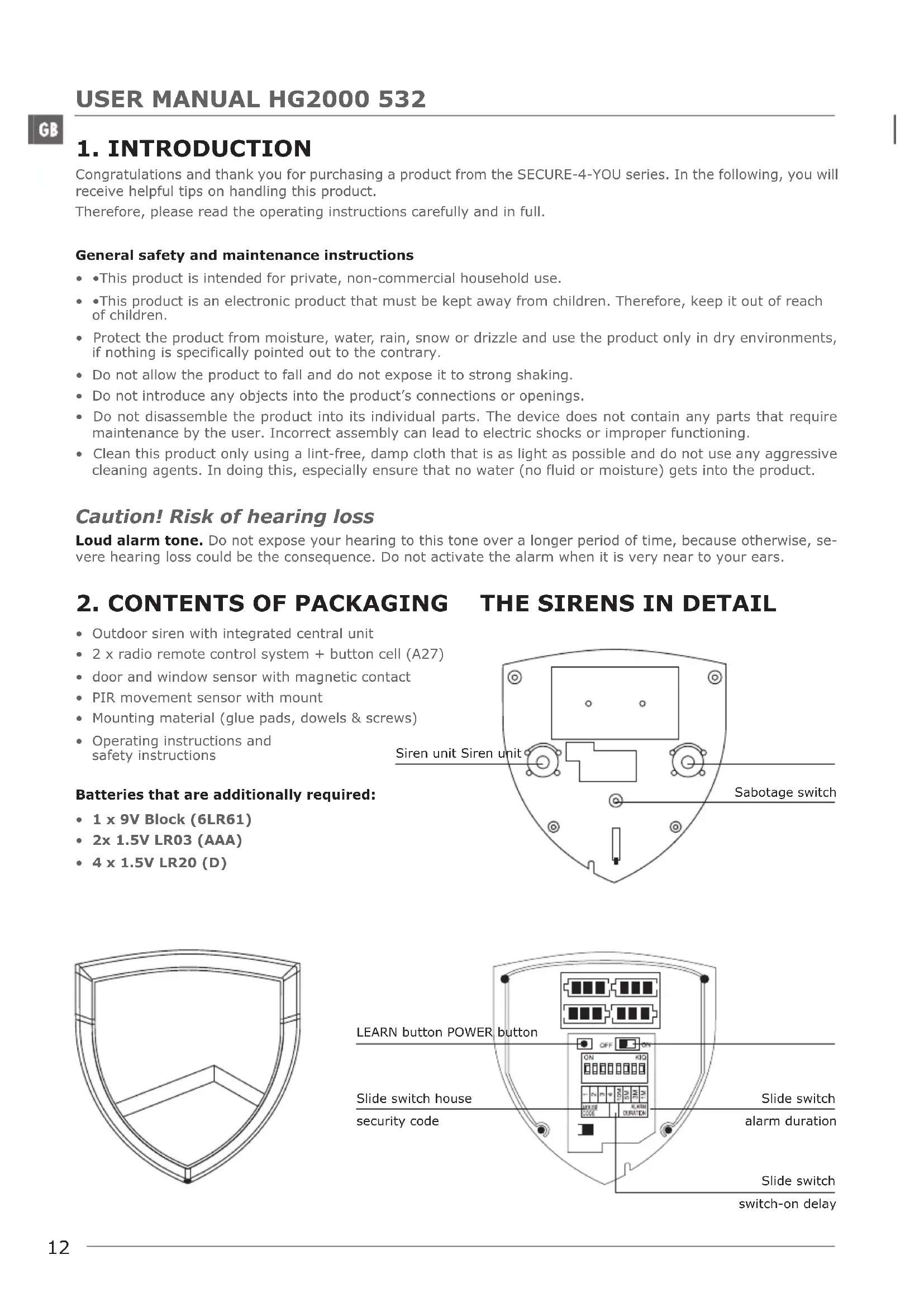
2. CONTENTS OF PACKAGING
- Outdoor siren with integrated central unit
- 2 x radio remote control system + button cell (A27)
- door and window sensor with magnetic contact
PIR movement sensor with mount - Mounting material (glue pads, dowels & screws)
- Operating instructions and safety instructions
Batteries that are additionally required:
- 1 x 9V Block (6LR61)
- 2x 1.5V LR03 (AAA)
- 4 x 1.5V LR20 (D)
3. PROPER USE
The Schwaiger "Green Guard" system is used for the securing and monitoring of your property / home. With the help of different sensors, individual areas of the building, such as, for example, the entrance zone, can be monitored or secured. The entire system is controlled via the central unit (in this case, the outdoor siren), which communicates by radio with the various sensors. As soon as the central unit recognises a breach through the sensors, this triggers an alarm. The entire operation of the system takes place via one or more radio remote control systems.
The housing of the outdoor siren consists of a robust plastic, is weather-resistant and is protected by a manipulation switch.
Important:
The use of alarm systems offers you extensive, but not 100 percent protection from or security against breakins or attacks. Setting off the alarm serves to scare away intruders or attackers and should alert people in the immediate environment.
4. FIRST COMMISSIONING
Alongside the two radio remote control systems this starter set contains a total of two alarm sensors, which are pre-programmed in their standard setting. After inserting the relevant batteries in these, they can be used immediately. The radio remote control system must be manually added as described in item 4.2.1 (Addition of the remote control).
Note
It is advisable to firstly install the system in the condition in which it was delivered and to check its function, before you finally mount the individual components.
4.1. Commissioning the outdoor siren
Inserting the batteries in the outdoor siren
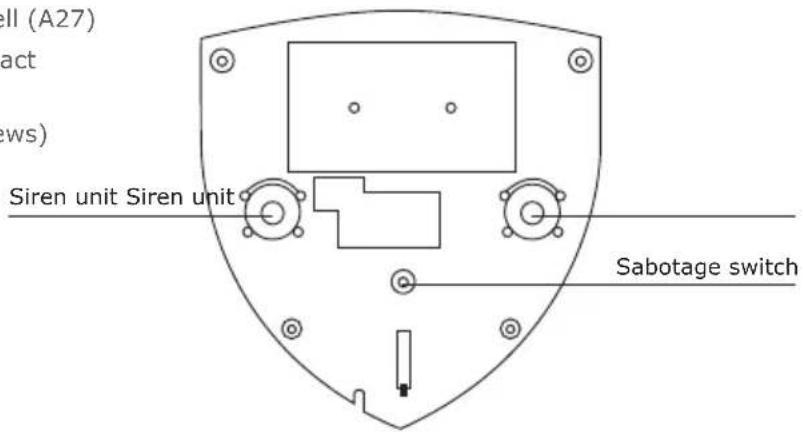
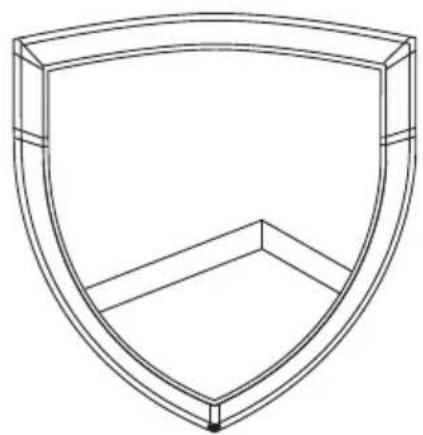
1) Remove the screws of the front cover (on the lower tip of the siren) using a Phillips screwdriver and then remove the front cover.
2) Place 4x D (LR20) batteries (with the correct polarity) in the battery compartment, accordingly.
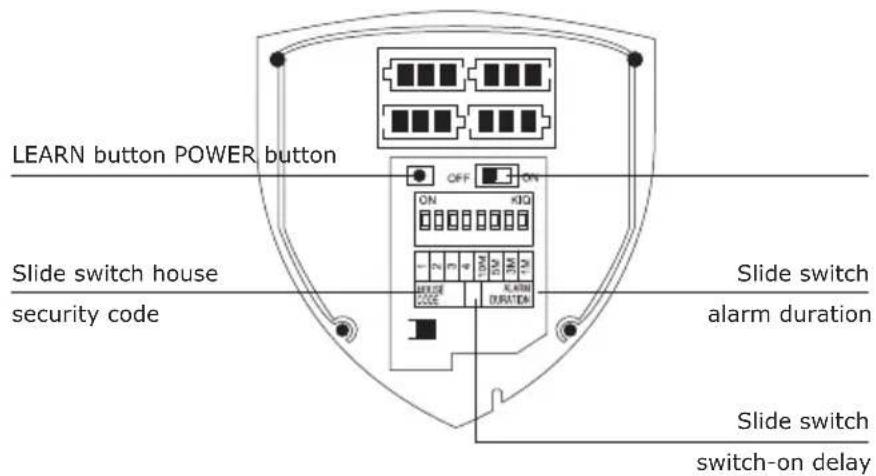
3) Now you can switch on the outdoor siren via the slide switch (ON position). (All 6 blue LEDs light up and the manipulation protection is temporarily switched off)
4.1.1. Setting the alarm duration
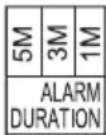
The alarm duration can be set via the slide switch in the interior of the siren.
The options for selection here are: 1 minute, 3 minutes, 5 minutes
Important: One of these three times must be chosen.
4.1.2. Setting the switch-on delay
The switch-on delay is important, so that you are able to leave the monitored area without setting off the alarm directly. The standard setting here is 5 seconds.
This can alternatively be set to 30 seconds using the slide switch in the interior of the siren.
| Hi 30s |
| Lo 5s |
4.2. Commissioning the remote control
To do this, carefully open the battery lid on the rear side of the remote control and then remove the transparent contact breaker. Now the remote control is ready to be added in the system.
4.2.1. Addition of the remote control
- Press the LEARN button in the interior of the siren.
- Now press any button on the remote control that should be added to the system.
- The alarm siren confirms the remote control's signal with a short beep.
- The remote control is integrated into the system.
- Leave the LEARN mode by pressing the LEARN button again.
4.2.2. Deletion of a remote control (for example, in the event of loss)
If a remote control becomes lost or broken, this can no longer be deleted and the outdoor siren must be reset.
Important: In doing this the alarm system can only be deactivated through a further remote control, otherwise the sabotage protection sets off an alarm immediately upon removing the sirens.
To do this, please proceed as follows:
- Open the front cover of the outdoor siren. Caution! The siren sets off the alarm immediately when it is taken off the wall, as well as when the mount is unscrewed.
- Keep the LEARN button pressed down for 5 seconds (the LEDs flash for a short time).
- Press the LEARN button again shortly, in order to get into learn mode (all blue LEDs now light up permanently).
- Now press any button on the remote control.
- The alarm signal confirms the remote control's signal with a short beep.
- Now leave the LEARN mode by pressing the LEARN button again.
- Now you can control the system via the new radio remote control system.
4.3. Commissioning the window sensor with magnetic contact
In order to commission the window sensor, open the lower cover of the product and place 2x AAA batteries (with the correct polarity) accordingly into the battery compartment here.
Battery status display
This product has a battery status display. As soon as the product's batteries need to be replaced, the LED on the front side flashes red slowly when in resting condition.
4.4. Commissioning the movement sensor
Remove the battery cover screw using a screwdriver and then take off the battery cover. Place 1 x 9V (6LR61) battery block (with the correct polarity) accordingly in the battery compartment. Then you can place the battery cover on again.
Note
The movement sensor has an energy-saving mode for conserving the battery. This means that the movement sensor switches into energy-saving mode for three minutes after the alarm and does not send any further signals during this time.
4.4.1. Sensitivity of the movement sensor
The sensitivity of this movement sensor can additionally be set.
For this, it has contact pins in the interior (below the battery).
These are marked with H (High ≤ 13 m range), M (Medium ≤ 6 m range) or L (Low ≤ 4 m range). For the desired setting, plug what is known as the jumper (small black block) onto the relevant pair of pins (vertical).
5. ASSEMBLY AND PLACE OF ASSEMBLY
5.1. Assembly instructions for the outdoor siren
- This product can be installed both in indoor and outdoor areas.
- This product is specially designed for mounting on the wall.
- Place the product where it is easily visible and at a height that is not directly reachable.
- Ensure that the spring of the sabotage switch, on the rear side of the siren, is completely pressed in (clicking noise when snapping in).
- Before installation, check the suitability of the place of assembly and also check the mounting material. Ensure that no electrical, water, gas or other connections are present at the mounting location.
Depending on your mounting location, additional/other mounting accessories may be required for mounting.
5.2. Assembly instructions for the movement sensor
- This product is exclusively suited to use in indoor or covered (rooved) areas. No liability for subsequent defects can be undertaken in the case of mounting in outdoor areas.
- It is recommended to mount the product in vulnerable areas or directly next to possible break-in points.
- Do not mount the movement sensor directly next to ovens, air-conditioning units or other similar types of system.
- Select the place of mounting so that there are very few or no hindrances (e.g. furniture or cupboards) in what will later be the coverage area.
- Before installation, check the suitability of the place of assembly and also check the mounting material. Ensure that no electrical, water, gas or other connections are present at the mounting location.
- Depending on your mounting location, additional/other mounting accessories may be required for mounting.
Coverage angle
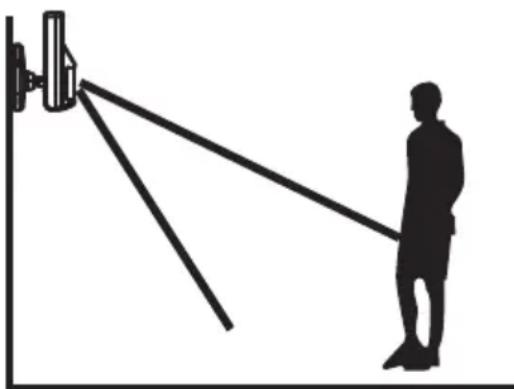
The ideal coverage angle reaches the product at an assembly height of 1.8 - 2.4m
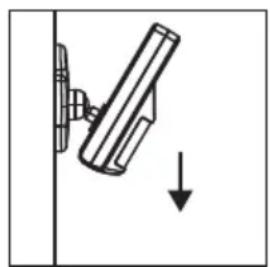
Reduction of the area
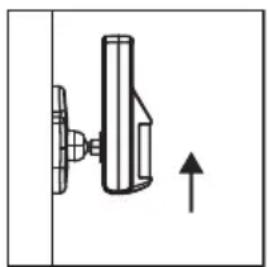
Enlargement of the area
5.3. Mounting instructions for the door and window sensor with magnetic contact
- It is recommended to affix the sensor unit directly on window or door frames and the magnetic contact directly on the window or the door (moving part).
This product is suited exclusively for use indoors. No liability for subsequent defects can be undertaken in the case of mounting in outdoor areas. - Please note that the markings on the device and the contact must be in a line and should be a maximum of 5 mm apart from each other, in order to ensure smooth functioning.
- The sensor can be mounted both on the left and on the right side.
6. DEVICE SETTINGS
6.1. Resetting to the factory settings
The entire system can be reset when needed.
To do this, press and hold the LEARN button in the interior of the siren for 5 seconds.
Then, by pressing the LEARN button again, you get into the learn mode and can addition the remote controls again.
GB
6.2. Functions of the remote control
Operating buttons of the remote control
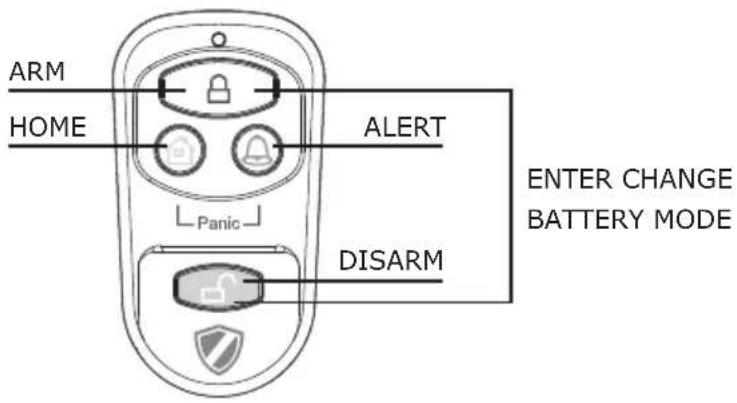
| By pressing the button the battery status of the outdoor siren can be queried. | |
| By pressing the button, the alarm duration can be queried. | |
| PANIC | By simultaneously pressing the and buttons, an alarm is immediately set off. |
| ARM/DISARM | These buttons can be used to activate the system (ARM) or to deactivate it (DISARM). |
| Battery status | By simultaneously pressing the ARM and the DISARM buttons, the sabotage protection can be activated or deactivated. |
6.2.1. Query of the alarm duration
To do this, press on the remote control. Now you can read the alarm duration from the flashing of the LEDs of the sirens.
| LED Code (flashing) Once T | Twice Three times | |
| Alarm duration 1 minute 3 | minutes 5 minutes |
6.2.2. Query of the battery status
To do this, press on the remote control. Now you can read the battery status from the flashing of the LEDs of the sirens.
An LED that is continually illuminated red shows a good to full status of the batteries.
If the LED only continues to flash, then it is recommended to replace the batteries.
6.2.3. Battery change mode (deactivation of the sabotage protection)
This mode is important for being able to complete a battery change, without setting off the alarm of the outdoor siren. To do this, press + at the same time on the remote control.
The outdoor siren additionally displays the deactivated state of the sabotage protection through the lighting up of all 6 blue LEDs. This mode switches itself off again automatically after a maximum of 1 hour. Therefore the alarm system is active, even when activation was forgotten.
Completing a battery change:
- Deactivate the manipulation protection by pressing the buttons simultaneously 日 + 日
- All blue LEDs now light up.
- Remove the screws of the front cover (on the lower tip of the siren) using a Phillips screwdriver and then remove the front cover.
- Deactivate the siren by moving the switch to the OFF position.
- Now you can replace the batteries and then reactivate and mount the siren (ON position).
- Deactivate the battery change mode using the button B.
GB
6.3. House security code
In most cases of use this code does not need to be changed.
If, however, for example, due to frequent false alarms, you suspect that neighbours in your area use alarm systems of the same type, you are recommended to change the house security code.
Important:
If you wish to make changes to the house security code, this must be completed for all components (outdoor siren, remote control, individual components).
All devices have a 4-polar jumper / DIP switch (usually in the battery compartment or under an additional cover). Ensure that, later, all devices have exactly the same setting of this jumper. In this, the following applies:
Inserted = ON / removed = OFF
| Jumper for the house code | ON DIP 4 3 2 1 | ·Outdoor siren ·Sensors Standard Code 1: ON, 2: ON, 3: ON, 4: ON |
| DIP switch for the house code | ON ON ON ON | ·Remote control Standard Code 1: ON, 2: ON, 3: ON, 4: ON |
7. ADDITION OF FURTHER COMPONENTS
Further components can be integrated into the system. Differing from the case of the starter set HG1000, it is sufficient when the new components have the same house security code. This means that, upon purchase, further components of the same jumper require the same PIN allocation as the system that was already used.
Zone allocation: This is not required in this system.
This allocation is required for the starter set HG1000, because work with safety zones takes place here. Remove this jumper or plug this into your standard configuration.
After successful mounting of the components, the system can be used.
It has two main modes: Alarm mode and standby mode
In order to activate the system (when, for example, you are leaving the house) simply press the B button.
Now the countdown that has been set runs down and then the system activates.
If, for example, in your absence a break-in takes place (movement sensor or window contact is triggered) the system alarm is triggered.
If, however, there was no break-in in your absence, simply and conveniently deactivate the system using the radio remote control system, by pressing the button when you enter the house.
The system now switches into the standby mode.
9. TECHNICAL DATA
| Outdoor siren (alarm centre) | |
| Power supply 4x LR20 (D) batteries | |
| Siren dB 120 dB | |
| Maximum number of sensors 250 | |
| Operating frequency 868.35 MHz (+/- | 0.5 MHz) |
| House security code Via 4-polar jumper | |
| Alarm duration 1/3/5 minutes (can be set) | |
| Switch-on delay 5/30 seconds (can be set) | |
| Housing ABS plastic (waterproof) | |
| Remote control | |
| Power supply 1 x 12V batteries (A27) | |
| Operating frequency 868.35 MHz (+/-0.5 MHz) | |
| Radio range Max. 60 m (open space) | |
| House security code Via 4-polar jumper | |
| Window sensor with magnetic contact | |
| Power supply 2 x AAA batteries (LR03) | |
| Operating frequency 868.35 MHz (+/-) | 0.5 MHz |
| Radio range Max. 250 m (open space) | |
| House security code Via 4-polar jumper | |
| Zone codes Not relevant | |
| Movement sensor | |
| Power supply 1 x 9V battery (6LR61) | |
| Operating frequency 868.35 MHz (+/-0.5 MHz) | |
| Radio range Max. 250 m (open space) | |
| House security code Via 4-polar jumper | |
| Zone codes Not relevant | |
| Coverage angle < 110° | |
| Sensitivity (Sensor) | Can be set H (high) ≤ 13m range M (medium) ≤ 6m range L (low) ≤ 4m range |
Disclaimer
Schwaiger GmbH gives no guarantees and assumes no liability whatsoever for damages arising from improper installation or assembly as well as from the improper use of the product or a failure to comply with the safety instructions.
Disposal
Electrical and electronic devices including batteries must not be disposed of with household waste. The user is legally obliged to return electric and electronic devices including batteries at the end of their service life to the designated public collection points or to return them to the original point of sale. Particulars relating to this are regulated by the respective national law. The symbol on the product, the operating instructions, or the packaging refers to these provisions.
EC Declaration of Conformity
Schwaiger GmbH hereby declares that this product conforms to the basic requirements and other relevant regulations of the Directive 1999/5/EC. The declaration of conformity is at www.schwaiger.de/downloads. This product was designed, tested and manufactured in accordance with the European R&TTE Directive 1999/5/EC.
TABLE DES MATIÈRES
F
Should you require any technical support and not be able to get it at your specialist dealer's, please contact our technical support team.
Schwaiger GmbH
Würzburger Straße 17
90579 Langenzenn
Hotline: +49 (0) 9101 702-199
www.schwaiger.de
info@schwaiger.de
Geschäftszeiten:
Monday to Friday 8 am - 5 pm