
HDM31A - Switch Schwaiger - Free user manual and instructions
Find the device manual for free HDM31A Schwaiger in PDF.


| Product Type | HDMI Amplifier Switcher |
| Brand | Schwaiger |
| Model | HDM31A |
| Number of Inputs | 3 HDMI |
| Number of Outputs | 1 HDMI |
| Max Video Resolution | 1080p (1920x1080) |
| Supported Resolutions | 480i, 576i, 1080i, 480p, 576p, 720p, 1080p |
| Bandwidth | 250 MHz / 2.5 Gbps per channel (7.5 Gbps total) |
| Intelligent Switching | Yes, auto-selects active source |
| Remote Control | IR remote included |
| IR Extender | Included, for remote placement |
| Power Supply | 5V DC via external adapter (optional) or bus-powered via HDMI |
| Dimensions (approx.) | 100 x 60 x 20 mm |
| Weight (approx.) | 100 g |
| Material | Plastic |
| Color | Black |
| Operating Temperature | 0°C to +70°C |
| Operating Humidity | 10% to 85% RH (non-condensing) |
| Storage Temperature | -10°C to +80°C |
| Storage Humidity | 5% to 90% RH (non-condensing) |
| Accessories Included | Main unit, IR remote, IR extender receiver, user manual |
| Maintenance | Clean with a dry, soft cloth; avoid liquids |
| Safety | Do not open the device; avoid moisture and extreme temperatures |
| Spare Parts / Repairability | No user-serviceable parts; contact distributor for repair |
Frequently Asked Questions - HDM31A Schwaiger
User questions about HDM31A Schwaiger
0 question about this device. Answer the ones you know or ask your own.
Ask a new question about this device
Download the instructions for your Switch in PDF format for free! Find your manual HDM31A - Schwaiger and take your electronic device back in hand. On this page are published all the documents necessary for the use of your device. HDM31A by Schwaiger.
USER MANUAL HDM31A Schwaiger
Monday to Thursday: 8:00 - 17:00 h
Friday: 8:00 - 14:30 h
INHALT
D
Rückseite
5.0 anscHluss unD BeDienunG
D
Thank you for purchasing this product. For optimum performance and safety, please read these instructions carefully before connecting, operating or adjusting this product. Please keep this manual for future reference.
1.0 INSTRUCTION
This is a kind of high performance mini HDMI Amplifier Switcher. This kind HDMI Amplifier Switcher not only has the key-press-switching function, but also has the IR remote control and intelligent function. That is to say, as soon as the power supply of the source equipment is switched, this switcher will respond automatically. In addition, it is standardly equipped with IR extender receiver: safe and convenient.
This kind of HDMI Amplifier Switcher routes high definition video (in multiple resolutions up to 1080p) and digital audio from any one of the several sources to display units. All inputs accommodate the connections of the high definition video sources simultan Player, compatible well for HD-DVD, PS3, Xbox 360 etc. The output sends the high definition audio/video signals to a high definition display.
GB
1.1 INTELLIGENT FUNCTION
GB
1) When supplied with power, this switcher will select the power-on source device depending on the sequence automatically(input1>inout2>input3)
2) Once the source device is turned on or plugged in(should stay power-on mode), the switcher will automatically select this source.
3) Once the source device is turned off or plugged out, the switcher will automatically select the next power-on source depending on the sequence automatically(input1>inout2>input3)
NOTE
1) When the source devises are on the stand-by mode, its power supply should be turned off, otherwise this switcher can not meet intelligent function.
2) When plugged in or out, this switcher is completely intelligent.
1.2 LIABILITY STATEMENT
Every effort has been made to ensure that this product is free of defects. Schwaiger GmbH cannot be held liable for the use of this hardware or any direct or indirect consequential damages arising from its use. It is the responsibility of the user of the hardware to check that it is suitable for his/her requirements and that it is installed correctly. All rights reserved. No parts of this manual may be reproduced or transmitted by any form or means electronic or mechanical, including photocopying, recording or by any information storage or retrieval system without the written consent of the publisher.
Schwaiger GmbH reserves the right to revise any of its hardware and software following its policy to modify and/or improve its products where necessary or desirable. This statement does not affect the legal rights of the user in any way.
All third party trademarks and copyrights are recognized.
GB
1.3 FEATURES
GB
This Mini HDMI Amplifier Switcher has many features that enable it to perform in a superior manner. Among those features you will find:
»Multifunctional on switching: intelligent or mechanical
»IR extender receiver (included)
»IR remote (included)
»Supports highest video resolution 1080p
»Supports 250MHz/2.5Gbps per channel (7.5Gbps all channel) bandwidth
2.0 SPECIFICATIONS
| Signal Inputs/Output | |
| Input DDC Signal 5 volts | p-p (TTL) |
| Maximum Single Link Range | 1920X1080P |
| Output Video HDMI1 | |
| Video format supported | |
| Operating Frequency | |
| Frequency Up to 250MHz | |
| Vertical Frequency Range | 50/60Hz |
| Resolutions(HDTV) | |
| Interlaced (50&60Hz) 480i, 576i, 1080i | |
| Progressive (50&60Hz) | 480p, 576p, 720p, 1080p |
| Environmental | |
| Operating Temperature | 0 °C to +70°C |
| Operating Humidity 10% | to 85 % RH (no condensation) |
| Storage Temperature -1 | 0°C to +80°C |
| Storage Humidity 5% to | 90 % RH (no condensation) |
| Power Requirement No | power needed for standard product |
GB
GB
| Accessories |
| IR extender receiver |
| IR remote |
| User Manual |
NOTE Specifications are subject to change without notice.
3.0 PACKAGE CONTENTS
Before attempting to use this unit, please check the packaging and make sure the following items are contained in the shipping carton:
GB
»Main unit.
»Remote control
»IR extender receiver
»User's Manual
NOTE Please retain the original packing material in the case of needing to return the unit.
4.0 PANEL DESCRIPTIONS
GB
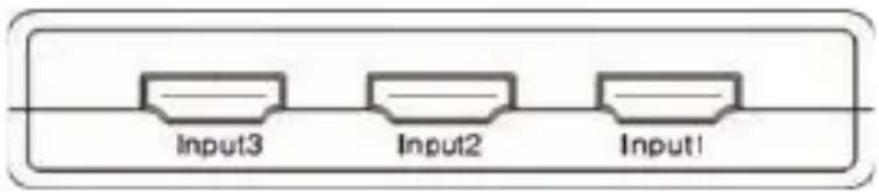
Front
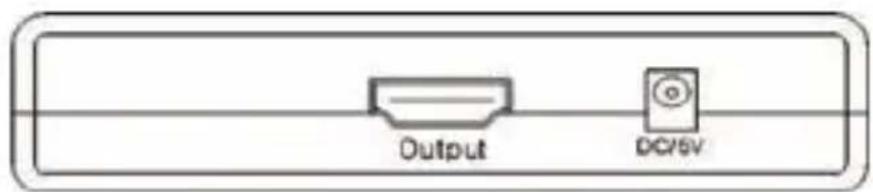
Rear
5.0 CONNECT AND OPERATE
1) Connect the HDMI input source to the HDMI switcher (Input cables are optional). See connection diagram section below.
2) Turn on the power.
ATTENTION Insert / Extract cable gently.
GB
5.1 CONNECTION DIAGRAM
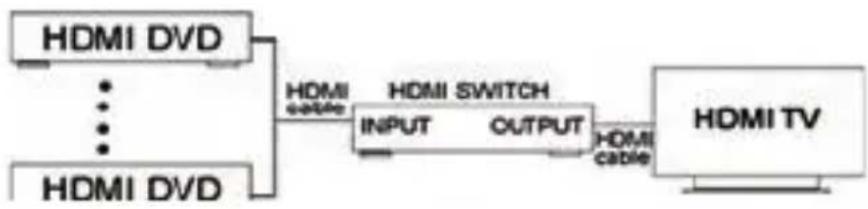
flowchart
graph LR
    A["HDMI DVD"] --> B["HDMI Switch"]
    C["HDMI DVD"] --> B
    B --> D["HDMI TV"]
    B --> E["INPUT OUTPUT"]
    E --> F["HDMI cable"]
6.0 TROUBLESHOOTING
GB
If the product doesn't appear to be functioning, make certain that the source and the destination device connected to the unit are functioning correctly. If there exist another problems please check the below settlement carefully.
| Without LED light | Is the power adapter connected? Is the ON/OFF switch on “ON” position? |
| No display Is the display unit turn on? Are cables connected properly? Please refer to the connection diagram. | |
| Without sound | 1. Check the display volume2. Turn off the HDMI source (DVD, PS3 etc.) and power on again. If it’s still not ok, then3. Turn off the switch box and turn on again4. Repeat step 2 again if still not working* Some HDMI devices without ATC certified will have such problems. |
| Remote not woking | Replace the battery of the remote control |
DO NOT open the HDMI switch box. Once opened, there are no responsibility of us. For other problems, please contact your distributor for repair.
7.0 NON-HDCP COMPLIANT DEVICES
GB
If a DVI device does not appear to work, make certain that the device is HDCP compliant. A non-HDCP compliant DVI device will not work with a signal that has HDCP encoding present.
NOTICE SCHWAIGER reserves the right to make changes in the hardware, packaging and any accompanying documentation without prior written notice. Different products have different outlooks.
SCHWAIGER®
BDA_HDM31A_a
Brand : Schwaiger
Model : HDM31A
Category : Switch