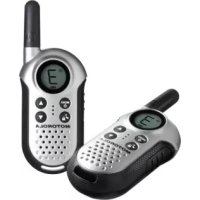
T4 - Radio ZEBRA - Free user manual and instructions
Find the device manual for free T4 ZEBRA in PDF.



| Product type | PMR Radio (Private Mobile Radio) |
| Brand and model | ZEBRA T4 (TLKR T4) |
| Number of channels | 8 PMR channels |
| Maximum range | Up to 6 km (varies with conditions) |
| Power supply | 3 AAA alkaline batteries (not included) |
| Typical battery life | Approximately 20 hours |
| Main functions | Confirmation beep, charge indicator, channel monitoring, automatic scan, keypad lock, key tone, power save, call alert tone |
| Low battery indicator | Yes (flashing icon) |
| Frequencies | 446.00625 - 446.09375 MHz (channels 1-8) |
| Package contents | 2 radios, 2 belt clips, user guide |
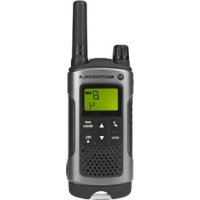
| Display type | LCD with icons |
| Safety | Compliant with RF exposure standards (refer to provided brochure) |
| Warranty | See conditions in the manual |
| Recommended use | Leisure, outdoor activities, group communication |
Frequently Asked Questions - T4 ZEBRA
User questions about T4 ZEBRA
0 question about this device. Answer the ones you know or ask your own.
Ask a new question about this device
Download the instructions for your Radio in PDF format for free! Find your manual T4 - ZEBRA and take your electronic device back in hand. On this page are published all the documents necessary for the use of your device. T4 by ZEBRA.
USER MANUAL T4 ZEBRA
TLKR T4 Owner's Manual
Product Safety and RF Exposure
for Portable Two-Way Radios 2
Features 3
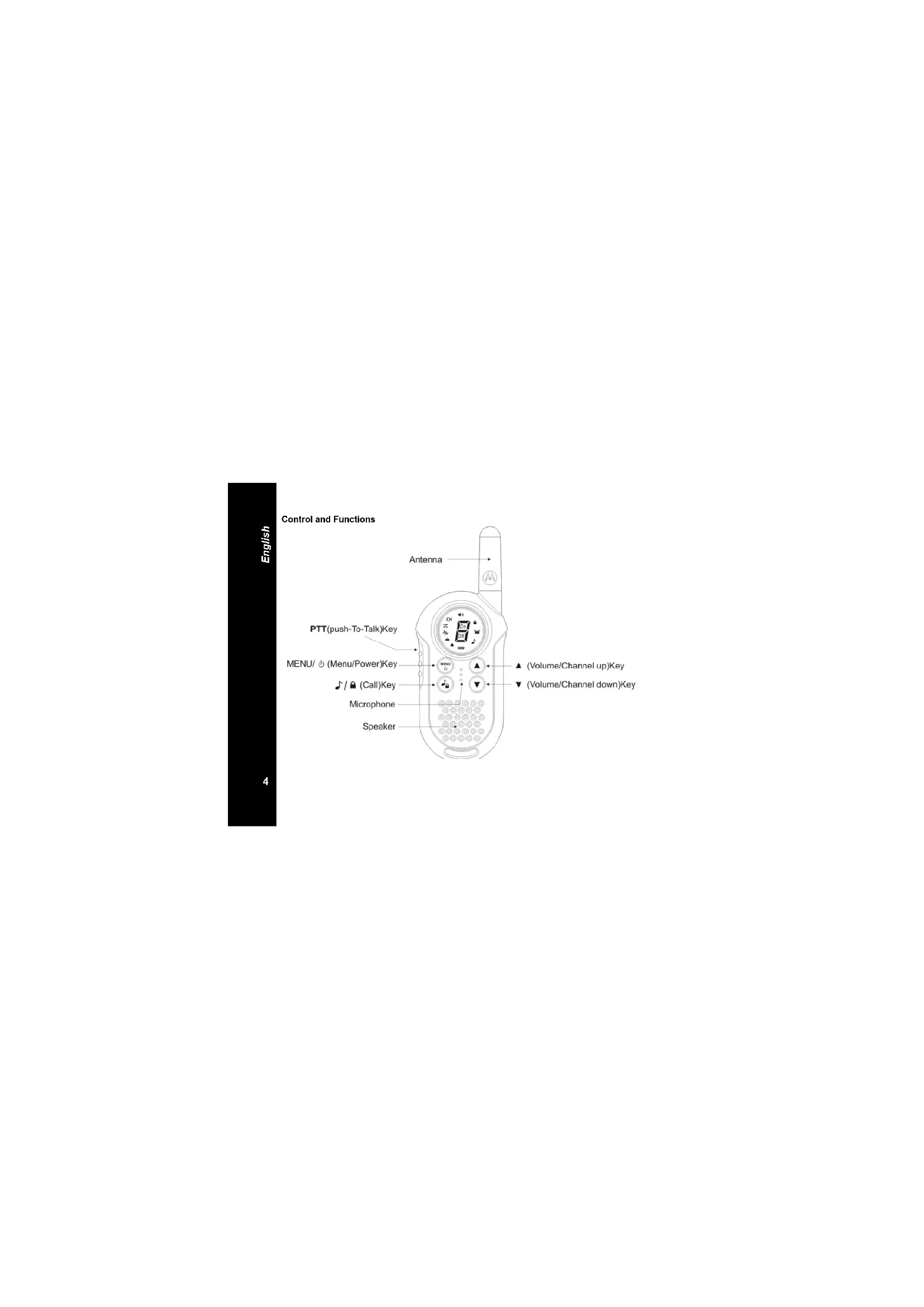
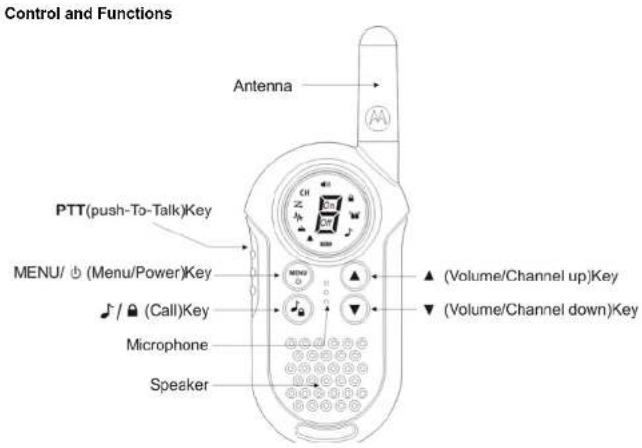
Display 3 Control and Functions 4
Package Contents 5
Install the Battery 5
Battery Level and Low Battery Alert 5
Using the Radio 53
Turning the Radio on and Adjusting the
Volume 6
Adjusting the Sound (Key Tone) 6
Talking on Your Radio 6
Navigating through the Menu 6
Choosing a Channel 7
Channel Scan Feature 7
Monitor Mode Feature 8
Transmitting a Call Alert Tone 8
Key Lock 8
Automatic Power Save Feature 8
Roger Beep 8
Specifications 9
Frequency Chart 9
Warranty Information 10
What is Not Covered by the Warranty . . . 10
Copyright Information 11
Product Safety and RF Exposure for Portable Two-Way Radios

Before using this product, read the operating instructions for safe usage contained in the Product Safety and RF Exposure booklet enclosed with your radio.
ATTENTION!
Before using this product, read the RF energy awareness information and operating instructions in the Prodct Safety and RF Exposure booklet to ensure compliance with RF energy exposure limits.
Features
- 8 PMR Channels
- Up to 6 km Range
- Roger Beep
Battery Level Meter -
Channel Monitor
Channel Scan
Keypad Lock -
Range may vary depending on environmental and/or topographical conditions
Display
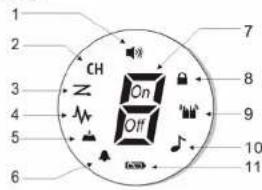
- Volume Indicator
- Channel Icon
- Scan Indicators
- Monitor Indicator
- Key Tone Indicator
- Roger Beep Tone Indicator
- Channel Number Indicator
- Keypad Lock Indicator
- Transmit/Receive Indicator
- Call Tone Indicator
- Battery Level Meter
English
Congratulations on your purchase of the PMR (Private Mobile Radio) Low Tier radio. This product is a lightweight, palm-sized radio. Use it at sporting events to stay in contact with family and friends, hiking, skiing, outdoors, or in a neighborhood watch for vital communication. This compact, state-of-the-art device is equipped with many features.
Package Contents
Your package contains two TLKR T4 radios, two belt clips and this reference guide. You may operate the unit with 3 AAA alkaline batteries per handset (not included).
Install the Battery
Your TLKR T4 radio uses 3 AAA alkaline batteries (not included). If alkaline batteries are used, we recommend using high quality alkaline batteries.
To install the alkaline batteries:
1) Make sure your radio is OFF.
2) Remove the battery compartment door by unlocking the battery clip using a coin or finger nail then pull up to remove the battery cover.
3) Install the 3 AAA batteries (not included) into the battery compartment. Be certain to follow the + and - symbols in the compartment. Installing the batteries incorrectly will prevent the unit from operating.
4) Replace the battery compartment door by sliding the door into place.
Battery Level and Low Battery Alert This unit has a battery level meter on the display to indicate the status of the batteries. When the battery in the unit is low, the batter level meter icon shows Replace the alkaline batteries immediately.
Using the Radio
In order to get the most out of your new radio, read this reference guide completely before attempting to operate the unit.
English
Turning the Radio On and Adjusting the Volume
- Press and hold the MENU key to turn the radio ON, and increase the volume by pressing the key. To decrease the volume, press the key.
- Press and hold the MENU/lay again to turn the radio OFF.
Adjusting the Sound (Key Tone)
Your radio emits a beep each time one of the keys (except for the PTT key) is pressed. To turn this sound OFF, press MENU button 4 times, the Key tone icon is flashing. To turn this sound ON, Press the key to turn ON.
Talking on Your Radio
To talk to others using the radio: Press and hold the PTT key and speak in a clear, normal voice about 5-8 cms away from the microphone. While you are transmitting, the icon will appear on the display. To avoid cutting off the first part of your transmission, pause slightly after pressing the PTT button before you start talking.
When you have finished speaking, release the PTT key. You can now receive incoming calls. While receiving, the icon will appear on the display.
Navigating through the Menu
To access the advanced features of the PMR Low Tier, your radio has a Menu function.
1. To enter the Menu, press the MENU key.
2. Additional presses of the MENU key will advance you through the Menu until exiting to "Normal" operating mode.

Choosing a Channel
In order to speak to someone, each of you must set to the same channel.
To choose a channel:
Enter the Menu. Press the key to increase or decrease the channel number displayed. If you press and hold the key, the channel number increase or decrease continuously.
Press PTT button to select channel.
Channel Scan Feature
Your PMR Low Tier radio has a channel scan feature that allows you to easily scan all 8 channels. When an active channel is detected, the radio will pause on that channel until the channel is clear. Then after a 2 second pause, the radio will continue scanning. Pressing the PTT key while the scan is paused on a channel will allow you to transmit on that channel.
To turn the channel scan ON:
Enter the Mode Menu. Advance through the menu until 2000 blinks. Press key to turn On the Scan function. Scanning channel will start while Scan icon is displayed.
To turn the channel scan OFF: Press the MENU/the Scan icon blinks, press key to turn Off the Scan function.
English
Monitor Mode Feature
Your PMR Low Tier radio allows you to listen for weak signals on the current channel at the press of a key.
To turn the Monitor Mode ON: Enter the menu. Advance through the menu until the icon blinks. Press the key to turn
On the Monitor function. Monitoring will start while Monitor icon is displayed. To turn the Monitor Mode OFF: Press the MENUAdvance through the Monitor mode, press the key to turn Off the Monitor function.
Transmitting a Call Alert Tone
Your TLKR T4 radio is equipped with a call tone that will be transmitted when the key is pressed. To transmit a call tone, press the key. The tone will be transmitted.
Key Lock
To Lock the keypad:
Press and hold the key. The icon appears.
To Unlock the keypad:
Press and hold the key. The icon disappears.
Automatic Power Save Feature
Your PMR Low Tier radio has a unique circuit designed to dramatically extended the life of the batteries. If there is no transmission nor an incoming call within 3 seconds, your radio switches to the Power Save mode. The radio is still able to receive transmissions in this mode.
Roger Beep
Roger Beep is a BEEP that is sent to notify the end of transmission (PTT transmission). Roger Beep can be heard through the speaker when Key Beep is on. Roger Beep is transmitted even if Key Beep is turned off. However, Roger Beep will not be heard from the speaker.
To turn Roger Beep OFF:
Enter the Menu. Advance through the Menu
until the on blinks. Press the key to
turn Roger beep Off.
To further Reference Page ON:
To turn Roger beep ON:
In your Roger OFF mode, press the key to
turn Roger beep On.
Specifications
Channels 8 PMR
Operating 446.00625-446.09375 MHz
Frequency
Power Source 3 AAA Alkaline Batteries
not included)
Range Up to 6 km
Battery Life 20 Hours typical
Alkaline Batteries
Frequency Chart (MHz)
Ch. Freq.
1446.00625
2446.01875
3446.03125
4446.04375
5446.05625
6446.06875
7446.08125
8446.09375
English
Warranty Information
The authorized Motorola dealer or retailer where you purchased your Motorola two-way radio and/or original accessories will honour a warranty claim and/or provide warranty service.
Please return your radio to your dealer or retailer to claim your warranty service. Do not return your radio to Motorola.
In order to be eligible to receive warranty service, you must present your receipt of purchase or a comparable substitute proof of purchase bearing the date of purchase. The two-way radio should also clearly display the serial number. The warranty will not apply if the type or serial numbers on the product have been altered, deleted, removed, or made illegible.
What Is Not Covered By The Warranty
Defects or damage resulting from use of the Product in other than its normal and customary manner or by not following the instructions in this user manual.
Defects or damage from misuse, accident or
Defects of damage from improper testing, operation, maintenance, adjustment, or any alteration or modification of any kind.
Breakage or damage to aerials unless caused directly by defects in material or workmanship.
Products disassembled or repaired in such a manner as to adversely affect performance or prevent adequate inspection and testing to verify any warranty claim.
Defects or damage due to range.
Defects or damage due to moisture, liquid or spills.
All plastic surfaces and all other externally exposed parts that are scratched or damaged due to normal use.
Products rented on a temporary basis.
Periodic maintenance and repair or replacement of parts due to normal usage, wear and tear.
Copyright Information
The Motorola products described in this manual may include copyrighted Motorola programs, stored semiconductor memories or other media. Laws in the United States and other countries preserve for Motorola, certain exclusive rights for copyrighted computer programs, including the exclusive right to copy or reproduce in any form, the copyrighted Motorola programs.
Accordingly, any copyrighted Motorola computer programs contained in the Motorola products described in this manual may not be copied or reproduced in any manner without express written permission of Motorola. Furthermore, the purchase of Motorola products shall not be deemed to grant either directly or by implication, estoppel, or otherwise, any license under the copyrights, patents or patent applications of Motorola, except for the normal non-exclusive royalty free license to use that arises by operation of law in the sale of a product.
MOTOROLA, the Stylized M Logo and all other trademarks indicated as such herein are trademarks of Motorola, Inc. Reg. U.S. Pat. & Tm. Off.
Motorola, Inc. 2010
English
eannnnnne
SOMMAIRE
Frequence 446.00625-446.09375 MHz
operationnelle
Unite
d'alimentation
3 piles alcalines AAA
(nonfournies)
Portée Jusqu'à 5 km
Autonomie de
la batterie
20 heures (conditions
normales) Batteries, alcalines
Cagr Uyan Tonu Iletimi
TnKTLR4
106003M 3 uOeHbBbBbBbBbBbBbBbBbBbBbBbBbBbBbBbBbBbBbBbBbBbBbBbBbBbBbBbBbBbBbBbBbBbBbBbBbBbBbBbBbBbBbBbBbBbBbBbBbBbBbBB
LIUONHUA 68BATAPEN YCTANAHNMSAOTCR CHENYUHAMOB530AM:
1.Y6eMTcB,HTPOpaMOCTaHLMBaIKIOHeHa.
2.CHMMT6 Kpblxky BaTapeHOrO OToJEnEHHA, MOHEKTHN HnHOTem OTrrHyb BA TapeHbHb 3aXMMN N NotTByH erO BBePc.
3.YCTAHOBHTB 6BATAPERHINOTcE3 5IeONHbHE 6BATAPENAA (HE BxOaT B KOMNNEK NOCTAKNI).CobXnADTe NpAHOCTB, 06b3HHeHHyIO CHMAMONAT "+N."BHTPYr OTECA. ECN SatAPenETYACTaHOBENH HApABINHbO, PAHNOCTAHUNI PABOTAH, HB 6VET.
4.3aAHTHe NaMeTOXpHxkyBbatapeHoro OtaKaKa
HnHkKatop yobhna 3apara HnCnnepeaochtanmmeerHnKtappot
TekyoepyOBpHa3apara. PnpHnKOM
3apara 3apara 2nok HnKATOPA yobhna
3apara 3apara Mnraet.HemeJeHHO
3aene HnOeOHBe 3apara.
Yro6bIyBb6paTbKaHAn:
BOMATU B MHO, IIN yBOHIOHNO HIN yMHBWHEH NTOBOPaKaEMO HOMePAKAHANA HAXMBNAI KNBAMU ANN ⅡN HENTPepbHOBO YBCENCHNHN MYN MChbueHNO HOMePAKAHANA HAXMBNAI KNBAMU ANN ⅡN DEXPKBHAAITE BE HAXAOT.
AaBbOpaKaHana HaxMnta TaHReHrty PTT.
ФункняckaHnpOBaHaKaHaNoB
Baaa padnoctan Ocaohena fynknae kana haoanb. noqbnnohnae kahnpoabte BCE 8 kaanob. Pn6 bnapyekenn HAnbHOI Kana padnoctan qikcnpnyer ta 30n Kaanah, nokn OH e oocodObrat. 3atm.
nocne2-6exyHdHn nay3b. paHIOCTAHm B030BHOHHT cKANHPoAHn. HxAaTANTHTy PTT BO sPem naysbl cKANHPoAHn. Bb MOKete Hauhhepepehy Ha daHHOM KaHane.
YTO6B KINHOHTB CKANPOBAHNE KAHANO8
BOI4NTBE MEO. DAIIRTEcNoMHO, NOKA He
3AMHIaER 3AHOV. YTO6B KINHOHTB FyHKIMIO
CKANPOBAHNI.HKMMITE KNABHIA ▲ HAHETOT
CKANPOBAHINE KAHA N ONGBIOTC 3AHOV
CKANPOBAHNI. TO6B BLKKNIOHTB CKANPOBAHNE
KAHANO8
HAKMITE MENUO, HAYOK CKANPOBAHNI
3AMIRaER, HAKMITE KNABHUY, VTO6B
OTKNOHTB FyHKINO CHKANPOBAHNI.
Функш MOHHTOPHRA kaHana
YHKJIUMMOHITOPINHA KAHAIANHOBONIHTPPOCYYNUATb CnBaIe CHRNIHAI HauTKyUHMKAHAIe pIH NAKATNI COOTERTCTBYOUSI KNAUBEM
BouMItBe M MeH, DnaiRaeTbc No MeHIO, NOAe H 3aAMrTa3HaOHK □. HaxMItBe KnaBIMU A, To6b6 BkIbKnHb FyHKuMO MoHTOpINHra. HauHETc MOHTOpHNr, H IOBANTc 3aOHK MoHTOpHNr.
BbKIOHJNEMHOTOMIHHPHa: HAKATNHENMUII BbIKDITEBPEKMHOMOTOHHPHa,BAKKIMTEKIBAIWU▼,TOObblBbIKDHTbYbHKlKMOHOTOMIHHPHa.
PepedaToHaBb3OBA
B 8pIaOCTHbIM LTKTRKT3 npEyCMOrPbHa nepaehDa ToTa bHb30a PnR HbKAttn KbAIBIN /J. DnBpeNepaehToHa bHb30a KoPOTKO HKBMkTe KNBMIU
Бнokровka knabnW
and Motorola are registered trademarks of Motorola, Inc. © 2007 by Motorola, Inc.
Released in 08/2007. All Rights Reserved.

- Product Safety and RF Exposure for Portable Two-Way Radios
- ATTENTION!
- Features
- Display
- Package Contents
- Install the Battery
- Using the Radio
- English
- Turning the Radio On and Adjusting the Volume
- Adjusting the Sound (Key Tone)
- Talking on Your Radio
- Navigating through the Menu
- Choosing a Channel
- Channel Scan Feature
- Monitor Mode Feature
- Transmitting a Call Alert Tone
- Key Lock
- Automatic Power Save Feature
- Roger Beep
- Specifications
- Frequency Chart (MHz)
- Warranty Information
- What Is Not Covered By The Warranty
- Copyright Information
- SOMMAIRE
- Cagr Uyan Tonu Iletimi
- Функш MOHHTOPHRA kaHana
- PepedaToHaBb3OBA
- Бнokровka knabnW
Brand : ZEBRA
Model : T4
Category : Radio