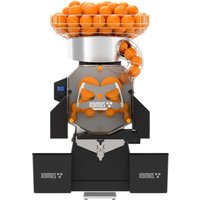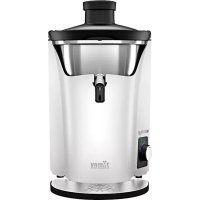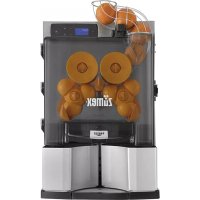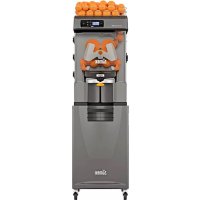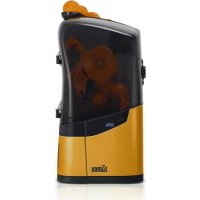
Minex - Juicer Zumex - Free user manual and instructions
Find the device manual for free Minex Zumex in PDF.



Frequently Asked Questions - Minex Zumex
User questions about Minex Zumex
0 question about this device. Answer the ones you know or ask your own.
Ask a new question about this device
Download the instructions for your Juicer in PDF format for free! Find your manual Minex - Zumex and take your electronic device back in hand. On this page are published all the documents necessary for the use of your device. Minex by Zumex.
USER MANUAL Minex Zumex
User's manual 10
The following Manual refers to the model Minex.
Please read the instructions carefully in order to make the most of your machine.
GENERAL INDEX
FIGURES 3
IMPORTANT GENERAL INFORMATION 12
TECHNICAL FEATURES 15
USAGEINSTRUCTIONS 16
GENERAL DESCRIPTION 16
PREPARATION 17
OPERATION 18
CLEANING 21
GENERAL RECOMMENDATIONS 24
MAINTENANCE OF THE FEEDING 25
AREA
FAULT DETECTION 26
EU DECLARATION OF CONFORMITY 28
Zumex reserves the right to modify the information contained in this manual without prior notice.
IMPORTANT GENERAL INFORMATION
- The specific particulars about your Zumex juicer (voltage, frequency and other data of interest) are stated on the Identification Label on the machine itself.
- Remember that for any technical consultation you should get in touch with your usual Distributor/ Official Technical Assistance Service, always stating the Serial number of the machine's Identification Label.
- In Spain Zumex adopts the measures required to ensure that the machines put into the market are subject to selective collectiOn and have correct environmental management. Please get in touch with your authorised Zumex distributor to dispose of these machines correctly.
- If the power cable is damaged, it must be replaced by its manufacturer, by its after-sales service or by similar qualified personnel to avoid hazards.
- Before cleaning the machine or carrying out any maintenance, always unplug from the mains.
- This is not a toy, so prevent children from playing with the appliance.
- This appliance can be used by children over the age of 8 or older, if they are supervised or if they have received instructions relating to the safe use of the appliance and they can understand the risks entailed. User cleaning and maintenance must not be carried
out by children, unless they are 8 years of age or older and they are supervised. Keep the appliance and its cable out of reach of children under the age of 8.
- This appliance can be used by people with impaired physical, sensorial or mental capacities or who lack experience or knowledge, if they are supervised or have received adequate training with respect to the safe operation of the appliance and they understand the risks entailed.
- Do not spray the appliance with water to clean it.
- This machine is designed for squeezing the fruit and the sizes indicated in this manual.
- Do not use other different fruit to that specified in the manual.
- When you clean, perform maintenance or replace parts, make sure that you have always unplugged the power cable from the socket and it is visible.
- Use the cutting elements with great care, to avoid possible cuts.
-
The parts that are in contact with food must be cleaned according to the instructions that you can read in the cleaning chapter.
-
Do not manipulate the machine in such a way that it works without safety elements.
- This appliance is intended to be used in household and similar applications such as:
- Staff kitchen areas in shops, offices and other working environments;
- Farm houses;
- By clients in hotels, motels and other residential type environments;
- Bed and breakfast type environments.
If you have any suggestion or comment to improve our machines or service network, please get in touch with Zumex directly at the address below:

ZUMEX GROUP, S.A.
Poligono Ind. Moncada III C/Moli 2. 46113 Moncada. Valencia. Spain.
Tel. +34 961 301 251 Fax: +34 961 301 255
zumex@zumex.com / www.zumex.com
TECHNICAL FEATURES
| ZUMEX MINEX | |
| Oranges per minute: 13 | |
| Dimensions (cm - inches): 36,5 x 36 x 72 cm | 14" x 14" x 28" | |
| Net Weight (Kg - lb): 19,5 Kg | 43 lb | |
| Power: 44 W | |
| Consumption: 0.45 A | |
| Voltage: Multitension 100-240 V | 50-60 Hz | |
| Anti-humidity Protection: IPX0 | |
| Sound pressure level: Less than 70 dB | |
| Safety: 3 detectors and electronic protection | |
| Maximum fruit size: | To 78 mm (Recommended 65 y 78mm). |
USAGEINSTRUCTIONS
GENERAL DESCRIPTION
ZUMEX MINEX
1 Feeder door 11 Blade
2 Counterweight 12 Tipping blade holder
3 Dispenser 13 MX female drum
4 Feeder Ramp 14 Left peel ejector
5 Retainer 15 Wheel
6 Cover 16 Blade lock
7 Juice Container 17 Silicone seal
8 Juice Container Filter 18 Extra push button
9 Drip tray 19 Tap fitting and joint assembly
10 MX male drum 20 Colour Kit
PREPARATION
To start operating the juice extractor, proceed as follows:
1 Remove the appliance from its packaging and place it on a surface that is as horizontal as possible.
Check that the electricity voltage is within the limits indicated on the machine characteristics label which can be found on the cover of this manual and on the machine itself.
Place the feeder ramp on the machine as shown in Fig. 1
Plug the cable supplied with the machine into a standard socket with a ground connection, Fig. 2
Before using the machine, install the tap fitting as shown in figures 3 and 4. Remove the jug, open the top cover and remove the juice container. The tap fitting and push button are inside the jug. Take out both parts and install the tap. Keep the button for
future use. Replace the container, close the cover and replace the jug in the machine, in that order.
Check that the cover, juice container and peel container are properly inserted in place, as otherwise the machine safety sensors will not allow it to be started.
Important: Your machine has been designed to squeeze citrus fruits with diameters of between 65 and 78~mm . To confirm the correct size of your orange, measure the diameter of your fruit with the caliper accessory supplied with your machine. Discard citrus fruits that do not fit through the 78mm circle and those that pass through the 65mm circle.
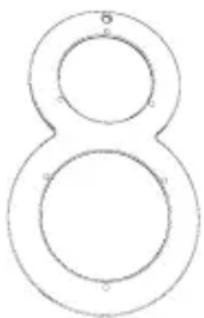
Minimum 65mm
Maximum 078mm
OPERATION
Once the appliance is plugged into the mains at the correct voltage, activate the switch at the rear of the machine (Fig. 2), and it will be ready to operate.
The machine operates as follows: the oranges on the ramp are automatically introduced into the extractor system, where they are cut in half and then the juice is extracted by the drums. Then the juice is deposited in the container or juice jug and the peel in the peel container.
1 Place the oranges for squeezing on the ramp.
Press the ON/OFF button at the front of the machine (Fig. 5), and the unit will automatically start up the extraction process. This process may be interrupted at any time by pressing that button again. The machine will also stop automatically a few seconds after it detects there are no oranges.
3 The dispenser and anti-drip tap allow you to work with the jug inserted in the machine or with a glass. If working with the jug (Fig. 6A), on extracting the juice, it will fall into the jug. If you want to serve the juice directly into a glass, remove the jug and the juice will fall into the juice container. Place the glass under the tap and press it down (Fig. 6B) to activate the tap. The juice will stop falling as soon as you remove your finger from the tap. If you wish, you can work with the push button instead of the jug. Connect the button as indicated in Figure 7. To remove the juice that has fallen inside the container, push the platform with glass inward, or press the button flap while you hold the glass (Fig. 6C).
OPERATING MODES AND INFORMATION DISPLAY
The machine may be in the following three operating modes. Depending on the mode in question, the display will show the following information:
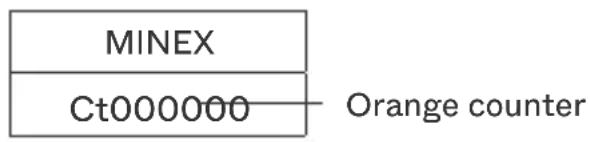
Normal operating mode: The machine is operating or ready to operate. The following appears on the display:
Safety stop mode: The machine has automatically stopped or does not start because one of the 3 elements affecting safe operation is missing (cover, juice container or peel container) or because they are not correctly positioned.
The last 2 digits of the 4 on the bottom line give information about the status of each of those elements. These digits may have the value "0" or "1"; value "0" indicates that the element in question is correctly position, and "1" indicates that it is missing or not correctly positioned.
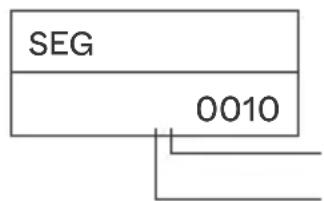
Juice container (correctly positioned) Cover and peel container (not correctly positioned)

NOTE: The values of the first 2 digits give additional information that may be useful for the machine After-sales service.

To prevent accidents, do not tamper with the machine to try and make it work without the safety elements. There are three elements that act on the safety sensors: the cover, the juice container and the peel container. The safety sensors must be tested regularly to ensure they operate correctly. To do this, start the machine and while it is operating, remove one of these elements to see whether the machine stops. Put it back in place and repeat the test with the other elements. If during any of the tests, the machine does not stop, notify the Technical Service.
Alarms mode: The machine has automatically stopped or does not work for some reason. When this occurs, the display will show the origin through the following alarm codes:
To restart the machine after a safety stop or following an alarm, eliminate the cause (remove jammed oranges,...) and restore the safety elements (cover, juice container or peel container). After doing this, press the ON/OFF button and the machine will start the extraction cycle.
1 Voltage alarm
5 Current alarm (thermal)
2 Mean current alarm
6 Short circuit current alarm
3 Tipping device lock alarm
7 Miscellaneous alarms
4 IA lock alarm

If the blade assembly has been dismantled to eliminate a blockage and you find it difficult to reassemble, this is because the machine must be in the start position to perform the mounting operation. To put it at that position, keep the ON/OFF button pressed (with the containers and cover correctly positioned) until the machine stops, and then you can assemble the blade unit with no problem and continue operating.

If the power cable is damaged, it must be replaced by a special cable or unit supplied by the manufacturer or official dealer.
CLEANING
Zumex recommends cleaning the machine at least 1 or 2 times a day, depending on use, to maintain food hygiene conditions.
Zumex recommends using Zumex Citric Active™ Detergent, which is specially designed to clean citrus juicers and has high cleaning power for wax and pulp.
The following steps should be followed for proper cleaning:
When the machine is stopped, disconnect it from the mains by unplugging the plug (never pull on the cable).
2 Release the latch (Fig. 8A) and open the cover. Pull it upwards with both hands to remove it from its hinges. (Fig. 8B). To reattach it, hold the cover with both hands, insert it into its hinges with a vertical up-and-down movement and secure it in position by closing the latch.
Important: Avoid forcing the hinges by exerting force on the cover, as this may cause damage.
3 Disassemble the blade holder unit (Fig. 9A) by turning it clockwise to the and pulling it gently towards you.
For a thorough clean, you should separate the blade from the holder by following these steps:
- Once the blade holder unit has been removed from the machine, turn the selector to the to remove the blade lock.
- To disassemble the turning blade, move it to the vertical position by aligning the notches on the blade and the blade holder. They can easily be separated in this position.
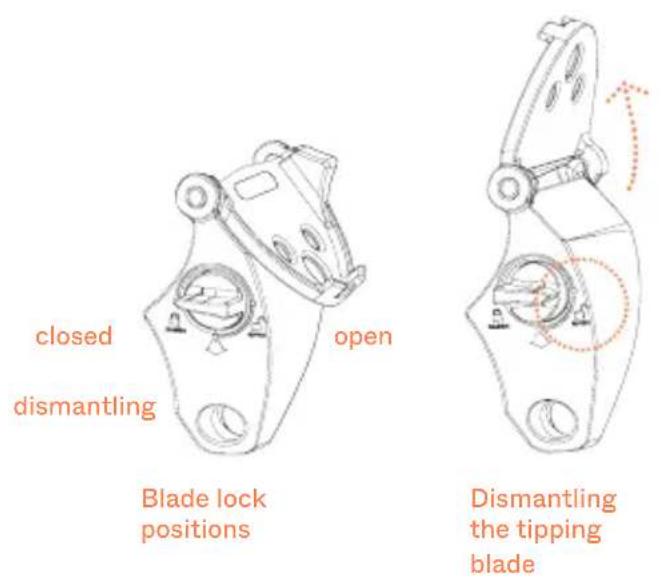
Warning! Handle this part with care as it is sharp. The supporting parts, turning blade and locking device must always be removed from and fitted to the machine as a complete unit.
To mount the blade holder unit in place, first insert the inner part, making sure that it is inserted as far as it will go, and then fit the clip on the outer part (See figure 9). If it is difficult to insert, the machine may have stopped in the middle of the cycle, press and hold the ON/OFF button (with the containers and cover in the correct positions) until the machine stops, it will now be possible to insert the blade holder without difficulty and continue the operation.

Firmly grasp the retainer and pull it outwards to unlatch it from its shaft (Fig.
9B). To reposition it, insert it onto its shaft until you hear it click into position (Fig. 9C).
Important: Do not operate the machine without this part. Make sure that it is
correctly mounted, as incorrect mounting could cause it to become detached inside the machine and impair functioning.
Pull the peel ejector sideways and outwards until it is completely released from the holders (Fig. 10A).
Important: Remove the ejector before removing the juicing units.
To assemble, push the ejector until the blade is fully inserted into the male
drum and the channel makes contact with the second knob (Fig. 10B).
Important: If the ejector is not correctly installed as indicated above, the part
may be damaged when the machine is in operation.
Unscrew the wheels and remove the juicing drums (Fig. 10C).
Remove the peel tray and the jug (Fig. 11).
Remove the juice container. Remove the filter by pulling the tab upwards (Fig. 12A). To reassemble the container, insert the filter first. Insert into the
machine until it fully engages and the power button is fully visible. (Fig. 12.B) Important: If the container is not correctly fitted, Error 011 will appear on the display. Handle the container carefully to avoid accidentally dropping juice or
the filter, as this part could be damaged and affect its functionality.
Turn the juice container with both hands and place it on a flat surface.
Dismantle the anti-drip tap as shown in figure A. Press the locking tabs and pull the tap backwards. Once the tap is released, pull it upwards to remove it from the container. It is recommended to disassemble the tap as shown in figure B and to remove the rubber seal for more thorough cleaning. Use the brush provided to properly clean the inside. If the moving part is stuck due to
a build-up of dried juice, follow the steps shown in figures C and D.
Important: For proper cleaning of the juice outlet area, the tap must be removed every time the machine is cleaned.
To reassemble, turn the juice container and place it on a flat surface. Hold the tap with one hand and press the locking tabs. Insert the tap into its mounting location on the container. Pull it in the direction of the arrows keeping the tap tabs held tight. Check that the tap is correctly mounted by pressing the button.
GENERAL RECOMMENDATIONS
- All removable parts EXCEPT THE COVER can be put in the dishwasher for washing or washed by hand with water and Zumex Citric Active (or food-grade soap).
- The cleaning of the juicing area and the cover should be done using a soft cloth soaked in water and Citric Active (or food-grade detergent). Under no circumstances should abrasive products or anti-limescale products be used.
- Afterwards, rinse with plenty of clean water to remove all traces of detergent.
- Finally, the machine should be sanitised with a disinfectant product after each cleaning. Rinse with plenty of water after sanitising to remove disinfectant residue.
- Once the cleaning process has been completed, all elements must be assembled in the reverse order of disassembly. Make sure that all parts are correctly assembled and fastened.
For more extensive information on Hygiene and Cleaning Protocols, see the support material available at www.zumex.com.
MAINTENANCE OF THE FEEDING AREA
Do not forget to clean the fruit feeding area regularly (Fig. 1), otherwise a layer of wax may form that is difficult to remove. To clean this area, proceed as follows:
1 Disconnect the machine from the mains.
2 Dismantle the ramp by pulling it upwards, it is simply snapped into place (Fig. 1).
3 Remove the feed door by pulling it in the direction indicated (Fig. 13).
4 If necessary due to dirt build up, dismantle the counterweight and dispenser (Fig. 13).
Wipe the entire exposed cavity with a cloth dampened in water and dish soap and clean the disassembled parts, rinsing with plenty of water so that no soap residue remains.
6 Assemble the parts in the reverse order of disassembly.
DETECTION OF FAILURES
FAILURE POSSIBLE CAUSE CORRECTION
THE MACHINE DOES NOT WORK
Machine unplugged Plug into mains
No power supplied to socket Check the socket
Switch not activated Activate the switch
Fuse blown Replace fuse in the connection base (Fig. 2)
Cover not in proper position. Information on display SEG 00010
Check it is in the right position
Juice container not in proper position. Information on display SEG 00001
Check it is in the right position
Peel container not in proper position. Information on display SEG 00010
Check it is in the right position
Safety sensors dirty Clean the button cover
THE MACHINE OFTEN BECOMES BLOCKED WHEN EXTRACTING JUICE
Not enough voltage (Alarm 01) Check that the voltage is within the limits indicated in the manual
THE DRUMS ARE NOT SYNCHRONISED
Internal failure Notify the Technical Service
FAILURE POSSIBLE CAUSE CORRECTION
THE EXTRACTORS BREAK Extractors not in right position Put them in position in accordance with the manual (Fig. 10)
THE MOTOR CAN BE
HEARD BUT THE DRUMS
DO NOT TURN
THE TIPPING BLADE DOES NOT TIP
Incorrect position Check it is in the right position
Jammed oranges Eliminate the blockage
Internal failure (Alarm 03) Notify the Technical Service
THE TAP BECOMES BLOCKED
Excessive seeds or pulp Remove and clean tap
Silicone seal misplaced Reposition the silicone seal and try
THE DISPENSER DOES NOT DISPENSE PROPERLY
Jammed oranges Eliminate blockage. Use the correct gauge (Fig. 13)
The juice contains pips or too much pulp
Dismantle and clean the tap, as shown in Fig. A and/or Fig. B
Mobile part of tap stuck or blocked
Dismantle the tap as indicated in the clearing section of this manual
machine is not plugged into the mains. If after making the checks mentioned here, the machine still does not work, call the Technical Service.
DECLARATION OF CONFORMITY EU
ZUMEX GROUP S.A. c., whose registered offices are situated at Poligono Industrial de Moncada III, C/ Moli, 2 - 46113 Moncada, Valencia (Spain) does here by declare, under its sole responsibility, that the Minex juicer machine models conform to the following harmonised standards:
en 60335-1 2012 Safety of household electrical appliances and similar. Part 1: General + a11 2014 requirements
en 60335- 2006Household and similar electrical appliances - Safety - Part 2-14: Particular 2-14 2008 requirements for kitchen machines
- a1 2012
+a11
en 62233 2008 Measurement methods for electromagnetic fields of household appliances and similar apparatus with regard to human exposure
en 55014-1 2006 Electromagnetic compatibility - Requirements for household appliances, electric tools and similar apparatus - Part 1: Emission
en 55014-2 1997 Electromagnetic compatibility - Requirements for household appliances, +a1 2001 electric tools and similar apparatus - Part 2: Immunity - Product family standard
en 61000-3-2 2006 Electromagnetic compatibility (EMC) - Part 3-2: Limits - Limits for harmonic current emissions (equipment input current <= 16 A per phase)
en 61000-3-3 1995 Electromagnetic compatibility (EMC) - Part 3-3: Limits - Limitation of
+ a1 2001 voltage changes, voltage fluctuations and flicker in public low-voltage supply
+ a2 2005 systems, for equipment with rated current <= 16 A per phase and not subject to conditional connection
nsf/ansi 8 2012 National Sanitation Foundation - Commercial powered food preparation equipment
nsf/ansi 51 2014 National Sanitation Foundation - Food equipment materials
Copying with the provisions of the European Directives set out below:
2006/42/eu Security on machinery
2014/35/eu Electrical equipment designed for use within certain voltage limits
2014/30/eu Electromagnetic compatibility (EMC)
reg.(eu) Plastic materials and articles intended to come into contact with foodstuffs
2011/65/eu Restriction of the use of certain hazardous substances in electrical and electronic equipment ROHS)
2012/19/eu Waste electrical and electronic equipment (WEEE)
reg.(eu) Good manufacturing practice for materials and articles intended to come into n° contact with food
2023/2006
reg.(eu) Materials and articles intended to come into contact with food
n^ 1935/2004
Moncada, April 8, 2021

Carlos Fuentelsaz
Quality Manager Zumex Group S.A.
PROBLEMES CAUSE POSSIBLE SOLUTION
L'APPAREIL NE FONCTIONNE PAS
PROBLEMES CAUSE POSSIBLE SOLUTION
nsf/ansi 8 2012 National Sanitation Foundation - Commercial powered food preparation equipment
nsf/ansi 51 2014 National Sanitation Foundation - Food equipment materials
Quality Manager Zumex Group S.A.
Moncada, April 8, 2021
nsf/ansi 8 2012 National Sanitation Foundation - Commercial powered food preparation equipment
nsf/ansi 51 2014 National Sanitation Foundation - Food equipment materials
SCOPE OF THE WARRANTY: The unit has a two-year warranty against defects and construction problems that could harm the correct operation, provided that the inner parts or mechanisms have not been manipulated. The following are excluded from the warranty.
EXCLUSIONS: Labor, trips, transport, parts that have become deteriorated due to natural wear as a consequence of use, as well as any damage resulting from the incorrect usage or installation of the unit and faults caused as a result of force majeure.
Any incorrect handling of the ID Label will make the Warranty void. Likewise, the warranty will also be void if other persons handle the unit, since only the Official Technical Support Service is qualified and authorized to do so.
Always provide the SERIAL Nr. on the ID Label when contacting the Technical Support Service.
YOUR ZUMEX DISTRIBUTOR
Zumex
www.zumex.com