MicroSet 40x1024x - Microscope BRESSER - Free user manual and instructions
Find the device manual for free MicroSet 40x1024x BRESSER in PDF.



| Product type | Optical microscope |
| Brand | Bresser |
| Model | MicroSet 40x1024x |
| Magnification | 40x to 1024x |
| Eyepieces | 10x WF and 16x WF |
| Objectives | 4x, 10x, 40x |
| Barlow lens | Yes (doubles magnification) |
| Lighting | LED (transmitted and reflected light) |
| Lighting modes | I (transmitted), II (reflected), III (combined) |
| Power supply | 3 AA batteries (included) |
| Smartphone adapter | Yes, with suction cup and fixing strap |
| Preparation accessories | Cutting device, tweezers, pipette, 5 glass slides, 10 coverslips |
| Included preparations | Yeast, Gum-Media, seawater, shrimp egg, permanent preparation |
| Color filter disc | Yes, under the microscope stage |
| Focusing | Via focusing wheel |
| Microscope stage | With holding clips |
| Base | Stable, non-slip |
| Carrying case | Included |
| Safety | Use under adult supervision recommended |
| Maintenance | Clean lenses with microfiber cloth, no liquid |
| Manufacturer | Bresser GmbH |
Frequently Asked Questions - MicroSet 40x1024x BRESSER
User questions about MicroSet 40x1024x BRESSER
0 question about this device. Answer the ones you know or ask your own.
Ask a new question about this device
Download the instructions for your Microscope in PDF format for free! Find your manual MicroSet 40x1024x - BRESSER and take your electronic device back in hand. On this page are published all the documents necessary for the use of your device. MicroSet 40x1024x by BRESSER.
USER MANUAL MicroSet 40x1024x BRESSER
Contains functional sharp edges and points. Choking hazard - small parts. Not for children under three years.
DE Bedienungsanleitung 4
GB Operating Instructions 10
FR Mode d'emploi 16
NL Handleiding 22
Istruzioni per l'uso 28
ES Instrucciones de uso 34
Manual de'utilisation 40

Aids with sharp edges and tips are sometimes used with this device. Please store the device and all of its accessories and aids out of the reach of children. There is a risk of INJURY.
This device contains electronic components that are powered by either a mains connection or batteries. Never leave a child unsupervised with this device. The device should only be used as per these instructions otherwise there is a serious RISK of ELECTRICAL SHOCK.
Children should only use this device under supervision. Keep packaging materials (plastic bags, rubber bands, etc.) away from children. There is a risk of SUFFOCATION.
The chemicals and liquids provided should be kept out of reach of children. Do not drink the chemicals! Hands should be washed thoroughly under running water after use. In case of accidental contact with the eyes or mouth rinse with water. Seek medical treatment for ailments arising from contact with the chemical substances and take the chemicals with you to the doctor.
FIRE-/ DANGER OF EXPLOSION!
Do not expose the device to high temperatures. Use only the mains adapter supplied or those battery types recommended. Never short circuit the device or batteries or throw into a fire. Exposure to high temperatures or misuse of the device can lead to short circuits, fire or even explosion!
RISK of material damage
Never take the device apart. Please consult your dealer if there are any defects. The dealer will contact our service centre and send the device in for repair if needed.
Position your device so that it can be disconnected from the power supply at any time. The wall socket should always be located near the device and be easily accessible, since the plug on the power cord serves as a disconnecting device for the power supply.
Do not subject the device to temperatures exceeding 60^ .
TIPS on cleaning
Remove the device from it's energy source before cleaning (remove plug from socket / remove batteries).
Clean the exterior of device with a dry cloth. Do not use cleaning fluids so as to avoid causing damage to electronic components.
Clean the lens (objective and eyepiece) only with the cloth supplied or some other soft lint-free cloth (e.g. micro-fi bre). Do not use excessive pressure - this may scratch the lens.
Dampen the cleaning cloth with a spectacle cleaning fluid and use it on very dirty lenses.
Protect the device from dust and moisture. Store the device in the bag supplied or in its original packaging. Batteries should be removed from the device if it is not going to be used for a long period of time.

DISPOSAL
Dispose of the packaging material/s as legally required. Consult the local authority on the matter if necessary.
Do not dispose of electrical equipment in your ordinary refuse. The European guideline 2002/96/EU on Electronic and Electrical Equipment Waste and relevant laws applying to it require such used equipment to be separately collected and recycled in an environment-friendly manner. Empty batteries and accumulators must be disposed of separately. Information on disposing of all such equipment made after 01 June 2006 can be obtained from your local authority.
EC Declaration of Conformity
Bresser GmbH has issued a Declaration of Conformity in accordance with applicable guidelines and corresponding standards. This can be viewed any time upon request.

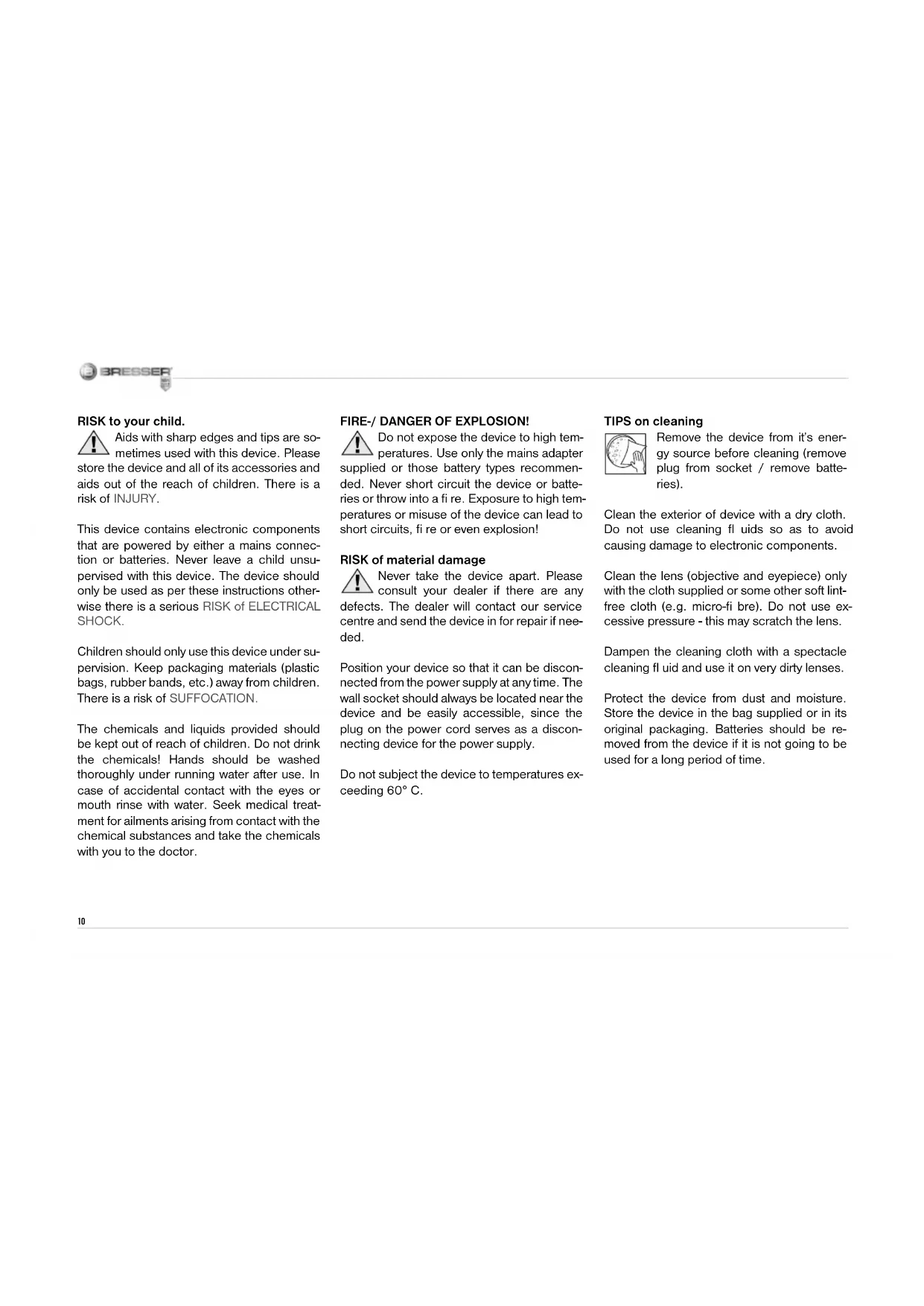
Here are the parts of your microscope (Fig. 1-6):
1 10x WF Eyepiece
2 16x WF Eyepiece
3 Barlow Lens
4 Compartment for optional accessories
5 Eyepiece supports
6 Microscope Head
7 Set Screw
8 Objective Nosepiece
9 Objective
10 Clips
11 Microscope Stage
12 LED Illumination (transmitted light)
13 Microscope Base
14 Selection Knob for Illumination
15 Battery compartment (3x AA)
16 Focus knob
17 Color Filter
18 LED Illumination (reflected light)
19 Compartment for optional accessories
20 5 Slides, 10 Cover Sips and 5 Prepared Specimens plastic box
21 Specimens:
a) Yeast
b) "Gum Media" Glue
c) Sea Salt
d) Shrimp Eggs
22 Smartphone holder
23 Specimen Slicer
24 Shrimp Hatchery
25 Tweezers
26 Pipette
27 Carrying Case
How do I use my microscope?
Before you assemble your microscope, make sure that the table, desk or whatever surface that you want to place it on is stable, and does not wobble.
How do I operate the electric LED illumination?
The batteries supplied should be inserted into the battery compartment (15) located in the base plate before use.
Remove the battery compartment cover by pressing lightly on the cover clip. Insert the batteries (3x AA) into the holder.
There are two lights on the microscope. They do not use light bulbs, but rather light-emitting diodes (LED). The first lamp shines onto the specimen from below and the second from above. (The thing that you want to observe with the microscope is called the object or specimen, by the way.) You can use each lamp on its own, or both of them together. There is a selection knob for this (Fig. 1, 14). It has three numbers: I, II and III. If you select the ...
I, the light only comes from below (transmitted light).
II, the light only comes from above (reflected light).
III, both lamps shine light on the specimen.
For transparent objects (transmitted-light objects), number I is best. In order to observe firm, non-transparent objects (direct-light objects), select number II. For semi-transparent objects, it is best to select number III.
It is not recommended to use number III for transmitted-light objects on slides, since the light may cause reflec tions on the surface of the slide, which will disturb your observation.
When do I use the color filters?
The color fi Iters (Fig. 1, 17) are located below the microscope stage (Fig. 1, 11). They help you when you are observing very bright or clear specimens. Here, you can choose from various colors. This helps you better recognize the components of colorless or transparent objects (e.g. grains of starch, protozoa).

How do I adjust my microscope correctly? First, loosen the screw (Fig. 1, 7) and turn the microscope head (Fig. 1, 6) into a comfortable viewing position.
Each observation starts with the lowest magnifi cation.
Adjust the microscope stage (Fig. 1, 11) so that it goes all the way down to the lowest position. Then, turn the objective nosepiece (Fig. 1, 8) until it clicks into place at the lowest magnifi cation (objective 4x ).
Note:
Before you change the objective setting, always move the microscope stage (Fig. 1, 11) to its lowest position. This way, you can avoid causing any damage!
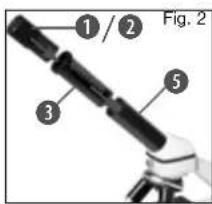
Now, insert the 10x eyepiece (Fig. 1, 1) into the Barlow lens (Fig. 1, 3). Make sure that the Barlow lens is placed all the way into the eyepiece supports (Fig. 1, 5) and is
not pulled out (Fig. 2).
How do I observe the specimen?
After you have assembled the microscope
with the adequate illumination and adjusted it correctly, the following basic rules are to be observed:
Start with a simple observation at the lowest magnification. This way, it is easier to position the object in the middle (centering) and make the image sharp (focusing).
The higher the magnifi cation, the more light you will require for a good image quality.
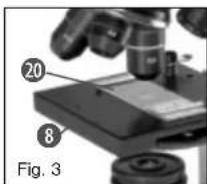
Now place the prepared specimen (Fig. 6, 20) directly under the objective on the microscope stage (Fig. 3). The object should be located di
rectly over the illumination (Fig. 1, 12).
In the next step, take a look through the eyepiece (Fig. 1, 1) and carefully turn the focus knob (Fig. 1, 16) until the image appears clear and sharp.
Now you can select a higher magnifi cation by slowly removing the Barlow lens (Fig. 1, 3) from the eyepiece support (Fig. 1, 5). When the Barlow lens is almost completely pulled out, the magnifi cation can be increased to almost double.
If you would like an even higher level of mag-
nifi cation, insert the 16x eyepiece (Fig. 1, 2) and turn the objective nosepiece (Fig. 1, 8) to a higher setting (10x or 40x).
Important tip:
The highest magnifi cation is not always the best for every specimen!
Note:
Each time the magnifi cation changes (eye- piece or objective change, pulling out the Barlow lens), the image sharpness must be readjusted with the focus knob (Fig. 1, 16). When doing this, make sure to be careful. If you move the microscope stage too quickly, the objective and the slide could come into contact and become damaged!
Which light for which specimen?
With this unit, a reflected light and transmitted light microscope, you can observe transparent, semi-transparent as well as non-transparent objects. The image of the given object of observation is "transported" through the light. As a result, only the correct light will allow you to see something!
If you are observing non-transparent (opaque) objects (e.g. small animals, plant components, stones, coins, etc.) with this microscope, the light falls on the object that is being observed.


From there, the light is reflected back and passes through the objective and eyepiece (where it gets magnified) into the eye. This is reflected light microscopy.
For transparent objections (e.g. protozoa), on the other hand, the light shines from below, through the opening in the microscope stage and then through the object.
The light travels further through the objective and eyepiece, where it is also magnifi ed, and fi nally goes into the eye. This is transmitted-light microscopy.
Many microorganisms in water, many plan components and the smallest animal parts are already transparent in nature. Others have to be prepared. We may make them transparent through a treatment or penetration with the right materials (media), or by taking the thinnest slices from them (using our hand or a specimen slicer), and then examine them. You can read more about this in the following sections.
How do I make thin specimen slices?
Only do this with the supervision of your parents or another adult.
As I already pointed out, the thinnest slices possible are taken from an object. In order to get the best results, we need some wax or paraffin. It is best if you get a candle. Place
the wax in a pot and heat it carefully over a low burner. Now, dip the object in the liquid wax a few times. Then, let the wax get hard. Using the specimen slicer (Fig. 6, 23) or a knife/scalpel, cut the smallest slices from the object that is covered with wax. These slices are to be laid on a slide and covered with a cover slip.
How do I make my own specimens?

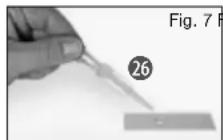
Take the object that you want to observe and place it on a glass slide (Fig. 6, 20). Then, add a few drops of distilled water on the object (Fig. 7) using a pipette (Fig. 7, 26). Now, place a cover slip vertically at the edge of the drop of water, so that the water runs along the edge of the cover slip. Then, slowly lower the cover slip over the water drops (Fig. 8).
Note:
The included glue "gum media" (Fig. 5, 21b) is used to make permanent prepared specimens. Use this in place of the distilled water. If you want to keep the object in place on the slide permanently, use the gum media.
Smartphone holder
Attach the smartphone holder (22) to the eyepiece. The suction cups must be clean and free from dust and dirt. A slight moistening is helpful.
Now press your smartphone on the retaining plate and make sure that it is properly secured.
As a backup, you should secure it with the enclosed rubber strap.
Smartphones with a rough surface will not hold as good as smartphones with a smooth surface.
Now start the Camera app. The camera needs to rest just above the eyepiece. Center the smartphone exactly over the eyepiece, so the image can be seen precisely centered on your screen. In some cases you need to adjust with the zoom function to display the image fullscreen. A light shading at the edges is possible.
Take the smartphone carefully off the holder after use.
NOTE:
Make sure that the smartphone can not slip out of the holder. Bresser GmbH assumes no liability for any damages caused by a dropped smartphone.

Troubleshooting
| Error Solution | |
| No recognizable image | Turn on light Readjust focus |
| Image flickers (while observing with optional available MicrOcular) = Monitor refresh rate not adequate | If necessary, increase resolution of graphics card |
Make sure your microscope has a long service life.
Clean the lens (objective and eyepiece) only with the cloth supplied or some other soft lint-free cloth (e.g. microfi bre). Do not press hard as this might scratch the lens.
Ask your parents to help if your microscope is really very dirty. The cleaning cloth should be moistened with cleaning fluid and the lens wiped clean using little pressure.
Make sure your microscope is always protected against dust and dirt. After use leave it in a warm room to dry off. Then install the dust caps and keep it in the case provided.


- FIRE-/ DANGER OF EXPLOSION!
- RISK of material damage
- TIPS on cleaning
- DISPOSAL
- EC Declaration of Conformity
- Here are the parts of your microscope (Fig. 1-6):
- How do I use my microscope?
- How do I operate the electric LED illumination?
- When do I use the color filters?
- Note:
- How do I observe the specimen?
- Important tip:
- Which light for which specimen?
- How do I make thin specimen slices?
- Smartphone holder
- Make sure your microscope has a long service life.
Brand : BRESSER
Model : MicroSet 40x1024x
Category : Microscope